
Societal Impact
Study Societal Impact in Class 11 Computer Science, with detailed explanations, worked examples, NCERT solutions and practice questions.
By Akhilesh Saini
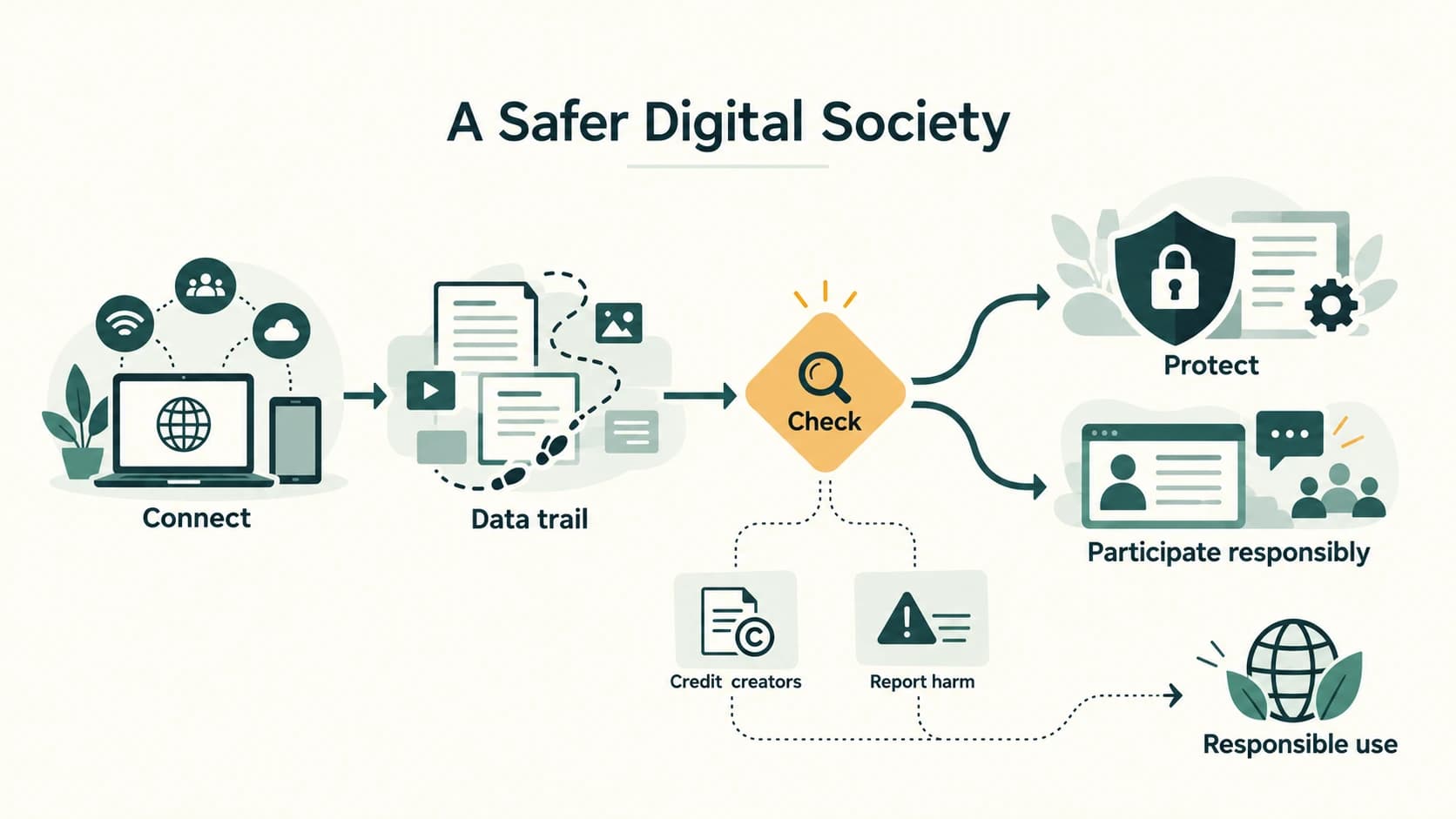
You can send a school assignment instantly, make a payment, learn from an online class and speak with a distant friend. The same connected world can expose a person's photographs, passwords, money, ideas and well-being to new risks. Computing is not only about making technology work: it is also about deciding how to use technology safely, fairly, legally and inclusively. This chapter helps you make those decisions.
Source alignment: NCERT Computer Science, Class XI, Chapter 11, “Societal Impact”, supplied kecs111.pdf, Reprint 2026–27, printed pages 229–250. The end-of-chapter Exercise has exactly 21 numbered questions (1–21); the reading includes Activities 11.1–11.6 and four separate Think and Reflect prompts. Solutions below are independently explained and linked to the original exercise numbering; substantial original question text and screenshot artwork are not reproduced.
Curriculum alignment: The eleven existing lesson identifiers C11-SLE-01–C11-SLE-11 are preserved. NCERT Chapter 11 directly treats footprints, etiquette, IPR, licensing, cybercrime, Indian IT law and screen health. For complete curriculum coverage, this resource clearly labels additional teaching on malware types, e-waste, digital accessibility and gender inclusion; these are not misrepresented as individually numbered sections of NCERT's Chapter 11. Legal illustrations are general educational explanations; whether an offence is established depends on facts and the law applicable to the case.
Learning outcomes
After studying, you should be able to recognise active and passive digital footprints; use safe communication and social media practices; distinguish copyright, patent, trademark, plagiarism and licensing; compare freeware with free/open-source software; recognise phishing, ransomware and identity theft; describe ethical reporting and Indian cyberlaw basics; reduce e-waste; and build inclusive and healthy digital habits.
Reading map
| Section | Stable lesson | Main learning focus |
|---|---|---|
C11-CH11-S01 | C11-SLE-01 | Active and passive digital footprints |
C11-CH11-S02 | C11-SLE-02 | Netiquette and responsible communication |
C11-CH11-S03 | C11-SLE-03 | Intellectual property rights |
C11-CH11-S04 | C11-SLE-04 | Plagiarism and infringement |
C11-CH11-S05 | C11-SLE-05 | Free software, open source and public licences |
C11-CH11-S06 | C11-SLE-06 | Hacking, fraud, phishing, ransomware |
C11-CH11-S07 | C11-SLE-07 | Cyberbullying, trolling, reporting and support |
C11-CH11-S08 | C11-SLE-08 | Malware types and prevention (curriculum extension) |
C11-CH11-S09 | C11-SLE-09 | E-waste management (curriculum extension) |
C11-CH11-S10 | C11-SLE-10 | IT Act basics, reporting and privacy law |
C11-CH11-S11 | C11-SLE-11 | Accessible and inclusive technology (curriculum extension), screen health (NCERT §11.7) |
How to use the chapter: Read the lessons, try the six NCERT activities and four reflections, then attempt all 21 numbered exercises before opening the worked answer key. Finish with 30 additional original practice questions and the revision sheet.
Lesson C11-SLE-01 — Digital Footprints
Section C11-CH11-S01 — The Trail We Leave Online (NCERT §11.2)
1. What is a digital footprint?
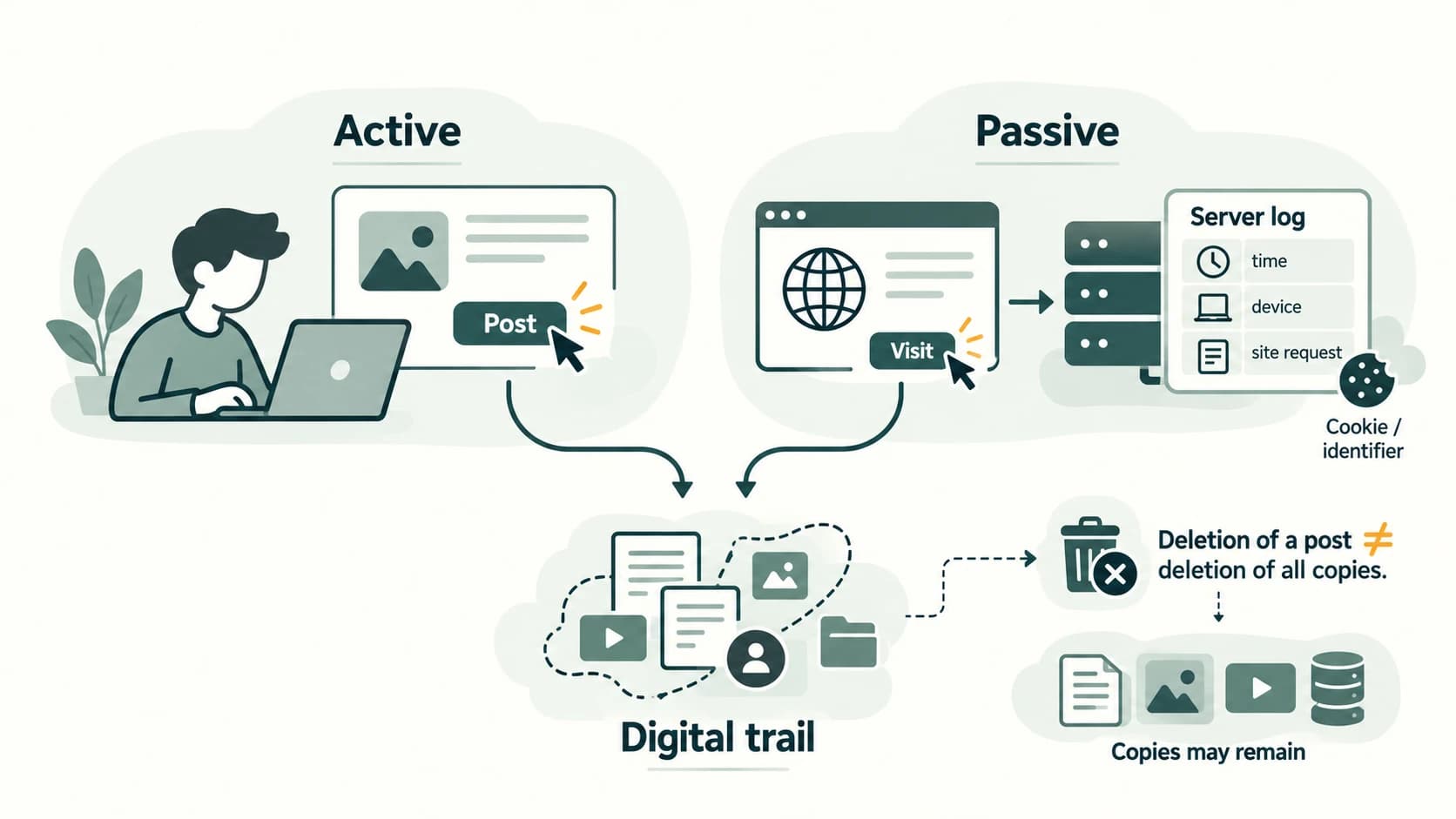
A digital footprint is the trail of data associated with activity using websites, apps or connected devices. A visit to a learning site may generate a page request, browser cookies, a time stamp and an IP address. Submitting a form or writing a comment creates further records. These records may exist both on your device and on remote systems.
Consider a student using an online bookstore. Searching for a book can create a server access log; accepting a cookie can create a browser identifier; signing into an account links the visit to a known account; ordering a book creates an explicit purchase record. One session can therefore create several types of traces with different purposes and retention periods.
2. Active and passive footprints
| Footprint | How created | Example | Awareness action |
|---|---|---|---|
| Active | Information you intentionally submit or publish | Uploading a photograph, filling a registration form, sending a public comment | Think about audience, consent and future effects |
| Passive | Data generated during use, sometimes without focused awareness | Device details, analytics events, site access logs, identifiers stored by services | Review permissions, browser privacy settings and site policies |
The distinction concerns how the information is generated, not whether the user is a good or bad person. A banking search or a hotel comparison can leave passive traces without a purchase. Some footprints carry multiple characteristics: a submitted search term is intentional input, while the surrounding connection metadata may be logged automatically.
3. Why digital footprints matter
Digital traces can help with convenience, account recovery, security investigations and service improvement. They can also reveal interests and habits, enable intrusive profiling, expose location patterns or be combined with leaked data. Your online reputation can be affected by what you publish and by what other people screenshot or forward.
Deleting a post often stops its visibility at the original location; it does not guarantee deletion of screenshots, downloaded copies, recipient devices or lawful backups. On the other hand, it is inaccurate to say that every copy always persists forever: actual deletion depends on a service's systems, retention rules and downstream copies. Your practical goal is to limit unnecessary traces and act thoughtfully before sharing.
4. Managing privacy without false promises
- Post only what is needed; seek permission before posting another person's personal details or photos.
- Use private sharing settings, recognising that recipients can still make copies.
- Review app permissions, saved passwords, site data and location sharing.
- Sign out on shared computers; never let the browser retain your session on public devices.
- Use separate, strong credentials, passkeys where offered, and multi-factor authentication (MFA).
- Ask for account-data correction or deletion through available privacy controls; understand these may not remove independent copies held elsewhere.
- Avoid treating “incognito/private browsing” as complete anonymity. It limits some local history storage, not visibility to a website or network.
Worked scenario: A class group photo is shared in a restricted group. One friend saves and forwards it. Later, the sender deletes the original. The forwarded copy remains a distinct file. A respectful solution involves contacting recipients, requesting deletion and tightening future sharing permissions, not assuming deletion from the sender's page controls every copy.
Self-check: Can looking up flight fares create a footprint without booking? Yes; the request and browsing metadata can be recorded even when no ticket is bought.
Lesson C11-SLE-02 — Netiquette, Communication and Social Media
Section C11-CH11-S02 — Being a Responsible Netizen (NCERT §11.3)
1. Digital society and digital citizenship
A digital society uses networked systems for education, banking, communication, services and collaboration. A netizen, or digital citizen, is a person participating in online spaces. As in a classroom, online actions affect other people. Technology permits fast messages; it does not remove the need for courtesy, truthfulness, confidentiality and accountability.
NCERT groups good conduct into net etiquette, communication etiquette and social media etiquette. These overlap, but each highlights a different situation.
2. Net etiquette: ethical, respectful, responsible
Be ethical: give creators credit, honour licence restrictions, avoid passing off someone else's work as your own, and share accurate information rather than rumours. When unsure, say you are unsure. Be respectful: seek consent before forwarding private chats or images, avoid insults, and recognise differences of opinion, language and culture. Be responsible: avoid exposing classmates' phone numbers or addresses, verify links and do not join harassment campaigns.
An online argument can become permanent when copied into screenshots. Before posting, ask: Is it true? Is it necessary? Is it fair? Would I say it politely in person? A public reply should address an idea without ridiculing the person.
3. Communication etiquette: a useful email
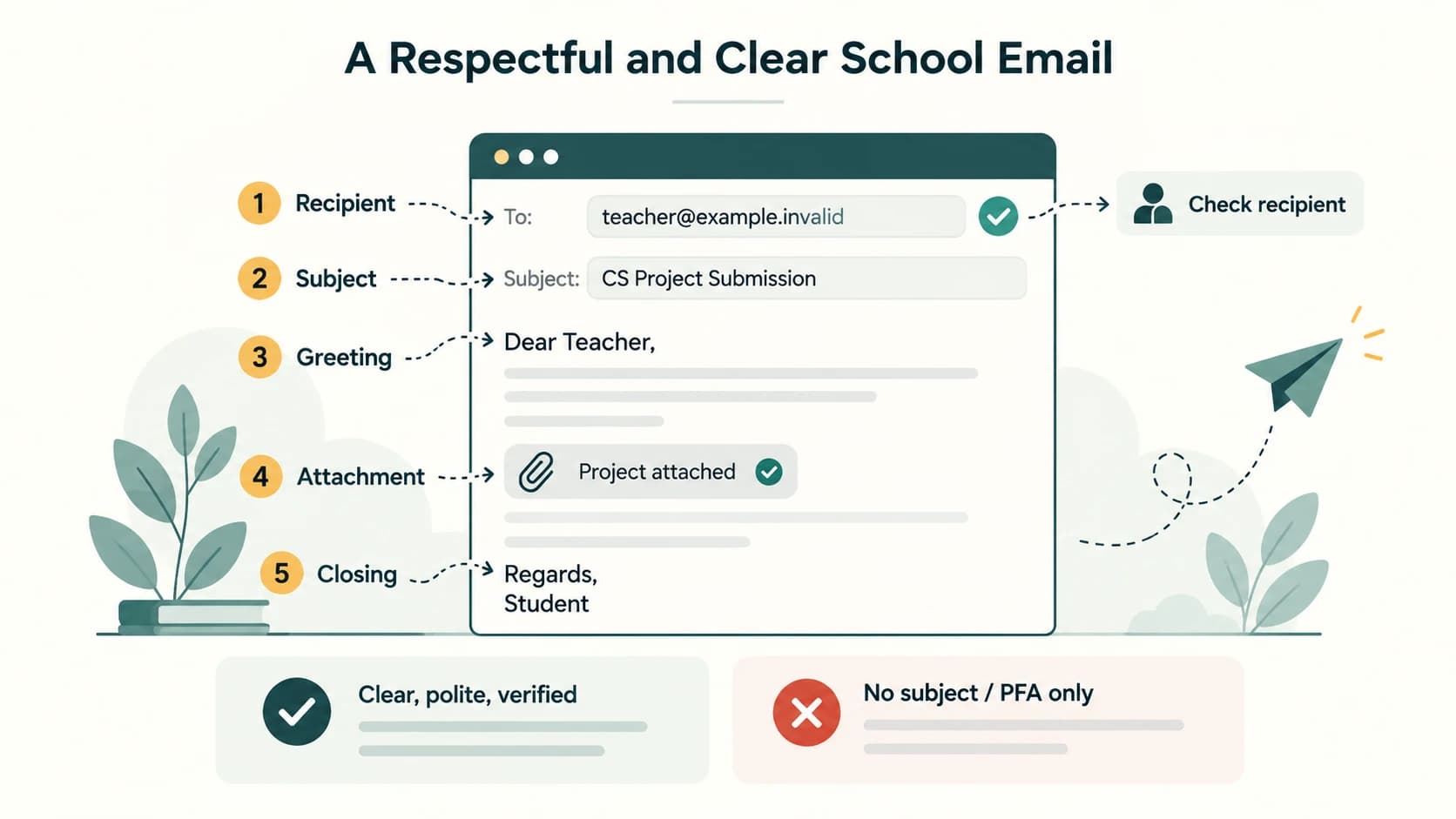
A professional or school email needs a relevant subject, respectful greeting, concise context, an identifiable request, polite closing and enough sender information for the recipient to respond. Attach the correct file and verify the intended recipients before sending.
Subject: Computer Science — Project Submission
Dear Teacher,
Please find attached my Computer Science project. The file is named
Class11_Project.pdf. Kindly let me know if any changes are required.Regards,
Neerja, Class XI-A
“PFA” is sometimes used to mean please find attached, but it may confuse readers. “Please find attached…” is clearer. Never use Reply All unnecessarily; do not spread a classmate's email address or phone number in a public mailing list.
4. Social media etiquette and misinformation
Treat unfamiliar online profiles cautiously. Profiles may be incomplete, impersonated or automated. Privacy controls help limit routine access but cannot prevent screenshots by authorised viewers. Check the source, date, evidence and independent coverage of a claim before forwarding; viral popularity is not proof.
A useful verification routine is: identify the original source; compare it with reliable independent sources; examine whether an image is reused out of context; separate an opinion from a verifiable fact. In class discussions, corrections should be calm and supported with evidence, not humiliating.
5. Passwords, identity and trust
Use unique, sufficiently long passwords or passphrases; a password manager can generate and store them. Enable MFA, preferably methods resistant to phishing where available. Change a password promptly after suspected exposure or compromise. Automatic frequent changes without evidence of compromise are not a substitute for strong unique credentials.
Do not meet unknown online contacts alone; a minor seeking an in-person meeting should involve a trusted adult and follow appropriate safety rules. If an account pretends to be your friend, confirm through another established channel before sharing anything sensitive.
Common mistakes: A deleted post may have been copied. A visible sender name does not guarantee identity. A familiar-looking URL may hide a different destination. A public apology is not cyberbullying; repeated threats, humiliation or impersonation can be.
Lesson C11-SLE-03 — Intellectual Property Rights
Section C11-CH11-S03 — Protecting Creative and Technical Work (NCERT §11.4.1)
1. What is intellectual property?
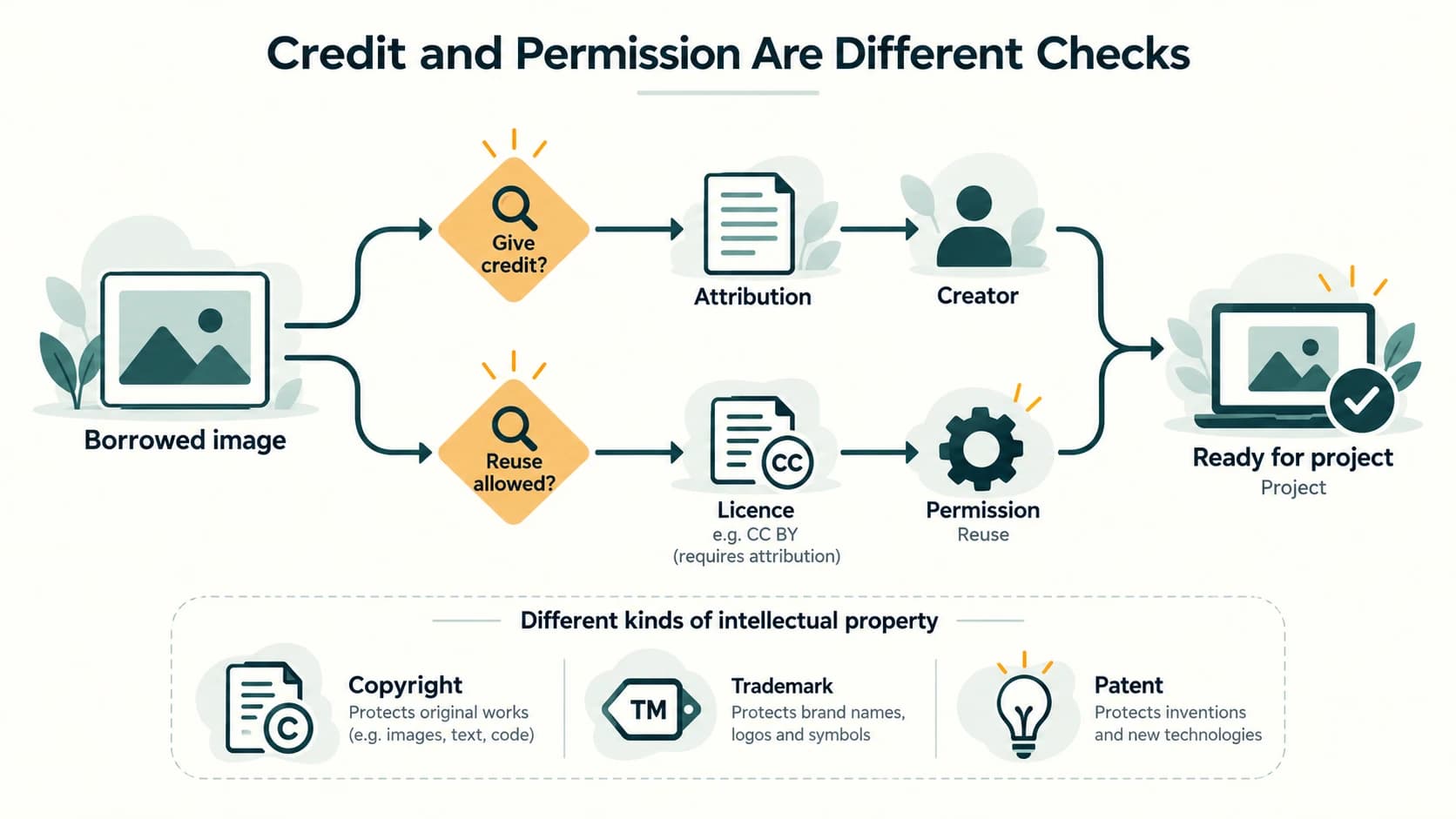
Intellectual property (IP) covers legally protected creations and identifiers: writing, software code, music, drawings, inventions, designs and commercial signs. Intellectual property rights (IPR) protect particular categories of such work through different legal mechanisms. The precise scope, exceptions and duration depend on the applicable law; credit alone does not grant the right to copy.
| Right | Typical subject | How protection generally arises | School-friendly example |
|---|---|---|---|
| Copyright | Original expression fixed in a form: story, code, photograph, video | Usually arises upon creation of eligible work; registration may aid evidence depending on law | An original educational animation |
| Patent | Qualifying inventions meeting legal criteria | Application, examination and grant required | A novel technical invention, if patentable |
| Trademark | Distinctive sign identifying goods or services | Rights depend on use/registration and jurisdiction | A brand name or symbol |
Idea versus expression: Copyright generally protects the particular expression, not the abstract idea “a story about a forest”. Code may be protected as a literary work, while certain technical inventions may qualify for patent protection subject to local exclusions and requirements. A trademark protects a trade identifier rather than the content of a book.
2. Permissions, licences and attribution
Before putting a photograph in a project, ask: Who owns it? Is the work public domain, covered by an applicable exception, or available under an explicit licence? What conditions apply? Is it an authorised copy? If permission is needed, obtain it. Then cite the creator and source as appropriate.
A student's own drawing is generally the safest original illustration. Free-to-view is not the same as free-to-reuse. A reference citation solves the problem of attribution, but it does not automatically solve the problem of copyright permission.
3. A practical rights audit
For each borrowed item record: creator/title; original source URL or publication; licence or permission basis; required credit; whether modifications are allowed; whether use in an openly available website is allowed. Keep any permission email. If the terms are unclear, replace the asset with one you created or can lawfully use.
Exam reminder: Patent ≠ automatic copyright; registered trademark ≠ copyright in a photograph; plagiarism ≠ identical to copyright infringement. These concepts may overlap in a single incident but ask different questions.
Lesson C11-SLE-04 — Plagiarism, Copyright and Trademark Infringement
Section C11-CH11-S04 — Giving Credit Is Necessary, But Sometimes Not Sufficient (NCERT §11.4.2)
1. Plagiarism
Plagiarism is presenting another person's words, work or ideas as your own without appropriate acknowledgement. It is fundamentally an academic and ethical attribution issue. Copying a paragraph into an assignment with no citation is a straightforward example. Merely swapping a few words without credit does not automatically make another author's idea yours.
A good paraphrase explains the idea in your own understanding and names the original source. Direct wording must be quoted where appropriate and credited. Also cite data, distinctive diagrams and claims that require evidence, even when you do not quote them verbatim.
2. Copyright infringement
Copyright infringement concerns use of protected work in ways reserved to the copyright holder without a valid licence, authorisation or legal exception. If an image is protected and not available for the proposed use, adding “Image source: ...” may prevent plagiarism but does not necessarily make copying legal. Conversely, even when a work is public-domain or openly licensed, passing it off as your own is poor scholarship and may be plagiarism.
Some laws permit limited quotation, fair dealing or other exceptions. Their conditions differ by country and purpose. Neither “only 30 seconds” nor “for school” automatically proves that every copied video clip is lawful. Check the relevant facts and rights instead of assuming a universal free-use length.
3. Trademark infringement and software piracy
Trademark infringement may arise when an unauthorised use causes legally relevant confusion or otherwise infringes protected marks. A brand name shown in a factual classroom comparison is not automatically infringement. Software piracy is unauthorised copying, distribution or use contrary to applicable rights and licences. A free download link is not proof that a software copy has permission to circulate.
4. Decision table
| Situation | Attribution concern? | Copyright or other rights concern? |
|---|---|---|
| Copy an article verbatim, claim authorship | Yes | Potentially yes |
| Paraphrase a unique argument without citation | Yes | Possibly, depending on extent of copied expression and applicable law |
| Attribute but upload an unlicensed copyrighted photo | Attribution may be adequate | Potentially yes |
| Use a genuine public-domain image and cite it | Generally sound scholarship | Usually no copyright restriction, subject to other rights |
| Place a competitor's logo on your fake product | May misrepresent origin | Possible trademark infringement |
Worked example: Three images are downloaded for a report. Their websites state no reusable licence. The student's collage is not automatically permitted because it has only three images or because it is a school assignment. The correct response is to inspect licences, obtain permission where necessary, use an applicable exception only where justified, or replace them with suitable openly licensed images.
Lesson C11-SLE-05 — Free Software, FOSS and Licensing
Section C11-CH11-S05 — Rights to Use, Study, Modify and Share (NCERT §11.4.3)
1. Price and freedom are separate questions
Freeware normally means software distributed at no monetary price, but its licence may limit copying, modification and redistribution. Free software describes freedoms to run, study, modify and redistribute software; it does not necessarily mean a price of zero. Open-source software similarly permits source-code access and reuse under recognised licence conditions, not simply visibility of a code file on a website.
| Attribute | Typical freeware | Free/open-source software |
|---|---|---|
| Price | Usually zero | May be zero or charged for distribution/support |
| Source available | Not necessarily | Available under licence terms |
| Modify source | Not automatically permitted | Permitted by suitable licence |
| Redistribute modified versions | Not automatically permitted | Allowed, subject to applicable conditions |
| Examples of licence concerns | Restrictions in end-user licence | Attribution, notices, share-alike or source-sharing duties may apply |
LibreOffice and Mozilla Firefox are familiar examples of software distributed with open-source code; consult each project's actual licence for exact rights.
2. GNU GPL and Creative Commons
The GNU General Public License (GPL) is designed for software. It permits use, studying, modification and redistribution while imposing licence-related obligations on certain distributions. The term copyleft describes conditions intended to preserve freedoms for recipients when covered modified works are redistributed. Simply using GPL software does not ordinarily require publication of all unrelated files you create.
Creative Commons (CC) licences are widely used for creative materials such as texts, pictures and video. Different CC licences impose different conditions: BY requires credit; SA requires share-alike treatment for adaptations under the licence; NC limits commercial use; ND restricts sharing adapted material. CC0 is a public-domain-style dedication/waiver mechanism. Not every CC-labelled work is suitable for every project and most CC licences are not a substitute for software-specific licensing.
3. Crediting an openly licensed image
A useful credit records the title, author, source and licence, and mentions changes if required: “Example Diagram” by Creator Name, source link, CC BY 4.0; cropped for layout. Do not invent the author or the licence. If a licence forbids distribution of adaptations, check whether the intended edited or collaged work is permitted.
4. Classroom choice
If one learner uses a proprietary browser with free downloads and another uses an open-source browser, both can browse the web. The important distinction is the rights provided by the licence, not that the browser's web pages are fundamentally different. A commercial application and a free/open-source editor can both generate a valid school report.
Lesson C11-SLE-06 — Cybercrime: Hacking, Fraud, Phishing and Ransomware
Section C11-CH11-S06 — Recognise the Risk, Protect the Account (NCERT §11.5)
1. What counts as cybercrime?
In a cybercrime, a computer, network or digital communication is a target or a means of committing an offence. Examples include unauthorised intrusion, fraudulent personation, theft of credentials, malicious interception, extortion and some forms of threatening or illegal publication. A harmful online act is not automatically covered by the same legal section in every circumstance; the offence depends on conduct, intent and applicable law.
| Threat | What happens | Warning sign | Safer response |
|---|---|---|---|
| Unauthorised access | Someone enters an account or system without permission | Unexpected sign-in or changed settings | Secure account, revoke sessions, report |
| Identity theft | Another person fraudulently uses identifiers, passwords or account access | Messages sent that you did not author | Change access credentials, preserve evidence |
| Phishing | Deceptive message attempts to obtain secrets or induce unsafe action | Urgent password-expiry link, fake bank alert | Verify through independently known official channel |
| Card/account fraud | Credentials or card details are misused | Unrecognised transaction | Contact bank promptly; report suspicious activity |
| Ransomware | Malicious software blocks access or encrypts files and demands payment | Files suddenly inaccessible, ransom notice | Disconnect affected system, seek trusted incident response |
| Eavesdropping | Unauthorised interception of communication | Unexpected network/session compromise | Use secure connections and report evidence |
2. Ethical hacking is authorised testing
A legitimate security tester operates with prior explicit permission, clear scope and a responsible reporting process. Technical curiosity by itself does not authorise accessing a school or neighbour's account. The textbook contrasts ethical and malicious hacking; the essential practical distinction is authorisation, scope and lawful conduct, not a label claimed by the actor.
3. Phishing: recognise without clicking
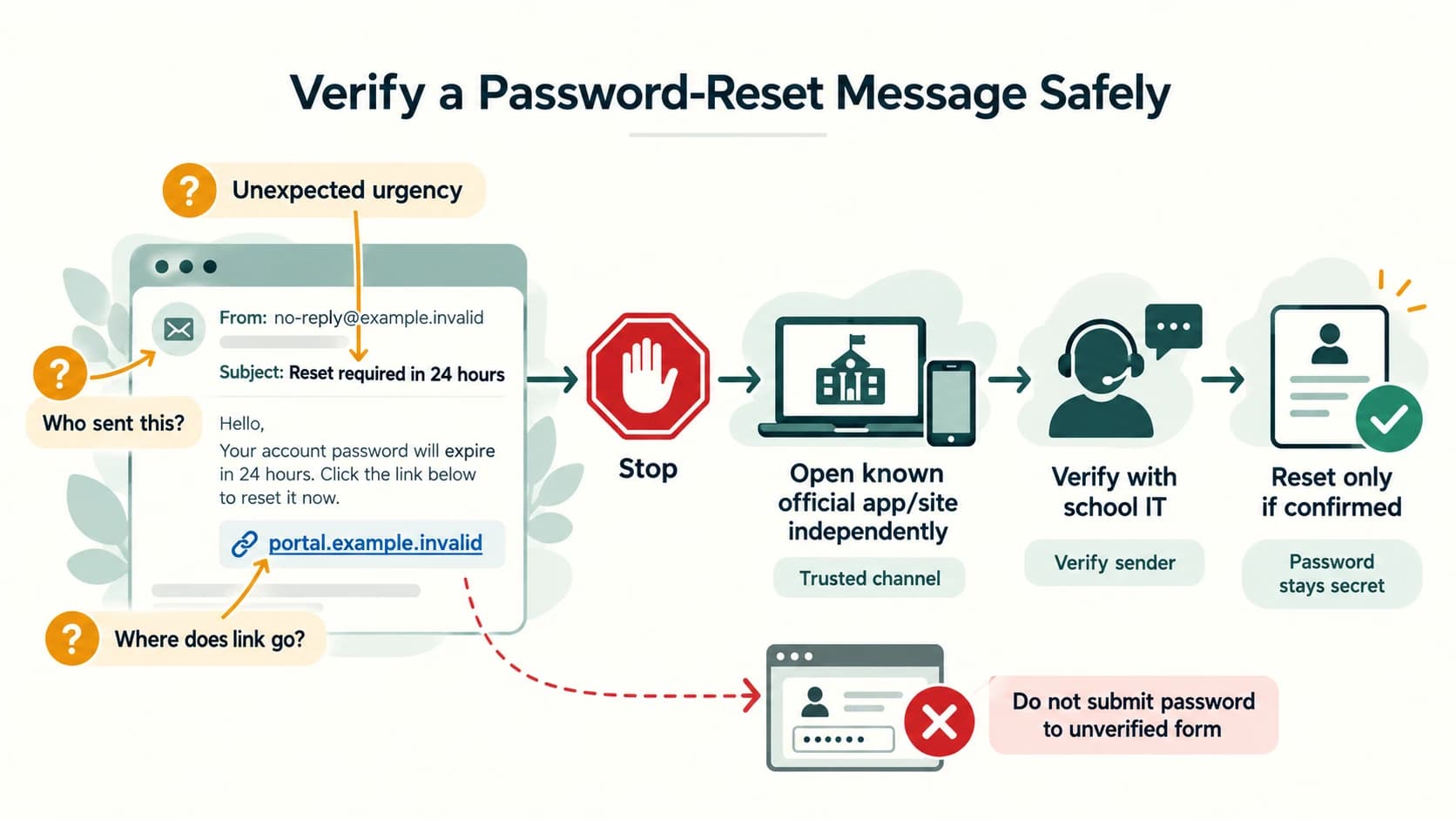
A message that says “Your account closes in 24 hours—enter your password here” relies on urgency. The visible link text, sender address and actual destination can differ. Avoid tapping a suspicious link; open the institution's known app or independently typed official site, or contact the institution through a verified number. A bank will not need your ATM PIN or OTP by SMS to confirm a purchase. Never submit those credentials in response to a message.
4. A simple response workflow
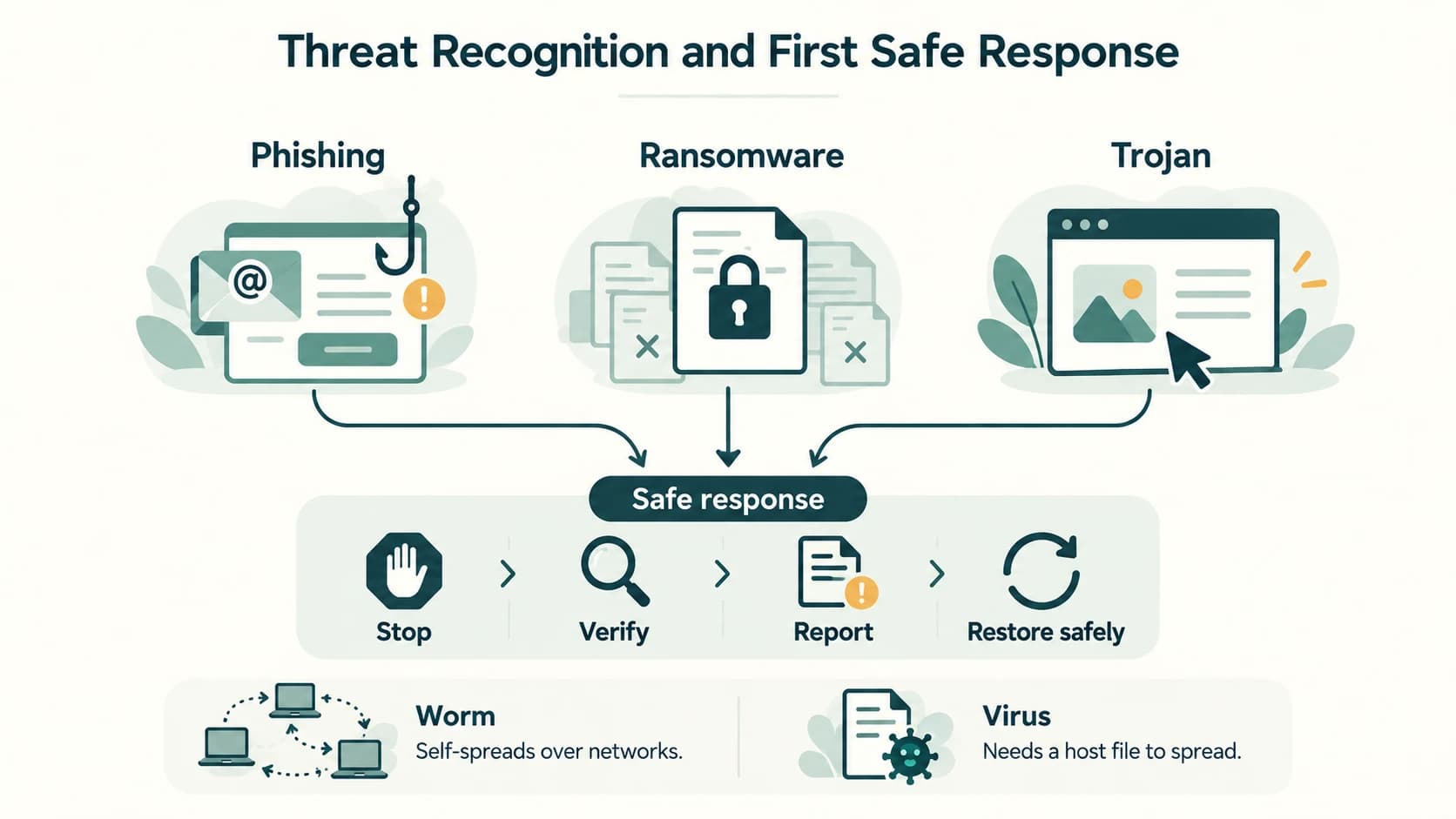
Stop → verify → secure → preserve → report. Do not reply to the attacker or forward their link as a warning without making it inert. If you disclosed a credential, change it promptly via a trusted route, revoke active sessions and enable MFA. If money is at risk, contact the bank and use the official cybercrime reporting options quickly. Preserve message headers, screenshots, transaction reference numbers and relevant dates without publishing sensitive details.
5. Ransomware prevention and readiness
Maintain updates, restrict unnecessary administrator permissions, use trusted software, be cautious about attachments and maintain recoverable backups separate from the live device. Backups should be periodically tested. A recovery plan is more dependable than assuming any one antivirus tool makes infection impossible.
Lesson C11-SLE-07 — Cyberbullying, Trolling and Online Safety
Section C11-CH11-S07 — Responding Without Escalating
1. Recognising harm
Cyberbullying can involve repeated or serious targeted humiliation, threats, impersonation, exclusion, spreading altered images or publishing private information to intimidate another person. Trolling often involves provocative conduct designed to upset or derail discussions; a single rude comment is not always legally equivalent to harassment. Analyse the behaviour and context rather than relying on labels alone.
Possible warning signs that a friend is being targeted include fear of checking messages, withdrawal from group chats, screenshots of threats, fake accounts, sudden public ridicule or a distressing change in online behaviour. These are clues, not a medical diagnosis or proof of a specific crime.
2. A responsible bystander response
Listen without demanding sensitive screenshots be widely shared. Encourage the student to stop engaging with aggressors, block or mute accounts where appropriate, preserve necessary evidence privately, use platform reporting and involve a trusted teacher, parent, counsellor or relevant authority. If threats include immediate danger, seek urgent local help. Do not retaliate with public humiliation or attempt to break into the bully's account.
3. Legal and personal safety distinction
India's IT Act addresses particular electronic offences such as fraudulent credential use (Section 66C), cheating by personation (Section 66D), and certain privacy violations (Section 66E), when their legal elements are met. Not all insulting or bullying conduct falls into these sections. Section 66A was struck down by the Supreme Court in 2015 and must not be described as an operative criminal provision. Other relevant criminal laws and child-protection processes may apply depending on facts; legal advice requires up-to-date professional assessment.
Lesson C11-SLE-08 — Malware: Virus, Worm, Trojan and Adware
Section C11-CH11-S08 — How Harmful Software Differs
Curriculum supplement: NCERT §11.5 mentions viruses and malware in its cybercrime discussion, but does not separately teach every malware category below. This section completes stable curriculum lesson C11-SLE-08.
Malware is software intentionally designed for malicious actions such as theft, disruption or unauthorised access. A virus attaches to another program/file and propagates as infected content is run. A worm can spread through networks without the same host-file requirement. A Trojan disguises itself as something legitimate; it need not self-replicate. Adware displays unwanted advertising and may become harmful when deceptive, intrusive or bundled without meaningful consent. Spyware secretly collects data. Ransomware can encrypt or deny access to data for extortion.
| Type | Main characteristic | Example conceptual risk |
|---|---|---|
| Virus | Replicates via infected host content | Damaged files when infected executable runs |
| Worm | Self-spreads between vulnerable systems | Rapid network propagation |
| Trojan | Masquerades as trusted software | User installs a fake “exam utility” |
| Adware | Pushes advertisements; sometimes intrusive | Aggressive pop-ups and tracking |
| Spyware | Collects information covertly | Stolen credentials |
| Ransomware | Demands payment after blocking data/access | Class project files inaccessible |
Prevention: install from reliable sources, update devices, disable unnecessary permissions, use reputable security protections, protect accounts with MFA, avoid unknown attachments, and keep separate backups. If compromised: stop risky activity, isolate as advised by trusted support, preserve evidence and seek assistance; do not experiment with malicious files for a school project.
Exam trap: Malware is the umbrella term; not every piece of malware is a virus, and not every Trojan self-replicates.
Lesson C11-SLE-09 — E-Waste Management
Section C11-CH11-S09 — Responsible Hardware Disposal
Curriculum supplement: This is an explicit C11-SLE-09 requirement rather than a standalone numbered NCERT Chapter 11 subsection.
E-waste is discarded electrical or electronic equipment and associated components. Old laptops, phones, monitors, keyboards and certain peripherals may contain recoverable materials along with substances needing controlled treatment. Indiscriminate burning, dumping or informal dismantling can harm people and the environment.
The preferred hierarchy
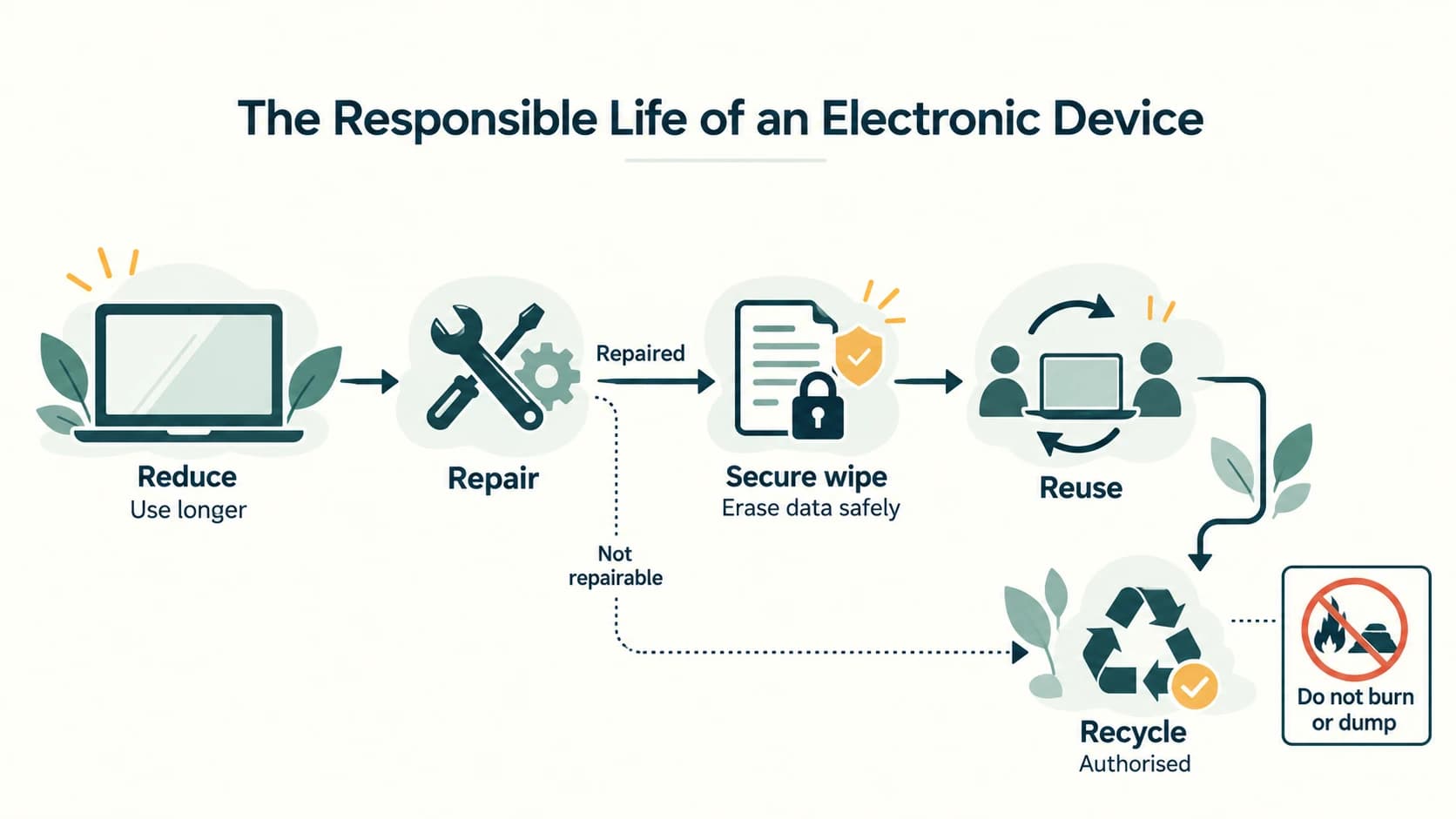
- Reduce: avoid unnecessary replacement; select durable, repairable equipment.
- Maintain and repair: clean safely, update software, replace worn components when practical.
- Reuse or refurbish: transfer working devices to another user with consent and proper data removal.
- Recycle through authorised channels: use producer take-back arrangements and appropriately registered/authorised e-waste collection or processing systems.
Before donating a computer, back up wanted data, sign out of accounts, remove memory cards, and use a suitable reset or secure erase method for the storage technology. Ordinary deletion or formatting alone may not securely erase recoverable files. If the device is broken, ask a qualified recycler about storage handling. Keep batteries and other regulated waste streams separate as required.
India's E-Waste (Management) Rules, 2022, as amended, create a regulatory framework for relevant producers and recyclers. Exact collection rules, responsible facilities and later amendments should be checked through the official Ministry/authorised channels. For schoolwork, avoid inventing a recycler name or claiming every local scrap buyer is licensed.
Classroom project idea: Audit unused classroom devices by type and condition, without collecting ownership information. Propose repair, reuse or responsible drop-off. Do not physically disassemble damaged batteries or displays.
Lesson C11-SLE-10 — Indian IT Act and Cyber-Safety Reporting
Section C11-CH11-S10 — What the Law Addresses (NCERT §11.6)
1. Scope and purpose
The Information Technology Act, 2000, later amended, recognises certain electronic transactions and records and addresses specified cyber-related wrongdoing. Its practical importance includes electronic records, digital/electronic signatures and offences concerning unauthorised or fraudulent digital conduct. The Act does not turn every online disagreement into an offence.
The following is a study summary, not a comprehensive legal opinion:
| Provision | Core educational idea | Example situation requiring factual assessment |
|---|---|---|
| Section 43 | Civil compensation framework for certain unauthorised acts affecting computer resources | Accessing or damaging computer data without permission |
| Section 66 | Certain acts described in Section 43 when committed dishonestly or fraudulently | Deliberate unauthorised intrusion with the necessary intent |
| Section 66C | Fraudulent/dishonest use of another person's electronic signature, password or unique identifier | Using a classmate's credentials to impersonate them |
| Section 66D | Cheating by personation using computer resources | Fake customer-support identity used to obtain money |
| Section 66E | A specifically defined privacy offence involving images of a person's private area, without consent and under the required circumstances | Unauthorised intimate-image capture/transmission; not every unwanted photo automatically qualifies |
| Section 67 and related provisions | Certain offences involving publishing or transmitting legally defined prohibited material | Depends on exact content and statutory elements |
Essential caution: Section 66A is not an active offence provision, having been struck down by the Supreme Court. Privacy laws and rules, criminal-law provisions and institutional procedures change over time; never recite old textbook law as a current exhaustive list. The Digital Personal Data Protection Act, 2023 and its notified rules are a separate personal-data legal framework with staggered commencement provisions; the precise operative requirements must be checked using official material when needed.
2. What to do if you are targeted
For a financial fraud, immediately contact the bank through verified channels, ask about blocking unauthorised access and use India's National Cyber Crime Reporting Portal at https://cybercrime.gov.in/. The national cybercrime helpline 1930 is used for urgent cyber financial fraud reporting. Police and emergency assistance may also be needed. Reporting a suspicious incident is not a declaration that a person is legally guilty; a competent authority assesses evidence.
3. Evidence handling and documentation
Record relevant dates, amounts, transaction IDs, URLs, sender details, screenshots and communications. Do not alter original files or circulate private information in a public class group. Reporting should be through an adult or designated school authority where appropriate for a minor. Keep a copy of the acknowledgement if a report is filed.
4. Data privacy
Personal data relates to an identifiable individual. Website logs may include IP address, device characteristics, approximate location, cookies, search history, account information, forms submitted and purchase events. Some of these data can be sensitive in context. Legitimate processing needs appropriate safeguards and legal bases under the rules that apply. Passwords, health records, identity documents and biometric information deserve particular care. Good privacy behaviour is both a technical practice (access controls, encryption, MFA) and an ethical practice (consent, minimisation, respect).
Lesson C11-SLE-11 — Gender, Disability, Inclusion and Healthy Technology Use
Section C11-CH11-S11 — Technology for Everyone; Technology in Balance
Scope clarification: Gender/disability access and the digital divide are a curriculum extension under C11-SLE-11; screen-health and ergonomics directly come from NCERT §11.7.
1. The digital divide and fair access
Internet access, reliable electricity, safe devices, language options, training and affordability are unequally distributed. Students who lack accessible study materials or reliable connectivity may be excluded even when a course is described as “online for everyone”. Inclusive design means anticipating different users instead of assuming a single kind of student, device or ability.
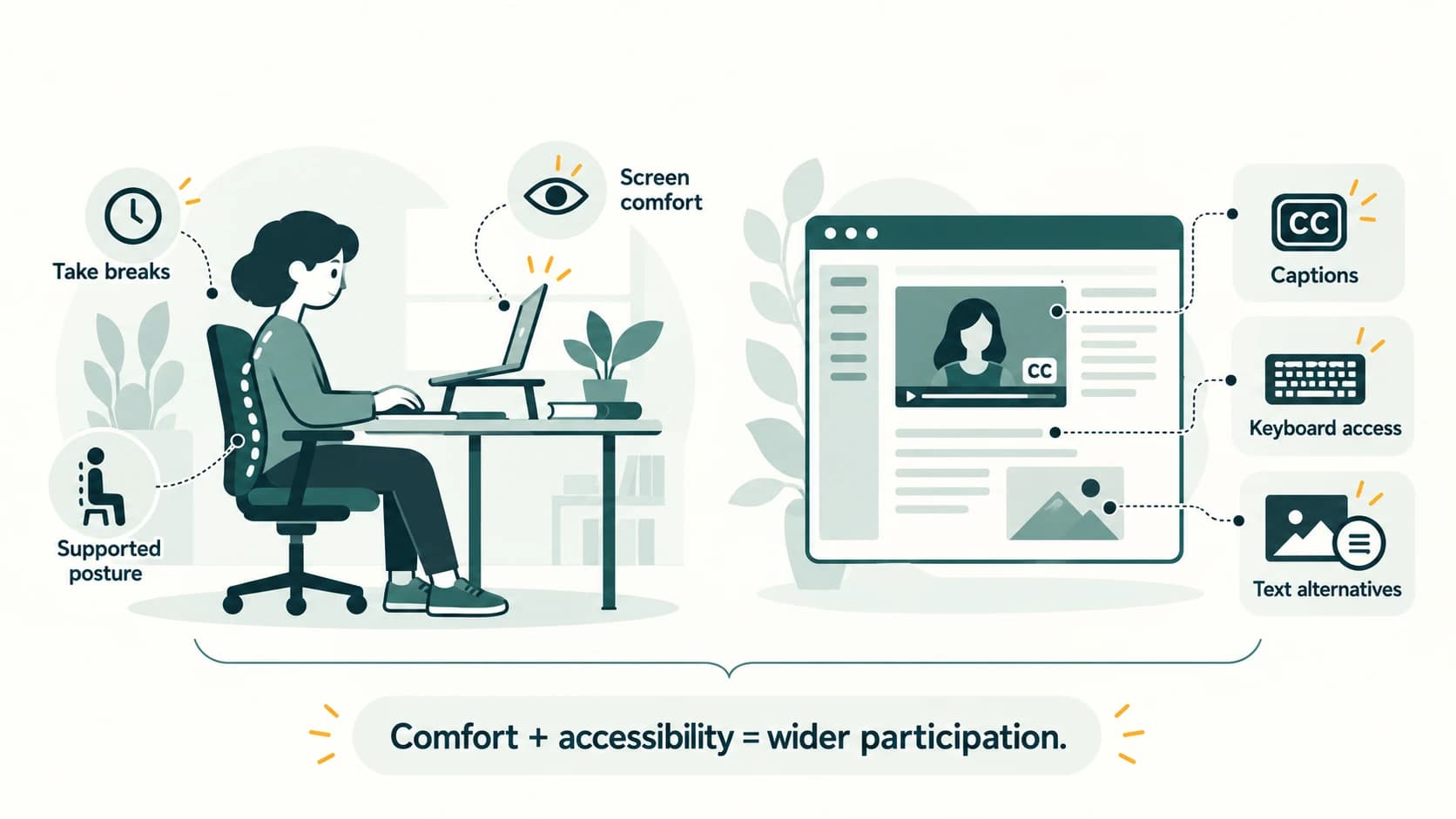
Examples: offer downloadable small-size notes as well as streaming video; provide subtitles and transcript alternatives for lessons; make instructional controls usable by keyboard; label diagrams with useful text alternatives; support screen readers; provide clear error messages; and avoid using colour alone to convey correct/incorrect answers.
The W3C Web Content Accessibility Guidelines explain four principles: Perceivable, Operable, Understandable, Robust. These are useful design principles for a Class XI web project. A student with a hearing disability may benefit from captions; a student with low vision may benefit from zoom, adequate contrast and screen-reader structure; a student with motor disability may require keyboard-only navigation.
Gender inclusion: do not assume computing careers belong to a particular gender. Avoid gender-stereotyped illustrations, discriminatory jokes or exclusive participation. When designing a classroom registration form, collect only necessary information and do not force irrelevant personal disclosures.
2. Screen-time health and ergonomics (NCERT §11.7)
Ergonomics concerns arranging workspaces, equipment and tasks so people can use them safely and comfortably. Poorly placed screens, prolonged static posture and repetitive hand movement may increase discomfort; excessive or distressing online use can affect sleep and well-being.
| Possible concern | Safer study habit |
|---|---|
| Eye fatigue, dry or uncomfortable eyes | Take periodic breaks, blink, avoid glare, adjust text size and display brightness |
| Neck/back discomfort | Place screen at comfortable height, support back and keep shoulders relaxed |
| Wrist strain | Keep keyboard/mouse within comfortable reach; vary tasks and avoid prolonged awkward posture |
| Sleep disruption | Avoid extended screen use at the expense of sufficient sleep and other activities |
| Social or emotional stress | Balance online learning with physical activity and offline relationships |
The NCERT posture figure illustrates comfortable seating, viewing distance, support and screen position; these are ergonomic guides, not one rigid angle suitable for everybody. Adjust to the person and equipment. The widely taught “20-20-20” reminder—about every 20 minutes, briefly look roughly 20 feet away for about 20 seconds—may help students remember to rest their focus; it is not a substitute for professional eye advice.
3. Device care
Keep devices ventilated and clean with manufacturer-suitable methods; avoid spills and obstructed cooling openings, protect chargers/cables from damage, and update the operating system. Do not open a device's electrical components for cleaning without the relevant knowledge. For persistent pain, vision problems or anxiety, speak with a qualified health professional rather than relying on a textbook posture diagram as a diagnosis.
4. A balanced digital day
Use devices for specific study goals, allow breaks, take part in offline activities, and set boundaries for unnecessary notifications. An inclusive, responsible student does not mock a classmate for using assistive technology, being offline due to connectivity issues or choosing not to publish personal photographs.
NCERT Solution Bank — Chapter 11 (All 21 Exercises)
Exercise source: The 21 numbered questions appear on NCERT Chapter 11 printed pages 245–250. Some tasks include visual SMS/email exhibits; the solutions below are based on inspection of those exhibits, not just extracted text. The original prompts are paraphrased for reference, and each answer supplies fresh explanation. Do not assume any illustrative phishing URL, date or personal record is current or authentic.
NCERT Exercise 1 — An email account is misused while its owner is signed in
Answer: (b) Identity theft, in the given choices. Revaan uses Atharv's authenticated account to send messages as if Atharv sent them. That falsely uses Atharv's online identity. Depending on the facts, unauthorised access and cyberbullying/harassment may be additional descriptions, but the most specific listed classification is identity theft. Atharv should promptly end sessions, change credentials, enable MFA and inform the teacher/affected classmates that the messages were not authorised. Leaving an account signed in is unsafe but does not authorise someone else to send messages through it.
Why not the other options as the primary answer? Plagiarism means misrepresenting authorship of borrowed work. Hacking is not the precise account-impersonation feature the question tests. Inflammatory emails can be harmful but the facts do not automatically establish all the elements of a specific bullying offence. For a real legal allegation, examine Section 66C and other applicable provisions based on evidence.
NCERT Exercise 2 — A classmate discovers another student's discarded password
Answer: (a) Inform Garvit so he can change the password. Rishika should not test the password, copy it to others, photograph it for sharing or use it to access the account. She can discreetly tell Garvit and, if necessary, a trusted teacher so that a secure password change and account review occur. A discovered credential remains confidential even when written on an abandoned paper.
Further safety: Garvit should use a unique new password, check recovery methods and active sessions, and enable MFA. Rishika can dispose of the paper securely after alerting him, rather than circulating it among the class.
NCERT Exercise 3 — Downloaded tuple tutorial is edited and relabelled as the student's creation
Textbook answer: (c) Copyright infringement, with an important accompanying ethical issue of misattributed authorship/plagiarism. Shaurya did not create the downloaded video; placing “Prepared by Shaurya” on it falsely suggests he did. Whether editing and sending the video infringes copyright also depends on the original licence, permission or any applicable statutory exception. The facts in the question supply no reuse permission; therefore the textbook's intended classification is infringement.
Better choice: Find a tutorial offered under licence terms permitting the intended reuse, link to the original video, or make an original 2-minute explanation and give appropriate credit. The short length of a clip does not automatically establish fair use or fair dealing.
NCERT Exercise 4 — Which action following an argument is not cyberbullying?
Answer: (a) Sending a sincere apology. An apology attempts reconciliation and is not inherently harassment. (b) A threatening message may intimidate a recipient depending on its circumstances and wording. (c) Fabricating and posting an embarrassing picture of a friend can be online humiliation and a serious privacy issue. Avoid assuming that a single curt boundary such as “Please do not contact me” is automatically cyberbullying; the question characterises (b) as threatening. The correct exam selection remains (a).
NCERT Exercise 5 — Paraphrasing a page and reusing downloaded images and an icon
All three actions require a source-and-rights check; the answers are not simply “everything on the Internet is prohibited.”
(a) Rephrased text from webpage 1
Using your own wording without acknowledging the original idea can be plagiarism. A sound solution is to study the paragraph, write a genuine independent explanation and cite webpage 1. If the rephrasing copies unusually distinctive expression, a copyright issue may still arise; changing a handful of words does not guarantee that all rights concerns disappear.
(b) Collage from three downloaded images on webpage 2
Potential copyright infringement exists if the three images are protected and their licences/permissions do not cover downloading, modifying and including them in a project. A collage does not automatically become original free-use work. Obtain authorisation where needed or use appropriate public-domain/CC images, comply with terms (including modification permissions) and give credit. Failure to credit can also be plagiarism.
(c) Logo/icon from webpage 3 placed on the cover
Potential copyright and/or trademark concerns exist. The icon may be copyrighted artwork or a protected identifier. A school context does not give an unlimited right to reuse it. Check the government's or creator's official usage conditions, use it only in the permitted way, and avoid implying endorsement. Merely copying the icon without credit can also raise attribution concerns. An original neutral illustration may be safer if reuse rights are unclear.
Conclusion: (a) is chiefly an attribution issue when no source is given; (b) and (c) raise permission/licence concerns in addition to attribution. Actual infringement cannot be conclusively found without the rights facts and applicable exceptions.
NCERT Exercise 6 — Match the four terms and descriptions
| Column A term | Matching meaning from Column B (paraphrased) | Why |
|---|---|---|
| Plagiarism | Internet text copied into a report and presented as the user's work | Attribution of another creator's work is missing |
| Hacking | Entering systems to view other people's private emails and files | Unauthorised system access |
| Credit card fraud | A fraudulent prize/reward scheme used to solicit banking details | Deceptive collection can facilitate financial fraud |
| Digital footprint | Data trail left through Internet use | Records of online activity |
Precision note: The first matching description is an example of plagiarism when borrowed material is misrepresented or insufficiently credited; simply organising correctly attributed information is not always plagiarism. The “prize” description also resembles phishing, which may be the technique used to commit financial fraud.
NCERT Exercise 7 — SMS supposedly from a bank asking for an ATM PIN
(a) Should you reply with the PIN?
No, never. The SMS exhibit says that a card was supposedly used for a transaction and asks the recipient to text a PIN to a number if the transaction is disputed. An ATM PIN is a secret credential, not an ordinary verification fact. Anyone who can see it may be able to misuse the card/account with other information. Do not send the PIN, OTP, CVV or password by SMS or share it by phone.
(b) Should you verify the message through the bank helpline?
Yes—but use an independently verified official number or the bank's own app/website, not a contact supplied in the suspicious SMS. Confirm transactions in your authenticated account and contact the bank immediately if one is unrecognised. Preserve the suspicious message for reporting. This example illustrates smishing (SMS-based phishing) and a possible attempt at financial fraud.
NCERT Exercise 8 — Deleted birthday photographs are still being forwarded
(a) How could the friend still have the photo?
Himanshu could have saved, screenshotted, downloaded, cached or received a copy before deletion. Removing the photograph from Preeti's social-network account does not automatically remove files saved on another device.
(b) Can other people get those images?
Possibly, yes. People to whom copies were forwarded may still view or redistribute them. It is not correct to assert that everyone can access them; it depends on who has copies or permissions. Preeti can ask recipients not to share, report misuse through the platform and seek support from a trusted adult if privacy or harassment concerns arise.
(c) Did deletion erase the digital footprint?
No guarantee of complete erasure. The original visible post may have been removed, while copies and platform/server records may persist subject to retention or deletion practices. This illustrates why students should consider the likely audience and future consequences before posting personal pictures.
NCERT Exercise 9 — School Wi-Fi password-expiry email and a link
Source screenshot examined: The example claims a school Wi-Fi password will expire within 24 hours and displays a password-update hyperlink. The exercise also names a registered school domain. The screenshot's link display text and its actual click destination cannot be conclusively verified from the static image, so do not pretend to have tested the URL or authenticated the sender.
(a) Is anything suspicious?
Yes: it deserves verification. A mass email urgently demanding that students enter a password through a link may be a phishing attempt. A sign-off reading “network security staff” by itself does not prove the sender works at the school. Compare the real sender address, official institution notices and the destination domain carefully. If the visible text resembles the approved domain, that resemblance alone does not prove either legitimacy or fraud.
(b) What could happen if a student clicks?
A click might open a genuine reset site, a deceptive credential-harvesting form or another unsafe destination. Clicking alone does not invariably steal a password, although it can expose browser/network metadata and some links are malicious. The especially dangerous action is entering a password on an unverified page. Students should navigate to the school's known portal independently and ask the IT administrator before resetting anything.
(c) What kind of cybercrime could this be?
If the email impersonates school staff and links to a fake password collection page, it would be phishing and possibly credential theft or fraudulent personation. The textbook evidently expects “phishing.” But an illustrated prompt, without reliable sender and link-target evidence, supports reasonable suspicion rather than a final forensic conclusion.
NCERT Exercise 10 — Searching for vacation information online
Answer: All four activities—(a) weather, (b) flight availability/fares, (c) places to visit, and (d) hotel deals—can create digital footprints. Even without booking anything, websites can log search queries, access times, cookies, device characteristics and IP-related information. Purchasing a ticket or submitting a hotel form additionally creates intentional transaction records. Key idea: Searching is itself an online activity; buying is not required.
NCERT Exercise 11 — Recognising and addressing cyberbullying
(a) Online signs and activities
Look for repeated threatening messages, impersonation accounts, embarrassing altered pictures, humiliating posts, unwanted disclosure of private information, repeated targeting in group chats, exclusion and evidence of coercion. Notice possible behavioural signs such as distress about notifications or withdrawal from digital school groups, but do not assume behaviour alone proves bullying. Speak privately, preserve evidence and involve a trusted adult or school official.
(b) What does the IT Act provide?
The Information Technology Act, 2000, as amended in 2008 addresses certain conduct that may accompany cyberbullying, depending on facts—for example, fraudulent use of someone else's password under Section 66C, online cheating by personation under Section 66D, and the narrow statutory private-image offence under Section 66E. Other provisions and laws may apply to threats, stalking, sexual harassment or obscene material when their elements are met. The Act does not provide one universal section for every example of cyberbullying. In particular, Section 66A was struck down in 2015 and must not be cited as an operative provision. A victim can preserve evidence, report to the platform and use police/cybercrime reporting channels.
NCERT Exercise 12 — Five important comparisons
(a) Copyright versus patent
| Copyright | Patent |
|---|---|
| Protects original expressive works such as text, illustrations and software code | Protects an eligible technical invention that meets statutory requirements |
| Usually arises automatically for eligible works | Requires filing and grant after examination |
| Does not give exclusive rights to a mere abstract idea | Protects claims to a qualifying invention rather than every description of an idea |
| Example: original program source | Example: patentable technical mechanism, where permitted by law |
(b) Plagiarism versus copyright infringement
Plagiarism is misrepresenting another creator's work or ideas without adequate credit (ethical/academic issue). Copyright infringement is using protected work beyond available rights without permission or a legal exception (legal rights issue). Crediting a source may remedy attribution but does not itself grant permission to copy. Properly licensed reuse can be lawful yet still academically dishonest if credited falsely.
(c) Non-ethical versus ethical hacking
Ethical security testing requires informed authorisation, permitted scope and responsible disclosure, normally with an agreement on methods and handling findings. Non-ethical hacking accesses or interferes with systems without authority or in violation of that scope. Possession of technical skills does not grant permission to test somebody else's device.
(d) Active versus passive digital footprints
Active: information purposefully submitted online—such as a posted comment, uploaded assignment or completed form. Passive: activity metadata collected or generated without specifically choosing to publish it—for example, server logs, device identifiers and some analytics. Both can matter for privacy and profiling.
(e) Free software versus free-and-open-source software
The textbook's “free software” can be interpreted ambiguously in everyday usage. If free means freeware/no charge, it can be proprietary and restrict source modification or distribution. Free and open source software (FOSS) grants recognised freedoms including inspecting, changing and sharing source under licence conditions. In GNU terminology, however, free software means freedom rather than zero price and substantially overlaps with FOSS. Always say freeware when you specifically mean “no cost,” to avoid this ambiguity.
NCERT Exercise 13 — How to credit a short passage from a web article
Model response: Identify the author/organisation, article title, site and original URL; verify the reuse conditions; place exact borrowed words within quotation marks as appropriate; provide an in-text citation or footnote near the passage; add a full reference in the bibliography; distinguish your own interpretation from the source. If you paraphrase rather than quote, the source still needs acknowledgement. A short extract may sometimes fall within a legal exception, but length by itself is not permission.
Example citation (fictional): “Digital learning relies on access and trust” (Rao, Learning Online, example.edu/article). The fictional line and link show format only, not a real published source. Never invent an actual reference in a submitted project.
NCERT Exercise 14 — Finding public-domain or freely reusable images
- Search trusted repositories with licence or usage-right filters; a search filter is a starting point, not proof of rights.
- Open the original item page and inspect the author, source, licence statement and any reuse restrictions.
- Distinguish public domain from a Creative Commons licence: a CC-BY image is licensed for certain reuse with attribution, not the same thing as public-domain material.
- Check whether adaptation/cropping and distribution on a public school website are permitted. Follow attribution terms and identify changes.
- Save the provenance and licence information. Consider other rights, such as privacy, personality and trademark rights in the image.
An image is not public domain simply because it appears in image-search results. Sources for licensing guidance include Creative Commons and official repositories with item-level licence labels.
NCERT Exercise 15 — Securing a home Wi-Fi router and sharing the password
Why secure it? An unprotected router can allow unknown users to connect, consume bandwidth, observe some traffic, attempt local attacks or abuse the connection. Use modern strong Wi-Fi security modes supported by the router (prefer WPA3 or WPA2-AES where appropriate), set a long unique Wi-Fi passphrase, replace the router's default administrator password, update router firmware, disable unwanted remote administration and review connected devices. A Wi-Fi password and the router-administrator password should be different.
Illustrative password—not for real use: Cloud-Library!Mango-84-Path demonstrates length and varied words/symbols, but it is printed publicly here and therefore must never be used as a real credential. Prefer generating a new unique secret with a trusted password manager; use MFA where the service supports it.
| Person | Would I share the main Wi-Fi password? | Justification |
|---|---|---|
| (a) Parents | Usually yes, if they are authorised household users | They need legitimate access; do not confuse Wi-Fi access with router administration |
| (b) Friends | Prefer guest network, only if needed | Limit exposure of the main household network and control guest access |
| (c) Neighbours | Normally no by default | It may create privacy, security and responsibility problems; only authorised arrangements |
| (d) Home tutors | If necessary, give time-limited guest access | Study resources may need connectivity, but access can be scoped/revoked |
Avoid the simplistic rule that every visitor must be given the main password. A separate guest network is a better solution when supported.
NCERT Exercise 16 — Maintaining a computer and browsing safely
(a) Longer device service life
Keep ventilation clear, prevent food or liquids near electronics, use manufacturer-approved cleaning methods, avoid overheating, protect power connections, regularly install security/OS updates, back up important files, check available storage and repair problems early. Do not force cables or open dangerous electrical components. Recycle or refurbish responsibly when replacement is necessary.
(b) Smart and safe Internet surfing
Use HTTPS where appropriate (while remembering a fraudulent site can also have HTTPS); examine domains carefully; never share passwords, PINs or OTPs; use unique credentials and MFA; update browser and devices; avoid unknown downloads; check privacy and sharing settings; report harassment and suspicious messages; cite creators, and verify information before forwarding. Log out of shared computers and do not save credentials there.
NCERT Exercise 17 — Data privacy and website-collected information
Data privacy means responsible and appropriately authorised handling of data relating to individuals, including collection, access, purpose, protection, use, retention, sharing and deletion. A site may collect information knowingly provided (name, email, account details, messages, orders) and usage/device data (IP address, time and page visits, cookies, browser/device type, rough geographic signals, clicks and referrals). Some applications also request precise location, contacts, camera or microphone permissions, but these are not collected by every website automatically.
Best practices include data minimisation, transparency, secure access, purpose limitation, privacy controls and careful handling of sensitive material. Students should read permissions and avoid putting unnecessary personal information in public projects.
NCERT Exercise 18 — Technologies used by two students to research and write reports
(a) Sunil: Google Chrome is a web browser, and Google Docs is a web-based collaborative document editor normally used through an online account. Chrome is distributed as proprietary Google-branded software, although it incorporates open-source components/technology. Docs usually uses cloud-based storage/synchronisation.
(b) Jagdish: Mozilla Firefox is a free/open-source web browser; LibreOffice Writer is a free/open-source desktop word processor. Both can be used to prepare a report; LibreOffice can work without a continuous Internet connection after installation. Firefox still accesses the web to conduct research.
What differs? Application type, distribution/licence, source-code availability and editing/storage workflow—not the student's topic, the fundamental ability to research or the correctness of the report. A document made in either editor can be valid; use proper citations in both.
NCERT Exercise 19 — Examples and IT Act provisions for two offences
(a) Identity theft
Illustrative victim experience: Someone fraudulently uses a classmate's password to log in as them and send instructions asking others for money. This may involve Section 66C (fraudulent/dishonest use of another's password or unique identifier), potentially Section 66D if cheating by personation occurs, and other offences depending on the evidence. Change passwords, revoke sessions, save the fraud messages and report promptly.
(b) Credit-card/account theft
Illustrative victim experience: A person receives a fake bank notification, enters card or banking details on a counterfeit page, and then notices an unauthorised transaction. Depending on the factual elements, Section 66C may be relevant to misuse of credentials; 66D may be relevant to fraudulent impersonation; Sections 43/66 may apply to qualifying unauthorised computer acts, alongside other criminal and financial rules. No single section automatically covers all card fraud.
Practical steps: contact the issuing bank immediately using its official channels, block or restrict the affected card/account, record transaction details and use the cybercrime reporting portal/1930 as applicable. This is an illustrative study answer, not a finding that a particular individual committed a legal offence.
NCERT Exercise 20 — Inspecting an incomplete project-submission email
What the screenshot actually shows: The subject line says “(no subject)”. The body begins with the abbreviation “PFA the required document with this email.” It has no formal greeting or explicit sign-off such as “Regards”. The visible sender account and the name Neerja identify the sender at least partially; the screenshot therefore does not support the claim that the sender is entirely anonymous.
| Feature | Present? | Explanation/correction |
|---|---|---|
| (a) Subject of the mail | Missing | Add “Computer Science Project Submission — Class XI” |
| (b) Formal greeting | Missing | Start with “Dear Ma'am/Sir” or the teacher's preferred title |
| (c) Self-explanatory terms | Weak/unclear | Replace PFA and vague “required document” with an explicit project name and attachment description |
| (d) Identity of the sender | Partly present, incomplete for school context | First name/email are visible, but adding class, section and roll number helps identification |
| (e) Regards | Missing | End politely with “Regards” and full academic identification |
Improved email:
Subject: Computer Science Project Submission — XI-A
Dear Teacher,
Please find attached my Computer Science project report. The attached file contains the completed assignment. Kindly acknowledge its receipt.
Regards,
Neerja Sharma, Class XI-A, Roll No. [your own roll number]
The placeholder roll number is intentionally unspecified, not invented.
NCERT Exercise 21 — Health and safety advice for a new laptop user
Sumit's father can explain that prolonged or poorly arranged laptop use may contribute to eye discomfort, muscle strain, tiredness, sleep disturbance or reduced physical activity. Safe habits include a comfortable chair and supported back, screen placement that avoids uncomfortable neck bending, suitable font size and lighting, frequent short breaks, gentle movement, sensible volume and sufficient sleep.
For longer laptop study sessions, an external keyboard or stand may help maintain a comfortable posture. Balance screen activities with outdoor play, physical exercise, hobbies, offline friendships and rest. Keep food and liquids away from equipment, leave cooling vents open, use devices safely while charging and follow manufacturer care guidance. Pain or persistent visual discomfort warrants appropriate professional advice rather than ignoring symptoms.
Exam focus: The NCERT terms ergonomics, viewing angle/distance, posture, wrist strain and psychological well-being belong in a complete answer. Avoid treating one fixed seating measurement as compulsory for every individual.
NCERT Activities 11.1–11.6 — Guided Responses
These six activities are part of the reading, separate from the 21 numbered exercises. They require observation or safe personal choices; example answers below are model approaches, not invented observations about your account or locality.
Activity 11.1 — Digital services used in everyday life
Source task: List the digital services used as a digital citizen.
Model response: Online classes, school assignment submission, railway/air-ticket searches, digital payments, banking, library catalogues, email, maps/navigation, public-service portals, appointment registration, shopping, weather forecasts and messaging. For each activity, identify the information involved and the footprint it may create:
| Service | Example information | Footprint / safeguard |
|---|---|---|
| Online school portal | Student ID, assignment | Keep login private; restrict sharing |
| Digital payment | Payment reference, account metadata | Use official app; verify recipients |
| Travel search | Route/date queries, browsing data | Manage site permissions and tracking choices |
| Shared class email | Recipient addresses and message | Use appropriate recipients, subject and tone |
Reflect: Which of these services would still generate metadata if you only browsed? Travel searches and most other web visits can. Class task: List your own services without publishing private passwords or account IDs.
Activity 11.2 — Report an abusive post or social-network sender
Safe generic procedure: Open the particular post/profile in the app, find its Report menu (often the three-dot or overflow menu), choose the closest reason such as harassment, impersonation or abusive content, and submit an accurate description. Use Block or Mute separately if appropriate. Save limited evidence privately if needed before removing access. Different platforms display different buttons; do not invent a universal interface or claim to have reported a real person. For threats or serious harm, involve a trusted adult/teacher and appropriate authorities, not only a platform report.
Model reflection: Blocking is a personal access-control choice; reporting asks platform moderators to assess a policy concern. They are related but different actions.
Activity 11.3 — Improve a weak email password
The textbook's example password is a predictable word with a spelling variation. Better approach: choose a unique, long, randomly generated password or passphrase, for example four or more unrelated words combined by a password manager; use MFA and protect recovery options.
Illustrative-only structure: River!Lantern-Garden47-Orbit is shown to demonstrate length and unpredictability of combination. Because it is published here, it is not a real password anyone should use. Avoid using personal names, dates of birth or a simple one-character substitution. A passphrase must not be reused across the student's school email and social accounts.
Why? Attackers can guess common words and leaked credentials; length, uniqueness and secure storage matter more than merely replacing one letter with a number.
Activity 11.4 — Explore Creative Commons and GNU licensing
Official reference destinations: https://creativecommons.org/ for CC material and https://www.gnu.org/licenses/ for GNU licences. A learner should be able to answer:
- Is a CC-licensed photo automatically public domain? No. Different CC licences grant rights subject to conditions.
- What does CC BY typically require? Attribution consistent with its terms.
- Can all CC images be edited and redistributed? Not necessarily: for example, ND conditions restrict distribution of adaptations.
- What is the purpose of GNU GPL? Software freedom with copyleft obligations for certain distributions.
- Does free/open software have to cost ₹0? No. Freedom and purchase price differ.
Mini-task: Choose an item with an actual, inspectable CC licence and draft a Title–Author–Source–Licence credit. Do not assign a licence from its search thumbnail alone.
Activity 11.5 — Unsubscribe from a mailing list or block a sender
For a legitimate list you joined: Use the provider's Unsubscribe control or a verified list-management preference link, provided the message is authentic. Do not click unsubscribe links in suspicious messages merely to stop them: that may confirm an address or redirect to malicious content. For spam: use the mail service's Report spam/phishing control and block the sender if desired. Blocking one address may not stop an attacker from using different accounts. Do not reply with threats or personal data.
Example: A student receiving a genuine weekly library newsletter can unsubscribe through the recognised library preference page; a fake lottery email claiming a prize should be reported as spam instead.
Activity 11.6 — Find the cyber-cell complaint procedure in your area
Verified national pathway: The National Cyber Crime Reporting Portal https://cybercrime.gov.in/ provides online reporting in India, and cyber financial fraud can be reported through 1930. For a minor, a parent/guardian or trusted school authority can help document and file a report. If there is immediate physical danger, use local police/emergency services.
General steps: Stop further disclosure or payment; contact affected bank/platform through official channels; securely preserve the relevant message, screenshots, transaction IDs, dates and identity information; report through the official portal or the appropriate police/cybercrime cell; retain the complaint acknowledgement and follow lawful instructions. Local contact details vary and must be looked up from an official police/government source, not guessed from a sample worksheet. This answer does not claim to have checked a particular local cyber-cell office.
Think and Reflect — All Four NCERT Prompts
Reflection 1 — Can digital footprints influence judgments about character or work ethics?
Answer: Yes, public posts, work-related comments or a history of behaviour may influence how others perceive a person. But digital traces can be incomplete, incorrectly attributed, manipulated or taken out of context; they are not a fair or infallible measure of a person's character. A responsible student avoids humiliating classmates on this basis and checks context before drawing conclusions. The lesson is to communicate thoughtfully while defending fair treatment and privacy.
Reflection 2 — Is it safe to use the same password on different websites?
Answer: No. If one site suffers a breach, attackers can attempt the leaked password on the user's other accounts (credential stuffing). Use a unique password/passkey per account, MFA where available and a trusted password manager. Strong individual passwords are not enough if the same secret is reused everywhere.
Reflection 3 — Why should creators or sources be acknowledged in a project?
Answer: Attribution recognises intellectual work, lets readers verify information, distinguishes personal conclusions from borrowed ideas and avoids plagiarism. It also helps readers locate the original context. However, acknowledgement does not replace legal permission where the work's licence requires it. Give credit and check reuse rights.
Reflection 4 — Are you maintaining physical, mental and emotional balance when using devices?
Model reflective response: I will take periodic breaks, adjust posture and screen comfort, protect sleep, manage notifications, choose trustworthy online spaces and make time for physical activity and in-person relationships. If messages or online interactions become distressing, I can seek help rather than facing them alone. A student should evaluate these habits honestly for their own situation; no real personal health status is inferred from the textbook question.
Original Practice — 30 Questions with Individually Explained Answers
These questions are original educational exercises, not NCERT questions or claims of actual previous-year CBSE examination papers. The first ten are conceptual, the next ten are short case decisions, and the last ten require application or written responses. Questions and answers are deliberately adjacent so students can check their reasoning after an attempt.
Concept and terminology (Q1–Q10)
Original Q1. What distinguishes active from passive digital footprints?
Answer: Active footprints arise from intentionally submitted content such as a post; passive footprints result from the system recording activity such as access logs. Both can reveal patterns. The same web session may generate both, so the labels do not identify separate kinds of people.
Original Q2. Why does a browser's private mode not guarantee anonymity?
Answer: It commonly limits saved local browsing data in that browser session. Websites, network operators and signed-in accounts may still see or retain records. The key distinction is local history reduction versus global invisibility.
Original Q3. Is an unattributed paraphrase safe because no exact sentence was copied?
Answer: Not necessarily. Borrowing another person's distinctive idea without credit can be plagiarism even if wording changes. A genuine paraphrase should explain accurately and cite the source.
Original Q4. Does a citation automatically permit using a copyrighted photograph?
Answer: No. Citation satisfies an attribution need, while copyright may require a licence, permission or valid exception. Rights and attribution must be assessed independently.
Original Q5. Which intellectual property right commonly protects a product name/logo?
Answer: A trademark principally protects a distinctive commercial identifier. Some logo artwork may also have copyright protection; rights can coexist.
Original Q6. State one meaningful difference between a patent and copyright.
Answer: Patents protect qualifying inventions following formal grant; copyright usually protects original expression upon creation. An idea for a story is not the same as its specific written expression.
Original Q7. Why is freeware not automatically open-source software?
Answer: A zero-price licence may withhold source access and modification rights. Open-source classification requires licence permissions covering source code and reuse conditions, not merely a free download.
Original Q8. What makes a security test ethical?
Answer: Explicit authorisation, a defined testing scope and responsible treatment/reporting of findings. Claiming a benevolent motive cannot justify intruding into someone else's system.
Original Q9. Is a worm always the same thing as a virus?
Answer: No. A virus normally propagates through infected host content; a worm can self-propagate across systems. Both are forms of malware.
Original Q10. Give two meaningful features of an accessible educational page.
Answer: Useful text alternatives for diagrams and keyboard-operable navigation are two examples. They assist users with different abilities and often improve usability generally.
Scenarios and decisions (Q11–Q20)
Original Q11. An online competition requests an OTP to release a prize. What should you do?
Answer: Do not share the OTP. Verify the offer through official independent channels and report suspected fraud. Urgency and attractive rewards are frequent social-engineering devices.
Original Q12. A friend sends a screenshot of a private class chat. May you post it publicly?
Answer: Not without appropriate consent and a legitimate reason. Sharing can invade the privacy of people in the chat even if the screenshot was received voluntarily.
Original Q13. A student uses an image labelled CC BY 4.0 but removes the author's name. Is that adequate?
Answer: No. The licence requires attribution under its conditions. The learner should give a suitable credit including creator, source and licence, and disclose modifications if required.
Original Q14. The file name marks.pdf.exe is sent as an “assignment.” What is safer?
Answer: Treat it cautiously; the final extension .exe signals an executable on many systems, not an ordinary PDF. Verify through the original sender and school channel, and do not run suspicious attachments. File names alone do not prove malware, but they justify caution.
Original Q15. A friend demands that you publicly humiliate someone who criticised your post. What is the responsible response?
Answer: Refuse escalation, discuss disagreements respectfully and use reporting/blocking when legitimate harassment occurs. Retaliatory humiliation can create further harm and a damaging digital footprint.
Original Q16. A router's Wi-Fi key is strong but its administrator password is still a factory default. Is the router adequately secured?
Answer: No. Administrative access can change router settings. Replace the administrator credential, keep firmware updated and use suitable Wi-Fi encryption. Distinguish admin login from Wi-Fi guest access.
Original Q17. A second-hand laptop is donated after a quick file deletion. What privacy concern remains?
Answer: Deleted data may remain recoverable. Back up required files and use an appropriate device/storage secure erase or reset before transfer, along with account sign-out; use qualified help when uncertain.
Original Q18. A website shows a padlock but asks for a bank PIN by chat. Is it trustworthy?
Answer: The padlock/HTTPS is about encrypted transport and certificate identity, not proof of honest business practices. The PIN request is unsafe; stop and contact the real bank independently.
Original Q19. A class video has no captions and its quiz requires a mouse. Which learners may be excluded?
Answer: Some deaf/hard-of-hearing students may need captions, and people who cannot operate a mouse may require keyboard controls. Accessible alternatives improve inclusion, though individual needs vary.
Original Q20. A teacher wants to use a student's public social profile to judge all their character traits. What is a limitation?
Answer: Posts may lack context, be edited, be old or be falsely attributed. A footprint is data about activity, not a complete, objective record of character. Privacy and fair evaluation matter.
Written applications and extended reasoning (Q21–Q30)
Original Q21. Build a five-step checklist for sending a school assignment by email.
Answer: (1) Verify recipient address, (2) write an informative subject, (3) use respectful greeting and explain the attachment, (4) attach the correct file and inspect its name, (5) sign with name/class and reread before sending. Each step reduces confusion or privacy risk.
Original Q22. Compare a “free to download” photo and an explicitly public-domain photo.
Answer: Free download states only that money is not charged or access is available; copyright can still restrict reuse. Public-domain status generally removes copyright restrictions on the work in the relevant jurisdiction, though privacy/trademark considerations can remain. Confirm the declaration and provenance.
Original Q23. Create a response plan after discovering an unrecognised payment.
Answer: Contact the bank immediately through an official channel, request appropriate account/card safeguards, preserve the transaction reference, change compromised credentials, report cyber financial fraud promptly through official means and keep the acknowledgement. Never give the attacker further OTPs or passwords.
Original Q24. Explain why a student should not “test” a phishing URL in a school computer lab.
Answer: Testing an untrusted link can expose credentials, install malicious content or violate acceptable-use rules. Investigation of suspicious infrastructure belongs with authorised IT/security staff using appropriate procedures. The safe class exercise is analysing a fictional printed example, not visiting a live phishing site.
Original Q25. Describe an ethical procedure for using three images in a public project.
Answer: For each image identify the owner and item page, inspect licence/permission, verify whether public sharing and editing are allowed, maintain attribution and change notes, and substitute original/reusable visuals where permissions are unclear. A collage does not bypass licence conditions.
Original Q26. Why is an e-waste collection drive incomplete without data-protection steps?
Answer: Working phones and drives may contain contacts, student photos and account tokens. Secure wiping, logged handover, authorised reuse/recycling and safe storage-media treatment protect privacy alongside environmental goals.
Original Q27. Explain how a site can offer accessibility without making separate pages for every disability.
Answer: Use semantic headings, text alternatives, captions, predictable keyboard navigation, readable contrast and flexible layout. These enable assistive technologies and allow many learners to adapt the same material to their needs.
Original Q28. Write a brief comparison between identity theft and phishing.
Answer: Phishing is a deceptive approach to obtain secrets or unsafe action; identity theft involves fraudulent use of someone's identifying credentials or characteristics. Phishing can lead to identity theft, but a suspicious message does not alone prove that an identity was used.
Original Q29. A friend is threatened through a fake profile. Suggest a proportionate response.
Answer: Avoid replying in anger, save minimal relevant evidence, block/report the impostor, tell a trusted adult or school authority, secure the friend's account and contact police/cybercrime authorities if serious threats or fraud are involved. Do not hack the suspected profile or circulate allegations publicly.
Original Q30. Design a healthy digital-study plan for an evening revision session.
Answer: Set a clear study goal and time, place the laptop comfortably, use readable text and good lighting, schedule short movement/eye breaks, mute distracting notifications, drink water away from electronics, make time for offline responsibilities and protect bedtime. The exact schedule should suit the person; the principle is sustained learning without avoidable strain.
Quick Revision — One-Page Concept Map
| Concept | Remember in one line |
|---|---|
| Active footprint | Intentionally supplied online data |
| Passive footprint | Usage-generated trace such as logs and identifiers |
| Netizen | Person using connected digital services responsibly |
| Netiquette | Ethical, respectful and careful online conduct |
| Copyright | Protects qualifying original expression |
| Patent | Grant for eligible inventions |
| Trademark | Protects distinguishing business/product identifiers |
| Plagiarism | Wrongly presenting others' ideas/work as your own |
| Copyright infringement | Unauthorised acts with protected work outside available rights |
| Freeware | Often zero-cost software without modification freedoms |
| FOSS | Software freedom under suitable licence terms |
| Phishing / smishing | Deceptive email/web or SMS used to induce unsafe disclosure |
| Identity theft | Fraudulent misuse of another person's identity credentials |
| Ransomware | Malware used for extortion by restricting files or access |
| Section 66C | Dishonest/fraudulent use of certain identifiers/passwords |
| Section 66D | Cheating by personation using a computer resource |
| Section 66A | Struck down, not an operative offence |
| E-waste | Discarded electronics requiring responsible handling |
| Ergonomics | Safer, more comfortable arrangement of devices and work |
| Digital inclusion | Design and access that work for diverse users |
Twelve common exam traps
- Deleting is not guaranteed erasure of screenshots and independently held copies.
- Browsing alone can create footprints; payment is not required.
- “I cited the site” does not prove copyright permission.
- “It is for school” does not automatically exempt every reuse.
- Plagiarism and copyright infringement may overlap but are not synonyms.
- Freeware is not necessarily open source; free software may be sold.
- An ethical hacker must have prior authorisation and scope.
- A bank does not ask you to message your PIN or OTP to validate a disputed transaction.
- HTTPS is not proof that the website's intentions are legitimate.
- A screenshot of a hyperlink does not prove its actual destination or sender authenticity.
- Section 66A was struck down; avoid stale notes that treat it as active.
- A comfortable, accessible study setup should fit real users; no one screen angle fits everyone.
Exam writing method
For 1-mark questions, give a precise definition or correct choice. For 2–3 marks, combine the concept with an example and a reason. For 5-mark scenario questions, identify the risk, justify it, list concrete precautions, and distinguish facts given by the question from assumptions or legal conclusions. When comparing two concepts, use a table with a clearly named basis of difference.
Reference and source notes
Primary textbook: NCERT, Computer Science, Class XI, Chapter 11, “Societal Impact,” Reprint 2026–27 (kecs111.pdf, printed pp. 229–250), available through https://ncert.nic.in/textbook.php?kecs1=0-11. Its Exercise has Q1–Q21; activities 11.1–11.6 and four Think and Reflect prompts are separate.
Curriculum: CBSE Computer Science (083), Class XI 2026–27, official curriculum: https://cbseacademic.nic.in/web_material/CurriculumMain27/SecPart2/Computer_Science_SecP2_2026-27.pdf. Existing Society, Law and Ethics IDs are from the supplied Master Curriculum. Additions on e-waste and disability/gender inclusion are explicitly labelled above.
Additional authoritative references for facts beyond NCERT:
- Government of India, India Code, Information Technology Act, 2000 and amendments: https://www.indiacode.nic.in/bitstream/123456789/13116/1/it_act_2000_updated.pdf (especially Sections 43, 66, 66C–66E; note struck-down Section 66A).
- Government of India, National Cyber Crime Reporting Portal: https://cybercrime.gov.in/; national cybercrime helpline 1930 (especially financial fraud).
- Ministry of Electronics and Information Technology, official law/rules documents: https://www.meity.gov.in/documents/act-and-policies (for up-to-date commencement/legal changes).
- Ministry of Environment, Forest and Climate Change, E-Waste (Management) Rules, 2022 and amendments: https://moef.gov.in/uploads/2022/11/E-Waste-Management-Rules-2022.pdf.
- Creative Commons: https://creativecommons.org/share-your-work/cclicenses/; GNU Free Software licences: https://www.gnu.org/licenses/; Open Source Definition: https://opensource.org/osd.
- W3C Web Accessibility Initiative, WCAG overview: https://www.w3.org/WAI/standards-guidelines/wcag/.
- CERT-In, official cybersecurity advisories: https://www.cert-in.org.in/.
This chapter is a learning resource rather than personal legal or medical advice. Some older textbook legal examples and service names describe historical contexts; legal commencement, website features, password recommendations and platform procedures should be verified against relevant authorities if used operationally. The chapter can remain educationally evergreen because it does not present a dated “current-status” claims box on student pages.