
Tuples and Dictionaries
Study Tuples and Dictionaries in Class 11 Computer Science, with detailed explanations, worked examples, NCERT solutions and practice questions.
By Akhilesh Saini
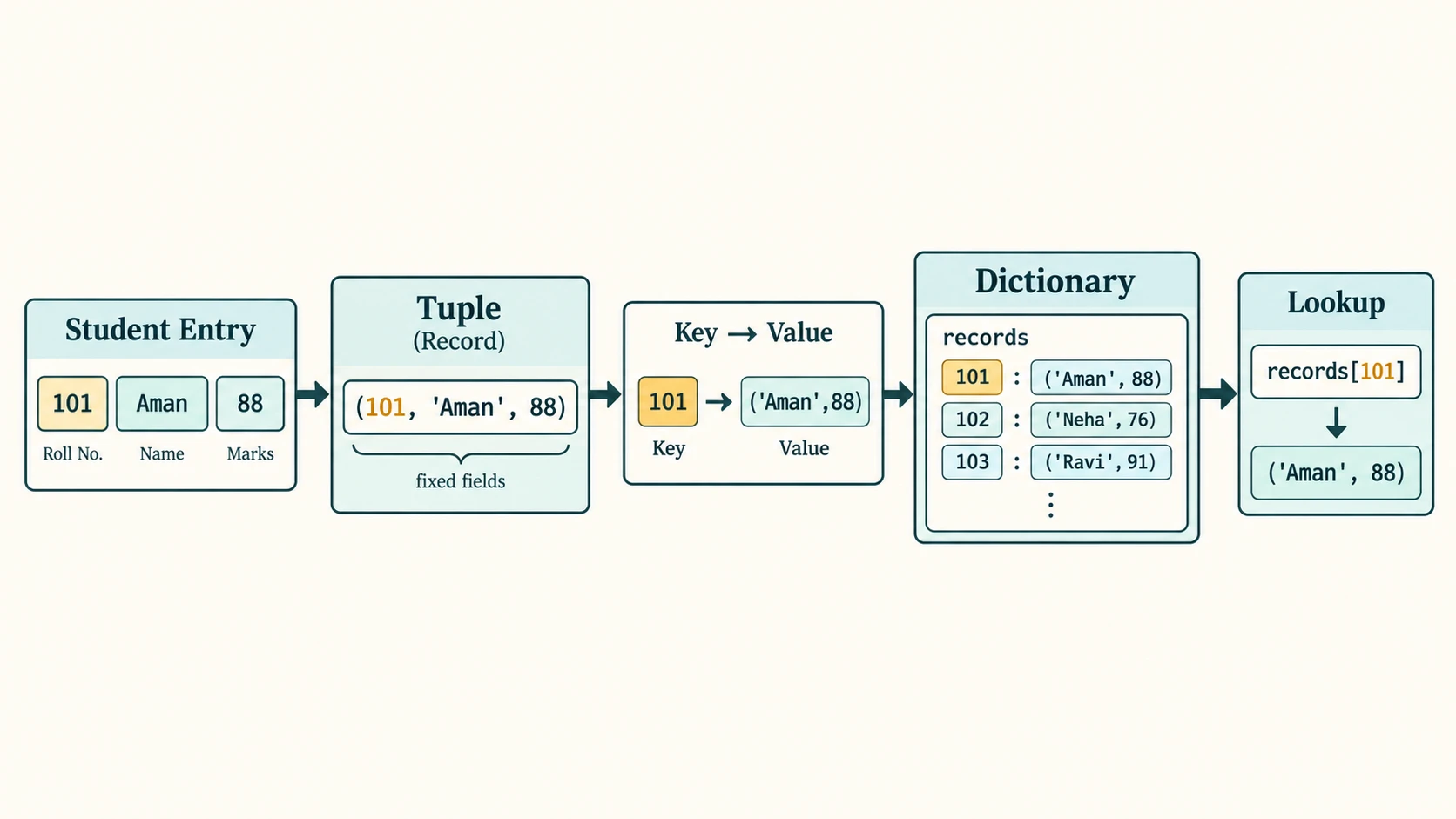
A school stores the roll number, name and marks of each learner. Each individual record has a fixed structure, but the school also needs a way to look up a record by roll number. Python gives us two useful tools for these jobs: a tuple for a fixed sequence of fields and a dictionary for finding values by meaningful keys. Understanding their differences makes data-handling programs simpler and safer.
Curriculum alignment. This NCERT chapter covers exactly two existing stable lessons: C11-PY-14 — Tuples: Operations and Programs and C11-PY-15 — Dictionaries: Keys, Values, Methods and Programs. The eight reading sections below make the chapter digestible without introducing extra curriculum lesson IDs. Practical programming reinforces C11-PY-17 without renumbering it.
Primary source: NCERT, Computer Science, Class XI, Chapter 10, “Tuples and Dictionaries,” supplied 2026–27 reprint (kecs110.pdf, printed pages 207–228). Curriculum authority: CBSE Class XI Computer Science (083), 2026–27. Python behavior is checked against Python's official documentation. Teaching and solutions are independently authored; task descriptions retain original NCERT question numbers without reproducing extended textbook text.
Learning outcomes
By the end, you should be able to form and index tuples (including singleton and nested tuples), reason about immutability and tuple-unpacking, use all prescribed tuple operations and functions, store records with dictionaries, understand unique and hashable keys, add/update/delete records, traverse a mapping, use each prescribed dictionary method, and write tested programs for searching, counting, record management and simple menu-based applications.
Chapter reading map
| Section | Stable lesson | Learn to |
|---|---|---|
C11-CH10-S01 — Tuple fundamentals | C11-PY-14 | Create tuples, index, immutability |
C11-CH10-S02 — Tuple operations | C11-PY-14 | Concatenate, repeat, slice, search, compute |
C11-CH10-S03 — Packing and nested tuples | C11-PY-14 | Unpack, return multiple values, record tuples |
C11-CH10-S04 — Tuple programs | C11-PY-14 | Compute values, swap, search, find mean |
C11-CH10-S05 — Dictionary foundations | C11-PY-15 | Create, access, update mappings |
C11-CH10-S06 — Dictionary operations | C11-PY-15 | Traverse, search, use prescribed methods |
C11-CH10-S07 — Dictionary applications | C11-PY-15 | Frequencies, employees, digit names |
C11-CH10-S08 — Combined structures | C11-PY-15 | Tuples as records in a dictionary, validation |
The NCERT Solution Bank afterwards contains all eight numbered exercises (including the two eight-part output exercises), all five programming problems with every requested operation, eight in-chapter programs, the SMIS extension, the four long case-study questions and documentation peer-review guidance. It is followed by 30 original practice questions, individually explained answers, revision.
Lesson C11-PY-14 — Tuples: Operations and Programs
Section C11-CH10-S01 — Understanding Tuples
1. A fixed, ordered collection
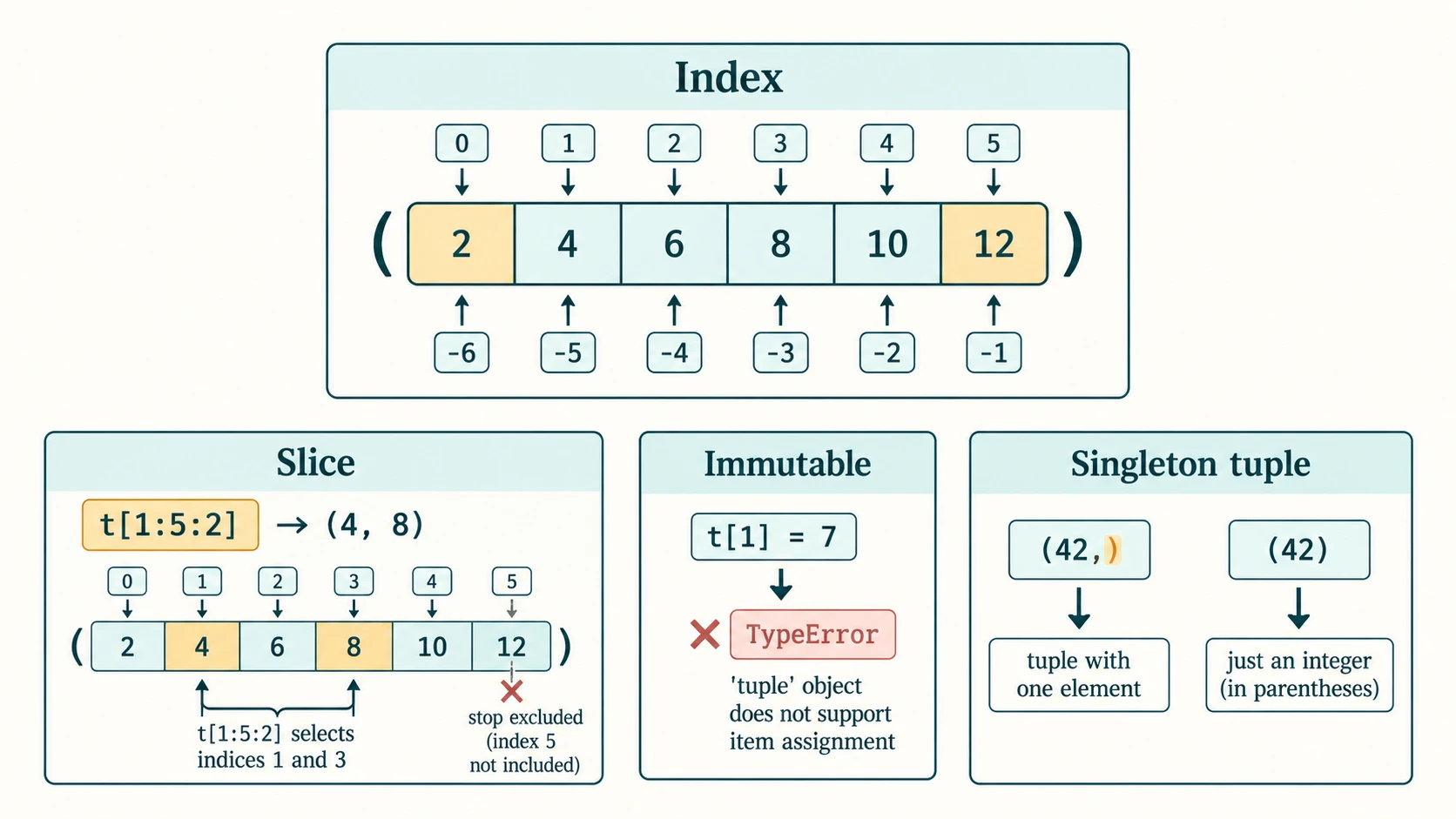
A tuple is an ordered, immutable sequence. It supports positions from zero and may contain values of different types. Commas, rather than brackets, make a tuple in the usual case; parentheses improve readability and are essential in some expressions.
student = (101, "Aman", 87.5)
empty = ()
single = (42,)
not_a_tuple = (42)
packed = 1, 2, 3
print(student[0], student[-1])
print(type(single).__name__, type(not_a_tuple).__name__)
print(packed)
101 87.5
tuple int
(1, 2, 3)The trailing comma in (42,) is crucial: (42) is only a parenthesised integer. For a one-item tuple of words write ("CS",); ("CS") is a string.
2. Two-way indexing and slicing
t = (2, 4, 6, 8, 10, 12)
print(t[0])       # first
print(t[-1])      # last
print(t[1:5:2])  # stop excluded
print(t[::-1])   # reversed tuple
2
12
(4, 8)
(12, 10, 8, 6, 4, 2)The indexes are 0..5, with matching negative indexes -6..-1. t[6] raises IndexError; slicing beyond the end normally stops harmlessly. A slice creates another tuple (an immutable sequence), not a mutable view.
3. Immutability: what can and cannot change?
Tuple elements cannot be replaced or removed in place. For example, with t = (1, 2, 3), assigning to t[1] raises TypeError. But a tuple can contain a mutable object, whose internals may change:
record = (101, "Aman", [77, 82])
record[2][0] = 90
print(record)
(101, 'Aman', [90, 82])The tuple still refers to the same inner list; the list was modified. Therefore, immutability of a tuple does not imply deep immutability of everything stored within it. Such a tuple with a list cannot be used as a dictionary key because it is unhashable.
| Structure | Indexed by | Can replace an element? | Example use |
|---|---|---|---|
| String | Integer | No | Read-only text |
| List | Integer | Yes | Scores that change |
| Tuple | Integer | No | Coordinate (x, y) or a fixed record |
| Dictionary | Key | Yes, values for a key | Roll number → student record |
Common mistake: Tuples are not required to contain multiple types and lists are not required to contain one type. Both can be mixed; fixedness, intended use and key/value access are the important differences. Also, performance depends on task and environment: the blanket claim that tuple iteration is always faster is not a useful guarantee.
Self-check
Why does (5,) have length one while (5) has no length? Because the comma creates a tuple, whereas the latter expression evaluates to an int.
Section C11-CH10-S02 — Operations, Methods and Built-ins
1. Concatenation, repetition and membership
a = (1, 3)
b = (5, 7)
print(a + b)
print(a * 3)
print(3 in a, 4 not in a)
print(a)  # unchanged
(1, 3, 5, 7)
(1, 3, 1, 3, 1, 3)
True True
(1, 3)Concatenation and repetition return new tuples; they do not modify the existing tuple. in checks top-level members; for ((1, 2), 3), 1 in t is False, while (1, 2) in t is True.
2. Search, count and numeric analysis
values = (9, 4, 9, 2, 5)
print(len(values), values.count(9), values.index(9))
print(min(values), max(values), sum(values))
print(sorted(values))
print(values)
5 2 0
2 9 29
[2, 4, 5, 9, 9]
(9, 4, 9, 2, 5)| Function / method | Meaning and result | Important caution |
|---|---|---|
len(t) | Number of top-level elements | Empty tuple gives zero |
tuple(iterable) | Create tuple from iterable | tuple(5) raises TypeError |
t.count(x) | Number of equal occurrences | Nested value counts as one item |
t.index(x) | First matching position | Absent item raises ValueError |
sorted(t) | Sorted list | Does not mutate source tuple |
min(t), max(t) | Smallest / largest comparable element | Empty tuple raises ValueError |
sum(t) | Numeric total | Requires suitable numeric items |
For a nonempty numeric tuple nums, the mean is sum(nums) / len(nums). A tuple's only standard methods covered here are count() and index(); sorted, min, max, sum, len, and tuple are built-in functions, not tuple instance methods.
3. Worked example: searching a tuple
numbers = (4, 8, 6, 8, 3)
target = 8
locations = [i for i in range(len(numbers)) if numbers[i] == target]
print("First:", locations[0] if locations else "Absent")
print("Frequency:", numbers.count(target))
First: 1
Frequency: 2Both locations are positions 1 and 3, but the program intentionally prints only the first position and the count. Use target in numbers for a simple presence check.
Section C11-CH10-S03 — Packing, Unpacking and Nested Tuples
1. Tuple assignment and swapping
name, roll, subject = ("Pooja", 40, "CS")
a, b = 5, 10
a, b = b, a
print(name, roll, subject)
print(a, b)
Pooja 40 CS
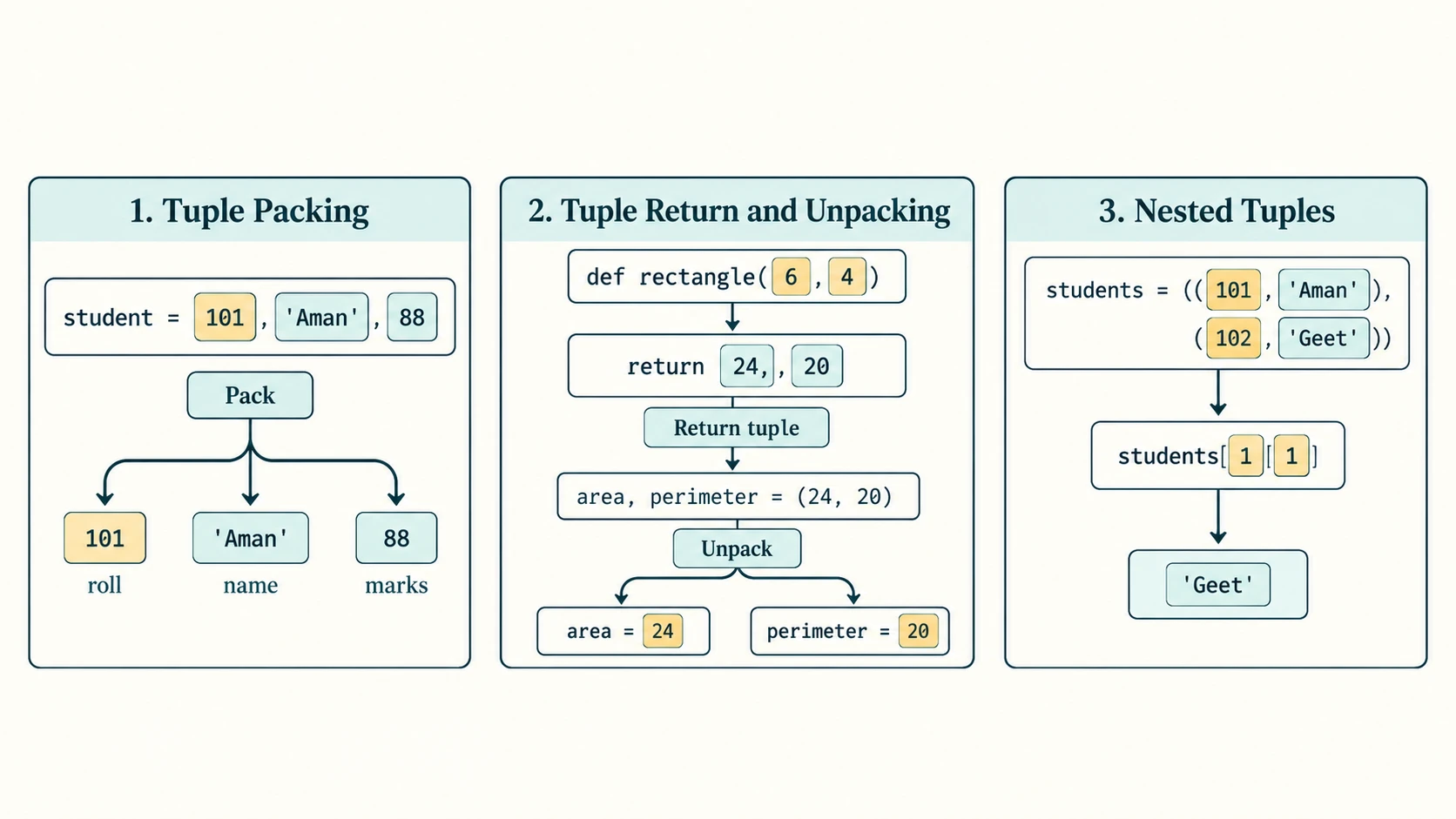
10 5Tuple packing groups values; unpacking assigns individual values to names. The right side is evaluated before the assignments take effect. Basic unpacking demands matching lengths: a, b = (1, 2, 3) raises ValueError. Extended unpacking such as first, *rest = (3, 4, 5) creates a list for rest; this is optional enrichment beyond the simplest textbook syntax.
2. Returning multiple values
from math import pi

def circle(radius):
    if radius < 0:
        raise ValueError("radius must be nonnegative")
    return pi * radius * radius, 2 * pi * radius

area, circumference = circle(5)
print(f"Area: {area:.2f}")
print(f"Circumference: {circumference:.2f}")
Area: 78.54
Circumference: 31.42The function returns a two-element tuple; the caller unpacks it into two names. The textbook's Program 10-3 deliberately uses 3.14 for π and therefore gets different approximate outputs; our clearer example uses the mathematical constant. Do not confuse a tuple return with two independent return statements.
3. Nested student records
students = (
    (101, "Aman", 98),
    (102, "Geet", 95),
    (103, "Sahil", 87),
)
for roll, name, marks in students:
    print(f"{roll}: {name} — {marks}%")
print("Second student:", students[1][1])
101: Aman — 98%
102: Geet — 95%
103: Sahil — 87%
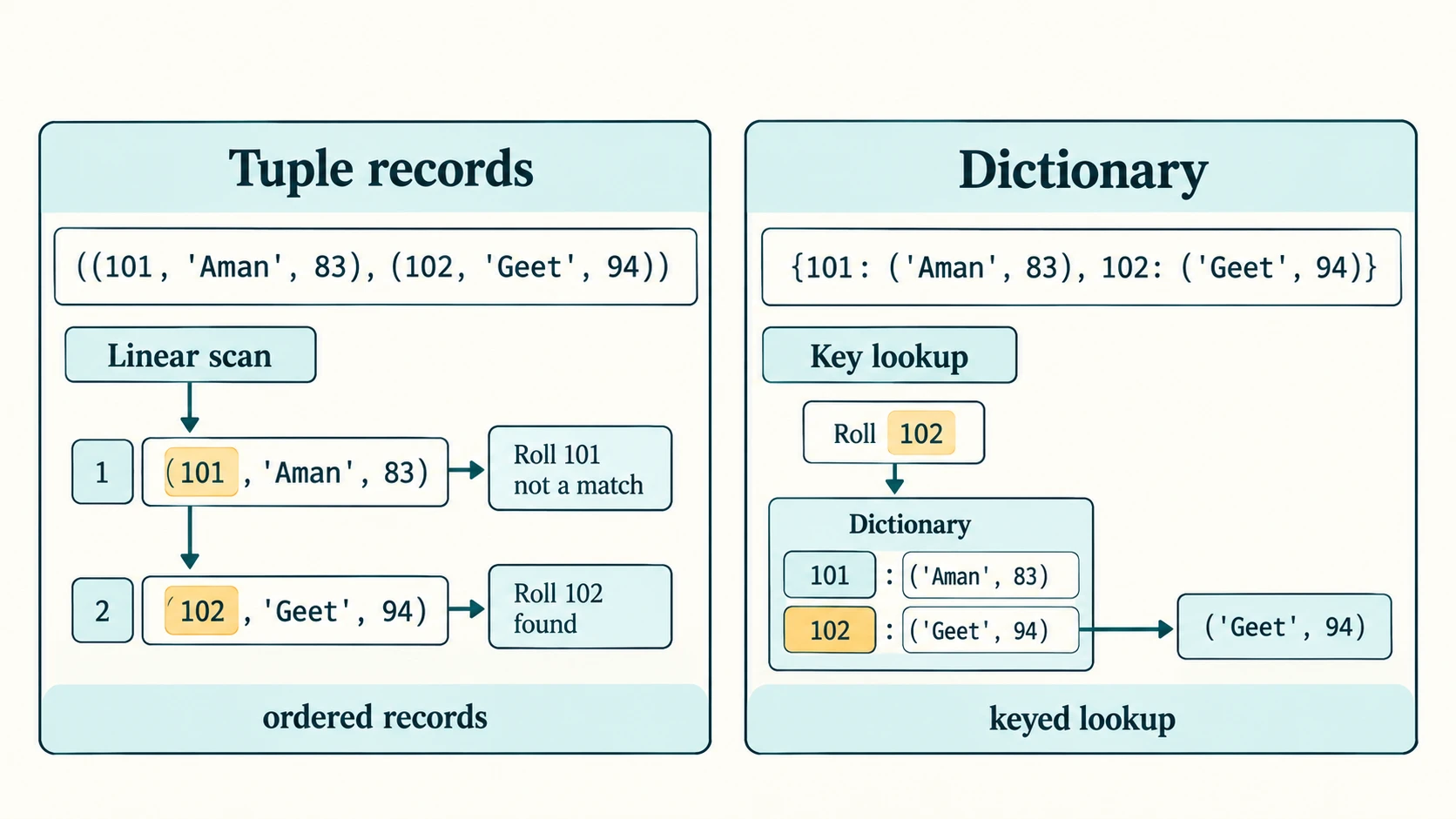
Second student: GeetA nested tuple contains another tuple. Here each record has roll number, name, percentage; the outer tuple stores records. An outer collection of fixed tuples works well when reading through all students; a dictionary is more convenient for look-up by roll number.
Section C11-CH10-S04 — Tuple Handling Patterns
Program pattern: read n values, compute extrema and mean
def summarize_tuple(values):
    if not values:
        raise ValueError("Enter at least one number")
    return min(values), max(values), sum(values) / len(values)

values = tuple(int(x) for x in "9 8 10 12 15".split())
low, high, mean = summarize_tuple(values)
print(values)
print(low, high, mean)
(9, 8, 10, 12, 15)
8 15 10.8For actual input, first check n > 0 before reading numbers; calling min(()) or max(()) will raise ValueError. Accumulating a list first and calling tuple(numbers) once is normally more straightforward than repeatedly constructing numbers = numbers + (num,).
A linear search function
def first_position(items, target):
    for index, value in enumerate(items):
        if value == target:
            return index
    return -1

print(first_position((7, 4, 2, 4), 4))
print(first_position((7, 4, 2, 4), 9))
1
-1-1 is this function's chosen not-found sentinel, unlike tuple.index() which raises ValueError when absent.
Exam traps
(1) * 3evaluates to the integer3;(1,) * 3evaluates to(1, 1, 1).sorted((3, 1))gives the list[1, 3], not the tuple(1, 3).- A tuple is immutable but a list inside it can change.
((1, 2), (3, 4))[1][0]returns3, not the second tuple.- A function returning
x, yproduces a tuple; two caller names can unpack it.
Lesson C11-PY-15 — Dictionaries: Keys, Values, Methods and Programs
Section C11-CH10-S05 — Understanding Dictionaries
A dictionary associates unique keys with values. Unlike tuples or lists, you generally access a dictionary by key rather than by numeric position. Keys must be hashable; strings, integers and a tuple of immutable, hashable values are common choices. Values may be any objects, including lists and tuples.
student = {"roll": 101, "name": "Aman", "percentage": 87.5}
print(student["name"])
print(student.get("section"))
student["percentage"] = 91.0
student["section"] = "XI-A"
print(student)
Aman
None
{'roll': 101, 'name': 'Aman', 'percentage': 91.0, 'section': 'XI-A'}The original keys retain their positions. Dictionaries preserve insertion order in modern Python (language guarantee from Python 3.7); the NCERT summary's description of them as “unordered” is a historical simplification. They are still not positional sequences: an integer key 0 is a key, not automatically the first entry.
Access and missing keys
book = {"title": "Algorithms", "pages": 240}
print(book["title"])
print(book.get("author"))
print(book.get("author", "Unknown"))
print("title" in book)
Algorithms
None
Unknown
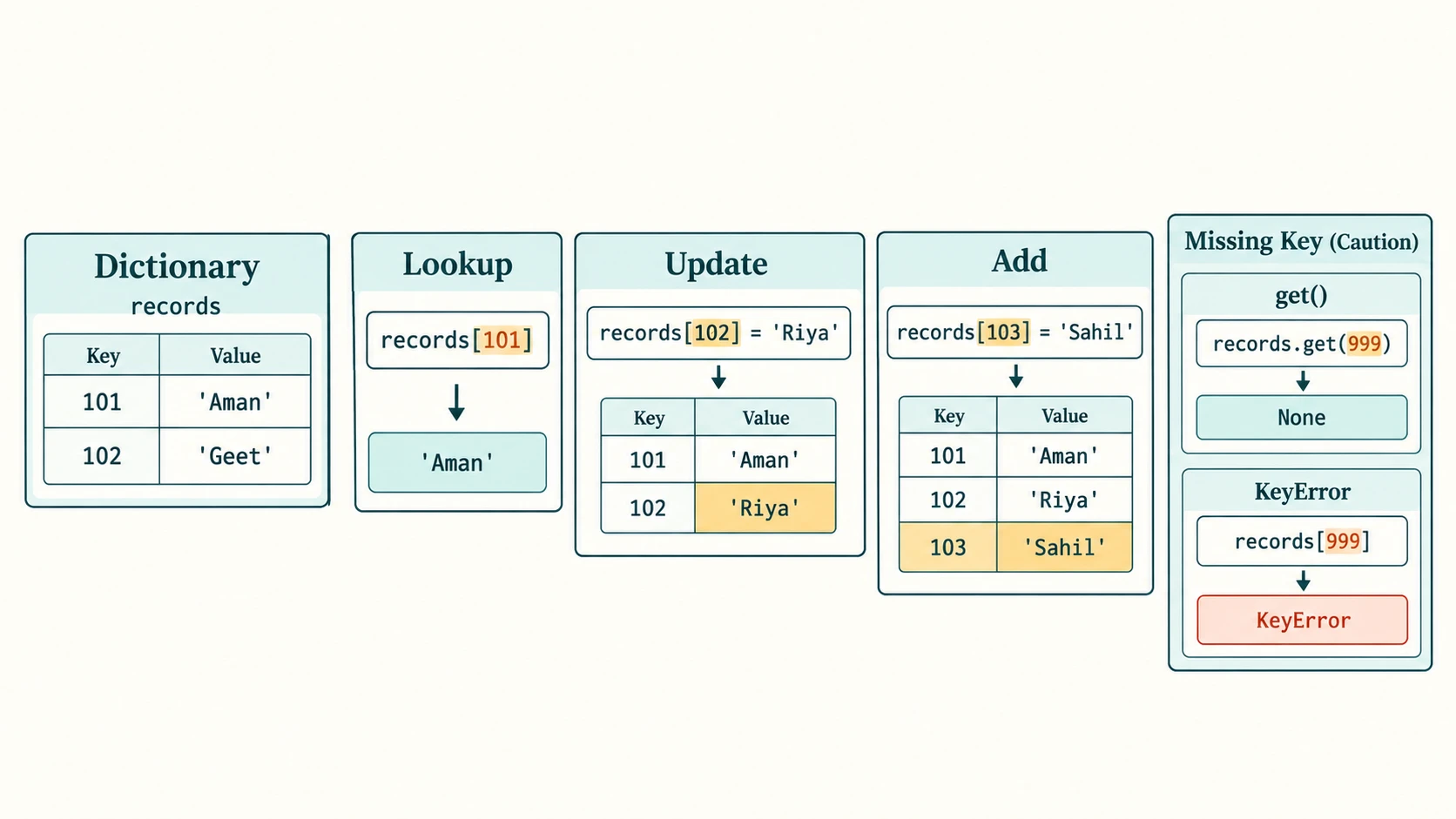
Truebook["author"] raises KeyError; get() avoids it. in checks keys, not values. If a key is repeated in a literal, the final assignment wins.
Key and value choices
coordinates = {(28, 76): "Point A", (29, 77): "Point B"}
print(coordinates[(28, 76)])
Point A[28, 76] cannot be a dictionary key because a list is unhashable. A tuple containing a list is also unhashable. A dictionary may contain numeric, string or tuple keys together, but choose one predictable key type for meaningful applications.
Section C11-CH10-S06 — Dictionary Operations and Methods
Adding, changing and deleting
scores = {101: 80, 102: 75}
scores[103] = 92              # insert
scores[102] = 79              # update
removed = scores.pop(101)    # delete and return
print(removed)
print(scores)
80
{102: 79, 103: 92}del scores[999] and scores.pop(999) raise KeyError when the key is missing; scores.pop(999, None) returns None instead. clear() deletes every entry but does not destroy the dictionary object.
Iterating through a mapping
marks = {"Aman": 81, "Geet": 90}
for name in marks:                  # keys
    print(name, marks[name])
for name, score in marks.items():   # key/value pairs
    print(f"{name}: {score}")
Aman 81
Geet 90
Aman: 81
Geet: 90In modern Python, these loops use insertion order. To display alphabetically, use for name in sorted(marks): ... explicitly.
Method reference — all CBSE-prescribed operations
| Operation | Result / typical usage | Caution |
|---|---|---|
len(d) | Count key/value entries | Not a sum of values |
dict() | Empty mapping; or converts suitable pairs | {} also empty |
d.keys() | Dynamic view of keys | dict_keys, not a list |
d.values() | Dynamic view of values | Values need not be unique |
d.items() | Dynamic view of (key,value) pairs | Iterate/unpack pairs |
d.get(k, fallback) | Value or fallback | No KeyError for missing k |
d.update(other) | Add/update entries in place | Returns None |
del d[k] | Remove the key | It is a statement, not a method |
d.clear() | Delete all entries | Returns None |
dict.fromkeys(keys, value) | New dictionary, common value | Shared mutable default is risky |
d.copy() | Shallow copy | Nested values still shared |
d.pop(k[,default]) | Remove key and return its value | Missing key fails without default |
d.popitem() | Remove most recently inserted pair | Empty dictionary raises KeyError |
d.setdefault(k, default) | Existing value or insert default | Does not overwrite existing entry |
max(d), min(d) | Largest/smallest key | Keys must be comparable |
sorted(d) | Sorted list of keys | Original dictionary remains unchanged |
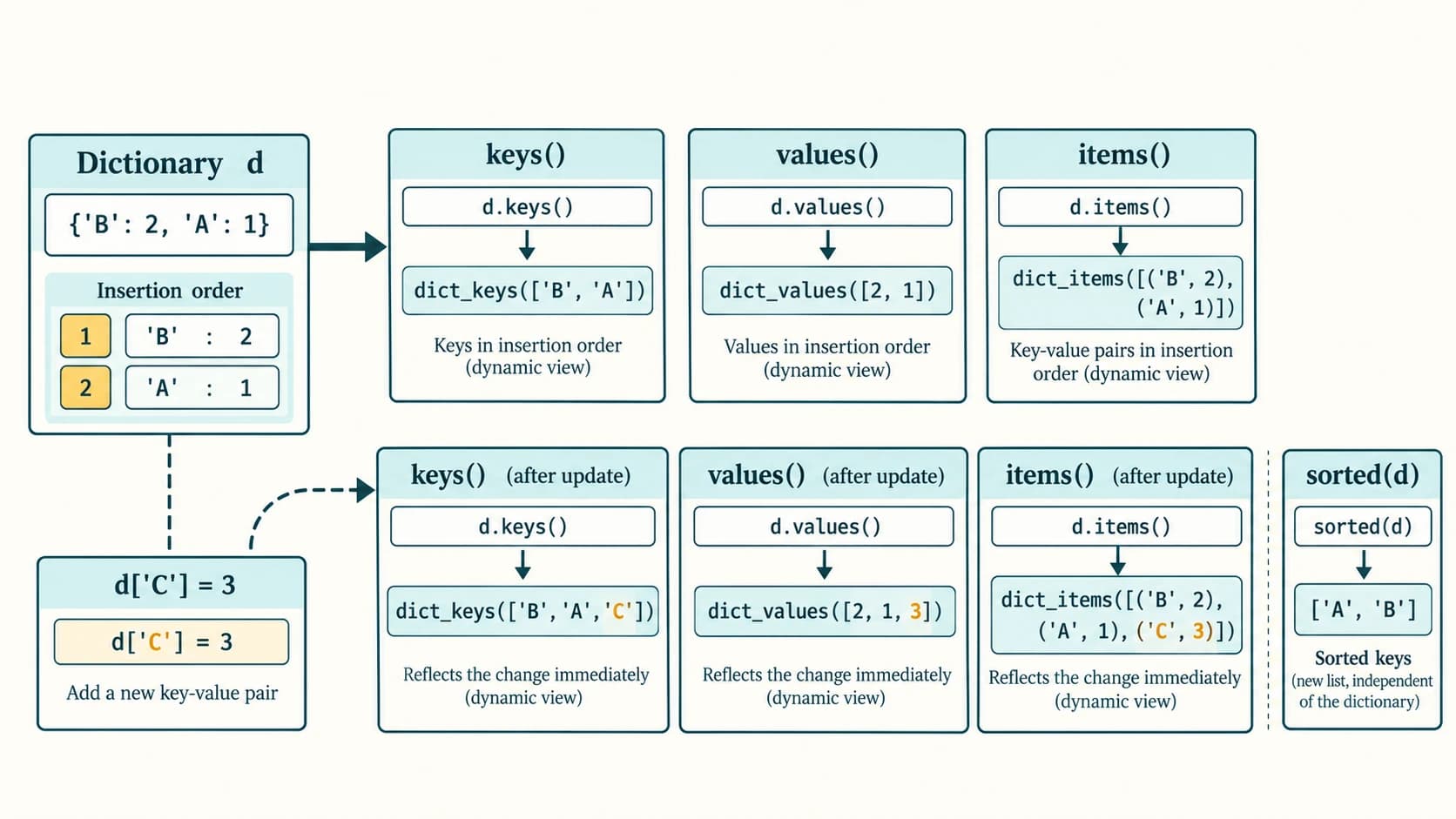
d.keys(), d.values() and d.items() are views, not copies of the data. Their printed form uses dict_keys([...]), dict_values([...]), and dict_items([...]) respectively. Views reflect later changes to the dictionary.
d = {"B": 2, "A": 1}
keys = d.keys()
d.setdefault("A", 99)
d.setdefault("C", 3)
print(list(keys))
print(sorted(d))
print(d.popitem())
print(d)
['B', 'A', 'C']
['A', 'B', 'C']
('C', 3)
{'B': 2, 'A': 1}Beware shared defaults: dict.fromkeys(["A", "B"], []) gives both keys the same list. Use a comprehension {k: [] for k in ("A", "B")} to obtain independent lists.
Section C11-CH10-S07 — Useful Dictionary Programs
Frequency counting
text = "w3resource"
frequency = {}
for char in text:
    frequency[char] = frequency.get(char, 0) + 1
print(frequency)
print("r:", frequency["r"])
{'w': 1, '3': 1, 'r': 2, 'e': 2, 's': 1, 'o': 1, 'u': 1, 'c': 1}
r: 2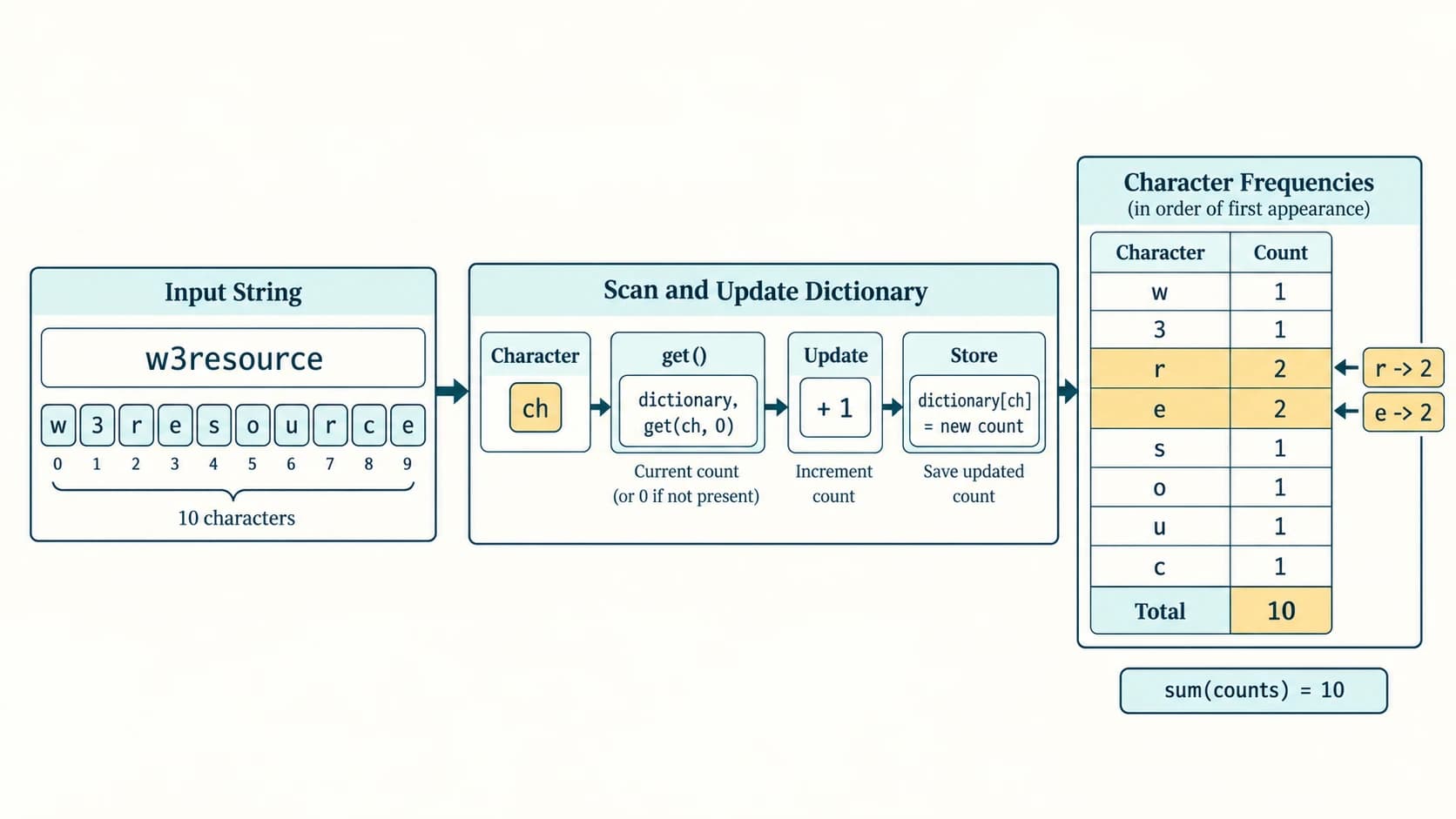
A dictionary naturally stores letter → frequency. The task here counts every character in the supplied string, so a digit such as 3 also becomes a key. For counting letters only, choose if ch.isalpha() and decide whether uppercase and lowercase should be merged.
Employees and salary lookup
salaries = {"Amina": 34000, "Joseph": 24000, "Zoya": 25000}
for name in sorted(salaries):
    print(name, salaries[name])
print("Highest:", max(salaries, key=salaries.get))
Amina 34000
Joseph 24000
Zoya 25000
Highest: Aminamax(salaries) alone compares names, not salaries. A task requiring top salary must compare the values, or use the key=salaries.get argument.
Convert each digit to its English name
DIGITS = {"0": "Zero", "1": "One", "2": "Two", "3": "Three", "4": "Four",
          "5": "Five", "6": "Six", "7": "Seven", "8": "Eight", "9": "Nine"}

def digit_names(text):
    if not text or not all(ch in DIGITS for ch in text):
        raise ValueError("Use one or more decimal digits")
    return " ".join(DIGITS[ch] for ch in text)

print(digit_names("876"))
Eight Seven SixThe program reads the number as text; otherwise leading zeros would disappear. This program spells each digit separately, not the quantity in words (so 876 is not “eight hundred seventy-six”).
Section C11-CH10-S08 — Combining Dictionaries and Tuples
A useful record design is {roll_number: (name, percentage)}. The roll number is the key; the tuple stores related values. This is the intended idea of the NCERT SMIS extension.
records = {
    101: ("Aman", 83.0),
    102: ("Geet", 94.0),
    103: ("Sahil", 87.0),
}
roll = 102
print(records.get(roll, ("Not found", None)))
best = max(records.items(), key=lambda pair: pair[1][1])
print("Topper:", best[0], best[1])
('Geet', 94.0)
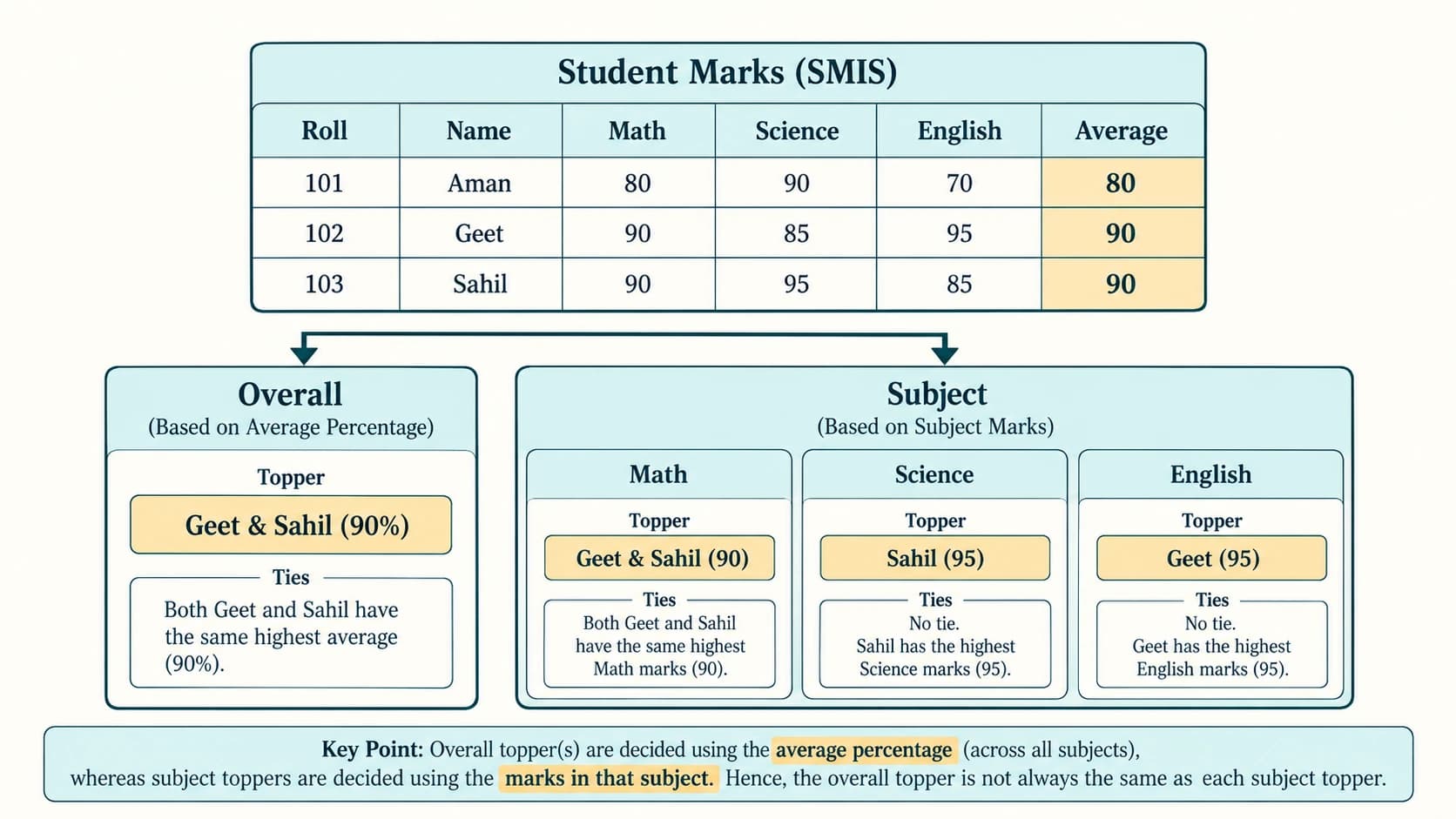
Topper: 102 ('Geet', 94.0)Important textbook gap: If each record stores only name and overall percentage, you can determine the overall topper but cannot infer the topper in each subject. To calculate subject toppers you must separately collect subject-wise marks. The full NCERT case-study solution later extends the tuple into (name, percentage, subject_marks_tuple) and explains the assumption openly.
Deciding which structure to use
| Need | Best fit | Why |
|---|---|---|
| Coordinate of a fixed location | Tuple (x, y) | Fixed position and fields |
| Set of test scores that you modify | List | Append/update/remove by index |
| Student by roll number | Dictionary | Direct meaningful key access |
| Fixed student record in a roll-number map | Tuple value inside dictionary | Predictable field order |
| Character frequencies | Dictionary | Character → running count |
Additional concept checks
- Reassigning an immutable tuple variable creates or binds a different tuple value; it does not modify the original. “Rebuilt variable” in the textbook means rebinding, not a guarantee about physical memory allocation.
- Dictionary keys should be hashable, not merely described as “immutable” without qualification. For instance,
(1, [2])is a tuple but cannot be used as a key. - Dictionary insertion order does not mean sorted key order. Call
sorted()when sorting matters. - Do not confuse
d.get(k)withd[k],d.values()with a list, ormax(d)withmax(d.values()).
NCERT Solution Bank — Chapter 10
Navigation note. These solutions refer to the source's original exercise numbering and paraphrase each task. Exercises 1 and 2 each contain eight subparts. The five Programming Problems, SMIS case-study task, four additional Case Study-based Questions, and peer-review activity are separate groups. All examples are Python 3 and all personal/student records are fictional.
NCERT Exercise 1 — Tuple output prediction, parts (i)–(viii)
Use the source values:
tuple1 = (23, 1, 45, 67, 45, 9, 55, 45)
tuple2 = (100, 200)| Subpart | Source expression (brief) | Exact result | Explanation |
|---|---|---|---|
| (i) | tuple1.index(45) | 2 | The first 45 is at zero-based index 2 |
| (ii) | tuple1.count(45) | 3 | 45 appears at indexes 2, 4 and 7 |
| (iii) | tuple1 + tuple2 | (23, 1, 45, 67, 45, 9, 55, 45, 100, 200) | New concatenated tuple |
| (iv) | len(tuple2) | 2 | Two top-level items |
| (v) | max(tuple1) | 67 | Largest numeric value |
| (vi) | min(tuple1) | 1 | Smallest numeric value |
| (vii) | sum(tuple2) | 300 | 100 + 200 |
| (viii), line 1 | sorted(tuple1) | [1, 9, 23, 45, 45, 45, 55, 67] | Returns a list, not a tuple |
| (viii), line 2 | print(tuple1) | (23, 1, 45, 67, 45, 9, 55, 45) | Original tuple is unchanged |
Complete reproducible test:
tuple1 = (23, 1, 45, 67, 45, 9, 55, 45)
tuple2 = (100, 200)
print(tuple1.index(45))
print(tuple1.count(45))
print(tuple1 + tuple2)
print(len(tuple2))
print(max(tuple1))
print(min(tuple1))
print(sum(tuple2))
print(sorted(tuple1))
print(tuple1)
This prints the nine output lines above, because (viii) itself contains two print statements.
NCERT Exercise 2 — Dictionary output prediction, parts (i)–(viii)
Use the historical sample dictionary exactly as printed in the textbook, solely to evaluate the Python expressions:
stateCapital = {"AndhraPradesh": "Hyderabad", "Bihar": "Patna",
                "Maharashtra": "Mumbai", "Rajasthan": "Jaipur"}
Source-data caution:
"AndhraPradesh": "Hyderabad"is historical textbook exercise data, not a claim about the present official capital of Andhra Pradesh. Exercise correctness depends on the literal dictionary assigned, not a live geography fact. Do not automatically update the string in the exercise: doing so would change the required outputs.
| Subpart | Source operation | Exact output / effect | Explanation |
|---|---|---|---|
| (i) | get("Bihar") | Patna | Existing key's value |
| (ii) | keys() | dict_keys(['AndhraPradesh', 'Bihar', 'Maharashtra', 'Rajasthan']) | Dynamic key-view representation |
| (iii) | values() | dict_values(['Hyderabad', 'Patna', 'Mumbai', 'Jaipur']) | Dynamic value-view representation |
| (iv) | items() | dict_items([('AndhraPradesh', 'Hyderabad'), ('Bihar', 'Patna'), ('Maharashtra', 'Mumbai'), ('Rajasthan', 'Jaipur')]) | View of key/value pairs |
| (v) | len(stateCapital) | 4 | Four mappings |
| (vi) | "Maharashtra" in stateCapital | True | Membership tests keys |
| (vii) | get("Assam") | None | Missing key, no default provided |
| (viii) | del ...["Rajasthan"] then print | {'AndhraPradesh': 'Hyderabad', 'Bihar': 'Patna', 'Maharashtra': 'Mumbai'} | Mutating deletion; insertion order of remaining entries persists |
Printing a string obtained from get() shows its characters without surrounding quotes; the views and dictionary show their normal representational quotes. None is the special value, not the string 'None'. Modern Python orders dictionary iteration by insertion rather than treating dictionaries as unordered containers.
NCERT Exercise 3 — Explain how lists and tuples are ordered
Answer: Each element has a definite position relative to other elements. The first element is index 0 and negative indexing counts back from the last. The order does not automatically change when we traverse either collection. For example, (8, 3, 5)[1] and [8, 3, 5][1] both give 3. The key difference is that lists permit modification whereas tuples do not permit element replacement.
NCERT Exercise 4 — Return more than one value from a function
Answer: Return a comma-separated group of results, which Python packs into a tuple; then unpack at the call site.
def rectangle(length, width):
    return length * width, 2 * (length + width)

area, perimeter = rectangle(6, 4)
print(area, perimeter)
24 20Why: The function returns (24, 20) as a single tuple object; unpacking assigns the elements to separate names.
NCERT Exercise 5 — Advantages of a tuple compared with a list
Answer: A tuple prevents accidental replacement, insertion or removal of its own top-level elements. It communicates a fixed-size record/constant-structure intention, supports unpacking, and can be used as a dictionary key if all contained elements are hashable. It may also use less memory for a comparable fixed sequence, though this is not a universal promise. Limit: A tuple containing a mutable object can still expose mutable nested state. Use a list if the sequence itself must grow, shrink or be edited.
NCERT Exercise 6 — When to use a tuple or dictionary
Answer: Use a tuple for a fixed ordered group such as (latitude, longitude) or (roll, name, marks). Use a dictionary when meaningful lookup is needed, such as {101: ("Aman", 89), 102: ("Geet", 92)}, where roll numbers uniquely identify records. A coordinate pair provides positional information; a student directory maps a meaningful key to a record. In a shopping bill {product_code: quantity}, dictionary access is preferable to searching a tuple every time.
NCERT Exercise 7 — Demonstrate rebuilding/rebinding with immutable data
Answer: The wording “variable is rebuilt” is imprecise: assignment binds a name to an object. Immutable objects cannot be altered in place. The name may be rebound to a new result, while an earlier alias retains its original object.
first = (1, 2)
original = first
first = first + (3,)
print(first)
print(original)
(1, 2, 3)
(1, 2)The first tuple stays (1,2); first now refers to a different tuple value. The program does not claim that every immutable assignment always allocates a particular memory address; such implementation details are irrelevant to the requested proof.
NCERT Exercise 8 — Why the singleton-tuple example raises TypeError
Answer: In the printed example, tuple1 = (5) assigns the integer 5. len(tuple1) is invalid because an integer has no length, raising TypeError: object of type 'int' has no len(). Correct by writing tuple1 = (5,), where the trailing comma makes a one-item tuple; len(tuple1) then evaluates to 1.
tuple1 = (5,)
print(type(tuple1).__name__)
print(len(tuple1))
tuple
1NCERT Programming Problem 1 — Separate email usernames and domains into tuples
Approach: Read an email address as text and split it at exactly one @. Validate nonempty sides and forbid surrounding whitespace. For a Class XI exercise this is a deliberately basic parser, not a full validator for every valid international email address. All three displayed sequences are tuples.
def split_emails(emails):
    usernames = []
    domains = []
    for raw in emails:
        address = raw.strip()
        if address.count("@") != 1:
            raise ValueError(f"Expected one @ in {address!r}")
        username, domain = address.split("@", 1)
        if not username or not domain or any(ch.isspace() for ch in address):
            raise ValueError("Missing username/domain or unexpected whitespace")
        usernames.append(username)
        domains.append(domain)
    return tuple(emails), tuple(usernames), tuple(domains)

n = int(input("How many email IDs? "))
if n <= 0:
    raise ValueError("n must be positive")
emails = tuple(input(f"Email {i + 1}: ").strip() for i in range(n))
all_emails, users, domains = split_emails(emails)
print("Emails:", all_emails)
print("Usernames:", users)
print("Domains:", domains)
Illustrative input: n=2, aman@example.org, geet@school.edu.
Emails: ('aman@example.org', 'geet@school.edu')
Usernames: ('aman', 'geet')
Domains: ('example.org', 'school.edu')
This satisfies the exact three-tuple output request. If invalid text is entered, the program raises an explanatory error rather than silently producing malformed components.
NCERT Programming Problem 2 — Search for a student's name (both requested approaches)
(a) User-defined function. Return True if any name matches the target, choosing case-insensitive exact matching for a user-friendly classroom policy.
def is_student_present(names, target):
    target = target.strip().casefold()
    return any(name.strip().casefold() == target for name in names)

names = ("Aman", "Geet", "Sahil")
print(is_student_present(names, "geet"))
print(is_student_present(names, "Riya"))
True
False(b) Built-in membership operator. For case-sensitive exact comparison, target in names suffices:
names = ("Aman", "Geet", "Sahil")
print("Geet" in names)
print("geet" in names)
True
FalseInput version for n names: names = tuple(input("Name: ").strip() for _ in range(n)) after checking that n > 0, then use either approach. Explain to students why the two policies can differ.
NCERT Programming Problem 3 — Find the two highest dictionary values
Policy: “Highest two values” may mean the two largest entries including duplicates or the two greatest distinct numerical values. This solution prints both so the interpretation is explicit. It also preserves associated keys if required.
marks = {"Aman": 92, "Geet": 88, "Sahil": 92, "Riya": 75}
if len(marks) < 2:
    raise ValueError("Need at least two entries")
entries = sorted(marks.items(), key=lambda item: item[1], reverse=True)
top_two_entries = entries[:2]
distinct = sorted(set(marks.values()), reverse=True)
print("Two highest entries:", top_two_entries)
print("Top distinct scores:", distinct[:2])
Two highest entries: [('Aman', 92), ('Sahil', 92)]
Top distinct scores: [92, 88]sorted(marks) alone sorts names, so it cannot find the highest scores. The stable sort preserves insertion order among tied marks. If there are fewer than two distinct values, report that rather than inventing a second distinct maximum.
NCERT Programming Problem 4 — Character-frequency dictionary
The textbook's illustrative input is w3resource. Its expected output is a frequency mapping, though the order in the printed sample differs from modern insertion-order display. Every observed character—including digit 3—is included.
text = "w3resource"
counts = {}
for ch in text:
    counts[ch] = counts.get(ch, 0) + 1
print(counts)
{'w': 1, '3': 1, 'r': 2, 'e': 2, 's': 1, 'o': 1, 'u': 1, 'c': 1}Check: the text contains 10 characters; the counts sum to 10. Its letter r occurs twice and e twice, with every other distinct character once.
NCERT Programming Problem 5 — Friends' phone directory, parts (a)–(f)
The program below implements every requested operation through separate functions; the phone numbers are fictional examples, stored as strings so any leading zero is not lost. Avoid collecting or publishing real friends' phone numbers in a public webpage.
def show_all(book):
    if not book:
        print("Directory is empty")
    for name, phone in book.items():
        print(f"{name}: {phone}")

def add_friend(book, name, phone):
    if not name.strip() or not phone.strip():
        raise ValueError("Name and phone cannot be empty")
    book[name.strip()] = phone.strip()

def delete_friend(book, name):
    return book.pop(name, None) is not None

def update_phone(book, name, phone):
    if name not in book or not phone.strip():
        return False
    book[name] = phone.strip()
    return True

def has_friend(book, name):
    return name in book

def show_sorted(book):
    for name in sorted(book, key=str.casefold):
        print(f"{name}: {book[name]}")

book = {"Zoya": "5550102", "Aman": "5550101"}
print("(a) All:")
show_all(book)
add_friend(book, "Geet", "5550103")   # (b)
print("(b) Added:", book)
print("(c) Deleted:", delete_friend(book, "Zoya"))
print("(d) Updated:", update_phone(book, "Geet", "5550199"))
print("(e) Present:", has_friend(book, "Geet"))
print("(f) Alphabetical:")
show_sorted(book)
(a) All:
Zoya: 5550102
Aman: 5550101
(b) Added: {'Zoya': '5550102', 'Aman': '5550101', 'Geet': '5550103'}
(c) Deleted: True
(d) Updated: True
(e) Present: True
(f) Alphabetical:
Aman: 5550101
Geet: 5550199To satisfy the input part interactively, begin with n = int(input("Number of friends: ")), validate n >= 0, and call add_friend(book, input("Name: "), input("Phone: ")) inside for _ in range(n). Then present menu options (a)–(f) by invoking these verified functions. A repeated name updates the record; explain that a dictionary does not permit duplicate keys. This is an educational in-memory directory (no persistence or consent system).
Fully interactive version of Problem 5
The complete menu below uses the six helper functions defined in the preceding solution block. Run both Python blocks together (as one .py program) to allow user input for n friends and then choose any of the six NCERT operations repeatedly. Only enter fictional or consented test records.
def phone_directory_menu():
    directory = {}
    n = int(input("How many friends initially? "))
    if n < 0:
        raise ValueError("Count cannot be negative")
    for _ in range(n):
        add_friend(directory, input("Friend name: "), input("Phone: "))
    while True:
        print("a Display | b Add | c Delete | d Modify | e Find | f Sorted | q Quit")
        choice = input("Choice: ").strip().lower()
        if choice == "q":
            break
        if choice == "a":
            show_all(directory)
        elif choice == "b":
            add_friend(directory, input("Name: "), input("Phone: "))
            print("Saved:", directory)
        elif choice == "c":
            print("Deleted:", delete_friend(directory, input("Name: ")))
        elif choice == "d":
            name = input("Existing name: ")
            phone = input("New phone: ")
            print("Updated:", update_phone(directory, name, phone))
        elif choice == "e":
            print("Found:", has_friend(directory, input("Name: ")))
        elif choice == "f":
            show_sorted(directory)
        else:
            print("Invalid choice")

if __name__ == "__main__":
    phone_directory_menu()
Test sequence: Enter 2 names; choose a to display both; choose b to add a third; choose d to change an existing phone; use e to confirm it exists; use f to print by name; use c to delete it; finally choose q. This covers the actual input requirement, and all six operations function on the same in-memory dictionary. Both blocks together make the full executable solution.
Walkthrough of all eight NCERT in-chapter programs
These explain the textbook programs independently rather than copying whole source listings.
Program 10-1 — Nested tuple of student records
The textbook stores multiple (roll, name, percentage) tuples inside an outer tuple and prints row details. students[i][0] is the roll, [1] the name, and [2] the percentage. An equivalent clearer loop is:
students = ((101, "Aman", 98), (102, "Geet", 95),
            (103, "Sahil", 87), (104, "Pawan", 79))
for row_no, (roll, name, percentage) in enumerate(students, start=1):
    print(row_no, roll, name, percentage)
The printed rows are 1 101 Aman 98, 2 102 Geet 95, 3 103 Sahil 87, and 4 104 Pawan 79. Python's enumerate supplies row numbers, while unpacking supplies fields.
Program 10-2 — Swap values without temporary variable
a, b = 5, 10
print("Before:", a, b)
a, b = b, a
print("After:", a, b)
Before: 5 10
After: 10 5Python evaluates the right-hand tuple before assigning the left-hand names, avoiding data loss.
Program 10-3 — Circle function returns area and circumference
The source uses π ≈ 3.14. With radius 5, area=3.14*25=78.5 and circumference=2*3.14*5=31.400000000000002 in the textbook's floating-point representation. For a cleaner user display format to two decimal places and use math.pi as shown in Section S03. These are different approximations, not contradictions.
Program 10-4 — Read n numbers into a tuple, output minimum/maximum
The source repeatedly concatenates one-element tuples using (num,). Its sample values 9,8,10,12,15 produce min=8, max=15. For robustness validate positive n and, for efficiency/readability, accumulate in a list then convert to tuple once; Section S04 includes that strategy.
Program 10-5 — Dictionary of odd numbers
odd = {1: "One", 3: "Three", 5: "Five", 7: "Seven", 9: "Nine"}
print(list(odd.keys()))
print(list(odd.values()))
print(list(odd.items()))
print(len(odd), 7 in odd, 2 in odd, odd.get(9))
del odd[9]
print(odd)
[1, 3, 5, 7, 9]
['One', 'Three', 'Five', 'Seven', 'Nine']
[(1, 'One'), (3, 'Three'), (5, 'Five'), (7, 'Seven'), (9, 'Nine')]
5 True False Nine
{1: 'One', 3: 'Three', 5: 'Five', 7: 'Seven'}Mapping to all source subparts: (a) keys, (b) values, (c) items, (d) length, (e) test 7, (f) test 2, (g) get 9, (h) delete key 9. The educational version converts the views into lists for a compact readable print; calling odd.keys() directly returns a dynamic view.
Program 10-6 — Name/salary dictionary
The textbook asks for a number of employee names and salaries, then traverses the dictionary to display them. A safe version accepts name = input(...).strip() without eval(), and salary = int(input(...)) with nonnegative validation. Store employee[name] = salary and display for name, pay in employee.items(): print(name, pay). Duplicate employee names overwrite earlier records; use a unique employee ID as key if duplicates are possible. Quotation marks typed as part of input are not needed when using input().
Program 10-7 — Character-count mapping
The program starts with an empty dictionary, increments the count for a previously seen character, and initializes a count of one for a new character. For HelloWorld, the frequencies are H1, e1, l3, o2, W1, r1, d1 (in order of first appearance). Capital W and lowercase letters are distinct keys. Section S07 contains a complete implementation and a second worked string.
Program 10-8 — Each digit replaced by its name
The program constructs a dictionary for digits 0–9, reads the number as a string, and uses each character to look up its English name. For input 6512, the result is Six Five One Two; for 876, it is Eight Seven Six. The textbook builds a result by repeated string concatenation; using ' '.join(...) avoids unnecessary initial spaces and is taught in Section S07. Input -10 or decimal point must either be handled explicitly or rejected, because '-' and '.' are not digit keys.
NCERT SMIS Case Study — Roll-number lookup, toppers and subject toppers
Original brief, paraphrased: For n Class X students collect roll number, name and percentage; write user-defined functions to add records, search by roll, display all, identify overall topper and identify subject toppers. The source suggests dictionary keys as roll numbers and immutable tuple records.
Necessary clarification: A (name, percentage) tuple gives no subject-wise marks. To meet every case-study requirement, the code requests marks in three clearly labelled subjects as additional inputs. It computes the overall percentage from those three values, so the displayed percentage is reproducible rather than an unsupported guess. Each stored dictionary value is a tuple (name, overall_percentage, (mathematics, science, english)). This is a documented extension of the textbook's minimal record, not a claim that the textbook provided subject marks.
SUBJECTS = ("Mathematics", "Science", "English")

def read_mark(prompt):
    value = float(input(prompt))
    if not 0 <= value <= 100:
        raise ValueError("Mark must lie between 0 and 100")
    return value

def accept_students(n):
    records = {}
    for _ in range(n):
        roll = int(input("Roll number: "))
        if roll in records:
            print("Duplicate roll number; try another")
            continue
        name = input("Name: ").strip()
        if not name:
            raise ValueError("Name required")
        subject_marks = tuple(read_mark(f"{subject}: ") for subject in SUBJECTS)
        percent = sum(subject_marks) / len(SUBJECTS)
        records[roll] = (name, percent, subject_marks)
    return records

def search_student(records, roll):
    return records.get(roll)

def display_all(records):
    for roll in sorted(records):
        name, percent, marks = records[roll]
        print(f"{roll}: {name}, {percent:.2f}%, marks={marks}")

def overall_toppers(records):
    if not records:
        return []
    high = max(record[1] for record in records.values())
    return [(roll, record[0], high) for roll, record in records.items()
            if record[1] == high]

def subject_toppers(records):
    results = {}
    for position, subject in enumerate(SUBJECTS):
        if not records:
            results[subject] = []
            continue
        high = max(record[2][position] for record in records.values())
        results[subject] = [(roll, record[0], high)
                            for roll, record in records.items()
                            if record[2][position] == high]
    return results

def main():
    records = {}
    while True:
        print("1 Add | 2 Search | 3 Display | 4 Overall top | 5 Subject top | 0 Exit")
        choice = input("Choice: ").strip()
        if choice == "1":
            n = int(input("Number of new students: "))
            if n <= 0:
                print("Enter a positive count")
                continue
            new = accept_students(n)
            for roll, record in new.items():
                if roll not in records:
                    records[roll] = record
                else:
                    print("Existing roll not overwritten:", roll)
        elif choice == "2":
            roll = int(input("Roll number to find: "))
            print(search_student(records, roll) or "Not found")
        elif choice == "3":
            display_all(records)
        elif choice == "4":
            print("Topper(s):", overall_toppers(records))
        elif choice == "5":
            for subject, winners in subject_toppers(records).items():
                print(subject, winners)
        elif choice == "0":
            break
        else:
            print("Invalid choice")

if __name__ == "__main__":
    main()
Worked dataset and boundary behavior. Insert roll 101 = Aman with marks (80,90,70) → 80%; roll 102 = Geet with (90,85,95) → 90%; roll 103 = Sahil with (90,95,85) → 90%. The overall co-toppers are Geet and Sahil; subject toppers are Mathematics Geet and Sahil (90), Science Sahil (95), English Geet (95). Empty dictionaries produce empty topper lists. This system keeps records in memory, not in a permanent database. Production school records require permissions and privacy controls beyond this Class XI demonstration.
Documentation / peer-review task for the SMIS study
Prepare a problem statement, input/output specification, list of five functions, sample data, pseudocode and dry run. Have a peer verify unique roll-number handling, missing-record lookup, 0% and 100% marks, multiple toppers, empty dictionary, subject-wise data assumptions, spelling/format, and whether the system avoids publishing real students' data. Record findings as observed behavior → issue → suggested correction → retest result. This supplies the separate textbook's documentation-review request rather than falsely labelling it another numbered programming question.
NCERT Case Study-based Question 1 — Illustrative savings-bank system
Requested components: investigate a savings-account form, savings and fixed-deposit rates and minimum balance; then build a function-based menu supporting account opening, deposit, withdrawal and fixed-deposit maturity calculation.
Research-first portion. Actual required KYC fields, savings interest, fixed-deposit rates and minimum-balance policy vary by financial institution, product, customer category, prevailing rules and date. Students must consult the specific selected bank's current official disclosures and record the source, retrieval date and product category in their project notes. Do not treat the sample rates or limits in the following classroom simulation as actual bank offers. An application form may ask for applicant identity/contact details, an account category and supporting identity/address information; required fields must be verified from the selected form rather than presented as a universal legal checklist.
Illustrative policies for this fictional bank: minimum balance ₹500, savings-account interest not actually credited in this prototype, annual compound interest on FD; slabs 1–2 years: 4%, 3–4 years: 5%, 5+ years: 6%, senior-citizen example bonus 0.5 percentage points. These numerical assumptions are invented simulation settings, not market data or endorsements.
from decimal import Decimal

MIN_BALANCE = Decimal("500.00")
FD_SLABS = ((2, Decimal("4.0")), (4, Decimal("5.0")))

def money(value):
    amount = Decimal(str(value))
    if not amount.is_finite():
        raise ValueError("Amount must be finite")
    return amount

def open_account(accounts, number, name, opening):
    amount = money(opening)
    if not name.strip() or number in accounts or amount < MIN_BALANCE:
        return False
    accounts[number] = {"name": name.strip(), "balance": amount}
    return True

def deposit(accounts, number, amount):
    amount = money(amount)
    if number not in accounts or amount <= 0:
        return False
    accounts[number]["balance"] += amount
    return True

def withdraw(accounts, number, amount):
    amount = money(amount)
    if number not in accounts or amount <= 0:
        return False
    if accounts[number]["balance"] - amount < MIN_BALANCE:
        return False
    accounts[number]["balance"] -= amount
    return True

def fd_rate(years, senior=False):
    if years <= 0 or not isinstance(years, int):
        raise ValueError("Use positive whole years")
    if years <= 2:
        base = Decimal("4.0")
    elif years <= 4:
        base = Decimal("5.0")
    else:
        base = Decimal("6.0")
    return base + (Decimal("0.5") if senior else Decimal("0"))

def fd_maturity(principal, years, senior=False):
    principal = money(principal)
    if principal <= 0:
        raise ValueError("Principal must be positive")
    rate = fd_rate(years, senior)
    return (principal * (1 + rate / 100) ** years).quantize(Decimal("0.01"))

def bank_menu():
    accounts = {}
    while True:
        print("1 Open | 2 Deposit | 3 Withdraw | 4 FD estimate | 5 Balance | 0 Exit")
        choice = input("Choice: ").strip()
        if choice == "0":
            break
        if choice == "1":
            number = input("Illustrative account ID: ").strip()
            name = input("Name: ")
            amount = input("Opening amount: ")
            print("Opened" if open_account(accounts, number, name, amount) else "Not opened")
        elif choice in ("2", "3"):
            number = input("Account ID: ").strip()
            amount = input("Amount: ")
            done = (deposit if choice == "2" else withdraw)(accounts, number, amount)
            print("Successful" if done else "Rejected")
        elif choice == "4":
            principal = input("FD principal: ")
            years = int(input("Whole years: "))
            senior = input("Senior category? y/n: ").lower() == "y"
            print("Estimated maturity:", fd_maturity(principal, years, senior))
        elif choice == "5":
            number = input("Account ID: ").strip()
            print(accounts.get(number, {}).get("balance", "Not found"))
        else:
            print("Invalid choice")

if __name__ == "__main__":
    bank_menu()
Test cases: Open fictitious ID DEMO1 with ₹1000; deposit ₹200 → ₹1200; withdraw ₹700 → balance ₹500 succeeds; another ₹1 withdrawal fails due to sample floor. FD principal ₹10000 for 2 years, nonsenior: 10000 × 1.04² = ₹10816.00. A three-year deposit uses the illustrative five-percent annual rate. Do not reuse the toy system to manage real money: it lacks authentication, transaction logs, durable storage, regulatory compliance and concurrency control.
NCERT Case Study-based Question 2 — Categorised classroom quiz system
Requirements covered: administrative login, add/modify/delete questions, student registration, category selection, display chosen-category questions, running score, final score. Quiz-show research should examine independently selected examples and record question format, scoring, fairness and accessibility; no contemporary show properties are invented here.
Educational password caveat: The following in-memory admin passcode is configured on first run and compared directly to facilitate understanding of functions/dictionaries. It is not production-grade authentication, and it must not be used to store real passwords. A real application needs salted password hashing, rate limiting, access controls, recovery and secure persistence.
from getpass import getpass

def add_question(questions, qid, category, prompt, choices, answer):
    if qid in questions or len(choices) != 3 or not 1 <= answer <= 3:
        return False
    questions[qid] = (category, prompt, tuple(choices), answer)
    return True

def edit_question(questions, qid, category, prompt, choices, answer):
    if qid not in questions or len(choices) != 3 or not 1 <= answer <= 3:
        return False
    questions[qid] = (category, prompt, tuple(choices), answer)
    return True

def remove_question(questions, qid):
    return questions.pop(qid, None) is not None

def ask_question():
    category = input("Category: ").strip()
    prompt = input("Question: ").strip()
    choices = [input(f"Option {i}: ") for i in (1, 2, 3)]
    answer = int(input("Correct option (1-3): "))
    return category, prompt, choices, answer

def take_quiz(questions, student, category):
    selected = [(qid, row) for qid, row in questions.items()
                if row[0].casefold() == category.casefold()]
    if not selected:
        print("No questions in this category")
        return 0
    score = 0
    for qid, (_, question, choices, answer) in selected:
        print("Question", qid, question)
        for position, option in enumerate(choices, start=1):
            print(position, option)
        guess = input("Answer 1/2/3: ").strip()
        if guess == str(answer):
            score += 1
            print("Correct! Current score:", score)
        else:
            print("Current score:", score)
    print(f"{student}: Final score {score}/{len(selected)}")
    return score

def quiz_menu():
    admin_id = input("Create demonstration admin ID: ").strip()
    admin_password = getpass("Create demonstration admin passcode: ")
    questions = {
        1: ("Computer Science", "Tuple is mutable?", ("Yes", "No", "Sometimes"), 2),
        2: ("Computer Science", "Keys in a dictionary are unique?", ("Yes", "No", "Never"), 1),
    }
    students = {}  # registration name -> count of completed quizzes
    while True:
        print("1 Admin | 2 Register | 3 Play | 0 Exit")
        choice = input("Choice: ").strip()
        if choice == "0":
            break
        if choice == "1":
            if input("Admin ID: ").strip() != admin_id or getpass("Passcode: ") != admin_password:
                print("Access denied")
                continue
            action = input("a Add | m Modify | d Delete: ").strip().lower()
            qid = int(input("Question ID: "))
            if action in ("a", "m"):
                fields = ask_question()
                fn = add_question if action == "a" else edit_question
                print("Saved" if fn(questions, qid, *fields) else "Rejected")
            elif action == "d":
                print("Deleted" if remove_question(questions, qid) else "Not found")
        elif choice == "2":
            student = input("Student nickname: ").strip()
            if student:
                students.setdefault(student, 0)
                print("Registered", student)
        elif choice == "3":
            student = input("Registered nickname: ").strip()
            if student not in students:
                print("Register first")
                continue
            category = input("Choose category: ").strip()
            take_quiz(questions, student, category)
            students[student] += 1
        else:
            print("Invalid option")

if __name__ == "__main__":
    quiz_menu()
Sample run: Register nickname Aman, select Computer Science, choose option 2 for tuple mutability and 1 for unique dictionary keys; running score rises to 1 then 2 and final score is 2/2. Choose a wrong answer and score stays unchanged. Teacher account creation is intended only for offline demonstration; a real server would enforce strong authentication and not reveal quiz answer keys to a student process.
NCERT Case Study-based Question 3 — Heritage-site research and directory
Research component. The source asks for Indian UNESCO World Heritage properties with name, district, state, when built, builder, reason/purpose and a site link if available. These details can be unknown, disputed or not applicable, especially for natural sites and structures built over centuries. Verify entries against UNESCO's official site (https://whc.unesco.org/en/statesparties/in) and authoritative institutional records; record Not established rather than fabricating a builder or year. UNESCO's current list and designations may change, so the program below does not ship with a purportedly up-to-date catalogue.
Programming component: administrator add/modify/delete; show all entered sites; search by site name; filter by state. Each dictionary record contains the exact requested research fields. This is a local prototype, not a public authenticated heritage database.
from getpass import getpass

FIELDS = ("district", "state", "period_or_year", "builder",
          "purpose", "website")

def read_site():
    name = input("Heritage-site name: ").strip()
    data = {field: input(field + ": ").strip() for field in FIELDS}
    if not name:
        raise ValueError("Site name required")
    return name, data

def add_site(sites, name, details):
    key = name.casefold()
    if key in sites:
        return False
    sites[key] = (name, details)
    return True

def modify_site(sites, name, details):
    key = name.casefold()
    if key not in sites:
        return False
    sites[key] = (name, details)
    return True

def delete_site(sites, name):
    return sites.pop(name.casefold(), None) is not None

def search_site(sites, name):
    return sites.get(name.casefold())

def by_state(sites, state):
    return sorted(name for name, details in sites.values()
                  if details["state"].casefold() == state.strip().casefold())

def heritage_menu():
    admin = input("Create local admin nickname: ").strip()
    passcode = getpass("Create local demo passcode: ")
    sites = {}
    while True:
        print("1 Add | 2 Modify | 3 Delete | 4 List | 5 Search | 6 State | 0 Exit")
        choice = input("Choice: ").strip()
        if choice == "0":
            break
        if choice in ("1", "2", "3"):
            ok = (input("Admin nickname: ").strip() == admin and
                  getpass("Passcode: ") == passcode)
            if not ok:
                print("Access denied")
                continue
            if choice == "3":
                print("Deleted:", delete_site(sites, input("Name: ")))
            else:
                name, details = read_site()
                fn = add_site if choice == "1" else modify_site
                print("Saved:", fn(sites, name, details))
        elif choice == "4":
            for name, details in sorted(sites.values(), key=lambda p: p[0].casefold()):
                print(name, details)
        elif choice == "5":
            print(search_site(sites, input("Name to find: ")) or "Not found")
        elif choice == "6":
            print(by_state(sites, input("State: ")))
        else:
            print("Invalid choice")

if __name__ == "__main__":
    heritage_menu()
Verification dry run using a plainly invented test record (not claimed to be UNESCO-listed): Add Practice Site A with state Demo State, district Demo District, and other fields marked Not established; search by exact name returns the record; state-filter Demo State returns ['Practice Site A']; delete removes it and a subsequent search returns Not found. The directory is empty until the student researches and adds verified entries. For actual publication, add URL validation, approved data sources, hashed credentials, permission checks and a database.
NCERT Case Study-based Question 4 — Simple bus reservation prototype
The textbook invites a system for one transport mode and mentions components of railway reservation as an illustrative decomposition. Here we choose bus travel to keep the algorithm manageable while covering schedules, seat availability, booking, cancellation/refund and basic billing. The initial routes, fares and times below are fictional classroom data. A real booking system would need dates, locking/concurrency, secure payments, identity verification, real-time inventory, persistence, audit logs and an operator's official policies.
SERVICES = {
    "B1": ("Town A", "Town B", "09:00", 2, 150),  # from, to, departure, seats, fare
    "B2": ("Town B", "Town C", "14:00", 3, 200),
}

def seats_left(service_id, bookings):
    capacity = SERVICES[service_id][3]
    used = sum(1 for booking in bookings.values() if booking[0] == service_id)
    return capacity - used

def list_services(bookings):
    for code, (origin, destination, departure, capacity, fare) in SERVICES.items():
        print(code, origin, "to", destination, departure,
              "Fare:", fare, "Available:", seats_left(code, bookings))

def reserve(bookings, service_id, passenger, next_id):
    if service_id not in SERVICES or not passenger.strip():
        return None
    if seats_left(service_id, bookings) <= 0:
        return None
    reference = f"R{next_id}"
    fare = SERVICES[service_id][4]
    bookings[reference] = (service_id, passenger.strip(), fare)
    return reference

def cancel(bookings, reference):
    record = bookings.pop(reference, None)
    return None if record is None else record[2]

def reservation_menu():
    bookings = {}  # reference -> (service, passenger, fare)
    next_id = 1
    while True:
        print("1 Timetable | 2 Book | 3 Cancel | 4 My booking | 0 Exit")
        choice = input("Choice: ").strip()
        if choice == "0":
            break
        if choice == "1":
            list_services(bookings)
        elif choice == "2":
            code = input("Service ID: ").strip().upper()
            passenger = input("Passenger nickname: ").strip()
            reference = reserve(bookings, code, passenger, next_id)
            if reference is None:
                print("Booking unavailable")
            else:
                next_id += 1
                print("Booked:", reference, "Fare:", bookings[reference][2])
        elif choice == "3":
            refund = cancel(bookings, input("Booking reference: ").strip())
            print("Reference missing" if refund is None
                  else f"Illustrative full refund: {refund}")
        elif choice == "4":
            reference = input("Booking reference: ").strip()
            print(bookings.get(reference, "Not found"))
        else:
            print("Invalid choice")

if __name__ == "__main__":
    reservation_menu()
Test: Service B1 starts with two seats. Reserving R1 and R2 leaves zero, and a third reservation returns None (unavailable). Cancelling R1 frees one seat and returns the illustrative fare 150 for a full refund; a subsequent reservation can succeed. Booking references increase monotonically inside this run. The classroom refund rule is deliberately simple and should not be presented as actual operator policy. The model is single-run and single-user; simultaneous reservations would require transaction-safe storage.
Complete source-to-solution case-study checklist
| NCERT task group | Requirements fulfilled here |
|---|---|
| SMIS extension | Accept record; roll search; list; overall topper; subject toppers (additional marks collected) |
| Peer review | Documentation, functional tests, correction log and privacy check |
| Bank Q1 | Field/rate research instructions; open/deposit/withdraw; minimum balance; FD maturity; menu |
| Quiz Q2 | Admin credentials; add/edit/delete; register student; category; questions; scoring; result |
| Heritage Q3 | Research fields; admin add/edit/delete; list; name search; filter by state |
| Reservation Q4 | Mode selected (bus); services; seat inventory; booking; billing; cancellation/refund |
Original Practice — 30 Questions with Explanations
These are original study questions, NOT reproduced NCERT exercises or official previous-year examination questions. Try them before reading the answers. Questions 1–10 test concepts, 11–20 trace exact Python outcomes, and 21–30 require a small program or algorithm. Each has an answer and explanation.
Conceptual review (Q1–Q10)
Practice Q1. How does (7) differ from (7,)?
Answer: (7) is an integer, while (7,) is a one-element tuple. Explanation: Parentheses only group the expression; the trailing comma creates a tuple in this syntax.
Practice Q2. Can a tuple contain a list? Can you edit the inner list?
Answer: Yes to both. Explanation: The tuple's element reference is fixed but the referenced list object can be mutated. This does not make the tuple itself mutable.
Practice Q3. When is a tuple suitable as a dictionary key?
Answer: When it and all components are hashable, e.g. (10, "A"). Explanation: A tuple such as (10, [20]) is unhashable because it contains a list.
Practice Q4. What does in test in a dictionary?
Answer: Presence of a key. Explanation: "A" in {"A": 99} is true, but 99 in {"A": 99} is false; test 99 in d.values() for values.
Practice Q5. Why is get() useful compared with brackets?
Answer: get() returns None or a specified default for a missing key, while d[k] raises KeyError. Explanation: This is valuable for optional fields or frequency counting.
Practice Q6. Does sorted(t) alter a tuple?
Answer: No; it constructs a new sorted list. Explanation: Tuples cannot be reordered in place.
Practice Q7. Must dictionary elements remain in random order?
Answer: No. Explanation: Modern Python dictionaries preserve key insertion order, but that is not the same as alphabetical or numerical sorting.
Practice Q8. Why might dict.fromkeys([1, 2], []) be surprising?
Answer: Both keys refer to the same list value. Explanation: Appending through one key appears when reading the other. Use independent list objects if you want separation.
Practice Q9. What is a good data structure for (roll, name, marks) and for roll → record?
Answer: Tuple for the record, dictionary for lookup. Explanation: They solve different organizational problems and work together naturally.
Practice Q10. How does setdefault() differ from ordinary assignment?
Answer: setdefault() keeps an existing key's value; direct assignment overwrites it. Explanation: d.setdefault("A", 5) will only insert 5 when "A" is absent.
Output-tracing practice (Q11–Q20)
Practice Q11.
x = (8,)
print(x * 3)
Answer: (8, 8, 8). Explanation: The trailing comma creates a tuple; * 3 repeats its items three times.
Practice Q12.
t = (3, 6, 9, 12)
print(t[-3:-1])
Answer: (6, 9). Explanation: Negative start -3 refers to 6, and negative stop -1 refers to 12 but is excluded.
Practice Q13.
p = (1, [2, 3])
p[1].append(4)
print(p)
Answer: (1, [2, 3, 4]). Explanation: Only the inner list mutates.
Practice Q14.
print((5, 2, 5).index(5))
print((5, 2, 5).count(5))
Answer: 0 then 2 on separate lines. Explanation: index finds the first position; count finds frequency.
Practice Q15.
d = {"A": 1, "B": 2}
d["A"] = 9
print(list(d))
Answer: ['A', 'B']. Explanation: Updating a value does not move an existing key to the end.
Practice Q16.
d = {1: "one", 2: "two"}
print(1 in d, "one" in d)
Answer: True False. Explanation: Dictionary membership checks keys, not values.
Practice Q17.
d = {"x": 4}
print(d.get("y", 7))
Answer: 7. Explanation: The second argument supplies the fallback.
Practice Q18.
d = {"b": 2, "a": 1}
print(sorted(d))
print(list(d.keys()))
Answer: ['a', 'b'] and then ['b', 'a']. Explanation: sorted sorts keys, but dictionary iteration preserves insertion order.
Practice Q19.
d = {"a": 1, "b": 2}
print(d.popitem())
print(d)
Answer: ('b', 2) followed by {'a': 1}. Explanation: popitem() removes the last-inserted pair.
Practice Q20.
a, b = (10, 20)
a, b = b, a
print(a + b)
Answer: 30. Explanation: Unpacking swaps the references; their numeric sum is unchanged.
Programming practice (Q21–Q30)
Practice Q21. Write a function returning the minimum, maximum and mean of a nonempty numeric tuple.
def extremes_and_mean(numbers):
    if not numbers:
        raise ValueError("Empty tuple")
    return min(numbers), max(numbers), sum(numbers) / len(numbers)

print(extremes_and_mean((2, 4, 6)))
Answer: (2, 6, 4.0). Explanation: A three-item return tuple supports simultaneous unpacking by the caller; empty input is rejected.
Practice Q22. Count the frequency of an element in a tuple without using .count().
def frequency(items, target):
    total = 0
    for item in items:
        if item == target:
            total += 1
    return total

print(frequency((2, 5, 2, 3, 2), 2))
Answer: 3. Explanation: The loop visits every item and increments only for matches.
Practice Q23. Find the first position of an item in a tuple, reporting -1 when absent.
def find_first(items, wanted):
    for index, value in enumerate(items):
        if value == wanted:
            return index
    return -1

print(find_first((4, 8, 4), 8))
Answer: 1. Explanation: This is a linear search; enumerate() provides zero-based positions.
Practice Q24. Create a dictionary mapping integers 1–4 to their squares.
squares = {n: n * n for n in range(1, 5)}
print(squares)
Answer: {1: 1, 2: 4, 3: 9, 4: 16}. Explanation: Each unique integer key maps to its square.
Practice Q25. Count word frequencies in a sentence, ignoring case.
sentence = "CS is fun and cs is useful"
counts = {}
for word in sentence.casefold().split():
    counts[word] = counts.get(word, 0) + 1
print(counts)
Answer: {'cs': 2, 'is': 2, 'fun': 1, 'and': 1, 'useful': 1}. Explanation: Case folding merges uppercase/lowercase words; splitting uses whitespace. Punctuation handling would need additional rules.
Practice Q26. From name→marks, print names scoring above 75, alphabetically.
marks = {"Zoya": 88, "Aman": 71, "Geet": 79}
print(sorted(name for name, mark in marks.items() if mark > 75))
Answer: ['Geet', 'Zoya']. Explanation: The comparison is strictly greater than 75; sorted() orders the matching names.
Practice Q27. Safely update a salary only if the employee exists.
def change_salary(records, name, amount):
    if name not in records or amount < 0:
        return False
    records[name] = amount
    return True

salaries = {"Aman": 24000}
print(change_salary(salaries, "Aman", 25000), salaries)
Answer: True {'Aman': 25000}. Explanation: A missing name is not silently inserted and a negative salary is rejected.
Practice Q28. Combine two dictionaries, letting the second overwrite shared keys.
first = {"A": 1, "B": 2}
second = {"B": 9, "C": 3}
result = first.copy()
result.update(second)
print(result)
Answer: {'A': 1, 'B': 9, 'C': 3}. Explanation: Update overwrites B, keeps its original position, and appends new key C.
Practice Q29. Find all roll numbers tied for the greatest score.
results = {101: 91, 102: 87, 103: 91}
best = max(results.values())
rolls = sorted(roll for roll, mark in results.items() if mark == best)
print(rolls)
Answer: [101, 103]. Explanation: It reports all ties. Handle an empty dictionary explicitly before calling max().
Practice Q30. Identify a fixed tuple record with an updateable lookup structure.
students = {101: ("Aman", 82), 102: ("Geet", 91)}
roll = 102
name, score = students[roll]
print(name, score)
students[roll] = (name, 94)
print(students[roll])
Answer: Geet 91, then ('Geet', 94). Explanation: The original record tuple is not mutated; the dictionary value at key 102 is replaced with a new tuple.
Quick Revision and Exam Readiness
| Concept | Remember |
|---|---|
| Tuple literal | (1, 2); singleton (1,); empty () |
| Tuple indexing | Zero-based and negative indexes |
| Tuple mutation | Cannot assign to an element; nested mutable contents may change |
| Tuple functions | len, tuple, sorted, min, max, sum |
| Tuple methods | count, index |
| Unpacking | a, b = (x, y); right side evaluated before assignment |
| Nested tuples | Example ((101, 'Aman'), (102, 'Geet')) |
| Dictionary | {key: value}; unique hashable keys |
| Missing key | d[k] → KeyError; d.get(k) → None/default |
| Mapping traversal | for key in d; for key, value in d.items() |
| Dict views | keys(), values(), items() are dynamic views |
| Dict mutation | Assignment, update, pop, popitem, clear, del |
| Sorting dictionary | sorted(d) returns sorted keys |
| Dictionary order | Insertion order; not automatically alphabetical |
max(d) | Largest key, not necessarily largest value |
| Data modeling | Use roll → tuple record for fast record lookup |
Most important exam mistakes to avoid
- Forgetting the comma in
(5,). - Calling
t.sort()or assumingsorted(t)returns a tuple. - Confusing tuple immutability with immutability of nested lists.
- Assuming
d.values()is a plain list orin dtests values. - Using a list as dictionary key.
- Expecting old “unordered dictionary” explanations to describe modern Python's insertion order.
- Using
max(dictionary)when the question asks for highest marks. - Overwriting a student record by entering the same roll number.
- Claiming subject topper information can be recovered from a single overall percentage.
- Treating demonstration banking rates, accounts or heritage entries as current real-world information.
Mini self-assessment
Can you explain why (10,) is a tuple, why sorted((2,1)) produces a list, why get() is safer for optional keys, why max(d) may be wrong for the highest salary, and how an overall topper differs from subject toppers? Revisit the corresponding sections if any answer is uncertain.
References and scope
- NCERT, Computer Science, Class XI, Chapter 10, “Tuples and Dictionaries,” supplied Reprint 2026–27 (
kecs110.pdf, printed pp. 207–228), https://ncert.nic.in/textbook.php?kecs1=0-11. - CBSE Class XI Computer Science (083), current official syllabus (curriculum basis): https://cbseacademic.nic.in/web_material/CurriculumMain27/SecPart2/Computer_Science_SecP2_2026-27.pdf.
- Python Tutorial, “Data Structures” (tuples and dictionaries): https://docs.python.org/3/tutorial/datastructures.html.
- Python Standard Library, “Mapping Types — dict” and common sequence operations: https://docs.python.org/3/library/stdtypes.html.
- For case-study research only: UNESCO World Heritage Centre India entries https://whc.unesco.org/en/statesparties/in and the selected bank's own official current disclosures. Classroom mock values are labeled illustrative.
The numbered NCERT exercise and case-study prompts are paraphrased and indexed, not reproduced verbatim in full. Every practice question in the original-practice section is newly created. The future student-facing PDF must be a date-free educational book and must omit the implementation appendix that follows.