
Lists
Study Lists in Class 11 Computer Science, with detailed explanations, worked examples, NCERT solutions and practice questions.
By Akhilesh Saini
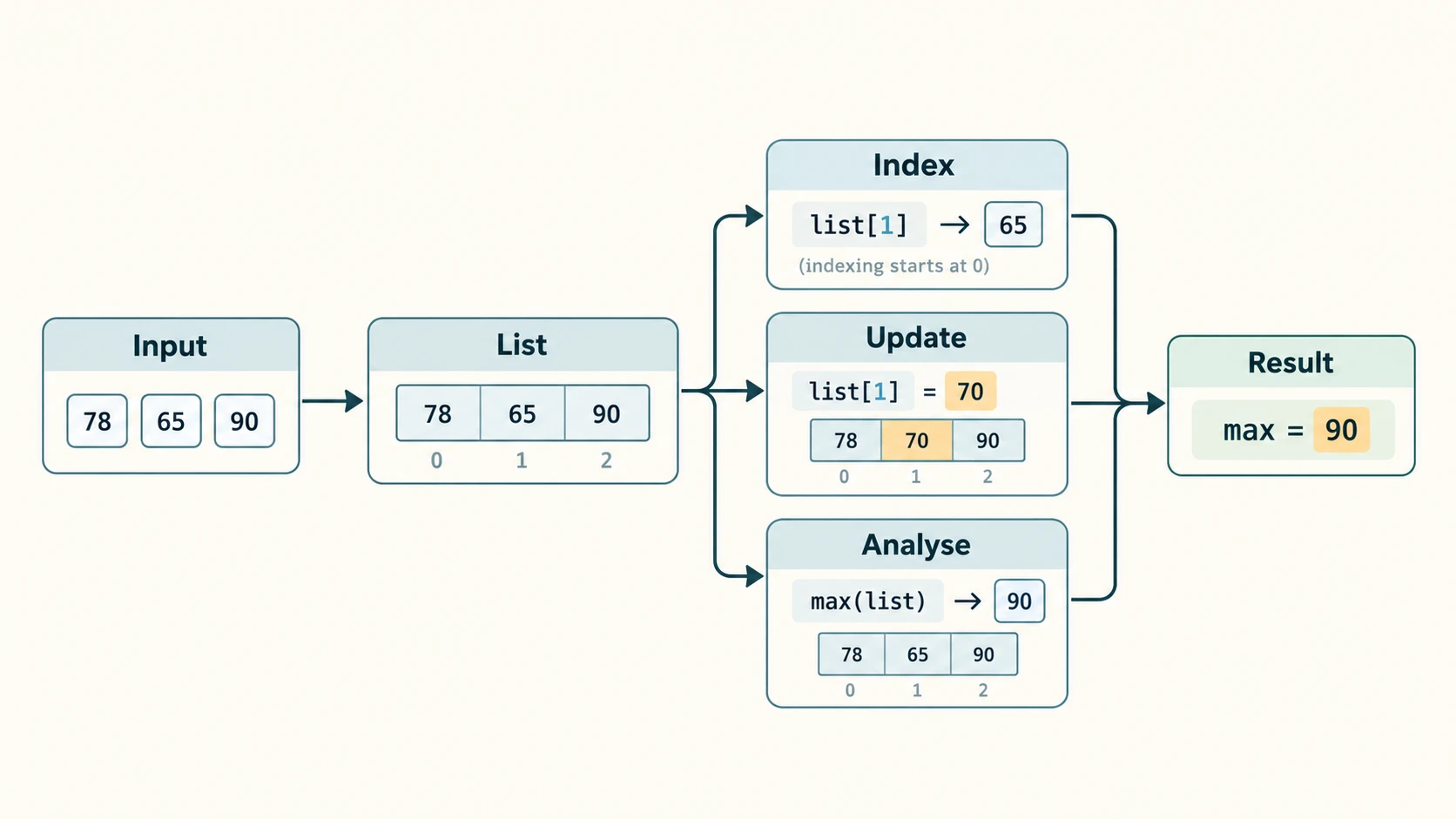
A class teacher collects scores for thirty students. A shop stores the prices of many items. A simple game keeps track of recent scores. In every case, one value is not enough: we need a way to keep several related values in order and process them together. Python's list provides that collection. We can add new elements, update existing ones, search, sort, remove duplicates and send a list to a function without having to create a separate variable for each item.
Curriculum alignment: This chapter implements the existing prescribed C11-PY-13 — Lists: Operations, Methods and Programs. Seven internal reading sections (C11-CH09-S01 to S07) make the long chapter approachable; these are navigation sections, not new curriculum IDs. The worked Python programs reinforce earlier programming, loops and function-call concepts. The list-related practicals also complement existing C11-PY-17 without replacing or renumbering that lesson.
Authoritative source: NCERT Computer Science, Class XI, Chapter 9, “Lists,” kecs109.pdf from the supplied verified reprint, printed pp. 189–206; CBSE Class XI Computer Science (083) syllabus 2026–27; official Python language documentation for exact method behaviour. NCERT's original numbering is retained; short task descriptions are paraphrased and all solutions and teaching explanations are original. Apparent textbook oversimplifications are identified openly.
Learning outcomes
After completing this chapter you should be able to create empty, numerical, mixed and nested lists; use zero-based and negative indices; explain list mutability; combine, repeat and slice lists; traverse them with for and while; choose suitable built-ins and mutating methods; distinguish append, extend and insert; delete by index versus value; sort safely; make copies without accidental aliasing; pass lists to functions; perform a linear search, frequency count, median, second-largest computation and in-place reversal; and independently solve every NCERT exercise and all nine programming problems.
How to navigate this chapter
| Reading section | NCERT coverage | Key skills |
|---|---|---|
C11-CH09-S01 — Lists and indexing | §9.1 | Creation, mixed/nested data, indices, mutability |
C11-CH09-S02 — List operations | §9.2 | Concatenation, repetition, membership, slicing |
C11-CH09-S03 — Traversal | §9.3 | for/while loops, indices, searching |
C11-CH09-S04 — Methods and built-ins | §9.4 | append/extend/insert, count/index, deletion, sorting |
C11-CH09-S05 — Nested and copied lists | §§9.5–9.6 | Nested access, shallow copy, aliasing |
C11-CH09-S06 — Lists in functions | §9.7 | Mutation, rebinding, return values |
C11-CH09-S07 — Complete programs | §9.8 | Menus, average, linear search, validation |
After the lessons comes an NCERT Solution Bank covering numbered Exercises 1–7, including Q1(i–iv), Q4(a–c), Q6(a–c), Q7(a–e); Programming Problems 1–9, including both Q8(a) and Q8(b); and detailed walkthroughs of NCERT Programs 9-1 through 9-5. Then come 30 original practice questions with explained answers, quick revision. The supplied Chapter 9 does not have an independently numbered Activities / Think-and-Reflect / case-study set; none is invented.
Lesson C11-PY-13 — Lists: Operations, Methods and Programs
Section C11-CH09-S01 — What Is a List?
1. From one variable to a collection
Consider a teacher who wants to know the average of five marks. Writing five separate variables works for a tiny, fixed dataset, but it becomes awkward when the class size changes. A list collects related objects under one name:
marks = [56, 72, 89, 64, 79]
print(marks)
print("Students:", len(marks))
print("Total:", sum(marks))
print("Average:", sum(marks) / len(marks))
[56, 72, 89, 64, 79]
Students: 5
Total: 360
Average: 72.0The brackets [] denote a list literal. A list is an ordered, mutable sequence of references to objects. Ordered means elements occupy positions. Mutable means we can replace, insert or delete elements in the existing list. Python does not require the elements all to be of the same type.
empty = []
subjects = ["Computer Science", "Mathematics", "English"]
measurements = [18, 18.5, True, "checked"]
class_record = ["Asha", "XI-A", [81, 78, 90]]
print(empty, subjects[0], class_record[2][1])
[] Computer Science 78Important: An empty list is valid, even though an older textbook definition may informally say “one or more elements.” The value [4] is a list containing one integer; 4 is an integer. A list can contain other lists (and also tuples, strings, dictionaries or other Python objects).
2. Indexed positions and negative indices
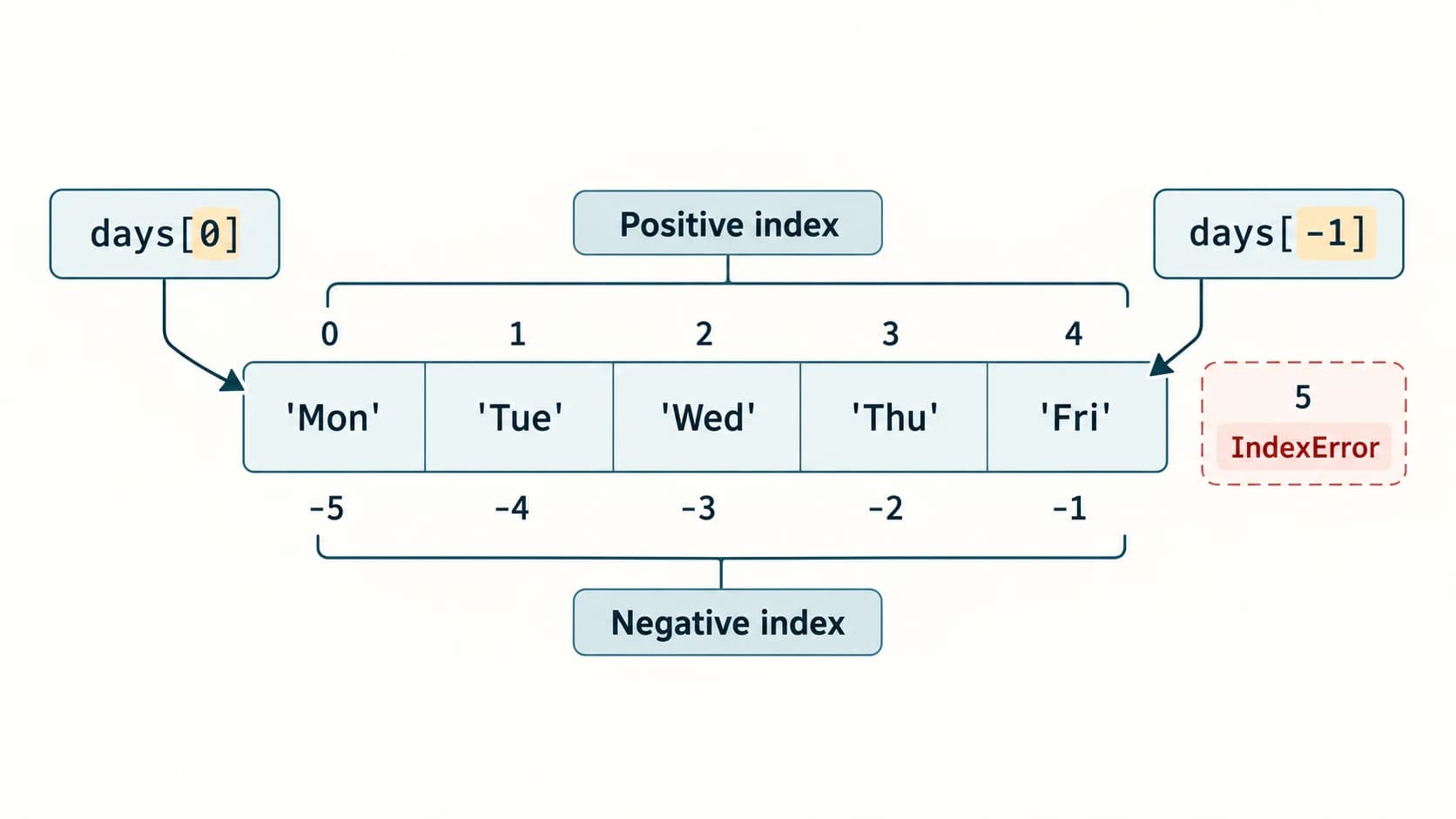
Every element has an integer position beginning at 0. A negative index counts backwards: -1 is the last item, -2 the item before it.
List element in days = ['Mon','Tue','Wed','Thu','Fri'] | Mon | Tue | Wed | Thu | Fri |
|---|---|---|---|---|---|
| Positive index | 0 | 1 | 2 | 3 | 4 |
| Negative index | -5 | -4 | -3 | -2 | -1 |
days = ["Mon", "Tue", "Wed", "Thu", "Fri"]
print(days[0])
print(days[-1])
print(days[1 + 2])
print(days[len(days) - 1])
Mon
Fri
Thu
FriTrying days[5] or days[-6] raises IndexError, since a five-element list has only five positions. An empty list has no first or last item. An expression in the brackets is permitted if it evaluates to a valid integer index.
3. Lists can be changed — unlike strings
colours = ["Red", "Green", "Blue", "Orange"]
colours[3] = "Black"
colours.append("White")
print(colours)
['Red', 'Green', 'Blue', 'Black', 'White']colours[3] = ... replaces one existing element. append() adds another element at the end. Compare with name = "Ravi": the statement name[0] = "K" raises TypeError because strings are immutable. For lists, changing an element modifies that list object, which can matter when multiple names refer to it.
4. Lists as objects, and why id() numbers are not exam answers
A variable such as colours refers to a list object. id(colours) reports an identity useful for experiments, but the numerical value depends on the Python process. We should never learn or print one textbook's id() number as if it were a standard result. We can test shared-object identity with is and observe whether changes are visible under both names; more on this in Section S05.
5. A practical input example
n = int(input("Number of marks: "))
if n <= 0:
    print("Enter a positive class size")
else:
    marks = []
    for i in range(n):
        mark = float(input(f"Mark {i + 1}: "))
        marks.append(mark)
    print("Mean:", sum(marks) / n)
The validation protects against division by zero. For a real grading program, also validate that each mark lies in the permitted range; the range depends on the school and examination. Common mistake: calling int(input()) without thinking about nonnumeric user input causes ValueError. In beginner exercises, we ordinarily assume well-formed numeric input, but document that assumption.
Checkpoint: Explain why [] and [[]] are different. The first has length zero; the second has length one because its sole element is itself an empty list.
Section C11-CH09-S02 — List Operations and Slicing
1. Concatenation: join two lists in order
The binary operator + creates a new outer list containing all items from its left operand followed by those from its right operand.
left = [1, 3, 5]
right = [2, 4, 6]
joined = left + right
print(joined)
print(left)
[1, 3, 5, 2, 4, 6]
[1, 3, 5]Neither original list is mutated by left + right. Both operands must be lists, so [1, 2] + "34" raises TypeError. Convert deliberately if needed, for example [1, 2] + list("34") creates [1, 2, '3', '4'], not [1, 2, 3, 4].
2. Repetition: repeat references in a list
print(["Go"] * 3)
print([1, 2] * 2)
print([1, 2] * 0)
['Go', 'Go', 'Go']
[1, 2, 1, 2]
[]A subtle but valuable warning: [[0] * 3] * 2 gives two references to the same inner list, not two independent rows. Updating one inner row affects both. To build independent rows, use [[0] * 3 for _ in range(2)].
3. Membership tests individual elements
subjects = ["CS", "Maths", "English"]
print("CS" in subjects)
print("Science" not in subjects)
print("C" in subjects)
True
True
FalseMembership on a list compares against its elements, not substrings inside an element. By contrast, "C" in "CS" is True because membership on a string searches the character sequence.
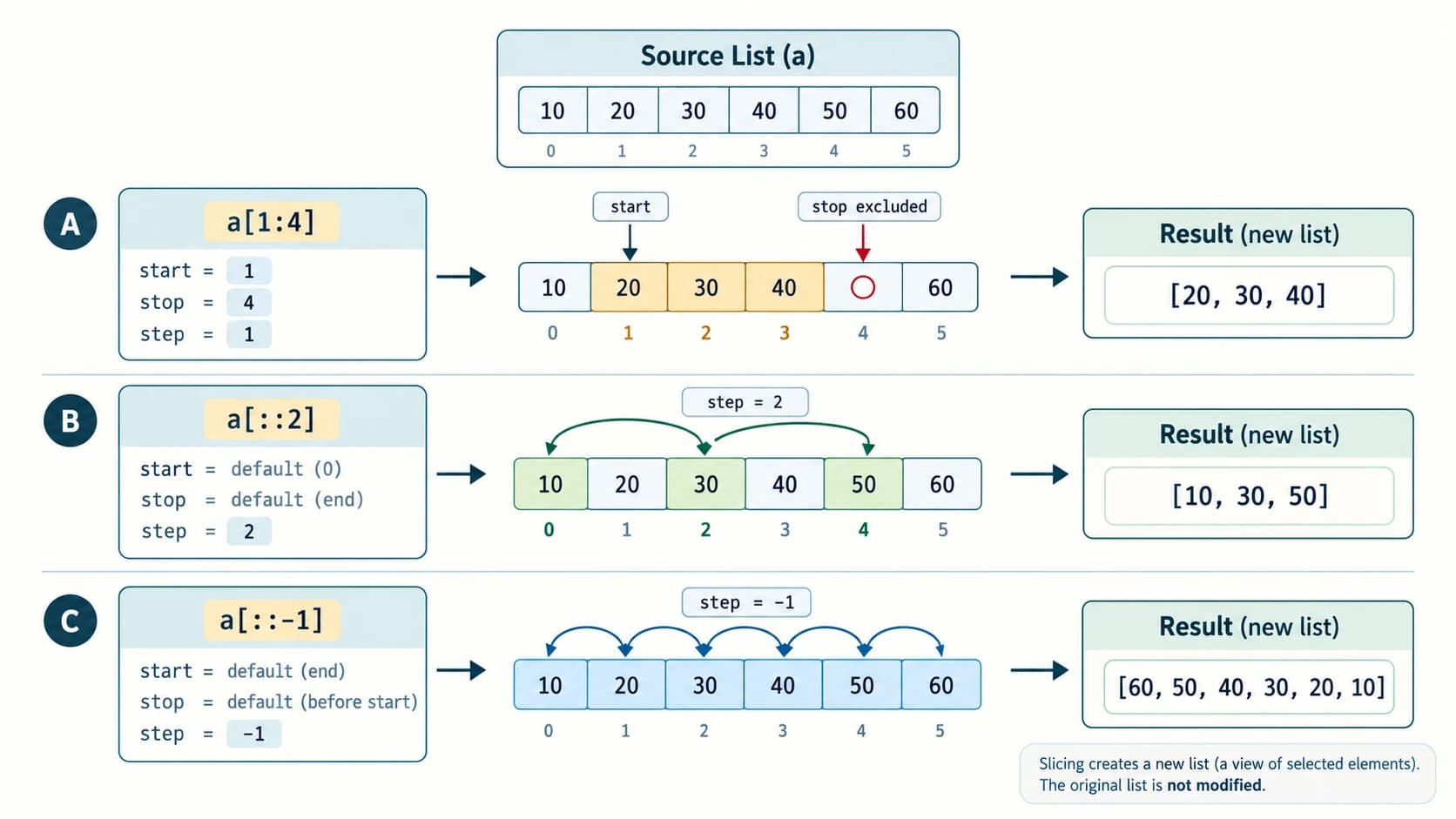
4. Slice notation list[start:stop:step]
A slice takes selected elements to form a new outer list. The start defaults to the appropriate beginning, the stop is excluded, and the step controls spacing and direction. For positive steps, the range goes forward; for negative steps, it goes backward.
numbers = [10, 20, 30, 40, 50, 60]
print(numbers[1:4])
print(numbers[:3])
print(numbers[3:])
print(numbers[::2])
print(numbers[::-1])
print(numbers[-4:-1])
[20, 30, 40]
[10, 20, 30]
[40, 50, 60]
[10, 30, 50]
[60, 50, 40, 30, 20, 10]
[30, 40, 50]An out-of-range slice boundary is clipped harmlessly: numbers[2:100] takes elements from index 2 onward. This contrasts with numbers[100], which raises IndexError. A slice with step=0 is invalid (ValueError). numbers[5:1] is empty, but numbers[5:1:-1] travels backward from index 5 to 2.
5. Assignment through a slice
A list allows slice assignment, not merely slice reading:
items = [10, 20, 30, 40]
items[1:3] = [21, 22, 23]
print(items)
[10, 21, 22, 23, 40]The selected two elements are replaced by three; list length can change. The replacement must be an iterable, even if only one new element is wanted: items[1:2] = [99]. Extended slices such as items[::2] = ... normally require the replacement sequence to have the same number of elements as the selected positions. We will also use del items[::2] in NCERT Exercise 4.
6. Three superficially similar operations
x = [6, 7]
y = x * 2           # new list, x unchanged
x *= 2              # mutates the original list in place
x = x * 2           # creates another list and rebinds x
The resulting elements may look the same, but object identity and aliases differ. We investigate NCERT Exercise 6 in the answer bank. This distinction frequently appears in tracing questions.
Section C11-CH09-S03 — Traversing and Searching Lists
1. Direct traversal with for
marks = [73, 85, 62]
for mark in marks:
    print(mark)
This prints 73, then 85, then 62 on separate lines. Choose direct traversal when you only need each value. It is usually simpler and harder to get wrong than manual index handling.
2. Index-based traversal
marks = [73, 85, 62]
for i in range(len(marks)):
    print("Student", i + 1, "scored", marks[i])
Use this form when both position and value matter or when an indexed update is necessary. Python also provides enumerate(marks, start=1), which is often clearer. Because the source syllabus introduces range() and len(), learn the basic indexed loop first.
3. A while loop needs its own progress update
items = ["Red", "Green", "Blue"]
i = 0
while i < len(items):
    print(items[i])
    i += 1
Without i += 1, this loop never reaches the exit condition if the list is nonempty. The final condition is checked when i becomes len(items); no out-of-range element is accessed because the body is skipped.
4. Linear search — the simplest correct search
A linear search compares the sought item with consecutive list elements until it finds a match or reaches the end.
def find_first(items, target):
    for i in range(len(items)):
        if items[i] == target:
            return i
    return -1

print(find_first([23, 12, 89, 12], 12))
print(find_first([23, 12, 89, 12], 7))
1
-1Returning -1 is an explicit decision in our function, not a built-in list method named find(). Python lists have index(value), which returns the first matching position but raises ValueError if the value is absent. The source chapter summary mentions find() among list operations; there is no built-in list.find() method. find() is a string method.
The worst-case linear search may inspect all n elements, so its time grows approximately with the list length: O(n). This terminology is enrichment; the required classroom skill is correct looping and testing.
5. Counting and accumulating
scores = [6, 8, 6, 9, 6]
occurrences = 0
for score in scores:
    if score == 6:
        occurrences += 1
print(occurrences)
print(scores.count(6))
3
3The loop demonstrates the algorithm; the method count(6) performs the same one-value frequency count directly. A running total uses a similar pattern: initialise total = 0, then add each numeric element, and divide by a checked nonzero count to obtain a mean.
Section C11-CH09-S04 — List Methods and Built-in Functions
1. Methods versus general built-in functions
A method is called on an object, for example items.append(9). A built-in function often receives the list as its argument, for example len(items) or sorted(items). NCERT's Table 9.1 conveniently groups both kinds together for learning; do not treat all of them as methods of the list class.
| Operation | Sample use | Result and change |
|---|---|---|
len() | len([2,4]) | 2; no mutation |
list() | list('CAT') | ['C','A','T']; makes a list |
append() | a.append(5) | Add one object at the end; returns None |
extend() | a.extend([5,6]) | Add items from an iterable; returns None |
insert() | a.insert(1,99) | Insert at index 1; returns None |
count() | a.count(5) | Number of equal elements |
index() | a.index(5) | First matching index, or ValueError |
remove() | a.remove(5) | Remove first equal value, or ValueError; returns None |
pop() | a.pop(1) | Remove at index 1 and return item; IndexError on bad index |
reverse() | a.reverse() | Reverse order in place; returns None |
sort() | a.sort() | Sort in place; returns None |
sorted() | sorted(a) | Return newly sorted list; original unchanged |
min(), max() | max(a) | Smallest/largest element; empty list raises ValueError |
sum() | sum(a) | Sum numeric contents (optional numeric start); default zero for empty list |
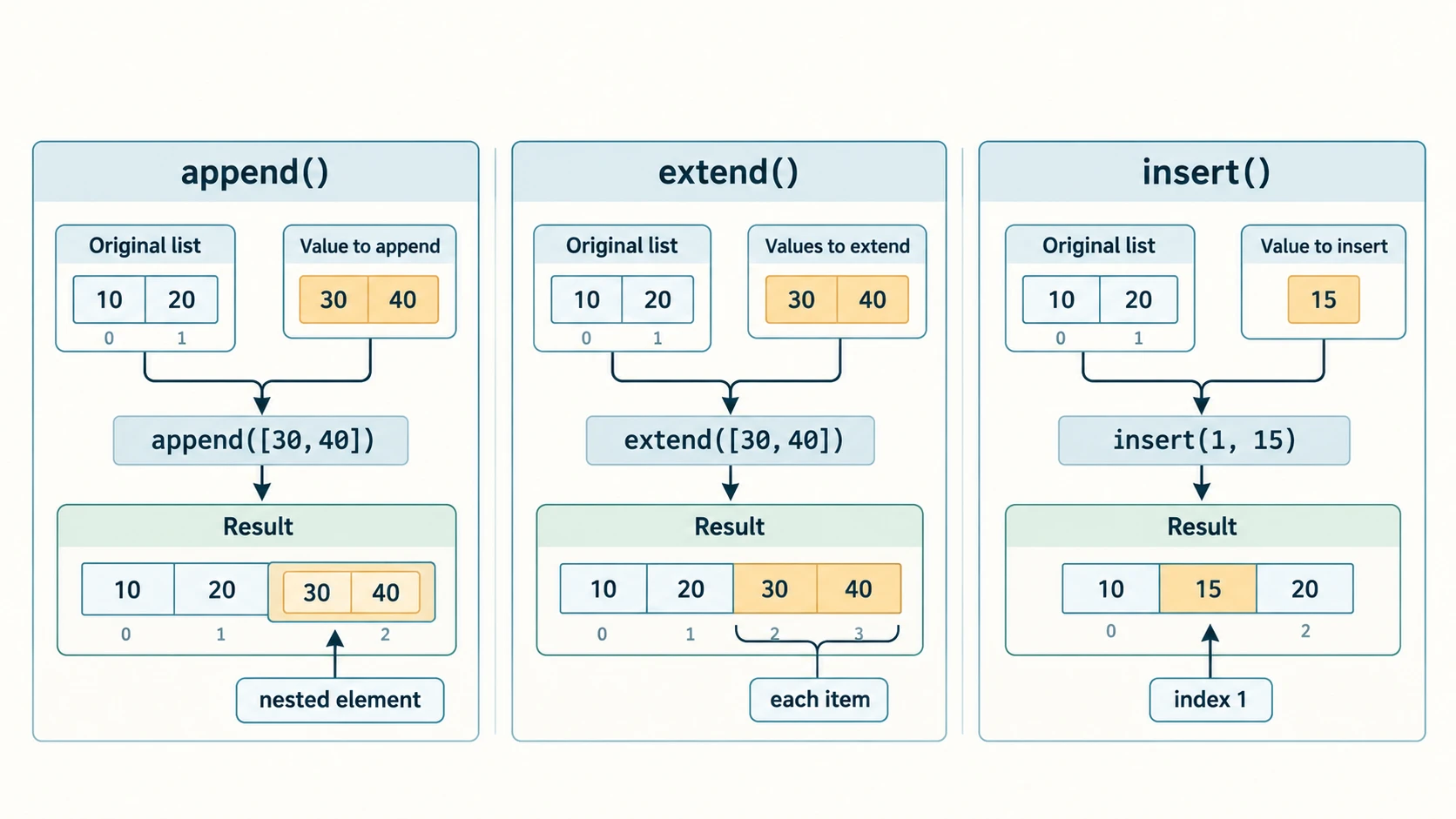
2. append() and extend() solve different problems
x = [10, 20]
y = [30, 40]
x.append(y)
print(x)

x = [10, 20]
x.extend(y)
print(x)
[10, 20, [30, 40]]
[10, 20, 30, 40]append adds one element, even if that element is another list. extend iterates over the supplied object and adds each yielded element. extend('AB') appends 'A' and 'B' separately. Unlike append, it therefore expects an iterable. Both methods mutate the list on which they are called.
3. Insertion and deletion: match the method to the requested action
a = [10, 30, 40]
a.insert(1, 20)
print(a)
a.remove(30)
print(a)
deleted = a.pop(1)
print(deleted, a)
[10, 20, 30, 40]
[10, 20, 40]
20 [10, 40]insert(1,20) inserts before the current item at index 1. remove(30) searches for the value 30 and removes the first such item; pop(1) removes the item at index 1. del a[1] also removes by index but does not return the deleted value. del a[1:4] deletes a slice; a.clear() removes all elements (supplementary standard method).
Boundary traps: a.remove(x) when x is absent raises ValueError; a.pop() on an empty list raises IndexError; a[-1] is the last item rather than an invalid negative position. User interfaces should clearly distinguish a human position such as “third” (1-based) from a Python index (2).
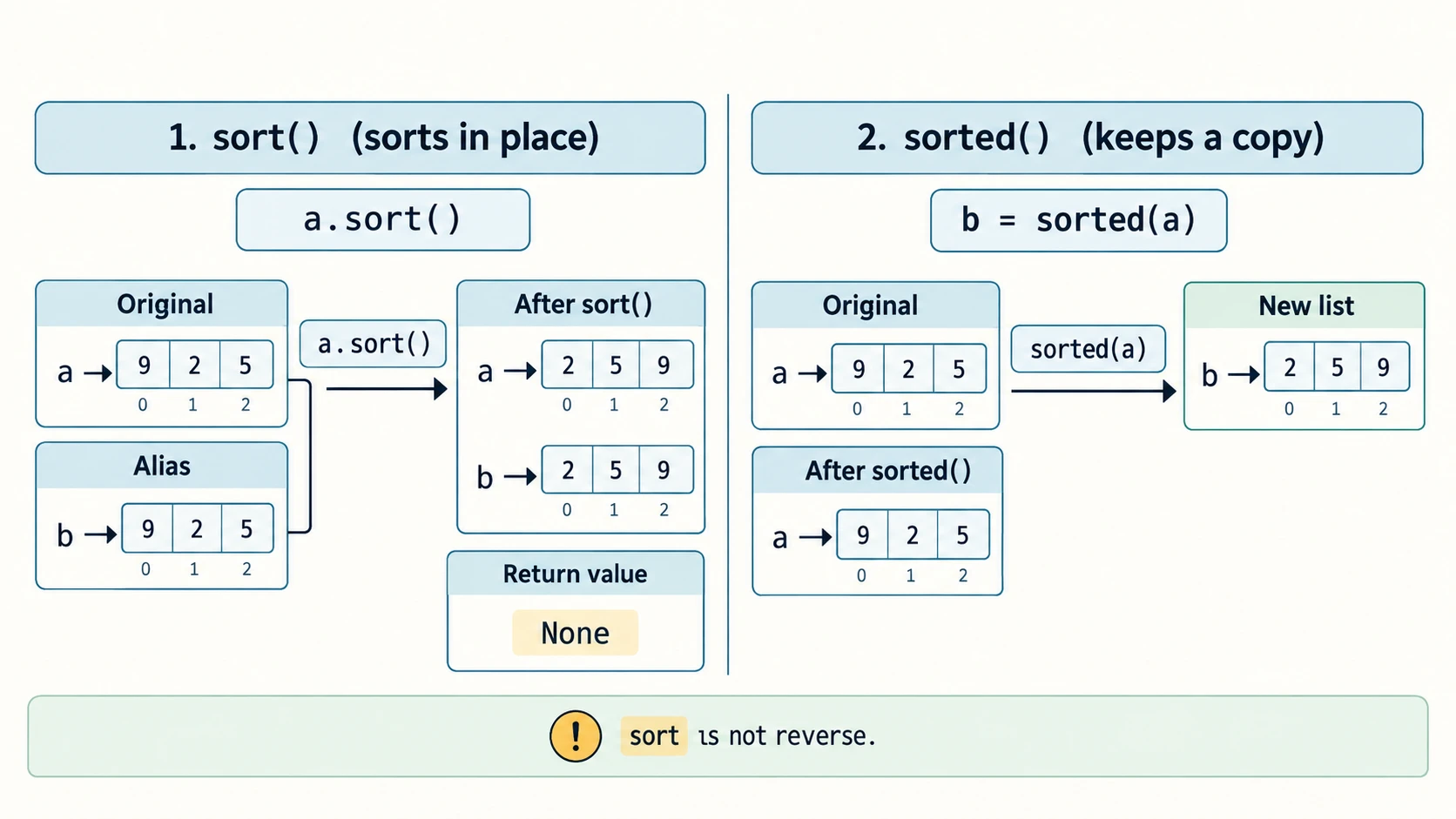
4. Sorting versus sorting a copy
a = [9, 2, 5]
returned = a.sort()
print(a)
print(returned)

b = [9, 2, 5]
c = sorted(b)
print(b)
print(c)
[2, 5, 9]
None
[9, 2, 5]
[2, 5, 9]The common mistake a = a.sort() discards the reference to the list by rebinding a to None. Use a.sort() when mutation is intended; use a = sorted(a) when you want the newly sorted result. a.sort(reverse=True) sorts descending. a.reverse() reverses the existing order, which is not necessarily the same as descending sorting: [3,1,2][::-1] gives [2,1,3], not [3,2,1].
Strings and numbers generally cannot be ordered against each other directly in a modern Python 3 list: [3, 'A'].sort() raises TypeError. Use consistent comparable values, or a deliberate key (advanced enrichment). Sorting a list of lists compares elements lexicographically; it does not magically understand grade semantics.
5. When to prefer simple built-ins
marks = [76, 82, 69, 93]
print(len(marks))
print(min(marks), max(marks))
print(sum(marks))
print(sum(marks) / len(marks))
4
69 93
320
80.0min/max need at least one element. sum() is intended mainly for numeric sequences, not to join strings (use ''.join(strings) for that). For a frequency distribution of all values, we can build a dictionary or use repeated count() calls; the latter can be less efficient on large inputs, but suits small beginner exercises.
6. Fast comparison reference
| Question | Prefer | Why |
|---|---|---|
| Add one nested list element | .append([3,4]) | Preserves nested object as one item |
| Add elements from another list | .extend([3,4]) | Flattens one level of supplied iterable into outer list |
| Insert before a chosen index | .insert(i, value) | Shifts later entries right |
| Delete first occurrence of a value | .remove(value) | Searches by equality |
| Delete item at a known index | .pop(i) / del a[i] | Uses location, not value |
| Get a descending ordering | .sort(reverse=True) | In-place descending sort |
| Preserve original while sorting | sorted(a) | Creates a separate list |
| Simply reverse order | .reverse() or a[::-1] | First mutates, second creates new outer list |
| Search for a value safely | x in a before .index(x) | Avoids uncaught ValueError |
Section C11-CH09-S05 — Nested Lists, Aliasing and Copying
1. A list can represent a table
scores = [
    [78, 83, 91],
    [65, 72, 88],
    [92, 89, 94],
]
print(scores[1])
print(scores[1][2])
[65, 72, 88]
88scores[1] selects the second inner list; [2] then selects the third score in that list. For a rectangular table, loop over rows and then their columns. Nothing requires all inner lists to have equal lengths, so code should not assume an element always exists at a particular column.
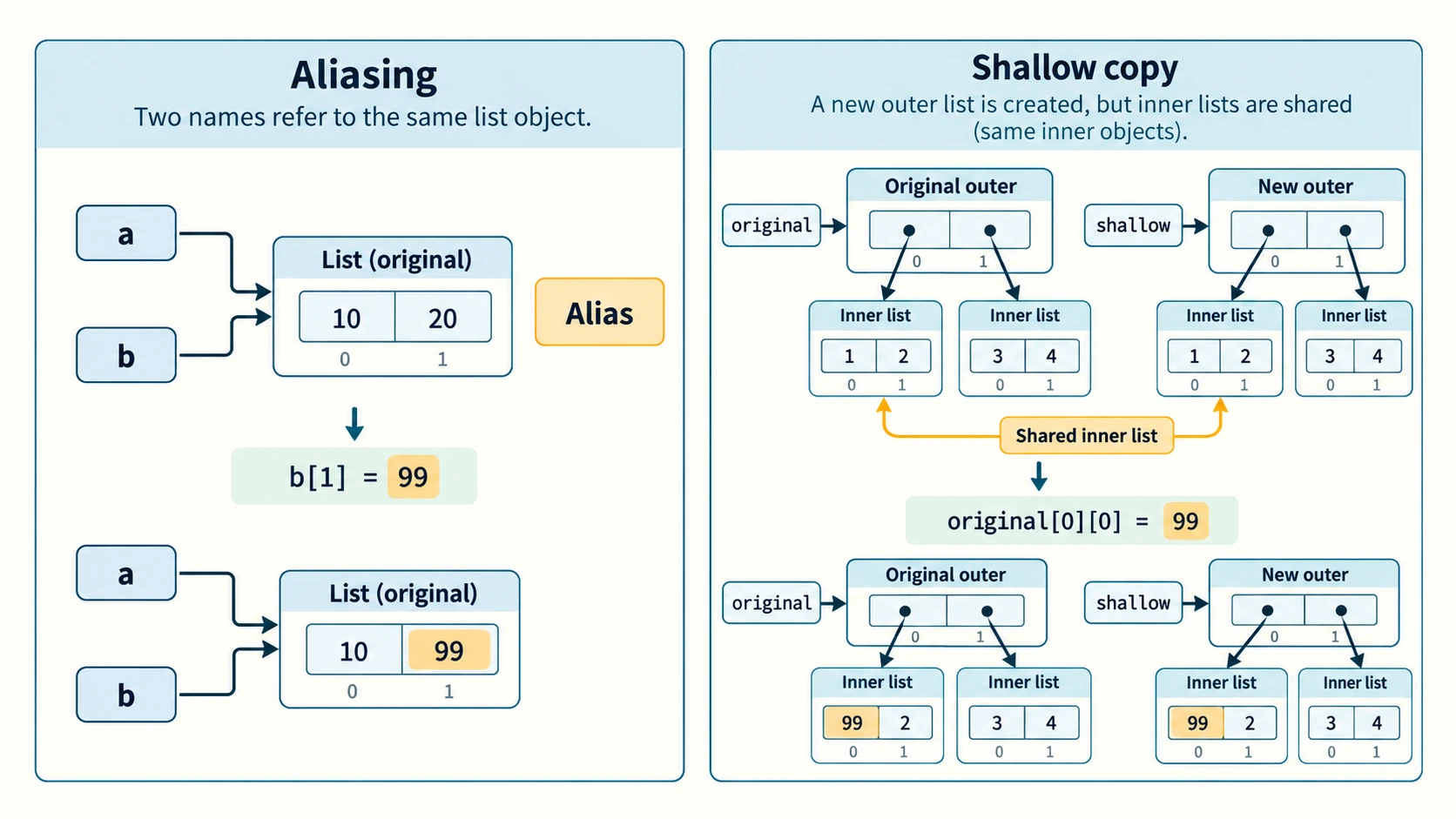
2. Assignment can make an alias, not a copy
a = [10, 20, 30]
b = a
b[1] = 99
print(a)
print(a is b)
[10, 99, 30]
TrueBoth names refer to one mutable list. An edit through either name is visible via the other. This is not an inexplicable side effect: it follows directly from the two references pointing to the same object.
3. Shallow copies create a different outer list
original = [10, 20, 30]
by_slice = original[:]
by_constructor = list(original)
by_method = original.copy()
print(by_slice == original, by_slice is original)
print(by_constructor is original, by_method is original)
True False
False FalseThe textbook also demonstrates copy.copy(original) after import copy. All four methods make shallow copies of an ordinary list: a separate outer list, but nested mutable objects are still shared. Note that list.copy() is a useful modern standard method; NCERT primarily introduces slicing, list() and copy.copy().
matrix = [[1, 2], [3, 4]]
shallow = matrix[:]
shallow[0][0] = 99
print(matrix)
[[99, 2], [3, 4]]If independent nested objects are required, copy.deepcopy(matrix) is an additional technique beyond the core syllabus. It recursively copies many nested objects, subject to their copying semantics.
4. The repeated-inner-list trap
wrong = [[0] * 3] * 2
wrong[0][1] = 7
print(wrong)

right = [[0] * 3 for _ in range(2)]
right[0][1] = 7
print(right)
[[0, 7, 0], [0, 7, 0]]
[[0, 7, 0], [0, 0, 0]]This is especially important when constructing student-grade tables, tic-tac-toe boards or grids. Repetition repeats references to inner lists, while the comprehension creates a new inner list in each iteration.
Section C11-CH09-S06 — Passing Lists to Functions
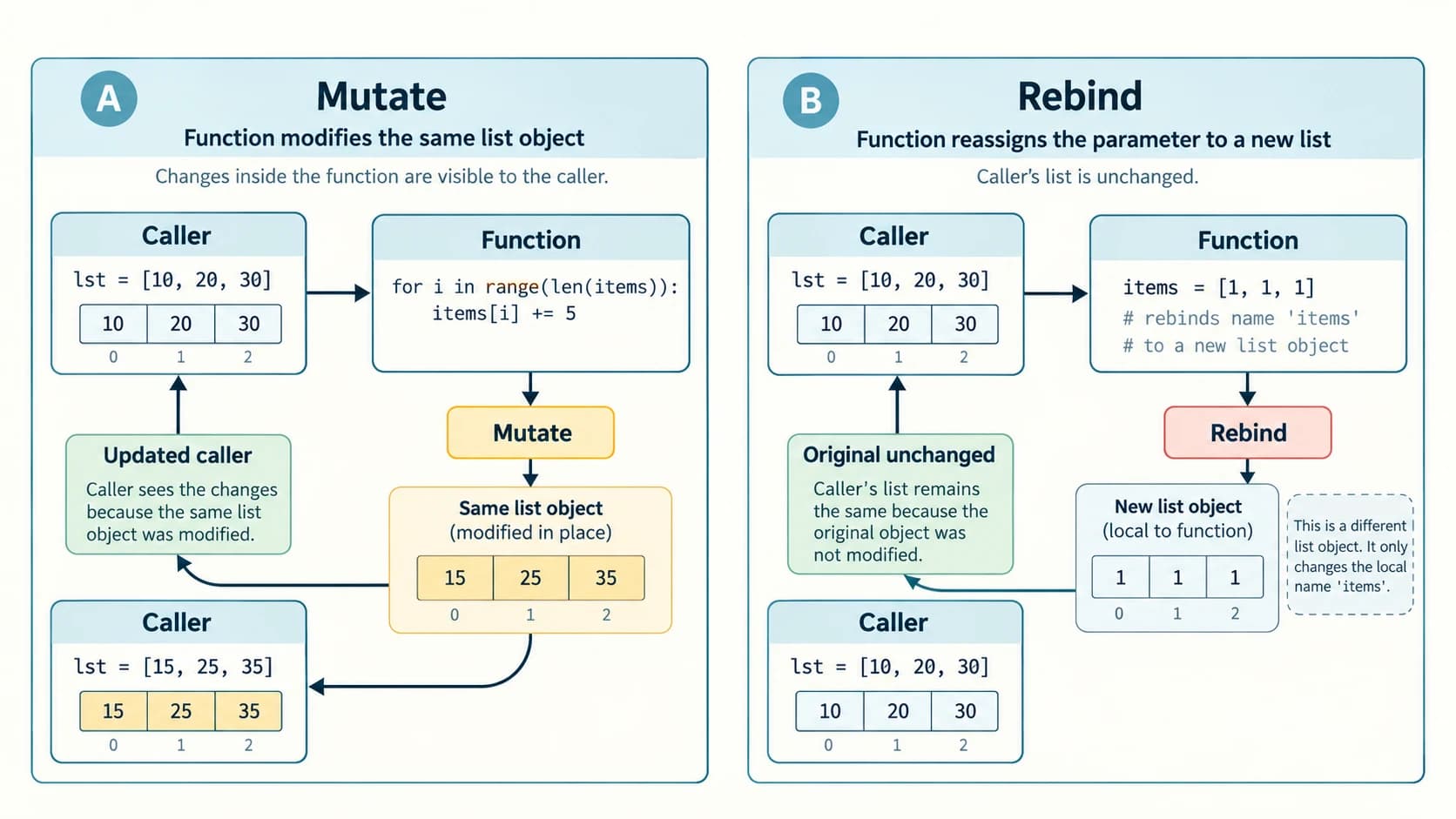
1. In-place mutation is visible to the caller
def add_bonus(scores):
    for i in range(len(scores)):
        scores[i] += 5

marks = [10, 20, 30]
add_bonus(marks)
print(marks)
[15, 25, 35]The function's parameter refers to the same list object supplied by the caller; scores[i] += 5 replaces elements within that object. This is the key idea behind NCERT Program 9-1.
2. Local rebinding does not replace the caller's list
def replace_locally(scores):
    scores = [1, 1, 1]   # a new list bound to the local name
    print("Inside:", scores)

marks = [10, 20, 30]
replace_locally(marks)
print("Outside:", marks)
Inside: [1, 1, 1]
Outside: [10, 20, 30]The assignment in the function changes where the local name refers; it does not mutate the original list. This is the key idea behind NCERT Program 9-2. Python's argument-passing mechanism is often called call by sharing or object-reference passing. Calling it simply “pass by reference” can be misleading because rebinding a parameter does not rebind the caller's variable.
3. Returning a new list is an alternative
def with_bonus(scores):
    return [score + 5 for score in scores]

original = [10, 20, 30]
updated = with_bonus(original)
print(original)
print(updated)
[10, 20, 30]
[15, 25, 35]If a program should not modify its inputs, prefer a function that returns a new list. If it should deliberately update the shared data, state that in the function's description and tests. A reliable answer explains which object changes, not only what numbers are printed.
4. Lists as input to simple algorithms
def largest(numbers):
    if not numbers:
        raise ValueError("A nonempty list is required")
    candidate = numbers[0]
    for value in numbers[1:]:
        if value > candidate:
            candidate = value
    return candidate

print(largest([11, 20, 7, 19]))20A candidate variable records the best value seen so far. This pattern generalises to finding a minimum, second-largest distinct number, frequency or first match. Handle empty input explicitly instead of using a made-up default maximum such as zero, which fails for an all-negative list.
Section C11-CH09-S07 — Build and Test Complete List Programs
1. Menu-driven list manager: design before coding
The textbook's Program 9-3 offers operations to append, insert, extend, modify, delete, sort and display. This is a good way to connect separate operations into a useful interface. However, its input example uses eval() to convert typed text to Python values; do not use eval(input()) with untrusted input, because it can execute arbitrary Python code. We will parse comma-separated integers safely, and every position check will reject invalid negative or out-of-range positions rather than relying on surprising Python-index behaviour.
A robust menu also makes the index convention explicit. The program here uses zero-based indices to match textbook list indexing.
def parse_ints(text):
    """Convert e.g. '10, 20, -3' to [10, 20, -3]."""
    return [int(part.strip()) for part in text.split(",") if part.strip()]


def menu():
    data = [22, 4, 16, 38, 13]
    while True:
        print("\nCurrent list:", data)
        print("1 Append  2 Insert  3 Extend  4 Modify  5 Delete index")
        print("6 Delete value  7 Ascending  8 Descending  9 Display  10 Exit")
        try:
            choice = int(input("Choice: "))
            if choice == 1:
                data.append(int(input("New integer: ")))
            elif choice == 2:
                pos = int(input(f"Index (0 to {len(data)}): "))
                if 0 <= pos <= len(data):
                    data.insert(pos, int(input("New integer: ")))
                else:
                    print("Invalid insertion index")
            elif choice == 3:
                data.extend(parse_ints(input("Comma-separated integers: ")))
            elif choice == 4:
                pos = int(input("Index to modify: "))
                if 0 <= pos < len(data):
                    data[pos] = int(input("Replacement: "))
                else:
                    print("Invalid index")
            elif choice == 5:
                pos = int(input("Index to remove: "))
                if 0 <= pos < len(data):
                    print("Removed:", data.pop(pos))
                else:
                    print("Invalid index")
            elif choice == 6:
                value = int(input("Value to remove: "))
                if value in data:
                    data.remove(value)
                else:
                    print("Not found")
            elif choice == 7:
                data.sort()
            elif choice == 8:
                data.sort(reverse=True)
            elif choice == 9:
                print("List:", data)
            elif choice == 10:
                print("Goodbye")
                return
            else:
                print("Choose a number from 1 to 10")
        except ValueError:
            print("Enter a valid integer or comma-separated integer list")


if __name__ == "__main__":
    menu()
This is a safe teaching adaptation of the textbook's menu, not a verbatim reproduction. The nine useful operations and exit option are preserved. Try choices 8, 5, 2, 3, 9, and 10; after descending sorting [38,22,16,13,4], deleting index 2 removes 16 and leaves [38,22,13,4].
2. Average with a function
def average_of_marks(marks):
    if not marks:
        raise ValueError("No marks supplied")
    return sum(marks) / len(marks)

print(average_of_marks([45, 89, 79, 76, 55]))68.8The textbook's Program 9-4 obtains n and computes total / n. This version computes the size from the list to avoid inconsistencies between the list's actual length and a separately supplied count, and it handles the empty-list boundary. Both teach the same average formula.
3. Linear search with position reporting
def search_position(numbers, sought):
    for i, value in enumerate(numbers):
        if value == sought:
            return i
    return None

numbers = [23, 567, 12, 89, 324]
result = search_position(numbers, 12)
if result is None:
    print("Not found")
else:
    print("Position:", result + 1)
Position: 3Internally the returned index is 2. We add 1 only while displaying a friendly human position. The source textbook's Program 9-5 uses the same None-on-missing concept. Be precise when a question asks for a “position”: explain whether it means index 2 or third place.
4. Debugging habits for all list programs
Test not only a normal list but also an empty list (where the program permits one), a single-element list, repeated values, negative numbers, already-sorted values and a missing search target. A function should either return a meaningful result or reject invalid input explicitly. For example, max([]) and min([]) raise ValueError, but sum([]) yields 0; computing the mean of an empty list must not attempt to divide by zero.
NCERT Chapter 9 — Complete Exercise Solution Bank
These solutions refer to the NCERT Chapter 9 exercise numbers and briefly describe each task instead of copying full textbook questions. The source distinguishes seven numbered conceptual/tracing exercises from nine numbered Programming Problems; both groups are solved. Where source code contains an unprinted expression, answers distinguish interactive mode, which displays an expression's value, from script mode, where the same expression alone produces no console output.
NCERT Exercise 1 — Output of four list operations
Exercise 1(i) — sort() then print
list1 = [12, 32, 65, 26, 80, 10]
list1.sort()
print(list1)
Answer:
[10, 12, 26, 32, 65, 80]Reason: sort() changes the original list in ascending order. print(list1) therefore displays the changed list. Note that list1.sort() itself returns None, not the sorted contents. Sorting places 10 first, 80 last.
Exercise 1(ii) — Calling sorted() without assigning its result
list1 = [12, 32, 65, 26, 80, 10]
sorted(list1)
print(list1)
Answer:
[12, 32, 65, 26, 80, 10]Reason: sorted(list1) builds a new sorted list, but the result is not assigned to a variable and is not printed in a script. It does not modify list1. Replacing the second line with list1 = sorted(list1) would change the subsequent printed answer.
Exercise 1(iii) — Slicing, concatenation and the missing print statement
list1 = [1,2,3,4,5,6,7,8,9,10]
list1[::-2]
list1[:3] + list1[3:]
Answer in interactive mode:
[10, 8, 6, 4, 2]
[1, 2, 3, 4, 5, 6, 7, 8, 9, 10]
Answer in a saved Python script: No printed output, because there are no print() calls. The expressions are still evaluated, but their values are not displayed automatically in script mode.
Reason: Starting at the last item, a step of -2 picks 10, 8, 6, 4, 2. The first three and remaining seven items concatenate to reconstruct the full original list. Neither expression changes list1. The distinction between an interactive prompt and an executable .py program is important for this source's wording “output”.
Exercise 1(iv) — The final element by length
list1 = [1,2,3,4,5]
list1[len(list1)-1]
Answer in interactive mode: 5.
Answer in script mode: No printed output without print(). Because len(list1) is 5, the valid final index is 4, and list1[4] is 5. The negative-index equivalent is list1[-1].
NCERT Exercise 2 — Append a nested list, then extend it
Starting list: myList = [10,20,30,40]. The two subparts are applied sequentially to the same list.
After operation (i):
myList = [10, 20, 30, 40]
myList.append([50, 60])
print(myList)
[10, 20, 30, 40, [50, 60]]The inner [50, 60] is one element at index 4. Length is now 5.
After operation (ii), continuing with the list resulting from (i):
myList = [10, 20, 30, 40]
myList.append([50, 60])  # state after (i)
myList.extend([80, 90])  # now apply (ii)
print(myList)
[10, 20, 30, 40, [50, 60], 80, 90]The integers 80 and 90 are appended separately; length becomes 7. The nested list remains nested. extend does not recursively flatten every nested list already in the sequence. If the two steps were instead tested independently from the original list, the second result would be [10, 20, 30, 40, 80, 90]; that is not the requested sequential interpretation.
NCERT Exercise 3 — Values at even indices
myList = [1,2,3,4,5,6,7,8,9,10]
for i in range(0, len(myList)):
    if i % 2 == 0:
        print(myList[i])
Answer:
1
3
5
7
9
The loop selects indices 0,2,4,6,8, whose values are 1,3,5,7,9. It does not select the even numbers in the list. Read i % 2 == 0 as a test of the index, not the element value.
NCERT Exercise 4 — Three slice deletions
The original list [1,2,3,4,5,6,7,8,9,10] is re-created separately in each subpart.
Exercise 4(a) — del myList[3:]
myList = [1,2,3,4,5,6,7,8,9,10]
del myList[3:]
print(myList)
[1, 2, 3]Slice [3:] refers to all elements beginning at index 3: values 4 through 10. Deleting them retains the first three elements.
Exercise 4(b) — del myList[:5]
myList = [1,2,3,4,5,6,7,8,9,10]
del myList[:5]
print(myList)
[6, 7, 8, 9, 10]Slice [:5] contains indices 0 through 4. Delete the first five values and keep the latter five.
Exercise 4(c) — del myList[::2]
myList = [1,2,3,4,5,6,7,8,9,10]
del myList[::2]
print(myList)
[2, 4, 6, 8, 10]The extended slice selects original indices 0,2,4,6,8 (values 1,3,5,7,9); deleting them leaves the even values. The indices refer to the original set of selected positions, not a series of new indices recalculated after each deletion.
NCERT Exercise 5 — append() versus extend()
| Point of difference | a.append(x) | a.extend(iterable) |
|---|---|---|
| What is added | Exactly one object x | Each element produced by the iterable |
If argument is [3,4] | Adds a single nested list [3,4] | Adds 3 and 4 separately |
| Increase in list length | Exactly 1 | Number of elements in iterable |
| Accepted argument | Any Python object | Iterable such as list, tuple or string |
Effect on a | Mutates existing list | Mutates existing list |
| Return value | None | None |
Example:
a = [1, 2]
a.append([3, 4])
print(a)
b = [1, 2]
b.extend([3, 4])
print(b)
[1, 2, [3, 4]]
[1, 2, 3, 4]Exam trap: append() does not flatten a list argument and extend() does not copy over a list as one nested element.
NCERT Exercise 6 — list1 * 2, list1 *= 2, list1 = list1 * 2
Initial list: list1 = [6,7,8,9].
(a) list1 * 2 evaluates to [6, 7, 8, 9, 6, 7, 8, 9] but does not modify or rebind list1 by itself. In a script, it is not printed unless wrapped in print().
(b) list1 *= 2 duplicates the references in the existing list object (in-place repetition). The list thereafter contains [6,7,8,9,6,7,8,9]. If alias = list1 before the operation, alias sees the updated contents too.
(c) list1 = list1 * 2 constructs a new outer list and rebinds the name list1 to it. The contents after assignment are also [6,7,8,9,6,7,8,9], but any old alias still refers to the original four-element list.
Independent demonstration:
x = [6, 7, 8, 9]
alias = x
x *= 2
print(x is alias, len(alias))

x = [6, 7, 8, 9]
alias = x
x = x * 2
print(x is alias, len(alias), len(x))
True 8
False 4 8These operations are compared independently from the same initial list, not applied one after the other. For nested mutable elements, both repetition styles may preserve inner-object sharing; the crucial identity difference remains the outer list.
NCERT Exercise 7 — Reading and updating a student's nested record
The given student record is:
stRecord = ["Raman", "A-36", [56, 98, 99, 72, 69], 78.8]| Subpart | Required information/action | Correct statement | Result |
|---|---|---|---|
| (a) | Student's percentage | stRecord[3] | 78.8 |
| (b) | Fifth-subject mark | stRecord[2][4] | 69 |
| (c) | Highest subject mark | max(stRecord[2]) | 99 |
| (d) | Roll number | stRecord[1] | 'A-36' |
| (e) | Change name | stRecord[0] = "Raghav" | Name now 'Raghav' |
Complete checked demonstration:
stRecord = ["Raman", "A-36", [56, 98, 99, 72, 69], 78.8]
print(stRecord[3])
print(stRecord[2][4])
print(max(stRecord[2]))
print(stRecord[1])
stRecord[0] = "Raghav"
print(stRecord)
78.8
69
99
A-36
['Raghav', 'A-36', [56, 98, 99, 72, 69], 78.8]The record demonstrates two levels of access: stRecord[2] gives the mark list, and its [4] index gives the fifth mark. There are five marks, so the last index is 4, not 5. The percentage 78.8 is already provided as an element; it need not be recalculated for this question.
NCERT Chapter 9 — Complete Programming Problem Solutions
All nine NCERT programming tasks follow. Inputs are described with simple assumptions; tested sample cases show the result. Solutions remain readable for Class XI students and avoid unnecessary outside libraries unless the task benefits from them.
NCERT Programming Problem 1 — Count the occurrences of an element
Algorithm: Read a list, read the target, set frequency to zero, inspect each element and increment the counter on equality. Python's count() can independently check the result.
numbers = [4, 7, 4, 9, 4, 2, 7]
target = int(input("Value to count: "))
frequency = 0
for value in numbers:
    if value == target:
        frequency += 1
print("Frequency:", frequency)
Sample input: 4. Output: Frequency: 3.
The result is zero when the element does not occur. The algorithm works with negative values too. To accept a full list from the user, precede the search with:
n = int(input("List length: "))
numbers = []
for i in range(n):
    numbers.append(int(input(f"Element {i + 1}: ")))
In this supplementary input snippet, assume n >= 0. The idiomatic shortcut for frequency is numbers.count(target), but show the loop in written exams when an algorithm is requested.
NCERT Programming Problem 2 — Separate positive and negative integers
Algorithm: Traverse the original list exactly once. Values greater than zero go to positives, values below zero go to negatives. Zero is neither positive nor negative, so it remains only in the original list unless another zero bucket is explicitly requested.
n = int(input("How many integers? "))
numbers = []
for i in range(n):
    numbers.append(int(input(f"Integer {i + 1}: ")))

positives = []
negatives = []
for value in numbers:
    if value > 0:
        positives.append(value)
    elif value < 0:
        negatives.append(value)

print("Original:", numbers)
print("Positive:", positives)
print("Negative:", negatives)
Sample input: six values -3, 5, 0, -1, 8, 2.
Original: [-3, 5, 0, -1, 8, 2]
Positive: [5, 8, 2]
Negative: [-3, -1]
Why it works: Every element is examined and classified using two mutually exclusive conditions. Order within each result list matches order of appearance in the original. Do not incorrectly treat 0 as a positive integer; mention it explicitly if the question uses “positive and negative”.
NCERT Programming Problem 3 — Function returning the largest element
def largest_element(values):
    if not values:
        raise ValueError("List must contain at least one number")
    best = values[0]
    for value in values[1:]:
        if value > best:
            best = value
    return best

print(largest_element([-8, -2, -14, -5]))-2Initialising from the first actual element is essential. Starting at best = 0 would be wrong for a list containing only negative numbers. The one-line check is max(values), but the function demonstrates the logic of a maximum search. Reject empty input, for which no largest element exists.
NCERT Programming Problem 4 — Return the second-largest number
This question does not explicitly say whether duplicate copies of the greatest number count as separate ranks. In most examination settings, “second largest number” means second-largest distinct value. The solution below states that interpretation; we also explain how the alternative differs.
def second_largest_distinct(values):
    largest = None
    second = None
    for value in values:
        if largest is None or value > largest:
            second = largest
            largest = value
        elif value != largest and (second is None or value > second):
            second = value
    if second is None:
        raise ValueError("At least two distinct values are needed")
    return second

print(second_largest_distinct([10, 50, 20, 50, 40]))40Dry run: 10 becomes largest; 50 displaces it; 20 becomes the new second; repeated 50 is ignored; 40 replaces 20 as second. This also works for negative integers and zero because None means “no candidate yet”. A simpler permitted version is sorted(set(values))[-2], but it assumes hashable values and still requires at least two distinct entries. If the question instead means the second element in a sorted list even when tied, sorted(values)[-2] gives 50 for the example; clarify the convention to the student.
NCERT Programming Problem 5 — Find the median of n integers
Median: Sort values first. For odd n, take the central element. For even n, average the two central elements. Do not confuse median with mean.
def median_of_list(values):
    if not values:
        raise ValueError("Median of an empty list is undefined")
    ordered = sorted(values)
    n = len(ordered)
    middle = n // 2
    if n % 2 == 1:
        return ordered[middle]
    return (ordered[middle - 1] + ordered[middle]) / 2

print(median_of_list([9, 2, 7, 3, 5]))
print(median_of_list([10, 2, 8, 4]))
5
6.0First input sorts to [2,3,5,7,9], so the median is 5. The second sorts to [2,4,8,10], so the median is (4+8)/2 = 6.0. Because sorted() returns a new list, the input list remains unchanged. To satisfy the original “read n integers” requirement, prepend:
n = int(input("Number of integers: "))
if n <= 0:
    print("At least one value is required")
else:
    values = [int(input(f"Value {i + 1}: ")) for i in range(n)]
    print("Median:", median_of_list(values))
The function is the reusable computation; the wrapper provides full user input and validation. The statistics.median() function is an additional cross-check where available, not a replacement for understanding the sorting algorithm.
NCERT Programming Problem 6 — Remove duplicate elements while preserving first appearances
def unique_in_order(items):
    answer = []
    for item in items:
        if item not in answer:
            answer.append(item)
    return answer

values = [4, 2, 4, 7, 2, 9, 7]
values[:] = unique_in_order(values)
print(values)
[4, 2, 7, 9]Why the design is useful: The first occurrence remains, later equal occurrences are ignored, and relative order is preserved. This equality-based approach also works for nested lists (unhashable objects) in many ordinary cases, unlike list(set(values)), which fails for unhashable elements and does not promise original order. The slice assignment values[:] = ... modifies the existing outer list, so existing aliases observe the deduplicated contents. If mutation were not required, we could use values = unique_in_order(values) instead. Large inputs invite more efficient hashing, but correctness and interpretation come first.
NCERT Programming Problem 7 — Insert an item at a chosen position using a function
The English word position can be 1-based, while Python uses 0-based indices. Our program asks for a human position, with position 1 meaning before the first element and position len(items)+1 meaning at the end. It checks the range and converts to a Python index.
def insert_at_position(items, position, element):
    if not 1 <= position <= len(items) + 1:
        raise ValueError("Position must be between 1 and length + 1")
    items.insert(position - 1, element)

n = int(input("Number of elements: "))
items = [int(input(f"Item {i + 1}: ")) for i in range(n)]
element = int(input("New element: "))
position = int(input("Position (starting at 1): "))
try:
    insert_at_position(items, position, element)
    print("Updated:", items)
except ValueError as error:
    print(error)
Sample: Starting list [10, 20, 30], new element 15, position 2 gives [10, 15, 20, 30].
Alternative index interpretation: If the teacher defines position as an actual Python index, use items.insert(index, element) with valid indices 0..len(items). Never mix the conventions silently.
NCERT Programming Problem 8(a) — Delete by position using a function
def delete_at_position(items, position):
    if not 1 <= position <= len(items):
        raise ValueError("Position is outside the list")
    return items.pop(position - 1)

values = [10, 20, 30, 40]
removed = delete_at_position(values, 3)
print("Removed:", removed)
print("Remaining:", values)
Removed: 30
Remaining: [10, 20, 40]To make the program interactive, replace the fixed list with the input loop from Problem 7 and call delete_at_position(values, int(input("Position (1-based): "))). The function uses pop to return the removed element; del values[position - 1] is also correct if the removed value need not be returned. Validating the position avoids accepting 0 as a negative index by accident.
NCERT Programming Problem 8(b) — Delete by value using a function
def delete_first_value(items, value):
    if value not in items:
        return False
    items.remove(value)
    return True

values = [10, 20, 30, 20]
print(delete_first_value(values, 20))
print(values)
print(delete_first_value(values, 99))
True
[10, 30, 20]
FalseOnly the first occurrence of 20 is removed. The function returns a Boolean so the caller can display “deleted” or “not found”. In a fully interactive version, read value = int(input("Value to delete: ")), call the function, then display the updated list. To remove every occurrence, the algorithm would need to repeat deletion or create a filtered list, but that is not what the source question requires.
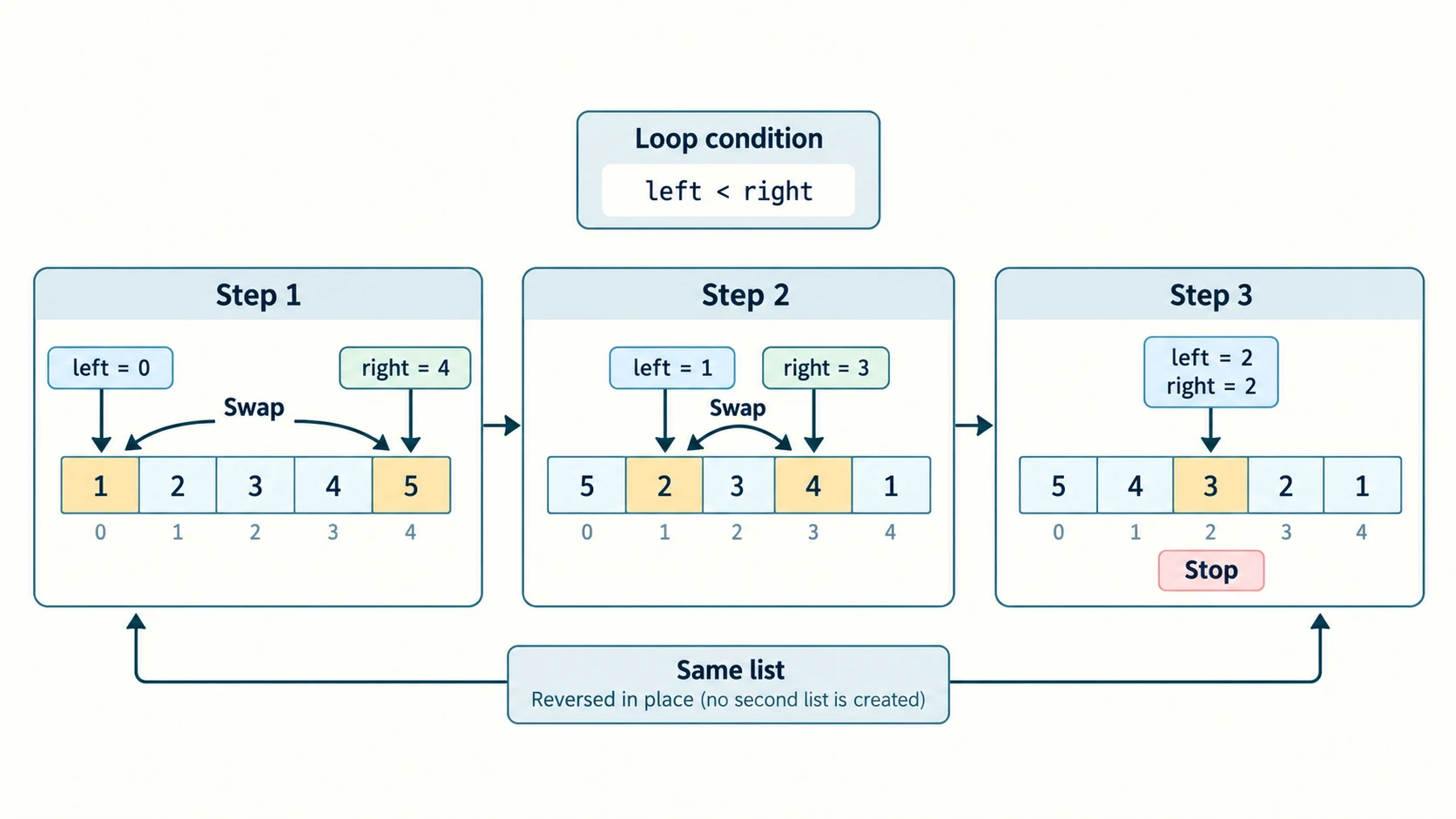
NCERT Programming Problem 9 — Reverse the given list in place without a new list
def reverse_in_place(items):
    left = 0
    right = len(items) - 1
    while left < right:
        items[left], items[right] = items[right], items[left]
        left += 1
        right -= 1

n = int(input("Number of elements: "))
values = [int(input(f"Element {i + 1}: ")) for i in range(n)]
reverse_in_place(values)
print("Reversed:", values)
Sample input: [1, 2, 3, 4, 5] gives [5, 4, 3, 2, 1].
Walkthrough: Exchange outermost elements (1 and 5), then the next pair (2 and 4), and stop when pointers meet or cross. All swaps are performed on the original list; no new result list is created. values[::-1] would create a new outer list, and values = values[::-1] would rebind only the local name. Python's values.reverse() also performs an in-place reversal, but the explicit two-pointer solution demonstrates the user-defined algorithm asked for in the question. Test with [], [9], [9,2] and [1,2,3,4,5].
NCERT In-Chapter Programs 9-1 to 9-5 — Explained
The five source programs are part of the teaching text, not five extra numbered end-of-chapter exercises. This section explains their purpose, important states and corrected classroom use without copying lengthy textbook source verbatim.
NCERT Program 9-1 — Mutate a list inside a called function
Purpose: Show that a function can change the contents of the caller's list.
def increment_values(items):
    for i in range(len(items)):
        items[i] += 5

source = [10, 20, 30, 40, 50]
increment_values(source)
print(source)
[15, 25, 35, 45, 55]The element assignments affect the shared object. The source also prints id() values: those identities are environment-specific and should not be memorised. If checking identity is helpful, id(source) equals id(items) inside this call for the same shared list, but their numeric display is not fixed across runs.
NCERT Program 9-2 — Rebind the local parameter to another list
def substitute_locally(items):
    items = [15, 25, 35, 45, 55]
    print("Inside:", items)

source = [10, 20, 30, 40, 50]
substitute_locally(source)
print("Outside:", source)
Inside: [15, 25, 35, 45, 55]
Outside: [10, 20, 30, 40, 50]Contrast with Program 9-1: Item mutation acts on the existing list; local assignment switches only the local parameter name to a different list. You can prove this with is, not by depending on fixed identifier numbers.
NCERT Program 9-3 — Menu-driven list operations
The textbook menu has ten choices: append, insert, extend by another list, modify, delete by index, delete by value, sort ascending, sort descending, display and exit. The fully executable, input-validated safe adaptation already appears in Lesson Section S07. The following state trace confirms the two main interactions illustrated in the source:
items = [22, 4, 16, 38, 13]
items.sort(reverse=True)  # textbook menu choice 8
print(items)
removed = items.pop(2)   # textbook menu choice 5, zero-based index 2
print(removed)
print(items)
[38, 22, 16, 13, 4]
16
[38, 22, 13, 4]Safety/editorial correction: The source's eval(input(...)) example is not appropriate for a public educational website because an untrusted user could enter executable Python expressions. Parsing a comma-separated list of integers using split(',') and int() is safer and sufficient for this exercise. Input index validation must also reject negative values if the interface promises only nonnegative positions.
NCERT Program 9-4 — Mean marks of n students
def compute_average(numbers):
    if not numbers:
        raise ValueError("Enter at least one mark")
    total = 0
    for mark in numbers:
        total += mark
    return total / len(numbers)

marks = [45, 89, 79, 76, 55]
print(compute_average(marks))68.8The textbook's input procedure reads n = 5 and these exact example marks. Their sum is 344, and 344 / 5 = 68.8. The adaptation uses len(numbers) to ensure that the divisor equals the real list length. Boundary: n=0 must be rejected if the mean is requested.
NCERT Program 9-5 — Linear search and one-based report
def linear_search(items, needle):
    for index, value in enumerate(items):
        if value == needle:
            return index
    return None

items = [23, 567, 12, 89, 324]
match = linear_search(items, 12)
if match is None:
    print("Number not present")
else:
    print("Found at position", match + 1)
Found at position 3The internal index is 2; the displayed human position is 3. Returning None explicitly communicates absence, unlike the built-in list.index() which raises ValueError on a miss. If duplicate values exist, linear search returns the first occurrence because it exits on the first match.
Original Practice Bank — 30 Questions with Explained Answers
These 30 questions are original practice, not NCERT questions or claims of previous-year examination papers. They are grouped by skill and deliberately include traps commonly encountered in output-prediction and lab tests. All answers follow Python 3 behaviour.
Part A — Ten concept-check MCQs
Practice 1 — Creating an empty list
Which expression creates an empty Python list? (A) {} (B) [] (C) () (D) "".
Answer: B, []. Square brackets make a list. {} is an empty dictionary, () an empty tuple and "" an empty string. All four are empty containers/text values, but their types and operations differ.
Practice 2 — Mutable operation
Which statement changes the same list object? (A) a + [4] (B) sorted(a) (C) a.append(4) (D) a[::-1].
Answer: C. append mutates the list. The other expressions construct new outer lists while leaving the original unchanged when their results are not assigned. The statement a += [4] would also normally mutate a list in place, but is not among the options.
Practice 3 — Meaning of the last index
For a=[5,6,7], what does a[-1] return? (A) 5 (B) 6 (C) 7 (D) IndexError.
Answer: C, 7. Index -1 refers to the last element. Negative indices count backward; index -3 would refer to 5. Lists with zero elements do not have a[-1].
Practice 4 — One item versus multiple items
What does a.append([8,9]) add? (A) Two integer elements (B) One nested list element (C) A tuple (D) Nothing.
Answer: B. append adds its argument as exactly one new item. extend([8,9]) would add two separate integers. The length of a grows by one, not two.
Practice 5 — Missing item search
Which expression raises ValueError if 22 is absent from a? (A) 22 in a (B) a.count(22) (C) a.index(22) (D) len(a).
Answer: C. index requires a match. Membership returns False, count returns zero and len reports the number of elements. A list does not support a built-in .find() method.
Practice 6 — sort() return value
After a=[3,1,2], what value does x=a.sort() bind to x? (A) [1,2,3] (B) None (C) [3,1,2] (D) True.
Answer: B, None. The sort happens in place and the method returns None. a becomes [1,2,3]. Use sorted(a) if a sorted result needs to be assigned.
Practice 7 — Which method removes by value?
For a=[10,20,30], which removes value 20 rather than index 20? (A) a.pop(20) (B) a.remove(20) (C) del a[20] (D) a.index(20).
Answer: B. remove searches for the given value. pop and del use indices, and index finds a position without deleting anything. a.pop(1) would also remove value 20 here, but only because that value happens to occupy index 1.
Practice 8 — Slicing excludes the stop
For a=[10,20,30,40], what is a[1:3]? (A) [10,20] (B) [20,30] (C) [20,30,40] (D) [30,40].
Answer: B. Start index 1 is included; stop index 3 is excluded. So indices 1 and 2 produce 20 and 30. Slicing does not mutate a.
Practice 9 — Minimum of an all-negative list
What does max([-10,-3,-7]) return? (A) 0 (B) -10 (C) -3 (D) 10.
Answer: C, -3. Among negative numbers, -3 is greatest. This is why initialising an algorithmic maximum to zero is unsafe for all-negative inputs.
Practice 10 — Duplicate highest value
What is the second largest distinct value of [8,8,5,3]? (A) 8 (B) 5 (C) 3 (D) undefined.
Answer: B, 5. Distinct values descending are 8,5,3. If the task instead means the second item in descending order with duplicates, the answer is 8. Explicitly naming the distinct interpretation removes ambiguity.
Part B — Ten tracing and output questions
Practice 11 — Nested element access
Predict the result:
x = ["XI", [4, 8, 12], "CS"]
print(x[1][-1])
Answer: 12. x[1] selects [4,8,12]; its negative index -1 selects its final element. x[-1] alone would be 'CS'.
Practice 12 — A copy versus an alias
a = [1, 2]
b = a
c = a[:]
b.append(3)
print(a, c)
Answer: [1, 2, 3] [1, 2]. b aliases a; therefore b.append(3) changes a. c is a separate shallow outer list created before the append, and is unaffected by that top-level append.
Practice 13 — extend consumes an iterable
a = [1]
a.extend("23")
print(a)
Answer: [1, '2', '3']. A string is iterable, and iteration yields its one-character strings. The result is not [1, 2, 3] because no integer conversion occurs.
Practice 14 — The result of reverse()
a = [2, 4, 6]
b = a.reverse()
print(a)
print(b)
Answer:
[6, 4, 2]
None
The existing list is reversed, but reverse() returns None. Assigning its return value does not capture a second reversed list.
Practice 15 — Delete from the middle
a = [10, 20, 30, 40, 50]
del a[1:4]
print(a)
Answer: [10, 50]. Delete indices 1,2,3 and retain indices 0 and 4 of the original list. Slice stop index 4 is not deleted.
Practice 16 — Test the element, not the index
numbers = [2, 5, 4, 9, 6]
for number in numbers:
    if number % 2 == 0:
        print(number, end=" ")
Answer: 2 4 6 (with a trailing space from end=" "). This program tests each element value, unlike NCERT Exercise 3, which tests the index. The difference matters when predicting output.
Practice 17 — pop() changes the original
a = [4, 8, 12]
x = a.pop()
print(x, a)
Answer: 12 [4, 8]. No index is supplied, so pop() removes and returns the last item. It is not the same as a.remove(12), whose return value would be None.
Practice 18 — Shallow nested copy
a = [[1, 2], [3, 4]]
b = a[:]
b[0].append(9)
print(a)
Answer: [[1, 2, 9], [3, 4]]. The new outer list b shares the original nested objects. Appending to b[0] changes an inner list reachable from a. By contrast, replacing b[0] with an entirely new list would not replace a[0].
Practice 19 — A rebind after aliasing
a = [1, 2]
b = a
a = a + [3]
print(a)
print(b)
Answer:
[1, 2, 3]
[1, 2]
The right-hand a + [3] creates a new outer list; then a is rebound to it. b still refers to the original list. Contrast a += [3], which mutates the original list and changes what b sees.
Practice 20 — Repeated references in a nested list
a = [[0]] * 3
a[0][0] = 7
print(a)
Answer: [[7], [7], [7]]. All three outer positions refer to the same one-element inner list. Changing that inner element is visible through all three references. Build independent inner lists with a comprehension.
Part C — Ten short-programming and application questions
Practice 21 — Find the sum of even integers
Task: Write a function returning the sum of even elements without modifying its argument.
def sum_even(items):
    total = 0
    for value in items:
        if value % 2 == 0:
            total += value
    return total

print(sum_even([1, 2, 3, 4, 6]))
Answer: 12. The even elements are 2,4,6 and their sum is 12. The list is only read, never updated, so caller data is unchanged.
Practice 22 — Count numbers above a threshold
Task: Count marks strictly greater than 75.
def count_above(marks, threshold):
    total = 0
    for mark in marks:
        if mark > threshold:
            total += 1
    return total

print(count_above([75, 76, 80, 74, 100], 75))
Answer: 3. Only 76,80,100 are strictly above 75. The boundary value 75 is not counted; using >= would answer a different question.
Practice 23 — Find the index of a missing value safely
def locate(items, target):
    for i in range(len(items)):
        if items[i] == target:
            return i
    return -1

print(locate([4, 7, 9], 5))
Answer: -1. Every element was checked and none matched. The -1 is our function's chosen missing-value sentinel, not a list find() method. For legitimate values at index 0, the result would be 0.
Practice 24 — Swap neighbouring pairs
Task: Swap indices (0,1), (2,3), etc. in-place, leaving a last unmatched item unchanged.
def swap_pairs(items):
    for i in range(0, len(items) - 1, 2):
        items[i], items[i + 1] = items[i + 1], items[i]

values = [10, 20, 30, 40, 50]
swap_pairs(values)
print(values)
Answer: [20, 10, 40, 30, 50]. The loop stops before an unmatched last item, avoiding an out-of-range access. This reinforces a related CBSE suggested practical involving even/odd locations.
Practice 25 — Compute a mean safely
def mean_or_none(numbers):
    if len(numbers) == 0:
        return None
    return sum(numbers) / len(numbers)

print(mean_or_none([]))
print(mean_or_none([2, 4, 9]))
Answer: None and 5.0. An empty dataset has no ordinary numerical mean; an explicit sentinel avoids ZeroDivisionError. (2+4+9)/3 = 5.0.
Practice 26 — Remove all copies of one value
def without_target(items, target):
    return [value for value in items if value != target]

print(without_target([3, 5, 3, 7, 3], 3))
Answer: [5, 7]. A comprehension includes only elements not equal to 3. This intentionally differs from NCERT Problem 8(b), where remove() deletes just the first matching value.
Practice 27 — Distinguish sorted from reversed
values = [4, 1, 3]
print(sorted(values))
print(values[::-1])
print(values)
Answer:
[1, 3, 4]
[3, 1, 4]
[4, 1, 3]
Sorting orders values; reversing flips current positions. Both expressions create new outer lists, so the original values remains [4,1,3].
Practice 28 — Read a two-dimensional record
students = [["A", [80, 90]], ["B", [70, 75]]]
print(students[1][0])
print(students[0][1][1])
Answer:
B
90
The first access gets the name of the second student; the second gets the second mark of the first student. Carefully count the nesting levels before writing each index.
Practice 29 — Find the second-smallest distinct integer
def second_smallest_distinct(values):
    distinct = sorted(set(values))
    if len(distinct) < 2:
        raise ValueError("Need two distinct values")
    return distinct[1]

print(second_smallest_distinct([5, 2, 2, 9, 4]))
Answer: 4. Sorted distinct values are 2,4,5,9; the second is 4. This helper assumes hashable elements (appropriate here because values are integers) and an explicit distinctness rule. It also guards against too few distinct items.
Practice 30 — Reverse words without mutating the original
def reversed_copy(words):
    return words[::-1]

original = ["one", "two", "three"]
backward = reversed_copy(original)
print(backward)
print(original)
Answer:
['three', 'two', 'one']
['one', 'two', 'three']
The returned slice is a new outer list; the original is not changed. This is deliberately different from NCERT Programming Problem 9, which requires an in-place reversal.
Quick Revision — Lists
One-page concept map
| Concept | Critical point | Common error |
|---|---|---|
| List literal | [] and [1,2] | Assuming empty lists are invalid |
| Position | First index 0; last -1 | Calling third item index 3 |
| Mutation | a[0]=..., .append(), .sort() | Assuming all operations return new lists |
+, * | Create new outer lists as expressions | Believing originals changed without assignment |
+=, *= on list | Typically mutate same outer list | Confusing augmented assignment with rebinding |
| Slice | start:stop:step, stop excluded | Including stop index |
append vs extend | One object versus separate iterable items | Assuming both add the same shape |
remove vs pop | Value versus index | Passing a value as pop() index |
sort vs sorted | In-place + None versus new list | Assigning a = a.sort() |
reverse vs reversed slice | In-place versus copy | Confusing reversal with sorting |
index() vs a search function | Raises ValueError on absence | Calling nonexistent list.find() |
| Nested list | a[row][column] | Forgetting which layer each index accesses |
b = a | Alias, no new list | Expecting independent mutation |
b = a[:] | Shallow copy | Assuming nested lists are independent |
| Function parameter | Mutation shared, rebinding local | Treating both cases as equivalent |
| Median | Sort first; average centre two if even | Dividing a sum instead of selecting central values |
| Second largest | State distinctness rule | Mishandling duplicate maximum |
| In-place reverse | Swap original elements | Creating an unrequested new list |
Ten exam and laboratory reminders
- Write what the code actually prints, not merely what an unprinted expression evaluates to; distinguish REPL from a
.pyfile. - Trace index and element value separately:
i % 2 == 0may filter positions, not even numbers. - Show initial and final list states when multiple mutations occur sequentially.
- Treat zero as neither positive nor negative in standard mathematics.
- Test an empty list before calculating average, median or maximum.
- For deletion by position, choose and state either 0-based index or 1-based human position.
- When duplicate values exist, specify whether “second largest” means distinct second or second sorted item.
- Avoid
eval(input()): use validated integer conversion for beginner list inputs. sort(),reverse(),append()andextend()mutate a list and returnNone.- In-place changes to shared mutable objects are visible through aliases; local rebinding is not.
Short viva prompts and worked oral answers
What is mutability? The ability to change an existing list's contents by insertion, replacement or deletion. What is slicing? Creating a selected sequence of elements using start/stop/step, with the stop excluded. When does index() fail? When the sought element does not occur; it raises ValueError. What does pop() return? The removed element. Why can .sort() not be assigned to obtain the list? It returns None while sorting the existing list. Why may a shallow copy still share data? Nested mutable values remain referenced by both outer lists. Why does a function edit sometimes affect its caller? Both names refer to one mutable list object. What is a linear search? Compare sequential elements until a match or exhaustion. What is an in-place algorithm? One that updates the existing structure rather than constructing a separate result collection, while possibly using a few temporary variables. Why check n>0 for a mean? To avoid dividing by zero.
Reading progression
Review Chapter 6's for, while and range() if iteration is challenging; revisit Chapter 8's index/slice rules and the differences between immutable strings and mutable lists. The next chapter covers Tuples (C11-PY-14) and shares the indexing ideas, but tuples themselves are immutable. Later dictionary work (C11-PY-15) stores items by keys instead of positional indices. The project's other stable curriculum IDs remain unchanged.
References and source-boundary notes
- Primary textbook: NCERT, Computer Science, Class XI, Chapter 9 “Lists,” supplied file
kecs109.pdf, 18 PDF pages and printed pp. 189–206, reprint marked 2026–27. Textbook entry: https://ncert.nic.in/textbook.php?kecs1=0-11. - Syllabus authority: CBSE Computer Science (083), Class XI (2026–27), https://cbseacademic.nic.in/web_material/CurriculumMain27/SecPart2/Computer_Science_SecP2_2026-27.pdf. The prescribed list topic explicitly includes operations, methods, nested lists and numeric/search/frequency programs.
- Language semantics: Official Python tutorial, Data Structures, https://docs.python.org/3/tutorial/datastructures.html; Python standard type references, https://docs.python.org/3/library/stdtypes.html#mutable-sequence-types.
- Textbook errata/cautions: The NCERT chapter summary loosely names a
find()operation for lists (not a standard list method). The menu example containseval(input()), unsuitable for untrusted public input. Its average and index examples assume nonempty/well-formed data, and its printedid()values are process-specific. Our corrections are original educational clarifications, not claims that the original source prints them. - Copyright-aware question referencing: Each source question is identified by number and concise description. The lesson prose, Python demonstrations, worked answer explanations and 30 extra practice questions are independently authored, rather than an extended reproduction of the textbook.