
Strings
Study Strings in Class 11 Computer Science, with detailed explanations, worked examples, NCERT solutions and practice questions.
By Akhilesh Saini
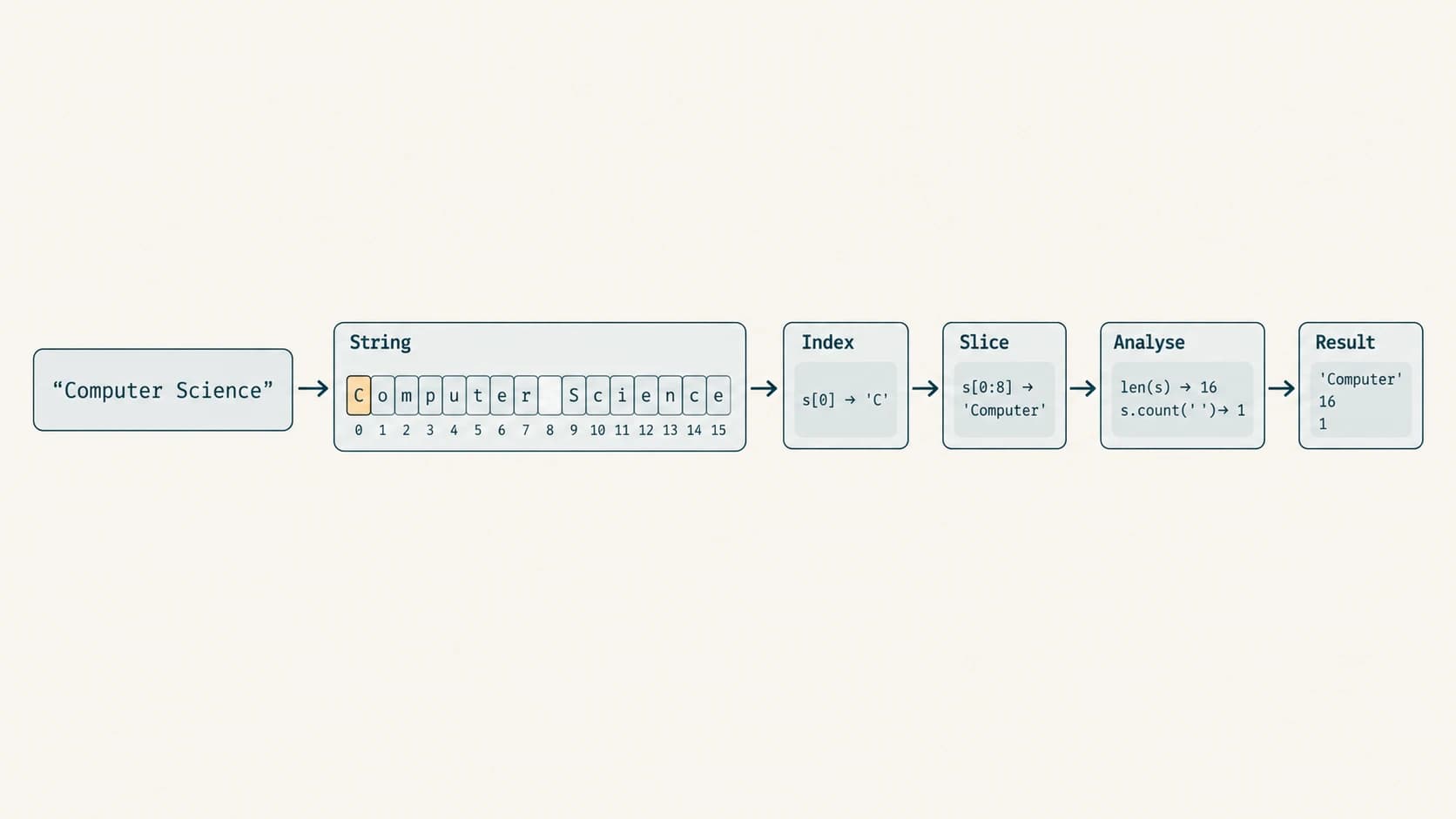
A student's name, an email subject, a search phrase and a sentence written in Hindi are all text. In Python we usually store text as a string: an ordered sequence of Unicode characters. A few simple techniques let us locate letters, extract words, validate input, replace symbols, analyse sentences and write useful text-processing programs. This chapter teaches those techniques step by step and solves every end-of-chapter NCERT question.
Curriculum alignment: The entire chapter teaches the existing, unchanged Class XI curriculum lesson C11-PY-12 — Strings: Indexing, Slicing, Traversal and Methods. The six chapter sections below are reading divisions, not six new lesson IDs. The accompanying original programs reinforce the previously learned topics on conditions and loops. NCERT's five in-chapter sample programs use functions; we explain them while keeping Chapter 7's separate syllabus status intact.
Source basis: NCERT Computer Science, Class XI, Chapter 8, “Strings,” supplied PDF kecs108.pdf, printed pages 175–188 (Reprint 2026–27); official CBSE Class XI Computer Science (083) syllabus; Python 3 documentation for string semantics. When an NCERT example oversimplifies the rule, the correction is identified rather than passed off as a textbook quotation. Exercise questions are referenced by their original numbering and briefly paraphrased, followed by original answers.
What you will learn
By the end, you will be able to create and display strings; use positive and negative indices; explain immutability; concatenate, repeat and search strings; form slices with positive/negative steps; traverse text using for and while; choose and apply the full group of string methods required by CBSE; predict printed outputs precisely; distinguish find() from index(); handle words, spaces, punctuation and case; implement all five NCERT programming problems; and solve original examination-style questions confidently.
Chapter navigation
| Reading section | NCERT alignment | Main skill |
|---|---|---|
C11-CH08-S01 — String foundations | §§8.1–8.2.2 | Unicode, creation, indices, immutability |
C11-CH08-S02 — String operations and slicing | §8.3 | Joining, repeating, membership, slicing |
C11-CH08-S03 — Traversing strings | §8.4 | for, while, counting, reversing |
C11-CH08-S04 — Case, searching and matching | §8.5 | Transformations, count/find/index, prefix/suffix |
C11-CH08-S05 — Tests and text splitting | §8.5 | Character classes, whitespace, join, partition, split |
C11-CH08-S06 — String algorithms | §8.6 | Functions, replacement, reverse, palindrome, safe input |
The separately navigable NCERT Solution Bank follows the lessons: Exercise 1 (i–x), Exercise 2 (i–x), Programming Problems 1–5, and guided explanations of NCERT Programs 8-1 through 8-5. It is followed by 30 original practice questions, each with an answer and explanation, a revision sheet.
Lesson C11-PY-12 — Strings: Indexing, Slicing, Traversal and Methods
Section C11-CH08-S01 — String Foundations
1. What exactly is a string?
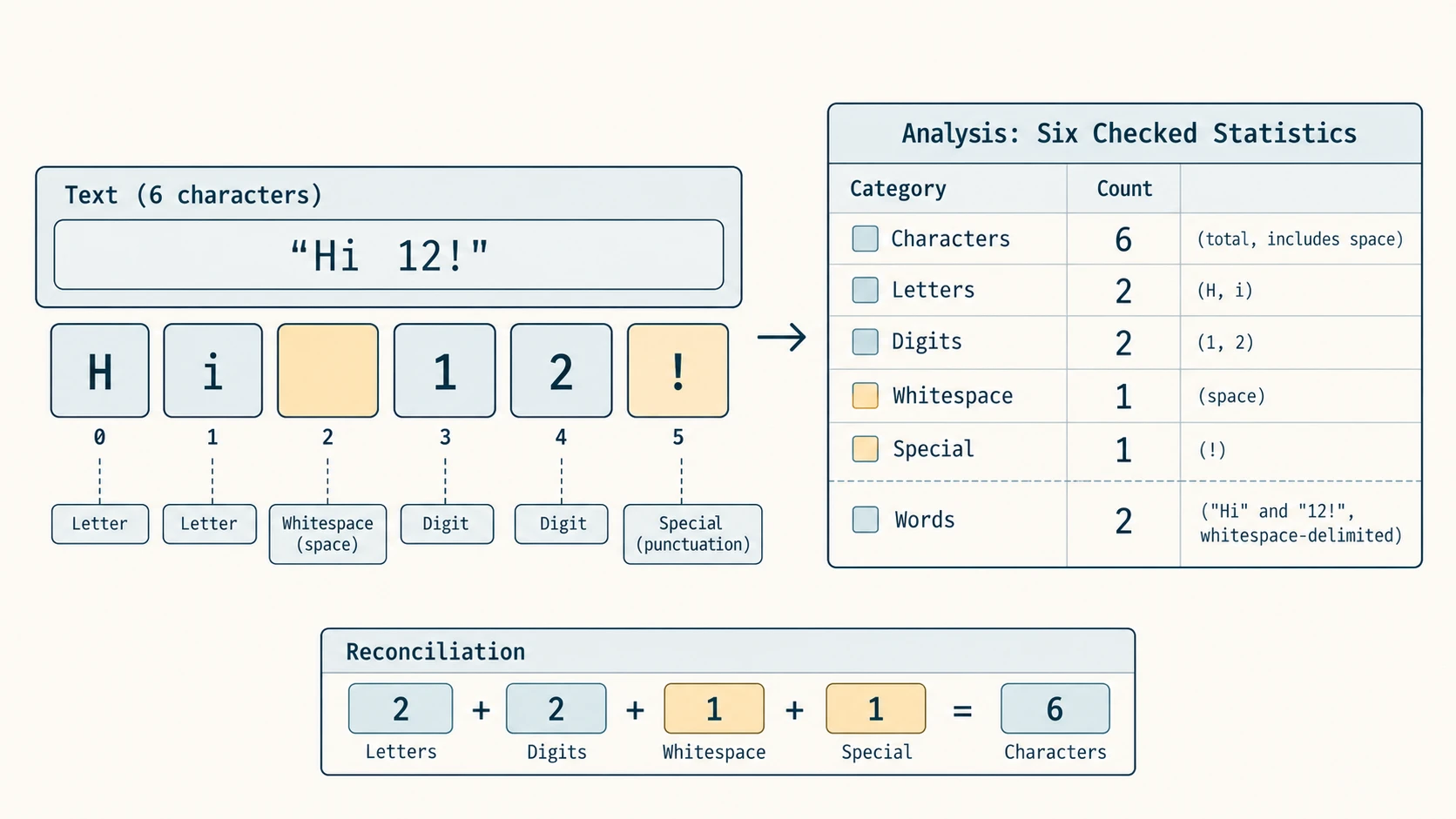
A Python string is a value of type str: a sequence whose elements are Unicode characters. For example, the string "CS 11!" has six characters: two letters, a space, two digits and an exclamation mark. Its length is six. Unlike the integer 11, the text "11" is a sequence of two digit characters. You can print both, but the operations you can perform on them are different.
subject = "Computer Science"
roll_text = "11"
roll_number = 11
print(type(subject).__name__)     # str
print(type(roll_text).__name__)   # str
print(type(roll_number).__name__) # int
print(len("CS 11!"))             # 6
Strings can contain English letters, Devanagari and other scripts, punctuation, emoji and whitespace. Python strings use Unicode; Unicode characters are not the same thing as UTF-8 bytes. For simple text, len() counts Python string code points, not the number of encoded bytes, and may not equal the number of visually perceived characters in text with combining marks or joined emoji. That subtlety matters for robust software, but the NCERT exercises here use straightforward text.
2. Creating and quoting strings
Python recognises single quotes, double quotes and triple-quoted text. Choose the quote that makes the content readable. Triple quotes can enclose literal newlines; a backslash escape can also place \n inside a string.
school = 'Central School'
message = "It's time to code"
quote = 'She said "Python is readable".'
paragraph = """First line
Second line"""
print(school)
print(message)
print(paragraph)
An empty string "" is a valid string with length 0. A one-character string such as 'A' still has type str; Python does not use a separate character data type. \t is a tab, \n is a newline, \\ represents a literal backslash and \' represents an apostrophe within single-quoted text. Use raw strings r"..." where appropriate for paths or regular-expression patterns, but remember that a raw string cannot end in a lone unescaped backslash.
3. Indexing — reaching one character
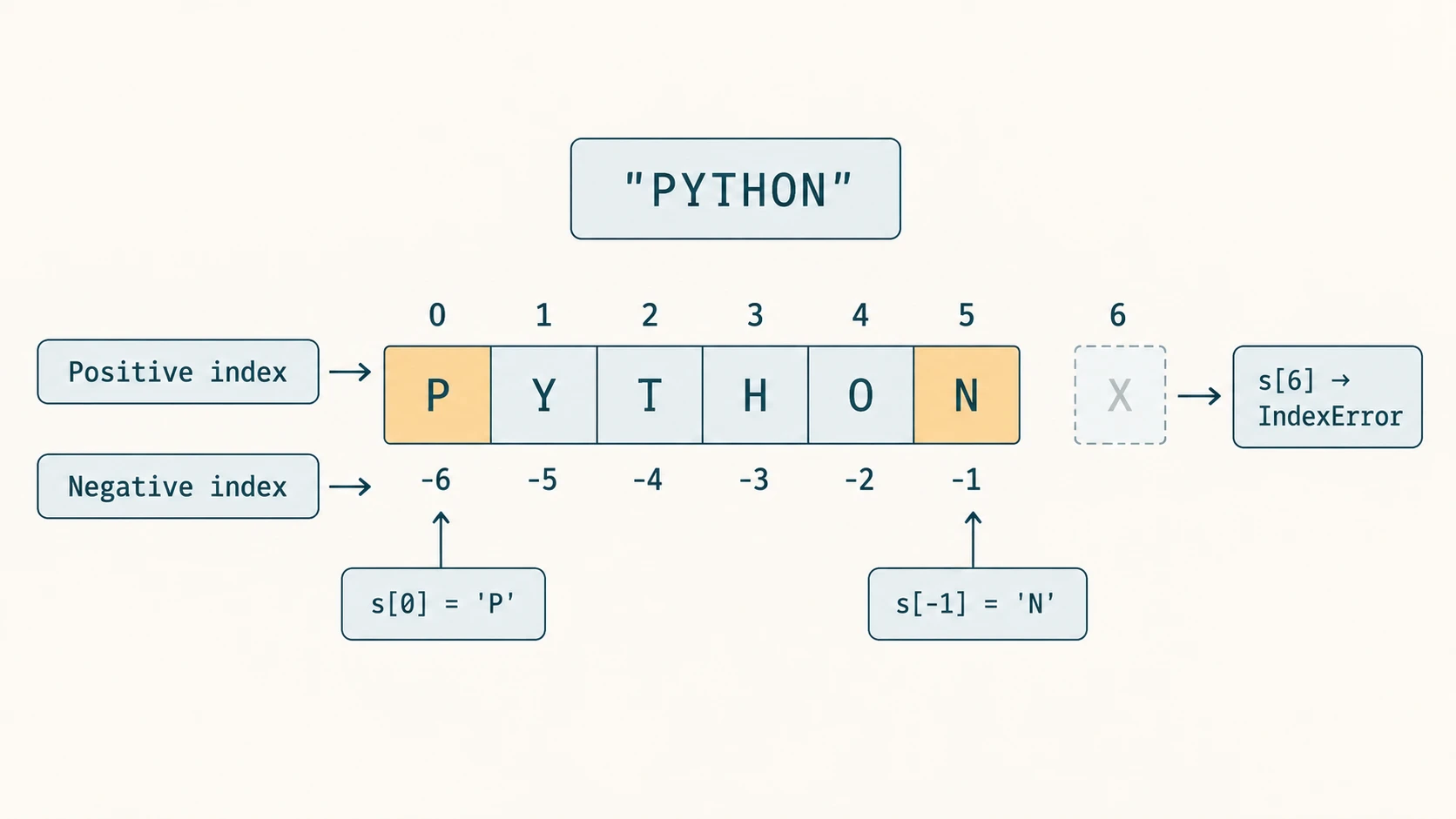
For a string of length n, valid positive indices are 0 through n-1; valid negative indices are -n through -1. Index -1 selects the last character. This double indexing is particularly helpful when the number of characters changes.
word = "PYTHON"
print(len(word))  # 6
print(word[0])   # P
print(word[2])   # T
print(word[-1])  # N
print(word[-6]) # P| Character | P | Y | T | H | O | N |
|---|---|---|---|---|---|---|
| Positive index | 0 | 1 | 2 | 3 | 4 | 5 |
| Negative index | -6 | -5 | -4 | -3 | -2 | -1 |
word[6] causes IndexError because the valid last index is 5. word[2.0] causes TypeError: an ordinary numeric-string index must be an integer, not a float, even if its value is mathematically whole. An expression producing an integer is acceptable: word[1 + 2] gives 'H'. Empty strings have no valid character index.
4. Immutability — changing a value versus changing a name
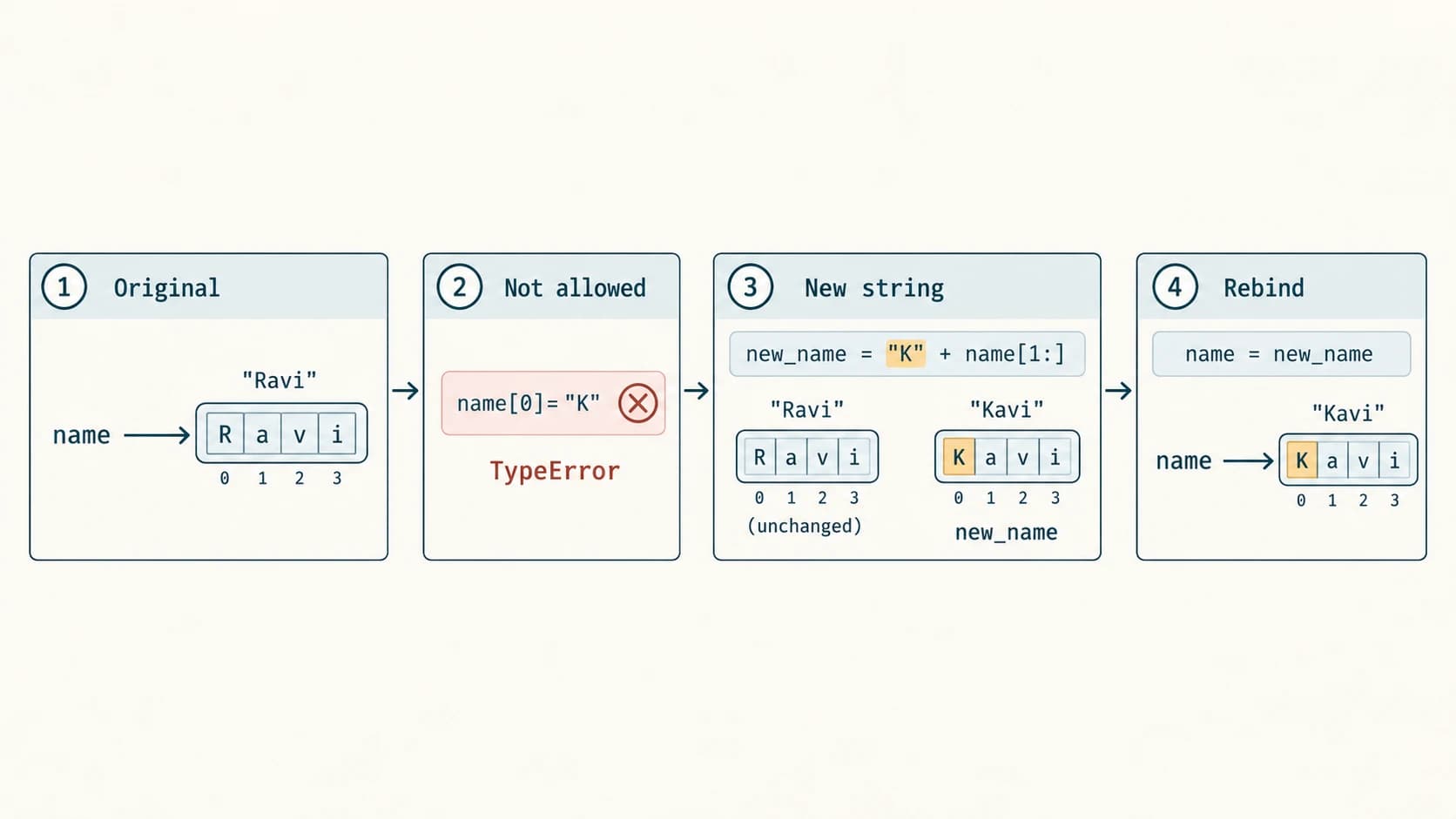
Strings are immutable: individual characters cannot be overwritten. The assignment name[0] = "M" raises TypeError. But you may bind the variable name to a new string; this does not mutate the old string.
name = "Ravi"
# name[0] = "K"  # TypeError: 'str' object does not support item assignment
new_name = "K" + name[1:]
print(name)      # Ravi
print(new_name)  # Kavi
name = new_name  # legal: variable now refers to another string
print(name)      # Kavi
A string method like replace() also produces a new result rather than updating the existing string in place. Exam trap: text.replace('a', '*') alone has no lasting effect on text; use text = text.replace('a', '*') when you want its new value.
Worked example: the safe last-character check
def last_character(text):
    if not text:
        return "No character: empty string"
    return text[-1]

print(last_character("Delhi")) # i
print(last_character(""))      # No character: empty string
The check prevents an IndexError for empty input. An empty string evaluates as false, while a nonempty string evaluates as true.
Section C11-CH08-S02 — Concatenation, Repetition, Membership and Slicing
5. Concatenation: + joins text
first = "Computer"
second = "Science"
print(first + second)          # ComputerScience
print(first + " " + second)    # Computer Science
Joining does not insert spaces automatically. Both operands must be strings ("Roll: " + 11 raises TypeError; use "Roll: " + str(11) or print("Roll:", 11)). Ordinary string concatenation creates a new string; it does not mutate either input.
6. Repetition: * repeats a pattern
print("Ha" * 3)   # HaHaHa
print("-" * 7)    # -------
print("go" * 0)   # empty string
print("go" * -2)  # empty string
Repeating a string by a non-integer such as 2.5 raises a TypeError.
7. Membership: substring search with in and not in
sentence = "Python makes coding interesting"
print("coding" in sentence)     # True
print("Coding" in sentence)     # False (case-sensitive)
print("Java" not in sentence)   # True
print("" in sentence)           # True (empty string occurs everywhere)
Membership searches for a substring, not an entire word. For example, 'art' in 'cartoon' is True. To recognise complete words in a simple space-separated sentence, consider word in sentence.split(); complex punctuation and multilingual languages may need more advanced tokenisation.
8. Slicing: text[start:stop:step]
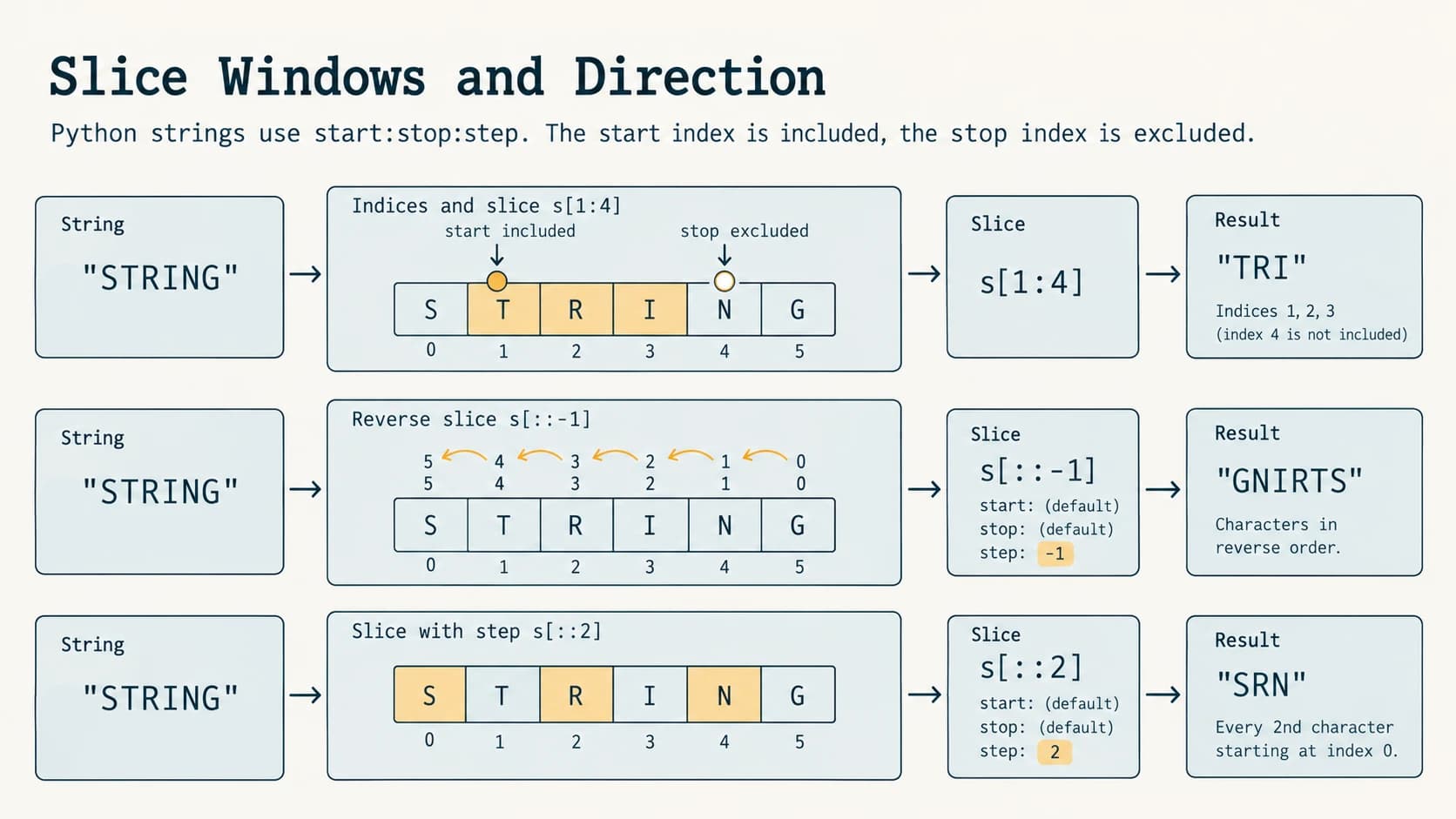
The slice includes start, excludes stop, and moves in increments of step. The default step is 1. Thus "ABCDE"[1:4] returns "BCD". A slice past the string's end is normally clipped rather than raising IndexError.
text = "Computer"
print(text[0:4])    # Comp
print(text[:4])     # Comp
print(text[4:])     # uter
print(text[::2])   # Cmue
print(text[::-1])  # retupmoC
print(text[-4:-1]) # ute
print(text[5:2])   # empty string, because step is positive
For ordinary positive step 1, the number of selected characters is often stop-start, provided the endpoints are valid and start <= stop. That shortcut does not always apply when a step changes, bounds exceed the string or the slice is empty.
Slice on "PYTHON" | Selected indices | Result |
|---|---|---|
s[:3] | 0,1,2 | PYT |
s[2:5] | 2,3,4 | THO |
s[::2] | 0,2,4 | PTO |
s[-3:] | -3,-2,-1 | HON |
s[::-1] | 5,4,3,2,1,0 | NOHTYP |
s[4:0:-2] | 4,2 | OT |
s[2:2] | none | "" |
Step direction matters: With a negative step, the default starting point moves to the right end, and movement proceeds left. s[5:0:-1] excludes index 0, whereas s[5::-1] includes it. A step of zero, as in s[::0], raises ValueError: slice step cannot be zero.
9. Slicing versus indexing — do not confuse their errors
s = "CAT"
# s[20]   -> IndexError
print(s[20:])  # prints nothing: slice is empty
print(s[:20])  # CAT: clipping is allowed
A single-character access must be in range, but a slice typically handles out-of-range start/stop by clipping. A negative index also addresses one character in indexing, but a negative step may reverse a whole slice.
10. Worked examples: recognising order and building new strings
label = "class XI"
print(label.upper())               # CLASS XI
print(label[:6] + label[6:].upper())  # class XI
print(label[::-1])                # IX ssalc
If you want to change an individual position in an immutable string, construct a new string using slices. For example, s[:i] + replacement + s[i+1:] swaps one character after checking 0 <= i < len(s).
Section C11-CH08-S03 — Traversing and Counting Text
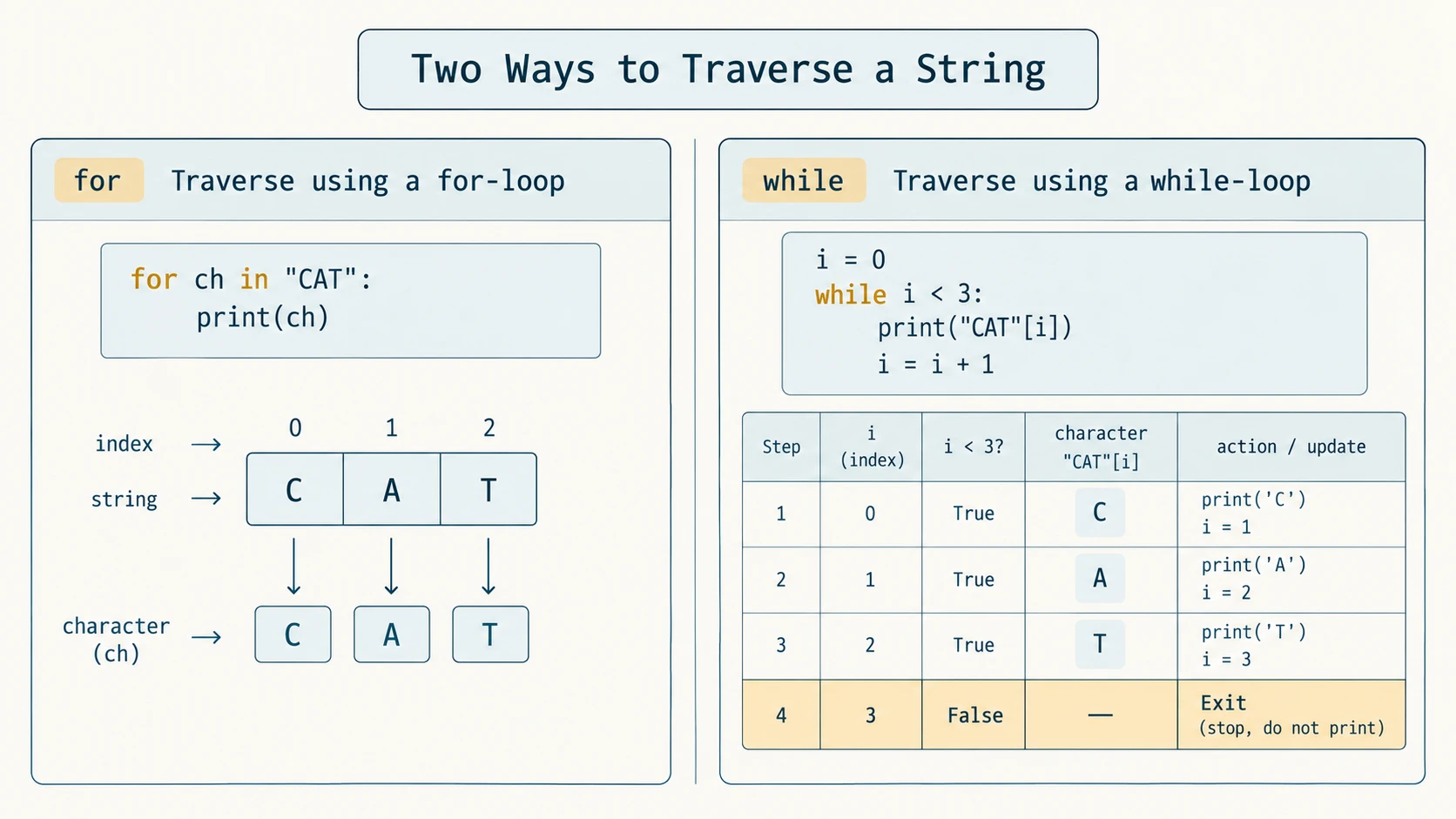
11. Traversal with a for loop
When you need each character and not its index, a for loop is normally the simplest choice:
word = "CODE"
for ch in word:
    print(ch, end=" ")
# C O D E
There are four iterations, one per character. The variable ch takes successive one-character string values. end=" " prints spaces instead of ending each output with a newline.
12. Traversal with a while loop
A while loop is useful when the index is important:
word = "CODE"
i = 0
while i < len(word):
    print(i, word[i])
    i += 1
# 0 C
# 1 O
# 2 D
# 3 E| Iteration | i before test | i < 4? | Character | i after update |
|---|---|---|---|---|
| 1 | 0 | True | C | 1 |
| 2 | 1 | True | O | 2 |
| 3 | 2 | True | D | 3 |
| 4 | 3 | True | E | 4 |
| Exit | 4 | False | not accessed | — |
Without i += 1, the test would remain true for nonempty text and the loop would not terminate. For an empty string, 0 < len("") is false immediately.
13. Counting vowels, digits and occurrences
text = "Education 2026"
vowels = 0
digits = 0
for ch in text:
    if ch.lower() in "aeiou":
        vowels += 1
    if ch.isdigit():
        digits += 1
print(vowels)  # 5
print(digits)  # 4
For English vowels, make a clear decision about whether uppercase vowels count: ch.lower() handles both cases. .isdigit() recognises Unicode digit characters, which is generally desirable for Unicode-aware school programs; ASCII-only digit processing can instead check '0' <= ch <= '9'.
14. Two approaches to reversing text
s = "Python"
print(s[::-1])
for index in range(len(s) - 1, -1, -1):
    print(s[index], end="")
print()
# Python's reverse: nohtyP
# Loop reverse:     nohtyP
The slice creates a new reversed string; the loop directly prints characters backwards without building another string. Both correctly handle empty input. Repeated concatenation within a loop is fine for the short school exercises, but for large text, accumulating a list and joining or using slicing is typically clearer and more efficient.
15. Index-based frequency table without dictionaries
word = "BANANA"
for ch in "BAN":
    print(ch, word.count(ch))
# B 1
# A 3
# N 2
The same counting idea appears in NCERT Program 8-1 and Programming Problem 4, and prepares you for dictionary-based frequency tables in Chapter 10.
Section C11-CH08-S04 — Changing Case, Finding and Matching Strings
16. Built-in function versus string method
len(text) is a built-in function, but text.lower() and text.count("a") are methods, called with dot notation on the string. Calling len() does not modify text; neither do string methods because strings are immutable. The official CBSE string-method list is slightly broader than NCERT Table 8.2: it also explicitly includes capitalize(), isalpha() and isdigit(). Those required methods are taught below alongside the textbook methods.
17. Letter-case transformations
| Method | What it returns | Example (s = "hELLO wORLD") |
|---|---|---|
s.lower() | Lowercase text | hello world |
s.upper() | Uppercase text | HELLO WORLD |
s.capitalize() | First character titlecased, rest lowercase | Hello world |
s.title() | Title-style beginning of each word | Hello World |
s.swapcase() | Case reversed wherever a case distinction exists | Hello World |
s = "hELLO wORLD"
print(s.lower())       # hello world
print(s.upper())       # HELLO WORLD
print(s.capitalize())  # Hello world
print(s.title())       # Hello World
print(s.swapcase())    # Hello World
Exam trap: capitalize() and title() are not interchangeable. capitalize() treats the whole string as one unit, whereas title() attempts to capitalise each word-like group. Natural-language names containing apostrophes may not be formatted perfectly by .title(), so for actual names, verify the intended style. Upper/lower case operations follow Unicode case rules and can occasionally change the length of a string.
18. Searching: find(), rfind(), index() and count()
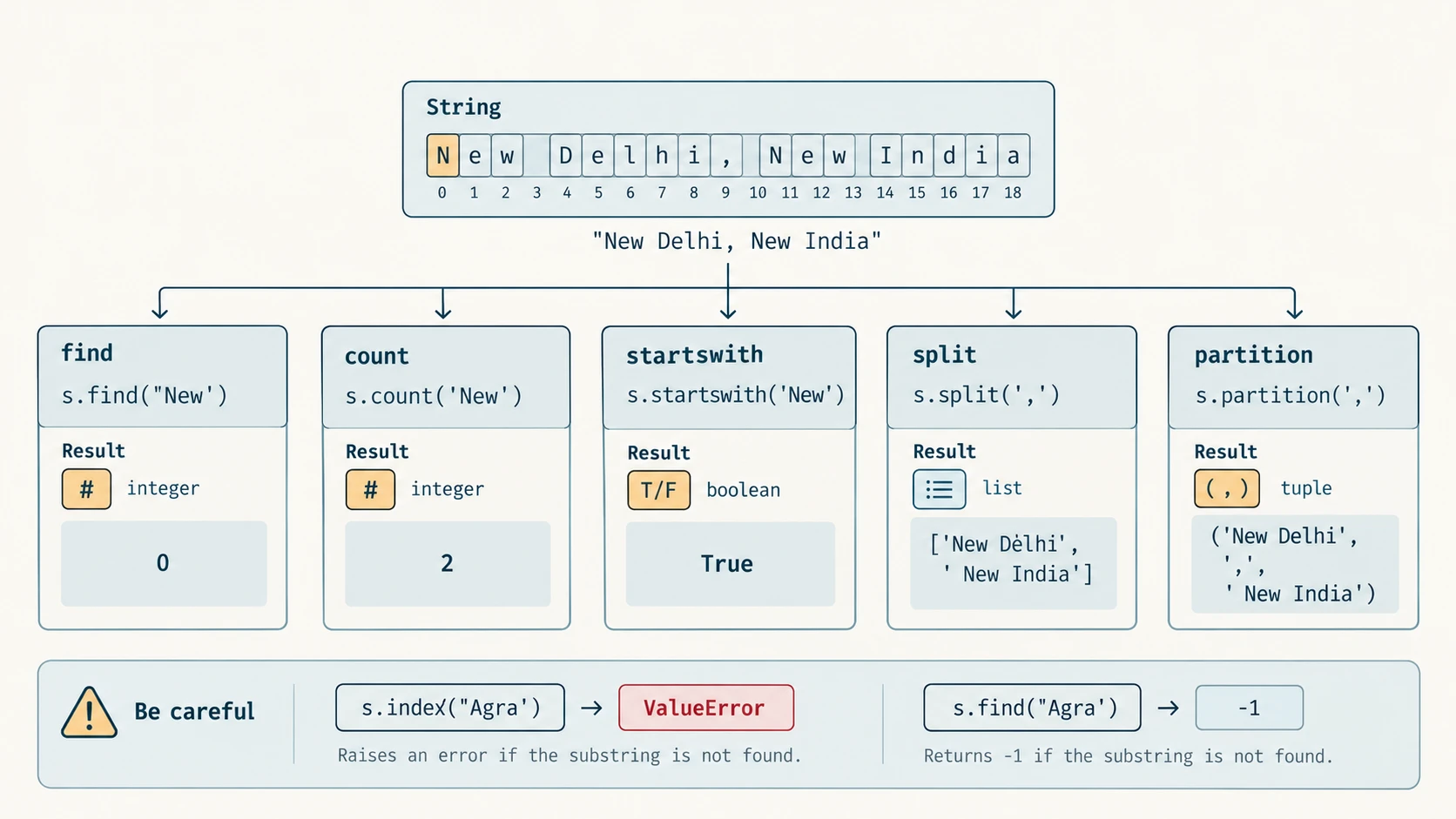
Consider "banana banana" (13 characters). find() reports the first starting index, rfind() the last starting index, and count() reports the number of non-overlapping occurrences. index() behaves like find() on success but raises an exception on failure.
s = "banana banana"
print(s.find("ana"))     # 1
print(s.rfind("ana"))    # 8
print(s.count("ana"))    # 2 (non-overlapping matches)
print(s.find("pear"))    # -1
# s.index("pear")        # ValueError: substring not found
print(s.index("banana")) # 0
find(sub, start, end), index(sub, start, end) and count(sub, start, end) can restrict the range using start and end, where end is exclusive. In the word "aaaa", count("aa") is 2, not 3: the underlying occurrences beginning at positions 0, 1, 2 overlap, but count does not count overlapping matches. The optional limits are useful in a question asking for the second half of a sentence.
To avoid an exception, use index() only after ensuring the substring exists, or use find() when an absent substring is a normal outcome:
address = "New Delhi"
needle = "Mumbai"
position = address.find(needle)
if position == -1:
    print("Not found")
else:
    print("Found at index", position)
19. Beginning and ending tests
filename = "notes.txt"
print(filename.startswith("no"))  # True
print(filename.endswith(".txt"))  # True
print(filename.endswith(".pdf"))  # False
print(".txt" in filename)          # True, but membership is NOT a suffix test
startswith() and endswith() return booleans. They can optionally take a tuple of prefixes or suffixes and start/end bounds. Prefix/suffix tests are case-sensitive unless you normalise case first, e.g. filename.lower().endswith(".txt"). A filename suffix alone is not a security guarantee of actual file format.
20. Comparing strings and Unicode order
String comparisons are lexicographic according to Unicode code-point order. Unlike human dictionary sorting, uppercase and lowercase letters can have different ordering. "a" == "A" is false and "Z" < "a" is true. For ordinary classroom case-insensitive comparisons, compare a.casefold() == b.casefold() (or use lower() for simple English-only examples). casefold() is useful additional knowledge but not part of the required NCERT method table.
Section C11-CH08-S05 — Character Tests, Whitespace and Breaking Text Apart
21. The character-class test family
These methods answer a yes/no question about a whole string. Importantly, methods such as isalpha(), isdigit() and isalnum() are False for an empty string. The islower() and isupper() methods care about cased letters, not digits or punctuation.
| Method | True when... | Example that is True | Example that is False |
|---|---|---|---|
isalpha() | Nonempty and every character is a letter | "Hindi" | "Hindi 11" |
isdigit() | Nonempty and every character is a Unicode digit | "2026" | "20.26" |
isalnum() | Nonempty and all are letters/digits | "CS11" | "CS 11" |
islower() | There is at least one cased character and all cased characters are lowercase | "cs11!" | "CS11!" |
isupper() | There is at least one cased character and all cased characters are uppercase | "CS11!" | "Cs11!" |
isspace() | Nonempty and all characters are whitespace | " \t\n" | " a " |
istitle() | Cased words are in title case | "Hello World!" | "hello World!" |
print("ComputerScience".isalpha()) # True
print("Computer Science".isalpha()) # False: contains a space
print("12345".isdigit())           # True
print("".isdigit())                # False
print("python 3!".islower())       # True: 3 and ! are uncased
print("123".isupper())             # False: no uppercase letters
print(" \t\n".isspace())          # True
Unicode note: .isdigit() accepts some non-ASCII digits, but not every digit accepted by .isdigit() can be passed unchanged to int(); more advanced programs should choose .isdecimal() or explicit conversion rules when parsing user-entered numbers. NCERT's exercises use simple ASCII digits.
22. Trimming whitespace: strip(), lstrip(), rstrip()
s = "  Python  "
print(repr(s.lstrip())) # 'Python  '
print(repr(s.rstrip())) # '  Python'
print(repr(s.strip()))  # 'Python'
strip() with no argument removes leading/trailing whitespace. If given a string of characters, it removes any of those characters repeatedly from both ends; it does not remove an exact prefix or suffix:
print("...Hello...".strip("."))  # Hello
print("www.example.com".strip("wcom."))  # example
For a genuine prefix or suffix, Python has removeprefix() and removesuffix() in recent Python 3, but they go beyond this chapter's prescribed method list.
23. Replacing text safely
s = "New Delhi, New India"
print(s.replace("New", "Old"))  # Old Delhi, Old India
print(s)                        # New Delhi, New India (original unchanged)
print(s.replace("New", "Old", 1))  # Old Delhi, New India
The optional third argument limits the number of replacements. Replacement is case-sensitive: replacing "a" does not replace uppercase "A" automatically.
24. Splitting into words
split() without a separator splits on runs of whitespace and discards leading/trailing empty fields. split(" ") splits on each literal single space; repeated spaces produce empty strings. This difference matters for word counting.
s = "  one   two  three  "
print(s.split())
# ['one', 'two', 'three']
print("one  two".split(" "))
# ['one', '', 'two']
print("red,blue,green".split(","))
# ['red', 'blue', 'green']
For the NCERT Programming Problem 1, the instruction assumes one space between words, so both ordinary space counting and .split() can work under that restricted assumption. A more robust modern program should count len(text.split()) rather than assume exactly one blank or ignore tabs and repeated spaces.
25. join() goes the opposite direction
subjects = ["Maths", "Science", "English"]
print(" | ".join(subjects))  # Maths | Science | English
print("-".join("ABC"))       # A-B-C
The object to the left of .join() is the separator; the iterable on the right supplies the strings. All items must be strings—",".join([1, 2]) raises a TypeError unless you convert the numbers first.
26. partition() makes exactly three pieces
address = "City: Delhi"
print(address.partition(":"))
# ('City', ':', ' Delhi')
print(address.partition("@"))
# ('City: Delhi', '', '')
partition(sep) returns a tuple (before, separator, after) based on the first occurrence. When the separator is absent, the two final tuple elements are empty strings. split(sep) instead returns a list of potentially many pieces. An empty separator passed to partition("") or split("") raises ValueError.
| Goal | Good tool | Key distinction |
|---|---|---|
| Test if text exists inside | in | Boolean result |
| Find its position | find() | Returns -1 on failure |
| Require a position | index() | Raises ValueError on failure |
| Count substrings | count() | Non-overlapping matches |
| Clean edges | strip() | Returns cleaned copy |
| Divide words | split() | Returns a list |
| Divide once into 3 fields | partition() | Returns a 3-tuple |
| Assemble pieces | join() | Separator comes before .join() |
27. Word and punctuation decisions are part of the problem specification
A “word” might mean space-delimited text ("can't" is one word), whitespace-separated tokens, or a linguistic unit. Likewise, a “special symbol” might include a literal space, or it might exclude all whitespace and count only punctuation. The code must say which interpretation is used. For our NCERT solution, spaces are counted in total characters, alphabetic characters use .isalpha(), numeric characters use .isdigit(), special symbols exclude whitespace, and spaces are recorded separately. This makes the categories explicit; otherwise the same input could yield contradictory totals.
Section C11-CH08-S06 — Practical String Algorithms and Safe Programs
28. Approach a string problem systematically
A useful five-step process is: (1) identify input and whether it may be empty, (2) state the expected output, (3) decide whether case, spaces or punctuation should matter, (4) choose a method or traversal loop, and (5) test a normal, empty, boundary and unusual case. This is the same problem-solving habit learned in Chapter 4.
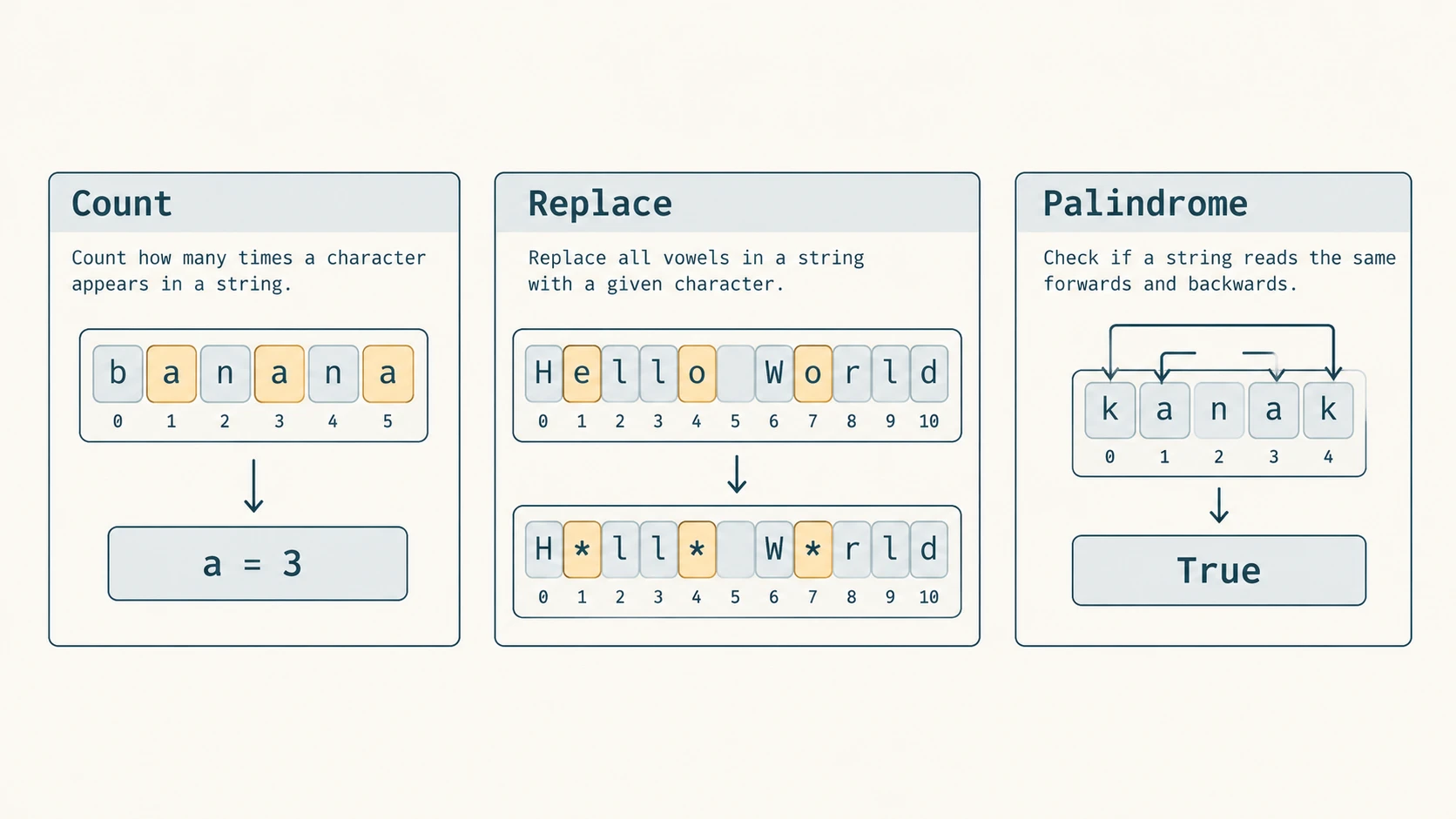
29. Count one character with a function (NCERT Program 8-1 concept)
def count_character(text, target):
    """Count exact, case-sensitive occurrences of a single character."""
    if len(target) != 1:
        raise ValueError("Please supply exactly one character")
    count = 0
    for ch in text:
        if ch == target:
            count += 1
    return count

print(count_character("Today is a Holiday", "a"))  # 3
We ask for one character because the chapter's stated problem is a character count. For substring counting, .count() is more appropriate. In the NCERT sample, the function is called charCount; the fully explained version above includes extra input checking and is original instructional code.
30. Replace vowels without modifying the original (NCERT Program 8-2 concept)
def replace_vowels(text):
    result = ""
    for ch in text:
        if ch in "aeiouAEIOU":
            result += "*"
        else:
            result += ch
    return result

original = "Hello World"
print(original)                 # Hello World
print(replace_vowels(original)) # H*ll* W*rld
The test uses the five English vowels. It is not a universal language-specific vowel recogniser. For efficiency on long texts you could append characters to a list and call "".join(parts) once, but the basic loop above is easy to trace.
31. Reverse by printing without constructing a new string (NCERT Program 8-3 concept)
def display_reverse(text):
    for i in range(len(text) - 1, -1, -1):
        print(text[i], end="")
    print()

display_reverse("Hello World")  # dlroW olleH
This program prints characters in reverse order; its function does not return a reversed string. It does not create a new reversed string itself (the console still receives output).
32. Reverse and return a newly built string (NCERT Program 8-4 concept)
def reverse_string(text):
    reversed_text = ""
    for i in range(len(text) - 1, -1, -1):
        reversed_text += text[i]
    return reversed_text

print(reverse_string("Hello World"))  # dlroW olleH
The new value is independent of the original string. A shorter alternative is return text[::-1], but the loop makes index movement clear.
33. Check a palindrome with two pointers (NCERT Program 8-5 concept)
def is_palindrome(text):
    left = 0
    right = len(text) - 1
    while left < right:
        if text[left] != text[right]:
            return False
        left += 1
        right -= 1
    return True

print(is_palindrome("kanak"))    # True
print(is_palindrome("computer")) # False
print(is_palindrome("Kanak"))    # False: case matters here
The two pointers move inward after the outer characters match. The moment two characters differ, there is no need to inspect the rest. Under this literal comparison, spaces, punctuation and case all matter. If the task says to ignore case and nonletters, normalise the text first; that produces a different problem and should not be silently substituted for the NCERT definition.
34. Carefully handle user input, especially when multiple lines are involved
input() reads one line, stopping at Enter, and does not include the newline in the returned string. If a question says “read until Enter,” the usual beginner interpretation is a single line. If it really requires multiple lines, the program needs another stopping rule, such as a blank line or EOF (Ctrl+D on some systems; Ctrl+Z then Enter on many Windows consoles). No single call to input() can infer an unspecified number of future lines.
def text_statistics(text):
    letters = sum(ch.isalpha() for ch in text)
    digits = sum(ch.isdigit() for ch in text)
    spaces = sum(ch.isspace() for ch in text)
    special = len(text) - letters - digits - spaces
    words = len(text.split())
    return len(text), letters, digits, spaces, special, words

print(text_statistics("Hi 12!"))
# (6, 2, 2, 1, 1, 2)
The counts are mutually exclusive: every character is classified once as a letter, digit, whitespace or other character. For the original exercise’s “special symbols,” we exclude whitespace and display whitespace separately. For a multiline input joined using "\n", the newline also counts as a character; for separately read lines kept separately, you must decide whether to include a separator in the reported total.
35. Worked mini-project: a safe simple text report
def report(text):
    total, letters, digits, spaces, other, words = text_statistics(text)
    print("Characters:", total)
    print("Letters:", letters)
    print("Digits:", digits)
    print("Whitespace:", spaces)
    print("Special symbols:", other)
    print("Words:", words)

report("CS-11 is fun!")
# Characters: 13
# Letters: 7
# Digits: 2
# Whitespace: 2
# Special symbols: 2
# Words: 3
Here CS-11 is one whitespace-delimited word. The special symbols are the hyphen and exclamation mark, and spaces are shown separately. This illustrates why a precise definition is as important as the program itself.
Chapter checkpoint
Before reading the solution bank, make sure you can answer these: Why does word[-1] access the last character? Why does word[20:] usually work when word[20] fails? What does the third slice parameter control? Why can replace() leave a variable unchanged? What is the difference between find() and index()? Why do split() and split(' ') count words differently after repeated spaces? Can a string of digits pass .isupper()? Why should a palindrome question state its case/punctuation rule?
Complete NCERT Chapter 8 Solution Bank
Reference and fidelity: NCERT Class XI Computer Science, Chapter 8, printed pp. 187–188, from the verified 2026–27 supplied PDF kecs108.pdf. The first numbered exercise uses mySubject = "Computer Science"; the second uses myAddress = "WZ-1,New Ganga Nagar,New Delhi". Each subpart below is identified by the original NCERT Roman numeral. The prompts are paraphrased, not reproduced wholesale. Exact Python display text is used when needed to verify the answer.
NCERT Exercise 1 — Ten operations on mySubject
mySubject = "Computer Science"
print(len(mySubject))  # 16
Note that the space between the two words occupies index 8. Thus Computer is at indices 0–7, the space at 8, and Science at 9–15. This is the anchor for the following traces.
| NCERT subpart | Original operation | Exact displayed output | Why |
|---|---|---|---|
| 1(i) | print(mySubject[0:len(mySubject)]) | Computer Science | Slice from index 0 to exclusive 16 gives all text. |
| 1(ii) | print(mySubject[-7:-1]) | Scienc | Indices −7 through −2; last e at −1 is excluded. |
| 1(iii) | print(mySubject[::2]) | Cmue cec | Select positions 0,2,4,6,8,10,12,14, including a space at 8. |
| 1(iv) | print(mySubject[len(mySubject)-1]) | e | Position 15 is the last character. |
| 1(v) | print(2*mySubject) | Computer ScienceComputer Science | Two copies, no newly inserted space. |
| 1(vi) | print(mySubject[::-2]) | eniSrtpo | Starting at index 15, take indices 15,13,11,9,7,5,3,1. |
| 1(vii) | print(mySubject[:3] + mySubject[3:]) | Computer Science | Adjacent slices recombine all original characters. |
| 1(viii) | print(mySubject.swapcase()) | cOMPUTER sCIENCE | Each uppercase/lowercase letter flips case. |
| 1(ix) | print(mySubject.startswith('Comp')) | True | Prefix Comp matches exactly. |
| 1(x) | print(mySubject.isalpha()) | False | The string includes a space, which is not alphabetic. |
Explanation of tricky subpart 1(ii)
The slice [-7:-1] starts at the S in Science and excludes the final e: Science minus the ending e gives Scienc. The often-seen incorrect answer Science assumes the stop position is included.
Explanation of tricky subpart 1(iii)
Map the string's indices carefully. The selected sequence is C + m + u + e + space + c + e + c, producing Cmue cec. Do not silently remove the space from the printed output; the slice contains it.
Explanation of tricky subpart 1(vi)
Negative step -2 selects every second character moving backwards from the right edge. Unlike [::-1], it both reverses the direction and skips alternate characters. The answer eniSrtpo preserves the actual case.
Independent Python reproduction for all 10 subparts
mySubject = "Computer Science"
print(mySubject[0:len(mySubject)])   # (i)
print(mySubject[-7:-1])             # (ii)
print(mySubject[::2])               # (iii)
print(mySubject[len(mySubject)-1])  # (iv)
print(2*mySubject)                  # (v)
print(mySubject[::-2])             # (vi)
print(mySubject[:3] + mySubject[3:]) # (vii)
print(mySubject.swapcase())         # (viii)
print(mySubject.startswith('Comp')) # (ix)
print(mySubject.isalpha())          # (x)
NCERT Exercise 2 — Ten operations on myAddress
myAddress = "WZ-1,New Ganga Nagar,New Delhi"Notice two commas, no space after either comma, and spaces within New Ganga Nagar and New Delhi. The first occurrence of New begins at index 5 and the second at index 21.
2(i) — Lowercase transformation
print(myAddress.lower())
# wz-1,new ganga nagar,new delhi
Only letter case changes. Punctuation and digits are preserved.
2(ii) — Uppercase transformation
print(myAddress.upper())
# WZ-1,NEW GANGA NAGAR,NEW DELHI
2(iii) — Count occurrences of New
print(myAddress.count('New'))
# 2
The substring appears once before Ganga and once before Delhi.
2(iv) — Find the first New
print(myAddress.find('New'))
# 5
The prefix WZ-1, contains five characters at positions 0–4, so the next character starts index 5.
2(v) — Find the last New
print(myAddress.rfind('New'))
# 21
rfind() reports the starting index of the last occurrence, not the number of occurrences.
2(vi) — Split using comma
print(myAddress.split(','))
# ['WZ-1', 'New Ganga Nagar', 'New Delhi']
The commas are removed as delimiters. The result is a Python list of three strings.
2(vii) — Split using literal space
print(myAddress.split(' '))
# ['WZ-1,New', 'Ganga', 'Nagar,New', 'Delhi']
Because there is no space after the commas, WZ-1,New and Nagar,New remain intact tokens. The result is four, not six, list items.
2(viii) — Replace New with Old
print(myAddress.replace('New','Old'))
# WZ-1,Old Ganga Nagar,Old Delhi
Both occurrences change, but the variable still holds the original string unless assigned the return value.
2(ix) — Partition at the first comma
print(myAddress.partition(','))
# ('WZ-1', ',', 'New Ganga Nagar,New Delhi')
The tuple has three parts; only the first comma separates them. The second comma remains inside the final part.
2(x) — Search using index() for absent text
# print(myAddress.index('Agra'))
# Raises: ValueError: substring not found
Correct answer: ValueError: substring not found. There is no normal printed integer output, and the program would stop here if the exception were not handled. A common mistaken answer is -1, which is what find('Agra') would return, not index('Agra').
A safe continuation would be:
if myAddress.find('Agra') == -1:
    print('Agra is not present')
# Agra is not present
Independent reproduction for Exercise 2
myAddress = "WZ-1,New Ganga Nagar,New Delhi"
print(myAddress.lower())
print(myAddress.upper())
print(myAddress.count('New'))
print(myAddress.find('New'))
print(myAddress.rfind('New'))
print(myAddress.split(','))
print(myAddress.split(' '))
print(myAddress.replace('New','Old'))
print(myAddress.partition(','))
try:
    print(myAddress.index('Agra'))
except ValueError as error:
    print(type(error).__name__ + ': ' + str(error))
NCERT Programming Problem 1 — Analyse characters, symbols and words
Task, paraphrased: Read text supplied by the student and report totals for all characters (including spaces), letters, digits, special symbols and words. The source says “line(s)” until Enter and assumes words have a single separating space. Since the line-termination rule is ambiguous for multiple lines, the principal solution below uses one Enter-terminated line; a separate clearly identified multiline extension follows.
Plan and category policy
- Every character counts towards total length, including spaces.
- Alphabetic characters are tested with
.isalpha(); digits with.isdigit(). - Special symbols are non-alphanumeric, non-whitespace characters, such as
!,%and-. - Whitespace is reported separately, so the groups are disjoint.
- Words are counted with
.split(), accepting multiple spaces rather than assuming exactly one. This is a robust extension of the textbook's simpler assumption.
Full executable solution — one input line
def analyse_line(text):
    letters = 0
    digits = 0
    spaces = 0
    special = 0

    for ch in text:
        if ch.isalpha():
            letters += 1
        elif ch.isdigit():
            digits += 1
        elif ch.isspace():
            spaces += 1
        else:
            special += 1

    return {
        "characters": len(text),
        "letters": letters,
        "digits": digits,
        "whitespace": spaces,
        "special": special,
        "words": len(text.split()),
    }

line = input("Enter a line of text: ")
counts = analyse_line(line)
print("Total characters:", counts["characters"])
print("Alphabets:", counts["letters"])
print("Digits:", counts["digits"])
print("Whitespace:", counts["whitespace"])
print("Special symbols:", counts["special"])
print("Words:", counts["words"])
Sample input: Hi 12!
Total characters: 6
Alphabets: 2
Digits: 2
Whitespace: 1
Special symbols: 1
Words: 2
Why it works: Each if/elif chain places one character into exactly one group; adding the four category counts produces len(text). split() creates tokens based on runs of whitespace, and len() counts them. Test "" (all zero), "123" (digits only), "hi!" (two letters and one special symbol), and "one two" (two words despite two spaces).
Optional multiline extension (not a claim about NCERT's exact stopping rule)
Use a blank line as the explicit end-of-entry marker. The joined newline between entered lines is included in total characters and whitespace.
lines = []
while True:
    line = input("Next line (blank to finish): ")
    if line == "":
        break
    lines.append(line)

full_text = "\n".join(lines)
print(analyse_line(full_text))
Interpretation note: Some school answer keys count “special characters” as every character that is neither alphabetic nor a digit—including spaces. That convention would use len(text) - letters - digits; our reported special-symbol count excludes whitespace, which is separately counted. Both conventions must be explained, not accidentally conflated.
NCERT Programming Problem 2 — Build title case using a user-defined function
Task, paraphrased: Given a phrase with more than one word, return text in which each word starts with a capital letter.
Function using simple character-by-character logic
def to_title_case(sentence):
    result = []
    new_word = True

    for ch in sentence:
        if ch.isspace():
            result.append(ch)  # preserve exactly the same whitespace
            new_word = True
        elif new_word:
            result.append(ch.upper())
            new_word = False
        else:
            result.append(ch.lower())

    return "".join(result)

sentence = input("Enter a phrase: ")
print("Title case:", to_title_case(sentence))
Sample input: cOMPUTER scIENCE is INTERESTING
Sample output: Computer Science Is Interesting
The flag new_word is set when whitespace is encountered and reset after a nonspace character is written. This solution preserves repeated spaces and tabs. It assumes words begin at the first non-whitespace character. It is educationally useful but not a full language-aware proper-name converter.
Short textbook-level alternative
def to_title_case_simple(sentence):
    return sentence.title()

print(to_title_case_simple("computer science"))  # Computer Science
Both solve the textbook's intended ordinary-word cases. The explicit algorithm demonstrates how to construct a reusable string-processing function without relying on a convenience method.
NCERT Programming Problem 3 — Delete all occurrences of a character
Task, paraphrased: Write deleteChar() with text and a character as inputs and return a new string with all instances of that character removed.
def deleteChar(text, char):
    if len(char) != 1:
        raise ValueError("Exactly one character must be supplied")
    result = ""
    for ch in text:
        if ch != char:
            result += ch
    return result

print(deleteChar("banana", "a"))  # bnn
print(deleteChar("Apple", "p"))   # Ale
print(deleteChar("mississippi", "s"))  # miiippi
Step-by-step: Inspect each source character. If it is not the character to delete, append it to the new result. All a characters are skipped in banana; the output is bnn. The function is case-sensitive: deleting lowercase p does not remove uppercase P.
A concise alternative is return text.replace(char, "") after validating that char has one character. We retain the loop because NCERT expects reasoning about strings, traversals and immutability.
Edge cases: If the character is absent, the original text is returned unchanged. If the input text is empty, the output is empty. The input character must be length 1; letting it be empty would contradict the problem's requirement of a character.
NCERT Programming Problem 4 — Sum digit characters inside text
Task, paraphrased: Read a string containing digits and return the sum of its digit values.
def sum_digits_in_text(text):
    total = 0
    for ch in text:
        if ch in "0123456789":
            total += int(ch)
    return total

print(sum_digits_in_text("A1B20C3"))  # 6
print(sum_digits_in_text("Room 209"))  # 11
print(sum_digits_in_text("No digits")) # 0
Manual trace: For "A1B20C3", the included characters are '1', '2', '0' and '3'; their numeric values total 1 + 2 + 0 + 3 = 6. This adds individual digits, not the decimal numbers implied by adjacent digits. The substring "20" contributes 2 + 0, not twenty.
Accuracy note: Checking ch in "0123456789" deliberately accepts ordinary ASCII digits, for which int(ch) is reliable. Some Unicode characters pass .isdigit() but do not parse with int() (for example, superscript two), so combining .isdigit() with int() without defining a digit policy can fail. The exercise's normal classroom inputs are ASCII digits.
NCERT Programming Problem 5 — Replace each blank with a hyphen
Task, paraphrased: Take a sentence with space-separated words and return a version with blanks replaced by hyphens.
def replace_blanks(sentence):
    result = ""
    for ch in sentence:
        if ch == " ":
            result += "-"
        else:
            result += ch
    return result

print(replace_blanks("Computer Science Class XI"))
# Computer-Science-Class-XI
print(replace_blanks("A  B"))
# A--B
Explanation: The function loops across all characters and substitutes '-' for the literal space ' '. Two consecutive blanks turn into two hyphens, preserving their count. Tabs and newlines are not changed because the problem specifies blanks/spaces between words. If the requirement meant all whitespace, use .isspace() instead and document the changed rule.
Equally correct concise implementation
def replace_blanks_simple(sentence):
    return sentence.replace(" ", "-")

print(replace_blanks_simple("A B C")) # A-B-C
The result is always a newly returned string; the original argument is not modified.
Guided solutions to the five worked NCERT programs
These are in-chapter sample programs, not additional end-of-chapter exercise numbers. Their educational purpose is explained here so a reader can reproduce and vary each program without relying on the source PDF.
| NCERT program | Topic | Reproduced function/approach in this chapter | Reference sample output |
|---|---|---|---|
| 8-1 | Count exact occurrences of a character | count_character(text, target) | "Today is a Holiday", 'a' → 3 |
| 8-2 | Mask English vowels with * | replace_vowels(text) | Hello World → H*ll* W*rld |
| 8-3 | Print text in reverse without creating reversed string | display_reverse(text) | Hello World → dlroW olleH |
| 8-4 | Construct and return reversed string | reverse_string(text) | Hello World → dlroW olleH |
| 8-5 | Test whether text reads the same both ways | is_palindrome(text) | kanak → True; computer → False |
Program 8-1 walkthrough: The counter begins at 0 and increases only when the current character equals the requested character. In the example phrase, the letter a occurs three times. It is a case-sensitive exact-character comparison; uppercase A would be different unless normalised.
Program 8-2 walkthrough: Instead of overwriting a character in an immutable string, the function builds a fresh result one character at a time. It writes * where the character belongs to the explicitly stated English vowel set and otherwise preserves the source character.
Program 8-3 walkthrough: Iterate from the last index to the first with a negative step and print end="". This prints backwards and is different from returning a reversed string. An empty input prints a blank line after the loop.
Program 8-4 walkthrough: The loop similarly moves right-to-left, but it appends to a fresh string and returns that string so the caller can store or further process the result. The original argument remains unchanged.
Program 8-5 walkthrough: Two indices start at opposite ends. If the characters differ, the result is False; if they keep matching until pointers meet/cross, the result is True. Literal "Kanak" is not considered the same as "kanak" under the source's strict character comparison. Normalising case before testing is a separately explained variant.
One comprehensive regression check for all five worked program ideas
assert count_character("Today is a Holiday", "a") == 3
assert replace_vowels("Hello World") == "H*ll* W*rld"
assert reverse_string("Hello World") == "dlroW olleH"
assert is_palindrome("kanak") is True
assert is_palindrome("computer") is False
print("Five NCERT example concepts verified")
The assertion block assumes the functions from Section S06 are defined earlier in the same running Python session or script.
Original Practice — 30 Questions with Answers and Explanations
These are original practice questions, not NCERT exercise items or previous-year examination questions. They assess understanding, prediction, debugging and small-program design. Answers are provided immediately for self-study; instructors may separate questions and solutions when preparing a worksheet.
Part A — 12 original conceptual MCQs
Practice P01 — String length
What is len("Hi! ")? A. 3 B. 4 C. 5 D. Error
Answer: B — 4. The string includes H, i, ! and one trailing space. Whitespace is part of the string and is counted by len().
Practice P02 — Negative indexing
If s = "Python", what is s[-2]? A. n B. o C. h D. IndexError
Answer: B — o. Counting backwards, n is index −1 and o is −2. Negative indexing does not mean reversing the string automatically.
Practice P03 — Out-of-range slice
For s = "abc", what is s[1:20]? A. IndexError B. bc C. abc D. empty string
Answer: B — bc. The slice starts at index 1 and is clipped at the end; only single-character indexing at an invalid index normally raises IndexError.
Practice P04 — Changing a string
Which statement is valid when s = "cat"? A. s[0] = 'b' B. s = 'b' + s[1:] C. del s[0] D. s.append('s')
Answer: B. Strings do not support item assignment, element deletion or list-style append(). Rebinding s to a newly concatenated string is legal.
Practice P05 — Repetition
What is the value of "go" * 3? A. gogogo B. go3 C. go go go D. TypeError
Answer: A. Repetition makes three consecutive copies without inserting separators automatically.
Practice P06 — Case-sensitive substring
What is "CS" in "class cs"? A. True B. False C. -1 D. Error
Answer: B — False. Membership is case-sensitive: CS differs from cs.
Practice P07 — Reverse slicing
Which slice reverses every character of s? A. s[-1] B. s[::1] C. s[::-1] D. s[1::-1]
Answer: C. The negative step reverses the direction and selects the full string; s[-1] accesses only the final character.
Practice P08 — find() or index()
Which operation returns -1 if "fox" is absent from s? A. s.index('fox') B. s.find('fox') C. s.count('fox') D. s.startswith('fox')
Answer: B. find() returns -1 on failure; index() raises ValueError, count() returns 0, and startswith() returns False.
Practice P09 — Digit test
What does "2030".isdigit() return? A. 4 B. "2030" C. True D. False
Answer: C — True. Every character is a digit and the string is nonempty. .isdigit() is a predicate returning a boolean, not the digit count.
Practice P10 — Uppercase predicate
What is "123!".isupper()? A. True B. False C. "123!" D. Error
Answer: B — False. There is no cased letter at all. A string does not become uppercase merely because it contains no lowercase letters.
Practice P11 — Splitting spaces
What is len("a b".split())? A. 2 B. 3 C. 4 D. Error
Answer: A — 2. Without a separator, split() treats a run of spaces as one separator. split(' ') would instead preserve an empty field between the two spaces and give three list entries.
Practice P12 — partition() result type
What does "key=value".partition("=") return? A. A string B. A list with two items C. A three-item tuple D. An integer
Answer: C. partition() returns (before, separator, after): ('key', '=', 'value'), not a list and not a plain string.
Part B — 10 original output-tracing questions
Practice P13 — Select a character and a slice
s = "DATA"
print(s[-2])
print(s[1:3])
Answer/output:
T
AT
Explanation: −2 is the penultimate T; [1:3] takes indices 1 and 2 (A, T).
Practice P14 — Negative-step selection
print("ABCD"[::-2])Answer: DB. Explanation: Positions 3 and 1, in reverse order, give D followed by B.
Practice P15 — Missing substring
print("abc".find("z"))Answer: -1. Explanation: This is not an exception because find() uses a numeric failure sentinel.
Practice P16 — Repeated spaces
print(" A B ".split())Answer: ['A', 'B']. Explanation: No-argument split() discards surrounding whitespace and collapses internal whitespace runs.
Practice P17 — Limit replacements
print("a,a,a".replace("a", "X", 2))Answer: X,X,a. Explanation: Only the first two lowercase a instances are replaced because count=2.
Practice P18 — Count a pair
print("hello".count("ll"))Answer: 1. Explanation: The pair ll occurs once starting at index 2.
Practice P19 — Two classification predicates
print("12".isdigit())
print("12".isalpha())
Answer/output:
True
False
Explanation: Digits are numeric characters; the string is not made entirely of alphabetic letters.
Practice P20 — Partition only once
print("one:two:three".partition(":"))Answer: ('one', ':', 'two:three'). Explanation: Only the first colon is the partition point; the second stays in the tail.
Practice P21 — Successful index()
print("hello".index("e"))Answer: 1. Explanation: The first e starts at index 1, and this search succeeds without an exception.
Practice P22 — Empty repetition
print("hi" * 0 == "")Answer: True. Explanation: Repeating a string zero times produces an empty string, so the equality is true.
Part C — 8 original programming questions, each solved
Practice P23 — Normalise redundant whitespace
Question: Create a function that converts any run of whitespace to a single space and removes whitespace at both ends.
def normalise_spaces(text):
    return " ".join(text.split())

print(normalise_spaces("  Learn\tPython   now  "))
# Learn Python now
Explanation: split() turns whitespace-separated words into a list, discarding redundant whitespace; joining with a single space reconstructs the sentence. This deliberately changes original spacing, unlike the NCERT title-case solution, which preserves it.
Practice P24 — Count words that start with English vowels
Question: Count whitespace-delimited words beginning with a, e, i, o or u, ignoring case.
def words_starting_vowel(sentence):
    count = 0
    for word in sentence.split():
        if word[0].lower() in "aeiou":
            count += 1
    return count

print(words_starting_vowel("An eagle is over us")) # 5
Explanation: split() returns only nonempty tokens, so word[0] is safe in this loop. The first letters of An, eagle, is, over and us are all vowels. This is an English-focused definition, not multilingual word segmentation.
Practice P25 — Case-and-punctuation-insensitive palindrome
Question: Treat spaces/punctuation and letter case as unimportant when checking whether a phrase is a palindrome.
def relaxed_palindrome(text):
    cleaned = "".join(ch.casefold() for ch in text if ch.isalnum())
    return cleaned == cleaned[::-1]

print(relaxed_palindrome("Never odd or even")) # True
print(relaxed_palindrome("Was it a rat I saw?")) # True
Explanation: Build a normalised string of letters/digits, reverse it and compare. This is a different, relaxed definition from NCERT Program 8-5's literal comparison. A cleaned empty string will pass; if the specification prohibits empty input, reject it separately.
Practice P26 — Count English vowels and consonants separately
Question: Ignore digits, spaces and symbols; return counts of vowels and consonants among English letters.
def english_letter_counts(text):
    vowels = 0
    consonants = 0
    for ch in text.lower():
        if "a" <= ch <= "z":
            if ch in "aeiou":
                vowels += 1
            else:
                consonants += 1
    return vowels, consonants

print(english_letter_counts("Code 123!")) # (2, 2)
Explanation: C and d are consonants, o and e vowels; numbers/punctuation do not enter either group. The ASCII alphabet check clearly restricts this question to English letters.
Practice P27 — First non-repeating character
Question: Return the first character appearing exactly once, or None if every character repeats.
def first_unique(text):
    for ch in text:
        if text.count(ch) == 1:
            return ch
    return None

print(first_unique("aabbcdd")) # c
print(first_unique("aabb"))    # None
Explanation: Iterate in original order so the first unique character wins. This beginner-friendly solution rescans the string and is not ideal for very large inputs; a frequency dictionary can speed it up after the next chapters.
Practice P28 — Report counts of distinct characters in appearance order
Question: Create a readable character-frequency report without using dictionaries.
def frequency_report(text):
    seen = ""
    for ch in text:
        if ch not in seen:
            print(repr(ch), text.count(ch))
            seen += ch

frequency_report("banana")
# 'b' 1
# 'a' 3
# 'n' 2
Explanation: seen prevents reporting a character more than once; .count() supplies the total number of times it occurs. The order is the first occurrence order, not alphabetical.
Practice P29 — Count overlapping substring matches
Question: For "aaaa", count occurrences of "aa" even when they overlap.
def count_overlapping(text, pattern):
    if pattern == "":
        raise ValueError("Pattern must not be empty")
    count = 0
    start = 0
    while True:
        position = text.find(pattern, start)
        if position == -1:
            return count
        count += 1
        start = position + 1

print(count_overlapping("aaaa", "aa")) # 3
print("aaaa".count("aa"))             # 2
Explanation: Positions 0, 1 and 2 begin the three overlapping matches. Each next search begins only one index after the previous match's start. Contrast that explicitly with .count(), which counts non-overlapping matches.
Practice P30 — Validate a simple roll-code pattern
Question: Accept a text code in the form CS- followed by exactly three ASCII decimal digits; reject other shapes.
def is_valid_cs_code(code):
    return (len(code) == 6
            and code.startswith("CS-")
            and all(ch in "0123456789" for ch in code[3:]))

print(is_valid_cs_code("CS-123")) # True
print(is_valid_cs_code("CS-12"))  # False
print(is_valid_cs_code("cs-123")) # False
print(is_valid_cs_code("CS-12A")) # False
Explanation: The length and exact prefix are checked first; the final slice must contain three ASCII digits. This is a classroom pattern validator, not evidence that the code was issued to a real student or exists in a database.
Revision Sheet — Strings at a Glance
Essential distinctions
| Confusable concepts | Correct distinction |
|---|---|
"123" versus 123 | First is a 3-character string; second is an integer. |
s[-1] versus s[::-1] | Last character versus reversed entire string. |
s[20] versus s[:20] | First may raise IndexError; second is clipped safely. |
s[1:4] versus s[1:4:2] | 1,2,3 versus 1,3. |
"A" in s versus s.find("A") | Boolean versus starting index/-1. |
find() versus index() | -1 on missing versus ValueError. |
count("aa") versus overlapping search | Counts non-overlapping matches versus all start positions. |
lower() versus title() | Lowercases all letters versus title-style word beginnings. |
capitalize() versus title() | First character of whole text versus word-by-word treatment. |
isdigit() versus isalpha() | Digits only versus letters only, both require nonempty text. |
islower() versus absence of uppercase characters | Requires at least one cased character; "123".islower() is false. |
split() versus split(" ") | General whitespace runs versus each literal single space. |
split() versus partition() | A list of variable length versus a three-item tuple. |
"-".join(words) versus words.join("-") | Separator calls join; a list does not have this string method. |
replace() versus item assignment | replace() returns new string; s[0] = ... is invalid. |
| Printed reverse versus returned reverse | Reverse printing need not build a new string; returning does. |
| Literal palindrome versus normalised palindrome | Case/spaces matter in the first, may be ignored explicitly in the second. |
Ten exam-focused reminders
- Start index at zero, not one. For
ncharacters the last valid positive index isn-1. - The last character has index
-1, regardless of length (unless empty). - Slice stop is exclusive; a negative step changes direction.
s[::0]raisesValueError; a step cannot be zero.- A
forloop over a string produces one-character strings. - For a
whileloop over indices, testi < len(s)and updatei. - Strings are immutable; methods and concatenation construct returned values.
index()can raise an exception;find()is safer when failure is expected.- Define “word,” “space,” “digit” and “special symbol” before text-statistics programming.
- Demonstrate empty input, case variation, punctuation and boundary positions in your test cases.
Suggested short-answer and viva prompts
A student should be able to explain (a) why Unicode is used for text, (b) why len("A B") is three, (c) the difference between an index and a slice, (d) how slicing reverses a string, (e) how join() differs from split(), (f) why .replace() does not mutate its operand, (g) how rfind() differs from find(), (h) how a while loop terminates, (i) why special-symbol counting needs a convention, and (j) how a two-pointer palindrome test works.
Study sequence and onward links
Work through indices and slice tracing before memorising methods. Then practise extracting characters in loops, experiment with search/replace and splitting, and finally write the five NCERT programs from scratch. The next chapter, Lists (Chapter 9, C11-PY-13), uses many familiar indexing and slicing ideas but lists are mutable; Chapter 10 will reuse text-processing ideas with tuples and dictionaries. Review C11-PY-08–C11-PY-11 if loops are difficult and C11-PY-04 when immutability is confusing.
Authoritative reading and source notes
- Primary NCERT source supplied by user: Computer Science, Class XI, Chapter 8, “Strings,”
kecs108.pdf, 14 PDF pages, printed pp. 175–188, NCERT Reprint 2026–27. Official NCERT textbook entry: https://ncert.nic.in/textbook.php?kecs1=0-11. - Syllabus authority: CBSE Computer Science (083), Class XI, 2026–27, https://cbseacademic.nic.in/web_material/CurriculumMain27/SecPart2/Computer_Science_SecP2_2026-27.pdf. The syllabus includes
capitalize(),isalpha()andisdigit()even though they are not prominent in the supplied NCERT Table 8.2; those methods are included in the teaching material. - Language behaviour and built-in reference: Python documentation, https://docs.python.org/3/library/stdtypes.html#text-sequence-type-str, especially string indexing/slicing, searching, whitespace splitting and Unicode predicates. Python tutorial, https://docs.python.org/3/tutorial/introduction.html#strings.
- Copyright-aware presentation: Original explanations, algorithms and practice questions are written independently. NCERT questions are identified by chapter and numbers, with concise prompt descriptions rather than long verbatim reproduction. Where the source’s wording is imprecise, alternative interpretations are labelled.