
Functions
Study Functions in Class 11 Computer Science, with detailed explanations, worked examples, NCERT solutions and practice questions.
By Akhilesh Saini
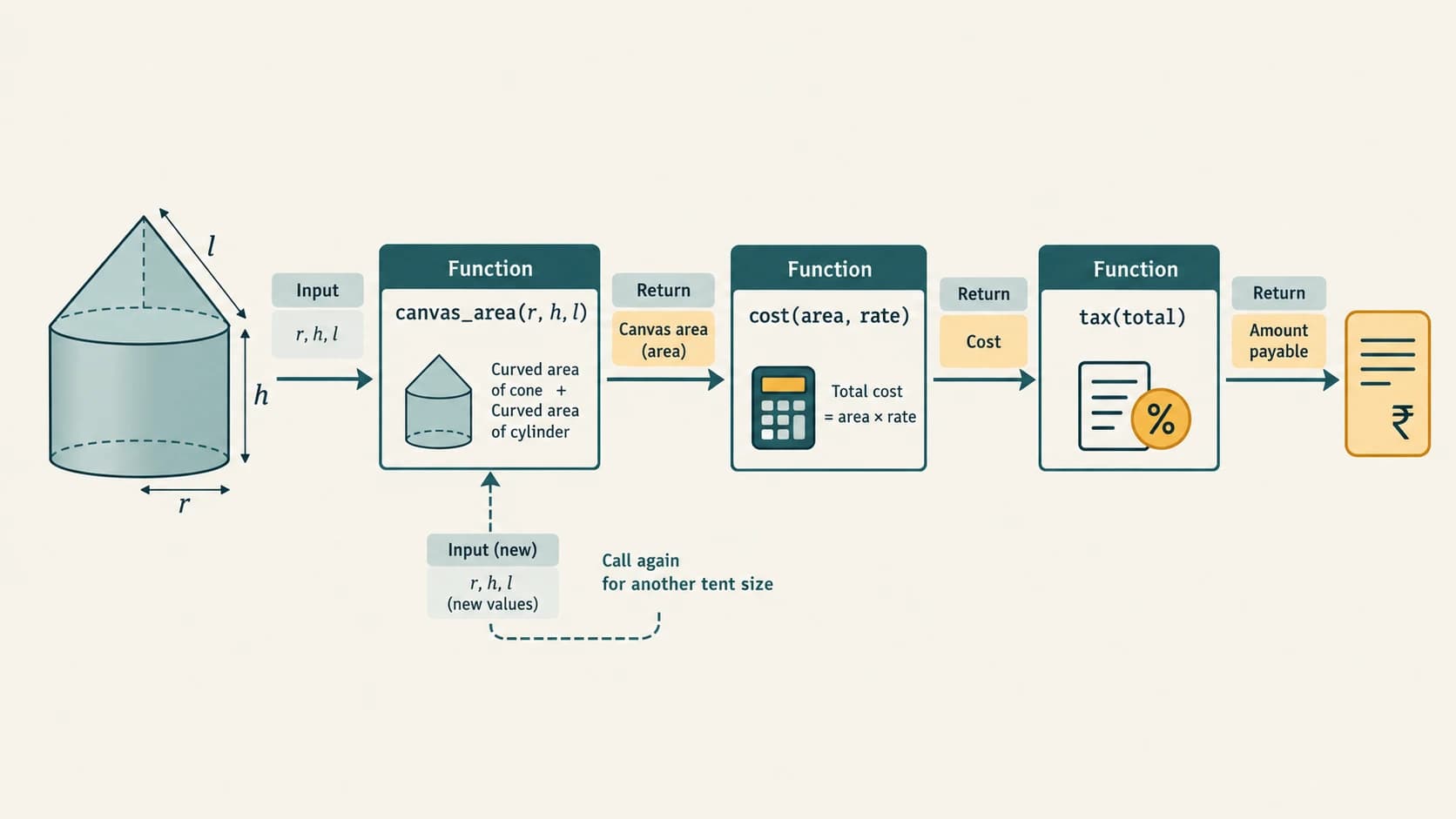
A large Python program becomes easier to understand when it is divided into small, named pieces that each perform a clear task. A function is one such piece: it can accept information, perform a calculation or action, and return a useful result. You have already called functions such as print(), input(), len() and range(). Now you will learn how to design your own.
Syllabus context. This is NCERT Class XI Chapter 7, Functions, from the supplied 2026–27 reprint (printed pp. 143–174). It is retained here as supplementary textbook learning and fully solved NCERT exercises; the current CBSE Class XI Computer Science (083) theory syllabus does not prescribe user-defined functions as a separate Class XI lesson. The
math,randomandstatisticscoverage also reinforces the existingC11-PY-16module lesson; problem practice connects toC11-PY-17. Neither of those stable curriculum IDs is reassigned, duplicated or renamed.
Learning outcomes
After reading this chapter, you should be able to explain modularity and reusability; define and call functions; distinguish parameters from arguments; apply positional, keyword and default arguments; return one or multiple results; trace the order of function calls; understand local and global names; use built-in functions and standard-library modules; safely design small interactive programs; and solve every NCERT chapter exercise, practical activity, lab and case study.
Chapter navigation
| Supplementary chapter section (not a curriculum lesson ID) | NCERT focus | Where to practise |
|---|---|---|
C11-CH07-S01 — Why functions matter | §§7.1–7.2 and tent program | Exercise 6–7, SMIS |
C11-CH07-S02 — Defining, calling, arguments | §§7.3–7.3.2 | Exercise 1(a,d,e), 5–6 |
C11-CH07-S03 — Returns and execution | §§7.3.3–7.3.4 | Exercise 5, 7; lab programs |
C11-CH07-S04 — Variable scope | §7.4 | Exercise 1(c), 6(b) |
C11-CH07-S05 — Standard-library functions | §7.5 | Exercise 1(b), 2–4; labs 4–5 |
C11-CH07-S06 — Modules, composition and design | §7.5, Program 7-16 | Calculator, shapes module, SMIS |
How the answer key works: NCERT prompts are identified and briefly paraphrased by their original numbering; substantial textbook questions are not recopied. Each solution is an original explanation and, wherever appropriate, independently testable Python 3 code. Example inputs are explicitly marked as sample runs. Chapter images are planned at the end of this Markdown, not yet generated.
Section C11-CH07-S01 — Why Functions Matter
1. From a complicated task to manageable subproblems
NCERT begins with a company that makes tents shaped like a cylinder topped with a cone. The company needs measurements, canvas area, material price and tax. A single uninterrupted list of statements can perform all these steps, but it becomes difficult to edit and test. Breaking this task into functions provides a reusable program structure.
If the cylinder has radius r, cylindrical height h, and the top cone has slant height l, the canvas required for the curved outside surfaces is:
The cylinder's circular base is not included because the NCERT model calculates only the cylinder's and cone's curved surfaces. If the price per square metre is p and tax is 18%, then base_cost = A_canvas × p and payable = base_cost × 1.18. The 18% is a source-provided textbook scenario, not a claim about the current tax rate for tents.
import math

def curved_canvas_area(radius, cylinder_height, cone_slant_height):
    """Find outside curved canvas area; excludes circular floor/base."""
    return (2 * math.pi * radius * cylinder_height
            + math.pi * radius * cone_slant_height)

def base_cost(area, price_per_square_metre):
    return area * price_per_square_metre

def amount_with_tax(before_tax, tax_rate=0.18):
    return before_tax * (1 + tax_rate)

# Demonstration measurements only; the formulas are the main lesson.
area = curved_canvas_area(radius=2, cylinder_height=3,
                          cone_slant_height=4)
print(f"Canvas: {area:.2f} m²")
print(f"Payable: {amount_with_tax(base_cost(area, 100)):.2f}")
For these sample measurements, the area is 20π ≈ 62.83 m² and the payable amount is approximately ₹7414.16 (using math.pi; the textbook sometimes approximates π as 3.14). Valid geometric input must also satisfy the cone's physical constraints; this sample is illustrative. The functions can be checked separately: does area calculation work before we even consider the price?
2. What is modular programming?
Modular programming means organising a larger problem into smaller parts with specific responsibilities. A function is a named, reusable group of statements. Some functions compute a value, some print, some update data, and some coordinate other functions.
The main advantages are:
- Readability:
calculate_area(...)communicates purpose better than repeating a long expression throughout a program. - Reusability: Call the same validated function for many tents or another program.
- Testability: Test canvas-area calculation without involving user input or payment.
- Maintainability: Change a calculation in one place rather than repeatedly.
- Teamwork: Different contributors can work on clearly specified components.
Functions do not automatically make every program shorter or faster. Many poorly named tiny functions may harm readability. Design them around meaningful tasks.
3. The fundamental vocabulary
| Word | Meaning | Example |
|---|---|---|
| Define | Create the function by executing a def statement | def square(x): ... |
| Call/invoke | Request that a defined function run | square(5) |
| Parameter | Name appearing in the function header | x in def square(x) |
| Argument | Actual supplied value or expression | 5 in square(5) |
| Return | Send a value/result back to the caller | return x * x |
| Side effect | A visible action besides returning a value | Printing or changing a list |
| Built-in function | Automatically available name | sum, len, print |
| Library function | Function accessed through an imported module | math.sqrt |
| User-defined function | Function authored for the task | curved_canvas_area |
A first complete example
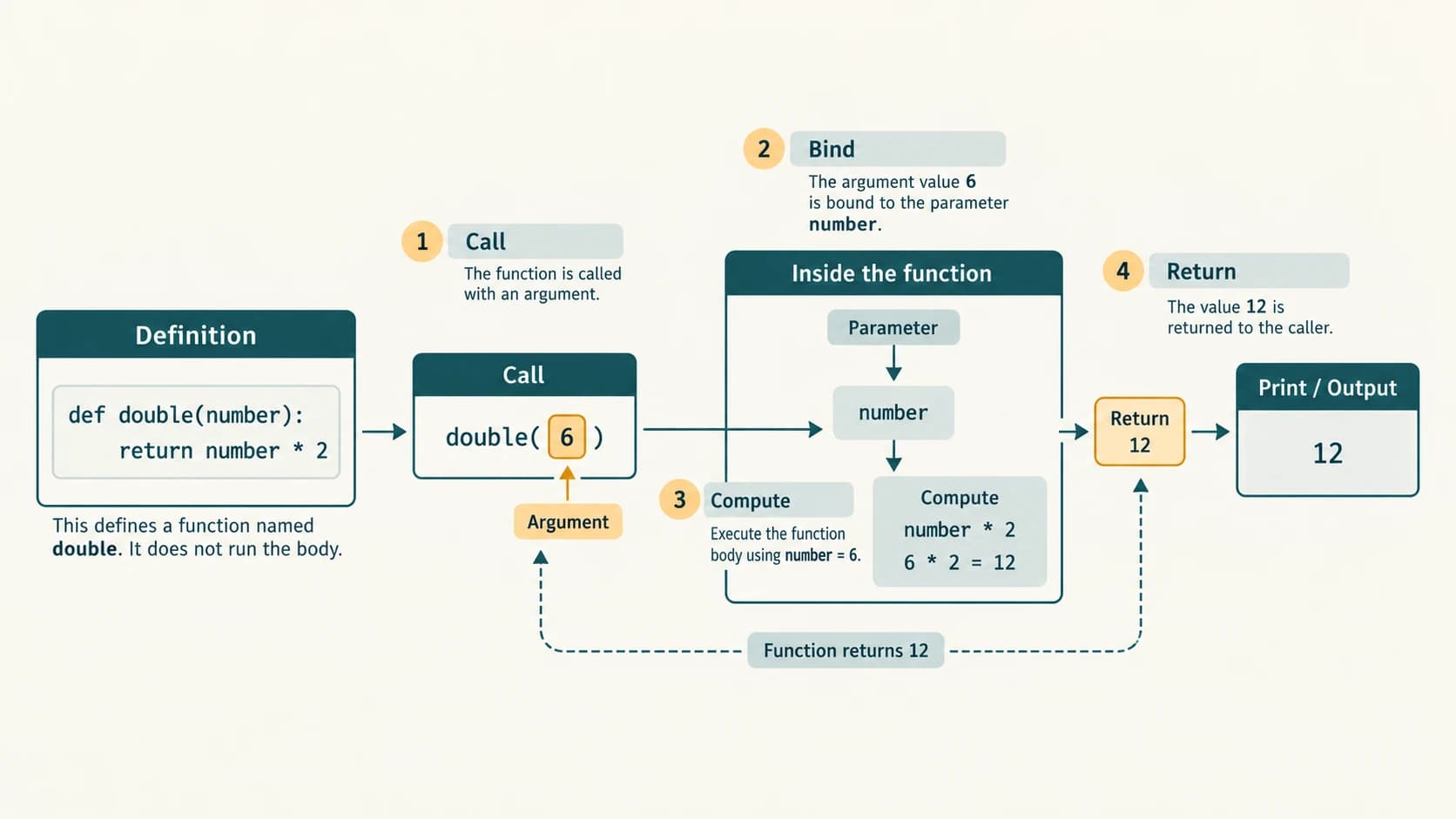
def double(number):
    answer = number * 2
    return answer

original = 6
result = double(original)
print(result)
Output: 12. Python executes the definition, later calls the function with argument 6, binds the parameter number to 6, computes 12, returns it, then prints it. No code inside the function executes merely because def is encountered.
Check your understanding
Predict triple(4) for def triple(x): return 3 * x. Answer: 12 because the argument 4 is bound to x for that call. Notice that writing the definition and calling it are separate operations.
Section C11-CH07-S02 — Defining Functions and Passing Values
1. Syntax of a user-defined function
def function_name(parameter1, parameter2):
    """Optional human-readable documentation string."""
    # Statements within the indented function body.
    result = parameter1 + parameter2
    return result

print(function_name(7, 9))
Output: 16. The function header begins with def, includes a valid identifier, optional parameters in parentheses, and ends with :. The function body is indented consistently (normally four spaces). return is optional but often important.
A function may take zero, one or several arguments. def say_hello(): print("Hello") takes none; say_hello() invokes it. It can be called repeatedly.
2. Argument and parameter: the difference
def perimeter(length, breadth):
    return 2 * (length + breadth)

side_a = 6
print(perimeter(side_a, 4))
Here length and breadth are parameters; side_a and 4 are arguments. The parameter length initially refers to the same 6 object as side_a. If the function later rebinds length, it does not rebind side_a. A mutable argument such as a list can be modified in place, however; that change will be visible to all names referring to that list.
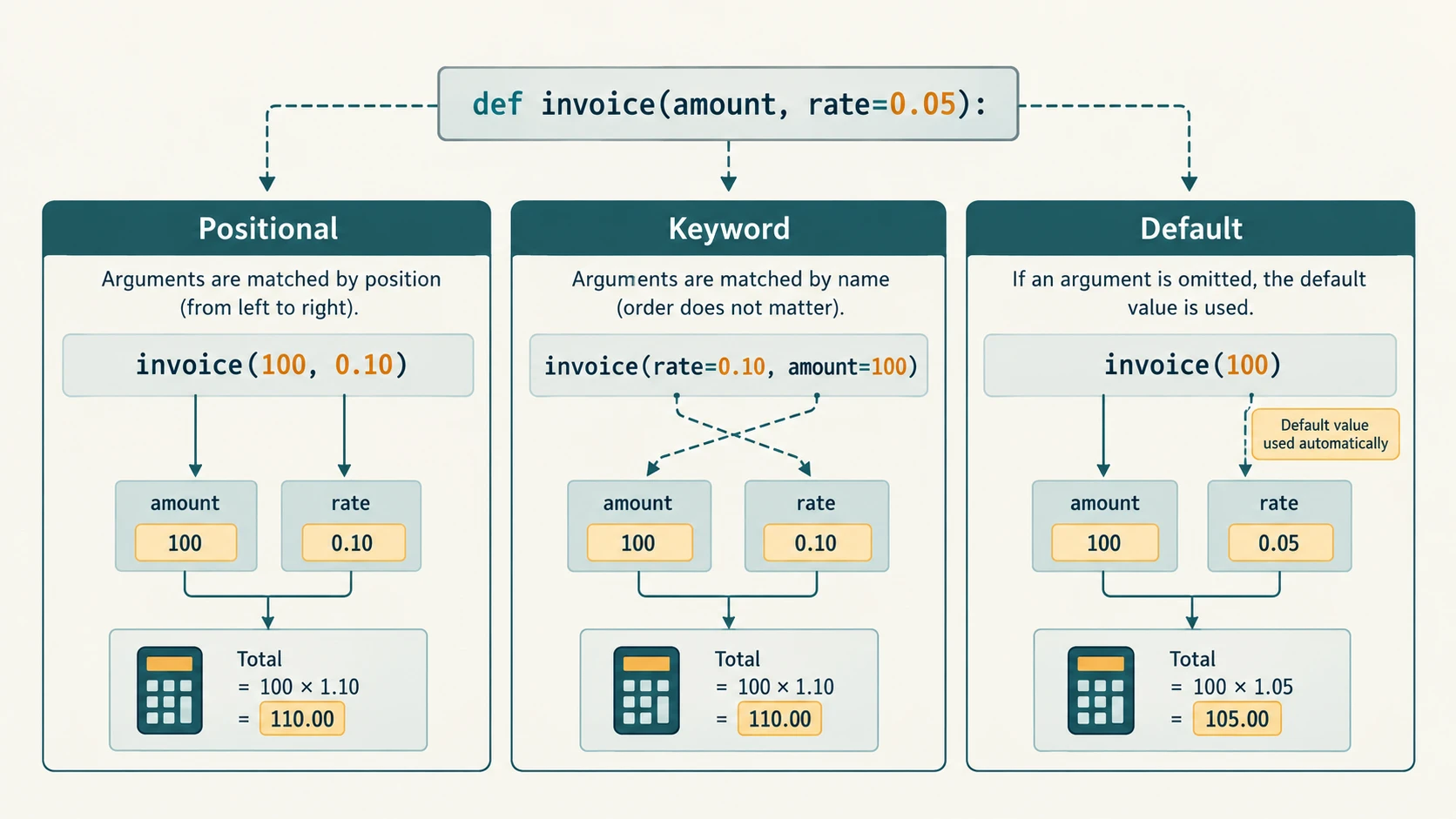
Positional arguments
def difference(a, b):
    return a - b

print(difference(10, 3))  # 7
print(difference(3, 10))  # -7
Order matters because the first argument is assigned to a and the second to b.
Keyword arguments
print(difference(b=3, a=10)) # 7Keyword arguments identify the parameter by name and may be supplied in a different order when the function permits it. Don't accidentally supply the same parameter twice.
Default parameters
def amount_with_service_fee(price, fee_rate=0.05):
    return price * (1 + fee_rate)

print(amount_with_service_fee(100))       # 105.0
print(amount_with_service_fee(100, 0.10)) # 110.00000000000001 (float)
The second displayed floating-point number may expose representation detail; when presenting money, use appropriate rounding/decimal handling. Write def f(a, b=2) rather than def f(a=2, b): under ordinary positional-or-keyword syntax, non-default parameters must precede parameters with defaults. NCERT Exercise 1(d) tests precisely this issue.
Deeper accuracy note: Python computes a default expression once when the function definition is executed; it does not create a fresh list for every call. Thus avoid def collect(x, items=[]): items.append(x); return items. Use items=None, then create [] inside the function when needed.
3. The four basic input/output combinations
| Function arrangement | Small example | What the caller receives |
|---|---|---|
| No arguments, no explicit return | def greet(): print("Hi") | None, plus console text |
| No arguments, returns value | def get_answer(): return 42 | Integer 42 |
| Arguments, prints only | def show(x): print(x) | None, plus console text |
| Arguments, returns value | def cube(x): return x**3 | The computed cube |
For reusable computation, generally return the result and let the caller decide whether to print it, save it or pass it elsewhere. print() does not substitute for return.
NCERT example observation: misleading function name
NCERT Program 7-4 calls its function sumSquares, but its printed loop accumulates 1 + 2 + … + n, not squares. To actually calculate the sum of squares, write total += i*i. We preserve the distinction instead of silently presenting the textbook function name as an accurate description.
Section C11-CH07-S03 — Returning Values and Flow of Execution
1. A return statement and None
def radius_area(radius):
    if radius < 0:
        return None  # Mark invalid input in this classroom example.
    return 3.14 * radius * radius

print(radius_area(2))  # 12.56
print(radius_area(-2)) # None
return stops that function call and hands control to the caller. A function that reaches its end with no explicit return (or simply uses return) returns the special object None. It is more precise to say a function call always evaluates to a value in Python, but there may be no meaningful computed result beyond None. This clarifies the textbook's informal description of 'void functions'.
Printing is not returning
def print_sum(a, b):
    print(a + b)

x = print_sum(2, 3)  # Prints 5 during the call.
print(x)             # Prints None.
Output:
5
None
For downstream calculations, write return a + b instead.
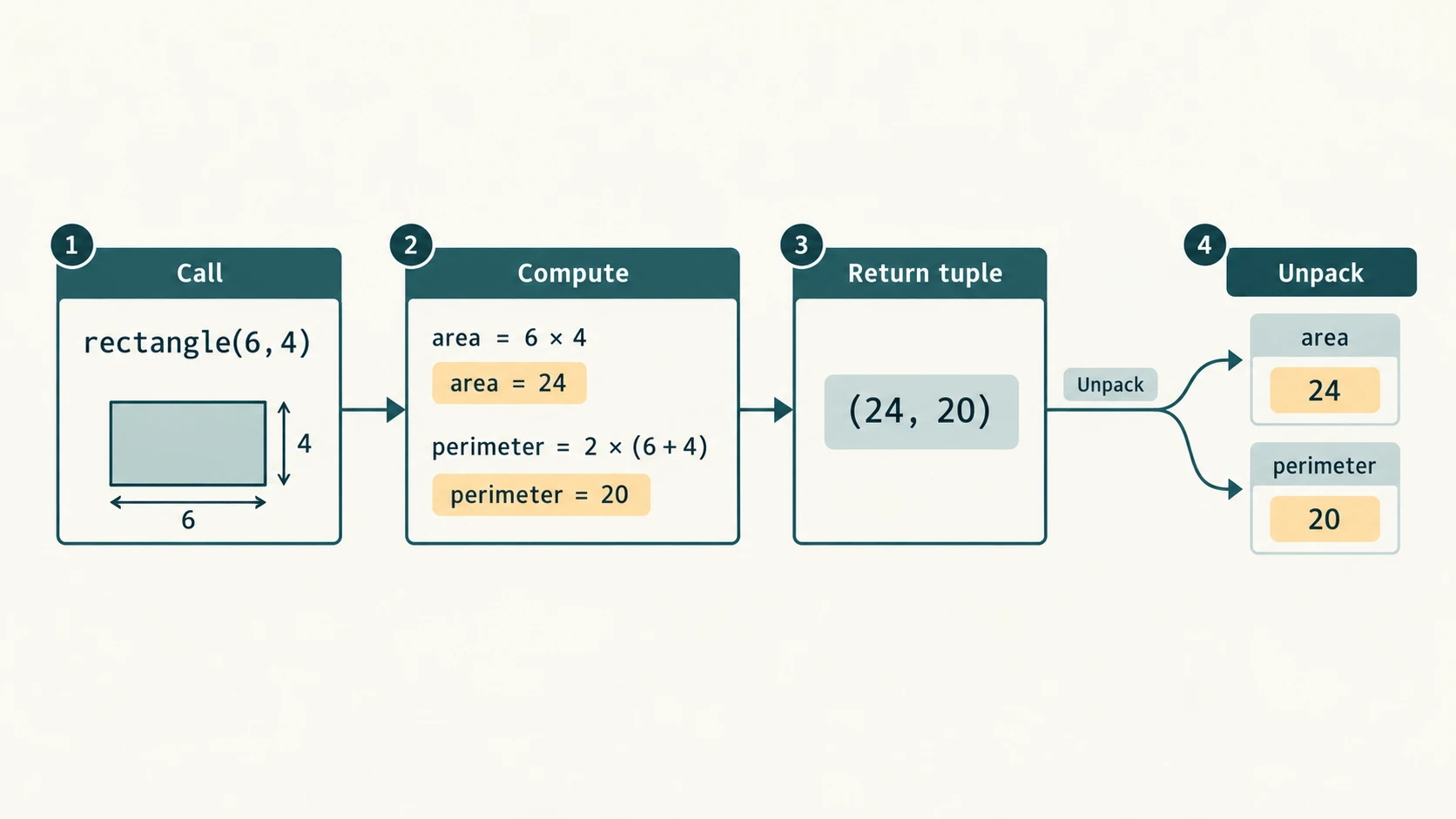
2. Return multiple values with a tuple
def rectangle(length, breadth):
    if length <= 0 or breadth <= 0:
        raise ValueError("Both dimensions must be positive")
    area = length * breadth
    perimeter = 2 * (length + breadth)
    return area, perimeter  # a tuple

area, perimeter = rectangle(6, 4)
print(area, perimeter)
Output: 24 20. Python constructs a tuple (24, 20) and the assignment unpacks it. A dictionary is another option when there are many named results. NCERT Program 7-12 shows this pattern, but its printed definition uses inconsistent letter casing (Length, Breadth versus length, breadth), which would raise NameError if entered literally. The above is a corrected original demonstration.
3. How control moves when you call a function
def first(number):
    print("B", number)
    return number + 1

print("A")
value = first(9)
print("C", value)
Output:
A
B 9
C 10
Reasoning: Python processes the definition without running its body; prints A; jumps into the function when called; returns with 10; then continues after the call. It is better to trace execution order than simply read function bodies from top to bottom.
A function must exist when execution reaches the call. In a script, calling hello() before an as-yet-unexecuted def hello() normally raises NameError; placing a definition textually lower in the file does not make it available automatically. (A definition inside another function may also be encountered later.)
4. A function can call another function
def square(value):
    return value * value

def sum_of_squares(a, b):
    return square(a) + square(b)

print(sum_of_squares(3, 4)) # 25
This form of composition creates complex behaviour out of simpler tested parts. Notice that square needs no knowledge of where its argument originated.
5. Function contracts and edge cases
A clear function contract states input types/limits and return behaviour. For example, a factorial implementation needs an integer n >= 0 and returns n! (zero factorial is one). A mean-calculating function must decide what to do with an empty list rather than divide by zero. A division function must guard its denominator.
def mean(values):
    if not values:
        raise ValueError("Mean requires at least one value")
    return sum(values) / len(values)

print(mean([2, 4, 6]))  # 4.0
For the benefit of beginning students, new vocabulary such as exception, unpacking and composition is demonstrated directly; no complex exception hierarchy is required to solve Chapter 7.
Section C11-CH07-S04 — Variable Scope: Local and Global
1. What does scope mean?
Scope determines where a name can be looked up. A function's parameters and names assigned inside it are normally local to that function call. A name bound at module level is global to that module.
school = "Example School"     # global name

def show_student(student):     # student is local parameter
    suffix = " — " + school  # suffix is local; school is read globally
    return student + suffix

print(show_student("Asha"))
# print(suffix)  # NameError: suffix is local to show_student.
Reading a global name in a function is different from assigning to it.
Shadowing, local assignment and UnboundLocalError
balance = 100

def incorrect_update():
    # balance is treated as local throughout this function
    # because an assignment occurs below.
    balance = balance + 10
    return balance

# incorrect_update() would raise UnboundLocalError.
The assignment makes balance local, but its current local value has not yet been set. NCERT Exercise 1(c) uses this mechanism. The preferred correction is to pass data in and return new data:
def increase(amount):
    return amount + 10

balance = increase(balance)
print(balance)  # 110
Python offers a global declaration for cases in which rebinding a module-level name is essential, but avoiding mutable global program state generally makes code easier to test.
counter = 0

def increment_global():
    global counter
    counter += 1

increment_global()
print(counter) # 1
This is a demonstration, not a recommendation to use global in ordinary calculations.
2. Mutable arguments versus rebinding a name
def modify_list(items):
    items.append(30)   # changes the existing list object

def rebind_list(items):
    items = [0]       # changes only the local parameter binding

numbers = [10, 20]
modify_list(numbers)
print(numbers)      # [10, 20, 30]
rebind_list(numbers)
print(numbers)      # [10, 20, 30]
The same principle applied to integers in NCERT Program 7-5: rebinding an integer parameter after num = num + 5 does not change the caller's name. Do not memorise sample id() numbers; they are implementation- and run-dependent.
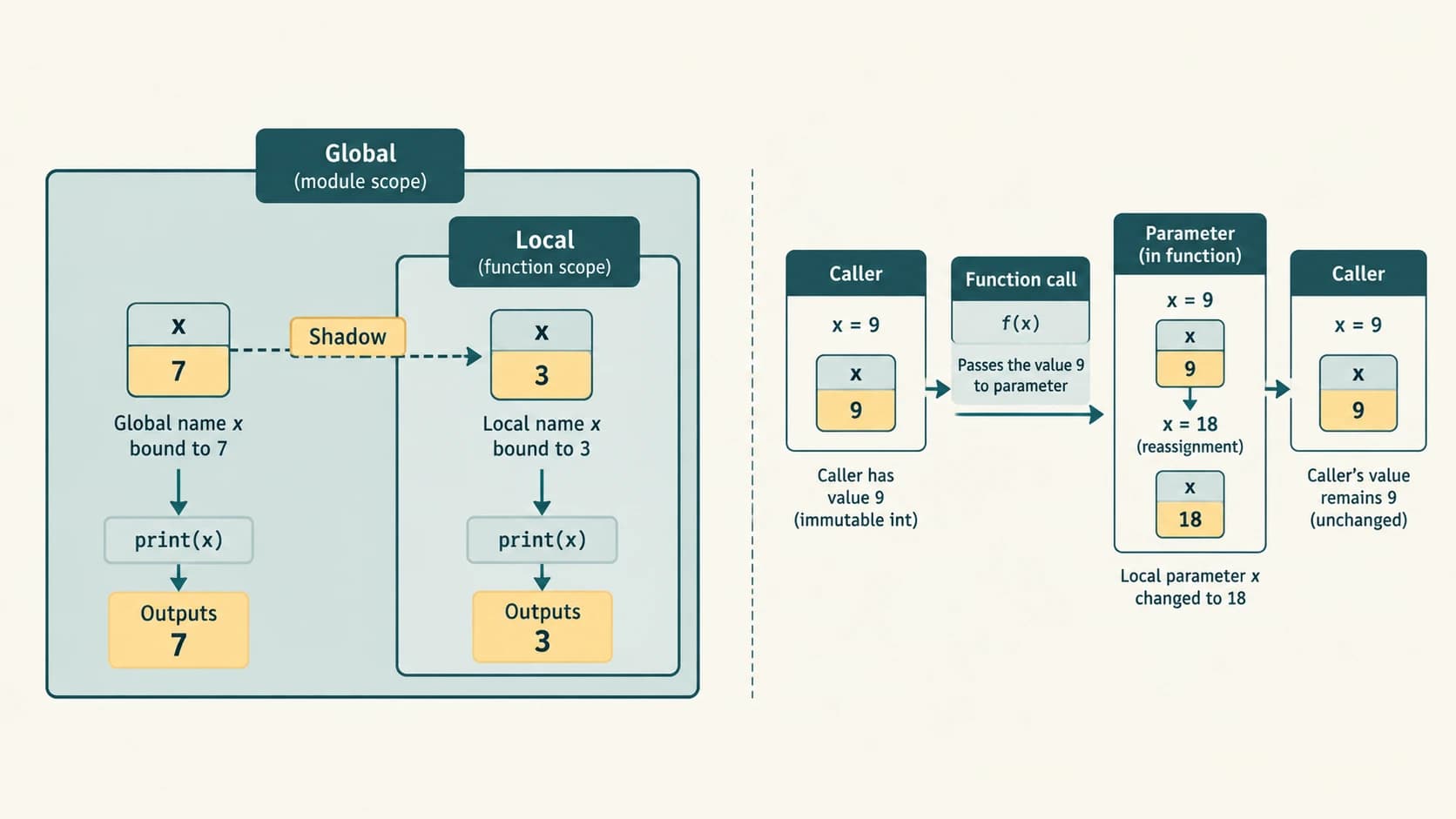
Scope quick check
x = 7

def test():
    x = 3
    return x

print(test(), x)
Answer: 3 7. The function's local x is separate from the module-level x.
Section C11-CH07-S05 — Built-in and Standard Library Functions
1. Three ways functions become available
- Built-in — available without import:
abs(-8),round(3.4),pow(2, 5),len("CS"). - Standard library — import a module first:
math.sqrt(81),random.randint(1, 5). - Your own — define it with
def, potentially in a separate module for reuse.
The broad CBSE Class XI curriculum explicitly covers math, random and statistics modules through the existing C11-PY-16 lesson. Chapter 7 adds the textbook's broader discussion of custom functions as supplementary material.
2. Mathematical helpers: math
import math

print(math.ceil(89.7))     # 90
print(math.floor(89.7))    # 89
print(math.sqrt(81))      # 9.0
print(math.factorial(5))  # 120
print(math.log10(1000))  # 3.0
print(math.sin(math.pi / 2)) # 1.0| Function | Meaning and a useful caution |
|---|---|
ceil(x) | Smallest integer not less than x, i.e. rounds toward +∞ |
floor(x) | Largest integer not greater than x, rounds toward −∞ |
sqrt(x) | Non-negative square root; ordinary math.sqrt rejects negative real inputs |
factorial(n) | n! for integer n >= 0; factorial(0) is 1 |
log10(x) | Base-ten logarithm; input x must be positive |
sin(x), cos(x) | Angle is in radians, not degrees |
For example, math.ceil(-1.2) == -1, whereas math.floor(-1.2) == -2. Their meanings are more useful than imagining that one always rounds away from zero.
pow() compared with math.pow()
from math import pow as float_power

print(pow(2, 10))        # 1024 (int)
print(float_power(2, 10)) # 1024.0 (float)
print(pow(2, 10, 7))     # 2 (modular exponentiation)
Built-in pow(a,b) generally preserves exact arbitrary-size integer arithmetic for non-negative integer powers; math.pow(a,b) converts to floating point. The third argument of built-in pow computes a modular power for supported integer inputs; math.pow does not accept that third argument. Use built-in pow or ** when exact integer powers matter.
3. Random numbers: random
import random

print(random.randint(1, 5))  # one of 1,2,3,4,5
print(random.randrange(1, 6))# one of 1,2,3,4,5
print(random.random())       # float: 0.0 <= x < 1.0
random.randint(a,b) includes both bounds, whereas random.random() generates a pseudo-random floating-point number in the half-open interval [0,1). Do not claim a fixed output for a stochastic call. random is suitable for classroom games and simulations, not for secrets, passwords or security tokens; use appropriate security APIs for real authentication.
4. Basic statistics: statistics
import statistics

scores = [11, 24, 32, 45, 51]
print(statistics.mean(scores))   # 32.6
print(statistics.median(scores)) # 32
print(statistics.mode([2, 3, 3, 4])) # 3
Mean is arithmetic total ÷ number of values; median is the middle value after sorting; mode is a most frequent value. A dataset may have more than one mode: statistics.multimode() can list them. Empty datasets are not suitable inputs for these functions.
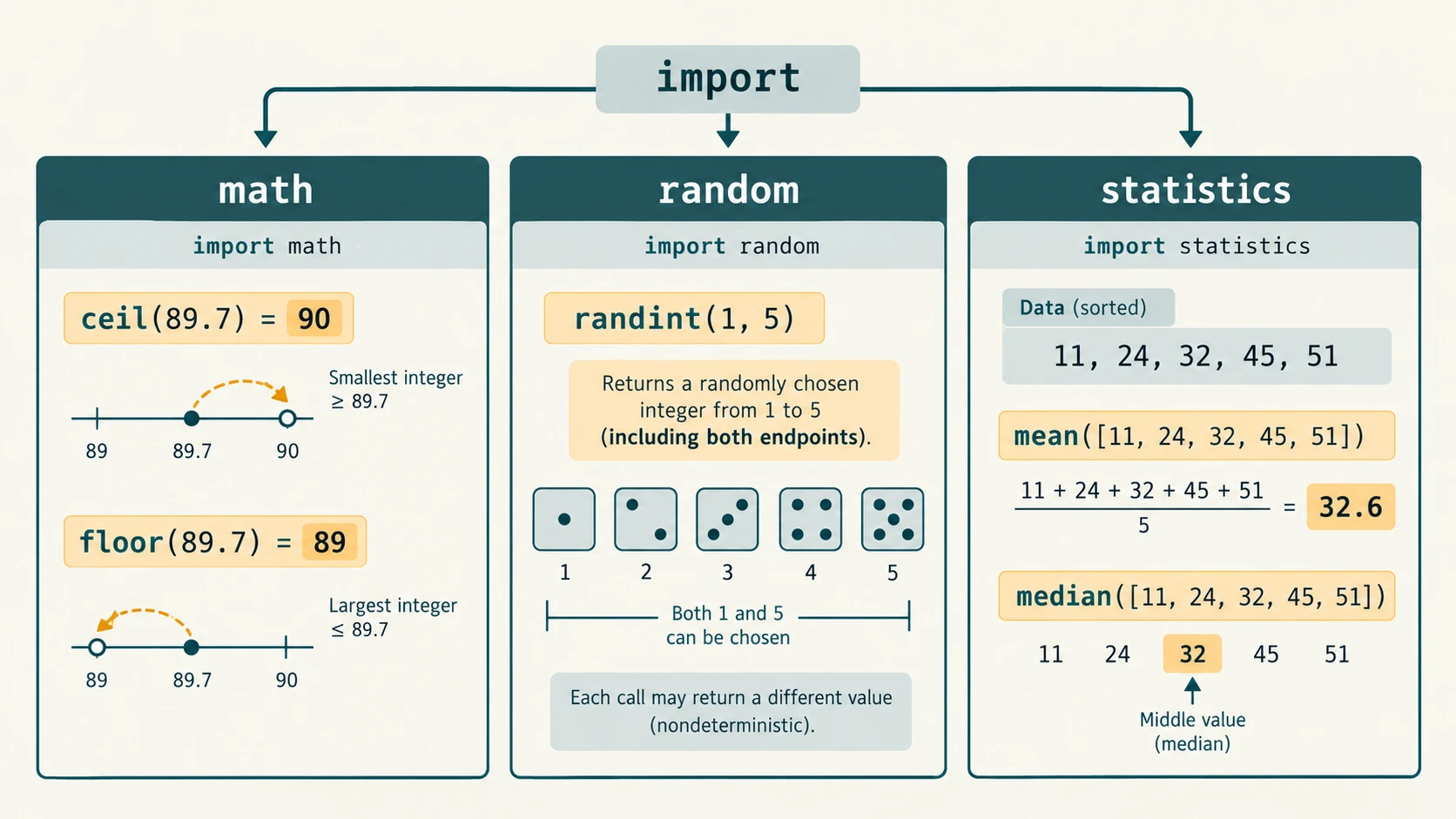
5. Reading functions in existing code
Code such as math.sqrt(math.ceil(624.7)) first evaluates the inside call: ceil(624.7) = 625; then sqrt(625) = 25.0. This is a function composition. If your school expects the textbook's special decimal inputs, reason about the intermediate values before computing the final result.
Section C11-CH07-S06 — Modules, Imports and Robust Design
1. A module is a Python source file
A module is a file containing Python definitions and statements. To reuse code, create basic_math.py with functions, then import it from a different file such as main.py.
File: basic_math.py
"""Small arithmetic helpers used to demonstrate a Python module."""

def add(a, b):
    return a + b

def subtract(a, b):
    return a - b

def multiply(a, b):
    return a * b

def divide(a, b):
    if b == 0:
        raise ZeroDivisionError("Denominator must not be zero")
    return a / b
File: main.py (save beside basic_math.py)
import basic_math

print(basic_math.add(2, 5))
print(basic_math.divide(2, 5))
Output:
7
0.4
The module name basic_math comes from its .py filename. Its first module statement is a docstring, readable via basic_math.__doc__. In NCERT Program 7-16, a custom division-by-zero message is printed and the function then returns None. This book uses an exception to avoid treating such an invalid result as a number; both approaches should clearly distinguish the error case from successful division.
2. Import styles
import math
print(math.sqrt(25))

from math import sqrt
print(sqrt(25))

from math import sqrt as square_root
print(square_root(25))
All print 5.0. import math binds the module name; from math import sqrt binds sqrt directly in the importer. Precision note about NCERT's simplified explanation: from math import sqrt does not generally avoid importing/loading the module itself; it mainly changes which names are bound locally. Modules ordinarily execute their top-level code on first import and are cached for subsequent imports within the running interpreter.
Avoid from math import * in lessons and larger programs: star imports obscure which module supplies a name and can cause name collisions.
3. Prevent imported code from starting a menu
def main():
    print("Interactive demonstration goes here")

if __name__ == "__main__":
    main()
This idiom allows a file's definitions to be imported without automatically running its command-line interface. It is a useful extension beyond the core NCERT discussion; you do not need to memorise it to understand the chapter's end-of-book exercise.
4. Documentation and testing
A good docstring explains purpose, parameters, return values and exceptional cases. For a divide(a,b) function, test ordinary positive numbers, a negative numerator, zero numerator, and zero denominator. Never mark a program "tested" solely because Python accepts its syntax: syntax correctness does not establish correct calculation, input checking, or task fulfilment.
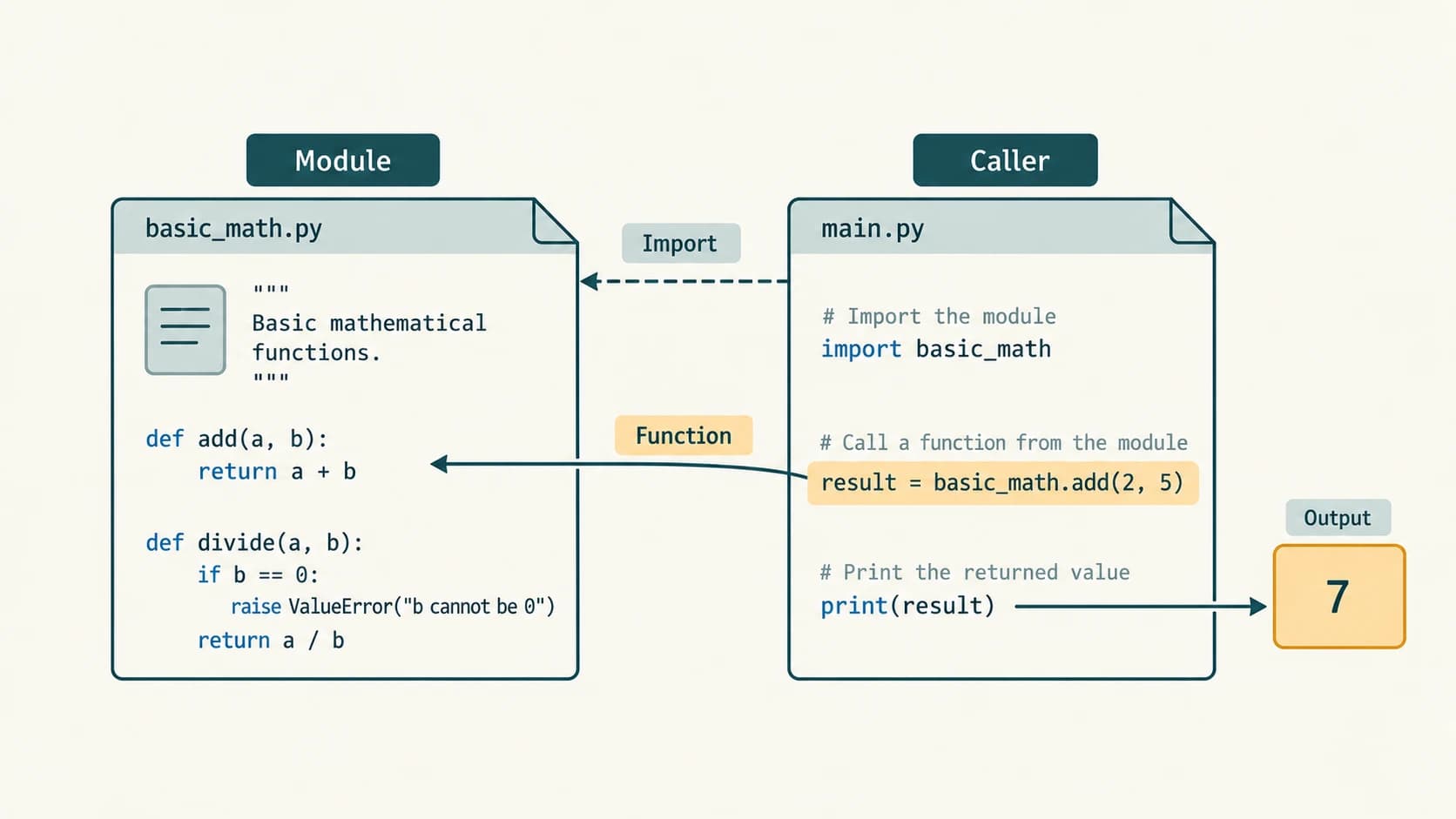
Common mistakes checklist
- Forgetting parentheses:
greetnames a function object, whilegreet()calls it. - Printing a value when the caller needs it returned.
- Giving too many/few arguments or misspelling names in a call.
- Placing a required parameter after a default parameter.
- Calling a function before the interpreter executes its definition.
- Changing a local variable while expecting the caller's integer to change.
- Assuming
random.random()produces every integer from 1 to 5. - Calling trigonometric functions with degrees instead of radians.
- Assuming
from module import nameimports only that function's executable bytes and never executes the module.
Complete NCERT Chapter 7 Exercise Solutions
Source: Supplied NCERT Class XI Computer Science, Chapter 7, printed p. 170 (kecs107.pdf, PDF page 28). The original exercise has seven numbered questions; Question 1 has five separate error-detection subparts (a–e). The short prompts below paraphrase and identify the questions, not reproduce the full exercise page. Deliberately invalid examples are shown as non-executable illustrations; only corrected versions are meant to run.
Exercise 1(a) — Identify errors in a repeated-printing function
The printed function uses def create(text, freq), prints with print text, uses range(1, freq) and calls create(5).
Problems, in order:
print textis invalid syntax in Python 3; useprint(text).create(5)supplies just one of the two required positional arguments, raisingTypeErrorafter correcting the syntax.- If
freqmeans “number of times to print”,range(1, freq)makesfreq-1iterations for positivefreq; userange(freq)orrange(1, freq+1). - Inconsistent indentation would also cause
IndentationError; preserve a four-space indented body.
Corrected program:
def create(text, freq):
    for _ in range(freq):
        print(text)

create("Hello", 5)
Output: Five separate lines containing Hello. The unused loop variable _ communicates that we care about repetition, not the loop index.
Exercise 1(b) — Identify import and function-call errors
The printed program imports sqrt and ceil from math, but tries to run print cos(0) inside calc().
Problems: (i) Python 3 requires print(...), not print cos(0); (ii) cos was not imported and no math prefix is available under the printed from statement; (iii) the function must be defined and invoked with consistent indentation. Corrected example:
from math import cos, sqrt, ceil

def calc():
    print(cos(0))

calc()
Output: 1.0. Only cos is needed for this example; the imports sqrt and ceil are redundant, though not a syntax error. cos(0) uses radians (and zero radians is also zero degrees).
Exercise 1(c) — Identify a variable-scope error
The source assigns mynum = 9 outside a function and attempts mynum = mynum + 9 inside add9() before a local value exists.
Error: UnboundLocalError occurs on the right-hand read of mynum: because of the assignment in this function, Python treats mynum as local throughout the body.
Preferred correction — explicit argument and return:
def add9(value):
    return value + 9

mynum = 9
mynum = add9(mynum)
print(mynum)  # 18
A valid alternative is global mynum before the assignment, but relying on global modification is less reusable and harder to test. The answer must explain scope, not merely rewrite the arithmetic.
Exercise 1(d) — Identify an incorrect header and call
In the source, an early parameter has a default while later parameters are required, the name resembles vall/val1, and the call uses inconsistent capitalisation and no supplied required arguments.
Problems: a non-default parameter cannot follow an ordinary default parameter; exact identifier spellings must agree; findValue and findvalue are distinct names; the corrected function needs its required arguments.
Corrected program:
def find_value(val2, val3, val1=1.1):
    final = (val2 + val3) / val1
    print(f"{final:.2f}")

find_value(4, 5)  # Uses the default 1.1
Output: 8.18. The original's vall is visually ambiguous with val1; choose a clearly spelled identifier and use it consistently. If no arguments are passed, the val2 and val3 parameters still have no supplied values.
Exercise 1(e) — An invalid assignment to a function call
The printed statement attempts to assign message to greet() using the form greet() = message. A function call is not an assignment target. The result should be assigned to the variable instead.
def greet():
    return "Good morning"

message = greet()
print(message)
Output: Good morning. Notice the direction of assignment: message = greet() stores the function's returned string in the name message.
Exercise 2 — math.ceil(89.7) versus math.floor(89.7)
import math
print(math.ceil(89.7))   # 90
print(math.floor(89.7))  # 89
Answer: ceil gives the least integer greater than or equal to 89.7: 90. floor gives the greatest integer less than or equal to 89.7: 89. Neither simply removes the fractional digits for all negative values; for negative numbers, the direction matters.
Exercise 3 — Choose random() or randint() for integers 1–5
Use random.randint(1, 5), because it returns one of the integers 1, 2, 3, 4, 5, including the endpoints.
import random
n = random.randint(1, 5)
print("Random integer:", n)
Output: One of five possible integers; no predetermined printed value can be promised. random.random() returns a fractional pseudo-random number from 0 (inclusive) up to 1 (exclusive), so it is not the direct solution requested. random.randrange(1, 6) would also be correct, but NCERT asks specifically to choose between the first two functions.
Exercise 4 — Built-in pow() versus math.pow()
import math
print(pow(2, 5))        # 32
print(math.pow(2, 5))   # 32.0
print(pow(2, 5, 7))     # 4, since 32 % 7 = 4
Answer: Built-in pow computes powers without automatically turning every integer calculation into a floating-point number. For integer inputs and non-negative integer exponent, it can produce an exact integer, even for very large powers. math.pow converts its arguments to floats and returns a float; finite-precision rounding or overflow can matter. Built-in pow(base, exp, mod) also supports modular exponentiation for supported integer arguments, which math.pow does not. Both accept two arguments for ordinary powers; their results may look numerically similar for small values.
Exercise 5 — Return multiple values from one function
def circle_measurements(radius):
    if radius < 0:
        raise ValueError("Radius cannot be negative")
    pi = 3.14
    area = pi * radius**2
    circumference = 2 * pi * radius
    return area, circumference

area, perimeter = circle_measurements(2)
print(area, perimeter)
Output: 12.56 12.56. The return area, circumference expression returns a two-element tuple. The caller unpacks it into area and perimeter. The equal numbers are a coincidence of the selected radius; the physical quantities have different units. Other examples include returning (minimum, maximum) or (sum, count).
Exercise 6(a) — Differentiate argument and parameter
| Parameter | Argument |
|---|---|
| Placeholder name in the function definition | Actual value/expression supplied when a function is called |
| Local binding inside the called function | Originates in the calling expression |
Example: amount in def discount(amount): ... | Example: 850 in discount(850) |
def square(number):  # 'number' is parameter
    return number * number

print(square(5))        # 5 is argument; prints 25
When an argument is a mutable object, the function may modify that same object; passing does not automatically make a copy.
Exercise 6(b) — Differentiate global and local variables
| Global (module level) | Local (function level) |
|---|---|
| Bound outside function definitions at module level | Parameter or name bound within a function |
| Usually readable within functions if not shadowed | Accessible within its function call, not as a global name |
Rebinding from inside a function needs global declaration | Can be assigned within the function directly |
rate = 10             # global

def add_rate(value):
    extra = value * rate / 100  # extra and value are local
    return value + extra

print(add_rate(200))   # 220.0
# print(extra)  # NameError outside the function
Use explicit parameters where practical, especially when code grows.
Exercise 7 — Does a function always return a value?
In Python, every normal function call produces some return object, but a function does not need an explicit return statement. If no return value is stated, it returns None. NCERT may describe such a function as one that “does not return a value”; this means no useful programmer-chosen result, not absence of the Python None object.
def announce():
    print("Welcome")

def get_answer():
    return 42

first = announce()
second = get_answer()
print(first, second)
Output:
Welcome
None 42
Explanation: announce() printed a message but implicitly returned None. get_answer() returned the integer 42. A function that raises an exception before returning does not complete normally, a separate case beyond this introductory distinction.
Coverage check: Numbered Exercise 1(a), 1(b), 1(c), 1(d), 1(e), 2, 3, 4, 5, 6(a), 6(b), and 7 are all addressed above.
NCERT Activity-Based Questions — Complete Worked Solutions
Source: NCERT Chapter 7, printed pp. 171–172 (kecs107.pdf, PDF pages 29–30). There are five numbered activities. The textbook says activity programs should include comments, a function definition and a function call. The following programs satisfy that intent. A real account system, retail checkout or school assessment has further security and legal requirements; these are classroom simulations only.
Activity 1 — Login function with a maximum of three attempts
Task: Define login(uid,pwd) and accept classroom example credentials (ADMIN / St0rE@1), reporting successful login or blocking after three failed attempts.
# NCERT classroom authentication exercise. NOT production authentication.
# Never hard-code real passwords into public code.
def login(uid, pwd):
    return uid == "ADMIN" and pwd == "St0rE@1"

attempts = 0
logged_in = False
while attempts < 3:
    userid = input("User ID: ")
    password = input("Password: ")
    if login(userid, password):
        logged_in = True
        print("login successful")
        break
    attempts += 1
    if attempts < 3:
        print("Incorrect credentials; try again")

if not logged_in:
    print("account blocked")
How it works: Each incorrect pair of credentials counts as one failed attempt. Three failures display account blocked; success exits without blocking. If the correct pair is entered on the third attempt, the attempt succeeds. Example, wrong/wrong/correct → login successful; wrong/wrong/wrong → account blocked.
Security qualification: This is a local practice script; it does not actually lock a remotely hosted account or maintain attempts across program restarts. Real systems need server-side attempt controls, safely hashed passwords, secret management and protection against credential attacks. Do not store the textbook password as a real credential.
Activity 2 — Shopping discounts and additional membership benefit
Source bands: Rs 500–999.99 gets 5%, Rs 1000–1999.99 gets 8%, and Rs 2000 or more gets 10%; below 500 no base discount is specified. Members receive an additional 5%. The source does not specify whether that means 5 percentage points off the original amount or another 5% after the first discount. The program explicitly adopts the additive percentage-point convention, to be replaced if a teacher specifies a different rule.
def calculate_bill(shopping_amount, is_member=False):
    if shopping_amount < 0:
        raise ValueError("Shopping amount must not be negative")

    if shopping_amount >= 2000:
        rate = 0.10
    elif shopping_amount >= 1000:
        rate = 0.08
    elif shopping_amount >= 500:
        rate = 0.05
    else:
        rate = 0.0

    if is_member:
        rate += 0.05  # declared convention: 5 percentage points more

    discount = shopping_amount * rate
    payable = shopping_amount - discount
    return discount, payable

for amount, member in [(750, False), (750, True), (1000, True)]:
    deduction, net = calculate_bill(amount, member)
    print(f"{amount:g} | member={member} | discount={deduction:.2f} | net={net:.2f}")
Expected lines:
750 | member=False | discount=37.50 | net=712.50
750 | member=True | discount=75.00 | net=675.00
1000 | member=True | discount=130.00 | net=870.00
Boundary tests: 499 → 0% base; 500 → 5%; 999.99 → 5%; 1000 → 8%; 1999.99 → 8%; 2000 → 10%. Under this declared rule a member shopping for less than 500 still receives the additional membership 5%; whether that is intended should be confirmed with the hypothetical store. The entire deduction must be subtracted once from the original shopping amount.
Activity 3 — A toddler-friendly word and addition game
The NCERT activity is open-ended: practise two-/three-letter English words and one-digit addition. This design uses short missing-letter prompts and addition questions with explicit scoring. It avoids pretending there is only one correct program for the creative task.
import random

WORDS = [
    ("a_", "am"), ("i_", "in"),
    ("c_t", "cat"), ("s_n", "sun"),
    ("p_n", "pen"), ("d_g", "dog")
]

def ask_word():
    hint, answer = random.choice(WORDS)
    guess = input(f"Complete the word {hint}: ").strip().lower()
    if guess == answer:
        print("Correct word!")
        return 1
    print("Answer:", answer)
    return 0

def ask_addition():
    a = random.randint(0, 9)
    b = random.randint(0, 9)
    guess = input(f"What is {a} + {b}? ").strip()
    if guess == str(a + b):
        print("Correct sum!")
        return 1
    print("Answer:", a + b)
    return 0

def play():
    score = ask_word() + ask_word() + ask_addition() + ask_addition()
    print(f"Score: {score}/4")

if __name__ == "__main__":
    play()
Design analysis: Inputs are short text or decimal-digit answers; outputs are instant encouraging feedback. Example word c_t → cat and addition 4 + 5 → 9. Because both selection and operands are random, do not claim an exact output across runs. For a younger learner, allow an adult to read prompts aloud, use large readable type and avoid collecting names or personal information. The learner types the full word, not just the missing character, a deliberate interface choice stated in the prompt.
Activity 4 — Fibonacci sequence using a user-defined function
NCERT introduces the series as 1, 1, 2, 3, 5, 8, … . We preserve that start rather than silently replacing it with the convention 0, 1, 1, 2, … .
def fibonacci_terms(count):
    """Return the first 'count' terms of the NCERT 1,1,2,... series."""
    if count < 0:
        raise ValueError("Number of terms cannot be negative")
    a, b = 1, 1
    terms = []
    for _ in range(count):
        terms.append(a)
        a, b = b, a + b
    return terms

print(fibonacci_terms(10))
Output: [1, 1, 2, 3, 5, 8, 13, 21, 34, 55]. Why it works: on each repetition, append the current term, then move (a, b) forward to (b, a + b). For count=0, the function returns an empty list.
Activity 5 — Menu-driven scientific and arithmetic calculator
The source requests functions for arithmetic (+, -, *, /) and log10(x), sin(x) and cos(x). We handle zero divisors and log domain; trig input is explicitly in radians.
import math

def calculate(operation, x, y=None):
    if operation == "+":
        return x + y
    if operation == "-":
        return x - y
    if operation == "*":
        return x * y
    if operation == "/":
        if y == 0:
            raise ValueError("Division by zero is not allowed")
        return x / y
    if operation == "log10":
        if x <= 0:
            raise ValueError("log10 requires x > 0")
        return math.log10(x)
    if operation == "sin":
        return math.sin(x)
    if operation == "cos":
        return math.cos(x)
    raise ValueError("Unknown operation")

def calculator_menu():
    while True:
        operation = input("Operation (+,-,*,/,log10,sin,cos) or q: ").strip()
        if operation.lower() == "q":
            print("Goodbye")
            break
        if operation not in ("+", "-", "*", "/", "log10", "sin", "cos"):
            print("Choose a listed operation")
            continue
        try:
            x = float(input("x (radians for sin/cos): "))
            y = float(input("y: ")) if operation in ("+", "-", "*", "/") else None
            print("Result:", calculate(operation, x, y))
        except ValueError as error:
            print("Invalid entry:", error)

if __name__ == "__main__":
    calculator_menu()
Representative sample calculations: +, inputs 2,3 → 5.0; /, 10,4 → 2.5; log10, 100 → 2.0; sin, numeric input 1.57079632679 radians → approximately 1.0. Since this is an interactive script, don't paste prompts into the saved code. math.cos and math.sin accept radians; convert degrees using math.radians(degrees) if the task specifies degrees.
NCERT Suggested Laboratory Exercises — Eight Worked Solutions
Source: NCERT Chapter 7, printed pp. 172–173 (kecs107.pdf, PDF pages 30–31). These are eight separately numbered lab exercises, not part of the seven theoretical exercise numbers above. Each solution below has a reusable function and a meaningful test.
Lab 1 — Divisibility by 7
def is_divisible_by_seven(number):
    return number % 7 == 0

print(is_divisible_by_seven(49))  # True
print(is_divisible_by_seven(50))  # False
print(is_divisible_by_seven(0))   # True: zero is a multiple of 7
The remainder operator % reports zero when the dividend is exactly divisible by 7. Negative multiples such as -14 also qualify mathematically.
Lab 2 — Prefix Mr/Ms based on the specified M/F code
def display_formal_name(name, gender):
    gender = gender.strip().upper()
    if not name.strip():
        raise ValueError("Name must not be empty")
    if gender == "M":
        return "Mr " + name.strip()
    if gender == "F":
        return "Ms " + name.strip()
    raise ValueError("For this exercise enter M or F")

print(display_formal_name("Arun", "M"))   # Mr Arun
print(display_formal_name("Asha", "F"))   # Ms Asha
This uses the assignment's simplified M/F inputs and courtesy-title mapping, not a rule about how all people should be addressed. In real forms, let users choose their preferred title instead of inferring it from gender.
Lab 3 — Determinant (discriminant) of a quadratic equation
For a quadratic ax² + bx + c = 0, a ≠ 0, the discriminant is D = b² − 4ac. The exercise calls this the “determinant”; discriminant is the standard mathematical term here.
def classify_quadratic(a, b, c):
    if a == 0:
        return None, "Not a quadratic equation (a = 0)"
    discriminant = b*b - 4*a*c
    if discriminant > 0:
        kind = "Two distinct real roots"
    elif discriminant == 0:
        kind = "One repeated real root"
    else:
        kind = "Two non-real complex roots"
    return discriminant, kind

for coefficients in [(1, -3, 2), (1, 2, 1), (1, 1, 1)]:
    print(coefficients, classify_quadratic(*coefficients))
Checks: (1,-3,2) → D=1, two distinct real roots; (1,2,1) → D=0, repeated root; (1,1,1) → D=-3, non-real complex roots. The program classifies roots, as requested; actually calculating the roots would be an extension.
Lab 4 — Lucky draw among ticket IDs 1–600
import random

def lucky_ticket(low=1, high=600):
    if low > high:
        raise ValueError("Invalid ticket range")
    return random.randint(low, high)

winning_token = lucky_ticket()
print("Winning token:", winning_token)
The winning token is a pseudo-random integer in [1,600] inclusive. The source assumes each of those IDs exists and corresponds to an eligible participant; a real event must verify eligibility before announcing a winner. Output cannot be predetermined. Do not use random.random() * 600 as a direct whole-number ticket without careful range and rounding logic.
Lab 5 — Compound interest with frequency of compounding
If principal is P, annual percentage rate is r_percent, time is t years, and interest compounds n times per year, then
NCERT's hint writes the interest formula using r as a fraction, not as an unconverted percentage. The exponent is the product n*t, and CI means interest alone, not the accumulated balance.
def compound_interest(principal, rate_percent, years, per_year):
    if principal < 0 or rate_percent < 0 or years < 0 or per_year <= 0:
        raise ValueError("Check amount, rate, time and compounding frequency")
    rate_fraction = rate_percent / 100
    amount = principal * (1 + rate_fraction / per_year)**(per_year * years)
    return amount - principal, amount

interest, balance = compound_interest(1000, 10, 1, 2)
print(f"Interest: {interest:.2f}")
print(f"Amount: {balance:.2f}")
Output: Interest: 102.50, Amount: 1102.50. Explanation: two half-yearly periods each earn 5%, so 1000 × (1.05)² = 1102.50. For actual banking calculations, decimal arithmetic and product-specific day-count conventions may be required; this is a school mathematics exercise.
Lab 6 — Swap two arguments only when the first is smaller
def ensure_descending(first, second):
    if first < second:
        return second, first
    return first, second

print(ensure_descending(5, 8)) # (8, 5)
print(ensure_descending(9, 4)) # (9, 4)
print(ensure_descending(7, 7)) # (7, 7)
When first is smaller, return the reversed pair; otherwise keep the original order. Returning two numbers returns a tuple, illustrating Exercise 5. The caller can unpack with first, second = ensure_descending(first, second).
Lab 7 — Shape calculation functions in an importable module
The source asks for area, perimeter or surface area as appropriate to a square, rectangle, triangle, circle and cylinder, and to import the module that defines the functions. Use two separate files in the same folder.
File: shapes.py
"""Geometry functions for the NCERT Class XI functions lab."""
import math

def area_square(side):
    return side**2

def perimeter_square(side):
    return 4*side

def area_rectangle(length, breadth):
    return length*breadth

def perimeter_rectangle(length, breadth):
    return 2*(length+breadth)

def area_triangle(base, height):
    return base*height/2

def perimeter_triangle(a, b, c):
    if min(a, b, c) <= 0 or a+b <= c or a+c <= b or b+c <= a:
        raise ValueError("Triangle sides must satisfy triangle inequality")
    return a+b+c

def area_circle(radius):
    return math.pi*radius**2

def circumference_circle(radius):
    return 2*math.pi*radius

def curved_area_cylinder(radius, height):
    return 2*math.pi*radius*height

def total_area_cylinder(radius, height):
    return 2*math.pi*radius*(radius+height)

def volume_cylinder(radius, height):
    return math.pi*radius**2*height
File: use_shapes.py
import shapes

print("Square area:", shapes.area_square(4))
print("Rectangle perimeter:", shapes.perimeter_rectangle(5, 3))
print("Triangle area:", shapes.area_triangle(6, 4))
print("Triangle perimeter:", shapes.perimeter_triangle(3, 4, 5))
print("Circle area:", round(shapes.area_circle(2), 2))
print("Cylinder total surface area:", round(shapes.total_area_cylinder(2, 3), 2))
Expected results (selected): square area 16; rectangle perimeter 16; triangle area 12.0; triangle perimeter 12; circle area 12.57; cylinder total surface area 62.83. The functions assume valid nonnegative dimensions except where explicit validation is shown; a production tool should validate all geometry inputs consistently. A cylinder has no simple planar perimeter analogous to a square's, so we compute curved/total surface area and optional volume instead.
Lab 8 — Five-question random-order GK quiz with score() and remark(scorevalue)
The task asks for five questions of your choice, randomly displayed, and the exact remark categories for scores from 0 through 5. This version uses a deterministic set of five original questions while shuffling presentation order. The function named score() computes the number of correct answers; remark(scorevalue) returns the required message.
import random

QUESTIONS = [
    ("How many days are in a standard week?", "7"),
    ("What is 3 + 4?", "7"),
    ("What is the capital of India?", "new delhi"),
    ("How many sides does a triangle have?", "3"),
    ("Which planet is called the Red Planet?", "mars"),
]

def score():
    questions = QUESTIONS.copy()
    random.shuffle(questions)
    points = 0
    for question, correct_answer in questions:
        answer = input(question + " ").strip().lower()
        if answer == correct_answer:
            points += 1
    return points

def remark(scorevalue):
    messages = {
        5: "Outstanding",
        4: "Excellent",
        3: "Good",
        2: "Read more to score more",
        1: "Needs to take interest",
        0: "General knowledge will always help you. Take it seriously."
    }
    return messages[scorevalue]

if __name__ == "__main__":
    final_score = score()
    print(f"Marks: {final_score}/5")
    print("Remark:", remark(final_score))
Example: A learner with four correct answers receives Marks: 4/5 and Remark: Excellent. The question order varies because of random.shuffle; correct-answer scoring is independent of order. Case normalisation using .lower() helps common text answers; acceptable variants such as abbreviations may require an enhanced answer matcher, not arbitrary rejection of valid knowledge.
Lab coverage check: Suggested Labs 1–8 have complete individually explained programs, including the explicitly requested importable geometry module and five-score GK quiz.
NCERT Case Study 7.1–7.2 — Function-Based Student Management Information System
Source: NCERT Chapter 7, printed pp. 173–174 (kecs107.pdf, PDF pages 31–32). This case study explicitly continues the earlier Chapter 5 introductory student-record project and Chapter 6 menu-driven subject-mark/grade project. It has two numbered parts (7.1 and 7.2), followed by peer review based on the documentation tips from Chapter 5.
Case Study 7.1 — Refactor the earlier SMIS into functions
The initial Chapter 5 exercise collected student-identification fields such as roll number, name, class and section. The Chapter 6 extension introduced a menu to enter/display five subject marks, compute a total and average percentage, and assign a grade. Chapter 7 asks that these behaviours be implemented as user-defined functions, without discarding earlier features.
A safe classroom example stores one fictitious student in memory. It does not save or upload private details. The module defines separate functions for creating the record, entering marks, printing record details, calculating totals and choosing a grade. The main loop only dispatches menu choices, making it easier to read.
Grade-boundary accuracy reminder from Chapter 6
NCERT Chapter 6's case-study table uses conditions that are incomplete at exactly 85% and 30% and overlap at exactly 50%. The following example adopts the same declared pedagogical correction used in our Chapter 6 companion, not a claim that the textbook specifies it unambiguously:
| Calculated percentage | Declared classroom implementation |
|---|---|
>= 85 | A |
>= 75 and < 85 | B |
>= 50 and < 75 | C |
>= 30 and < 50 | D |
< 30 | Reappear |
This is separate from Chapter 6 Programming Exercise 10's grade table. Ask the teacher before applying any example grade formula to a real grading system.
Case Study 7.2 — Add a short-attendance function
The source specifies the short-attendance threshold as strictly below 78%. It asks for a function accepting total working days and comparing a student's days present. When present days are already part of the student record, a one-argument check_short_attendance(total_working_days) can read the current record's attendance, while a separate pure helper attendance_flag(total_days, present_days) makes the underlying arithmetic testable.
Return 1 when this value is less than 78; return 0 when it is equal to or above 78. Reject zero working days to avoid division by zero; reject negative or impossible day counts. A user entering exactly 78/100 days present must not be reported as a defaulter.
Integrated classroom program for Case Studies 7.1 and 7.2
Save the following as smis_functions.py and run it normally. Functions are intentionally small; the menu loop delegates tasks rather than repeating calculations.
"""Fictional, in-memory student information demo for NCERT Ch 7."""

SUBJECTS = ("English", "Mathematics", "Science", "Social Science", "Computer")

# One in-memory demo record. Never enter real identifiable pupil data in
# public examples or repositories.
student = {
    "roll": "11CS014", "name": "Asha", "class": 11,
    "section": "A", "house": "Green",
    "marks": None, "days_present": None
}


def read_number(prompt, minimum, maximum):
    """Accept a valid numeric entry within inclusive limits."""
    while True:
        try:
            number = float(input(prompt))
        except ValueError:
            print("Please enter a numeric value")
            continue
        if minimum <= number <= maximum:
            return number
        print(f"Enter a number from {minimum} through {maximum}")


def enter_details(record):
    """Capture introductory Chapter 5 fields for a fictional record."""
    record["roll"] = input("Roll ID: ").strip()
    record["name"] = input("Display name: ").strip()
    record["section"] = input("Section: ").strip()
    record["house"] = input("House: ").strip()
    record["class"] = int(read_number("Class (1-12): ", 1, 12))
    print("Details updated in memory")


def display_details(record):
    print("Roll:", record["roll"])
    print("Name:", record["name"])
    print("Class / section:", record["class"], record["section"])
    print("House:", record["house"])


def enter_marks(record):
    """Input five Chapter 6 subject marks, each from 0 through 100."""
    values = []
    for subject in SUBJECTS:
        mark = read_number(f"{subject} mark (0-100): ", 0, 100)
        values.append(mark)
    record["marks"] = values
    print("Five marks recorded for this session")


def display_marks(values):
    if values is None:
        print("Enter marks first")
        return
    for subject, value in zip(SUBJECTS, values):
        print(f"{subject}: {value:g}")


def total_and_percentage(values):
    if values is None or len(values) != 5:
        raise ValueError("Exactly five subject marks are required")
    total = sum(values)
    percentage = total / 5  # each subject out of 100
    return total, percentage


def grade_for(percentage):
    """Declared clarified Ch 6 case-study boundaries, not NCERT's literal table."""
    if not 0 <= percentage <= 100:
        raise ValueError("Percentage must be between 0 and 100")
    if percentage >= 85:
        return "A"
    if percentage >= 75:
        return "B"
    if percentage >= 50:
        return "C"
    if percentage >= 30:
        return "D"
    return "Reappear"


def attendance_flag(total_working_days, days_present):
    """Return 1 for below 78% presence and 0 otherwise."""
    if total_working_days <= 0:
        raise ValueError("Total working days must be positive")
    if days_present < 0 or days_present > total_working_days:
        raise ValueError("Days present must be between 0 and total days")
    return 1 if days_present * 100 < total_working_days * 78 else 0


def check_short_attendance(total_working_days):
    """One-argument NCERT wrapper, reading days present from student record."""
    if student["days_present"] is None:
        raise ValueError("Enter days present first")
    return attendance_flag(total_working_days, student["days_present"])


def attendance_menu():
    total_days = int(read_number("Working days (1-366): ", 1, 366))
    present = int(read_number("Days present: ", 0, total_days))
    student["days_present"] = present
    result = check_short_attendance(total_days)
    percentage = 100 * present / total_days
    print(f"Attendance: {percentage:.2f}%")
    print(f"Short attendance flag: {result}")
    print("Defaulter" if result == 1 else "Not short")


def show_results(record):
    if record["marks"] is None:
        print("Enter marks first")
        return
    total, percentage = total_and_percentage(record["marks"])
    print(f"Total: {total:g}/500")
    print(f"Percentage: {percentage:.2f}%")
    print("Grade:", grade_for(percentage))


def main():
    while True:
        print("\nSTUDENT MANAGEMENT INFORMATION SYSTEM")
        print("1 Enter / update details")
        print("2 Display details")
        print("3 Enter / update subject marks")
        print("4 Display subject marks")
        print("5 Total / percentage / grade")
        print("6 Check short attendance")
        print("7 Exit")
        choice = input("Option (1-7): ").strip()

        if choice == "1":
            enter_details(student)
        elif choice == "2":
            display_details(student)
        elif choice == "3":
            enter_marks(student)
        elif choice == "4":
            display_marks(student["marks"])
        elif choice == "5":
            show_results(student)
        elif choice == "6":
            attendance_menu()
        elif choice == "7":
            print("Goodbye")
            break
        else:
            print("Choose a valid menu option")


if __name__ == "__main__":
    main()
Detailed walk-through
enter_details()anddisplay_details()implement the Chapter 5 fields for one fictional student.enter_marks(),display_marks(),total_and_percentage()andgrade_for()refactor the Chapter 6 subject-mark and menu logic into reusable functions.attendance_flag(total_working_days, days_present)is the pure calculation function: no user prompts, no printing and no hidden mutable global state.check_short_attendance(total_working_days)is the requested one-parameter interface in the context of the current record, transparently reading the record'sdays_present.attendance_menu()requests valid working days, records the present count and displays the returned1or0.- The code does not retain data after the program exits and is not a school-deployment system. It teaches decomposition, scope and function reuse.
Verified reasoning for attendance cases
| Working days | Present days | Exact percentage | Function result | Reason |
|---|---|---|---|---|
| 100 | 77 | 77% | 1 | Strictly below 78% |
| 100 | 78 | 78% | 0 | Equal threshold, so not short |
| 100 | 79 | 79% | 0 | Above threshold |
| 20 | 15 | 75% | 1 | 15 ÷ 20 × 100 = 75 |
| 50 | 39 | 78% | 0 | Equal threshold |
| 30 | 24 | 80% | 0 | Above threshold |
Using integer cross-multiplication (present * 100 < total * 78) avoids floating-point ambiguity at the boundary. The source's less-than sign must not be silently changed to less-than-or-equal.
Marks and grade sample (consistent with Chapter 6)
With the fictional marks 80, 90, 70, 100 and 85, total = 425, percentage = 425 / 5 = 85%; under the explicit clarified classroom table above, grade A. The original NCERT Chapter 6 case-study table does not assign exactly 85 unambiguously. If the instructor selects another boundary policy, update and retest grade_for().
Peer-review guide for Case Study 7
Exchange a program with a classmate using fictional example details and review it against the Chapter 5 documentation tips and Chapter 7 expectations. Check (1) clear problem definition and readable function names; (2) correct indentation and docstrings; (3) appropriate parameters and return values; (4) no copied repetitive blocks in the menu; (5) five valid 0–100 marks; (6) consistent grade boundaries; (7) valid attendance days and the exact 78% boundary; (8) no personally identifiable student records in a public submission; (9) testing of missing marks, bad menu choices, zero total days and exact threshold.
Example constructive feedback: “Your attendance check is modular and returns the required flag. Please test 39 out of 50 days and change the comparison from <= 78 to < 78, because an attendance of exactly 78% must return 0.”
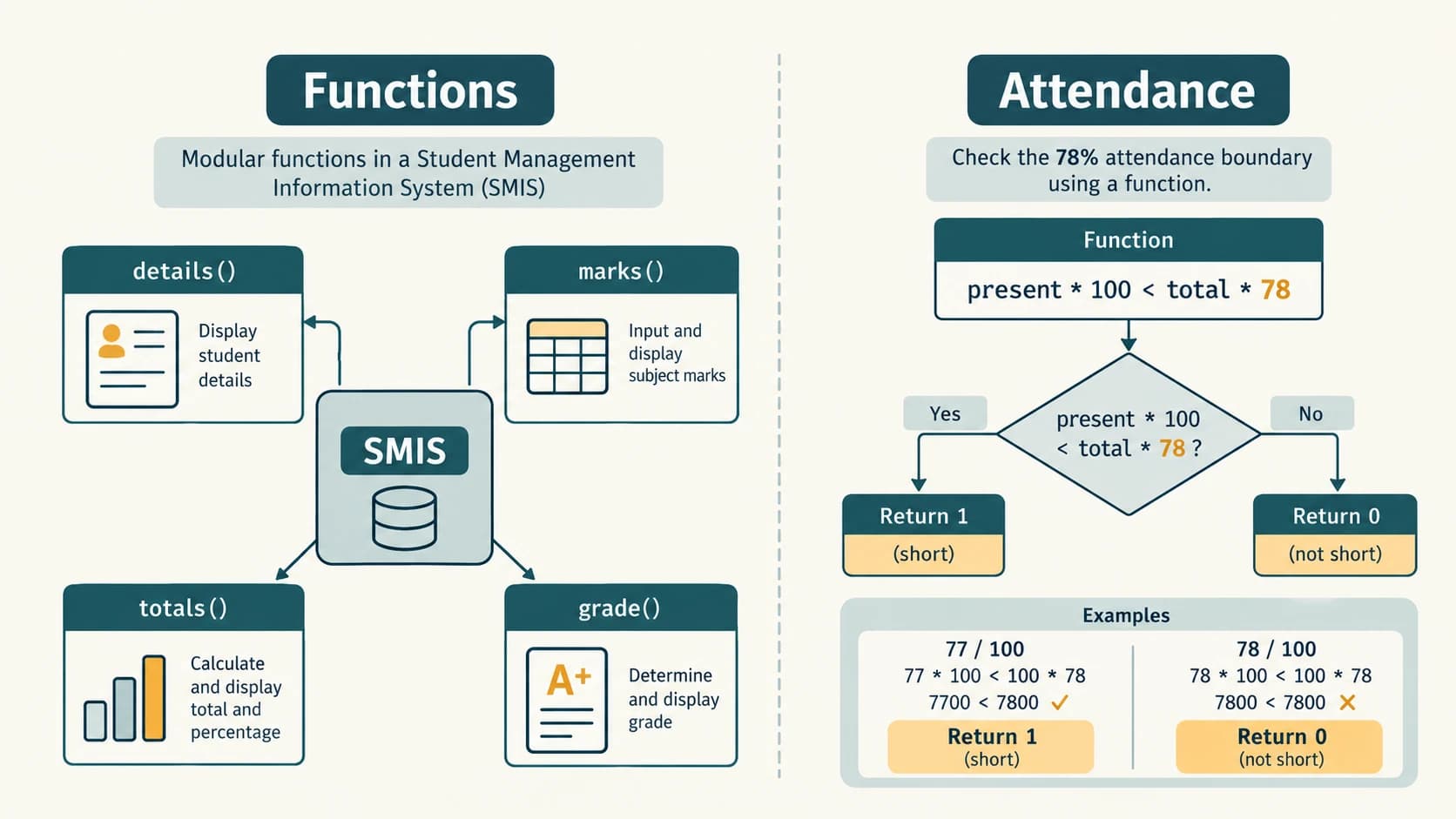
Case-study coverage check: Both Case 7.1 (function-based extension of Chapters 5–6) and Case 7.2 (short attendance), plus the associated documentation/peer review, are covered.
Additional Original Practice — 30 Questions With Explained Answers
These 30 questions are original practice, not additional NCERT textbook exercises. They reinforce function definitions, arguments, return values, scope, import statements and small programs. Do not mistake them for past examination questions.
Section A — Ten concept MCQs
P01. Which keyword starts a function definition? (A) function (B) def (C) return (D) import.
Answer: B. def binds a name to a newly created function object when executed; return is used inside functions to send back a value.
P02. In def double(x): return 2*x, what is x? (A) argument (B) global variable (C) parameter (D) a library module.
Answer: C. x appears in the definition header and is a parameter. The value in double(7) is an argument.
P03. What does a function return when its body finishes without return? (A) zero (B) empty string (C) None (D) False.
Answer: C. The call evaluates to the special object None (which is distinct from numeric zero and Boolean False).
P04. Which header follows normal default-argument ordering? (A) def f(a=1,b): (B) def f(a,b=1): (C) function f(a): (D) def f(a b):.
Answer: B. A required positional-or-keyword parameter comes before a parameter with a default. A, C and D are invalid Python syntax as written.
P05. Which call returns an integer in Python 3? (A) math.sqrt(81) (B) math.pow(2,3) (C) pow(2,3) (D) math.sin(0).
Answer: C. Built-in pow(2,3) returns integer 8; the listed math calls ordinarily return floats.
P06. Which randomly returns an integer from 1 through 5 inclusive? (A) random.random() (B) random.randint(1,5) (C) random.randint(1,4) (D) math.randint(1,5).
Answer: B. randint includes its two integer bounds; random() yields a fraction below 1.
P07. What does from math import sqrt bind locally? (A) the name sqrt (B) a new built-in keyword (C) the global name math (D) no name.
Answer: A. It binds sqrt, allowing sqrt(25). It need not bind the module name math in that importing namespace.
P08. Which approach usually best supports reuse of a numeric result? (A) print inside the function only (B) return the value to the caller (C) repeat the formula everywhere (D) always use global.
Answer: B. A returned value can be printed, stored, tested or used by another function.
P09. What is the output of print(math.ceil(-1.2)) after importing math? (A) -2 (B) -1 (C) 1 (D) 2.
Answer: B. The least integer greater than or equal to -1.2 is -1; floor would give -2.
P10. Which statement best describes a local variable in Python? (A) it is always global (B) it is automatically exported by a module (C) it is a name bound within a function's local scope (D) it cannot refer to a list.
Answer: C. A local name can refer to any type of object, including a list, but its name binding is scoped to the function execution.
Section B — Ten code-output / error-tracing questions
P11. Predict the output:
def plus(a, b):
    return a + b
print(plus(2, 5))
Answer: 7. Parameters receive 2 and 5; their sum is returned to print.
P12. Predict the output:
def foo():
    print("Inside")
x = foo()
print(x)
Answer: Two lines, Inside then None. Printing during execution does not create an explicit return value.
P13. Predict the output:
def f(a, b=3):
    return a*b
print(f(4), f(4, 2))
Answer: 12 8. The first call uses default b=3, the second overrides it with 2.
P14. Predict the output:
def subtract(a, b):
    return a-b
print(subtract(b=4, a=10))
Answer: 6. Keyword argument order does not change parameter matching.
P15. Predict the output:
x = 5
def outer():
    x = 9
    return x
print(outer(), x)
Answer: 9 5. Local x shadows but does not modify global x.
P16. Predict the output:
def bundle(a):
    return a+1, a+2
first, second = bundle(4)
print(first, second)
Answer: 5 6. The returned tuple is unpacked into two variables.
P17. Predict the output:
import math
print(math.floor(5.8), math.ceil(5.8))
Answer: 5 6. Floor goes toward negative infinity; ceil toward positive infinity.
P18. Predict the output:
from math import sqrt
print(sqrt(49))
Answer: 7.0. The function returns a floating-point square root.
P19. What happens here?
value = 4
def change():
    value = value + 1
    return value
# change()  # Uncommenting this call raises an exception.
Answer: Calling change() would raise UnboundLocalError because its assignment makes value local, but the expression reads that local before it is initialised. Preferred correction: accept value as a parameter and return value+1.
P20. Predict the output:
def power(x):
    return x*x
print(power(power(2)))
Answer: 16. The inner call yields 4; the outer call squares 4.
Section C — Ten short programs / reasoning challenges
P21. Write a function to find the larger of two numbers.
def larger(a, b):
    return a if a >= b else b

print(larger(9, 12))  # 12
Explanation: The expression chooses b only when a is not greater than or equal to b. Equal arguments return their common value.
P22. Calculate the factorial of a nonnegative integer using a function.
def factorial(n):
    if n < 0:
        raise ValueError("Negative factorial is undefined here")
    result = 1
    for value in range(2, n+1):
        result *= value
    return result

print(factorial(5)) # 120
print(factorial(0)) # 1
Explanation: Multiply each integer from 2 through n; for n=0, the loop has zero iterations and the initial product 1 is correct.
P23. Return the sum and average of a nonempty list.
def summary(values):
    if not values:
        raise ValueError("Cannot average an empty list")
    total = sum(values)
    return total, total/len(values)

print(summary([4, 8, 12])) # (24, 8.0)
Explanation: Two values are returned in a tuple; reject an empty input to avoid dividing by zero.
P24. Write a function that converts degrees to radians, then computes sine.
import math

def sine_degrees(angle_degrees):
    return math.sin(math.radians(angle_degrees))

print(round(sine_degrees(30), 3)) # 0.5
Explanation: math.sin expects radians. Conversion is crucial; passing 30 directly treats it as 30 radians.
P25. Produce a Boolean membership check for a number in [10, 20].
def in_interval(x):
    return 10 <= x <= 20

print(in_interval(10), in_interval(21)) # True False
Explanation: The inclusive chained comparison includes both endpoints.
P26. Write an area_circle function with a default value of π.
def area_circle(r, pi=3.14):
    if r < 0:
        raise ValueError("Negative radius")
    return pi*r*r

print(area_circle(2))                # 12.56
print(round(area_circle(2, 3.14159), 5)) # 12.56636
Explanation: The caller can use the default approximation or supply a more precise one. In ordinary programs, prefer math.pi for a reliable approximation.
P27. Give a function to check whether a number is even.
def is_even(number):
    return number % 2 == 0

print(is_even(-4), is_even(7))  # True False
Explanation: Remainder zero indicates evenness for positive, negative and zero integers.
P28. Write a safe function to calculate a percentage without dividing by zero.
def percentage(part, whole):
    if whole <= 0:
        raise ValueError("Whole must be positive")
    if not 0 <= part <= whole:
        raise ValueError("Part must lie between zero and whole")
    return 100*part/whole

print(percentage(39, 50)) # 78.0
Explanation: Input validation is separate from calculation. This also reinforces the case-study boundary at 78%.
P29. Print a name n times using a dedicated function.
def repeat_message(text, count):
    if count < 0:
        raise ValueError("Count cannot be negative")
    for _ in range(count):
        print(text)

repeat_message("Python", 2)
Answer: Two lines each containing Python. A print-only function normally returns None; this is appropriate for a display operation.
P30. Design a test list for a function deciding short attendance.
Answer with demonstration:
def short_attendance(total, present):
    if total <= 0 or not 0 <= present <= total:
        raise ValueError("Invalid attendance")
    return int(100*present < 78*total)

assert short_attendance(100, 77) == 1
assert short_attendance(100, 78) == 0
assert short_attendance(50, 39) == 0
assert short_attendance(20, 15) == 1
Explanation: Include below-boundary, exact-boundary and above-boundary cases; separately verify that total 0, negative days and present days exceeding total are rejected. The integer comparison is exact.
Quick Revision and Exam-Style Checklist
One-page conceptual summary
| Concept | Essential rule | Common trap |
|---|---|---|
| Definition | def f(x): followed by indented body | def does not automatically run the function's body |
| Call | f(5) supplies argument 5 | f by itself is a function object, not a call |
| Parameter | Name in function header | Do not confuse it with the argument in the caller |
| Default | def f(a, b=1): | Required parameters do not normally follow defaults |
| Return | return result sends result to caller | print(result) does not return result |
| Multiple returns | return a, b produces tuple | Caller may unpack with x, y = ... |
| Missing explicit return | Normal call returns None | None is neither integer 0 nor string "" |
| Global/local | Local assignment shadows global name | Reading uninitialised local triggers UnboundLocalError |
| Library | import math then math.sqrt(9) | No unqualified sqrt unless imported or defined |
| Ceil/floor | Ceiling is toward +∞; floor toward −∞ | Negative numbers matter |
| Pseudo-random | randint(1,5) includes 5 | random() does not directly return an integer 1–5 |
| Statistics | Mean / median / mode measure different things | mode differs from mean |
| Functions in modules | Put reusable definitions in .py files | Avoid module-name and file-name collisions |
| Attendance | Return 1 for strictly below 78% | 78% itself returns 0 |
Fifteen-minute self-check
Without looking at the answers, (1) explain why print() and return differ; (2) write a default-parameter header; (3) trace outer(inner(2)); (4) distinguish ceil(-2.3) and floor(-2.3); (5) explain why randint(1,5) includes 5; (6) write return area, perimeter; (7) explain local shadowing; (8) import math.sqrt two ways; (9) list checks needed before dividing; and (10) evaluate short attendance for 39 present out of 50 days. Answers are given throughout the lessons and NCERT solution sections.
What to practise on your computer
Save the math helper module and its importing file in the same folder, run every NCERT lab task, and then run the SMIS attendance checks at 77%, 78% and 79%. Explain what each function receives, what it returns, what it prints, and which exceptional inputs it rejects. That is a more reliable test of understanding than memorising definitions alone.
Reference register and editorial notes (student-readable references)
- R1 (primary): NCERT, Computer Science, Class XI, Chapter 7, “Functions,” printed pp. 143–174, supplied official Reprint 2026–27 PDF
kecs107.pdfinkecs1dd(1).zip. Official textbook index: https://ncert.nic.in/textbook.php?kecs1=0-11. - R2 (curriculum authority): CBSE, Computer Science (083), Class XI, 2026–27 official syllabus: https://cbseacademic.nic.in/web_material/CurriculumMain27/SecPart2/Computer_Science_SecP2_2026-27.pdf. This chapter is supplementary for standalone custom functions;
math,random,statisticslink to the existing Class XI module lesson. - R3 (language semantics): Official Python documentation, Defining Functions and More on Defining Functions, https://docs.python.org/3/tutorial/controlflow.html#defining-functions.
- R4 (standard library): Official Python
math,random, andstatisticsdocumentation, https://docs.python.org/3/library/math.html, https://docs.python.org/3/library/random.html, https://docs.python.org/3/library/statistics.html.
Provenance note: The exercise/activity/lab/case numbering is taken from the supplied NCERT chapter; examples, solutions, tests, clarifications and added questions in this document are original instructional work. Source quirks are explicitly identified where they affect accuracy, rather than silently changing the textbook's contents.