
Flow of Control
Study Flow of Control in Class 11 Computer Science, with detailed explanations, worked examples, NCERT solutions and practice questions.
By Akhilesh Saini
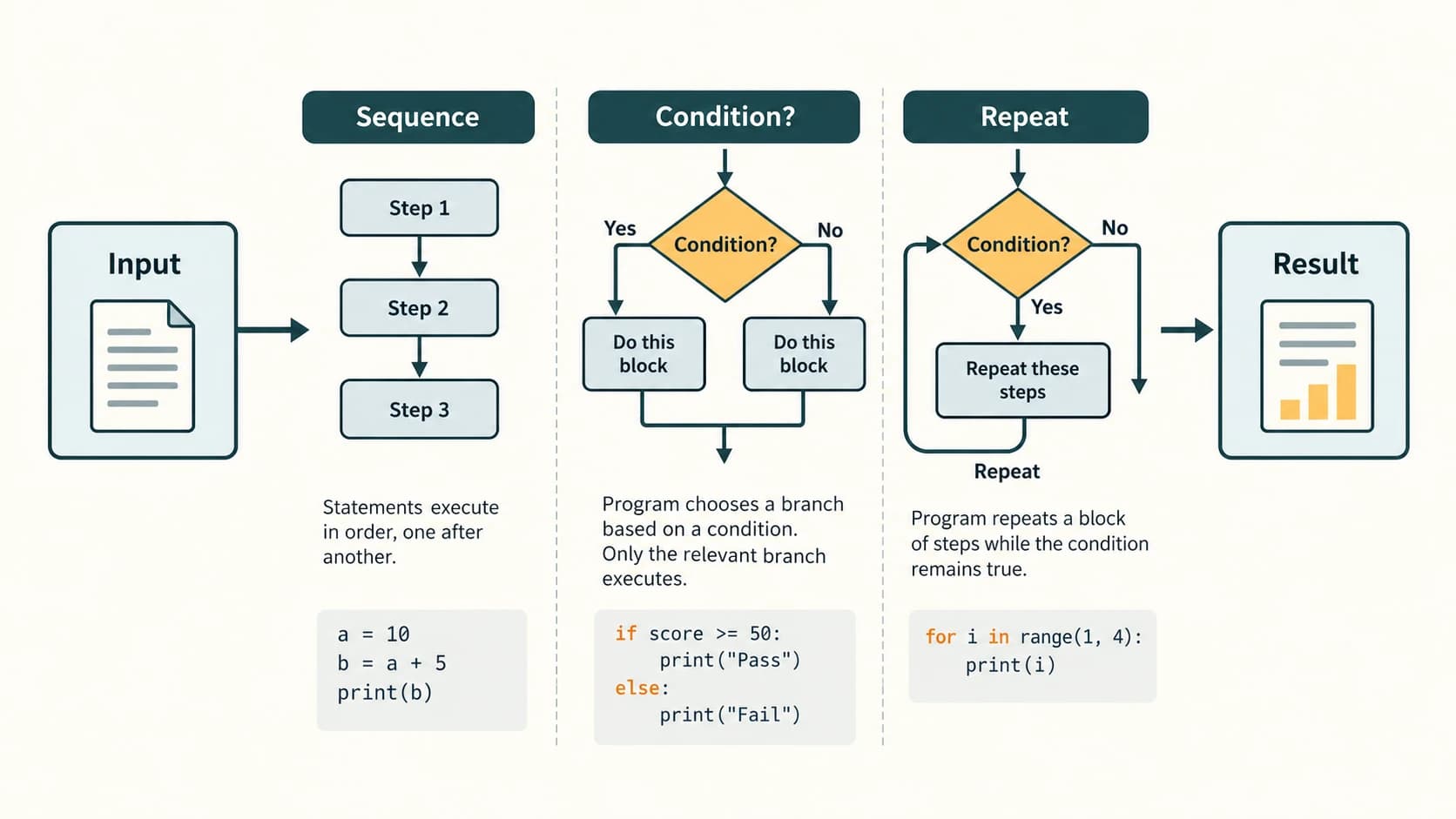
Study this chapter to make programs decide and repeat. In Chapter 5 you wrote Python statements, expressions and basic programs. Here, you will learn to choose which statements run, repeat them safely, and reason about the exact order of execution. This chapter follows NCERT Class XI Computer Science Chapter 6 and the prescribed CBSE Class XI Python control-flow coverage.
What you will be able to do
By the end, you should be able to trace a program line by line; recognise indentation as a meaningful part of Python; write if, if-else, if-elif-else and nested conditions; use for, range() and while; distinguish break from continue; construct nested-loop patterns; guard against incorrect or non-terminating loops; and solve the complete NCERT Chapter 6 exercise and SMIS case study.
Curriculum map and reading route
| Lesson ID (preserved) | Lesson title | Main NCERT links |
|---|---|---|
C11-PY-08 | Flow of Control and Indentation | §§6.1, 6.3; flowchart and block tracing |
C11-PY-09 | Conditional Statements | §6.2, Programs 6-2 to 6-4; NCERT Exercise 1, Programming 1, 4, 10 |
C11-PY-10 | for Loop and range() | §6.4; Programs 6-5 to 6-9; Exercise 2 and 5(ii–iii) |
C11-PY-11 | while Loop, break, continue and Nested Loops | §§6.4–6.6; Programs 6-10 to 6-19; Exercises 3–5 and Programming 2–9 |
C11-PY-17 (later practice-program lesson) is a useful cross-reference only; its stable lesson remains separate. The full NCERT answer key, case study and added original practice are in a separate resource layer below, not interleaved with the conceptual lessons. All official NCERT exercise references use question numbers and short identifying descriptions, rather than reproducing long textbook passages.
Lesson C11-PY-08 — Flow of Control and Indentation
1. What is flow of control?
A program is a set of instructions, but the sequence in which those instructions are executed matters as much as their spelling. This sequence is its flow of control. In a simple sequential program, Python reads statements from top to bottom. However, a conditional can select a path, and a loop can revisit a block.
first = 17
second = 9
answer = first - second
print("Difference:", answer)
Output
Difference: 8The assignment to answer happens before the call to print(). Reading the print() line first would make no sense: its value depends on earlier work.
The three broad control-flow patterns
| Pattern | How execution moves | Simple real-world analogy | Python building block |
|---|---|---|---|
| Sequence | Each instruction is followed by the next | Enter details, then calculate, then show receipt | Consecutive statements |
| Selection | Choose an eligible branch depending on a test | Allow entry only when age is sufficient | if, elif, else |
| Repetition | Execute a block again for items or while a test stays true | Check every record in a class | for, while |
A flowchart uses arrows to show sequence, a diamond to show a decision and a return arrow to show repetition. The chart helps you design the algorithm; Python statements are what the interpreter executes.
2. A Python block is defined by indentation
Indentation is the leading whitespace on a line. It tells Python which statements belong to a conditional or loop. Unlike languages that usually use braces {}, Python relies on consistent indentation. Use four spaces per level, as recommended by the Python style guide. Do not casually mix tabs and spaces.
age = 19
if age >= 18:
    print("Eligible")           # inside the if block
    print("Age requirement met")  # also inside the block
print("Check finished")           # outside the block
Output
Eligible
Age requirement met
Check finished
The colon (:) begins the controlled suite; the two four-space-indented lines execute only when the condition is true. The final unindented line executes afterward regardless of that decision.
An if body cannot be empty. During planning, use pass as a temporary placeholder:
if age >= 18:
    pass  # valid placeholder; add behaviour later
The following is invalid, because no indented block follows the colon:
# Teaching example — intentionally invalid; do not run:
# if age >= 18:
# print("Eligible")
Python would raise an IndentationError. Note that IndentationError is a subtype of SyntaxError; indentation is not merely a matter of attractive formatting.
3. Trace control flow by recording state
Suppose a program adjusts a fare when a concession applies:
fare = 80
student = True
if student:
    fare = fare - 20
print(fare)| Executed step | fare after the step | Reason |
|---|---|---|
fare = 80 | 80 | Initialisation |
student = True | 80 | Boolean flag is set |
if student: | 80 | Test is true |
fare = fare - 20 | 60 | Selected branch runs |
print(fare) | 60 | Output is 60 |
A dry run lists each executed statement, the current variable values, the branch taken and the output. It helps catch errors without guessing from the program's appearance.
A difference between an error and a wrong algorithm
An indentation error often prevents a program from starting. A logic error may produce a perfectly valid program that gives the wrong result. For example, accidentally placing a final print() inside a loop can produce several outputs rather than one. Ask not only “Does Python accept this?” but also “Does the algorithm produce the expected result?”
Common mistakes
- Assuming indentation is cosmetic; in Python it defines scope of the block (not variable scope).
- Forgetting
:afterif,fororwhile. - Using inconsistent indentation within the same block.
- Reading a loop's body only once when tracing output.
- Confusing a flowchart's visual arrow with the line-by-line execution of source code.
Checkpoint: What prints if student = False in the fare example? Answer: 80, because the adjustment is skipped but the final print is outside the branch.
Lesson C11-PY-09 — Conditional Statements
1. Conditions: questions with a Boolean answer
A condition evaluates to a Boolean value: True or False. Typical comparisons are >, <, >=, <=, ==, and !=.
marks = 72
print(marks >= 40)   # True
print(marks == 100)  # False
print(marks != 0)    # True
Be careful: = assigns a value, while == compares values. A chained comparison such as 40 <= marks <= 100 is valid Python; marks >= 40 and marks <= 100 expresses the same idea more explicitly.
| Operator | Meaning | Example when n = 12 |
|---|---|---|
> | greater than | n > 10 → True |
>= | greater than or equal to | n >= 12 → True |
< | less than | n < 12 → False |
<= | less than or equal to | n <= 15 → True |
== | equal to | n == 12 → True |
!= | not equal to | n != 12 → False |
2. The if statement
Use if when something should happen only if a test passes:
age = int(input("Enter age: "))
if age >= 18:
    print("Meets the age requirement")
If age is 16, this program prints no eligibility message. The threshold is inclusive: a person aged 18 satisfies >= 18, but not > 18.
3. The if-else statement
Use else for one mutually exclusive alternative:
number = -6
if number >= 0:
    print("Non-negative")
else:
    print("Negative")
Output: Negative. Exactly one branch executes, then control continues after the whole structure. A useful pattern for an absolute (non-negative) difference is:
first = 5
second = 9
if first >= second:
    difference = first - second
else:
    difference = second - first
print("Absolute difference:", difference)
Output: Absolute difference: 4. The built-in abs(first - second) is a shorter alternative after students understand the conditional.
4. More than two cases with if-elif-else
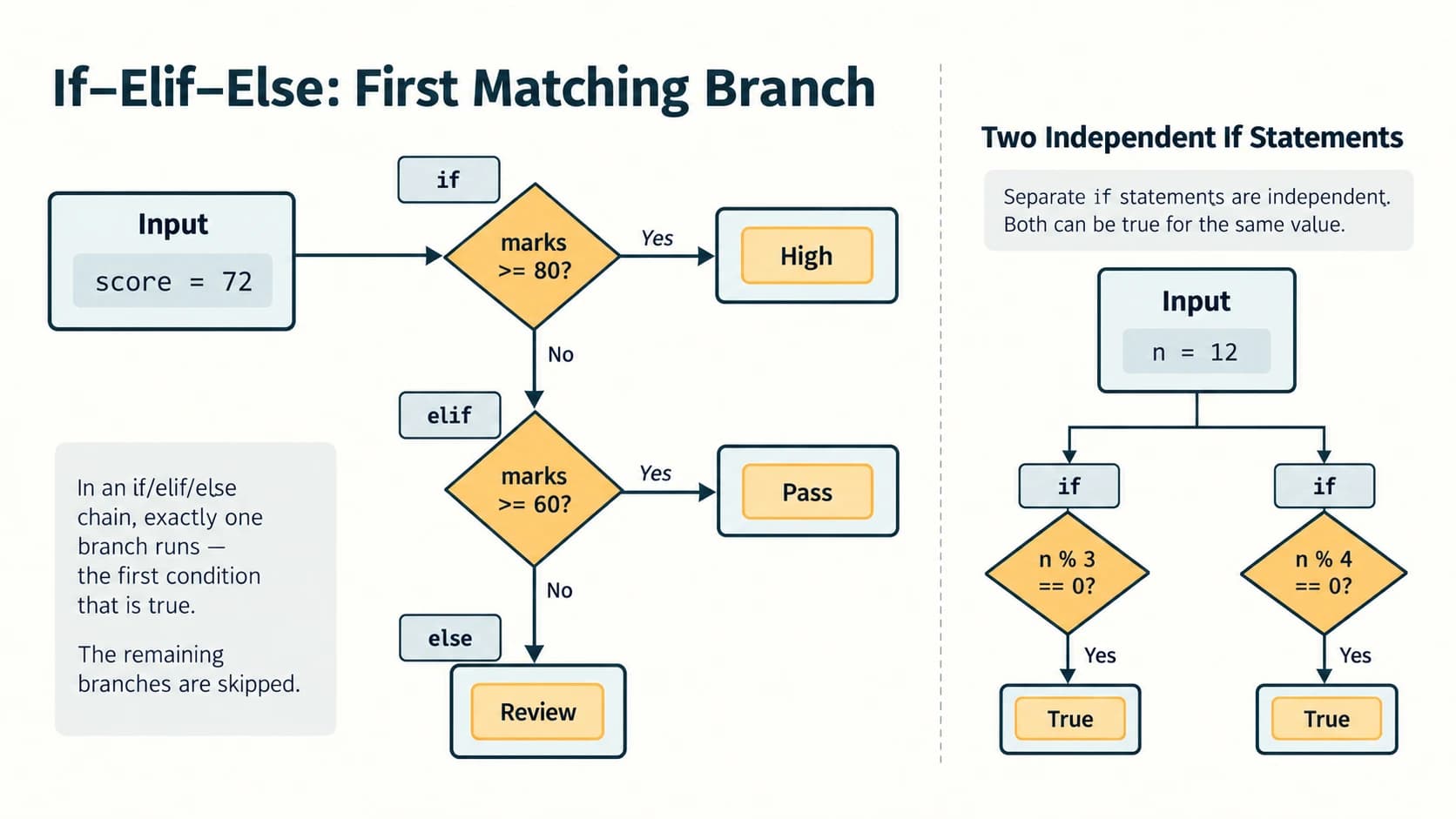
The tests are checked in order. When a true branch is found, Python executes that branch and skips the remaining alternatives:
value = 0
if value > 0:
    print("Positive")
elif value < 0:
    print("Negative")
else:
    print("Zero")
Output: Zero. You may use several elif branches; else is optional and has no condition. To catch every case that has not matched, put else last. This structure differs from independent if statements: several independent if bodies may run, but only one branch of an if/elif chain can run.
Ordered grade bands: the boundary rule
Consider a school percentage out of 100. The simplest unambiguous code tests high thresholds first:
percentage = 80
if percentage > 90:
    grade = "A"
elif percentage >= 80:
    grade = "B"
elif percentage >= 70:
    grade = "C"
elif percentage >= 60:
    grade = "D"
else:
    grade = "E"
print(grade)  # B
Here 90 is B, 80 is B, 70 is C and 60 is D. The NCERT Programming Exercise 10 table uses “above 90%” for A and its adjacent bands include shared endpoints; the code resolves these endpoints explicitly without applying two grades to one student. Invalid percentages below 0 or above 100 should be rejected in a full application.
5. Logical operators and compound conditions
and: both sides must be true.or: at least one side must be true.not: reverses a Boolean value.
age = 20
has_permit = True
if age >= 18 and has_permit:
    print("Requirement satisfied")
and and or are short-circuit operators: Python may not evaluate the right-hand expression if the left side settles the answer. This can prevent division by zero:
n = 0
if n != 0 and 20 / n > 2:
    print("Safe test passed")
else:
    print("Cannot use n as a divisor")
Output: Cannot use n as a divisor. The division is never attempted.
6. Nested decisions and input validation
An if can appear inside another if or elif branch. For a small calculator, first validate the operation, then address division by zero explicitly:
left = 24.0
right = 0.0
operator = "/"
if operator == "+":
    print(left + right)
elif operator == "-":
    print(abs(left - right))  # follows NCERT's positive-difference variant
elif operator == "*":
    print(left * right)
elif operator == "/":
    if right == 0:
        print("Cannot divide by zero")
    else:
        print(left / right)
else:
    print("Unknown operation")
Output: Cannot divide by zero. There is no artificial 0 result when the operation fails. Textbook caution: in NCERT Program 6-3, the final result line is outside the operator checks. As written, an invalid operator or division by zero can therefore still be followed by printing the initial value 0. The corrected example above avoids implying a valid calculation occurred.
7. Edge cases and common errors
Boundary cases reveal faulty conditions. Test age 17, 18, 19 instead of only 25. For grades, test 59.9, 60, 69.9, 70, 79.9, 80, 90, 90.1. If checking for leap years, “divisible by four” alone is not enough for century years; the correct condition is year % 400 == 0 or (year % 4 == 0 and year % 100 != 0).
| Misconception | Correction |
|---|---|
elif can appear without an earlier if | It must belong to an existing conditional chain |
else needs a Boolean expression | else: has no condition |
All tests in an if/elif chain run | Python stops after the first true branch |
| Age 18 fails if rule states “18 or older” | Use >= 18 |
Two if blocks always behave like if-elif | Two independent if blocks can both execute |
Checkpoint: Why does if mark >= 60 come after if mark >= 70 in a high-to-low grading chain? Answer: otherwise a score of 80 would be captured prematurely by the 60 threshold and never reach the 70 threshold.
Lesson C11-PY-10 — The for Loop and range()
1. Repeat work without writing the same statement many times
A loop helps perform the same kind of action repeatedly. A for loop gets one item at a time from an iterable such as a string, list or range object:
for number in range(1, 6):
    print(number)
Output
1
2
3
4
5
Each iteration temporarily binds number to the next value. The loop stops when all values are exhausted.
2. Master the stop-exclusive range() rule
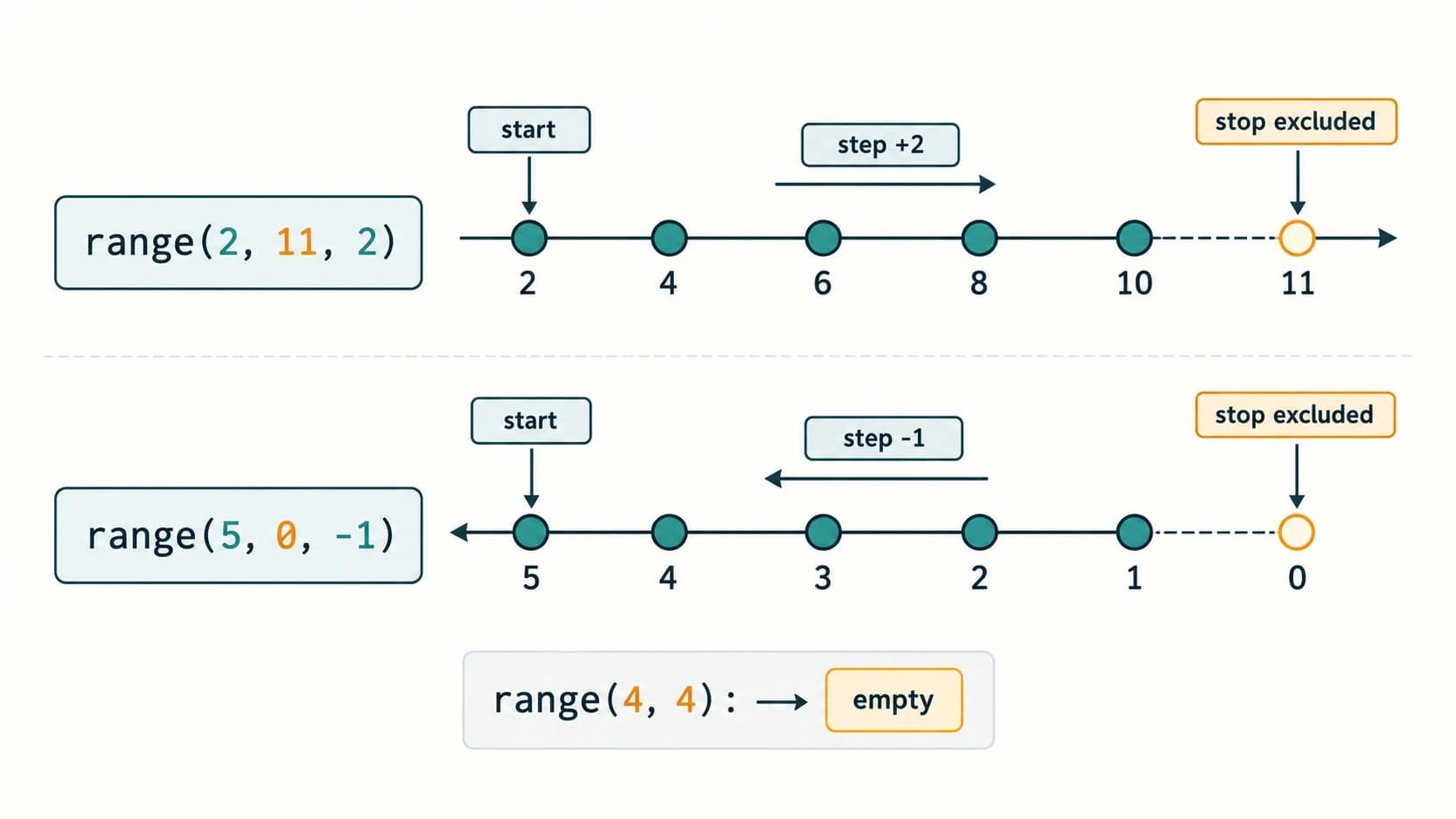
range(stop) starts at 0; range(start, stop) starts at start; range(start, stop, step) changes by step each time. The stop is excluded; the step cannot be zero.
| Expression | Values produced | Key observation |
|---|---|---|
range(5) | 0, 1, 2, 3, 4 | stop 5 is excluded |
range(1, 6) | 1, 2, 3, 4, 5 | print the first five natural numbers |
range(2, 11, 2) | 2, 4, 6, 8, 10 | even numbers |
range(20, 30, 2) | 20, 22, 24, 26, 28 | NCERT tracing case |
range(5, 0, -1) | 5, 4, 3, 2, 1 | countdown |
range(5, 5) | (empty) | loop body is skipped |
range(1, 6, -1) | (empty) | step moves away from stop |
range() is an iterable range object, not an eagerly built list. Convert it with list(range(...)) only when an actual list is useful.
3. Iterating through characters and records
word = "INDIA"
for letter in word:
    print(letter)
Output
I
N
D
I
A
The string remains unchanged. A for loop can also enumerate subjects, days, marks or other known collections. In the chapter source, NCERT Programs 6-6 through 6-9 demonstrate character iteration, integer ranges, even-number iteration and multiples of ten.
4. Accumulators and running totals
An accumulator starts at a neutral value and is updated after each iteration. To add the first n natural numbers:
n = 5
total = 0
for number in range(1, n + 1):
    total += number
print(total)
Output: 15. Trace it:
number | total before | total after |
|---|---|---|
| 1 | 0 | 1 |
| 2 | 1 | 3 |
| 3 | 3 | 6 |
| 4 | 6 | 10 |
| 5 | 10 | 15 |
For multiplication, such as a factorial, initialise the accumulator to 1, not 0:
n = 5
factorial = 1
for value in range(2, n + 1):
    factorial *= value
print(factorial)  # 120
The mathematical convention is 0! = 1; the same code produces 1 for n = 0. Handle negative integers as invalid inputs.
5. Do not change your counting assumption accidentally
A loop over range(1, n + 1) includes n. A loop over range(n) produces exactly n iterations starting with 0. They often have the same number of iterations but different values.
for number in range(1, 5):
    print(number * 10, end=" ")
print()
Output: 10 20 30 40 followed by a newline. The end=" " argument controls formatting, not the loop's numerical behaviour.
Common mistakes
- Expecting the stop value to be included.
- Using positive step when counting backward.
- Forgetting
n + 1when the question means “up to and including n”. - Setting a product accumulator to 0.
- Assuming
range()works with fractional step values (it expects integer-like arguments).
Checkpoint: How many values are in range(20, 30, 2)? Answer: five: 20, 22, 24, 26 and 28.
Lesson C11-PY-11 — while, break, continue and Nested Loops
1. The while loop
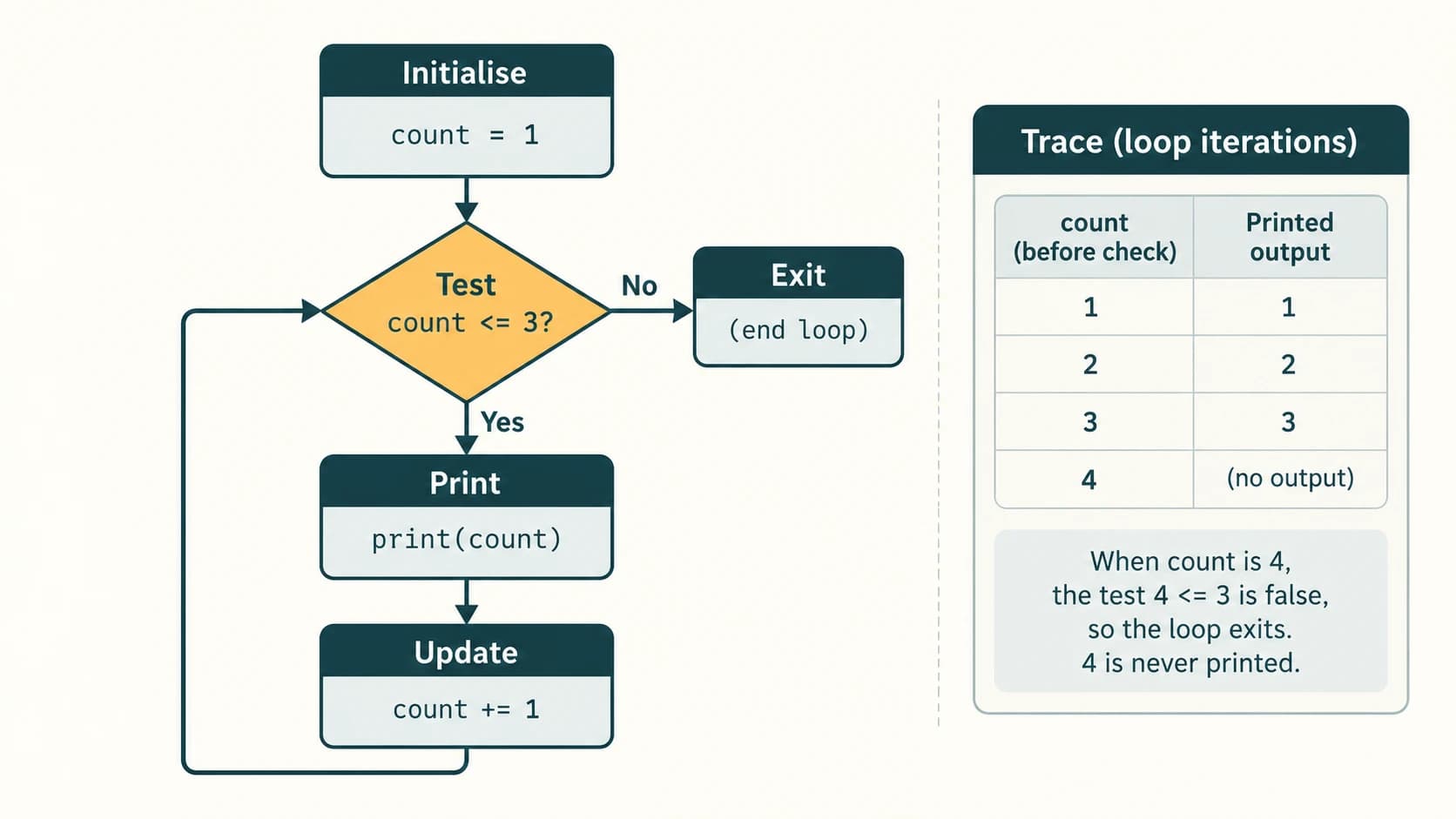
A while loop checks a Boolean condition before every iteration. If the test is false initially, the body may never run:
count = 1
while count <= 5:
    print(count)
    count += 1
Output: numbers 1 to 5, one per line. Its control variable must change so the loop eventually ends. A simple way to recognise the structure is initialise → test → work → update → test again.
attempts_left = 3
while attempts_left > 0:
    print("Attempt number:", 4 - attempts_left)
    attempts_left -= 1
print("Finished")
This runs three times and then stops. A while is useful when the number of iterations depends on a changing condition or on user input, rather than on a fixed sequence.
2. Loop termination and infinite loops
# Conceptual counterexample: DO NOT RUN unchanged.
# value = 1
# while value > 0:
#     print(value)
#     # value is never changed; the condition stays true
This is an infinite loop because value never changes and the condition does not become false. A deliberate while True loop can be safe when there is a reachable break, such as a menu with a Quit option. During tracing, ask: What state changes? When can the condition become false? Is a break possible?
3. The difference between break and continue
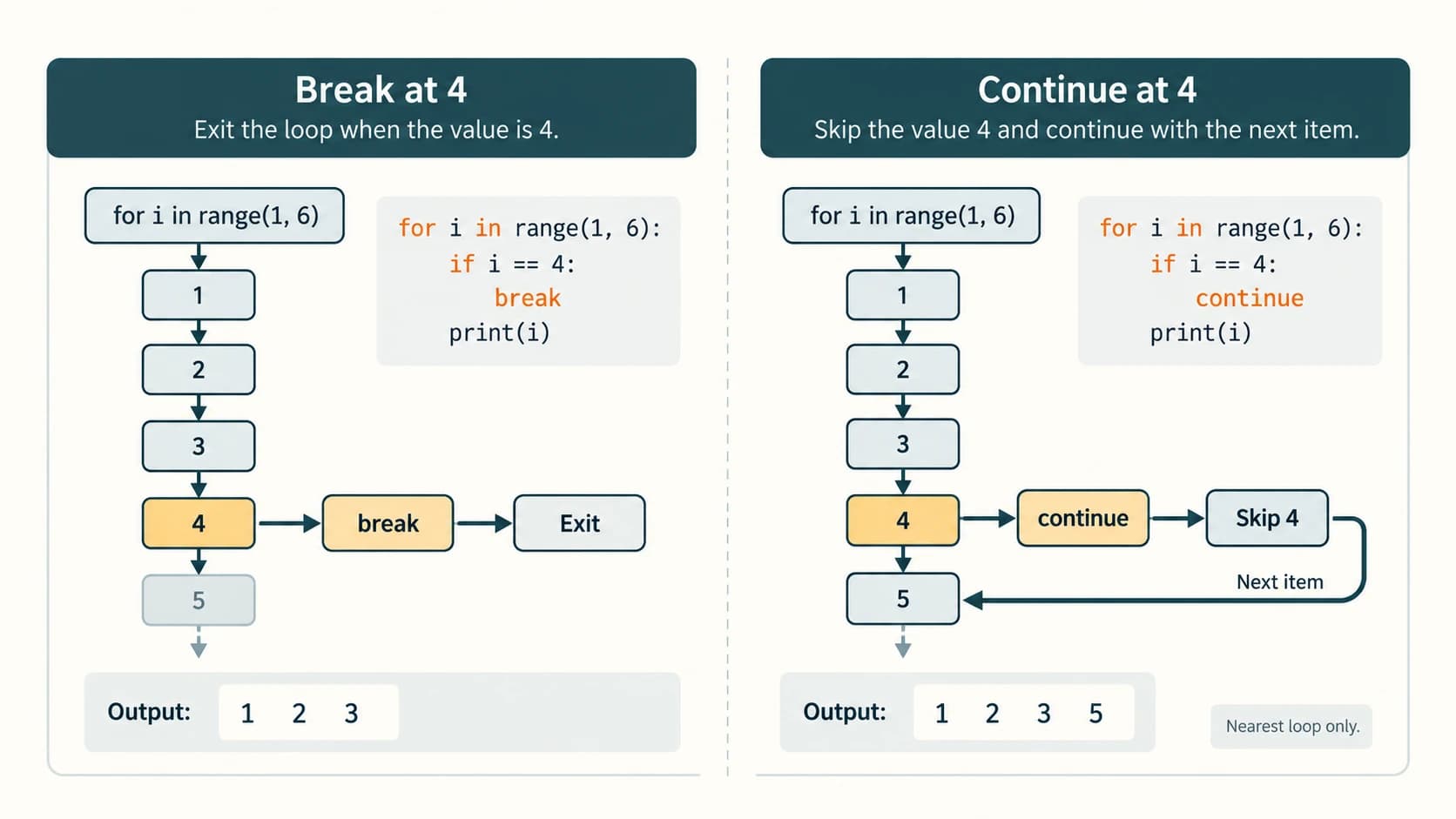
break immediately terminates the nearest enclosing loop. continue skips the remaining statements for this iteration and proceeds to the next iteration (after the loop's usual update/check).
for value in range(1, 6):
    if value == 4:
        break
    print(value, end=" ")
Output: 1 2 3 . By contrast:
for value in range(1, 6):
    if value == 4:
        continue
    print(value, end=" ")
Output: 1 2 3 5 .
| Statement | Effect | Next execution point |
|---|---|---|
break | Exit one enclosing loop | First statement after that loop |
continue | Skip this iteration's remaining body | Next for item or the next while condition |
pass | Do nothing | Next statement in the same block |
A subtle while pitfall
If continue is executed before updating the condition variable, the loop may get stuck:
# Unsafe version (illustration only):
# value = 1
# while value <= 5:
#     if value == 3:
#         continue          # value stays 3 forever
#     value += 1
Correct it by updating first:
value = 0
while value < 5:
    value += 1
    if value == 3:
        continue
    print(value, end=" ")
Output: 1 2 4 5 .
4. Nested loops: a loop inside another loop
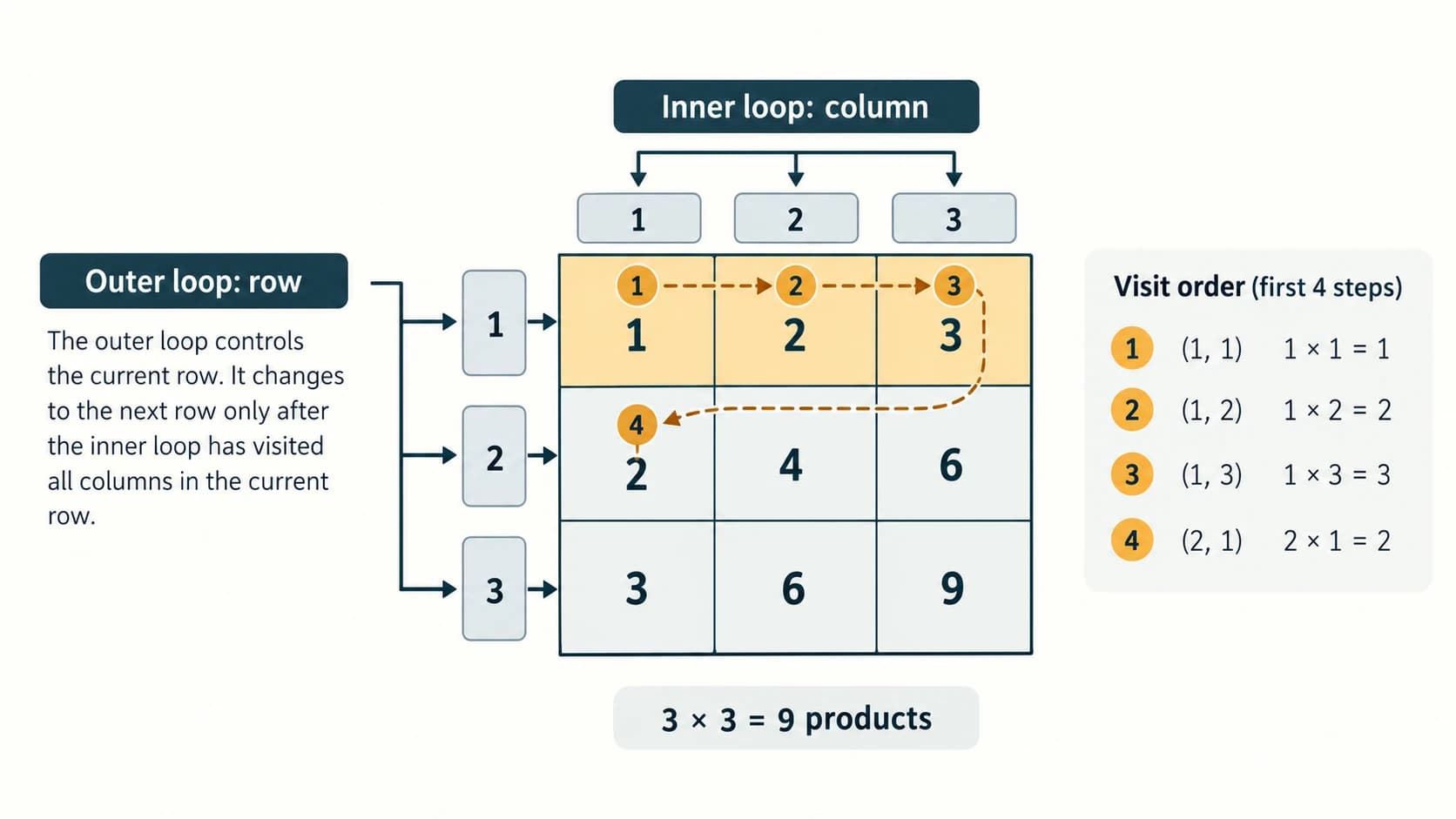
For every iteration of an outer loop, an inner loop runs through its own sequence unless it is stopped early:
for row in range(1, 4):
    for column in range(1, 4):
        print(row * column, end=" ")
    print()
Output
1 2 3
2 4 6
3 6 9
The inner loop runs three times for each of the three outer iterations, giving nine products. The final print() belongs to the outer loop's body, after the inner loop, and moves to a new row. If break occurs in the inner loop, it does not automatically break the outer loop.
5. Generating patterns using row–column reasoning
Rather than memorising a printed shape, determine (a) how many rows there are, (b) how many spaces precede each row, (c) what each row prints and (d) when to move to the next line. Here is a left-aligned ascending number pattern:
height = 5
for row in range(1, height + 1):
    for number in range(1, row + 1):
        print(number, end=" ")
    print()
It prints rows containing 1; 1 2; …; 1 2 3 4 5. For an aligned pattern, use the row number to calculate leading spaces. See Programming Exercise 9 for all four NCERT shapes, including a hollow diamond.
6. An introduction to efficiency: testing for prime numbers
A prime integer has exactly two positive divisors, 1 and itself. It is enough to test candidate divisors d while d*d <= n. If a composite number has a factor greater than its square root, another factor must be smaller than that root.
n = 29
if n < 2:
    is_prime = False
else:
    is_prime = True
    divisor = 2
    while divisor * divisor <= n:
        if n % divisor == 0:
            is_prime = False
            break
        divisor += 1
print(is_prime)  # True
For 49, the test reaches 7; because 7 × 7 = 49, it correctly declares the number composite. This is a useful application of both conditional and iterative control flow.
7. Loop-else: optional advanced clarification
Python allows an optional else after a for or while loop; it runs when a loop completes without being terminated by break. This syntax is not necessary to solve the assigned NCERT questions, but explains some real Python programs. Do not confuse it with the else that belongs to an if.
for number in range(2, 5):
    if number == 3:
        break
else:
    print("No early stop")   # not printed
8. Revision: choose the right tool
| Situation | Appropriate construction | Why |
|---|---|---|
| Award grade by percentage | if-elif-else | Mutually exclusive bands |
| Print 1 through 100 | for ... in range(1, 101) | Known integer sequence |
| Ask until user types Quit | while with state/break | Number of attempts not known |
| Skip negative readings | continue | Ignore one item, keep iterating |
| Stop when a match is found | break | Avoid unnecessary iterations |
| Draw a grid or repeated-row pattern | Nested loops | Rows and columns have separate counts |
Checklist before trusting a loop: Initialise every variable; check inclusive/exclusive boundaries; verify every path updates relevant state; test zero iterations, one iteration and multiple iterations; verify whether a break exits the correct loop; and trace the printed output exactly.
NCERT Chapter 6 — Complete Exercise Solutions
These original worked solutions refer to the official NCERT exercise numbering and paraphrase its tasks. They follow the uploaded Reprint 2026–27 chapter (kecs106.pdf, printed pp. 139–142). The main exercise has five numbered conceptual/output questions, of which Question 5 has six parts. A separate Programming Exercises list has ten numbered tasks (Question 9 has four patterns), followed by one Case Study 6.1. Examples labelled “sample run” are illustrative inputs, not outputs asserted by the textbook.
NCERT Exercise 1 — Difference between else and elif
Solution: elif introduces an additional condition after an initial if (and possibly another elif). It is tested only if earlier branches fail. else has no condition and runs if no earlier branch in the chain succeeded.
marks = 75
if marks >= 90:
    print("A")
elif marks >= 70:
    print("B")
else:
    print("C")
Output: B. The elif condition is evaluated because the first condition is false; else is skipped because the elif was true.
NCERT Exercise 2 — Purpose of range()
Solution: range() represents a sequence of equally spaced integers, especially useful in a counted for loop. Its stop endpoint is excluded:
for value in range(3, 7):
    print(value, end=" ")
Output: 3 4 5 6 . range(3, 7) begins at 3 and excludes 7.
NCERT Exercise 3 — Differentiate break and continue
Solution: break terminates the nearest enclosing loop immediately, while continue skips only the rest of the current iteration and keeps the loop active. For range(1, 5), breaking at 3 outputs 1 2, but continuing at 3 outputs 1 2 4.
for n in range(1, 5):
    if n == 3:
        break
    print(n, end=" ")
# 1 2
for n in range(1, 5):
if n == 3:
continue
print(n, end=" ")
# 1 2 4NCERT Exercise 4 — Infinite loop
Solution: An infinite loop repeatedly executes without reaching a stopping condition. For example, the following code never modifies the condition variable:
# Teaching example only — DO NOT EXECUTE as written:
# count = 1
# while count <= 5:
#     print(count)  # count remains 1
Correction: Put count += 1 inside the loop body, so the test eventually becomes false after counting to 5. A deliberately infinite service loop is a different design and can have a controlled break.
NCERT Exercise 5 — Predict the output of six segments
5(i) — Decrease from 110 while greater than 100
a = 110
while a > 100:
    print(a)
    a -= 2
Exact output
110
108
106
104
102
Explanation: The test is performed before printing. After the fifth iteration the value becomes 100, so a > 100 is false and 100 is not printed.
5(ii) — Two-step range
for i in range(20, 30, 2):
    print(i)
Exact output
20
22
24
26
28
Explanation: The range stops before 30.
5(iii) — Iterate the letters of INDIA
country = 'INDIA'
for i in country:
    print(i)
Exact output
I
N
D
I
A
Explanation: A string is iterable; its characters are visited in order, including the repeated I.
5(iv) — Sum even values divisible by four
i = 0
sum = 0
while i < 9:
    if i % 4 == 0:
        sum = sum + i
    i = i + 2
print(sum)
Exact output
12Trace: values examined are 0, 2, 4, 6, 8. The contributions are 0 + 4 + 8 = 12. The built-in sum() is shadowed by the variable named sum; this is legal but choosing total would be better style.
5(v) — Nested loops with an early break
for x in range(1, 4):
    for y in range(2, 5):
        if x * y > 10:
            break
        print(x * y)
Exact output
2
3
4
4
6
8
6
9
Trace: with x=1 print 2,3,4; with x=2 print 4,6,8; with x=3 print 6,9, then at y=4 the product is 12, so break exits the inner loop without printing 12. The outer loop has no further x value.
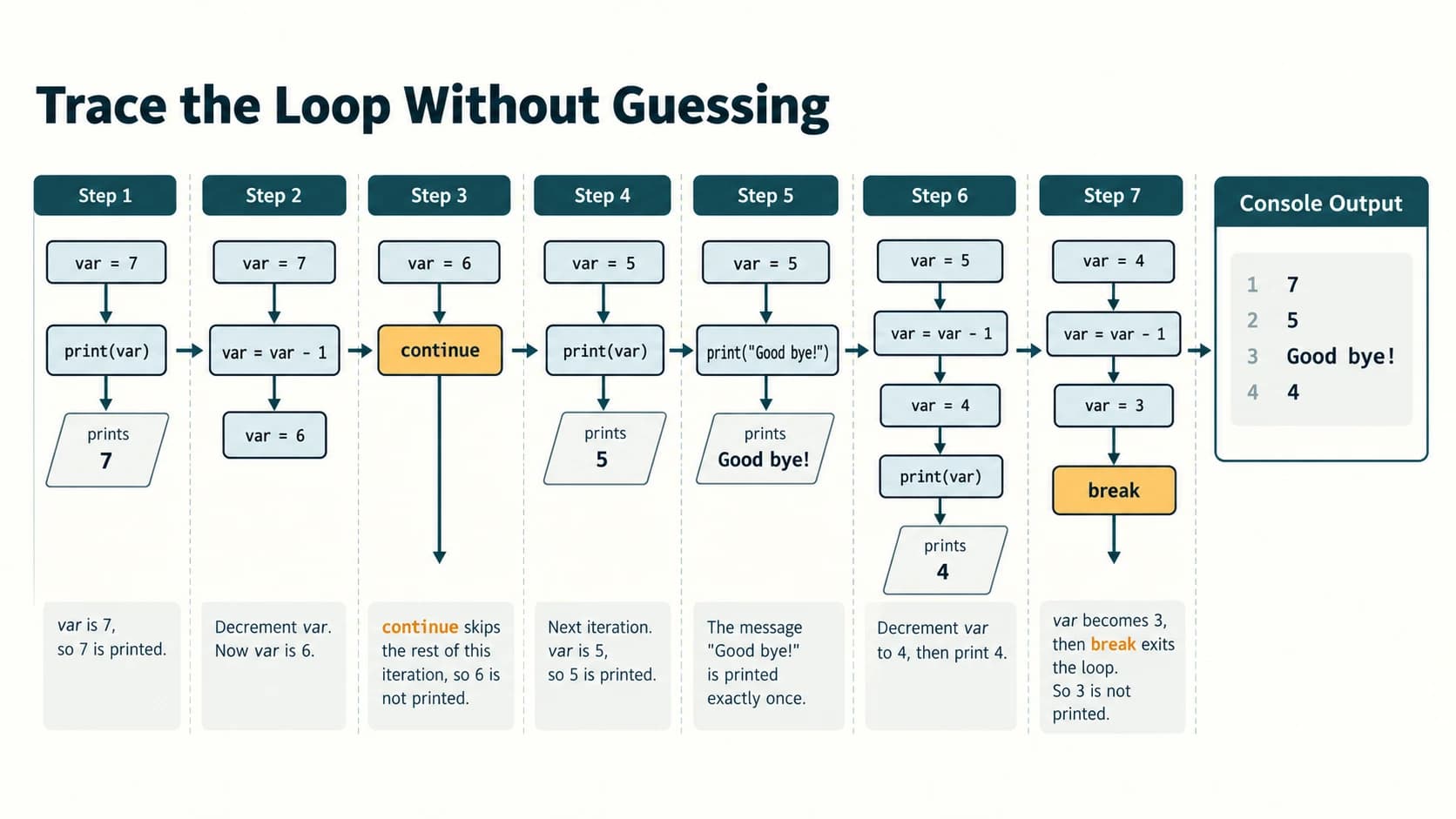
5(vi) — break, continue and changed counter
The following retains the textbook's branch structure with consistent four-space indentation:
var = 7
while var > 0:
    print('Current variable value: ', var)
    var = var - 1
    if var == 3:
        break
    else:
        if var == 6:
            var = var - 1
            continue
    print("Good bye!")
Exact output
Current variable value:  7
Current variable value:  5
Good bye!
Current variable value:  4
Trace: Begin with 7, decrement to 6, then decrement again to 5 and continue (so there is no goodbye for 7). Next print 5, decrement to 4 and print goodbye. Next print 4, decrement to 3 and break (so there is no goodbye for 4). The two spaces before each numeric value are due to the trailing space already inside the message and the default separator added by print().
NCERT Programming Exercises — All Ten Worked Solutions
The programs below are independently written solutions to the tasks numbered 1–10 in the NCERT chapter. Where a question does not prescribe exact formatting or example inputs, sample runs are labelled as such. Functions requested by NCERT are given concise def solutions, while the detailed study of user-defined functions belongs to its own learning context.
NCERT Programming Exercise 1 — Driving-licence age eligibility
Approach: Compare the given age against the 18-year threshold specified in the question. Validate impossible negative ages.
name = input("Name: ").strip()
age = int(input("Age in completed years: "))

if age < 0:
    print("Age cannot be negative")
elif age >= 18:
    print(name, "meets the specified age criterion")
else:
    print(name, "does not yet meet the specified age criterion")
Sample run (age 18): Asha meets the specified age criterion. For age 17 the result is “does not yet meet”; for age -1 the input is rejected. Note: The question asks about the stated age condition, not every legal requirement for obtaining a licence (vehicle categories and jurisdictions may impose other conditions).
NCERT Programming Exercise 2 — Multiplication table using a function
Approach: A function receives the integer, and a loop computes the products from 1 through 10.
def show_table(number):
    for multiplier in range(1, 11):
        print(f"{number} × {multiplier} = {number * multiplier}")

value = int(input("Enter the number: "))
show_table(value)
Sample run (value = 3):
3 × 1 = 3
3 × 2 = 6
3 × 3 = 9
3 × 4 = 12
3 × 5 = 15
3 × 6 = 18
3 × 7 = 21
3 × 8 = 24
3 × 9 = 27
3 × 10 = 30
Explanation: range(1, 11) includes 1 through 10, so the table contains exactly ten rows. The function performs the repeated action; the call occurs after reading input.
NCERT Programming Exercise 3 — Minimum and maximum of five user numbers
Approach: Initialise both current extrema from the first actual input, not to zero, which would give wrong answers for lists of all negative or all positive values.
first = float(input("Number 1: "))
smallest = first
largest = first

for position in range(2, 6):
    number = float(input(f"Number {position}: "))
    if number < smallest:
        smallest = number
    if number > largest:
        largest = number

print("Minimum:", smallest)
print("Maximum:", largest)
Sample run: For numbers 9, -3, 12, 7, 0, the program prints Minimum: -3.0 and Maximum: 12.0. Starting smallest = 0 would be incorrect for an all-positive set such as 4, 6, 5, 8, 7.
NCERT Programming Exercise 4 — Leap-year test
Rule: A year is a leap year if it is divisible by 400, or if it is divisible by 4 but not by 100.
year = int(input("Year: "))
if year <= 0:
    print("Enter a positive year")
elif year % 400 == 0 or (year % 4 == 0 and year % 100 != 0):
    print("Leap year")
else:
    print("Not a leap year")
Verification table
| Test input | Expected result | Explanation |
|---|---|---|
| 2000 | Leap year | Divisible by 400 |
| 1900 | Not leap year | Divisible by 100 but not 400 |
| 2024 | Leap year | Divisible by 4 and not 100 |
| 2025 | Not leap year | Not divisible by 4 |
Exam trap: Testing only year % 4 == 0 wrongly labels 1900 as a leap year.
NCERT Programming Exercise 5 — Alternating-sign multiples of five
The textbook shows the pattern -5, 10, -15, 20, -25, ... and says to continue “up to n”, without explicitly stating whether n is the term count or a magnitude bound. Here we interpret n as the number of terms, which is natural for a pattern-generation task; the assumption is documented for teachers.
n = int(input("How many terms? "))
if n < 0:
    print("Term count cannot be negative")
else:
    for position in range(1, n + 1):
        term = 5 * position
        if position % 2 == 1:
            term = -term
        print(term, end=" " )
    print()
Sample run: n = 5 produces -5 10 -15 20 -25 . For n = 0, no terms are printed. Reason: Odd positions are negative and even positions are positive; magnitude increases by five every position.
NCERT Programming Exercise 6 — Finite series of reciprocal cubes
The problem asks for the sum 1/1³ + 1/2³ + ... + 1/n³ for a positive integer n.
n = int(input("Number of terms: "))
if n < 1:
    print("Enter a positive term count")
else:
    total = 0.0
    for k in range(1, n + 1):
        total += 1 / (k ** 3)
    print("Sum:", total)
Worked check: For n = 3, sum = 1 + 1/8 + 1/27 = 251/216 ≈ 1.162037037037037. The question asks for a finite sum, not the infinite-series limit. Floating-point output is an approximation, so use rounded output only when the question specifies precision.
NCERT Programming Exercise 7 — Sum of digits of an integer
Approach: Take the absolute value, peel off each final decimal digit using % 10, and remove the digit using // 10.
number = int(input("Integer: "))
remaining = abs(number)
total = 0
while remaining > 0:
    total += remaining % 10
    remaining //= 10
print("Sum of digits:", total)
Sample run: -5072 gives 5 + 0 + 7 + 2 = 14, so output is Sum of digits: 14. For the integer zero, result is zero because total begins at 0 and the body need not run. Warning: Using Python's / instead of // would create a float and break the intended integer-digit algorithm.
NCERT Programming Exercise 8 — Palindrome check using a function
A numerical palindrome has the same digits read left-to-right and right-to-left. The function below uses division and remainder, rather than relying only on string reversal.
def is_number_palindrome(number):
    if number < 0:
        return False
    original = number
    reversed_number = 0
    while number > 0:
        last_digit = number % 10
        reversed_number = reversed_number * 10 + last_digit
        number //= 10
    return original == reversed_number

value = int(input("Integer: "))
if is_number_palindrome(value):
    print("Palindrome")
else:
    print("Not a palindrome")
Tests: 12321 → Palindrome; 123421 → Not a palindrome; 0 → Palindrome; 100 → Not a palindrome; negative values → Not a palindrome under this declared integer convention. For arbitrary text, a different function could test text == text[::-1] after specifying case and punctuation rules.
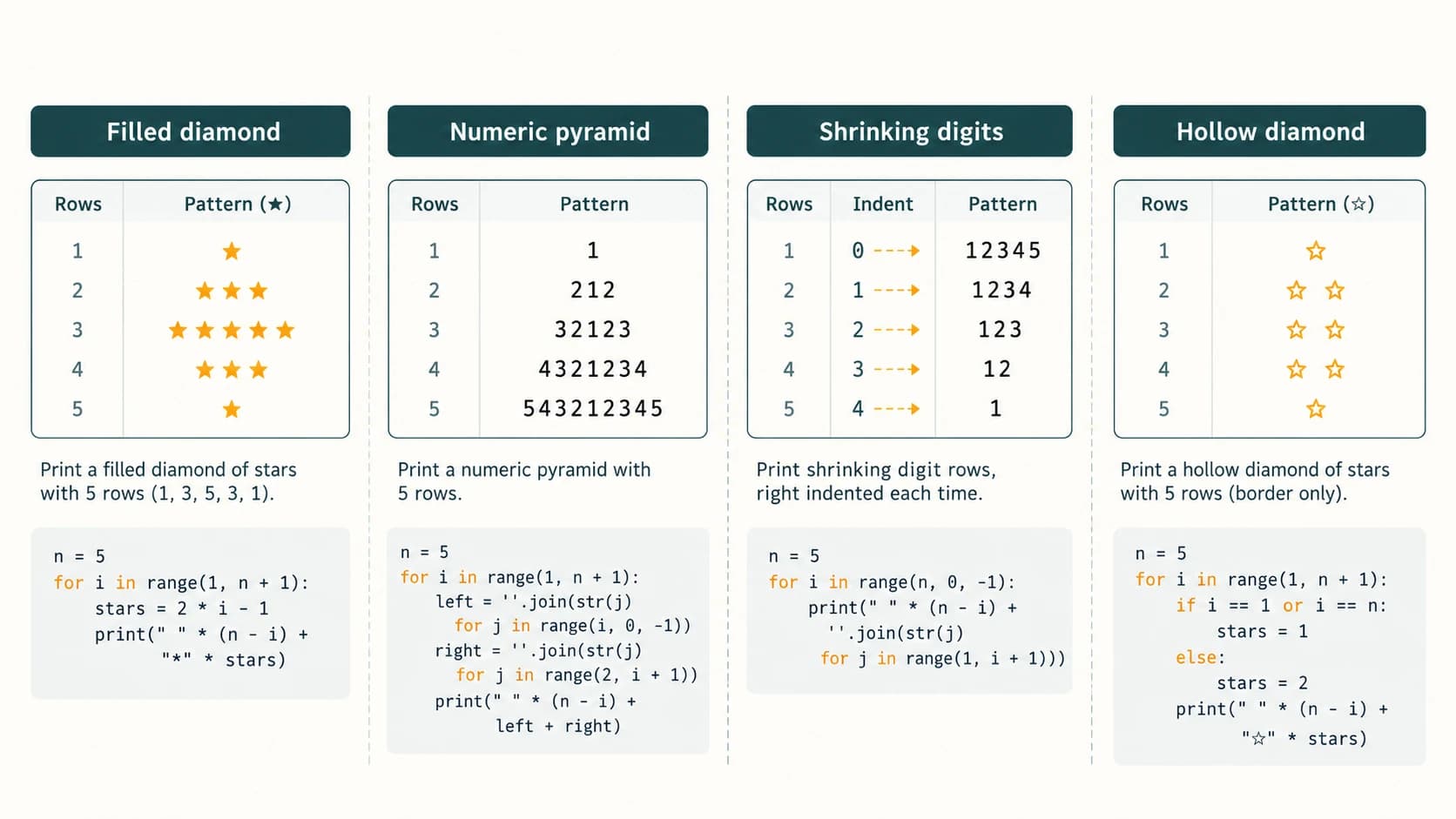
NCERT Programming Exercise 9 — All four printed patterns
The NCERT page shows four distinct patterns; the solutions below reproduce their structural intent while consistently using monospaced output. Pattern height 5 is used because the source illustration has five rows. “Empty spaces” are significant; the code must be read alongside a fixed-width font to see alignment. The patterns are original programmatic implementations, not screenshots of the textbook.
9(i) — Solid diamond with five rows
Target pattern:
  *
 ***
*****
 ***
  *
Solution: Count stars in rows 1, 3, 5, 3, 1 while centring them.
height = 5
middle = height // 2
for row in range(height):
    distance = abs(middle - row)
    stars = height - 2 * distance
    print(" " * distance + "*" * stars)
Explanation: Row 0 is two positions from the centre and displays one star; row 2 is the centre and displays five. This version assumes a positive odd height so the diamond has one central widest row.
9(ii) — Descending then ascending digits in a centred triangle
Target pattern:
    1
   212
  32123
 4321234
543212345
Solution: For each row, write descending integers to 1, then ascending integers to the row index (starting at 2), after the correct number of leading spaces.
height = 5
for row in range(1, height + 1):
    left = "".join(str(v) for v in range(row, 0, -1))
    right = "".join(str(v) for v in range(2, row + 1))
    print(" " * (height - row) + left + right)
Explanation: Row 3 contains 32123. Each row increases by two digits, and the indentation decreases by one space as the width grows.
9(iii) — Shrinking digit rows shifted to the right
Target pattern:
12345
 1234
  123
   12
    1
Solution: The left indentation increases by one space per row, while the rightmost available digit decreases.
height = 5
for row in range(height):
    digits = "".join(str(v) for v in range(1, height - row + 1))
    print(" " * row + digits)
Explanation: In the final row the indentation is four spaces and only 1 remains.
9(iv) — Hollow five-row diamond
Target pattern:
  *
 * *
*   *
 * *
  *
Solution: Only the boundary stars are printed; the interior is left blank.
height = 5
middle = height // 2
for row in range(height):
    distance = abs(middle - row)
    half_width = middle - distance
    if half_width == 0:
        print(" " * distance + "*")
    else:
        inner_spaces = 2 * half_width - 1
        print(" " * distance + "*" + " " * inner_spaces + "*")
Explanation: Top and bottom rows have one star; the central row has two stars separated by three spaces. The main difference from a filled diamond is that only the edges are shown.
NCERT Programming Exercise 10 — Grade classification from percentage
The source table specifies Above 90% → A, 80–90% → B, 70–80% → C, 60–70% → D, Below 60% → E. To ensure no percentage gets more than one grade, test thresholds from high to low, applying each exact boundary to the higher of its two named adjacent bands (except 90, because A is strictly above 90).
percentage = float(input("Percentage: "))
if not 0 <= percentage <= 100:
    print("Invalid percentage")
elif percentage > 90:
    print("Grade A")
elif percentage >= 80:
    print("Grade B")
elif percentage >= 70:
    print("Grade C")
elif percentage >= 60:
    print("Grade D")
else:
    print("Grade E")
Boundary verification: 91 → A; 90 → B; 80 → B; 70 → C; 60 → D; 59.99 → E; 101 → invalid. The textbook's “80 to 90” and “70 to 80” descriptions share boundary numbers unless a convention is chosen; this solution makes the decision consistent and explicit.
NCERT Case Study 6.1 — Extend the Student Management Information System
1. What the case study requires
This case builds on the Student Management Information System (SMIS) from Chapter 5. It asks for a menu-driven program to accept and display five subject marks; calculate the sum and percentage, defined as total / 5 when each subject is out of 100; and calculate a grade from a specified grade table. It also requests a peer-review exercise based on the documentation tips in Chapter 5. We will preserve the menu-style workflow and use fictional sample students.
Read the case-study grade table carefully
| Published category in NCERT case study | Problem needing clarification |
|---|---|
Percentage > 85 → A | Exactly 85 is not included |
Percentage < 85 and >= 75 → B | Excludes 85 |
Percentage < 75 and >= 50 → C | Exactly 50 qualifies |
Percentage > 30 and <= 50 → D | Exactly 50 qualifies here too; exactly 30 does not |
Percentage < 30 → Reappear | Exactly 30 remains unassigned |
This is not the same grading table as Programming Exercise 10. Do not merge the two rules. The published SMIS case-study conditions are incomplete at 85 and 30 and overlap at 50. A computer can execute them only if we either reproduce the gap explicitly or adopt and clearly declare a boundary policy.
For the working classroom sample below, we define a coherent policy using higher-band priority:
| Percentage | Grade in the clarified sample policy |
|---|---|
| 85 through 100 | A |
| 75 through just below 85 | B |
| 50 through just below 75 | C |
| 30 through just below 50 | D |
| Below 30 | Reappear |
Important: This is an explicit proposed correction for the ambiguous boundaries, not a claim that NCERT prints the corrected inequalities. If the teacher provides an exact 85/30/50 convention, replace these boundaries before applying grades to real students.
2. Data and validation plan
The program should accept exactly five marks in the interval 0 to 100, hold them in memory, offer to display marks, show total and percentage, display grade and exit. Do not pretend an absent set of marks is the same as five zeros. For this simple school exercise, subjects are given fixed placeholder labels. The program does not write private student details to disk and does not claim to be a production-grade student-record system.
3. Complete menu-driven Python program
SUBJECTS = ("English", "Mathematics", "Science", "Social Science", "Computer")
marks = None  # None means marks have not yet been entered

def accept_marks():
    collected = []
    for subject in SUBJECTS:
        while True:
            try:
                mark = float(input(f"Enter {subject} marks (0–100): "))
            except ValueError:
                print("Please enter a number.")
                continue
            if 0 <= mark <= 100:
                collected.append(mark)
                break
            print("Marks must be between 0 and 100.")
    return collected

def display_marks(values):
    for subject, mark in zip(SUBJECTS, values):
        print(f"{subject}: {mark:g}")

def totals(values):
    total = sum(values)
    percentage = total / len(SUBJECTS)
    return total, percentage

def grade_for(percentage):
    # Declared boundary convention for gaps/overlap in NCERT case study:
    if percentage >= 85:
        return "A"
    elif percentage >= 75:
        return "B"
    elif percentage >= 50:
        return "C"
    elif percentage >= 30:
        return "D"
    else:
        return "Reappear"

while True:
    print("\nSTUDENT MANAGEMENT INFORMATION SYSTEM")
    print("1. Enter or update five subject marks")
    print("2. Display marks")
    print("3. Calculate total and percentage")
    print("4. Display grade")
    print("5. Exit")
    choice = input("Select 1–5: ").strip()

    if choice == "5":
        print("Goodbye")
        break
    elif choice == "1":
        marks = accept_marks()
        print("Marks saved in the current session")
    elif choice in ("2", "3", "4"):
        if marks is None:
            print("Enter marks first using option 1")
            continue
        if choice == "2":
            display_marks(marks)
        elif choice == "3":
            total, percentage = totals(marks)
            print(f"Total: {total:g} out of 500")
            print(f"Percentage: {percentage:.2f}%")
        else:
            _, percentage = totals(marks)
            print("Grade:", grade_for(percentage))
    else:
        print("Invalid menu option. Choose 1 to 5.")
Why these features matter: while True keeps the menu available until option 5 triggers break; if and elif select actions; a for loop reads five marks; continue retries invalid values and prevents totals before data entry; and None distinguishes unentered marks from legitimate zeros. Helper functions make the separate operations readable. The case study requires a menu; it does not require storing students' actual identities.
Worked example and tests
For marks 80, 90, 70, 100, 85, the total is 425, the percentage is 425 / 5 = 85%, and the declared corrected boundary convention returns A. Without that boundary policy, the literal textbook conditions leave 85% unclassified.
| Scenario | Expected response | Reason |
|---|---|---|
| Option 3 before entering marks | “Enter marks first” | Prevent false totals |
| Input mark 120 | Ask for a corrected mark | Outside allowed bounds |
| Marks 100, 100, 100, 100, 100 | Total 500, 100%, A | Maximum valid score |
| Marks 0, 0, 0, 0, 0 | Total 0, 0%, Reappear | Valid zeros, not missing marks |
| Average exactly 85 | A under declared correction | Source's missing boundary resolved |
| Average exactly 50 | C under higher-band priority | Source's overlapping boundary resolved |
| Average exactly 30 | D under declared correction | Source's missing boundary resolved |
| Option 5 | Menu exits | break leaves enclosing loop |
If exact textbook-condition fidelity is required
The following compact function does not silently amend NCERT's case-study table; it gives “Unspecified by table” for missing boundaries and resolves 50 according to first-true-match order (C before D):
def textbook_grade_literal(p):
    if p > 85:
        return "A"
    elif 75 <= p < 85:
        return "B"
    elif 50 <= p < 75:
        return "C"
    elif 30 < p <= 50:
        return "D"
    elif p < 30:
        return "Reappear"
    return "Unspecified by textbook table"  # exactly 30 or 85
This illustrates the underlying teaching point: programs cannot repair incomplete requirements without an explicit decision. The menu program above uses a documented, usable policy instead.
4. Documentation and peer-review guide
For the classroom peer-review activity, exchange programs or pseudocode with a classmate and review them respectfully. Record: the input contract (exactly five valid marks); the menu choices; meaningful variable names; explanatory comments; correct totals and percentages; grade boundaries (including 30, 50, 75, 85); how invalid or missing data is handled; whether choosing Exit stops the program; and a small test table with results. Avoid using real student personal information in shared demonstrations.
A useful peer-review note might be: “The menu and calculation are easy to follow; please add a test for 85%, because the source table leaves this exact value undefined.” This gives actionable, respectful feedback rather than just saying a program is wrong.
Additional Original Practice — 30 Questions With Explanations
The following are original practice questions, not extra claims about the number of NCERT exercises. They include MCQs, code-output tasks, short-answer reasoning and small program-writing problems. Each has an explained solution.
Section A — Ten conceptual MCQs
P01. Which condition correctly includes someone aged exactly 18? (A) age > 18 (B) age >= 18 (C) age == 19 (D) age < 18.
Answer: B. “At least 18” is inclusive. > excludes age 18.
P02. Which part of a Python if-elif-else chain has no condition? (A) if (B) elif (C) else (D) all three.
Answer: C. else: is the fallback only after all prior tests fail.
P03. What is the final element in range(2, 11, 3)? (A) 8 (B) 9 (C) 11 (D) 12.
Answer: A. The values are 2, 5, 8; the next, 11, is excluded.
P04. Which action terminates the nearest surrounding loop immediately? (A) continue (B) pass (C) break (D) elif.
Answer: C. break leaves the loop. continue skips only the current iteration's remaining statements.
P05. Which expression tests whether integer n is odd? (A) n / 2 == 1 (B) n % 2 != 0 (C) n // 2 == 0 (D) n % 2 == 0.
Answer: B. Odd integers have remainder 1 when divided by 2, so the remainder is not zero. D tests evenness.
P06. How many times does the loop body run for for k in range(4, 4)? (A) 0 (B) 1 (C) 4 (D) infinite.
Answer: A. The start equals the excluded stop, so the range is empty.
P07. Where should a counter update be placed in a typical while loop? (A) nowhere (B) on every relevant path that must make progress toward termination (C) only after the loop (D) always outside the loop.
Answer: B. A loop should update its condition-dependent state; forgetting the update before a continue can prevent termination.
P08. In a nested loop, what happens when break runs inside the inner loop? (A) both loops always terminate (B) the inner loop terminates; outer loop can continue (C) the program exits (D) break is a syntax error.
Answer: B. break targets only the nearest enclosing loop.
P09. A percentage of 90 receives which grade under the NCERT Exercise 10 table (“above 90” is A)? (A) A (B) B (C) C (D) D.
Answer: B. Exactly 90 does not satisfy “above 90”; it is in the B band of the stated policy.
P10. A loop's body may execute zero times when (A) every loop must run once (B) the initial while test is false (C) there is an else block (D) the code uses a variable.
Answer: B. while is pre-test; it does not require a first execution. A for loop over an empty iterable also executes zero times.
Section B — Ten code-trace problems
P11. Predict the output:
for x in range(3):
    print(x + 1, end=" ")
Answer: 1 2 3 . range(3) supplies 0, 1, 2; adding one produces 1, 2, 3.
P12. Predict the output:
n = 5
while n > 1:
    print(n, end=" ")
    n -= 2
Answer: 5 3 . After printing 3, n becomes 1 and the loop exits.
P13. Predict the output:
for i in range(5):
    if i % 2 == 0:
        continue
    print(i, end=" ")
Answer: 1 3 . Even numbers, including 0, skip the print; only odd values are printed.
P14. Predict the output:
score = 60
if score > 80:
    print("High")
elif score >= 60:
    print("Pass")
else:
    print("Review")
Answer: Pass. The first test is false, but the second includes 60.
P15. Predict the output:
for x in range(2):
    for y in range(3):
        print(x, y, sep="", end=" ")
Answer: 00 01 02 10 11 12 . For each x (0, 1), y runs through 0, 1, 2.
P16. Predict the output:
k = 0
while k < 4:
    k += 1
    if k == 2:
        continue
    print(k, end=" ")
Answer: 1 3 4 . k is incremented before the skip, so the loop terminates safely.
P17. Predict the output:
found = False
for n in (4, 7, 10):
    if n % 5 == 0:
        found = True
        break
print(found)
Answer: True. The loop encounters 10, which is divisible by 5, and stops. The final print is outside the loop.
P18. Predict the output:
total = 1
for x in range(1, 4):
    total *= x
print(total)
Answer: 6. The product is 1 × 1 × 2 × 3. Starting from 0 would incorrectly give 0.
P19. Predict the output:
for x in range(3, 0, -1):
    print(x, end=" ")
Answer: 3 2 1 . Negative step decreases the sequence; excluded stop is 0.
P20. Predict the output:
value = 12
if value % 3 == 0:
    print("Multiple of 3")
if value % 4 == 0:
    print("Multiple of 4")
Answer: Two lines, Multiple of 3 and Multiple of 4. The conditions belong to independent if statements, not to an if/elif chain, so both execute.
Section C — Ten short programs and applied questions
P21. Write a program to print all even positive integers up to and including n.
Solution:
n = 12
for value in range(2, n + 1, 2):
    print(value, end=" ")
Output: 2 4 6 8 10 12 . The n + 1 limit makes the bound inclusive; the step 2 ensures every printed integer is even. If n < 2, nothing is printed.
P22. Print the first n squares and explain the upper bound.
Solution:
n = 4
for i in range(1, n + 1):
    print(i * i, end=" ")
Output: 1 4 9 16 . There are n values because range(1, n + 1) includes n.
P23. Count how many vowels appear in a given word (English vowels only).
Solution:
word = "education"
count = 0
for letter in word.lower():
    if letter in "aeiou":
        count += 1
print(count)  # 5
Explanation: The vowels are e, u, a, i, o; case is normalised before membership testing. This counts letters, not phonetic vowel sounds.
P24. Write a sum-of-odd-numbers loop for positive integers less than 10.
Solution:
total = 0
for n in range(1, 10, 2):
    total += n
print(total)  # 25
Explanation: The terms are 1 + 3 + 5 + 7 + 9 = 25.
P25. Determine whether a whole number is divisible by both 4 and 6.
Solution:
number = 24
if number % 4 == 0 and number % 6 == 0:
    print("Divisible by both")
else:
    print("Not divisible by both")
Explanation: Both remainders must be zero. For 24, the program prints Divisible by both.
P26. Demonstrate an input sentinel used to end a loop.
Solution:
# Standalone classroom program: enter q to finish.
while True:
    reply = input("Type q to quit or anything else to repeat: ")
    if reply.lower() == "q":
        print("Finished")
        break
Explanation: break makes the deliberately open-ended loop terminate when the user enters q or Q.
P27. Compute factorial of 0 and 5 without using a library.
Solution:
for n in (0, 5):
    product = 1
    for factor in range(2, n + 1):
        product *= factor
    print(n, product)
Output:
0 1
5 120
Explanation: The loop is empty for 0, leaving the multiplicative identity 1; factors 2 through 5 multiply to 120.
P28. Print a three-by-four grid of asterisks using nested loops.
Solution:
for row in range(3):
    for column in range(4):
        print("*", end="")
    print()
Output:
****
****
****
Explanation: Inner loop controls four symbols per row; outer loop controls three rows.
P29. Explain why while True is not necessarily a program defect.
Answer: A program may intentionally wait for events or menu choices. It is safe when each intended exit has a reachable break or another intentional termination mechanism; otherwise it may loop forever. A menu with option 5 Exit is an example.
P30. What three tests would reveal common errors in a number-guessing loop with target 5?
Answer: Try an immediate correct guess (5), an incorrect then correct sequence (3, 5), and repeated incorrect guesses followed by an explicit quit option. These test first-iteration success, state progression, and safe exit. If an attempt counter is used, also verify that it updates on every path and stops at its limit.
Quick Revision, Exam Strategies and Practical Companion
Twelve facts worth remembering
- Flow of control is the sequence in which statements execute.
- Python uses indentation to mark statement blocks; four spaces per level is the recommended convention.
iftests one condition,eliftests further alternatives, andelseis the unmatched fallback.- In an
if-elif-elsechain, only the first matching branch executes. range(start, stop, step)excludes the stop endpoint and requires a non-zero integer step.forloops iterate through items;whileloops repeat while their condition remains true.- Accumulators for addition usually begin at zero; for multiplication they begin at one.
breakexits one nearest enclosing loop;continueskips only the current iteration's remaining body.- In a nested loop, each outer iteration normally restarts the inner iterable or range.
- The meaning of “up to n” must be specified: include the nth value, stop before n, or generate n terms?
- Validate boundary conditions, zero terms, invalid entries and early-exit behaviour.
- If a source grading table overlaps or leaves gaps, record the ambiguity instead of silently guessing what the setter intended.
Common short-answer distinctions
| Pair | Exam-ready distinction |
|---|---|
if and elif | if starts the chain; elif conditionally continues it |
elif and else | elif has a test; else does not |
for and while | Iteration over items versus repetition controlled by a Boolean test |
break and continue | Leave the loop versus skip one iteration's remainder |
range(1,n) and range(1,n+1) | Excludes n versus includes n for positive step 1 |
print(x) in loop versus outside loop | Multiple outputs versus one final output |
== and = | Compare two values versus assign a binding |
n/10 and n//10 | True division versus floor division; integer digit stripping uses // for non-negative values |
How to answer code-output questions efficiently
Draw a small table with columns iteration, variable values before test, condition result, updates, and printed text. For nested loops, explicitly list each (outer, inner) pair. For break/continue, mark where execution jumps. Check whether a print() line is actually inside the block, because a misplaced indent can change the entire result.
Practical lab suggestions
Create a local Python file for each of the following: inclusive/exclusive range values; leap-year boundaries; safe digit sum; the four NCERT patterns; and the SMIS menu. Test a conventional value, a lower/upper boundary, and an invalid input. Explain each unexpected result before adding new features. For viva preparation, be ready to answer: Why is range(1, 6) five values? Why must a while variable change? Why can two independent ifs both execute? What does break exit in nested loops?
References and scope note
The main educational source is NCERT, Computer Science, Class XI, Chapter 6, “Flow of Control,” Reprint 2026–27, specifically the kecs106.pdf supplied in the verified kecs1dd(1).zip; the parent website is https://ncert.nic.in/textbook.php?kecs1=0-11. The curriculum boundary is the official CBSE Computer Science (083), Class XI, 2026–27, available within https://cbseacademic.nic.in/web_material/CurriculumMain27/SecPart2/Computer_Science_SecP2_2026-27.pdf. For Python language precision, consult the official Python Tutorial at https://docs.python.org/3/tutorial/controlflow.html and the range() built-in documentation at https://docs.python.org/3/library/stdtypes.html#ranges. Worked programs, error cautions and extra questions are original instructional material, not quoted textbook answer keys.