
Getting Started with Python
Study Getting Started with Python in Class 11 Computer Science, with detailed explanations, worked examples, NCERT solutions and practice questions.
By Akhilesh Saini
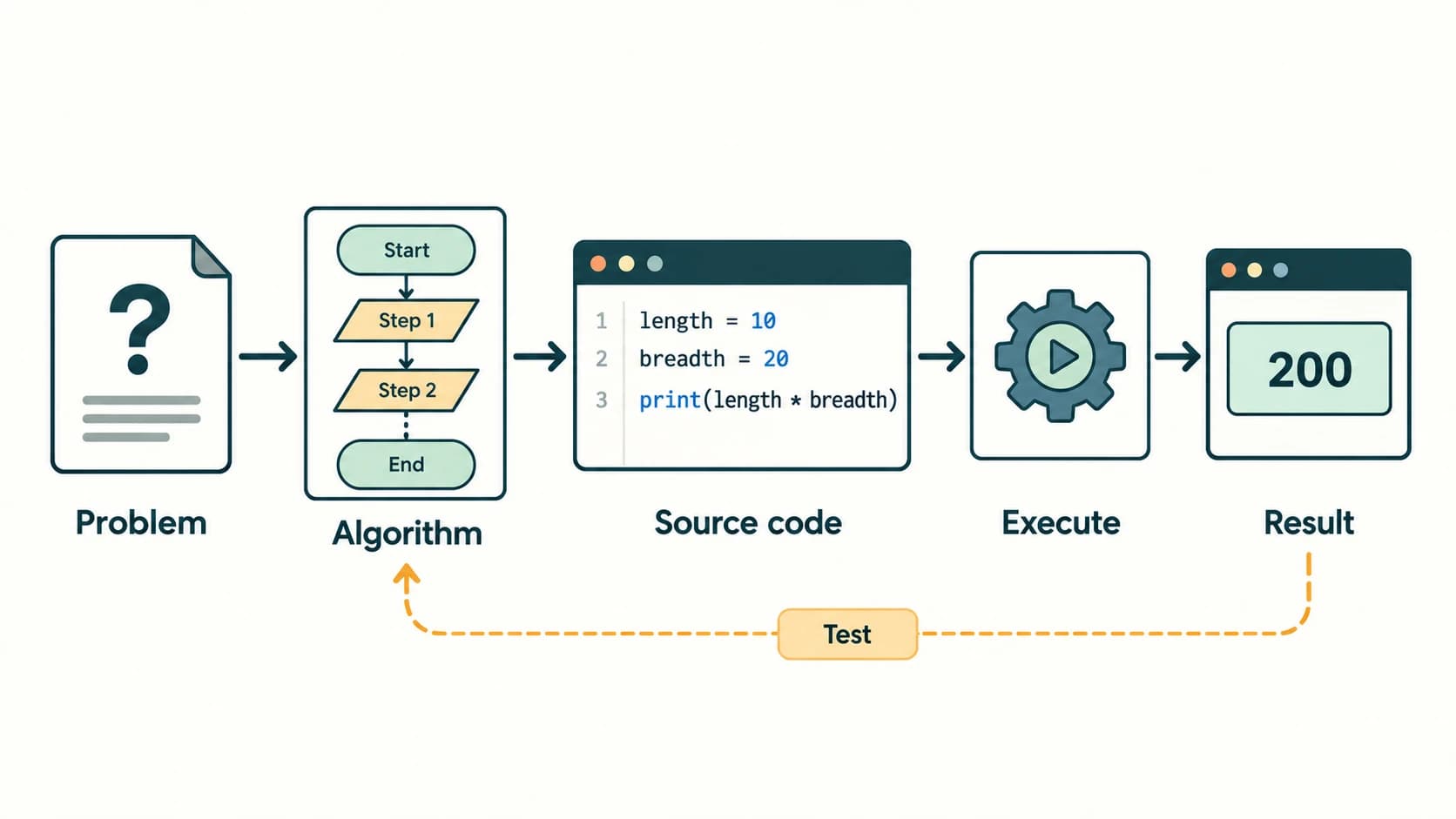
Class XI Computer Science (083) • Concept lessons, working examples, complete NCERT exercises and original practice with explained answers.
In Chapter 4 you learned to solve a problem with an algorithm. Now you can make those steps run on a computer. Imagine a student keeping track of three test scores. A human can add the marks and divide by three; a Python program can perform the same steps for different inputs in seconds. The difficult part is not typing print()—it is understanding what the data means, how Python evaluates the expression, and how to detect a wrong result.
Primary textbook: NCERT Computer Science, Class XI, Chapter 5, “Getting Started with Python”, printed pages 87–120, Reprint 2026–27 (uploaded kecs1dd(1).zip → kecs105.pdf). This companion explains §§5.1–5.13 and provides worked responses to all 21 numbered end-of-chapter exercises, the Student Management Information System (SMIS) case study, and the documentation/peer-feedback assignment. Question prompts are identified by number and briefly paraphrased; the solutions and explanations are original. The chapter does not contain separately numbered “Activities” or “Think and Reflect” tasks, so none are invented. NCERT's interactive examples and Programs 5-1 through 5-11 are addressed through the corresponding lessons.
Curriculum alignment: The six existing stable master-curriculum lesson IDs C11-PY-02 through C11-PY-07 are used without renaming or inventing new lessons. The chapter's six C11-CH05-S0x values are internal sections for navigation, not curriculum lesson IDs. Indentation is introduced as a Python reading rule here; full flow-of-control and indentation study belongs to the later C11-PY-08 lesson. Lists, tuples, dictionaries and sets receive introductory treatment; their full programming lessons follow later in the curriculum.
Learning outcomes
By the end of the chapter you will be able to run Python commands interactively and from .py files; recognise keywords, identifiers, comments and assignments; predict simple data types and explain mutable versus immutable objects; evaluate expressions with correct precedence; use input/output and conversions safely; distinguish syntax, runtime and logic errors; debug short programs; and solve the official exercises—including the practical case study—using tested Python 3 code.
Chapter map
| NCERT sections | Curriculum lesson ID | Core idea |
|---|---|---|
| 5.1–5.1.3 | C11-PY-02 | Python language, interpreter, interactive and script modes |
| 5.2–5.6 | C11-PY-03 | Keywords, identifiers, variables, comments, object identity |
| 5.7–5.7.6 | C11-PY-04 | Numbers, strings, collections, mutability and immutability |
| 5.8–5.10 | C11-PY-05 | Operators, precedence, expressions and statements |
| 5.11–5.12 | C11-PY-06 | Input, output, explicit and implicit type conversion |
| 5.13 and programming applications | C11-PY-07 | Syntax, logical and runtime errors, debugging |
Lesson C11-PY-02 — Python Introduction, Execution Modes and Program Structure
Section C11-CH05-S01 — Your first executable program
1. Programs, programming languages and source code
A program is a sequence of instructions written to perform a task. Source code means the human-readable program written in a language such as Python. The processor executes machine instructions, so a software implementation must translate or otherwise execute high-level instructions. In the most common Python implementation (CPython), source code is compiled to an intermediate bytecode representation and executed by a Python virtual machine. For Class XI, the helpful summary is that Python is an interpreted high-level programming language, but this does not mean it never performs any compilation internally.
Python is widely used for calculations, automation, data analysis, education, scientific computing and web applications. Its syntax emphasises readability, it is case-sensitive, and the language provides a large standard library. Programs can run on multiple operating systems with a compatible Python installation; portability does not mean every program runs unchanged on every machine or that platform-specific libraries never matter.
2. Interactive mode: experiment, observe, learn
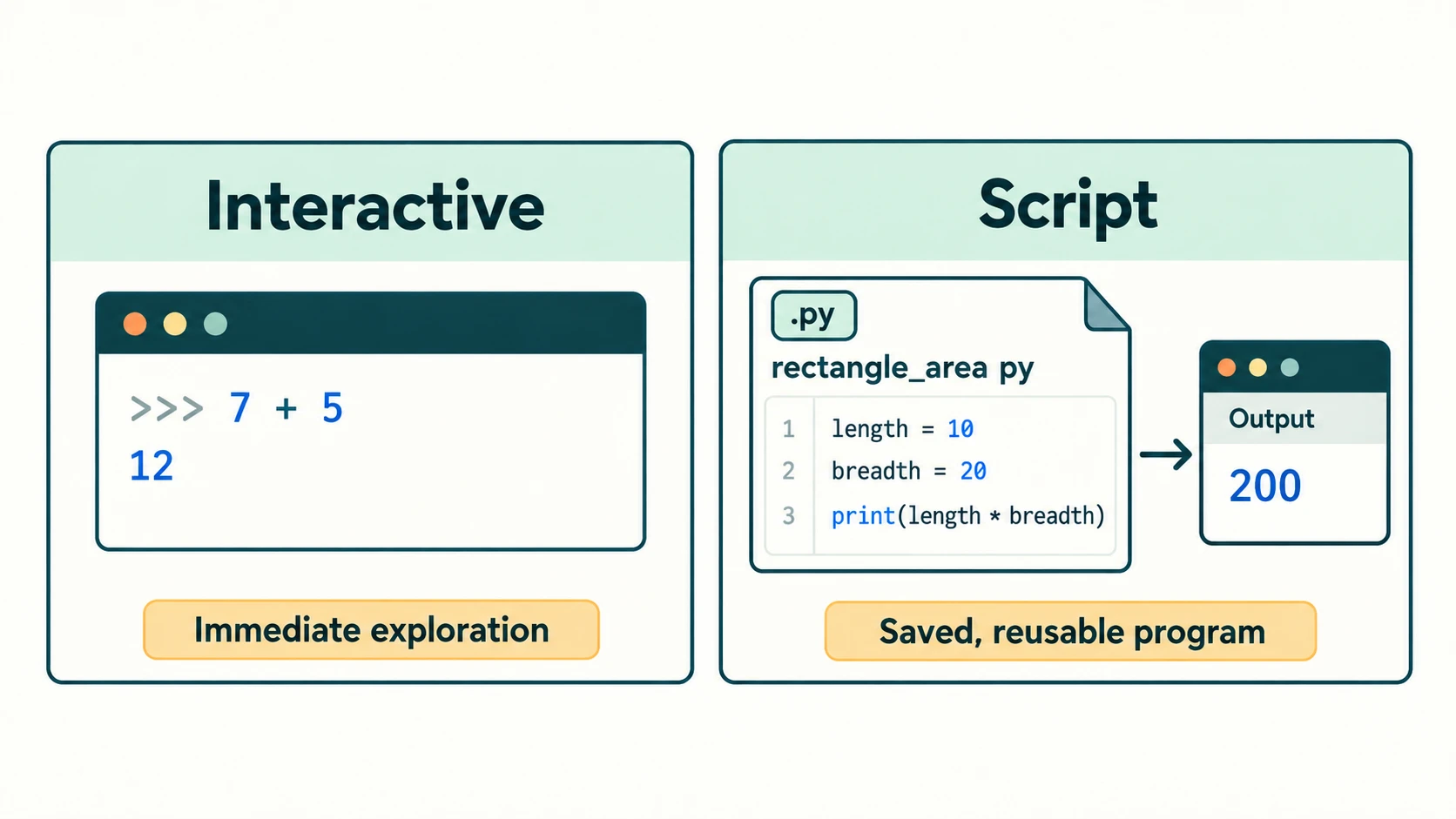
The >>> prompt is an invitation from the interactive Python interpreter: it is not part of the code you type into a program file.
>>> 7 + 5
12
>>> length = 10
>>> breadth = 20
>>> length * breadth
200
>>> print("Hello, Python!")
Hello, Python!
In this mode the interpreter displays the value of a bare expression, whereas a .py script ordinarily needs print() to display something. The interactive shell is useful for testing one expression, trying a built-in function or diagnosing an unexpected result. A sequence typed at the prompt can be saved as a history in some environments, but do not mistake that for a well-organised reusable program file.
3. Script mode: save your solution as a .py file
Create a plain-text file named, for example, rectangle_area.py:
# Calculate the area of a rectangle.
length = 10
breadth = 20
area = length * breadth
print("Area:", area)
Output:
Area: 200Save the file and run it from an editor's Run command, or in a terminal with an installed Python 3 interpreter:
python rectangle_area.pyOn some systems the command is python3 rectangle_area.py or the Windows Python launcher py rectangle_area.py; the exact launch command depends on the installation. In IDLE, save the script and choose Run → Run Module. A Python script's .py extension identifies the source file, but simply typing its filename at a >>> prompt is not the general way to execute it.
4. Read a beginner program as a sequence of state changes
The rectangle program performs four distinct operations: assign 10 to length; assign 20 to breadth; evaluate the multiplication and associate its result with area; display the result. A trace table makes the changing variable bindings visible.
| After statement | length | breadth | area |
|---|---|---|---|
length = 10 | 10 | not yet defined | not yet defined |
breadth = 20 | 10 | 20 | not yet defined |
area = length * breadth | 10 | 20 | 200 |
print(...) | 10 | 20 | 200 |
The order matters: area = length * breadth must not execute before both operands are defined. If you change length later, area does not automatically recalculate; you must execute the calculation again.
5. Program layout, indentation and useful habits
Use meaningful filenames, consistent indentation, descriptive variable names, small steps and explanatory comments that describe why an operation exists. Python uses indentation to delimit blocks after constructs such as if, for and def; it is not merely visual decoration. However, ordinary top-level assignments are not indented. More detailed indentation and branches are covered in the next chapter.
Quick check: Interactive 2 + 3 displays 5. A file containing only 2 + 3 normally produces no printed output. A file containing print(2 + 3) displays 5.
Lesson C11-PY-03 — Tokens, Variables, Literals and Comments
Section C11-CH05-S02 — Names and values
1. Keywords and identifiers
A keyword is a reserved word with a defined language role. Examples include if, else, for, while, def, True, False, None, and, or, not, is, in and return. A keyword cannot be used as an ordinary variable name. True is a keyword; true is not a synonym for it. The exact keyword list is available from Python's keyword module.
An identifier is a name created for a variable, function or other programming entity. A good beginner's naming rule is: begin with a letter or underscore, then use letters, digits or underscores; do not use a Python keyword; respect case. Python also allows certain Unicode letters in identifiers, but ASCII-style English names are usually easier to share across editors and projects.
| Candidate | Valid identifier? | Explanation |
|---|---|---|
marks_total | Yes | Letters and underscore |
_temp2 | Yes | Initial underscore allowed |
2marks | No | Begins with a digit |
total marks | No | Contains a space |
rate% | No | % is not part of an identifier |
class | No | Reserved keyword |
Class | Yes | Case-sensitive; not the keyword class |
studentName | Yes | Mixed capitals permitted |
Style advice: Prefer snake_case for ordinary variable names (total_marks, student_age). Do not call a variable sum, list, str or input unless you intentionally want to shadow a useful built-in name; doing so creates confusion.
2. Variables and the assignment operator
The statement score = 84 binds the name score to the integer object 84. It does not mean a mathematical equation asserting that two expressions are permanently equal. Compare:
first = 10
second = first + 5  # second is 15
first = 30           # second remains 15
print(first, second)
Output: 30 15.
Python does not require a separate declaration such as int first;. The first assignment establishes the name. Using a name that has never been bound normally raises NameError (or UnboundLocalError in a suitable function-local situation).
Parallel assignment is concise and helps avoid temporary variables:
left, right = 12, 30
left, right = right, left
print(left, right)  # 30 12
The expressions on the right are evaluated before the names on the left are rebound; this is why swapping works.
3. Literals, tokens and comments
A literal is a written representation of a value: 25 (integer), 3.5 (floating point), 'A' (string), True (Boolean) or None (absence-of-value singleton). Tokens include names, keywords, operators, delimiters and literals. For example, in area = length * breadth, the meaningful elements are the name area, assignment =, name length, multiplication * and name breadth.
A single-line comment starts with # outside a string. Python ignores the remaining characters on that line:
# Amount is in rupees.
price = 25.0
quantity = 3
cost = price * quantity  # rupees before any discount
print(cost)               # 75.0
Triple-quoted strings are strings, not a special #-style comment syntax. They may act as documentation strings (docstrings) at the start of modules, functions or classes. Avoid filling a program with comments that merely repeat the code; explain assumptions, units and non-obvious decisions.
4. Every Python value is an object
A Python variable stores a reference to an object, not necessarily a distinct box containing a copied value. id(obj) returns an identity that is guaranteed to remain stable for that object's lifetime within the running program. Never build exercises around the literal number returned by id()—such numbers vary by run and implementation. For the same object, is tests identity; == compares values. For numbers and strings, use == to check equal value, not is.
numbers_a = [1, 2]
numbers_b = [1, 2]
print(numbers_a == numbers_b)  # True: equal contents
print(numbers_a is numbers_b)  # False: separate lists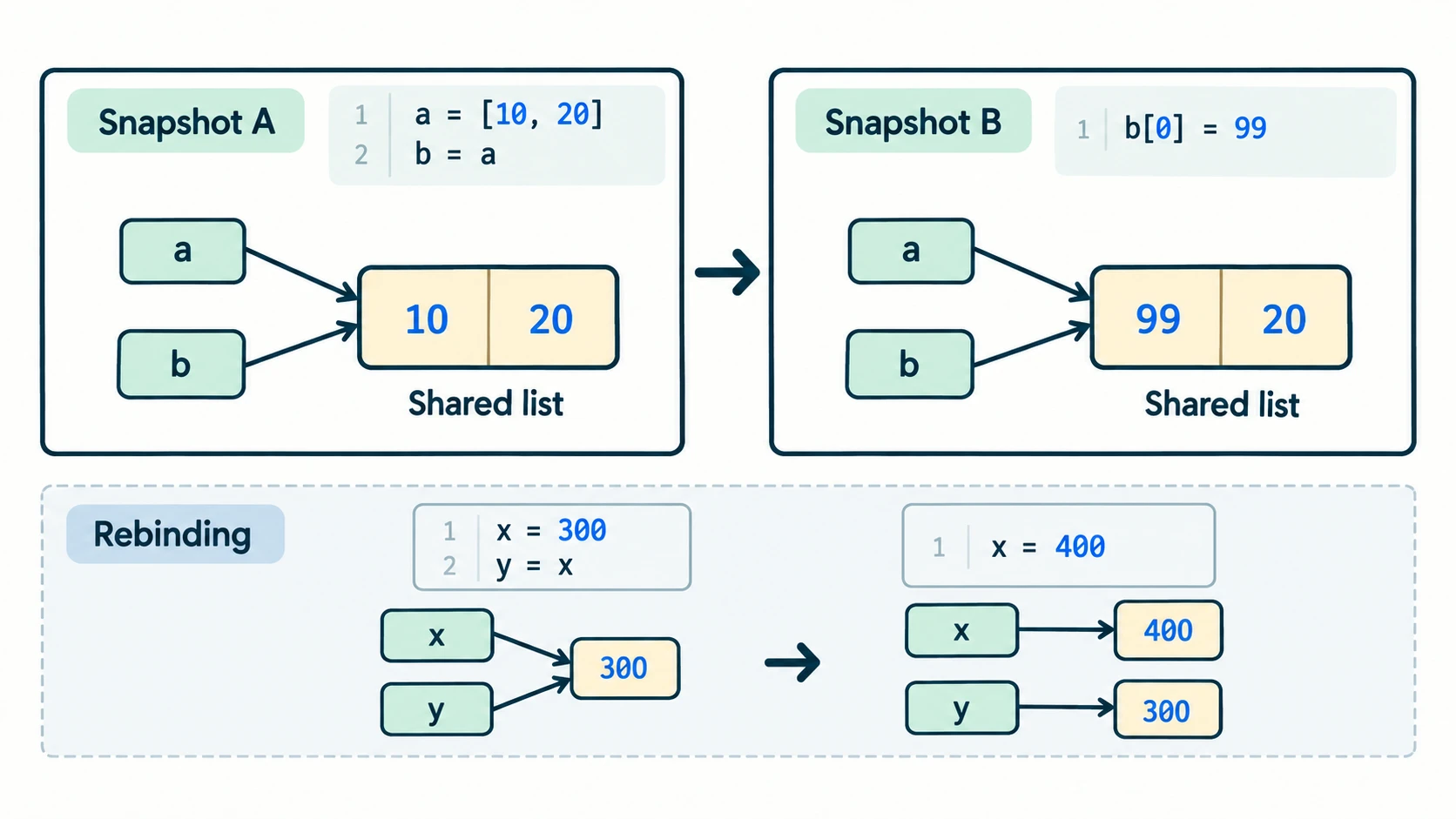
Common mistake: x == 10 compares; x = 10 assigns. Confusing them can create either a wrong result or a syntax error, depending on where the symbol is used.
Lesson C11-PY-04 — Data Types, Mutability and Immutability
Section C11-CH05-S03 — Choose a data representation that matches the meaning
1. Basic types and type()
Python's built-in types tell it what operations make sense for a value. A value may be an integer, decimal-like floating-point number, complex number, Boolean, string, list, tuple, set, dictionary or None.
| Type | Example | Main use / important behaviour |
|---|---|---|
int | 12, 0, -7 | Whole numbers; arbitrary precision subject to resources |
float | 12.5, -0.25 | Approximate real-number calculations |
complex | 2 + 3j | Numbers with real and imaginary components |
bool | True, False | Truth values; subclass of integer |
str | "C11" | Text; immutable sequence of characters |
list | [1, 2, 3] | Ordered, changeable collection |
tuple | (1, 2, 3) | Ordered, immutable container |
set | {2, 4, 6} | Unordered collection of distinct hashable items |
dict | {"name": "Asha"} | Mapping from unique keys to values; preserves insertion order in modern Python 3 |
NoneType | None | Indicates an absent or unspecified value |
print(type(42).__name__)       # int
print(type(42.0).__name__)     # float
print(type("42").__name__)     # str
print(type(True).__name__)     # bool
print(type(None).__name__)     # NoneType
Floating-point note: A binary float cannot represent every decimal fraction exactly; do not rely on exact equality after long chains of floating-point arithmetic. Financial software often requires decimal arithmetic and explicit rounding rules beyond this chapter.
2. Strings are text, even when they look like numbers
"9876543210" is a string of digits, not a numerical amount to be added to another amount. This is useful for telephone numbers and PIN-like identifiers, where leading zeros and formatting may matter.
phone = "0987654321"
print(phone[0])       # 0
print(len(phone))     # 10
A string can be concatenated with another string using + and repeated using * with an integer:
print("Py" + "thon")  # Python
print("ha" * 3)        # hahaha
But "2" + 3 raises TypeError, because the operands are incompatible. Text operations are different from numerical operations.
3. List, tuple, set and dictionary: four different choices
marks = [84, 76, 91]                      # list
coordinates = (28.6, 77.2)               # tuple
chosen_subjects = {"CS", "Maths", "CS"}  # set: duplicate removed
student = {"name": "Asha", "grade": 11}  # dictionary

print(marks[0])            # 84
print(coordinates[1])      # 77.2
print(len(chosen_subjects)) # 2
print(student["grade"])   # 11
A set has no guaranteed presentation order; avoid asserting a specific printed order. A tuple can be written without parentheses in some contexts (pair = 1, 2); the comma is what constructs the tuple. Dictionaries use keys, not positional indexes. A set's elements themselves must be hashable; you cannot put a plain mutable list inside a set.
4. Mutable objects, immutable objects and rebinding
Mutable means an object's internal contents can be changed after creation. Lists, dictionaries and sets are mutable. Immutable means an existing object's value cannot be changed in place. Integers, floats, booleans, strings and tuples are immutable. A tuple can nevertheless contain a mutable item; tuple immutability means the references stored by the tuple cannot be replaced.
first = [10, 20]
second = first
second[0] = 99
print(first)   # [99, 20]: both names refer to the same list

name = "Anu"
name = name + "ja"
print(name)    # Anuja: name is rebound to a new string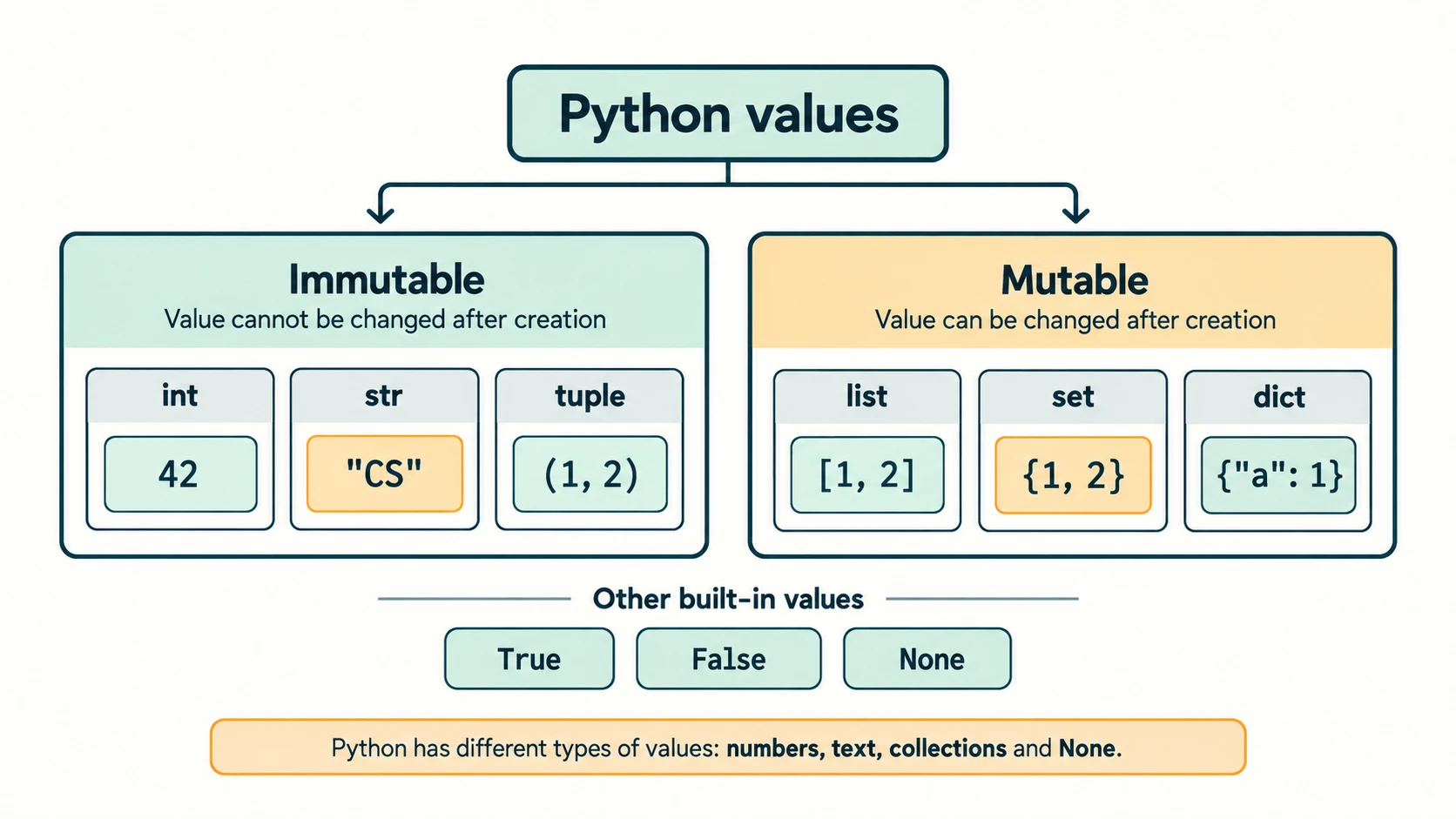
| Operation | What changes? | Why? |
|---|---|---|
a = 300; b = a; a = 400 | b still refers to 300 | Integer cannot be modified; a is rebound |
a = [3]; b = a; a.append(4) | Both show [3, 4] | Same list object modified in place |
a = (1, 2); a[0] = 9 | Raises TypeError | Tuple does not support item assignment |
a = {1, 1, 2} | Contains {1, 2} | Duplicate set elements collapse |
Accuracy note on the textbook's simplified language: Reassigning a name does not necessarily destroy the previous object; the object may still be referenced by another name. Likewise, Python dictionaries are insertion-ordered in supported modern Python 3 even though they are not index-based sequences. Learn the underlying behaviour, not an over-literal analogy.
Memory trick: Mutability concerns objects, not whether a variable name may be assigned again. Almost any ordinary variable can be rebound regardless of its current object's type.
Lesson C11-PY-05 — Operators and Expressions
Section C11-CH05-S04 — Predict what Python will calculate
1. Arithmetic operators
| Operator | Meaning | Example | Result |
|---|---|---|---|
+ | Addition | 7 + 3 | 10 |
- | Subtraction | 7 - 3 | 4 |
* | Multiplication | 7 * 3 | 21 |
/ | True division | 7 / 2 | 3.5 |
// | Floor division | 7 // 2 | 3 |
% | Remainder | 7 % 2 | 1 |
** | Exponentiation | 2 ** 5 | 32 |
In Python, // rounds down toward negative infinity: -7 // 2 is -4, not -3. Division by zero raises ZeroDivisionError. The expression 2 ** 3 ** 2 is 2 ** (3 ** 2) or 512, because exponentiation groups from right to left.
2. Relational, logical and assignment operators
Comparisons such as >, <, >=, <=, ==, != produce Boolean values. Python supports chained comparisons: 0 <= marks <= 100 means both bounds must hold, and the middle operand is evaluated only once. Logical not, and and or combine conditions and may short-circuit, meaning the right operand might not execute if the left already settles the outcome.
marks = 83
eligible = (marks >= 60) and (marks <= 100)
print(eligible)       # True
print(not eligible)   # False
and and or may return an operand rather than a Boolean (for example, "" or "Guest" gives "Guest"), but when used with Boolean comparisons they behave as familiar logical operators. +=, -=, *=, /=, //=, %= and **= are augmented assignment forms; n += 1 increases n by 1. Whether such an update mutates an object or rebinds a name depends on the operand type.
3. Identity versus membership
isandis notcompare whether references identify the very same object. Idiomatic absence check:answer is None.inandnot incheck containment."a" in "cat"isTrue;3 in [1, 2, 3]isTrue.
Do not use x is 4 for checking numerical equality; use x == 4. The textbook's description of identity as a test of “whether the value is of a certain type” is inaccurate: type checks use type() or isinstance(), while is tests object identity.
4. Precedence and parentheses
A good beginner-friendly order is:
- Parenthesised expressions; calls and indexing where applicable.
- Exponentiation
**(watch its interaction with unary signs). - Multiplication, division, floor division and remainder:
* / // %. - Addition and subtraction:
+ -. - Comparisons, membership and identity:
== != < <= > >= in is. - Logical
not, thenand, thenor.
print(3 + 2 * 5)        # 13
print((3 + 2) * 5)      # 25
print(2 ** 3 ** 2)      # 512
print(-2 ** 2)         # -4
print((-2) ** 2)       # 4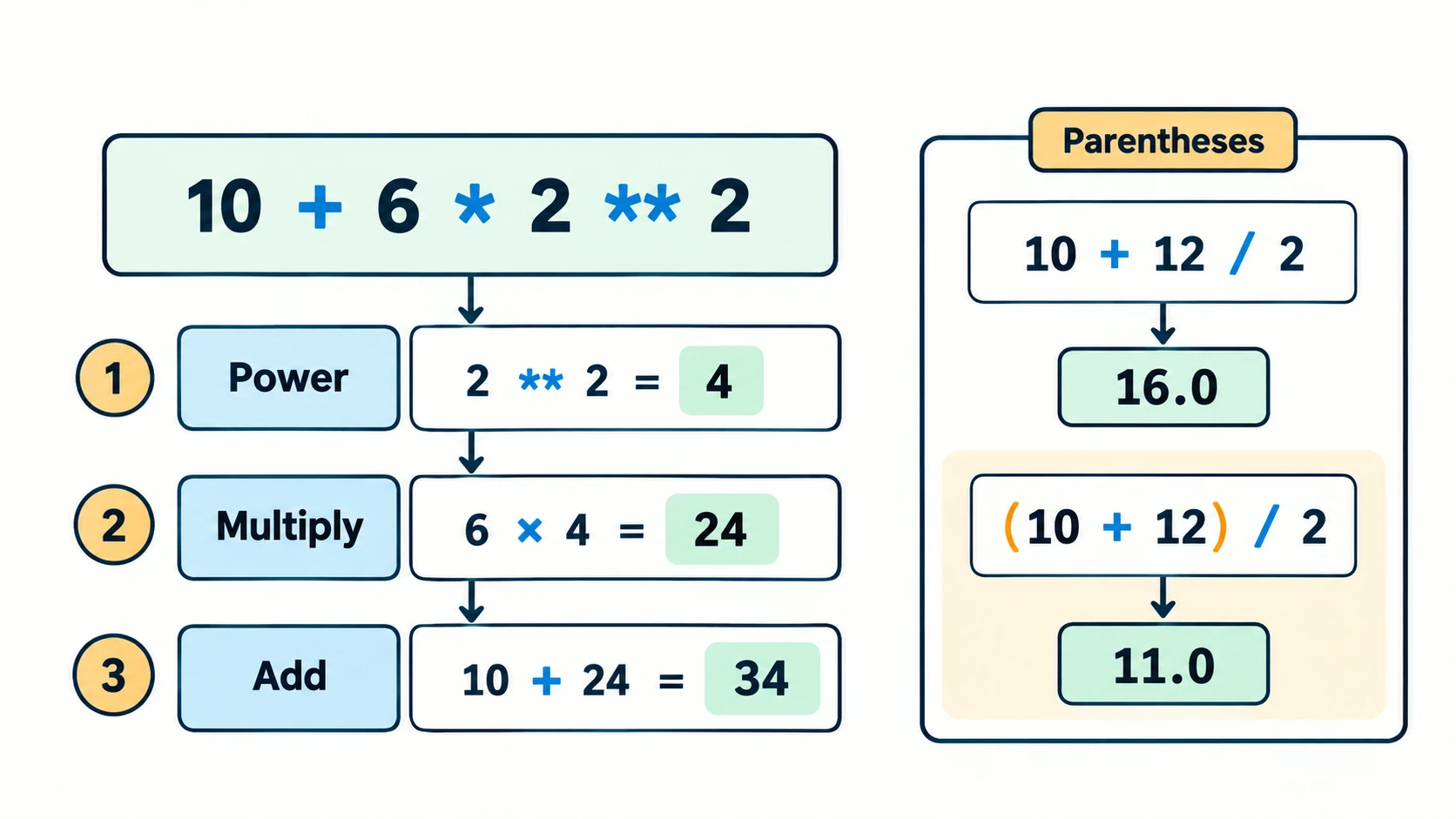
Avoid memorising a rule without practising dry runs. To evaluate 10 + 6 * 2 ** 2, first obtain 2 ** 2 = 4, then 6 * 4 = 24, then 10 + 24 = 34.
5. Expressions, statements and the difference between value and output
An expression evaluates to a value: a + b, 5 > 2, or "go" * 2. An assignment statement changes a binding: total = a + b. A print() call produces visible output, but the return value of print() itself is None.
result = 4 + 5
print(result)        # 9
Some textbook exercises show a line that modifies a variable but includes no print(). In a script, that line does not display a result. In a REPL, assignments also do not echo their values automatically. State the resulting value separately from the literal printed output.
Lesson C11-PY-06 — Type Conversion and Input/Output
Section C11-CH05-S05 — From keyboard text to reliable calculations
1. print() and formatted output
print() displays values separated by a space unless sep is changed. By default, it finishes with a newline; end may change the ending text.
print("Class", 11)                 # Class 11
print(2026, 27, sep="-")         # 2026-27
print("Hello", end=" ")
print("World")                    # Hello World
For rounded results and readable labels, a formatted string (f-string) is useful:
average = 87.456
print(f"Average: {average:.2f}")  # Average: 87.46
The :.2f format displays two places after the decimal for presentation. The original floating-point number is not necessarily changed by printing it.
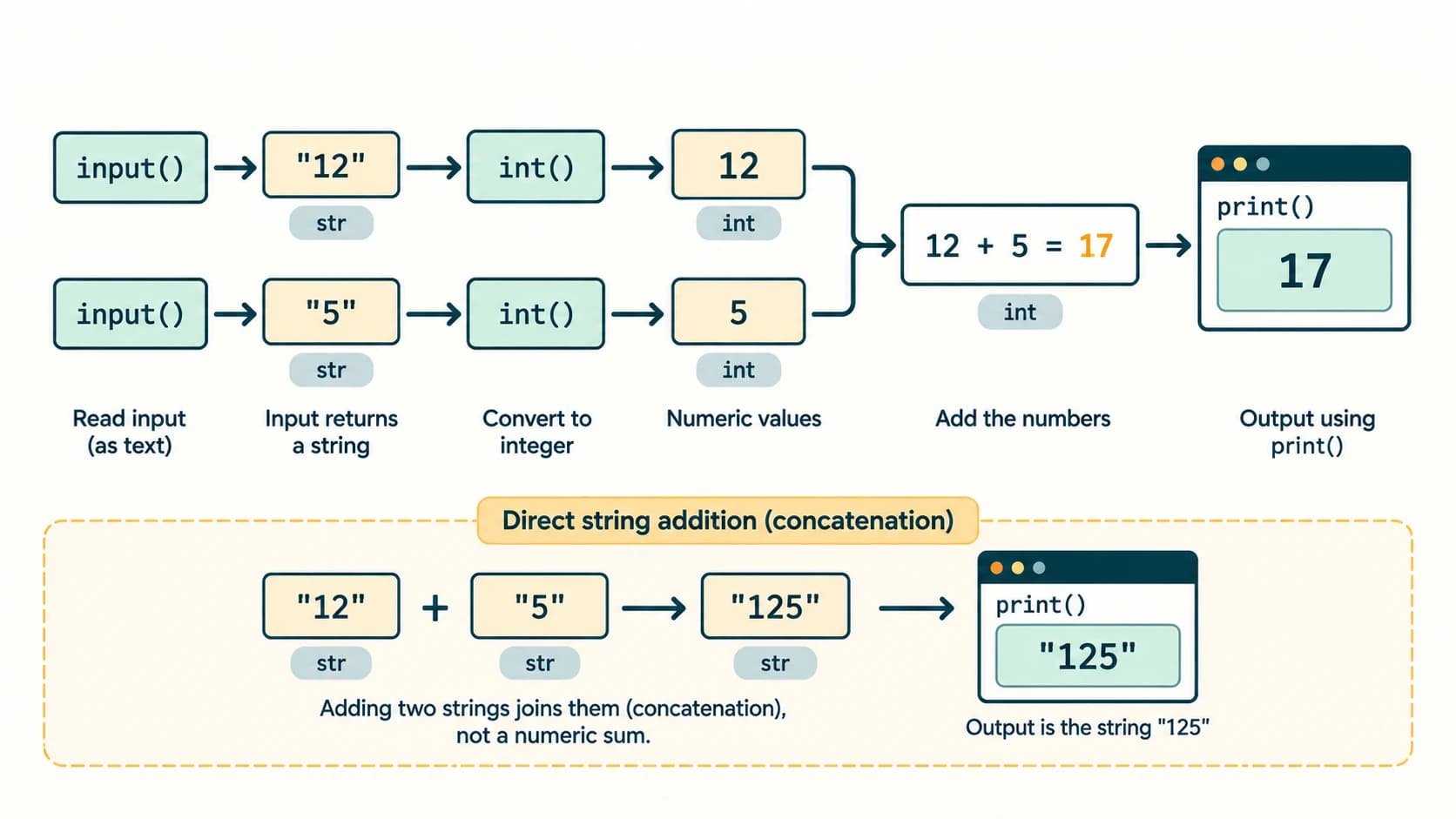
2. input() always returns a string
text = input("Enter your age: ")
print(type(text).__name__)  # str
Even if the user types 16, the result of input() is the string "16". Consequently:
number_text = "2"
print(number_text * 3)        # 222
print(int(number_text) * 3)   # 6
For numeric input, convert deliberately:
length = float(input("Length in cm: "))
breadth = float(input("Breadth in cm: "))
print(f"Area = {length * breadth:.2f} cm²")
An empty or non-numeric answer to a required numeric prompt raises ValueError unless the program handles it. Validation and exception handling are introduced here conceptually; detailed exceptions and loops follow later in study.
3. Explicit versus implicit conversion
Explicit conversion is requested by the programmer using int(), float(), str() or another conversion operation. Implicit conversion sometimes happens automatically during an expression: 2 + 0.5 produces the floating-point value 2.5.
| Expression | Result | Reason |
|---|---|---|
int("42") | 42 | Valid decimal integer text |
float("3.14") | 3.14 | Valid decimal floating-point text |
int(3.9) | 3 | Truncates toward zero, not ordinary rounding |
str(42) | "42" | Number to textual representation |
int("3.14") | ValueError | Text is not a valid integer literal |
2 + 0.5 | 2.5 | Mixed numeric calculation |
"2" + "3" | "23" | String concatenation, not addition |
"2" + 3 | TypeError | String and integer are incompatible operands |
To convert the text "3.14" to an integer, you may write int(float("3.14")) (which gives 3), but this discards the fractional component. Avoid such a conversion unless that is the desired behaviour.
4. Step-by-step worked example: simple interest
An amount of ₹5,000 is lent at 6% per annum for 2 years. Simple interest is P × R × T / 100, so interest is 5000 × 6 × 2 / 100 = ₹600; amount payable is ₹5,600.
principal = 5000.0
rate = 6.0
years = 2.0
interest = principal * rate * years / 100
amount = principal + interest
print(f"Interest: ₹{interest:.2f}")
print(f"Total: ₹{amount:.2f}")
Output:
Interest: ₹600.00
Total: ₹5600.00
Use correct units and input assumptions. This model assumes a fixed annual simple-interest rate and no compounding or fees; it is not a model for every real loan.
Lesson C11-PY-07 — Syntax, Logical and Runtime Errors
Section C11-CH05-S06 — Find the reason, not just the symptom
1. Three useful error categories
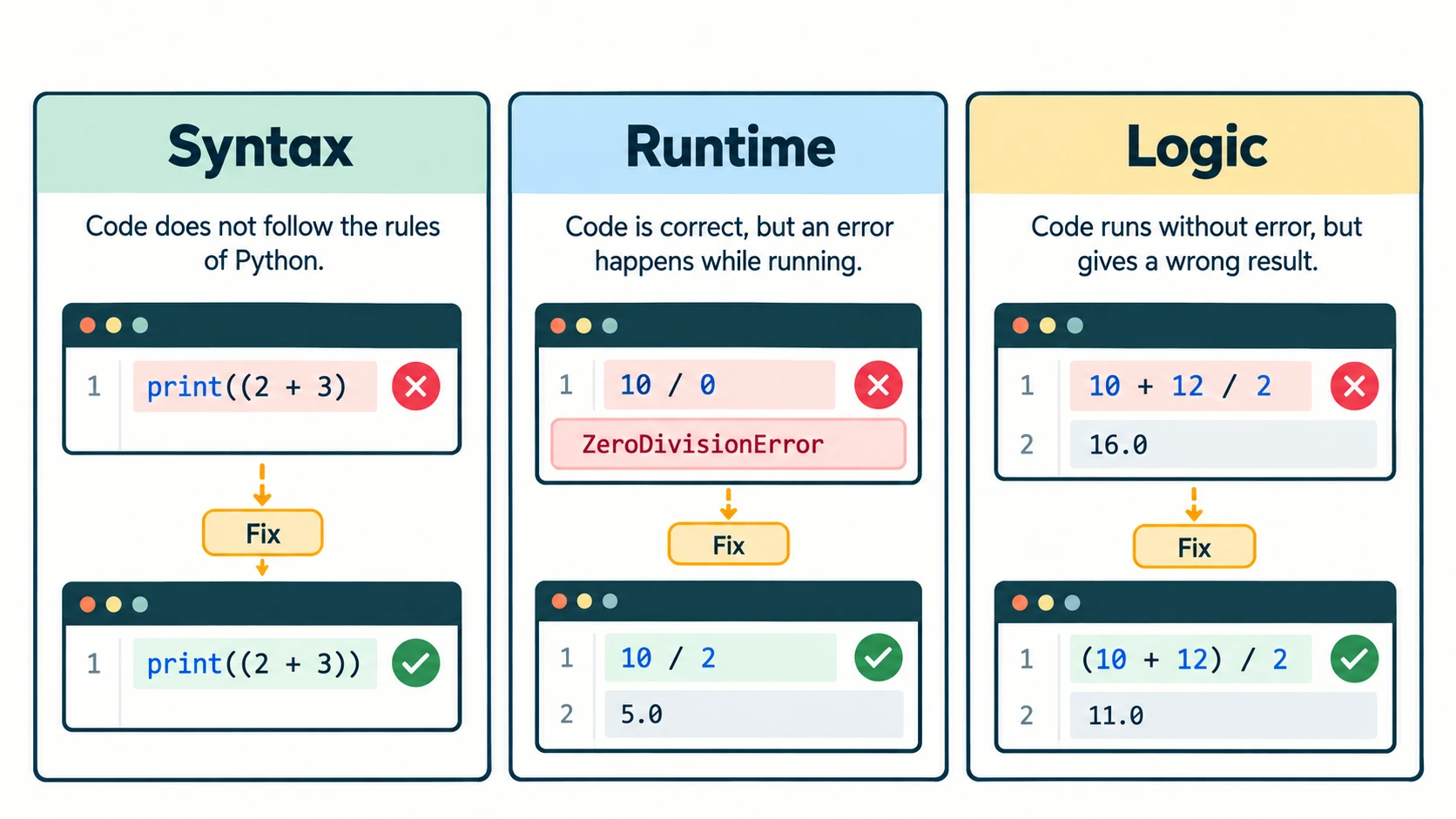
A syntax error means Python cannot parse the source according to its grammar. A runtime error means the program started running but encountered an operation it could not complete. A logical error means the program executes but returns the wrong result for the intended problem.
| Category | Minimal example | What happens |
|---|---|---|
| Syntax | print((2 + 3) | Missing closing parenthesis; SyntaxError |
| Runtime | 10 / 0 | ZeroDivisionError |
| Runtime | int("hello") | ValueError |
| Runtime | print(unknown_name) | NameError |
| Logical | average = 10 + 12 / 2 | Runs but gives 16 rather than 11 |
Correct average: (10 + 12) / 2 equals 11.0. Parentheses fix the intended grouping. A logical error is discovered by comparing actual behaviour with the specification, not merely by looking for an error message.
2. A practical debugging routine
- Reproduce the problem with the smallest possible input.
- Read the error type and the line indicated by the traceback.
- Inspect the variables and operations on that line; for wrong answers, compare with a hand calculation.
- Fix the underlying cause—not only the displayed symptom.
- Test ordinary inputs, edge cases, invalid data and at least one case that previously failed.
Example: a program accepts two numeric inputs for division. If the second is zero, it should report that division is undefined rather than attempt the operation. Use an if check as an introductory demonstration:
numerator = float(input("Numerator: "))
denominator = float(input("Denominator: "))
if denominator == 0:
    print("Cannot divide by zero.")
else:
    print(numerator / denominator)
Later chapters provide the complete teaching of conditional branches and input loops. For now, recognise the test and why the zero boundary matters.
3. Tests should target meaning as well as syntax
For a percentage calculation, test 18/20 → 90, 0/20 → 0, 20/20 → 100, and 18/0 → invalid. A program that outputs 90 for the first case is not automatically correct for every other case. For an identifier, test leading digits and reserved keywords. For conversion, test an integer string, a decimal string and invalid text.
Cross-chapter revision: The whole solution chain is algorithm → readable source code → executed statements → output → tested result. A syntactically valid program can still solve the wrong problem.
NCERT Exercise Solutions — Chapter 5 (Questions 1–21)
This answer key follows the exercise numbering in the supplied NCERT 2026–27 Chapter 5 PDF, printed pages 115–119. Each question is identified with a short topic paraphrase, not a long reproduction of the textbook question. Unless an input is specified, numeric examples show one valid test rather than a unique response for every possible input. The code uses Python 3.
Question 1 — Identify invalid identifiers (parts i–viii)
| NCERT part | Given candidate | Answer | Reason |
|---|---|---|---|
| (i) | Serial_no. | Invalid | Period/full stop not permitted in an identifier |
| (ii) | 1st_Room | Invalid | Identifier cannot begin with a digit |
| (iii) | Hundred$ | Invalid | $ is not allowed |
| (iv) | Total Marks | Invalid | A space separates tokens; it is not part of one identifier |
| (v) | Total_Marks | Valid | Letters and underscore are allowed |
| (vi) | total-Marks | Invalid | Hyphen is the subtraction operator, not part of the name |
| (vii) | _Percentage | Valid | Initial underscore is legal |
| (viii) | True | Invalid | Reserved Python keyword/Boolean literal |
Reasoning: A name's spelling, not what it means in English, determines its syntactic validity. For example, Serial_no would be valid; serial_no. would still be invalid. Python is case-sensitive.
Question 2 — Python assignment statements (parts a–e)
(a) Assign length 10 and breadth 20.
length = 10
breadth = 20
(b) Store the average of these two values in the variable named sum.
sum = (length + breadth) / 2
print(sum)  # 15.0
The question specifically names the destination variable sum, so that is used here; in fresh code a better name is average because this result is not a sum. Moreover, sum shadows Python's built-in sum() function.
(c) Assign a stationery list.
stationery = ["Paper", "Gel Pen", "Eraser"](d) Store the three portions of a name.
first = "Mohandas"
middle = "Karamchand"
last = "Gandhi"
(e) Join these name parts with spaces.
fullname = first + " " + middle + " " + last
print(fullname)  # Mohandas Karamchand Gandhi
Equivalent readable expression: fullname = " ".join((first, middle, last)). The space is necessary: joining without it would make the words run together.
Question 3 — Translate statements into logical expressions (parts a–e)
(a) Is 20 plus −10 less than 12?
print(20 + (-10) < 12) # TrueExplanation: 20 − 10 = 10, and 10 is less than 12.
(b) Check whether num3 does not exceed 24.
num3 <= 24Equivalent: not (num3 > 24). The result depends on num3; for num3 = 24, the answer is True, and for num3 = 25, it is False.
(c) Is 6.75 strictly between the values of num1 and num2?
min(num1, num2) < 6.75 < max(num1, num2)If the question guarantees num1 < num2, the simpler num1 < 6.75 < num2 is appropriate. The given text does not say which integer is smaller, so the min/max form works in either order. “Between” is interpreted strictly; 6.75 cannot equal an integer endpoint anyway.
(d) Is the string held in middle lexicographically between the strings held in first and last?
first < middle < lastPython compares strings lexicographically (character by character), not by string length. The truth value depends on the actual contents of the three variables. If the exercise's quotation marks instead denote literal words, the corresponding expression would be "first" < "middle" < "last", which is False; the curriculum context names variables first, middle and last, so the variable form is the intended solution.
(e) Is the stationery list empty?
not stationeryEquivalent: len(stationery) == 0. For the three-item list assigned in Q2(c), it evaluates to False. In Python, Stationery and stationery are different identifiers; use the one that was actually defined.
Question 4 — Insert parentheses to make comparisons True (parts a–c)
This NCERT question has an important constraint: it asks for one pair of parentheses per expression. With Python's chaining and Boolean-to-integer comparison rules, the parts behave differently.
(a) From 0 == 1 == 2, one valid grouping is:
0 == (1 == 2) # TrueHere 1 == 2 is False. For numerical comparison, False compares equal to 0 (because bool is a subclass of int). This is valid Python but not a style to imitate in real programs.
(b) From 2 + 3 == 4 + 5 == 7, one valid grouping is:
2 + (3 == 4) + 5 == 7 # True3 == 4 is False, which behaves numerically as zero, so the final equality is 2 + 0 + 5 == 7. Again, this illustrates precedence, not good everyday code style.
(c) 1 < -1 == 3 > 4 cannot be made True by inserting only one ordinary pair of parentheses while keeping the original token order and operators. With two pairs around the separate comparisons, it can be repaired:
(1 < -1) == (3 > 4) # TrueBoth sides are False, hence equal. This is a textbook-constraint issue, not a reason to fabricate a one-pair answer. A clearer test of the intended proposition is (1 < -1) is (3 > 4), but it changes an operator and so does not satisfy the exercise's edit restriction. Exam note: explain the limitation whenever Q4(c) is asked exactly as printed.
Question 5 — Trace reassignment and simultaneous assignment (parts a–c)
(a) Initial num1 = 4; then num2 = num1 + 1; then num1 = 2.
num1 = 4
num2 = num1 + 1
num1 = 2
print(num1, num2)
Printed output:
2 5The later update to num1 does not retroactively change num2.
(b)
num1, num2 = 2, 6
num1, num2 = num2, num1 + 2
print(num1, num2)
Printed output:
6 4Both right-hand expressions are evaluated using the old values num1 = 2 and num2 = 6 before rebinding.
(c)
num1, num2 = 2, 3
num3, num2 = num1, num3 + 1
print(num1, num2, num3)
Actual result in a fresh Python session: NameError: name 'num3' is not defined on the second line; there is no printed print(...) output. The right-hand num3 + 1 is evaluated before the new num3 on the left can be assigned. This is not a logical output-value question unless an initial num3 value is supplied.
A corrected illustrative program (not the printed textbook code) is:
num1, num2, num3 = 2, 3, 4
num3, num2 = num1, num3 + 1
print(num1, num2, num3)  # 2 5 2
Question 6 — Choose a suitable data type (parts a–h)
| Part | Data | Suitable type | Explanation |
|---|---|---|---|
| (a) | Number of months in a year | int | Whole-number count: 12 |
| (b) | Resident of Delhi or not | bool | Two possible Boolean states |
| (c) | Mobile number | str | Identifier, not a quantity to calculate with; preserves leading zero or country-code punctuation |
| (d) | Pocket money | float in a school-level example | May include fractional rupees; actual currency systems prefer integer paise or decimal arithmetic |
| (e) | Volume of a sphere | float | Real-valued measurement involving π |
| (f) | Perimeter of a square | float | Can be fractional when the side length is fractional; int also suffices for strictly integral lengths |
| (g) | Student's name | str | Text |
| (h) | Student's address | str | Text, spaces, punctuation and postal-code formatting |
Why it matters: A mobile number with a leading 0 may lose that zero if stored as an integer. A Boolean is better than writing the words “yes” and “no” as arbitrary numbers.
Question 7 — Predict output and expression results (parts a–n)
Assume the starting values specified by NCERT—num1 = 4, num2 = 3, num3 = 2—afresh for each applicable independent subpart. Where the printed subpart assigns new values, follow that assignment. The distinction between a computed value and actual printed output is significant in part (c).
| Part | Expression or action | Value / literal printed result | Reason |
|---|---|---|---|
| (a) | num1 += num2 + num3; print(num1) | 9 | 4 + 3 + 2 = 9 |
| (b) | num1 = num1 ** (num2 + num3); print(num1) | 1024 | 4 ** (3 + 2) = 4⁵ |
| (c) | num1 **= num2 + num3 | num1 becomes 1024; no printed output | No print() is present |
| (d) | num1 = '5' + '5'; print(num1) | 55 | String concatenation; no surrounding quote marks printed |
| (e) | print(4.00/(2.0+2.0)) | 1.0 | Float division |
| (f) | num1 = 2+9*((3*12)-8)/10; print(num1) | 27.2 | (3×12 − 8)=28; 9×28 /10 = 25.2; add 2 |
| (g) | num1 = 24 // 4 // 2; print(num1) | 3 | Floor division groups left-to-right: (24//4)//2 |
| (h) | num1 = float(10); print(num1) | 10.0 | Integer converted to float |
| (i) | num1 = int('3.14'); print(num1) | ValueError | '3.14' is not a valid decimal integer string; print() never runs |
| (j) | print('Bye' == 'BYE') | False | String comparisons are case-sensitive |
| (k) | print(10 != 9 and 20 >= 20) | True | Both comparisons true |
| (l) | print(10 + 6 * 2 ** 2 != 9//4 - 3 and 29 >= 29/9) | True | 34 != -1 and 29 >= 3.222… |
| (m) | print(5 % 10 + 10 < 50 and 29 <= 29) | True | 15 < 50 and 29 <= 29 |
| (n) | print((0 < 6) or (not(10 == 6) and (10 < 0))) | True | First condition already true; or short-circuits |
Deep-check for (l): 2 ** 2 = 4; 6 * 4 = 24; 10 + 24 = 34; 9 // 4 = 2; 2 - 3 = -1. The first comparison is 34 != -1, True. The second compares 29 with 29/9 ≈ 3.2222, also True. Thus True and True produces True.
Deep-check for (i): Use float('3.14') if you want 3.14, or int(float('3.14')) for a deliberate truncation to 3. Neither should be misreported as the result of int('3.14').
Question 7(c) testing note: In a script, num1 **= ... changes a variable without printing anything. To see 1024, add print(num1) yourself; that print statement was not present in the exercise's part (c).
Question 8 — Categorise the errors (parts a–b)
(a) Evaluating 25 / 0 raises ZeroDivisionError, a runtime error. The expression is syntactically well formed, but division by zero cannot be executed.
(b) The sequence num1 = 25; num2 = 0; num1/num2 also raises ZeroDivisionError, a runtime error. The semicolons legally separate small statements on a single line; they are not a syntax error. The division is still by zero.
Neither part, as printed, is a syntax error or a logical-error example. To illustrate the remaining categories, print((25 + 2) has a syntax error, whereas average = 25 + 2 / 2 instead of (25 + 2) / 2 is a logical error for the average task.
Question 9 — Dart hits a circular board (parts a–d)
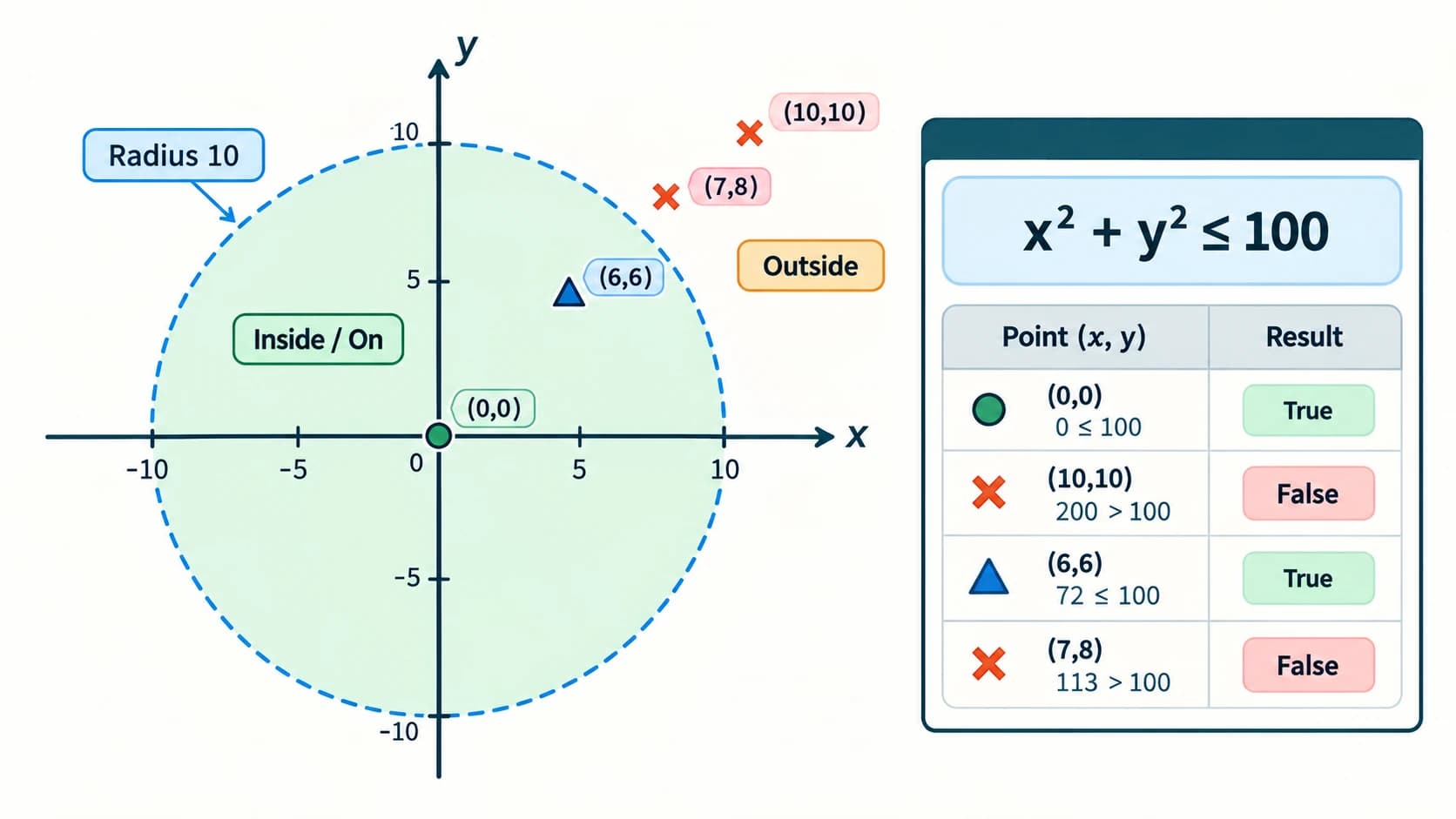
The dartboard has centre (0, 0) and radius 10 units. Points on or inside the circumference satisfy:
In Python:
x * x + y * y <= 100| Part | Point (x, y) | x² + y² | Within/on board? |
|---|---|---|---|
| (a) | (0, 0) | 0 | True |
| (b) | (10, 10) | 200 | False |
| (c) | (6, 6) | 72 | True |
| (d) | (7, 8) | 113 | False |
Worked example: (6,6) gives 36 + 36 = 72, and 72 ≤ 100. A boundary point (10,0) returns True; if the exercise defined “within” as strictly inside, the operator would be < rather than <=. Here we treat a dart on the board's edge as a hit.
for x, y in [(0, 0), (10, 10), (6, 6), (7, 8)]:
    print((x, y), x*x + y*y <= 100)
Output:
(0, 0) True
(10, 10) False
(6, 6) True
(7, 8) False
The loop here is only a compact demonstration of the four checks; a full lesson on for loops comes later in the curriculum.
Question 10 — Celsius to Fahrenheit and water's two reference temperatures
The relationship is F = C × 9/5 + 32. A temperature change of 1°C corresponds to a change of 1.8°F; a Fahrenheit reading additionally includes the 32-degree offset.
celsius = float(input("Temperature in °C: "))
fahrenheit = celsius * 9 / 5 + 32
print(f"Temperature in °F: {fahrenheit:.2f}")
Sample runs (given textbook reference temperatures):
Temperature in °C: 100
Temperature in °F: 212.00

Temperature in °C: 0
Temperature in °F: 32.00
Answer: Water's usual boiling point at standard atmospheric pressure is 212°F; its freezing point is 32°F. These reference temperatures depend on pressure and conditions; the exercise assumes the standard textbook values.
Question 11 — Total repayment under simple interest
Let principal P, annual interest rate R percent, and time T years. Then interest = P * R * T / 100 and amount = P + interest.
principal = float(input("Principal (₹): "))
rate = float(input("Annual interest rate (%): "))
years = float(input("Time (years): "))

interest = principal * rate * years / 100
amount_payable = principal + interest
print(f"Simple interest: ₹{interest:.2f}")
print(f"Amount payable: ₹{amount_payable:.2f}")
For inputs 5000, 6, 2:
Simple interest: ₹600.00
Amount payable: ₹5600.00
Worked reasoning: 5000 × 6 × 2 / 100 = 600; 5000 + 600 = 5600. Assume non-negative principal/rate/time and no fees or compounding. This example explains textbook arithmetic, not bank-product terms.
Question 12 — Time taken by three people together
If A alone takes x days, B takes y days and C takes z days, their work rates are 1/x, 1/y and 1/z jobs per day. Combined rate is (xy + yz + xz)/(xyz), so the time to finish one job is xyz/(xy + yz + xz) days.
x = float(input("A alone (days): "))
y = float(input("B alone (days): "))
z = float(input("C alone (days): "))

if x <= 0 or y <= 0 or z <= 0:
    print("Days must all be positive.")
else:
    together = (x * y * z) / (x * y + y * z + x * z)
    print(f"Together: {together:.2f} days")
Sample test: x = 6, y = 8, z = 12. Numerator 6×8×12 = 576; denominator 48+96+72 = 216; time = 576/216 = 2.666… days.
Together: 2.67 daysThis assumes independent, constant work rates and no interference between workers. Do not add the days themselves; add the rates, then take the reciprocal.
Question 13 — Two integers: arithmetic operators
The exercise asks to input two integers and perform all basic arithmetic operations. This solution demonstrates the arithmetic family; it treats division by zero explicitly.
first = int(input("First integer: "))
second = int(input("Second integer: "))

print("Addition:", first + second)
print("Subtraction:", first - second)
print("Multiplication:", first * second)
print("Power:", first ** second)

if second == 0:
    print("Division, floor division and remainder are undefined (divisor 0).")
else:
    print("Division:", first / second)
    print("Floor division:", first // second)
    print("Remainder:", first % second)
Sample input: 12 and 5.
Addition: 17
Subtraction: 7
Multiplication: 60
Power: 248832
Division: 2.4
Floor division: 2
Remainder: 2
Notice: for negative numbers, floor division is not identical to truncation toward zero. For very large exponents, calculating powers can consume substantial resources. This is a learning exercise, not an unrestricted production calculator.
Question 14 — Swap two values using a temporary variable
first = int(input("First value: "))
second = int(input("Second value: "))

temporary = first
first = second
second = temporary

print("After swap:", first, second)
Example: If first = 12, second = 30, then temporary holds 12, first becomes 30, and second becomes 12. Output: After swap: 30 12.
Why the temporary value matters: If we first wrote first = second and then second = first, the original first value would be lost.
Question 15 — Swap without a third variable
Python supports simultaneous assignment directly:
first = int(input("First value: "))
second = int(input("Second value: "))
first, second = second, first
print("After swap:", first, second)
For the sample 12, 30, the output is After swap: 30 12. This is preferred over adding/subtracting integers to swap: arithmetic swapping is harder to read and can create unwanted limitations in other programming languages. Right-hand values are evaluated before assignment to either target.
Question 16 — Repeat “GOOD MORNING” n times
For this introductory chapter, string repetition avoids requiring prior knowledge of loops. Each occurrence is placed on a separate line:
n = int(input("How many greetings? "))
if n < 0:
    print("Enter a non-negative count.")
else:
    print("GOOD MORNING\n" * n, end="")
Sample input 3 prints:
GOOD MORNING
GOOD MORNING
GOOD MORNING
How it works: Multiplying a string by non-negative integer n repeats that string n times. The newline \n becomes a line break. The end="" argument prevents adding an extra newline to the string that already contains its own newlines. The use of if is a preview of the next chapter's flow control.
Question 17 — Average of three numbers
first = float(input("First number: "))
second = float(input("Second number: "))
third = float(input("Third number: "))
average = (first + second + third) / 3
print(f"Average: {average:.2f}")
For 12, 15, 18 the average is (12 + 15 + 18)/3 = 15:
Average: 15.00Exam trap: first + second + third / 3 divides only the third number by three before adding the other two. Parenthesise the complete sum.
Question 18 — Volumes of spheres of radii 7, 12 and 16 cm
The formula is V = (4/3) × π × r³. Python's math.pi offers a suitable approximation to π.
import math

for radius in (7, 12, 16):
    volume = (4 / 3) * math.pi * radius ** 3
    print(f"Radius {radius} cm: {volume:.2f} cm³")
Output (rounded to 2 decimal places):
Radius 7 cm: 1436.76 cm³
Radius 12 cm: 7238.23 cm³
Radius 16 cm: 17157.28 cm³
Worked check, r = 7: 4/3 × π × 343 ≈ 1436.755, displayed as 1436.76. The exponent ** 3 cubes the radius; ^ is not the exponent operator in Python. The short loop processes the three fixed radii; repetition is formally covered in a later lesson.
Question 19 — Determine the year a person turns 100
This problem requires a reference current calendar year. To keep the exercise correct whenever the material is read, the program asks for that year rather than hard-coding a publication or today's year. It computes a calendar-year estimate from age; a person's exact 100th birthday also depends on their date of birth and whether their birthday has already occurred in the reference year.
name = input("Your name: ")
age = int(input("Your age in completed years: "))
current_year = int(input("Current calendar year: "))

if age < 0 or age > 150:
    print("Enter a plausible non-negative age.")
else:
    year_at_100 = current_year + (100 - age)
    print(f"{name}, you will turn 100 in approximately {year_at_100}.")
Illustrative inputs: Name = Asha, age = 17, reference year = 2026. The simplified method gives 2026 + (100 - 17) = 2109.
Asha, you will turn 100 in approximately 2109.Accuracy qualification: If the student is 17 before their 18th birthday in 2026, they may have been born in 2008 and turn 100 in 2108 rather than 2109. For an exact answer, request the date of birth and compute birth_year + 100; be careful with leap-day birthdays and local legal conventions. This correction is important: age and current year alone do not always uniquely determine the year of the 100th birthday.
Question 20 — Energy from mass via E = mc²
Use mass m in kilograms and speed of light approximation c = 3 × 10⁸ m/s. E = m × c² is measured in joules.
mass = float(input("Mass (kg): "))
if mass < 0:
    print("Mass must not be negative.")
else:
    speed_of_light = 3.0e8
    energy = mass * speed_of_light ** 2
    print(f"Energy: {energy:.3e} joules")
Sample: m = 2 kg gives 2 × (3 × 10⁸)² = 2 × 9 × 10¹⁶ = 1.8 × 10¹⁷ J.
Energy: 1.800e+17 joulesThis is mass–energy equivalence, not a claim that all everyday objects spontaneously release that energy. The scientific constant is approximated as instructed by the textbook.
Question 21 — Ladder height from length and inclination (parts a–d)
With ladder length L and angle θ from the horizontal ground, the vertical wall height is h = L × sin(θ). The math.sin() function accepts radians, while NCERT supplies degrees; always convert with math.radians().
import math

examples = [(16, 75), (20, 0), (24, 45), (24, 80)]
for length, angle_degrees in examples:
    height = length * math.sin(math.radians(angle_degrees))
    print(f"{length} ft at {angle_degrees}° -> {height:.2f} ft")
Output:
16 ft at 75° -> 15.45 ft
20 ft at 0° -> 0.00 ft
24 ft at 45° -> 16.97 ft
24 ft at 80° -> 23.64 ft| Part | Length | Angle | Calculation | Height |
|---|---|---|---|---|
| (a) | 16 ft | 75° | 16 × sin(75°) | 15.45 ft |
| (b) | 20 ft | 0° | 20 × 0 | 0 ft |
| (c) | 24 ft | 45° | 24 × √2/2 | 16.97 ft |
| (d) | 24 ft | 80° | 24 × sin(80°) | 23.64 ft |
Boundary check: The height can never be greater than the ladder length for a right-triangle model. A program that applies sin(75) directly interprets 75 as radians and produces a wrong answer without raising an exception: that is a logical error. The 0° case gives a zero-height idealised ladder, not a practical safely leaning ladder.
NCERT Case Study — Student Management Information System (SMIS)
Source: NCERT Chapter 5, after Exercise Q21 (printed p. 119). The task is to identify relevant fields from a school identity card, accept details of students and display them in a readable format. Schools differ in what information appears on their cards, so there is no unique universal record layout. This companion demonstrates safe fictional example data and an introductory program rather than asking readers to publish classmates' personal details.
Step 1. Choose fields and define a record
Possible non-sensitive classroom-demo fields include an internal roll number, display name, class, section and house. Real systems may also store photographs, guardian contacts, date of birth, emergency details and addresses, but those must be collected only when necessary and protected appropriately. Never print actual students' private information in a public demonstration or repository.
| Field | Suggested Python type | Example, fictitious |
|---|---|---|
| Roll number | str | 11CS014 |
| Display name | str | Asha Verma |
| Class | int | 11 |
| Section | str | A |
| House | str | Green |
Step 2. A small working single-student version
# Student Management Information System: introductory display module.
# All input is supplied by the user; do not use real private student data
# in a public demonstration.
roll_number = input("Roll number: ").strip()
student_name = input("Student name: ").strip()
class_number = int(input("Class: "))
section = input("Section: ").strip()
house = input("House: ").strip()

print("\nSTUDENT INFORMATION")
print("Roll number:", roll_number)
print("Name:", student_name)
print("Class / Section:", class_number, section)
print("House:", house)
Sample input uses the fictional record above. The displayed section is:
STUDENT INFORMATION
Roll number: 11CS014
Name: Asha Verma
Class / Section: 11 A
House: Green
The strip() calls remove leading/trailing whitespace; they are a practical refinement. The exercise's core aim is to collect, name and display fields clearly.
Step 3. Extension: collect more than one student
The textbook asks about all students in a school. An introductory in-memory demonstration can accept a chosen number of records using a simple loop and a list of dictionaries. Loops, lists and dictionaries will be formally taught later, so the code is presented as an optional integrative example, not an expectation before those lessons.
# Demonstration only: do not enter real private records into public tools.
student_count = int(input("Number of fictional student records: "))
records = []
for index in range(student_count):
    print(f"Student {index + 1}")
    roll = input("Roll: ").strip()
    name = input("Name: ").strip()
    section = input("Section: ").strip()
    records.append({"roll": roll, "name": name, "section": section})

print("\nCLASS REGISTER")
for record in records:
    print(f"{record['roll']} | {record['name']} | {record['section']}")
This example does not save records permanently. A real school-management product needs authentication, appropriate access controls, record validation, secure storage, deletion/retention rules and institutional permissions. Those are beyond this chapter. For a very large school, storing every record by keyboard re-entry is inefficient; a database-backed application would be more suitable.
Step 4. Documentation tips and peer-review response
The textbook's accompanying documentation checklist asks students to assess whether program objectives are clear, functions (when present) are explained, comments help readability, variable/function names are meaningful, indentation is consistent and the filename matches the purpose.
Example model review of the short program above:
| Review point | Assessment | Improvement |
|---|---|---|
| Objective described? | Yes, introductory display module | Mention that records are entered interactively |
| Function objectives documented? | Not applicable: no defined functions | If functions are added, provide short docstrings |
| Comments purposeful? | Yes, limited to purpose and data caution | Avoid comments repeating obvious print lines |
| Names meaningful? | Yes: student_name, class_number, roll_number | Keep same convention throughout |
| Indentation consistent? | Yes | When adding loops/conditions, use four spaces |
| Filename meaningful? | Not specified in code | Save as student_information_display.py |
| Sensitive data handled carefully? | Uses fictional examples | Follow school policy; never publish actual records |
Peer-feedback template: “The program displays fictional student details clearly. Its names are descriptive and comments focus on the objective. To improve it, validate that the class is positive, check for blank roll numbers, avoid duplicate roll numbers in the extended version, and document whether the data is stored.” Review a peer's actual program rather than treating this sample as a report about an unseen program.
Original Practice Set — 30 Questions with Answers and Explanations
These questions are original, not claimed as previous-year CBSE questions or as additional NCERT questions. Try solving them without running Python first; then verify your prediction. MCQs have one best answer. The practical questions ask you to justify the answer, not merely name it.
Part A — Concept MCQs (Questions P01–P10)
P01. Which action normally displays the result of a calculation in a Python script?
A. Writing a bare arithmetic expression only · B. Calling print() · C. Naming the file .txt · D. Writing >>> in the source file.
Answer: B. print() displays the value. The >>> prompt belongs to an interactive session; an unused expression in a normal script is not automatically printed.
P02. Which identifier is valid?
A. 1score · B. total-score · C. total_score · D. for.
Answer: C. Underscore is allowed, whereas leading digits, hyphens and reserved keywords are not.
P03. Which Python type should store the identifier "00718" when leading zeros matter?
A. float · B. str · C. bool · D. complex.
Answer: B. Identifiers often look numeric but are not quantities; a string preserves their formatting.
P04. What is 8 // 3?
A. 2.666... · B. 3 · C. 2 · D. 0.
Answer: C. Floor division returns the floor of the quotient: floor(8/3) = 2.
P05. Which expression checks equality of values?
A. x = y · B. x == y · C. x is type(y) · D. x = = y.
Answer: B. == compares values; = assigns. Identity is is not a substitute for equality.
P06. What does input() return before explicit conversion?
A. Always int · B. Always float · C. A string · D. A Boolean.
Answer: C. The keyboard text must be converted when a numeric value is intended.
P07. What happens when int('2.5') runs?
A. Returns 2 · B. Returns 3 · C. Returns 2.5 · D. Raises ValueError.
Answer: D. int() does not accept a decimal-point string directly as an integer literal.
P08. Which collection below can be modified by assigning to an existing index?
A. Tuple · B. String · C. List · D. Integer.
Answer: C. Lists are mutable; strings and tuples do not support item assignment.
P09. Which error type most precisely describes using an undefined name?
A. ZeroDivisionError · B. NameError · C. SyntaxError · D. TypeError.
Answer: B. Python cannot resolve the name at runtime. Some function-local variants produce UnboundLocalError, a subclass of NameError.
P10. What is the usual source of a logical error?
A. Missing required colon making a statement unparseable · B. Division by zero · C. Wrong formula that runs successfully · D. A .py filename.
Answer: C. Logical errors require testing expected meaning; the interpreter may execute the incorrect algorithm perfectly.
Part B — Trace, diagnose and explain (Questions P11–P20)
P11. Predict the output.
x = 5
y = x
x = 9
print(x, y)
Answer: 9 5. y refers to the old integer value; rebinding x does not change y.
P12. Predict the output.
print("CS" * 3)Answer: CSCSCS. Multiplication of a string by an integer repeats its text.
P13. Predict the output.
print(18 // 5, 18 % 5)Answer: 3 3. 18 = 5×3 + 3.
P14. What does this print, and why?
text = "04"
print(text + "2")
Answer: 042. Both operands are strings, so + concatenates; leading zero is preserved.
P15. Diagnose the following.
height = int("160.5")Answer: ValueError at runtime. Use float("160.5") when fractional centimetres are acceptable, or specify an intended rounding rule before converting to whole centimetres.
P16. What is the output?
print(1 + 2 * 3 ** 2)Answer: 19: exponentiation 3²=9, multiplication 2×9=18, addition 1+18=19.
P17. Spot the hidden problem.
average = 60 + 80 / 2
print(average)
Answer: It prints 100.0, which is wrong if the intended calculation is the average of 60 and 80. Correct: (60 + 80) / 2, which prints 70.0. This is a logical error, not a syntax error.
P18. What will happen?
marks = [70, 80]
other = marks
other.append(90)
print(marks)
Answer: [70, 80, 90]. Both names refer to one mutable list; .append() changes the shared object.
P19. Evaluate.
print(2 < 3 < 4, 2 < 3 > 4)Answer: True False. The first chain checks 2 < 3 and 3 < 4; the second checks 2 < 3 and 3 > 4.
P20. Distinguish output from variable state.
count = 8
count += 2
Answer: The new value of count is 10; nothing is printed by the script. Add print(count) to display 10.
Part C — Original programming and application questions (Questions P21–P30)
P21. Convert 2.5 kilometres into metres. Write and explain the formula.
kilometres = 2.5
metres = kilometres * 1000
print(metres)  # 2500.0
Answer explanation: 1 kilometre = 1000 metres, so multiply by 1000. Distinguish units in variable names or comments.
P22. Find the total and average of marks 81, 74 and 95.
marks1, marks2, marks3 = 81, 74, 95
total = marks1 + marks2 + marks3
average = total / 3
print(total, round(average, 2))
Answer: 250 83.33. The sum is 250; dividing by 3 gives 83.333..., displayed to two decimals.
P23. Given price ₹240 and quantity 3, compute a bill with 5% discount.
subtotal = 240 * 3
discount = subtotal * 5 / 100
payable = subtotal - discount
print(f"Payable: ₹{payable:.2f}")
Answer: Payable: ₹684.00. Subtotal ₹720, discount ₹36, net ₹684. No tax is assumed.
P24. Determine whether a number lies in the inclusive range 1–100. Test 1, 100 and 101.
number = 100
print(1 <= number <= 100)  # True
Answer: For 1 → True; 100 → True; 101 → False. Chained comparisons naturally express inclusive boundaries. This is a Boolean calculation; no conditional statement is needed.
P25. Concatenate three pieces of a full name without losing spaces.
first, middle, last = "Ravi", "Kumar", "Sharma"
print(first + " " + middle + " " + last)
Answer: Ravi Kumar Sharma. A name component can contain additional spaces or be blank in real systems, so more robust projects need explicit requirements; this meets the stated simple example.
P26. Find the area of a circular sheet of radius 4 cm.
import math
radius = 4
area = math.pi * radius ** 2
print(f"{area:.2f} cm²")
Answer: 50.27 cm² because π×4² ≈ 50.2655. Exponentiation uses **.
P27. Debug a program that joins two typed ages instead of adding them.
Incorrect snippet:
a = input("First age: ")
b = input("Second age: ")
print(a + b)
Corrected solution:
a = int(input("First age: "))
b = int(input("Second age: "))
print(a + b)
Answer explanation: Without conversion, inputs 15 and 16 produce 1516; with conversion the sum is 31. Both versions are syntactically valid, but the first has a type-related logical mistake for the requested purpose.
P28. Store two equally valued but distinct lists, and explain identity.
a = [1, 2]
b = [1, 2]
print(a == b, a is b)
Answer: True False. == compares contents, while is checks object identity.
P29. A taxi charges a fixed base of ₹50 and ₹12 per kilometre. Find the price for 7.5 km.
base = 50
rate = 12
km = 7.5
fare = base + rate * km
print(f"₹{fare:.2f}")
Answer: ₹140.00. Distance charge ₹90 plus fixed base ₹50. No waiting charge or tax is assumed.
P30. A rectangle has length 8 cm and breadth 5 cm. Find its area and perimeter.
length = 8
breadth = 5
area = length * breadth
perimeter = 2 * (length + breadth)
print(area, perimeter)
Answer: 40 26. The area is 40 cm² and perimeter is 26 cm; do not attach the same unit to both quantities.
Quick Revision and Examination Checklist
Concepts in one view
| Topic | Essential reminder | Typical mistake |
|---|---|---|
| Interactive vs script | REPL evaluates typed expressions; scripts save reusable code | Including >>> in source files |
| Identifiers | Names are case-sensitive; keywords cannot be names | Spaces, -, $, leading digits |
| Assignment | Right side evaluated first; name then bound | Treating = as mathematical equality |
| Object identity | is tests same object; == tests equal values | Comparing numbers with is |
| Basic data types | Choose types by meaning, not appearance | Treating mobile number as quantity |
| Mutable list | Shared references see in-place changes | Assuming b = a copies a list |
| Division | / true division; // floor; % remainder | Confusing floor with truncation for negatives |
| Exponent | **, not ^ | Writing r ^ 3 to cube a radius |
input() | Returns str | Adding numeric-looking strings |
| Conversion | int('3.14') raises ValueError | Assuming it returns 3 |
| Precedence | Use parentheses for intended grouping | Writing a + b / 2 for an average |
| Error classes | Syntax: cannot parse; runtime: fails executing; logic: wrong result | Thinking every wrong result raises an error |
| Radians | math.sin() takes radians | Passing an angle in degrees directly |
Before submitting a Python solution, ask yourself
- Did I identify the input values, their units and their expected types?
- Do variable names communicate their meaning?
- Have I used parentheses to make the intended arithmetic explicit?
- Is a user-entered number converted from its initial string representation?
- Do my sample results agree with a hand calculation?
- Are boundary and invalid inputs handled or at least stated as assumptions?
- Did I distinguish a runtime exception from an ordinary printed output?
- Did I preserve the exact NCERT question number in my answer?
- Did I explain a printed-textbook ambiguity instead of silently inventing a value?
- If I used a later-topic feature (a loop, conditional, list, dictionary), did I label it as a preview rather than pretend it was already taught in full?
References for deeper study
- NCERT, Computer Science, Class XI, Chapter 5 “Getting Started with Python”, reprint 2026–27;
kecs105.pdf, printed pages 87–120. Official textbook portal: https://ncert.nic.in/textbook.php?kecs1=0-11 - CBSE, Computer Science (083), Class XI, 2026–27 syllabus, Unit 2: https://cbseacademic.nic.in/web_material/CurriculumMain27/SecPart2/Computer_Science_SecP2_2026-27.pdf
- Python documentation, tutorial/interpreter (interactive vs script execution): https://docs.python.org/3/tutorial/interpreter.html
- Python language reference, lexical analysis (identifiers, reserved words): https://docs.python.org/3/reference/lexical_analysis.html
- Python standard-library
mathmodule (sine and degree/radian conversion): https://docs.python.org/3/library/math.html
Completion status: All 21 numbered NCERT exercises, including subparts (Question 7's a–n and Question 21's a–d), have an answer or, where the printed task itself is defective, a stated limitation and a corrected demonstration. The SMIS case study and documentation/peer-feedback assignment have separate guided solutions. The 30 additional questions are original and have explanations.