
Introduction to Problem Solving
Study Introduction to Problem Solving in Class 11 Computer Science, with detailed explanations, worked examples, NCERT solutions and practice questions.
By Akhilesh Saini
Class XI Computer Science (083) • Complete NCERT-aligned lessons, step-by-step algorithm design, pseudocode, flowcharts, textbook exercise answers and additional practice.
Imagine that a school wants to organise its library. The computer can store thousands of book records, but before any program is written somebody must decide: What counts as an available book? What happens if two students request the last copy? How is a return date computed? What should be displayed if a book is missing? These decisions form the problem-solving process. Programming is one important stage—not the beginning and not the end.
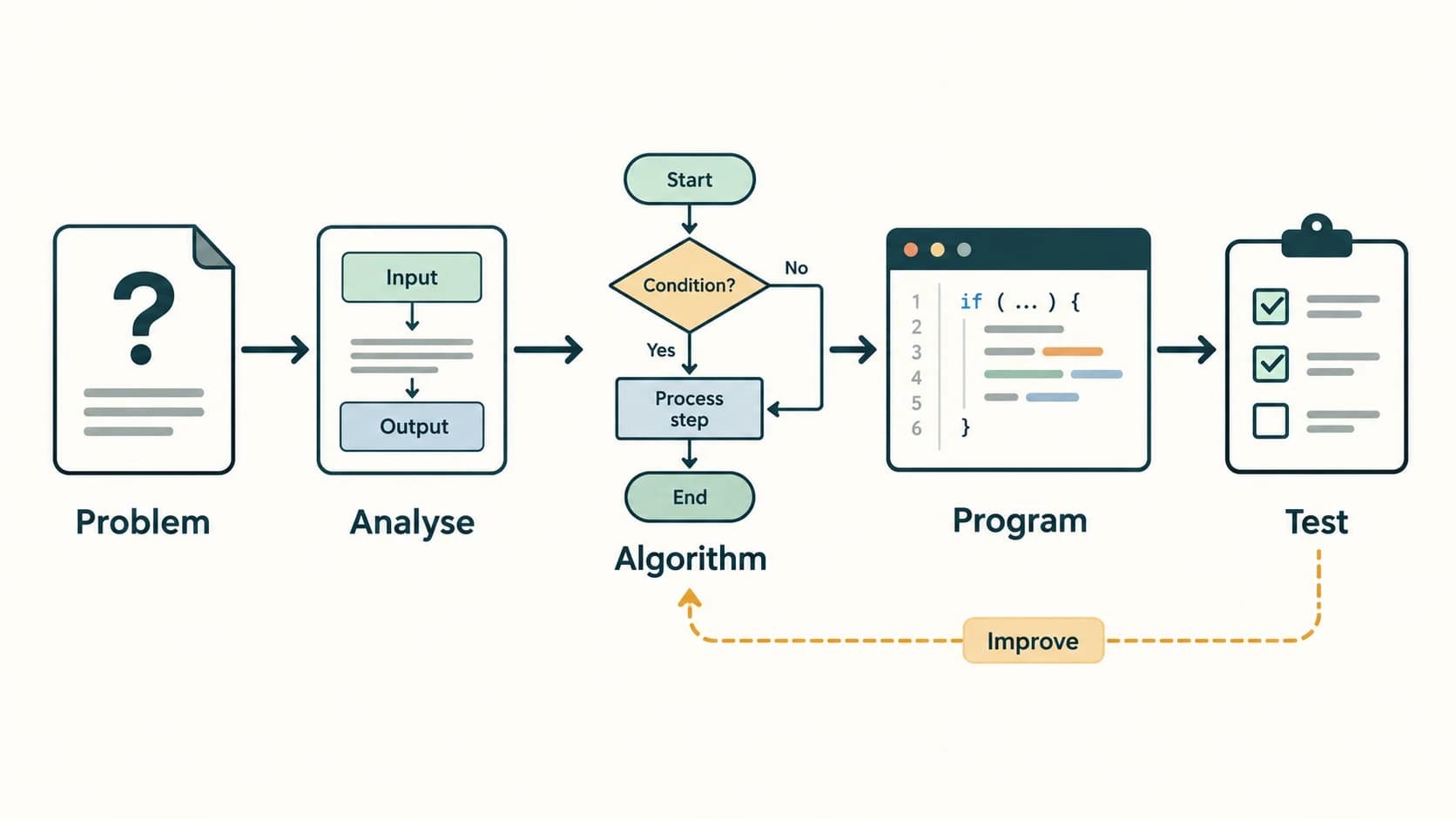
This chapter introduces a method you can reuse for every program: understand → design → represent → test → implement → improve. You will learn how to express a solution independently of any programming language, and why some apparently reasonable algorithms fail at boundary cases.
Primary NCERT source: Computer Science, Class XI, Chapter 4, “Introduction to Problem Solving”, printed pp. 61–86; official Reprint 2026–27; source kecs104.pdf from the supplied textbook ZIP. Textbook coverage includes §§4.1–4.9, all 18 numbered exercise questions, Activities 4.1–4.5, and four “Think and Reflect” prompts. All exercise prompts in this companion are short identifying paraphrases with their original question numbers, not reproduced pages of NCERT. Worked answers, extra tasks, explanations and original diagrams are authored for this resource.
Curriculum alignment: The master curriculum ID C11-PY-01 — Problem Solving, Algorithms, Flowcharts and Pseudocode is used for this entire chapter. The seven C11-CH04-S0x identifiers are internal content sections, not newly invented curriculum lessons. The official CBSE 2026–27 Class XI syllabus places problem solving, algorithm design, flowcharts and pseudocode under Unit 2: Computational Thinking and Programming I. Examples using Python are optional bridges to later curriculum lessons, not substitutions for algorithm study.
What you will be able to do
After studying this chapter, you should be able to: state a computing problem's inputs, outputs, assumptions and constraints; describe the development stages; construct finite, precise algorithms; read and draw standard flowcharts; write readable pseudocode; distinguish sequence, selection and iteration; perform dry runs and find errors; compare simple algorithms by time and memory; decompose large systems; and solve every NCERT Chapter 4 question with sound reasoning.
Chapter map
| NCERT coverage | Internal section | What you learn |
|---|---|---|
| 4.1–4.2 | C11-CH04-S01 | Problems, input–processing–output, analysis, stages of solution |
| 4.3 | C11-CH04-S02 | What an algorithm is; correctness and characteristics |
| 4.4 | C11-CH04-S03 | Flowchart shapes and pseudocode conventions |
| 4.5 | C11-CH04-S04 | Sequence, selection and repetition |
| 4.6 | C11-CH04-S05 | Verification, trace tables, edge cases and debugging |
| 4.7–4.8 | C11-CH04-S06 | Algorithm comparison and transformation into code |
| 4.9 | C11-CH04-S07 | Decomposition and integration |
| Printed pp. 83–86 | NCERT exercise companion | Fully explained questions 1–18 |
| Margin activities | Activities | 4.1–4.5, with complete models and examples |
| Margin reflections | Think and Reflect | Four prompts with reasoned answers |
| Original | Self-assessment | 24 fresh questions and detailed answer key |
Lesson C11-PY-01 — Problem Solving, Algorithms, Flowcharts and Pseudocode
Section C11-CH04-S01 — Understanding a Problem Before Writing Code
1. What is a computational problem?
A problem specifies a task or desired outcome. A computer solution has to transform available information into the required output by following well-defined instructions. A computer cannot guess missing conditions reliably. If we ask for a student's “result” without saying whether the result is a total, percentage, grade or pass/fail decision, the instruction is incomplete.
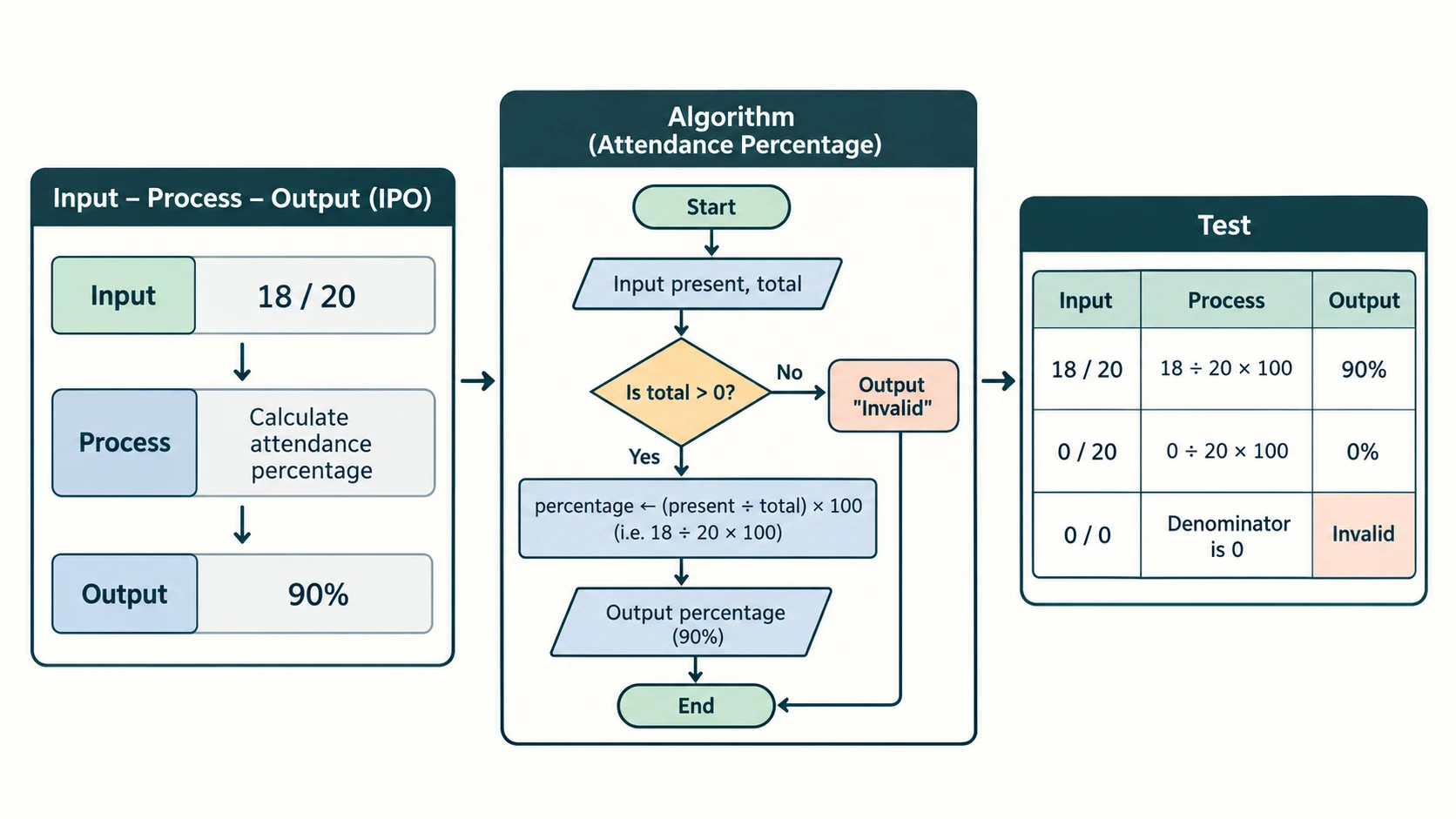
Example — school attendance report. The problem is to display attendance percentage for a student. The input is days attended and total working days. The process is percentage = attended / working_days × 100. The output is attendance percentage. But before programming, decide what to do if working_days = 0 or attended > working_days. Those are part of the problem, not minor implementation details.
| Component | Question to ask | Attendance example |
|---|---|---|
| Input | Which information must the algorithm receive? | attended, working_days |
| Processing | What computation or decision is needed? | Divide and multiply by 100 |
| Output | What observable result is required? | “Attendance: 92%” |
| Constraints | Which inputs are meaningful? | 0 ≤ attended ≤ working_days, positive working_days |
| Failure handling | What if inputs violate a constraint? | Reject or request correction |
Garbage In, Garbage Out (GIGO) means incorrect or unsuitable input can lead to misleading output even if the arithmetic is performed faithfully. GIGO is a warning to validate inputs; it does not mean every error in a system is caused by its input.
2. The main stages of computer-based problem solving
The NCERT presentation moves from analysis through algorithm development, coding, testing/debugging, and maintenance. A good project may revisit stages when requirements change.
- Analyse the problem. Read carefully. Identify the purpose, stakeholders, input, output, conditions, valid ranges and examples. Clarify ambiguous requirements before proceeding.
- Develop an algorithm. Plan a finite sequence of operations that transforms valid input into correct output. This is a language-independent design stage.
- Represent the algorithm. Use numbered steps, pseudocode or a flowchart so classmates and programmers can review its logic.
- Code or implement. Convert the logical plan into a program in a suitable language; follow its syntax and data-type rules.
- Test and debug. Use ordinary cases, boundaries, invalid values and special cases. Compare actual results with independently calculated expected results. Fix causes, then test again.
- Maintain and improve. After delivery, correct defects and adjust the system to changing needs while preserving existing behaviour where required.
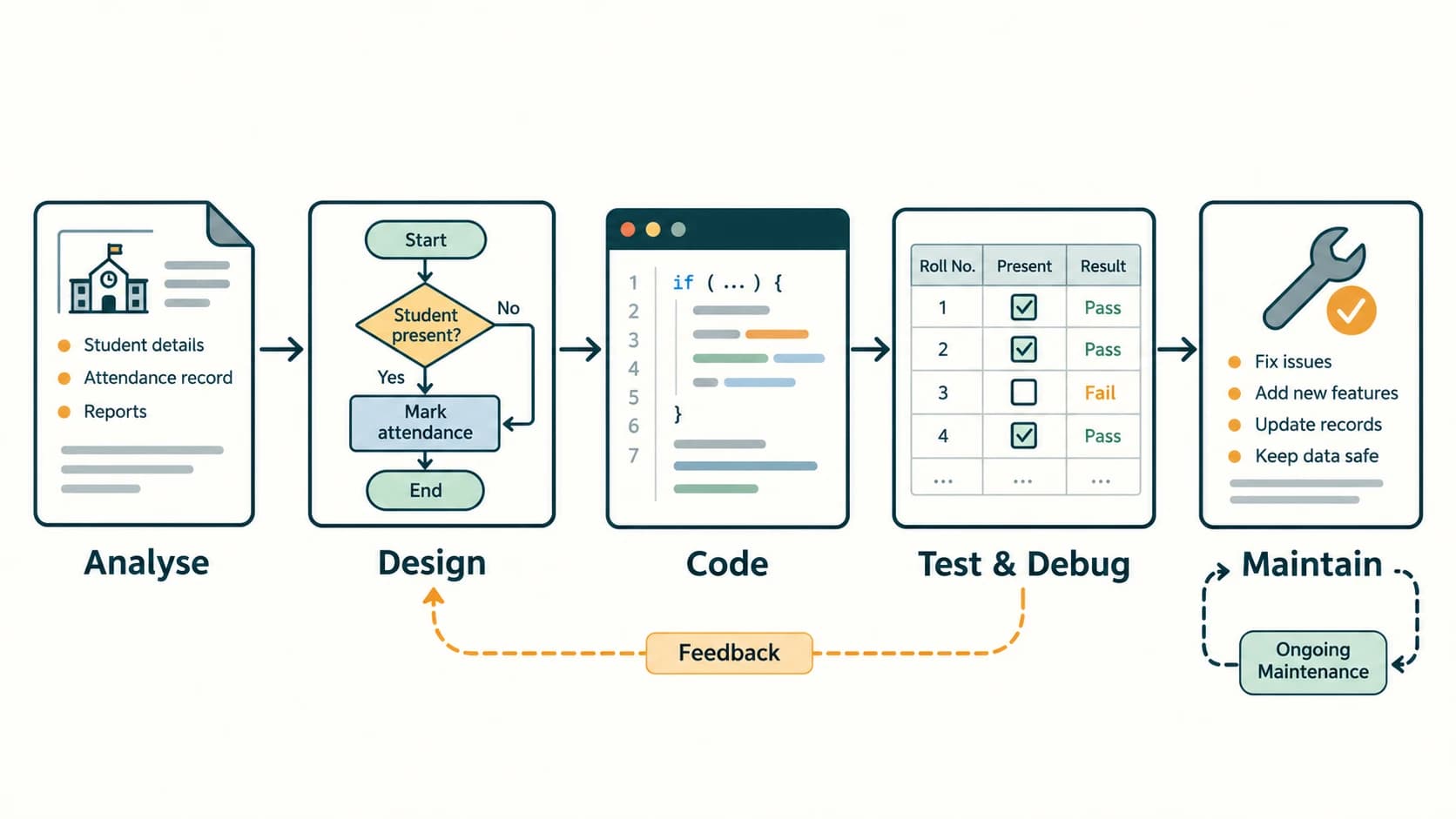
Worked scenario — calculating the discount on a school stationery purchase.
- Requirement: A valid subtotal of at least ₹1,000 receives 10% off; smaller purchases receive no discount. Display the final amount. Negative subtotals are invalid.
- Inputs:
subtotalin rupees. - Decision: If
subtotal < 0, report an error; otherwise ifsubtotal ≥ 1000, deduct0.10 × subtotal. - Expected checks: ₹999 → ₹999; ₹1,000 → ₹900; ₹2,000 → ₹1,800; −₹10 → invalid. A solution that uses
subtotal > 1000instead of≥fails at the boundary.
3. Requirement clarity: questions that prevent mistakes
A problem statement often leaves gaps. For “find the average”, ask: How many numbers? Can the user enter zero? Is zero a data item or an instruction to stop? What if no numbers are entered? For “find the largest”, ask: Are equal values allowed? Could numbers be negative? For “charge GST”, ask: Which rate and whether the base amount already includes tax?
Input validation is necessary in many practical problems, but it cannot replace clear requirements. Good software does both. Avoid presenting an arbitrary assumption as if NCERT or CBSE prescribed it; when an exercise leaves a choice open, state the assumption explicitly.
4. Reading a problem as a specification
Try this template for any new exercise:
Task: … Valid input: … Expected output: … Rules: … Boundary examples: … Unresolved assumptions: …
For example, “calculate the perimeter of a rectangle” might specify that length and breadth are real, non-negative measurements in centimetres, and the result must be in centimetres. Negative lengths are not meaningful even though the expression 2 × (length + breadth) accepts them mathematically.
Quick check: An algorithm that works for one test input has demonstrated one successful case, not universal correctness.
Section C11-CH04-S02 — Designing a Good Algorithm
1. Definition and why algorithms matter
An algorithm is a finite and precise sequence of operations for completing a task or solving a class of problems. It specifies what to do, rather than necessarily saying how the processor stores every variable in memory. A correct algorithm should produce the required result for every input covered by its specification and terminate under the stated conditions.
The textbook motivates algorithms with ordinary tasks and a greatest common divisor (GCD) example. For 45 and 54, the common divisors include 1, 3 and 9; the GCD is 9. One method lists divisors. A more efficient method uses repeated remainders, as explained later.
2. Characteristics of a good algorithm
| NCERT characteristic | Practical meaning | Example of a defect if absent |
|---|---|---|
| Precision / definiteness | Each step has an unambiguous meaning | “Use a suitable number” without defining suitable |
| Uniqueness of prescribed result | Given the current state and input, the next instruction/result is clear | Ambiguous overlap between two decision branches |
| Finiteness | Execution must eventually stop for valid input | Counter never changes in a WHILE loop |
| Input | Receives zero or more values as appropriate to the task | Asking for average without obtaining numbers |
| Output | Produces a meaningful outcome | Computes a total but never returns/displays it |
Additional design goals: correctness (right answer), readability (others can follow it), generality (works across legitimate cases), efficiency (reasonable resources) and robustness (clear handling of bad inputs). These improve the quality of a solution, even though they are not separate items in the five-characteristic textbook list.
3. Worked algorithm: greatest common divisor by remainders
Task: Find the GCD of two positive integers. Input: a, b greater than zero. Output: largest positive common divisor.
INPUT a, b
WHILE b ≠ 0 DO
    remainder ← a MOD b
    a ← b
    b ← remainder
END WHILE
PRINT a
For a = 54, b = 45:
| Iteration | a before | b before | a MOD b | a after | b after |
|---|---|---|---|---|---|
| 1 | 54 | 45 | 9 | 45 | 9 |
| 2 | 45 | 9 | 0 | 9 | 0 |
The loop stops and prints 9. Because replacing (a, b) with (b, a MOD b) preserves the common divisors and decreases the second positive component, the method is both sound and terminating for positive inputs. This is the Euclidean algorithm, an enrichment beyond the textbook's simple divisor-list illustration.
4. Writing algorithms before syntax
Consider squaring an input number:
INPUT num
square ← num × num
PRINT square
For num = −4, the result is 16. No Python variable declarations or print() syntax are needed to understand the mathematical plan. Once the plan is checked, translation into a programming language is much easier.
5. An algorithm is not automatically a complete implementation
The line INPUT age hides details such as whether the user types letters, a negative number or a decimal value. Pseudocode deliberately abstracts some of these matters; the written specification and eventual program must resolve them. Similarly, the statement “repeat until successful” is not precise unless successful is defined and termination is addressed.
Exam trap: “An algorithm has a finite description” does not guarantee the execution of a flawed loop terminates. An algorithm in the intended sense must have a well-defined terminating procedure for its valid input domain.
Section C11-CH04-S03 — Communicating Algorithms with Flowcharts and Pseudocode
1. Flowcharts: visualising control and data movement
A flowchart is a visual diagram of logical steps joined by directional arrows. It is useful for checking the sequence of decisions and the paths by which an algorithm can finish. In hand-drawn flowcharts, use a clear and consistent set of shapes:
| Standard shape | Meaning | Suitable text inside |
|---|---|---|
| Oval / rounded rectangle | Start / End (terminator) | Start, End |
| Rectangle | Process or computation | total ← price × quantity |
| Parallelogram | Input or output | INPUT age, PRINT grade |
| Diamond | A condition / decision | age ≥ 18? |
| Arrow | Flow of control from one step to the next | Usually no text, or Yes / No on decision branches |
The shape is meaningful: a diamond is for testing a condition, not storing the result of a multiplication. Decision branches should be labelled Yes and No (or True and False). Both should lead clearly to their next step. A flowchart can be drawn on paper or prepared with software; the logical correctness matters more than decorative styling.
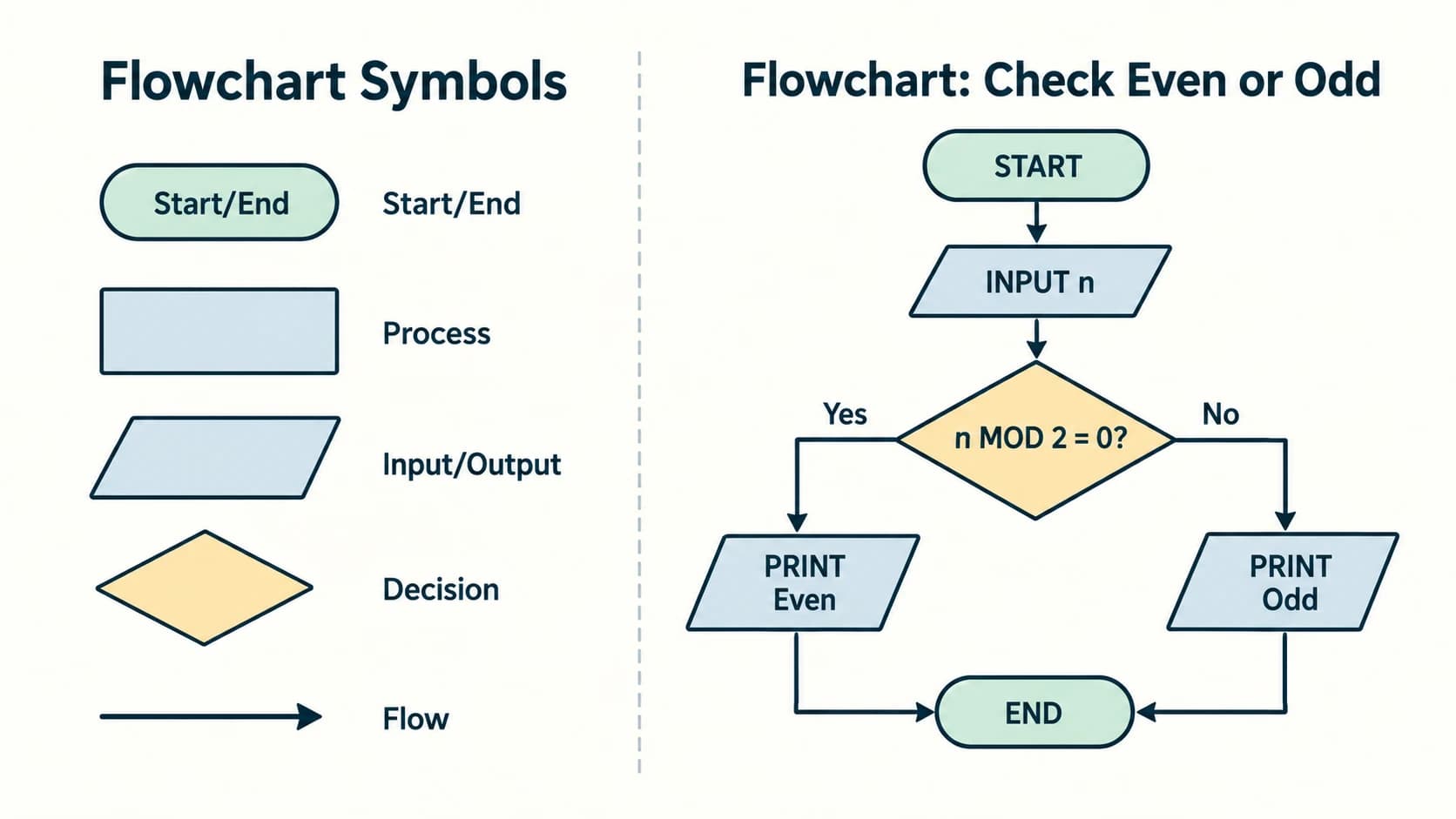
2. Example: square of a number (NCERT Example 4.1)
Specification: input one number, compute its square, print the answer.
START
  ↓
INPUT num
  ↓
square ← num × num
  ↓
PRINT square
  ↓
END
To draw it properly, use an oval at START/END, a parallelogram for input/output and a process rectangle for multiplication. This text schematic is an accessibility aid; the planned instructional illustration supplies a visually correct shape-based flowchart.
3. Example: a light bulb that does not work (NCERT Example 4.2)
A simple diagnostic plan is: Is the switch on? If not, turn it on and test. If still not working, check safe, permitted causes such as a bulb replacement with electrical power disconnected or seek an adult/qualified electrician. Do not turn a classroom algorithm into directions for handling exposed mains wiring. A practical decision tree may have an Unsafe or uncertain? → Stop and request qualified help branch.
4. Pseudocode: a readable algorithmic language
Pseudocode is a human-readable expression of program logic, using informal but consistent operations. It is not executable Python, and no universal standard requires everyone to write exactly the same capitalisation. Common verbs include INPUT, SET, COMPUTE, PRINT, IF, ELSE, WHILE and FOR. In this chapter ← means assign the value on the right to the name on the left, MOD means remainder, and = inside an IF denotes equality.
Example — add two numbers (NCERT Example 4.3):
INPUT first, second
sum ← first + second
PRINT sum
Example — area and perimeter of rectangle (NCERT Example 4.4):
INPUT length, breadth
IF length < 0 OR breadth < 0 THEN
    PRINT "Invalid measurements"
ELSE
    area ← length × breadth
    perimeter ← 2 × (length + breadth)
    PRINT area, perimeter
END IF
If length = 8 cm and breadth = 5 cm, the area is 40 cm² and perimeter is 26 cm. The validation branch is an original enhancement; the textbook example shows the core arithmetic without it.
5. Choosing between pseudocode and a flowchart
| Pseudocode | Flowchart |
|---|---|
| Compact for calculations and long sequences | Immediate visual view of choices and loops |
| Easy to edit in a text file | Helps beginners see how branches reconnect |
| Scales better for lengthy procedures | Can become cluttered for complex solutions |
| No strict grammar | Uses recognisable standard symbols |
| Prepares the logic for programming | Useful for explaining logic to non-programmers |
Good practice: Whenever possible, start with a small input–process–output table. Then choose either representation; you do not have to draw both for every routine problem unless a question specifically asks for both.
Section C11-CH04-S04 — Flow of Control: Sequence, Selection and Repetition
1. Sequence: do each step in order
INPUT base, height
area ← (base × height) / 2
PRINT area
Each instruction follows the previous one. A sequence alone cannot handle different outcomes depending on the input or repeat a task many times.
2. Selection: choose a branch
A conditional asks a yes/no question about the current data. The result determines which path executes.
Odd/even (NCERT Example 4.5):
INPUT n
IF n MOD 2 = 0 THEN
    PRINT "Even"
ELSE
    PRINT "Odd"
END IF
This applies to integers; checking a fractional input with parity is not meaningful in the ordinary school-mathematics sense.
Age categories (NCERT Example 4.6):
INPUT age
IF age < 0 THEN
    PRINT "Invalid age"
ELSE IF age < 13 THEN
    PRINT "Child"
ELSE IF age < 20 THEN
    PRINT "Teenager"
ELSE
    PRINT "Adult"
END IF
The order matters. Once age < 13 has failed, any remaining valid age is at least 13. At age = 13, the teenage branch is chosen; at 20, the adult branch is chosen. The negative-age check is an explicit enhancement to the textbook's simplified example.
Multiple conditionals. AND is true only when both conditions are true; OR is true when at least one is true. Consider NCERT's “Dragons and Wizards” card-game demonstration (Examples 4.7): diamonds/clubs earn Dragons a point; numbered hearts earn Wizards a point; non-number hearts earn Dragons a point; other cards earn Wizards a point. An implementation must agree on how card ranks are represented before checking isNumberCard.
Dpoints ← 0
Wpoints ← 0
REPEAT for each drawn card:
    INPUT suit, rank
    IF suit = "diamond" OR suit = "club" THEN
        Dpoints ← Dpoints + 1
    ELSE IF suit = "heart" AND rank is numeric card THEN
        Wpoints ← Wpoints + 1
    ELSE IF suit = "heart" THEN
        Dpoints ← Dpoints + 1
    ELSE
        Wpoints ← Wpoints + 1
    END IF
END REPEAT
IF Dpoints > Wpoints THEN PRINT "Dragons win"
ELSE IF Wpoints > Dpoints THEN PRINT "Wizards win"
ELSE PRINT "Tie"
END IF
Textbook clarification: Its one-card illustration reinitialises scores and shows an ELSE branch which would call Wizards the winner even if the scores were equal. A proper game algorithm keeps totals for all cards and handles a tie explicitly. This correction is explained here; it is not an additional NCERT exercise.
3. Repetition: do a block again while necessary
A loop repeats instructions while a test remains true, or for a specified number of times. Every finite loop needs a stopping condition that the program actually reaches.
Fixed count (NCERT Example 4.8 — average of five values):
sum ← 0
count ← 0
WHILE count < 5 DO
    INPUT num
    sum ← sum + num
    count ← count + 1
END WHILE
average ← sum / 5
PRINT average
For 4, 6, 8, 10, 12, the total is 40 and the average is 8. count becomes 5, so the loop stops. If you forget count ← count + 1, the condition can remain true forever.
Unknown count and sentinel (NCERT Example 4.9): A sentinel is a special value signalling stop, here 0. Zero is not included in the average.
sum ← 0
count ← 0
INPUT num
WHILE num ≠ 0 DO
    sum ← sum + num
    count ← count + 1
    INPUT num
END WHILE
IF count = 0 THEN
    PRINT "No values supplied"
ELSE
    PRINT sum / count
END IF
The initial read is needed before testing; the read inside the loop ensures the next value can change the condition. The guard against count = 0 is an original safety fix for the immediate-sentinel case, which otherwise causes division by zero.
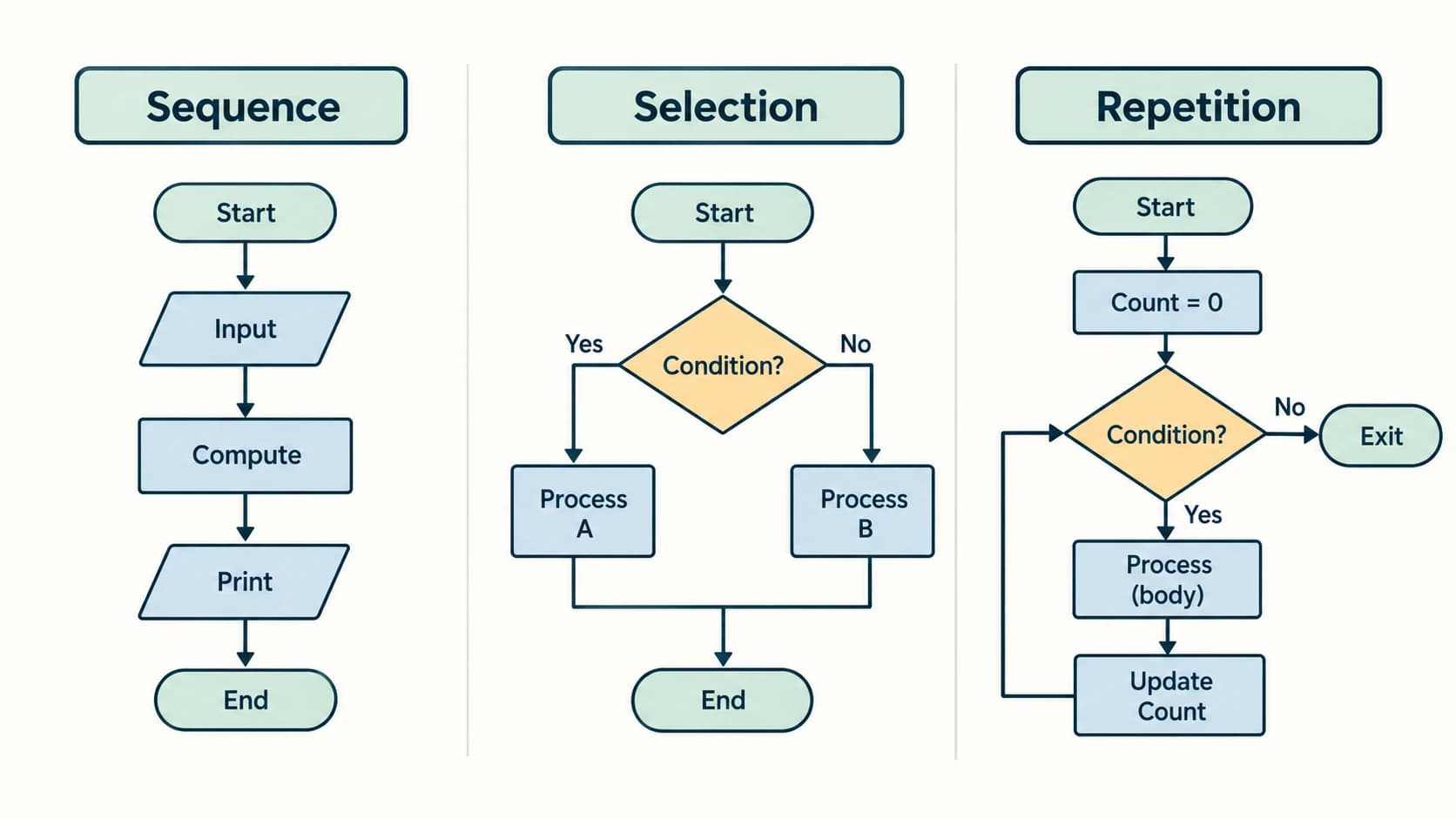
4. Trace a loop, do not merely read it
For input 4, 6, 2, 0:
| Input just read | Is it zero? | Add to sum? | Sum | Count |
|---|---|---|---|---|
| 4 | No | Yes | 4 | 1 |
| 6 | No | Yes | 10 | 2 |
| 2 | No | Yes | 12 | 3 |
| 0 | Yes | No | 12 | 3 |
Final average = 12/3 = 4. The sentinel 0 does not affect the total or number of values.
5. When a loop is correct
Ask three separate questions. Initialisation: Was the starting state set correctly? Progress: Does each iteration move toward stopping? Termination/result: Once the condition becomes false, is the expected output produced? A loop can be finite but still incorrect (for example, printing numbers 1–9 when asked for 1–10).
6. Flowcharts for repeated and conditional work
In a conventional flowchart, loop flow returns from a processing box to a decision diamond. When the stopping condition is reached, the other branch exits toward output/end. Do not draw an unlabelled infinite arrow that hides which condition is tested.
Section C11-CH04-S05 — Verifying Algorithms with Test Cases and Dry Runs
1. What verification tries to establish
Verification asks whether an algorithm follows its specification. A dry run manually follows the steps for carefully chosen inputs; it helps discover faulty branches, missing operations, incorrect boundaries or mismatched variable values. Real projects also use code testing, reviews and other techniques. A few successful dry runs cannot prove a complex algorithm correct for every input.
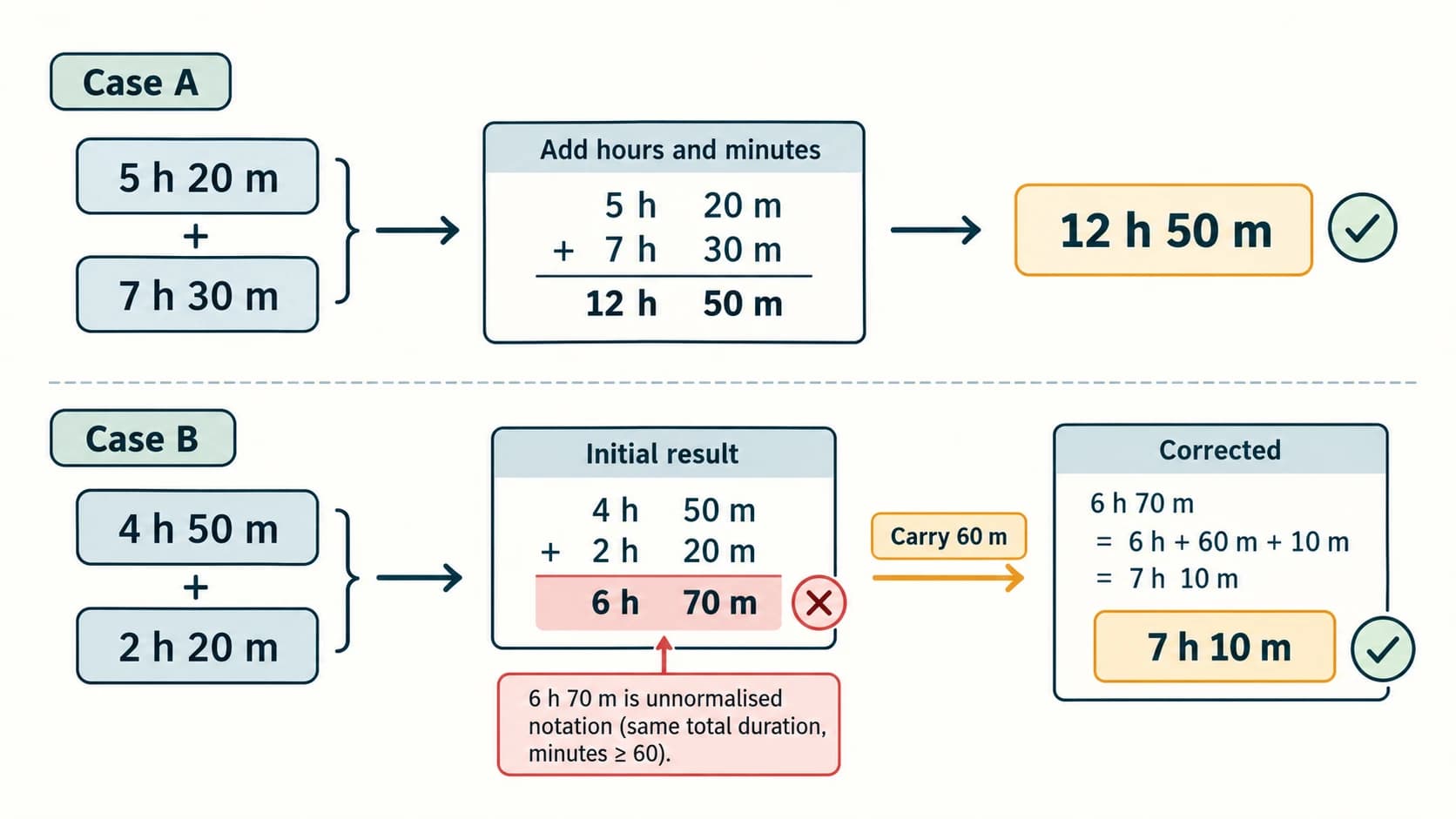
2. Worked dry run: adding durations with minute carry (NCERT §4.6)
The first, flawed design simply adds hours and minutes separately:
hours ← h1 + h2
minutes ← m1 + m2
PRINT hours, minutes
For 5 h 20 m + 7 h 30 m, it prints 12 h 50 m—valid by chance. For 4 h 50 m + 2 h 20 m, it prints 6 h 70 m, which is not normalised. The correct result is 7 h 10 m because 70 minutes equals 1 hour 10 minutes.
INPUT h1, m1, h2, m2
IF h1 < 0 OR h2 < 0 OR m1 < 0 OR m1 ≥ 60 OR m2 < 0 OR m2 ≥ 60 THEN
    PRINT "Invalid duration"
ELSE
    total_minutes ← (h1 × 60 + m1) + (h2 × 60 + m2)
    result_hours ← total_minutes DIV 60
    result_minutes ← total_minutes MOD 60
    PRINT result_hours, "hours", result_minutes, "minutes"
END IF
DIV means integer quotient. This approach accommodates any total duration and preserves conventional minute notation. Unlike the textbook's simple correction (carry one hour if the minute sum is ≥60), this form generalises readily when many durations are added; the textbook's two-input method is also correct when both minute fields are 0–59. The source PDF's corrected pseudocode repeats two assignment lines; that repetition is unnecessary and does not change the result.
3. Design a test table before running the algorithm
| Test type | Example for age-category program | Expected result |
|---|---|---|
| Ordinary | age = 16 | Teenager |
| Lower boundary | age = 0 | Child |
| Exact boundary | age = 13 | Teenager |
| Exact boundary | age = 20 | Adult |
| Invalid | age = -2 | Invalid age |
| Invalid type | age = "sixteen" | Rejected / request number |
Different problems need different edge cases. For factorial, 0! matters. For division, a zero denominator matters. For extracting digits, negative inputs and non-integer values matter. For a sentinel loop, the sentinel being the first input matters.
4. Common error types in an algorithm
- Boundary error: using
< 9instead of≤ 9for single-digit positive numbers. - Non-terminating loop: repeating without changing the loop variable or state.
- Incorrect initial value: starting a product accumulator at 0 instead of 1.
- Wrong branch precedence: two ranges overlap and there is no rule for the shared endpoint.
- Missing guard: dividing by count without checking whether count is zero.
- Unit error: treating 70 minutes as a normal
hours:minutesdisplay. - Unclear scope: assuming all integers are positive or every user enters valid data.
5. Turning a dry run into debugging
When a test fails, record (1) the test input, (2) expected output, (3) actual output, and (4) the first step where results diverge. Modify the algorithm at that point. Then repeat the failing case and previous passing cases. A fix that solves one test while breaking three others is not a reliable solution.
Section C11-CH04-S06 — Comparing Algorithms and Moving to Code
1. Different algorithms can solve the same problem
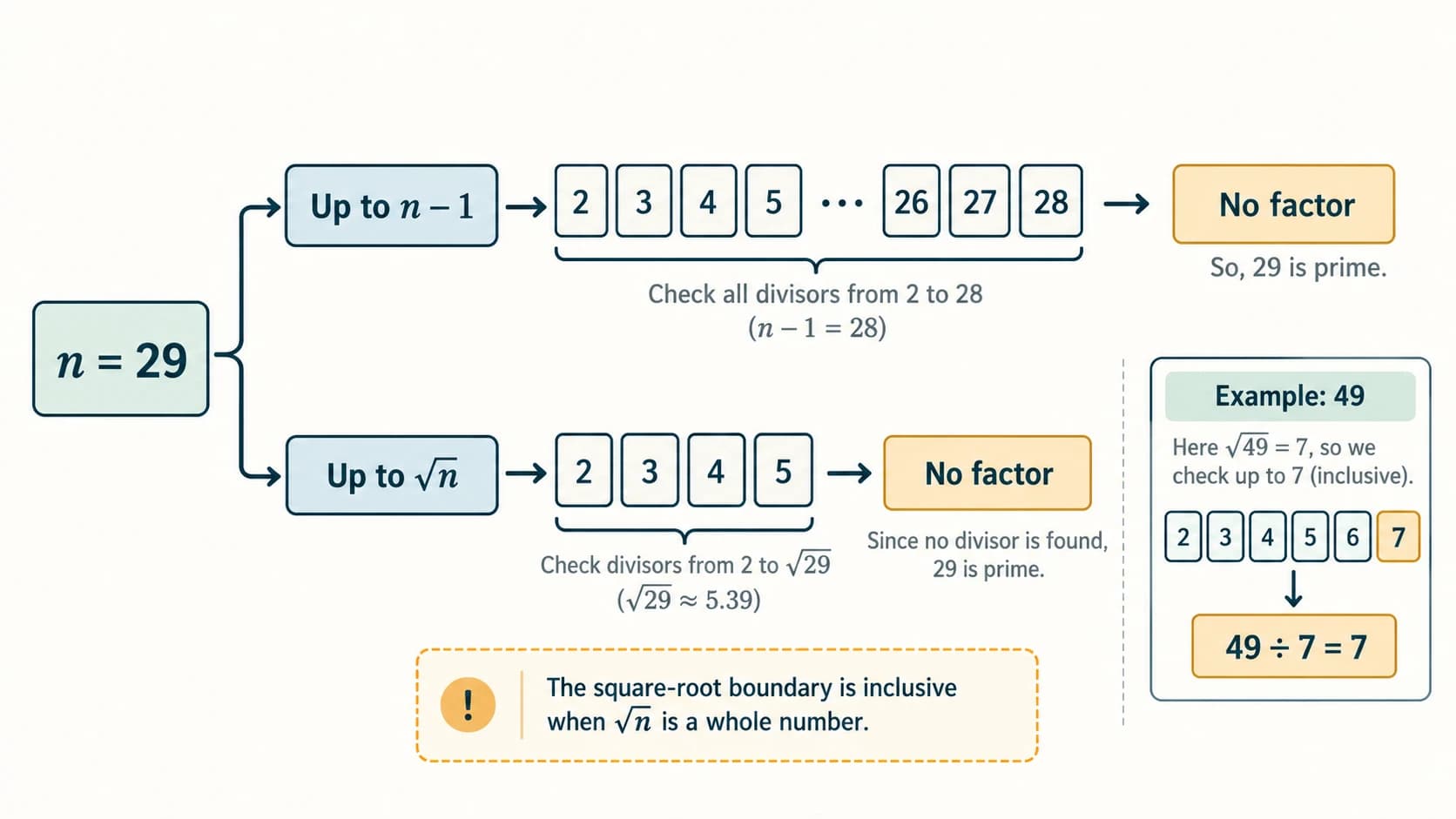
NCERT compares several methods for deciding whether a number is prime: checking possible divisors up to n−1, up to about n/2, up to √n, or against a precomputed list of primes. All require attention to the input domain and to how many checks they make.
An integer n is prime when n > 1 and it has no positive divisor other than 1 and itself. 1 is not prime; neither 0 nor negative integers are prime.
Simple correct algorithm (divisors only up to √n):
INPUT n
IF n ≤ 1 THEN
    PRINT "Not prime"
ELSE
    divisor ← 2
    is_prime ← TRUE
    WHILE divisor × divisor ≤ n AND is_prime = TRUE DO
        IF n MOD divisor = 0 THEN
            is_prime ← FALSE
        ELSE
            divisor ← divisor + 1
        END IF
    END WHILE
    IF is_prime THEN PRINT "Prime"
    ELSE PRINT "Not prime"
    END IF
END IF
Why does √n suffice? If n = a × b with a and b both greater than 1, at least one of them must be ≤ √n; otherwise their product would exceed n. This is not true of checking only “even numbers”; a factor can be odd.
Test: n = 29: possible divisors 2, 3, 4, 5 do not divide it; 6² > 29, so it is prime. n = 49: 7 divides it and 7² = 49, so not prime. The 49 case demonstrates why the comparison must include the square root.
2. Time and space at school level
Time complexity describes how the amount of work grows with input size, while space complexity describes the additional memory used. These are conceptual comparisons, not stopwatch guarantees for every hardware platform.
| Method | Max tested candidate divisors (roughly) | Additional storage (excluding input) | Caveat |
|---|---|---|---|
Test from 2 to n−1 | Proportional to n | Few variables | Unnecessarily many checks |
Test to n/2 | Proportional to n | Few variables | Improvement in constants, not growth class |
Test to √n | Proportional to √n | Few variables | Efficient simple one-number check |
| Precomputed prime list | Depends on list and bound | List requires memory | Only reliable if list covers the needed divisors |
Important NCERT qualification: A stored prime list “up to 100” cannot by itself decide primality of every arbitrarily large integer. For example, a number whose smallest prime factor is larger than 100 would be misclassified if the algorithm checks only that fixed list. In particular, 101 × 103 = 10403 is composite, but neither 101 nor 103 appears on a list ending at 100. Use a list extending to √n or an appropriate alternative.
3. Coding is the implementation phase
An algorithm can be implemented in a high-level language such as Python. The source code must use that language's grammar and data types. Execution translates/interprets the code as required by the runtime and platform. Choose tools according to the task, not just popularity or speed claims.
Python bridge — square of a number:
number = float(input("Enter a number: "))
square = number * number
print("Square:", square)
Python bridge — parity of an integer:
n = int(input("Enter an integer: "))
if n % 2 == 0:
    print("Even")
else:
    print("Odd")
Python bridge — prime using square-root testing:
n = int(input("Enter an integer: "))
if n <= 1:
    print("Not prime")
else:
    d = 2
    while d * d <= n and n % d != 0:
        d += 1
    print("Prime" if d * d > n else "Not prime")
For inputs 2, 9, 29, 49, this prints Prime, Not prime, Prime, Not prime respectively. Python syntax is enrichment at this stage; the next lessons teach its execution, operators and control structures systematically. These short examples assume the user types valid numeric input; input conversion errors are a separate programming topic.
4. Readable algorithms are easier to verify
Choose descriptive names (total_minutes, count, marks) instead of obscure single letters where clarity matters. Align pseudocode inside branches and loops. Make the conditions mutually clear, document non-obvious assumptions and include example outputs. Overcomplicated pseudocode may appear “advanced” while actually hiding missing requirements.
Section C11-CH04-S07 — Decomposition: Solving a Big Task in Small Parts
1. What decomposition means
Decomposition breaks a complex task into smaller, better-defined tasks. Each subproblem can be studied, implemented and tested separately. The pieces are then integrated to create the final system. This is useful not only for a programming team; students can use it to solve a long mathematics problem or organise a school event.
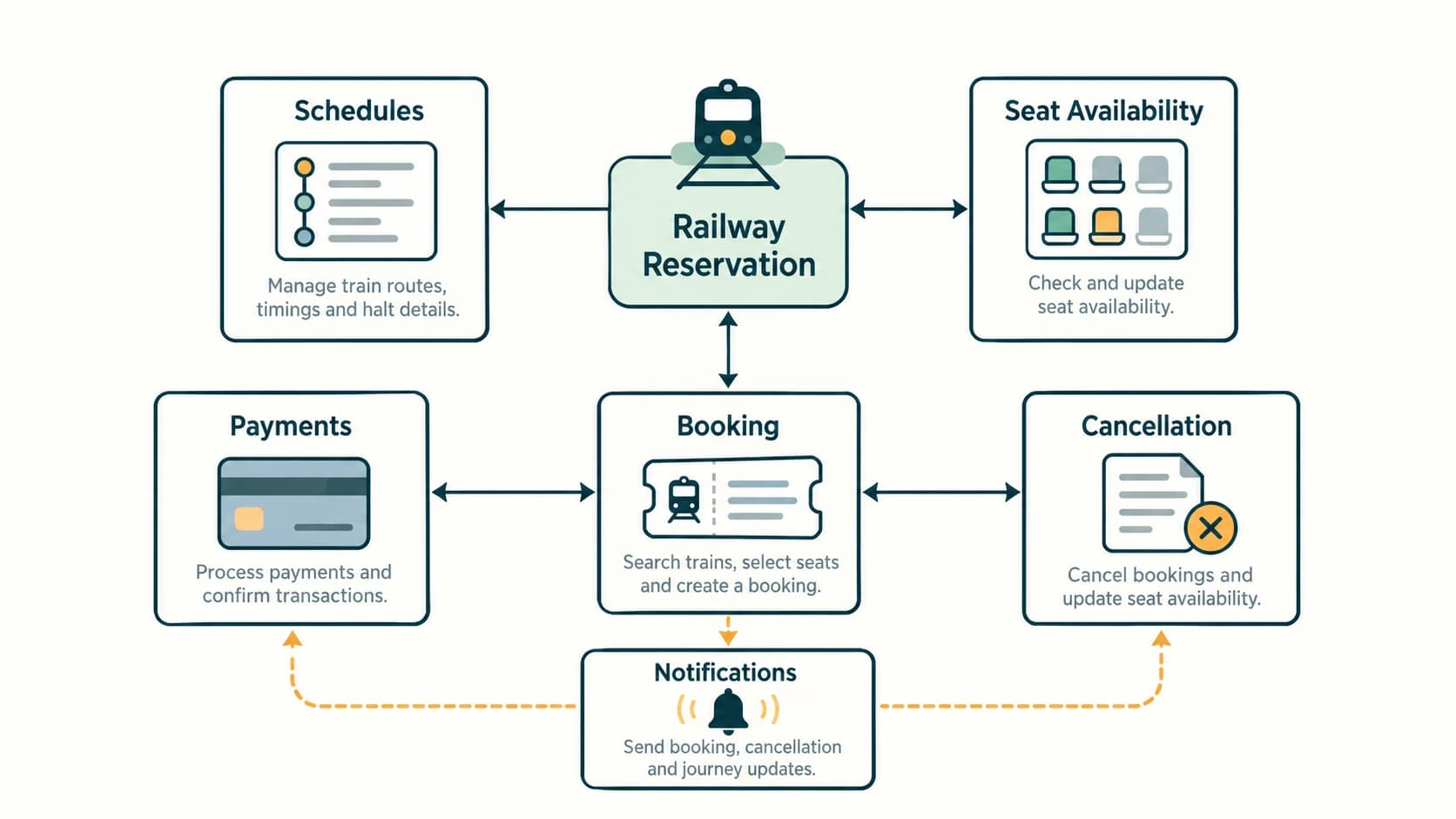
Example — railway ticket booking (NCERT §4.9): One component manages train schedules, another determines seat availability, another checks reservations and cancellations, another handles payment and another sends confirmations. To avoid two customers reserving the same last seat, availability, booking and payment processes must coordinate carefully; independent modules are not enough without integration rules.
2. Example project: school library system
| Subsystem | Inputs | Responsibilities | Expected result |
|---|---|---|---|
| Catalogue | Book ID, title, author | Search, maintain records | Matching book records |
| Membership | Student ID | Check borrow rights | Eligibility result |
| Lending | Student ID, book ID | Issue and record due date | Loan receipt |
| Returns | Loan ID, return date | Mark returned, calculate delay | Updated availability |
| Alerts | Due dates, student contact | Send reminders when permitted | Reminder status |
| Reporting | Loan logs | Count issues and overdue items | Summary |
Integration test: If book B101 has one available copy and two students try to borrow it simultaneously, the system must allow at most one confirmed issue. This is a requirement connecting the catalogue and lending components. A decomposition diagram that ignores interactions is incomplete.
3. Five-step method for any large problem
- State the full desired behaviour.
- Divide it into independently understandable responsibilities.
- Define inputs and outputs between subproblems.
- Implement/test each part, including errors.
- Integrate, test interactions and refine boundaries.
Misconception to avoid: “Divide and conquer” is also the name of a family of algorithms (for example, merge sort). Here the textbook uses the phrase informally to explain decomposition; not every decomposition project is a divide-and-conquer algorithm in that more specific sense.
4. Closing chapter summary
You should now be able to solve the same logical problem without immediately writing Python. Begin by clarifying input, output and assumptions; use an algorithm, draw a flowchart or write pseudocode, choose between sequence/selection/iteration, dry-run edge cases, compare efficiency where useful, and translate into program syntax only after the plan makes sense.
NCERT Exercise Solutions — Chapter 4 (Questions 1–18)
The following solutions correspond one-to-one with the 18 numbered exercises on printed pages 83–86 of the supplied NCERT 2026–27 Chapter 4. The task descriptions are concise paraphrases for navigation. ← denotes assignment, MOD remainder, and DIV integer quotient. Pseudocode uses END IF and END WHILE to show scope; the language is intentionally independent of Python.
NCERT Exercise 1 — Divide two numbers and display the quotient
Task: Read two values, divide the first by the second and show the quotient.
Input: Numerator a and denominator b. Output: a/b when b ≠ 0.
INPUT a, b
IF b = 0 THEN
    PRINT "Division by zero is undefined"
ELSE
    quotient ← a / b
    PRINT quotient
END IF
Dry runs: a=18, b=3 → 6; a=7, b=2 → 3.5; a=5, b=0 → error message (no division is attempted). The textbook does not explicitly stipulate an error branch; it is essential for a generally usable algorithm. Ordinary / means mathematical division here, not integer-only division.
NCERT Exercise 2 — Best-of-five coin-flip game
Task: Two players compete; player 1 or 2 wins each flip, and the first player to reach three wins takes the cake. The contest lasts at most five flips.
Input: A sequence of valid winners coded 1 or 2. Output: Winner of the game.
wins1 ← 0
wins2 ← 0
flips ← 0
WHILE flips < 5 AND wins1 < 3 AND wins2 < 3 DO
    INPUT result
    IF result = 1 THEN
        wins1 ← wins1 + 1
        flips ← flips + 1
    ELSE IF result = 2 THEN
        wins2 ← wins2 + 1
        flips ← flips + 1
    ELSE
        PRINT "Enter only 1 or 2; this flip was not counted"
    END IF
END WHILE
IF wins1 = 3 THEN PRINT "Player 1 wins the cake"
ELSE PRINT "Player 2 wins the cake"
END IF
Worked sequence: 1, 2, 1, 1 gives player 1 three wins and player 2 one; stop after four flips—a fifth input is not needed. Sequence 2,1,2,1,2 ends after five with player 2 winning 3–2. There cannot be a tie after five valid flips; the algorithm also halts as soon as a player wins three. An invalid entry does not count toward the five flips, so users must eventually provide valid inputs for termination; interactive software can limit retries.
NCERT Exercise 3 — Multiples of five from 10 through 25
Task: Display the multiples of 5 in the inclusive range [10,25].
number ← 10
WHILE number ≤ 25 DO
    PRINT number
    number ← number + 5
END WHILE
Output: 10, 15, 20, 25. Both endpoints are included because the task explicitly specifies them. An equivalent general solution loops from 10 through 25 and prints n whenever n MOD 5 = 0, but the increment-by-five solution avoids unnecessary divisibility checks.
NCERT Exercise 4 — Example of fixed-count iteration
Task: Provide an everyday or computing example where the number of loop repetitions is known in advance.
Model answer: Print the first ten positive integers, once each.
count ← 1
WHILE count ≤ 10 DO
    PRINT count
    count ← count + 1
END WHILE
The body executes exactly 10 times and prints 1,2,3,4,5,6,7,8,9,10. Another practical example is reading marks in exactly five subjects. This is a count-controlled loop, unlike reading donations until a target is reached.
NCERT Exercise 5 — Collect donations until ₹200 is raised
Task: Receive contributions of ₹10, ₹20 or ₹50, and stop when the collected total reaches exactly ₹200.
Important specification choice: The question says “till the total becomes 200”. If the next offered contribution exceeds the remaining amount, blindly adding it can skip 200 and cause a total = 200 loop to run indefinitely. This solution accepts only contributions that fit the remaining target; otherwise it requests another amount. This is one defensible interpretation, not a hidden NCERT rule.
target ← 200
total ← 0
WHILE total < target DO
    PRINT "Amount still needed:", target - total
    INPUT offered
    IF offered ≠ 10 AND offered ≠ 20 AND offered ≠ 50 THEN
        PRINT "Choose 10, 20 or 50"
    ELSE IF total + offered > target THEN
        PRINT "That donation exceeds the remaining amount; choose another"
    ELSE
        total ← total + offered
        PRINT "Collected so far:", total
    END IF
END WHILE
PRINT "Target of ₹200 reached"
Dry run: Offer 50, 50, 20, 50, 20, 10: cumulative totals 50,100,120,170,190,200. If total is already 190, a proposed ₹50 is declined; ₹10 completes the target. Because the offered denominations include ₹10 and accepted totals are multiples of ₹10, reaching exactly ₹200 remains possible if valid donations continue. In a real fundraiser, another valid policy would allow totals at least ₹200 (total < 200 as the loop condition but accept overshooting); specify which policy is wanted.
NCERT Exercise 6 — Item bill and bill with 5% GST
Task: Read price and quantity, calculate base bill and bill after adding 5% tax.
INPUT price, quantity
IF price < 0 OR quantity < 0 OR quantity is not an integer THEN
    PRINT "Invalid price or quantity"
ELSE
    bill ← price × quantity
    gst ← bill × 5 / 100
    bill_with_gst ← bill + gst
    PRINT "Base bill:", bill
    PRINT "GST (5%):", gst
    PRINT "Total bill with GST:", bill_with_gst
END IF
Worked example: Price ₹120, quantity 3 → base ₹360, GST ₹18, total ₹378. A quick mental check is 360 × 1.05 = 378. The 5% rate is prescribed for this exercise example; it should not be presented as a universal real-world GST rate. Real billing systems also specify currency rounding.
NCERT Exercise 7 — Three subject marks: aggregate and percentage
Task: Read marks out of 100 for Computer Science, Mathematics and Physics; compute the sum and percentage.
Input: cs, maths, physics. Maximum aggregate 300.
INPUT cs, maths, physics
IF cs < 0 OR cs > 100 OR maths < 0 OR maths > 100 OR physics < 0 OR physics > 100 THEN
    PRINT "Each mark must be between 0 and 100"
ELSE
    aggregate ← cs + maths + physics
    percentage ← (aggregate / 300) × 100
    PRINT aggregate, percentage
END IF
Worked example: cs=88, maths=76, physics=91: aggregate 88+76+91=255; percentage (255/300)×100 = **85%**. Every subpart (a) input, (b) aggregate, (c) percentage is included. Checking types is an additional implementation concern if the source is a text field.
NCERT Exercise 8 — Greater of two different numbers
Task: Determine which of two user-entered, different numbers is larger.
INPUT a, b
IF a > b THEN
    PRINT a, "is larger"
ELSE IF b > a THEN
    PRINT b, "is larger"
ELSE
    PRINT "Both are equal"
END IF
Dry runs: (9,4) → 9; (-3,-8) → -3; (5,5) → equal. The task expects different values, but explicitly handling equal inputs makes the algorithm safer without changing the answer for the intended domain.
NCERT Exercise 9 — Colour message according to number ranges
Task: Print GREEN for numbers “between 5 and 15”; BLUE for “between 15 and 25”; ORANGE for “between 25 and 35”; print a default phrase for other numbers.
Ambiguity to recognise: The phrases overlap at 15 and 25 if all ranges include both endpoints. The source question gives no tie-breaking convention. Here we choose disjoint intervals, explicitly: [5,15) is GREEN, [15,25) is BLUE, [25,35] is ORANGE. This resolves the ambiguity; a different stated precedence could also be valid.
INPUT number
IF 5 ≤ number AND number < 15 THEN
    PRINT "GREEN"
ELSE IF 15 ≤ number AND number < 25 THEN
    PRINT "BLUE"
ELSE IF 25 ≤ number AND number ≤ 35 THEN
    PRINT "ORANGE"
ELSE
    PRINT "ALL COLOURS ARE BEAUTIFUL"
END IF| Input | Output under stated convention | Why |
|---|---|---|
| 4 | Default | Below range |
| 5 | GREEN | Green lower boundary |
| 14.9 | GREEN | Still below 15 |
| 15 | BLUE | Blue lower boundary |
| 25 | ORANGE | Orange lower boundary |
| 35 | ORANGE | Last inclusive value |
| 36 | Default | Above range |
If a teacher instead requires the first matching inclusive interval to win, the outputs at 15 and 25 differ; state that convention. Never claim the source itself specifies our chosen disjoint boundaries.
NCERT Exercise 10 — Largest and smallest of four numbers
Task: Accept four numeric inputs and display both the maximum and minimum.
INPUT a, b, c, d
largest ← a
smallest ← a
FOR each x among b, c, d DO
    IF x > largest THEN largest ← x END IF
    IF x < smallest THEN smallest ← x END IF
END FOR
PRINT "Largest:", largest
PRINT "Smallest:", smallest
Walkthrough: For 7, -4, 22, 22, initialise largest=smallest=7. After −4, smallest is −4; after first 22, largest is 22; second 22 changes neither. Result largest 22; smallest −4. Initialising to the first value, rather than zero, handles negative-only inputs correctly. Repeated numbers are allowed although they do not affect the extreme values.
NCERT Exercise 11 — Monthly water bill with progressive slabs
Task: Calculate water usage charges for first 100 units at ₹5, next 150 at ₹10, remaining usage above 250 at ₹20, plus ₹75 monthly meter charge.
Interpretation: The expression “first…next…more than…” specifies progressive slab billing, not one flat rate on all consumed units.
INPUT units
IF units < 0 THEN
    PRINT "Consumption cannot be negative"
ELSE
    IF units ≤ 100 THEN
        usage_bill ← units × 5
    ELSE IF units ≤ 250 THEN
        usage_bill ← (100 × 5) + (units - 100) × 10
    ELSE
        usage_bill ← (100 × 5) + (150 × 10) + (units - 250) × 20
    END IF
    total_bill ← usage_bill + 75
    PRINT "Usage charges:", usage_bill
    PRINT "Meter charge: 75"
    PRINT "Total payable:", total_bill
END IF| Usage units | Usage calculation | Meter charge | Total |
|---|---|---|---|
| 0 | 0 | ₹75 | ₹75 |
| 80 | 80×5 = 400 | ₹75 | ₹475 |
| 100 | 100×5 = 500 | ₹75 | ₹575 |
| 150 | 100×5 + 50×10 = 1,000 | ₹75 | ₹1,075 |
| 250 | 100×5 + 150×10 = 2,000 | ₹75 | ₹2,075 |
| 300 | 500 + 1500 + 50×20 = 3000 | ₹75 | ₹3,075 |
Exam traps: Do not charge ₹20 for all 300 units; only the part above 250 receives that rate. Always add the ₹75 meter charge at the end. The rates are fictional exercise parameters, not verified current utility tariffs.
NCERT Exercise 12 — What are conditionals and when are they needed?
Answer: Conditionals are control structures that evaluate a condition and select the instructions that should run, usually using IF, ELSE IF and ELSE. A condition evaluates to true/false. They are needed when different inputs or states require different behaviour—for instance, deciding if an integer is even, applying a price discount, reporting pass/fail or choosing between routes depending on traffic.
IF temperature > 38 THEN
    PRINT "Temperature above threshold"
ELSE
    PRINT "Not above threshold"
END IF
When the test is false, the alternate branch runs. Branches help prevent unsuitable actions and make the algorithm responsive to its data. Conditions may combine multiple tests with AND or OR; test the endpoints carefully.
NCERT Exercise 13 — Match flowchart symbols with their functions
The supplied exercise displays five shapes across printed pp. 84–85; their labels are arranged in a separate matching column. Inspecting those original printed shapes yields the following matching key:
| Original shape, in source order | Correct matching function |
|---|---|
| Rounded rectangle / terminator (first symbol on p.84) | Start/Stop of the process |
| Parallelogram (second on p.84) | Data (input/output) |
| Rectangle (third on p.84) | Process step |
| Diamond (first on p.85) | Decision making |
| Directional arrow (second on p.85) | Flow of control |
The same associations are introduced by NCERT's Table 4.1, printed p.66. Remember: the parallelogram is not a processing box. When you later see a diamond in an exercise flowchart, expect its outgoing paths to represent alternatives (such as Yes/No).
NCERT Exercise 14 — Improve the school-going algorithm with alternatives
Task: Expand the fixed sequence of waking, getting ready, taking lunch, using a bus and reaching school to include alternatives.
Model with branching and basic safety:
START
Wake up and check school timetable / holiday status
IF today is a school holiday THEN
    PRINT "No school journey required"
    STOP
END IF
Get ready and pack necessary books, ID, lunch and water
Check travel options, weather and safe route
IF suitable school bus is available THEN
    Travel by school bus and get off at the authorised stop
ELSE IF safe walking route and sufficient time exist THEN
    Walk using safe crossings
ELSE IF family-approved bicycle route is suitable THEN
    Wear helmet and cycle safely
ELSE
    Arrange authorised alternate transport / inform guardian
END IF
Reach school, follow entry procedures
END
Why improved: It does not falsely assume all students own lunch boxes, travel by bus or attend school on every day. It uses conditionals, allows route choice, and accounts for safety and access. In an actual school transport application, requirements for accessibility, cost, time and supervision would be specified more precisely.
NCERT Exercise 15 — Factorial pseudocode
Task: Calculate n! = n × (n−1) × … × 1 for a non-negative integer n, where 0! = 1.
INPUT n
IF n is not an integer OR n < 0 THEN
    PRINT "Factorial requires a non-negative integer"
ELSE
    product ← 1
    counter ← 2
    WHILE counter ≤ n DO
        product ← product × counter
        counter ← counter + 1
    END WHILE
    PRINT product
END IF
Worked example: 5! = 1×2×3×4×5 = 120; for 0, the loop never runs and the output remains 1, as required. Beginning with product = 0 would force every answer to zero—a common initialisation mistake. Factorials grow rapidly, so a computer implementation should consider its permitted input size.
NCERT Exercise 16 — Flowchart for a three-digit Armstrong number
Task: Construct a flowchart to decide if a three-digit integer equals the sum of cubes of its three decimal digits (for example, 371).
Input requirement: Valid values are whole numbers 100–999. An algorithm for more general n-digit narcissistic numbers uses a different power; that is not what this question asks.
Flowchart-building instructions (actual standard shapes):
- Terminator:
START. - Input parallelogram:
INPUT n. - Decision diamond:
100 ≤ n ≤ 999 and integer?If No, go to a parallelogramPRINT "Enter a three-digit integer", thenEND. - Process rectangle (Yes branch):
hundreds ← n DIV 100;tens ← (n DIV 10) MOD 10;ones ← n MOD 10. - Process rectangle:
cube_sum ← hundreds³ + tens³ + ones³. - Decision diamond:
cube_sum = n?Yes → output parallelogramPRINT "Armstrong"; No → outputPRINT "Not Armstrong". - Join both outcomes and finish at END terminator.
Accessible schematic:
                 START
                   ↓
                INPUT n
                   ↓
       [three-digit integer?]
        No ↙           ↘ Yes
    PRINT invalid    Extract digits
        ↓                 ↓
       END          Add digit cubes
                          ↓
                    [sum equals n?]
                   Yes ↙     ↘ No
                PRINT YES   PRINT NO
                     ↘      ↙
                       END
Pseudocode counterpart:
INPUT n
IF n is not an integer OR n < 100 OR n > 999 THEN
    PRINT "Invalid three-digit input"
ELSE
    h ← n DIV 100
    t ← (n DIV 10) MOD 10
    u ← n MOD 10
    cube_sum ← h*h*h + t*t*t + u*u*u
    IF cube_sum = n THEN PRINT "Armstrong"
    ELSE PRINT "Not Armstrong"
    END IF
END IF
Dry runs: 371: 3³ + 7³ + 1³ = 27 + 343 + 1 = 371 → Armstrong. 153: 1+125+27=153 → Armstrong. 372: 27+343+8=378 ≠372 → not Armstrong. 99 → invalid input for this three-digit version.
NCERT Exercise 17 — Verify and repair the digit-category algorithm
Task: Check the source algorithm that uses Number < 9 for “Single Digit” and then Number < 99 for “Double Digit”, with “Big” otherwise; verify it at 5, 9, 47, 99, 100, 200.
Why the source version fails: It classifies 9 as double-digit and 99 as big, although those numbers have one and two digits respectively. Also, negative values should not be silently treated as one-digit positive integers.
| Input | Source algorithm produces | Correct categorisation |
|---|---|---|
| 5 | Single Digit | Single Digit |
| 9 | Double Digit | Single Digit |
| 47 | Double Digit | Double Digit |
| 99 | Big | Double Digit |
| 100 | Big | Big |
| 200 | Big | Big |
Corrected version with a stated non-negative-integer domain:
INPUT Number
IF Number is not an integer OR Number < 0 THEN
    PRINT "Invalid input"
ELSE IF Number ≤ 9 THEN
    PRINT "Single Digit"
ELSE IF Number ≤ 99 THEN
    PRINT "Double Digit"
ELSE
    PRINT "Big"
END IF
For 0 this gives Single Digit; for 10 Double Digit; for 100 Big. Alternatively, thresholds of < 10 and < 100 are equivalent on validated inputs. The improvement repairs boundary conditions rather than simply changing labels.
NCERT Exercise 18 — Accept only positive integers up to 100
Task: The source uses 0 ≤ Number ≤ 100, even though it says the accepted values must be positive integers no greater than 100. Identify failures and improve it.
(a) Failure cases: 0 would be incorrectly accepted, because zero is not positive. If the algorithm performs numerical comparisons without checking input type, values such as 3.5 may also pass even though they are not integers. Non-numeric input may fail at conversion in an implementation.
| Test input | Textbook comparison alone | Correct outcome |
|---|---|---|
0 | ACCEPT | REJECT |
1 | ACCEPT | ACCEPT |
100 | ACCEPT | ACCEPT |
101 | REJECT | REJECT |
−1 | REJECT | REJECT |
3.5 | Potentially ACCEPT | REJECT |
"ten" | Not well-defined | REJECT / request integer |
(b) Corrected algorithm:
INPUT Number
IF Number is an integer AND Number ≥ 1 AND Number ≤ 100 THEN
    PRINT "ACCEPT"
ELSE
    PRINT "REJECT"
END IF
In an actual program reading a text input, perform conversion/validation before numeric comparison. The range 1 through 100 inclusive is the correct accepted domain. This exercise illustrates why both value constraints and data-type constraints belong in a requirement.
NCERT Activities 4.1–4.5 — Complete Guided Solutions
Activities are opportunities to design, try, observe and explain. The following are model approaches and worked sample outputs. They do not claim that experiments were performed on a student's own computer or in their school; replace hypothetical measurements with real observations when completing a practical notebook.
Activity 4.1 — Plan steps to find the LCM of two numbers (NCERT p.64)
Task: State the sequence of steps to find the least common multiple (LCM) of two numbers.
For positive integers, use the relationship:
Step-by-step algorithm:
INPUT a, b
IF a is not a positive integer OR b is not a positive integer THEN
    PRINT "Use two positive integers"
ELSE
    x ← a
    y ← b
    WHILE y ≠ 0 DO
        r ← x MOD y
        x ← y
        y ← r
    END WHILE
    gcd ← x
    lcm ← (a DIV gcd) × b
    PRINT lcm
END IF
For 12 and 18, GCD = 6; LCM = (12/6) × 18 = 36. It is a multiple of 12 (36÷12=3) and 18 (36÷18=2). Use integer arithmetic for the quotient to avoid unnecessary floating-point error. The input-domain assumption avoids the special zero-case convention; a more general design could explicitly define LCM(0,n) = 0 for non-zero n.
Alternative simpler beginner method: List positive multiples of the larger number until one is also divisible by the smaller. This is intuitive for small values but much less efficient for large ones. Do not confuse LCM with GCD.
Activity 4.2 — Draw a flowchart for achieving a career goal (NCERT p.67)
Task: Present a goal and decision steps as a flowchart.
Illustrative goal: Become a software engineer. Other careers are equally valid; use a pathway appropriate to your actual goal.
[START]
   ↓
[Identify career interests and available pathways]
   ↓
[Choose subjects and short-term learning goals]
   ↓
[Study concepts and practise projects]
   ↓
<Are required skills and eligibility fulfilled?>
  No ↓                            Yes ↓
[Find gaps; adjust study plan]    [Apply to a suitable course / opportunity]
   │                                       ↓
   └────────── return to study     <Selected or accepted?>
                                  No ↓             Yes ↓
                              [Seek feedback]    [Continue learning and working]
                                  │                 ↓
                                  └─ revise plan   [END: milestone achieved]
Use ovals for start/end, rectangles for actions and diamonds for the two decisions. A career goal may require retries and alternate routes. The example does not guarantee admission or employment; it models planning and feedback.
Activity 4.3 — Hockey match scoreboard pseudocode (NCERT p.68)
Task: Write pseudocode to manage the score of a hockey match.
Assumptions: There are teams A and B. Each accepted GOAL A or GOAL B event adds one goal. END finishes the report. More sophisticated official rules for event correction and match periods can be added later; this activity focuses on basic counters.
scoreA ← 0
scoreB ← 0
INPUT event
WHILE event ≠ "END" DO
    IF event = "GOAL A" THEN
        scoreA ← scoreA + 1
    ELSE IF event = "GOAL B" THEN
        scoreB ← scoreB + 1
    ELSE
        PRINT "Unknown event; no score change"
    END IF
    PRINT "Current score:", scoreA, "-", scoreB
    INPUT event
END WHILE
IF scoreA > scoreB THEN PRINT "Team A wins"
ELSE IF scoreB > scoreA THEN PRINT "Team B wins"
ELSE PRINT "Scores level; check match/tie-break rules"
END IF
Illustrative event sequence: GOAL A, GOAL B, GOAL A, END → score goes 1–0, 1–1, 2–1. Final result: Team A wins under the stated no-tie-break assumptions. Why a loop? The number of goal events is unknown in advance; the END sentinel signals that the recording is over. The event loop tracks goals, not match time; it is an educational abstraction.
Activity 4.4 — Trace the sentinel-average pseudocode (NCERT p.76)
The textbook explicitly provides input values 6, 7, 4, 8, 2, 5, 0, 3, 1. Its pseudocode stops as soon as 0 is read.
(1) What is the sum? Only inputs before zero count: 6+7+4+8+2+5 = 32. The values 3,1 after zero are not read by that algorithm.
(2) What is the value of count? 6, because six non-zero numbers occurred before the sentinel.
(3) Why is INPUT num written twice? The first read obtains an initial value to test the loop condition; the read inside the loop fetches the next value. Without the second read, num would never change and the loop could run forever for a non-zero first entry.
(4) Why divide sum by count? Arithmetic mean is the sum of the entered data divided by the number of items. Here average = 32/6 = 16/3 ≈ 5.3333. It must not be divided by 9 (all values printed in the exercise) or by 7 (including the stopping zero).
(5) Another approach? A read-at-the-start-of-the-loop approach is possible:
sum ← 0
count ← 0
WHILE TRUE DO
    INPUT num
    IF num = 0 THEN EXIT WHILE END IF
    sum ← sum + num
    count ← count + 1
END WHILE
IF count = 0 THEN PRINT "No data"
ELSE PRINT sum / count
END IF
This produces the same result on valid inputs. The explicit empty-data check is an enhancement missing from the simplified textbook example.
| Iteration | Input | Included? | Sum after | Count after |
|---|---|---|---|---|
| 1 | 6 | Yes | 6 | 1 |
| 2 | 7 | Yes | 13 | 2 |
| 3 | 4 | Yes | 17 | 3 |
| 4 | 8 | Yes | 25 | 4 |
| 5 | 2 | Yes | 27 | 5 |
| 6 | 5 | Yes | 32 | 6 |
| Stop | 0 | No | 32 | 6 |
Activity 4.5 — Rectangle measured in feet and inches (NCERT p.77)
Task: Accept length and breadth as a combination of feet and inches, then calculate area and perimeter.
Important: Do not multiply the feet parts and ignore inches. Normalize both measurements into a common unit first.
Input: length_ft, length_in, breadth_ft, breadth_in, with whole feet ≥0 and inches in [0,12) (assuming decimal inches are allowed). Define positive overall dimensions. Output: area in square feet and perimeter in feet/inches.
INPUT length_ft, length_in, breadth_ft, breadth_in
IF any measurement is negative OR length_in ≥ 12 OR breadth_in ≥ 12 THEN
    PRINT "Invalid feet/inch input"
ELSE
    length_total_inches ← 12 × length_ft + length_in
    breadth_total_inches ← 12 × breadth_ft + breadth_in
    IF length_total_inches ≤ 0 OR breadth_total_inches ≤ 0 THEN
        PRINT "Length and breadth must be positive"
    ELSE
        area_square_inches ← length_total_inches × breadth_total_inches
        area_square_feet ← area_square_inches / 144
        perimeter_inches ← 2 × (length_total_inches + breadth_total_inches)
        perimeter_whole_feet ← perimeter_inches DIV 12
        perimeter_remaining_inches ← perimeter_inches MOD 12
        PRINT area_square_inches, area_square_feet
        PRINT perimeter_whole_feet, perimeter_remaining_inches
    END IF
END IF
Worked measurement: Length 5 ft 6 in → 66 inches; breadth 4 ft 3 in → 51 inches.
- Area
= 66×51 = **3,366 square inches**. - Since
1 sq ft = 144 sq in, area= 3,366/144 = **23.375 square feet**. - Perimeter
= 2×(66+51) = **234 inches**, equivalent to 19 ft 6 in.
Check: In decimal feet, 5.5 × 4.25 = 23.375; perimeter 2(5.5+4.25) = 19.5 feet. The two unit methods agree. A measurement input interface should document whether inches may be fractional and how rounding is displayed. Length units and area units are not interchangeable.
NCERT “Think and Reflect” — Four Model Responses
Reflection 1 — What if an algorithm never terminates? (NCERT p.67)
An algorithm that runs forever cannot complete a task requiring a final answer. It may keep using processor time, battery, memory or other resources, and the user may never see the required result. The solution is to design an appropriate termination condition and guarantee that the repeated state progresses toward it. For an intentional continuously operating service, such as a server, we instead specify how it handles requests and how it shuts down safely; that is a different contract from a finite calculation.
Reflection 2 — Where do everyday activities involve decisions? (NCERT p.70)
Examples include deciding whether to take an umbrella if rain is forecast, choosing a different route if the usual road is closed, deciding if a borrowed book is overdue, or selecting a jacket if it is cold. Each has a condition and alternative actions. Before encoding it in a program, define what counts as “rain”, “closed” or “cold”. Different people may choose different thresholds; algorithms need explicit rules.
Reflection 3 — Which everyday tasks involve repetition? (NCERT p.75)
Brushing each tooth surface, checking each item on a packing list, taking a specified number of exercise steps or counting attendance student by student can be described as loops. Fixed repetitions: count exactly 10 stretches. Condition-based repetitions: continue checking books until no unprocessed book remains. Every well-designed finite activity needs a stopping condition.
Reflection 4 — Why verify an algorithm? (NCERT p.77)
Verification reveals mistakes before or during coding, when they are often easier to repair. A duration-adder that works for 20+30 minutes may still fail for 50+20 minutes; a test at the carry boundary exposes the defect. Without checking, incorrect outputs can affect fees, marks, transport or services. Testing with normal, boundary and invalid inputs improves confidence, although no small set of tests can guarantee the absence of every defect.
Original Practice Set — 24 Questions
These questions are new practice material, not NCERT exercise questions or claimed previous-year CBSE questions. Answer all questions, then use the individually explained solutions below. The set mixes short answers, tracing, pseudocode, numericals, conceptual checks and debugging to build understanding beyond memorising definitions.
Practice questions
P01 (short answer). State the three basic parts of an input–processing–output design and give one example for computing a circle's area.
P02 (MCQ). Which property is violated when a loop has no attainable stopping condition? (A) Output (B) Finiteness (C) Input (D) Formatting.
P03 (trace). What prints for x = 8, followed by x ← x + 5, then PRINT x × 2?
P04 (MCQ). Which flowchart symbol tests a condition? (A) Terminator (B) Rectangle (C) Diamond (D) Parallelogram.
P05 (output). Trace this pseudocode: n←1; WHILE n<8: PRINT n; n←n+3. Show the numbers printed and the final value of n.
P06 (short). Describe one benefit of pseudocode over writing Python immediately, and one benefit of a flowchart.
P07 (numerical). A mark is 72 out of 90. Calculate the percentage and state the input/process/output.
P08 (debug). A programmer writes sum←1 before adding five inputs. Why is that incorrect if the task is to compute their total?
P09 (boundary). The rule is “discount if the bill is at least ₹500”. Should ₹500 qualify? Write the correct comparison.
P10 (MCQ). For a positive integer, which expression tests evenness? (A) n/2=0 (B) n MOD 2=0 (C) n<2 (D) n MOD 2=1.
P11 (algorithm). Write pseudocode to print positive even numbers from 2 through 12 inclusive.
P12 (trace). Starting from total←0, process inputs 3, 5, 0, 8 with a zero sentinel that stops reading. What are total and count at the end, and what is the mean?
P13 (flowchart design). Give the shapes and branches for an age eligibility check: age ≥ 18 means eligible, otherwise not eligible; negative age invalid.
P14 (reason). Why can successful tests on 5 and 7 fail to detect a defect in an algorithm that checks whether numbers are single-digit?
P15 (numerical). Add durations 2 h 48 m and 3 h 27 m and write normalised hours/minutes.
P16 (comparison). Why is testing candidate divisors only up to √n sufficient for primality? Illustrate with 35.
P17 (debug). A factorial algorithm starts with product←0 and repeatedly multiplies by 1 through n. What is the error and correction?
P18 (pseudocode). Accept an integer from 1 through 50; reject 0, 51 and fractional values. Write a clear condition.
P19 (MCQ). Which input sequence makes a sentinel-average algorithm need an empty-data guard? (A) 4, 5, 0 (B) 0 (C) 5, 0 (D) 8, 4, 0.
P20 (numerical). Bill the first 50 units at ₹4 and every additional unit at ₹6, with a fixed ₹20 fee. What does 65 units cost? Show the slab computation.
P21 (algorithm). Find the smallest of three numbers a,b,c in pseudocode. Avoid assuming they are positive.
P22 (concept). Distinguish an algorithm's time complexity from space complexity in one paragraph.
P23 (decomposition). Break a school sports-day registration system into at least four meaningful subproblems and identify one interaction that must be tested.
P24 (challenge). The pseudocode WHILE i ≤ 5: PRINT i; i ← i - 1 starts at i=1. Explain the defect and give a terminating fix that prints 1–5.
Practice answers with explanations
A01. Input = radius r; processing = πr²; output = circle area. For a real physical circle, require r ≥ 0 and state square units. This identifies the problem before choosing any programming language.
A02. B, finiteness. If the condition can never become false, the specified finite computation has no end. A program printing continuously by intention is a different requirement.
A03. x changes from 8 to 13, then 13×2 = **26**. The assignment changes stored state before the printed expression is evaluated.
A04. C, diamond. It represents a decision; label outgoing edges Yes/No. Rectangles are processes, parallelograms handle input/output and rounded terminators start/end.
A05. Outputs 1, 4, 7. After printing 7, n becomes 10, and 10<8 is false. Final stored n = **10**; it is not printed. Count three iterations.
A06. Pseudocode helps verify logic without being distracted by indentation or exact keywords of Python. A flowchart makes alternate control paths and loops visible at a glance. Neither guarantees correctness by itself.
A07. Percentage = (72/90)×100 = **80%**. Input: score 72 and maximum 90; process: division and multiplication by 100; output: 80%. Check that the maximum is positive.
A08. An accumulator for addition should normally begin at 0, the additive identity. Starting at 1 creates a constant +1 error regardless of the entered values. For multiplication, the identity is 1 instead.
A09. Yes, ₹500 qualifies. Correct condition: bill ≥ 500. bill > 500 would incorrectly exclude the threshold value.
A10. B, n MOD 2 = 0. Even integers have zero remainder on division by 2. Option D tests oddness for positive integers.
A11.
n ← 2
WHILE n ≤ 12 DO
    PRINT n
    n ← n + 2
END WHILE
Output 2,4,6,8,10,12 (six values). Using n < 12 would miss 12.
A12. The first zero stops the loop. Include 3 and 5 only: total 8, count 2, mean 4. The later 8 is not processed. This is why sentinel semantics must be specified.
A13. Start terminator → input parallelogram age → decision diamond age < 0? Yes → output “invalid” → End; No → decision age ≥ 18? Yes → output “eligible”; No → output “not eligible”; then End. The invalid-age test must precede eligibility.
A14. Tests with 5 and 7 do not reach the 9 boundary. A faulty condition n < 9 passes both tests but misclassifies 9. Test exact boundaries and adjacent values, not only typical cases.
A15. Add hours 2+3=5, minutes 48+27=75 → carry 1 hour and 15 minutes. Final 6 h 15 m. Total-minute check: 168+207=375, equal to 6×60+15.
A16. A composite n=a×b has at least one factor no larger than √n. For 35, √35≈5.92; test 2,3,4,5, finding 35 MOD 5=0. No divisors greater than the square root need to be tried once the smaller-factor possibilities are exhausted.
A17. Multiplying 0 by any value stays 0, so every result would be wrong. Initialise product ← 1; then multiply by each integer from 1 through n. This also returns 0! = 1 when no multiplication is performed.
A18. IF Number is an integer AND 1 ≤ Number AND Number ≤ 50 THEN ACCEPT ELSE REJECT. Input type validation is necessary; a plain range test could inadvertently admit 3.5.
A19. B, input 0 alone. The sentinel is the first item, so count = 0; a calculation sum/count would divide by zero. Check the count and report no data.
A20. First 50 units cost 50×4 = ₹200; remaining 15 units cost 15×6 = ₹90; fixed fee ₹20. Total ₹310. Charging all 65 at ₹6 would violate progressive slabs.
A21.
INPUT a,b,c
smallest ← a
IF b < smallest THEN smallest ← b END IF
IF c < smallest THEN smallest ← c END IF
PRINT smallest
Initialising from a handles negative numbers correctly. For −8,−3,−12, output is −12.
A22. Time complexity expresses the growth of steps or operations with input size; space complexity describes memory use as input size grows. They help compare algorithms abstractly and do not always equal wall-clock time or a fixed byte count on every machine. A faster algorithm may use extra memory for a lookup table.
A23. One decomposition: (1) student identification and eligibility, (2) event and age-group catalogue, (3) registration/capacity controls, (4) schedule and venue allocation, (5) reports and certificates. Integration test: once an event reaches capacity, two simultaneous registrations must not both get the last available slot. Clear shared data rules are required.
A24. i starts at 1 and repeatedly decreases, so i ≤ 5 stays true; the loop does not terminate and prints 1,0,−1,... Correct it to i ← i + 1. Then it prints 1,2,3,4,5, exits with i=6. Progress must move toward the condition becoming false.
Fast Revision and Exam Readiness
One-page concept checklist
| Idea | Remember |
|---|---|
| Computational problem | State expected input, transformation, output and restrictions |
| Algorithm | Finite, precise steps that solve the stated task |
| Good algorithm | Precise, well-defined step results, finite, input, output |
| Flowchart | Terminator, process rectangle, decision diamond, I/O parallelogram, arrows |
| Pseudocode | Human-readable algorithm notation, not a runnable language |
| Sequence | Executes successive steps |
| Selection | Chooses actions based on a true/false condition |
| Repetition | Repeats until a counter or condition says stop |
| Dry run | Trace algorithm by hand with known input and expected result |
| Boundary test | Check values exactly on, immediately below and above a threshold |
| Complexity | Relative growth in computation and memory requirements |
| Decomposition | Break large problem into testable cooperating subproblems |
Seven mistakes to avoid in examinations
- Skipping the INPUT specification: a calculation cannot use a value that has not been obtained or initialised.
- Using the wrong flowchart shape: a diamond is a condition; a rectangle is computation.
- Unclear thresholds:
n<9does not include 9, andn>0does not include zero. - Infinite repetition: a counter must progress towards the stopping condition.
- Wrong accumulator identity: use 0 for adding, 1 for multiplying.
- Losing units or carry:
6 h 70 mshould be normalised to7 h 10 m. - Testing only one easy case: use ordinary, boundary, invalid and sentinel-first examples.
Mini self-test before Chapter 5
Without looking back, write an IPO table for dividing two inputs with zero-denominator protection; draw the correct four control-shape types; explain why 0! = 1 in a correctly initialised loop; classify numbers 9, 99 and 100 correctly; and calculate a two-slab bill. If you can perform each task and justify the boundary decisions, you are ready to begin Python fundamentals.