
Emerging Trends
Study Emerging Trends in Class 11 Computer Science, with detailed explanations, worked examples, NCERT solutions and practice questions.
By Akhilesh Saini
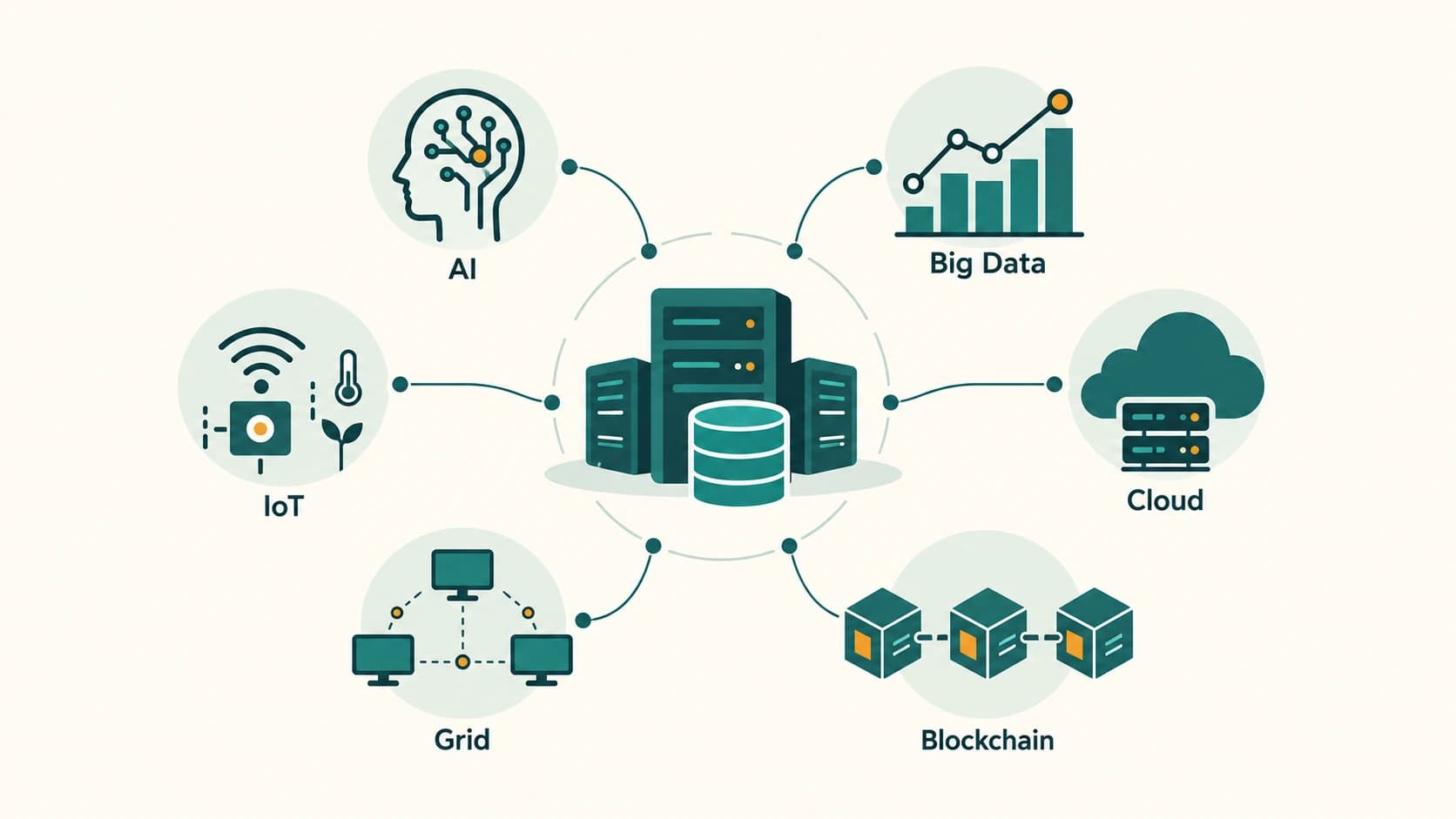
Class XI Computer Science (083) — a complete, beginner-friendly companion to NCERT Chapter 3 with explanations, examples, every end-of-chapter solution, activities, reflection answers and additional practice.
Imagine this ordinary morning. Your phone suggests a faster route because roads are crowded. Your watch notices that you have been sitting too long. A hospital doctor consults a scan stored on a remote server. A shop owner pays only for the computing resources needed to keep an online store running. These examples appear unrelated, but they connect through developments in artificial intelligence, connected devices, data and shared computing.
NCERT source: Computer Science, Class XI, Chapter 3, “Emerging Trends,” printed pp. 45–60, Reprint 2026–27, supplied as kecs103.pdf in the latest official textbook ZIP. Coverage: Sections 3.1–3.7, all 14 end-of-chapter numbered exercise questions (including Q3 a–b, Q4 a–b, Q8 a–b, Q9 alternatives, Q10 a–f, and Q14 matching), all five activities (3.1–3.5), and all five reflection prompts. Exercise questions are referenced and briefly paraphrased; answers and worked explanations are original.
Syllabus status, read first. The official CBSE Class XI Computer Science (083), 2026–27 unit-wise examinable syllabus contains Computer Systems and Organisation, Computational Thinking and Programming I, and Society, Law and Ethics. It does not list this NCERT chapter’s AI, IoT, cloud, grid, big data, or blockchain subjects as separate prescribed Class XI theory units. We cover the complete book chapter and its questions because this project is textbook-comprehensive. This resource should be labelled NCERT supplementary enrichment, not misrepresented as a guaranteed separately examinable CBSE unit. Cross-topic connections to data privacy, computer architecture and disability access are valuable, but they do not create new prescribed curriculum lesson IDs.
Learning goals
By the end, you should be able to explain the difference between AI and machine learning; describe NLP, VR, AR and robots; identify the five characteristics of big data; design a simple IoT solution using sensors; tell IoT and the Web of Things apart; compare cloud service models and cloud versus grid; explain what a blockchain can and cannot guarantee; and answer NCERT’s conceptual, scenario-based and project-style questions.
NCERT roadmap and source mapping
| NCERT section | Study-book section | Topics |
|---|---|---|
| 3.1–3.2.4 | C11-CH03-S01 | Emerging trends; AI, ML, NLP, immersive experiences, robotics |
| 3.3–3.3.2 | C11-CH03-S02 | Big data, five Vs, analytics |
| 3.4–3.4.3 | C11-CH03-S03 | IoT, Web of Things, sensors, smart cities |
| 3.5–3.5.1 | C11-CH03-S04 | Cloud computing, on-demand service, IaaS, PaaS, SaaS |
| 3.6 | C11-CH03-S05 | Grid computing and cloud comparison |
| 3.7 | C11-CH03-S06 | Distributed ledgers and blockchain |
| Printed pp. 59–60 | Separate chapter companion | NCERT Exercises 1–14 |
| Activities 3.1–3.5 | Separate chapter companion | Guided investigations and example reports |
| Five margin prompts | Separate chapter companion | Think and Reflect model answers |
Section C11-CH03-S01 — Artificial Intelligence and Interactive Technologies
1. What makes a technology an emerging trend?
A technology is emerging when it is developing, beginning to be adopted widely or finding important new uses. The adjective does not automatically mean that the technology was invented yesterday. For instance, research into AI and robotics is decades old, even though new capabilities and widespread applications keep appearing. Some early ideas remain useful for years; others become outdated.
Three questions help us evaluate a trend: What problem does it solve? How does it work at a beginner's level? What are the possible limitations or harms? Understanding the second and third questions is as important as knowing a fashionable name.
2. Artificial intelligence (AI)
Artificial intelligence is the field of building computational systems that perform tasks associated with human intelligence, such as recognising patterns, interpreting language, planning, making predictions or choosing actions. It does not mean a machine necessarily thinks, feels or understands the world as a person does.
Consider a route-finding app. It receives road maps, your destination and possibly live traffic information. It estimates routes and recommends one according to criteria such as time or distance. The result can use search algorithms, machine learning and other engineering methods; not every part of such an app is necessarily AI.
2.1 Knowledge bases, rules and learning
Some AI systems store facts and rules in a knowledge base and use them to reach conclusions. A simple rule might be: if a student's library book is overdue, send a reminder. Other systems learn useful patterns from examples rather than requiring a programmer to write a rule for every possible case. Many real systems combine both approaches.
Illustration: A school helpdesk may have a rule-based answer for “What time does the library close?” and use a language model to recognise that “When can I return a book?” asks a related question. The system must still check school policy rather than inventing opening times.
3. Machine learning (ML)
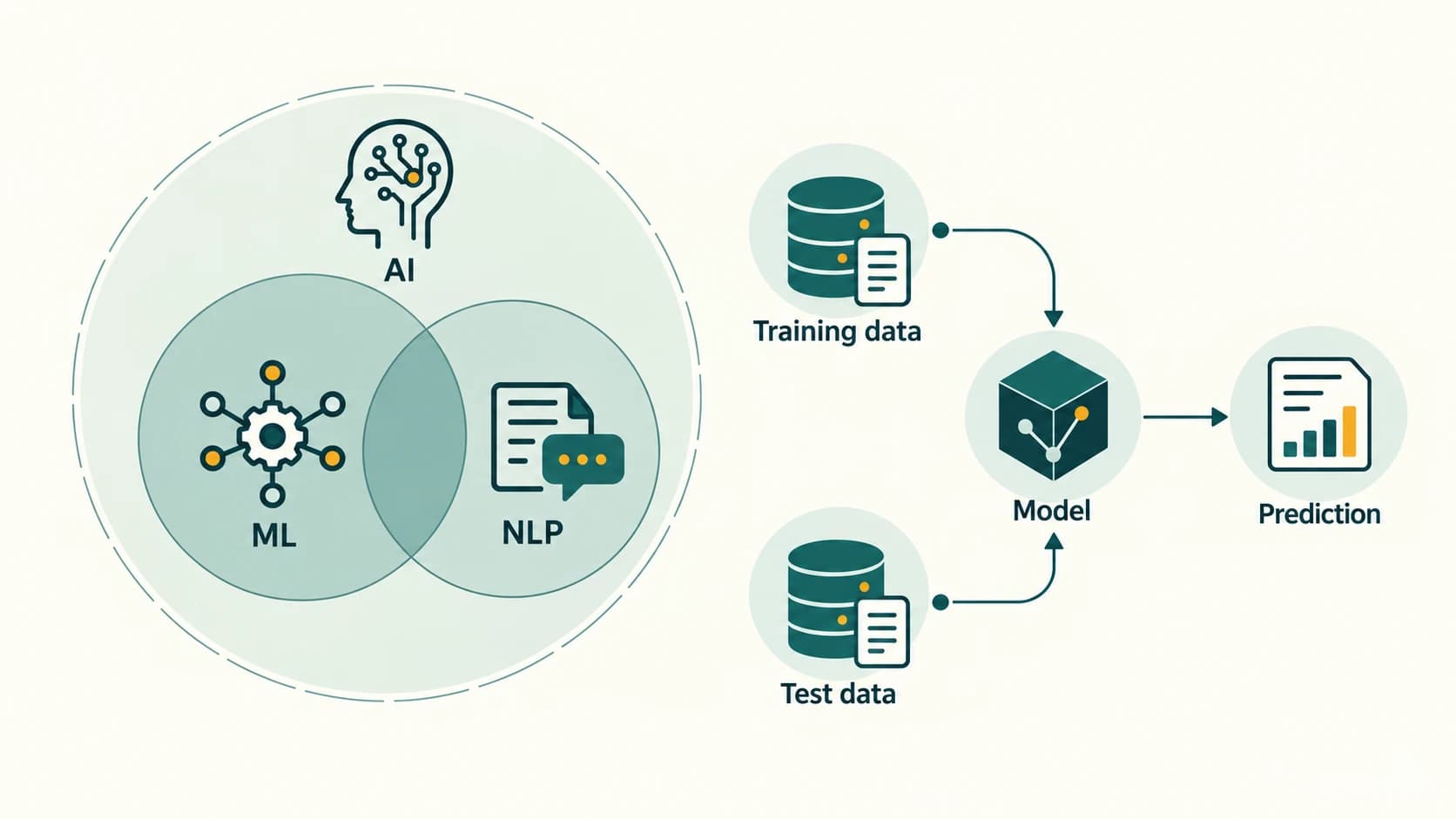
Machine learning is a part of AI in which a model learns patterns from data for a task such as classification or prediction. A programmer specifies the training process and goals, but typically does not hand-code every detailed decision rule.
A beginner-friendly ML workflow is:
- Collect data: Gather relevant examples such as labelled images of healthy and diseased leaves.
- Prepare data: Remove invalid duplicates, inspect missing values, and correct wrong labels.
- Split data: Keep training and test examples separate; a validation set can help tune the model.
- Train: Let the learning algorithm adjust its parameters using training examples.
- Evaluate: Measure performance on examples the model did not learn from.
- Use and monitor: Make predictions on new cases, check mistakes and update when appropriate.
Worked example. Suppose a model examines 40 previously unseen images and correctly classifies 34. Its accuracy on this small test is 34 ÷ 40 × 100 = 85%. This does not prove it will achieve 85% accuracy on every farm. The test may be small or unrepresentative; the more serious disease class might be under-detected. For medical or safety-related systems, accuracy alone is not enough.
| Traditional explicitly programmed rule | Machine-learning model |
|---|---|
Programmer writes condition such as if temperature > 38 | Parameters are learned from many examples |
| Easy to audit when the rules are few and clear | Can model complicated patterns but may be harder to explain |
| Does not automatically improve by collecting data | Can be retrained and evaluated with new, representative data |
| Suitable for fixed, well-defined conditions | Useful for recognition and prediction tasks |
Common confusion: AI is the broader field; ML is one family of approaches within AI. Not every robot uses ML, and not every ML application is a robot.
4. Natural Language Processing (NLP)
NLP helps computer systems process, analyse or generate human language. Its tasks include understanding text, translating, retrieving information, recognising speech, producing speech and classifying messages. Modern spoken assistants usually combine speech recognition, language processing and text-to-speech; these are distinct parts of a pipeline.
- Speech to text: Spoken question → recognition software → written words.
- Text processing: Written words → extract intent or information → response.
- Text to speech: Written response → generated audible speech.
- Machine translation: Text in one language → text in another; meaning may require checking.
- Predictive typing and spell checking: Contextual suggestions improve text entry.
Example: A learner dictates “Show my homework for tomorrow.” The recogniser first converts audio to words; the assistant then identifies the requested information. An automated response may be wrong when the speech is unclear, an accent is underrepresented in training data, or the assistant lacks the school timetable.
Accessibility: NLP can enable speech-to-text captions for deaf or hard-of-hearing users, dictation for people with limited hand mobility, voice commands for those who cannot comfortably use a keyboard, and audio reading for some users with print-reading difficulties. This does not remove the need for accessible interfaces, human support or accuracy checks.
5. Immersive experiences: VR versus AR
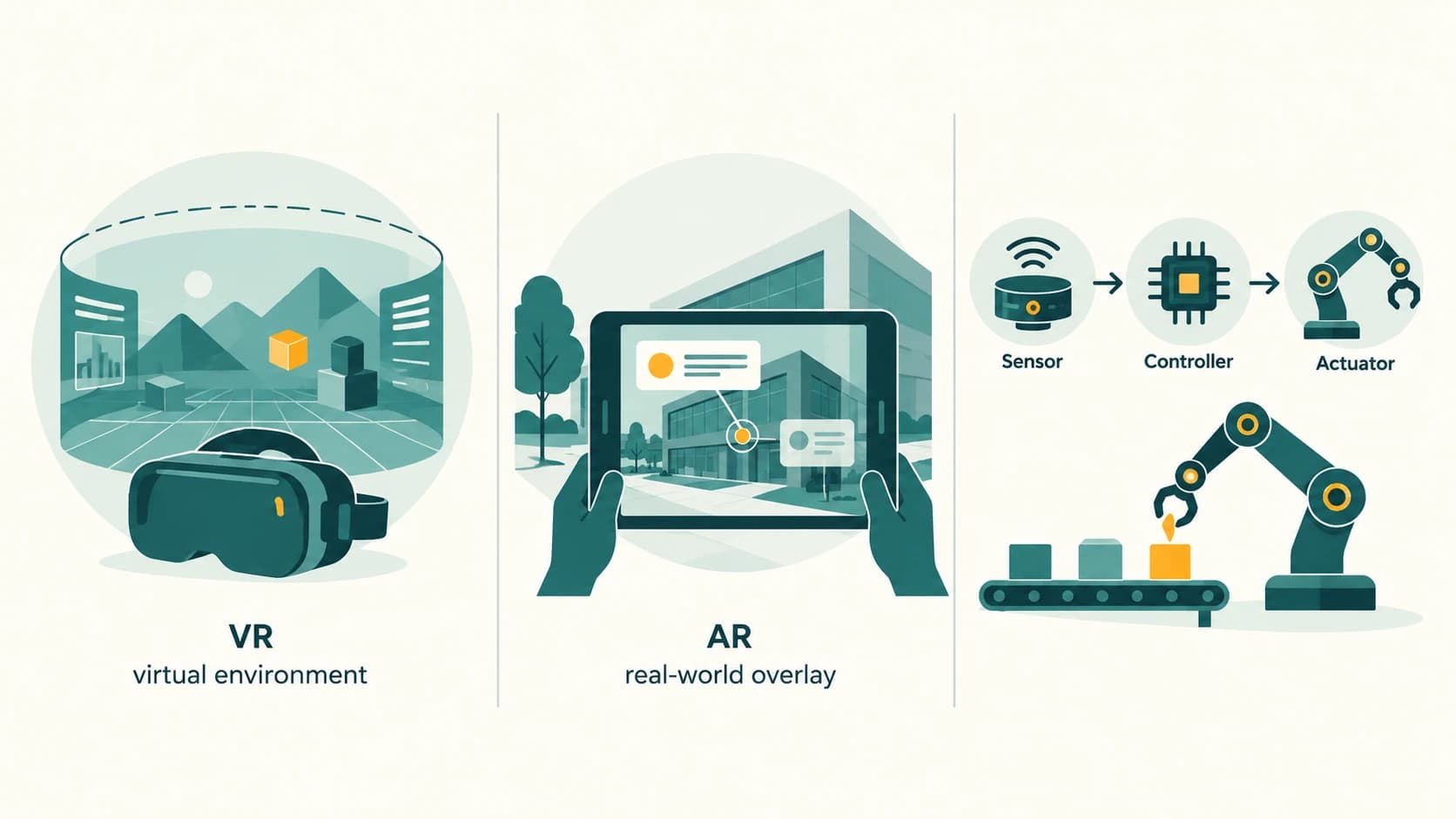
Virtual reality (VR) presents a computer-generated environment in which the user can look around and interact. A headset often tracks head motion, sometimes with hand controllers. Augmented reality (AR) overlays digital information on a view of the physical surroundings, such as labels over an actual road or furniture previewed in a real room.
| Feature | VR | AR |
|---|---|---|
| Main experience | Simulated world | Real environment enriched with digital elements |
| Typical device | VR headset | Camera-enabled phone, tablet or AR glasses |
| Example | Practice driving inside a simulator | Overlay arrows onto a real street view |
| Learning benefit | Safely rehearse challenging tasks | Understand real objects with added guidance |
| Limitation | Motion discomfort, equipment cost | Tracking errors, limited field of view, privacy concerns |
Do not confuse “immersive” with “perfectly realistic.” A good simulation is a learning aid, not an exact substitute for medical practice or real-world driving. In location-based AR, GPS provides satellite positioning, while visual positioning can recognise features in camera imagery for more precise localisation in supported settings.
6. Robotics: sensing, processing and acting
A robot is a programmable physical system capable of performing tasks, often using sensors, a controller and actuators. It may be autonomous, remotely operated or a combination. Robotics combines computing with electronics and mechanical design. A robot does not need to resemble a person: a wheeled warehouse robot and a surgical robotic arm are both robots.
- Sensor: Receives information (distance, light, orientation or temperature).
- Controller/software: Uses sensor data and instructions to decide an action.
- Actuator: Creates movement or another physical change (motor, gripper, wheel).
- Feedback: New sensor readings show whether the action worked.
Example: A small line-following robot uses optical sensors to detect a dark path, a microcontroller to choose left/right motor speeds, and electric motors to steer. In hospitals, robotic tools may assist with precise instrument positioning; the trained medical professional remains responsible for clinical decisions.
A drone is an unmanned aircraft that may be remotely piloted or partly automated. In disaster relief, a drone can survey flooded routes, map damage or carry lightweight supplies subject to safety and aviation rules. It does not guarantee recovery of victims or replace trained emergency teams.
What to remember from Section 1
- AI is the broad field; ML is a data-driven approach within it.
- NLP handles human languages; speech recognition and speech synthesis are different tasks.
- VR creates an artificial environment; AR overlays information on the real world.
- Robots combine programming, sensors and actuators and can be non-humanoid.
- Accuracy, accessibility, privacy and human oversight matter in every deployment.
Section C11-CH03-S02 — Big Data and Data Analytics
1. The challenge is not only “lots of data”
When a school uses an attendance spreadsheet, a small conventional database may be sufficient. A large transport system continuously collecting sensor readings, passenger counts, camera streams and service updates presents a different challenge: huge size, fast arrival, mixed formats and uncertainty. Big data refers to datasets and processing problems whose size or complexity can exceed the practical capabilities of ordinary tools in the given environment. There is no single universal number of gigabytes that makes data “big.”
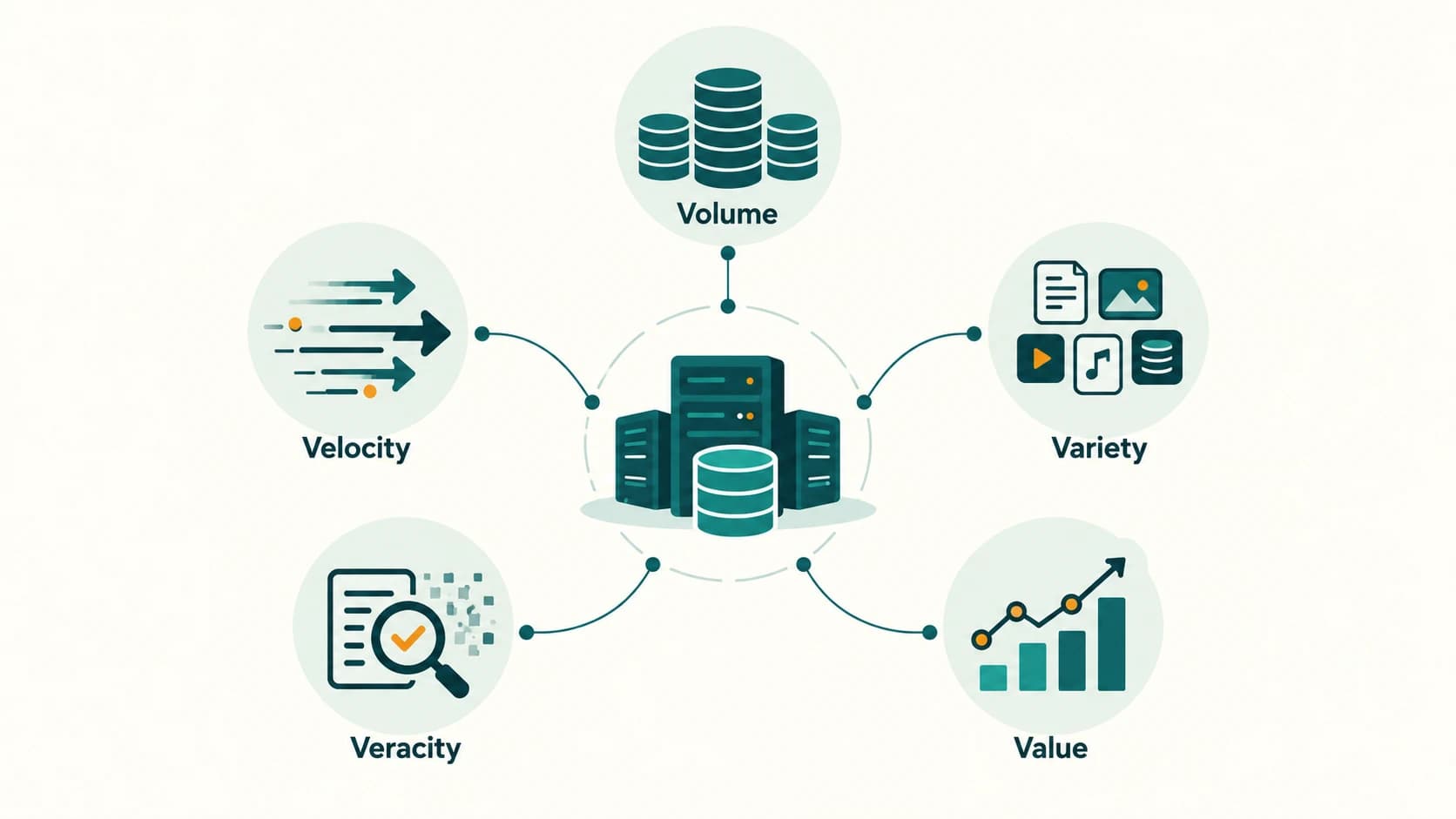
NCERT organises big data using five Vs:
| V | Meaning | Easy example | Practical question |
|---|---|---|---|
| Volume | Quantity of data | Millions of traffic sensor readings | Can we store and process it? |
| Velocity | Speed of generation/arrival | Buses report positions every few seconds | Can we respond soon enough? |
| Variety | Different formats and structures | Tables, images, text, GPS points | How will we combine them? |
| Veracity | Reliability and quality | Faulty sensor reports impossible speed | Should we trust these records? |
| Value | Useful insights worth extracting | Better route planning, fewer delays | Is the benefit worth the cost? |
1.1 Structured, semi-structured and unstructured data
Structured information is arranged in predictable columns, such as bus_id, latitude and time. Semi-structured information has flexible but interpretable fields, such as JSON sensor messages. Unstructured information includes images, audio or free-form comments. The categories describe data organisation, not importance or trustworthiness.
2. Data analytics
Data analytics means examining data to discover patterns, test hypotheses or support decisions. A simple cycle is question → collect → clean → analyse → interpret → act → check the outcome.
Worked school example: A school records the number of students borrowing books on five days: 12, 18, 15, 20, 15. Total loans are 12 + 18 + 15 + 20 + 15 = 80; daily mean is 80 / 5 = 16. The observations suggest demand on the fourth day was higher than on the first. They do not show the reason. Perhaps a class visited the library; a good analyst investigates context before making a policy.
Python's statistics module helps with small numerical data; NCERT additionally mentions the pandas library for tabular analysis. This chapter does not require advanced Python libraries to grasp the core ideas.
from statistics import mean

loans = [12, 18, 15, 20, 15]
print(sum(loans))   # 80
print(mean(loans))  # 16
Optional enrichment code, not a new CBSE Class XI practical requirement.
3. Quality, privacy and fairness
A huge dataset can still be misleading. Suppose 80% of survey responses come from only one neighbourhood: a city-wide conclusion may be biased. A model trained on inaccurate or unequal records may harm some communities more than others. Collect only necessary information, protect personal data, explain the purpose of collection and check consent or other lawful requirements. Aggregated statistics can sometimes answer questions without exposing individuals.
What to remember from Section 2
Data size is only one problem. Speed, formats, quality and actual usefulness determine whether analytics produces meaningful results. A pattern is not automatically a cause.
Section C11-CH03-S03 — Internet of Things, Web of Things and Smart Cities
1. What is the Internet of Things?
The Internet of Things (IoT) connects physical objects containing computing components, sensors or actuators so they can exchange information and sometimes take actions automatically. A device can be part of an IoT system without having a screen. Many IoT devices communicate through a local gateway or network rather than connecting directly to the public Internet.
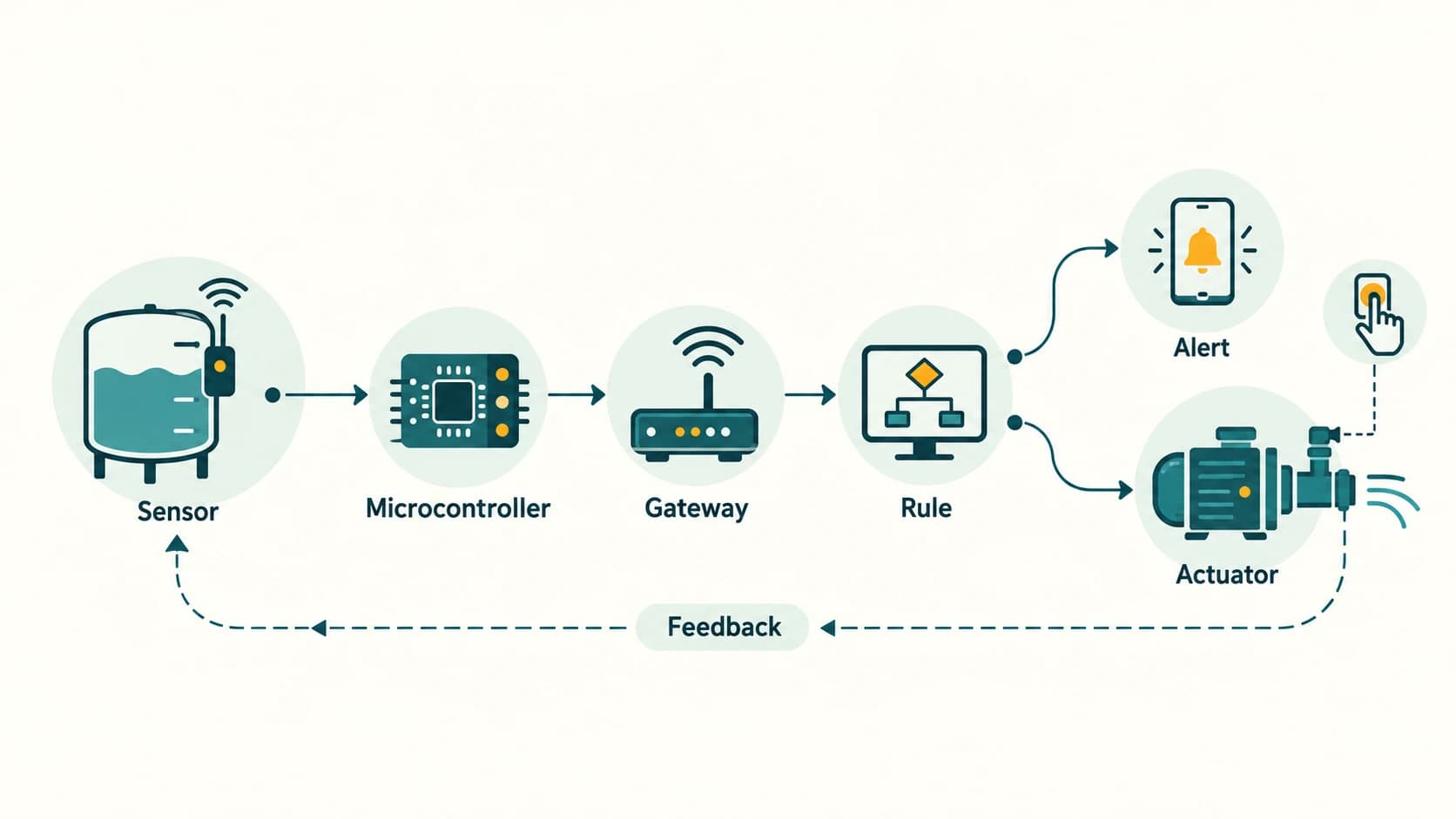
Example — smart water tank: A water-level sensor measures the tank, a microcontroller sends the reading, software checks a minimum threshold, and a pump switch may respond. The household can see a status message on a phone. Safe controls, manual override and electrical protection are essential; this is a conceptual example, not construction instructions.
1.1 The IoT data/action loop
- Sense: Read temperature, motion, location or another physical quantity.
- Connect: Send data to a controller, gateway, local computer or network service.
- Process: Check rules, thresholds or an analytical model.
- Act or notify: Adjust a device or inform a person.
- Verify: Check the next sensor reading and record whether the action succeeded.
A sensor observes; an actuator changes something. A smart system may contain both.
2. Sensors and microcontrollers
A sensor converts a property of the environment into a measurement or usable signal. A microcontroller is a compact computing device that runs an embedded program; sensors can provide it with data. A gyroscope measures rotation; an accelerometer measures acceleration, including the effect of gravity. Phones typically combine multiple sensors and software to estimate device orientation.
| Sensor | What it measures | Typical application |
|---|---|---|
| Temperature sensor | Temperature | Climate control or cold-storage monitoring |
| Accelerometer | Acceleration | Detect phone movement and orientation |
| Gyroscope | Angular rate of rotation | Stabilisation and motion tracking |
| GPS/GNSS receiver | Satellite signals used to estimate location | Bus tracking |
| Light sensor | Light intensity | Automatic brightness |
| Motion sensor | Presence or motion | Entry lights and security alerts |
| Water-level sensor | Water level | Tank monitoring |
Privacy/safety trap: A sensor reporting a doorway opened is not necessarily proof of a particular person's attendance. Attendance records require reliable identification, consent/legal basis where applicable, error-handling and safeguards against tracking misuse.
3. Web of Things (WoT) versus IoT
IoT focuses on connecting and exchanging data with physical things. The Web of Things uses web technologies and standard descriptions/interfaces so different IoT devices can be understood and controlled more consistently across applications. WoT is a way of improving the interoperability of connected things, not a completely separate collection of sensors.
Example: A school has lights, fans and temperature sensors from different suppliers. Instead of writing a separate custom integration for each, the school could expose standard web-facing descriptions and controls through a secure management interface. Web of Things does not imply that every device should be openly accessible on the Internet. Authentication and access control remain essential.
4. Smart homes, schools and cities
A smart city uses information systems, communications and sometimes sensors to manage services such as water, transport, electricity and waste more effectively. The technology is a means to improve public outcomes, not proof that a city is successful merely because sensors are installed.
- Transport: Estimate bus arrivals from locations and publish accessible updates.
- Water: Detect unusual flow that may indicate a leak, followed by inspection.
- Waste: Use bin fill-level estimates to plan collection routes.
- Public safety: Monitor infrastructure such as bridge vibration with engineering review.
- Schools: Track air quality and energy usage while minimising student surveillance.
Worked example: Imagine three classroom temperature readings of 28°C, 32°C, 29°C. A simple system flags the 32°C room for inspection. The data might help staff check ventilation, but one reading is not enough to diagnose an equipment failure.
What to remember from Section 3
A complete IoT system connects measurements to useful decisions and, where safe, actions. WoT standardises how applications interact with devices. A well-designed smart city protects reliability, human rights and access for everyone.
Section C11-CH03-S04 — Cloud Computing
1. Computing as an on-demand service
In cloud computing, a provider makes computing capabilities available over a network: storage, virtual servers, databases, development environments or complete applications. Instead of purchasing every machine and maintaining it on their premises, an organisation can rent resources and increase or decrease them as demand changes. Cloud is not another name for “the Internet”; the Internet or other network is commonly a way to access remotely operated computing resources.
A useful analogy is an electricity service: you use a facility when you need it and pay according to an agreed plan. The comparison is imperfect: cloud bills may include storage kept over time, data transfer, subscriptions and minimum charges, not only active minutes.
Cloud computing is often described by five essential characteristics:
| Characteristic | Student-friendly meaning |
|---|---|
| On-demand self-service | Request computing resources when needed without a person manually approving every request |
| Broad network access | Services accessible through suitable networks and devices |
| Resource pooling | Provider shares underlying capacity among customers with logical separation |
| Rapid elasticity | Capacity can grow or shrink with changing demand |
| Measured service | Usage is monitored, controlled and reported for allocation or billing |
A practical example: An online bookshop sells 30 books on a normal day but expects more traffic during a school fair. Renting additional server capacity only around the fair may be more practical than buying powerful hardware that sits unused most of the year. The provider's service levels, security and pricing must be checked.
2. IaaS, PaaS and SaaS
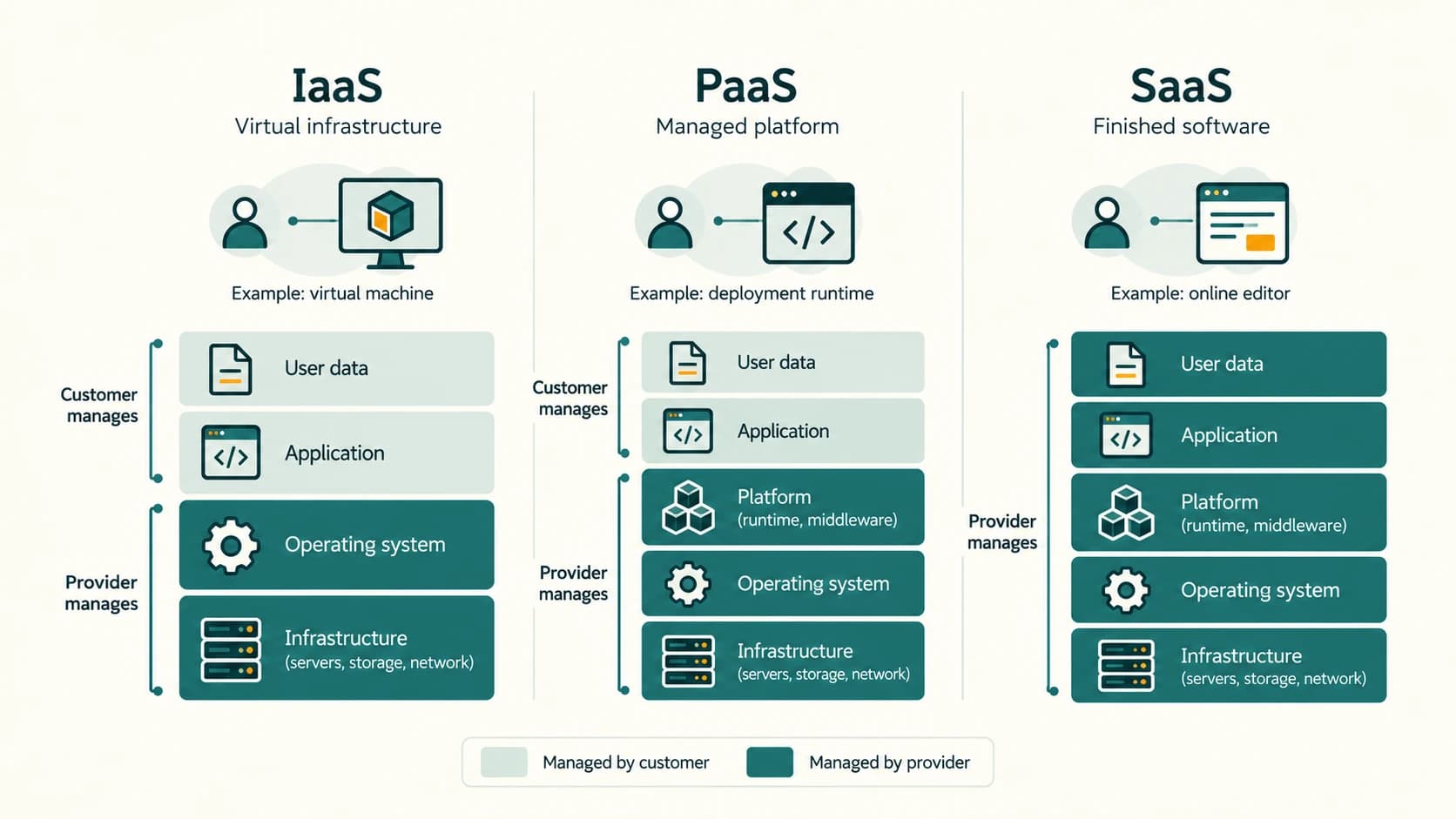
These are service models, meaning how much of the technology stack the provider manages on behalf of the user.
| Model | What the provider offers | What the user typically controls | Beginner example |
|---|---|---|---|
| IaaS — Infrastructure as a Service | Virtual machines, networking and storage resources | Operating system configuration, installed applications and much of app security | Rent a VM and storage to host a custom website |
| PaaS — Platform as a Service | Managed application runtime, deployment tools and underlying infrastructure | Application code, data and supported settings | Upload an app to a managed runtime without maintaining the server OS |
| SaaS — Software as a Service | A finished application through web/app access | User files, account permissions and available preferences | Use an online document editor or email service |
Exam decision rule: The question mentions virtual servers and on-demand storage you configure yourself → usually IaaS. It mentions a ready-made environment for deploying your code → PaaS. It mentions using a complete online application → SaaS.
2.1 Mini-case: online school science exhibition
Students build a website for science exhibits. The website could run on a rented virtual machine (IaaS) where they install and patch their server software. Alternatively they might deploy code to a managed runtime (PaaS) that handles servers and many maintenance tasks. If they only need to upload photos and share event registrations, an existing website/application service (SaaS) may be enough. There is no single “best” model independent of skills, budget and requirements.
3. Costs, benefits and limits
Benefits: easier startup, scalable capacity, less initial hardware, managed services, backup options and access from multiple locations. Limits: need for reliable access, possible provider outages, ongoing fees, data transfer charges, vendor dependence, privacy obligations and unclear allocation of security responsibilities.
Illustrative budget (fictional numbers for learning): Suppose a cloud plan charges ₹6 per server-hour, and the server runs 5 hours per day for 20 days. Compute cost is 6 × 5 × 20 = ₹600, excluding storage, transfer, taxes and other services. Running the same rate 24 hours for 30 days would cost 6 × 24 × 30 = ₹4,320 (again for compute alone). This shows why stopping unused resources matters, not that a particular provider charges these prices.
A cloud-based storage service can save setup time and may reduce expense, but not always: high traffic, permanent large-scale usage, specialised requirements and data egress may change the comparison. Keep independent backups and use access controls. A cloud provider cannot make deleted files magically recoverable unless a suitable retention/backup policy exists.
4. Public services and government cloud
The Government of India's GI Cloud / MeghRaj initiative supports e-governance cloud facilities. It is an example of a government-provided cloud initiative, not a general recommendation that every student should register for a government cloud account. Large commercial providers offer, among other services, virtual servers, databases, storage and managed application platforms. A privately owned cloud company is not automatically the same concept as a “private cloud” deployment. A private cloud is an infrastructure deployment model intended for exclusive use by an organisation.
What to remember from Section 4
The defining idea is convenient, pooled, configurable computing on demand, often metered by usage. Distinguish the resource level the customer receives: infrastructure, platform or finished software.
Section C11-CH03-S05 — Grid Computing
1. Computing by collaboration
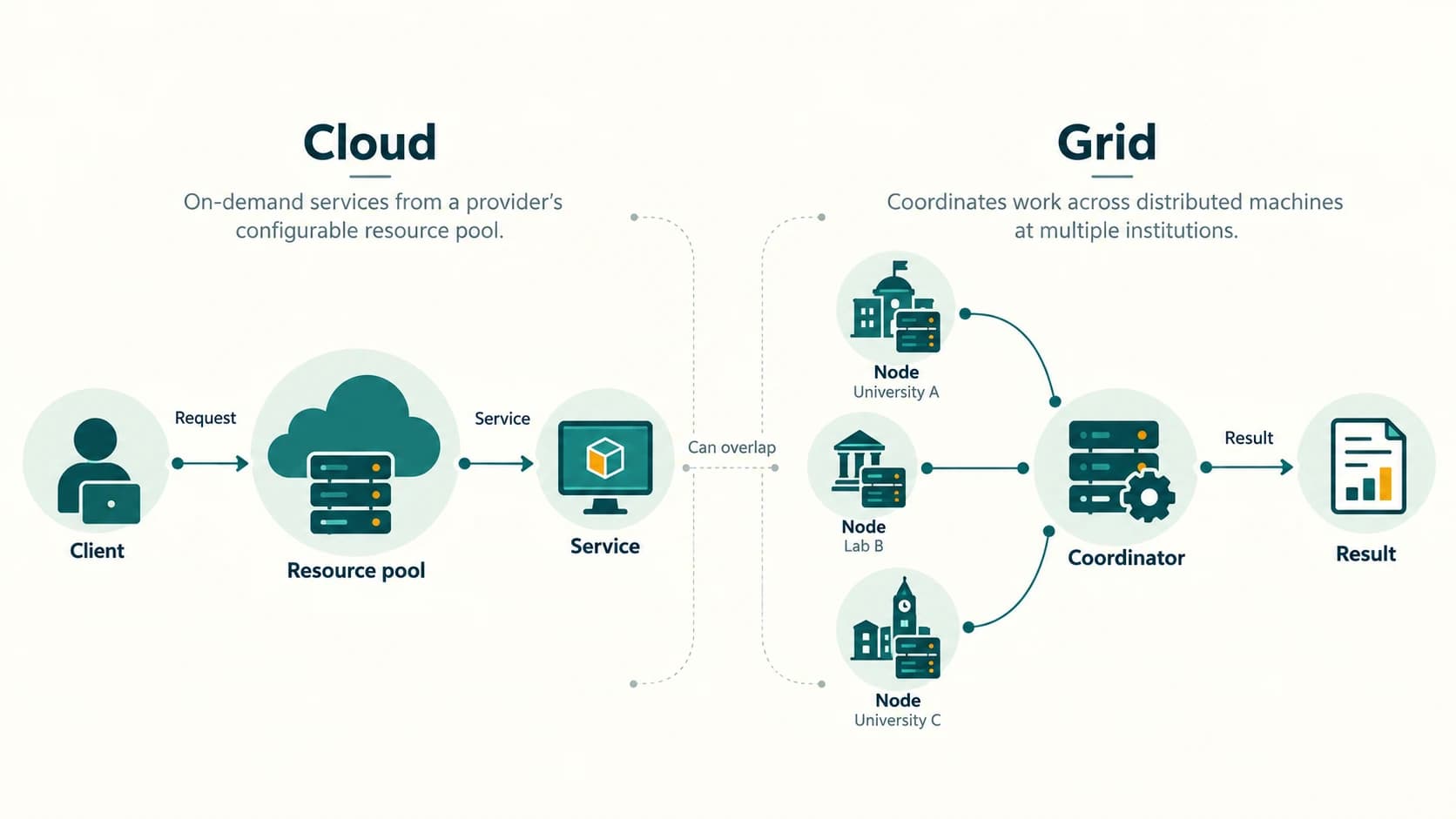
Grid computing connects computing resources, often in different locations and under different owners, to work on a shared computational or data problem. A grid might divide a scientific simulation into independent pieces; different computers calculate pieces and return results to a coordinating system. This can reuse existing computers without buying one extremely powerful machine.
Example: A research group has 100,000 independent calculations. If ten participating computers are each capable of 1,000 calculations in an hour, their combined theoretical capacity is 10 × 1,000 = 10,000 calculations/hour. At that ideal rate, the work takes 100,000 ÷ 10,000 = 10 hours. Real runs may take longer because of communication, failures, different computer speeds and tasks that cannot run simultaneously.
A grid generally uses middleware to discover resources, schedule work, transfer inputs, collect output and manage errors. The NCERT chapter mentions processor/CPU grids, which share computation, and data grids, which provide coordinated access to distributed datasets.
2. Grid computing versus cloud computing
| Question | Grid computing | Cloud computing |
|---|---|---|
| What brings resources together? | Collaboration of distributed nodes for tasks or data access | Provider offers a pool of configurable resources/services |
| Typical purpose | Large shared computation or distributed research data | On-demand infrastructure, platform or software |
| Who owns the machines? | Often multiple groups or institutions | Often operated by one or more cloud providers |
| How resources are requested | Job scheduler or grid middleware | Provider APIs, dashboards, subscriptions |
| Typical example | Institutions sharing capacity for research calculations | Startup renting server capacity to run an application |
Important nuance: The technologies overlap. A cloud cluster can run scientific jobs; a grid may use cloud resources. The distinction helps describe the service and collaboration models, not a rigid physical separation.
3. Limitations
Some tasks cannot be split efficiently. Transferring huge datasets between machines takes time. Different hardware and operating systems complicate management. Security and fair sharing matter when several organisations participate. Grid computing is therefore not “every normal computer connected to the Internet,” but a coordinated system set up for shared work.
Section C11-CH03-S06 — Blockchain and Distributed Ledgers
1. What problem is a shared ledger trying to address?
A ledger is an organised record of transactions or events. In a traditional centralised system, the organisation operating the database usually controls updates. A blockchain is one type of distributed ledger in which transaction records are grouped into blocks and cryptographically linked, with participating nodes following rules to accept updates.
Imagine a scholarship disbursement record. If authorised departments need to agree which payments were approved, a shared audit history might make unexplained changes easier to detect. But it does not solve every problem: incorrect data could be entered initially, and authorised people can still make mistaken or unfair decisions. Record integrity does not imply that a decision was just.
2. A simplified block-and-chain model
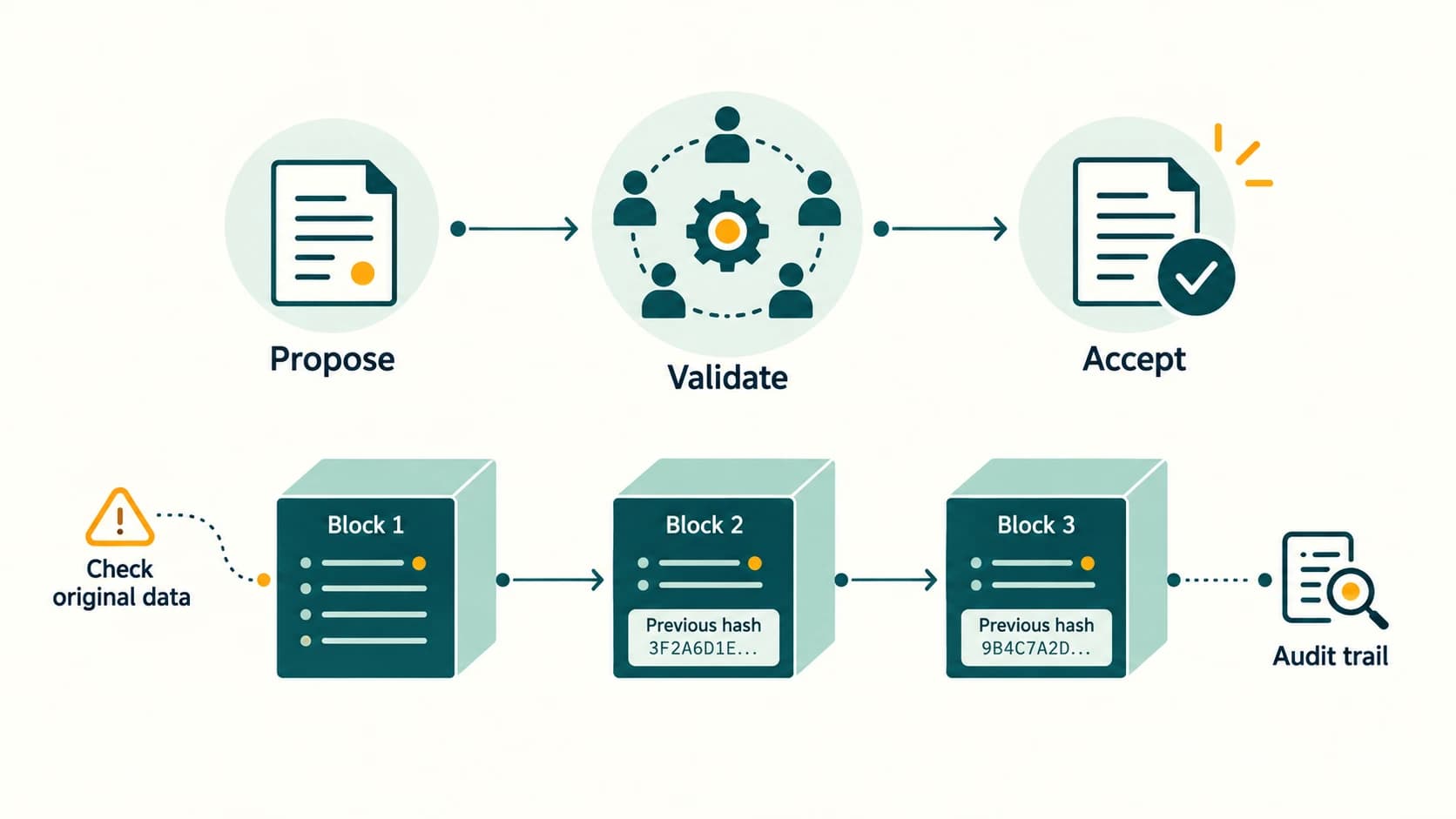
Each block commonly contains transactions and metadata such as a cryptographic hash representing the previous block. A hash is a mathematical fingerprint of data: changing even a small part typically gives a different result. Network participants apply a consensus mechanism to decide which valid record additions are accepted.
[Block 1: records | hash] → [Block 2: records | previous hash | hash]
                                  → [Block 3: records | previous hash | hash]
Simplified lifecycle: A participant proposes a transaction → eligible network nodes check it under the agreed rules → a block is accepted through the network's consensus process → participating ledger copies are updated. Not every blockchain requires all nodes to vote, not every user holds a full ledger copy, and not every blockchain displays all transaction contents publicly.
3. Why changing history is difficult — and where it can fail
A later block links to the earlier block's hash. If someone alters an old record, the mismatch can be detected. Actual resistance to altering accepted history also depends on consensus rules, permissions, independent participants and network security. Blockchain is usually described as tamper-evident and tamper-resistant, rather than magically unhackable or absolutely unchangeable.
| Useful property | What it does not guarantee |
|---|---|
| Shared audit trail | That the information originally entered was correct |
| Cryptographic linking | Privacy of every record |
| Consensus about record order | Fair or accurate external decision making |
| Dispersed copies | No software vulnerabilities or compromised accounts |
| Traceable authorised updates | Permission to publish citizens' personal information |
4. Possible uses and the better-tool question
NCERT considers digital currency, healthcare, land records and voting as possible applications; these are illustrative proposals, not claims of guaranteed real-world success. Other possibilities include tracing product batches through supply chains or recording the custody history of laboratory samples. A conventional well-audited database may be better when a single trusted authority already governs the system and no independent consensus is required.
Privacy-by-design: A scholarship system should avoid putting students' names, identity documents, medical details or bank data on an append-only public ledger. Sensitive records can be stored securely in controlled databases, with only necessary audit references or cryptographic commitments used in a permissioned log where appropriate. Independent review, complaint channels and correction processes remain essential.
What to remember from Section 6
A blockchain combines linked records, distributed validation and agreed update rules. It can strengthen tamper evidence and shared accountability in appropriate settings; it does not automatically ensure accuracy, fairness, secrecy or suitability for every application.
Consolidated comparison and chapter revision
| Term | One-line meaning | Typical learner example |
|---|---|---|
| AI | Software performing intelligence-associated tasks | Pattern recognition in traffic predictions |
| ML | Learning useful patterns from example data | Recognising categories of leaf images |
| NLP | Processing human language | Speech-to-text captions |
| VR | Simulated interactive environment | Training simulator |
| AR | Digital overlays on physical surroundings | Camera view with sign labels |
| Robotics | Programmable sensing and physical action | Warehouse robot |
| Big data | Difficult-to-manage data with large scale/complexity | City transport streams |
| Analytics | Extracting useful insight from data | Detecting peak travel periods |
| IoT | Networked physical things exchanging information | Tank-level alert sensor |
| WoT | Web-standard approaches to interacting with things | Common interface for different smart devices |
| Cloud computing | Configurable computing resources/services on demand | Renting a web-server VM |
| Grid computing | Coordinated distributed resources doing common work | Shared scientific simulations |
| Blockchain | Linked distributed records accepted under rules | Multi-party audit trail |
Quick revision: Name the five Vs: Volume, Velocity, Variety, Veracity, Value. Name the three cloud service models: IaaS, PaaS, SaaS. Distinguish a sensor (measures) from an actuator (acts). Distinguish VR (virtual environment) from AR (overlay). Distinguish AI (broad) from ML (subset). Distinguish IoT (connected things) from WoT (web-based interoperability). A blockchain supports tamper evidence; it does not guarantee correct source data.
Common misconceptions and exam traps
- “Every AI system is machine learning.” False: rule-based reasoning is another AI approach.
- “Every robot has human shape.” False: industrial arms and mobile platforms are robots.
- “VR and AR mean the same thing.” False: replacing an environment differs from overlaying on the real one.
- “More data always means more accurate results.” False: wrong, biased or irrelevant data can mislead.
- “An IoT sensor itself makes the decision.” Often false: the microcontroller or software uses sensor data.
- “Cloud storage is always cheaper and safer.” False: compare usage, fees, controls and backups.
- “IaaS provides a finished online document editor.” That is normally SaaS; IaaS rents building blocks.
- “Grid and cloud can never overlap.” False: both may be used together.
- “Blockchain is impossible to attack or amend.” Too absolute: security and governance depend on the design.
- “Recording on a blockchain confirms a scholarship applicant is eligible.” False: external eligibility must be independently verified.
NCERT Exercise Solutions — Chapter 3 (Questions 1–14)
The headings paraphrase the supplied 2026–27 NCERT questions so learners can find them by original number without reproducing lengthy textbook passages. All numbers and subparts are covered. Where a question asks for “your” services, plans or observations, the response below is an example answer to customise, not a claim about the learner's personal situation.
NCERT Exercise 1 — Examples of cloud services you may use
Question focus: Identify everyday services delivered through cloud computing.
Model answer: A student might use an online document editor to create class notes, cloud file storage to back up project work, a web-based email service for school messages, an online learning platform to watch lessons, and a photo-backup service to preserve photographs. Many of these are SaaS, because the student uses a complete online application. Some also depend on infrastructure and storage cloud services behind the scenes.
Explanation: A service is cloud-based because the data processing, storage or app capability is provided remotely through managed resources—not merely because a device has an Internet connection. This is a sample list: replace it with services you genuinely use if the question requests your own experience.
NCERT Exercise 2 — Explain IoT and describe applications
Answer: IoT is a network of physical devices containing electronics, computing capability and communication functions that exchange data with other devices or services. A connected sensor may send a reading; software may analyse it; an alert or an actuator may respond.
Possible applications: (1) Smart agriculture: soil-moisture measurements guide irrigation; (2) healthcare: approved monitoring devices notify care teams about concerning readings; (3) smart homes: lighting or energy-management devices coordinate; (4) transport: buses transmit location information; (5) factories: vibration sensors help monitor machinery; (6) environmental monitoring: air-quality measurements support analysis.
Explanation: Not every Internet-connected service is an IoT device; the defining idea is integration of physical things and their data/actions.
NCERT Exercise 3(a) — Short note on cloud computing
Answer: Cloud computing makes storage, servers, databases, platforms or complete software accessible over networks when needed. Users can request resources without purchasing and managing all underlying hardware. Its common advantages include rapid provisioning, elastic capacity, remote access and measured or subscription-based pricing. The standard service models are IaaS, PaaS and SaaS. Risks include network dependence, ongoing fees, provider outages and security or privacy obligations. Example: a startup deploys its website to a cloud-hosted VM rather than buying its own server.
NCERT Exercise 3(b) — Short note on big data and its characteristics
Answer: Big data concerns datasets whose size, speed, diversity or complexity make conventional storage or analysis methods difficult to use efficiently. Its five defining classroom characteristics are Volume (quantity), Velocity (rate), Variety (types), Veracity (quality) and Value (benefit from analysis). For example, a city transport system generates streams of locations, ticket records and public feedback. Analysing these responsibly might improve services, but poor-quality or biased information can lead to mistaken conclusions.
NCERT Exercise 4(a) — AI and its applications
Answer: AI is the field of designing computer systems for tasks involving perception, language, reasoning or decision support. Examples include speech assistants, route prediction and image interpretation. In public services, AI may help sort citizen requests; in education it may provide practice feedback; in healthcare it may support image analysis under professional supervision.
Explanation: Do not claim that an automated result is always reliable or that AI automatically equals human-level intelligence. Check performance, privacy, fairness and human oversight.
NCERT Exercise 4(b) — ML and its applications
Answer: ML is a branch of AI in which algorithms use examples or data to learn patterns. A model is trained, evaluated on separate examples and applied to new cases. Example uses include filtering unwanted messages, predicting demand for products, recognising plant diseases from photographs and suggesting content. Poor training data can produce inaccurate or biased predictions.
Difference from part (a): AI is the overall field; ML is one of its methods.
NCERT Exercise 5 — Cloud computing compared with grid computing
| Feature | Cloud | Grid |
|---|---|---|
| Central idea | Network-delivered computing capabilities available as services | Distributed computers coordinated for shared processing/data tasks |
| Provisioning | Often on-demand through provider interface | Often through collaborating institutions and a job manager |
| Typical workload | Host an online app, rent a server or use software | Break a research computation into parallel jobs |
| Example | Startup uses a rented virtual machine | Universities pool resources to simulate a complex phenomenon |
Conclusion: Cloud focuses on service provisioning and flexible capacity; grid focuses on cooperation toward computational tasks. Their methods can overlap—for instance, grid-style jobs may run on cloud-hosted machines.
NCERT Exercise 6 — Why might cloud storage save money and time?
Answer and justification: Setting up local storage requires purchasing hardware, arranging power and network facilities, installing software, maintaining equipment and planning for backup. A managed cloud storage account can often be configured more quickly; the organisation uses provider facilities and pays according to its storage and transfer plan. Increasing capacity may take far less time than buying and installing a new physical drive array.
Balanced conclusion: The claim is conditional, not universal. Long-term storage fees, large data-transfer charges, security needs, poor Internet access or compliance requirements can alter the cost/time balance. A sensible evaluation compares total costs and risks across both approaches.
NCERT Exercise 7 — Meaning of on-demand service in the cloud
Answer: An on-demand cloud service lets a user provision a needed capability—such as a virtual machine, storage or application plan—when they need it, usually without waiting for each request to be manually handled by the provider. A dashboard or API allows selection of type and quantity; automated cloud management allocates the resources and records usage.
Step-by-step example: A developer logs into a cloud dashboard, selects a VM size and region, starts it, installs the application and later stops or deletes the resource when it is no longer needed. Charging depends on the provider's tariff and whether storage or other resources remain allocated.
NCERT Exercise 8(a) — Government-provided cloud initiative
Answer: GI Cloud / MeghRaj, a Government of India cloud initiative supporting electronic governance. National Informatics Centre (NIC) facilities support government hosting and related cloud capabilities. Its purpose is to enable government departments to deliver and manage digital services efficiently.
Source note: NCERT Section 3.5.1 names MeghRaj. Government information is additionally documented at https://cloud.gov.in/, https://www.nic.gov.in/service/data-centre/ and the Ministry of Electronics and IT's publicly available MeghRaj material.
NCERT Exercise 8(b) — Large commercial cloud providers and services
Answer (examples, not endorsements):
| Commercial provider | Service examples by category |
|---|---|
| Amazon Web Services (AWS) | Compute/virtual servers, object storage, managed databases, serverless application functions |
| Microsoft Azure | Virtual machines, storage, managed databases, application hosting |
| Google Cloud | Compute Engine virtual machines, Cloud Storage, managed databases, application services |
Explanation: The word “private” in the question can mean privately operated commercial provider, not necessarily the technical deployment model called a private cloud. These companies also offer multiple service models; classifying the entire company as only IaaS or PaaS would be inaccurate.
NCERT Exercise 9 — Choose the service model from the scenario
Question focus: A company wants virtual servers and storage building blocks that it will combine and configure for its own custom applications.
Correct option: (d) Infrastructure as a Service (IaaS).
Why? IaaS gives the customer foundational compute, storage and network resources to configure. PaaS would supply a more managed application runtime; SaaS would supply a finished application. “Application as a Service” is not one of the three standard models in this question. The phrase “combined into a platform” does not change the fact that the requested resources are infrastructure components.
NCERT Exercise 10 — Six features of a smart school
This question requires an implementation idea for every subpart (a)–(f). A good answer also explains where IoT actually adds a device/sensor interaction, because merely moving teaching material online is digital education, not automatically IoT.
10(a) E-textbooks
Students access digital textbooks through an authorised learning application on school-managed tablets or personal devices. The school can synchronise versions and provide downloaded/offline copies. IoT aspect, where present: managed devices can report battery/connectivity status and classroom availability. The e-textbook file itself is not inherently IoT. Provide screen-reader support and offline access for students with limited connectivity.
10(b) Smart boards
Connect an interactive board or display to a secure school network so teachers can present annotated notes and share lesson material. Room occupancy and lighting sensors could adjust brightness or power use. Restrict remote controls to authorised staff, and allow lessons to continue during a network outage.
10(c) Online tests
Use a school-approved test platform for distributing questions, receiving answers and providing feedback. IoT could help manage approved exam-room devices or network quality, but online testing itself is a software/service use case. Ensure accessibility, reasonable accommodations, data protection and a fallback for connectivity problems.
10(d) Wi-Fi-connected door sensors
A contact sensor detects when a classroom door opens or closes; a secure gateway or network sends a status alert to authorised maintenance/security staff. It should not be treated as proof that a named pupil entered the room. Configure sensible alert thresholds and limit data retention.
10(e) Location sensors on school buses
A school bus carries a GNSS/GPS receiver and network-enabled tracker. Its location reaches a protected transport dashboard, enabling estimated arrival notices for authorised parents and staff. Maintain consent/notice, safety rules and access controls; location estimates may be wrong in tunnels or poor reception.
10(f) Wearables for attendance
An approved badge or wearable may transmit an identifier to a school-controlled reader, which registers an attendance event. The software checks for duplicates or missed scans and allows staff to correct errors. An identifier being detected is not absolute proof of physical presence. Offer non-wearable alternatives and follow appropriate child privacy and safeguarding rules.
Overall: The six features work best as a secure, inclusive school system, not an excuse for constant tracking or compulsory expensive devices.
NCERT Exercise 11 — Cloud strategy for five friends starting a business
Suggested answer: The friends should avoid heavy upfront equipment expenses. They can create shared project documents using a SaaS collaboration tool, host their initial website using an affordable managed platform (PaaS or SaaS, if sufficient), use a small cloud database or storage plan, and switch to more configurable IaaS only if the application needs custom infrastructure. Cloud resources can expand if customer traffic increases.
A sensible sequence:
- Decide the first product and estimate traffic, storage and data sensitivity.
- Choose the least complex suitable service and use student/startup offers only after checking terms.
- Set a clear monthly spending limit, monitor usage and turn off unnecessary compute resources.
- Protect accounts with strong authentication and minimal access permissions.
- Maintain backups, test recovery and avoid publishing secrets in code.
- Measure actual demand before purchasing larger capacity.
Example calculation: If a startup's illustrative test VM costs ₹8/hour and operates 3 hours each day for 15 test days, compute charges are 8 × 3 × 15 = ₹360 (before other charges). This illustrates limited initial commitment rather than a real provider quotation.
NCERT Exercise 12 — Report: blockchain for transparent scholarship distribution
Title: Shared audit records for scholarship applications and payments
Problem: Scholarship processing has several stages: eligibility checks, approval and release of funds. If records are altered or the reason for a rejected payment cannot be traced, students may struggle to obtain explanations. A controlled shared audit system might improve the evidence available to authorised reviewers.
Proposed design:
- A student submits an application to an ordinary secure application portal (not a public blockchain).
- A school or authorised authority checks documents and eligibility using applicable scheme rules.
- After approval, the relevant authority signs an approval record; a permissioned audit ledger records the event identifier, status, timestamp, issuing authority and audit reference, not sensitive identity documents.
- The payments system records transfer or failure events and reconciles them with bank confirmations.
- An independent auditor can compare the ordered records against the secure application and payment databases.
- The student can see their own status and appeal or request corrections through a protected portal.
Where blockchain may help: authorised departments could share a tamper-evident sequence of actions; unexplained record changes may be easier to investigate. This can support accountability (who approved), transparency (what stage was reached) and efficiency (fewer mismatched records) if the implementation works well.
Important safeguards: Do not publish personal documents, bank details or protected student data to all network nodes. Store sensitive details off-ledger with strict access controls. Verify information before acceptance; keep complaint handling, data correction, audit trails and operational procedures. The ledger cannot establish whether a student is actually eligible or whether a payment reached the correct person without trusted external checks.
Limitations and evaluation: Blockchain may be unnecessarily expensive/complex if a well-governed central database already provides adequate auditing. Compare the extra benefits of multi-agency consensus against cost, privacy, scaling and support requirements. Pilot with dummy student records and assess outcomes before any real deployment.
Conclusion: A permissioned, privacy-conscious audit ledger is a possible tool for better coordination—not a substitute for fair policy, verified data or responsive administration.
NCERT Exercise 13 — Relationship between IoT and WoT
Answer: IoT connects smart physical devices so they can send readings, receive commands and interact with one another or other systems. WoT builds on this connectivity by using web descriptions, interfaces and conventions to make devices easier to discover and interact with across different applications.
Example: An IoT smart fan reports speed and temperature. A WoT-compatible interface could describe the fan's readable temperature property and adjustable speed control so different approved applications can use it without requiring a fully custom protocol for every fan model.
Core distinction: IoT describes connected things and their interactions; WoT provides a web-technology approach to interoperability. Secure authentication remains necessary.
NCERT Exercise 14 — Match the everyday alert/action to the smart system
| Column A, NCERT item | Best match from Column B | Reason |
|---|---|---|
| 1. Reminder to take medicine | D. Smart Health | Supports medication schedules and health reminders |
| 2. Alert that the door was left unlocked | C. Home Automation | Connected home lock/security system reports its state |
| 3. Alert about an available parking place | A. Smart Parking | Occupancy data informs drivers about parking |
| 4. Television controlled from a wristwatch | B. Smart Wearable | A smartwatch or similar wearable provides the control interface |
Answer key: 1–D, 2–C, 3–A, 4–B. The last situation can also involve home automation, but Smart Wearable is the best unique matching choice because the controlling device is on the wrist; the table uses each option once as the textbook matching exercise intends.
NCERT Activity Guides — Activities 3.1–3.5
These are guided model responses. A field investigation is complete only when the student records their own observations and sources; examples below should not be represented as personally performed experiments.
NCERT Activity 3.1 — How can NLP assist people with disabilities?
Model investigation:
| Need | Language-related tool | How it helps | Important limitation |
|---|---|---|---|
| A learner cannot easily type | Speech-to-text dictation | Converts spoken answers into text | Background noise or pronunciation may cause mistakes |
| A learner cannot hear a spoken lesson clearly | Live or recorded captions | Provides a written alternative to audio | Captions need quality review |
| A learner finds printed text difficult to access | Text-to-speech with accessible navigation | Reads text aloud | Mispronunciation and inaccessible page layouts can remain |
| Learners use different languages | Translation or multilingual voice interfaces | Helps access information in a familiar language | Translations may lose details |
| A person has limited hand mobility | Voice navigation with accessible controls | Reduces keyboard or touch dependence | Should provide a reliable alternative input method |
A suitable student report: State the accessibility problem, name an NLP-related tool, describe how input becomes output, and test whether the output is correct using a harmless sample sentence. Conclude that accessible design and human correction are still needed. Do not claim a specific person’s disability or needs without their input.
NCERT Activity 3.2 — Applications of robots in medicine
Example findings: Robotic surgical assistance can let a clinician control precision instruments; rehabilitation robots can guide repeatable movements during supervised therapy; robotic prosthetic mechanisms may help users perform certain motions; hospital supply robots can carry medicine or linen along approved routes; laboratory robots can automate sample handling.
Suggested observation table:
| Medical use | Robot action | Human oversight/safety |
|---|---|---|
| Surgical assistance | Positions/controls instruments | Qualified surgeon controls and monitors |
| Physical rehabilitation | Guides measured movement | Therapist sets goals and supervises |
| Laboratory automation | Sorts or transfers samples | Technicians validate identifiers and results |
| Hospital logistics | Moves sealed supplies | Staff verify route, delivery and hygiene |
Conclusion: Robots can help with precision, repetitive work and physically demanding tasks, but do not replace medical judgement. Separate robots already in clinical use from speculative research prototypes when preparing a real report.
NCERT Activity 3.3 — Examples of IoT devices found in the market
Example list: Smart light bulb with network control, connected thermostat/AC controller, smart door lock, smart electricity meter, home security camera, water-level monitor, smartwatch with network-linked functions, connected air-quality monitor and vehicle location tracker.
Classification exercise: For each device, record (a) the sensor or data source, (b) its communication method, (c) the user's action or displayed insight, and (d) one security or privacy concern. A basic ordinary light bulb is not automatically IoT; the connected control or monitoring capability matters.
Model row: Connected temperature controller → temperature sensor → Wi-Fi or gateway → compare reading with set point and notify/control AC → secure remote access; allow manual override.
Observation note: Prices and availability vary by region and retailer, so no unverifiable claim is made about a particular item being sold in your local market today.
NCERT Activity 3.4 — What is VPS and how might it support AR?
In the chapter's location-based augmented-reality context, VPS means Visual Positioning System. It uses camera imagery and a mapping/reference model to estimate where a device is and sometimes its orientation. Systems may combine the visual estimate with satellite GPS, inertial sensors and other information.
Possible uses: Help locate a person precisely near a landmark; anchor digital signs to real buildings; guide a visitor through an AR heritage walk; provide extra positioning cues where satellite location alone is insufficient. For example, an outdoor AR application may use mapped street images to place a label over a monument rather than relying only on a rough GPS coordinate.
Difference: GPS primarily estimates geographic location from satellite signals; VPS compares visual features to a reference representation and may refine the position/orientation. VPS needs suitable imagery and reference coverage and may perform poorly in darkness, featureless areas or rapidly changing surroundings. Avoid suggesting a phone camera can always determine an accurate indoor location everywhere.
NCERT Activity 3.5 — Indian data centres and the services they provide
Verified examples for a sample report: National Informatics Centre (NIC) identifies National Data Centres at Delhi, Pune, Hyderabad and Bhubaneswar. As a group these facilities support government e-governance applications and infrastructure, including hosting, server/storage capacity, co-location and cloud-related services. NIC specifically describes Bhubaneswar as a cloud-enabled facility; individual sites and offerings are not identical. A second example is a commercial colocation data-centre campus in Chennai operated by STT GDC India, offering data-centre space, connectivity and infrastructure facilities to customers.
| Example location/operator | Type | Illustrative core service |
|---|---|---|
| NIC National Data Centre, Delhi | Government | Infrastructure supporting government digital applications |
| NIC National Data Centre, Pune | Government | Government systems hosting and storage services |
| NIC National Data Centre, Hyderabad | Government | Infrastructure for e-governance systems |
| NIC National Data Centre, Bhubaneswar | Government | Cloud-enabled services and co-location for departments |
| STT GDC India data centres, Chennai | Commercial | Colocation/data-centre facility services |
Important distinction: A data centre is a physical facility containing computing, networking and power/cooling infrastructure. It is not necessarily a cloud service by itself. A data-centre operator may rent secure space and power while a separate cloud provider delivers on-demand virtual resources.
Student report format: Location → operator → broad facility type → services → independent source link → one cybersecurity or reliability consideration. Sources: NIC Data Centre https://www.nic.gov.in/service/data-centre/; STT GDC India Chennai https://www.sttgdc.com/in-en/locations/chennai. Check live offerings before publishing a time-sensitive directory.
NCERT “Think and Reflect” — All Five Prompts
Reflection 1 — Can drones help during natural disasters? (near Section 3.2.4)
Suggested answer: Yes. Drones may capture overhead images of damaged bridges and roads, help locate safe routes, support damage mapping and carry small essential supplies where permitted. Their cameras and sensors can help teams decide where to send rescue workers. However, high winds, rain, battery limits, restricted airspace and personal privacy can limit use; emergency authorities and trained operators must coordinate flights. A drone is a support tool, not a substitute for on-ground rescue.
Reflection 2 — How do ordinary digital actions create big data? (near Section 3.3)
Suggested answer: Web searches, online purchases, uploaded photos, bus-ticket reservations, video viewing, navigation and app interactions can create logs or content. Across many users and devices these records become large, rapid and diverse datasets. Some can improve services, but personal information must be collected and used responsibly. The exact data collected depends on the service's policies and technical design; do not assume every click is kept permanently or every platform stores identical information.
Reflection 3 — How could your city become smarter? (near Section 3.4.3)
Suggested answer: My model plan would start with water leakage alerts, reliable public-bus arrival information and improved waste collection. Water sensors could flag unusual flows for investigation, approved bus trackers could feed accessible travel displays, and bin fill sensors could help plan routes. Success would be measured by fewer leaks, reduced waiting and cleaner streets—not simply by the count of installed sensors. Residents should be consulted, public dashboards should avoid exposing personal data and services must remain accessible without smartphones.
Reflection 4 — Emerging technologies as assistive tools (near Section 3.6)
Suggested answer: NLP can support dictation and captions; computer vision may help describe selected visual information; robotics can assist with certain mobility or rehabilitation tasks; accessible cloud services can allow a learner to continue schoolwork across compatible devices; AR may overlay guidance when appropriate. People with disabilities should participate in testing and design. Assistive effectiveness varies among individuals; reliable alternatives, affordability and accessible controls are crucial.
Reflection 5 — Two other possible blockchain application areas (near Section 3.7)
Suggested answer: (1) Supply-chain batch traceability, where authorised organisations record shipments and transfers so the history of a product lot is easier to audit; and (2) certificate verification, where an institution issues verifiable proofs that another party can check without relying on an easily altered screenshot. Both are possible designs, not guaranteed deployments. They require trusted issuing organisations and privacy controls. A conventional database or digital signature may be a simpler solution depending on participants and requirements.
Additional Original Practice — 30 Questions with Answers and Explanations
These are newly authored educational questions—not claimed as NCERT questions or previous CBSE papers.
Part A — MCQs (1–16)
Practice 1. Which relationship is most accurate? (A) ML contains all AI (B) AI contains ML as a field (C) AI and ML are unrelated (D) All robots use ML.
Answer: B. ML is a data-driven family of approaches within AI; rule-based AI also exists.
Practice 2. A system turns a teacher's spoken words into captions. Which technology is central? (A) Speech recognition (B) AR (C) Grid scheduling (D) Database replication.
Answer: A. Speech recognition converts audio into text. Caption editing may still be needed.
Practice 3. A phone shows an animated arrow over an actual road captured by its camera. This is (A) VR (B) AR (C) blockchain (D) PaaS.
Answer: B. The physical scene remains visible while digital guidance is added.
Practice 4. Which device part physically moves a robotic gripper? (A) Sensor (B) Actuator (C) Cloud bill (D) Ledger.
Answer: B. The actuator creates motion; a sensor measures environmental values.
Practice 5. A transport dataset contains GPS coordinates, photos and public comments. Which big-data V does this show most directly? (A) Veracity (B) Variety (C) Value (D) Volume.
Answer: B. Its formats differ. The system might additionally have large volume, but that was not stated.
Practice 6. A sensor produces wildly incorrect readings. Which V is most affected? (A) Veracity (B) Variety (C) Velocity (D) Volume.
Answer: A. Veracity concerns reliability and trustworthiness.
Practice 7. A connected thermometer sends readings every minute. Which component measures temperature? (A) Actuator (B) Sensor (C) Application store (D) Router cable only.
Answer: B. The sensor obtains data; another component can process or transmit it.
Practice 8. What best describes the Web of Things? (A) Only video websites (B) Web technologies for interoperable IoT devices (C) A type of GPS satellite (D) Any offline calculator.
Answer: B. Web-based descriptions and interfaces help integrate connected things.
Practice 9. A developer rents a virtual server and configures its operating system. Which model? (A) SaaS (B) PaaS (C) IaaS (D) NLP.
Answer: C. The customer receives fundamental infrastructure resources.
Practice 10. A student uses a complete web-based spreadsheet application. Which model typically describes this? (A) SaaS (B) IaaS (C) Processor grid (D) Robot control.
Answer: A. The finished application is supplied as a service.
Practice 11. What does cloud elasticity mean? (A) Physically stretching a cable (B) Increasing or reducing available resources (C) Every provider is free (D) Data never gets lost.
Answer: B. Elasticity describes resource scaling with demand.
Practice 12. Ten laboratories share machines to process one huge research simulation. This is a strong example of (A) grid computing (B) smart parking (C) NLP (D) AR.
Answer: A. Distributed resources collaborate on computational work.
Practice 13. Why are blockchain blocks linked by cryptographic hashes? (A) To print them faster (B) To make changes in older records easier to detect (C) To guarantee all entries are true (D) To replace electricity.
Answer: B. Hash links enable tamper evidence but do not verify facts recorded outside the chain.
Practice 14. Which is not guaranteed by blockchain technology? (A) Possible distributed record sharing (B) Tamper-evident links (C) Correctness of every original claim (D) Validation under some agreed protocol.
Answer: C. Users can submit inaccurate source information.
Practice 15. A student says “A private company selling cloud services must operate only private clouds.” This is (A) correct (B) incorrect because provider ownership and deployment model differ (C) always true in India (D) a definition of SaaS.
Answer: B. Commercial firms can provide public, private and hybrid solutions.
Practice 16. Smart-city success is best measured by (A) number of networked sensors only (B) colourful dashboards (C) actual improvements in service, safety and inclusion (D) number of mobile phones sold.
Answer: C. The goal is to solve public problems responsibly.
Part B — Short-answer and application questions (17–26)
Practice 17. Explain the difference between a rule-based system and an ML model using a school example.
Answer: A rule can send a library reminder when due_date < today; its condition is written explicitly. An ML model might estimate demand for books from past borrowing patterns; it learns parameters from data. Both must be checked for correct operation.
Practice 18. Write the five Vs of big data and one short phrase for each.
Answer: Volume—size; Velocity—rate; Variety—formats; Veracity—trustworthiness; Value—useful insight. These are characteristics, not independent software products.
Practice 19. Why could a million wrong measurements be less useful than a thousand accurate ones?
Answer: Quantity alone cannot repair invalid readings. Reliable smaller data can support safer decisions; low veracity may mislead even sophisticated analysis.
Practice 20. Draw a conceptual IoT loop for an automatic greenhouse ventilation system.
Answer: Temperature sensor → microcontroller/network → threshold comparison → approved motor/fan control → new temperature reading. State that manual overrides and electrical protection are needed.
Practice 21. Give two differences between a gyroscope and an accelerometer.
Answer: The accelerometer senses acceleration (including gravity's effect); a gyroscope senses angular rate of rotation. Software may combine both for device orientation, rather than relying on one sensor for all movements.
Practice 22. A school uses web-based assignment storage and browser editing. Is each student's computer itself a cloud data centre?
Answer: No. The student's device is a client accessing remotely supplied services; its local hardware does not become the provider's cloud infrastructure merely by opening a web application.
Practice 23. Why is PaaS often more convenient than IaaS for a small development team?
Answer: PaaS usually handles more of the runtime/platform management, so developers focus on code. IaaS gives more infrastructure control but requires more operating-system and configuration work.
Practice 24. A grid task finishes slower after more computers are added. Offer two explanations.
Answer: Coordination/network overhead may outweigh extra processing, and some parts of the work may not be parallelisable. Slow machines or large data transfers can also reduce efficiency.
Practice 25. A blockchain ledger stores an incorrect date of birth. Does its cryptographic design correct it automatically?
Answer: No. The ledger records what was submitted under accepted rules. Correcting an error requires a governed correction process or additional verified record, and sensitive identity data may not belong on-chain.
Practice 26. Give one ethical risk and one safety/quality measure for an attendance wearable.
Answer: Risk: persistent monitoring of children and incorrect identification. Safeguard: minimise data retention, restrict access, provide non-wearable alternatives and allow manual correction of attendance.
Part C — Worked numericals and integrated cases (27–30)
Practice 27 — Cloud billing. A server runs 2 hours each day for 25 days at a fictional rate of ₹7/hour. Find the compute cost; identify one possible extra charge.
Solution: 2 × 25 × 7 = ₹350 compute cost. Storage, transfer and taxes may cost extra. A rate alone does not determine the total bill.
Practice 28 — Parallel processing. A task contains 48,000 independent calculations. Four computers each process 2,000 calculations per hour. Find the ideal total processing rate and completion time.
Solution: Total ideal rate = 4 × 2,000 = 8,000 calculations/hour; ideal time = 48,000 ÷ 8,000 = 6 hours. Explain that real jobs incur overhead and some tasks cannot be split perfectly.
Practice 29 — Smart farming design. A farmer wants to know when water levels in a storage tank are low. Name the sensor, controller, communication path, output and one reliability measure.
Answer: A suitable water-level sensor sends readings to a microcontroller; a local network or gateway sends the status to an authorised dashboard; the system provides a low-water alert. Add a manual inspection method or redundant alert because sensor or connectivity failure can occur. Avoid controlling electrical pumps without approved safety design.
Practice 30 — Scholarship transparency case. Three departments need to audit the approval and payment stages. A vendor proposes placing every student's sensitive documents in a public blockchain. Assess the proposal.
Answer: Reject the public exposure of sensitive records. Consider a secure off-ledger student database, role-based access, verified approvals, dispute resolution and possibly permissioned shared audit references if independent multi-party validation is genuinely needed. Evaluate whether a conventional shared audit system could meet the requirements more simply. The choice depends on governance, not fashionable technology.
Final self-check for students
Before you finish Chapter 3, try explaining these without looking back: Why is ML only part of AI? What changes when AR is used instead of VR? Which of the five Vs is most affected by inaccurate measurements? What makes an IoT device different from a normal electric switch? How does WoT relate to IoT? Why does “rent a VM” indicate IaaS rather than SaaS? How does a grid coordinate work? What does a blockchain's cryptographic link demonstrate—and what does it not prove?
If any answer is unclear, revisit the corresponding section, work through the activity and attempt its related original practice question. For a school assessment, study the CBSE-prescribed topics first, then use this NCERT supplementary chapter to deepen your understanding of applications.
Further reading and source notes
- Primary source (textbook): NCERT Computer Science, Class XI, Chapter 3 “Emerging Trends,” Reprint 2026–27, pp. 45–60. Supplied
kecs103.pdf. Book selector: https://ncert.nic.in/textbook.php?kecs1=0-11; official chapter: https://ncert.nic.in/textbook/pdf/kecs103.pdf. - Prescribed syllabus authority: CBSE Computer Science (083), Class XI, 2026–27, pp. 1–3, https://cbseacademic.nic.in/web_material/CurriculumMain27/SecPart2/Computer_Science_SecP2_2026-27.pdf. This excludes Emerging Trends as a standalone syllabus unit; textbook treatment here is explicitly supplementary.
- Independent conceptual check — cloud: NIST Special Publication 800-145, The NIST Definition of Cloud Computing, https://csrc.nist.gov/pubs/sp/800/145/final.
- Independent conceptual check — Web of Things: W3C, WoT Architecture 1.1 and Thing Description 1.1, https://www.w3.org/TR/wot-architecture11/ and https://www.w3.org/TR/wot-thing-description/.
- Independent conceptual check — blockchain: NIST IR 8202, Blockchain Technology Overview, https://csrc.nist.gov/pubs/ir/8202/final.
- Indian public-sector example: NIC Data Centre, https://www.nic.gov.in/service/data-centre/; GI Cloud/MeghRaj, https://cloud.gov.in/.
- AR VPS technical source: Google ARCore Geospatial API overview, https://developers.google.com/ar/develop/geospatial.
- Commercial data-centre activity example: STT GDC India, Chennai locations, https://www.sttgdc.com/in-en/locations/chennai.
Textbook-versus-research note: NCERT provides the original chapter order, fundamental definitions, five Vs, examples, activities, and exercise prompts. The more precise NIST/W3C terminology, qualifications about blockchain consensus and cloud bills, privacy safeguards, and worked fictional examples are original explanatory enrichment, checked where possible against the independent references above. Older numerical claims and product names in the textbook have not been repeated as permanently current facts. This chapter does not assert that experimental AR, robots, blockchain voting or other proposed uses are proven to work in every setting.