
Encoding Schemes and Number System
Study Encoding Schemes and Number System in Class 11 Computer Science, with detailed explanations, worked examples, NCERT solutions and practice questions.
By Akhilesh Saini
Class XI Computer Science (083): clear teaching, independently worked examples, complete NCERT exercise solutions and guided activities.
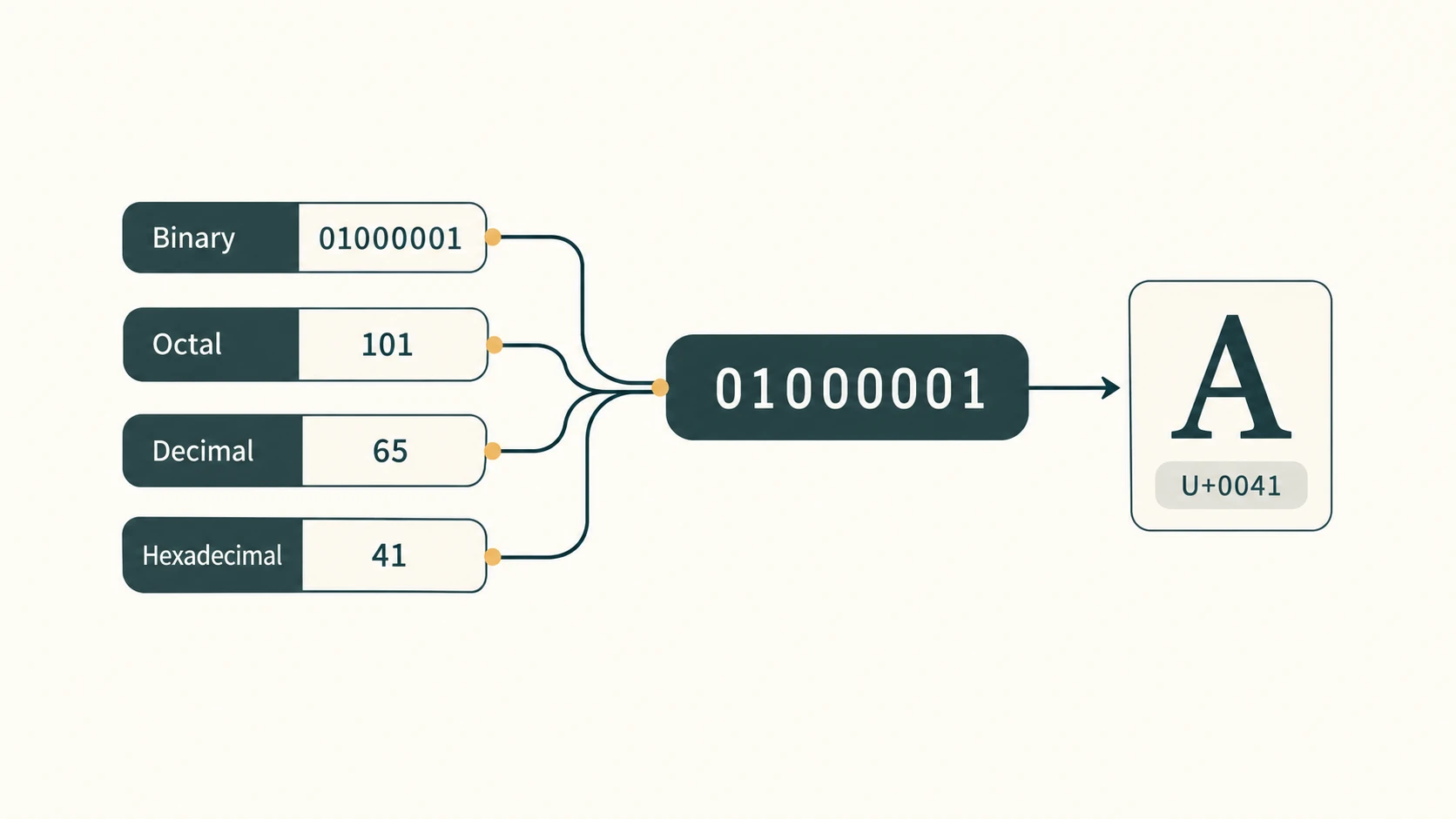
The big idea: Computers store patterns of bits, not human meanings. A number system tells us how a written sequence of digits represents a quantity; a character encoding tells us which number represents a letter, punctuation mark or writing-system symbol. The two ideas meet when text becomes a sequence of bytes.
NCERT alignment: Computer Science, Class XI, Chapter 2, “Encoding Schemes and Number System,” printed pages 27–44, Reprint 2026–27 (kecs102.pdf from the supplied NCERT archive). CBSE alignment: Class XI Computer Science (083), Unit 1, 2026–27. The syllabus expressly includes binary, octal, decimal and hexadecimal systems, conversions, ASCII, ISCII and Unicode (UTF-8/UTF-32). The book additionally explains UTF-16 and fractional conversions; these remain as NCERT learning material without being falsely presented as a separate syllabus unit.
Curriculum ID policy: This chapter covers the existing stable lessons C11-CSO-10 (number systems and conversions) and C11-CSO-11 (character encoding). To respect the master curriculum's lesson order, the detailed lessons appear number systems first, while the NCERT book introduces encoding first. A map below makes both sequences explicit. Neither Boolean logic nor another unit is silently merged into this chapter.
Exercises: All 17 NCERT end-of-chapter question numbers are addressed below, including all their subparts, the Hindi Unicode phrase and the practical typing task. Separate sections cover Activities 2.1–2.5 and three Think and Reflect prompts. The NCERT questions are referenced by number and briefly restated in original wording rather than transcribed at length. The explanations and additional practice are independently written.
What you should be able to do
After studying, you should be able to identify a radix, validate the digits of a number, expand positional notation using powers (including negative powers), convert whole and fractional numbers among bases 2, 8, 10 and 16, use 3-bit/4-bit groups reliably, distinguish ASCII/ISCII/Unicode and UTF encodings, find code points for a Hindi phrase, and answer every exercise question with independently checked numerical working.
At a glance — NCERT sections and curriculum mapping
| NCERT section | What the book covers | Existing lesson ID |
|---|---|---|
| 2.2.1–2.2.5 | Decimal, binary, octal and hexadecimal; bases and hexadecimal applications | C11-CSO-10 |
| 2.3.1–2.3.4 | Decimal/base conversions; binary grouping; fractional numbers | C11-CSO-10 |
| 2.1.1–2.1.3 | ASCII, ISCII, Unicode, Unicode encodings | C11-CSO-11 |
| Exercises 1–17; Activities 2.1–2.5 | Application, calculation, encoding and digital-language practice | Chapter 2 companion sections |
Lesson C11-CSO-10 — Number Systems and Conversions
1. Numbers have a base, not just digits
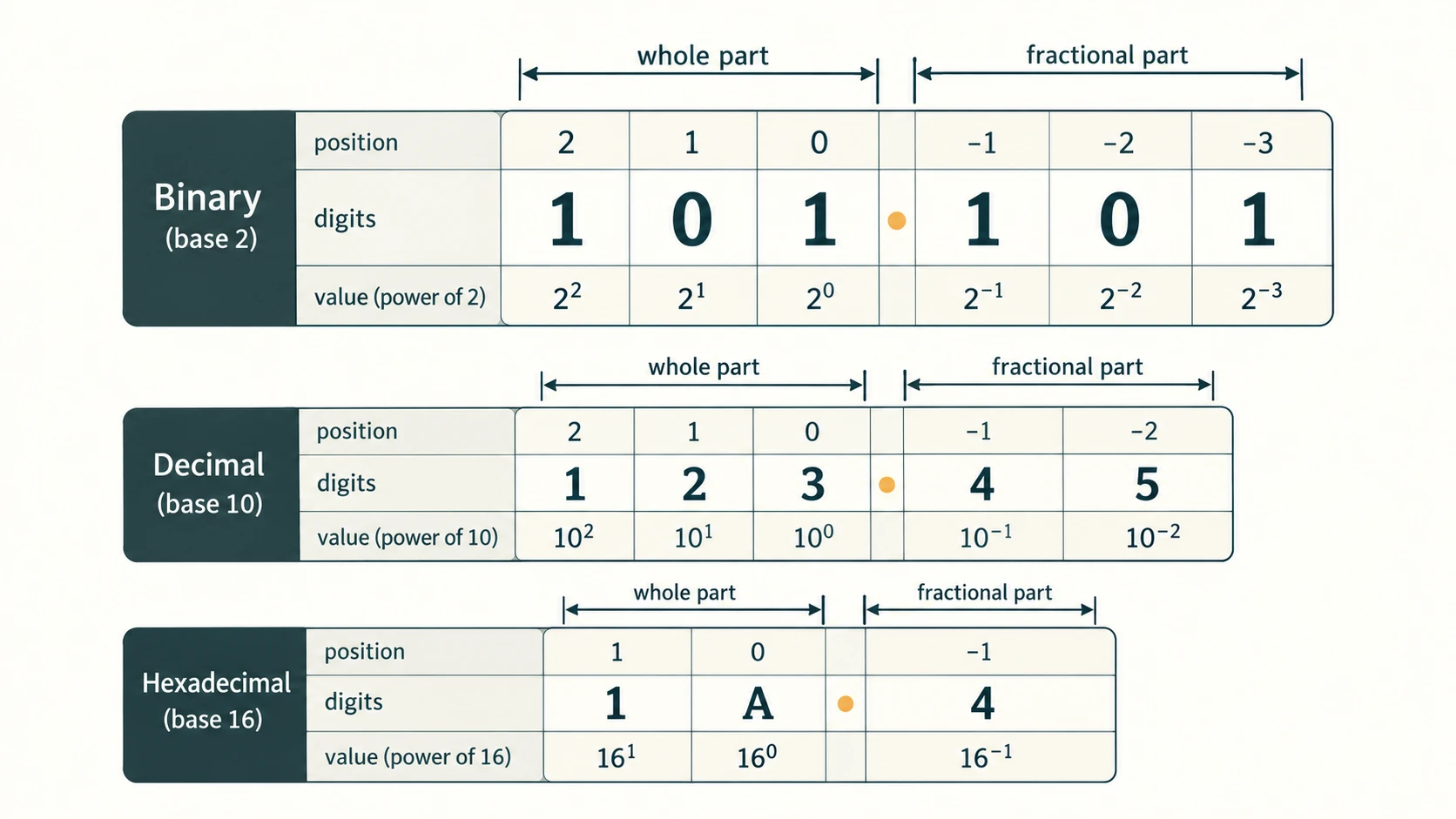
When we write 315, we normally mean three hundreds, one ten and five ones. This only works because we assume base 10. In base 8, (315)₈ means three sixty-fours, one eight and five ones, giving (205)₁₀. Thus, the same symbols can represent different values in different bases.
The base (or radix) is the number of distinct digits permitted in a positional system. Base b has digits representing values 0 through b − 1. Position zero is the rightmost whole-number digit, then position 1, 2 and so on to its left. Fractional positions are −1, −2 and so on to the right of the radix point.
| System | Base | Permitted symbols | Place values from the right | Example |
|---|---|---|---|---|
| Decimal | 10 | 0–9 | 1, 10, 100, ... | (345)₁₀ |
| Binary | 2 | 0–1 | 1, 2, 4, 8, ... | (1011)₂ |
| Octal | 8 | 0–7 | 1, 8, 64, ... | (345)₈ |
| Hexadecimal | 16 | 0–9, A–F | 1, 16, 256, ... | (A3F)₁₆ |
In hexadecimal: A = 10, B = 11, C = 12, D = 13, E = 14, F = 15; the letters are single digits, not variables. For example, F is valid in base 16 but invalid in base 8. A leading zero does not change the number's value, although it can be important when a fixed number of bits is required.
One universal formula: for a numeral whose digits are d_n ... d_1 d_0 . d_-1 d_-2 ... in base b, its decimal value is
Σ (digit value × b^(position)).
For (23.4)₈, this is 2 × 8¹ + 3 × 8⁰ + 4 × 8⁻¹ = 16 + 3 + 0.5 = (19.5)₁₀. Do not mistakenly read the hexadecimal symbol A as ten separate digits or treat the base marker as a multiplier of the entire number.
1.1 Why binary is especially useful
Physical electronic circuits can reliably distinguish two logic states, often described as low and high. We label these logical states 0 and 1. Real transistors and voltages are more complex than a light switch, but the two-state model explains binary representation. One binary digit is a bit. Three bits provide 2³ = 8 possible patterns; four bits provide 2⁴ = 16 patterns. That is why octal and hexadecimal are convenient abbreviations for long bit strings.
A byte contains eight bits; its possible patterns run from 00000000 to 11111111, representing 256 unsigned values (0–255). This does not mean that every character universally uses exactly one byte: that depends on the encoding scheme.
1.2 The power-of-two lookup table
| Power | Decimal | Power | Decimal |
|---|---|---|---|
| 2⁰ | 1 | 2⁶ | 64 |
| 2¹ | 2 | 2⁷ | 128 |
| 2² | 4 | 2⁸ | 256 |
| 2³ | 8 | 2⁹ | 512 |
| 2⁴ | 16 | 2¹⁰ | 1024 |
| 2⁵ | 32 | 2¹¹ | 2048 |
A fast check: (100000)₂ = (32)₁₀, not 100,000 decimal. (10)₈ = 8, (10)₁₆ = 16, and (10)₂ = 2.
2. Converting from another base to decimal
To convert from base b to decimal, multiply every digit by its positional power of b and add. This method works for whole numbers and fractions without repeated division.
Worked example A — binary: (101101)₂ = 1×2⁵ + 0×2⁴ + 1×2³ + 1×2² + 0×2¹ + 1×2⁰ = 32 + 8 + 4 + 1 = (45)₁₀.
Worked example B — octal: (257)₈ = 2×8² + 5×8 + 7 = 128 + 40 + 7 = (175)₁₀.
Worked example C — hexadecimal: (3A5)₁₆ = 3×16² + 10×16¹ + 5×16⁰ = 768 + 160 + 5 = (933)₁₀.
Worked example D — fraction: (110.101)₂ = (4 + 2) + (1/2 + 0/4 + 1/8) = (6.625)₁₀. The fractional powers descend as b⁻¹, b⁻², b⁻³, not as positive powers.
Common trap: (12)₂ is not a valid binary numeral because the digit 2 is not in the binary digit set. Check symbol validity before calculating.
3. Converting a decimal whole number to base b
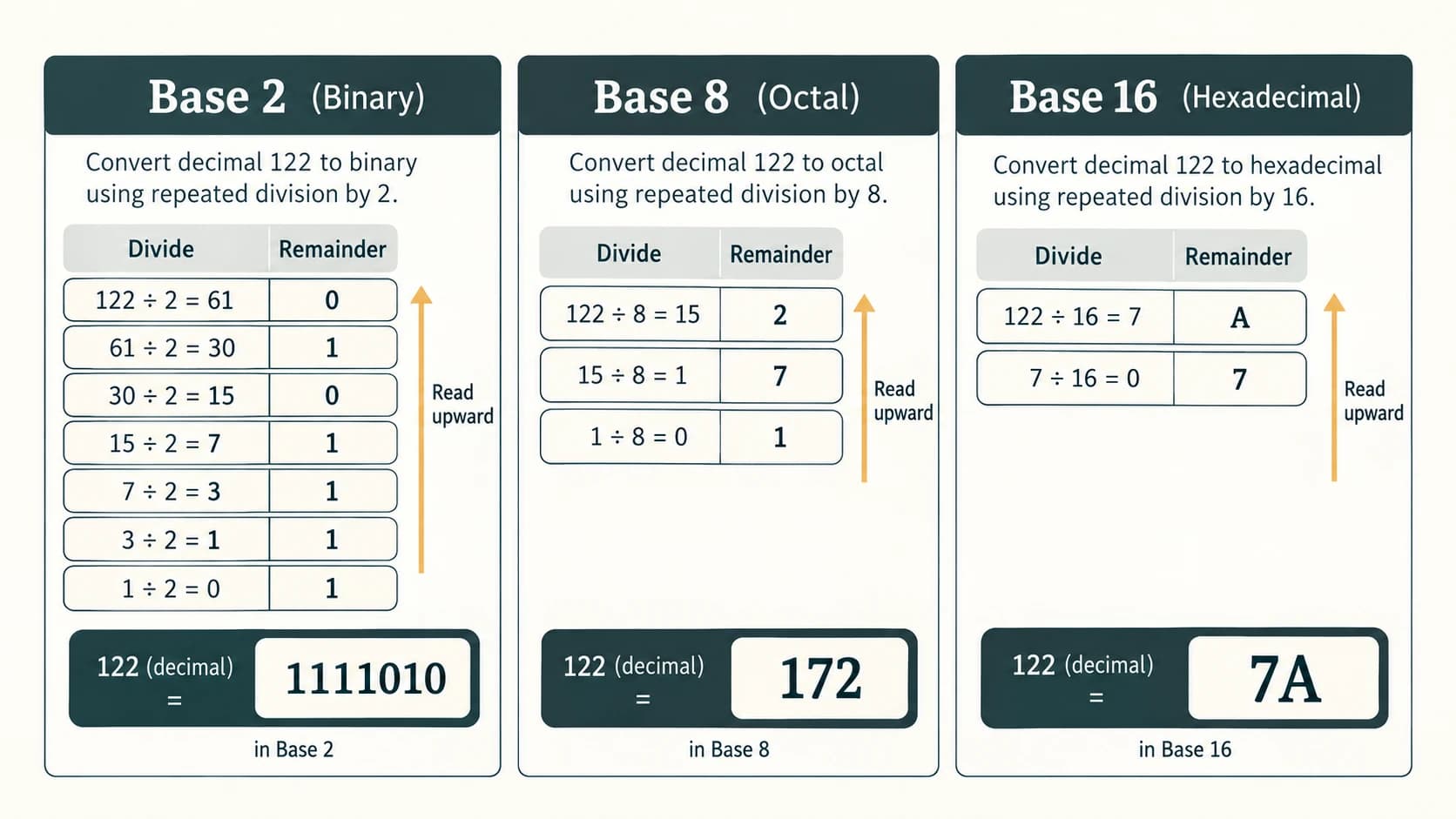
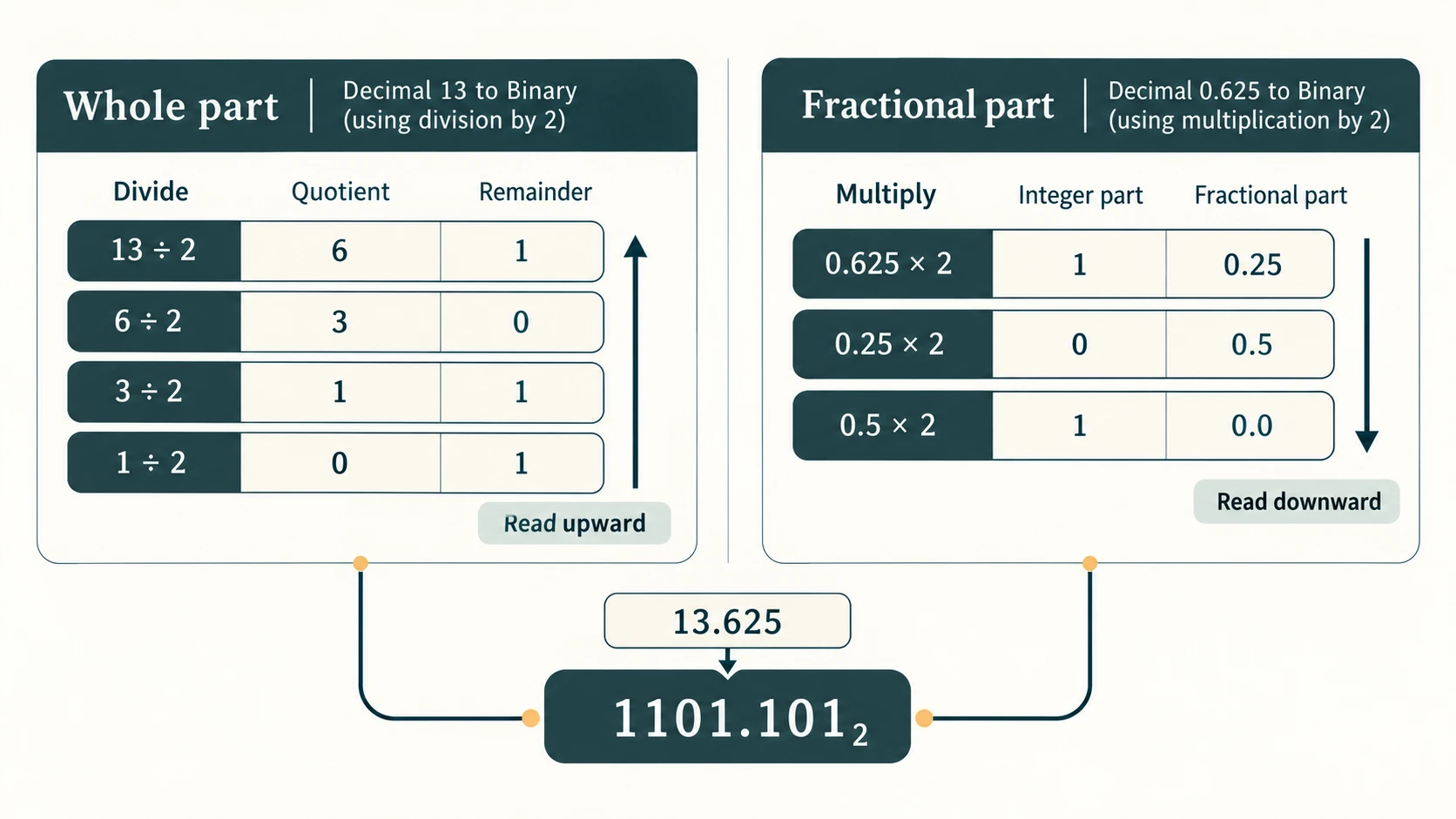
Use successive division by the destination base. At each step record the quotient and remainder; divide the quotient again until it is zero. The final digits are the remainders from bottom to top. Each remainder must be smaller than the base.
Worked example — (122)₁₀ to binary:
| Division | Quotient | Remainder |
|---|---|---|
| 122 ÷ 2 | 61 | 0 |
| 61 ÷ 2 | 30 | 1 |
| 30 ÷ 2 | 15 | 0 |
| 15 ÷ 2 | 7 | 1 |
| 7 ÷ 2 | 3 | 1 |
| 3 ÷ 2 | 1 | 1 |
| 1 ÷ 2 | 0 | 1 |
Reading upward: (122)₁₀ = (1111010)₂. Verify using 64 + 32 + 16 + 8 + 2 = 122.
The same logic in base 8 gives 122 ÷ 8 = 15 r2, 15 ÷ 8 = 1 r7, 1 ÷ 8 = 0 r1; so (122)₁₀ = (172)₈. In base 16: 122 ÷ 16 = 7 r10(A), 7 ÷ 16 = 0 r7; therefore (122)₁₀ = (7A)₁₆.
Why reversed order? The first remainder is the units digit (b⁰); the last remainder is the highest positional digit. If you write the first remainder first, you reverse place values.
4. Fast binary ↔ octal and binary ↔ hexadecimal conversions
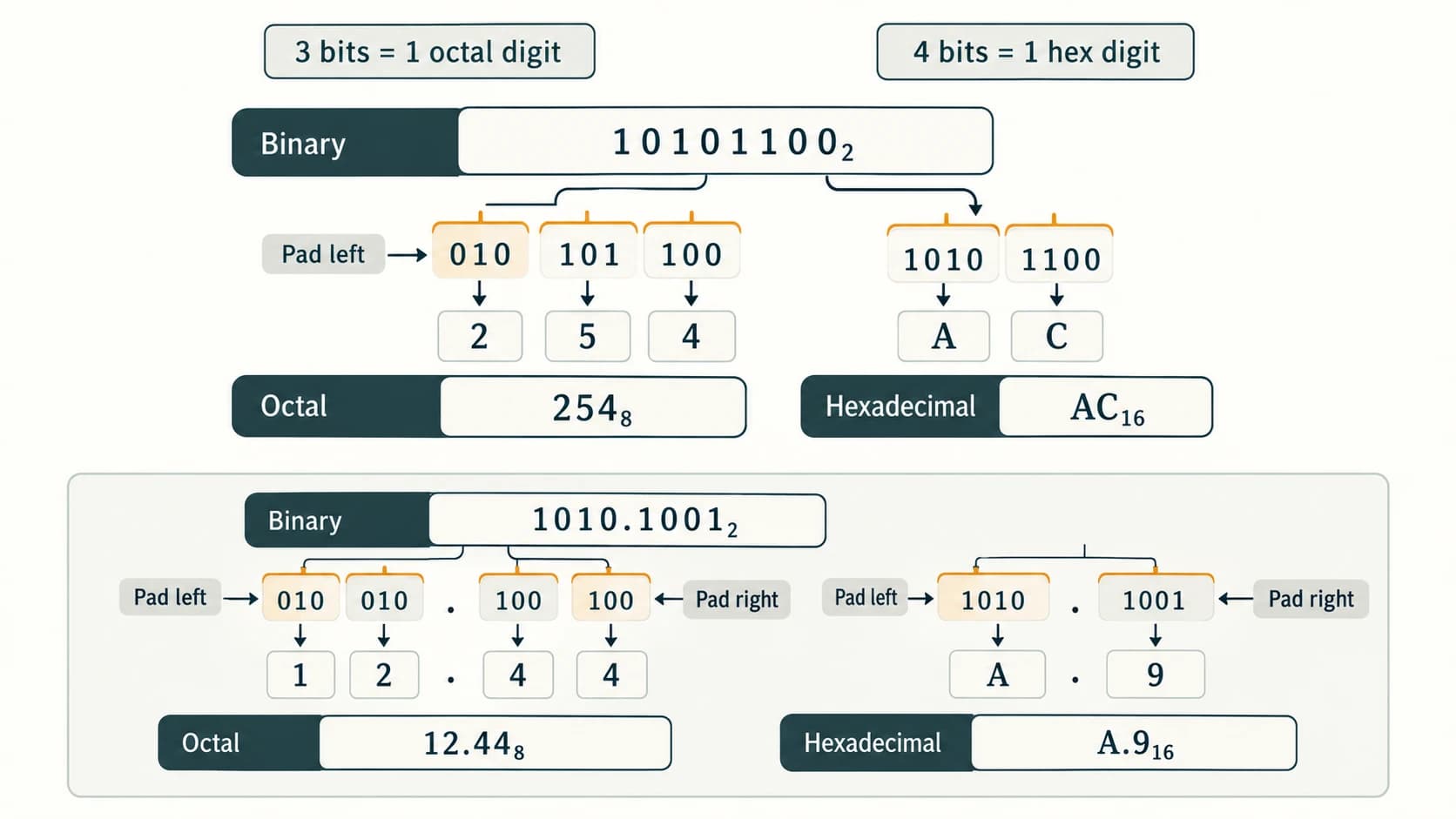
Instead of converting through decimal, use fixed-width groups:
- One octal digit ↔ 3 bits because
8 = 2³. - One hexadecimal digit ↔ 4 bits because
16 = 2⁴.
For the whole-number part, start grouping at the radix point (or right edge) and move left; pad zeros on the left only when needed. For the fractional part, start at the radix point and move right; pad zeros on the right only when needed. Padding zeroes does not change the value.
Whole-number demonstration: (10101100)₂ → 010 101 100 → (254)₈; grouping into four gives 1010 1100 → (AC)₁₆.
With a fraction: (1010.1001)₂ → octal 001 010 . 100 100 → (12.44)₈; hexadecimal 1010 . 1001 → (A.9)₁₆. Group each side of the point independently: grouping straight across the point produces a wrong answer.
Backwards: (705)₈ → 111 000 101 → (111000101)₂; (23D)₁₆ → 0010 0011 1101 → (001000111101)₂. You may drop redundant leading zeros when interpreting the value, but preserve them when a specified 12-bit or 16-bit width is required.
5. Fractional conversions — two different algorithms
When converting to decimal, use powers such as 2⁻¹ = 1/2, 8⁻² = 1/64, and 16⁻¹ = 1/16.
When converting a decimal fraction to another base, repeatedly multiply the fractional remainder by the destination base. At each step, take the integer part of the product as the next fractional digit. Continue with its remaining fractional part. Read the extracted integer digits top to bottom.
Example: (0.25)₁₀ to binary
0.25 × 2 = 0.50→ next digit0, fractional remainder.50.0.50 × 2 = 1.00→ next digit1, fractional remainder0.- Therefore
(0.25)₁₀ = (0.01)₂exactly.
Example: (13.625)₁₀ to binary
- Whole part:
13 = 1101₂. - Fraction:
.625×2 = 1.25→1;.25×2 = .5→0;.5×2 = 1.0→1. - Therefore
(13.625)₁₀ = (1101.101)₂.
Repeating fractions are important. The decimal number 0.675 does not have a finite binary expansion. The textbook shows an initial prefix .1010110, but the value is not exactly equal to that finite prefix. In a solution, write ≈, show a chosen number of digits, or indicate repetition. Its hexadecimal form is exactly (0.A(C))₁₆, meaning A followed by indefinitely repeating C digits; (0.AC)₁₆ is only a rounded/truncated prefix and not an exact equality.
A finite base-b representation of a reduced fraction p/q is possible precisely when every prime factor of q divides b. So 1/8 terminates in binary, while 1/10 repeats in binary. This is enrichment useful for checking precision, not a requirement to memorise advanced number theory.
6. Hexadecimal in real life
A colour component uses one byte (0–255). A familiar RGB colour may be written as #RRGGBB, two hex digits per component. For example, red (255,0,0) is #FF0000; yellow (255,255,0) is #FFFF00, and dark grey (128,128,128) is #808080. Six hex digits describe 24 bits, not six bytes.
Memory addresses, debugging tools and byte dumps also use hex because a group of four bits fits one hex character. 1100 0000 1111 0001₂ reads concisely as C0F1₁₆. The format of modern addresses depends on the system; the chapter's 16/32-bit address illustrations should not be treated as universal limits.
NCERT accuracy note — Figure 2.7: The textbook's worked line for (65)₁₀ shows (14)₁₆, although its division remainders are 1 then 4. Those remainders must be read upward, producing (41)₁₆ (4×16 + 1 = 65). This resource uses the mathematically correct result, explicitly marking the apparent printing error rather than copying it. A separate small arithmetic typo in Example 2.18 shows 0.156225; the correct fractional sum is 0.15625, giving (605.12)₈ = (389.15625)₁₀.
7. Quick decision guide and exam checks
| You are given | You want | Reliable operation |
|---|---|---|
| Binary/octal/hex number | Decimal | Expand digits using positional powers |
| Decimal whole number | Binary/octal/hex | Divide repeatedly by target base; remainders upward |
| Decimal fractional part | Binary/octal/hex | Multiply repeatedly by target base; integer digits downward |
| Binary (with/without fraction) | Octal | Group in threes independently on either side of point |
| Binary (with/without fraction) | Hexadecimal | Group in fours independently on either side of point |
| Octal or hex | Binary | Replace each digit with fixed 3-bit or 4-bit group |
Before submitting: confirm every digit is valid for its base; show which algorithm you chose; mark an approximation if the expansion repeats; check by reversing the conversion or evaluating positional powers; retain fractional trailing zeros when needed for grouping, not to change the value.
Lesson C11-CSO-11 — Character Encoding: ASCII, ISCII and Unicode
1. A character is not a bit pattern until it is encoded
When you press the letter A, software associates that character with a numerical value under a defined standard. In ASCII, capital A has decimal code 65, hexadecimal 41, and seven-bit binary 1000001. The computer stores a binary representation of that code, not the letter-shaped image of an A.
There are three distinct layers to keep apart:
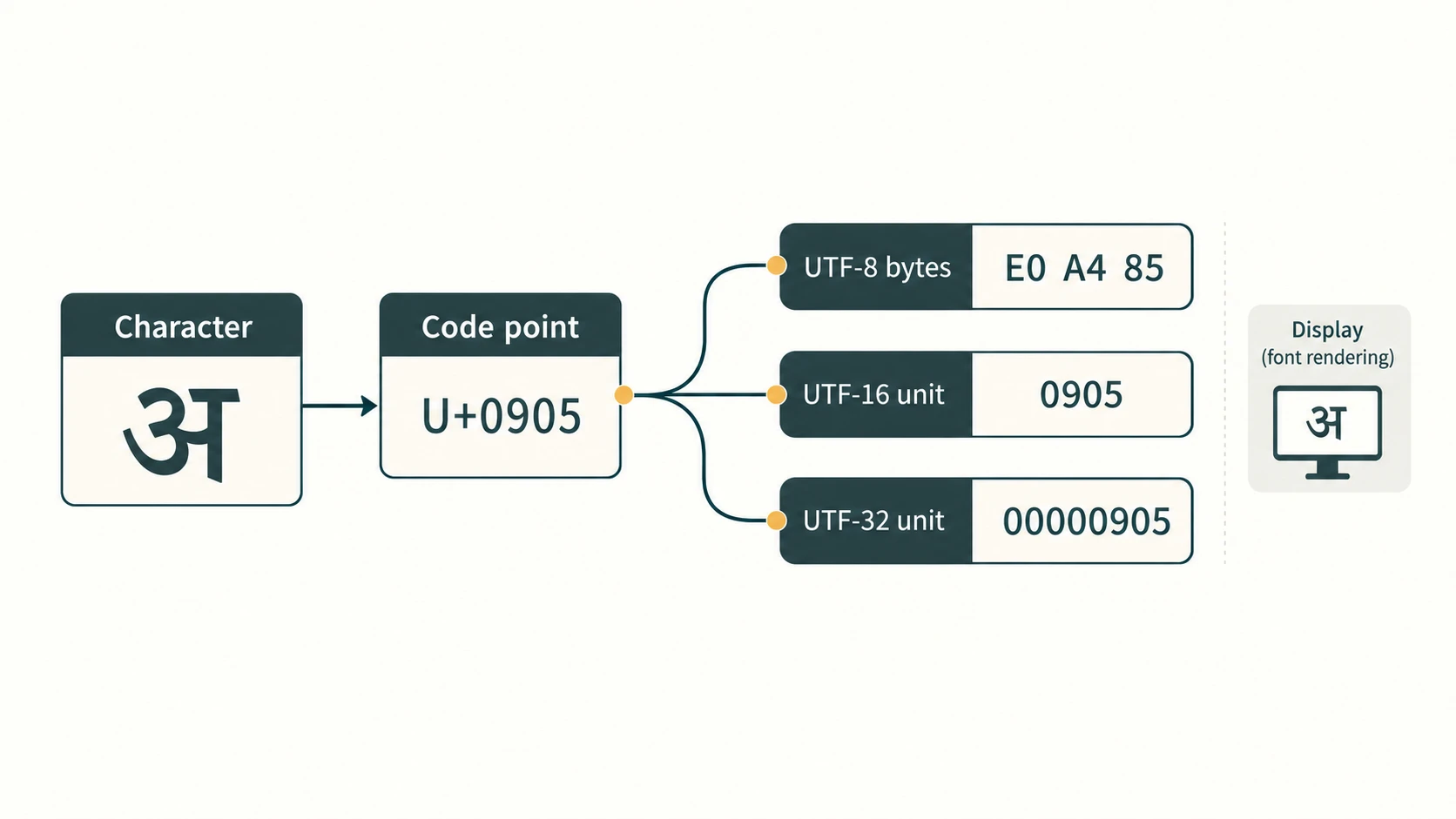
- Character: an abstract textual item, such as
A,अ, or a punctuation mark. - Code point: a number assigned to the character within a coding standard; for Unicode
अis U+0905. - Encoded bytes: the actual byte sequence obtained under a chosen encoding such as UTF-8 or UTF-16.
A font determines how characters look when displayed; an input method/keyboard layout lets you type them; an encoding defines their machine representation. Installing a beautiful font alone does not magically convert the bytes of an older non-Unicode document into Unicode.
2. ASCII: the classic seven-bit code
ASCII means American Standard Code for Information Interchange. Its core scheme assigns 128 codes (0–127), representable using seven bits. Printable characters, control codes and whitespace have assigned values. ASCII treats lowercase and uppercase letters differently: A=65, Z=90, a=97, z=122; 0=48, 9=57; space =32.
| Character | Decimal ASCII | Seven-bit binary | Hex code |
|---|---|---|---|
| Space | 32 | 0100000 | 20 |
0 | 48 | 0110000 | 30 |
9 | 57 | 0111001 | 39 |
A | 65 | 1000001 | 41 |
D | 68 | 1000100 | 44 |
Z | 90 | 1011010 | 5A |
a | 97 | 1100001 | 61 |
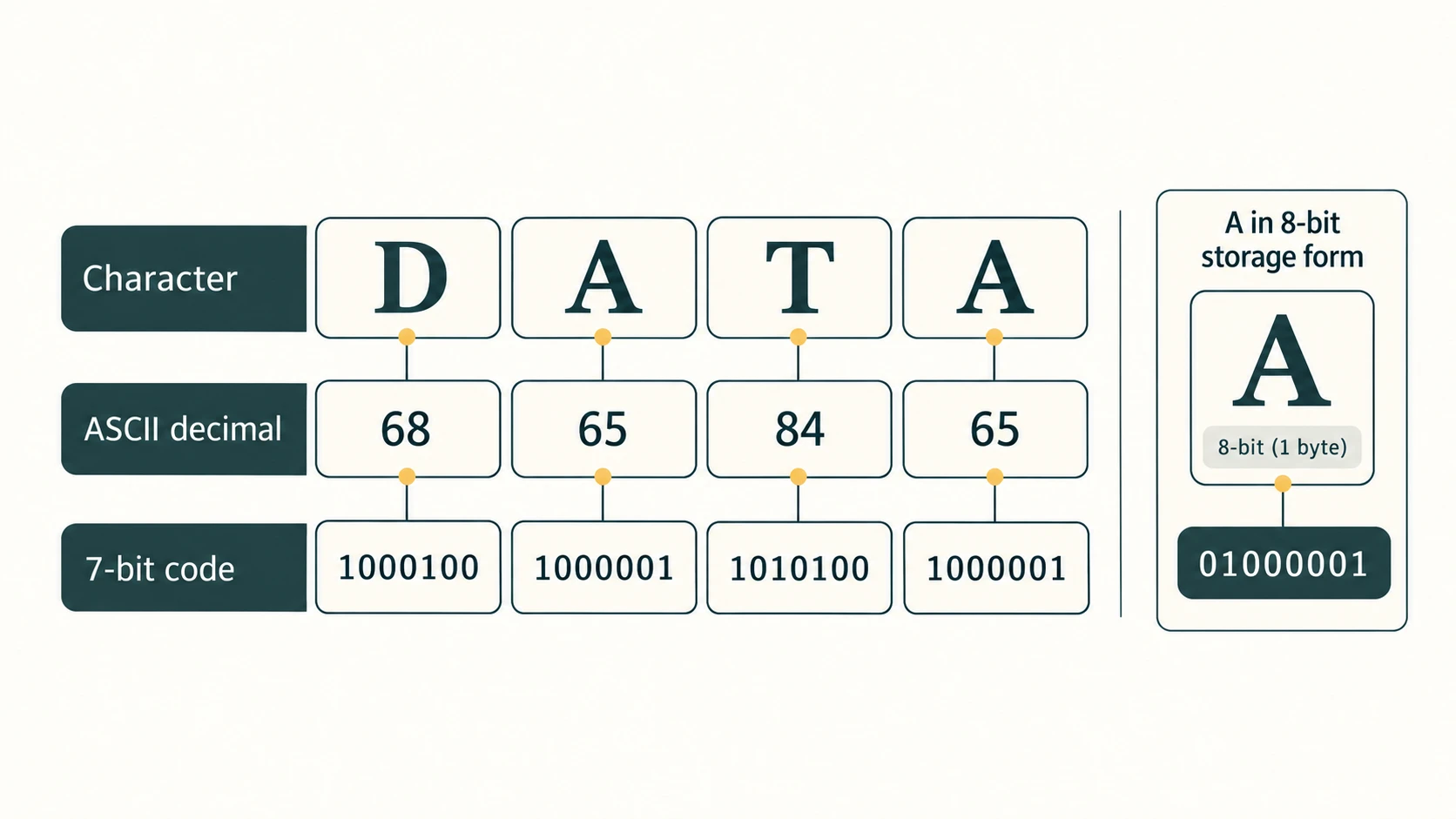
Worked example — DATA: D → 68 → 1000100, A → 65 → 1000001, T → 84 → 1010100, A → 65 → 1000001. The four seven-bit groups can be shown separately for a textbook exercise; a modern system commonly stores ASCII-range characters as 8-bit bytes with a leading zero, for example A = 01000001 in UTF-8. Do not confuse 7-bit ASCII coding with an 8-bit storage unit.
Exam trap: the numeral 5 is not ASCII code 5. The character '5' has ASCII code 53 and seven-bit binary 0110101. ASCII does not cover Devanagari or all the world's scripts.
3. ISCII: an Indian-script encoding scheme
ISCII means Indian Script Code for Information Interchange. It was designed to help represent Indian scripts using a shared 8-bit framework, with ASCII-compatible lower values and script-specific higher values. The textbook explains it using the general count 2⁸ = 256 code combinations; not all these 256 slots directly mean 256 separately displayable letters in every Indian language, because writing systems can combine characters and encoding also needs controls and special codes.
Its historical importance is in giving Indian languages a systematic digital coding model. For contemporary multilingual documents, Unicode is preferred for interoperable text. ISCII and Unicode are not interchangeable byte mappings; conversion from old data requires proper encoding interpretation.
4. Unicode: code points for many writing systems
Unicode defines consistent characters and their code points across scripts and platforms. Examples: Latin A is U+0041, Devanagari अ is U+0905, ह is U+0939, and the ordinary space is U+0020. Unicode contains many scripts, not just English and Hindi.
UTF means Unicode Transformation Format: a way to encode Unicode code points in bytes or code units. A code point such as U+0905 is usually written in hexadecimal; it is not the same as its UTF-8 bytes.
| Encoding | Code-unit width | How length varies | Typical example |
|---|---|---|---|
| UTF-8 | 8 bits | 1–4 bytes per code point | A → 41 (hex byte); अ → E0 A4 85 |
| UTF-16 | 16 bits | 1 or 2 code units per code point | अ → one unit 0905 (shown as numeric value) |
| UTF-32 | 32 bits | One 32-bit code unit per code point | अ → numeric unit 00000905 |
For UTF-16/UTF-32, actual byte order depends on the chosen endianness; table values above are code-unit values, not a promise about byte order in a file. Modern Unicode covers code points beyond U+FFFF, where UTF-16 uses a surrogate pair. The textbook's brief statement that Unicode is a superset of ASCII is useful at the character-assignment level: Unicode U+0000 through U+007F match ASCII assignments, and their UTF-8 bytes match ASCII bytes. That does not mean all UTF encodings produce identical byte strings.
Why UTF-32 usually consumes more memory: it allocates 32 bits to each code point, whereas UTF-8 uses as few as 8 bits and UTF-16 commonly uses 16 bits for a code point in the Basic Multilingual Plane. Do not claim UTF-32 is always larger for every possible character: some supplementary characters occupy 4 bytes in all three encodings. Rendering clusters and font files create additional real-world complexities outside the storage comparison.
Hindi character sequences may combine. The visible unit कि, for example, is written using code points क (U+0915) plus vowel sign ि (U+093F). Treating a displayed syllable as always one Unicode value is wrong. In the Chapter 2 Hindi exercise we list every Unicode code point, including spaces.
5. Typing Indian languages in practice
A workable Unicode typing setup has an input method, Unicode-compatible software, and a font supporting the script. Many operating systems already provide the necessary shaping and basic fonts. On a supported system:
- Open language/keyboard settings and add an Indian-language keyboard or phonetic/transliteration input method.
- Switch to that layout; open a Unicode-aware text editor.
- Type and check the expected letters, signs, conjuncts and spaces.
- Choose a script-supporting font if the default does not display the text correctly. Font examples include Noto Sans Devanagari, Mangal, Noto Sans Bengali, Noto Sans Tamil, Noto Sans Gurmukhi, Noto Serif Devanagari and Lohit fonts where installed.
- Save in UTF-8 if the application provides an encoding choice; reopen, copy to another app, and verify characters remain intact.
Avoid a false promise: names, menu paths, keyboard availability and bundled fonts vary by Windows/macOS/Linux/mobile versions. A font's presence or script label does not prove that a device has that exact layout installed. Verify on your own device.
6. Comparing the schemes accurately
| Feature | ASCII | ISCII | Unicode |
|---|---|---|---|
| Intended coverage | Core English-oriented characters and controls | Indian-script representation | Broad international script coverage |
| Common textbook bit framing | 7 bits; 128 assignments | 8-bit scheme | Code points represented via UTF-8, UTF-16 or UTF-32 |
| Example | A → 65 | Historical Indian-script codes | अ → U+0905 |
| Current general-purpose multilingual documents | Too limited on its own | Legacy/historical interoperability | Preferred when applications support it |
Important distinction: the term cipher in the chapter's introductory margin describes a coded representation, but character encoding is not encryption: encoding is designed to represent text consistently, not to hide a secret message from unauthorised readers. Anyone with the encoding definition can decode it.
7. One complete picture
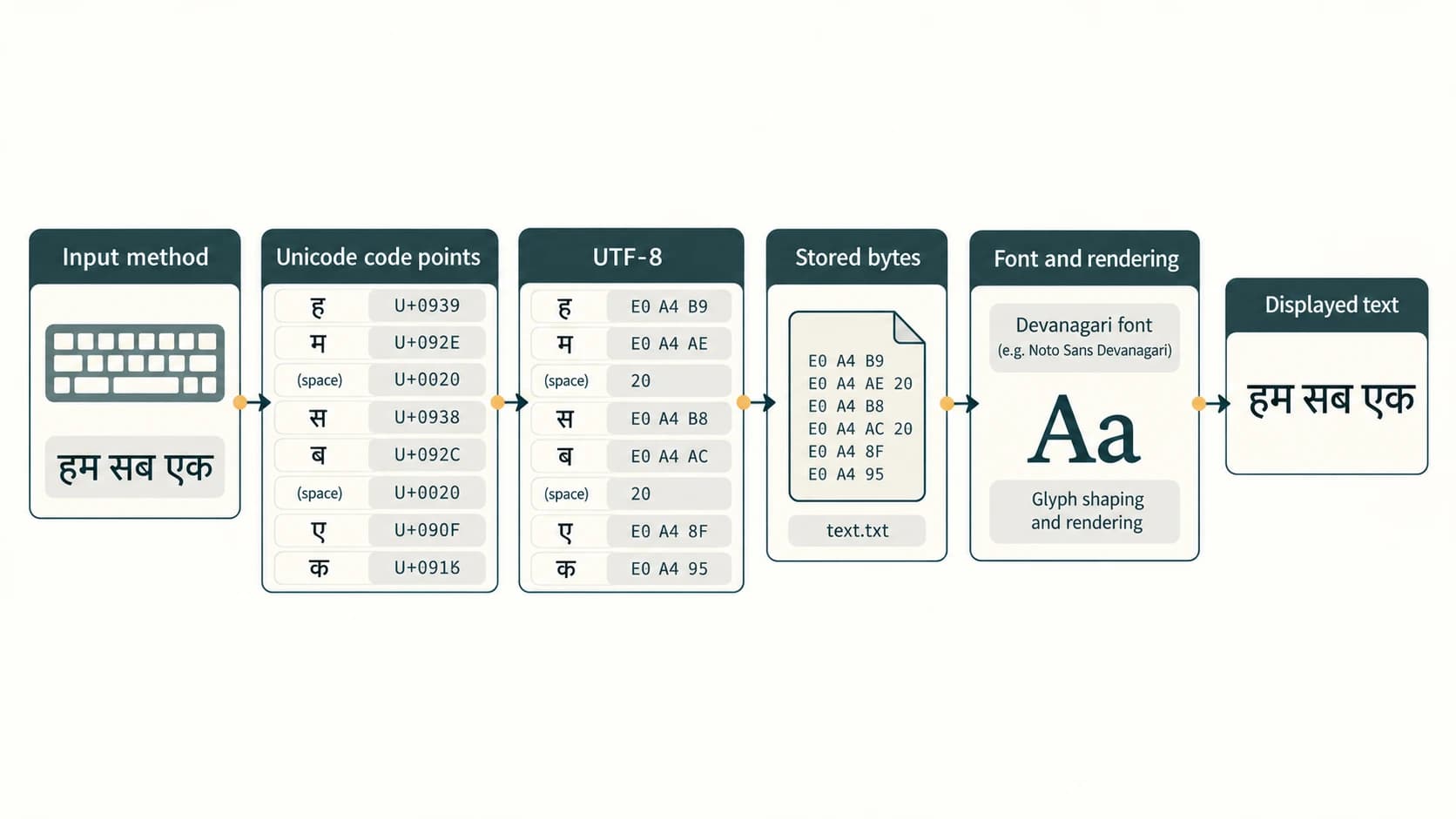
Imagine a student types the Hindi phrase हम सब एक in a note. The input method produces a Unicode character sequence; each code point has an assigned number; UTF-8 turns those numbers into byte sequences; storage hardware retains the bytes. When a reader opens the file, the decoder reconstructs the Unicode sequence, and the text rendering system uses an available font to show the correct shapes. If bytes are decoded using the wrong scheme, text may look like meaningless symbols even though the stored bits themselves are unchanged.
Chapter lesson checkpoint
Explain in your own words (a) why (3A)₁₆ is valid but (3A)₈ is not, (b) why 1010.1₂ is 10.5₁₀ rather than 1010.1₁₀, (c) why a Unicode font is not the same as a Unicode encoding, (d) why four binary digits map to one hexadecimal digit, and (e) when a recurring decimal-to-binary fraction requires an approximation sign. Suggested answers are demonstrated below; do not memorise a table without understanding the method.
NCERT Chapter 2 — Complete End-of-Chapter Exercise Solutions
How to use these answers: Match the question number and roman-letter subpart to your NCERT book (pages 43–44). The short question summaries here are independently paraphrased. For every conversion, we supply both the answer and the mechanism (positional terms, division remainders or fixed-width binary groups). A zero-padded binary group is retained when it communicates a specific octal/hex digit; redundant leading zeros may be removed for an ordinary numeric value. Decimal-fraction results are exact unless explicitly marked approximate.
Exercise 1 — Identify the three requested bases
Binary uses base 2, octal base 8, and hexadecimal base 16. Their digit sets are respectively {0,1}, {0,1,2,3,4,5,6,7} and {0–9,A–F}. The base tells you how many symbols are possible at one position; it is not the number of bits occupied by a written numeral.
Exercise 2 — Expand the encoding abbreviations
ASCII = American Standard Code for Information Interchange. ISCII = Indian Script Code for Information Interchange. ASCII is a seven-bit character-code standard; ISCII is an eight-bit Indian-script coding scheme. These are code standards, not number-system bases.
Exercise 3 — Six conversions to decimal or binary
(i) (514)_8 → decimal. 4×8^0 + 1×8^1 + 5×8^2 = (332)_10. The powers start with 0 at the rightmost digit; letters A–F must first be read as decimal 10–15.
(ii) (220)_8 → binary. Replace each octal symbol by exactly three bits: 010 010 000 → (10010000)_2. Leading zeros are optional in the final numerical value, but each three-bit group is deliberate.
(iii) (76F)_16 → decimal. F×16^0 + 6×16^1 + 7×16^2 = (1903)_10. The powers start with 0 at the rightmost digit; letters A–F must first be read as decimal 10–15.
(iv) (4D9)_16 → decimal. 9×16^0 + D×16^1 + 4×16^2 = (1241)_10. The powers start with 0 at the rightmost digit; letters A–F must first be read as decimal 10–15.
(v) (11001010)_2 → decimal. 0×2^0 + 1×2^1 + 0×2^2 + 1×2^3 + 0×2^4 + 0×2^5 + 1×2^6 + 1×2^7 = (202)_10. The powers start with 0 at the rightmost digit; letters A–F must first be read as decimal 10–15.
(vi) (1010111)_2 → decimal. 1×2^0 + 1×2^1 + 1×2^2 + 0×2^3 + 1×2^4 + 0×2^5 + 1×2^6 = (87)_10. The powers start with 0 at the rightmost digit; letters A–F must first be read as decimal 10–15.
Exercise 4 — Six whole-number conversions from decimal
(i) 54 (decimal) → base 2. Quotient/remainder trace: 54 ÷ 2 = 27 remainder 0; 27 ÷ 2 = 13 remainder 1; 13 ÷ 2 = 6 remainder 1; 6 ÷ 2 = 3 remainder 0; 3 ÷ 2 = 1 remainder 1; 1 ÷ 2 = 0 remainder 1. Read remainders from last to first: (110110)_2. Check: the positional sum of the digits equals 54.
(ii) 120 (decimal) → base 2. Quotient/remainder trace: 120 ÷ 2 = 60 remainder 0; 60 ÷ 2 = 30 remainder 0; 30 ÷ 2 = 15 remainder 0; 15 ÷ 2 = 7 remainder 1; 7 ÷ 2 = 3 remainder 1; 3 ÷ 2 = 1 remainder 1; 1 ÷ 2 = 0 remainder 1. Read remainders from last to first: (1111000)_2. Check: the positional sum of the digits equals 120.
(iii) 76 (decimal) → base 8. Quotient/remainder trace: 76 ÷ 8 = 9 remainder 4; 9 ÷ 8 = 1 remainder 1; 1 ÷ 8 = 0 remainder 1. Read remainders from last to first: (114)_8. Check: the positional sum of the digits equals 76.
(iv) 889 (decimal) → base 8. Quotient/remainder trace: 889 ÷ 8 = 111 remainder 1; 111 ÷ 8 = 13 remainder 7; 13 ÷ 8 = 1 remainder 5; 1 ÷ 8 = 0 remainder 1. Read remainders from last to first: (1571)_8. Check: the positional sum of the digits equals 889.
(v) 789 (decimal) → base 16. Quotient/remainder trace: 789 ÷ 16 = 49 remainder 5; 49 ÷ 16 = 3 remainder 1; 3 ÷ 16 = 0 remainder 3. Read remainders from last to first: (315)_16. Check: the positional sum of the digits equals 789.
(vi) 108 (decimal) → base 16. Quotient/remainder trace: 108 ÷ 16 = 6 remainder C; 6 ÷ 16 = 0 remainder 6. Read remainders from last to first: (6C)_16. Check: the positional sum of the digits equals 108.
Exercise 5 — Four octal numbers to decimal (including a fraction)
(i) (145)_8. 5×8^0 + 4×8^1 + 1×8^2 = (101)_10.
(ii) (6760)_8. 0×8^0 + 6×8^1 + 7×8^2 + 6×8^3 = (3568)_10.
(iii) (455)_8. 5×8^0 + 5×8^1 + 4×8^2 = (301)_10.
(iv) (10.75)_8. 0×8^0 + 1×8^1 + 7×8^−1 + 5×8^−2 = (8.953125)_10. The places to the right of the point use 8⁻¹ and 8⁻², not positive powers.
Exercise 6 — Four decimal numbers to hexadecimal (including a fraction)
(i) 548 (decimal) → hexadecimal. 548 ÷ 16 = 34 remainder 4; 34 ÷ 16 = 2 remainder 2; 2 ÷ 16 = 0 remainder 2; write remainders upward. Therefore (224)_16 (exact).
(ii) 4052 (decimal) → hexadecimal. 4052 ÷ 16 = 253 remainder 4; 253 ÷ 16 = 15 remainder D; 15 ÷ 16 = 0 remainder F; write remainders upward. Therefore (FD4)_16 (exact).
(iii) 58 (decimal) → hexadecimal. 58 ÷ 16 = 3 remainder A; 3 ÷ 16 = 0 remainder 3; write remainders upward. Therefore (3A)_16 (exact).
(iv) 100.25 (decimal) → hexadecimal. Whole part 100 ÷ 16 = 6 remainder 4 → 64 and fractional part .25 × 16 = 4 → .4. Therefore (64.4)_16 (exact).
Exercise 7 — Four hexadecimal numbers to decimal (including a fraction)
(i) (4A2)_16. 2×16^0 + A×16^1 + 4×16^2 = (1186)_10.
(ii) (9E1A)_16. A×16^0 + 1×16^1 + E×16^2 + 9×16^3 = (40474)_10.
(iii) (6BD)_16. D×16^0 + B×16^1 + 6×16^2 = (1725)_10.
(iv) (6C.34)_16. C×16^0 + 6×16^1 + 3×16^−1 + 4×16^−2 = (108.203125)_10. The hexadecimal fractional places are sixteenths and 256ths.
Exercise 8 — Convert four binary numbers to both octal and hexadecimal
(i) (1110001000)_2. Octal: form 3-bit groups 001 110 001 000 → (1610)_8. Hexadecimal: form 4-bit groups 0011 1000 1000 → (388)_16. Pad on the left of the integer when necessary.
(ii) (110110101)_2. Octal: form 3-bit groups 110 110 101 → (665)_8. Hexadecimal: form 4-bit groups 0001 1011 0101 → (1B5)_16. Pad on the left of the integer when necessary.
(iii) (1010100)_2. Octal: form 3-bit groups 001 010 100 → (124)_8. Hexadecimal: form 4-bit groups 0101 0100 → (54)_16. Pad on the left of the integer when necessary.
(iv) (1010.1001)_2. Octal: form 3-bit groups 001 010 . 100 100 → (12.44)_8. Hexadecimal: form 4-bit groups 1010 . 1001 → (A.9)_16. For the fractional side, grouping starts just after the point; the final padded zeros contribute no value.
Exercise 9 — Four octal numbers to binary
(i) (2306)_8. 3 bits per octal digit: 010 011 000 110 → (10011000110)_2. An optional leading zero can be removed without changing the value.
(ii) (5610)_8. 3 bits per octal digit: 101 110 001 000 → (101110001000)_2. An optional leading zero can be removed without changing the value.
(iii) (742)_8. 3 bits per octal digit: 111 100 010 → (111100010)_2. An optional leading zero can be removed without changing the value.
(iv) (65.203)_8. 3 bits per octal digit: 110 101 . 010 000 011 → (110101.010000011)_2. The fractional groups are copied in order after the point; trailing zeros may be dropped when writing a value but kept here for one-to-one digit correspondence.
Exercise 10 — Four hexadecimal numbers to binary
(i) (4026)_16. 4 bits per hexadecimal digit: 0100 0000 0010 0110 → (100000000100110)_2. A hexadecimal 0 maps to 0000; do not omit interior zero groups.
(ii) (BCA1)_16. 4 bits per hexadecimal digit: 1011 1100 1010 0001 → (1011110010100001)_2. A hexadecimal 0 maps to 0000; do not omit interior zero groups.
(iii) (98E)_16. 4 bits per hexadecimal digit: 1001 1000 1110 → (100110001110)_2. A hexadecimal 0 maps to 0000; do not omit interior zero groups.
(iv) (132.45)_16. 4 bits per hexadecimal digit: 0001 0011 0010 . 0100 0101 → (100110010.01000101)_2. The fractional groups remain four bits each, including their final zeroes.
Exercise 11 — Encode HOTS, Main and CaSe in seven-bit ASCII
The letter case matters. Consult the standard ASCII numerical assignments, then convert each decimal code to a seven-bit binary value. The spaces between groups in the following tables mark character boundaries; they are not extra characters in the source words.
(i) HOTS
| Character | Decimal ASCII | Hex | 7-bit binary |
|---|---|---|---|
H | 72 | 48 | 1001000 |
O | 79 | 4F | 1001111 |
T | 84 | 54 | 1010100 |
S | 83 | 53 | 1010011 |
Full seven-bit sequence (grouped by character): 1001000 1001111 1010100 1010011.
(ii) Main
| Character | Decimal ASCII | Hex | 7-bit binary |
|---|---|---|---|
M | 77 | 4D | 1001101 |
a | 97 | 61 | 1100001 |
i | 105 | 69 | 1101001 |
n | 110 | 6E | 1101110 |
Full seven-bit sequence (grouped by character): 1001101 1100001 1101001 1101110.
(iii) CaSe
| Character | Decimal ASCII | Hex | 7-bit binary |
|---|---|---|---|
C | 67 | 43 | 1000011 |
a | 97 | 61 | 1100001 |
S | 83 | 53 | 1010011 |
e | 101 | 65 | 1100101 |
Full seven-bit sequence (grouped by character): 1000011 1100001 1010011 1100101.
Exercise 12 — Base corresponding to sixteen hexadecimal symbols
Base 16. Sixteen distinct literals are used: 0–9 and A–F. A hexadecimal digit F denotes value 15; when adding 1 to F in hexadecimal, the resulting numeral is (10)₁₆, equal to (16)₁₀.
Exercise 13 — General base with B unique symbols
If a positional number system has B distinct digit symbols and meets the usual base-system conventions, its radix is B. It can have B possible values at one digit position and B² possible two-digit patterns (including leading zero). Example: if B = 8, the system is octal, with symbols 0–7.
Exercise 14 — Write the Hindi phrase as Unicode hex values and binary
The phrase shown in the textbook is हम सब एक. Here we use Unicode code-point values in hexadecimal, normally written as U+XXXX, and show the corresponding 16-bit numeric binary value for each code point. This is a representation of the Unicode scalar values, not a claim that these are the UTF-8 bytes. Spaces are included because they are characters too.
| Order | Character | Meaning / role | Unicode code point (hex) | 16-bit value (binary) |
|---|---|---|---|---|
| 1 | ह | Devanagari letter ha | U+0939 | 0000100100111001 |
| 2 | म | Devanagari letter ma | U+092E | 0000100100101110 |
| 3 | SPACE | WORD SPACE | U+0020 | 0000000000100000 |
| 4 | स | Devanagari letter sa | U+0938 | 0000100100111000 |
| 5 | ब | Devanagari letter ba | U+092C | 0000100100101100 |
| 6 | SPACE | WORD SPACE | U+0020 | 0000000000100000 |
| 7 | ए | Devanagari letter e | U+090F | 0000100100001111 |
| 8 | क | Devanagari letter ka | U+0915 | 0000100100010101 |
Compact sequence in hexadecimal: 0939 092E 0020 0938 092C 0020 090F 0915. Compact sequence in binary: 0000100100111001 0000100100101110 0000000000100000 0000100100111000 0000100100101100 0000000000100000 0000100100001111 0000100100010101. There are 8 Unicode code points, including the two space characters. For actual UTF-8 encoding, the code points are transformed into bytes of possibly different lengths. The phrase is not representable entirely in ASCII.
Optional byte-level verification (beyond the prompt): UTF-8 bytes grouped by character are E0 A4 B9 | E0 A4 AE | 20 | E0 A4 B8 | E0 A4 AC | 20 | E0 A4 8F | E0 A4 95. The Devanagari code points shown above require three UTF-8 bytes each; each ASCII space occupies one byte. This distinction prevents the common mistake of writing 0939 as if it were two ready-to-store UTF-8 bytes.
Exercise 15 — Benefits of authoring Indian-language text with Unicode
The chief advantage is interoperable, consistent text representation. A Unicode document can be stored, searched, copied, sorted, transmitted and opened across different compatible applications and operating systems without depending on the arbitrary byte-to-glyph mappings of a proprietary legacy font. A matching script font is still needed for readable display; input methods and text shaping may also be required. Unicode alone does not guarantee every device has every font, nor does it automatically transliterate words.
Exercise 16 — Practical steps to type with a Unicode Indian-language keyboard
Sample workflow for Hindi (adapt to your operating system): (1) open the device’s language or keyboard settings; (2) add Hindi/Devanagari as an input language and select a supported layout such as an INSCRIPT keyboard or a compatible phonetic input method; (3) switch to the layout via the system’s keyboard selector; (4) open a modern text editor or office program; (5) type and visually verify नमस्ते and हम सब एक, including vowel signs and spaces; (6) if characters display as empty boxes, check that a Devanagari-capable font such as Mangal or Noto Sans Devanagari is available; (7) save a test document using UTF-8 when an encoding option is provided; (8) reopen it and copy the text into a second Unicode-compatible application to confirm correct preservation. Expected observation: the text remains editable and searchable as Hindi text, not a sequence of custom font symbols. Evidence to record: OS/app used, layout chosen, test phrase, screenshot or typed output, and whether the reopened text matched. These are suggested steps, not fabricated observations of your computer.
Exercise 17 — Encode COMPUTER in ASCII and seven-bit binary
| Letter | Decimal ASCII code | 7-bit binary |
|---|---|---|
C | 67 | 1000011 |
O | 79 | 1001111 |
M | 77 | 1001101 |
P | 80 | 1010000 |
U | 85 | 1010101 |
T | 84 | 1010100 |
E | 69 | 1000101 |
R | 82 | 1010010 |
Full seven-bit sequence (separated per letter): 1000011 1001111 1001101 1010000 1010101 1010100 1000101 1010010. Decimal code sequence: 67, 79, 77, 80, 85, 84, 69, 82. Each binary group has precisely seven bits; when stored in bytes under a compatible modern encoding, prepend a zero bit to each group.
NCERT Activities 2.1–2.5 — Guided Answers and Workbooks
The activities are not additional end-of-chapter exercises. Some ask for a numerical answer; others require a real device or a language-font inventory. Model responses are marked examples rather than fabricated observations.
Activity 2.1 — Two possible Unicode fonts for three Indian languages
The activity asks students to research two font names for any three Indian languages. Here is a useful example selection; a font must actually be installed or available in the chosen application before you can use it.
| Language / writing system | Unicode-capable font example 1 | Example 2 | What to verify |
|---|---|---|---|
| Hindi / Devanagari | Noto Sans Devanagari | Mangal | Proper shaping of क, कि, भारत |
| Bengali / Bengali script | Noto Sans Bengali | Vrinda | Correct rendering of Bengali combinations |
| Tamil / Tamil script | Noto Sans Tamil | Latha | Correct Tamil vowels and signs |
Suggested lab record: identify your computer/mobile OS, open a font picker or use a font preview, record the two font names you can actually select for each language, enter a short word, and note whether it renders correctly. The table contains possible fonts, not a claim that they are installed on every device. A Unicode keyboard/input method is a separate tool from a font.
Activity 2.2 — Convert three decimal whole numbers to binary
This activity follows the section that explains why computers work with binary. Use repeated division by 2; list the remainders upward.
(i) 593 decimal: 593 ÷ 2 = 296 remainder 1; 296 ÷ 2 = 148 remainder 0; 148 ÷ 2 = 74 remainder 0; 74 ÷ 2 = 37 remainder 0; 37 ÷ 2 = 18 remainder 1; 18 ÷ 2 = 9 remainder 0; 9 ÷ 2 = 4 remainder 1; 4 ÷ 2 = 2 remainder 0; 2 ÷ 2 = 1 remainder 0; 1 ÷ 2 = 0 remainder 1. Answer: (1001010001)_2. Back-check: 593.
(ii) 326 decimal: 326 ÷ 2 = 163 remainder 0; 163 ÷ 2 = 81 remainder 1; 81 ÷ 2 = 40 remainder 1; 40 ÷ 2 = 20 remainder 0; 20 ÷ 2 = 10 remainder 0; 10 ÷ 2 = 5 remainder 0; 5 ÷ 2 = 2 remainder 1; 2 ÷ 2 = 1 remainder 0; 1 ÷ 2 = 0 remainder 1. Answer: (101000110)_2. Back-check: 326.
(iii) 79 decimal: 79 ÷ 2 = 39 remainder 1; 39 ÷ 2 = 19 remainder 1; 19 ÷ 2 = 9 remainder 1; 9 ÷ 2 = 4 remainder 1; 4 ÷ 2 = 2 remainder 0; 2 ÷ 2 = 1 remainder 0; 1 ÷ 2 = 0 remainder 1. Answer: (1001111)_2. Back-check: 79.
Activity 2.3 — Convert three decimal whole numbers to octal
Divide by 8; a remainder of 7 is legal in octal, while 8 would not be.
(i) 913 decimal: 913 ÷ 8 = 114 remainder 1; 114 ÷ 8 = 14 remainder 2; 14 ÷ 8 = 1 remainder 6; 1 ÷ 8 = 0 remainder 1. Answer: (1621)_8. Back-check: 913.
(ii) 845 decimal: 845 ÷ 8 = 105 remainder 5; 105 ÷ 8 = 13 remainder 1; 13 ÷ 8 = 1 remainder 5; 1 ÷ 8 = 0 remainder 1. Answer: (1515)_8. Back-check: 845.
(iii) 66 decimal: 66 ÷ 8 = 8 remainder 2; 8 ÷ 8 = 1 remainder 0; 1 ÷ 8 = 0 remainder 1. Answer: (102)_8. Back-check: 66.
Activity 2.4 — Convert the given binary, octal and “hexadecimal” values to decimal
(i) (110101)₂: 1×32 + 1×16 + 0×8 + 1×4 + 0×2 + 1 = 32 + 16 + 4 + 1 → (53)₁₀.
(ii) (1703)₈: 1×8³ + 7×8² + 0×8 + 3 = 512 + 448 + 3 → (963)₁₀.
(iii) Source-check necessary: the supplied PDF prints (COF5)₁₆, which appears to contain the Latin letter O between C and F. O is not a hexadecimal digit, so (COF5)₁₆ is invalid as written and cannot be numerically converted. If the intended character was the digit zero, the corrected input (C0F5)₁₆ would yield 12×16³ + 0×16² + 15×16 + 5 = 49152 + 240 + 5 = **(49397)₁₀**. This is a conditional correction, not a claim that the book definitely meant zero. Students should flag the ambiguity rather than silently changing the stated symbol.
Activity 2.5 — Binary representations of two hex values and one octal value
Replace every hexadecimal digit with four bits; replace each octal digit with three bits. Showing the initial groups helps check that no zeros were lost.
(i) (F018)_16. 1111 0000 0001 1000 → (1111000000011000)_2. The base-16 value is 61464 decimal, matching the new bit representation.
(ii) (172)_16. 0001 0111 0010 → (101110010)_2. The base-16 value is 370 decimal, matching the new bit representation.
(iii) (613)_8. 110 001 011 → (110001011)_2. The base-8 value is 395 decimal, matching the new bit representation.
NCERT Think and Reflect — All Three Answers
Reflection 1 — Is additional software or a font always needed for Unicode Indian-language typing?
Not always. Unicode support is already part of most contemporary operating systems and text applications, and a suitable font may already be installed. But a person does need an accessible typing method (keyboard layout, on-screen keyboard or transliteration), software that accepts the text, and a font with the needed glyphs. A missing font may produce empty squares even when the underlying characters are correctly stored. Distinguish installing a keyboard/input method from installing a font.
Reflection 2 — Why does a character often occupy more space in UTF-32 than in UTF-16 or UTF-8?
UTF-32 always uses a 32-bit code unit for one Unicode code point. UTF-16 commonly uses 16 bits for characters in the Basic Multilingual Plane, while UTF-8 uses 8 bits for an ASCII-range code point and more for other code points. Thus A requires 1 byte in UTF-8, 2 in UTF-16 (excluding optional byte-order markers), and 4 in UTF-32. However, a supplementary code point often needs 4 bytes in UTF-8 or 4 bytes in UTF-16 as well, so “always greater” would be incorrect. Physical font files and document overhead are separate issues.
Reflection 3 — Why are the extracted fractional digits written top-to-bottom?
Repeated fractional multiplication extracts each digit in positional order: the first integer part is the digit for b⁻¹, the next is for b⁻², and so on. That is already left-to-right, so the digits are read top-to-bottom. By contrast, repeated whole-number division extracts b⁰ first, b¹ second and so on, so its remainders must be read bottom-to-top. This explains the apparent reversal without needing a memorised trick.
NCERT in-text and margin questions — further clarifications
The chapter also asks questions within explanations and side notes, outside the numbered exercise and three Think and Reflect boxes. Their answers are consolidated here so no conceptual prompts are missed.
Why does the key labelled A map to code 65? Will this always hold? ASCII assigns the character uppercase A the stable numeric value 65; this is a shared character-encoding convention, not a property of the physical key. Different keyboard layouts and input methods can produce different characters from a physical key, but wherever a software application intends the ASCII/Unicode character A, its code point is 65 (U+0041). Standardisation makes text interoperable.
What is character encoding? It is a specified mapping between textual characters or code points and numerical representations used in communication or storage. Unlike encryption, it is not designed to keep the meaning secret.
Why are 3-bit binary groups used for octal digits? Three bits have 2³ = 8 combinations, exactly matching the eight octal digits 0–7.
Why are 4-bit binary groups used for hexadecimal digits? Four bits have 2⁴ = 16 combinations, exactly matching the sixteen hexadecimal symbols 0–9 and A–F.
Why do we not simply use a decimal digit to shorten four binary bits? A single decimal digit has only 10 possible values, while four bits have 16. We would need at least two decimal symbols for some 4-bit patterns; one hexadecimal symbol can represent all of them directly.
Additional Original Practice Questions — Complete Explained Answers
The following are original practice questions, not NCERT exercises and not previous-year CBSE examination questions. They assess concept understanding as well as arithmetic. Show your working before checking the answers.
Part A — Multiple-choice questions (P1–P12)
P1. Which expression is a valid hexadecimal number?
(A) (17G)₁₆ (B) (2A9)₁₆ (C) (875)₈ (D) (102)₂
Answer: B. Hex uses 0–9 and A–F; G is not allowed. Octal has no 8; binary has no 2. The numeral (2A9)₁₆ uses only permitted digits.
P2. How many different bit patterns can three bits represent?
(A) 3 (B) 6 (C) 8 (D) 16
Answer: C. Each of the three positions has two possibilities. Total patterns = 2×2×2 = 8.
P3. Which conversion method is most direct for binary to hexadecimal?
(A) Divide by 10 (B) Group into pairs (C) Group into fours (D) Multiply by 16
Answer: C. Every four bits correspond exactly to one of the 16 hexadecimal symbols. Group from the radix point.
P4. The value of (10)₈ in decimal is:
(A) 2 (B) 8 (C) 10 (D) 16
Answer: B. 1×8¹ + 0×8⁰ = 8.
P5. Which value equals (1A)₁₆?
(A) 16 (B) 26 (C) 32 (D) 110
Answer: B. 1×16 + A(10) = 26.
P6. Which binary fraction equals decimal 0.5?
(A) .1₂ (B) .01₂ (C) .11₂ (D) .001₂
Answer: A. The first fractional binary position has weight 2⁻¹ = 1/2.
P7. How many assignments are in standard seven-bit ASCII?
(A) 64 (B) 128 (C) 256 (D) 1024
Answer: B. 2⁷ = 128 different 7-bit patterns.
P8. Which statement correctly distinguishes Unicode from a font?
(A) Unicode fixes the typeface size (B) Unicode assigns code points; a font draws glyphs (C) Unicode is a Windows-only font (D) Unicode means encrypted text
Answer: B. Coding and display are separate. An input method handles entry; a font determines glyph appearance.
P9. The uppercase letter A in seven-bit ASCII is:
(A) 1000001 (B) 1100001 (C) 0000001 (D) 1000000
Answer: A. The decimal ASCII value of A is 65 = 64+1, hence 1000001. 1100001 is lowercase a (97).
P10. To convert a decimal fraction to binary, repeatedly:
(A) divide the fraction by 2 (B) multiply the fraction by 2 (C) divide by 8 (D) multiply by 10
Answer: B. Each multiplication by 2 extracts the next binary fractional digit from its integer part.
P11. Which number has a terminating binary representation?
(A) 0.1₁₀ (B) 0.2₁₀ (C) 0.125₁₀ (D) 0.3₁₀
Answer: C. 0.125 = 1/8 = 2⁻³, represented as .001₂. The others have a factor of 5 in their reduced denominators and repeat in base 2.
P12. In Unicode, U+0905 is primarily a:
(A) font file (B) hexadecimal code point (C) three-byte UTF-8 sequence (D) keyboard shortcut
Answer: B. U+0905 is the Unicode scalar value for अ; under UTF-8 it becomes bytes E0 A4 85.
Part B — Short-answer and numerical problems (P13–P20)
P13. Find (101101.01)₂ in decimal.
Solution: 2⁵+2³+2²+2⁰+2⁻² = 32+8+4+1+0.25 = **(45.25)₁₀**. The bit immediately right of the point represents one-half, not one-tenth.
P14. Convert (375)₁₀ to hexadecimal.
Solution: 375 ÷ 16 = 23 r7; 23 ÷ 16 = 1 r7; 1 ÷ 16 = 0 r1. Read the remainders upward: (177)₁₆. Check 256 + 7×16 + 7 = 375.
P15. Convert (101011.101)₂ into both octal and hexadecimal.
Solution: For octal, group 101 011 . 101 → (53.5)₈. For hex, pad separately: 0010 1011 . 1010 → (2B.A)₁₆. Both represent 43.625 in decimal.
P16. Interpret (7C.8)₁₆ in decimal.
Solution: 7×16 + 12 + 8×16⁻¹ = 112 + 12 + 0.5 = **(124.5)₁₀**.
P17. Convert (25.375)₁₀ to binary.
Solution: 25 = 11001₂. For the fraction, .375×2 = .75 → 0, .75×2 = 1.5 → 1, .5×2 = 1.0 → 1. Thus (11001.011)₂. Reverse check: 16+8+1+.25+.125 = 25.375.
P18. Why is (12.4)₈ valid while (12.8)₈ is invalid?
Answer: Octal allows only 0–7 in both integer and fractional places. The symbol 8 is invalid regardless of where it appears. (12.4)₈ equals 1×8 + 2 + 4/8 = 10.5 decimal.
P19. Show the seven-bit ASCII code for Hi!.
Solution: H=72=1001000₂; i=105=1101001₂; !=33=0100001₂. Thus 1001000 1101001 0100001. Three characters are shown as three seven-bit codes, not as a single decimal integer.
P20. How do UTF-8, UTF-16 and UTF-32 differ for one Unicode code point?
Answer: UTF-8 uses one to four 8-bit code units (bytes), UTF-16 uses one or two 16-bit units, and UTF-32 uses one 32-bit unit. They encode the same code point into different stored representations. A displayed “character” can involve several code points, especially when combining marks are involved.
Part C — Application-style mini cases (P21–P24)
P21. A designer sees RGB (0,128,255). Write the hexadecimal web colour.
Solution: 0 → 00, 128 → 80, 255 → FF; result #0080FF. Keep two hex digits per colour channel so the three components do not shift places.
P22. A learner says “UTF-8 stores अ using hex 0905, which is exactly two bytes.” Is that correct?
Answer: No. U+0905 is the code-point value, while its UTF-8 byte encoding is E0 A4 85 (three bytes). The mistake confuses a code point written in hexadecimal with a sequence of encoded bytes.
P23. You receive a binary string 11001010.011. Explain its conversion to octal without a calculator.
Solution: Whole part: group right-to-left as 011 001 010 → 312. Fractional part: group left-to-right as 011 → 3. Therefore (312.3)₈. If the fractional side were shorter, append zeroes on the right, not the left.
P24. A school publishes a Hindi notice in an older font-dependent encoding. Students see garbled text on other devices. What is a robust publication plan?
Answer: Identify the old character encoding rather than only changing fonts; convert the text to valid Unicode with a reliable mapping; proofread conjuncts, vowel signs and punctuation; save in a Unicode-capable format (UTF-8 where appropriate); verify rendering using a compatible Devanagari font and input/display software on multiple devices. Also check that copy/paste and search continue to work. Merely declaring a different font does not convert legacy bytes.
Chapter 2 Revision Sheet
Essential facts at one glance
| Concept | Exam-ready reminder |
|---|---|
| Base | Number of distinct digits permitted at a position |
| Positional expansion | digit × base^position, added for each position |
| Binary/oct/hex | Bases 2/8/16; octal 0–7; hex 0–9,A–F |
| Whole decimal → base b | Divide repeatedly; read remainders upward |
| Fraction decimal → base b | Multiply repeatedly; read integer digits downward |
| Octal ↔ binary | One octal digit = 3 bits |
| Hex ↔ binary | One hex digit = 4 bits |
| Fractional groups | Start at point; move right; pad on right |
| Whole-number groups | Start at right edge/point; move left; pad on left |
| ASCII | 7-bit, 128 assignments; A=65, a=97, space=32 |
| ISCII | Indian scripts, historical 8-bit coding model |
| Unicode | International code-point standard, not a font |
| UTF-8, UTF-16, UTF-32 | Alternative encodings of Unicode code points |
Devanagari अ | U+0905 (not identical to UTF-8 byte sequence) |
Three calculations worth remembering
(100101.101)₂ = 32 + 4 + 1 + .5 + .125 = (37.625)₁₀.(10101100)₂ = (254)₈ = (AC)₁₆.(605.12)₈ = 6×64 + 0×8 + 5 + 1/8 + 2/64 = (389.15625)₁₀.
Five common examination mistakes — and how to avoid them
- Wrong base digits: checking hex allows
A–F, octal does not allow 8 or 9. - Wrong remainder order: successive division results must be reversed; fractional multiplication results must not.
- Wrong grouping direction: group whole parts from right to left, fractional parts from left to right, without bridging the point.
- Treating a recurring fractional prefix as exact: show
≈where conversion must be stopped before the remainder reaches zero. - Equating a Unicode code point with UTF-8 bytes or with a font: make three separate columns if necessary.
How to structure your NCERT answers
For simple base definitions, state the exact digit set and one example. For conversions, name your method, show at least two intermediate steps or a positional expansion, write the final numeral with a clear base subscript, and check the result independently. For Unicode character questions, provide the code point and its hexadecimal notation, include spaces where present, and clearly state whether the binary strings are numeric values or UTF-8 bytes. For practical language-typing tasks, report the actual tools used instead of inventing screenshots or installed fonts.
Where next? The next NCERT chapter explores technology trends. In the structured CBSE curriculum, Boolean logic and logic gates are separate lessons (C11-CSO-08, C11-CSO-09) and have not been included in this Chapter 2 file merely to fill a numerical lesson gap.