
Exception Handling in Python
Study Exception Handling in Python in Class 12 Computer Science, with detailed explanations, worked examples, NCERT solutions and practice questions.
By Akhilesh Saini
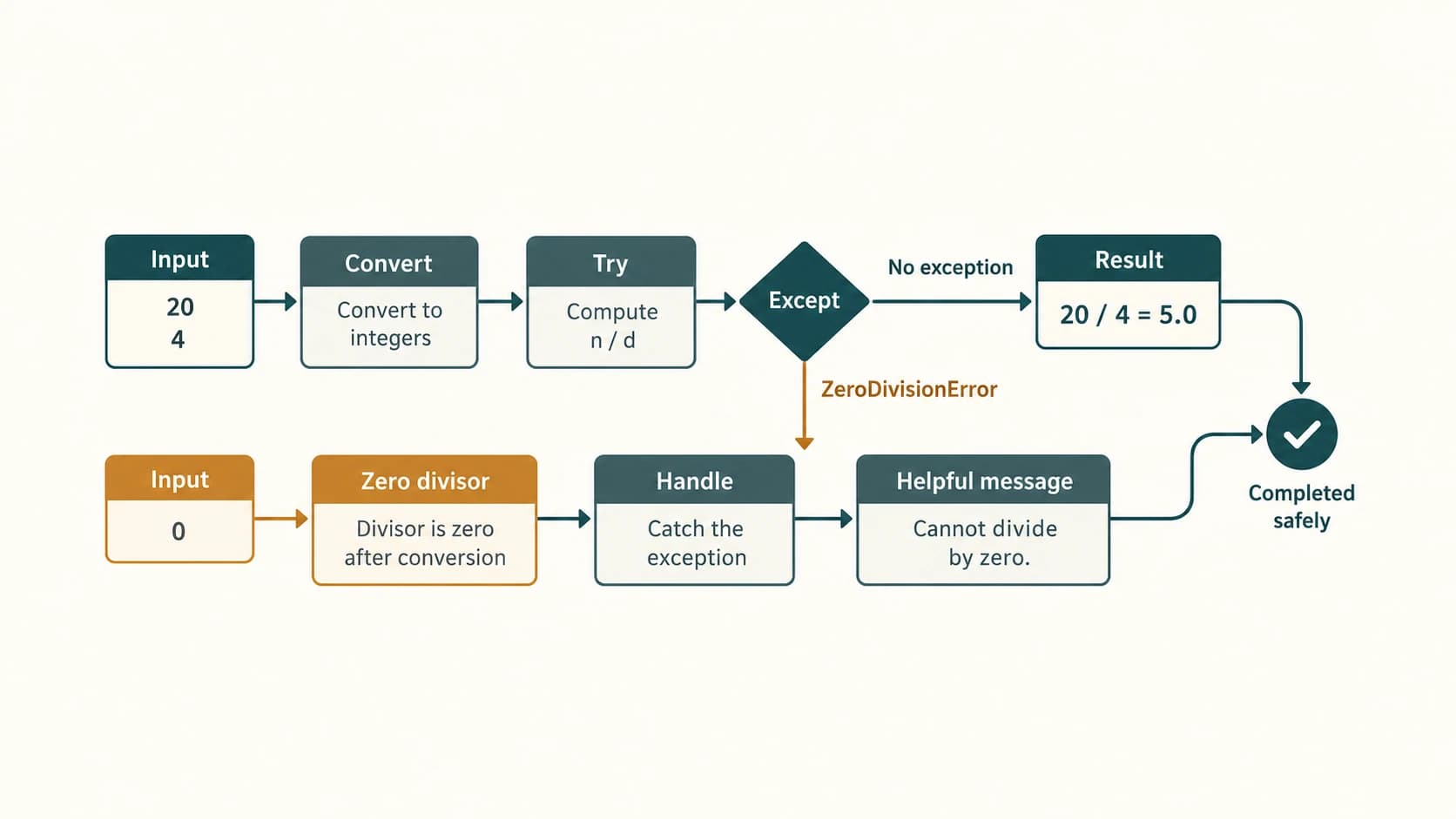
Imagine a school marks calculator. It runs perfectly when a student enters 80 and 4, but crashes when somebody enters eighty or uses zero as the divisor. The calculation itself is simple; the challenge is responding sensibly when an input or operation fails. Python's exception-handling features let a program recognise such failures, provide a useful message and—when appropriate—continue safely.
Source: NCERT Computer Science, Class XII, Chapter 1, “Exception Handling in Python,” supplied official textbook PDF lecs101.pdf, printed pages 1–18, reprint 2026–27. The nine numbered end-of-chapter questions and seven labelled textbook programs are all covered below. Questions are briefly paraphrased rather than copying large passages. Python-specific clarifications are identified separately from NCERT's presentation.
Curriculum mapping: The uploaded CBSE Class 12 Computer Science Master Curriculum places this chapter in Unit 1 — Computational Thinking and Programming II, under the single permanent lesson C12-PY-05 — Exception Handling with try/except/finally. The seven C12-CH01-SXX codes below are stable reading-section anchors within that lesson, not seven additional curriculum lessons. Keep the established chapter ID and future URLs unchanged.
Order and scope note: NCERT begins its textbook with exception handling, whereas the master curriculum lists C12-PY-01 (Class 11 Python revision) and C12-PY-02–C12-PY-04 (functions, parameters and scope) before C12-PY-05. These four prerequisites should be navigable as separate curriculum resources; do not mislabel them as content supplied by NCERT Chapter 1 or insert them as extra NCERT exercises. The try/except/finally lesson is prescribed; NCERT's treatment of raise, assert, else and propagation is retained for complete textbook coverage, with additional reliability techniques labelled as enrichment.
Learning objectives
By the end, you should be able to distinguish syntax, runtime and logical errors; identify major built-in exception classes; interpret tracebacks; use raise and understand assert; write correct try, except, else and finally blocks; handle conversion and division errors separately; predict which statements run or are skipped; explain propagation and cleanup; solve all nine NCERT exercises; and design beginner-friendly programs that fail safely without concealing important mistakes.
Chapter reading map
Permanent curriculum lesson: C12-PY-05 — Exception Handling with try/except/finally
Chapter reading anchors: C12-CH01-S01 through C12-CH01-S07 (all belong to C12-PY-05).
| Reading section | NCERT alignment | Main focus |
|---|---|---|
C12-CH01-S01 — Why programs fail | §§1.1–1.3 | Syntax, runtime and logic errors |
C12-CH01-S02 — Recognising exceptions | §1.4 | Built-ins, tracebacks, error type |
C12-CH01-S03 — Raising and asserting | §1.5 | raise, assert, AssertionError |
C12-CH01-S04 — Catching exceptions | §§1.6–1.6.3 | try, except, skipped statements |
C12-CH01-S05 — Multiple handlers and else | §1.6.4 | Specific handlers, optional else |
C12-CH01-S06 — finally and propagation | §§1.7–1.7.1 | Cleanup, unhandled exceptions |
C12-CH01-S07 — Reliable small programs | Applications | Validation and testing patterns |
Practical companion separation: For website integration, expose NCERT exercise solutions, Python lab/worked programs, original practice, and viva/revision as distinct resource sections linked to lesson C12-PY-05 instead of placing everything on one long page. SQL query sets and Python–SQL tasks belong to later database lessons and should not be artificially attached to this chapter.
Independent NCERT Solution Bank: Exercise 1–9, including Exercise 2(a–d) and 5(a–c); explanations of Programs 1-1 through 1-7; 30 original practice questions with individual explanations; revision sheet. NCERT Chapter 1 does not have separately enumerated Activity or Think-and-Reflect sets: none are fabricated.
Section C12-CH01-S01 — Why Programs Fail
1. Syntax, runtime and logic are not the same
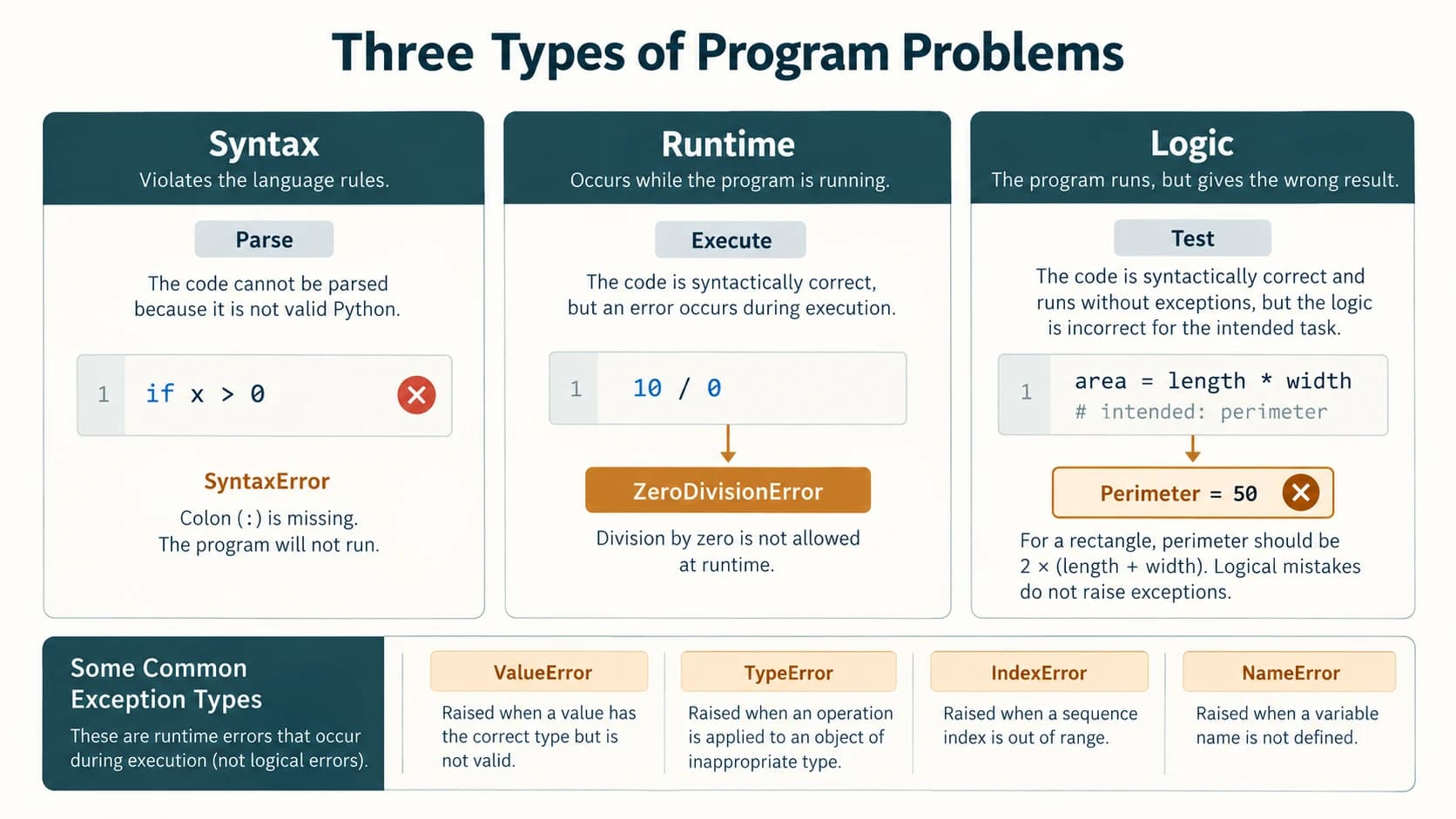
A computer obeys the instructions it can understand. Sometimes a program cannot even be parsed; sometimes a statement is valid Python but fails when run; sometimes the code completes and produces a wrong answer without an exception.
| Category | When noticed | Simple example | Outcome |
|---|---|---|---|
| Syntax / parsing error | Normally before the script runs | Missing : after if | Interpreter reports SyntaxError |
| Runtime exception | During execution | 8 / 0 | ZeroDivisionError unless handled |
| Logical error | Often revealed only by tests | Rectangle perimeter calculated as length * width | Wrong answer, usually no exception |
Syntax errors: Python requires rules for statements, parentheses and indentation. The deliberately incorrect text if score > 50 print("Pass") is not valid syntax. Correct it as follows:
score = 65
if score > 50:
    print("Pass")
A typical file containing a syntax error cannot start execution; no handler inside that unparseable file can make the syntax error disappear. SyntaxError is nevertheless a Python exception class, and an external program using compile() or importing a faulty module may catch it. This distinction matters in NCERT Exercise 1.
Runtime exceptions: Python can parse print(8 / 0) but division by zero is mathematically undefined. The interpreter creates a ZeroDivisionError, stops the current normal execution path and looks for a suitable handler.
numerator = 8
denominator = 0
try:
    print(numerator / denominator)
except ZeroDivisionError:
    print("Cannot divide by zero.")
Cannot divide by zero.Logical errors: A wrong formula can be syntactically correct and run without raising an exception:
length, breadth = 5, 3
wrong_perimeter = length * breadth
correct_perimeter = 2 * (length + breadth)
print(wrong_perimeter)    # 15: wrong for perimeter
print(correct_perimeter)  # 16: correct
Exceptions do not replace careful algorithms, tests or validation.
2. What is an exception?
An exception is an object signalling that an operation could not proceed in the usual way. Python raises it at the error point. A matching handler catches it. If no handler catches it, Python normally displays a traceback and terminates that unhandled execution path. A program might handle the error by asking again, skipping an optional operation, recording a failure or exiting cleanly; simply swallowing it is not automatically safe.
Think through one statement
numbers = [10, 20, 30]
try:
    print(numbers[5])
    print("This line will not run")
except IndexError:
    print("Requested position is outside the list.")
print("Continuing after the handler.")
Requested position is outside the list.
Continuing after the handler.Why? numbers[5] fails before the subsequent statement in the try block; control jumps to except IndexError. Because the error was handled, execution resumes after the complete try statement.
Section C12-CH01-S02 — Recognising Built-in Exceptions
3. The exception types in NCERT Table 1.1
| Exception | Common cause | Predictable example / caution |
|---|---|---|
SyntaxError | Malformed Python grammar | Missing colon; detected during parsing |
ValueError | Correct input type but unsuitable value | int("abc") |
IOError / OSError | Operating-system / file-I/O problem | open("missing_file_12345.txt") normally raises a FileNotFoundError (a subclass of OSError) |
KeyboardInterrupt | User interrupts execution | Typically Ctrl+C, not ordinarily the Delete or Esc key |
ImportError | Requested import cannot be completed | from math import nonexistent_function_xyz |
EOFError | Interactive input() encounters end-of-file | Terminal stdin closed / Ctrl+D (Unix) or Ctrl+Z then Enter (Windows) |
ZeroDivisionError | Zero divisor or modulo by zero | 10 / 0 or 10 % 0 |
IndexError | Sequence position outside range | [4, 8][5] |
NameError | Identifier is not defined | print(unknown_total) |
IndentationError | Incorrect block indentation | Inconsistent / missing required indent; subclass of SyntaxError |
TypeError | Type or argument mismatch | "4" + 2 or math.sqrt(4, 9) |
OverflowError | Certain numeric operations exceed representable range | math.exp(1000) typically on CPython |
Source-faithful clarification: NCERT lists IOError, but in current Python 3 IOError is an alias of OSError. FileNotFoundError is a more specific subclass. For math.sqrt(-1), Python raises ValueError, whereas passing the wrong number of arguments to math.sqrt raises TypeError. We preserve the textbook's classifications where useful but explain current Python behaviour rather than guessing. Python integers normally grow as needed; not every large integer calculation raises OverflowError.
A compact demonstration of common exception classes
cases = [
    ("ValueError", lambda: int("abc")),
    ("ZeroDivisionError", lambda: 10 / 0),
    ("IndexError", lambda: [1, 2][4]),
    ("TypeError", lambda: "10" + 2),
]
for label, action in cases:
    try:
        action()
    except Exception as err:
        print(label, "->", type(err).__name__)
ValueError -> ValueError
ZeroDivisionError -> ZeroDivisionError
IndexError -> IndexError
TypeError -> TypeErrorThe broad Exception is used only in this controlled teaching demonstration to print an error's actual type. In real code, prefer specific exception classes when you can recover meaningfully.
4. Reading a traceback
A traceback reports the function-call path and the line where an unhandled exception occurred. Consider:
def divide(a, b):
    return a / b

def show_answer():
    return divide(12, 0)

# Calling show_answer() would raise ZeroDivisionError.
Reading the traceback from its last line tells you the exception type (ZeroDivisionError) and usually an explanatory message (division by zero). The preceding frames lead you to the failing operation. A traceback is diagnostic evidence, not proof that every line above the error was wrong.
5. Catch only what you can reasonably handle
A useful error message should tell the learner what went wrong and what to do next. Consider the difference between a vague “Error!” and “Enter an integer other than zero.” Be specific, but avoid revealing secrets or unnecessarily displaying raw technical details to the user. Distinguish expected input mistakes from programming bugs: a bare except: catches far more than everyday conversion and arithmetic errors, including keyboard interrupts.
Section C12-CH01-S03 — Raising and Asserting Exceptions
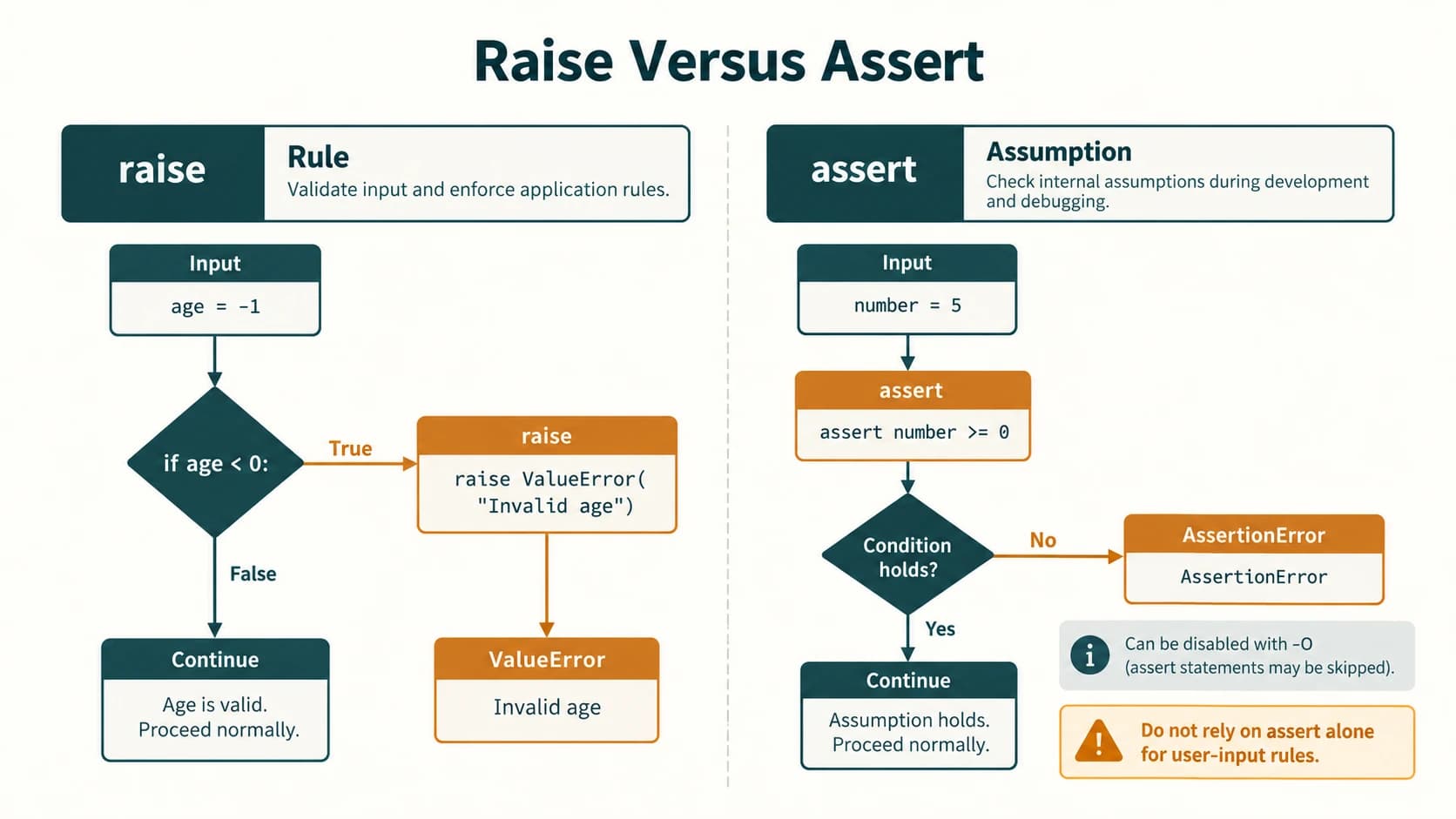
6. The raise statement
Python raises built-in exceptions automatically when an operation fails. A programmer can also deliberately raise a suitable exception to reject a value that violates a rule. The modern form is raise ExceptionType("message").
def ticket_price(age):
    if age < 0:
        raise ValueError("Age cannot be negative.")
    return 30 if age < 12 else 60

print(ticket_price(10))  # 30
If ticket_price(-3) is called without a handler, ValueError: Age cannot be negative. is raised and the function does not return a ticket price. This is preferable to quietly calculating a plausible-looking result for invalid age.
Raise and handle in one example
def divide_nonzero(a, b):
    if b == 0:
        raise ZeroDivisionError("The divisor must not be zero.")
    return a / b

for divisor in (4, 0):
    try:
        print(divide_nonzero(20, divisor))
    except ZeroDivisionError as err:
        print("Cannot calculate:", err)
5.0
Cannot calculate: The divisor must not be zero.Why explicit raise? Division already raises ZeroDivisionError for a zero divisor. In this example, raise allows a more contextual message and illustrates the exact mechanism required by NCERT Exercise 3. In many simple programs, the built-in error and a matching handler are sufficient.
Propagating an exception deliberately
def load_score(text):
    try:
        return int(text)
    except ValueError:
        print("Score could not be converted here.")
        raise

try:
    load_score("N/A")
except ValueError:
    print("Caller decides what to do next.")
Score could not be converted here.
Caller decides what to do next.A bare raise inside an active handler re-raises the exception. It is not the same as raise written in unrelated code where no active exception exists.
7. What does assert mean?
assert condition, "explanation" expresses an assumption that should be true. If the condition is false during normal execution, it raises an AssertionError. NCERT Program 1-1 tests whether an input is nonnegative before squaring it.
def square_nonnegative(number):
    assert number >= 0, "OOPS... Negative Number"
    return number * number

print(square_nonnegative(100))  # 10000
def square_nonnegative(number):
assert number >= 0, "OOPS... Negative Number"
return number * number
try:
square_nonnegative(-350)
except AssertionError as err:
print(type(err).__name__ + ":", err)AssertionError: OOPS... Negative NumberImportant Python 3 distinction: assert is meant for debugging internal assumptions, not as the only validation of untrusted input. Assertions may be disabled when Python runs in optimised mode (python -O). Use an explicit conditional and raise ValueError(...) for rules that must always be enforced. NCERT Exercise 4 asks for an assertion-based version to practise the construct, so we give it and explain the limitation.
8. Custom exceptions — an optional extension
class InvalidMarkError(ValueError):
    """Raised when a mark falls outside the allowed range."""


def checked_mark(mark):
    if not 0 <= mark <= 100:
        raise InvalidMarkError("Marks must be between 0 and 100.")
    return mark

try:
    checked_mark(105)
except InvalidMarkError as err:
    print(err)
Marks must be between 0 and 100.This is enrichment: the chapter notes user-defined exceptions but does not require a complete inheritance lesson. For simple scripts, built-in ValueError is usually enough.
Section C12-CH01-S04 — Catching Exceptions With try and except
9. The basic pattern
try:
    number = int(input("Enter an integer: "))
    print("Double:", number * 2)
except ValueError:
    print("Please type a valid integer.")
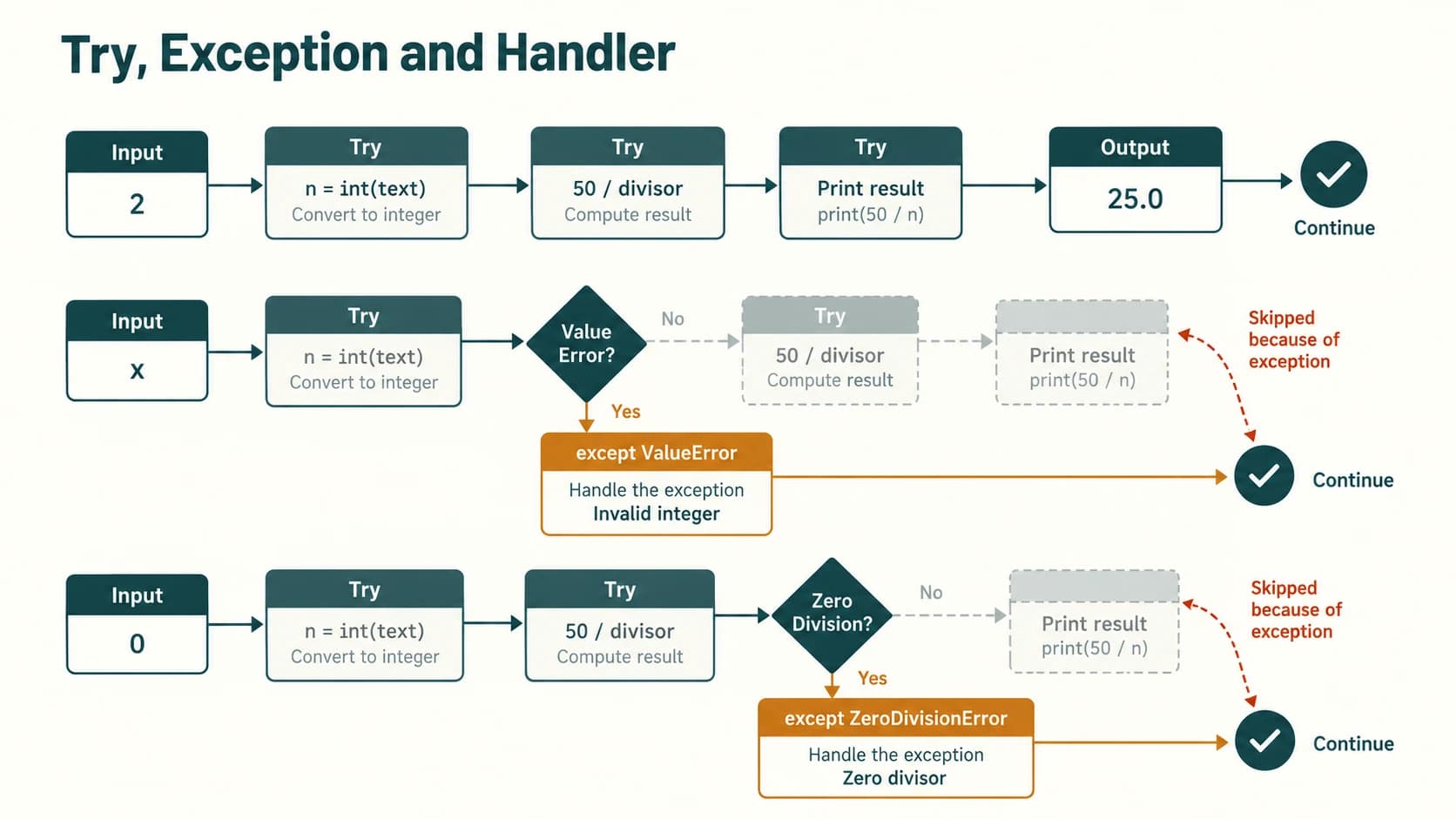
try protects the operation likely to fail. If the conversion succeeds, its except ValueError does not run. If the conversion fails, the rest of the try suite is skipped and the matching handler runs. The interpreter does not retry int(...) by itself: repeat with a loop when re-entry is required.
Trace with a successful integer and invalid text
| Input | int(...) | Handler | Outcome |
|---|---|---|---|
7 | Produces 7 | Skipped | Double: 14 |
cat | Raises ValueError | Runs | Please type a valid integer. |
Do not swallow failure and continue using an undefined variable
Incorrect logic: if the variable number is assigned only inside try but conversion fails, referencing number afterward can raise NameError. Keep successful-result work in the try branch or its else branch, or initialise a sensible state and check it.
try:
    number = int("not-a-number")
except ValueError:
    print("Conversion failed; no value to double.")
else:
    print(number * 2)
Conversion failed; no value to double.10. Exceptions travel up the call stack
def convert_number(text):
    return int(text)

def calculate_total(text):
    return convert_number(text) * 5

try:
    print(calculate_total("two"))
except ValueError:
    print("The outer caller caught the conversion error.")
If convert_number does not catch its own error, the caller calculate_total also exits unless its code handles it; the outermost matching handler here receives it. The exception is propagated, not automatically transformed into a new error.
11. Catch matching exception classes
for raw in ("5", "zero", "0"):
    try:
        value = int(raw)
        print(10 / value)
    except ValueError:
        print("Enter digits for a whole number.")
    except ZeroDivisionError:
        print("Zero is not an allowed divisor.")
2.0
Enter digits for a whole number.
Zero is not an allowed divisor.These are distinct failure causes: int("zero") raises ValueError before division. 10 / 0 raises ZeroDivisionError after successful conversion.
Section C12-CH01-S05 — Multiple Handlers and else
12. One try, multiple except blocks
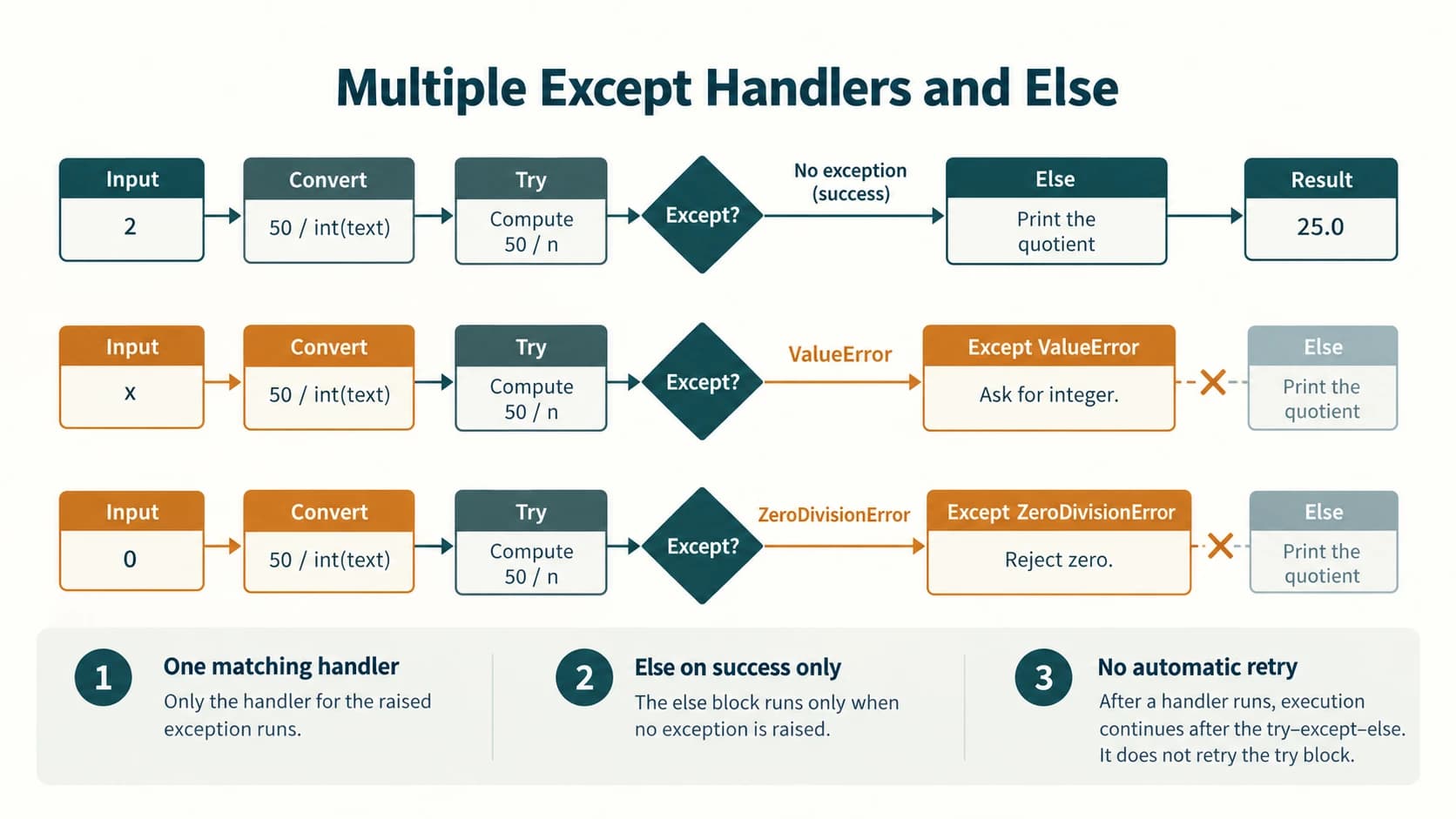
A conversion-and-division program may fail in more than one way. Two different handlers make the feedback useful:
def show_quotient(text):
    try:
        divisor = int(text)
        quotient = 50 / divisor
    except ValueError:
        return "Enter a whole-number divisor."
    except ZeroDivisionError:
        return "The divisor cannot be zero."
    else:
        return f"The quotient is {quotient}."

for sample in ("2", "0", "five"):
    print(show_quotient(sample))
The quotient is 25.0.
The divisor cannot be zero.
Enter a whole-number divisor.The first matching handler runs. When no exception occurs, else runs. A handler for a base class such as Exception should go after the specific subclasses, or it will mask them. It is normally better to avoid bare except:; an intentional, top-level catch-all has special requirements and should not be used to hide programming bugs.
13. Why else is useful
The optional else suite runs only if the entire try suite completes without an exception. It does not run merely because an exception was caught. Use else for subsequent work that should happen only when the vulnerable operation succeeded.
try:
    age = int("17")
except ValueError:
    print("Invalid age")
else:
    print("Valid integer:", age)
Valid integer: 17Exception in else: It is not caught by the preceding except clauses attached to that same try statement. That is one reason to keep the try block focused on the operation you expect to recover from.
14. A small repeated-input example
def first_valid_integer(entries):
    for entry in entries:
        try:
            number = int(entry)
        except ValueError:
            print("Rejected:", entry)
        else:
            return number
    raise ValueError("No valid integer was given")

print("Accepted:", first_valid_integer(["bad", "8"]))
Rejected: bad
Accepted: 8A loop is what enables a retry. Merely adding except handles the current attempt; it does not replay the failed statement.
Section C12-CH01-S06 — finally, Cleanup and Unhandled Errors
15. The full structure
try:
    result = 12 / 3
except ZeroDivisionError:
    print("Cannot divide by zero.")
else:
    print("Result:", result)
finally:
    print("This attempt is finished.")
Result: 4.0
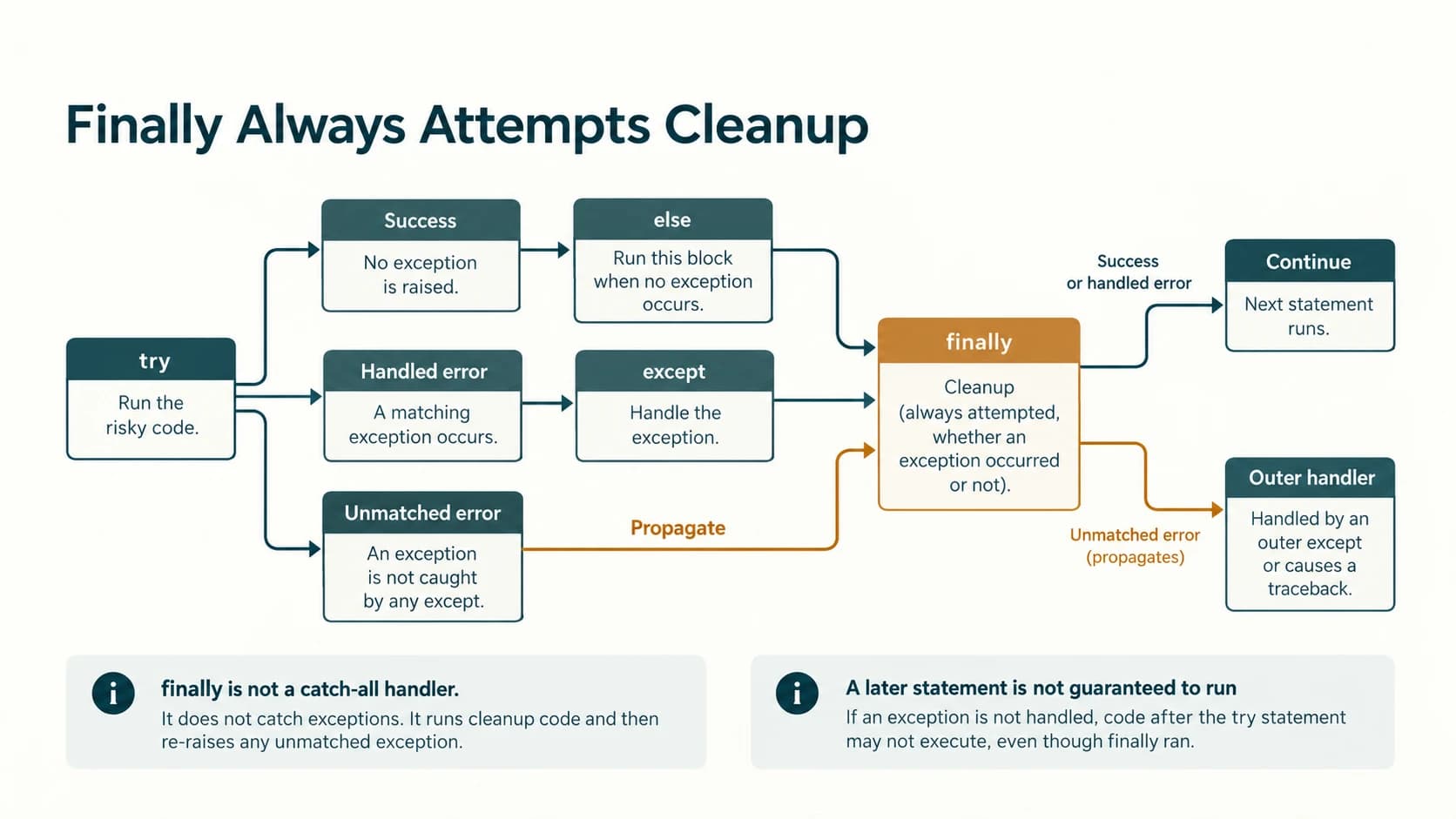
This attempt is finished.Order and roles: try contains the at-risk operation; one matching except catches it if needed; else executes on a clean try; finally runs as the statement is being exited, both on normal and exceptional paths (apart from extreme situations such as immediate process termination). finally belongs last in this construction.
Three possible paths through one program
def trace_division(text):
    lines = []
    try:
        lines.append("TRY")
        value = 50 / int(text)
    except ValueError:
        lines.append("BAD INPUT")
    except ZeroDivisionError:
        lines.append("DIVISION BY ZERO")
    else:
        lines.append("ANSWER " + str(value))
    finally:
        lines.append("FINALLY")
    return lines

for case in ("2", "0", "x"):
    print(case, trace_division(case))
2 ['TRY', 'ANSWER 25.0', 'FINALLY']
0 ['TRY', 'DIVISION BY ZERO', 'FINALLY']
x ['TRY', 'BAD INPUT', 'FINALLY']16. What if no handler matches?
def only_zero_is_caught(text):
    try:
        print(50 / int(text))
    except ZeroDivisionError:
        print("Zero was supplied.")
    finally:
        print("Cleanup always attempted.")

try:
    only_zero_is_caught("not-an-integer")
except ValueError:
    print("The outer caller catches the unhandled ValueError.")
Cleanup always attempted.
The outer caller catches the unhandled ValueError.This demonstrates the critical rule: finally runs before an unhandled exception propagates; it does not automatically catch the exception. If there were no outer handler, code after the failing try statement on that path would not run normally. The textbook's discussion on page 15 can be read as suggesting execution always continues afterward, but actual Python behaviour depends on whether the exception was handled at a higher level.
17. finally also runs with return
def demonstration():
    try:
        print("Calculate")
        return 42
    finally:
        print("Release resources")

print(demonstration())
Calculate
Release resources
42finally runs during the return. Avoid placing a competing return in finally: it can override earlier returns and even suppress active exceptions.
18. File cleanup and the preferred modern pattern
NCERT correctly motivates finally with cleaning up open files. A conceptual pattern is:
handle = None
try:
    handle = open("example.txt", "r", encoding="utf-8")
    content = handle.read()
except FileNotFoundError:
    print("The optional file was not found.")
finally:
    if handle is not None:
        handle.close()
The preferred pattern for ordinary file work is a context manager, which closes the file on exit:
try:
    with open("example.txt", "r", encoding="utf-8") as handle:
        content = handle.read()
except FileNotFoundError:
    print("The optional file was not found.")
The with clause is a preview of Chapter 2 (File Handling). It is shown here to give a safe example of resource cleanup, not as a replacement for learning finally.
Section C12-CH01-S07 — Building Reliable Student Programs
19. A simple four-step strategy
- Identify the risky operation. For example, converting user input into a number or opening a file.
- Anticipate reasonable failures. Invalid digits, a zero divisor, a missing optional file.
- Handle the right exceptions. Show precise feedback; do not catch every error indiscriminately.
- Test success and failure paths. Include the zero, negative, empty and boundary cases that make sense for the program.
Example: percentage calculation with understandable messages
def percentage(obtained_text, total_text):
    try:
        obtained = float(obtained_text)
        total = float(total_text)
        if total <= 0:
            raise ValueError("Maximum marks must be positive.")
        if obtained < 0 or obtained > total:
            raise ValueError("Obtained marks are outside the valid range.")
        answer = obtained / total * 100
    except ValueError as err:
        return "Invalid marks: " + str(err)
    else:
        return f"Percentage: {answer:.2f}%"
    finally:
        # Illustration only: do not put return here.
        pass

for a, b in (("72", "80"), ("abc", "80"), ("50", "0"), ("90", "80")):
    print(percentage(a, b))
Percentage: 90.00%
Invalid marks: could not convert string to float: 'abc'
Invalid marks: Maximum marks must be positive.
Invalid marks: Obtained marks are outside the valid range.Implementation note: In a real student-facing interface, prefer a friendly fixed message for conversion errors instead of exposing the raw Python conversion message. The raw message is shown here for diagnostic learning.
Example: safe integer prompt (illustrative, interactive)
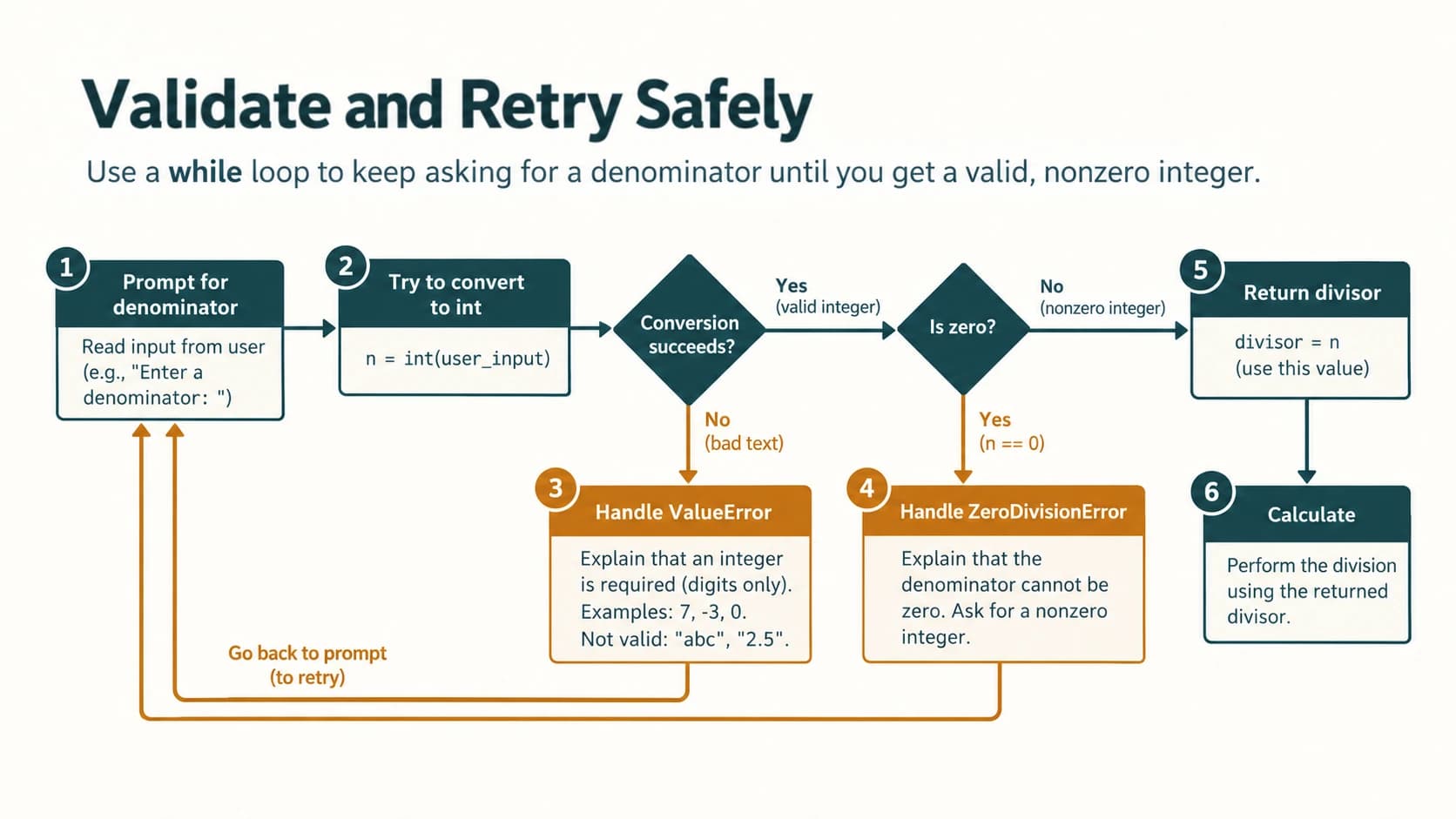
def ask_nonzero_divisor():
    while True:
        raw = input("Non-zero integer divisor: ")
        try:
            divisor = int(raw)
            if divisor == 0:
                raise ZeroDivisionError("Zero cannot be a divisor")
        except ValueError:
            print("Please enter an integer, e.g. 2 or -3.")
        except ZeroDivisionError:
            print("Please enter an integer other than zero.")
        else:
            return divisor

# Uncomment when running interactively:
# divisor = ask_nonzero_divisor()
# print(100 / divisor)
Notice that the while True loop, not the except statement, supplies repeated attempts.
Sample classroom test matrix
| Case | Input | Expected response |
|---|---|---|
| Valid quotient | numerator 20, denominator 4 | 5.0 |
| Zero divisor | numerator 20, denominator 0 | explain division is not possible |
| Non-numeric | numerator abc, denominator 4 | request numeric input |
| Negative denominator | numerator 20, denominator -4 | -5.0 |
| Valid percentage | 72 of 80 | 90.00% |
| Obtained > maximum | 90 of 80 | reject invalid marks |
Complete NCERT Chapter 1 — Exercise Solutions
The source textbook's Exercise on printed pages 17–18 has nine numbered questions. The answers below retain that numbering. Each question is briefly restated in our own words and answered completely; solutions are designed for Python 3.
NCERT Exercise 1 — Are syntax errors exceptions?
Question (paraphrased): Explain why every syntax error belongs to Python's exception system but many exceptions are not syntax errors.
Answer: SyntaxError is an exception class in Python's built-in exception hierarchy, so a syntax error is reported using an exception object. However, a program can obey all syntax rules yet raise a different exception when it runs—for example ZeroDivisionError during division by zero, IndexError from an invalid list position, or ValueError from invalid numeric text. Therefore, the category of exceptions is broader than syntax errors.
print(issubclass(SyntaxError, Exception))       # True
print(issubclass(ZeroDivisionError, Exception)) # True
Important nuance: A syntax error in the source file itself is normally detected during parsing, before its try statements can run. To catch a syntax error dynamically, another valid program can use compile():
try:
    compile("if True print(1)", "example", "exec")
except SyntaxError:
    print("The supplied source text has invalid syntax.")
Explanation: This is a technically precise reading of the NCERT claim. It does not mean a try block within an unparseable script can catch that script's own syntax error.
NCERT Exercise 2 — When do four built-in exceptions occur?
2(a) ImportError
Answer: An import error occurs when a requested import cannot be resolved. A missing module commonly produces the more specific subclass ModuleNotFoundError; an unavailable name imported from an existing module typically produces ImportError.
try:
    from math import function_that_does_not_exist
except ImportError:
    print("The requested function could not be imported.")
The requested function could not be imported.Explanation: Python finds math but cannot find that particular member. By contrast, import imaginary_module_xyz generally produces ModuleNotFoundError, which can also be caught by except ImportError because it is a subclass.
2(b) IOError
Answer: IOError covers operating-system I/O failures; in modern Python 3 it is an alias for OSError. A missing file usually raises FileNotFoundError, which is a specific OSError.
try:
    with open("this_file_does_not_exist_123456.txt", "r") as source:
        print(source.read())
except FileNotFoundError:
    print("Cannot open: the specified file does not exist.")
Cannot open: the specified file does not exist.Explanation: The FileNotFoundError handler gives a more precise response than a generic I/O error message. This example assumes the distinctively named file does not exist in the working directory. Other I/O errors include permission or device problems.
2(c) NameError
Answer: A NameError occurs when Python tries to use a name that has not been defined in the relevant scope.
try:
    print(total_marks_not_defined)
except NameError:
    print("A referenced variable has not been defined.")
A referenced variable has not been defined.Explanation: This is not a syntax problem: the statement is legal Python, but the name cannot be resolved at runtime.
2(d) ZeroDivisionError
Answer: Division or modulo by zero raises ZeroDivisionError for ordinary numeric operations.
try:
    answer = 25 / 0
except ZeroDivisionError:
    print("Division by zero is not allowed.")
Division by zero is not allowed.Explanation: The exception occurs at the division expression; the assignment to answer does not complete. We can choose to provide another input instead of allowing the program to crash.
NCERT Exercise 3 — Raise an exception for a zero denominator
Question (paraphrased): Explain raise and write a program that accepts two numbers, prints their quotient and deliberately raises an appropriate exception when the denominator is zero.
Explanation: raise interrupts normal execution by producing an exception object. Here a ZeroDivisionError clearly describes the invalid denominator. We also handle invalid numeric input.
def divide_with_explicit_raise(numerator, denominator):
    if denominator == 0:
        raise ZeroDivisionError("Second number must not be zero.")
    return numerator / denominator


def main():
    try:
        first = float(input("Enter numerator: "))
        second = float(input("Enter denominator: "))
        result = divide_with_explicit_raise(first, second)
    except ValueError:
        print("Please enter valid numbers.")
    except ZeroDivisionError as err:
        print("Cannot divide:", err)
    else:
        print("Quotient:", result)

# Run main() in an interactive Python environment.
Sample run — valid inputs: first = 18, second = 3 produces Quotient: 6.0.
Sample run — zero denominator: first = 18, second = 0 produces Cannot divide: Second number must not be zero.
Sample run — invalid numeral: first = apple produces Please enter valid numbers. and the second prompt is not reached.
What was raised? The zero-divisor case uses raise ZeroDivisionError(...) explicitly, even though Python's / would also raise the same class automatically. The explicit check is present to meet the textbook's learning objective.
NCERT Exercise 4 — Use assert with the division problem
Question (paraphrased): Rework Exercise 3 so an assertion checks the divisor.
def divide_with_assertion(numerator, denominator):
    assert denominator != 0, "Denominator must not be zero."
    return numerator / denominator


def main():
    try:
        first = float(input("Enter numerator: "))
        second = float(input("Enter denominator: "))
        answer = divide_with_assertion(first, second)
    except ValueError:
        print("Please enter valid numbers.")
    except AssertionError as err:
        print("Assertion failed:", err)
    else:
        print("Quotient:", answer)

# Run main() when using the program interactively.
Sample normal output: first = 15, second = 5 → Quotient: 3.0.
Sample zero output (assertions enabled): first = 15, second = 0 → Assertion failed: Denominator must not be zero.
Reasoning: The condition denominator != 0 becomes false when zero is entered and raises AssertionError; the matching handler runs instead of the else branch.
Essential qualification: Under Python's -O optimisation, ordinary assert statements may be omitted. Then a zero divisor can raise ZeroDivisionError from the division itself; the sample program above does not have a handler for that error. The assertion program is correct as a demonstration for the NCERT question, but production input validation should use if denominator == 0: raise ValueError(...) or handle ZeroDivisionError directly rather than depending on assert.
NCERT Exercise 5 — Define three terms
5(a) Exception handling
Answer: Exception handling is the process of writing code that detects or catches exceptional conditions and responds to them deliberately, typically using Python's try and except statements. It separates usual calculations from the response to a failure and can prevent avoidable abrupt termination.
5(b) Throwing / raising an exception
Answer: Throwing (raising) an exception means creating or signalling an exceptional condition and interrupting the normal execution path. In Python an operation may raise an exception automatically, or a program can use the raise statement to do so explicitly.
5(c) Catching an exception
Answer: Catching an exception occurs when a matching exception handler (normally an except suite) receives and processes the raised exception. After a successfully handled error, the program may continue after the try statement.
try:
    raise ValueError("Example failure")  # throwing / raising
except ValueError as err:               # catching
    print("Handled:", err)               # handling action
Handled: Example failureDistinction: Raising and catching refer to different phases. You can raise an exception without catching it; a try without a matching handler does not guarantee recovery.
NCERT Exercise 6 — Explain the try–except mechanism
Answer: Place code that may fail in a try suite, followed by one or more matching except suites. Python executes the try statements in order. If none raises an exception, all the except suites are skipped. If an exception occurs, the remaining try statements are skipped; Python searches for the first compatible handler. Once the handler finishes normally, execution proceeds after the whole try statement. If no handler matches, the exception propagates to a caller or, if it remains unhandled, normally terminates the program with a traceback.
try:
    marks = int("not-a-number")
    print("This line is skipped if conversion fails.")
except ValueError:
    print("Please provide a number for marks.")
print("Program reached the next statement.")
Please provide a number for marks.
Program reached the next statement.Short exam explanation: try contains the vulnerable code; except catches the specified exception type. The at-fault statement aborts the rest of that try suite; the matching handler runs; handled exceptions permit subsequent statements to continue. NCERT Figure 1.8 describes this process diagrammatically.
NCERT Exercise 7 — Complete three missing keywords/classes
Question (paraphrased): Fill in the two exception classes needed for whole-number input and zero division, and the final clause keyword.
Answers to the blanks, in order:
ValueError— invalid text supplied toint()(such ashello).ZeroDivisionError— valid numeric zero denominator.finally— a clause that runs on completion or abnormal exit of thetrystatement.
Fully formatted completed program:
print("Learning Exceptions...")
try:
    num1 = int(input("Enter the first number: "))
    num2 = int(input("Enter the second number: "))
    quotient = num1 / num2
    print("Both the numbers entered were correct")
except ValueError:
    print("Please enter only whole numbers")
except ZeroDivisionError:
    print("Number 2 should not be zero")
else:
    print("Great .. you are a good programmer")
finally:
    print("JOB OVER... GO GET SOME REST")
Sample run A — two valid integers: Inputs 12 and 4 produce:
Learning Exceptions...
Both the numbers entered were correct
Great .. you are a good programmer
JOB OVER... GO GET SOME REST
Sample run B — second input zero: Inputs 12 and 0 produce:
Learning Exceptions...
Number 2 should not be zero
JOB OVER... GO GET SOME REST
Sample run C — invalid first input: Input twelve produces:
Learning Exceptions...
Please enter only whole numbers
JOB OVER... GO GET SOME REST
Accuracy note: The original exercise calculates quotient but does not include a statement to display its value. The completed answer faithfully retains that behaviour. To show it additionally, put print("Quotient:", quotient) inside else; that would be an enhancement, not a missing NCERT blank. The source's informal message “only numbers” is tightened to “whole numbers,” because int("2.5") is also invalid. The source indentation is normalised for runnable Python.
NCERT Exercise 8 — Incorrect math arguments versus ValueError
Question (paraphrased): Intentionally misuse math.sqrt() or math.pow() and catch ValueError.
Important source issue: The task combines two different failure conditions. In Python 3, giving sqrt() too many positional arguments raises TypeError, not ValueError; giving sqrt() an invalid negative domain value raises ValueError. A complete, technically correct answer should demonstrate both and must not label a wrong-arity error as a ValueError.
Part A — wrong number of arguments (TypeError)
import math
try:
    print(math.sqrt(16, 2))
except TypeError as err:
    print("Caught TypeError: incorrect argument count")
Caught TypeError: incorrect argument countWhy? math.sqrt expects one argument, but we supplied two. The error concerns the function call signature, so it is a TypeError.
Part B — invalid mathematical input (ValueError)
import math
try:
    print(math.sqrt(-9))
except ValueError:
    print("Caught ValueError: square root needs a non-negative real input")
Caught ValueError: square root needs a non-negative real inputWhy? The function received the expected number and type of arguments, but the input lies outside its real-number domain. math.pow(-2, 0.5) is another domain-error example. Use Part A when the prompt emphasises wrong argument count, and Part B when it emphasises catching ValueError. This correction is verified against actual Python behaviour rather than silently accepting the textbook's inconsistency.
NCERT Exercise 9 — Purpose of finally; extend Exercise 7
Answer: The finally suite is executed when a try statement is exited—whether the guarded work succeeded, a matching handler caught an exception, or another exception is propagating. It is especially useful for cleanup such as closing a resource.
Exercise 7 already contains a finally blank; filling it is the requested extension. Here is a slightly enhanced version that also prints the quotient after successful input:
print("Learning Exceptions...")
try:
    numerator = int(input("Enter the first number: "))
    denominator = int(input("Enter the second number: "))
    quotient = numerator / denominator
except ValueError:
    print("Enter integers only.")
except ZeroDivisionError:
    print("The denominator cannot be zero.")
else:
    print("Quotient:", quotient)
    print("Great .. you are a good programmer")
finally:
    print("JOB OVER... GO GET SOME REST")
Three cases: For 20 and 4, prints quotient 5.0, the success message, then the closing message; for 20 and 0, prints a zero-denominator message and then the closing message; for twenty, prints a conversion message and then the closing message. The finally message appears in all three cases. This does not mean that an unmatched exception is caught by finally.
NCERT Programs 1-1 to 1-7 — Guided Walkthroughs
These are explanations and readable reconstructions of the seven explicitly labelled programs in the supplied textbook, not claims that their text has been copied word for word. They are distinct from the nine end exercises.
NCERT Program 1-1 — The assert statement (printed p. 6)
Textbook mechanism: negativecheck(number) asserts nonnegative input then prints the square. Calling it with positive 100 prints 10000; calling it with -350 raises AssertionError with the chosen message. The later print(negativecheck(100)) also prints None, because the function prints the square but does not return it. This detail is easy to miss when reading an image of the output.
def negativecheck(number):
    assert number >= 0, "OOPS... Negative Number"
    print(number * number)

print(negativecheck(100))
10000
NoneWhen negativecheck(-350) runs, the assertion raises AssertionError before the square-printing statement. The surrounding caller would need an except AssertionError to recover. Under python -O, assertions may be suppressed; never rely on them as the only input rule.
NCERT Program 1-2 — Single except handler (printed p. 10)
Textbook mechanism: The program divides the fixed numerator 50 by an integer supplied by the user. It catches ZeroDivisionError, but not conversion ValueError. For 10, quotient 5.0 and the normal-success message appear; for 0, the exception message appears, while the print after the entire try–except statement still runs.
def program_1_2(denominator):
    print("Practicing for try block")
    try:
        quotient = 50 / int(denominator)
        print(quotient)
        print("Division performed successfully")
    except ZeroDivisionError:
        print("Denominator as ZERO... not allowed")
    print("OUTSIDE try..except block")

program_1_2("0")
Practicing for try block
Denominator as ZERO... not allowed
OUTSIDE try..except blockKey point: Converting abc in this program would raise an unhandled ValueError; a zero-divisor handler does not catch all numeric errors.
NCERT Program 1-3 — Two except handlers (printed p. 11)
Textbook mechanism: The program handles both division by zero and invalid integer text. These are separate error classes, so one try block may have two handlers.
def program_1_3(text):
    try:
        divisor = int(text)
        print(50 / divisor)
        print("Division performed successfully")
    except ZeroDivisionError:
        print("Denominator as ZERO is not allowed")
    except ValueError:
        print("Only INTEGERS should be entered")

program_1_3("bad")
Only INTEGERS should be enteredFor 2, the program prints 25.0 and the success message. For 0, only the zero error message appears. The second print inside the try is skipped on failure.
NCERT Program 1-4 — Bare except (printed p. 12)
Textbook mechanism: The program catches invalid numeric text as ValueError and uses a final bare except: to catch other exceptional conditions, including division by zero.
def textbook_bare_except(text):
    try:
        divisor = int(text)
        quotient = 50 / divisor
        print("Division performed successfully")
    except ValueError:
        print("Only INTEGERS should be entered")
    except:
        print("OOPS... SOME EXCEPTION RAISED")

textbook_bare_except("0")
OOPS... SOME EXCEPTION RAISEDModern best practice: Use except ZeroDivisionError: here if that is the known recoverable failure. A bare except: can also capture KeyboardInterrupt and SystemExit, which normally should not be intercepted casually. It is presented to explain the NCERT program, not as a default recommendation.
NCERT Program 1-5 — Optional else (printed p. 13)
Textbook mechanism: The division attempt handles ZeroDivisionError and ValueError, and the quotient is displayed inside else only if the try ran successfully.
def program_1_5(text):
    try:
        quotient = 50 / int(text)
        print("Division performed successfully")
    except ZeroDivisionError:
        print("Denominator as ZERO is not allowed")
    except ValueError:
        print("Only INTEGERS should be entered")
    else:
        print("The result of division operation is", quotient)

program_1_5("5")
Division performed successfully
The result of division operation is 10.0Notice that else is tied to successful completion of try, not to the mere presence of handlers.
NCERT Program 1-6 — The finally suite (printed p. 14)
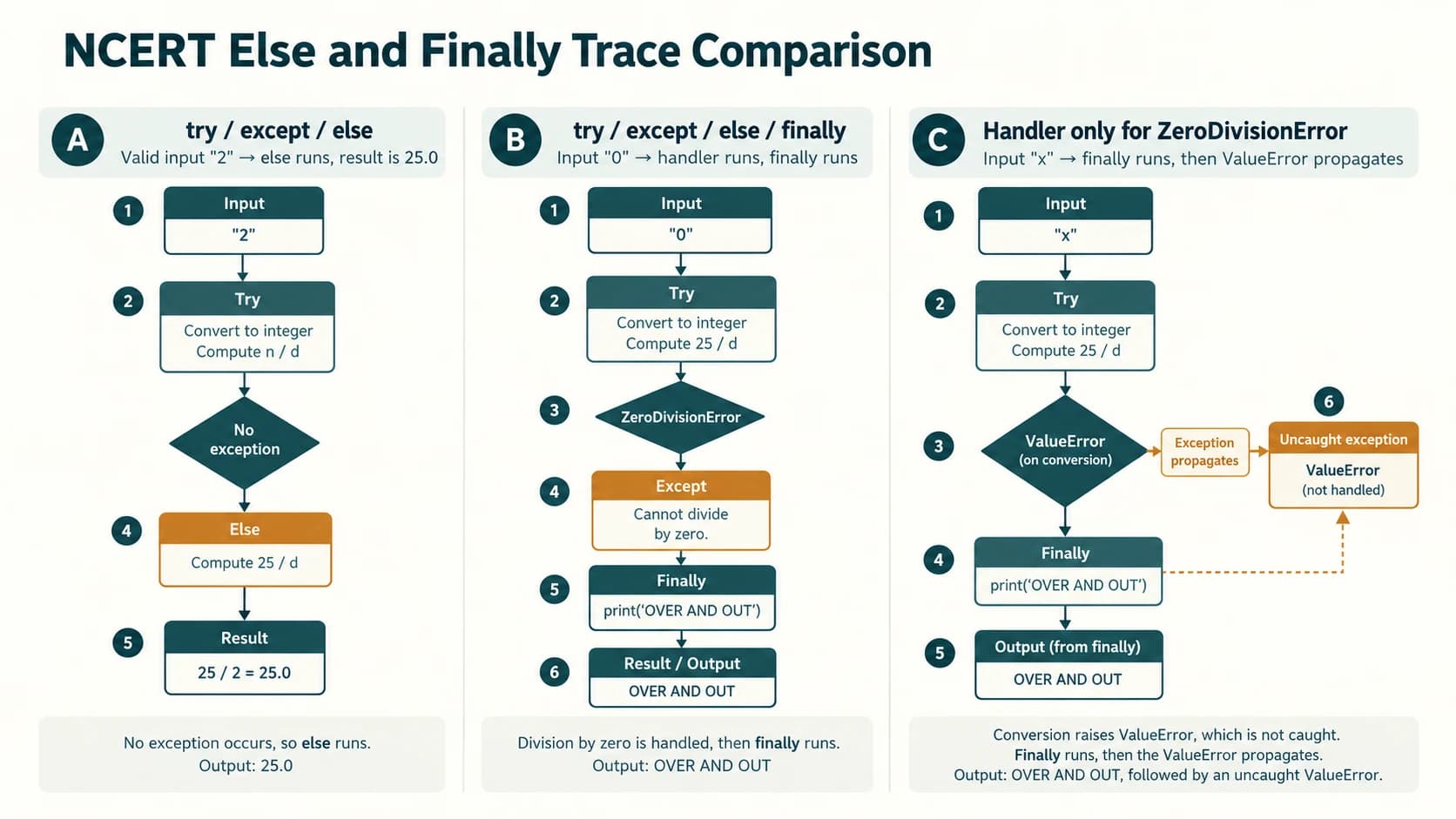
Textbook mechanism: The try/except/else structure ends with finally: print("OVER AND OUT"). The closing message appears after success and after either of the two handled errors.
def program_1_6(text):
    try:
        quotient = 50 / int(text)
    except ZeroDivisionError:
        print("Denominator as ZERO is not allowed")
    except ValueError:
        print("Only INTEGERS should be entered")
    else:
        print("The result is", quotient)
    finally:
        print("OVER AND OUT")

program_1_6("0")
Denominator as ZERO is not allowed
OVER AND OUTNCERT Program 1-7 — finally before propagation (printed pp. 14–15)
Textbook mechanism: Only ZeroDivisionError is caught, so a non-numeric text such as x produces unhandled ValueError after finally prints its message. To demonstrate without terminating this book's example, an outer handler catches that propagated error:
def program_1_7(text):
    try:
        quotient = 50 / int(text)
        print("Division performed successfully")
    except ZeroDivisionError:
        print("Denominator as ZERO is not allowed")
    else:
        print("The result is", quotient)
    finally:
        print("OVER AND OUT")

try:
    program_1_7("x")
except ValueError:
    print("Outer caller caught the ValueError")
OVER AND OUT
Outer caller caught the ValueErrorCritical qualification: The outer handler is our teaching addition, not part of Program 1-7. Without it, the traceback is shown and normal code after that unhandled call does not continue. finally guarantees an attempt at cleanup, not a successful recovery from every error.
Thirty Original Practice Questions — Answers and Explanations
The following questions are new teaching questions, not an additional NCERT exercise. They combine definitions, multiple choice, tracing and short programming tasks. Every question has a direct answer with an explanation.
Conceptual and multiple-choice practice (P01–P12)
P01. Which is a runtime exception?
Question: Choose: (A) a missing colon, (B) 10 / 0, (C) a wrong formula with valid code, (D) a misspelled heading in a comment.
Answer: B — 10 / 0. The statement is syntactically legal, but evaluation raises ZeroDivisionError. A missing colon is a syntax error; the wrong formula is a logical error; a comment typo has no Python runtime effect.
P02. Is SyntaxError a subclass of Exception?
Answer: Yes. issubclass(SyntaxError, Exception) evaluates to True. However, invalid syntax in an ordinary script is detected before that script executes, so its own internal handlers cannot fix parsing.
P03. Which exception does int("seven") raise?
Answer: ValueError. The argument is a string, a supported input type for int, but its characters do not form an acceptable base-10 integer.
P04. What error can "7" + 2 raise?
Answer: TypeError. String concatenation requires another string; convert one operand explicitly if numerical addition or textual joining is intended.
P05. Does try automatically repeat a failed input operation?
Answer: No. A matching except takes control after the failure; it does not restart the try. Add a loop with a clear exit condition to prompt again.
P06. What executes after an exception is handled?
Answer: The selected handler, followed by any finally, and then statements after the complete try construct, provided no further exception or early return changes control flow. Remaining statements in the failed try suite are not resumed.
P07. Is except Exception: the same as bare except:?
Answer: No. Exception covers ordinary exceptions such as ValueError but does not cover direct BaseException subclasses such as KeyboardInterrupt and SystemExit. A bare except: can catch both, which is usually undesirable for beginner application logic.
P08. Where should the broad handler appear when specific handlers exist?
Answer: After the specific handlers. The first compatible except runs, so a broad handler placed first can make later specific handlers unreachable in practice.
P09. When does else of a try statement run?
Answer: When the try suite completes normally without raising an exception. It does not run after an exception, even one caught in except.
P10. Does finally turn an unmatched error into a successful result?
Answer: No. finally is executed as execution exits the try statement, then the unmatched exception continues to propagate. Cleanup is not the same as recovery.
P11. Why should assert not be used to enforce a password length rule?
Answer: Assertions can be disabled in optimised execution. A rule that must always apply should use an explicit condition and raise an appropriate exception, such as ValueError.
P12. Which exception best matches an invalid index in a Python list?
Answer: IndexError. A request such as items[10] with a two-element list asks for a nonexistent position. A dictionary's missing key instead normally raises KeyError.
Predict-the-output practice (P13–P22)
P13. Missing number
try:
    x = int("x")
    print("A")
except ValueError:
    print("B")
print("C")
Answer:
B
C
Explanation: Conversion fails before A; the ValueError handler prints B; the program then prints C.
P14. Zero divisor with a final message
try:
    print(6 / 0)
except ZeroDivisionError:
    print("Z")
finally:
    print("F")
Answer:
Z
F
Explanation: The division does not print a quotient. The specific handler prints Z and the final clause prints F.
P15. Valid division with else
try:
    print(8 / 2)
except ZeroDivisionError:
    print("Problem")
else:
    print("Success")
Answer:
4.0
Success
Explanation: No exception was raised, so the handler is skipped and the else suite runs.
P16. What does the finally print before return?
def answer():
    try:
        return 7
    finally:
        print("done")

print(answer())
Answer:
done
7
Explanation: The function attempts to return 7, but finally runs before the return reaches the caller.
P17. Two exception classes in one tuple handler
for value in ("0", "x"):
    try:
        print(12 / int(value))
    except (ValueError, ZeroDivisionError):
        print("invalid")
Answer:
invalid
invalid
Explanation: The first case raises ZeroDivisionError, the second ValueError; both are caught by the same tuple of classes.
P18. A caught exception does not restore the skipped line
try:
    raise ValueError("bad")
    print("X")
except ValueError:
    print("Y")
print("Z")
Answer:
Y
Z
Explanation: X lies after the raise inside try and never executes on this path.
P19. Which handler matches an invalid integer?
try:
    print(int("3.5"))
except ZeroDivisionError:
    print("Zero")
except ValueError:
    print("Value")
Answer:
ValueExplanation: int("3.5") cannot parse the decimal-point text into an integer using its standard string parser. The second handler matches.
P20. Catching a missing list index
items = [2, 4]
try:
    print(items[2])
except IndexError:
    print("Out of range")
else:
    print("All good")
Answer:
Out of rangeExplanation: Valid indices are 0 and 1. The error handler runs; else is skipped.
P21. How many closing messages?
for text in ("2", "0"):
    try:
        print(10 / int(text))
    except ZeroDivisionError:
        print("bad denominator")
    finally:
        print("closed")
Answer:
5.0
closed
bad denominator
closed
Explanation: Two iterations enter the try statement, so two finally messages appear—one for success and one for handled zero division.
P22. TypeError is not caught as ValueError
import math
try:
    math.sqrt(16, 3)
except ValueError:
    print("Value issue")
except TypeError:
    print("Argument issue")
Answer:
Argument issueExplanation: The call supplies too many arguments. The mismatch is about argument count, which raises TypeError, not a mathematical-domain ValueError.
Short programming practice (P23–P30)
P23. Print a positive integer or a helpful error
Task: Accept a numeric-text string and return the positive integer. Reject invalid text and values at or below zero.
def positive_integer(text):
    try:
        number = int(text)
        if number <= 0:
            raise ValueError("The integer must be positive")
    except ValueError as err:
        return "Rejected: " + str(err)
    else:
        return number

print(positive_integer("12"))
print(positive_integer("-3"))
12
Rejected: The integer must be positiveExplanation: The same ValueError category can signal malformed input and a business-rule violation, but the message distinguishes them.
P24. Safely access a tuple element
Task: Retrieve a zero-based position and explain an invalid index.
def safe_tuple_item(values, index):
    try:
        return values[index]
    except IndexError:
        return "Index is out of range"

print(safe_tuple_item((4, 6), 1))
print(safe_tuple_item((4, 6), 9))
6
Index is out of rangeExplanation: Tuples support indexing like lists; out-of-range lookup raises IndexError.
P25. Show the difference between a missing dictionary key and safe lookup
def lookup_mark(marks, roll):
    try:
        return "Found: " + str(marks[roll])
    except KeyError:
        return "No record for this roll number"

print(lookup_mark({101: 88}, 101))
print(lookup_mark({101: 88}, 999))
Found: 88
No record for this roll numberExplanation: A missing mapping key raises KeyError; it is not an IndexError. When no exception is desired, marks.get(roll) is another option, but be careful if None is a legitimate stored value.
P26. Validate a percentage without assertions
def valid_percentage(value):
    if not 0 <= value <= 100:
        raise ValueError("Percentage must be in the range 0 to 100")
    return value

try:
    print(valid_percentage(108))
except ValueError as err:
    print(err)
Percentage must be in the range 0 to 100Explanation: An explicit check runs regardless of Python's assertion optimisation settings.
P27. Demonstrate cleanup after a failed calculation
def run_with_cleanup():
    try:
        print(1 / 0)
    except ZeroDivisionError:
        print("Calculation failed")
    finally:
        print("End of calculation attempt")

run_with_cleanup()
Calculation failed
End of calculation attemptExplanation: The final message prints whether the protected expression succeeds or fails.
P28. Handle two expected errors without catching every exception
def safe_ratio(a_text, b_text):
    try:
        ratio = float(a_text) / float(b_text)
    except ValueError:
        return "Both inputs must be numbers"
    except ZeroDivisionError:
        return "Second input must be nonzero"
    else:
        return ratio

print(safe_ratio("9", "3"))
print(safe_ratio("9", "0"))
3.0
Second input must be nonzeroExplanation: Input conversion and division fail for different reasons and get targeted messages. The successful result comes from else.
P29. Raise and then catch a custom mark exception
class InvalidStudentMark(ValueError):
    pass


def check_student_mark(mark):
    if mark < 0 or mark > 100:
        raise InvalidStudentMark("Out-of-range marks")
    return mark

try:
    check_student_mark(-1)
except InvalidStudentMark as err:
    print("Caught:", err)
Caught: Out-of-range marksExplanation: A custom exception may inherit from a suitable built-in type; it permits a specific handler while still being compatible with broader handlers for that parent class. This is an enrichment task, not a compulsory NCERT exercise.
P30. Write a small test for a zero-divisor rule
def checked_division(a, b):
    if b == 0:
        raise ZeroDivisionError("Nonzero denominator required")
    return a / b

assert checked_division(10, 2) == 5.0
try:
    checked_division(10, 0)
except ZeroDivisionError:
    print("Zero divisor correctly rejected")
else:
    print("Unexpected: no error")
Zero divisor correctly rejectedExplanation: The first assert is an internal teaching test, not the input rule. The real validation is the explicit zero check. The else of the outer try would reveal if the expected exception did not occur.
Quick Revision Sheet — Exception Handling
Essential terms
| Term | Remember |
|---|---|
| Syntax error | Invalid Python grammar, normally detected before a script executes |
| Runtime exception | Error object raised while evaluating code |
| Logical error | Program runs but answers are wrong; may raise nothing |
| Raising / throwing | Signalling an exception, automatically or with raise |
| Catching | Matching an exception with a handler |
| Propagation | Unhandled exception travels to a caller |
try | Statements that may fail |
except | Matching recovery / feedback code |
else | Runs when the try suite finishes without an exception |
finally | Runs on exit to support cleanup, including on failure |
assert | Internal assumption check, may be disabled with -O |
Exception-to-example memory map
| Example | Most relevant exception |
|---|---|
int("xyz") | ValueError |
8 / 0 | ZeroDivisionError |
[3][5] | IndexError |
"hi" + 3 | TypeError |
math.sqrt(-1) | ValueError |
math.sqrt(1, 2) | TypeError |
print(unknown) | NameError |
data["absent"] for missing dictionary key | KeyError |
open("missing") | FileNotFoundError (OSError) |
assert False | AssertionError (when enabled) |
Exam tips
- A correct exception class matters: a wrong argument count is usually
TypeError, notValueError. elseoccurs only on a successfultry; successfulexcepthandling does not activate it.finallydoes not suppress an unhandled exception. It runs before propagation.- Do not assume the failing line has assigned its variable.
returninfinallycan mask errors; avoid it.- Use separate handlers for different expected faults, and avoid hiding programming bugs with bare
except:. raiseexplicitly signals an error;assertis not a substitute for mandatory input validation.- For board answers, preserve NCERT's nine numbered exercise questions; the practice questions in this resource are additional.
Five-minute viva review
What follows try? One or more except clauses, or a finally clause as required by the language syntax; optional else may be used with appropriate except clauses.
How many handlers run for one raised exception? The first matching handler attached to that try runs; the others are skipped.
Does finally always print its message? It normally runs on leaving the try statement, but immediate process termination or catastrophic failures are outside the usual guarantee.
Why not use bare except: everywhere? It hides the kind of failure and can swallow interrupts or termination requests.
Difference between raise and assert? raise deliberately produces an exception; assert checks a debugging assumption and may be compiled away.
Can an exception be caught in a caller? Yes. An unmatched exception propagates up the call stack until a suitable handler is found or it remains unhandled.
Sources and Editorial Verification Notes
Primary uploaded textbook: NCERT, Computer Science, Class XII, Chapter 1, “Exception Handling in Python,” lecs101.pdf, pp. 1–18 (2026–27 reprint). NCERT §§1.1–1.7.1, Examples/Figures 1.1–1.13, Programs 1-1…1-7, Exercise 1–9. Source chapter belongs to the uploaded lecs1dd.zip; do not use a similarly titled third-party guide as a substitute for the provided PDF.
Curriculum reference: Uploaded 06-class-12-computer-science-master-curriculum(2).md, Unit 1: C12-PY-05 — Exception Handling with try/except/finally; the document identifies CBSE 2026–27 Computer Science (083) as its basis. A related official curriculum index is https://cbseacademic.nic.in/curriculum_2027.html. The wider NCERT topics and extra reliability examples are taught as textbook/enrichment content, not invented new syllabus lessons.
Python behaviour reference: Python language tutorial, Errors and Exceptions, https://docs.python.org/3/tutorial/errors.html; Python standard exceptions https://docs.python.org/3/library/exceptions.html; the assert statement and optimisation rules in https://docs.python.org/3/reference/simple_stmts.html.
Source clarification register (production QA; not for student-facing PDF):
- NCERT Q1's wording concerns exception hierarchy; parsing failures prevent the ordinary malformed script from starting. Dynamic compilation is a separate case.
- NCERT Q8 asks to misuse a
mathfunction's argument count and catchValueError; wrong arity raisesTypeError, while a domain error such assqrt(-9)raisesValueError. Explain both rather than fabricating aValueErrorresult for the wrong-arity example. - NCERT Table 1.1 calls out
IOError: Python 3 aliases it toOSError; missing file operations commonly raise the narrowerFileNotFoundError. - NCERT's
KeyboardInterruptmention of Delete/Esc should not be taught as the standard Python interrupt shortcut;Ctrl+Cis typical in a terminal. - NCERT Program 1-1 prints a function call that returns nothing:
print(negativecheck(100))prints the squared number and thenNone. - NCERT Program 1-4 demonstrates bare
except:; retain for source coverage while explaining the safer preference for targeted handlers. - NCERT Program 1-7's unmatched conversion error runs
finallyand is still propagated. Do not claim statements after that failed call necessarily execute; they do only if handled by an outer suitable handler or control flow otherwise permits. - NCERT Q7's code computes a quotient without printing it. The faithful blank-completion preserves that; a separate Q9 enhancement may print it in
else. - No separate NCERT Activity / Think-and-Reflect numbered groups appear in the chapter. Do not advertise them as included.
- Class XII master curriculum is now supplied: map only
C12-PY-05to this chapter. KeepC12-CH01-S01–S07as intra-lesson reading anchors. Do not pretendC12-PY-01–04are part of the NCERT Chapter 1 answer set.