
File Handling in Python
Study File Handling in Python in Class 12 Computer Science, with detailed explanations, worked examples, NCERT solutions and practice questions.
By Akhilesh Saini
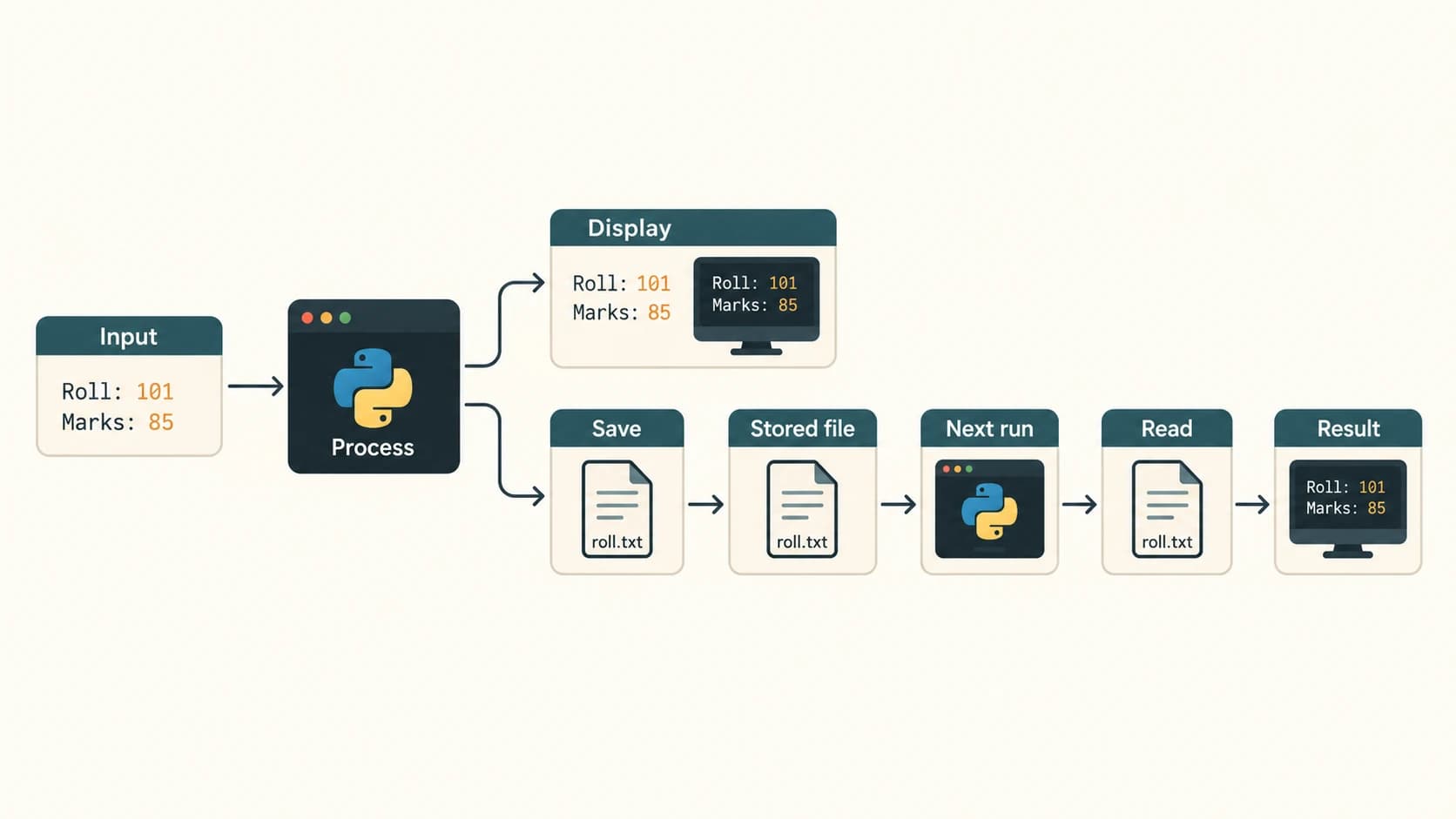
A Python program can read a student's name, calculate marks and print a result—but what happens when we close the program? Variables normally disappear. Files let programs preserve information so it can be recovered the next time the program runs. This chapter turns small, temporary Python programs into useful applications that save and retrieve text, structured records and tables.
Source and boundaries. NCERT Computer Science, Class XII, Chapter 2, “File Handling in Python,” printed pp. 19–38 (lecs102.pdf, reprint 2026–27). The chapter contains 10 end-of-chapter numbered exercises, Activity 2.1–2.4, and Program 2-1–2-8. Every numbered item is answered in the separate solution bank. The supplemental CSV and binary CRUD material is drawn from the uploaded Class XII master curriculum, not misrepresented as an NCERT Chapter 2 exercise or program. Explanations and all original practice questions here are newly written.
Curriculum map: Unit 1 — Computational Thinking and Programming II. The six permanent lessons are C12-FILE-01 through C12-FILE-06; the C12-CH02-SXX section IDs are stable chapter reading anchors, not new curriculum lesson IDs. This source chapter primarily covers C12-FILE-01–C12-FILE-04; C12-FILE-05 and C12-FILE-06 are clearly labelled syllabus/practical extensions. Link back to prerequisite C12-PY-05 for handling ValueError, FileNotFoundError and EOFError.
Learning objectives
By the end of the chapter you should be able to explain persistence and common file types, select the correct Python file mode, write/read/traverse text files, reason about seek() and tell(), serialize trusted Python objects using pickle, search and update stored records, process CSV tables, solve NCERT Exercises 1–10 and Activities 2.1–2.4, trace all eight worked programs, and answer 30 additional practice questions with explanations.
Chapter reading map
| Reading section | Permanent lesson | Source alignment | Main idea |
|---|---|---|---|
C12-CH02-S01 | C12-FILE-01 — File Concepts, Paths and File Modes | NCERT §§2.1–2.3 | Persistence, file types, open, modes, with |
C12-CH02-S02 | C12-FILE-02 — Text Files: Reading, Writing and Appending | NCERT §§2.4–2.5, 2.7 | write, writelines, read, readline, readlines, loops |
C12-CH02-S03 | C12-FILE-03 — seek(), tell() and Text-File Manipulation | NCERT §2.6; Program 2-2/2-5 | File cursor and sequential/random access |
C12-CH02-S04 | C12-FILE-04 — Binary Files and pickle | NCERT §2.8 | Pickling, unpickling and end-of-file |
C12-CH02-S05 | C12-FILE-05 — Binary-File CRUD/Search/Update Problems | Curriculum practical extension | Reliable record storage and lookup |
C12-CH02-S06 | C12-FILE-06 — CSV Files with the csv Module | Curriculum practical extension | Tabular data and CSV reader/writer |
Section C12-CH02-S01 — File Concepts, Paths and File Modes
Permanent lesson: C12-FILE-01. NCERT: §§2.1–2.3.
1. Why use files?
If a school stores students' marks in Python variables, those values usually live only while the program runs. A file provides a named location for stored data that survives normal program termination. A program can open the file later, read existing data, update it and create reports. Common real-life uses include student results, inventories, attendance, reports, game progress and exported data.
Persistent storage is different from memory in use: writing to a file requests that data be stored beyond the lifetime of the current Python process. For reliable applications, programmers also consider flushes, storage errors, backups and safe replacement of files.
2. Text files and binary files
Every on-disk file is ultimately bytes. The distinction is how applications interpret them.
| Aspect | Text file | Binary file |
|---|---|---|
| Interpretation | Bytes decoded using an encoding into characters | Raw bytes interpreted by a format or program |
Python open | "r", "w", "a" etc. (text is default) | "rb", "wb", "ab" etc. |
| Read returns | Python str | Python bytes |
| Typical examples | .txt, .py, .csv | Images, audio, .dat pickle records |
| Newlines | Can be translated/recognised by text I/O | Byte sequences are handled as-is |
| Encoding | Specified, e.g. UTF-8 | Does not apply until bytes are decoded |
NCERT wording clarified: The printed margin note suggests text files contain only ASCII; this is a simplification. Modern text may use UTF-8, Unicode and many other encodings. Similarly, not every .dat file is a pickle and an extension alone does not determine contents.
For example, an ordinary file might contain:
Roll,Name,Marks
101,Aman,88
102,Geet,94
It is human-readable text, but a program must interpret the comma-separated fields to understand the table.
3. Opening a file: handle, mode and path
from pathlib import Path
path = Path("students.txt")
with path.open("w", encoding="utf-8") as file:
    file.write("Aman,88\n")
with path.open("r", encoding="utf-8") as file:
    print(file.read())
# Aman,88
open(filename, mode, encoding=...) returns a file object (also called a handle). The filename can be a relative path resolved from the process's current working directory or an absolute path. Check the current directory with Path.cwd(). Avoid overwriting unrelated files by working within a dedicated exercises directory.
File-mode reference
| Mode | File must exist? | Creates if missing? | Erases existing contents? | Intended use | Initial position |
|---|---|---|---|---|---|
r | Yes | No | No | Read text | Beginning |
rb | Yes | No | No | Read raw bytes | Beginning |
r+ | Yes | No | No | Read/write without truncation | Beginning |
w | No | Yes | Yes | Create/replace text | Beginning |
wb | No | Yes | Yes | Create/replace binary | Beginning |
w+ | No | Yes | Yes | Read/write text anew | Beginning |
a | No | Yes | No | Append text | End for writes |
ab | No | Yes | No | Append binary | End for writes |
a+ | No | Yes | No | Append and read text | Writes always at end |
x | Must not exist | Yes | No | Create only if absent | Beginning |
Reading/writing symbols: r read, w write with truncation, a append, x exclusive create, b binary, t text (default), + update/read-write. E.g. rb+ is equivalent to r+b (read/write existing binary file); wb+ creates/truncates a read/write binary file; ab+ appends binary and permits reads. Python accepts several orderings such as r+b and rb+ but the standard styles above are clearer.
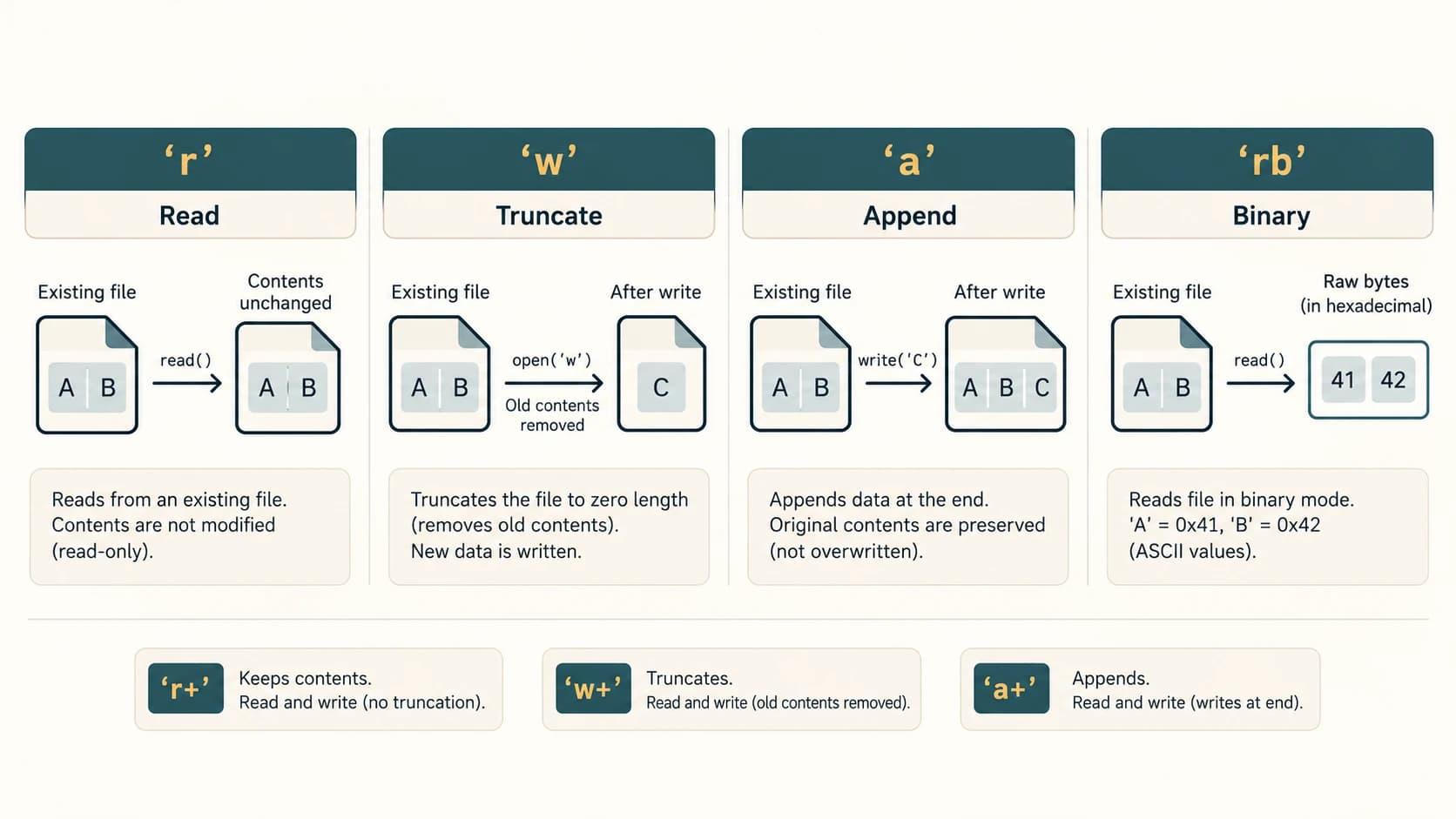
Mode-selection pitfalls
Opening an existing file with w deletes its previous contents immediately; reading later cannot recover them from that handle. r+ avoids automatic truncation, but writing overwrites bytes/characters starting at the cursor; it does not automatically insert content. In a+, writes go to the end even after a seek. A text file used only for reading should usually be opened with r, not r+.
4. Closing files and with
Closing a file releases its associated operating-system resources and normally flushes pending buffered output. Failing to close may delay writes, leak file descriptors or leave resources open; Python does not necessarily produce an immediate error. Prefer:
with open("note.txt", "w", encoding="utf-8") as file:
    file.write("Keep learning.\n")
print(file.closed)  # True after leaving the with block
A with statement closes the file when its suite exits, including if the suite raises an exception. If a file operation itself fails, that error should still be handled appropriately. The file properties .name, .mode and .closed describe the handle.
Example — error handling when a file may not exist:
try:
    with open("missing_report.txt", "r", encoding="utf-8") as f:
        print(f.read())
except FileNotFoundError:
    print("The report does not exist yet.")
Common misconceptions
wandado not mean the same thing for an existing file:wreplaces;apreserves then appends..txtis not synonymous with ASCII: the encoding is essential.withhandles closing, not every exception raised while reading or writing.- Text file paths are not necessarily relative to the
.pyscript; they are relative to the current working directory unless explicitly resolved.
Quick check: What happens when open("results.txt", "w") is called on a file already holding five marks? Its contents are truncated before new data is written. For preserving them, open in a mode.
Section C12-CH02-S02 — Text Files: Reading, Writing and Appending
Permanent lesson: C12-FILE-02. NCERT: §§2.4–2.5 and 2.7.
1. write() and writelines()
write(string) puts one string into a text file and returns the number of characters written; writelines(iterable_of_strings) writes its items in sequence and returns None. Neither method automatically inserts separators or newlines.
lines = ["First line\n", "Second line\n", "Third line\n"]
with open("lesson.txt", "w", encoding="utf-8") as f:
    characters = f.write("Heading\n")
    result = f.writelines(lines)
print(characters)  # 8: seven letters + newline
print(result)      # None
Why \n matters: Without it, consecutive calls such as f.write("A") and f.write("B") produce AB on one line. The actual newline character may be represented differently on different operating systems when translated into bytes.
with open("marks.txt", "w", encoding="utf-8") as f:
    mark = 58
    f.write(str(mark) + "\n")  # Numeric data must be converted to text
Calling f.writelines([10, 20]) causes TypeError: its members must be strings. Passing a single string to writelines writes one character at a time but has the same final character sequence, which is rarely useful.
2. Appending without destroying earlier content
with open("diary.txt", "w", encoding="utf-8") as f:
    f.write("Monday: Python\n")
with open("diary.txt", "a", encoding="utf-8") as f:
    f.write("Tuesday: Files\n")
with open("diary.txt", "r", encoding="utf-8") as f:
    print(f.read(), end="")
# Monday: Python
# Tuesday: Files
3. read, readline, readlines and direct iteration
| Method | What it does in text mode | Typical result |
|---|---|---|
f.read() | Remaining text, or whole file if at beginning | A str |
f.read(n) | Read up to n characters | A str |
f.readline() | Next line including newline if present | One str or "" at EOF |
f.readline(n) | Read at most n characters, stopping at a newline | A str |
f.readlines() | Read remaining lines into a list | list[str] |
for line in f: | Read lines one at a time | More memory-efficient for long files |
Technical correction to a textbook simplification: In text mode, read(n) and readline(n) specify characters, not bytes. In binary mode, read(n) counts bytes. tell() reports a position token useful for seeking back, not always an ordinary character index.
with open("example.txt", "w", encoding="utf-8") as f:
    f.writelines(["Hello everyone\n", "Writing Python\n", "Last line"])
with open("example.txt", "r", encoding="utf-8") as f:
    print(repr(f.read(5)))      # 'Hello'
    print(repr(f.readline()))   # ' everyone\n'
    print(repr(f.readline()))   # 'Writing Python\n'
    print(repr(f.readlines()))  # ['Last line']
In the sample, read(5) consumes the first five characters; the first readline() begins where the cursor was left. Calling read() repeatedly without resetting eventually returns "" because the file position has reached EOF.
Process a large file safely
with open("example.txt", "r", encoding="utf-8") as f:
    for line_no, line in enumerate(f, start=1):
        print(line_no, line.rstrip("\n"))
Prefer rstrip("\n") over strip() when you need to preserve meaningful leading/trailing spaces. split() produces words on whitespace; splitlines() produces a list of line strings (for one line read with readline(), usually one list element). Their purposes differ.
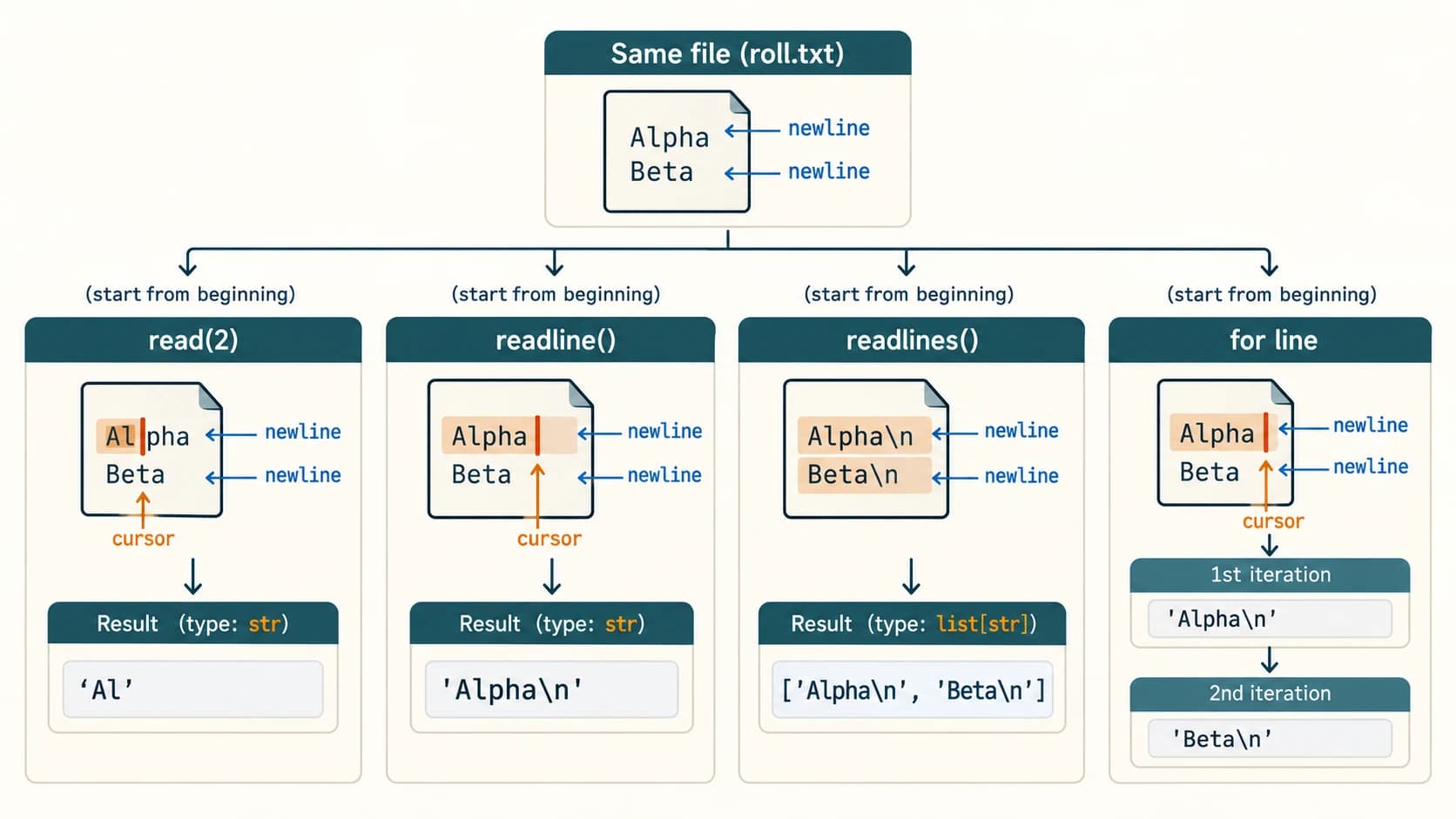
4. File traversal programs
A traversal visits successive lines or records until no more remain. NCERT uses both while line: and direct for iteration. In modern beginner programs, the latter is simpler unless you explicitly need readline() for a particular task.
with open("messages.txt", "w", encoding="utf-8") as f:
    f.write("First\nSecond\nThird\n")
with open("messages.txt", "r", encoding="utf-8") as f:
    line = f.readline()
    while line != "":
        print(line, end="")
        line = f.readline()
Why end=""? Each line already ends with \n. Plain print(line) normally adds another newline, causing blank lines between outputs.
5. Combined read and write
When a file is opened with w+, the old contents are erased. After writing, call seek(0) to read from the start; otherwise the current cursor is at or near the end.
with open("report.txt", "w+", encoding="utf-8") as f:
    f.write("First sentence\nSecond sentence\n")
    f.seek(0)
    print(f.read())
Exam traps
- Opening
"w"truncates;"a"preserves and appends. writelinesdoesn't manufacture line breaks; the string elements must supply them.readlinesconsumes the remaining part of the stream; it does not start at the beginning unless you seek there.- Reading in text mode gives
str; binary mode givesbytes. - If
print()adds its newline to a line already ending with\n, you may see a blank line.
Section C12-CH02-S03 — seek(), tell() and Text-File Manipulation
Permanent lesson: C12-FILE-03. NCERT: §2.6 and Programs 2-2, 2-5.
1. The file position
A file handle maintains a current position. Reading advances the position; writing usually advances it; seeking explicitly sets it. tell() reports the current position, while seek(offset, whence=0) requests a position change.
In a binary file, offsets are bytes and whence commonly has the following meanings:
whence | Reference point | Example (binary mode) |
|---|---|---|
0 | Start of file | f.seek(2, 0) |
1 | Current position | f.seek(-1, 1) |
2 | End of file | f.seek(-2, 2) |
In text mode, portable seeking is more restricted: f.seek(0), f.seek(0, 2) and seeking to a position previously returned by tell() are the reliable patterns; nonzero current-relative or end-relative offsets may raise io.UnsupportedOperation. A text-mode tell value should not be assumed to equal a number of visible characters, especially when multibyte encodings or newline translation are involved.
2. A reliable text-mode example
with open("cursor_demo.txt", "w", encoding="utf-8") as f:
    f.write("ABCD\nWXYZ\n")
with open("cursor_demo.txt", "r", encoding="utf-8") as f:
    print(f.read(4))  # ABCD
    saved = f.tell()  # Opaque position token
    print(repr(f.readline()))  # '\n'
    f.seek(saved)    # Return to saved position
    print(repr(f.readline()))  # '\n'
    f.seek(0)
    print(f.read(2))  # AB
3. Byte-accurate binary example
with open("bytes_demo.dat", "wb") as f:
    f.write(b"ABCDE")
with open("bytes_demo.dat", "rb") as f:
    f.seek(2)
    print(f.read(2))  # b'CD'
    f.seek(-1, 2)
    print(f.read(1))  # b'E'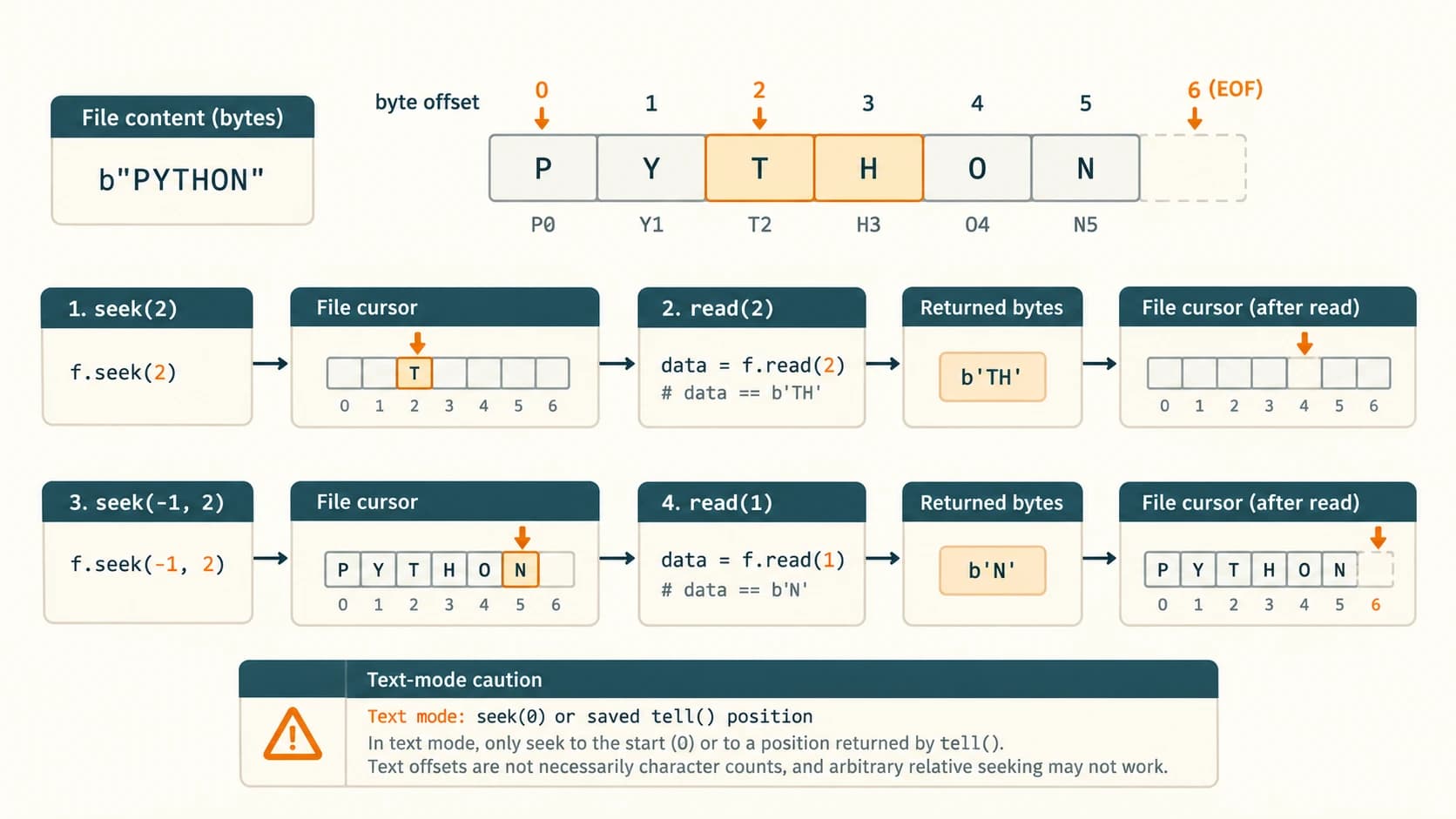
NCERT Program 2-2: It moves to offset 10 in a simple ASCII example and prints the remaining substring. That result is appropriate for this single-byte file, not a guarantee that offset 10 points to the 11th readable character in every UTF-8 document. The reported initial offset also depends on exact content/newline bytes.
4. Editing a text file
For beginner-friendly editing, reading lines into memory, changing them and rewriting deliberately is easier to reason about than writing in place. An in-place overwrite of a shorter replacement string may leave leftover old characters, and an in-place insertion is not automatic.
from pathlib import Path
path = Path("shopping.txt")
path.write_text("Pen\nPencil\n", encoding="utf-8")
lines = path.read_text(encoding="utf-8").splitlines()
updated = ["Notebook" if word == "Pencil" else word for word in lines]
path.write_text("\n".join(updated) + "\n", encoding="utf-8")
print(path.read_text(encoding="utf-8"))
For important real data, use a temporary file and replace the original only after successfully writing the new contents; handle failures and backups. The basic read_text/write_text example is suitable for small class exercises.
Exam trap: seek() changes the cursor; it does not move or insert actual file contents. tell() retrieves a location; it does not display the text at that location.
Section C12-CH02-S04 — Binary Files and the pickle Module
Permanent lesson: C12-FILE-04. NCERT: §2.8, Programs 2-6–2-8.
1. Why serialize objects?
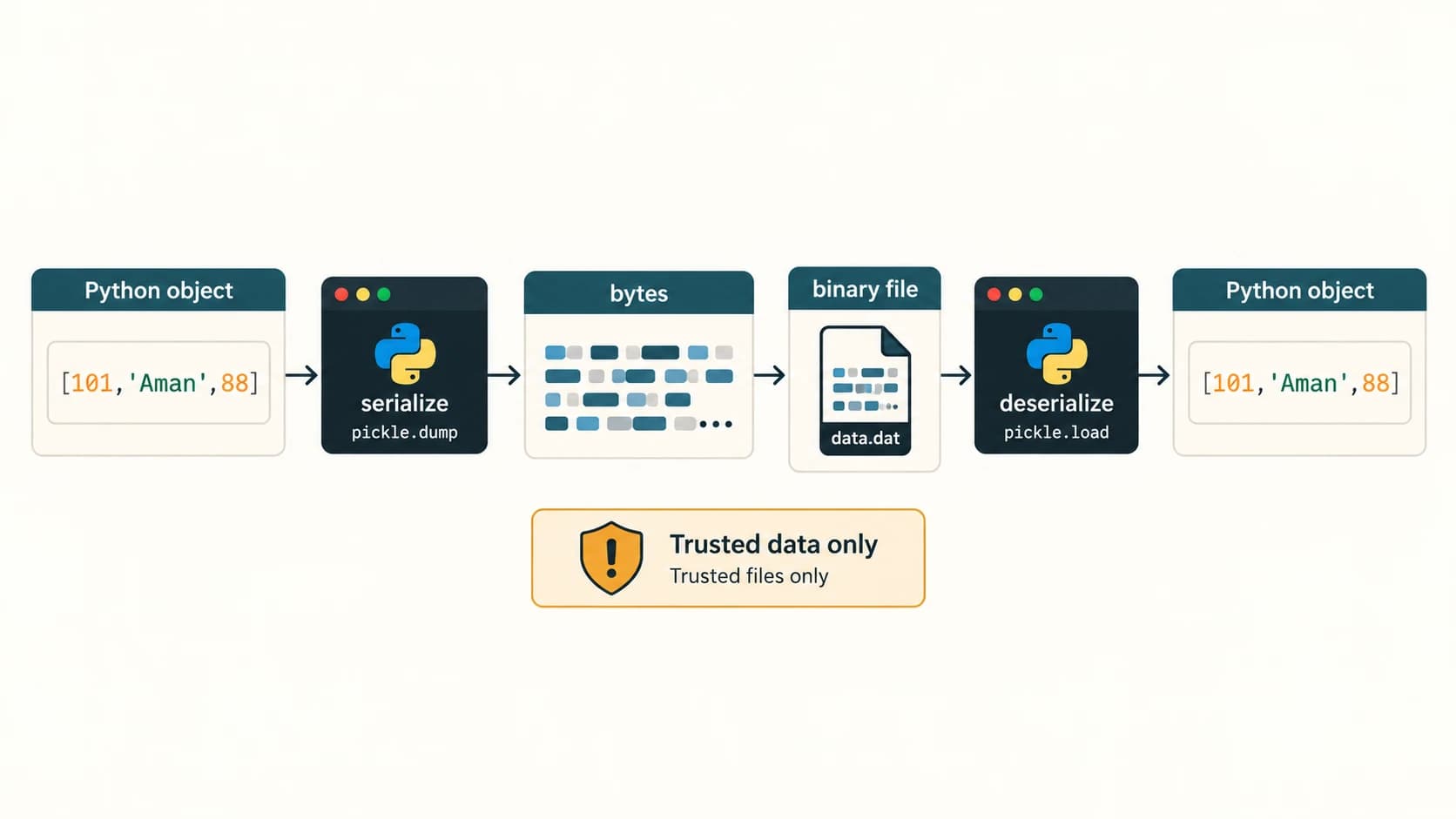
Python can store a simple sentence using write() and later recover that sentence using read(). But how do we preserve a list of employees, or a dictionary mapping roll numbers to marks, without manually converting every value to a string? Serialization transforms a data structure into a form suitable for storage or transfer. Deserialization reconstructs an object from that stored representation.
The Python pickle module serializes Python objects into binary data. NCERT calls serialization pickling and deserialization unpickling. Its core functions are:
pickle.dump(obj, binary_file)— serialize one object to an open binary stream.pickle.load(binary_file)— read and reconstruct one serialized object.pickle.dumps(obj)/pickle.loads(bytes)— related operations working with bytes directly rather than an open file (supplementary Python knowledge).
import pickle
student = [101, "Aman", 88]
with open("student.dat", "wb") as f:
    pickle.dump(student, f)
with open("student.dat", "rb") as f:
    restored = pickle.load(f)
print(restored)  # [101, 'Aman', 88]
Critical safety rule: Do not use pickle.load() on files downloaded from unknown sources or received from untrusted people. Unpickling malicious data can execute arbitrary code. The classroom examples here operate only on locally created, trusted files. When exchanging untrusted or cross-language data, consider safer formats such as JSON or CSV instead.
2. One file can hold multiple serialized records
Each call to pickle.dump() writes one serialized object; repeated calls may create a sequence of objects. When reading such a stream, one pickle.load() call retrieves one object, so use a loop:
import pickle
records = [[11, "Ravi", 32600], [12, "Farida", 38250]]
with open("employees.dat", "wb") as f:
    for record in records:
        pickle.dump(record, f)
with open("employees.dat", "rb") as f:
    while True:
        try:
            record = pickle.load(f)
        except EOFError:
            break
        print(record)
Why EOFError? A well-formed stream ends after the last record. Calling load() again at the end raises EOFError; catching it ends iteration. Do not catch every possible exception with bare except: pass, because damaged data or unrelated bugs deserve an explanation rather than silent concealment. A corrupted pickle might instead raise pickle.UnpicklingError or another exception.
3. Binary mode and byte size
A pickle stream is not human-readable text. Use "wb", "ab" or "rb", never text file modes for pickled objects. Its exact size may vary with the Python version, pickle protocol and stored values; do not rely on a fixed textbook byte count. For illustration:
import pickle
from pathlib import Path
with open("sample_record.dat", "wb") as f:
    pickle.dump({"roll": 101, "marks": 88}, f)
size_bytes = Path("sample_record.dat").stat().st_size
print(size_bytes > 0)  # True
This is different from the tell() value on a text file: Path.stat().st_size reports the file's size in bytes on disk. tell() is a position of a particular file object and may not be the same as total size.
4. Interpreting the employee-record example
NCERT Program 2-8 stores an employee number, name, basic salary, allowances and computed total salary. A reliable classroom demonstration is:
import pickle
employees = [
    [11, "Ravi", 32600, 4400, 37000],
    [12, "Farida", 38250, 5300, 43550],
]
with open("employee_records.dat", "wb") as f:
    for rec in employees:
        pickle.dump(rec, f)
with open("employee_records.dat", "rb") as f:
    while True:
        try:
            print(pickle.load(f))
        except EOFError:
            break
The stored total is derived as basic + allowances. For program correctness, recalculate it when accepting or editing a record, and reject negative or invalid numeric inputs according to your application's stated rules. Source note: The printed Program 2-8 has visibly inconsistent indentation in the published PDF text; the independently formatted working code above preserves the intended algorithm rather than reproducing an indentation error.
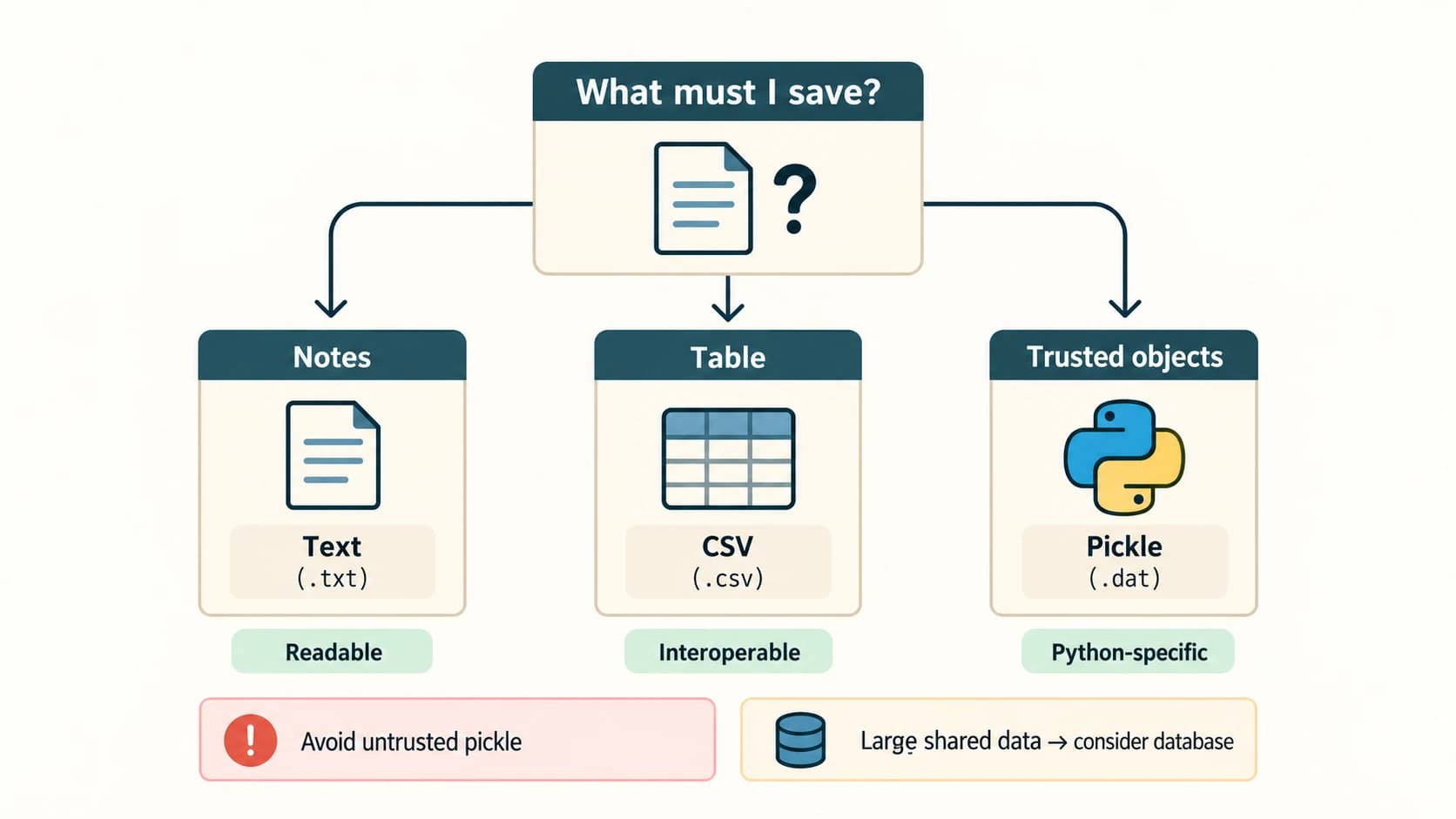
5. Text vs pickle vs CSV—choose the right tool
| Situation | Suitable representation | Rationale |
|---|---|---|
| Free-form diary or notes | UTF-8 text | Readable and editable |
| Student table to open in spreadsheet | CSV | Portable row/column format |
| Python-only trusted list/dictionary snapshot | Pickle | Preserves many Python object structures |
| Passwords or long-term sensitive data | None of these alone | Need proper security/privacy design, restricted access and often a database |
Do not unpickle arbitrary external data. For beginners, clarity and safety are more important than convenience.
Section C12-CH02-S05 — Binary-File Search, Update and CRUD Programs
Permanent lesson: C12-FILE-05 — curriculum practical extension. NCERT Chapter 2 illustrates record append/traversal but does not have a separate named CRUD unit.
1. What does CRUD mean?
CRUD means Create, Read, Update and Delete. In file programs:
- Create: save a new record with an identifier that is not already present.
- Read/Search: locate records, usually by a roll number or item number.
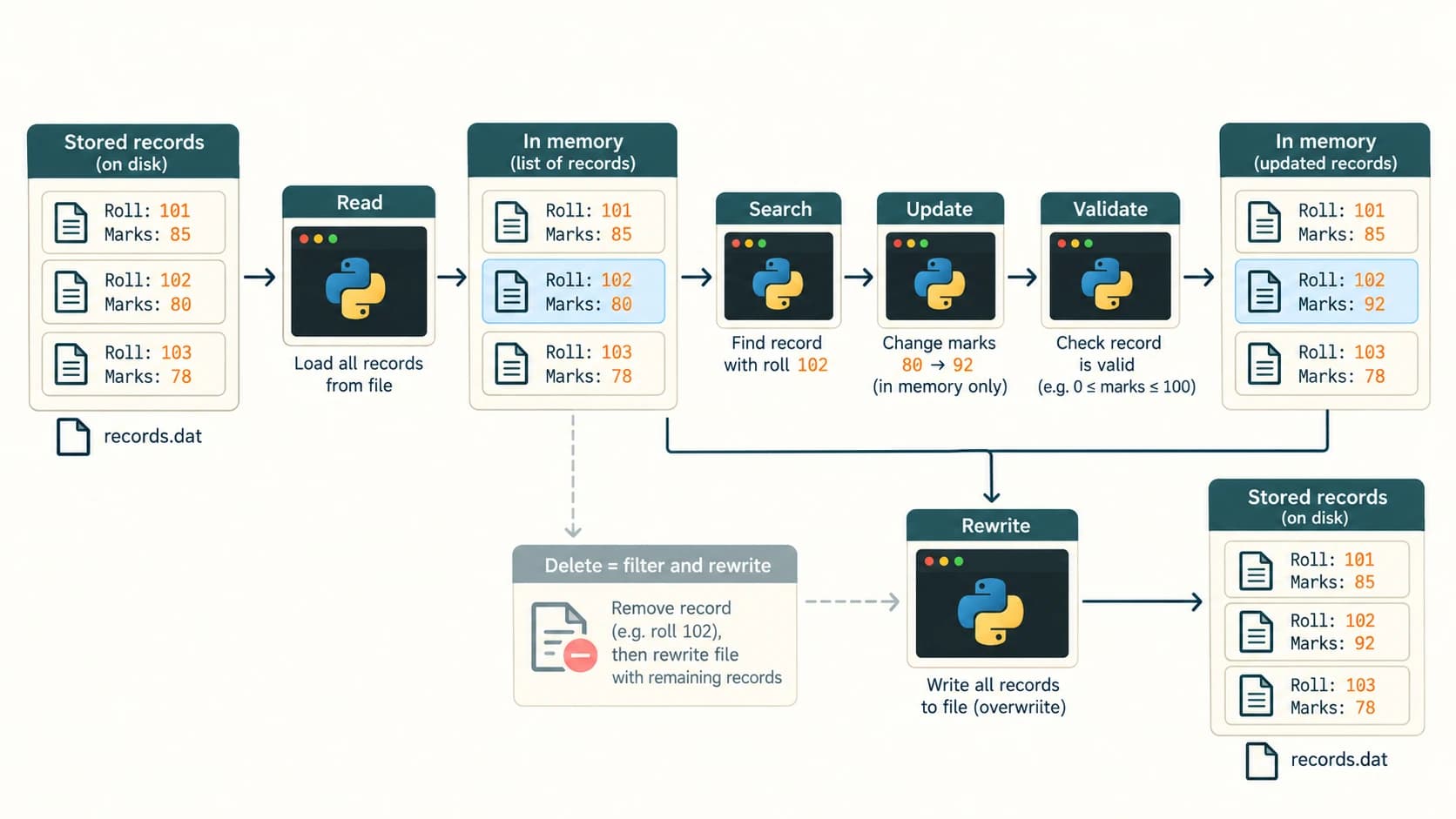
- Update: locate an existing record and change selected fields.
- Delete: rewrite the collection without the selected record.
In simple pickle-based exercises, a safe and understandable strategy is load trusted records → work with a Python list → rewrite the file. Arbitrary-length pickle records are not fixed-width slots, so overwriting a particular record in place is unsafe.
2. Complete file CRUD example
The following independently runnable program demonstrates student records with a roll-number key. It deliberately uses a local file created by the program itself.
import pickle
from pathlib import Path

PATH = Path("class_records.dat")

def read_all():
    if not PATH.exists():
        return []
    with PATH.open("rb") as f:
        return pickle.load(f)  # Trusted file created by this app

def write_all(records):
    with PATH.open("wb") as f:
        pickle.dump(records, f)

def create_student(roll, name, marks):
    records = read_all()
    if any(rec["roll"] == roll for rec in records):
        return False
    records.append({"roll": roll, "name": name, "marks": marks})
    write_all(records)
    return True

def find_student(roll):
    return next((r for r in read_all() if r["roll"] == roll), None)

def update_marks(roll, marks):
    records = read_all()
    for rec in records:
        if rec["roll"] == roll:
            rec["marks"] = marks
            write_all(records)
            return True
    return False

def delete_student(roll):
    records = read_all()
    remaining = [r for r in records if r["roll"] != roll]
    if len(remaining) == len(records):
        return False
    write_all(remaining)
    return True

write_all([])  # Reset only our example file
print(create_student(101, "Aman", 88))  # True
print(create_student(102, "Geet", 94))  # True
print(find_student(101))                # {'roll': 101, 'name': 'Aman', 'marks': 88}
print(update_marks(101, 91))            # True
print(find_student(101)["marks"])      # 91
print(delete_student(102))              # True
print(len(read_all()))                  # 1
Limitations: This single-file technique is suited to small classroom exercises. It replaces the whole file and is not designed for simultaneous users, crash safety or untrusted data. Real applications may use a transactional database, locking, validated input and atomic file replacement. When writing production systems, keep a temporary backup and consider os.replace after a fully written temporary file.
3. Stream-of-records search (closer to NCERT's repeated dump pattern)
NCERT stores one employee object per dump. To search such a stream, call load repeatedly until EOFError:
import pickle
with open("inventory_stream.dat", "wb") as f:
    for item in [[1, "Pen", 10], [2, "Book", 5], [3, "Eraser", 7]]:
        pickle.dump(item, f)
search_no = 2
found = None
with open("inventory_stream.dat", "rb") as f:
    while True:
        try:
            item = pickle.load(f)
        except EOFError:
            break
        if item[0] == search_no:
            found = item
            break
print(found)  # [2, 'Book', 5]
Difference between two serialization layouts: A file with one pickled list of many records needs one load() to read the list. A file with many individually pickled records needs repeated load(). Mixing the reading logic for these two layouts is a common examination and debugging mistake.
Section C12-CH02-S06 — CSV Files with Python's csv Module
Permanent lesson: C12-FILE-06 — curriculum practical extension. NCERT Chapter 2 briefly lists .csv as text, but a full lesson on csv.reader, csv.writer and DictReader is not included in its ten exercises.
1. Why not simply use split(',')?
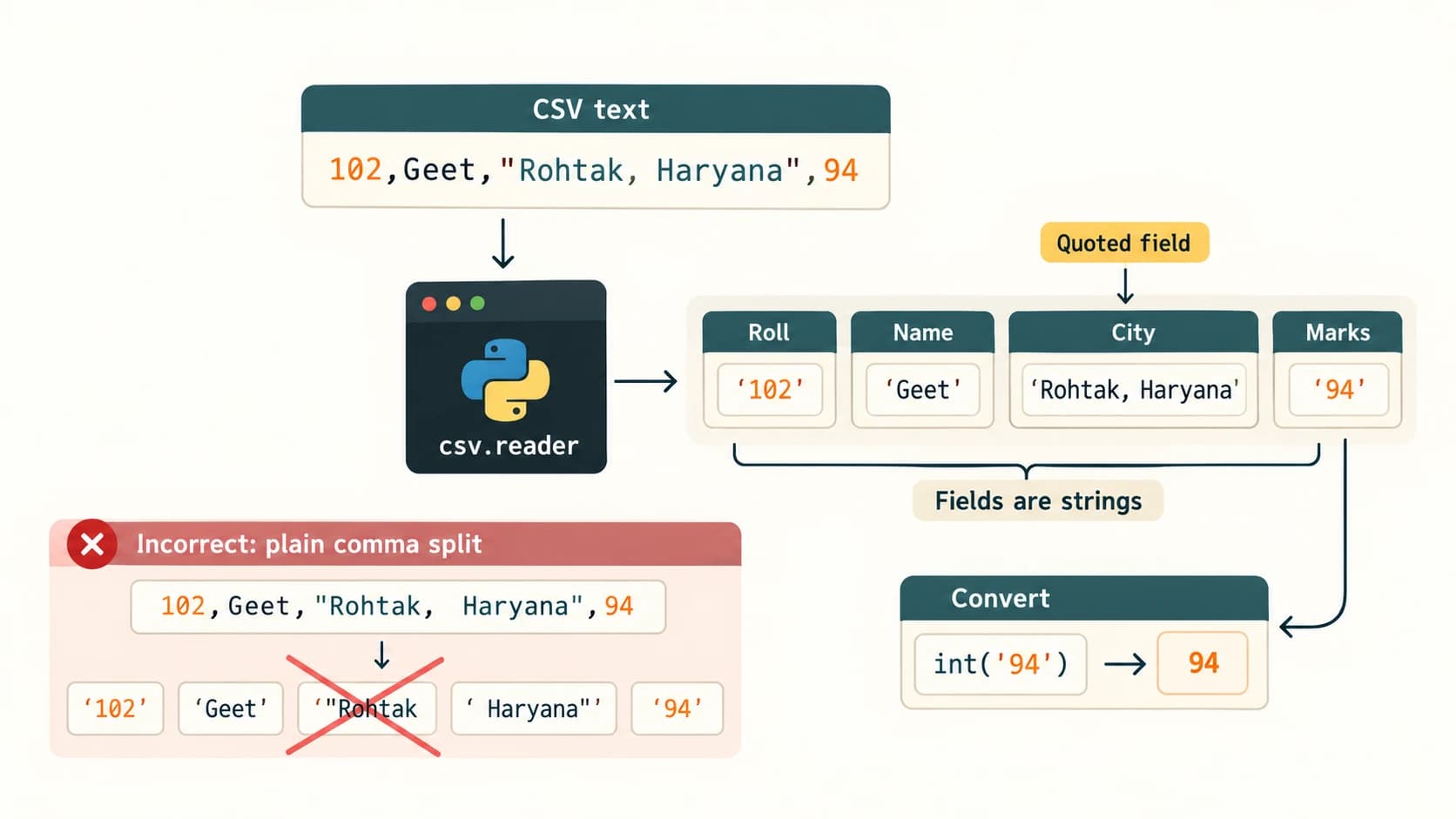
A CSV (comma-separated values) file stores records as rows. A field can legally contain commas, quotation marks or newlines if correctly quoted. Calling split(',') cannot correctly handle all such cases; Python provides the csv module to parse and create rows.
Roll,Name,City
101,Aman,Delhi
102,Geet,"Rohtak, Haryana"
The quoted city should remain one field, not become two separate pieces.
2. Write and read CSV rows
import csv
rows = [
    ["Roll", "Name", "City"],
    [101, "Aman", "Delhi"],
    [102, "Geet", "Rohtak, Haryana"],
]
with open("students.csv", "w", newline="", encoding="utf-8") as f:
    writer = csv.writer(f)
    writer.writerows(rows)
with open("students.csv", "r", newline="", encoding="utf-8") as f:
    for row in csv.reader(f):
        print(row)
# ['Roll', 'Name', 'City']
# ['101', 'Aman', 'Delhi']
# ['102', 'Geet', 'Rohtak, Haryana']
Notice: Numeric CSV fields are read as strings, unless explicitly converted. newline="" allows the csv module to manage newlines consistently and avoids problems such as unexpected blank lines on some platforms.
3. DictReader and DictWriter
import csv
records = [{"roll": 101, "name": "Aman", "marks": 88},
           {"roll": 102, "name": "Geet", "marks": 94}]
with open("scores.csv", "w", newline="", encoding="utf-8") as f:
    writer = csv.DictWriter(f, fieldnames=["roll", "name", "marks"])
    writer.writeheader()
    writer.writerows(records)
with open("scores.csv", "r", newline="", encoding="utf-8") as f:
    for row in csv.DictReader(f):
        print(row["name"], int(row["marks"]))
# Aman 88
# Geet 94
DictReader exposes column names; DictWriter uses a supplied field order. For small exercises, update a CSV by reading rows and rewriting to a newly opened output file. This is a text format, not a Python-object serializer, so lists or other nested values require explicit representation.
4. CSV practice application — total and topper
import csv
with open("marks_report.csv", "w", newline="", encoding="utf-8") as f:
    writer = csv.writer(f)
    writer.writerows([["name", "math", "science"],
                      ["Aman", 80, 90], ["Geet", 95, 85]])
with open("marks_report.csv", "r", newline="", encoding="utf-8") as f:
    students = list(csv.DictReader(f))
for s in students:
    s["total"] = int(s["math"]) + int(s["science"])
best = max(students, key=lambda s: s["total"])
print(best["name"], best["total"])  # Geet 180
Use-case comparison: Text is best for paragraphs; CSV for interoperable tabular records; pickle for trusted Python objects; databases for more demanding concurrent applications.
NCERT Chapter 2 — Complete Exercise Solutions (Questions 1–10)
How to use these answers: Each question is identified by its exact NCERT number and subpart, but the question is described briefly in new words rather than reproduced at length. The solutions explain both the textbook intention and modern Python-specific nuances. NCERT printed exercise pp. 37–38.
NCERT Exercise 1 — Differentiate the following
Q1(a) — Text file versus binary file
A text file represents information as characters decoded from bytes using an encoding, so a text editor can display its contents. In Python text mode, read() returns str, and write() accepts str. A binary file stores and retrieves raw bytes: binary-mode read() returns bytes, and write() accepts bytes-like objects. A pickle .dat file, image or audio file is a common binary example. Both are physically bytes; “text files contain only ASCII” is an outdated simplification.
| Text | Binary |
|---|---|
Open with "r", "w", "a" etc. | Open with "rb", "wb", "ab" etc. |
| Encoding decodes bytes into characters | Program interprets raw byte layout |
| Suitable for logs, notes and CSV | Suitable for images, pickled objects, media |
f.read(3) requests 3 characters | f.read(3) requests 3 bytes |
Q1(b) — readline() versus readlines()
readline() reads the next line (or a specified maximum number of characters) and returns a string. readlines() reads all remaining lines and returns a list of strings. Both usually preserve newline characters if they occur. At EOF, readline() returns "", whereas readlines() returns [].
with open("sample.txt", "w", encoding="utf-8") as f:
    f.write("Alpha\nBeta\n")
with open("sample.txt", "r", encoding="utf-8") as f:
    print(repr(f.readline()))  # 'Alpha\n'
    print(repr(f.readlines())) # ['Beta\n']
Q1(c) — write() versus writelines()
write(s) writes one string and returns the count of characters. writelines(strings) writes each string from an iterable and returns None. Neither adds \n automatically.
with open("method_demo.txt", "w", encoding="utf-8") as f:
    print(f.write("Hi\n"))         # 3
    print(f.writelines(["A\n", "B\n"]))  # None
NCERT Exercise 2 — Uses and syntax
Q2(a) — open()
Purpose: Open or create a file according to the mode and return a file handle. Syntax: open(filename, mode='r', encoding=...) for text files; binary modes omit encoding. Example:
with open("note.txt", "w", encoding="utf-8") as f:
    f.write("A new file\n")
Q2(b) — read()
Purpose: Read some or all remaining file data from the current position. Syntax: file_object.read(size=-1). In text mode size counts characters; in binary mode it counts bytes. Example:
with open("note.txt", "r", encoding="utf-8") as f:
    print(f.read(4))  # A ne
Q2(c) — seek()
Purpose: Reposition the file cursor. Syntax: file_object.seek(offset, whence=0). Use 0 to return to the beginning of a text file, or the saved tell() position; binary files also support relative/end offsets. Example:
with open("note.txt", "r", encoding="utf-8") as f:
    f.read(2)
    f.seek(0)
    print(f.read(1))  # A
Q2(d) — dump()
Purpose: Convert a Python object into a pickle byte stream and write it to a binary file. Syntax: pickle.dump(object, binary_file) after import pickle. Example:
import pickle
with open("one_record.dat", "wb") as f:
    pickle.dump([1, "Pen", 20], f)
NCERT Exercise 3 — Select the correct modes and write statements
| Part | Requirement | Correct mode and statement | Explanation |
|---|---|---|---|
| Q3(a) | Read and write existing example.txt | f = open("example.txt", "r+", encoding="utf-8") | Requires existing text file; no truncation |
| Q3(b) | Write binary bfile.dat | f = open("bfile.dat", "wb") | Creates/truncates; writes bytes |
| Q3(c) | Append and read try.txt | f = open("try.txt", "a+", encoding="utf-8") | Creates if absent; writes append; seek before reading |
| Q3(d) | Binary read only btry.dat | f = open("btry.dat", "rb") | Requires existing binary file |
Close each handle after use (e.g. f.close()), or preferably write the open inside a with block. If Q3(a)'s source does not exist, r+ raises FileNotFoundError; choose w+ only if creating/truncating is actually intended.
NCERT Exercise 4 — Why close files? What if they remain open?
Closing flushes outstanding buffered output, releases operating-system resources and prevents needless file-handle leaks. If a file is not closed, Python may still write the data eventually, but you must not depend on that timing: some data may remain buffered, and operations can exhaust resources. There is not necessarily an immediate error dialog; the failure may remain invisible until later. Use:
with open("school.txt", "w", encoding="utf-8") as f:
    f.write("School report\n")
# Closed automatically even if the block exits exceptionally
NCERT Exercise 5 — Difference between direct open/read(10) and with/read()
Set (a): P = open("practice.txt", "r") followed by P.read(10) reads up to the first ten characters, advances the file position, and yields the returned string. If run as a bare statement in a script without printing/assignment, its result is not automatically displayed by the program. The file remains open unless closed later.
Set (b): with open("practice.txt", "r") as P: followed by x = P.read() reads all remaining characters and stores them in x. The with block closes the file when the block exits. Both versions require the file to exist. A simple demonstration:
with open("practice.txt", "w", encoding="utf-8") as f:
    f.write("abcdefghijklmnop")
with open("practice.txt", "r", encoding="utf-8") as p:
    a = p.read(10)
with open("practice.txt", "r", encoding="utf-8") as p:
    b = p.read()
print(a, len(a))  # abcdefghij 10
print(b, len(b))  # abcdefghijklmnop 16
NCERT Exercise 6 — Append the three supplied lines to hello.txt
Since the handle is assumed to be open in append mode, use write() three times with explicit newlines. The first supplied line includes an initial blank before “Welcome” in the printed question; it is retained here:
with open("hello.txt", "a", encoding="utf-8") as f:
    f.write(" Welcome my class\n")
    f.write("It is a fun place\n")
    f.write("You will learn and play\n")
Or equivalently:
with open("hello.txt", "a", encoding="utf-8") as f:
    f.writelines([" Welcome my class\n",
                  "It is a fun place\n",
                  "You will learn and play\n"])
If hello.txt already has content, these lines are added after the existing data. If the previous final line has no terminating newline, the first new line will attach to it; check or handle that boundary if formatting is important.
NCERT Exercise 7 — Read hello.txt; contrast a and w
with open("hello.txt", "r", encoding="utf-8") as f:
    print(f.read(), end="")
Difference: Exercise 6 used "a" to append, leaving any earlier contents intact. Opening that file with "w" would erase the old contents immediately and then write only the new lines, if any. Opening it with "r" as done here only displays existing data and does not modify it. The exact output depends on whether the file had prior content before Exercise 6.
NCERT Exercise 8 — Accept sentences until END; print only those beginning uppercase
The end marker END is a sentinel and should not be saved as an ordinary sentence. We preserve each accepted line exactly, then check the first character when reading it back. A line starting with a space is not considered to begin with an uppercase letter.
FILE = "sentences.txt"
with open(FILE, "w", encoding="utf-8") as f:
    while True:
        sentence = input("Enter a sentence (END to stop): ")
        if sentence == "END":
            break
        f.write(sentence + "\n")

print("Sentences beginning with an uppercase letter:")
with open(FILE, "r", encoding="utf-8") as f:
    for raw_line in f:
        line = raw_line.rstrip("\n")
        if line and line[0].isalpha() and line[0].isupper():
            print(line)
Illustrative sample: inputs "We learn Python", "today is sunny", "Hello again", " END", "END" produce displayed sentences We learn Python and Hello again. The line " END" starts with a space, so it is saved but not displayed; only exact END stops input. You could choose a different policy, such as ignoring leading spaces, but must state it clearly.
NCERT Exercise 9 — Pickling, serialization and deserialization
Pickling is Python's process of converting an in-memory Python object (e.g. list or dictionary) into bytes so the object structure and values can be saved. Serialization is the general process of converting an object or data structure into a storable or transferable format; in Python's pickle, the serialization operation is pickle.dump. Deserialization is the reverse reconstruction operation, performed here with pickle.load.
import pickle
student = {"roll": 101, "name": "Aman", "marks": 88}
with open("stored_object.dat", "wb") as f:
    pickle.dump(student, f)
with open("stored_object.dat", "rb") as f:
    recovered = pickle.load(f)
print(recovered == student)  # True
Use pickles only from a source you trust, because loading untrusted pickles is unsafe. Serializing a value does not by itself encrypt or protect it.
NCERT Exercise 10 — Inventory binary-file program with item total
Specification: Accept the number of items, then for each item accept Item No (integer), Item Name (string), Qty (integer) and Price (float). Store the records in a binary file. Read them and print the item details, including Amount = Qty × Price, which is a calculated display value.
This solution creates a new classroom file per run (wb), writes one record per pickle.dump, then retrieves records until EOFError. It also checks for negative quantity or price and duplicate item numbers so errors are understandable.
import pickle

FILE = "items.dat"
number = int(input("How many items? "))
if number < 0:
    raise ValueError("Item count cannot be negative")

seen_numbers = set()
with open(FILE, "wb") as f:
    for i in range(number):
        print(f"Item {i + 1}")
        item_no = int(input("Item No: "))
        if item_no in seen_numbers:
            raise ValueError("Item number must be unique")
        item_name = input("Item Name: ").strip()
        qty = int(input("Quantity: "))
        price = float(input("Price per item: "))
        if qty < 0 or price < 0:
            raise ValueError("Quantity and price cannot be negative")
        seen_numbers.add(item_no)
        pickle.dump([item_no, item_name, qty, price], f)

print("INVENTORY REPORT")
with open(FILE, "rb") as f:  # Trusted local file just written
    while True:
        try:
            item_no, item_name, qty, price = pickle.load(f)
        except EOFError:
            break
        amount = qty * price
        print("Item No:", item_no)
        print("Item Name:", item_name)
        print("Quantity:", qty)
        print("Price per item:", f"{price:.2f}")
        print("Amount:", f"{amount:.2f}")
        print("-" * 20)
Sample input: 2 items: (101, Pen, 5, 12.50) and (102, Notebook, 3, 40.00).
Calculated report: first amount 5 × 12.50 = 62.50; second amount 3 × 40.00 = 120.00. Total of these example amounts is 182.50 (optional enrichment, not a required NCERT output field). The program should be run on trusted local files, and monetary rounding is presented for classroom simplicity; business finance systems should use appropriate decimal arithmetic.
Alternative layout: A single pickle.dump(list_of_records, file) followed by one load() would also satisfy the storage requirement if consistently implemented. This solution uses repeated dump to match the chapter's Program 2-8 pattern.
NCERT Activities 2.1–2.4 — Completed Practical Guidance
Activity 2.1 — Compare plain-text and word-processor file sizes
Task focus: Create a .txt and .docx with the same short name or sentence; inspect each size.
Procedure: Save identical text (for example, Aman) using a plain-text editor as UTF-8 and a word processor as .docx. Compare file sizes in the operating-system file properties, and optionally using Python:
from pathlib import Path
for filename in ["student.txt", "student.docx"]:
    path = Path(filename)
    if path.exists():
        print(filename, path.stat().st_size, "bytes")
Expected observation: A short UTF-8 .txt may occupy only a few bytes, while .docx is often larger because it stores a zipped package of XML documents, formatting and other information. Do not invent one fixed size: actual bytes depend on content, software, encoding, and metadata. A .txt file can also exceed a .docx file if it contains substantially more text or if compressibility differs.
Conclusion: File size is determined by data representation and content, not by the file extension alone.
Activity 2.2 — Explore extra file modes and offsets
Task focus: Examine rb+, wb, w+, ab, ab+ and where the file cursor begins.
| Mode | Read? | Write? | Existing data preserved? | Cursor initially (typical binary mode) |
|---|---|---|---|---|
rb+ | Yes | Yes | Yes | Start |
wb | No | Yes | No (truncates) | Start |
w+ | Yes | Yes | No (truncates) | Start |
ab | No | Yes | Yes, appends | End for writes |
ab+ | Yes | Yes | Yes, appends | End for writes; seek to read |
For a safe demonstration, use a disposable filename; a wb or w+ experiment will truncate it. An appending handle may be explicitly positioned for reads, but writes still go to the end. The mode symbols and tell() values are practical observations, not permission to seek to arbitrary nonzero offsets in a text stream.
with open("mode_lab.bin", "wb") as f:
    f.write(b"ABC")
with open("mode_lab.bin", "rb+") as f:
    print(f.tell())  # 0
    print(f.read(1)) # b'A'
with open("mode_lab.bin", "ab+") as f:
    print(f.tell())  # typically 3 on opening at the end
    f.seek(0)
    print(f.read())  # b'ABC'
    f.write(b"D")  # appended regardless of previous seek
Activity 2.3 — Replace writelines with write; test non-string values
The chapter gives lines = ["Hello everyone\n", ...]. f.writelines(lines) succeeds because it accepts an iterable of strings. f.write(lines) raises TypeError because write expects a single str not a list. Similarly, passing a tuple of numbers to writelines raises TypeError because each member is not a string. Convert each element first, with separators:
numbers = (10, 20, 30)
with open("numbers.txt", "w", encoding="utf-8") as f:
    f.writelines(str(n) + "\n" for n in numbers)
with open("numbers.txt", "r", encoding="utf-8") as f:
    print(f.read())
Correct distinction: writelines accepts any iterable of strings, including a tuple of strings, but not a tuple of integers unchanged.
Activity 2.4 — Loop over readline() for a multiline file
Create at least three lines of text, then read until readline() returns the empty string. Preserve each line's original newline without accidentally printing a second blank line:
with open("multiline.txt", "w", encoding="utf-8") as f:
    f.write("Line one\nLine two\nLine three\n")
with open("multiline.txt", "r", encoding="utf-8") as f:
    while True:
        line = f.readline()
        if line == "":
            break
        print(line, end="")
Observation: The loop executes once per line. readline() returns "" only when no characters remain; a blank line within a file contains "\n", so it does not end iteration.
NCERT Worked Programs 2-1–2-8 — Walkthroughs and Verified Classroom Versions
The textbook labels eight programs; these examples preserve their goals and explain what each statement accomplishes. Any safety, formatting or reliability fixes are explicitly distinguished from the original printed version.
NCERT Program 2-1 — Write input to a text file, reopen and display
Original task: Accept one piece of text, save it in testfile.txt, then reopen in read mode and traverse to display it. The first open in w mode creates/truncates the file; write() stores the text; the second open retrieves it.
sentence = input("Enter a sentence: ")
with open("testfile.txt", "w", encoding="utf-8") as f:
    f.write(sentence)
print("Now reading the contents of the file:")
with open("testfile.txt", "r", encoding="utf-8") as f:
    for line in f:
        print(line, end="")
If the user enters roll_numbers = [1, 2, 3, 4, 5, 6], it is stored as ordinary text, not as a pickled Python list. Closing/reopening ensures the file is ready for the subsequent read. with replaces explicit close() without changing the lesson.
NCERT Program 2-2 — seek() and tell()
Original task: Read testfile.txt, show the current position, move to the beginning, move to offset 10, and read the remainder. For the printed single-byte example, the remaining text begins after ten bytes. Exact output length depends on the string's characters and newline conventions.
with open("testfile.txt", "w", encoding="utf-8", newline="\n") as f:
    f.write("roll_numbers = [1, 2, 3, 4, 5, 6]")
with open("testfile.txt", "r", encoding="utf-8") as f:
    content = f.read()
    print(content)
    print("Position after full read:", f.tell())
    f.seek(0)
    print("Position after seek(0):", f.tell())
    f.seek(10)  # Suitable here: known ASCII-only example
    print("After offset 10:", f.read())
The sample's substring after offset 10 is rs = [1, 2, 3, 4, 5, 6] (the prefix roll_numbe has ten characters). For arbitrary Unicode text, store/restore a tell() cookie or use binary mode for byte-offset calculations.
NCERT Program 2-3 — Repeatedly write sentences to practice.txt
Original task: Keep taking user input until a stop response and write entries to a newly created text file. The printed program uses w+ and writes each input without an added newline, causing successive inputs to run together. This is a pedagogical pitfall, not a property of file I/O that should be imitated.
with open("practice.txt", "w", encoding="utf-8") as f:
    while True:
        line = input("Enter data: ")
        f.write(line + "\n")  # Improvement: separate successive entries
        if input("More data? (y/n): ").lower() == "n":
            break
w+ would also work but is unnecessary when the file is only written in this program. Unlike w, it permits reads using the same handle (after repositioning).
NCERT Program 2-4 — Traverse a text file using readline()
Original task: Read practice.txt line by line and print each line until end of file.
with open("practice.txt", "r", encoding="utf-8") as f:
    line = f.readline()
    while line:
        print(line, end="")
        line = f.readline()
The textbook's output combines two written sentences because Program 2-3 did not insert \n between them. This version displays one stored line at a time, provided the file actually contains line separators. Renaming a variable from str avoids shadowing Python's built-in str().
NCERT Program 2-5 — Write, report cursor position, seek and read
Original task: Use a single read/write file handle in w+ mode; accept sentences; use tell() to display the current position, then call seek(0) and read the content back.
with open("report.txt", "w+", encoding="utf-8") as f:
    f.write("I am a student of Class XII\n")
    f.write("Python is useful\n")
    print("Position after writing:", f.tell())
    f.seek(0)
    print("READING DATA FROM THE FILE")
    print(f.read(), end="")
The numerical tell() output is not a universal constant: it depends on the exact text, encoding and newlines. Avoid memorizing the sample's 67 byte-position value as a rule.
NCERT Program 2-6 — Serialize one student record
Original task: Pickle a list such as [1, 'Geetika', 'F', 26] into a binary file named mybinary.dat.
import pickle
listvalues = [1, "Geetika", "F", 26]
with open("mybinary.dat", "wb") as f:
    pickle.dump(listvalues, f)
The file stores a Python pickle byte stream, not a plain line of text. The dump method returns None and should not be mistaken for write(str(...)).
NCERT Program 2-7 — Deserialize that student record
Original task: Read the object created in Program 2-6 and print it.
import pickle
with open("mybinary.dat", "rb") as f:  # Trusted file from Program 2-6
    objectvar = pickle.load(f)
print("The data stored in file are:", objectvar)
# The data stored in file are: [1, 'Geetika', 'F', 26]
One load() reconstructs the one list stored by the previous program. If you call load() again, the stream is exhausted and EOFError is expected.
NCERT Program 2-8 — Append multiple employee records and display them
Original task: Enter employee number, name, basic salary and allowances; calculate total salary; pickle each employee record to an append-mode binary file; report file size; reopen and display the saved records until EOF.
import pickle
from pathlib import Path

sample_employees = [
    (11, "D N Ravi", 32600, 4400),
    (12, "Farida Ahmed", 38250, 5300),
]
# For repeatable demonstration, start fresh; use "ab" to append later.
with open("empfile.dat", "wb") as f:
    for number, name, basic, allowance in sample_employees:
        pickle.dump([number, name, basic, allowance, basic + allowance], f)
print("Size of file (bytes):", Path("empfile.dat").stat().st_size)
with open("empfile.dat", "rb") as f:  # Trusted local records
    record_number = 1
    while True:
        try:
            record = pickle.load(f)
        except EOFError:
            break
        print("Record", record_number, record)
        record_number += 1
Expected records: [11, 'D N Ravi', 32600, 4400, 37000] and [12, 'Farida Ahmed', 38250, 5300, 43550]. The size in bytes can vary and is intentionally not hard-coded. To follow the textbook's append workflow exactly, use open(..., "ab") once an existing record stream is established; running an append-only program repeatedly will preserve prior entries and increase the number of records. The typeset original contains inconsistent indentation around the with and while suite; the example above fixes only the formatting and reproducibility, not the algorithm.
Connection to Chapter 1: Catching EOFError at the end of a trustworthy record stream is a narrow, intentional exception-handling use case. It is different from using except Exception: pass to hide all input and corruption errors.
NCERT Textbook Side Questions — Additional Answers
Does a newly created file behave differently under write and append?
If the file does not exist, both "w" and "a" create it; the first inserted text therefore appears similar. The difference matters when the file already exists: "w" discards old contents, while "a" adds after them. Python does not provide a separate append() method on file handles; appending is an opening mode.
What happens if a number is passed directly to write()?
write() requires a string in text mode; write(58) raises TypeError. Use write(str(58)). In binary mode, encode a string or provide an appropriate bytes object.
Is read(10) exactly ten bytes?
In text mode, it requests ten characters; with UTF-8 a character may occupy more than one byte. In binary mode, it requests ten bytes.
Does seek() work identically in text and binary files?
No. Binary offsets are byte-based and support start/current/end reference points, while text-mode seeking has restrictions because of encoding and newline translation. For portable text files, use seek(0) or a saved tell() cookie.
Can we pass a tuple of numbers to writelines()?
Not unchanged. Every item yielded by the iterable must be a string, so writelines((10, 20)) raises TypeError. Convert elements to strings first.
Original Practice Questions — 30 Fully Explained Answers
The following questions are original practice, not additional NCERT exercises or claims about a previous board paper. Work through them after the textbook solutions. The set progresses from basic interpretation through Python tracing to practical programming.
Foundation and conceptual MCQs (1–10)
Practice 1 — Which mode preserves existing text and adds new text at the end?
Options: A r; B w; C a; D x.
Answer: C, a. It creates the file if absent and appends to existing content if present. w would erase old content; r is read-only; x creates only if the file does not exist.
Practice 2 — What does open("data.txt", "rb").read(2) return?
Options: A an integer; B a string; C bytes; D a list.
Answer: C, bytes. The b in rb requests raw-byte access. For example, a file starting with ASCII AB would yield b'AB'; text-mode read(2) would yield 'AB'.
Practice 3 — When does a with open(...) as f: file close?
Options: A only after calling f.close(); B when the with suite exits; C at the first read(); D never.
Answer: B. The context manager closes the file when its suite exits normally or because of an exception. It does not prevent file-operation exceptions from occurring.
Practice 4 — What is returned by f.writelines(["A", "B"]) when successful?
Options: A 2; B "AB"; C None; D ['A','B'].
Answer: C. writelines writes both strings but does not return a count. It also does not add newline characters by itself.
Practice 5 — At end-of-file, what does readline() return for a text stream?
Options: A None; B ""; C -1; D EOFError.
Answer: B. The empty string indicates no characters remain. A blank line in the file instead has newline characters and is not the same as EOF.
Practice 6 — Which statement can destroy previous contents immediately?
Options: A open("x.txt","r"); B open("x.txt","a"); C open("x.txt","w"); D open("x.txt","rb").
Answer: C. Write mode truncates an existing file on opening. It is appropriate only when replacing the file is intentional.
Practice 7 — Which function reconstructs a trusted object stored by pickle.dump?
Options: A pickle.read; B pickle.load; C pickle.write; D pickle.readtext.
Answer: B. pickle.load(binary_handle) reconstructs the next serialized object. Treat untrusted pickle streams as unsafe.
Practice 8 — What does f.read(3) measure in text mode?
Options: A exactly three disk bytes; B three lines; C at most three decoded characters; D three words.
Answer: C. Text streams count characters for reading. Three Unicode characters may occupy more than three UTF-8 bytes.
Practice 9 — For a large text file, which approach is usually most memory-conscious?
Options: A read() the whole file; B readlines() the whole file; C iterate for line in f; D duplicate the file first.
Answer: C. Iterating consumes lines progressively, avoiding an unnecessary whole-file copy. Memory usage still depends on the size of the current line and processing.
Practice 10 — Which standard module correctly processes a quoted CSV field containing a comma?
Options: A pickle; B csv; C random; D statistics.
Answer: B. csv.reader understands field quoting and separators. Plain split(',') would incorrectly divide a quoted field such as "Rohtak, Haryana".
Output tracing and explanation (11–18)
Practice 11 — Write twice without a newline
with open("p11.txt", "w", encoding="utf-8") as f:
    f.write("Hello")
    f.write("World")
with open("p11.txt", "r", encoding="utf-8") as f:
    print(f.read())
Answer: HelloWorld. write() doesn't automatically insert a space or a newline; concatenation happens because both strings are written sequentially.
Practice 12 — Writing followed by appending
with open("p12.txt", "w", encoding="utf-8") as f:
    f.write("A")
with open("p12.txt", "a", encoding="utf-8") as f:
    f.write("B")
with open("p12.txt", "r", encoding="utf-8") as f:
    print(f.read())
Answer: AB. The second open does not delete A; append mode writes B after it.
Practice 13 — Repeated reads and EOF
with open("p13.txt", "w", encoding="utf-8") as f:
    f.write("ABCDE")
with open("p13.txt", "r", encoding="utf-8") as f:
    print(f.read(2))
    print(f.read(2))
    print(repr(f.read(2)))
    print(repr(f.read(2)))
Answer: AB, CD, 'E', '' on separate output lines. Each read continues from the previous position and eventually encounters EOF.
Practice 14 — readline() retains end-of-line
with open("p14.txt", "w", encoding="utf-8") as f:
    f.write("One\nTwo\n")
with open("p14.txt", "r", encoding="utf-8") as f:
    print(repr(f.readline()))
    print(repr(f.readlines()))
Answer: 'One\n', then ['Two\n']. The first method returns a string; the second returns a list of remaining line strings. repr makes the newline visible.
Practice 15 — writelines() and the number of lines
with open("p15.txt", "w", encoding="utf-8") as f:
    f.writelines(["X", "Y", "Z"])
with open("p15.txt", "r", encoding="utf-8") as f:
    print(f.read().splitlines())
Answer: ['XYZ']. There were three input strings but no line separators, so the resulting file contains one text line.
Practice 16 — Cursor reset before reading
with open("p16.txt", "w+", encoding="utf-8") as f:
    f.write("DATA")
    print(repr(f.read()))
    f.seek(0)
    print(f.read())
Answer: '' then DATA. After writing, the cursor is at the end; seeking to the start makes the existing text available for reading. Buffered update-mode streams may require synchronizing operations; a seek performs the necessary repositioning for this example.
Practice 17 — Binary offset from the end
with open("p17.bin", "wb") as f:
    f.write(b"Python")
with open("p17.bin", "rb") as f:
    f.seek(-2, 2)
    print(f.read())
Answer: b'on'. The byte string contains six bytes; moving two bytes before EOF positions the cursor at o.
Practice 18 — Two pickles, two loads
import pickle
with open("p18.dat", "wb") as f:
    pickle.dump([1, 2], f)
    pickle.dump({"x": 3}, f)
with open("p18.dat", "rb") as f:
    print(pickle.load(f))
    print(pickle.load(f))
Answer: [1, 2] then {'x': 3}. Each load() reconstructs one serialized object. A third load at the end would encounter EOFError.
Short-answer reasoning (19–24)
Practice 19 — Why is with generally preferable to opening a file and forgetting its handle?
Answer: It reliably closes the file at block exit, including during exception propagation. That reduces leaked file handles and delayed buffered output. It does not guarantee a disk failure cannot occur, so write errors still need attention.
Practice 20 — Explain r+ versus w+ with a previously populated file.
Answer: r+ opens the existing file for reading and writing without truncation; writing begins at the cursor and may overwrite some content. w+ truncates immediately then allows both reading and writing. Both allow seeking, and r+ requires the file to exist.
Practice 21 — Can a file with a .csv extension be treated as a binary pickle file automatically?
Answer: No. A file extension is a naming convention, not an automatic data conversion. CSV conventionally stores text rows; pickle stores Python-specific binary object representations. Parsing the wrong format causes errors or meaningless data.
Practice 22 — What is the difference between appending a pickle record and replacing a record?
Answer: Appending with ab adds another serialized object at EOF, leaving existing records untouched. Replacing a variable-length record safely requires a search and a rewrite of the logical record collection, not simply writing a new pickle over the old bytes in place.
Practice 23 — Why does opening a CSV with newline="" help?
Answer: It allows the csv module to handle line boundaries without extra text-I/O newline transformations that can produce blank lines or broken embedded newlines on some operating systems.
Practice 24 — Why is loading an arbitrary .dat file with pickle.load unsafe?
Answer: A pickle may contain instructions that execute while objects are reconstructed; attackers can exploit this feature. Load only trusted, locally created pickles. File extension alone cannot establish trust.
Applied mini-programming (25–30)
Practice 25 — Count lines without loading the whole file
Task: Create a short text file and count lines using iteration.
with open("p25.txt", "w", encoding="utf-8") as f:
    f.write("A\nB\nC\n")
with open("p25.txt", "r", encoding="utf-8") as f:
    count = sum(1 for _ in f)
print(count)  # 3
Explanation: A file iterator yields successive lines; sum adds one for each. This works without reading all lines into a list.
Practice 26 — Print lines containing a target word
with open("p26.txt", "w", encoding="utf-8") as f:
    f.write("I enjoy Python\nI enjoy music\nPython uses files\n")
with open("p26.txt", "r", encoding="utf-8") as f:
    for line in f:
        if "Python" in line:
            print(line.rstrip("\n"))
Answer: I enjoy Python and Python uses files. The membership check is case-sensitive and does not automatically match lowercase python.
Practice 27 — Save an object and verify it was restored
import pickle
original = {"101": [88, 90], "102": [75, 86]}
with open("p27.dat", "wb") as f:
    pickle.dump(original, f)
with open("p27.dat", "rb") as f:
    restored = pickle.load(f)
print(restored == original)  # True
Explanation: Pickle retains this trusted dictionary's keys and nested list values. Equality confirms the reconstructed data, not cryptographic integrity or safe provenance.
Practice 28 — Find all records above a score threshold
records = [{"roll": 1, "marks": 75},
           {"roll": 2, "marks": 91},
           {"roll": 3, "marks": 88}]
print([r["roll"] for r in records if r["marks"] >= 85])
# [2, 3]
Explanation: The list comprehension filters matching records. In a binary-file exercise, load the trusted records first, apply the same filter, and save changes only if updates are required.
Practice 29 — CSV total from named columns
import csv
with open("p29.csv", "w", newline="", encoding="utf-8") as f:
    writer = csv.DictWriter(f, fieldnames=["item", "qty", "price"])
    writer.writeheader()
    writer.writerows([{"item": "Pen", "qty": 5, "price": 12.5},
                      {"item": "Book", "qty": 2, "price": 40}])
with open("p29.csv", "r", newline="", encoding="utf-8") as f:
    total = sum(int(r["qty"]) * float(r["price"])
                for r in csv.DictReader(f))
print(total)  # 142.5
Explanation: The CSV reader produces strings, so explicit conversion is necessary. Total is 5×12.5 + 2×40 = 142.5.
Practice 30 — Create safely without overwriting an existing answer file
from pathlib import Path
path = Path("p30_unique.txt")
if path.exists():
    path.unlink()  # Only remove our disposable practice file
try:
    with path.open("x", encoding="utf-8") as f:
        f.write("First submission\n")
    with path.open("x", encoding="utf-8") as f:
        f.write("Accidental replacement")
except FileExistsError:
    print("Submission already exists; it was not replaced.")
Explanation: x raises FileExistsError if a file exists. The example cleans up only its named disposable demonstration file so the first create succeeds; in a real system, never automatically delete an existing user's submission.
Quick Revision — File Handling at a Glance
| Question | Key answer |
|---|---|
| File persistence | Data can survive process termination when stored successfully |
Text read() returns | str |
Binary read() returns | bytes |
| Mode that truncates | w, w+, wb etc. |
| Mode that appends | a, a+, ab, ab+ |
| File context manager | with open(...) as f: |
write return | Number of characters written in text mode |
writelines return | None; does not add newlines |
readline at EOF | "" |
readlines at EOF | [] |
tell | Current position token |
seek | Repositions cursor subject to mode restrictions |
pickle.dump | Serialize one trusted Python object to binary stream |
pickle.load | Deserialize one trusted object from binary stream |
| Pickle-stream EOF | EOFError after final record |
| CSV writer | csv.writer, writerow, writerows |
| CSV reader | csv.reader, csv.DictReader |
| CSV field type | Strings until explicitly converted |
| Full-record update | Search, revise, rewrite safely |
Exam-readiness checklist
- I can explain the file modes and why
wcan destroy previous records. - I can distinguish read/write methods and show why some operations return
None. - I can predict cursor movement after
read()and useseek(0)correctly. - I can demonstrate two styles of pickle storage: one list and a sequence of records.
- I can solve NCERT Q1–Q10 with reasoning rather than memorising outputs.
- I can complete the four NCERT activities with observations and cautions.
- I can use
csv.readerandDictWriterfor correctly quoted CSV data. - I never unpickle files from an unknown source.
Viva / oral review (sample prompts with quick responses)
Why does pickle.load() need a binary stream? Pickle is a byte-based serialization format rather than decoded character text.
Why add \n when writing sentences? Python write does not insert line breaks automatically.
What is the difference between read() and readline()? The former reads an amount of text; the latter stops after one line or a given limit.
Does with catch exceptions? No; it closes resources while any unhandled exception continues to propagate.
When should we avoid a file containing many pickle records? When exchanging data with untrusted parties, needing interoperability, needing concurrent reliable updates, or building a larger multi-user application.