
Project Based Learning
Study Project Based Learning in Class 12 Computer Science, with detailed explanations, worked examples, NCERT solutions and practice questions.
By Akhilesh Saini
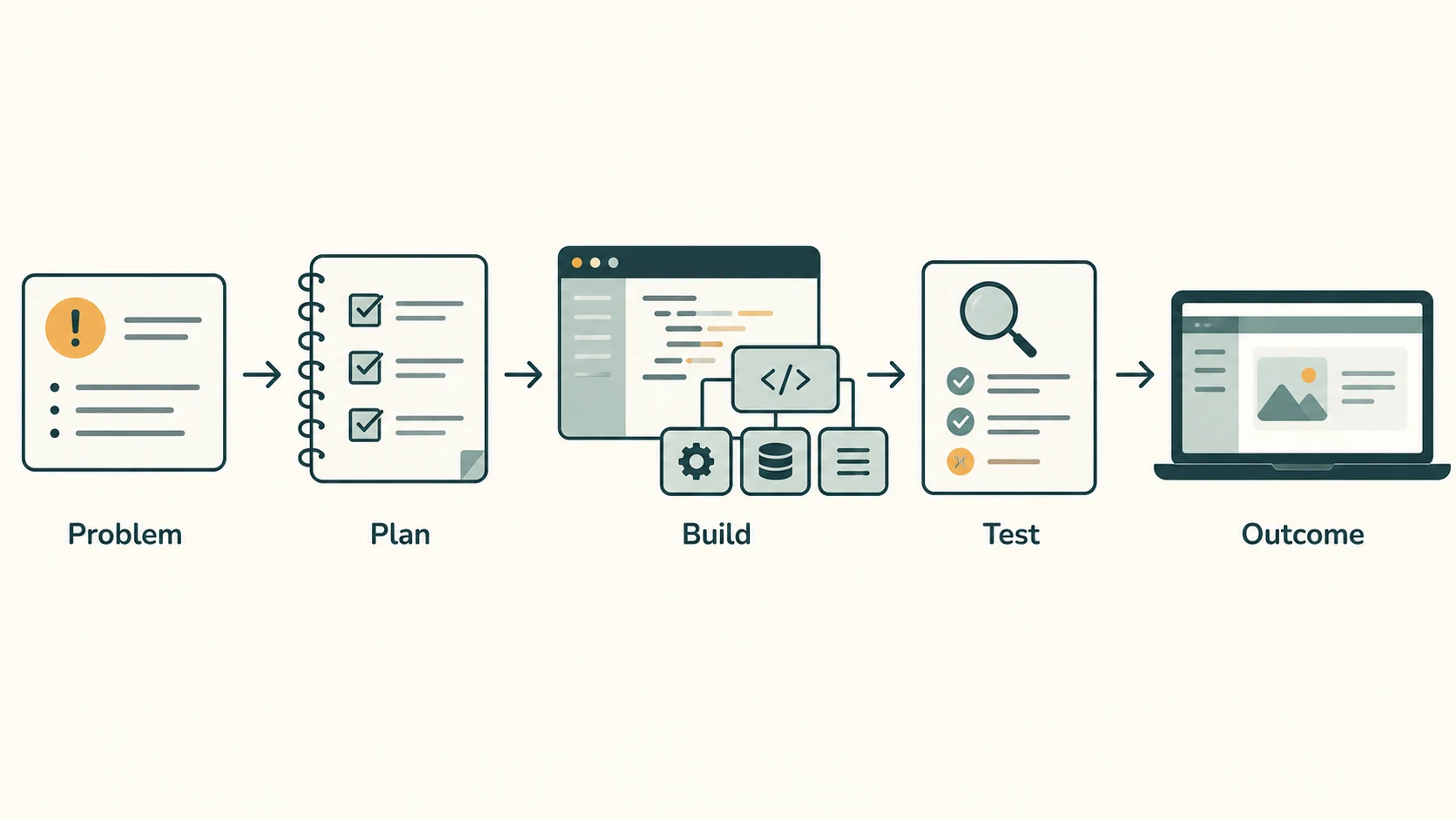
Knowing Python syntax is useful; using it to solve a real problem is the next step. A working project requires more than code: someone must understand the problem, agree on expected behaviour, collect or create suitable test data, divide work into modules, coordinate teammates, test the result and communicate what was achieved. This chapter converts those steps into practical skills and applies them to all three NCERT Chapter 13 project descriptions.
Source coverage. NCERT Computer Science, Class XII, Chapter 13, Project Based Learning, printed pages 241–248, §§13.1–13.4. The chapter explains identification, planning, scheduling, monitoring and outcomes; modular/top-down/bottom-up approaches; six teamwork practices; and three complete project specifications. It has no separately numbered end-of-chapter exercises or activities. Accordingly, the worked requirements and implementations below are original teaching solutions for NCERT's three project briefs, not fabricated NCERT exercises or official NCERT sample programs. The textbook's three briefs are restaurant order processing, a Minesweeper-style puzzle and the educational game Match the Sum. The course-specific solutions below add clear assumptions where the briefs do not prescribe a complete implementation.
Learning objectives
By the end you should be able to (1) distinguish a problem statement from project requirements; (2) prepare deliverables, milestones and acceptance criteria; (3) compare modular, top-down and bottom-up development; (4) divide responsibilities and practise effective communication, listening, sharing, respect, help and participation; (5) design sensible input validation and error handling; (6) implement simplified Python versions of all three textbook projects; (7) prepare test cases and a report; and (8) answer 30 explained original practice questions.
Chapter reading map
| Section | Topic | NCERT connection |
|---|---|---|
| C12-CH13-S01 | What project-based learning is | §13.1 |
| C12-CH13-S02 | Project approaches and modular design | §13.2 |
| C12-CH13-S03 | Five stages, planning and monitoring | §13.2, Figure 13.1 |
| C12-CH13-S04 | Teamwork and roles | §13.3, §13.3.1 |
| C12-CH13-S05 | Requirements, algorithms, tests and documentation | Applied extension |
| C12-CH13-S06 | NCERT Project 1: Restaurant ordering | §13.4, Project 1 |
| C12-CH13-S07 | NCERT Project 2: Minesweeper puzzle | §13.4, Project 2 |
| C12-CH13-S08 | NCERT Project 3: Match the Sum | §13.4, Project 3 |
| C12-CH13-S09 | Practical records, viva and peer review | Applied extension |
Section C12-CH13-S01 — Understanding Project-Based Learning
Project-based learning (PBL) is learning through the investigation, design, implementation and evaluation of a meaningful problem. Instead of memorising a function in isolation, students use programming, data handling, decision-making and communication together to produce a demonstrable result.
A project has a goal, boundaries, stakeholders, constraints, planned activities and an outcome. A program is software that may form all or part of the project. A deliverable is something others can inspect, such as a requirements document, source-code repository, test report or demonstration. A stakeholder is anyone who will use, commission, support or be affected by the result.
Example. “Write a Python menu program” is a coding instruction; “help a school canteen issue accurate bills, record orders and calculate daily sales” is a problem that needs analysis, data structures, input validation, reporting and user testing.
A successful project is not measured only by the number of lines of code. It should address the agreed problem, handle expected mistakes, be usable by its intended audience and have enough documentation for another person to understand it.
Problem → requirement → deliverable
| Layer | Restaurant example |
|---|---|
| Problem | Handwritten orders and bill totals cause delays or mistakes |
| Requirement | A customer enters item codes and quantities; the software calculates an accurate bill |
| Constraint | Order numbers restart each day but persisted bill identifiers must remain unique |
| Deliverable | Working application, saved order records, tests and sample reports |
| Acceptance criterion | A test order for two items produces the correct sum and can be retrieved |
Exam insight: A requirement says what the system must do; an implementation explains how the system does it. “The user can view a bill” is a requirement. “The program prints a formatted Python string” is one implementation choice.
Section C12-CH13-S02 — Three Project Development Approaches
NCERT mentions modular, top-down and bottom-up approaches. They can complement each other rather than competing as mutually exclusive methods.
Modular approach
Divide a large problem into understandable units with clear responsibilities and inputs/outputs. For restaurant software, modules might be menu, order, billing, persistence, authentication and reports. Modules make collaborative work easier, allow focused tests and reduce changes spilling into unrelated areas.
A module boundary is effective when the information crossing it is explicit. For example:
def calculate_total(line_items, menu):
    """Return a monetary total in integer paise."""
    total = 0
    for item_code, quantity in line_items:
        if item_code not in menu or quantity <= 0:
            raise ValueError("Invalid line item")
        total += menu[item_code]["price_paise"] * quantity
    return total
This function receives its required values; it does not secretly read input or modify a database. The contract is easier to test.
Top-down approach
Begin with the overall goal and repeatedly break it into smaller tasks until each can be implemented. Example: Automate restaurant → collect order, price it, issue bill, store it, report sales → validate item code and quantity; compute line total; allocate identifier. Top-down design is especially useful when requirements are understood but the implementation details are not.
Bottom-up approach
Begin with dependable smaller components, then assemble them into a complete application. Example: implement and test money calculations, unique-order-ID generation and persistence, then connect them to a kiosk workflow. This is useful when reusable building blocks already exist or individual parts can be independently tested.
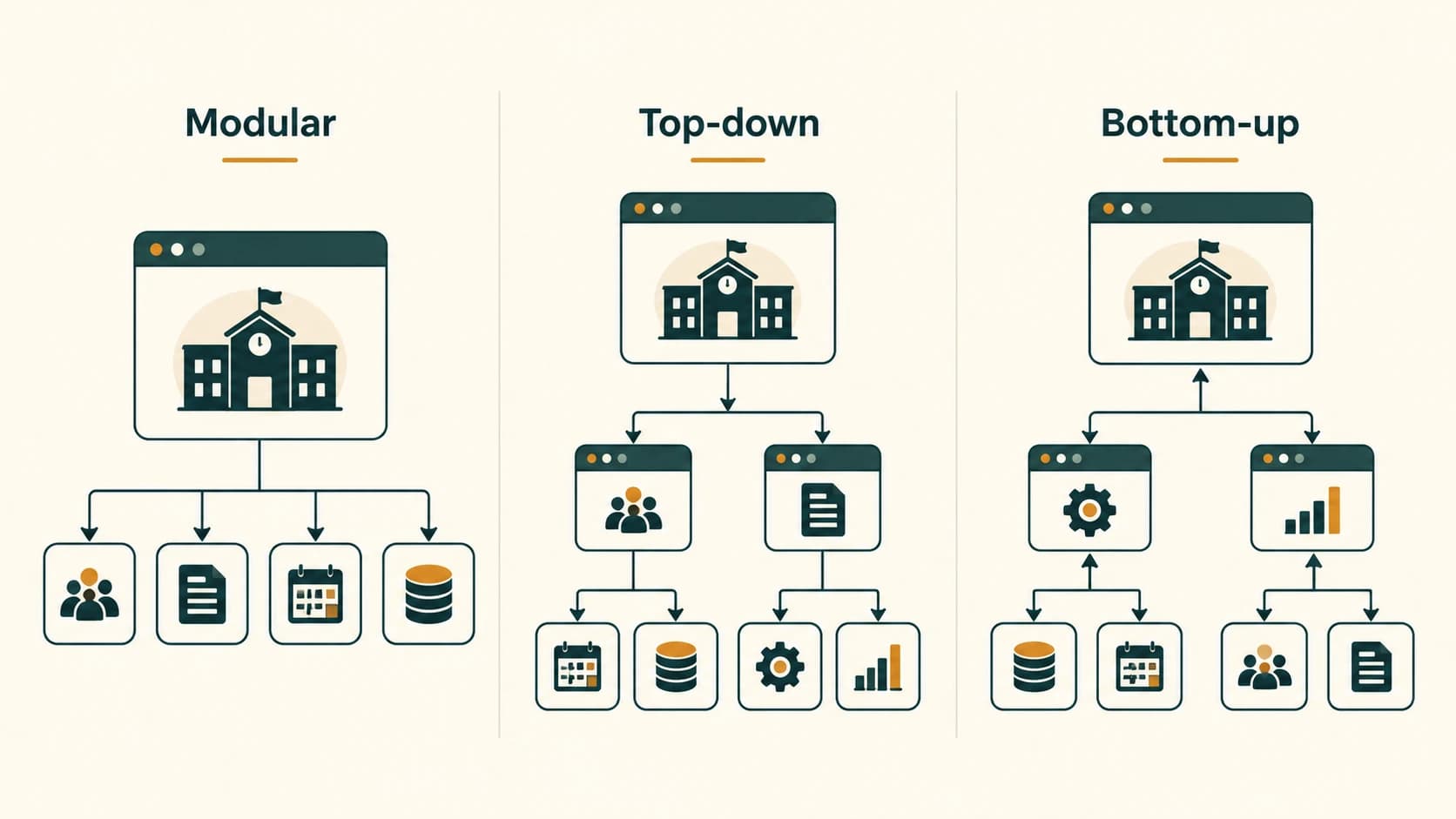
| Approach | Direction | Advantage | Watch-out |
|---|---|---|---|
| Modular | Divide by responsibility | Clear ownership and testing | Poorly defined interfaces cause integration trouble |
| Top-down | Whole problem to subproblems | Strong alignment with user needs | Uncertain technical details may be postponed too long |
| Bottom-up | Components to solution | Reliable reusable parts | Parts may fail to satisfy the overall user journey |
Practical method: Plan top-down, implement in modules, and integrate well-tested components bottom-up. This is a sensible synthesis, not a statement that NCERT requires one rigid life-cycle model.
Section C12-CH13-S03 — Five Stages of a Project
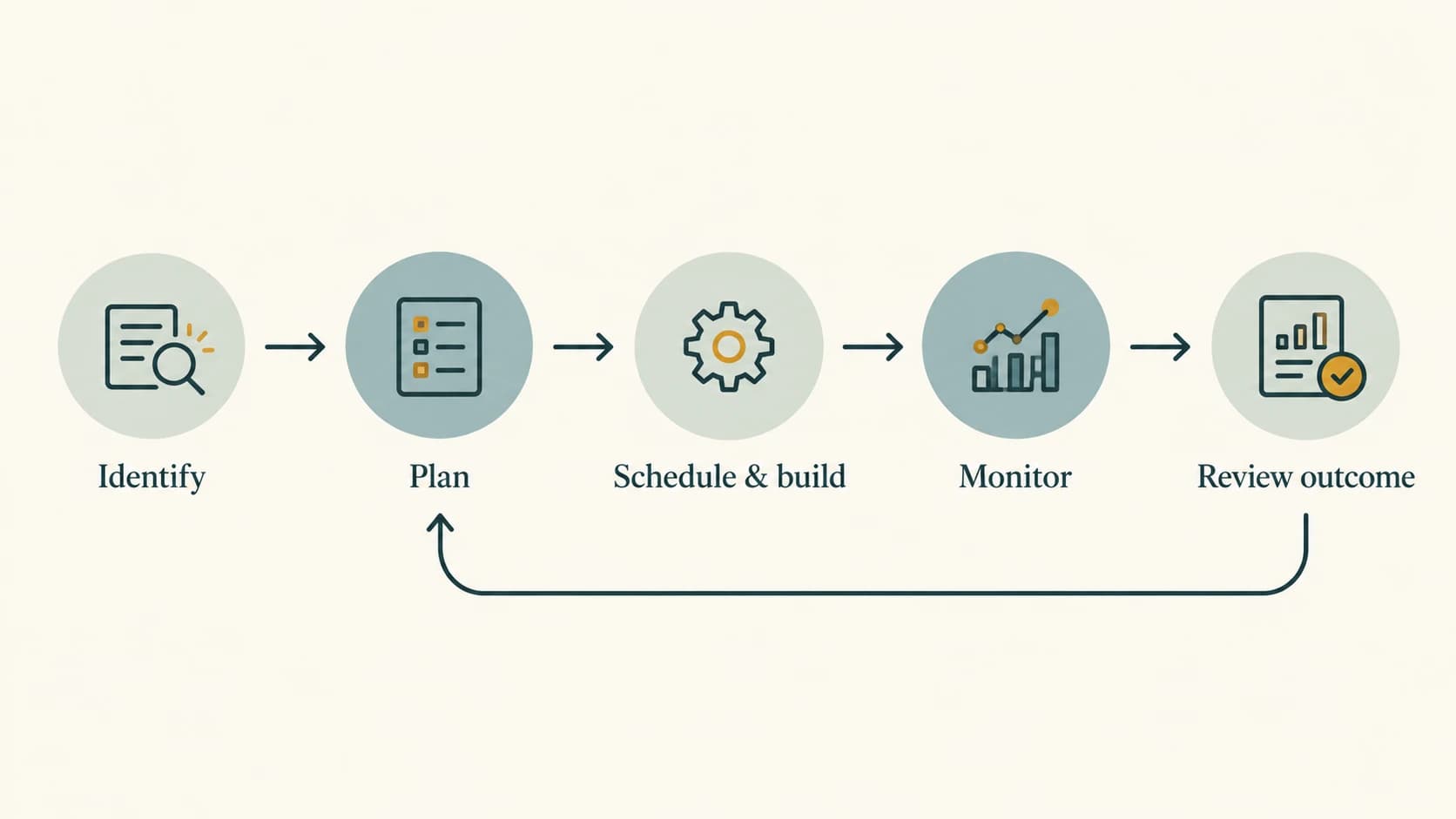
NCERT's Figure 13.1 presents five stages: identify a project → define a plan → fix a time frame and carry out processing → obtain guidance and monitor → evaluate outcomes. Feedback can cause a return to an earlier stage rather than following a strictly one-way process.
1. Identify the project
Ask who has the problem, why it matters, what a successful solution looks like and what is outside scope. Talk to stakeholders before deciding on a technology. A school attendance application should not begin by assuming it needs facial recognition; a simple roll-number form may better meet the requirement while protecting privacy.
2. Define a plan
List tasks, expected outputs, dependencies, resources and responsibilities. Decide who is responsible for requirements, implementation, test-data preparation, review and presentation. Clarify which work can happen in parallel and which must wait for a shared interface decision.
3. Fix time frame and process the work
Give milestones realistic durations and reserve time for integration and unexpected corrections. Dates below are a teaching example, not an NCERT-mandated schedule.
| Day | Milestone | Completion evidence |
|---|---|---|
| 1 | Confirm requirements | Agreed problem and acceptance checklist |
| 2 | Design modules and data | Diagram and sample records |
| 3–4 | Build a minimum working system | Core workflow demonstrable |
| 5 | Integrate and test | Passed tests and defect list |
| 6 | Improve usability/documentation | User guide and corrected defects |
| 7 | Demonstrate and review | Final report and feedback |
4. Guidance and monitoring
Use short check-ins to report completed work, current blockers, next action and owner. Seek help from the teacher, reliable references or teammates when blocked. Monitoring checks both progress and quality; merely marking a task “done” before testing is not evidence of success.
5. Review project outcomes
Verify the result against requirements, gather feedback, record limitations and make justified improvements. Some outcomes are tangible (a working application or report), while others are learning outcomes (communication or debugging skills). Evaluate claims using reproducible tests instead of presentation appearance alone.
Worked example: If bills are correct but order records are lost when the program exits, the billing algorithm is working but the persistence requirement has not been met. The project is therefore not yet accepted.
Section C12-CH13-S04 — Teamwork and Communication
NCERT identifies six teamwork components: communicate, listen, share, respect, help and participate. These apply equally to school groups and professional development teams.
- Communicate: Report decisions and difficulties promptly. Prefer specific messages such as “three invalid-quantity tests still fail” over “everything is fine.”
- Listen: Summarise a teammate's idea accurately before disagreeing; confirm shared decisions in writing.
- Share: Share code, notes, test data and expertise through an agreed location. Avoid hiding critical knowledge with one student.
- Respect: Criticise the proposal or evidence, not the person. Invite quieter members to contribute.
- Help: Support teammates who are blocked; helping does not mean taking credit or doing all their tasks.
- Participate: Each member must own meaningful work and help review the integrated result.

Example responsibility matrix
| Task | Team member | Reviewer | Evidence |
|---|---|---|---|
| Confirm requirements | A | Teacher/user | Requirements sheet |
| Design database | B | A | Table schema |
| Build order functions | C | B | Tested Python functions |
| Build reports | B | C | Report examples |
| Integrate/test | A + C | B | Test log |
| Demonstrate/document | All | Teacher | Report and demo |
Use version control or clearly labelled shared files to prevent one member's changes overwriting another's. Resolve conflicting versions through review rather than choosing the newest filename blindly.
Mini-scenario: Two students implement different date formats for order IDs. Neither component is “wrong” in isolation, but their interface is inconsistent. The group should agree on one canonical format, write an example and add an integration test.
Section C12-CH13-S05 — Turning a Brief into Testable Software
This section is a practical extension that makes the NCERT projects implementable.
Requirement categories
- Functional requirements: behaviours such as add order, view bill, reveal a grid cell or select matching digits.
- Non-functional requirements: reliability, usability, response time at classroom scale, data safety and ease of maintenance.
- Constraints: Python version, permitted libraries, availability of a graphical interface, fixed board size or time limits.
- Assumptions: decisions left unspecified by a brief, such as whether a tie is allowed or how invalid input is handled.
A sensible minimum project structure
project/
  README.md
  main.py
  logic.py
  storage.py        # only when persistence is required
  tests/
    test_logic.py
  sample_data/
The original files need not follow these exact names. The important idea is separation between user interaction, business logic and stored records.
Testing vocabulary
A test case identifies inputs, action, expected output and actual result. Unit testing verifies a component; integration testing verifies modules working together; acceptance testing checks whether the promised behaviour works for the intended user. A boundary test checks edge values (zero quantity, last free grid cell, first order of a new day). Regression testing reruns previous tests after a change.
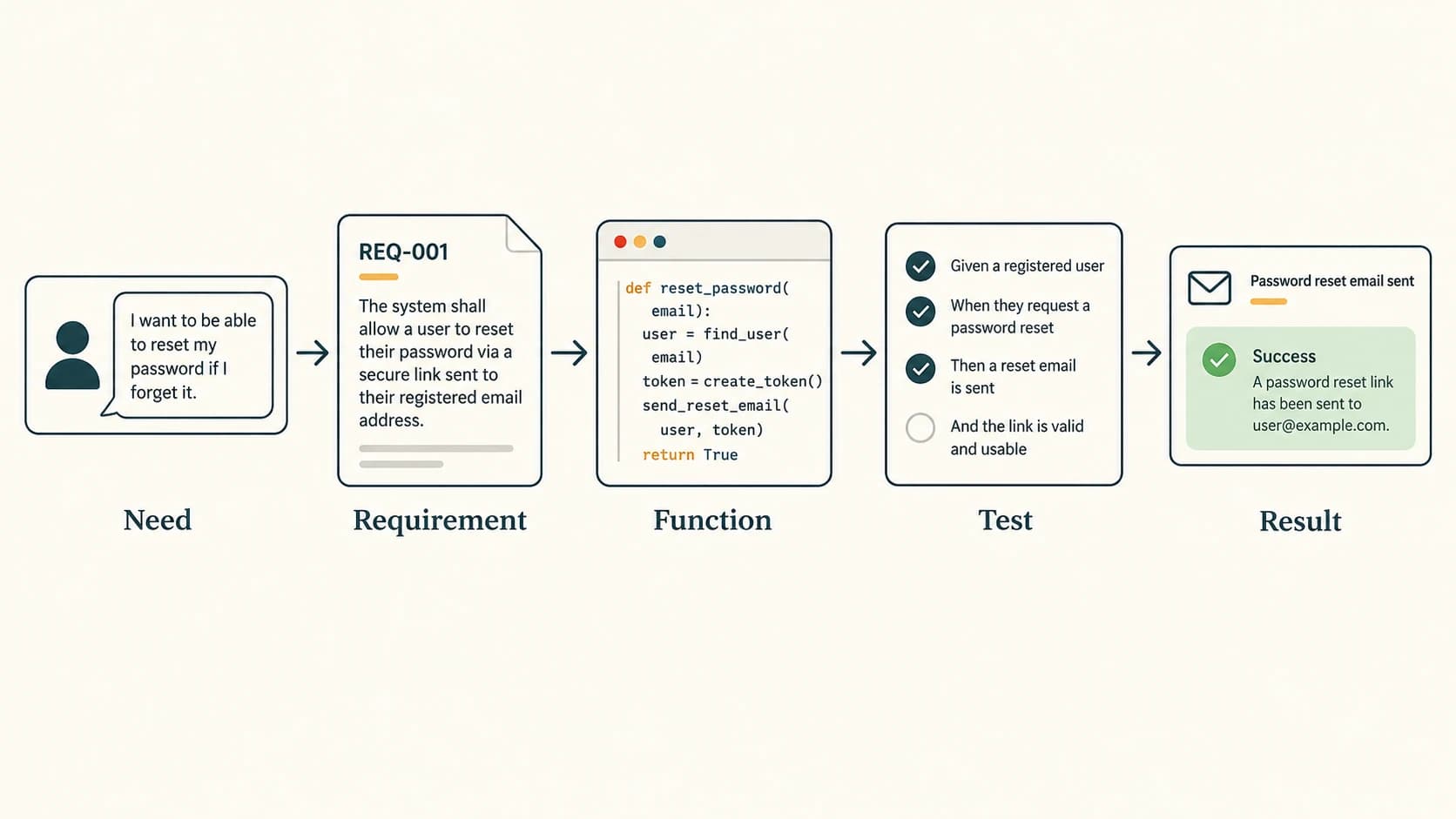
| Requirement | Input/test | Expected result |
|---|---|---|
| Quantity must be positive | Quantity 0 | Controlled validation error; no order saved |
| Order number resets each day | First order on new date | Daily sequence starts at 1 |
| Puzzle cell is bomb-free | Reveal an empty cell | Adjacent-bomb count or empty region shown |
| Match uses two or three digits | Choose four positions | Selection rejected |
| Match equals 10 | Choose digits 4 and 6 | Both selected cells removed |
Avoid common technical mistakes
Use integers in paise for classroom money calculations when possible, or Decimal, rather than assuming binary floating-point represents every rupee amount exactly. Never use Python's eval() to interpret a student's numeric input. Validate indexes before accessing lists. Do not store passwords as readable text. Prevent ordinary customer interactions from reaching manager-only functions. Keep real students' personal information out of public sample repositories.
Section C12-CH13-S06 — NCERT Project 1: Restaurant Order Processing
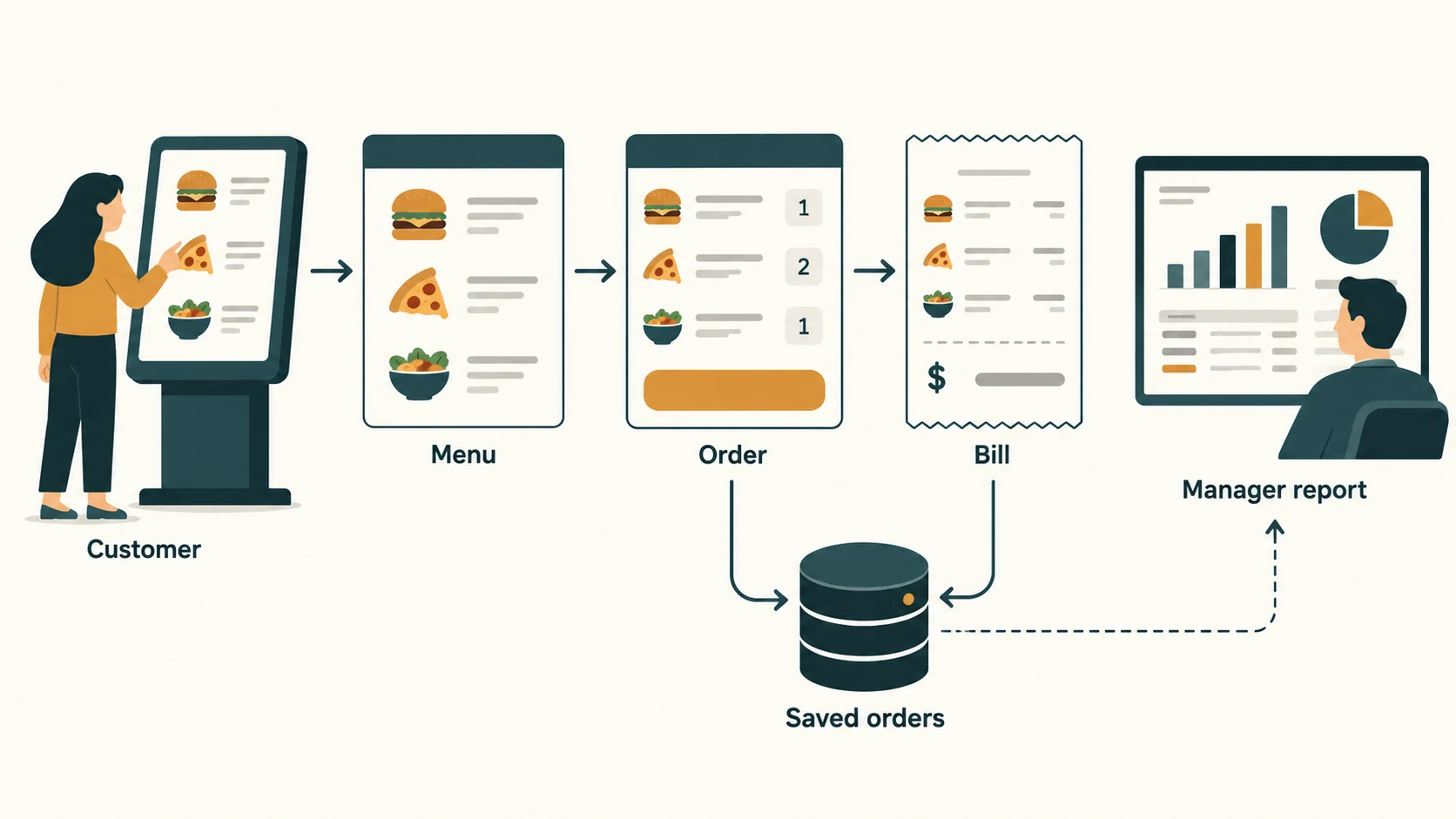
The textbook asks students to automate order processing for a restaurant. Its specified features include distinct manager/customer logins, an order kiosk/menu, item code and quantity entry, a displayed bill with order number, a unique saved bill identifier, an order sequence that starts again at 1 each day, manager menu edits and order deletion, a date-filtered daily-sales summary and at least one other relevant report.
The program below is a minimal, console-based reference implementation of the core data and reporting workflows. It demonstrates how the logic fits together; a production or final submitted project should add an appropriate kiosk GUI, durable accounts and secure authentication. Manager/customer identity is simulated by separate call paths; this example deliberately does not claim to implement secure user login.
Proposed data dictionary
| Data item | Type | Reason |
|---|---|---|
item_code | string | Stable item lookup, e.g., TEA |
price_paise | integer | Exact pricing |
order_date | ISO date string | Day-by-day numbering and summaries |
order_number | positive integer | Sequence resets each date |
bill_id | string | Combined date and sequence gives global uniqueness |
lines | list of item records | Preserve purchased quantities/prices |
total_paise | integer | Saved financial result |
Algorithm
- Load or initialise menu and orders.
- Customer reads menu, supplies item code and positive quantity.
- Compute each line total at the current menu price.
- Calculate next order number for the chosen date.
- Generate
YYYYMMDD-NNNNbill ID, store order and display the bill. - Authorised manager may edit menu, delete an order and generate sales reports.
- Recalculate the selected date's sales from surviving saved orders.
Runnable core implementation (standard-library Python)
from datetime import date
from pathlib import Path
import json

DB_FILE = Path("restaurant_data.json")


def default_data():
    return {
        "menu": {
            "TEA": {"name": "Tea", "price_paise": 2000},
            "SAND": {"name": "Sandwich", "price_paise": 7500},
            "JUICE": {"name": "Juice", "price_paise": 6000},
        },
        "orders": [],
    }


def load_data():
    if not DB_FILE.exists():
        return default_data()
    with DB_FILE.open("r", encoding="utf-8") as file:
        data = json.load(file)
    if not isinstance(data, dict) or not {"menu", "orders"} <= data.keys():
        raise ValueError("Invalid restaurant data")
    return data


def save_data(data):
    # Classroom-scale save. Concurrent kiosk systems need a real database.
    temp = DB_FILE.with_suffix(".tmp")
    with temp.open("w", encoding="utf-8") as file:
        json.dump(data, file, indent=2)
    temp.replace(DB_FILE)


def set_menu_item(data, code, name, price_paise):
    # In a real application, call this only after manager authorisation.
    if not code or not name or not isinstance(price_paise, int) or price_paise < 0:
        raise ValueError("Invalid menu item")
    data["menu"][code] = {"name": name, "price_paise": price_paise}


def place_order(data, requested, order_date=None):
    if order_date is None:
        order_date = date.today().isoformat()
    date.fromisoformat(order_date)  # Reject invalid date format.
    if not requested:
        raise ValueError("An order needs at least one item")

    lines = []
    for code, qty in requested:
        if code not in data["menu"] or type(qty) is not int or qty <= 0:
            raise ValueError("Unknown item or invalid quantity")
        item = data["menu"][code]
        lines.append({
            "code": code, "name": item["name"], "quantity": qty,
            "price_paise": item["price_paise"],
            "line_paise": item["price_paise"] * qty,
        })

    # max, not len: deleting an order must not cause ID reuse.
    previous = [o["order_number"] for o in data["orders"]
                if o["order_date"] == order_date]
    # Persisted high-water marks preserve uniqueness after deletion.
    daily_max = data.setdefault("daily_max", {})
    last = max([daily_max.get(order_date, 0)] + previous)
    number = last + 1
    daily_max[order_date] = number
    bill_id = f"{order_date.replace('-', '')}-{number:04d}"
    order = {
        "bill_id": bill_id, "order_date": order_date,
        "order_number": number, "lines": lines,
        "total_paise": sum(line["line_paise"] for line in lines),
    }
    data["orders"].append(order)
    return order


def delete_order(data, bill_id):
    # Real manager-only operation: check permissions before calling.
    old_count = len(data["orders"])
    data["orders"] = [o for o in data["orders"] if o["bill_id"] != bill_id]
    return len(data["orders"]) != old_count


def daily_sales(data, day):
    date.fromisoformat(day)
    records = [o for o in data["orders"] if o["order_date"] == day]
    return {
        "date": day,
        "order_count": len(records),
        "total_paise": sum(o["total_paise"] for o in records),
    }


def item_sales_report(data):
    """Extra report: cumulative quantities sold by item code."""
    result = {}
    for order in data["orders"]:
        for line in order["lines"]:
            code = line["code"]
            result[code] = result.get(code, 0) + line["quantity"]
    return result


def rupees(paise):
    return f"Rs {paise / 100:.2f}"


if __name__ == "__main__":
    data = load_data()
    order = place_order(data, [("TEA", 2), ("SAND", 1)])
    save_data(data)
    print("Bill:", order["bill_id"], rupees(order["total_paise"]))
    print("Daily sales:", daily_sales(data, order["order_date"]))
    print("Item report:", item_sales_report(data))
Example computation: Tea ₹20 × 2 plus sandwich ₹75 × 1 gives ₹115. The above demonstration generates a date-dependent bill ID and prints Rs 115.00.
Important limitation: A file-based program is sufficient to demonstrate logic for one classroom machine. Simultaneous kiosk requests could generate conflicting numbers without atomic database transactions. A deployed version needs database uniqueness constraints, authentication, role-based permissions, audit logs, input limits and error handling for disk failures. Saved data should not contain plaintext passwords.
Manager and customer flow
| Customer kiosk | Manager screen |
|---|---|
| View menu and enter quantities | Add/update item and price |
| Submit order and receive bill | Remove or cancel an order with authorisation |
| See current order number and total | Select date for daily-sales report |
| Receive errors for invalid items | Review item-sales report |
Test cases
| Test | Input | Expected output |
|---|---|---|
| R01 | Tea × 2, sandwich × 1 | ₹115.00 |
| R02 | Unknown code | Validation error; no bill saved |
| R03 | Quantity 0 | Rejected |
| R04 | First orders on two different days | Both display daily order number 1 |
| R05 | Delete order 1, create another same day | New order receives number 2 (never reused) |
| R06 | Query date with no orders | Count 0, total ₹0 |
| R07 | Add manager menu item | New item available for subsequent orders |
| R08 | Multiple orders involving TEA | Quantity report totals units, not bill count |
Design discussion: Deleting a financial record outright may be unsuitable in a real business. An audited cancelled status is generally safer. NCERT explicitly mentions deletion, so the demonstration provides deletion while explaining this real-world tradeoff.
Section C12-CH13-S07 — NCERT Project 2: Grid-Based Puzzle
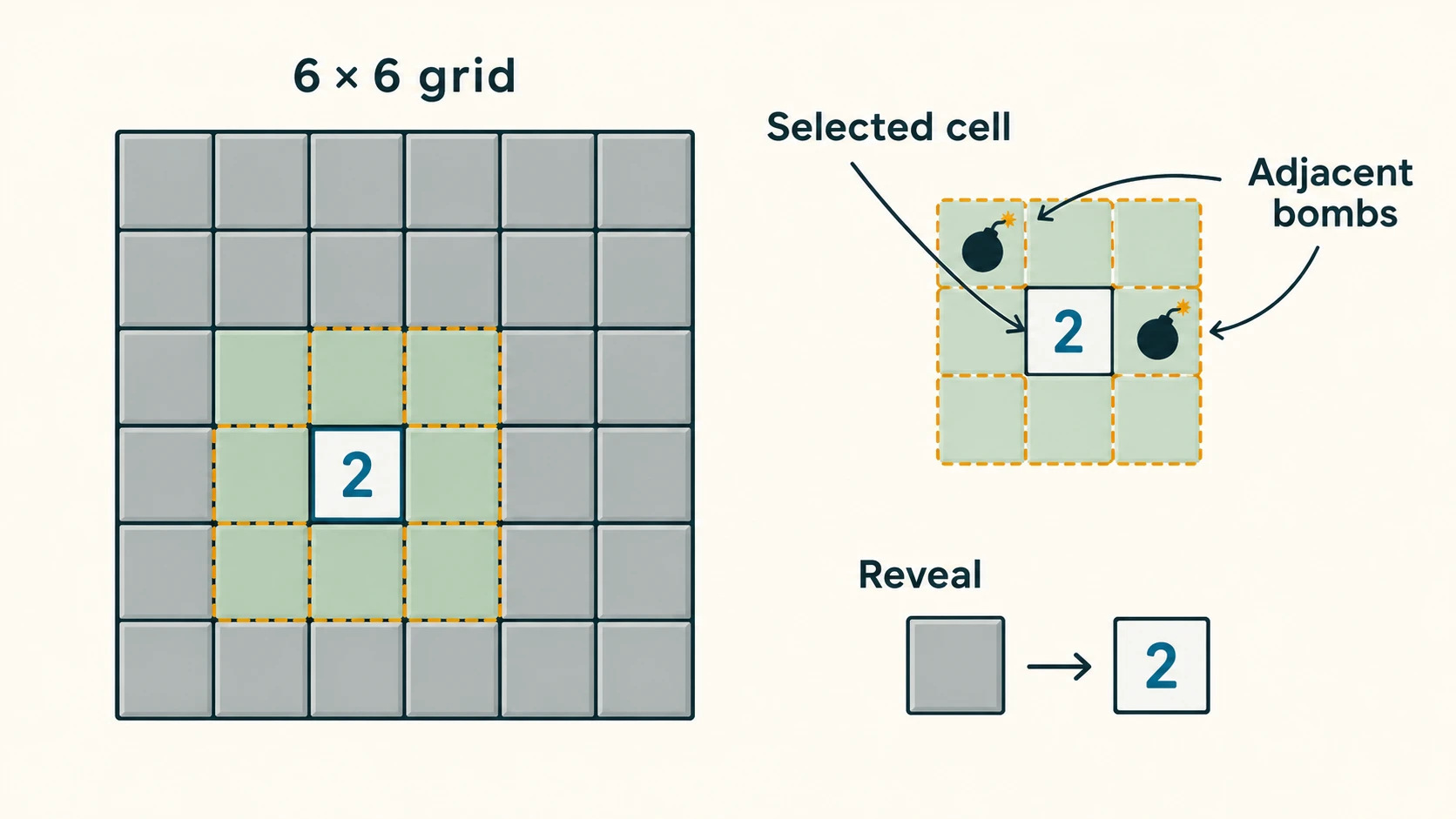
NCERT describes a Minesweeper-style game with a grid of cells, some containing bombs. Clicking a bomb ends the game; a safe cell reveals the number of bombs in adjacent cells. It suggests simplifying the challenge to a 6 × 6 grid containing 6 bombs and asks students to handle exceptions. The following is a console-based, interactive reference solution; the textbook refers to clicking a cell, so a graphical submission would add buttons to call the same game logic.
Representation
Use a set of (row, column) coordinates for bomb positions. Use another set for revealed safe positions. Grid coordinates range from 0 to 5. Adjacency includes up to eight neighbours (horizontal, vertical and diagonal), excluding the cell itself.
Runnable game engine and console interface
import random

SIZE = 6
BOMB_COUNT = 6


class Puzzle:
    def __init__(self, seed=None):
        generator = random.Random(seed)
        positions = [(r, c) for r in range(SIZE) for c in range(SIZE)]
        self.bombs = set(generator.sample(positions, BOMB_COUNT))
        self.revealed = set()
        self.finished = False
        self.lost = False

    @staticmethod
    def in_bounds(row, col):
        return 0 <= row < SIZE and 0 <= col < SIZE

    def neighbours(self, row, col):
        return [(r, c)
                for r in range(row - 1, row + 2)
                for c in range(col - 1, col + 2)
                if (r, c) != (row, col) and self.in_bounds(r, c)]

    def adjacent_bombs(self, row, col):
        return sum(cell in self.bombs for cell in self.neighbours(row, col))

    def reveal(self, row, col):
        if self.finished:
            raise RuntimeError("The game has ended")
        if not self.in_bounds(row, col):
            raise ValueError("Cell outside the grid")
        if (row, col) in self.revealed:
            return "already revealed"
        if (row, col) in self.bombs:
            self.finished = self.lost = True
            return "bomb — game over"
        self.revealed.add((row, col))
        # Deliberately reveal one cell; zero-cell expansion is an optional feature.
        if len(self.revealed) == SIZE * SIZE - BOMB_COUNT:
            self.finished = True
            return "won"
        return f"safe — {self.adjacent_bombs(row, col)} adjacent bombs"

    def view(self, show_bombs=False):
        rows = []
        for r in range(SIZE):
            values = []
            for c in range(SIZE):
                cell = (r, c)
                if show_bombs and cell in self.bombs:
                    values.append("*")
                elif cell in self.revealed:
                    values.append(str(self.adjacent_bombs(r, c)))
                else:
                    values.append(".")
            rows.append(" ".join(values))
        return "\n".join(rows)


def main():
    game = Puzzle()
    print("Reveal every safe cell. Rows/columns are 0 to 5.")
    while not game.finished:
        print(game.view())
        try:
            values = input("Row and column (example: 2 4): ").split()
            if len(values) != 2:
                raise ValueError("Enter exactly two numbers")
            row, col = map(int, values)
            print(game.reveal(row, col))
        except ValueError as exc:
            print("Invalid input:", exc)
    print(game.view(show_bombs=True))
    print("Result:", "Lost" if game.lost else "Won")


if __name__ == "__main__":
    main()
Explaining the algorithm
When the player reveals cell (2, 3), potential neighbours include rows 1, 2, 3 and columns 2, 3, 4, except (2, 3) itself. Each valid neighbour is compared with the bomb set. A corner has only three valid neighbours; an edge cell has five; an interior cell has eight.
Time complexity: One adjacent-bomb count checks at most eight positions, so it is constant time with respect to board size. Grid rendering visits all SIZE × SIZE cells, so it is O(n²) for an n × n board. Set membership is expected constant time.
Test cases
| Test | Scenario | Expected |
|---|---|---|
| M01 | Start new game | Exactly 36 positions, six distinct bombs |
| M02 | Reveal bomb | Game finishes with loss |
| M03 | Reveal safe cell | Correct 0–8 neighbour count |
| M04 | Select negative or 6 as index | Controlled error |
| M05 | Reveal same safe cell again | No double counting |
| M06 | Reveal all 30 safe cells | Win |
| M07 | Count corner neighbours | At most three considered |
| M08 | Malformed row/column input | Clear message without crashing |
Extensions: Flood-reveal empty regions, place flags, add a timer, implement a GUI in Tkinter, delay bomb generation until the first move to guarantee a safe first reveal, and store a local high-score table. These are original extensions, not compulsory textbook requirements. The simple reference implementation does not guarantee a safe first click.
Section C12-CH13-S08 — NCERT Project 3: Match the Sum
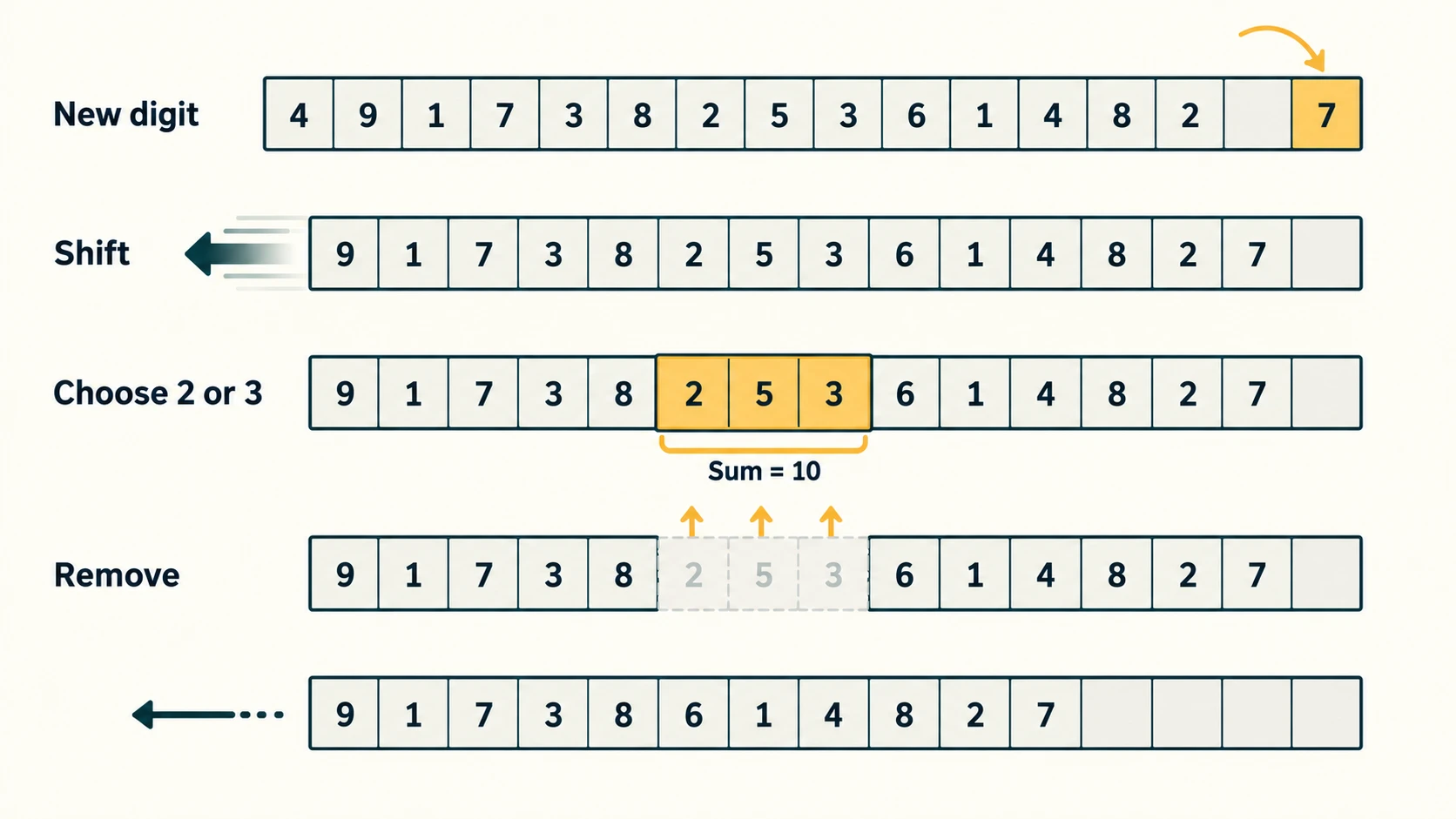
NCERT asks for an educational game for children aged around 5–7. It displays 15 cells, introducing random digits 1 to 9 at timed intervals into the rightmost cell while shifting earlier digits left. A player chooses two or three digits currently displayed; if their sum is 10, those chosen digits disappear. The game continues while an empty cell remains for insertion. The brief specifically asks students to handle the case where no currently displayed combination adds to ten.
There are several possible interpretations of how holes behave after a removal. This reference implementation chooses and documents a clear rule: remaining digits preserve their order and compact to the right after each successful removal. New digits enter on the right only if the board is not full. For a classroom GUI, a clock/timer should invoke tick() at a controlled interval; the reference implementation below focuses on deterministic game logic rather than depending on a specific graphical toolkit.
Rules used for this model
- The board is a list of 15 positions, displayed left to right.
- The rightmost populated positions store the current digits.
- Each timed
tick()inserts one random digit in[1, 9]at the right end, shifting existing digits left in the 15-position view. - The player selects exactly two or three distinct occupied positions.
- Successful selection (sum 10) removes the chosen digits and compacts the remainder, maintaining order.
- Invalid selections are rejected without changing the board.
- Before adding a digit to an already full board, the game ends. A special empty-combination check can warn the player when the current board has no valid pair/triple.
Runnable logic model
import random
from itertools import combinations

WIDTH = 15


class MatchTen:
    def __init__(self, seed=None):
        self.rng = random.Random(seed)
        self.digits = []  # Occupied cells, oldest to newest
        self.over = False
        self.score = 0

    def board(self):
        return [None] * (WIDTH - len(self.digits)) + self.digits[:]

    def tick(self):
        if self.over:
            return None
        if len(self.digits) == WIDTH:
            self.over = True
            return None
        number = self.rng.randint(1, 9)
        self.digits.append(number)
        return number

    def choose(self, positions):
        if self.over:
            raise RuntimeError("Game over")
        if len(positions) not in (2, 3) or len(set(positions)) != len(positions):
            raise ValueError("Choose 2 or 3 different cells")
        board = self.board()
        if any(type(p) is not int or p < 0 or p >= WIDTH or
               board[p] is None for p in positions):
            raise ValueError("Selected cell is empty or outside board")
        if sum(board[p] for p in positions) != 10:
            return False
        chosen = set(positions)
        self.digits = [value for i, value in enumerate(board)
                       if value is not None and i not in chosen]
        self.score += 1
        return True

    def possible_match(self):
        occupied = [(i, value) for i, value in enumerate(self.board())
                    if value is not None]
        for count in (2, 3):
            for group in combinations(occupied, count):
                if sum(value for _, value in group) == 10:
                    return tuple(i for i, _ in group)
        return None


if __name__ == "__main__":
    game = MatchTen(seed=7)
    for _ in range(8):
        game.tick()
    print("Board:", game.board())
    print("One possible match:", game.possible_match())
    # For an interactive GUI: call tick() via a timer, then choose() from clicks.
Worked selection
Suppose occupied digits include 6, 4, 3, 7. Choosing cells containing 6 and 4 removes those two because 6 + 4 = 10. Choosing 3 and 7 also works. Three-digit examples include 1 + 2 + 7 = 10 and 2 + 3 + 5 = 10. The selected cells must be different, and only values currently shown may be used.
What if no digits add to 10?
Do not falsely remove a combination. Keep the state unchanged, inform the player “No match currently available”, and (if the board has space) allow the next timed digit to arrive. If the board is full and no match exists, end the game with an explanatory message. A teacher may choose an alternative rescue rule, but it must be explicitly documented and tested; NCERT does not mandate an exact rescue algorithm.
Test cases
| Test | Input/state | Expected |
|---|---|---|
| E01 | Empty board | Fifteen empty cells |
| E02 | Insert one digit | At rightmost position; integer 1–9 |
| E03 | Choose values 4 and 6 | Remove two, increase score by one |
| E04 | Choose values 1, 2, 7 | Remove three |
| E05 | Choose 2 and 2 | No removal |
| E06 | Choose same position twice | Reject duplicate selection |
| E07 | Select empty cell | Reject |
| E08 | Insert with all 15 cells occupied | Game ends without losing data silently |
| E09 | No valid 10-sum present | Return None, do not fabricate match |
| E10 | Remove middle digits | Remaining numbers keep their order |
Teaching note: This reference program covers the data model, insertion, selection, removal, scoring and edge conditions. Building a visually timed game requires a graphical event loop or approved console clock. It would be misleading to present this logic-only demonstration as a complete timed graphical game. For accessibility, a complete UI should provide readable values, keyboard selection, adjustable pace and a clear pause control.
Section C12-CH13-S09 — Submitting, Demonstrating and Reviewing Projects
A project file should help a teacher or teammate run, understand and evaluate the work without guessing how it operates.
Suggested practical-file structure
- Project title and problem statement.
- Objectives and intended users.
- Functional requirements, constraints and assumptions.
- Solution approach, algorithms/flowcharts and module interfaces.
- Data dictionary and important validation rules.
- Python source code and setup instructions.
- Clearly identified test data, expected and actual results.
- Screenshots or console-output evidence of essential workflows.
- Limitations, improvements and individual team contributions.
- Conclusion and references (only sources actually consulted).
A description of teamwork should name contributions accurately; do not assign equal individual credit to work that was not done or claim that untested features passed.
Example demonstration script
For the restaurant project: open the menu; enter two valid products; display a correctly priced bill; retrieve the persisted order; run a daily-sales report; show rejected invalid quantity; demonstrate manager-only workflows under the project's actual authorisation system. For the puzzle: demonstrate safe reveal, adjacent count, bomb loss and completion. For Match the Sum: show timed insertion (if UI supports it), a valid two-digit match, a valid three-digit match, an invalid match and full-board end condition.
Peer-review checklist
- Does the project demonstrably meet every required core feature?
- Are inputs validated and errors handled without unexplained crashes?
- Can the recorded output be reproduced from given inputs?
- Have modules been tested both separately and together?
- Does the project disclose assumptions and known missing functionality?
- Are personal data and credentials protected appropriately?
- Is the project report consistent with the actual implemented code?
Original Practice Bank — 30 Explained Questions
These 30 questions are originally prepared for revision and are not numbered NCERT Chapter 13 exercises. First attempt each, then compare with the answer.
Part A — Concept MCQs (P01–P12)
P01. What best characterises PBL? A) Copying source code without running it B) Solving a meaningful problem with a planned, reviewed result C) Memorising only definitions D) Removing all documentation. Answer: B. PBL connects investigation, design, implementation and review to a relevant problem.
P02. Which is a functional requirement? A) The application must issue a bill B) The team should be respectful C) The deadline is seven days D) The program should be easy to maintain. Answer: A. It specifies user-visible behaviour.
P03. What does top-down design do first? A) Write minor helper functions B) Start with the complete problem and divide it C) Ignore users D) Choose colours. Answer: B. It progressively refines an overall system into tasks.
P04. Why use modular design? A) To prevent all bugs B) To avoid testing C) To make responsibilities and interfaces clearer D) To force one programmer to write everything. Answer: C. Modular separation supports ownership and testability but does not eliminate defects.
P05. Which project step explicitly obtains teacher feedback and checks progress? A) Identification only B) Guidance and monitoring C) Printing the cover D) Deleting code. Answer: B. Monitoring identifies blockers and supports adjustments.
P06. What is an acceptance criterion? A) A measurable condition showing a requirement works B) An optional file name C) The project logo D) A promise of no bugs. Answer: A. It makes expected behaviour testable.
P07. Which behaviour best supports teamwork? A) Keeping interface changes secret B) Sharing decisions and hearing concerns C) Ignoring teammate tests D) Overwriting all files. Answer: B. Collaboration requires clear communication, listening and respect.
P08. In a restaurant's daily numbering scheme, what must a globally unique bill ID include? A) Only order number B) A date-qualified sequence or other unique identifier C) Price alone D) Customer name only. Answer: B. Order number 1 repeats across dates, so it alone is not unique.
P09. Which test best checks quantity validation? A) Quantity 3 B) Quantity 0 C) A normal menu read D) Printing a heading. Answer: B. A non-positive value is a boundary case that should be rejected.
P10. In a 6×6 Minesweeper-style board, how many neighbours can an interior cell have? A) 4 B) 6 C) 8 D) 9. Answer: C. There are eight adjacent horizontal, vertical and diagonal positions.
P11. Which selection should disappear in Match the Sum? A) 6 and 3 B) 2, 3 and 5 C) 9, 2 and 1 D) 8 and 4. Answer: B. It selects three digits whose sum is 10.
P12. Which is best described as an integration test? A) Testing calculate_total alone B) Testing order entry, billing and saving together C) Checking whitespace D) Choosing a title. Answer: B. It verifies cooperating components.
Part B — Short Answers (P13–P22)
P13. Explain the difference between an algorithm and a module. Answer: An algorithm is a sequence of steps for solving a problem; a module is an organised, separately understandable component of software. A module may implement one or more algorithms.
P14. Give two limitations of top-down design. Answer: Technical feasibility may be discovered late, and the overall model can be based on mistaken assumptions about users. Early prototypes and feedback reduce both problems.
P15. Why does a schedule need flexibility? Answer: Dependencies, testing defects and resource availability can change. A useful plan reserves time to diagnose problems instead of assuming every task finishes on its first attempt.
P16. Distinguish unit from acceptance testing. Answer: Unit tests check individual functions or modules. Acceptance tests demonstrate whether the complete user requirement works from an end-user perspective.
P17. Why must a bill number not be reused after an order is removed? Answer: Reuse creates two different historical transactions with the same identifier, causing ambiguity and unreliable audit or reporting. Maintain a separate daily high-water mark.
P18. What makes an input-validation test different from a calculation test? Answer: A validation test checks rejection of forbidden or malformed inputs; a calculation test checks the correctness of accepted inputs and operations.
P19. In a puzzle, why must row and column boundaries be checked? Answer: A click on a negative or too-large index is not a valid cell. Validation prevents accidental Python negative-index behaviour and unhandled errors.
P20. Why use a set for bomb positions? Answer: It prevents duplicate bomb locations and gives efficient membership checks when determining whether a cell or neighbour contains a bomb.
P21. How can a team avoid incompatible module interfaces? Answer: Define input/output examples, agree data types and formats, use shared tests and communicate interface changes before merging work.
P22. Does successful execution mean a project is complete? Answer: No. A demonstration may pass one path while failing critical requirements or edge cases. The group should check all acceptance criteria, error paths and documented limitations.
Part C — Applied Cases (P23–P30)
P23. A restaurant stores prices as ordinary floats. What is a safer classroom alternative? Answer: Store paise as integers (e.g., ₹75.50 as 7550) or use Python Decimal. Binary floating-point may introduce tiny representation differences in monetary sums.
P24. The daily report shows ₹0 after restarting a kiosk although yesterday's bills printed correctly. Diagnose. Answer: The program likely kept orders only in temporary memory or failed to reload saved data. Check persistent storage, successful writes, the loaded filename and the date filter.
P25. Two kiosks allocate the same order number at almost the same time. How should a real system address this? Answer: Use a database transaction with a uniqueness constraint and safely allocated sequence. A local JSON file without concurrent locking is not sufficient.
P26. A grid has six bombs but a corner cell shows 4 adjacent bombs. Explain. Answer: This is a logic error: a corner has at most three neighbouring cells. Check bounds and exclude the central cell itself.
P27. A puzzle is impossible to win because selecting a revealed cell twice increments progress twice. Fix. Answer: Keep revealed cells in a set, return early on repeats and calculate the win condition from the number of distinct safe cells revealed.
P28. A player picks 2, 3, and 5 in Match the Sum but two selected positions refer to the same cell. What should happen? Answer: Reject the selection despite the displayed arithmetic. Each selected digit must come from a distinct occupied position.
P29. A full Match the Sum board contains no possible pair or triple totalling 10. Explain a fair outcome. Answer: The game should report that there is no available valid move and end, or apply a separately documented teacher-approved rescue rule. It must not invent a nonexistent combination.
P30. Three teammates each report that their individual code works, but the combined app fails. Plan the response. Answer: Reproduce the failure, inspect module contracts and shared formats, run integration tests, assign the relevant interface correction, verify against the requirement, rerun regression tests and record the learning in the final report.
Quick Revision — Key Ideas
| Term | Recall |
|---|---|
| Project-based learning | Learn by delivering and reviewing a meaningful solution |
| Requirement | Expected system behaviour or condition |
| Module | Component with a clear purpose and interface |
| Top-down | Whole system decomposed into parts |
| Bottom-up | Tested parts combined into a system |
| Plan | Tasks, people, dependencies, resources, milestones |
| Monitoring | Track evidence, problems and corrective actions |
| Teamwork | Communicate, listen, share, respect, help, participate |
| Acceptance test | Demonstrates a promised end-user requirement |
| Restaurant project | Daily bills, menu management, persistence and reporting |
| Puzzle project | Safe reveals and neighbour counts on a bomb grid |
| Match the Sum | Timed digits; remove two/three distinct displayed digits totalling ten |
Frequently confused pairs
- Project vs program: A project includes problem analysis, collaboration, implementation, testing and reporting. A program may be just one deliverable.
- Requirements vs assumptions: Requirements come from agreed user needs; assumptions resolve unspecified choices and must be stated.
- Top-down vs bottom-up: Design from overall structure vs assemble tested components.
- Passing example vs tested feature: One successful demonstration does not cover invalid and boundary inputs.
- Order sequence vs bill identifier: Daily order sequence restarts; uniquely persisted bill identification must not collide.
Viva questions with short answers
1. What is PBL? Learning by planning, developing, testing and reviewing a solution to a practical problem.
2. Why identify stakeholders? To confirm whose needs the result must satisfy.
3. Name NCERT's five project stages. Identification, planning, time frame/processing, guidance/monitoring and outcome.
4. What is modularity? Splitting a larger system into manageable components with defined responsibilities.
5. Why integrate early? Interface incompatibilities are easier to correct before the final deadline.
6. Name all six teamwork practices. Communicate, listen, share, respect, help and participate.
7. How does a report differ from a raw data file? A report selects and summarises relevant stored records to answer a question.
8. Why persist orders? So records survive application restarts and support reporting.
9. Why use validation? To reject unsafe, inconsistent or meaningless inputs.
10. How many bombs does NCERT's simplified puzzle suggest? Six in a 6×6 grid.
11. How many cells does Match the Sum display? Fifteen.
12. Which selected sums are valid? Exactly two or three distinct displayed digits whose total is ten.
13. How do you demonstrate code correctness? Provide reproducible tests, expected outputs and actual results.
14. Does code completion mean full delivery? No; testing, feedback and documentation remain.
15. How should limitations be reported? Clearly, accurately and with sensible improvement plans.
Self-check
You are ready to present this chapter when you can trace the five NCERT project stages, explain all six teamwork practices, distinguish top-down/bottom-up/modular design, demonstrate one valid and one invalid test for every NCERT project, show why daily order numbers and unique bill IDs are different, count neighbours for an edge and corner puzzle cell, and explain how selecting distinct digits to total ten changes the Match the Sum board.