
Security Aspects
Study Security Aspects in Class 12 Computer Science, with detailed explanations, worked examples, NCERT solutions and practice questions.
By Akhilesh Saini
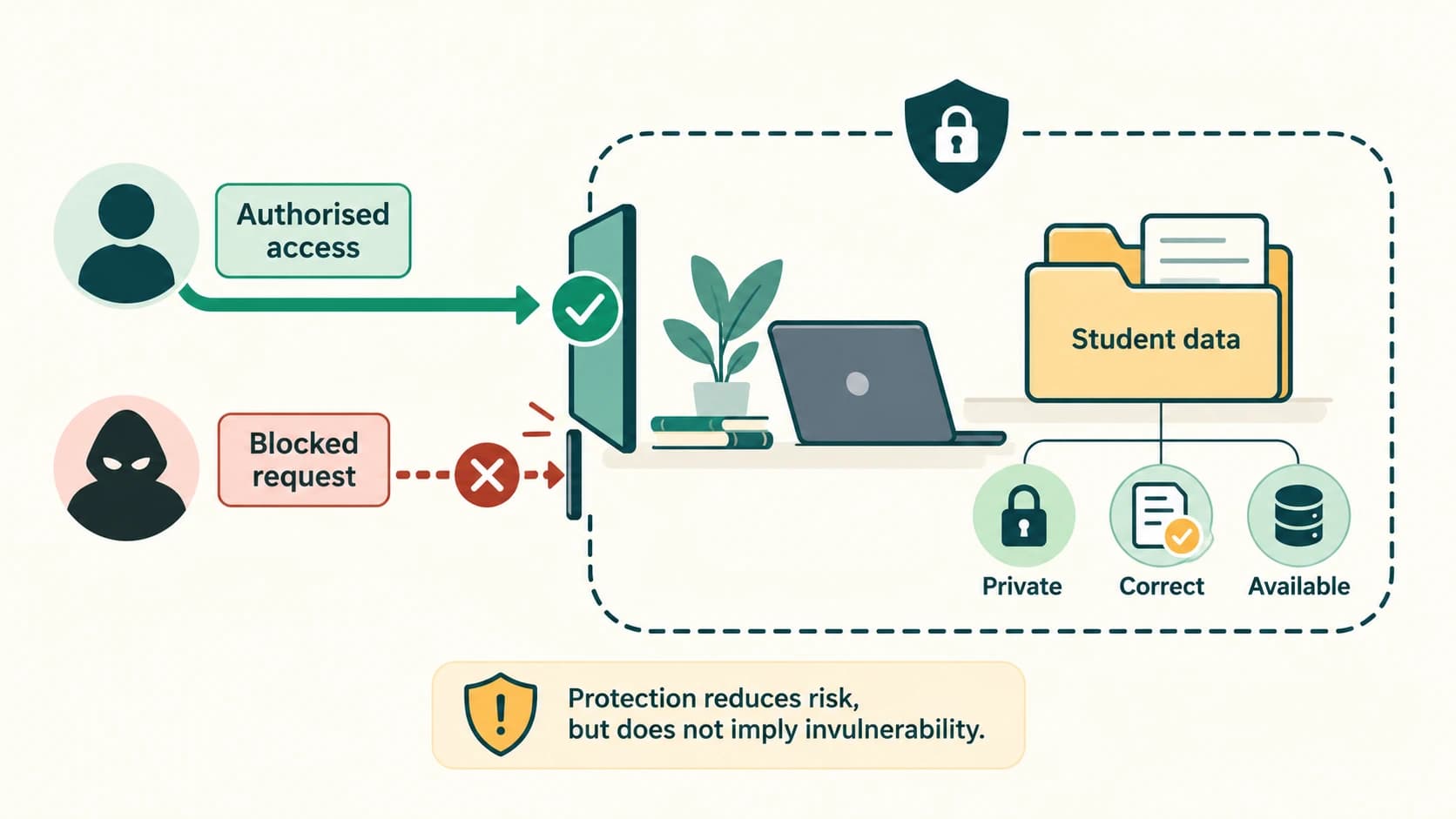
A computer can store assignments, personal photographs, school records, messages and passwords. Connecting that computer to other devices or the Internet makes sharing easier, but it also introduces ways for someone to misuse information or interrupt a service. Computer security means reducing these risks through sensible technology, responsible behaviour and preparation for recovery.
Learning objectives
After studying this chapter, you should be able to:
- distinguish threats, vulnerabilities, attacks and safeguards;
- explain viruses, worms, ransomware, Trojans, spyware, adware and keyloggers;
- identify common malware delivery paths, warning signs and preventive controls;
- compare antivirus detection methods and explain their limitations;
- distinguish spam, phishing and suspicious messages;
- compare HTTP and HTTPS without confusing encryption with website trustworthiness;
- explain host-based and network firewalls and evaluate classroom filtering scenarios;
- describe session and other browser cookies, useful purposes and privacy risks;
- distinguish authorised ethical testing from malicious or unauthorised intrusion;
- compare DoS, DDoS, intrusion, snooping and eavesdropping; and
- solve all 17 NCERT exercises, complete Activities 12.1 and 12.2, and practise with 30 additional original questions.
Source and curriculum alignment
This resource follows NCERT Class XII Computer Science, Chapter 12: Security Aspects, pages 223–240 in the 2026–27 reprint. The source's subsections 12.1–12.9 supply the main teaching order. The supplied master curriculum contains no separately assigned permanent C12 security lesson IDs; consequently, C12-CH12-S01–S10 are chapter-local navigation identifiers only. HTTPS and web technology connect conceptually to existing C12-CN-11 and C12-CN-12 lessons, but they are not regenerated here.
The textbook makes some simplified or older recommendations. When they may affect security, a clearly labelled Current security clarification adds context. These additions do not replace the NCERT explanation in the exercise bank. The historical malware names in this chapter are illustrations rather than claims about current outbreaks.
Section C12-CH12-S01 — Security Threats, Weaknesses and Prevention
NCERT section 12.1: Threats and Prevention.
Why a disconnected device has fewer network risks
When a computer is not connected to a network, a remote attacker cannot directly send requests to it through that network. There is no online service exposed through the disconnected link. That removes an important set of network-borne attack opportunities. It does not make the machine completely safe: infected USB drives, unsafe software, physical theft, local users, and hardware failures may still cause damage.
A school computer needs Internet access to download learning material and submit assignments. The aim of network security is therefore safe connectivity, not the unrealistic requirement to disconnect every device permanently.
Vocabulary that prevents confusion
| Term | Explanation | School example |
|---|---|---|
| Asset | Anything valuable that needs protection | Student mark sheet or teacher account |
| Threat | Potential source of harm | Someone attempting account theft |
| Vulnerability | Weakness that might be exploited | An unpatched application |
| Attack | Attempt to exploit a weakness | Sending a deceptive sign-in message |
| Risk | Likelihood and effect of harm | Losing access to class files before submission |
| Safeguard / control | Action or tool to reduce risk | Backups, strong authentication, updates |
A simple risk story: a teacher stores all results on one laptop (asset). The laptop runs outdated software (vulnerability). Malicious code may exploit it (threat/attack), and results could become unavailable (impact). Updating the software, restricting accounts and keeping recoverable backups (controls) reduce the risk.
Three security goals
- Confidentiality: information is seen only by authorised people; marks should not be visible to unrelated students.
- Integrity: information stays correct and is changed only through authorised actions; an attacker should not alter recorded marks.
- Availability: authorised users can obtain a service when needed; students should be able to access an assignment portal before a deadline.
A control may support more than one goal. For example, backups primarily help availability and restoration, while careful access permissions protect confidentiality and integrity.
Defence in depth
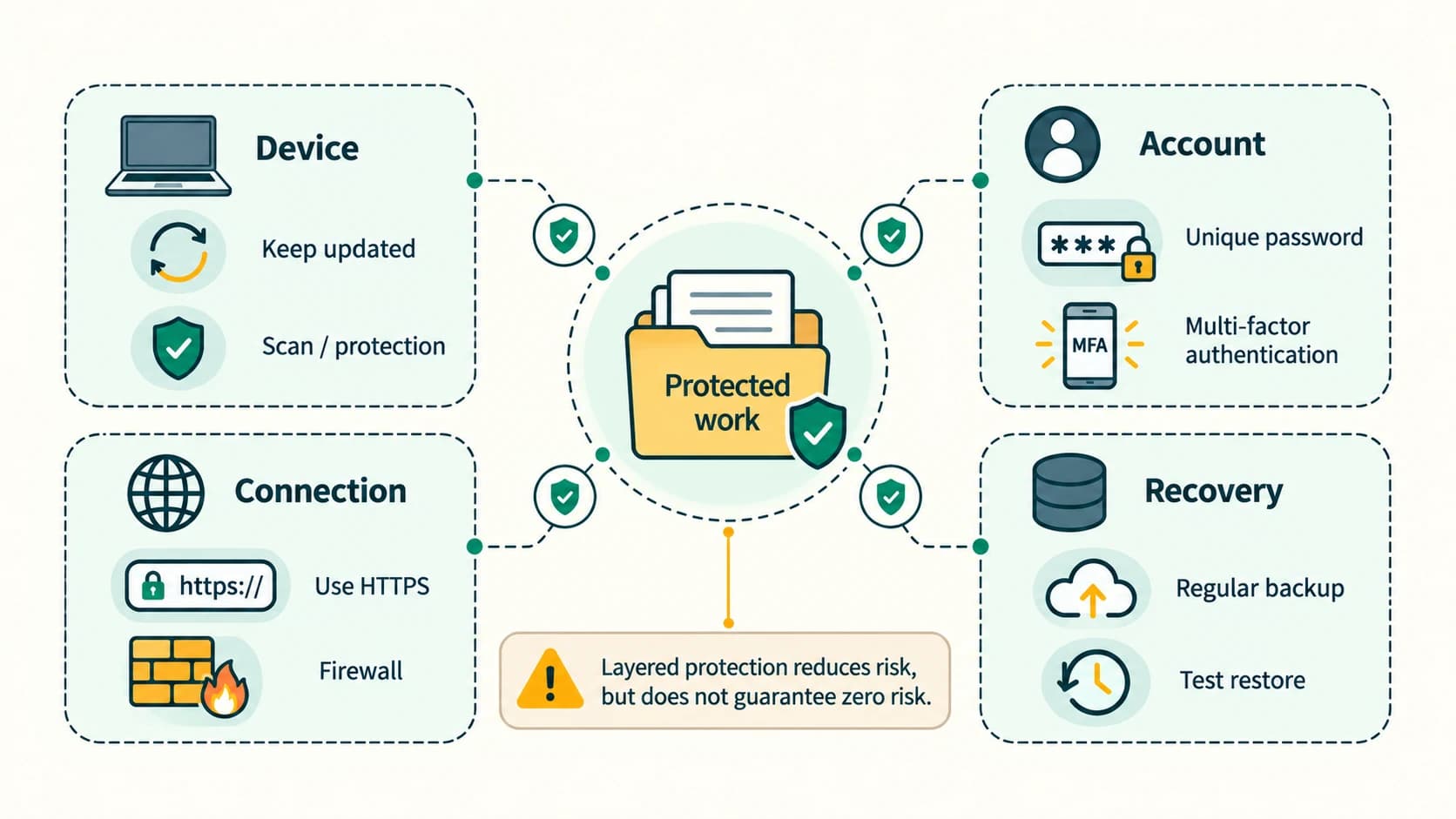
No single tool guarantees safety. Combining software updates, careful permissions, strong unique passwords or passkeys, multifactor authentication (MFA), antimalware, firewalls, backups and user awareness gives overlapping protections. Each layer addresses a different kind of failure.
Exam trap: A security threat is not the same as a vulnerability. The threat is potential harm; a vulnerability is a weakness through which harm might occur.
Section C12-CH12-S02 — Malware: Types and How They Behave
NCERT sections 12.2–12.2.7.
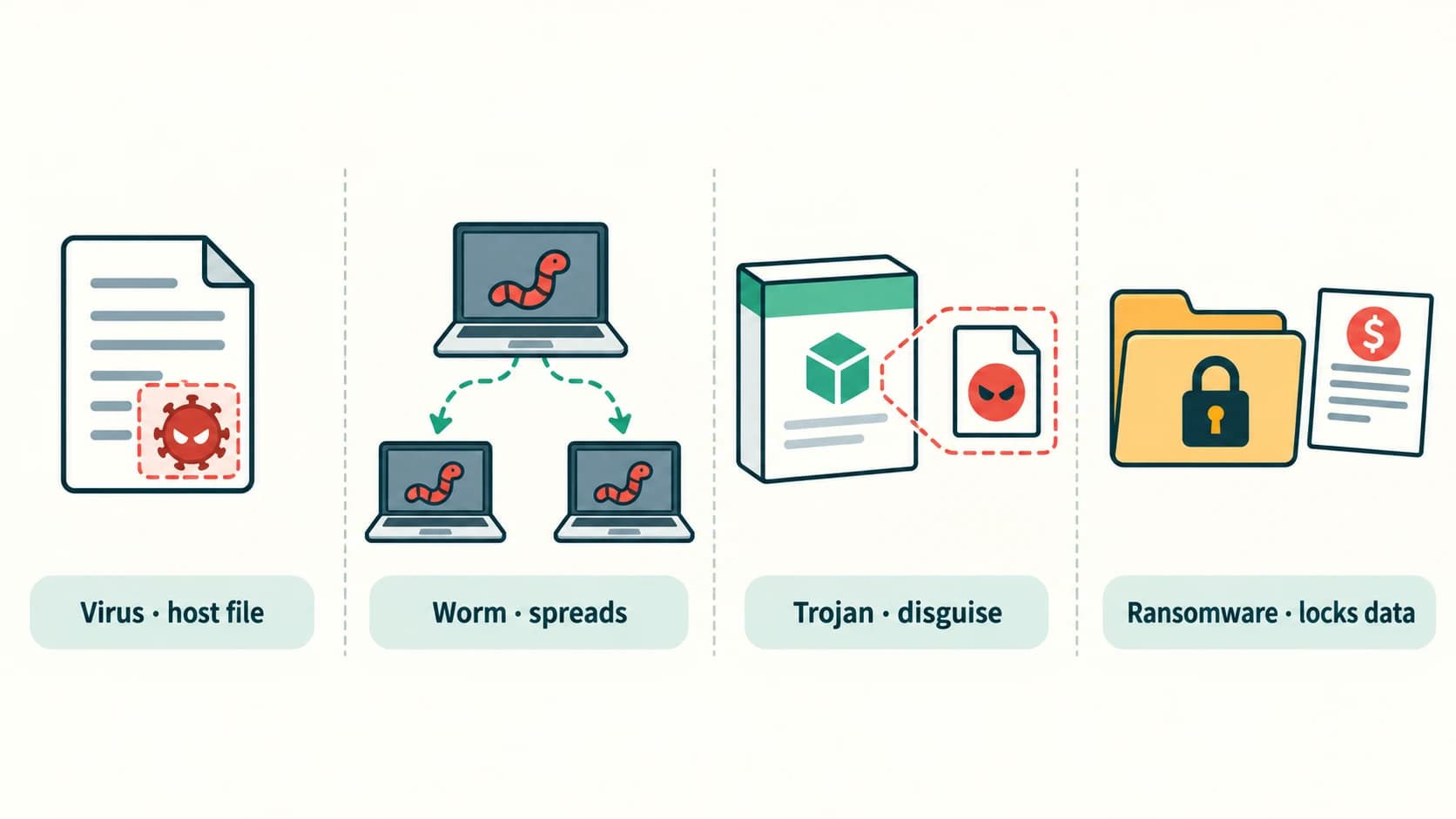
Malware means malicious software: software intentionally designed to steal information, disrupt operations, manipulate a computer or otherwise cause harm. Malware names describe behaviour and may overlap. A Trojan can install spyware; a worm can carry ransomware; a virus may also steal information. Classification therefore concerns how the program behaves, not merely its name.
Virus
A computer virus is malicious code that attaches to or infects another executable file, document macro or host. Executing the infected host can activate the virus and enable it to spread to further files or systems. The virus can damage data, consume resources, change files or steal information.
Example: Someone launches an infected application obtained from an untrusted download site. The code executes with the application and infects other compatible files. The protective response is to avoid the download, keep security tools updated and check files from untrusted sources.
The textbook mentions historical names including ILOVEYOU, MyDoom, Sasser, Netsky and Stuxnet. Those names do not all represent technically pure file-infecting viruses: for example, MyDoom and Sasser are known as worms, while CryptoLocker is ransomware. For the general textbook question, students can cite well-documented computer-malware outbreaks and label their type accurately.
Worm
A worm is a self-contained malicious program that can spread between systems, often by taking advantage of network access or weaknesses. Unlike a classic virus, it does not require a host program to carry its code. Some worms can replicate and propagate without the target user opening a particular infected document.
| Aspect | Classic virus | Worm |
|---|---|---|
| Dependence | Typically attaches to another file/host | Standalone program |
| Spread | Often follows infected-file execution or sharing | Can propagate over networks without a separate host file |
| Damage | Corrupt data, steal information, disrupt programs | Similar damage plus rapid network spread |
| Defence | Avoid unsafe files; patch; scan | Patch network-exposed software; filter traffic; scan |
Important qualification: Not every virus requires a deliberate human click for every infection, and not every worm spreads automatically in every environment. These are the typical textbook distinctions.
Ransomware
Ransomware makes files or systems unavailable, often through encryption, and demands money for supposed restoration. Some attacks also copy private information and threaten to publish it. The NCERT chapter refers to the WannaCry outbreak in May 2017, in which victims saw demands for payment after their files were encrypted.
A victim should not assume that payment will restore the data or prevent disclosure. Useful safeguards include patched systems, restricted privileges, secure offline or isolated backups, and rehearsed recovery procedures. Report suspected infection promptly rather than attempting unverified fixes.
Trojan horse
A Trojan is malware disguised as useful or legitimate software. The name comes from the Trojan horse of Greek legend: something that appears harmless is used to introduce a hidden danger. A fake “free exam answer tool” might seem attractive while secretly installing unwanted software. A Trojan does not have to replicate like a virus or worm.
Spyware, adware and keyloggers
Spyware secretly collects information about a user or device and may transmit it elsewhere. It may record browsing activity or confidential data. Adware displays unwanted advertisements, may track activity or redirect users, and can earn advertising or affiliate revenue for its operator. Some ad-supported software is legitimately disclosed and consent-based; the malicious or deceptive behaviour is the security concern.
A keylogger records keyboard input. It can be a software program or physical device. Stolen keystrokes may expose passwords, private messages, card details or school credentials. It can also be used with proper authorisation in some monitoring contexts; recording someone else secretly is a privacy and security problem.
Software keyboard versus randomised virtual keyboard
NCERT contrasts a fixed-layout operating-system on-screen keyboard with a virtual keyboard whose key positions change. A randomised layout can make simple position-based observation harder, but it is not a reliable defence against a compromised computer. Advanced malware may observe screenshots, clicks, clipboard contents, browser events or typed data after entry. Prefer a trusted device, MFA/passkeys and verified sign-in pages; never treat a virtual keyboard as proof of safety.
Malware comparison at a glance
| Type | Defining feature | Typical harm |
|---|---|---|
| Virus | Infects a host file or program | File/data damage or theft |
| Worm | Independent program with propagation capability | Rapid spread and disruption |
| Ransomware | Denies access and demands payment | Data unavailability and extortion |
| Trojan | Pretends to be useful or legitimate | Hidden installation or access |
| Spyware | Secretly collects information | Privacy loss and account compromise |
| Adware | Pushes unwanted ads or redirects | Tracking, disruption, unsafe links |
| Keylogger | Captures keyboard input | Credential and information theft |
Exam trap: A worm is not defined simply as “more dangerous than a virus”; the key difference is its independent program and propagation behaviour.
Section C12-CH12-S03 — Malware Delivery, Warning Signs and Practical Protection
NCERT sections 12.2.8–12.2.9.
A useful question is not only “What is malware?” but “How could it reach this computer?” NCERT identifies four common routes:
- Downloaded files: a supposed free tool, game or document from an untrusted source may include harmful code.
- Spam email: a deceptive attachment or link may lead to malware or credential theft.
- Removable storage: an infected USB drive or other device may transfer harmful files to another computer.
- Network propagation: vulnerable connected systems may be reached by malware such as worms.
Today, compromised websites, fake software updates and malicious browser extensions can also be relevant. The essential response is to establish trust before installing or opening content.
Warning signs
Possible signs include a suddenly changed browser home page, unknown startup applications, unexplained files, repeated suspicious pop-ups, unusual account messages, abnormal crashes, or unexplained resource use. None of these signs alone proves malware: slow performance might be caused by low storage or a legitimate update. Several unexpected changes together justify investigation.
Prevention checklist with reasons
| Action | Why it matters |
|---|---|
| Update operating system, browser and apps | Fixes known vulnerabilities |
| Use reputable security tools | Helps prevent and detect many known threats |
| Use trusted downloads and app stores | Reduces exposure to disguised installers |
| Verify sender and link destination | Reduces phishing and attachment risks |
| Keep separate, recoverable backups | Allows recovery after damage or ransomware |
| Use MFA where available | Makes a stolen password less useful |
| Use unique strong passwords or passkeys | Prevents one account breach from compromising others |
| Use standard user accounts when possible | Limits unnecessary privileges |
| Scan unknown removable media and avoid auto-run | Reduces removable-device risk |
| Apply sensible firewall rules | Reduces unwanted network exposure |
Worked school scenario: a suspicious “results” attachment
A student receives an unexpected message titled “Class results—open immediately,” with an attached executable file rather than a school document. The safe decision is not to execute it. Verify the message through the teacher or school's official channel, report it using an appropriate reporting option and delete or quarantine it as instructed. If it was already opened, inform a responsible adult or administrator and follow the school's incident procedure.
What to do if infection is suspected
Stop entering passwords or confidential information on the affected device. Report the incident promptly, preserve information useful for investigation, and follow responsible administrator guidance. Isolating an affected device from the network may help reduce spread when authorised, but avoid changing critical school or workplace systems without permission. Restore data only from known-good backups after the underlying problem is addressed.
Current security clarification: The textbook suggests frequently changing passwords and closing deceptive pop-ups with an X. Modern practice emphasises long unique passwords or passkeys, MFA, and changing credentials when compromise is suspected rather than rigid frequent rotation. Some malicious pop-ups imitate a close button; using browser controls or ending an unsafe browsing session can be safer than interacting with the page.
Section C12-CH12-S04 — Antivirus and Malware Detection
NCERT section 12.3, including 12.3.1(A)–(E).
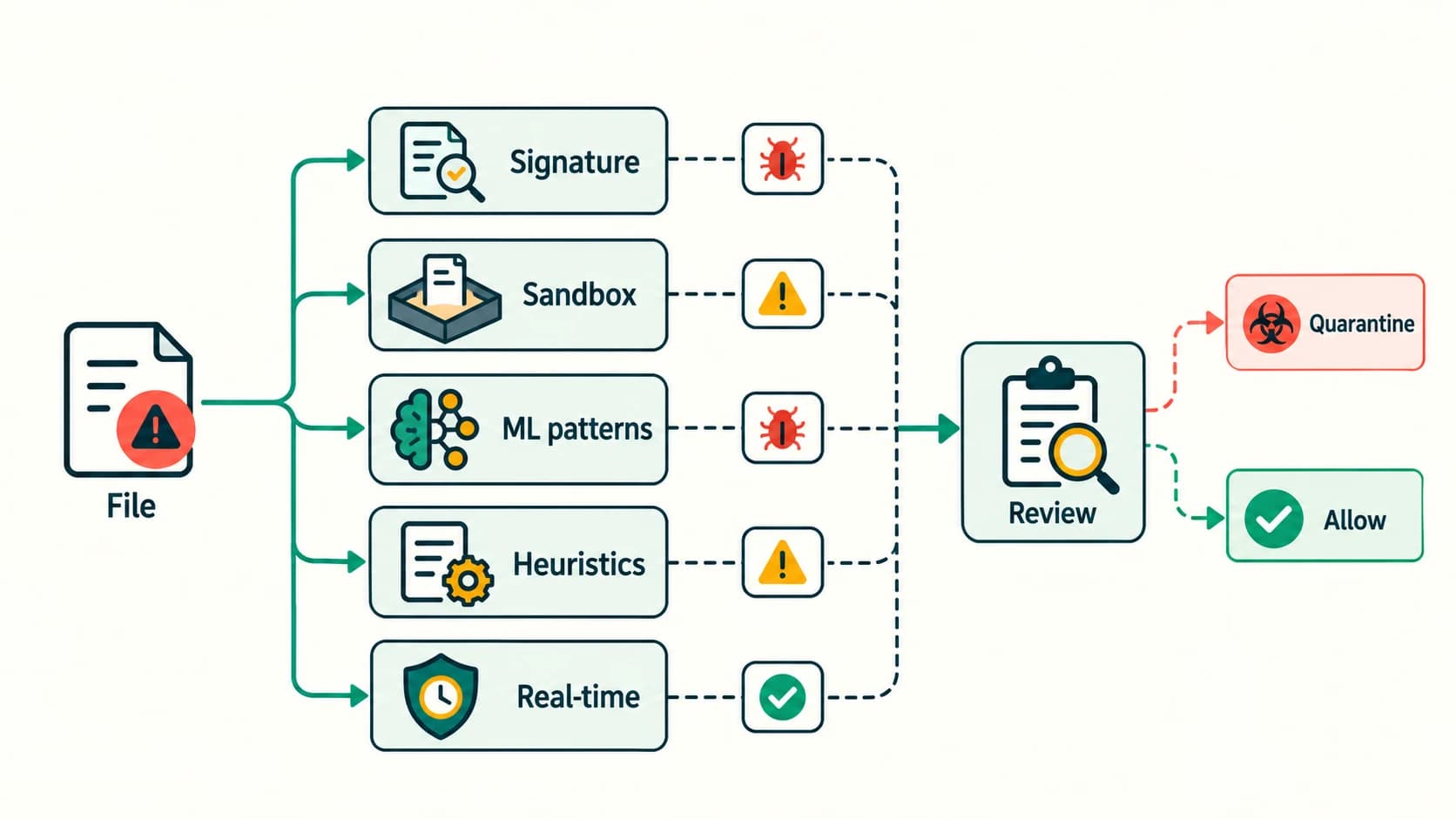
Antivirus or antimalware software helps identify, block, isolate and remove malicious programs. It is one layer of defence, not a substitute for updates, careful permissions and backups. Different techniques are used because attackers change code and behaviour.
Five methods in the textbook
1. Signature-based detection
A security tool compares a suspicious file against recorded signatures, such as characteristic code patterns or file properties. It is efficient for familiar threats but can miss new or substantially changed malware. A continually updated threat database is therefore valuable.
Analogy: Identifying a person from a known photograph works when you already have a suitable image, but not for every unknown visitor.
2. Sandbox detection
A sandbox is an isolated or controlled environment where software can be observed without giving it the ordinary level of access to the real system. A security tool may inspect whether a file attempts suspicious actions. Isolation is useful, but it is not infallible: some threats conceal behaviour in test environments, and no sandbox should be assumed perfectly secure.
3. Data mining / machine learning
Software may compare a collection of characteristics—file structure, behaviours and other features—with learned patterns. It may identify suspicious files that do not match one known signature. Mistakes remain possible; classification is probabilistic rather than guaranteed.
4. Heuristics
Heuristic analysis checks suspicious characteristics or behaviour that resemble malicious patterns, even when there is no exact match with a known sample. Heuristics may produce false positives: a safe program may be flagged because it resembles suspicious code.
5. Real-time protection
The security tool continuously monitors relevant activity while files open and programs run, looking for harmful changes or execution. This can detect threats in use rather than only during scheduled scans.
| Technique | Key idea | Main limitation |
|---|---|---|
| Signature | Match known patterns | Unknown/altered code can escape exact matching |
| Sandbox | Observe actions in isolation | Time/cost; evasive software may hide behaviour |
| Data mining | Classify using learned features | False classifications and training limitations |
| Heuristic | Detect suspicious properties | May flag legitimate programs |
| Real-time | Monitor while running | Consumes resources and cannot catch every attack |
Exam trap: A clean antivirus scan reduces concern but does not prove that a computer is free of every threat.
Section C12-CH12-S05 — Spam and Deceptive Messages
NCERT section 12.4.
Spam is unwanted or unsolicited digital communication, including bulk email, advertisements, forum posts and repeated messages. Spam may be merely annoying, but some spam carries malicious files, unsafe links or deceptive requests. Phishing refers specifically to messages or pages that attempt to trick a person into revealing credentials, money or sensitive information, or into taking unsafe actions. Not all spam is phishing; not all phishing is high-volume spam.
A message saying “Your school account closes in 10 minutes—type your password at this link” is suspicious because it combines urgency with a sensitive request. The appearance of a school logo alone does not authenticate the sender.
Safe handling routine
- Do not open unexpected executable attachments or log in through unsolicited links.
- Verify school or service notices through a known website or a separately obtained official channel.
- Use Report spam or Report phishing where appropriate.
- Never send one-time passwords, recovery codes or PINs to an unsolicited requester.
- If credentials have been exposed, change them from a trusted device and inform the relevant account owner or administrator.
Exam trap: “Spam” describes unwanted distribution; “malware” describes harmful software. One message can involve both, but the terms are not interchangeable.
Section C12-CH12-S06 — HTTP, HTTPS and Secure Web Connections
NCERT section 12.5; cross-link to C12-CN-11 and C12-CN-12.
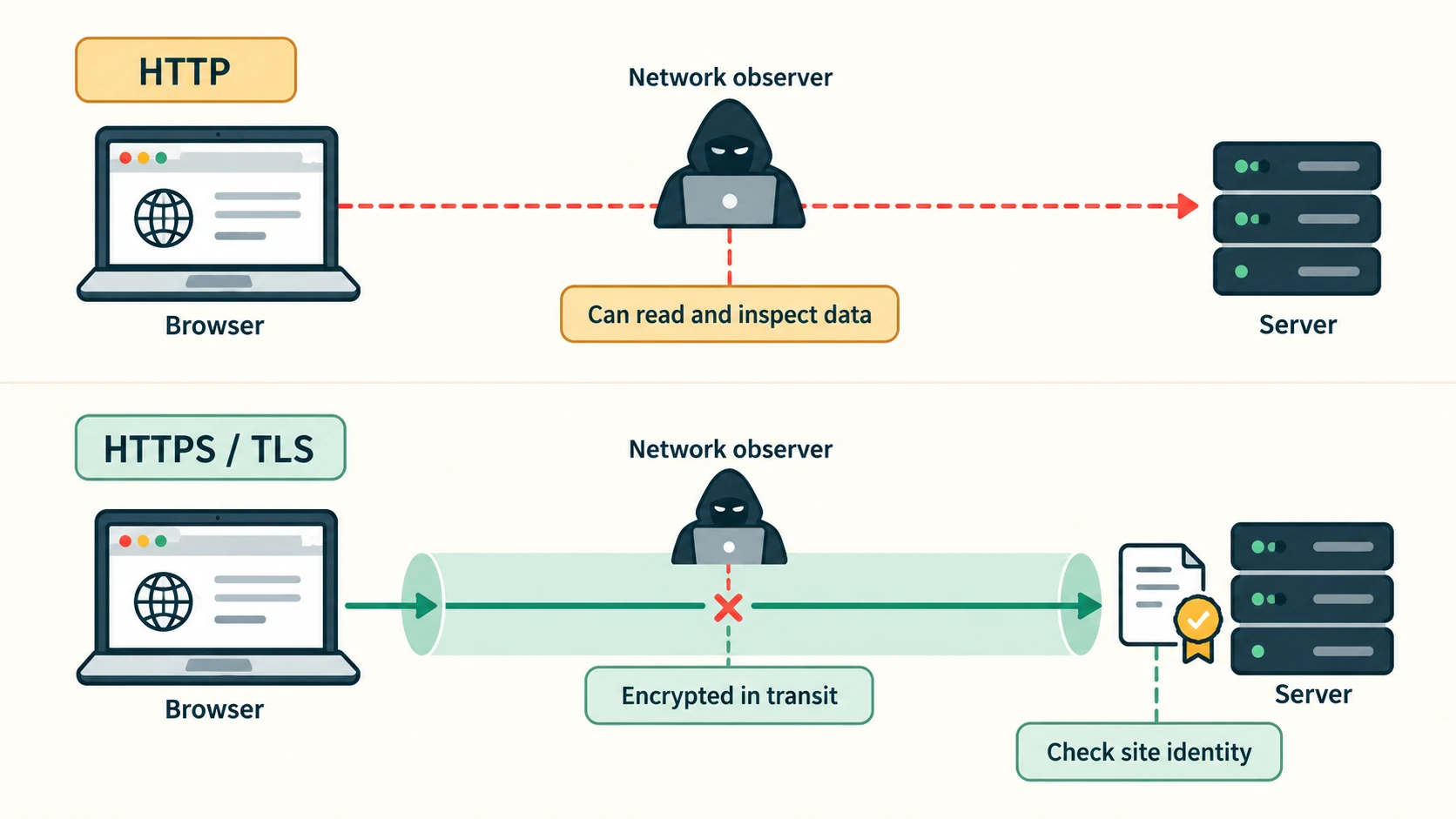
HTTP is an application protocol for requesting and returning web resources. In ordinary HTTP, traffic is not protected by the HTTPS encryption layer. Someone positioned to observe or tamper with traffic may be able to read data or interfere with what is delivered.
HTTPS is HTTP communication protected by TLS (Transport Layer Security). Properly configured HTTPS helps keep the information exchanged confidential, detect unauthorised changes in transit, and authenticate the site's server identity through certificate validation. Websites should use it for sign-in, personal information and ordinary browsing alike.
| Aspect | HTTP | HTTPS |
|---|---|---|
| Transit encryption | No HTTPS/TLS layer by default | HTTP is protected by TLS |
| Confidentiality against network observers | No transport confidentiality | Provides transport confidentiality when properly established |
| Integrity during transit | Not protected by TLS | TLS detects tampering in transit |
| Server identity | No TLS certificate validation | Uses certificate validation and hostname checks |
| URL scheme | http:// | https:// |
Practical comparison
When a student enters an account password over unprotected HTTP, the data may be visible to an attacker in a position to monitor the traffic. When the student uses the authentic site's HTTPS connection with valid TLS, the exchanged data is protected in transit against ordinary passive network observation.
What HTTPS does not guarantee
A deceptive website can also obtain an HTTPS certificate. Therefore HTTPS does not prove that the site owner is honest, that a download is harmless, or that a user should enter credentials. Students must check the actual domain, not only the presence of a padlock-like symbol. HTTPS also does not correct a device already infected by spyware.
Current security clarification: The textbook refers to “SSL Digital Certificates.” Today, TLS is the modern protocol family for HTTPS; SSL is obsolete terminology used informally for certificates. Do not teach that old SSL itself is the recommended current connection protocol.
Section C12-CH12-S07 — Firewalls and Access-Control Rules
NCERT section 12.6 and 12.6.1.
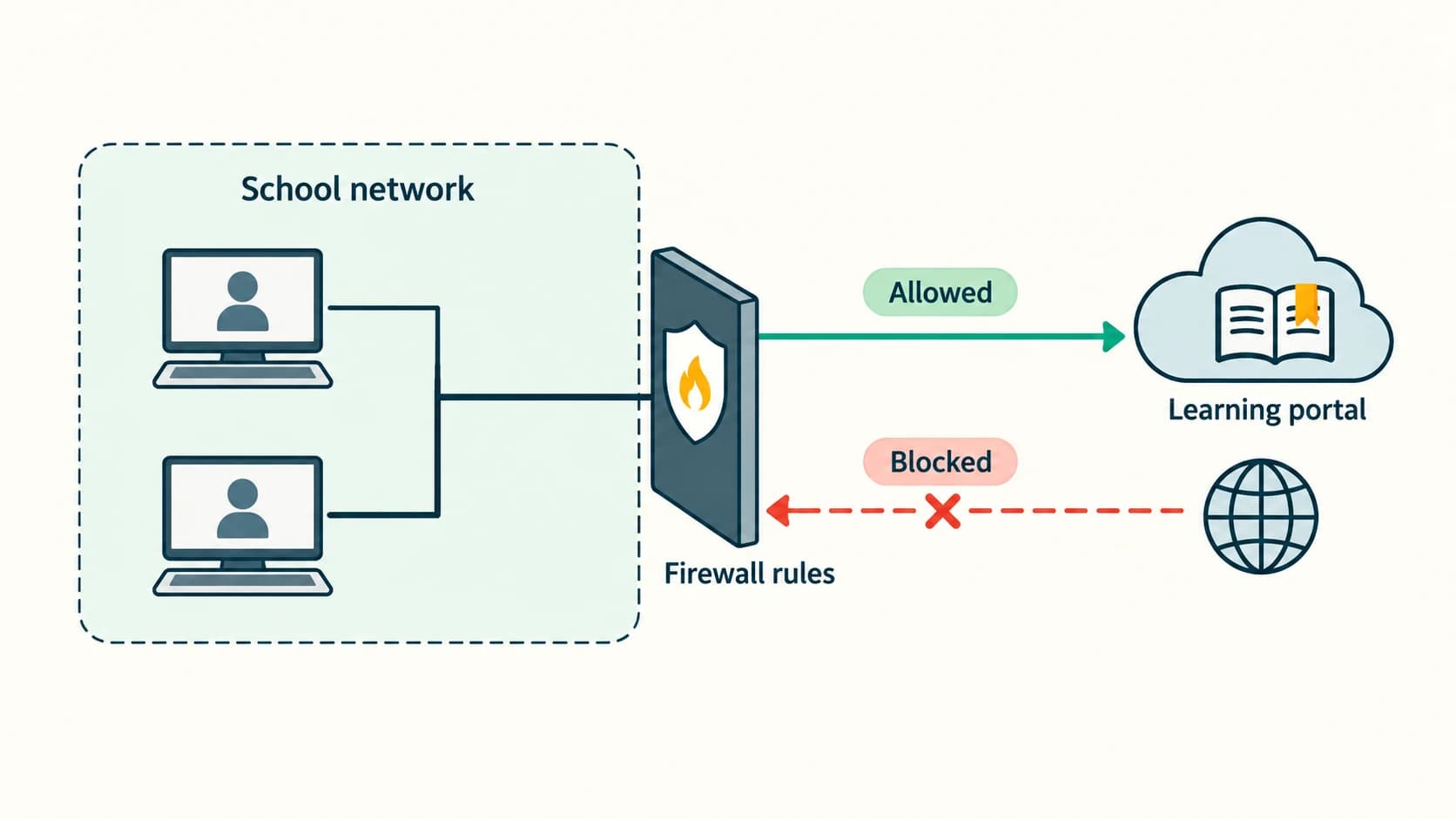
A firewall examines network connections or traffic against defined rules and decides which to allow, reject or block. It can reduce unwanted communication between a trusted part of a network and other systems. It does not automatically remove viruses, assess every website's truthfulness or replace secure user behaviour.
Types of firewall
- Network firewall: deployed between networks or network segments; for example, a school's border firewall applies Internet-access rules to many computers.
- Host-based firewall: runs on an individual device and helps regulate that device's incoming or outgoing connections; for example, the personal firewall provided by an operating system.
A firewall may be software, hardware or both. A device may use both a local host firewall and a separate network firewall.
A school access-control example
Suppose a school needs students to use a learning portal and teachers to access a confidential results service. The intended rule is: students can reach approved course resources, but access to confidential marks must be limited to authorised staff. Network firewall rules can help restrict connections, but login permissions and application-level authorisation are also necessary; otherwise a student might reach information through an allowed web service.
Limits of firewalls
Encrypted traffic, wrongly configured policies, malicious actions already allowed by a rule and threats inside a network may escape a simple firewall. Security teams may add endpoint protection, access-control lists, network monitoring and application-specific filtering.
Activity-style question: Can a firewall reduce distractions while students complete a project? Partly: authorised administrators can block some domains or services under school policy, but filtering is not perfect and does not replace classroom expectations, supervision or privacy-respecting access rules.
Safety rule for Activity 12.1: Students should inspect firewall status with a teacher; they should not disable a protective firewall on a live school or personal device merely to complete an exercise.
Section C12-CH12-S08 — Cookies, Sessions and Privacy
NCERT section 12.7 and 12.7.1.
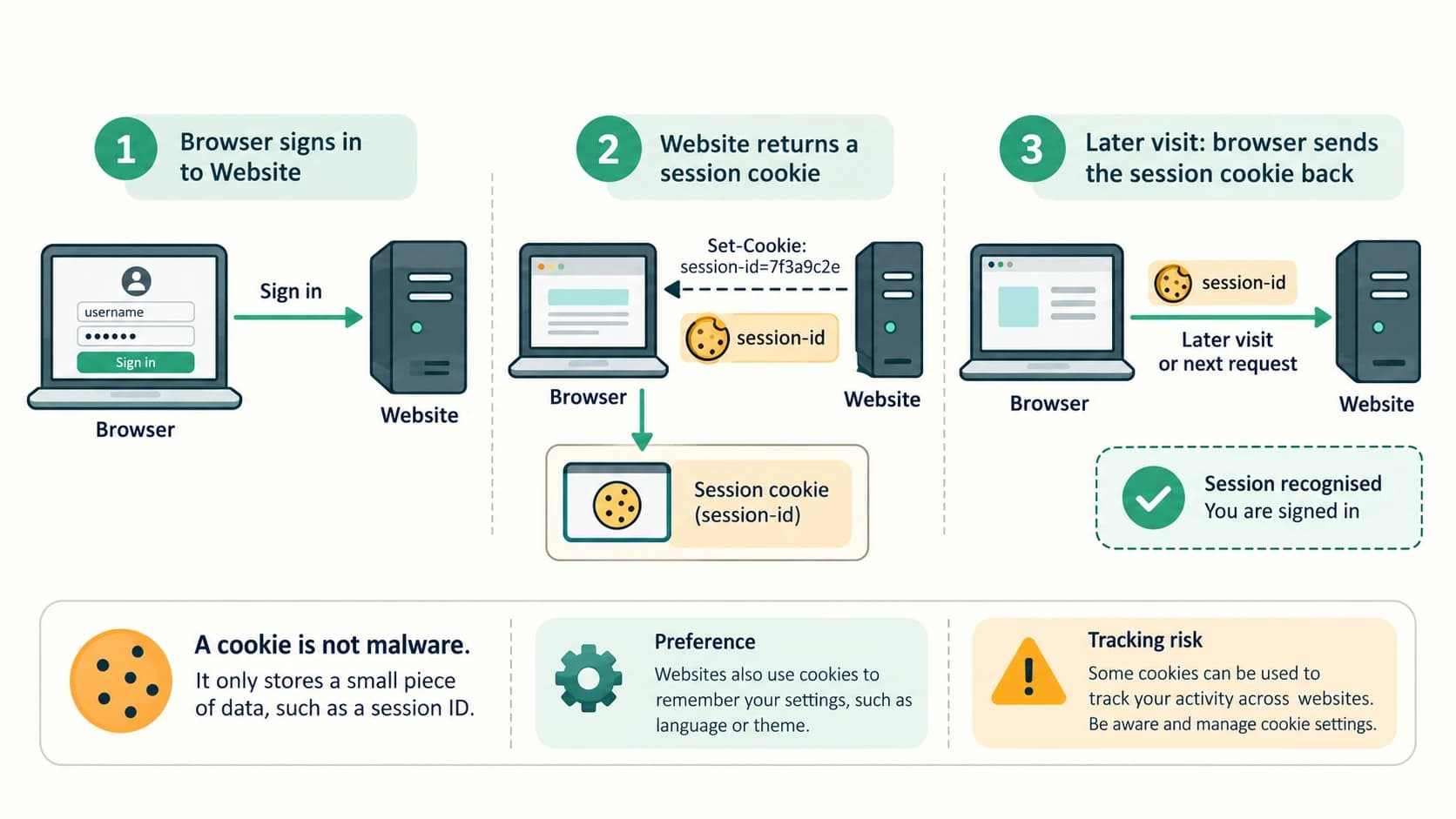
A browser cookie is a small piece of information a website asks the browser to store and send with appropriate later requests. It commonly stores a session identifier, preference or other state. A cookie is not necessarily an ordinary visible file, because browsers may manage cookies inside an internal storage database.
Helpful uses
- A session cookie helps a website recognise subsequent requests during a visit.
- An authentication cookie may carry a session token so a signed-in user does not need to log in on every page.
- A preference cookie can store a language or display preference.
- Shopping sites may associate a cart with a browser session or account.
Example: school library portal
A student signs in once and opens several catalogue pages. The browser returns a session cookie so the portal can recognise requests as part of the same session. The server still needs to check whether the student is authorised to view each requested resource. Knowing a session token is not the same as having unrestricted access.
Risks
Some cookies support advertising or cross-site tracking, which can raise privacy concerns. If an attacker steals an unprotected session token, that token may be misused. Cookies are not themselves computer viruses; the common risk is inappropriate tracking, disclosure or theft of the information they represent.
The NCERT chapter discusses third-party, super and zombie cookies. These terms describe various tracking or persistence practices; in modern browsers, tracking can also involve storage mechanisms other than standard HTTP cookies. A cookie manager's controls may not remove every alternative tracking method.
Secure handling in applications
An appropriately configured session cookie can use attributes such as Secure (HTTPS-only transmission), HttpOnly (not exposed to normal page JavaScript) and SameSite (limits some cross-site sending). These improve safety but do not eliminate all session risks. Server-side timeouts, logout and authorisation checks also matter.
Current security clarification: A browser's password autofill is usually managed by browser or password-manager features, not simply by the website storing someone's name, address and password inside an ordinary cookie. Never assume that cookies should contain a plain-text account password.
Section C12-CH12-S09 — Hackers, Crackers and Permission
NCERT section 12.8 and subsections 12.8.1–12.8.3.
A person who understands computer security may use that skill to improve safety or misuse systems. It is the authorisation, intention and behaviour that matter, not only the level of technical skill.
| Common textbook label | Typical description | Permission/ethics issue |
|---|---|---|
| White-hat / ethical hacker | Tests systems to find and report weaknesses | Works with explicit permission and agreed scope |
| Black-hat / cracker | Illegally exploits weaknesses to steal, damage or disrupt | Acts without authorisation and causes harm |
| Grey-hat | May find weaknesses without prior permission, sometimes without intent to cause harm | Lack of permission still creates legal and ethical problems |
A security specialist authorised to test the school's practice server, within a defined schedule and scope, performs an ethical security assessment. A student who accesses another person's account “only to prove it is insecure” is not authorised merely because they intend to report the flaw afterward.
Responsible response to a discovered weakness
Stop before accessing other people's information, preserve only what is needed to describe the issue, and inform the owner through the school's approved channel. Do not publish secret data or run intrusive demonstrations on live systems.
Exam trap: “Grey hat” is a descriptive term, not a special legal permission. Professional security work needs prior authorisation.
Section C12-CH12-S10 — Network Security Attacks and Interception
NCERT section 12.9 and subsections 12.9.1–12.9.4.
Denial of Service (DoS)
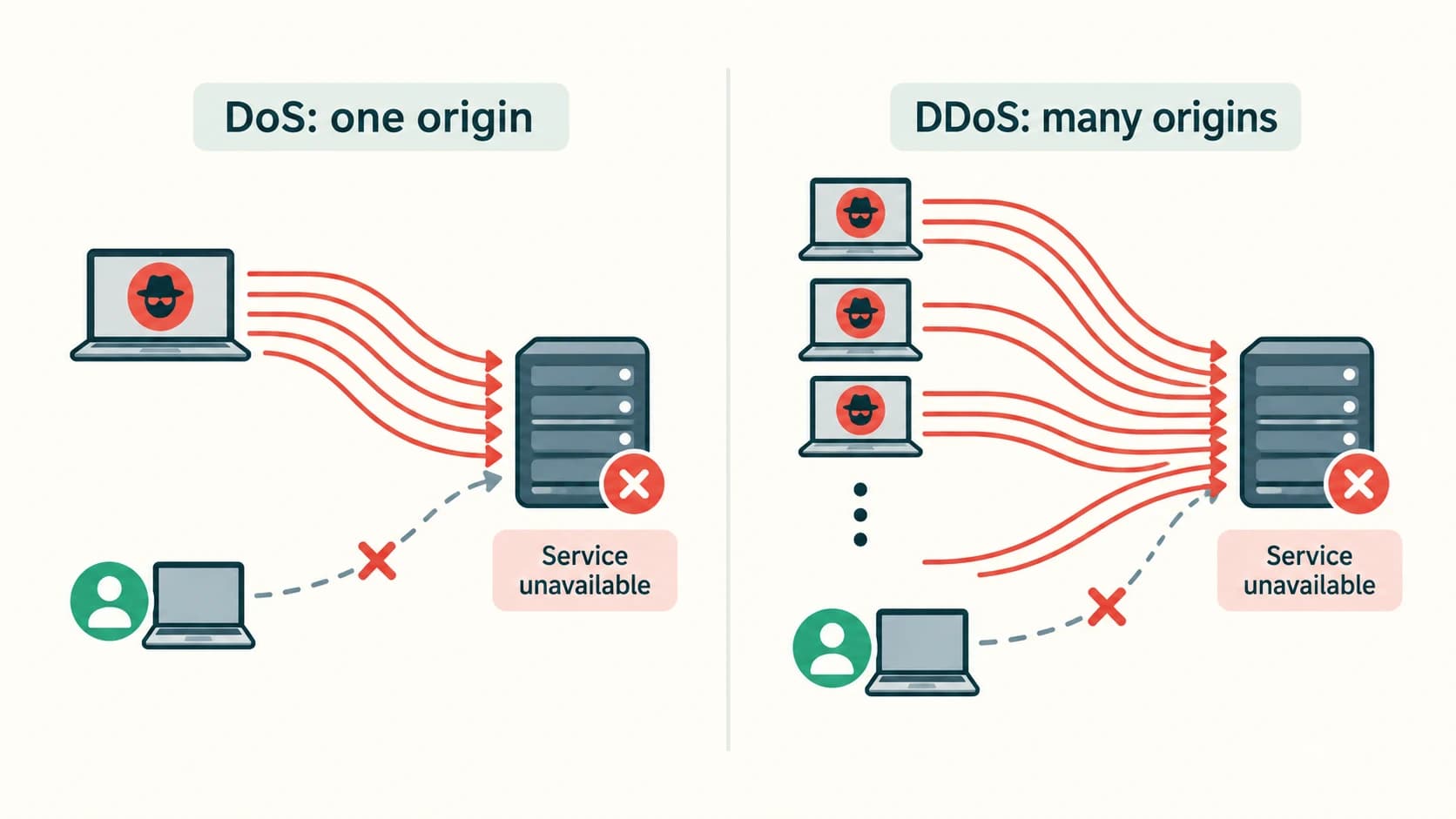
A DoS attack aims to make a network service unavailable to legitimate users, for example by exhausting its capacity to process requests. It mainly threatens availability. An ordinary server outage is not automatically a DoS attack; a technical failure may have other causes.
A distributed DoS (DDoS) attack uses numerous sources or compromised devices to create disruptive traffic. A DDoS campaign may be harder to block than an attack from one origin because traffic comes from many places. Defenders may use traffic filtering, rate limits, capacity planning and specialist mitigation services.
| DoS | DDoS | |
|---|---|---|
| Source pattern | May involve one principal source or attack origin | Many distributed sources |
| Main objective | Prevent legitimate access | Prevent legitimate access |
| Typical challenge | Traffic/resource exhaustion | Same goal, potentially broader source distribution |
| Core harm | Availability | Availability |
Network intrusion
Intrusion means unauthorised activity that penetrates, abuses or attempts to bypass network or system defences. The NCERT textbook introduces these associated concepts:
- Asymmetric routing used evasively: traffic takes different routes, potentially making some monitoring systems see only portions of activity. Using asymmetric routing normally is not automatically an attack.
- Buffer overflow attack: a program incorrectly handles more data than a memory region can safely contain; in some cases attackers exploit the flaw for disruption or unauthorised action. Developers reduce risk with safe programming, patches and platform protections.
- Traffic flooding: extremely high traffic can overwhelm services or monitoring systems and reduce their ability to inspect events.
These are defensive definitions, not instructions to create or test intrusive traffic on a network.
Snooping and eavesdropping
In the NCERT distinction, snooping or sniffing involves capturing and analysing traffic, which can be stored for later inspection; eavesdropping focuses on unauthorised observation of a private communication as it occurs. Both may violate confidentiality. Legitimate network administrators also analyse traffic with authorisation to troubleshoot problems.
A simple analogy
- A person secretly copies a letter on its way to a friend and studies the copy later: similar to stored-data snooping.
- A person secretly listens to a private call while it happens: similar to real-time eavesdropping.
In practical cybersecurity discussions, the terms can overlap; what matters is whether the observation is authorised and which information is exposed. HTTPS and other properly configured encryption tools make intercepted traffic harder to read, though they do not eliminate every endpoint or metadata risk.
Security goals and attack examples
| Scenario | Most directly affected goal |
|---|---|
| Private message intercepted | Confidentiality |
| School mark changed without permission | Integrity |
| Portal unavailable due to flooding | Availability |
| Ransomware locks important files | Availability; may also affect confidentiality |
| Stolen session token used to view records | Confidentiality and access control |
NCERT Activities — Complete Model Responses
These activities are practical investigations rather than exercises with one universal screen layout. The responses below preserve what the NCERT activities ask and give safe ways to complete them. No local device settings or observations are invented.
NCERT Activity 12.1 — Observe firewall on/off controls with a teacher
Task restatement: Ask a teacher to demonstrate where firewall settings can be enabled or disabled.
Model response and procedure:
- With permission, open the computer's operating-system security settings.
- Locate the firewall or firewall and network protection section.
- Observe the status of active profiles (such as private and public network profiles) and ask the teacher what each controls.
- Discuss how incoming connections can be allowed or blocked and why a network administrator may impose policy.
- Record the observed interface labels in your notebook. Do not turn the firewall off on a connected working computer merely for this activity.
Expected conclusion: Host-based firewalls help control traffic to or from an individual computer. School networks may also use separate network firewalls. The precise buttons vary by operating system, version and administrator policy.
NCERT Activity 12.2 — Inspect browser cookie settings
Task restatement: Find cookie controls in your browser and determine where the browser lists stored site information.
Model response and procedure:
- Open browser Settings and locate Privacy, Site data, or Cookies controls (names vary).
- Inspect whether the browser provides options to view site data, remove individual sites' stored data, and block or limit third-party cookies.
- Visit a trusted non-sensitive demonstration website if the teacher approves, and inspect its site-data view.
- Record the cookie names or categories only if they do not expose private tokens; do not copy session values into homework or screenshots.
- Discuss how deleting a cookie may sign a user out or clear a stored preference.
Expected conclusion: Browsers manage site data, including cookies, to support sessions and preferences. The files might be inside a browser database rather than separate readable files on disk.
Additional NCERT in-chapter prompt — Firewall and study distractions
Prompt restatement: Students are given Internet access for a project; can firewall controls reduce distracting access?
Model answer: An authorised school administrator can configure domain, application or network policies to reduce access to selected entertainment services during the session. This must be proportionate to the school's policy and not block essential learning resources. Firewall filtering alone cannot guarantee concentration or stop every alternative access path; expectations and supervision also matter.
NCERT Chapter 12 — Solutions to All 17 End-of-Chapter Exercises
The following numbered questions follow the NCERT Chapter 12 exercise order. Each question is briefly restated, followed by an original explanatory solution. The answers distinguish the textbook's core idea from additional security clarifications where necessary.
NCERT Exercise 1 — Why does disconnecting a computer reduce danger?
Question restatement: Explain why a machine not connected to a network or the Internet is usually regarded as safer.
Solution: Remote attackers ordinarily need a communication path to contact a system. A computer with no network connection cannot be reached directly over the Internet, so it has fewer opportunities for network intrusion, unsolicited remote requests, worm propagation through network links and traffic interception. That is the textbook reason it is considered safer.
Limitation: The disconnected computer can still be infected through removable drives, malicious files introduced locally, physical access or a previously compromised installation. It can also suffer data loss from failure or theft. Therefore, isolated does not mean immune to all threats. Where connectivity is necessary, apply defence-in-depth safeguards.
NCERT Exercise 2 — Define virus and give historical examples
Question restatement: What is a virus? Identify familiar historical malicious programs.
Solution: A computer virus is malicious code that infects a host program or file. When infected code executes, it can carry out unwanted actions such as changing or damaging files and may spread by infecting other files. A computer virus is software, not a biological organism.
Historical names appearing in discussions of computer-malware outbreaks: ILOVEYOU, Netsky, MyDoom, Sasser, Stuxnet and CryptoLocker. Important classification: MyDoom and Sasser are classed as worms, while CryptoLocker is ransomware; these are not all strict examples of file-infecting viruses. CIH (Chernobyl) and Melissa are commonly discussed as historical virus/macro-virus examples. These names refer to historical outbreaks, not currently circulating threats.
Conclusion: A good answer states the defining host-infection behaviour, then uses malware examples with their accurate categories rather than implying that every malicious program is a virus.
NCERT Exercise 3 — Virus versus worm
Question restatement: What is the main difference between a worm and a computer virus?
Solution: A virus typically infects another file or program and spreads when infected content is executed or shared. A worm is an independent malicious program; it can copy itself between computers, often using network connectivity, without being attached to another host executable.
Example: If opening an infected application causes it to infect other files, that illustrates a classic virus. If malicious software independently seeks reachable vulnerable computers and spreads across the network, that illustrates worm-like propagation.
Remember: Both are malware and both can steal information or disrupt a system. Host dependence and typical propagation are the defining differences—not a guaranteed difference in severity.
NCERT Exercise 4 — How ransomware extorts victims
Question restatement: Explain how ransomware is used to demand money.
Solution: Ransomware makes a victim's files or computer inaccessible, commonly by encrypting data. It displays a demand for money in exchange for a proposed decryption key or restoration method. Some ransomware also steals information and threatens publication, producing an additional form of pressure.
Worked scenario: A school discovers that important documents cannot be opened and a payment demand appears. Even if the payment is made, recovery is not guaranteed. The school should activate its incident plan, isolate affected systems where appropriate, notify responsible personnel and restore from trusted backups once systems are secured.
Prevention: System patching, limiting administrative privileges, filtering unsafe attachments and maintaining recoverable backups reduce risk and impact.
NCERT Exercise 5 — The Trojan horse name
Question restatement: Why is a Trojan named after the Trojan horse?
Solution: In Greek legend, a wooden horse apparently offered as a gift concealed a hidden danger. Likewise, Trojan malware pretends to be a safe or attractive program but secretly carries harmful functions. The disguise persuades the user to run it. For example, a counterfeit learning application might hide spyware.
Exam distinction: A Trojan is defined by deception and installation under false pretences, not by independently replicating like a worm.
NCERT Exercise 6 — Adware and creator revenue
Question restatement: How can adware earn money for its operator?
Solution: Adware displays advertisements, redirects the browser to promotional pages or collects data used to select advertisements. The operator may receive advertising impressions, clicks, referral commissions or another form of commercial payment when users view or interact with ads. Deceptive adware may therefore benefit financially while worsening the user's browsing experience.
Qualification: Not all ad-supported applications are malicious. Legitimately disclosed ads in software with informed user consent are different from unwanted installation, invasive tracking or redirects to unsafe sites.
NCERT Exercise 7 — Two keylogger risks
Question restatement: State and explain two threats caused by a secretly installed keylogger.
Solution:
- Credential theft: The program can record passwords, account identifiers and PIN-like input, allowing an attacker to attempt unauthorised access to email, banking, school accounts or other services.
- Exposure of private information: The program can capture personal messages, private notes, financial details or confidential school information entered through the keyboard. This can enable impersonation, privacy violations or fraud.
A keylogger cannot necessarily recover data never typed on the observed keyboard, and protective authentication methods may limit some harms. Nevertheless, a compromised device should not be trusted for sensitive sign-in until it has been assessed and secured.
NCERT Exercise 8 — Virtual keyboard versus on-screen keyboard
Question restatement: Why may an online virtual keyboard with changing key positions be safer than a fixed keyboard?
Textbook solution: In a fixed QWERTY on-screen keyboard, each key appears in the same place. A virtual keyboard that randomises key positions can make it harder for a simple program that records click coordinates to infer the entered keys. The randomised layout is the key textbook distinction.
Current security clarification: The benefit is limited. Modern malicious software may capture screen contents, mouse activity, browser input, clipboard data or the submitted form itself. Therefore, neither an on-screen keyboard nor a randomised virtual keyboard makes an untrusted computer safe. Use verified sites, trusted devices and MFA/passkeys where possible.
NCERT Exercise 9 — Malware distribution routes
Question restatement: List and explain major channels by which malware reaches a computer.
Solution:
- Downloads from the Internet: A harmful installer may be disguised as a free program, document or update.
- Spam or malicious email: A dangerous attachment or link may trick a user into opening or downloading malware.
- Removable devices: A contaminated USB drive or similar storage medium may introduce malicious files to another computer.
- Network propagation: Malware such as a worm may move from one vulnerable networked computer to another.
Example: If a student copies unknown executables from a USB device onto a laboratory PC and runs one, removable-device distribution may be involved. A school should allow only trusted software, keep systems patched and enforce responsible handling of external media.
NCERT Exercise 10 — Symptoms of infection
Question restatement: Describe warning signs that may suggest malware infection.
Solution: Possible warning signs include many unexpected pop-ups; a changed home page or search engine; unknown applications starting automatically; severe unexplained slowness or crashes; programs or files appearing, changing or disappearing unexpectedly; unexpected storage consumption; and messages being sent from an account without the user's knowledge.
Important interpretation: These symptoms are indicators, not proof. A full disk or failing hardware can also slow a computer. When several unexplained changes occur, report them and use trusted security procedures rather than downloading a fake “instant repair” product advertised in a pop-up.
NCERT Exercise 11 — Preventing malware
Question restatement: Give sensible ways to reduce malware infection.
Solution: Keep the operating system, browser and applications patched; use trustworthy antimalware protection and update its definitions; install only trusted software; avoid unexpected links and attachments; scan suspicious external storage with approved tools; use a firewall; back up important files securely; restrict unnecessary privileges; and avoid typing passwords on unknown shared computers. Use unique passwords or passkeys and MFA where available, and do not share OTPs or recovery codes.
Reasoning: These controls work at different stages: updates reduce vulnerable software, filters and careful behaviour reduce entry, antimalware helps detect execution, restricted privileges limit damage, and backups support restoration.
Current clarification: Regular mandatory password rotation is not a universal requirement; change passwords if they are suspected compromised, use strong unique credentials and prefer MFA. No protective software detects every threat.
NCERT Exercise 12 — Antimalware detection approaches
Question restatement: Explain methods used by antivirus software to identify malicious files.
Solution:
- Signature-based detection: matches known malicious patterns against a regularly updated database. Fast for known threats, weaker against new or modified variants.
- Sandbox detection: observes a suspicious program within a controlled environment to identify harmful behaviour without freely executing it on the main system.
- Data mining / machine learning: evaluates learned patterns across multiple characteristics to classify files or activities as suspicious.
- Heuristic detection: checks code or behaviour for suspicious patterns similar to known malware, even without a complete exact signature.
- Real-time protection: continuously examines relevant program activity while files and processes are used.
Summary: Combining methods is more effective than relying on a single exact signature, yet both false positives and missed detections remain possible.
NCERT Exercise 13 — HTTP risks and HTTPS protection
Question restatement: What is unsafe about using HTTP, and how does HTTPS reduce that risk?
Solution: Ordinary HTTP does not provide the encryption and connection protection of HTTPS. Network observers may read information transmitted in cleartext, and attackers in a position to interfere with the connection may change responses or impersonate destinations.
HTTPS protects HTTP traffic using TLS, providing confidentiality during transit, integrity checks and server-certificate validation. Thus, a correctly established HTTPS connection reduces the risk of password interception and traffic tampering while communicating with the intended site.
Limits: A malicious website can still use HTTPS. Always check the actual domain and context, and never assume that an HTTPS label makes an unexpected attachment trustworthy. The modern secure protocol is TLS; “SSL” is legacy wording.
NCERT Exercise 14 — A cookie's advantage and disadvantage
Question restatement: Give one benefit and one possible drawback of browser cookies.
Solution:
- Benefit: A session or preference cookie lets a website remember a signed-in session, language selection or shopping cart state, improving convenience.
- Drawback: A cookie may be used to support unwanted tracking across sites, or a stolen session identifier may enable account misuse.
Explanation: Cookies are simply a browser storage and request mechanism. Their effect depends on what data is stored, where it is sent, how the site protects it and whether the user has meaningful privacy controls.
NCERT Exercise 15 — White, black and grey hats
Question restatement: Distinguish the three textbook categories of hacker.
Solution: A white-hat hacker is an authorised security professional who finds and reports weaknesses so the owner can fix them. A black-hat hacker exploits systems without authorisation for malicious purposes such as theft, extortion or damage. A grey-hat hacker may act without permission while claiming curiosity or non-malicious intent; this still creates ethical and legal risks.
Example: A school-authorised security tester checking an approved test system is acting ethically. Breaking into the school's live examination database without approval is not justified by saying the purpose was to “help”. Permission and scope are the decisive criteria.
NCERT Exercise 16 — DoS versus DDoS
Question restatement: How is Distributed Denial of Service different from Denial of Service?
Solution: Both types of attack try to prevent legitimate users from accessing a service, generally by exhausting some capacity or resource. A DoS attempt can originate from one source or attack setup. In a DDoS attempt, many distributed sources—sometimes compromised computers referred to in the textbook as zombies—contribute to the disruptive traffic.
Example: One machine overwhelming a small practice server represents a single-source denial scenario. Numerous compromised devices sending requests toward the same service represent a distributed pattern. The purpose in each case is to interfere with availability, not necessarily to steal data.
NCERT Exercise 17 — Snooping versus eavesdropping
Question restatement: Explain NCERT's distinction between snooping and eavesdropping.
Solution: Snooping (also called sniffing) is the capture and inspection of traffic, which may be saved for later examination. Eavesdropping is the unauthorised interception or monitoring of another person's private communication as it happens. The textbook contrasts copying a letter secretly with listening in on a conversation in real time.
Qualification: In real security discussions, these terms can overlap, and authorised packet capture may be an ordinary network-administration technique. The wrongdoing is unauthorised interception or misuse of private data. Appropriate encryption and controlled access reduce exposure.
Original Practice Bank — 30 Questions with Explained Answers
All questions in this section are newly authored for this resource. They are not presented as NCERT exercise questions or as verified previous-year board questions. First try to answer independently, then read the explanation.
Part A — Concept MCQs (P01–P12)
Practice P01 — Recognise a vulnerability
Which is the best example of a vulnerability rather than an attack?
A. A stolen laptop B. A web application missing a security update C. A fraudulent message being sent D. A server intentionally flooded with traffic
Correct answer: B. Missing a security update may leave a known weakness that an attacker could exploit. The fraudulent message and the deliberate flooding are attack activities; theft is an incident or consequence. The distinction helps choose controls that address the root weakness.
Practice P02 — Identify the security goal
A student changes another student's recorded mark without permission. Which property is most directly affected?
A. Availability B. Confidentiality C. Integrity D. Bandwidth
Correct answer: C — Integrity. Integrity means information remains correct and may be changed only through authorised procedures. The data still exists, but its accuracy and trustworthiness have been compromised.
Practice P03 — Name the self-propagating malware type
Malware running as an independent program copies itself to reachable vulnerable systems. Its most suitable classification is:
A. Worm B. Session cookie C. Firewall D. Browser cache
Correct answer: A — Worm. A worm does not need to attach itself to a separate host executable. The other choices are ordinary web or security mechanisms, not this malware type.
Practice P04 — Disguised installer
A harmful program masquerades as a popular study app and secretly runs unauthorised code. What defining feature is illustrated?
A. A TLS certificate B. Trojan deception C. Circuit switching D. A safe sandbox
Correct answer: B. Trojans rely on a misleading legitimate appearance. A Trojan can also install other malware, but its disguise is what defines the category in this scenario.
Practice P05 — Ransomware recovery
Which preparation is especially helpful when important files are encrypted by ransomware?
A. Reusing one password B. Maintaining tested recoverable backups C. Turning off updates D. Accepting every pop-up
Correct answer: B. Trusted backups provide a potential recovery path without relying on an attacker. Patching and careful permissions are also valuable, but backups are directly relevant to restoring unavailable data.
Practice P06 — Antivirus signatures
Why might signature-only detection miss a new malicious program?
A. Every program looks identical B. Its exact known signature may not yet be recorded C. It cannot inspect files D. Signatures are browser cookies
Correct answer: B. Signature databases recognise recorded patterns. New or altered malware may evade exact matching; heuristics, behavioural analysis and updates can complement signatures.
Practice P07 — Spam versus phishing
An unsolicited promotional message is annoying but makes no attempt to steal information. What is the most precise label?
A. Spam B. Guaranteed ransomware C. Firewall D. Eavesdropping
Correct answer: A. It is unwanted communication. Phishing is a deception-based attempt to obtain sensitive information or induce unsafe actions. Spam and phishing can overlap but are not synonymous.
Practice P08 — What HTTPS cannot promise
Which statement about HTTPS is correct?
A. It proves every website is honest B. It removes all malware from a device C. It protects web traffic in transit using TLS D. It guarantees the page contains accurate information
Correct answer: C. HTTPS helps encrypt and authenticate the network connection. A fraudulent website can also deploy HTTPS, so users must examine the domain and the request being made.
Practice P09 — Host firewall
Which firewall operates directly on one school laptop and controls that laptop's connections?
A. Host-based firewall B. Network backbone C. Domain cookie D. Wireless mouse
Correct answer: A. A host firewall protects an individual computer. A separate network firewall may additionally manage traffic between school network segments.
Practice P10 — Browser sessions
A website recognises a student on several pages after one successful login. Which mechanism commonly helps maintain the session?
A. A session cookie holding an identifier B. A virus attached to the textbook C. An unauthorised worm D. A fake antivirus pop-up
Correct answer: A. The browser can send a session identifier with appropriate requests. The website must still check authorisation, and the session identifier must be protected against theft.
Practice P11 — Authorised testing
A consultant tests a school's approved training server only within the written scope. Which category best fits this behaviour?
A. Ethical/white-hat testing B. Unauthorised eavesdropping C. Spam delivery D. Ransomware
Correct answer: A. Permission, scope and responsible reporting distinguish an authorised assessment from intrusive activity. Having strong technical skills alone does not make an action ethical.
Practice P12 — Multiple attack origins
An online portal becomes unavailable under coordinated unwanted traffic from many distributed sources. Which term describes the pattern?
A. DDoS B. Local backup C. Cookie preference D. Heuristic scan
Correct answer: A. Distributed denial of service attacks involve multiple origins. The primary affected security goal is service availability.
Part B — Short and Analytical Questions (P13–P22)
Practice P13 — Explain two reasons an updated device may still be infected
Answer: Patching removes many known exploitable weaknesses, but it does not prevent every unsafe user action or unknown vulnerability. A user might still run a disguised Trojan or disclose credentials to a fraudulent site. Patches must therefore be combined with trusted downloads, limited privileges, security monitoring and awareness.
Practice P14 — Explain why a firewall cannot replace antivirus
Answer: A firewall manages connections based on network rules; antivirus and antimalware tools analyse files, code and application behaviour for harmful activity. A malicious file already stored on a computer might execute without requiring a new blocked connection. Conversely, antivirus cannot enforce every network access policy. Both provide useful but different safeguards.
Practice P15 — Interpret a browser warning about a certificate
Answer: A certificate warning can indicate that the browser cannot reliably validate the connection's identity or security—for example, an expired, misconfigured or unexpected certificate. The safe response for a sensitive website is to stop and verify the address through a trusted channel rather than bypass the warning and submit a password. The warning does not by itself prove an attacker is present, but it should not be ignored.
Practice P16 — Are browser cookies necessarily malicious software?
Answer: No. Cookies are small pieces of browser-managed data used for sessions, preferences and other state. They cannot be equated with executable viruses. The risks arise from tracking, exposure of sensitive identifiers or misuse of stored information. A session cookie can be beneficial if appropriately protected and constrained.
Practice P17 — Distinguish false positive from missed detection
Answer: A false positive occurs when safe software is incorrectly flagged as malicious. A missed detection (false negative) occurs when harmful software is not recognised. Excessive false positives disrupt legitimate work, while false negatives allow threats through. Combining techniques and investigating alerts improves decision quality, but no detector is perfect.
Practice P18 — Explain how least privilege helps
Answer: Least privilege means giving a user or program only the permissions necessary for the assigned task. A student who only needs to view a document should not be able to change the school's entire records database. If that student account is compromised, restricted permissions can reduce the possible damage.
Practice P19 — Why are recoverable backups different from a copy left on the same computer?
Answer: A copy on the same machine may be damaged by the same malware, theft or storage failure as the original. A more dependable plan keeps separate protected versions—such as isolated or offline backups—and tests restoration. Merely seeing a backup file does not prove it is complete or recoverable.
Practice P20 — Explain why a randomised keyboard is not a universal solution
Answer: Randomising key locations may hinder a simple recorder that infers typed characters from fixed click positions. It cannot stop a compromised operating system or browser from inspecting screen contents, clicks or form submissions. Use trusted devices, MFA and appropriate endpoint protections rather than relying on rearranged keys alone.
Practice P21 — Compare confidentiality and availability in two incidents
Answer: If someone reads a private school message without permission, confidentiality is affected. If a class portal cannot serve lessons due to disruptive traffic, availability is affected. The same incident may violate more than one property—for example, ransomware that both copies confidential data and prevents access.
Practice P22 — Explain why permission matters to network monitoring
Answer: Authorised administrators may inspect limited network traffic for troubleshooting, reliability and security in accordance with policy. Intercepting another person's private traffic secretly is an abuse. The technical act of viewing packets does not alone determine whether it is permitted; authority, scope, proportionality and handling of collected information do.
Part C — Case Studies and Applied Reasoning (P23–P30)
Practice P23 — Compromised school email
Scenario: A teacher sees unexpected sent messages containing a suspicious link. What should be done and why?
Answer: The teacher should notify the school's account or IT administrator, stop using the affected account for sensitive tasks, and review it from a trusted device. Depending on the administrator's instructions, reset affected credentials, revoke suspicious sessions, enable or review MFA and warn relevant recipients. These actions address both a possible credential compromise and the risk of further deceptive messages. Do not assume that simply deleting the outgoing messages fixes the underlying account problem.
Practice P24 — Phishing with an HTTPS link
Scenario: An email directs a student to https://school-results-example.invalid and asks for a password. The address uses HTTPS. Is this enough to trust it?
Answer: No. HTTPS can protect traffic to that particular server, but it does not establish that the address is the school's real domain or that the request is legitimate. The student should navigate independently to the known official school site, check the announcement there or ask an authorised school representative. The .invalid domain shown here is deliberately a non-working example, not a recommended destination.
Practice P25 — Classroom firewall controls
Scenario: During an examination, students should reach the exam portal but not administrative mark-editing tools. Suggest layered controls.
Answer: Use a school-approved network filtering policy to restrict unnecessary connections, plus authenticated accounts with roles that permit students to submit answers but not change marks. Restrict staff administration behind additional authorisation and log relevant changes. A firewall alone cannot decide whether the person who reached an allowed application may edit a particular record.
Practice P26 — Ransomware affecting a shared laboratory
Scenario: Several laboratory PCs show inaccessible files after an unknown attachment was opened on one machine. Identify likely concerns and priorities.
Answer: This is consistent with possible malware or ransomware spread, but technical investigation is needed before declaring a cause. The priority is to notify the laboratory administrator, contain affected systems using approved procedures, protect unaffected devices and accounts, preserve incident information and plan clean recovery from validated backups. Simply paying a demand or copying files from an infected system into the backup set is unsafe and does not reliably restore normal operations.
Practice P27 — Cookie preference versus tracking
Scenario: A library site remembers the student's preferred language, while advertisements for recently viewed books appear across unrelated websites. Explain the difference.
Answer: Remembering a language is an ordinary functional preference. Cross-site advertisement personalisation may involve third-party identifiers or other tracking technologies. The student can use browser privacy controls and review a site's consent choices. Do not assume that the language-setting cookie itself is responsible for all advertising behaviour.
Practice P28 — DoS or ordinary outage?
Scenario: A school website becomes slow immediately before results are announced. Another student says it must be a DDoS attack. Evaluate the claim.
Answer: The observation alone is insufficient. The portal may simply be overloaded by legitimate students checking results, or it may be suffering a server fault. A DDoS conclusion requires further evidence of coordinated disruptive traffic, particularly traffic from many suspicious sources. A careful report describes observed symptoms separately from the cause being investigated.
Practice P29 — Antivirus flags a legitimate assignment tool
Scenario: School security software quarantines an app written by a student for a programming project. Must the project be malware?
Answer: No. Heuristic or behavioural detection can produce false positives. The student should not disable protection to force execution. Instead, show the code and alert to a teacher or administrator, verify the source and behaviour, and use an approved review process. Legitimate status should be determined through evidence rather than through automatic trust or automatic dismissal.
Practice P30 — One security measure is not enough
Scenario: Design a compact security plan for students who submit projects online and use shared computers occasionally.
Answer: Use trusted sites with HTTPS and verify the domain; authenticate using unique credentials or passkeys and MFA; avoid storing passwords on untrusted shared computers; log out fully and avoid saving session data; install updates and use approved antimalware; do not open suspicious attachments; apply least-privilege permissions; and keep recoverable copies of project work. This is defence in depth: each measure addresses a different failure route, and no measure alone provides complete protection.
Quick Revision — Security Aspects
Essential definitions
| Term | Recall in one line |
|---|---|
| Threat | A potential cause of harm |
| Vulnerability | A weakness that can be exploited |
| Malware | Software intended to cause harm or unauthorised activity |
| Virus | Malicious code dependent on infected host content |
| Worm | Independent malware with replication/propagation capability |
| Ransomware | Malware that denies access or threatens exposure to extort a victim |
| Trojan | Harmful software disguised as something legitimate |
| Spyware | Covert information collection |
| Keylogger | Captures keyboard entries |
| Antivirus | Helps prevent, detect, quarantine and remove malicious programs |
| Spam | Unwanted digital communication |
| Phishing | Deceptive attempt to obtain secrets or induce unsafe action |
| HTTPS | HTTP protected in transit by TLS |
| Firewall | Applies rules to network traffic or connections |
| Cookie | Browser-managed state sent with relevant site requests |
| Ethical hacker | Authorised tester working within agreed scope |
| DoS | Attack that disrupts service availability |
| DDoS | Denial-of-service attack involving distributed sources |
| Snooping | Capture and analysis of traffic, often stored |
| Eavesdropping | Unauthorised listening to ongoing private communication |
Comparison questions examiners often ask
Virus vs worm: classic virus infects host content; worm is a self-contained program that may propagate independently.
Trojan vs ransomware: Trojan identifies a deceptive distribution form; ransomware identifies an extortion behaviour. They may appear together.
HTTP vs HTTPS: HTTPS adds TLS protection in transit. It does not certify the ethics of a website owner.
Host firewall vs network firewall: one device's traffic versus traffic crossing a network boundary.
DoS vs DDoS: both harm availability; DDoS has multiple distributed sources.
Snooping vs eavesdropping: NCERT emphasises stored captured traffic versus unauthorised real-time interception; real-world terminology may overlap.
Safe handling of unusual pop-ups: Avoid interacting with deceptive page controls; use trusted browser/security procedures.
Strong passwords: Use unique, hard-to-guess credentials or passkeys; MFA adds protection; change compromised passwords promptly rather than following an arbitrary rotation alone.
Five-minute student revision routine
- Define malware and identify the differences among virus, worm, ransomware and Trojan.
- Name four entry routes and at least six preventive measures.
- Explain signature, sandbox, heuristic and real-time detection.
- Distinguish HTTPS from mere website trust, and list two cookie benefits/risks.
- Describe host and network firewalls; explain DoS/DDoS and snooping/eavesdropping.
Viva questions with short answers
V1. What does CIA stand for in security? Confidentiality, Integrity and Availability.
V2. Can a firewall guarantee a clean computer? No; it manages allowed connections or traffic, not every file or program.
V3. Does a secure HTTPS connection guarantee a download is safe? No; it protects the connection, not the content's intention.
V4. Why are off-device backups valuable? They can survive a failure or infection affecting the main computer.
V5. What is the purpose of a heuristic detector? To identify suspicious properties without requiring an exact known signature.
V6. What is one risk from spyware? Private data can be collected without consent.
V7. Is permission relevant to ethical hacking? Yes; testing requires explicit authorisation and defined scope.
V8. Is a virus the same as a worm? No; they differ in their host dependence and typical propagation.
V9. What can a session cookie represent? A token associated with the user's authenticated session.
V10. Which security goal is harmed by DDoS? Primarily availability.
Student self-check
- I can explain 7 malware categories without mixing them up.
- I can list the 5 antivirus techniques in NCERT.
- I can explain when HTTPS helps and when it does not.
- I know how session cookies and firewalls serve different roles.
- I can distinguish DoS/DDoS and snooping/eavesdropping.
- I can explain every answer in the 17 NCERT exercises.
- I attempted all 30 original practice questions.