
Data Communication
Study Data Communication in Class 12 Computer Science, with detailed explanations, worked examples, NCERT solutions and practice questions.
By Akhilesh Saini
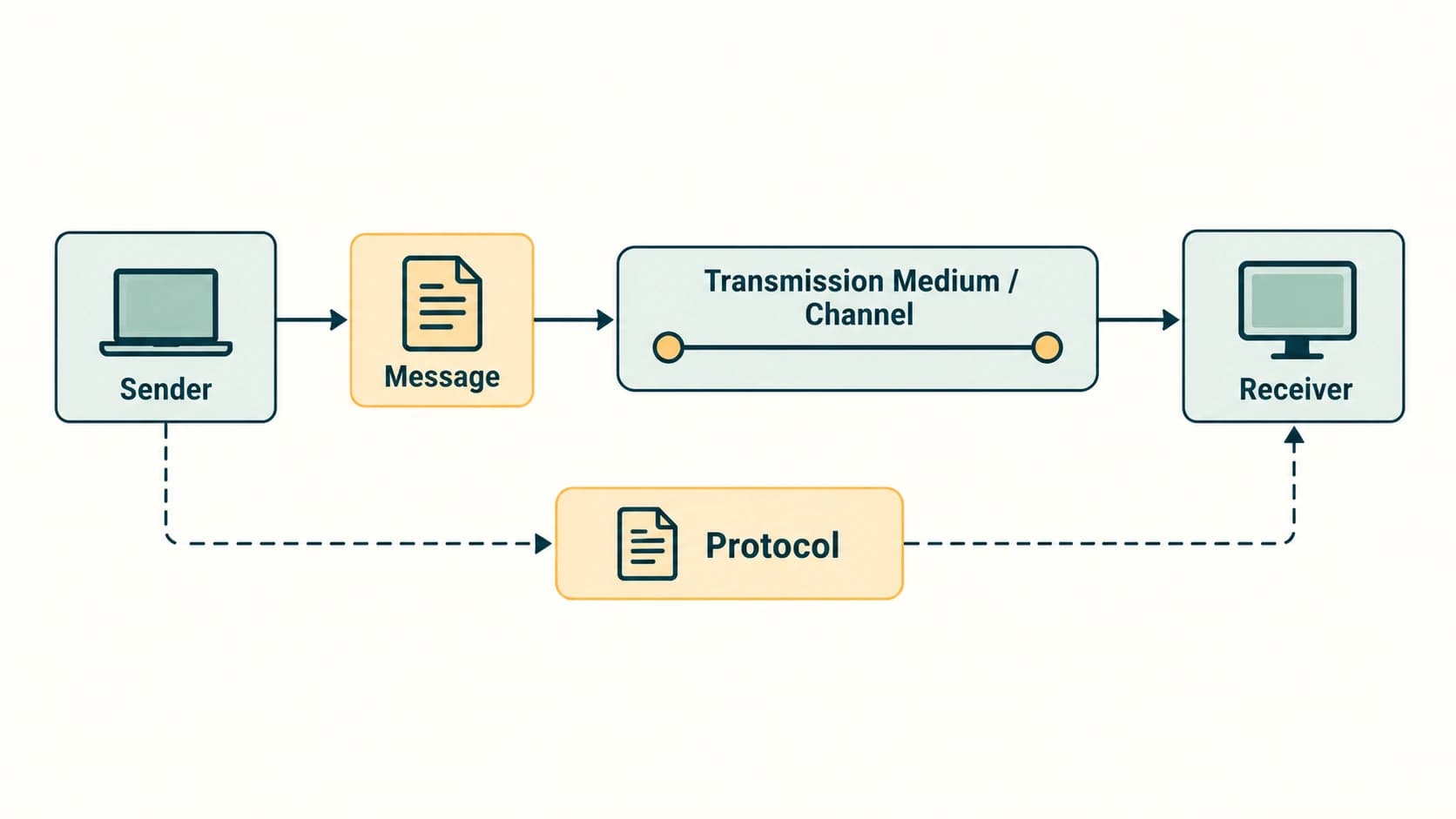
A computer becomes much more useful when it can exchange meaningful information with another device. Sending a document to a printer, receiving a web page, joining a video call, or sharing a photograph across a mobile network are all examples of data communication. In this chapter we study what travels, how it travels, how fast it can travel, what kinds of links exist, and the rules that make communication work.
Learning objectives
By the end of this chapter, you should be able to:
- define data communication and identify sender, receiver, message, medium and protocol;
- distinguish bandwidth in hertz from data rate in bits per second and calculate transfer rates correctly;
- classify simplex, half-duplex and full-duplex links with justified examples;
- compare circuit switching and packet switching;
- identify twisted-pair, coaxial and optical-fibre media and explain the role of radio, microwave and infrared transmission;
- explain Bluetooth, Wi-Fi and major generations of mobile networks;
- describe the purpose of flow control, access control, addressing and error handling;
- explain HTTP, FTP, PPP, SMTP and TCP/IP, with practical examples;
- answer all 13 NCERT end-of-chapter exercise groups, three activities and the worked numerical example.
How Chapter 11 fits the Computer Science curriculum
Chapter 10, Computer Networks, already introduced network types, devices and protocols. This Chapter 11 is the NCERT data-communication deep dive. Existing permanent curriculum IDs are reused as cross-links; it does not create a second set of C12-CN lessons. The section identifiers C12-CH11-S01 through S10 are stable chapter navigation anchors, not extra permanent syllabus lessons. NCERT Chapter 11 additionally teaches transmission modes and mobile-generation history in more detail.
Section C12-CH11-S01 — Communication and Its Five Components
NCERT 11.1–11.2 · Aligns with C12-CN-02
What is communication?
Communication means sharing information between parties. Data communication is the exchange of digital or digitally represented data between at least two connected devices using a medium and agreed rules. The data may be a number, word, photograph, video, audio stream or a collection of files. A connection may be a short cable, a shared Wi-Fi network, a cellular link or a route through the global Internet.
Consider a student who prints a project report. The computer sends a print job; a connected printer receives it. When the computer requests a web page, its role changes: it sends a request and receives a response. The sender and receiver are roles for a particular message, not necessarily permanently different machines.
The five essential components
| Component | Meaning | School-computer example |
|---|---|---|
| Sender (source) | Device initiating transmission of a particular message | Laptop submitting a print job |
| Receiver (destination) | Device accepting that message | Network printer |
| Message | The information to be communicated | Printable page data |
| Transmission / communication medium | Physical or wireless channel carrying signals | Ethernet cable or Wi-Fi radio link |
| Protocol | Rules governing the exchange | Rules for addressing, framing and delivery |
A simplified communication path is:
Sender → message encoded as signals → transmission medium → receiver, with protocol rules applied at both ends.
Nodes are participating devices on a network; a switch and a router can also handle or forward messages. A network is useful because many different nodes can share services and resources.
What makes communication successful?
- The destination must be known or discoverable.
- Both endpoints must understand the message format and the communication rules.
- A usable medium or route must be available.
- The receiver must deal with the arrival rate and possibly errors or retransmissions.
- For sensitive information, suitable authentication and encryption are important additional protections.
A communication system may satisfy these conditions at different layers rather than through one single protocol.
Worked example — submitting a document
A student sends a 40-page document from a laptop to a classroom printer. The laptop is the sender, the printer is the receiver, the encoded print job is the message, the Wi-Fi/Ethernet network is the medium, and networking/printing rules form the protocols. If the printer sends a status message back, then it becomes the sender for that response. This is why the roles depend on the direction of each message.
Check your understanding
Question: Is a router always the original sender? Answer: No. A router commonly acts as an intermediary, forwarding traffic originated by other nodes, though it can generate its own management or routing messages.
Section C12-CH11-S02 — Capacity, Bandwidth, Bit Rate and Numerical Problems
NCERT 11.3 and Example 11.1 · Aligns with C12-CN-03
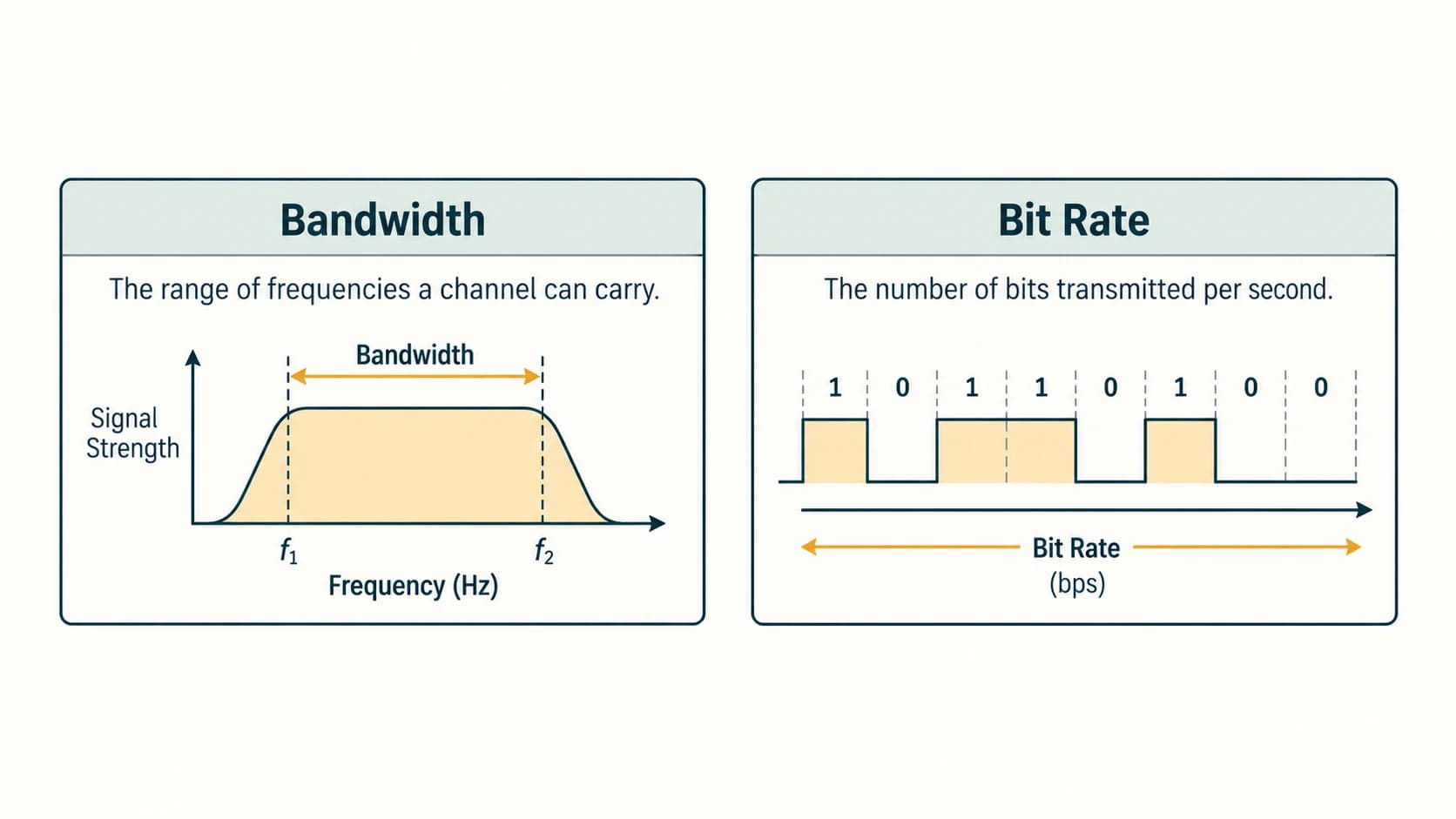
Bandwidth: a frequency range
In the NCERT explanation, bandwidth is the range of frequencies available in a communication channel. If a channel carries frequencies from f_min to f_max, its frequency bandwidth is:
Bandwidth is measured in hertz (Hz). If the lower limit is 500 MHz and the upper limit is 1 GHz (=1000 MHz), the frequency bandwidth is 1000 − 500 = 500 MHz. A large frequency bandwidth can help support a high bit rate, but does not alone determine the exact usable data rate: modulation, noise and coding also matter.
Bit rate and data transfer rate
Bit rate (or data transfer rate) is the number of bits transferred per second. It is measured in bit/s or bps.
- b = bit; B = byte. Normally, 1 byte contains 8 bits.
- Mbps = megabits per second; MB/s (or MBps) = megabytes per second.
- To estimate transfer time from a known number of bits:
time (s) = data size (bits) ÷ actual rate (bit/s). - Divide a bit rate by 8 to obtain the corresponding byte rate, before accounting for transmission overhead.
Critical unit distinction: NCERT convention versus modern SI convention
NCERT's printed conversion table uses 1 Kbps = 2^10 bps, 1 Mbps = 2^20 bps, 1 Gbps = 2^30 bps, and 1 Tbps = 2^40 bps. These are the values shown in this textbook, but they do not agree with the internationally defined decimal SI prefixes used for telecommunications rates.
| Quantity | NCERT printed binary-style interpretation | Standard decimal interpretation |
|---|---|---|
| 1 kilobit per second | 1,024 bit/s | 1,000 bit/s |
| 1 megabit per second | 1,048,576 bit/s | 1,000,000 bit/s |
| 1 gigabit per second | 1,073,741,824 bit/s | 1,000,000,000 bit/s |
| 1 terabit per second | 1,099,511,627,776 bit/s | 1,000,000,000,000 bit/s |
For a textbook exercise that explicitly uses NCERT's conversion table, report its binary-style answer and identify the assumption. For standard networking units in modern specifications, use decimal powers of ten. Binary prefixes such as Ki, Mi and Gi avoid the ambiguity. The official SI reference is documented in the internal sources appendix. This distinction is particularly important for NCERT Exercise 9.
NCERT Example 11.1 — Required upload rate
Given: Ten pages must be uploaded in 20 seconds. Each page has 1,600 characters, and each character occupies 8 bits.
- Data in one page =
1,600 × 8 = 12,800 bits. - Data in ten pages =
10 × 12,800 = 128,000 bits. - Required data rate =
128,000 ÷ 20 = 6,400 bit/s.
Therefore, the physical answer is 6,400 bps. With standard decimal prefixes this is 6.4 kbps. In the NCERT textbook's binary-style Kbps convention, it is 6.25 Kbps, which is also its printed result. Both representations refer to the same 6,400 bits per second, but use different divisor conventions.
Additional worked numerical examples
Example A — a 4 MB file. Treating MB as decimal megabytes and ignoring overhead, the file has 4 × 1,000,000 × 8 = 32,000,000 bits. At an effective rate of 8 Mbps = 8,000,000 bit/s, the ideal time is 32,000,000 ÷ 8,000,000 = 4 seconds. In practice it may take longer.
Example B — comparing units. 24 Mbps ÷ 8 = 3 MB/s as an ideal rate. It does not equal 24 MB/s.
Example C — frequency width. A signal occupies 2.1 GHz through 2.3 GHz. The bandwidth is 0.2 GHz = 200 MHz, not 2.3 GHz.
Example D — ideal capacity versus throughput. An advertised 100 Mbps link might deliver 65 Mbps of application data during congestion or when overhead is included. The nominal link rate, available capacity and observed throughput are related but not identical quantities.
Exam traps
- Do not subtract the upper frequency from zero if a nonzero lower frequency is given.
- Do not convert MHz (a frequency unit) directly into Mbps (a data rate) without a physical model.
- Do not confuse bits with bytes.
- Read the exercise's stated unit convention before converting gigabits.
Section C12-CH11-S03 — Simplex, Half-Duplex and Full-Duplex
NCERT 11.4 · NCERT-specific deepening of C12-CN-02
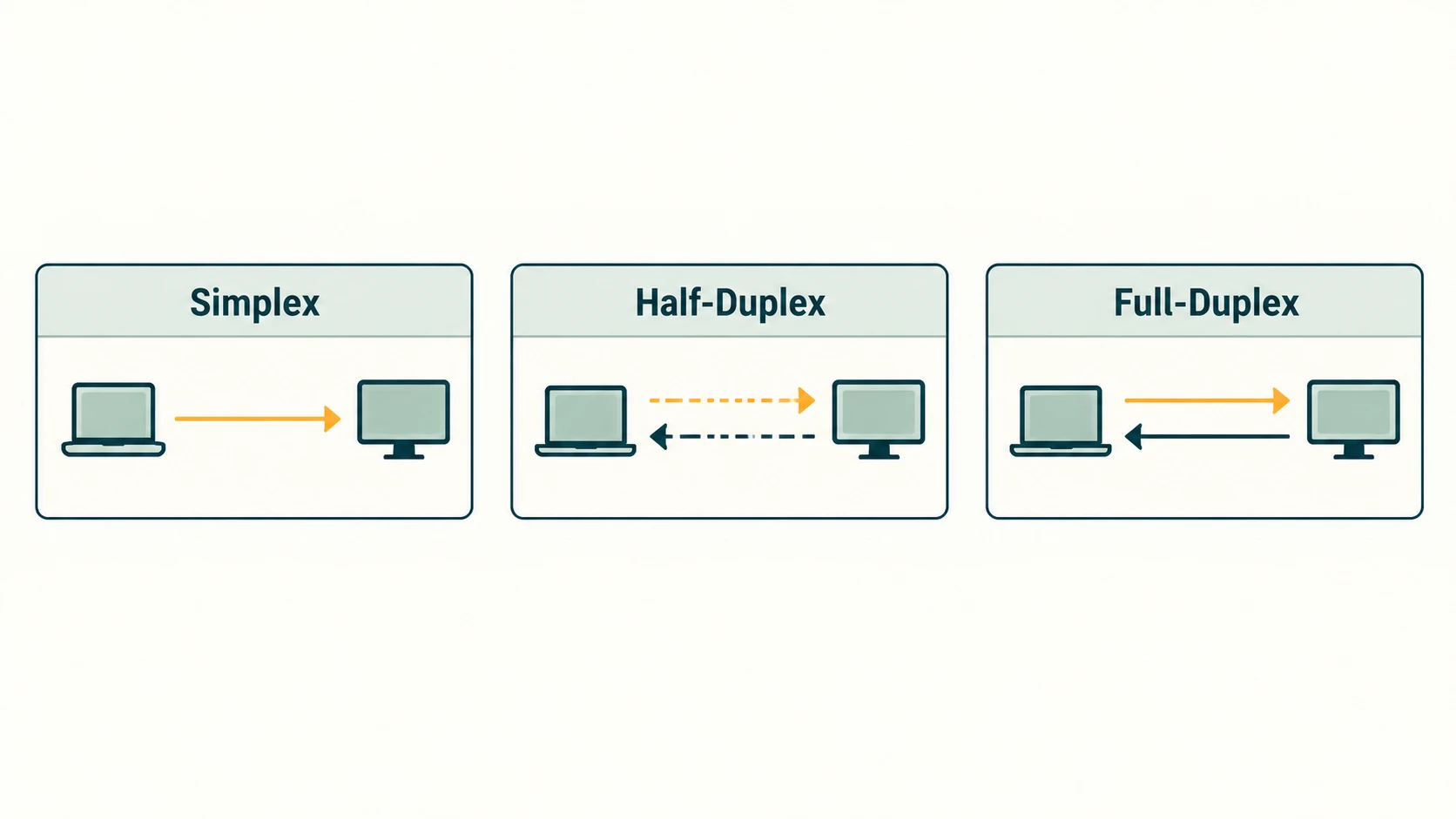
Duplex describes directions in which information can travel over a communication arrangement and whether simultaneous transmission is possible.
| Mode | Direction | Can both sides transmit simultaneously? | Familiar example |
|---|---|---|---|
| Simplex | A → B only | No: only one direction is provided | Broadcast signal to an ordinary receive-only device |
| Half-duplex | A ⇄ B, alternating turns | No | Push-to-talk walkie-talkies |
| Full-duplex | A ⇄ B at the same time | Yes | Ordinary two-way telephone conversation |
Simplex communication
Only one direction of message flow is supported in the model. The receiving side does not use that channel to send data back. NCERT uses keyboard-to-computer and speaker output as elementary one-way examples. Many modern connected devices also send acknowledgements or control traffic, however, so a particular application-level one-way flow does not automatically make the complete physical connection simplex.
Half-duplex communication
Both devices can send and receive, but one at a time over the shared communication arrangement. A walkie-talkie user presses a button to speak; the other party listens and replies afterward. Alternating transmissions prevent simultaneous use of the same shared channel.
Full-duplex communication
Both devices can send and receive simultaneously. A mobile voice call provides a familiar application-level illustration. Full-duplex can be implemented with separate transmit/receive paths or techniques allowing both directions to share available resources.
Direction-tracing example
Two students using push-to-talk radios converse as follows: A speaks at 11:01; B receives. B speaks at 11:02; A receives. Both devices can perform either role, but not at the same instant: half-duplex. In a regular voice call, both can speak and hear at once: full-duplex.
Comparison with switching
Duplex mode does not identify a switching technique. Half/full duplex tells us about direction and concurrency; circuit/packet switching tells us how paths and network resources are used. These are distinct classifications.
Section C12-CH11-S04 — Circuit Switching and Packet Switching
NCERT 11.5 · Aligns with C12-CN-05
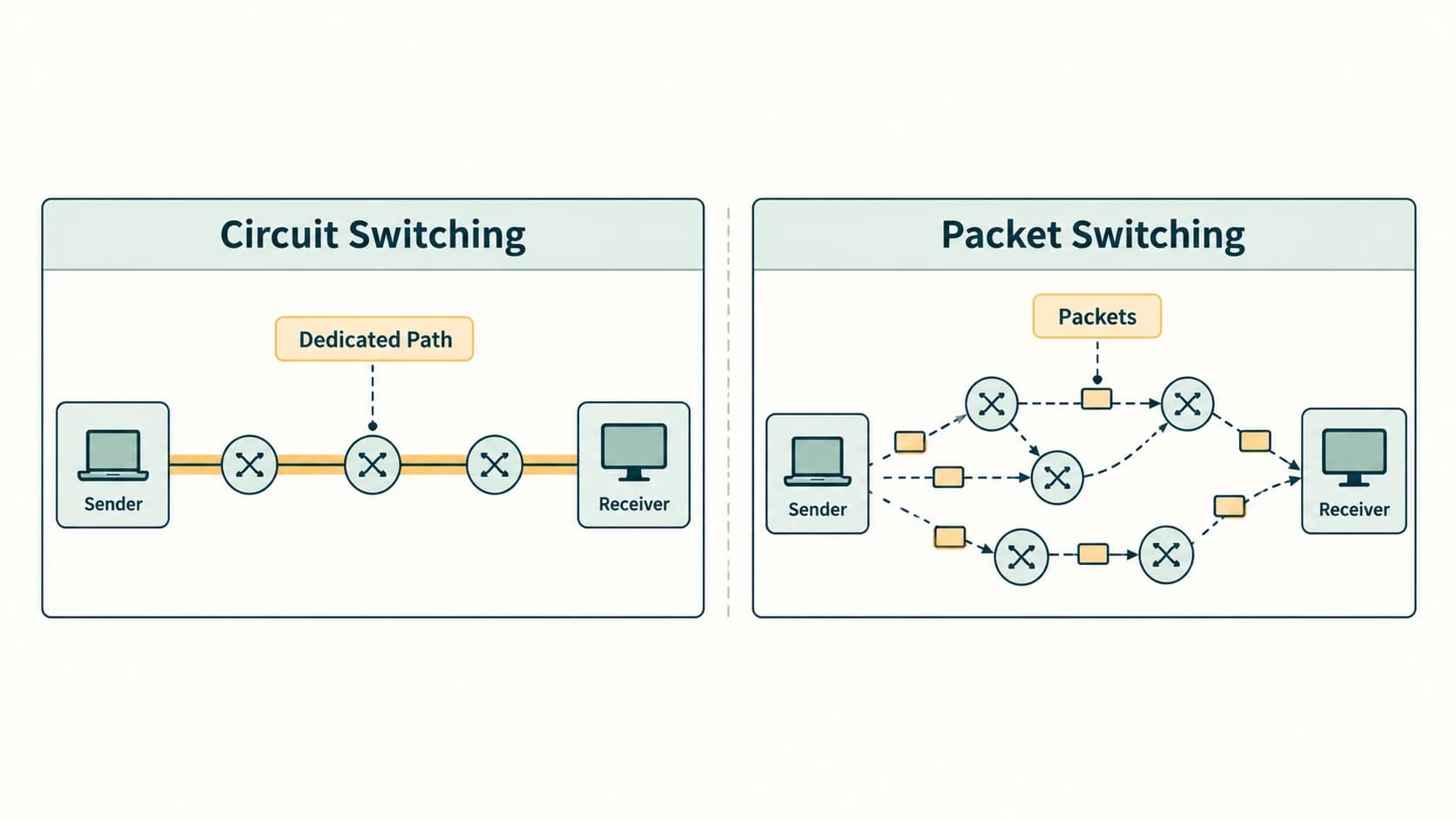
A network with many endpoints cannot practically maintain a separate permanent wire for every possible pair. Switching helps move data through intermediate network devices.
Circuit switching
A circuit-switched connection reserves a communication route or an allocation of link resources for the duration of the session. A classic telephone circuit is the usual school-level illustration. The process is often described as:
- Set up the end-to-end circuit/resource allocation.
- Transfer a stream of data over that established arrangement.
- Release the allocation when the session ends.
The reserved arrangement can give predictable access once established but may waste capacity during silence. Real telephone services today also use packet systems; the classic telephone example is historical and conceptual.
Packet switching
A message is divided into smaller units called packets. Packet headers help networking devices forward those packets toward the destination. Different packets can travel by different available paths. The destination combines the data into the desired form, with reliable transport protocols providing ordering/retransmission when required.
Suppose a 3,000-byte message is divided into three 1,000-byte payloads (ignoring headers). Packets P1, P2, P3 may cross different routers and arrive in order P2, P1, P3. A reliable transport layer can restore the original sequence. Packet switching by itself does not guarantee arrival or ordering.
| Comparison | Circuit switching | Packet switching |
|---|---|---|
| Route / resources | Allocated for session | Shared dynamically by packets |
| Setup | Usually needed before transmission | Datagram services may not require a reserved path |
| Idle time | Reserved capacity can be unused | Others may use available capacity |
| Delay | Often stable once circuit established | Can vary with queueing and congestion |
| Typical teaching example | Traditional fixed circuit telephone | Internet packet traffic |
Exam trap: packets and the Internet
The Internet is fundamentally packet-switched, but an Internet application can still maintain a logical connection (such as a TCP connection). A logical connection is not the same thing as a dedicated physical circuit. Also, some modern packet technologies use controlled paths or quality-of-service mechanisms; real networks are more varied than the basic classroom contrast.
Section C12-CH11-S05 — Wired (Guided) Transmission Media
NCERT 11.6.1 · Aligns with C12-CN-06
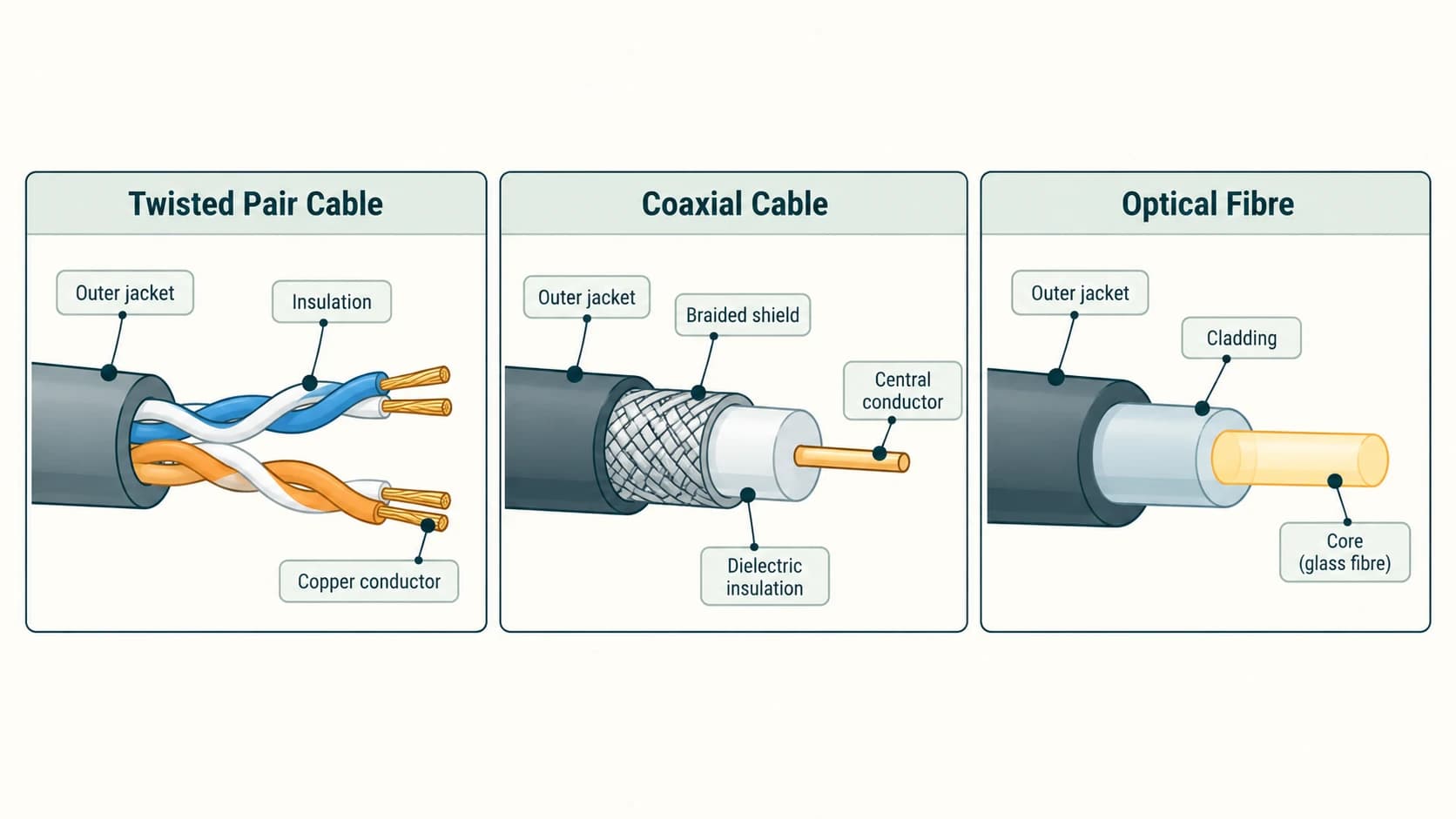
A guided medium confines or guides the signal along a physical structure. NCERT describes three broad cable categories: twisted-pair, coaxial and optical fibre. Guided does not mean the cable cannot be bent or that all media conduct electricity.
Twisted-pair cable
A twisted-pair cable has two insulated copper conductors twisted around each other. The twisting reduces the effect of interference and crosstalk by making the pair experience more similar external disturbances. Multiple pairs can be assembled within one cable jacket.
- UTP (Unshielded Twisted Pair): pairs have no additional overall metal shield; widely used for Ethernet connections.
- STP (Shielded Twisted Pair): adds shielding that can help in electrically noisy environments, when installed appropriately.
- Advantages: generally inexpensive, flexible and easy to terminate for local networks.
- Limitations: susceptible to greater attenuation/interference than properly installed optical fibre, and practical link lengths and speeds depend on the cable category and equipment.
An RJ45 modular connector is commonly associated with copper Ethernet twisted-pair cabling. The connector is a physical termination, not a networking protocol. Ethernet is not limited to copper; it can also run over fibre.
Coaxial cable
A coaxial cable has a central conductor, insulation (dielectric), an outer conductive shield and a protective jacket. The shared axis and surrounding shield reduce external interference. It is used for cable television and other radio-frequency services, and has historically been used for Ethernet installations.
- Advantages: good shielding and ability to carry higher-frequency signals across suitable distances.
- Limitations: typically bulkier and less convenient for modern desktop Ethernet wiring than twisted-pair alternatives; connectors and installation affect performance.
Optical-fibre cable
Optical fibre transmits information through light guided by a glass or plastic core surrounded by cladding with a lower refractive index. Total internal reflection and waveguiding help keep the light in the fibre; simply saying that light moves as electrical current would be wrong.
- Advantages: high data capacity, low electromagnetic interference, useful long-distance communication, thin and lightweight strands.
- Limitations: specialist optical equipment/splicing or connectors can cost more; tight bends and physical damage degrade links; installers must protect eyes and equipment from active optical emissions.
- Full-duplex clarification: NCERT illustrates separate fibres for two directions. In some modern systems, wavelength-division techniques provide bidirectional communication using one fibre, so it is inaccurate to claim that two fibres are always necessary.
| Property | Twisted pair | Coaxial | Optical fibre |
|---|---|---|---|
| Signal representation on cable | Electrical | Electrical/RF | Light |
| Important construction | Twisted copper pairs | Central conductor + shield | Optical core + cladding |
| Interference | Can be affected by EMI | Shielding offers resistance to EMI | Immune to electromagnetic pickup in fibre |
| Common uses | LAN Ethernet, telephony | Cable TV, broadband distribution | Backbone networks, FTTH, long links |
| Typical installation concern | Pair termination and cable rating | Impedance/connectors | Bend radius, optical connectors |
Practical selection
For a short school computer-lab cable run, properly rated twisted-pair Ethernet is often suitable. For linking buildings across longer distances or electrically noisy environments, fibre may be preferred. The best medium depends on requirements, not solely on which has the highest theoretical capacity.
Section C12-CH11-S06 — Wireless Spectrum, Bluetooth and Wi-Fi
NCERT 11.6.2–11.6.3 · Aligns with C12-CN-07
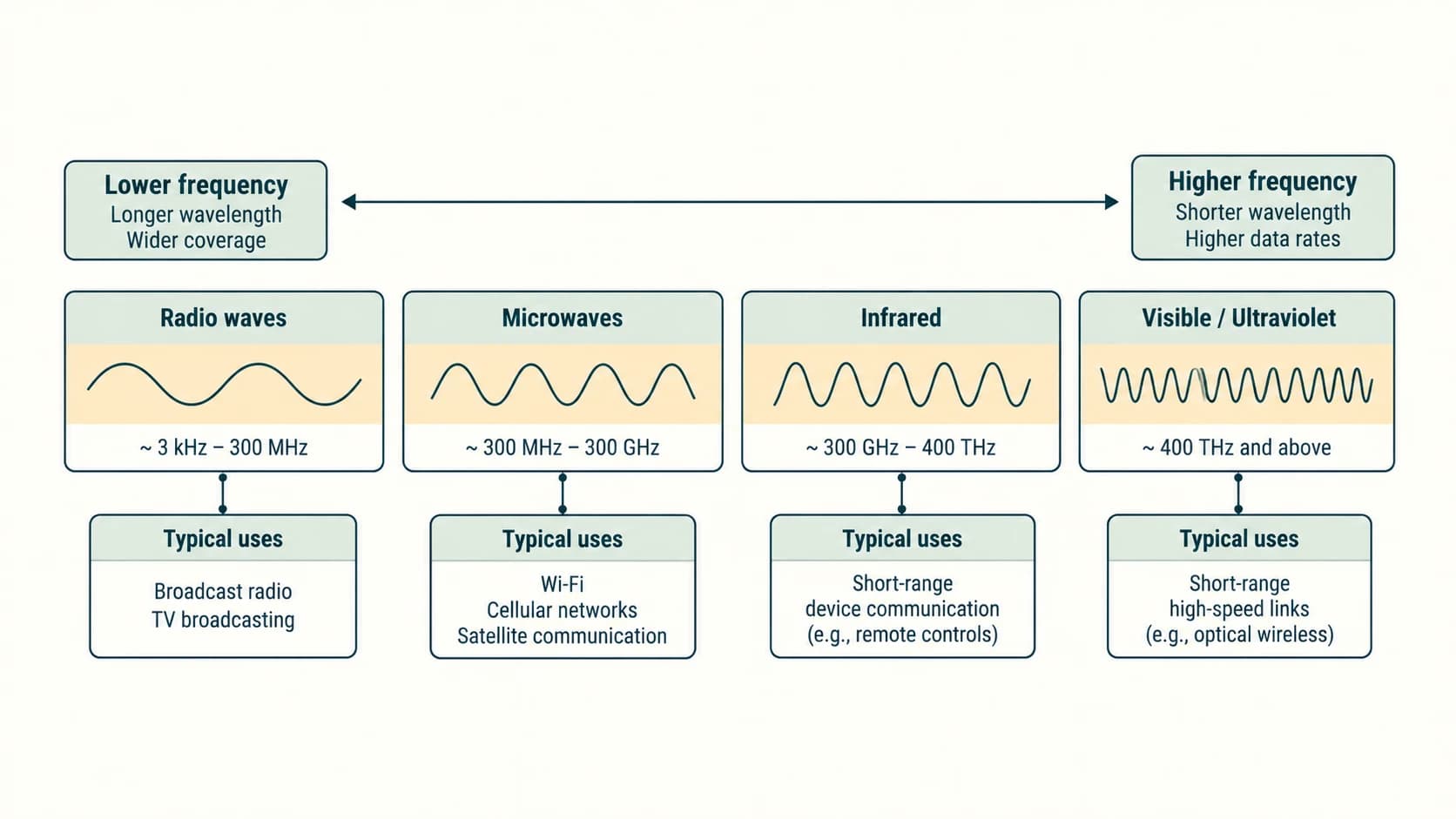
Wireless communication transfers encoded information through electromagnetic waves rather than a continuous wire connecting the endpoints. The system still needs transmitters, receivers, antennas or optical sensors, and suitable agreed protocols.
Types of wireless signals
NCERT divides its simplified wireless spectrum (about 3 kHz to 900 THz) into radio waves, microwaves, infrared and visible light. Its diagram places a teaching boundary of about 1 GHz between radio and microwave, 300 GHz between microwave and infrared, and 400 THz between infrared and visible light. These category boundaries are an educational simplification; engineering standards and scientific usage may overlap in naming portions of the spectrum.
| NCERT category | Approximate textbook region | Typical property or application |
|---|---|---|
| Radio | 3 kHz–1 GHz | Broadcast, some two-way radio and other wireless services |
| Microwave | 1 GHz–300 GHz | Directional radio links, satellite communication, radar and many wireless services |
| Infrared | 300 GHz–400 THz | Short-range optical remote controls and optical data links |
| Visible light | 400–900 THz in the textbook figure | Optical signalling and visible-light communication concepts |
Radio waves
Many radio signals spread from an antenna in multiple directions, depending on antenna design. They may reflect, bend or pass through materials to different degrees; a universal promise of wall penetration would be incorrect. Interference, propagation conditions, antenna and permitted frequency affect performance.
Microwaves
Microwave links can use directional antennas and often require a clear line of sight, especially at higher frequencies. They are useful for point-to-point links and satellites. The NCERT description is a useful introductory model, but not every microwave antenna is strictly one-directional, and not all microwave signals behave identically in bad weather.
Infrared
Infrared uses electromagnetic radiation beyond red visible light. Familiar short-range examples are television remotes or purpose-built infrared communication links. Most infrared systems do not pass through opaque walls.
Important textbook correction: NCERT's infrared table mentions Bluetooth-enabled peripherals. Ordinary Bluetooth communicates through radio in the 2.4 GHz band, not infrared. Bluetooth is therefore not an infrared example, even though both are short-range wireless technologies.
Bluetooth
Bluetooth is a short-range personal-area wireless technology commonly used by earphones, keyboards, watches, mice and smartphones. Many Bluetooth implementations operate in the 2.4 GHz ISM band. Range and throughput depend on the particular Bluetooth version and device, so the textbook's single speed/range number must not be treated as a universal maximum.
NCERT describes a classic Bluetooth piconet with one coordinating device and up to seven active secondary devices in its classic master–slave model. Modern Bluetooth Low Energy uses different terminology and connection arrangements; for textbook questions, identify the classical description explicitly.
Wireless LAN (WLAN) and Wi-Fi
A wireless LAN connects nearby devices over radio links using IEEE 802.11-based systems. A Wi-Fi access point usually bridges wireless devices into an existing local network and possibly onward to the Internet through a router.
- Students in a classroom may join the school's access point without using physical network cables on each device.
- Wi-Fi provides local network connectivity; an Internet connection is a separate service and is not automatically guaranteed.
- Practical speed and range depend on interference, band, access-point placement, device capabilities and network load.
Wi-Fi versus Bluetooth versus cellular data
| Characteristic | Bluetooth | Wi-Fi | Cellular network |
|---|---|---|---|
| Common scope | Personal devices nearby | Building/home/campus network | Wide outdoor and indoor operator coverage |
| Common infrastructure | Paired/associated devices | Access points, routers | Cellular base stations and operator core |
| Example | Wireless headset | Laptop on school WLAN | Phone accessing Internet while travelling |
Wireless safety and privacy
Use suitable network authentication and encryption. Do not assume that any network named “free Wi-Fi” is trusted. Avoid exposing personal passwords on untrusted networks; HTTPS helps protect web traffic but is not a blanket guarantee that a website is trustworthy.
Section C12-CH11-S07 — Mobile Telecommunication Generations
NCERT 11.7 · NCERT enrichment related to C12-CN-07
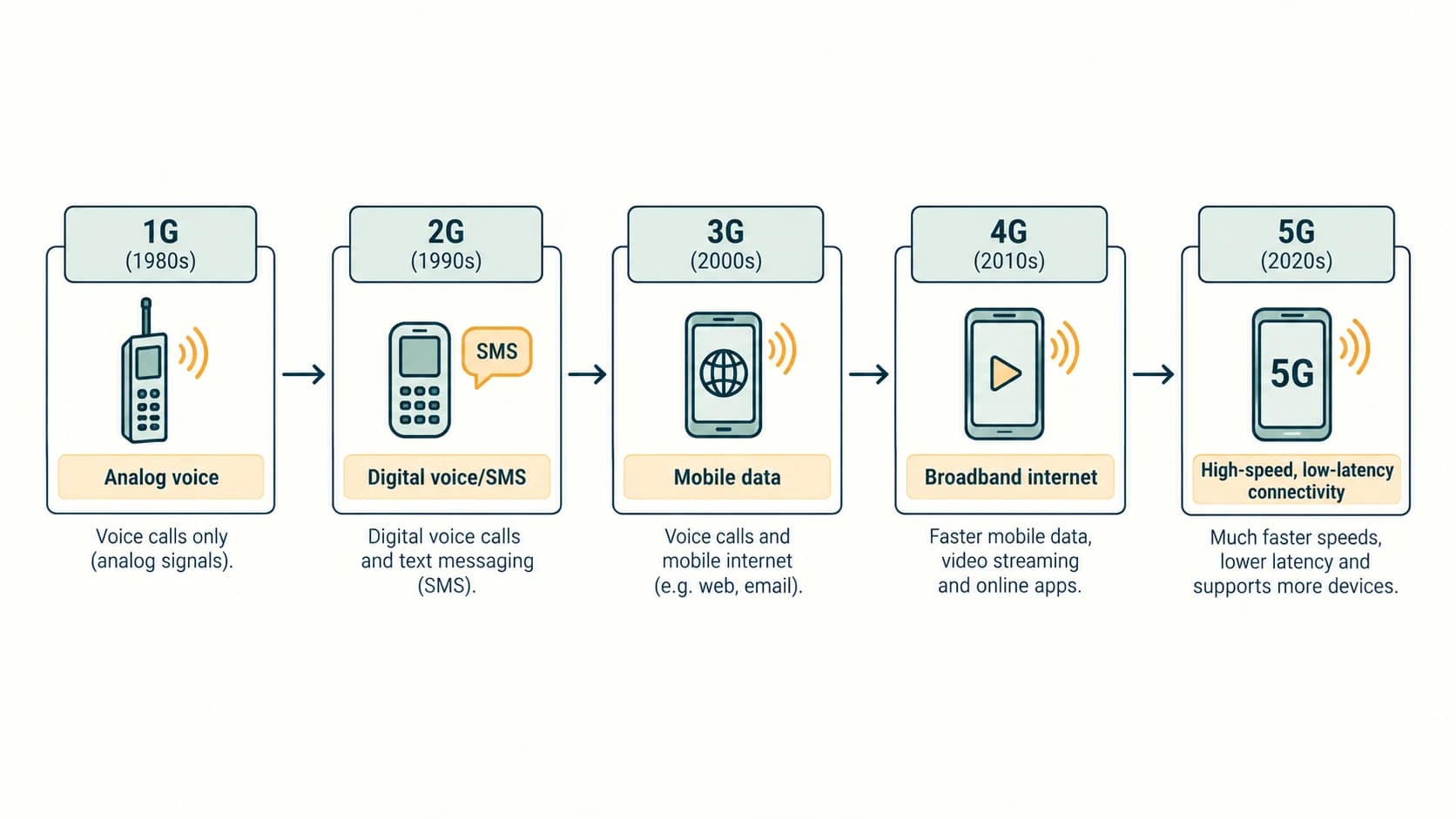
Mobile network generations describe major developments in the standards and capabilities of cellular communication. These are broad teaching milestones, not a promise that every network launched in exactly the same year everywhere.
| Generation | NCERT's main teaching point | Representative capabilities |
|---|---|---|
| 1G | Analog cellular voice | Voice calls using analog radio technology |
| 2G | Digital voice and messaging | Improved capacity, SMS and related digital services |
| 3G | Mobile voice plus more capable data | Mobile Internet, multimedia services |
| 4G | Broadband mobile data | High-speed Internet, streaming and IP-based services |
| 5G | Further increase in capacity, efficiency and support for connected devices | Enhanced mobile broadband, low-latency applications, large-scale IoT possibilities |
1G: analog voice
Early cellular networks primarily provided voice calling using analog techniques. Capabilities were limited compared with later digital systems, especially for data services and security.
2G: digital mobile communication
Digital mobile systems allowed improved efficiency and introduced text messaging. Many services used evolving 2G standards; data rates were modest by modern standards.
3G: more practical mobile Internet
3G networks made mobile web access and multimedia services more practical. The higher data capacity supported new communication applications, although user experience varied across operators and locations.
4G: mobile broadband
4G made smartphone streaming, applications and broadband data services widely practical. Real-world performance depends on radio conditions, device capabilities, spectrum and network congestion.
5G: a current deployed technology, not a hypothetical future invention
The NCERT reprint preserves older prose saying that 5G “is currently under development” and “is expected” to reach certain capabilities. For understanding the historical state of that textbook passage, those are the book's words. For present technical accuracy, 5G networks have already been commercially deployed and standardized as IMT-2020. They support a combination of higher broadband performance, more efficient connectivity and some advanced industrial/IoT scenarios, depending on implementation.
Do not memorize “5G has not yet launched” as a current fact. For exams that ask what the textbook passage states, identify the historical wording separately from the present-day status. Rather than listing rapidly changing user counts, focus on the underlying technical progression.
What is IoT and M2M?
- IoT (Internet of Things): connected devices with sensing, control and communication capabilities, for example a classroom environmental monitor.
- M2M (machine-to-machine): automatic communication between devices such as a utility meter and a data collection system.
- IoT and M2M overlap, but IoT is a broader ecosystem involving networks, devices, applications and data processing.
Worked application: A traffic sensor sends small status packets periodically, whereas a student watches a high-resolution lecture video. Both involve digital communication, but their requirements differ in data volume, delay sensitivity and reliability. Different mobile network features can support those needs.
Section C12-CH11-S08 — Why Protocols Are Necessary
NCERT 11.8–11.8.1 · Aligns with C12-CN-11
Without an agreed structure, one device could send data in a format that another cannot recognize. A protocol is a defined set of rules for communicating systems: messages, addressing, order of operations and responses. Different protocols address different layers of a network.
Four key responsibilities
- Addressing: helps a message reach the correct destination or service. IP addresses support inter-network delivery; application protocols may use different identifiers.
- Flow control: helps avoid overwhelming a slower receiver. TCP's receiver-advertised window is an example of managing the amount of unacknowledged data in flight.
- Access control: coordinates use of a shared communication medium, such as rules governing when wireless stations attempt transmission.
- Error detection, recovery and ordering: some protocols detect corrupted frames, provide acknowledgements or retransmission, and reassemble data in order. Not all protocols promise end-to-end reliable delivery.
Rate-mismatch scenario
A sender can produce data at an instantaneous rate of 1,024 Mbps while a receiver can process only 512 Mbps. Without buffering or flow control, data could be dropped. A flow-control mechanism prevents the sender from overwhelming the receiver; it does not magically increase the receiver's maximum processing rate.
Layers matter
A link-layer protocol frames data for a particular local medium. IP provides addressing and forwarding. TCP provides a reliable, ordered byte stream between endpoints. HTTP operates at the application layer to exchange web requests and responses. The layers cooperate, and protocols at one layer should not be credited with every service performed at another.
Common mistake: Saying that “IP guarantees packets arrive in order.” IP itself is a best-effort network-layer protocol; order and retransmission are handled elsewhere if needed.
Section C12-CH11-S09 — HTTP, FTP, PPP, SMTP and TCP/IP
NCERT 11.8.2–11.8.6 · Aligns with C12-CN-11 and C12-CN-12
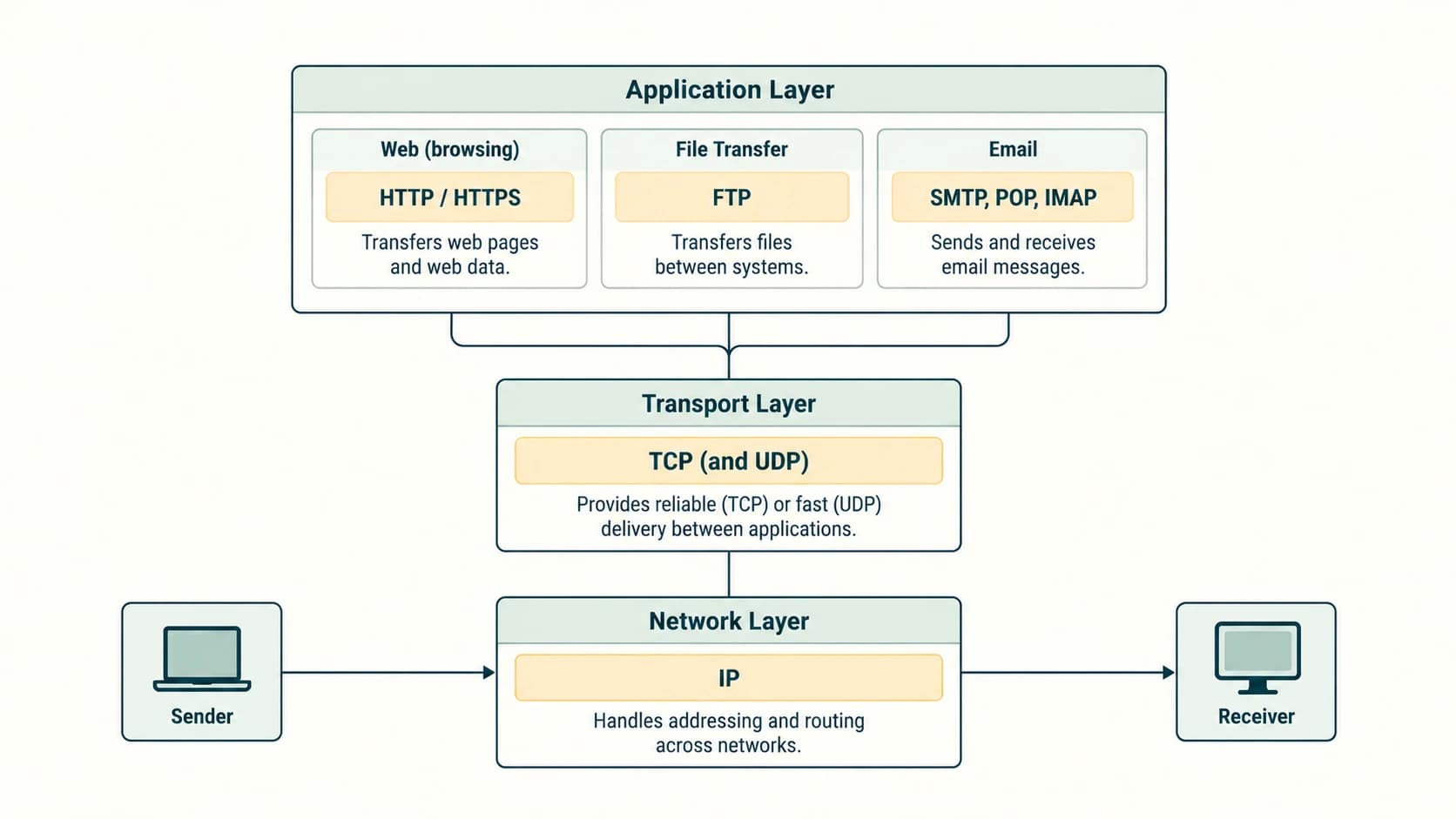
HTTP — HyperText Transfer Protocol
HTTP lets a client (often a web browser) request a resource from a server, which returns a response. A request can ask for an HTML page, image or data; the response contains a status and usually content. The textbook describes HTTP using TCP. Modern HTTP also includes versions using QUIC over UDP, so “HTTP always runs over TCP” is not universally true.
Example exchange (conceptual):
Browser → Server: GET /notes.html
Server → Browser: 200 OK + HTML body
HTTP by itself does not automatically encrypt application content. HTTPS applies security mechanisms such as TLS to protect supported web exchanges in transit. The URL syntax https://example.org/notes identifies a secured web resource. Authentication, availability and a site's honesty remain separate security matters.
FTP — File Transfer Protocol
FTP is a traditional client–server protocol for transferring files. Its standard design uses a control connection and a separate data transfer connection. A user may authenticate, navigate directories, upload files or download files. Ordinary FTP is not encrypted by default; modern secure transfer options include SFTP (a different protocol built on SSH) and FTPS (FTP with TLS), each used according to server support.
Example: A school administrator transfers a static report to a file server. The FTP client authenticates and initiates upload; the server stores the file with appropriate permissions.
PPP — Point-to-Point Protocol
PPP is a data-link protocol for a direct logical link between two nodes. It helps establish a link, negotiate certain link parameters and carry network-layer packets. Depending on configuration, optional authentication such as PAP or CHAP can be used. PPP itself is not a general-purpose end-to-end reliable ordered-transport protocol; the textbook's discussion of packet retransmission belongs more naturally to reliable transport such as TCP.
SMTP — Simple Mail Transfer Protocol
SMTP supports sending and relaying email. Mail software composes a message; an outgoing submission/SMTP server accepts it and relays it toward the recipient's mail infrastructure. Receiving and reading mail typically involves IMAP or POP3, or a webmail interface that handles those details on the user's behalf.
- SMTP: sends/submits/relays email.
- POP3: traditionally retrieves messages from a mailbox, often downloading them to a client.
- IMAP: accesses and synchronizes messages stored in mailboxes on a server.
Exam trap: Do not use SMTP as the usual answer to “Which protocol does a mail client use to synchronize the inbox?” IMAP is the clearer answer.
TCP/IP — Transmission Control Protocol / Internet Protocol
TCP and IP have different roles:
- IP: addressing and routing packets between networks on a best-effort basis. IP alone cannot guarantee delivery, ordering or the absence of duplicates.
- TCP: connection-oriented transport providing an ordered, reliable stream of bytes to applications, using sequence information, acknowledgements and retransmissions as appropriate.
A common path is:
Application creates a message
    ↓
Transport divides the byte stream into segments (when TCP is used)
    ↓
IP carries packets using source/destination addresses
    ↓
Routers forward packets toward the destination
    ↓
Destination's protocols deliver data to its application
Because routers may take different paths and queues may vary, packets can arrive at different times or out of sequence. TCP handles the ordered delivery semantics for its byte stream. TCP/IP describes a family or suite of protocols, not only a client–server application type: peer-to-peer software also uses TCP/IP.
Protocol revision table
| Protocol | Full name | Main purpose | Easy distinction |
|---|---|---|---|
| HTTP | HyperText Transfer Protocol | Web request/response | Web pages and resources |
| HTTPS | HTTP over TLS-secured transport | Protected web communication | Encrypted in transit |
| FTP | File Transfer Protocol | Traditional file transfer | Unencrypted by default |
| PPP | Point-to-Point Protocol | Direct link framing and control | Data-link layer |
| SMTP | Simple Mail Transfer Protocol | Sending/relaying mail | Outgoing email |
| POP3 | Post Office Protocol version 3 | Retrieving mail | Download-style retrieval |
| IMAP | Internet Message Access Protocol | Access/sync mailbox | Server-based mailbox management |
| IP | Internet Protocol | Routing/addressing | Best effort |
| TCP | Transmission Control Protocol | Reliable ordered byte stream | Transport reliability |
| DNS | Domain Name System | Resolving names and related records | Name lookup, not an email sender |
Section C12-CH11-S10 — Integrated Communication Scenarios and Exam Reasoning
NCERT consolidation · Cross-links to C12-CN-02/03/05/06/07/11/12
This section applies the concepts to everyday systems and prepares students for multi-step reasoning rather than merely remembering definitions.
Scenario 1 — Sending a photo by phone
The smartphone prepares the image data. A cellular or Wi-Fi radio link carries frames/signals locally. Routers may forward IP packets through other networks. An application server or another endpoint receives the data. If the application uses TCP or another reliability mechanism, lost information can be retransmitted. Sending one photo is not “simplex” just because the user only sees an outgoing upload: control traffic and acknowledgements may also flow in the reverse direction.
Scenario 2 — A shared school printer
Several computers share one printer. The network switch directs local traffic based on link-layer addressing when appropriate. The printer may return status such as busy, ready, or paper out. Resource sharing requires not only a physical medium but also device discovery, permissions and compatible printing protocols.
Scenario 3 — A voice conversation
Students can hear and speak concurrently in a normal voice call (full-duplex user interaction). Push-to-talk radios alternate speakers (half-duplex). Modern calls frequently travel in packets, illustrating that full-duplex voice does not imply circuit switching.
Scenario 4 — Selecting communication media
A school needs to link a computer laboratory to a nearby room and to a distant building. Short local Ethernet over suitable twisted-pair cable may be practical within cable limits. For the more distant building, fibre can provide electrical isolation and good capacity. If trenching is impossible, a properly engineered wireless point-to-point link might be considered, with attention to obstacles and spectrum regulations.
Scenario 5 — Choosing the right protocol
A learner opens an educational website: DNS may help locate the host, HTTPS protects the browser–server exchange, IP carries packets through the network, and transport protocols deliver application data. The learner then emails homework: SMTP is used in outgoing mail submission/relay. Different tasks invoke different protocols; one protocol does not explain the entire communication system.
End-of-lesson self-check
Explain why bandwidth in MHz is not directly the same measurement as throughput in Mbps. Explain why a packet-switched web service can still offer a reliable user experience. Finally, identify what would change if the receiving device were significantly slower than the sending device. Compare your response to Sections S02, S04 and S08.
NCERT Activity Solutions — Activities 11.1–11.3
These are responses to the three numbered activities in NCERT Chapter 11, not additional invented textbook exercises.
NCERT Activity 11.1 — Identify different types of senders on a network
Activity restatement: List the different kinds of devices that can send information over a network.
Model answer:
- A desktop or laptop computer sending a file or webpage request.
- A smartphone uploading a photograph or transmitting a voice packet.
- A smartwatch sending step-count or heart-rate measurements to an associated device.
- A network printer sending print-status/error information.
- A network camera sending a video stream.
- A sensor node transmitting temperature or movement readings.
- A server returning a requested page or file to a client.
- A router generating its own management or routing messages.
Explanation: “Sender” describes the role in one communication exchange. A device that sends data may receive data in another exchange. A device with a network address can often act as a sender for some messages and a receiver for others. Avoid treating “sender” as synonymous with “desktop computer.”
NCERT Activity 11.2 — Convert 10 MHz to hertz
Activity restatement: How many hertz are in ten megahertz?
1 MHz = 1,000,000 Hz because mega means 10^6 in the SI frequency system.
10 MHz = 10 × 1,000,000 Hz = 10,000,000 Hz = 10^7 Hz.
Answer: 10,000,000 Hz.
Explanation: MHz in a frequency measurement is not the same as Mbps in a data-rate measurement. No conversion to bits per second can be made from frequency alone.
NCERT Activity 11.3 — Identify other email protocols
Activity restatement: Find email protocols other than SMTP.
Model answer:
| Protocol | Use | Example situation |
|---|---|---|
| POP3 (Post Office Protocol version 3) | Retrieves email from a mail server, traditionally by downloading messages | A mail client downloads messages for local reading |
| IMAP (Internet Message Access Protocol) | Accesses and synchronizes remote email folders | Reading the same inbox on a phone and laptop |
| MIME (Multipurpose Internet Mail Extensions) | Message format extensions allowing attachments and multiple content types | An email with a photograph or PDF attached |
Clarification: MIME is a message-format standard rather than a transport or mailbox-access protocol in the same sense as SMTP/POP3/IMAP. It is included because it is important to real-world email systems. SMTP sends and relays messages; IMAP or POP3 typically provide the mailbox-access function. Secure connections are typically established using TLS with appropriately configured mail services.
NCERT Worked Example 11.1 — Complete Numerical Solution
Question: A user uploads 10 pages in 20 seconds. Each page has 1,600 characters and each character contains 8 bits. Find the required data rate.
Solution, step by step:
- Characters uploaded =
10 × 1,600 = 16,000. - Bits uploaded =
16,000 × 8 = 128,000 bits. - Data rate =
128,000 bits ÷ 20 seconds = 6,400 bits/s. - NCERT convention:
6,400 ÷ 1,024 = 6.25 Kbps, matching the textbook's printed solution. - Standard decimal telecommunications convention:
6,400 ÷ 1,000 = 6.4 kbps.
Answer: 6,400 bps; equivalently 6.25 Kbps under the textbook's binary-style divisor, or 6.4 kbps with standard decimal SI prefixes.
Common mistake: Multiplying by 8 × 20 instead of dividing by time; confusing characters with pages; or reporting “6.25 Kbps” without stating the unusual textbook unit convention.
NCERT Chapter 11 — Complete Exercise Solutions (Questions 1–13)
All exercise prompts below are brief restatements of the textbook questions. The explanations and examples are original. Numbering matches NCERT Chapter 11, pages 221–222.
NCERT Exercise 1 — Define data communication and list its components
Question restatement: Explain data communication and name its main components.
Answer: Data communication is the exchange of data between two or more devices via a communication medium according to agreed protocols. The five fundamental components are:
- Sender: source device creating or transmitting the message.
- Receiver: destination device accepting the message.
- Message: information being exchanged, such as text, audio, video or files.
- Communication medium: path over which signals travel, such as a cable or wireless link.
- Protocol: rules governing message format, addressing, delivery and interpretation.
Illustration: In a student's network printing task, the laptop is the sender, the printer is the receiver, the encoded print document is the message, Ethernet/Wi-Fi is the medium and printing/networking rules are the protocols. A reply from the printer reverses sender/receiver roles for that particular reply.
NCERT Exercise 2 — Mode permitting simultaneous two-way communication
Question restatement: Which communication mode supports transmission in both directions at the same time?
Answer: Full-duplex communication. Both devices can send and receive simultaneously. A two-way phone conversation is the usual example.
Why not half-duplex? A half-duplex arrangement lets both parties communicate, but one direction is used at a time (for example, push-to-talk radio). Simplex supports only one direction in the model.
NCERT Exercise 3 — LAN, MAN and WAN: speed and geographical scope
Question restatement: Among LAN, MAN and WAN, which is generally faster and which covers the widest area?
Textbook-level answer: LAN is commonly presented as having the highest local communication speed, while WAN covers the largest geographical area.
Reasoning: A LAN interconnects nearby devices, often with high-speed links under one organization's control; a MAN typically spans a metropolitan area; a WAN connects sites across cities, countries or beyond.
Modern technical qualification: These are network scope categories, not fixed speed classes. A particular WAN link can be faster than an old or poorly connected LAN. Therefore, “LAN is always faster” is not a universal physical law. The expected exam comparison describes typical school-level use cases.
NCERT Exercise 4 — Three kinds of wired media
Question restatement: Name and explain the three wired transmission media.
Answer:
(a) Twisted-pair cable: Two insulated copper conductors are twisted together to reduce interference; commonly used for telephony and Ethernet. Variants include UTP and shielded twisted-pair. It is flexible and economical but is susceptible to some electrical noise and attenuation.
(b) Coaxial cable: Has a central conductor, surrounding insulator, metallic shield and outer jacket. Its construction offers useful shielding for high-frequency transmission; used in cable television and broadband distribution networks.
(c) Optical-fibre cable: Guides modulated light along an optical core and cladding. It supports high data capacity and is not affected by electromagnetic interference in the fibre. It is useful for backbone or long-distance links but requires careful connectors and handling.
Comparison: Twisted-pair and coaxial carry electrical signals; optical fibre carries light. Both a cable's design and its connected equipment determine usable capacity.
NCERT Exercise 5 — Compare wired and wireless media
Question restatement: Give similarities and differences between guided (wired) and unguided (wireless) transmission.
| Property | Wired / guided | Wireless / unguided |
|---|---|---|
| Transmission path | Signals follow a cable/fibre | Electromagnetic waves propagate through air/free space |
| Example | Twisted-pair Ethernet | Wi-Fi or cellular radio |
| Mobility | Usually tethered, though devices can be moved after unplugging | Supports mobility within coverage |
| Installation | Needs physical cable | Needs radio infrastructure, antennas and coverage planning |
| Interference/security | Fibre resists electromagnetic pickup; copper has shielding/cabling concerns | Radio may suffer interference and eavesdropping risks if not properly protected |
| Performance | Depends on cable type, quality and equipment | Depends on obstacles, signal strength, spectrum and load |
Explanation: Neither category is always faster or always more secure. Security depends on the technologies, protocols and configuration. Some wireless links outperform older wired links; some advanced wired links outperform wireless ones.
NCERT Exercise 6 — Transmission medium using light
Question restatement: Which transmission medium carries information as light?
Answer: Optical fibre (fibre-optic cable). It guides light through a glass/plastic optical core surrounded by cladding and a protective jacket. Changes in transmitted light represent information. The important distinction is that data is not being conveyed as an electrical current through the glass core.
NCERT Exercise 7 — Advantages and disadvantages of optical fibre
Question restatement: Describe strengths and limitations of fibre-optic cables.
Advantages:
- High transmission capacity over suitable links.
- Low susceptibility to external electromagnetic interference.
- Useful for long-distance communication and backbone links.
- Thin, lightweight fibres, potentially allowing compact cable assemblies.
- Electrical isolation through the fibre itself, useful across electrically different sites.
Disadvantages:
- Installation, splicing and testing may require specialized expertise and tools.
- Optical transceivers and connectors can cost more than simple copper arrangements.
- Fibres can be damaged by excessive bends or pulling stress.
- Dirty connectors can cause loss and intermittent failures.
Qualification: NCERT models full-duplex fibre with two fibres. Modern bidirectional optical modules can use two wavelengths on a single fibre; therefore, two physical fibres are not mandatory in every implementation.
NCERT Exercise 8 — Radio-wave frequency range
Question restatement: State the radio-wave frequency range in the chapter's classification.
Textbook answer: Approximately 3 kHz to 1 GHz, as printed in NCERT Table 11.1 for the radio-wave category.
Explanation: NCERT subsequently classifies approximately 1 GHz–300 GHz as microwaves. Scientific/engineering contexts often treat microwaves as a subset of radio waves, so boundaries differ by convention. Use the NCERT range when the question specifically asks for the textbook classification, and do not infer that real-world radio systems never operate above 1 GHz.
NCERT Exercise 9 — Convert 18 Gbps to bits per second
Question restatement: Express 18 gigabits per second in bits per second.
Textbook convention, using its printed 1 Gbps = 2^30 bps:
NCERT-table answer: 19,327,352,832 bps.
Modern standardized decimal convention: 1 Gbps = 10^9 bit/s, so 18 × 1,000,000,000 = 18,000,000,000 bit/s. This is 18 billion bits/s.
Important: These are two distinct unit conventions. The modern decimal result is standard for telecommunications link speeds; the larger binary number follows the book's explicitly printed conversion table. Write down the convention to show you have not made an arithmetic mistake.
NCERT Exercise 10 — Expand HTTP
Question restatement: What is the full form of HTTP?
Answer: HyperText Transfer Protocol.
Explanation: HTTP specifies request/response exchanges between clients and servers, especially for web resources. HTTPS is the secure form of HTTP exchange using encrypted transport security. HTTP and HTML are different: HTTP is a protocol, while HTML is a markup language for structuring web content.
NCERT Exercise 11(a) — Short note: HTTP
Answer: HyperText Transfer Protocol (HTTP) supports communication between a client such as a web browser and a web server. The client sends a request for a resource and the server returns a response containing status information and potentially content. A typical sequence is GET /chapter.html followed by a response containing HTML. HTTP alone need not encrypt traffic; HTTPS adds transport security.
NCERT Exercise 11(b) — Short note: Bandwidth
Answer: Bandwidth in the textbook's frequency-domain description is the range of frequencies a channel can carry. It is calculated as the highest frequency minus the lowest frequency, and is expressed in hertz. For example, a frequency range from 2.4 GHz to 2.5 GHz has a width of 0.1 GHz = 100 MHz. This frequency bandwidth is not identical to a data rate in bits per second.
NCERT Exercise 11(c) — Short note: Bluetooth
Answer: Bluetooth is a wireless personal-area technology used for short-range device connectivity, including earphones, keyboards, mice and watches. Many Bluetooth radio systems operate in the 2.4 GHz range. The NCERT piconet description refers to a particular classic Bluetooth arrangement. Actual range, speed and number of supported active connections depend on the Bluetooth implementation and version. It is a radio technology, not infrared.
NCERT Exercise 11(d) — Short note: DNS
Answer: Domain Name System (DNS) is a distributed system for resolving names and other records. When a browser needs the address of a named service such as www.example.com, a DNS lookup may provide an IP address or other information needed to locate the service. It is often compared with a directory, but it does much more than store a single list of names. DNS is not the protocol that transfers the web page; HTTP/HTTPS handles that application exchange.
NCERT Exercise 11(e) — Short note: Data transfer rate
Answer: Data transfer rate (bit rate) is the number of bits transferred per second, expressed in bps/bit/s, commonly in kbps, Mbps or Gbps for higher rates. For example, an 8,000,000-bit transfer completed in 2 seconds has a data rate of 4,000,000 bit/s = 4 Mbps using standard decimal prefixes. The effective rate may be less than the physical line's advertised data rate because of overhead, congestion and transmission conditions.
NCERT Exercise 12 — Explain a protocol with example
Question restatement: Define a data communication protocol and give an example.
Answer: A protocol is a set of agreed rules for exchanging data between devices, including what messages mean, the permitted order of actions, how recipients are identified and how errors or unexpected events may be managed.
Example: HTTP defines how a browser makes a request and how a web server formats a response. A browser that requests /lesson.html expects an HTTP response with appropriate status and representation of the resource. Without agreed rules, the server might not recognize the request or the browser might misinterpret the response.
Other valid examples: SMTP for relaying email; TCP for ordered reliable delivery of a byte stream; IP for network-layer addressing and forwarding. Each protocol has its own responsibilities.
NCERT Exercise 13 — Calculate bandwidth between 500 MHz and 1 GHz
Question restatement: A composite signal contains frequencies from 500 MHz to 1 GHz. Find its bandwidth.
Step 1: Convert units: 1 GHz = 1,000 MHz.
Step 2: Apply the formula: Bandwidth = highest − lowest = 1,000 − 500 = 500 MHz.
Step 3: Express in hertz if required: 500 MHz = 500 × 10^6 Hz = 500,000,000 Hz.
Final answer: 500 MHz (5 × 10^8 Hz).
Exam trap: 1 GHz is the highest frequency, not the bandwidth. Since the lower frequency is 500 MHz, the width cannot be 1 GHz. This is frequency bandwidth, not a bit rate.
Original Practice Questions — 30 Questions with Explained Answers
The following questions are newly written for this resource, not NCERT exercises or claimed previous-year examination questions. They include MCQs, short explanations, calculations and applied scenarios. Answers are provided immediately after each question for self-study.
Part A — Concept MCQs (Questions P01–P12)
Practice P01 — Identify the communication component
A phone sends an image over a Wi-Fi connection. Which component is the message?
A. The phone's antenna B. The image data C. The Wi-Fi access point D. The communication protocol
Correct answer: B — the image data. The antenna or wireless path is part of the transmission arrangement, while protocols define exchange rules. The information being transferred is the message.
Practice P02 — Role reversal
A printer replies “Job completed” to the laptop that submitted a document. What is the printer's role for that reply?
A. Medium B. Sender C. Protocol D. Channel capacity
Correct answer: B — sender. For the original print job the printer was receiving; for its return status message, the printer initiates transmission. Roles depend on the direction of the specific message.
Practice P03 — Frequency bandwidth
A channel permits frequencies from 150 MHz to 220 MHz. What is its frequency bandwidth?
A. 370 MHz B. 70 MHz C. 220 Mbps D. 150 Mbps
Correct answer: B — 70 MHz. Subtract lower frequency from higher frequency: 220 − 150 = 70 MHz. MHz measures frequency, not transferred bits per second.
Practice P04 — Bits and bytes
Which statement is correct if overhead is ignored?
A. 16 Mbps equals 16 MB/s B. 16 Mbps equals 2 MB/s C. 16 Mbps equals 128 MB/s D. 16 Mbps equals 0.5 MB/s
Correct answer: B — 2 MB/s. There are eight bits in a byte, so divide by 8. The distinction between lowercase b and uppercase B is essential.
Practice P05 — Half-duplex example
Which situation most clearly illustrates half-duplex communication?
A. Push-to-talk radio conversation B. A normal simultaneous voice conversation C. A receive-only broadcast radio D. Reading a stored file locally
Correct answer: A. Two parties can each send messages, but they take turns using the channel. Simultaneous two-way speech is full duplex, and receive-only broadcast is a simplex example.
Practice P06 — Packet switching
What may happen to three packets of one message in a packet-switched network?
A. They must use the same physical circuit B. They cannot be reordered C. They may take different routes D. Every packet is guaranteed to arrive without transport mechanisms
Correct answer: C. Routers can forward packets independently. Packet switching itself does not guarantee in-order delivery or retransmission.
Practice P07 — Optical-fibre property
Why does optical fibre resist electromagnetic pickup along the fibre?
A. It uses a copper shield B. It guides light instead of electrical current in the fibre C. It always travels in a vacuum D. It has no protective coating
Correct answer: B. Information is encoded into guided light and is not carried as an electrical signal through the glass core, unlike copper cables.
Practice P08 — Bluetooth classification
Which description is correct for ordinary Bluetooth wireless connections?
A. Infrared-only links B. 2.4 GHz-band radio technology C. Submarine optical cables D. Communication only through cellular towers
Correct answer: B. Bluetooth normally uses radio spectrum around 2.4 GHz. The textbook's placement of Bluetooth peripherals in an infrared example is inaccurate.
Practice P09 — 5G status
Which statement is correct for present-day understanding?
A. 5G is only a future hypothetical system B. 5G is a commercially deployed mobile network generation C. 5G means optical-fibre-only networking D. 5G is a file-transfer protocol
Correct answer: B. Although the NCERT passage retains older wording about development, commercial 5G networks already exist. Capabilities vary with deployment and equipment.
Practice P10 — Electronic mail
Which protocol primarily handles sending and relaying outgoing email?
A. SMTP B. IMAP C. POP3 D. DNS
Correct answer: A — SMTP. IMAP and POP3 support mailbox access/retrieval; DNS helps locate host-related records.
Practice P11 — Reliable ordered transport
Which protocol is specifically designed to provide a reliable ordered byte stream?
A. IP B. TCP C. DNS D. Ethernet connector
Correct answer: B — TCP. IP provides best-effort packet forwarding, while TCP provides ordering and retransmission semantics to applications using it.
Practice P12 — Most suitable measurement
A teacher wants to express how much data a device received during one second. Which unit is suitable?
A. hertz B. meters C. bit/s D. degrees Celsius
Correct answer: C — bit/s. It measures a rate of information transfer. Hertz measures oscillations per second and is used for frequency.
Part B — Short-Answer Practice (Questions P13–P20)
Practice P13 — Why does a network need a protocol?
Question: Explain what could go wrong if two devices used different message formats.
Answer: The receiver could fail to recognize the message boundary, the intended destination, or how to interpret the payload. Protocols define mutually agreed rules for formatting, addressing, sequencing and responses. Communication hardware alone does not ensure that exchanged bits have a useful meaning.
Practice P14 — Difference between Wi-Fi and the Internet
Question: A laptop displays “Connected to Wi-Fi” but no website opens. Is this possible?
Answer: Yes. Wi-Fi indicates connectivity to a wireless local network/access point. The Internet requires an additional working route and service beyond the local network. A router/ISP outage or DNS problem can prevent web access while the Wi-Fi radio link is still working.
Practice P15 — Why does twisting two copper wires help?
Question: Describe the purpose of twisted pairs in a cable.
Answer: Twisting helps the paired conductors experience more similar external interference and reduces coupling with nearby pairs. Proper differential signalling can reject some common-mode disturbances. It does not eliminate every form of interference or make the cable immune to physical damage.
Practice P16 — Routing versus switching
Question: Describe in two sentences the difference between a LAN switch and an IP router.
Answer: A typical Ethernet switch forwards frames between ports within a local network using learned link-layer information. A router forwards IP packets between networks based on IP addressing and routing information. Some physical devices combine both functions.
Practice P17 — Why can packet arrival order differ?
Question: A file's packets arrive in order 3, 1, 2. Explain the cause and what a reliable transport does.
Answer: Packet routes may differ or queueing delays may vary, causing reordering. TCP uses sequence information and buffering to deliver the byte stream in order to an application, and can retransmit data that is lost. This is not a guarantee provided by packet switching alone.
Practice P18 — Why is fibre chosen for some building links?
Question: Give two reasons to prefer fibre over a basic copper link between electrically separate buildings.
Answer: Fibre resists electromagnetic interference and offers electrical isolation along its optical path. It can also support long-distance, high-capacity links. Installation costs, bends and optical transceivers must still be considered.
Practice P19 — Addressing, flow control and access control
Question: Match each concern to the correct protocol responsibility.
(a) Receiver is slower than sender. (b) Several devices share a radio channel. (c) Packet must reach a specific destination.
Answer: (a) Flow control protects a slower receiver. (b) Access control coordinates use of the shared medium. (c) Addressing and routing help identify and reach the destination. These are separate but cooperating responsibilities.
Practice P20 — HTTP versus DNS
Question: Why does resolving a domain name not mean that the browser has downloaded a webpage?
Answer: DNS provides information such as an IP address related to a name. The browser still needs to establish a suitable connection and make an HTTP/HTTPS request. The server then responds with the requested resource or an error/status, so DNS lookup and web content transfer are distinct processes.
Part C — Solved Numericals (Questions P21–P25)
Practice P21 — Frequency range
Question: A composite signal covers 80 MHz to 125 MHz. Find the frequency bandwidth in MHz and Hz.
Solution: 125 − 80 = 45 MHz. In hertz, 45 × 10^6 = 45,000,000 Hz.
Answer: 45 MHz = 45,000,000 Hz.
Practice P22 — File transfer time
Question: A 15 MB decimal-size file is uploaded at an effective 12 Mbps. Find the ideal transfer time ignoring overhead.
Solution: Data size is 15 × 1,000,000 × 8 = 120,000,000 bits. Rate is 12 × 1,000,000 = 12,000,000 bit/s. Therefore time is 120,000,000 ÷ 12,000,000 = 10 s.
Answer: 10 seconds. Real transfer may require more time depending on conditions.
Practice P23 — Decimal versus binary rate conversion
Question: Convert 3 Gbps to bps using (a) modern decimal prefixes and (b) the NCERT chapter's printed binary-style rule.
Solution: (a) 3 × 10^9 = 3,000,000,000 bps. (b) 3 × 2^30 = 3,221,225,472 bps.
Answer: (a) 3,000,000,000 bps, (b) 3,221,225,472 bps. The answers differ because their prefix conventions differ; do not mix them mid-calculation.
Practice P24 — Pages and character encoding
Question: A document has 12 pages, with 2,000 characters per page and exactly 8 bits per character. How many seconds will it take at an effective 9,600 bps?
Solution: 12 × 2,000 × 8 = 192,000 bits. Time =192,000 ÷ 9,600 = 20 s.
Answer: 20 seconds. The 8-bit-per-character assumption is supplied; real text encodings can use variable-width representations.
Practice P25 — Distinguishing throughput from frequency
Question: A link has a frequency bandwidth of 20 MHz but transfers 45 megabits of user data in 15 seconds. What measured application throughput can be concluded?
Solution: Throughput = 45,000,000 bits ÷ 15 s = 3,000,000 bit/s.
Answer: 3 Mbps measured throughput. The 20 MHz frequency bandwidth remains a separate channel property; it is not enough on its own to derive the rate.
Part D — Applied Case Studies (Questions P26–P30)
Practice P26 — Choosing media in a hospital
Case: A hospital needs a fixed data link between buildings over a significant distance and wants to minimize electromagnetic interference. Identify a suitable medium and discuss one challenge.
Model answer: Optical fibre is often suitable because its optical path resists electromagnetic pickup and can support long high-capacity links. The challenge is installation, termination, protection from bends and damage, and compatible transceivers. A site survey and engineering design are still needed.
Practice P27 — One-way teaching broadcast versus group discussion
Case: A classroom radio receives a broadcast. Students then speak over push-to-talk walkie-talkies. Finally, a teacher calls a colleague by phone. Name the communication modes as taught in NCERT.
Model answer: Radio reception is simplex for that receive-only broadcast channel; walkie-talkies are half-duplex because users take turns; normal voice telephony is full-duplex at the conversation level. Real protocols may include control paths, so the labels refer to the illustrated communication arrangement.
Practice P28 — Selecting an email protocol
Case: A student sends homework and later wants the same inbox to remain synchronized across a laptop and phone. Which protocols fit the two tasks and why?
Model answer: Outgoing message submission/relay uses SMTP. Synchronizing a mailbox from multiple devices commonly uses IMAP, which maintains server-based mailbox state. POP3 can retrieve email, but IMAP better illustrates synchronized folders and message flags.
Practice P29 — Avoiding a bandwidth misunderstanding
Case: A service advertises 100 Mbps. A user concludes it will always deliver 100 MB in one second. Identify both mistakes.
Model answer: First, 100 Mbps is 100 megabits/s, equal to an ideal maximum 12.5 megabytes/s before overhead when using decimal prefixes. Second, advertised link rates do not guarantee constant application throughput; congestion, signal quality, server limits and protocol overhead can reduce measured performance.
Practice P30 — End-to-end packet journey
Case: A user opens a secured school website over Wi-Fi. Describe at least five relevant steps or technologies without claiming a single protocol does everything.
Model answer:
- The computer associates with the school Wi-Fi access point and obtains suitable network configuration.
- DNS may resolve the website hostname into network address information.
- IP provides packet addressing and forwarding across connected networks and routers.
- A suitable transport, such as TCP, or QUIC for certain HTTP versions, carries application data according to its own rules.
- TLS/HTTPS protects the supported browser–server exchange in transit.
- The server responds with a webpage or other resources, and the browser renders them.
This uses data-communication components, protocols and shared networks together. DNS does not download the HTML, and a Wi-Fi connection by itself does not guarantee a functioning Internet route.
Quick Revision — Data Communication
Chapter summary
- Data communication: an exchange of data between connected devices according to agreed rules.
- Five components: sender, receiver, message, transmission medium and protocol.
- Bandwidth (frequency range):
highest frequency − lowest frequency, expressed in hertz. - Bit rate: bits transferred per second. Distinguish Mbps from MB/s.
- Simplex: one way. Half-duplex: both ways, one at a time. Full-duplex: both ways simultaneously.
- Circuit switching: reserved session resources. Packet switching: shared network resources and independently forwarded packets.
- Guided media: twisted pair, coaxial cable and optical fibre.
- Unguided media: radio-frequency, microwave, infrared and other electromagnetic systems.
- Bluetooth: short-range personal-area radio technology. Wi-Fi: wireless local networking.
- 1G–5G: broad evolution from analog voice toward digital messaging, mobile broadband and advanced connected-device services.
- Protocols: agreed communication rules. HTTP/HTTPS for web exchanges, FTP for traditional file transfer, PPP for a link, SMTP for outgoing email, TCP for reliable ordered transport and IP for packet forwarding.
High-value comparisons
| Asked in an exam | Strong answer |
|---|---|
| What differs between bandwidth and bit rate? | Hz measures channel frequency width; bit/s measures information transfer per unit time. |
| Half-duplex vs full-duplex? | Alternating directions versus simultaneous two-way transmission. |
| Circuit vs packet switching? | Reserved connection resources versus shared routing of packets. |
| Copper vs optical fibre? | Electrical signal versus guided light. |
| Bluetooth vs Wi-Fi? | Common personal-area radio vs WLAN connectivity, with varied capabilities. |
| SMTP vs IMAP? | Sending/relaying email versus accessing/synchronizing mailbox content. |
| TCP vs IP? | Reliable ordered transport versus best-effort addressing/forwarding. |
| Textbook Gbps vs modern Gbps? | NCERT prints 2^30 bps; standard decimal prefix means 10^9 bps. |
Formula sheet
1 byte = 8 bits · 1 MHz = 10^6 Hz · Standard 1 Mbps = 10^6 bps · Standard 1 Gbps = 10^9 bps. Be alert to NCERT's separately explained binary-style bit-rate table.
Common exam mistakes to avoid
- Reporting frequency width in bit/s without sufficient information.
- Treating a gigabit as a gigabyte.
- Calling alternating push-to-talk communication full-duplex.
- Treating packet switching as a guarantee of in-order delivery.
- Claiming an optical fibre carries an electrical signal down its core.
- Calling Bluetooth an infrared technology.
- Treating 5G as undeployed because an older textbook paragraph says “under development.”
- Confusing SMTP with mailbox synchronization.
- Assigning TCP's reliability functions to IP.
- Claiming that successful Wi-Fi connection guarantees DNS, Internet access and the web server are working.
Viva-voce review questions and short answers
V1. Give an example of a node. A laptop, printer, switch or server participating in a network.
V2. What is a protocol? A set of agreed rules for communicating devices.
V3. What is bandwidth in the NCERT chapter? The difference between maximum and minimum frequencies of a channel, measured in hertz.
V4. Can 24 Mbps be written as 24 MB/s? No; ideally it is 3 MB/s before overhead using decimal units.
V5. Name the three duplex modes. Simplex, half-duplex and full-duplex.
V6. What is a packet? A bounded unit of transmitted data with relevant control/header information.
V7. Which cable carries light? Optical fibre.
V8. Name the physical components of coaxial cable. Central conductor, insulating dielectric, surrounding shield and outer jacket.
V9. Which band is widely used by Bluetooth? Around 2.4 GHz.
V10. What is WLAN? Wireless Local Area Network.
V11. What is the latest generation discussed in NCERT Chapter 11? 5G.
V12. Which protocol sends mail? SMTP.
V13. Which protocol provides ordered reliable transport? TCP.
V14. What does IP do? Supplies network-layer packet addressing and forwarding.
V15. What is 1 GHz in MHz? 1,000 MHz.
Student self-assessment
- I can identify all five components in a real communication scenario.
- I can solve the NCERT upload-rate example without confusing bits and bytes.
- I can explain both the book's binary-style convention and decimal SI convention for Gbps.
- I can distinguish the three transmission modes accurately.
- I can explain both switching techniques and identify their limits.
- I can compare the three wired media and major wireless technologies.
- I can explain why Bluetooth is not an infrared system.
- I can outline mobile generations through 5G.
- I can distinguish TCP, IP, SMTP, FTP, PPP, HTTP and DNS.
- I have checked all 13 NCERT exercises, three activities and 30 extra practice answers.