
Computer Networks
Study Computer Networks in Class 12 Computer Science, with detailed explanations, worked examples, NCERT solutions and practice questions.
By Akhilesh Saini
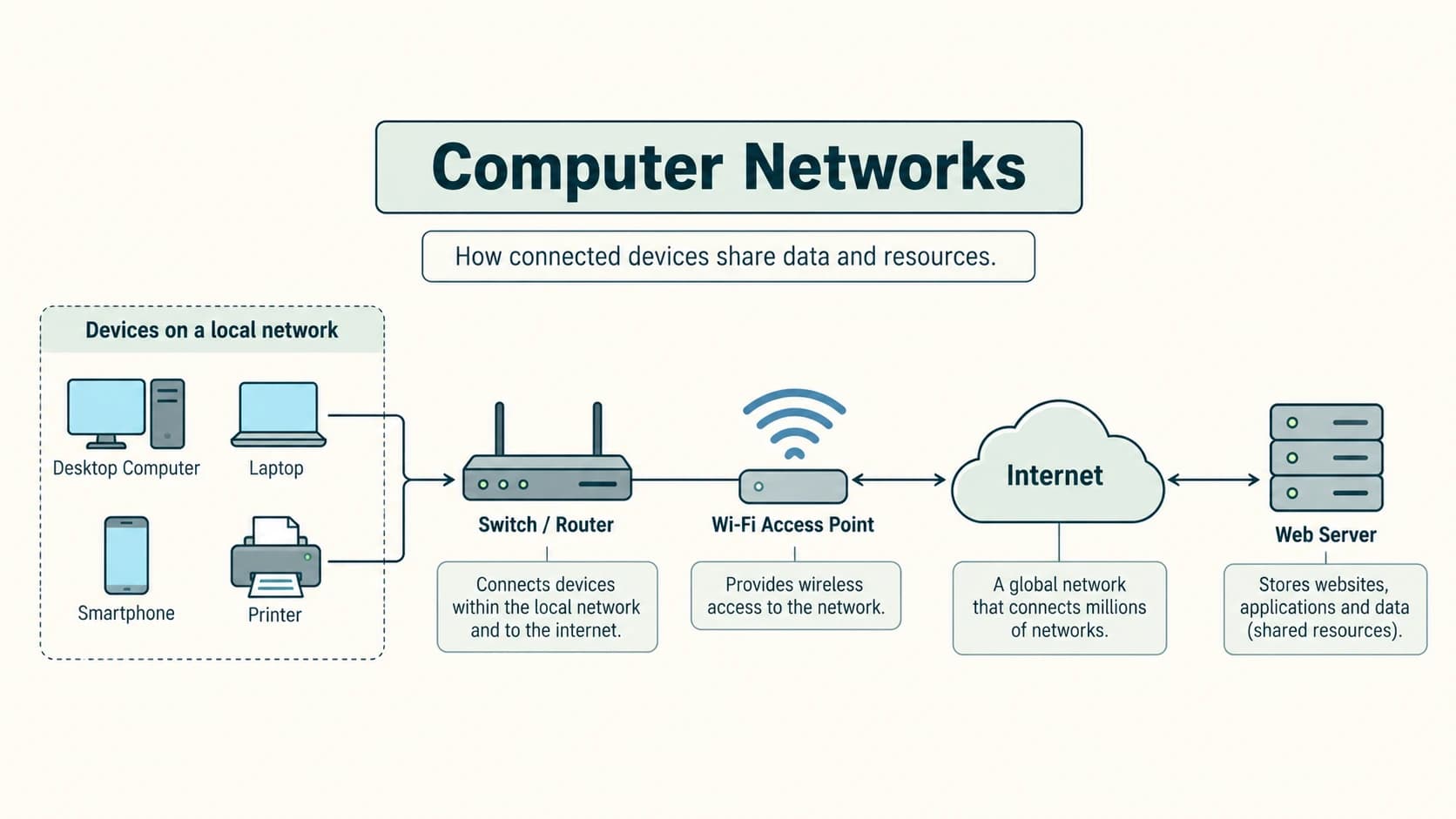
A network is more than two computers connected by a cable. It is a coordinated system of devices, communication media, addressing rules and protocols that lets information reach the intended recipient. When you print from a classroom laptop to a shared printer, load a website, send an email or make a video call, different parts of networking cooperate to perform the task.
This chapter teaches the twelve permanent Computer Networks lessons in your Class XII curriculum. It also includes all 16 numbered NCERT Chapter 10 exercises, Activities 10.1–10.4, and 30 additional questions with explanations. NCERT's Chapter 10 mainly discusses network development, device types, network sizes, topologies, MAC/IP addressing, the Internet, WWW and DNS. The CBSE master-curriculum additions—communication measures, switching, transmission-media details and the fuller protocol list—are explained in their named lessons without being misrepresented as separate NCERT chapter sections.
Learning objectives
After completing this chapter you should be able to explain data communication and packets; trace major historical networking developments; calculate transfer times from bit rates; distinguish IPv4, IPv6 and MAC addresses; compare circuit and packet switching; choose wired and wireless media; identify and use common network devices; classify PAN, LAN, MAN and WAN; sketch bus, star and tree networks; match common protocols to their purposes; and explain a browser request, URL, website, web server, hosting and DNS resolution.
Lesson map
| Permanent ID | Lesson | NCERT Chapter 10 connection |
|---|---|---|
C12-CN-01 | Evolution of networks: ARPANET, NSFNET, Internet | §10.2 and historical timeline |
C12-CN-02 | Data communication, nodes and terminology | §10.1; syllabus extension for five components |
C12-CN-03 | Bandwidth and data-transfer rate | LAN speed discussion; additional syllabus detail |
C12-CN-04 | IP addresses and MAC vs IP | §10.6, with modern precision |
C12-CN-05 | Circuit and packet switching | Additional syllabus detail; NCERT packets in §10.1 |
C12-CN-06 | Wired transmission media | §10.1 and §10.3 references; syllabus extension |
C12-CN-07 | Wireless transmission media | §10.3 wireless examples; syllabus extension |
C12-CN-08 | Network devices | §10.4 |
C12-CN-09 | PAN, LAN, MAN and WAN | §10.3 |
C12-CN-10 | Bus, star and tree topologies | §10.5, with mesh and ring as NCERT extensions |
C12-CN-11 | Communication protocols | WWW/HTTP in §10.7; expanded CBSE protocol list |
C12-CN-12 | WWW, HTML, XML, domains, URLs and hosting | §§10.7–10.8 |
Lesson C12-CN-01 — Evolution of Networks: ARPANET, NSFNET and the Internet
1. Why networking developed
Early computers usually worked alone: moving information between institutions required physically carrying storage media or establishing special connections. Researchers wanted machines at geographically separated institutions to exchange data and use remote computing resources. Work on packet-switched networking eventually helped create the Internet, a system of interconnected networks that follow compatible protocols.
A network connects devices so that they can communicate. The Internet is a global network of networks; it is not one computer, one website, or one company's infrastructure. Its growth involved research networks, open protocols, academic institutions, service providers and many independent participating networks.
2. Historical milestones
| Period/year | Development | Why it matters |
|---|---|---|
| 1960s | Research into computer networking and packet switching | Introduced designs for communicating across distributed machines |
| 1969 | Early ARPANET connections, including UCLA and SRI | Landmark demonstration of interconnected research hosts |
| 1971 | Early network email developed by Ray Tomlinson | Made electronic person-to-person messaging practical |
| 1970s | TCP/IP designs developed by Vint Cerf, Bob Kahn and others | Common rules could connect different networks |
| 1983 | ARPANET's transition to TCP/IP | Important milestone in modern Internet interoperability |
| 1980s | NSFNET linked research and educational institutions | Broadened academic networking and Internet connectivity |
| 1980s | DNS developed | Mapped memorable domain names to technical records |
| 1989–1991 | Tim Berners-Lee developed the Web at CERN | Linked documents using URLs, HTML and HTTP |
| 1990s onward | Public Internet and Web usage expanded | Connected homes, schools, firms, services and mobile devices |
Historical precision. The textbook timeline provides some years as broad teaching milestones; different dates may refer to proposal, implementation, standardisation or public release. For example, the Web proposal dates to 1989 and practical implementation and public availability developed around 1990–91. ARPANET, the Internet and WWW are not synonyms. The Web runs over the Internet; email and other Internet services do not require Web pages.
3. ARPANET versus NSFNET
ARPANET (Advanced Research Projects Agency Network) was a US-supported research network that helped demonstrate packet switching and communication among research sites. NSFNET (National Science Foundation Network) was a later US academic networking initiative that helped broaden connections among universities and research organisations. Neither should be described simply as today's Internet: modern Internet connectivity spans many independently administered networks.
Worked application
Two university departments need a shared repository. They can connect their local area networks through Internet service providers and use an authorised server. They do not need to rebuild ARPANET; they use contemporary networking technology built on its historical foundations.
Exam traps: ARPANET ≠ WWW; WWW ≠ Internet; the fact that TCP/IP became central in 1983 does not mean all Internet technology appeared in one year; the first WWW proposal and the first broadly adopted Web experiences are separate events.
Lesson C12-CN-02 — Data Communication Components and Terminology
1. What must exist for a message to travel?
Communication needs a sender, receiver, message, transmission medium and protocol. For example, when a student uploads homework: the student's laptop is the sender, the school's file server the receiver, the file is the message, Wi-Fi/Ethernet/Internet links are the medium, and networking protocols govern addressing and exchange. The same device can send one message and receive another.
| Element | Meaning | Classroom example |
|---|---|---|
| Sender/source | Originates data | Student's computer |
| Receiver/destination | Intended endpoint | Assignment server |
| Message/data | Information being conveyed | PDF assignment |
| Medium/channel | Carries the signals | Copper cable, fibre or radio |
| Protocol | Agreed communication rules | IP, TCP, HTTPS |
A node is an addressable or participating device such as a computer, printer, switch, router, phone or server. A host typically refers to an endpoint able to run network applications, not necessarily every intermediary node. A server provides a service; a client requests that service. These describe roles, not necessarily whether a computer is large or small.
2. Packets, headers and paths
Many networks transmit information in packets rather than one uninterrupted physical stream. A packet contains payload data and control information, such as addresses. Intermediate devices forward packets according to network rules. A large message may be split across multiple packets; different packets can follow different paths in a packet-switched network. At the destination, higher-layer protocols may reassemble and verify the complete information.
Example: a 2 MB photo does not have to occupy a single giant frame across every network segment. Packetisation supports sharing links with other traffic. But packetisation alone does not guarantee delivery or correct ordering—protocols such as TCP supply those features where used.
3. Direction of communication
Simplex: data travels in one direction for that link (illustrative example: one-way broadcast). Half-duplex: both directions are possible but not simultaneously in a traditional shared-channel system (e.g. walkie-talkie push-to-talk). Full-duplex: endpoints can send and receive simultaneously (e.g. a switched full-duplex Ethernet link). These are communication modes, not synonyms for network size.
Quality concepts: Throughput is actual useful transfer accomplished per second; latency is the delay before data reaches the destination; jitter is variation in delay; packet loss is failure of some transmitted packets to reach the destination. A link can have high bandwidth and still feel slow if its latency is large.
Concept check
A network printer is switched on but its Ethernet cable is unplugged. The printer still exists, but the communication medium/link is unavailable. Diagnosing the failed element is more useful than saying that “the Internet is down.”
Lesson C12-CN-03 — Bandwidth and Data-Transfer Rate
1. Bits, bytes and rates
A bit is a binary digit, and 1 byte is 8 bits. Digital link rates are commonly written in bits per second (bps), not bytes per second (B/s). 1 Mbps = 1,000,000 bits/second and 1 Gbps = 1,000 Mbps in standard decimal networking units. Bandwidth in the school-syllabus context often refers to link capacity or maximum data rate; technically, bandwidth may also mean a frequency range measured in hertz.
Transfer time (idealised) = amount of data in bits ÷ rate in bits per second. This is a lower-bound classroom calculation if there is no overhead, retransmission, congestion or application limitation.
2. Solved numericals
Example A — Convert bits/bytes. A 12 MB file (using decimal MB) contains 12 × 8 = 96 megabits. On an ideal 24 Mbps connection: 96 Mb ÷ 24 Mb/s = 4 seconds. This is not a promise that a real download will take exactly four seconds.
Example B — Actual throughput. A transfer moves 60 megabits in 10 seconds. Throughput = 60 ÷ 10 = 6 Mbps. If the advertised link capacity is 10 Mbps, measured throughput is 60% of nominal capacity, which could reflect several sources of overhead.
Example C — MB/s versus Mbps. 100 Mbps is 12.5 MB/s at most before protocol overhead; it is not 100 megabytes per second. A rate of 5 MB/s corresponds to 40 Mbps.
| Measure | Unit | Asked question |
|---|---|---|
| Link capacity/bit rate | bps, Mbps, Gbps | What is the maximum signalling/data rate? |
| Throughput | bps, Mbps | What useful rate did we actually achieve? |
| Latency | ms | How long does an individual exchange take? |
| Jitter | ms of variation | How consistent is packet timing? |
The NCERT chapter mentions LAN Ethernet speed examples from the textbook's period; these are examples, not hard speed ceilings for present-day LANs. Do not memorise an old speed range as a permanent networking standard.
3. Applying this to video calls
A video call requires enough upload and download throughput and reasonably low latency and jitter. There is no single universal “minimum video-call speed”: video resolution, encoding, number of participants and application design all matter. For Activity 10.2's related exploration, investigate requirements published for the specific application instead of presenting an invented constant.
Lesson C12-CN-04 — IP Address Basics and MAC Versus IP
1. Two different identification systems
A MAC (Media Access Control) address identifies a link-layer network interface on a local network. A common Ethernet/Wi-Fi MAC address is 48 bits, often written as six hexadecimal byte pairs such as 02:1A:2B:3C:4D:5E. A unicast IP address identifies a network interface for IP communication and routing; the relevant IP address depends on the network and may change when the network changes. Most ordinary Internet traffic uses both concepts at different stages: link-local frames have link-layer destination addresses, while IP packets have network-layer source and destination addresses.
| Characteristic | MAC address | IP address |
|---|---|---|
| Layer/role | Data-link identification on a local link | Network-layer addressing and routing |
| Common representation | Six hexadecimal byte pairs for 48-bit MAC | IPv4 dotted decimal or IPv6 colon-separated hex |
| Typical scope | Local network segment/link | Across interconnected IP networks |
| Assignment | Hardware vendor or locally generated software address | Network configuration/ISP/administrator |
| Can change? | Yes—locally administered or privacy-randomised MACs exist | Yes—dynamic or manually reassigned addresses |
Important correction to NCERT simplification: a device's factory-assigned MAC is commonly stable, but operating systems can use private/randomised MAC addresses. It is therefore not always true that a MAC address can “never change”. Also, knowing a private IP address does not automatically let anyone on Earth contact the device; NAT, routing and firewalls can prevent direct access.
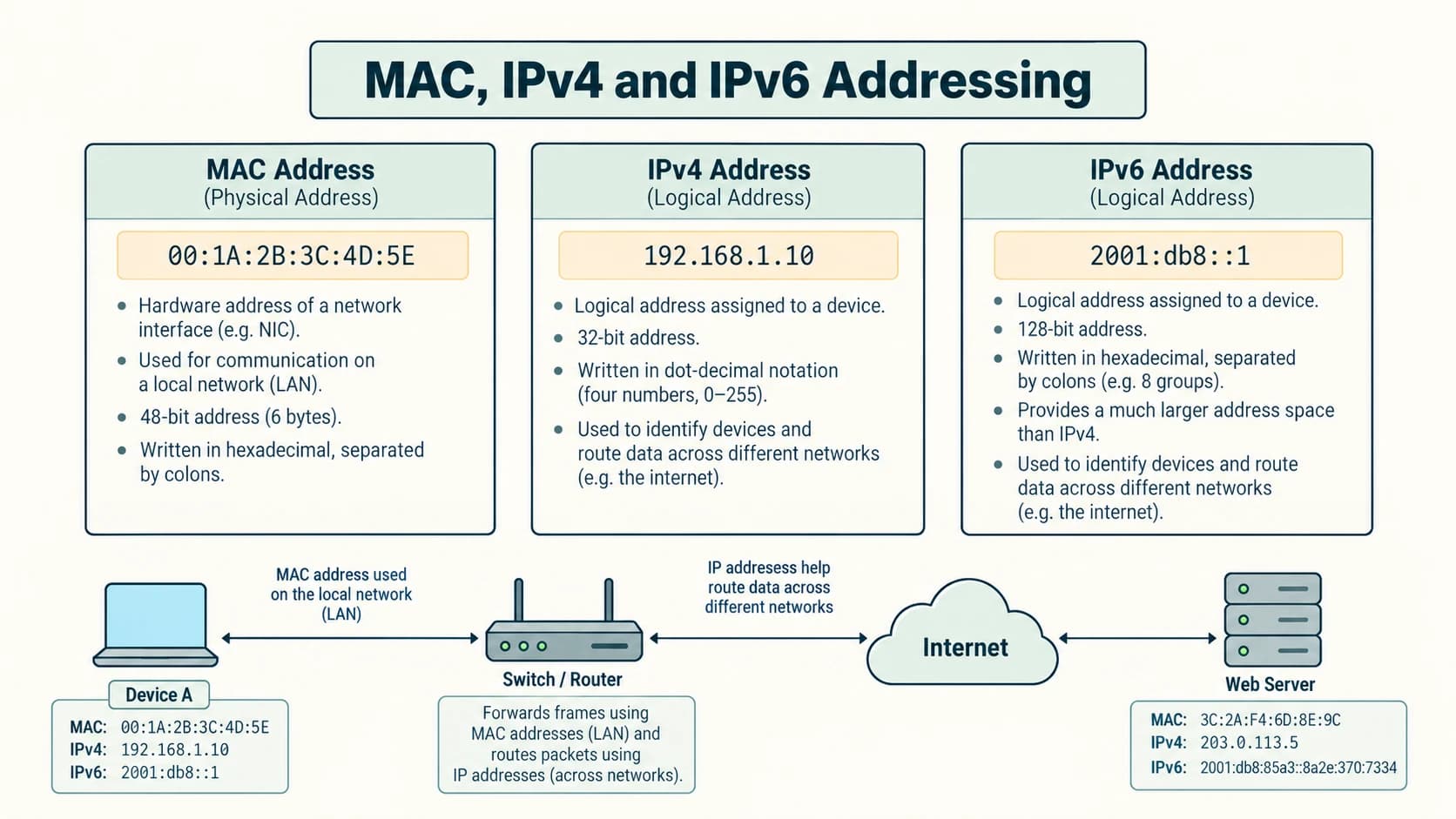
2. IPv4
IPv4 uses 32 bits, displayed as four decimal octets from 0 to 255, such as 192.168.1.20. The number of possible 32-bit combinations is 2^32 = 4,294,967,296. Not all these combinations are available as globally public device addresses, because address ranges have specialised or reserved purposes. Private-use examples include 192.168.1.20 and 10.0.0.15; these ordinarily require routing/NAT or special network setup for access to the public Internet.
Check whether an address is valid: 192.168.1.300 is invalid IPv4 dotted-decimal notation, because 300 > 255. 10.0.0.5 is valid notation. Four dotted components are required for the usual IPv4 presentation.
3. IPv6
IPv6 uses 128 bits. One valid example is 2001:db8::5, where :: compresses consecutive zero groups (used at most once in a standard textual address). An uncompressed example is 2001:0db8:0000:0000:0000:0000:0000:0005. 2001:db8::/32 is reserved for documentation examples. IPv6 provides a vastly larger address space, but using IPv6 does not by itself guarantee an endpoint is publicly reachable or secure.
4. MAC, IP and IMEI: do not confuse them
Phones may have Wi-Fi MAC addresses, IP addresses for their connections, and a cellular-equipment identifier called IMEI. These are different systems. ipconfig or ip addr can show local IP configuration; operating-system network settings may reveal MAC addresses. A MAC is not a replacement for an IP address, and an IMEI is not a routing address.
Worked trace
Laptop 192.168.1.20 opens a remote website. The laptop forwards an IP packet toward its default gateway via its local Ethernet or Wi-Fi link. Its first frame's destination MAC may be that of the gateway, not the remote website. The router then forwards traffic onward using IP routing decisions and new local-link framing at each hop.
Lesson C12-CN-05 — Circuit Switching and Packet Switching
1. Circuit switching
In circuit switching, a dedicated logical or physical end-to-end circuit is established for a connection, traditionally associated with telephone networks. A classical circuit reserves resources for the duration, even if the participants are briefly silent. The stages are circuit setup, communication and release. Advantages include predictable reserved resources; disadvantages include potentially inefficient use of capacity and a setup stage.
2. Packet switching
In packet switching, a message is represented by packets that share networking links with traffic from other users. Each packet carries information enabling delivery/forwarding; routers make forwarding decisions. This lets one network link carry traffic from many conversations without reserving a separate entire circuit for each one. Delay and packet loss can vary, and protocols are needed for reliable delivery when an application requires it.
| Point | Traditional circuit switching | Packet switching |
|---|---|---|
| Resource allocation | Dedicated/reserved circuit during session | Links shared among packets and users |
| Setup | Circuit normally established first | Data can be sent over existing routed network infrastructure |
| Idle periods | Reserved circuit may be underused | Other traffic can use link capacity |
| Path/delay | Predictable reservation in simple models | Variable queues, routes and delays possible |
| Illustrative use | Traditional public switched telephone call | Typical Internet IP data transport |
Misconception: video calls are not automatically circuit-switched merely because they are “calls”. Internet-based voice and video typically use packet switching.
3. Packet-order exercise
Three packets from the same file arrive as packet 1, packet 3, packet 2. An application expecting an ordered stream should not blindly concatenate arrival order. A reliable transport protocol (for example TCP) can arrange ordered delivery to applications and recover from some losses; an application built on datagrams may need its own handling.
Lesson C12-CN-06 — Wired Transmission Media
The medium determines how a signal travels. Guided/wired media include twisted-pair copper, coaxial cable and optical fibre. Select them according to distance, interference, installation, cost and required throughput—not by assuming one option is always best.
1. Twisted-pair copper
Two insulated copper conductors are twisted to reduce electromagnetic interference and crosstalk. Ethernet LANs commonly use several twisted pairs in a cable with suitable connectors (typically modular 8P8C connectors often called “RJ45”). UTP (unshielded twisted pair) is widespread for short building runs; shielded cable may be used where interference control is needed. Cabling category, installation quality and network equipment affect supported speed and distance. A classroom should not assume every copper cable supports every Ethernet standard.
2. Coaxial cable
A coaxial cable has a central conductor surrounded by insulation and an outer shield. It is used in applications such as cable television distribution and some broadband access networks. Its shielding helps limit interference. It is not interchangeable with the usual twisted-pair Ethernet patch cable, even though both contain copper.
3. Optical fibre
An optical fibre guides light through a glass or plastic core. It supports high-capacity communication and is resistant to electromagnetic interference. Single-mode and multimode fibre have different optical properties and typical deployment ranges. Fibre equipment and installation can be more specialised, and the fibre is not a source of electrical power to an attached device merely because it transmits data.
| Medium | Signal | Typical classroom use | Advantage | Limitation |
|---|---|---|---|---|
| Twisted pair | Electrical | Desk to LAN switch | Economical, common | Susceptible to some EMI; design-dependent reach |
| Coaxial | Electrical/RF | Cable broadband/TV | Good shielding | Different connectors/equipment |
| Fibre optic | Light | Building backbone/long-distance link | High capacity, EMI-resistant | Optics/installation requirements |
Scenario
A school wants to connect computers to a switch in the same laboratory: twisted-pair Ethernet is a straightforward choice. To connect separated buildings across an electrically noisy industrial yard: fibre is often a strong candidate, subject to site design and cost.
Lesson C12-CN-07 — Wireless Transmission Media
Unlike guided media, wireless signals propagate through space and are affected by distance, obstacles, interference and radio regulations. The syllabus groups wireless media broadly as radio waves, microwaves and infrared; these overlap in the electromagnetic spectrum in some classification schemes. Wi-Fi and Bluetooth are technologies/protocol families, not different fundamental kinds of matter.
1. Radio waves
Radio-frequency communication supports mobile and local networking; many radio signals can pass through some building materials. Wi-Fi and Bluetooth use radio frequencies. Performance varies with power, frequency band, antenna design, channel use, security settings and nearby networks. A “wireless” connection does not mean the access point itself has no wired connection.
2. Microwaves
Microwaves are higher-frequency radio waves often used for directional point-to-point links, satellite communication and some wireless broadband systems. A fixed microwave link may require relatively clear line-of-sight between antennas. Heavy precipitation can affect certain high-frequency links. Calling all microwave links “satellite links” is incorrect; many are terrestrial.
3. Infrared
Infrared uses light just beyond visible red and is widely associated with short-range, often line-of-sight applications such as remote controls. It generally does not pass through opaque walls. It is less common than Wi-Fi for general Internet access.
| Medium/type | Representative use | Strength | Important limitation |
|---|---|---|---|
| Radio / Wi-Fi | School wireless LAN | Mobility without individual Ethernet cabling | Shared airwaves/interference |
| Radio / Bluetooth | Headset to phone (PAN) | Low-power, short-range pairing | Limited range and profile-dependent data rates |
| Directional microwave | Two-building backhaul | Avoids laying cable | Alignment and path/weather constraints |
| Infrared | Handheld remote | Simple local signalling | Line-of-sight/obstacles |
Security rule: A wireless link can carry encrypted or unencrypted traffic depending on its configuration; being “radio” does not automatically make it insecure or secure. Secure Wi-Fi authentication and HTTPS protect different parts of the communication.
Lesson C12-CN-08 — Networking Devices: NIC, RJ45, Repeater, Hub, Switch, Router, Gateway and Modem
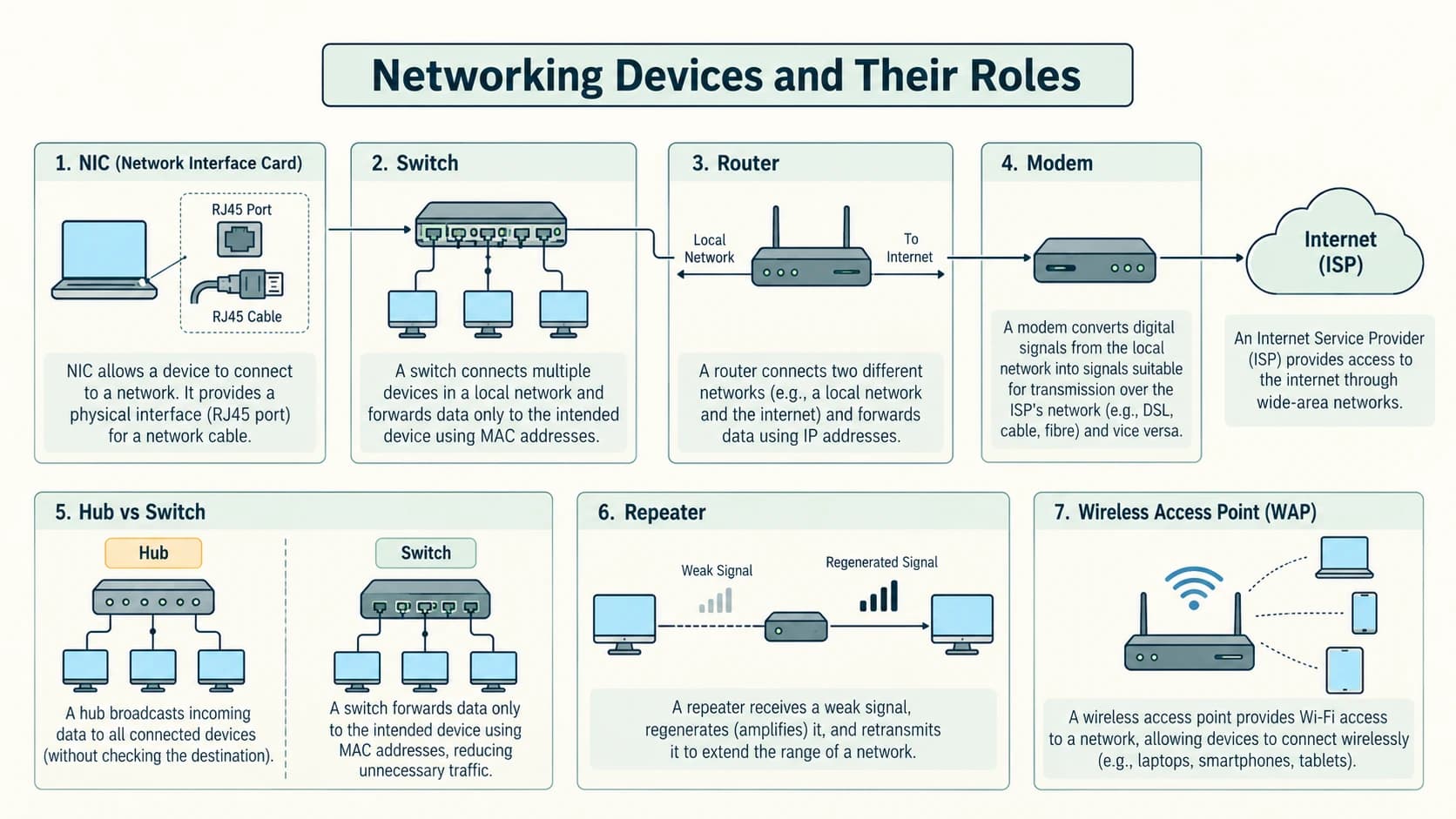
A network device is best understood by what it forwards, where it operates and what decisions it makes. One device can implement more than one function: a household Wi-Fi router may combine a router, wireless access point, Ethernet switch, firewall and sometimes a modem. So names on product boxes need not imply physically separate machines.
1. Network Interface Card (NIC) and connector
A NIC (Network Interface Card or network adapter) provides a device with network connectivity, for example Ethernet or Wi-Fi. It may be built into the motherboard or supplied by an external adapter. A wired Ethernet NIC commonly has a socket accepting an 8P8C modular plug usually referred to in classrooms as RJ45. Strictly, the connector terminology is more nuanced, but “RJ45 plug” is the widely recognised school-exam label. The plug/connector is not a modem, switch or router.
2. Repeater and hub
A repeater regenerates or retransmits signals so a physical link can extend over another segment; it does not determine the IP destination of a packet. A classic Ethernet hub is effectively a multiport repeater: traffic arriving on one port is repeated to its other ports. It has no learned MAC forwarding table, and attached devices share the relevant collision domain in traditional half-duplex designs. Hubs are mainly useful as historical concepts and are much less common in modern LANs.
3. Switch
An Ethernet switch learns source MAC addresses on its ports and uses its forwarding table to send known unicast frames toward the correct outgoing port. If the destination MAC is unknown, or traffic is broadcast, a conventional switch may flood it within the relevant broadcast domain/VLAN. A switch is not guaranteed to encrypt traffic or provide Internet routing merely because it makes a LAN.
4. Router
A router forwards packets between different IP networks, using an IP routing table and, as necessary, forwarding policies. For example, one router may connect a private school LAN to an ISP's network. Routing decisions use destination IP prefixes; the first-hop frame uses the next-hop link's MAC address. A router is different from a switch, although some multilayer switches can also route.
5. Gateway
A gateway is an entry/exit point or function that connects systems or networks, sometimes translating between protocols or application formats. On a typical home network, the default gateway is the router address to which a host sends packets destined for other networks. In other contexts, gateway means a protocol-converting system; not all gateways must perform the same translation.
6. Modem
Modem expands to modulator–demodulator. In traditional telephone-data networks, modems convert digital data to signals suited to an analogue communication channel and convert received signals back. Modern cable, DSL and cellular devices employ more elaborate physical-layer modulation; it is inaccurate to say every Internet modem simply turns all bits into sound over a telephone line. A modem typically interfaces with the service provider's access technology; a router decides how to forward among IP networks.
7. Wireless card and access point
A Wi-Fi adapter (wireless NIC) gives a device a wireless link. An access point connects wireless client devices to a LAN. It need not do IP routing. This distinction matters when selecting school hardware: dozens of laptops may need an access point plus an Ethernet switch and an upstream router.
| Device | Basic function | Forwarding knowledge | Practical placement |
|---|---|---|---|
| NIC / Wi-Fi card | End-device network interface | Hardware/link configuration | Laptop/desktop |
| RJ45-style plug | Cable termination/connection | None | Ethernet patch cable |
| Repeater | Regenerate/retransmit signals | No address-based routing | Physical link extension |
| Hub | Repeat incoming bits to other ports | No per-destination table | Legacy shared Ethernet |
| Switch | Forward Ethernet frames | MAC address learning | Laboratory LAN |
| Router | Forward between IP networks | IP prefixes/route table | LAN–ISP connection |
| Gateway | Entry/exit or protocol translation | Depends on implementation | Default route or converter |
| Modem | Interface/modulation for access medium | Technology-specific physical-layer logic | ISP-facing access link |
Worked school design
Six desktops with Ethernet NICs connect to a switch. A teacher's laptop connects through an access point linked to that switch. To browse Internet websites, the LAN uses a router/default gateway and appropriate ISP access equipment. The same setup can share a local printer even if the external Internet connection becomes unavailable.
Exam traps: hub broadcasts/repeats rather than learns MACs; a switch mainly makes forwarding choices on a local Ethernet network; a router connects IP networks; an RJ45 plug is not the NIC itself; a modem and router can coexist in one physical device.
Lesson C12-CN-09 — PAN, LAN, MAN and WAN
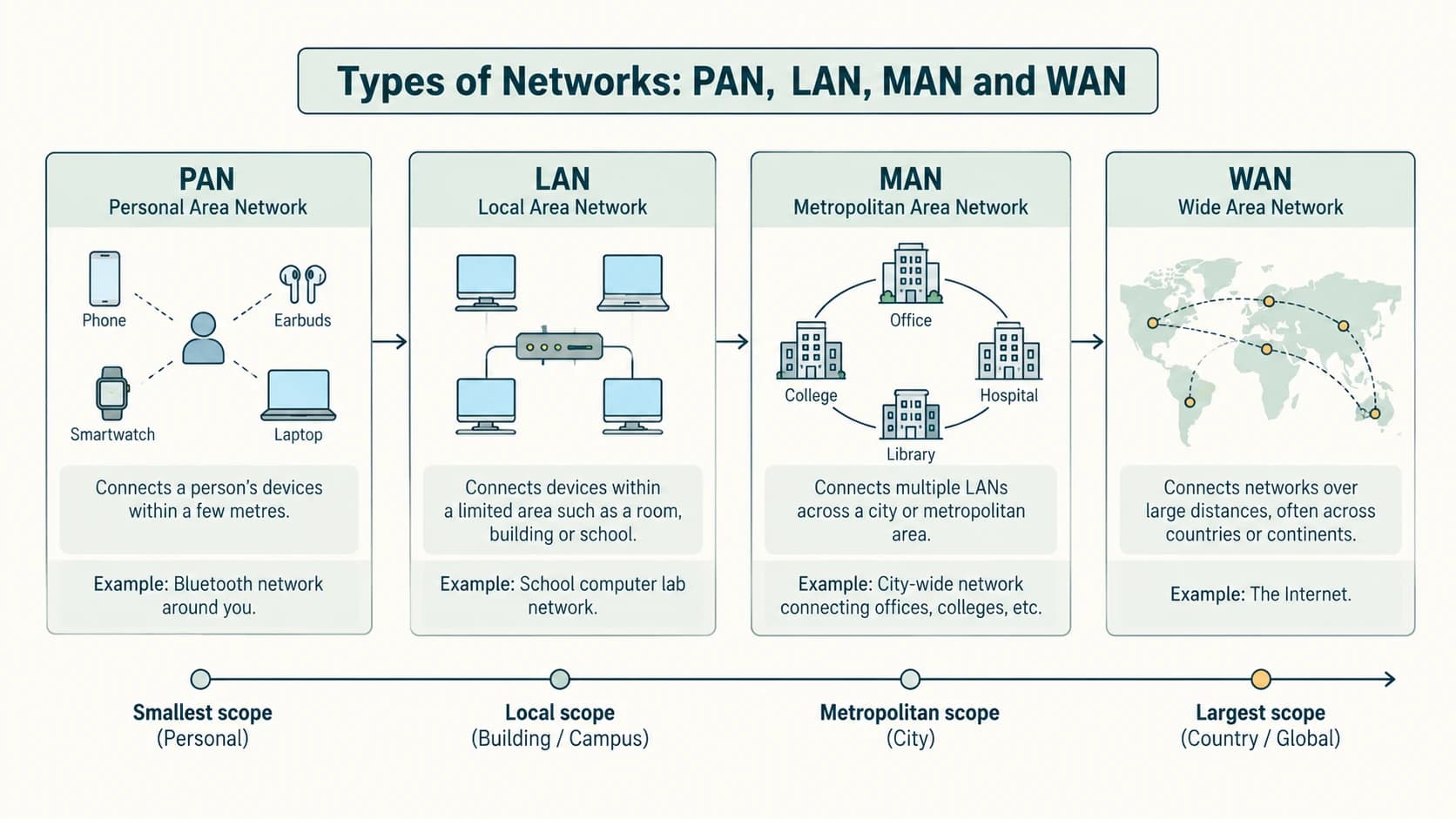
Network classifications describe typical coverage and administrative context, not a universal distance guarantee. The physical technologies that build a network are separate from its geographic category: a LAN can use cables or Wi-Fi; a WAN can use fibre, radio and other media.
| Type | Full form | Example | Typical scale and purpose |
|---|---|---|---|
| PAN | Personal Area Network | Phone with smartwatch/headset | Devices associated with one person nearby |
| LAN | Local Area Network | Classroom, office or campus LAN | Within a building or local premises |
| MAN | Metropolitan Area Network | City-wide educational/cable network | Across a metropolitan area |
| WAN | Wide Area Network | Bank offices in multiple states | Joins distant locations and smaller networks |
1. PAN
A phone and a Bluetooth headset form a short-range personal area network. A phone–laptop USB tether can be a wired PAN. NCERT uses an approximate 10-metre classroom picture; this is not a universal physical limit of every personal-area wireless standard.
2. LAN
A school laboratory can share files and a network printer through a Local Area Network. A LAN is usually administered by one household, school or organisation. It can support relatively high local speeds, but a LAN's security depends on authentication, segmentation and settings; it is not automatically secure because it covers a small area.
3. MAN
A university district or city-level fibre/cable system connecting geographically separated sites may be a Metropolitan Area Network. A MAN is larger than a conventional local site network but is not automatically a single nationwide WAN.
4. WAN
A Wide Area Network spans distant cities, states or countries and can connect several LANs. The global Internet is a huge interconnected system of networks and, at a basic school level, is described as the largest WAN. A company WAN can remain private even though it uses third-party long-distance carriers.
Worked NCERT scenario
Two universities in different Indian states need to transfer research data. Classify their interconnection as WAN, because it spans geographically distant networks. If they use the public Internet as transport, they may also use a secure authenticated service or VPN to protect the information.
Classification challenge
A mobile phone hotspot provides a small wireless LAN for connected devices; depending on the personal use arrangement it may also be described as a personal network. The important learning outcome is recognising coverage, role and communication technology, rather than insisting every real implementation belongs to exactly one category.
Lesson C12-CN-10 — Bus, Star and Tree Topologies (with NCERT Mesh and Ring)
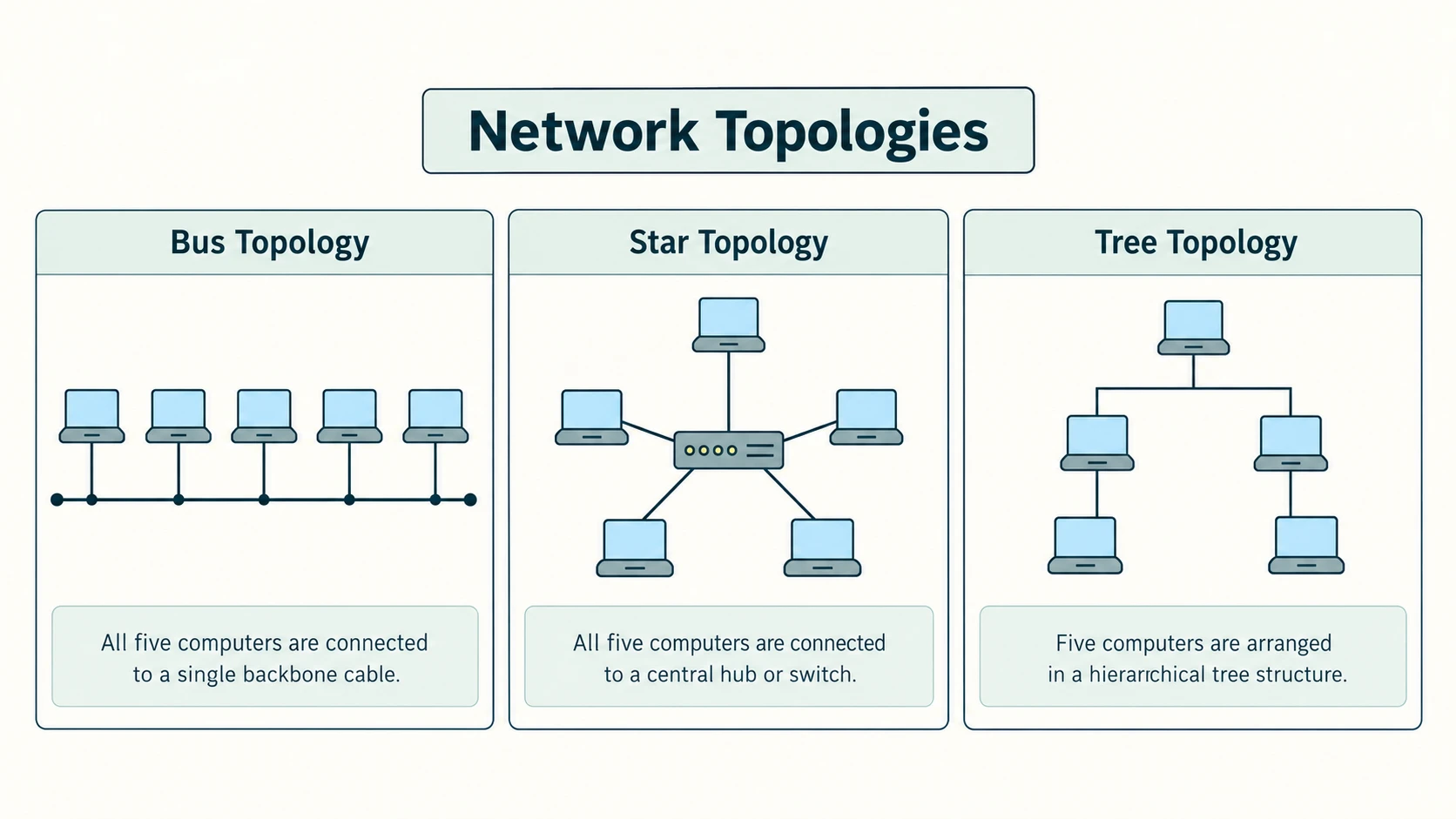
Network topology is the arrangement of nodes and communication links. Physical topology describes physical connections; logical topology describes how data traffic is arranged or travels. These may differ, so a classroom drawing should state which kind it illustrates.
1. Bus topology
In a traditional bus topology, devices attach to a shared backbone cable. A classical bus may need proper termination at the ends; a break in the shared backbone can disrupt multiple devices. Its simple cable arrangement was economical in historical LAN designs, but modern switched Ethernet LANs usually do not use one shared physical bus cable.
A five-device conceptual bus diagram:
  PC1     PC2     PC3     PC4     PC5
   |       |       |       |       |
===+=======+=======+=======+=======+===   shared backbone
The devices are connected to one common backbone, not directly to a central switch. If the shared backbone fails, the connected group may be affected.
2. Star topology
In a star, every end device has an independent link to one central device, usually a switch. A cable failure to one laptop typically affects that laptop only; loss of the central switch may disconnect all attached end devices.
Five-device conceptual star:
          PC1        PC2
            \        /
             \      /
              [SWITCH]
            /    |    \
          PC3   PC4    PC5
3. Tree topology
A tree arranges multiple segments hierarchically. For example, a school building may use a core switch feeding floor switches, which in turn connect end-device stars. It provides structure and expansion but can introduce dependency on upper-level links or devices. A tree is not just one continuous shared bus.
                  [Core Switch]
                   /        \
             [Floor A]   [Floor B]
              /    \     /   |   \
             PC1   PC2  PC3  PC4  PC5
The core-to-floor links form the tree's upper branches; each PC has an independent local link to its own floor switch.
4. Additional topologies described by NCERT
A ring connects each node to two neighbours in a loop. The textbook illustrates a one-directional ring; some real ring technologies can use redundancy or traffic in more than one direction. A mesh provides multiple inter-node links. A full mesh of n nodes needs n(n−1)/2 undirected physical links, so five nodes require 5×4/2 = 10 links. A hybrid network combines topologies; for example, several star LAN segments joined by a backbone.
| Topology | Main identifying feature | Typical point of failure |
|---|---|---|
| Bus | Shared main backbone | Backbone segment |
| Star | Independent links to centre | Central switch/hub |
| Tree | Hierarchical branches | Trunk or parent switch |
| Ring | Closed chain of neighbours | Break may disrupt a simple unprotected ring |
| Full mesh | All pairs directly connected | Multiple alternate paths, but much cabling |
Answer-building guidance
For a “draw star and bus with five computers” question, count five PCs on each, label the central device in star and the common backbone in bus. Draw physical links cleanly and add a one-sentence explanation of how failure differs. Do not draw a tree when asked for star.
Lesson C12-CN-11 — Common Networking Protocols
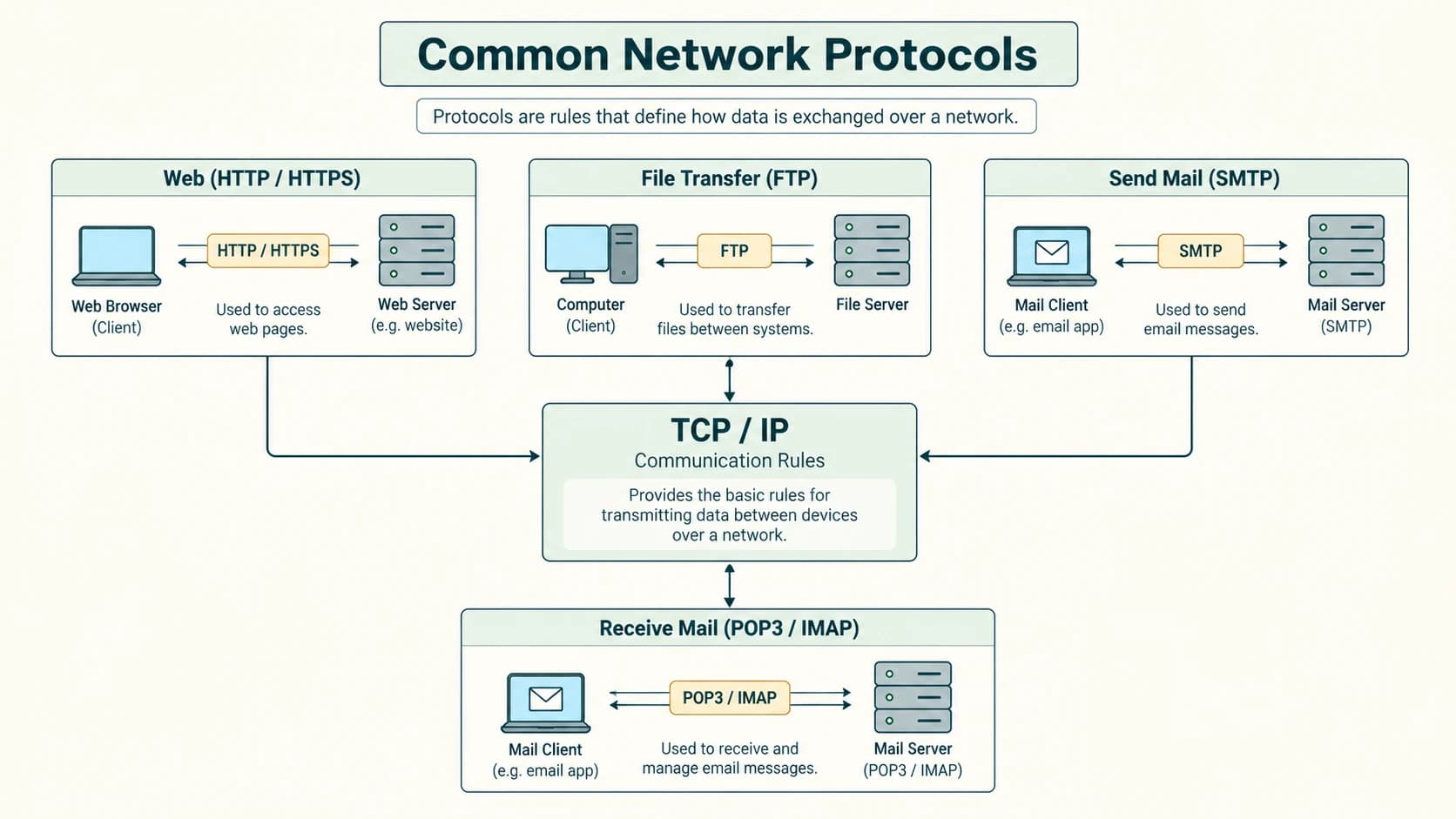
A protocol is an agreed set of rules for information exchange: message format, timing, addressing, error handling and other behaviour. Different protocols solve different parts of communication. Knowing a protocol's role is more useful than only memorising its expanded name.
1. The TCP/IP layered idea
IP (Internet Protocol) provides addressing and forwarding of packets across interconnected IP networks. TCP (Transmission Control Protocol) offers a reliable, ordered byte stream with acknowledgements, retransmissions and flow/congestion control. UDP (User Datagram Protocol) is a lightweight datagram transport that does not promise delivery or ordering by itself. Many Internet applications use TCP; others use UDP, including some real-time communication mechanisms.
A simple Web journey might be HTTP application → TCP transport → IP network → Ethernet/Wi-Fi link. For modern HTTPS, TLS secures the application exchange; some HTTP versions can also use QUIC over UDP rather than TCP. Treat the layered example as an exam model, not a claim that every HTTPS connection necessarily uses TCP.
2. Protocol reference table
| Protocol | Full name | Typical job | Important note |
|---|---|---|---|
| HTTP | Hypertext Transfer Protocol | Web requests/responses | Unencrypted HTTP is not the same as HTTPS |
| HTTPS | Hypertext Transfer Protocol Secure | HTTP over a secure transport | TLS protects the connection; check destination too |
| FTP | File Transfer Protocol | Transfer files via FTP service | Ordinary FTP sends information without modern built-in TLS protections |
| SMTP | Simple Mail Transfer Protocol | Submit/relay outgoing email | Sending mail, not ordinarily the main mailbox retrieval protocol |
| POP3 | Post Office Protocol version 3 | Retrieve messages from mailbox | Often downloads mail; IMAP is another common retrieval method |
| PPP | Point-to-Point Protocol | Encapsulates data over point-to-point links | Link-layer protocol, not Web-page rendering |
| TCP/IP | Transmission Control Protocol / Internet Protocol suite | Transport and routing foundation | TCP and IP perform different jobs |
| TELNET | Telnet remote-terminal protocol | Interactive remote login | Legacy and generally unsafe unencrypted over untrusted networks |
| VoIP | Voice over Internet Protocol | Transport voice/video communication over IP | A technology family, not one universal single protocol |
Additional named protocols: DNS helps find IP-address records for domain names; DHCP commonly assigns local IP configuration automatically; SSH is an encrypted remote administration alternative to plaintext Telnet in many environments. These are useful context beyond the syllabus's named protocol list.
3. Four practical scenarios
- A student reads
https://example.com: the client exchanges HTTPS traffic with a Web server after resolving the name if required. - An administrator sends a message from one mail server to another: SMTP is associated with sending/relaying mail. POP3, by contrast, is a historical/common method for retrieval.
- A company transfers large files through a traditional FTP server: FTP does the file transfer; if privacy is required, use an appropriately secure transfer mechanism rather than plain FTP.
- A video discussion uses VoIP over Internet packet transport. The network does not need to reserve a traditional telephone circuit for the entire conversation.
Exam traps: SMTP is sending, POP3 is receiving; TCP is not an IP address; HTTP is not a programming language; HTTPS improves transport security but does not guarantee that a site is truthful or harmless; TELNET is not the recommended secure remote-login choice.
Lesson C12-CN-12 — WWW, HTML, XML, Domain Names, URLs, DNS, Browsers and Hosting
1. Internet versus World Wide Web
The Internet is worldwide packet-network infrastructure and participating systems. The World Wide Web (WWW) is a collection of resources and hyperlinks accessed with Web standards over this infrastructure. Sending email, using remote file-transfer services or playing some online games can use the Internet without being the Web. A school website is a Web application or collection of pages accessed over the Internet.
A website is a set of related Web pages/resources under a common site identity; a Web page is one document or rendered resource; a Web browser requests and displays Web resources; a Web server is software (and its host) that serves requests; Web hosting supplies infrastructure to operate the site. A domain name makes the address memorable but does not by itself store the site's data.
2. HTML and XML
HTML (HyperText Markup Language) structures pages for Web browsers: headings, paragraphs, hyperlinks, images and other content. XML (eXtensible Markup Language) represents structured data with custom descriptive tags and rules. XML is not automatically a substitute for HTML page rendering.
HTML illustration:
<!doctype html>
<html lang="en">
  <head><title>Library</title></head>
  <body>
    <h1>School Library</h1>
    <p>Search for books in the catalogue.</p>
    <a href="/books">View books</a>
  </body>
</html>
XML illustration:
<book>
  <title>Computer Science</title>
  <class>12</class>
</book>
HTML defines a document's Web-page structure; XML defines a data structure and needs applications to decide how to use or display it.
3. URI, URL and domain
A URI (Uniform Resource Identifier) identifies a resource; a URL (Uniform Resource Locator) is a URI that gives a location/access method. Not every URI is necessarily a URL in the strict standards terminology. NCERT treats these terms more loosely for introductory explanation.
Consider the illustrative URL:
https://www.example.com:443/guides/networks?class=12#revision
|_____| |_____________|___| |______________| |______| |______|
 scheme        host    port       path          query   fragment
The host is www.example.com; the registrable domain within it is example.com. HTTPS defaults to port 443, so :443 can normally be omitted. The path identifies a resource within the host; the query passes parameters; the fragment identifies a section within a document and is generally handled by the client rather than sent as part of an HTTP request target. A website may have many pages under one domain.
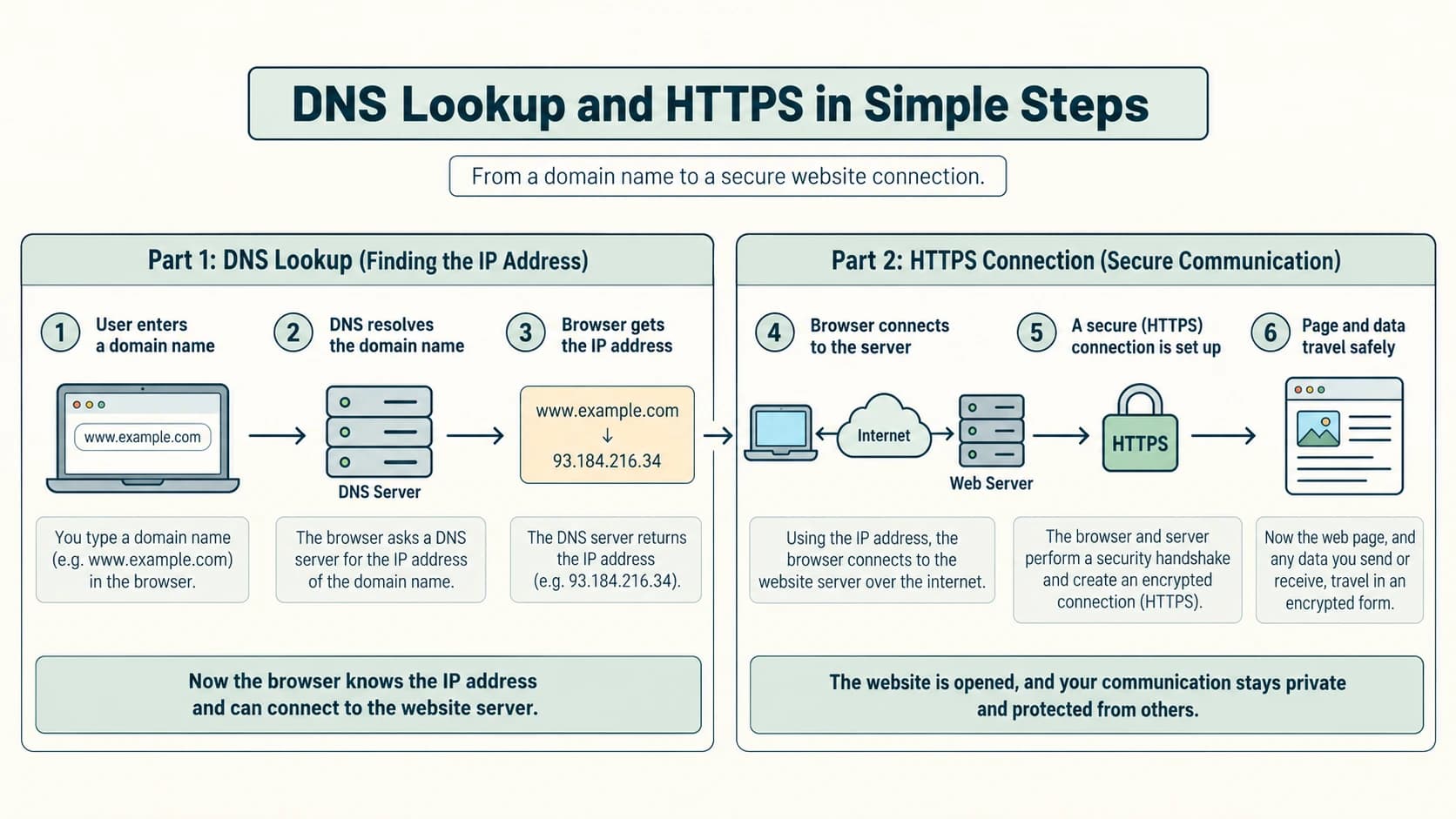
4. How DNS resolution works
DNS (Domain Name System) is a distributed naming system that stores records such as address records (A for IPv4, AAAA for IPv6). The DNS resolver helps turn a domain name into an IP address before a new connection is made when name resolution is required. A browser may first use its cache or operating-system cache; if needed a recursive resolver consults cached data or authoritative DNS servers through the DNS hierarchy.
Simplified lookup:
- A user enters
https://www.example.com/guide. - The browser/operating system looks for a cached address; if necessary it asks a recursive DNS resolver.
- The resolver obtains the appropriate DNS answer, possibly using root, TLD and authoritative name-server information; it may cache the answer for its TTL.
- With an address, the browser arranges the appropriate network/secure connection and sends the Web request.
- The Web server supplies a response that the browser renders.
Critical source clarification: DNS is not usually a step performed by the HTTP protocol itself; name resolution typically precedes establishing the network connection. The historical textbook's example IP addresses are illustrations and may not be the live addresses of those domains. There are 13 named root-server identities (A–M), backed by many distributed server instances, not exactly 13 physical machines on Earth.
5. Domain names and secure access
example.com is a domain name. www.example.com is a hostname under that domain. DNS may map one name to multiple addresses and may change answers by time or location; it is not a universal one-name-to-one-fixed-IP phonebook. HTTPS uses TLS to protect communication with the contacted site, but verify that the site's identity and content are trustworthy.
6. IoT connection (NCERT §10.7 extension)
The Internet of Things (IoT) includes networked devices and sensors that exchange information, such as a connected electricity meter, irrigation sensor or air-quality logger. Not every smart device is directly reachable from the public Internet, nor should one be. Consider authentication, privacy, updates and the safety impact before connecting physical devices.
Exam traps: Internet is not WWW; domain name is not full URL; HTML is page markup, XML is general data markup; DNS does not itself send the webpage; one website may have many pages and servers; HTTPS does not make content automatically authentic or accurate.
NCERT Chapter 10 — Activities 10.1–10.4: Fully Explained Responses
These four numbered activities are the activities actually printed in NCERT Chapter 10. They are not interchangeable with the end-of-chapter exercises.
Activity 10.1 — Identify other real-world networks
Task (paraphrased): Think of networks beyond computer networks in everyday life.
Model response: A rail network connects stations by rail lines and timetabled services; an airline route network connects airports; a power-distribution network links generating stations, substations and customers; a road network connects locations through roads and junctions; a social network connects people through relationships; and an irrigation network links canals and fields. A network has interconnected components and relationships/links, even when the links are not data cables.
Reflection: A “network” does not necessarily carry digital information. But the analogy helps: a junction resembles an intermediate node and a route resembles a possible path.
Activity 10.2 — Create a smartphone hotspot and connect devices
Task (paraphrased): Use a phone hotspot to allow another device to connect.
Safety and equipment: Use your own phone and permissioned laptop; check that your mobile plan allows hotspot use. Do not publish the hotspot password, phone number or personal device details in an assignment.
Steps:
- On a phone, open hotspot/tethering settings and enable its personal hotspot or Wi-Fi hotspot.
- Set a strong password and an appropriate supported security mode; do not use an openly accessible network for class demonstrations.
- On a laptop or second permitted phone, choose the hotspot's Wi-Fi network name and supply the password.
- Confirm that the device has joined the local network and, if mobile data works, can reach an appropriate test page.
- Turn the hotspot off after the activity to avoid accidental access or excessive data use.
Observation table (fill with your actual results):
| Observation | What to record |
|---|---|
| Device providing hotspot | Phone (no serial number) |
| Connected device | Laptop / another phone |
| Connection type | Wi-Fi radio link |
| Was an IP assigned? | Yes/No from network settings |
| Internet available? | Yes/No (distinct from local connection) |
Conclusion: The connected devices form a small network; access to the wider Internet depends on the phone's upstream data connection. The device may retain a local hotspot connection even if the cellular service is unavailable.
Activity 10.3 — Find and list Internet service providers in your region
Task (paraphrased): Research ISPs serving your locality.
Method: Check the providers' official coverage tools, locally posted broadband service offers or a verified state/regional broadband directory. Record only names and confirmed service areas, without pretending a national brand serves every street.
| Provider (fill after checking) | Access type | Source used | Availability verified? |
|---|---|---|---|
| Provider A | Fibre / cable / fixed wireless | Official coverage page | Yes/No |
| Provider B | Fibre / cellular / other | Service enquiry | Yes/No |
| Provider C | Fibre / cellular / other | Local authorised listing | Yes/No |
Sample explanation: An ISP sells or operates Internet connectivity for homes, schools or companies. Two providers serving the same city may offer different networks, speeds, plans and coverage. Your list should represent actual locality-based research, not fabricated results.
Activity 10.4 — Find your computer's MAC address
Task (paraphrased): Discover how an operating system displays a network interface's MAC address.
Windows: Open Settings → Network & Internet → Wi-Fi or Ethernet → Hardware properties; locate Physical address (MAC). Alternatively, use ipconfig /all in Command Prompt and find the Physical Address for the correct adapter.
Linux: Open network settings or run ip link show and look for link/ether on the relevant interface. macOS: open System Settings → Network → select the relevant adapter → Details / Hardware, or use appropriate network commands. Exact menu names vary across versions.
Expected observation: A typical MAC appears in six hexadecimal byte pairs, for example 02:1A:2B:3C:4D:5E (illustrative, not your device's actual address). Modern Wi-Fi privacy settings may show a private/randomised MAC for a network rather than the original hardware address. You may have separate MAC addresses for wired Ethernet and Wi-Fi.
Safety: Do not publish your full actual address in a publicly indexed worksheet. If demonstrating an output, replace the real value with a fictitious sample or redact it.
NCERT Chapter 10 — Complete Exercise Solutions (Questions 1–16)
The questions are faithfully paraphrased from the uploaded textbook so the solutions remain stand-alone while respecting the original question order and subparts. The original NCERT exercise includes 16 numbered questions.
NCERT Exercise 1 — Expand the four abbreviations
(a) ARPANET: Advanced Research Projects Agency Network. This name refers to the historical packet-switched research network associated with the US ARPA programme. NCERT uses “Advanced Research Project Agency Network” in some wording; the commonly expanded proper name includes Projects.
(b) MAC: Media Access Control. It refers to the link-layer addressing/control concept; the MAC address commonly identifies a network interface on an Ethernet/Wi-Fi link.
(c) ISP: Internet Service Provider. It provides connectivity to Internet services, normally through an access network and upstream connectivity.
(d) URI: Uniform Resource Identifier. A URI identifies a resource; a URL is an important form of URI used for locating/accessing resources.
NCERT Exercise 2 — Explain the term network
A network is a set of two or more interconnected people, devices or systems with links that support interaction, sharing or communication. In computing, a computer network links computers and other communication devices so they can exchange digital information and share resources using common protocols. For example, five computers connected by a switch form a small LAN capable of sharing a printer.
Why not define it merely as “the Internet”? A classroom LAN can be a complete network without any Internet connection.
NCERT Exercise 3 — Give two benefits of networking computing devices
Benefit 1 — Resource sharing: Multiple computers can use a network printer or authorised central storage, reducing unnecessary duplication. Benefit 2 — Communication and collaboration: Students can exchange files, use email, or work together through permitted applications. Central administration and backups are additional possible benefits, but they depend on setup and access controls.
NCERT Exercise 4 — Differentiate LAN and WAN
| Comparison | LAN | WAN |
|---|---|---|
| Expansion | Local Area Network | Wide Area Network |
| Coverage | Room, building, nearby campus premises | Different cities, states or countries |
| Typical governance | One local administrator/organisation | May link multiple networks/providers |
| Connection examples | Ethernet or local Wi-Fi | Carrier fibre, leased links, VPN over Internet, etc. |
| Main purpose | Local communication and resources | Link geographically remote sites |
Example: A school's computer laboratory LAN versus a bank connecting branches across India. WAN does not necessarily mean “slow” and LAN does not necessarily mean “fully secure.”
NCERT Exercise 5 — List common networking devices
Examples include modem, network interface card (NIC), Ethernet connector (RJ45-style), repeater, hub, switch, router, gateway, wireless adapter and wireless access point. The expected textbook names include modem, Ethernet card, RJ45, repeater, hub, switch, router and gateway. The connector is included because NCERT treats it under its “network devices” teaching section, although a connector is passive hardware rather than a packet-forwarding device.
NCERT Exercise 6 — Connecting universities in two different states
Answer: WAN (Wide Area Network). The locations are geographically separated across state boundaries, so a WAN or Internet-based interconnection is appropriate. Each institution will often have its own LAN, joined through routers, ISP networks and authorised services. Transmitting confidential material also requires appropriate security and authentication; simply choosing a WAN does not encrypt information.
NCERT Exercise 7 — Define topology and list common topologies
Topology is the arrangement of network devices and communication links. NCERT discusses mesh, ring, bus, star and tree (hybrid) topologies. The master curriculum specifically names bus, star and tree. A bus has a shared backbone; a star uses a central device; a tree has hierarchical branches; a ring connects neighbours into a loop; a mesh provides several direct interconnections.
NCERT Exercise 8 — Tree versus bus topology
A bus connects nodes to one shared linear backbone. A tree creates a hierarchy of branches, often using several interconnected switches or segments. In a bus, disruption to the main backbone can affect connected nodes. In a tree, loss of a parent device or trunk can isolate its downstream branch, while other branches may continue. A tree supports hierarchical expansion and segmentation; a bus emphasises shared common media. Draw their connection shapes distinctly in an exam.
NCERT Exercise 9 — Identify two topologies from descriptions
(a) All nodes use a single shared cable: Bus topology. The common medium is the backbone.
(b) Every node has its own independent cable to a central switching device: Star topology. The central switch forms the hub of the star.
Reasoning: “One shared cable” and “independent cables leading to the centre” are the diagnostic phrases. Both should not be labelled simply “wired topology,” since that does not identify their structure.
NCERT Exercise 10 — Explain a modem and its use
A modem (modulator–demodulator) adapts digital information to the signalling form required by the access communication medium and reverses the process on reception. In the traditional telephone-line example, the sender modulates digital bits onto analogue line signals and the receiving modem demodulates them. A modem lets a computer/network interface with an ISP's access connection. Modern cable/DSL/cellular modems use their technology's own signalling and modulation methods; not every modem implies old-fashioned audible telephone tones.
NCERT Exercise 11 — Explain the five specified devices
(a) Switch: A LAN device that forwards Ethernet frames using learned destination MAC-to-port information. Unlike a hub it normally need not repeat every known unicast frame to all ports.
(b) Repeater: Regenerates/relays a signal to overcome physical-layer attenuation over a link or segment; it does not choose Internet routes by destination IP.
(c) Router: Connects different IP networks and forwards packets based on routing information, such as IP prefixes. Often the default path from a local network to the ISP.
(d) Gateway: The network entry/exit function or a translating system between different protocols/networks. The default gateway for a home computer is often its router.
(e) NIC: Network Interface Card, a wired or wireless interface enabling a host to connect to a network. It presents link-layer addressing and transmission functions.
Quick contrast: A switch handles the local link's Ethernet frames; a router forwards between IP networks; a gateway can describe a router's role or a more complex conversion device.
NCERT Exercise 12 — Draw bus and star networks with five computers
Bus topology, five computers:
PC1     PC2     PC3     PC4     PC5
 |       |       |       |       |
=+=======+=======+=======+=======+==  shared backbone
Star topology, five computers:
          PC1         PC2
             \       /
              [SWITCH]
             /   |   \
           PC3  PC4  PC5
The bus has one common shared communication line, whereas the star has one cable from each computer to the central switch. Five computers are shown in each, matching the question. These text sketches also have corresponding clean diagrams in the planned illustrations.
NCERT Exercise 13 — Why is a MAC address significant?
A MAC address provides link-layer identification for an interface. A switch uses Ethernet MAC addresses to learn where frames should be forwarded on its local network segment, allowing devices to exchange frames with the appropriate peers. For example, a switch can learn which port leads to a laptop's MAC address. A MAC alone is not a universal Internet routing address, and modern devices can use locally assigned or privacy-randomised addresses.
NCERT Exercise 14 — IP address versus MAC address
An IP address is a logical network-layer address used for sending packets across IP networks and may change with network location and configuration. A MAC address is a link-layer identifier used on a local data-link segment; typical Ethernet MACs are 48 bits and written in hexadecimal. IP addresses may be IPv4 (32 bits) or IPv6 (128 bits). At each routed hop, IP addressing helps maintain end-to-end packet routing while local link-layer framing may use different MAC addresses for next hops.
Illustration: A laptop may have IP 192.168.1.20 on its school network and Wi-Fi MAC 02:1A:2B:3C:4D:5E. Moving to another network can change its IP; a privacy MAC setting can also change its presented MAC. The two addresses play distinct roles.
NCERT Exercise 15 — Define DNS and a DNS server
DNS means Domain Name System, a distributed hierarchical system storing name-related records. A DNS server participates in storing or retrieving these records. A recursive resolver answers clients' lookups, while an authoritative name server provides DNS information for names under its authority. When a browser needs www.example.com, it can resolve the name to an appropriate IP address and then establish a connection to the relevant service. DNS identifies addresses; it does not itself download the Web page.
NCERT Exercise 16 — Explain Internet versus WWW to Sahil
Internet: The global network infrastructure connecting many independent networks and devices through the Internet protocol suite. It supports email, file transfer, video communication, Web access and other services.
WWW (Web): A linked collection of pages and resources served by Web servers and accessed using URLs, HTML and protocols such as HTTP/HTTPS over the Internet.
Suitable example: When Sahil opens a school's website in a browser, he is using the Web, and that Web access travels over the Internet. When he uses an email service or Internet-based voice call, he uses the Internet; the communication need not consist of ordinary Web pages. A private computer LAN can exist without the global Internet or any Web pages.
One-line summary: Internet = the global network; Web = one major information service built on top of it.
Additional NCERT In-Text Prompts — Explained
These are questions or invitations in the main lesson, not additional numbered end-of-chapter exercises.
Prompt A — Explore required Internet speed for a video call
Speed requirements depend on call resolution, compression, meeting size and application. Investigate the help documentation for the specific calling service and distinguish download from upload. For an ideal calculation, an application consuming 2 Mbps continuously would transfer 2×60=120 megabits in one minute, equivalent to 15 MB decimal, before overhead. That figure is an illustrative rate, not an official minimum.
Prompt B — What happens to bus or ring when a node fails?
In a classical shared bus, an individual end computer going offline usually does not necessarily break the backbone, but a severed backbone/termination fault can disrupt many devices. In a simple ring, an interruption in a ring's path can disrupt transmission unless the network has a redundancy/bypass mechanism. Always say which physical failure is assumed rather than promising that every node failure takes down every kind of bus or ring.
Prompt C — Does a phone have a MAC address, and is it the IMEI?
A smartphone's Wi-Fi interface has a MAC address; it also can have IP addresses and a cellular-equipment identifier IMEI. The IMEI is not the same as a MAC or IP. Many devices may use private Wi-Fi MAC addresses for privacy, so the MAC observed on one Wi-Fi network may differ from that observed on another.
Prompt D — Where could IoT improve safety?
An illustrative safe IoT project is a roadside weather and visibility-monitoring station that reports sensor readings to a control room and issues alerts for human review. Discuss reliable sensors, power backup, secure communications, privacy, false alarms and human oversight. The system should not be assumed capable of preventing all accidents or making autonomous safety-critical decisions without validation.
Original Practice Set — 30 Questions with Detailed Answers
These questions are original practice material, not NCERT textbook questions or claimed previous-year examination papers. Work through the reasoning before checking the answer.
Practice 1 — MCQ: Which description best defines the Internet?
Question: (A) One large computer (B) A worldwide set of interconnected networks (C) Only linked HTML documents (D) A single company's Wi-Fi.
Answer: B. The Internet connects many independent networks using compatible protocols. Option C describes the Web more closely; a LAN or Wi-Fi access point can exist without Internet access.
Practice 2 — MCQ: Which historical project came before NSFNET?
Question: (A) ARPANET (B) HTML5 (C) Bluetooth (D) DNS over HTTPS.
Answer: A. ARPANET was a pioneering research packet network; NSFNET expanded academic connectivity later. The other choices are different protocols/technologies from later contexts.
Practice 3 — MCQ: Which element carries data between communicating devices?
Question: (A) Medium/channel (B) File name (C) Keyboard layout (D) Compiler warning.
Answer: A. Copper, fibre and wireless radio are examples of communication media. A protocol governs the exchange, but the physical transmission medium carries signals.
Practice 4 — MCQ: Convert 2 MB to megabits (decimal units)
Question: (A) 2 Mb (B) 8 Mb (C) 16 Mb (D) 20 Mb.
Answer: C. 2 megabytes × 8 bits/byte = 16 megabits. Capital B means bytes; lowercase b means bits.
Practice 5 — MCQ: Which is syntactically valid IPv4?
Question: (A) 300.1.1.1 (B) 10.0.0.8 (C) 192.168.1 (D) 10.999.2.5.
Answer: B. It contains four decimal octets, all between 0 and 255. 192.168.1 has only three components, while the others have octets greater than 255.
Practice 6 — MCQ: Which is true about modern Wi-Fi MAC addresses?
Question: (A) They are always unchangeable (B) They replace IP addresses (C) Devices may use private/randomised addresses (D) They are always 128 bits.
Answer: C. Some operating systems generate private MAC addresses to reduce tracking. Many MAC addresses are 48 bits; IP addressing and MAC addressing serve different roles.
Practice 7 — MCQ: Which system traditionally reserves a circuit?
Question: (A) Circuit switching (B) Packet switching (C) DNS (D) CSS.
Answer: A. Traditional circuit switching establishes a dedicated logical/physical path for a conversation. Packet switching shares transmission capacity among packets.
Practice 8 — MCQ: Which medium is immune to electromagnetic interference in the cable itself?
Question: (A) Unshielded copper pair (B) Coaxial copper (C) Optical fibre (D) Copper telephone pair.
Answer: C. Fibre carries light rather than an electrical signal. Other constraints still affect practical fibre links, such as optical loss and installation quality.
Practice 9 — MCQ: Which device forwards IP packets between networks?
Question: (A) RJ45 connector (B) Router (C) Passive cable (D) Keyboard.
Answer: B. A router makes forwarding decisions using IP network information. A switch usually handles Ethernet MAC forwarding within a LAN, while RJ45-style hardware is a connector.
Practice 10 — MCQ: What topology has a central switch?
Question: (A) Physical star (B) Single-backbone bus (C) Basic ring (D) Full mesh only.
Answer: A. Each end device has an independent link to the star's centre. A tree may contain stars, but the direct description is star.
Practice 11 — MCQ: Which protocol is associated with outgoing email?
Question: (A) POP3 (B) SMTP (C) HTML (D) PPP.
Answer: B. SMTP submits or relays mail. POP3 is mainly associated with mailbox retrieval.
Practice 12 — MCQ: What does DNS primarily do in a Web lookup?
Question: (A) Render HTML (B) Find domain-name records such as IP addresses (C) Format a hard drive (D) Create an Ethernet MAC.
Answer: B. DNS supplies name-related records; the browser subsequently communicates with the Web server using appropriate network/Web protocols.
Practice 13 — Short answer: Sender, receiver and protocol
Question: When a teacher sends a file to a student across a school LAN, identify sender, receiver, message and protocol.
Answer: The teacher's device/application is the sender, the student's device/application the receiver, and the file the message. The actual protocol depends on the file-sharing service (for example HTTPS for a browser-based portal). The medium could be Ethernet, Wi-Fi or both; “LAN” alone is a network category, not a specific file-transfer protocol.
Practice 14 — Short answer: Why use packets?
Question: Explain two benefits of packet switching.
Answer: Breaking a transmission into packets lets multiple users share links and allows routers to forward portions of traffic as capacity becomes available. It can also permit alternative paths when a network route fails, subject to routing arrangements. Reliability is not guaranteed by packetisation alone.
Practice 15 — Short answer: Is a network printer necessarily on the Internet?
Answer: No. A printer and PCs can share a local LAN with no Internet connection. Access control and suitable local print protocols are sufficient for local printer sharing.
Practice 16 — Short answer: Differentiate IP and MAC
Answer: IP addresses identify interfaces for network-layer routing and may change with networks. MAC addresses operate on local links and are commonly used by Ethernet switches for forwarding. A MAC is not a globally routable destination and can be software-selected or private in some settings.
Practice 17 — Short answer: Explain an access point
Answer: A wireless access point connects nearby wireless clients to a LAN over Wi-Fi. It can be integrated into a household router, but the access-point function alone does not necessarily perform IP routing or connect to the ISP.
Practice 18 — Short answer: What happens if the star centre fails?
Answer: If the sole central switch fails, attached devices may lose their direct LAN connectivity. If just one end-device cable fails, other devices generally continue to communicate through the switch. This illustrates the advantage and the central dependency of star wiring.
Practice 19 — Short answer: Why is a domain name useful?
Answer: People can remember www.example.com more easily than a changing IP address. DNS supports translating names to appropriate records. A name can map to more than one address, and a domain is not necessarily bound permanently to one server.
Practice 20 — Short answer: HTML versus XML
Answer: HTML defines document/page structure for browsers; XML represents structured data with custom tags. XML data may be displayed only when an application interprets or styles it. They are both markup languages but have different primary purposes.
Practice 21 — Short answer: Why is Telnet a risky administration tool?
Answer: Traditional Telnet does not encrypt its interactive session. On an untrusted network an attacker might intercept credentials and commands. Administrators commonly use secure alternatives such as SSH where appropriate.
Practice 22 — Short answer: Browser versus Web server
Answer: A browser is a client program that requests and displays Web content; a Web server answers requests and provides resources. Both communicate using Web protocols, often HTTPS. A single machine can technically run both client and server software.
Practice 23 — Numerical: Transfer a 25 MB file over a 20 Mbps link
Answer: Assuming decimal MB and no overhead, 25×8 = 200 Mb; transfer time 200÷20 = 10 seconds. In a real link, overhead and congestion can make it longer.
Practice 24 — Numerical: Throughput with a known time
Question: A 96 Mb download takes 24 seconds. Calculate average data rate.
Answer: 96 Mb ÷ 24 s = 4 Mbps. If the nominal link speed is higher, this is the measured average throughput for this transfer, not automatically the physical link's maximum.
Practice 25 — Numerical: Full-mesh links
Question: How many direct links are necessary for a full mesh of six nodes?
Answer: Each of six nodes could connect to five others, initially counting each pair twice: 6×5÷2 = 15 undirected links. It would be incorrect to answer 30 because every single cable was counted from both ends.
Practice 26 — Scenario: Connect three school floors
Question: Each floor has multiple computers and one local switch, with all floors connected to a central distribution switch. Name the physical topology and explain one risk.
Answer: A tree/hierarchical star topology. Each floor is a star; the distribution switch and uplinks provide hierarchy. A failure of the distribution switch or a floor uplink can isolate multiple computers, so suitable redundancy and maintenance may be useful.
Practice 27 — Scenario: Identify type and protocol
Question: A user connects a Bluetooth headset to a phone, then submits a school form on an HTTPS website. Which network type fits the headset link and which protocol protects the website connection?
Answer: The headset–phone link is a PAN, commonly Bluetooth. The form uses HTTPS for encrypted transport to the appropriate Web service. PAN is a network-size category; HTTPS is an application/secure transport protocol context.
Practice 28 — Scenario: Diagnose two different failures
Question: A laptop can print to the school printer but cannot browse external sites. What does this tell you?
Answer: The local LAN and printer connection may be working. The trouble could lie with the default gateway, DNS, ISP, firewall or Web service. It would be premature to blame the Ethernet switch or claim there is no network. Diagnose layers: local IP reachability, route, DNS lookup, secure connection, Web response.
Practice 29 — Scenario: DNS does not show a page
Question: A browser successfully resolves a domain to an IP address, but the HTTPS request fails. Is DNS necessarily the cause?
Answer: No. DNS may have succeeded. Problems may involve the server being unreachable, routing, TLS certificate validation, a firewall, an incorrect service port or an application failure. DNS answer ≠ successful Web response.
Practice 30 — Integrated design question
Question: A college has a laboratory LAN, a distant branch campus, a public website and an email system. Identify the local network, inter-campus link, website service and mail-sending protocol.
Answer: The laboratory devices form a LAN, the geographically distant campuses need a WAN connection (possibly carried via Internet/VPN), the public website is part of the WWW accessed with HTTPS using DNS for name resolution when needed, and SMTP is used for sending/relaying outgoing email. These functions can operate together but belong to different networking concepts.
Quick Revision — Computer Networks at a Glance
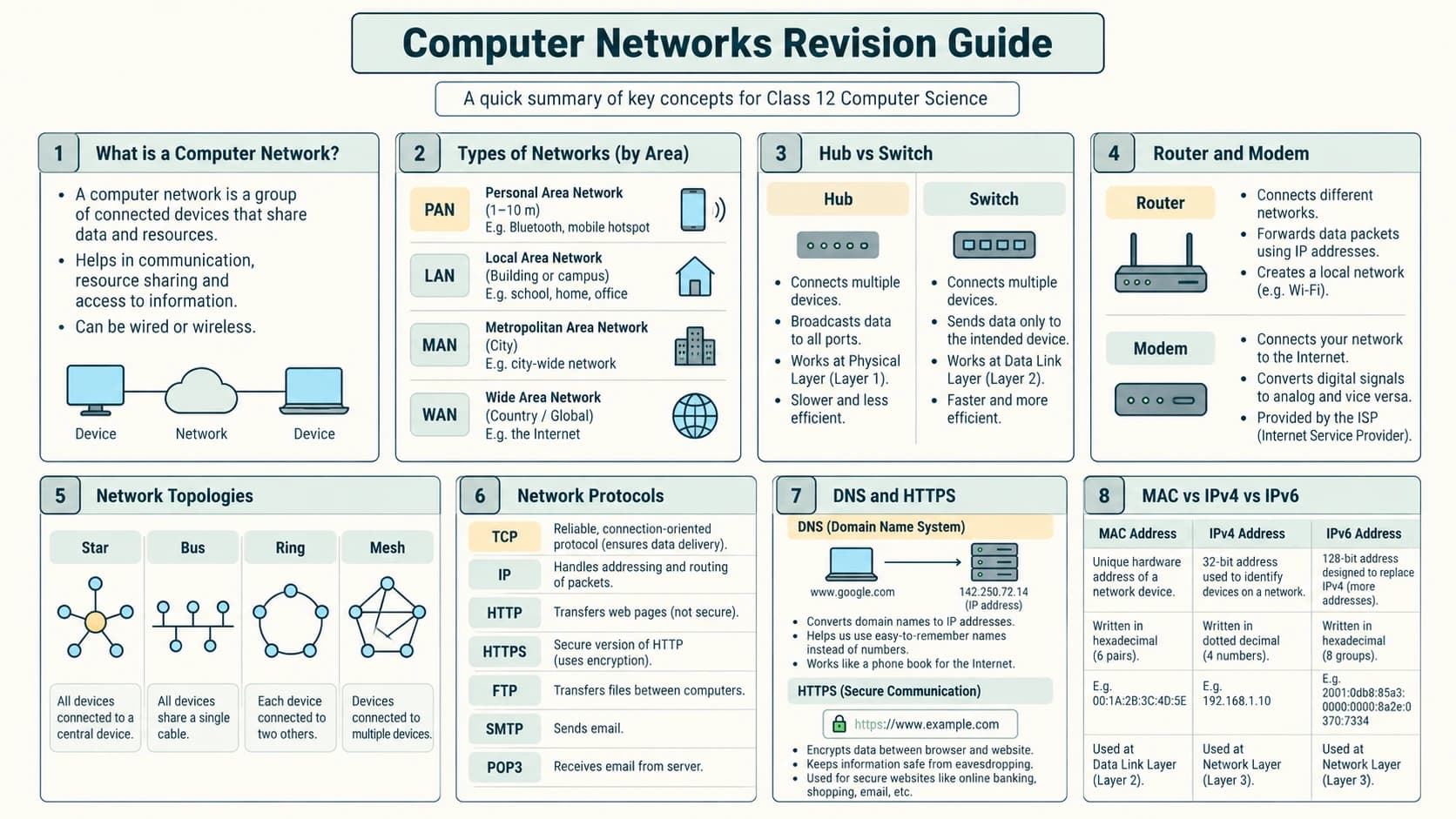
| You need to identify… | Think of… | Fast recognition clue |
|---|---|---|
| Nearby person's devices | PAN | Personal short-range network |
| One school/office site | LAN | Local resources and administration |
| City-level interconnection | MAN | Metropolitan coverage |
| Distant state/country branches | WAN | Wide geographic coverage |
| Shared linear cable | Bus | Single backbone |
| Independent cable to centre | Star | Central switch/hub |
| Hierarchical branches | Tree | Parent/child distribution |
| Every pair directly linked | Full mesh | n(n−1)/2 links |
| Direct computer link to LAN | NIC | Wired/Wi-Fi adapter |
| One LAN's Ethernet destinations | Switch | MAC forwarding |
| Different IP networks | Router | Routing table |
| Internet provider access/signalling | Modem | Access-medium interface |
| Human-friendly Web name | DNS | Resolves records, not the page itself |
| Sending email | SMTP | Mail transfer/submission |
| Retrieving via POP3 | POP3 | Mailbox access |
| Secure Web request | HTTPS | HTTP exchange secured with TLS |
| Table of HTML links | WWW | Web on top of Internet |
Essential formulas and facts
1 byte = 8 bits.1 Mbps = 1,000,000 bps(decimal).- Ideal transmission time = total transmitted bits ÷ bit rate.
- IPv4 has 32 bits; IPv6 has 128 bits; a commonly encountered Ethernet MAC has 48 bits.
- A full mesh with
nnodes hasn(n−1)/2undirected links. - IP is for network-layer routing; MAC is for local-link delivery.
- Router ≠ switch; Web ≠ Internet; DNS ≠ HTTP; link capacity ≠ actual throughput.
Fifteen viva prompts with short model replies
- What is a computer network? A set of devices linked to exchange data/resources.
- What is a node? A device participating in a network, such as a host or networking device.
- What is ARPANET? An early US-supported packet-switched research network.
- What is ISP? An Internet Service Provider.
- What is bandwidth in school networking questions? Usually the nominal data-carrying rate/capacity.
- Why convert bytes to bits? Link speeds are commonly expressed in bits per second.
- What is a MAC address? A link-layer interface identifier.
- What is IPv6's address size? 128 bits.
- What is packet switching? Sending information in shared-network packets.
- What device links IP networks? Router.
- What is a star's central failure point? Central switch/hub.
- What is an example of PAN? Phone with Bluetooth headset.
- Which protocol sends email? SMTP.
- What is DNS? Distributed system of name-related records, including IP lookups.
- Are Internet and WWW identical? No: Web is a service running over the Internet.
Student self-check
- I can identify all five communication components and draw a packet path.
- I can explain ARPANET, NSFNET, Internet and WWW without mixing them up.
- I can convert MB to Mb and calculate ideal transfer time.
- I know the MAC/IP difference and the size of IPv4 and IPv6.
- I can compare circuit and packet switching.
- I can choose suitable copper, fibre and wireless media for examples.
- I can distinguish hubs, switches, routers, modems and gateways.
- I can classify PAN/LAN/MAN/WAN and draw bus/star/tree accurately.
- I know every named protocol in the master curriculum.
- I can distinguish URL, domain, DNS, website, browser and Web server.
- I can solve all sixteen NCERT Chapter 10 questions and explain all four activities.