
Structured Query Language (SQL)
Study Structured Query Language (SQL) in Class 12 Computer Science, with detailed explanations, worked examples, NCERT solutions and practice questions.
By Akhilesh Saini
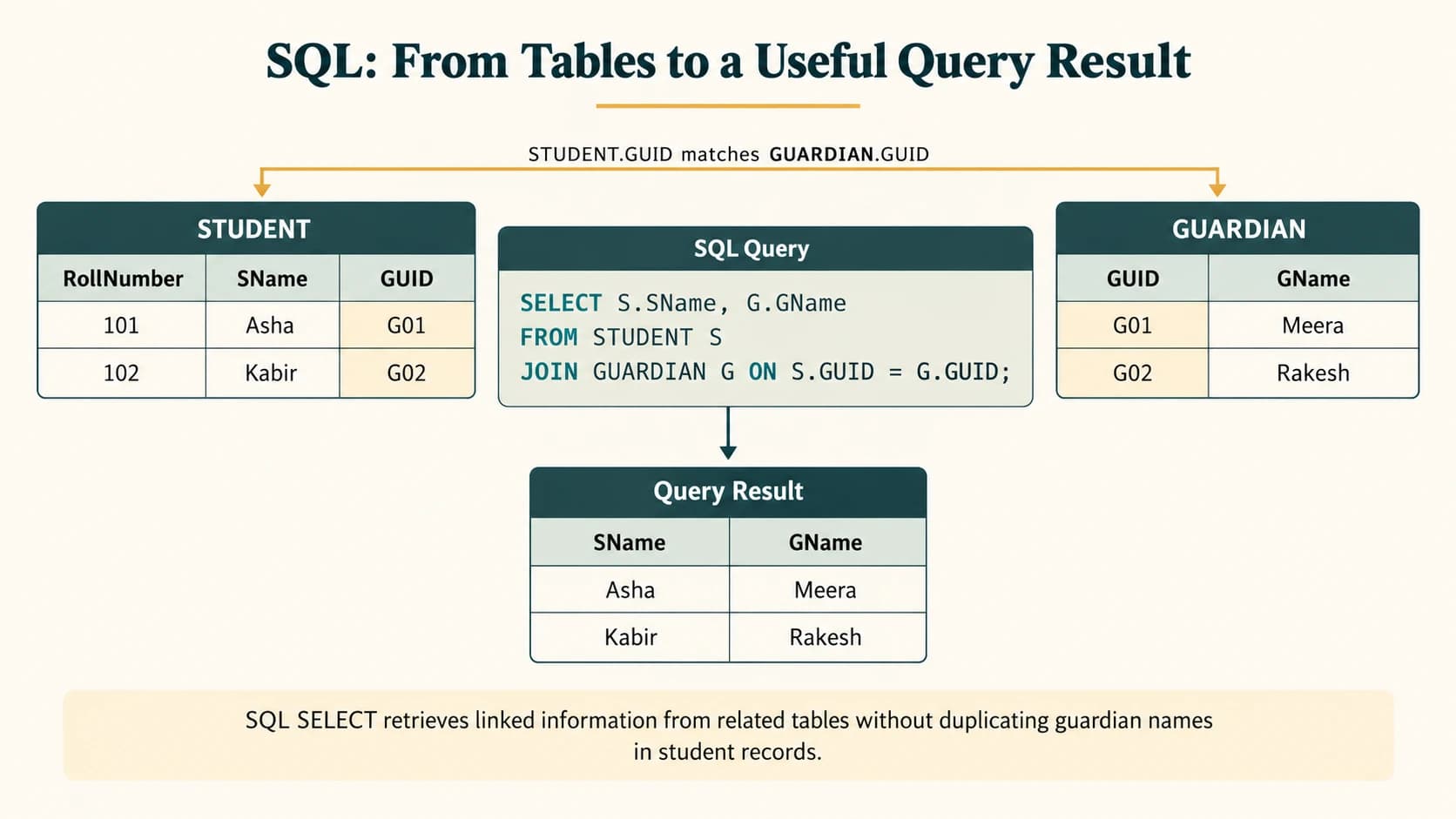
SQL is the language used to define, populate, update and query data in relational databases. A school can store students and attendance in linked tables, a shop can maintain products and bills, and a showroom can join car details to sales records. The most useful SQL questions are not only “which command?” but also which rows are selected, which data changes, and which constraints protect relationships?
Textbook coverage: NCERT Computer Science, Class XII, Chapter 9, printed pages 131–180. Its complete Exercises 1–8 (including all lettered subparts), Activities 9.1–9.15, and Examples 9.1–9.25 are covered in the later solution and worked-example sections. The textbook uses MySQL, which is the primary SQL dialect here. Practical departures from the textbook and server-version-dependent features are clearly marked. The original textbook tables are discussed and selectively restated to support solutions; they are not replaced by unrelated datasets.
Curriculum alignment: The ten SQL lesson IDs C12-SQL-01 through C12-SQL-10 map to the supplied master curriculum. The NCERT chapter additionally includes mathematical, string and date functions and UNION, INTERSECT, MINUS/EXCEPT operations; these are included as NCERT extensions (not assigned invented permanent IDs). Python-to-SQL connectivity belongs to the subsequent, separate C12-PYSQL-01–04 track, not this chapter.
Learning objectives
By the end of the chapter, you should be able to build MySQL databases and tables with appropriate data types and keys; alter and inspect table definitions; insert, update and delete safely; select and filter data with relational and logical operators; use NULL, IN, BETWEEN, LIKE, ORDER BY, DISTINCT and aliases; apply scalar and aggregate functions; group and filter grouped results; distinguish joins from Cartesian products; solve every textbook exercise; and interpret the actual results of SQL queries instead of just memorising commands.
Reading map
| Section | Curriculum lesson | Primary focus |
|---|---|---|
C12-CH09-S01 | C12-SQL-01 | SQL, DDL/DML, data types and MySQL setup |
C12-CH09-S02 | C12-SQL-02 | CREATE TABLE and constraints |
C12-CH09-S03 | C12-SQL-03 | ALTER, DROP, DESCRIBE and inspection |
C12-CH09-S04 | C12-SQL-04 | INSERT, UPDATE, DELETE |
C12-CH09-S05 | C12-SQL-05 | SELECT, WHERE and operators |
C12-CH09-S06 | C12-SQL-06 | IN, BETWEEN, NULL, LIKE |
C12-CH09-S07 | C12-SQL-07 | ORDER BY, DISTINCT and aliases |
C12-CH09-S08 | C12-SQL-08 | Aggregate functions |
C12-CH09-S09 | C12-SQL-09 | GROUP BY and HAVING |
C12-CH09-S10 | C12-SQL-10 | Cartesian product and joins |
C12-CH09-S11 | NCERT extension | Single-row math, string and date functions |
C12-CH09-S12 | NCERT extension | Set operations and SQL portability |
Section C12-CH09-S01 — SQL, MySQL, DDL, DML and Data Types
Permanent lesson: C12-SQL-01. NCERT: §§9.1–9.3.
1. Querying without describing every processing step
A DBMS manages stored data; an RDBMS uses relations (tables) with defined columns and constraints. SQL describes what result is needed. The database engine chooses how to retrieve it. Common RDBMS implementations include MySQL and PostgreSQL. The textbook uses the mysql> interactive prompt; it is not part of the actual SQL statement.
| Command class | Purpose | Examples |
|---|---|---|
| DDL (data definition) | Define/change structure | CREATE, ALTER, DROP |
| DML (data manipulation) | Add/modify/remove rows | INSERT, UPDATE, DELETE |
| DQL (often classified separately in teaching) | Retrieve rows | SELECT |
| DCL / TCL (supplemental) | Privileges / transactions | GRANT, REVOKE, COMMIT, ROLLBACK |
NCERT includes SELECT among data manipulation operations in its summary. Calling it DQL separately is a useful modern classroom classification, not a correction to the supplied source. MySQL keywords are generally case-insensitive, whereas comparisons between stored string values depend on column collation. End statements with ;.
-- Run in the MySQL command-line client (omit the mysql> prompt).
CREATE DATABASE IF NOT EXISTS StudentAttendance;
SHOW DATABASES;
USE StudentAttendance;
SHOW TABLES;
SHOW DATABASES is plural. SHOW DATABASE is not the expected MySQL statement (important in NCERT Activity 9.3). USE selects an existing database; it does not create one.
2. MySQL types, values, NULL and constraints
| Type | Practical use | Example |
|---|---|---|
INT | Whole number | RollNumber INT |
BIGINT | Large whole number | Numeric identifiers when truly needed |
DECIMAL(10,2) | Exact fixed-point money | Price DECIMAL(10,2) |
FLOAT, DOUBLE | Approximate decimal | Measurements; not ideal for money |
CHAR(n) | Fixed-length string | Fixed-width codes |
VARCHAR(n) | Variable-length string | SName VARCHAR(40) |
DATE | Calendar date | '2019-01-24' |
DATETIME, TIME | Date-time / time | Event records |
BOOLEAN / TINYINT(1) | Logical flags | MySQL uses a tiny integer representation |
A constraint restricts legal table values: NOT NULL disallows missing data, UNIQUE prevents duplicates, PRIMARY KEY uniquely identifies rows, FOREIGN KEY enforces referenced rows, DEFAULT supplies a missing field value, and CHECK tests a condition (enforcement depends on MySQL version; supported/enforced in modern MySQL 8.0.16+). SQL NULL means unknown/missing, not zero, the empty string, or the characters 'NULL'.
Common exam trap: VARCHAR(10) means a maximum of 10 characters, not a minimum. To require names of at least ten characters, use CHECK (CHAR_LENGTH(TeamName) >= 10) as well as an adequate maximum length.
Section C12-CH09-S02 — Table Creation and Constraints
Permanent lesson: C12-SQL-02. NCERT: §9.4.2 and §9.4.4.
1. Build a school database in dependency order
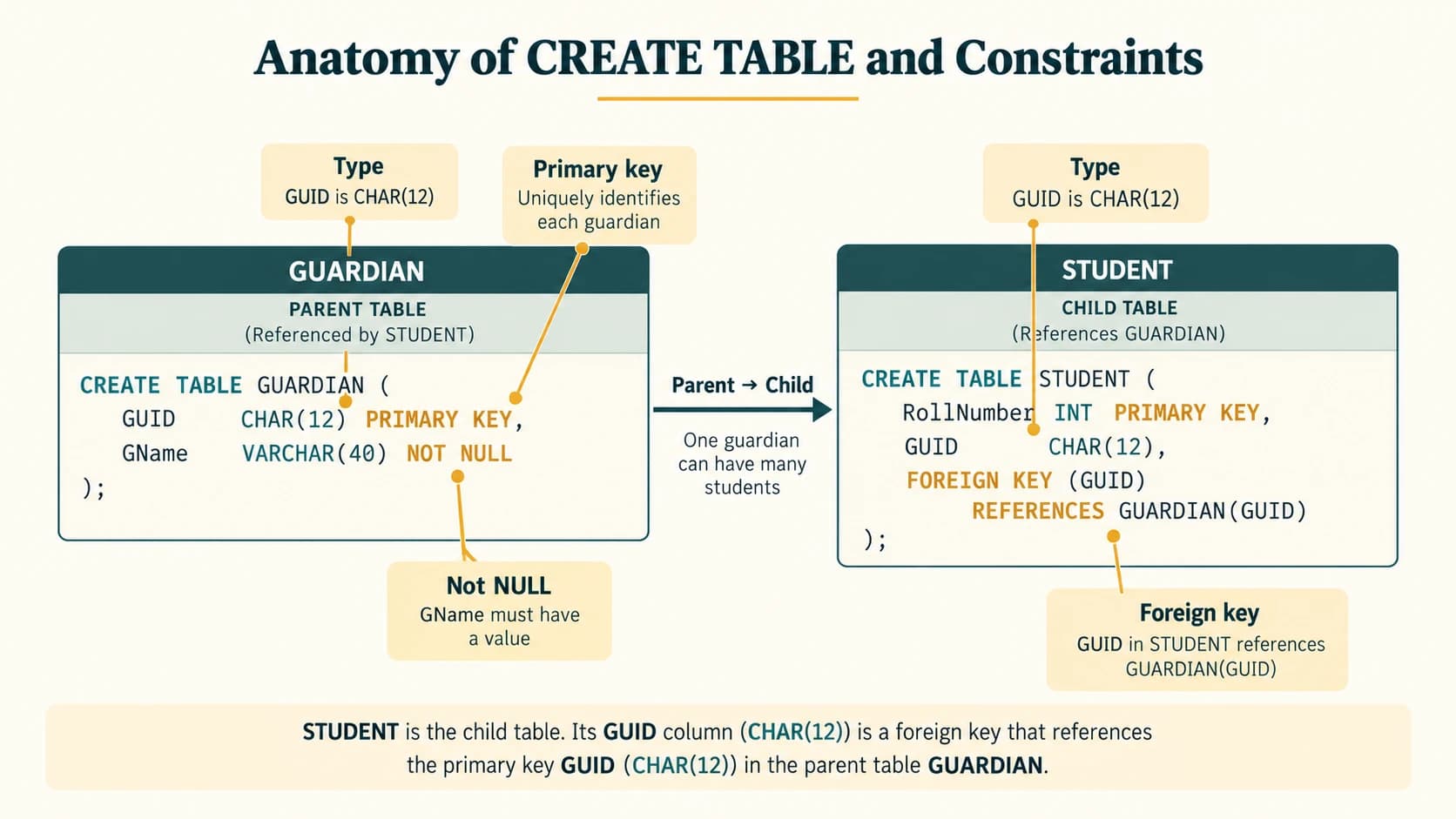
Create referenced (parent) tables before child tables. This follows NCERT's GUARDIAN → STUDENT → ATTENDANCE scenario. The sample uses compact fictional identifiers for clarity; the chapter's later activity walkthroughs give the textbook data values.
CREATE DATABASE IF NOT EXISTS StudentAttendance;
USE StudentAttendance;

CREATE TABLE GUARDIAN (
    GUID CHAR(12) PRIMARY KEY,
    GName VARCHAR(40) NOT NULL,
    GPhone CHAR(10) NULL
);

CREATE TABLE STUDENT (
    RollNumber INT PRIMARY KEY,
    SName VARCHAR(40) NOT NULL,
    SDateOfBirth DATE,
    GUID CHAR(12),
    CONSTRAINT fk_student_guardian
      FOREIGN KEY (GUID) REFERENCES GUARDIAN(GUID)
);

CREATE TABLE ATTENDANCE (
    AttendanceDate DATE NOT NULL,
    RollNumber INT NOT NULL,
    Status CHAR(1) NOT NULL,
    PRIMARY KEY (AttendanceDate, RollNumber),
    CONSTRAINT fk_attendance_student
      FOREIGN KEY (RollNumber) REFERENCES STUDENT(RollNumber),
    CHECK (Status IN ('P', 'A'))
);
The same student's roll number may occur on multiple dates because the pair (AttendanceDate, RollNumber) is the primary key. One guardian may be referenced by several students. In a more general system, a separate student–guardian relationship table may be needed if one student may have multiple guardians; that is an extension beyond the NCERT's simplified schema.
2. Column- versus table-level constraints
-- A column-level primary key:
CREATE TABLE Department (
    DeptID CHAR(3) PRIMARY KEY,
    DeptName VARCHAR(50) NOT NULL
);

-- A composite key must name multiple columns at table level:
CREATE TABLE ExamMark (
    RollNumber INT NOT NULL,
    ExamCode CHAR(5) NOT NULL,
    Marks INT CHECK (Marks BETWEEN 0 AND 100),
    CONSTRAINT pk_exam_mark PRIMARY KEY (RollNumber, ExamCode)
);
A FOREIGN KEY protects referential integrity only if it is declared and enforced; two same-named columns alone do not create a relationship. MySQL's InnoDB engine supports foreign-key constraints. CHECK constraints and names must use syntax supported by the installed server version.
Section C12-CH09-S03 — ALTER, DROP and Database/Table Inspection
Permanent lesson: C12-SQL-03. NCERT: §§9.4.1, 9.4.3–9.4.5.
1. Describe the structure, then change it
SHOW DATABASES;
USE StudentAttendance;
SHOW TABLES;
DESCRIBE STUDENT;
SHOW CREATE TABLE STUDENT;

ALTER TABLE GUARDIAN ADD COLUMN GAddress VARCHAR(120);
ALTER TABLE GUARDIAN MODIFY COLUMN GName VARCHAR(60) NOT NULL;
ALTER TABLE GUARDIAN DROP COLUMN GAddress;DESCRIBE/DESC shows columns, their types, nullability and keys; SHOW CREATE TABLE reveals the more complete schema and constraints. Use ALTER TABLE ... ADD CONSTRAINT for an explicit foreign key when it was not declared originally.
ALTER TABLE ATTENDANCE
    ADD CONSTRAINT fk_attendance_student
    FOREIGN KEY (RollNumber) REFERENCES STUDENT(RollNumber);
This is an alternative to defining the same constraint in CREATE TABLE: do not execute it if the named constraint already exists, or MySQL will reject the duplicate. In real deployments, inspect the existing structure first.
2. DROP is structural; DELETE is row-level
-- Remove an entire table (run only in a disposable practice database):
DROP TABLE IF EXISTS ScratchTable;
-- Remove a whole practice database:
DROP DATABASE IF EXISTS SandboxOnly;
ALTER TABLE changes column structure; UPDATE changes stored field values. DELETE FROM removes matching records but keeps the table definition. DROP TABLE removes its structure and data. MySQL DDL usually causes implicit commits; do not rely on a normal transaction rollback to undo DROP or many ALTER operations.
Section C12-CH09-S04 — INSERT, UPDATE and DELETE
Permanent lesson: C12-SQL-04. NCERT: §§9.5 and 9.7.
1. Insert correctly, including missing optional values
INSERT INTO GUARDIAN (GUID, GName, GPhone) VALUES
  ('000000009001', 'Mrs Sharma', '9876500011'),
  ('000000009002', 'Mr Verma', NULL);

INSERT INTO STUDENT (RollNumber, SName, SDateOfBirth, GUID) VALUES
  (101, 'Aditi', '2007-04-12', '000000009001'),
  (102, 'Rohan', '2006-11-03', '000000009002');

INSERT INTO ATTENDANCE (AttendanceDate, RollNumber, Status)
VALUES ('2026-04-15', 101, 'P');
Values must correspond to the listed columns in order; NULL is unquoted; insert parent guardians before referencing them. Omitting a nullable column uses its default (often NULL) only when it is permitted.
2. Update only selected rows
SELECT RollNumber, SName FROM STUDENT WHERE RollNumber = 101;
UPDATE STUDENT SET SName = 'Aditi Sharma' WHERE RollNumber = 101;
SELECT RollNumber, SName FROM STUDENT WHERE RollNumber = 101;

-- Undo a test row, not the entire table:
DELETE FROM ATTENDANCE
WHERE AttendanceDate = '2026-04-15' AND RollNumber = 101;
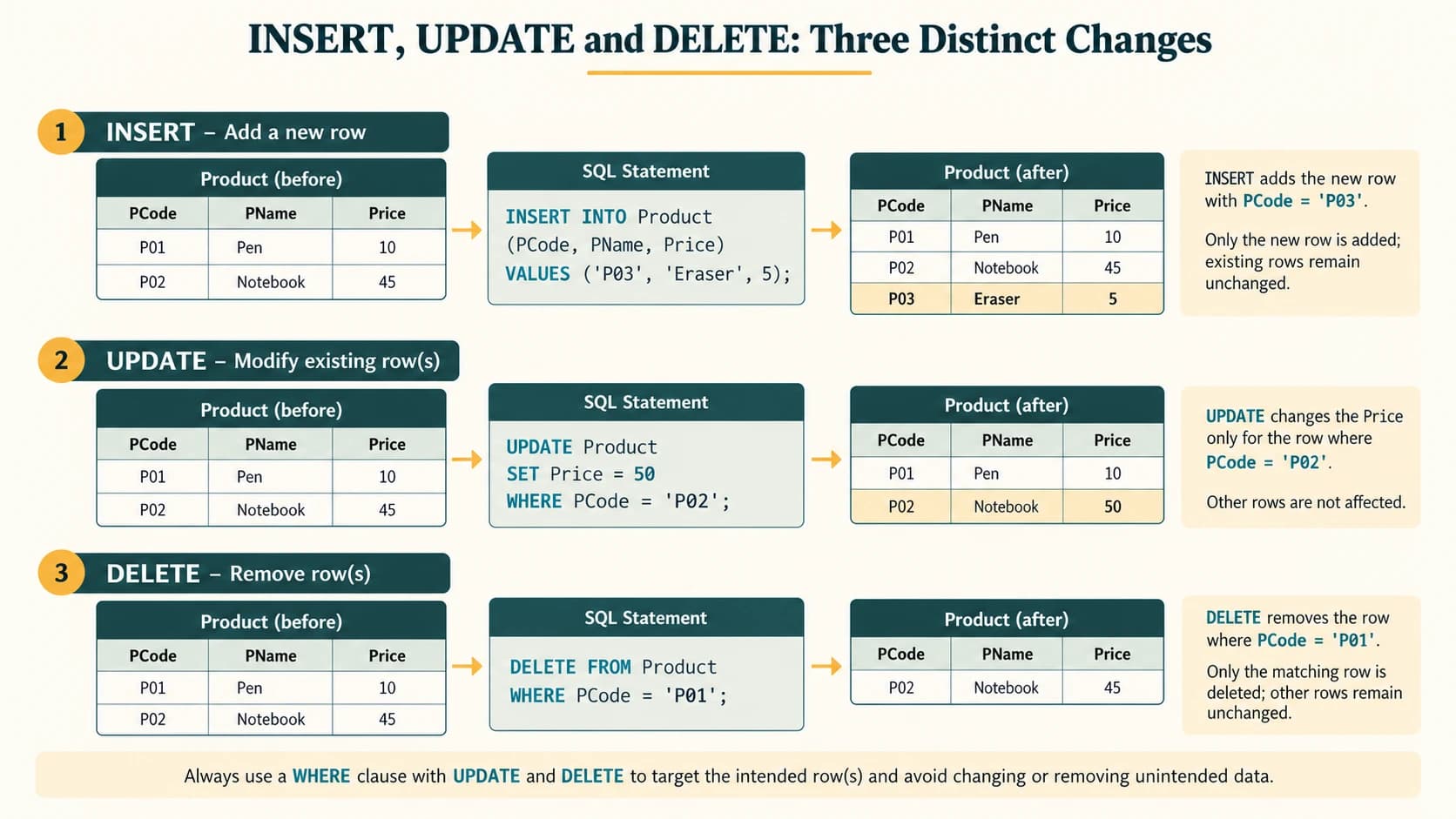
UPDATE STUDENT SET SName='X'; updates every row when it lacks WHERE. DELETE FROM STUDENT; removes all student rows if constraints permit. Prefer a SELECT with exactly the same filter before a destructive change. Foreign keys may prohibit deleting referenced parent rows without an explicit deletion policy.
Section C12-CH09-S05 — SELECT, WHERE and Comparison/Logical Operators
Permanent lesson: C12-SQL-05. NCERT: §9.6, OFFICE example.
1. Use a reusable OFFICE dataset
The NCERT EMPLOYEE table contains EmpNo, EName, Salary, Bonus, DeptID (printed column spelling varies slightly in one table). Its ten employees are Aaliya, Kritika, Shabbir, Gurpreet, Joseph, Sanya, Vergese, Nachaobi, Daribha and Tanya. Where the textbook omits Bonus for a row, use NULL rather than inventing a zero.
CREATE DATABASE IF NOT EXISTS OFFICE;
USE OFFICE;
CREATE TABLE EMPLOYEE (
    EmpNo INT PRIMARY KEY,
    EName VARCHAR(30),
    Salary DECIMAL(10,2),
    Bonus DECIMAL(10,2),
    DeptID CHAR(3)
);

INSERT INTO EMPLOYEE VALUES
(101,'Aaliya',10000,234,'D02'),
(102,'Kritika',60000,123,'D01'),
(103,'Shabbir',45000,566,'D01'),
(104,'Gurpreet',19000,565,'D04'),
(105,'Joseph',34000,875,'D03'),
(106,'Sanya',48000,695,'D02'),
(107,'Vergese',15000,NULL,'D01'),
(108,'Nachaobi',29000,NULL,'D05'),
(109,'Daribha',42000,NULL,'D04'),
(110,'Tanya',50000,467,'D05');
SELECT * FROM EMPLOYEE;
SELECT EmpNo, EName FROM EMPLOYEE;
SELECT EName AS Name, Salary * 12 AS AnnualSalary FROM EMPLOYEE;
SELECT EName, Salary FROM EMPLOYEE WHERE Salary > 40000;
SELECT EName, Salary, DeptID
FROM EMPLOYEE
WHERE Salary BETWEEN 20000 AND 50000 AND DeptID = 'D02';A WHERE condition is evaluated per row. AND requires both predicates; OR needs at least one. Use parentheses to remove ambiguity in mixed conditions. SQL comparison operators include =, <> or != (MySQL), <, >, <= and >=.
SELECT EName FROM EMPLOYEE
WHERE (Salary > 45000 OR DeptID = 'D01') AND EName <> 'Kritika';
Section C12-CH09-S06 — IN, BETWEEN, NULL and LIKE
Permanent lesson: C12-SQL-06. NCERT: §9.6 selected examples.
SELECT EName FROM EMPLOYEE WHERE DeptID IN ('D01', 'D02');
SELECT EName FROM EMPLOYEE WHERE Salary BETWEEN 20000 AND 50000;
SELECT EName FROM EMPLOYEE WHERE Bonus IS NULL;
SELECT EName FROM EMPLOYEE WHERE Bonus IS NOT NULL;
SELECT EName FROM EMPLOYEE WHERE EName LIKE 'S%';
SELECT EName FROM EMPLOYEE WHERE EName LIKE '_a%';
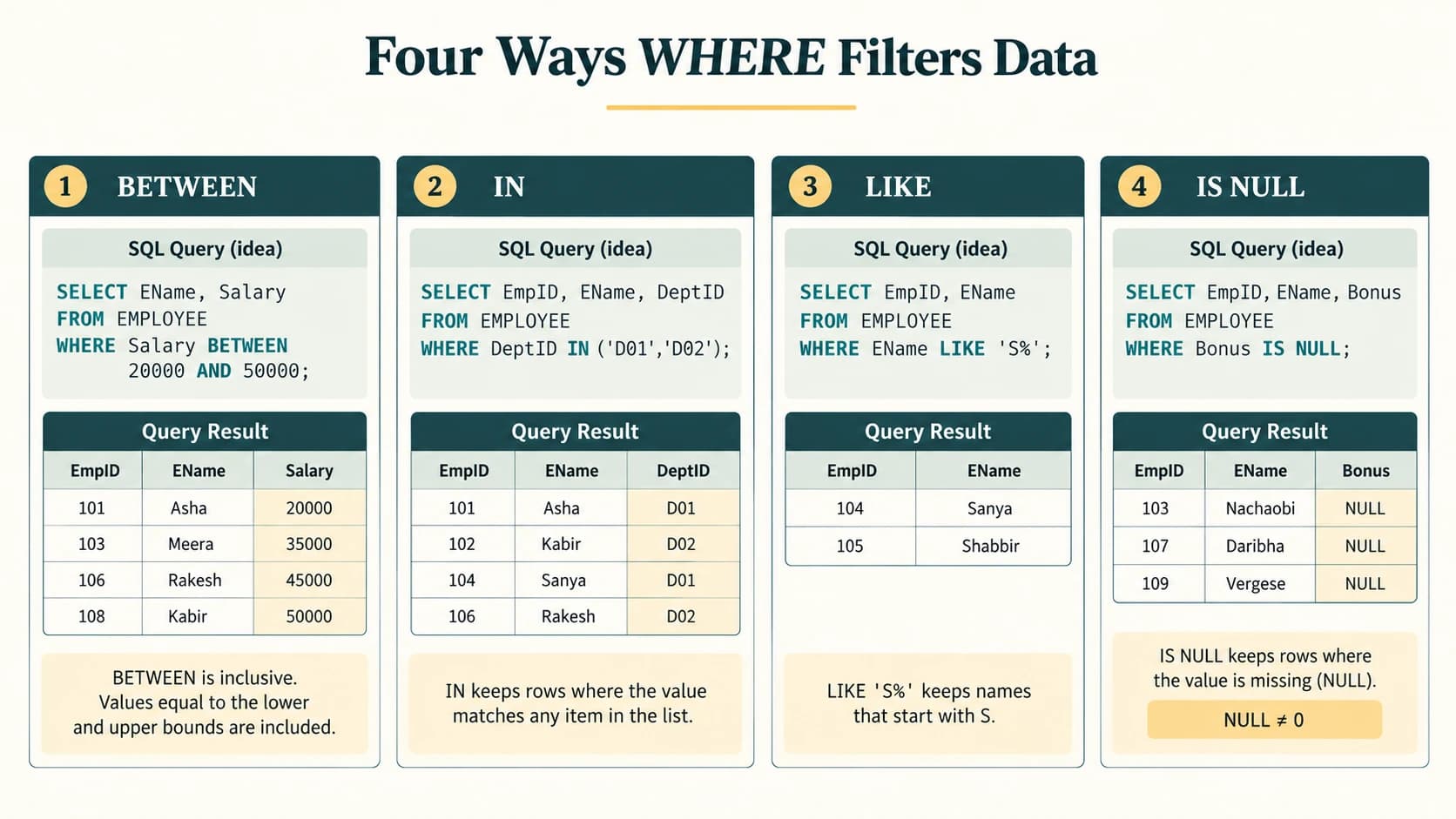
BETWEEN includes both boundaries. % matches zero or more characters, _ matches exactly one character. LIKE behaviour for letter case depends on MySQL collation. SQL's three-valued logic matters: Bonus = NULL and Bonus <> NULL do not correctly test for missing values. Use IS NULL / IS NOT NULL. An SQL expression involving NULL may evaluate to unknown and be excluded by WHERE.
Section C12-CH09-S07 — ORDER BY, DISTINCT and Aliases
Permanent lesson: C12-SQL-07. NCERT: §9.6.2 ORDER BY and distinct projections.
SELECT DISTINCT DeptID FROM EMPLOYEE ORDER BY DeptID;
SELECT EName AS EmployeeName, Salary AS MonthlySalary
FROM EMPLOYEE ORDER BY Salary DESC, EName ASC;
SELECT EName, Salary FROM EMPLOYEE ORDER BY EName ASC;
ORDER BY Salary DESC, EName ASC orders primarily by decreasing salary, then sorts tied salaries alphabetically. The default order is ascending when no ASC/DESC is stated, but SQL query results have no guaranteed ordering without an ORDER BY. An alias (AS) renames an output column, not the stored database attribute. DISTINCT removes duplicate projected rows, not all records from the source table.
Section C12-CH09-S08 — Aggregate Functions
Permanent lesson: C12-SQL-08. NCERT: §9.8.2.
1. One summary from several rows
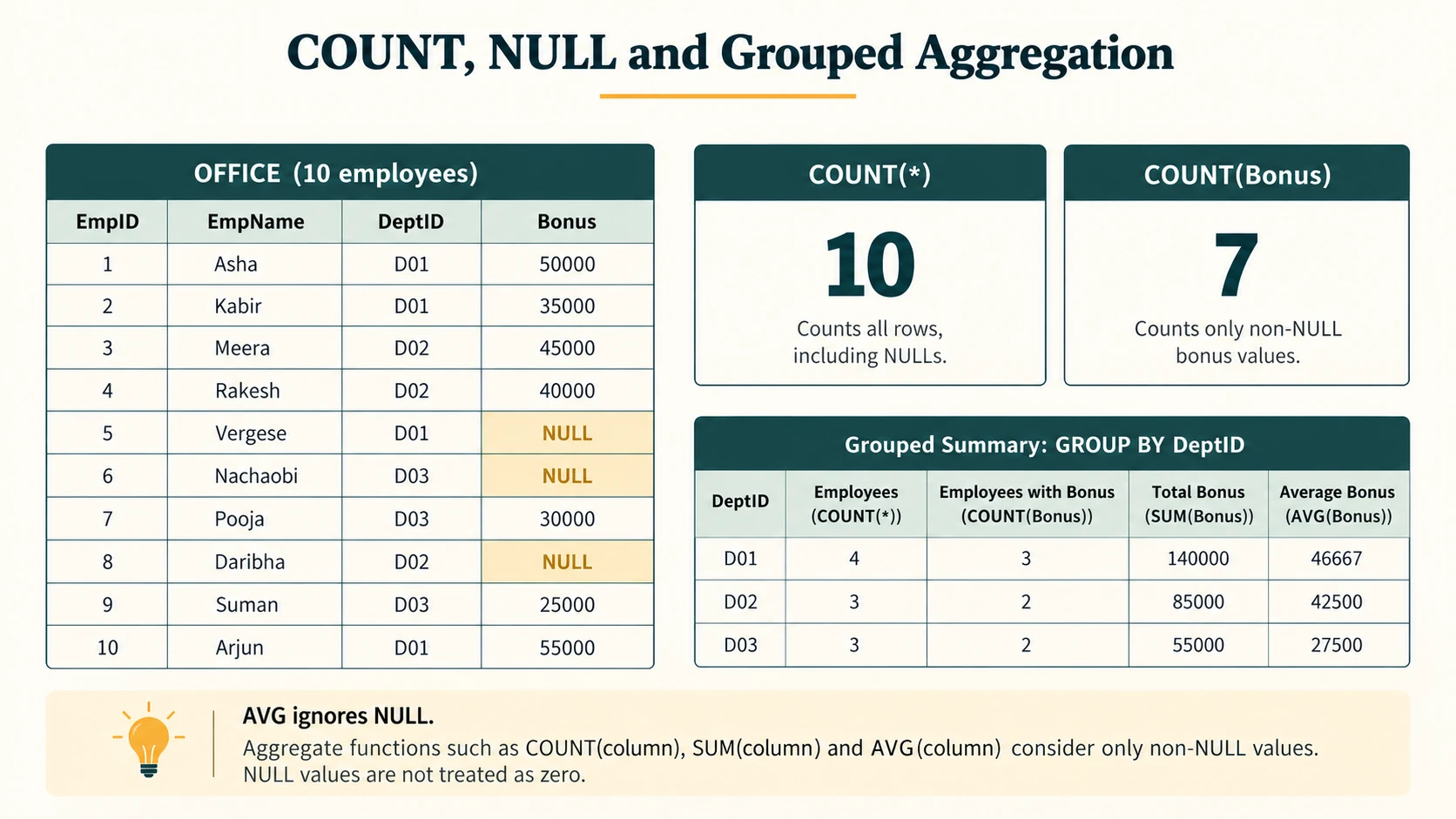
SELECT COUNT(*) AS EmployeeCount FROM EMPLOYEE;
SELECT COUNT(Bonus) AS KnownBonusCount FROM EMPLOYEE;
SELECT COUNT(DISTINCT DeptID) AS DepartmentCount FROM EMPLOYEE;
SELECT MIN(Salary) AS LowestSalary, MAX(Salary) AS HighestSalary FROM EMPLOYEE;
SELECT ROUND(AVG(Salary), 2) AS AverageSalary,
       SUM(Salary) AS TotalSalary FROM EMPLOYEE;
COUNT(*) counts rows; COUNT(Bonus) counts non-NULL bonus values; COUNT(DISTINCT DeptID) counts distinct non-NULL department IDs. SUM, AVG, MIN, MAX normally ignore NULLs. If there are no non-NULL numeric values, AVG/SUM return NULL (whereas COUNT returns 0). ROUND controls decimal presentation, not the underlying aggregation criterion.
Section C12-CH09-S09 — GROUP BY and HAVING
Permanent lesson: C12-SQL-09. NCERT: §9.9.
SELECT DeptID, COUNT(*) AS StaffCount, ROUND(AVG(Salary),2) AS AverageSalary
FROM EMPLOYEE
GROUP BY DeptID
ORDER BY DeptID;

SELECT DeptID, COUNT(*) AS StaffCount
FROM EMPLOYEE
GROUP BY DeptID
HAVING COUNT(*) >= 2
ORDER BY DeptID;
The processing sequence is conceptually: FROM → WHERE (filter rows) → GROUP BY (form groups) → HAVING (filter groups) → SELECT (display results) → ORDER BY. WHERE COUNT(*) > 1 is invalid in ordinary SQL for group filtering; HAVING COUNT(*) > 1 is the appropriate expression. Modern MySQL's ONLY_FULL_GROUP_BY mode rejects ungrouped, nonaggregated columns that are not functionally dependent on the grouped columns; avoid ambiguous queries.
Section C12-CH09-S10 — Cartesian Product, Equi-Join and Natural Join
Permanent lesson: C12-SQL-10. NCERT: §§9.10.4 and 9.11.
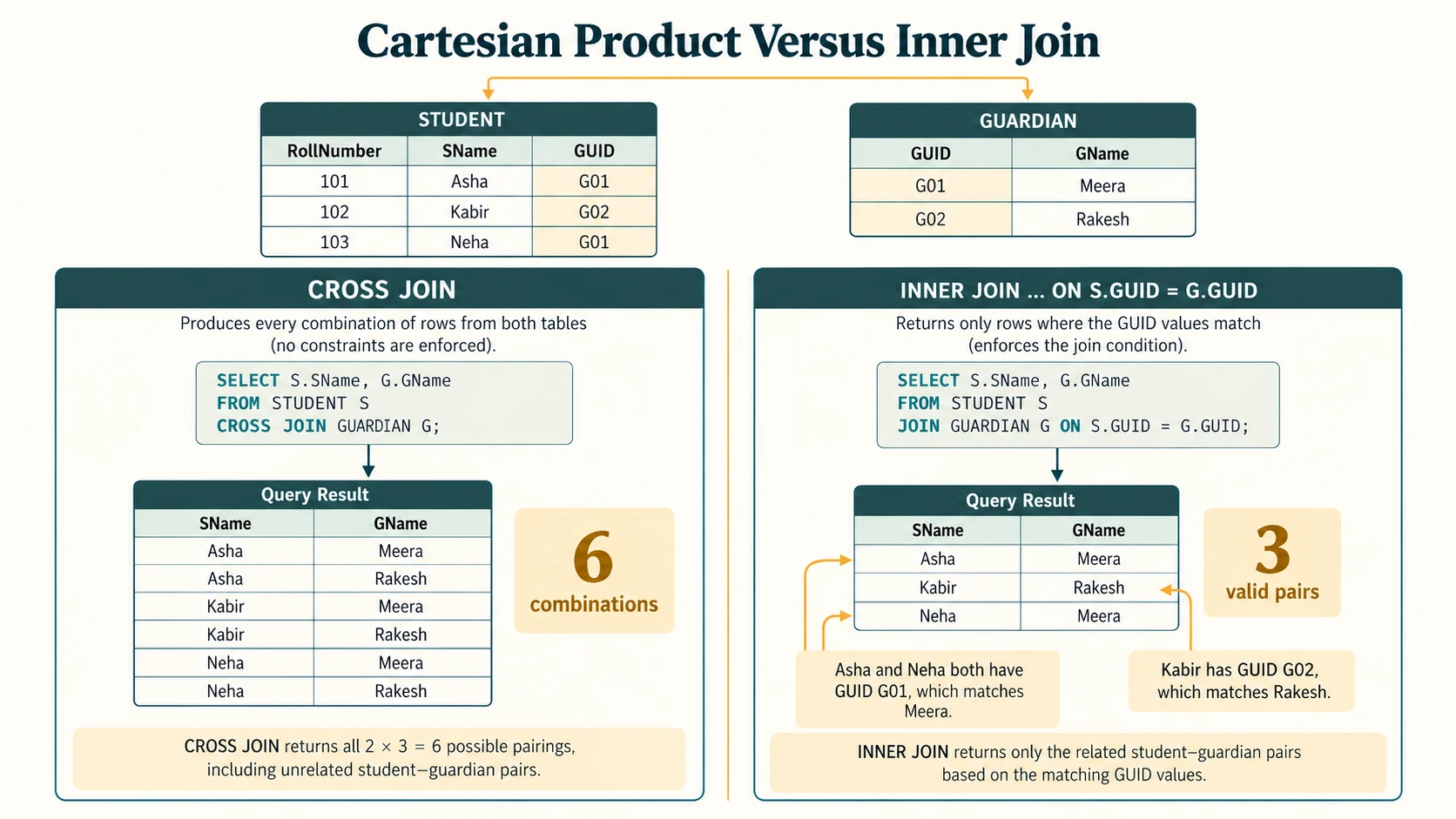
A Cartesian product pairs every row of one table with every row of another. If A has 4 rows and B has 5, A CROSS JOIN B contains 20 rows, before other filters. This is usually not what we want for parent-child lookups.
-- Cartesian product: all combinations, no matching condition
SELECT * FROM GUARDIAN CROSS JOIN STUDENT;

-- Equi-join: match foreign key with referenced primary key
SELECT S.RollNumber, S.SName, G.GName
FROM STUDENT AS S
INNER JOIN GUARDIAN AS G ON S.GUID = G.GUID;

-- Alternative old-style inner join, same equality condition
SELECT S.SName, G.GName
FROM STUDENT AS S, GUARDIAN AS G
WHERE S.GUID = G.GUID;
The INNER JOIN returns only matching rows. A LEFT JOIN retains unmatched left-table rows with NULLs on the right (supplemental). A NATURAL JOIN automatically matches columns that have the same names; it can silently change meaning when a new same-named column is added. Prefer explicit JOIN ... ON for clarity and safety.
-- Natural join is suitable only when same-named columns are intended to match.
SELECT * FROM STUDENT NATURAL JOIN GUARDIAN;
Because both example tables share GUID, this natural join equates that column. If they also shared other attribute names unexpectedly, those would become extra equality conditions.
Section C12-CH09-S11 — NCERT Supplement: Single-Row Functions
Textbook extension, not a new permanent lesson. NCERT: §9.8.1.
1. Mathematical functions
SELECT POW(2,3);                    -- 8
SELECT ROUND(342.9234,-1);          -- 340 (nearest ten)
SELECT ROUND(354.567,2);            -- 354.57
SELECT MOD(17,5);                   -- 2
SELECT CEIL(4.2), FLOOR(4.8);       -- 5, 4
ROUND(x,d) rounds to d decimal places; a negative d rounds to tens, hundreds etc. TRUNCATE(x,d) cuts digits without ordinary rounding. For monetary amounts use a fixed-precision type (DECIMAL) where possible. Functions may be applied to constants or selected table columns.
2. String functions
SELECT UPPER('database'), LOWER('SQL');
SELECT LENGTH('Informatics Practices');        -- 22 bytes for ASCII input
SELECT CHAR_LENGTH('India');                 -- 5 characters
SELECT LEFT('INDIA',3), RIGHT('Computer Science',4);
SELECT MID('Informatics',3,4), SUBSTR('Practices',3);
SELECT INSTR('student@example.com','@');
MySQL LENGTH() counts bytes, CHAR_LENGTH() counts characters. For the textbook's ASCII strings, the counts coincide. MID(s, start, count)/SUBSTR use one-based string positions in MySQL, not Python's zero-based indexing. RIGHT('Computer Science',4) returns ence.
3. Date functions
SELECT YEAR('1979-11-26'), MONTH('1979-11-26'), DAY('1979-11-26');
SELECT MONTHNAME('1979-11-26'), DAYNAME('1947-08-15');
SELECT DATE_FORMAT('1979-11-26', '%W, %e, %M, %Y');
The SQL example above uses unambiguous ISO dates. The textbook Exercise 2(d) prints dates in the slash-separated form 1979/11/26; MySQL may accept this as a date string in supported contexts, but ISO YYYY-MM-DD is preferable for portable, predictable classroom work. Date names depend on configured locale in some database systems.
Section C12-CH09-S12 — NCERT Supplement: Operations on Relations
Textbook extension, not a new permanent lesson. NCERT: §§9.10.1–9.10.3.
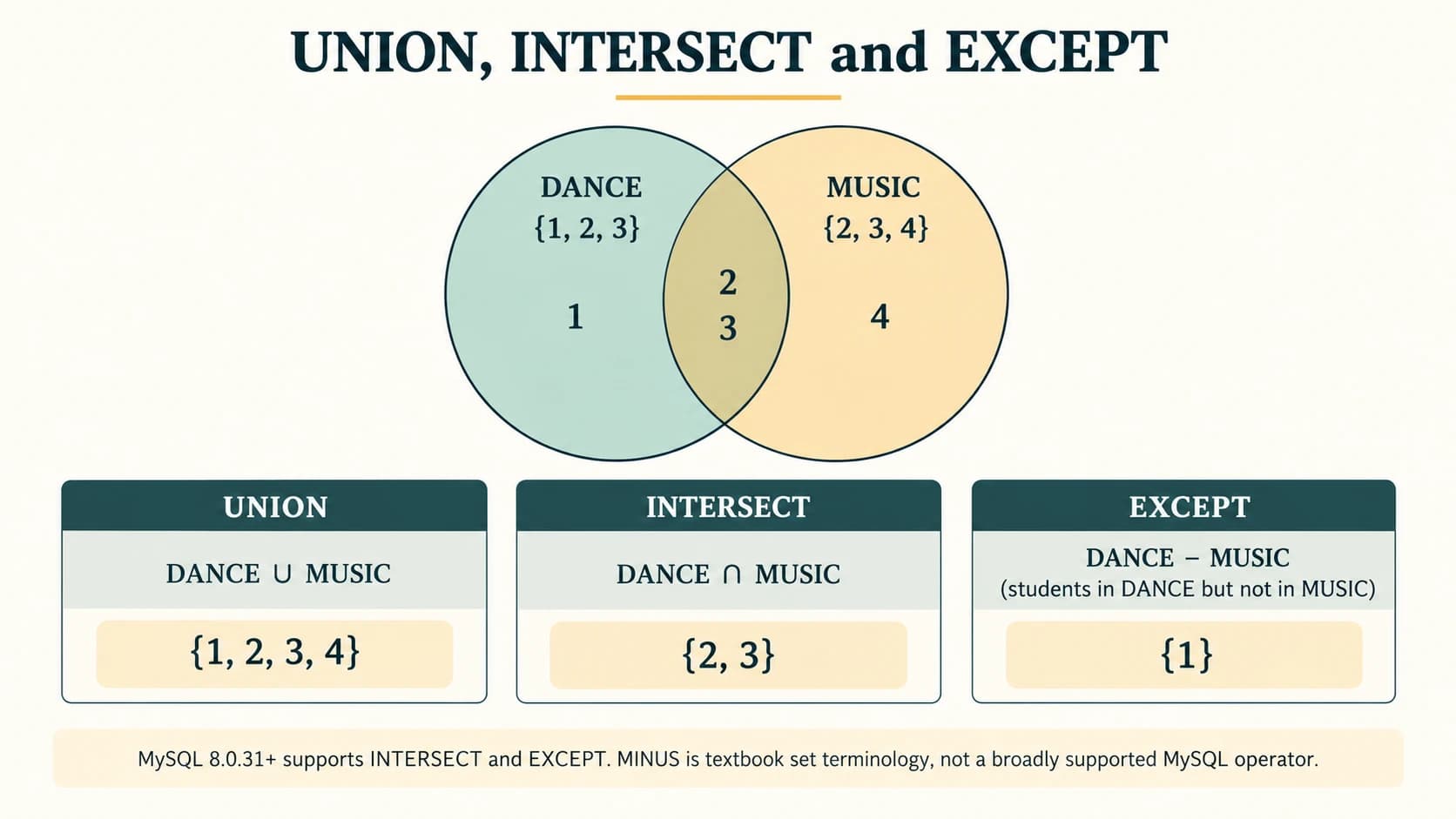
NCERT presents UNION (either set), INTERSECT (both sets), and MINUS (first set except second) using DANCE and MUSIC relations. The tables must have the same number of columns and compatible types to use direct set operations.
-- Modern MySQL versions supporting these operators:
SELECT StudentID FROM DANCE
UNION
SELECT StudentID FROM MUSIC;

SELECT StudentID FROM DANCE
INTERSECT
SELECT StudentID FROM MUSIC;

SELECT StudentID FROM DANCE
EXCEPT
SELECT StudentID FROM MUSIC;
Portability note: INTERSECT and EXCEPT are available in MySQL 8.0.31+; they are unavailable in earlier MySQL 8.0 releases. Standard SQL uses EXCEPT, while some other DBMS use the word MINUS; MySQL does not generally support the latter as the set-difference keyword. On older versions, an inner join can illustrate intersection, and NOT EXISTS can express difference:
SELECT DISTINCT D.StudentID FROM DANCE AS D
WHERE EXISTS (SELECT 1 FROM MUSIC AS M WHERE M.StudentID = D.StudentID);

SELECT D.StudentID FROM DANCE AS D
WHERE NOT EXISTS (SELECT 1 FROM MUSIC AS M WHERE M.StudentID = D.StudentID);
UNION removes duplicate results by default; UNION ALL retains them. Set membership logic and SQL NULL behaviour require extra care in advanced queries.
NCERT Activities 9.1–9.15 — Complete Worked Answers
The tasks below preserve the activity numbers and scope used in the book. Run DDL commands in a disposable practice database; where an activity builds on an earlier table, follow the stages in order rather than executing incompatible CREATE or ALTER alternatives twice.
Activity 9.1 — Other database models
Task: Name databases other than relational databases. Model answer: Hierarchical databases arrange records in parent–child structures; network databases allow richer linked-record paths; document stores (e.g. JSON document databases), key–value stores, wide-column stores and graph databases use other storage/query models. These are examples of data models/categories; individual products can support more than one model.
Activity 9.2 — Additional MySQL types
Task: Find more data types and variants of integer and floating-point types. Answer: Common integer families include TINYINT, SMALLINT, MEDIUMINT, INT, BIGINT and optional UNSIGNED variations. Decimal/real families include DECIMAL(M,D) (exact fixed point), FLOAT and DOUBLE (approximate); dates/times also include TIME, DATETIME, TIMESTAMP, YEAR. Other classes include TEXT, BLOB, JSON, ENUM and SET. Choose DECIMAL for exact prices and CHAR(12) for fixed-length numeric-looking identifiers that must not undergo arithmetic.
Activity 9.3 — Database discovery typo
Task: Execute the printed show database; and see whether StudentAttendance appears. Answer: In MySQL the correct syntax is:
SHOW DATABASES;
CREATE DATABASE IF NOT EXISTS StudentAttendance;
SHOW DATABASES;
USE StudentAttendance;
SHOW DATABASE; (singular) is not the correct listing statement and can cause a syntax error. The named database appears in the list only if it exists and the user has permission to see it.
Activity 9.4 — Create GUARDIAN and ATTENDANCE without constraints
Task: Create the two additional tables according to NCERT Tables 9.4–9.5 and show structure, without adding constraints yet. This exercise deliberately uses unconstrained columns; improve them in the next activity.
USE StudentAttendance;
CREATE TABLE GUARDIAN (
  GUID CHAR(12), GName VARCHAR(20), GPhone CHAR(10), GAddress VARCHAR(30)
);
CREATE TABLE ATTENDANCE (
  AttendanceDate DATE, RollNumber INT, AttendanceStatus CHAR(1)
);
DESC GUARDIAN;
DESC ATTENDANCE;
Expected structural result: GUARDIAN has four columns; ATTENDANCE three; no primary/foreign-key markers yet. The original NCERT activity says not to add any constraints at this step, so NOT NULL and UNIQUE are deferred even though Table 9.4 identifies eventual requirements.
Activity 9.5 — Add the attendance foreign key
Task: Define referencing and referenced columns, after keys are added. First give STUDENT a primary key if it was not already created with one, and give ATTENDANCE its composite primary key; then:
ALTER TABLE ATTENDANCE
  ADD PRIMARY KEY (AttendanceDate, RollNumber);
ALTER TABLE ATTENDANCE
  ADD CONSTRAINT fk_attendance_student
  FOREIGN KEY (RollNumber) REFERENCES STUDENT(RollNumber);
ATTENDANCE.RollNumber is the referencing/child column and STUDENT.RollNumber is the referenced/parent primary key. The same data type and compatible attributes must be used. The foreign-key addition fails if invalid existing rows exist or a duplicate named constraint was previously defined. The optional STUDENT.GUID → GUARDIAN.GUID relationship can be added similarly after creating GUARDIAN's primary key.
Activity 9.6 — Remaining GUARDIAN inserts
Task: Complete GUARDIAN records in Table 9.6. The textbook demonstrates inserting the first GUID 444444444444 (Amit Ahuja) and fourth GUID 333333333333 (Danny Dsouza, absent phone) separately. Three rows then remain—for Baichung Bhutia, Himanshu Shah and Sujata P.:
-- The first and fourth rows have already been entered in NCERT examples.
INSERT INTO GUARDIAN (GUID,GName,GPhone,GAddress)
VALUES ('111111111111','Baichung Bhutia','3612967082',
        'Flat no. 5, Darjeeling Appt., Shimla');
INSERT INTO GUARDIAN (GUID,GName,GPhone,GAddress)
VALUES ('101010101010','Himanshu Shah','4726309212',
        '26/77, West Patel Nagar, Ahmedabad');
INSERT INTO GUARDIAN (GUID,GName,GPhone,GAddress)
VALUES ('466444444666','Sujata P.','3801923168',
        'HNO-13, B-block, Preet Vihar, Madurai');
The textbook's fourth entry omits GPhone and should be inserted as shown in the chapter:
INSERT INTO GUARDIAN (GUID,GName,GAddress)
VALUES ('333333333333','Danny Dsouza','S-13, Ashok Village, Daman');
Source-design caveat: NCERT Table 9.4 specifies GAddress VARCHAR(30) while several printed addresses exceed 30 characters. Before executing unabridged entries under strict SQL mode, change the attribute to a sufficient length (ALTER TABLE GUARDIAN MODIFY GAddress VARCHAR(100)), or use valid abbreviated classroom addresses. GUID is a character identifier, not an arithmetic quantity. Never use actual students' government IDs for a demo.
Activity 9.7 — Remaining STUDENT rows
Task: Insert the remaining four rows after the book has demonstrated two inserts: RollNumber 1 Atharv Ahuja and RollNumber 3 Taleem Shah (with NULL GUID). The records below reproduce NCERT Table 9.7 values for RollNumbers 2, 4, 5, 6:
INSERT INTO STUDENT (RollNumber,SName,SDateOfBirth,GUID)
VALUES (2,'Daizy Bhutia','2002-02-28','111111111111');
INSERT INTO STUDENT (RollNumber,SName,SDateOfBirth,GUID)
VALUES (4,'John Dsouza','2003-08-18','333333333333');
INSERT INTO STUDENT (RollNumber,SName,SDateOfBirth,GUID)
VALUES (5,'Ali Shah','2003-07-05','101010101010');
INSERT INTO STUDENT (RollNumber,SName,SDateOfBirth,GUID)
VALUES (6,'Manika P.','2002-03-10','466444444666');
For a completely fresh copy of the table, also insert the two rows used in NCERT's demonstration:
INSERT INTO STUDENT (RollNumber,SName,SDateOfBirth,GUID)
VALUES (1,'Atharv Ahuja','2003-05-15','444444444444');
INSERT INTO STUDENT (RollNumber,SName,SDateOfBirth,GUID)
VALUES (3,'Taleem Shah','2002-02-28',NULL);
Verify SELECT * FROM STUDENT ORDER BY RollNumber; gives exactly six records and that non-NULL GUIDs reference existing GUARDIAN keys. Do not reinsert a row if following the textbook exercises in sequence: it would violate RollNumber uniqueness.
Activity 9.8 — AND versus OR
Task: Compare NCERT Example 9.6's salary between 20000 and 50000 with Salary > 5000 OR DeptID = '20' (as printed). Answer: AND selects the intersection of conditions; OR selects their union. Salary > 5000 OR DeptID='20' returns all ten OFFICE employees because each earns more than 5000. Salary BETWEEN 20000 AND 50000 returns the subset within the inclusive salary range. Caution: The dataset's DeptIDs use strings such as D01, D02, not numeric '20'; the OR example is a poor department-code comparison. Do not infer equal outputs from these two different filters.
SELECT EName, DeptID FROM EMPLOYEE
WHERE Salary BETWEEN 20000 AND 50000;
SELECT EName, DeptID FROM EMPLOYEE
WHERE Salary > 5000 OR DeptID = '20';
Activity 9.9 — Two ORDER BY columns
Task: Compare ORDER BY Salary, Bonus with ORDER BY Salary, Bonus DESC. Answer: First sort by salary ascending; only within equal salary values sort Bonus ascending or descending respectively. NCERT's ten salaries are all distinct, so the displayed row order is identical for both queries on Table 9.8; a tied-salary example would expose the secondary sort.
SELECT EmpNo,EName,Salary,Bonus FROM EMPLOYEE ORDER BY Salary ASC, Bonus ASC;
SELECT EmpNo,EName,Salary,Bonus FROM EMPLOYEE ORDER BY Salary ASC, Bonus DESC;
Activity 9.10 — SALE commission and credit-card transactions
Task (a): Display each invoice and its commission rounded to a whole number. (b): Select credit-card sales.
SELECT InvoiceNo, ROUND(Commission,0) AS RoundedCommission
FROM SALE ORDER BY InvoiceNo;
SELECT * FROM SALE WHERE PaymentMode = 'Credit Card';
Using NCERT's six SALE records after its commission computation: rounded commissions are I00001 73590, I00002 70839, I00003 72480, I00004 79198, I00005 44317, I00006 74426 when computed from the mathematically correct 12% of each SalePrice. The textbook's printed output contains some inconsistent computed figures (notably invoice I00004 and I00005); run ROUND(SalePrice*0.12,0) if deriving the commission afresh. Credit-card invoices are I00001 and I00005.
Activity 9.11 — INVENTORY strings, including source column-name mismatch
Task (a): Uppercase car make/name beginning with B; (b): show model substring from position 3 if length greater than 4.
-- NCERT activity says CarMake; the actual INVENTORY column is CarName.
SELECT CarID, UPPER(CarName) AS NameUpper
FROM INVENTORY WHERE CarName LIKE 'B%';

SELECT CarID, SUBSTR(Model,3) AS ModelFromThird
FROM INVENTORY WHERE CHAR_LENGTH(Model) > 4;
The Baleno rows B001 and B002 match (a). Query (b) works on both Baleno model strings and other model names longer than four characters; shorter LXI and VXI are excluded. This is a source naming discrepancy, not a newly invented column.
Activity 9.12 — EMPLOYEE suffixes and designation text
SELECT EmpName, RIGHT(EmpID,2) AS LastTwoIDCharacters
FROM EMPLOYEE;

SELECT Designation, INSTR(LOWER(Designation),'e') AS PositionOfE
FROM EMPLOYEE;
INSTR returns zero if a substring is absent. Converting to lowercase makes the search for 'e' case-independent under the function result, avoiding collation surprises. RIGHT(EmpID,2) returns 01 for E001.
Activity 9.13 — Employee date of birth and salary
SELECT EmpName, DAYNAME(DOB) AS BirthWeekday
FROM EMPLOYEE WHERE Salary > 25000;
This reports the historical weekday on the employee's birth date, not which weekday their birthday falls on this year. The NCERT CARSHOWROOM EMPLOYEE values use DATE-formatted DOB columns.
Activity 9.14 — Customer sale totals and commission extrema
SELECT SUM(SalePrice) AS TotalSaleToCustomer
FROM SALE WHERE CustID = 'C0001';
SELECT MAX(Commission) AS LargestCommission,
       MIN(Commission) AS SmallestCommission
FROM SALE;
C0001 purchased invoice I00001 (₹613,248) and I00004 (₹659,982): total ₹1,273,230. From commissions calculated as 12% of SALE prices, maximum is ₹79,197.84 for I00004 and minimum ₹44,317.20 for I00005. If you use the textbook's later commission display instead, the numbers can disagree because its sample includes inconsistent computed values; the SQL query itself is unchanged.
Activity 9.15 — Aggregate sales by employee
SELECT EmpID, COUNT(*) AS CarsSold
FROM SALE GROUP BY EmpID ORDER BY EmpID;

SELECT EmpID, MAX(SalePrice) AS BiggestSale
FROM SALE GROUP BY EmpID ORDER BY EmpID;
From Table 9.11: E001 → 1 car / ₹590321; E002 → 1 / ₹369310; E004 → 1 / ₹613248; E007 → 2 / maximum ₹659982; E010 → 1 / ₹604000. Only employees with an actual sale appear in this grouped SALE result; use a LEFT JOIN from EMPLOYEE to also show staff with zero sales.
NCERT Examples 9.1–9.25 — Worked Reading Guide
These walkthroughs identify the purpose and result logic of every numbered NCERT example, with the same textbook table context. Query snippets are original restatements so you can revise quickly before the complete exercises.
| NCERT example | What is being demonstrated | Reasoning / check |
|---|---|---|
| 9.1 | Create STUDENT table | Types, PRIMARY KEY(RollNumber); inspect with DESC |
| 9.2 | Fetch name and birth date of roll 1 | SELECT SName,SDateOfBirth FROM STUDENT WHERE RollNumber=1 returns the one matching student |
| 9.3 | Display annual salary with alias | Salary*12 evaluates per employee row; AS Name changes only the header |
| 9.4 | Filter Dept D04 and salary above 5000 | Both predicates must hold (AND) |
| 9.5 | Show all except Aaliya | WHERE NOT EName='Aaliya' filters the named record |
| 9.6 | Inclusive salary range | BETWEEN 20000 AND 50000; boundary values are included |
| 9.7 | Choose certain departments | DeptID IN ('D01','D02','D04') is membership test |
| 9.8 | Exclude departments | DeptID NOT IN ('D01','D02') excludes both codes |
| 9.9 | Ascending salary | ORDER BY Salary ASC |
| 9.10 | Descending salary | ORDER BY Salary DESC |
| 9.11 | Employees missing bonus | Bonus IS NULL, not Bonus = NULL |
| 9.12 | Bonus present and Dept D01 | Combine IS NOT NULL with AND DeptID='D01' |
| 9.13 | Names beginning with K | LIKE 'K%' |
| 9.14 | Names ending in a with salary >45000 | LIKE '%a' AND Salary>45000 |
| 9.15 | Exactly five-letter pattern ending ANYA | LIKE '_ANYA' |
| 9.16 | Names containing se | LIKE '%se%' |
| 9.17 | Names with second letter a | LIKE '_a%' |
| 9.18 | Car final price and installments | ROUND, numeric calculations, new FinalPrice; validate units and rounding |
| 9.19 | Commission on SALE | ALTER TABLE commission then UPDATE with percentage; query rounded values |
| 9.20 | Customer string transformations | LOWER, UPPER, LENGTH, INSTR, LEFT, MID |
| 9.21 | Employee DOJ dates | DAY, MONTH, YEAR, DAYNAME, MONTHNAME |
| 9.22 | INVENTORY aggregates | COUNT, COUNT(DISTINCT), AVG, MAX, MIN, SUM |
| 9.23 | Sales grouped by customer/payment | GROUP BY CustID, HAVING COUNT(*)>1; grouped counts |
| 9.24 | Cartesian product DANCE × MUSIC | Every left row pairs with every right row; counts multiply |
| 9.25 | Join UNIFORM with COST | Compare filtered old-style join, JOIN ... ON and NATURAL JOIN (only when same-named columns intended) |
Worked interpretation: On the NCERT OFFICE sample, Example 9.11's missing bonus employees are Vergese, Nachaobi and Daribha. Example 9.12's present-bonus Dept D01 employees are Kritika and Shabbir. Example 9.13 matches Kritika, and Example 9.17's '_a%' matches names whose second letter is a (e.g. Sanya, Tanya, Daribha and Nachaobi where applicable to exact spelling). These results rely on the printed sample rows and the configured SQL case/collation treatment.
NCERT Chapter 9 — Complete Exercise Solutions (Questions 1–8)
The solutions below retain the textbook's question and subpart structure. Unless explicitly marked otherwise, SQL uses MySQL syntax. CREATE/INSERT statements establish an example state; do not mix independently demonstrated updates with “original-table” output questions without restoring the initial rows.
NCERT Exercise 1 — Short answers (a–f)
1(a). Define RDBMS and name two programs
An RDBMS (Relational Database Management System) stores data as related tables, enforces supported constraints and provides a query interface based on relational operations. Examples: MySQL and PostgreSQL. PRIMARY KEY identifies a table row and a FOREIGN KEY can enforce a reference to a parent row.
1(b). Purpose of ORDER BY and GROUP BY
- (i) ORDER BY arranges the final result according to column/expression values.
ASC(default) orDESCcontrols the direction:SELECT * FROM EMPLOYEE ORDER BY Salary DESC;. - (ii) GROUP BY forms groups based on shared field values, so functions like
COUNTorAVGcan produce one summary per group:SELECT DeptID, COUNT(*) FROM EMPLOYEE GROUP BY DeptID;.
Unlike ORDER BY, GROUP BY is not an instruction to sort the result. Add ORDER BY when display order matters.
1(c). Any two differences: single-row and aggregate functions
| Single-row function | Aggregate (multiple-row) function |
|---|---|
| Evaluates values from an individual row or constant | Summarises a set/group of rows |
| Usually returns one result per input row | Usually returns one result per group or entire selection |
Examples UPPER(Name), ROUND(Price,2) | Examples SUM(Price), AVG(Price), COUNT(*) |
1(d). Cartesian product
A × B pairs every row of A with every row of B, giving rows(A) × rows(B) records and all columns from the selected tables (before projection). A relation with four rows crossed with one with five rows gives 20 combinations. Use an equi-join to keep only related pairs when that is the actual requirement.
1(e). Differentiate ALTER/UPDATE and DELETE/DROP
- (i) ALTER modifies table structure (
ADD COLUMN,MODIFY,DROP COLUMN). UPDATE modifies values already stored in matching records. For example,ALTER TABLE Product ADD COLUMN Discount DECIMAL(8,2);versusUPDATE Product SET Discount=0 WHERE Discount IS NULL;. - (ii) DELETE removes rows with optional filtering (
DELETE FROM Product WHERE PCode='P06';) while retaining table structure. DROP TABLE removes the table definition and its records (DROP TABLE Product;). MySQL DDL generally commits implicitly, so treat DROP as irreversible without backup.
1(f). Name SQL functions for four tasks
- (i) Day of week for Indian Independence Day:
DAYNAME('1947-08-15')→ Friday. - (ii) Substring beginning at a specified position:
MID(text,position,length)orSUBSTRING/SUBSTR. - (iii) Month name of a birth date:
MONTHNAME(DOB)→ e.g.'March'for a date in March. - (iv) Name in upper case:
UPPER(Name)or MySQL synonymUCASE(Name).
NCERT Exercise 2 — Predict the SQL output (a–e)
| Subpart / query | Answer | Explanation |
|---|---|---|
2(a) SELECT POW(2,3); | 8 | 2 cubed |
2(b) SELECT ROUND(342.9234,-1); | 340 | Round to nearest ten |
2(c) SELECT LENGTH('Informatics Practices'); | 21 | 11 letters + 1 space + 9 letters; all ASCII, so 21 bytes |
2(d) YEAR('1979/11/26'), MONTH(...), DAY(...), MONTHNAME(...) | 1979, 11, 26, November | Interpreting the printed date as 26 November 1979; ISO literal recommended |
2(e) LEFT('INDIA',3) | IND | First three characters |
2(e) RIGHT('Computer Science',4) | ence | Final four characters |
2(e) MID('Informatics',3,4) | form | MySQL positions 3–6 |
2(e) SUBSTR('Practices',3) | actices | From character 3 to end |
You can run the last group as one statement:
SELECT LEFT('INDIA',3) AS A,
       RIGHT('Computer Science',4) AS B,
       MID('Informatics',3,4) AS C,
       SUBSTR('Practices',3) AS D;
Textbook syntax note: The PDF uses typographic quotation marks in places. Type straight SQL single quotes and ISO-formatted date strings; fancy quotes pasted from PDFs may trigger errors.
NCERT Exercise 3 — MOVIE table queries (a–g)
The source lists MovieID, MovieName, Category, ReleaseDate, ProductionCost, BusinessCost for six rows. Three details matter: MovieIDs such as 001 are identifiers (preserve leading zeros by storing them as CHAR(3)), the Telugu/Punjabi rows have missing ReleaseDate and BusinessCost, and the exercise calls BusinessCost - ProductionCost NetProfit even though business receipts are a better economic interpretation than a business “cost”. We follow the stated arithmetic and label the interpretation clearly.
CREATE DATABASE IF NOT EXISTS FilmPractice;
USE FilmPractice;
CREATE TABLE MOVIE (
  MovieID CHAR(3) PRIMARY KEY,
  MovieName VARCHAR(40) NOT NULL,
  Category VARCHAR(25),
  ReleaseDate DATE NULL,
  ProductionCost DECIMAL(12,2),
  BusinessCost DECIMAL(12,2) NULL
);
INSERT INTO MOVIE VALUES
('001','Hindi_Movie','Musical','2018-04-23',124500,130000),
('002','Tamil_Movie','Action','2016-05-17',112000,118000),
('003','English_Movie','Horror','2017-08-06',245000,360000),
('004','Bengali_Movie','Adventure','2017-01-04',72000,100000),
('005','Telugu_Movie','Action',NULL,100000,NULL),
('006','Punjabi_Movie','Comedy',NULL,30500,NULL);
3(a). Display all information
SELECT * FROM MOVIE;Returns all six rows and all six columns. Unordered output is not guaranteed; add ORDER BY MovieID for consistent presentation.
3(b). Total_Earning calculated as the sum of two supplied costs
SELECT MovieID, MovieName,
       ProductionCost + BusinessCost AS Total_Earning
FROM MOVIE ORDER BY MovieID;
Expected values: 001 254500, 002 230000, 003 605000, 004 172000, 005 NULL, 006 NULL. This is exactly the question's formula, but summing costs is not normally total revenue/earnings; students should not confuse the requested calculation with standard financial terminology. Missing BusinessCost yields NULL.
3(c). Different movie categories
SELECT DISTINCT Category FROM MOVIE ORDER BY Category;Returns Action, Adventure, Comedy, Horror, Musical (five unique categories).
3(d). Net profit by given formula
SELECT MovieID, MovieName,
       BusinessCost - ProductionCost AS NetProfit
FROM MOVIE ORDER BY MovieID;
001 5500, 002 6000, 003 115000, 004 28000, 005 NULL, 006 NULL. The textbook's field BusinessCost is treated as a receipt-like value by this exercise; conventional profits require actual revenue minus all relevant costs.
3(e). Movie IDs/names and production cost strictly between 10,000 and 100,000
SELECT MovieID, MovieName, ProductionCost AS Cost
FROM MOVIE
WHERE ProductionCost > 10000 AND ProductionCost < 100000;
Outputs Bengali_Movie (004, 72000) and Punjabi_Movie (006, 30500). Telugu_Movie's 100000 is excluded by the strict less-than condition.
3(f). Comedy or Action movies
SELECT * FROM MOVIE WHERE Category IN ('Comedy', 'Action');Returns rows 002, 005, 006 in MovieID terms.
3(g). Unreleased movies
SELECT * FROM MOVIE WHERE ReleaseDate IS NULL;Returns rows 005 (Telugu_Movie) and 006 (Punjabi_Movie). Do not use ReleaseDate = NULL.
NCERT Exercise 4 — Design Sports and MATCH_DETAILS (a–g)
4(a). Create Sports database
CREATE DATABASE IF NOT EXISTS Sports;
USE Sports;
4(b–c). TEAM table with ID between 1 and 9, name length at least 10, table-level primary key
CREATE TABLE TEAM (
  TeamID INT NOT NULL,
  TeamName VARCHAR(40) NOT NULL,
  CONSTRAINT pk_team PRIMARY KEY (TeamID),
  CONSTRAINT chk_team_id CHECK (TeamID BETWEEN 1 AND 9),
  CONSTRAINT chk_team_name CHECK (CHAR_LENGTH(TeamName) >= 10)
);
CHAR_LENGTH >= 10 is necessary: VARCHAR(40) alone does not impose the requested minimum length. CHECK needs an enforcing server version (modern MySQL 8.0.16+); otherwise implement validation in application/database logic as supported.
4(d). Show the table's structure
DESC TEAM;
SHOW CREATE TABLE TEAM;
DESC shows columns; SHOW CREATE TABLE also exposes the actual CHECK and PRIMARY KEY definitions.
4(e). Insert the four named teams
INSERT INTO TEAM (TeamID,TeamName) VALUES
(1,'Team Titan'),
(2,'Team Rockers'),
(3,'Team Magnet'),
(4,'Team Hurricane');
The source accidentally labels the fourth item “Row 3” again; its fourth TeamID is 4. Every name satisfies the chosen minimum ten-character constraint.
4(f). Show all team rows
SELECT TeamID, TeamName FROM TEAM ORDER BY TeamID;Four rows, in TeamID sequence 1 through 4.
4(g). Build MATCH_DETAILS and insert all six matches
CREATE TABLE MATCH_DETAILS (
  MatchID CHAR(2) PRIMARY KEY,
  MatchDate DATE NOT NULL,
  FirstTeamID INT NOT NULL,
  SecondTeamID INT NOT NULL,
  FirstTeamScore INT NOT NULL CHECK (FirstTeamScore >= 0),
  SecondTeamScore INT NOT NULL CHECK (SecondTeamScore >= 0),
  CONSTRAINT fk_match_first FOREIGN KEY (FirstTeamID) REFERENCES TEAM(TeamID),
  CONSTRAINT fk_match_second FOREIGN KEY (SecondTeamID) REFERENCES TEAM(TeamID),
  CONSTRAINT chk_different_teams CHECK (FirstTeamID <> SecondTeamID)
);
INSERT INTO MATCH_DETAILS VALUES
('M1','2018-07-17',1,2,90,86),
('M2','2018-07-18',3,4,45,48),
('M3','2018-07-19',1,3,78,56),
('M4','2018-07-19',2,4,56,67),
('M5','2018-07-18',1,4,32,87),
('M6','2018-07-17',2,3,67,51);
This design protects match IDs, references existing teams, rules out a team playing itself, and prevents negative scores. NCERT asks to choose appropriate types/constraints; these protections are justified elaborations rather than invented source requirements.
NCERT Exercise 5 — Sports query results (a–e)
All answers operate on Exercise 4's six original matches.
5(a). Both scores greater than 70
SELECT MatchID FROM MATCH_DETAILS
WHERE FirstTeamScore > 70 AND SecondTeamScore > 70;
Output: M1 (90 and 86).
5(b). First score below 70, second above 70
SELECT MatchID FROM MATCH_DETAILS
WHERE FirstTeamScore < 70 AND SecondTeamScore > 70;
Output: M5 (32 and 87).
5(c). Team 1 played and won
SELECT MatchID, MatchDate FROM MATCH_DETAILS
WHERE (FirstTeamID = 1 AND FirstTeamScore > SecondTeamScore)
   OR (SecondTeamID = 1 AND SecondTeamScore > FirstTeamScore)
ORDER BY MatchID;
Output: M1 — 2018-07-17; M3 — 2018-07-19. The query allows Team 1 to appear on either side of the match, though the six printed examples place it only in FirstTeamID.
5(d). Team 2 played but did not win
SELECT MatchID FROM MATCH_DETAILS
WHERE (FirstTeamID = 2 AND FirstTeamScore <= SecondTeamScore)
   OR (SecondTeamID = 2 AND SecondTeamScore <= FirstTeamScore)
ORDER BY MatchID;
Output: M1, M4. The <= includes a draw as “not won” if draws were possible; the source's six matches do not contain draws involving Team 2.
5(e). Rename the table and columns
RENAME TABLE TEAM TO T_DATA;
ALTER TABLE T_DATA RENAME COLUMN TeamID TO T_ID;
ALTER TABLE T_DATA RENAME COLUMN TeamName TO T_NAME;
DESCRIBE T_DATA;
RENAME COLUMN is supported in modern MySQL. For older versions, use ALTER TABLE T_DATA CHANGE TeamID T_ID INT NOT NULL; with a full column definition, ensuring all previous attributes/constraints are preserved. Renaming a referenced table/column under InnoDB requires careful inspection of the resulting foreign-key metadata; execute in a copy of the database.
NCERT Exercise 6 — SCHOOLUNIFORM constraints (a–d)
The source assumes tables UNIFORM and COST already exist, with primary key UNIFORM.UCode and composite key COST(UCode,Size). The challenge is to repair missing parent references, blank item names and invalid prices. The following steps assume the columns include UCode, UName, UColor, Size, Price. Verify the existing structure before running changes.
6(a). Add a red, medium handkerchief priced at ₹100
-- First create its item row, choosing unused UCode = 7:
INSERT INTO UNIFORM (UCode, UName, UColor)
VALUES (7, 'Handkerchief', 'Red');

-- Then create the item-size-price row:
INSERT INTO COST (UCode, Size, Price)
VALUES (7, 'M', 100);
If Exercise 6(b)'s printed erroneous COST record 7, 'M', 100 has already been inserted, do not insert it twice: add the missing parent UNIFORM row and reconcile existing data before enabling the key.
6(b). Prevent price records for nonexistent uniform items
ALTER TABLE COST
ADD CONSTRAINT fk_cost_uniform
FOREIGN KEY (UCode) REFERENCES UNIFORM(UCode);
This enforces the requested parent-child relationship. The operation fails if current COST records contain UCodes absent from UNIFORM, so repair or delete invalid rows first. The source highlights precisely this absent-foreign-key anomaly.
6(c). Require a valid item name
ALTER TABLE UNIFORM
MODIFY COLUMN UName VARCHAR(40) NOT NULL;
NOT NULL prevents missing names. If the intent is also to reject blank or whitespace-only names, add an enforcing CHECK:
ALTER TABLE UNIFORM
ADD CONSTRAINT chk_uniform_name CHECK (CHAR_LENGTH(TRIM(UName)) > 0);
A NOT NULL constraint alone does not prohibit ''.
6(d). Price must be strictly positive
ALTER TABLE COST
ADD CONSTRAINT chk_positive_uniform_price CHECK (Price > 0);
The test is strict (> 0); zero is invalid. Review existing records before adding the constraint. These statements assume a MySQL version that enforces CHECK.
NCERT Exercise 7 — Product table (a–k)
The original table contains exactly six products: Washing Powder 120 Surf; Toothpaste 54 Colgate; Soap 25 Lux; Toothpaste 65 Pepsodent; Soap 38 Dove; Shampoo 245 Dove. Outputs for 7(h–k) are computed from these original prices before the update requested in 7(f), unless stated otherwise.
7(a). Create Product with suitable data types and constraints
CREATE TABLE Product (
  PCode CHAR(3) PRIMARY KEY,
  PName VARCHAR(40) NOT NULL,
  UPrice DECIMAL(10,2) NOT NULL CHECK (UPrice > 0),
  Manufacturer VARCHAR(40) NOT NULL
);
INSERT INTO Product (PCode,PName,UPrice,Manufacturer) VALUES
('P01','Washing Powder',120,'Surf'),
('P02','Toothpaste',54,'Colgate'),
('P03','Soap',25,'Lux'),
('P04','Toothpaste',65,'Pepsodent'),
('P05','Soap',38,'Dove'),
('P06','Shampoo',245,'Dove');
7(b). Identify the primary key
PCode, because every product row has a different stable product code. PName is not unique (Soap and Toothpaste each occur twice).
7(c). PCode, PName and price: name descending, tie price ascending
SELECT PCode, PName, UPrice FROM Product
ORDER BY PName DESC, UPrice ASC;| Display order | PCode | PName | Price |
|---|---|---|---|
| 1 | P01 | Washing Powder | 120 |
| 2 | P02 | Toothpaste | 54 |
| 3 | P04 | Toothpaste | 65 |
| 4 | P03 | Soap | 25 |
| 5 | P05 | Soap | 38 |
| 6 | P06 | Shampoo | 245 |
7(d). Add a Discount column
ALTER TABLE Product ADD COLUMN Discount DECIMAL(10,2) DEFAULT 0;7(e). Set discount: 10% only if price > 100, else 0
UPDATE Product SET Discount = CASE
    WHEN UPrice > 100 THEN ROUND(UPrice*0.10,2)
    ELSE 0
END;
Original-discount results: P01 ₹12, P06 ₹24.50, all others ₹0. Discount here is an amount in rupees, not a percentage field; that choice is declared explicitly.
7(f). Increase Dove prices by 12%
UPDATE Product
SET UPrice = ROUND(UPrice*1.12,2)
WHERE Manufacturer = 'Dove';
P05 Soap ₹38 → ₹42.56; P06 Shampoo ₹245 → ₹274.40. Since 7(e) was executed before 7(f), the stored Discount for P06 still reflects the prior price unless you intentionally recompute it. Query outputs below use the original six-row values as supplied by NCERT.
7(g). Number of products per manufacturer
SELECT Manufacturer, COUNT(*) AS Products
FROM Product GROUP BY Manufacturer ORDER BY Manufacturer;
Colgate 1, Dove 2, Lux 1, Pepsodent 1, Surf 1. (Counts unchanged by price update.)
7(h). Output of AVG(UPrice) by product name
SELECT PName, AVG(UPrice) AS AvgPrice
FROM Product GROUP BY PName ORDER BY PName;
Original table results: Shampoo 245, Soap 31.5, Toothpaste 59.5, Washing Powder 120. After 7(f), Shampoo and Soap averages differ; do not confuse the two database states.
7(i). Output of DISTINCT Manufacturer
SELECT DISTINCT Manufacturer FROM Product ORDER BY Manufacturer;Colgate, Dove, Lux, Pepsodent, Surf (five rows).
7(j). Output of COUNT(DISTINCT PName)
SELECT COUNT(DISTINCT PName) FROM Product;4 (Washing Powder, Toothpaste, Soap, Shampoo).
7(k). Output of MAX/MIN price by PName
SELECT PName, MAX(UPrice) AS MaxPrice, MIN(UPrice) AS MinPrice
FROM Product GROUP BY PName ORDER BY PName;| Product | MAX original price | MIN original price |
|---|---|---|
| Shampoo | 245 | 245 |
| Soap | 38 | 25 |
| Toothpaste | 65 | 54 |
| Washing Powder | 120 | 120 |
NCERT Exercise 8 — CARSHOWROOM INVENTORY (a–e)
The textbook INVENTORY lists eight cars, with CarId, CarName, Price, Model, YearManufacture, FuelType: two Dzire, two Baleno, two EECO and two SWIFT. This solution uses its original prices: D001 582613 LXI; D002 673112 VXI; B001 567031 Sigma1.2; B002 647858 Delta1.2; E001 355205 5 STR STD; E002 654914 CARE; S001 514000 LXI; S002 614000 VXI.
8(a). Add Discount to INVENTORY
ALTER TABLE INVENTORY ADD COLUMN Discount DECIMAL(12,2) DEFAULT 0;8(b). LXI 0%, VXI 10%, all other models 12%
UPDATE INVENTORY SET Discount = CASE
  WHEN Model = 'LXI' THEN 0
  WHEN Model = 'VXI' THEN ROUND(Price * 0.10, 2)
  ELSE ROUND(Price * 0.12, 2)
END;
For clarity, this stores the rupee amount of the discount, not an integer percent. Thus D001/S001 get zero; D002/S002 get 10%; both Baleno and both EECO get 12%. Apply all of the conditions in this order—otherwise an unconstrained ELSE may overwrite specific policies.
8(c). Name of the most expensive petrol car
SELECT CarName, Price FROM INVENTORY
WHERE FuelType = 'Petrol'
ORDER BY Price DESC, CarID ASC LIMIT 1;
Dzire (D002), ₹673,112. An equivalent portable approach is WHERE FuelType='Petrol' AND Price=(SELECT MAX(Price) FROM INVENTORY WHERE FuelType='Petrol'), which returns all tied most-expensive cars if any.
8(d). Average and total Baleno discounts
SELECT ROUND(AVG(Discount),2) AS AverageBalenoDiscount,
       ROUND(SUM(Discount),2) AS TotalBalenoDiscount
FROM INVENTORY WHERE CarName = 'Baleno';
B001 discount 567031×0.12 = ₹68,043.72; B002 647858×0.12 = ₹77,742.96. Therefore average ₹72,893.34 and total ₹145,786.68.
8(e). Count cars with no discount
SELECT COUNT(*) AS NoDiscountCars
FROM INVENTORY WHERE Discount = 0;
2 cars: D001 and S001 (both LXI). IS NULL would be wrong because zero discount is a numeric zero, not a missing value.
Original Practice — 30 Questions With Explained Answers
These are original exam-style practice questions, not questions copied from NCERT. They use the teaching datasets established earlier. Unless a question says otherwise, use MySQL syntax and assume the named table exists with its initial rows.
Part A — Foundations and Concepts (Questions 1–10)
Practice 1 — Identify the correct SQL command class
Question: Which command alters table structure: INSERT, SELECT, ALTER or UPDATE?
Answer: ALTER (DDL). INSERT and UPDATE change stored data; SELECT retrieves rows.
Practice 2 — Choose the data type for an exact price
Question: Which is more suitable for a money amount: FLOAT or DECIMAL(10,2)?
Answer: DECIMAL(10,2). It stores fixed decimal scale exactly, reducing binary floating-point rounding surprises.
Practice 3 — Do SQL keywords need uppercase letters?
Question: Is select * from Product; invalid because it is lowercase?
Answer: No. SQL keywords are not case sensitive in MySQL. Stored string comparisons and object naming can have environment/collation-specific case behavior.
Practice 4 — Primary-key duplication
Question: Product already contains PCode='P01'. Can another P01 record be inserted?
Answer: No, if PCode is declared PRIMARY KEY. The key must be unique and non-NULL; the server rejects a duplicate.
Practice 5 — A nullable foreign key
Question: Can STUDENT.GUID be NULL if the student has no guardian assigned?
Answer: Yes only if that foreign-key column is nullable. When non-NULL, its value must reference an existing parent key (with FK enforcement).
Practice 6 — The safest inspection before UPDATE
Question: Before changing all Dove product prices, which query should you use?
Answer: SELECT PCode, UPrice FROM Product WHERE Manufacturer='Dove';. Inspect exactly the rows that will match the UPDATE filter.
Practice 7 — DELETE versus DROP
Question: Which keeps the table while removing matching records: DROP TABLE Product or DELETE FROM Product WHERE PCode='P01'?
Answer: DELETE with WHERE. DROP TABLE removes the table definition too.
Practice 8 — BETWEEN endpoints
Question: Does Salary BETWEEN 10000 AND 50000 include 10000 and 50000?
Answer: Yes, both. It is equivalent to Salary >=10000 AND Salary <=50000 for ordinary non-NULL numeric values.
Practice 9 — Invalid NULL comparison
Question: Why is WHERE Bonus=NULL wrong for detecting missing values?
Answer: Equality with NULL is unknown, not true. Use WHERE Bonus IS NULL.
Practice 10 — COUNT of missing bonuses
Question: If EMPLOYEE contains 10 rows but only 7 non-NULL Bonus values, what are COUNT(*) and COUNT(Bonus)?
Answer: 10 and 7 respectively. COUNT(Bonus) ignores NULL values.
Part B — Write and Trace Queries (Questions 11–20)
Practice 11 — Create a class timetable
Question: Write a table TIMETABLE with one row per (ClassCode, Weekday, PeriodNo) and nonempty Subject.
Answer:
CREATE TABLE TIMETABLE (
  ClassCode VARCHAR(10) NOT NULL,
  Weekday VARCHAR(12) NOT NULL,
  PeriodNo INT NOT NULL CHECK (PeriodNo BETWEEN 1 AND 8),
  Subject VARCHAR(40) NOT NULL,
  PRIMARY KEY(ClassCode,Weekday,PeriodNo)
);
Reason: Multiple days/periods reuse a class code, so a composite key identifies one scheduled lesson uniquely.
Practice 12 — Add a column without changing existing rows manually
Question: Add Email to STUDENT as an optional field.
Answer: ALTER TABLE STUDENT ADD COLUMN Email VARCHAR(80) NULL;. Existing records may have NULL in Email; no row changes are required.
Practice 13 — Filter with IN
Question: Write the query selecting OFFICE employee name and department for D01, D03 and D05.
Answer:
SELECT EName, DeptID FROM EMPLOYEE
WHERE DeptID IN ('D01','D03','D05');
Reason: IN is a concise equality membership test; it does not require multiple OR conditions.
Practice 14 — LIKE patterns
Question: Find names whose third character is n.
Answer: SELECT EName FROM EMPLOYEE WHERE EName LIKE '__n%';. Two underscores stand for positions 1 and 2; n must occupy position 3.
Practice 15 — Order ties predictably
Question: Display product name and price with highest prices first; if equal, sort PCode ascending.
Answer:
SELECT PCode, PName, UPrice
FROM Product ORDER BY UPrice DESC, PCode ASC;
Reason: First sort by descending price; only ties use increasing PCode.
Practice 16 — Name aliases and arithmetic
Question: Show each car's CarName and net price after discount.
Answer:
SELECT CarID, CarName, Price - COALESCE(Discount,0) AS NetPrice
FROM INVENTORY;
Reason: This assumes Discount is a currency amount. COALESCE treats missing Discount as zero for display, a policy that should be explicit.
Practice 17 — Group employees by department
Question: Return department codes and average salary, highest average first.
Answer:
SELECT DeptID, ROUND(AVG(Salary),2) AS AvgSalary
FROM EMPLOYEE GROUP BY DeptID ORDER BY AvgSalary DESC;
Reason: Salary is aggregated inside each department; sorting follows grouping.
Practice 18 — HAVING minimum group size
Question: Which manufacturers have at least two products?
Answer:
SELECT Manufacturer,COUNT(*) AS ProductCount
FROM Product GROUP BY Manufacturer HAVING COUNT(*) >= 2;
On the six NCERT products, only Dove qualifies with 2 products.
Practice 19 — Detect rows not connected to a guardian
Question: Find students without a guardian assigned.
Answer: SELECT RollNumber,SName FROM STUDENT WHERE GUID IS NULL;. This finds NULL assignments, not “dangling” non-NULL references; a declared FK protects the latter.
Practice 20 — Show guardian/student pairs
Question: Display each student's name and corresponding guardian name.
Answer:
SELECT S.SName,G.GName
FROM STUDENT AS S JOIN GUARDIAN AS G ON S.GUID=G.GUID;
Reason: The inner join keeps only linked pairs. To retain students whose GUID is NULL, use LEFT JOIN starting from STUDENT.
Part C — Tracing, Edge Cases and Reasoning (Questions 21–30)
Practice 21 — Division of a Cartesian product
Question: TABLE_A has 6 rows and TABLE_B has 7. How many rows in an unrestricted CROSS JOIN?
Answer: 42 (6×7). With 3 columns in A and 2 in B, the result displays five columns if SELECT * is used (assuming distinct names are displayed distinctly).
Practice 22 — Natural join surprise
Question: GUARDIAN and STUDENT share GUID; later another same-named column is added to both. Could NATURAL JOIN change its matching condition?
Answer: Yes. It matches on all same-named columns, not just GUID. Prefer an explicit JOIN ... ON S.GUID = G.GUID for predictable semantics.
Practice 23 — Difference between COUNT and SUM
Question: COUNT(Discount) returns 8 for eight cars, while SUM(Discount)=0. Is that contradictory?
Answer: No. COUNT(Discount) counts non-NULL values, including zeros; SUM adds their numeric amounts. Eight zero discounts yield count 8 and sum 0.
Practice 24 — The wrong condition on an aggregate
Question: Correct SELECT DeptID,COUNT(*) FROM EMPLOYEE WHERE COUNT(*)>1 GROUP BY DeptID;.
Answer:
SELECT DeptID,COUNT(*) FROM EMPLOYEE
GROUP BY DeptID HAVING COUNT(*) > 1;
Reason: WHERE filters ordinary rows before grouping; HAVING filters group summaries.
Practice 25 — Preserve codes that begin with zeros
Question: Store MovieID 001 as INT or CHAR(3)?
Answer: CHAR(3), because the leading zeros are part of an identifier. Numeric INT 1 would not retain the desired three-character representation.
Practice 26 — Unknown string lengths
Question: A varchar column is VARCHAR(20). Will it reject a two-letter string because it is shorter than 20?
Answer: No. It sets a maximum, not an exact or minimum length. Use CHAR_LENGTH(...) inside an enforcing check if minimum length is required.
Practice 27 — Pattern against a literal underscore
Question: LIKE 'Hindi_%' contains _. Does it specifically mean a literal underscore?
Answer: Not by default: _ is a single-character wildcard in LIKE. To match an actual underscore, use an appropriately escaped pattern such as LIKE 'Hindi\\_%' under a MySQL backslash-escape mode that supports it, or specify an explicit ESCAPE character consistent with server settings.
Practice 28 — Aggregate rows with absent prices
Question: MOVIE has BusinessCost NULL for two films. Does AVG(BusinessCost) treat those as zeros?
Answer: No. SQL AVG ignores NULLs. If an exercise intentionally treats missing receipts as zero, it must explicitly apply a policy like AVG(COALESCE(BusinessCost,0))—which changes the meaning.
Practice 29 — MySQL EXCEPT compatibility
Question: Why might SELECT ... INTERSECT SELECT ... fail on an older MySQL installation?
Answer: MySQL support for INTERSECT and EXCEPT begins with 8.0.31. On older versions, use equivalent supported join/EXISTS techniques (with careful duplicate and NULL handling).
Practice 30 — Comprehensive bill total
Question: In BILL_LINE(BillID,ItemID,Quantity) and ITEM(ItemID,Price), write a query for total for each bill.
Answer:
SELECT L.BillID, SUM(L.Quantity * I.Price) AS BillTotal
FROM BILL_LINE AS L
JOIN ITEM AS I ON I.ItemID = L.ItemID
GROUP BY L.BillID
ORDER BY L.BillID;
Reason: Each bill line contributes quantity times unit price, and GROUP BY gives one sum per bill. Real billing systems often store immutable PriceAtSale on each line so future catalogue price changes do not rewrite the historical bill total.
Quick Revision — SQL in One View
| If the question asks… | Start with… | Common error to avoid |
|---|---|---|
| Create a table / database | CREATE TABLE / CREATE DATABASE | Forgetting a primary key or data type |
| Inspect a table | DESCRIBE, SHOW CREATE TABLE | Confusing structure with rows |
| Add/remove a column | ALTER TABLE | Using UPDATE for schema change |
| Insert a record | INSERT INTO ... VALUES | Missing quote for strings or FK parent |
| Change a value | UPDATE ... SET ... WHERE | Omitting WHERE |
| Remove selected rows | DELETE ... WHERE | Accidentally deleting all rows |
| Show matching rows | SELECT ... FROM ... WHERE | Comparing NULL using = |
| Show one value per distinct category | DISTINCT or GROUP BY | Unintended duplicates |
| Sort results | ORDER BY ... ASC/DESC | Assuming grouping implies order |
| Compute a total/average | SUM, AVG, etc. | Assuming NULL equals zero |
| Compute per-group summaries | GROUP BY | Selecting ambiguous ungrouped columns |
| Restrict aggregated groups | HAVING | Writing aggregate in ordinary WHERE |
| Join related tables | INNER JOIN ... ON | Missing join predicate (Cartesian product) |
| Match prefix/suffix | LIKE 'A%' / LIKE '%a' | Confusing % with _ |
| Keep all records on the left | LEFT JOIN | Mistaking an inner join for outer join |
SQL order of clauses
SELECT column_or_aggregate AS Alias
FROM TableA
JOIN TableB ON TableA.Key = TableB.Key
WHERE row_condition
GROUP BY grouped_column
HAVING group_condition
ORDER BY output_column DESC;
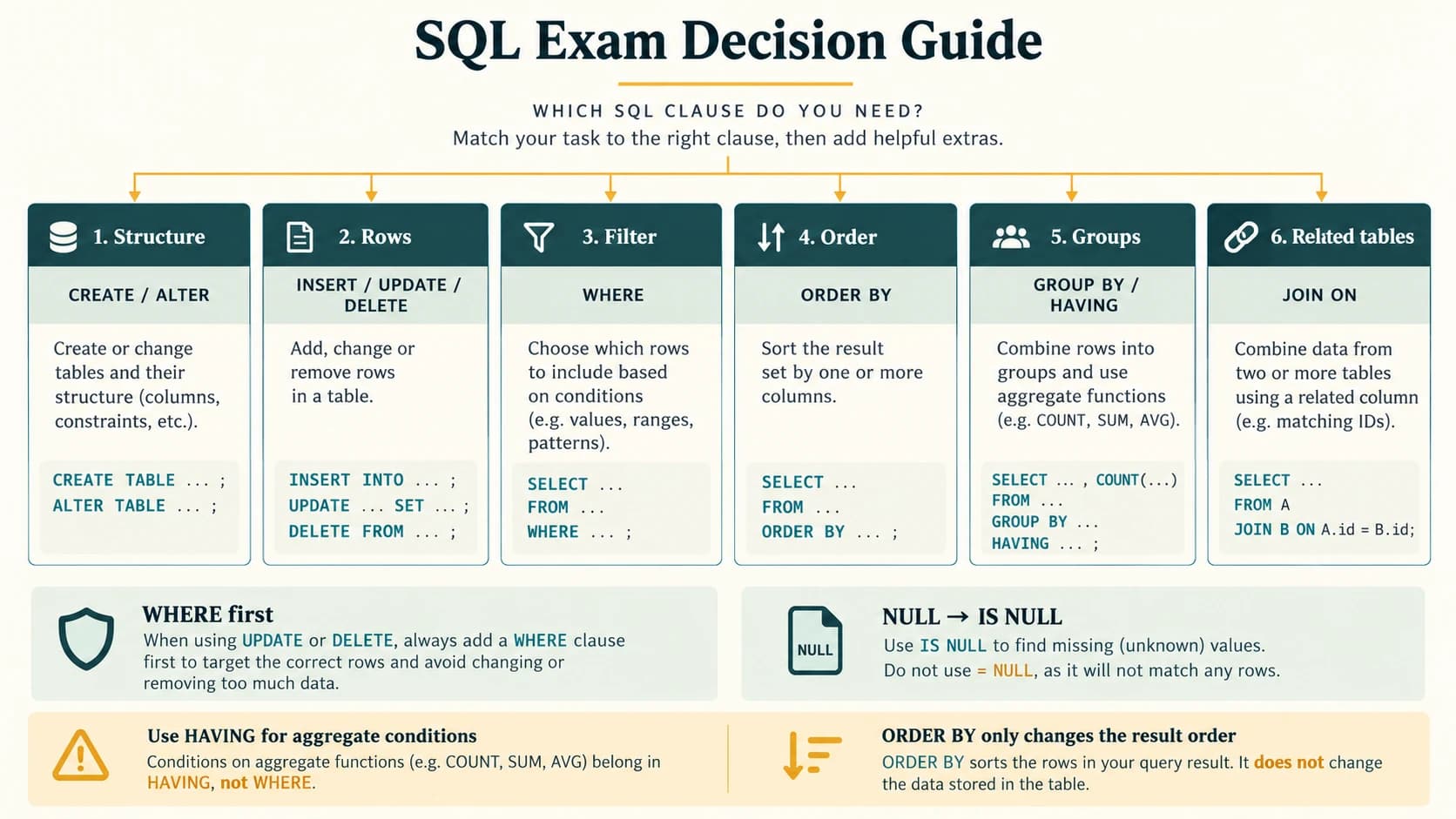
Remember WHERE before GROUP BY; HAVING after GROUP BY. Write LIMIT last when you need just the first N rows in MySQL. Do not rely on an unspecified row order.
Useful distinctions for viva
Q. Can one table have multiple candidate keys? Yes; choose one as primary. Q. Is a foreign key automatically unique? No; several students may reference one guardian. Q. Can a foreign key be NULL? If the column is allowed to be NULL. Q. Does COUNT(*) ignore rows containing NULLs? No. Q. Is SUM a single-row function? No, it aggregates values. Q. Does BETWEEN include boundaries? Yes. Q. Does ORDER BY change the stored table order? No; it orders a query's result. Q. Does MySQL LENGTH always count characters? It counts bytes; use CHAR_LENGTH for characters. Q. Can NATURAL JOIN become unsafe after schema changes? Yes, due to extra same-named columns. Q. Should you use DROP on real practice data without backup? No.
Student self-assessment
- I can create tables, choose keys and understand FK insertion order.
- I can distinguish
ALTER,UPDATE,DELETEandDROP. - I can write SELECT/WHERE, BETWEEN, IN, LIKE and NULL queries.
- I can predict ORDER BY, DISTINCT, COUNT and GROUP BY results.
- I can explain a Cartesian product versus a correctly joined result.
- I can solve all eight NCERT exercise groups and all 15 activities.
- I can explain where an NCERT example depends on a MySQL version or a source inconsistency.