
Searching
Study Searching in Class 12 Computer Science, with detailed explanations, worked examples, NCERT solutions and practice questions.
By Akhilesh Saini
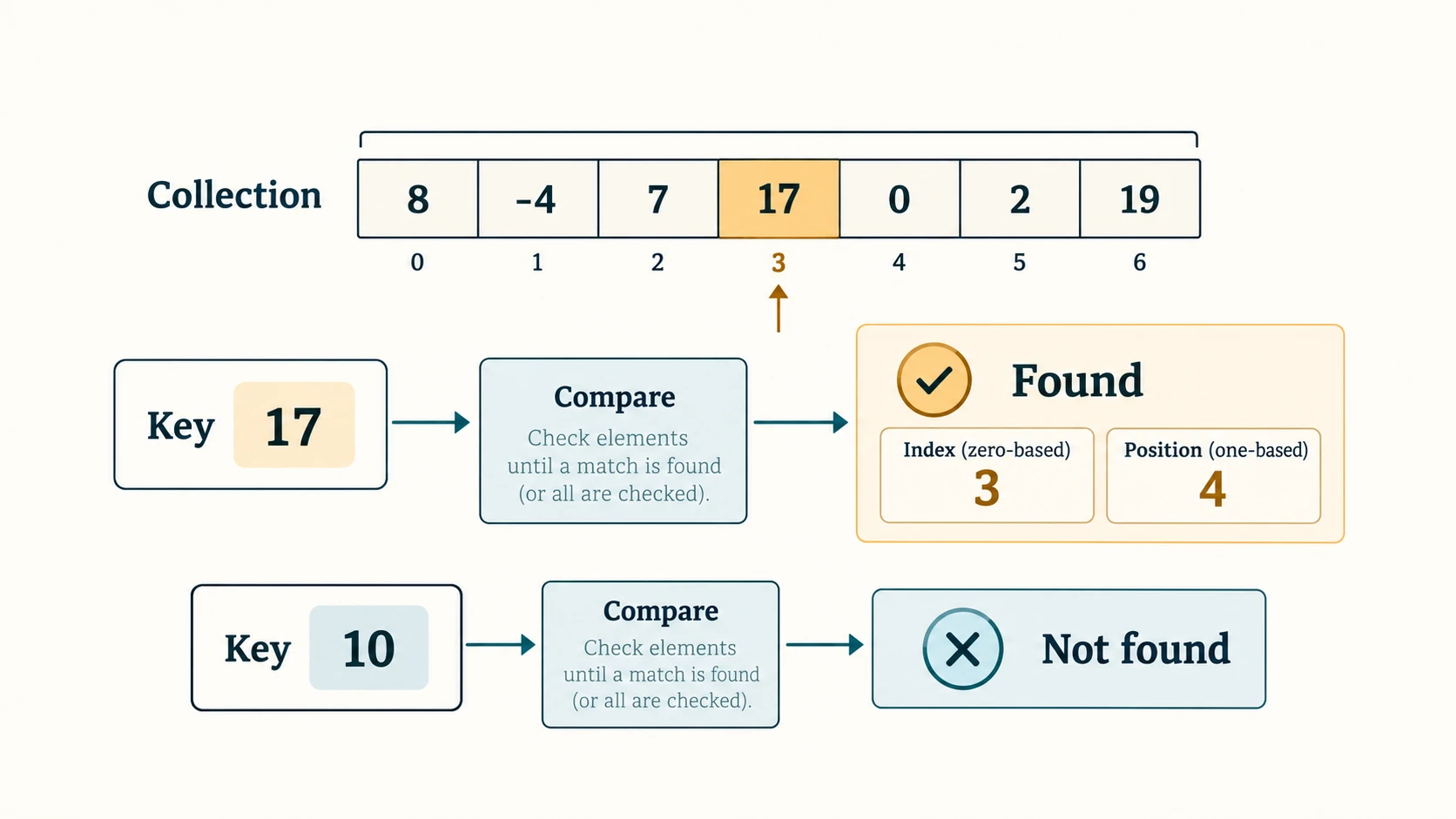
Searching is the process of finding out whether a key appears in a collection and, when it does, where it appears. For a classroom roll register, an unsorted list, or a dictionary-like index, the appropriate search technique depends on what we already know about the data. This chapter builds from straightforward list scanning to a faster search on an ordered list, and finally to a hash table that computes a storage location from a key.
Source and scope. Based on the supplied NCERT Computer Science, Class XII, Chapter 6 “Searching,” printed pp. 81–96 (Reprint 2026–27; lecs106.pdf). Its 9 numbered end-of-chapter exercises, 5 activities (6.1–6.5), 2 algorithms (6.1–6.2) and 3 worked programs (6-1–6-3) are all treated below. The explanations, programs and extra practice are original educational writing, not reproductions of the entire textbook. Some minor source inconsistencies are explicitly identified rather than silently repeated.
Curriculum alignment. The uploaded Class XII master curriculum specifies permanent lesson IDs for Python fundamentals, files, stack, networks, databases and Python–SQL. It does not assign a separate C12 lesson ID to Searching, even though Searching is present in this NCERT textbook. Therefore, the stable IDs C12-CH06-S01 to S07 are reading-section anchors only. Do not invent or repurpose permanent curriculum lesson identifiers.
Student navigation: Seven teaching sections → NCERT activities → textbook-program walkthroughs → complete Exercise 1–9 solutions → 30 original practice questions with answers → quick revision and viva. The website can serve these as distinct pages even though the editorial deliverable is a single Markdown file.
Learning objectives
By the end, a student should be able to: trace key comparisons in linear search; distinguish a 0-based index from a 1-based position; write and test linear search on unsorted lists; state why an ordered list is essential for ordinary binary search; trace first, last and mid using integer division; write iterative binary search; contrast linear and logarithmic work; create a table using a remainder hash function; detect collisions; implement simple collision handling; solve all 9 NCERT exercises with exact trace counts; answer 5 textbook activities; and apply the concepts to names, scores and lookup records.
Reading map
| Section | Focus | NCERT reference | Outcome |
|---|---|---|---|
C12-CH06-S01 | Search fundamentals | §6.1 | Key, index, position, result |
C12-CH06-S02 | Linear Search | §6.2; Algorithm 6.1; Program 6-1 | Sequential scan; first match |
C12-CH06-S03 | Binary Search | §6.3; Algorithm 6.2; Program 6-2 | Sorted input; interval narrowing |
C12-CH06-S04 | Performance and traces | §6.2–§6.3, Tables 6.1–6.7 | Counts, edge cases, examples |
C12-CH06-S05 | Hashing fundamentals | §6.4; Program 6-3 | Remainder-based lookup |
C12-CH06-S06 | Collisions and safe hash tables | §6.4.1 + clearly marked extension | Chaining; safe search |
C12-CH06-S07 | Choosing a method | Chapter summary + original examples | Apply the right tool |
Section C12-CH06-S01 — What Does Searching Mean?
1. Key, collection, match and result
If scores = [35, 80, 45, 80] and we search for the key 80, the element occurs twice. A basic search may return the first match. That is a design choice: another application might require all matches. Do not confuse the value being searched with its storage position.
| Term | Example | Meaning |
|---|---|---|
| Collection | [35, 80, 45, 80] | Data to inspect |
| Key | 80 | Value being sought |
| Index | 1 | Python's zero-based position of the first matching value |
| Human position | 2 | The same location when counting positions from 1 |
| Successful search | Key appears at least once | Return a location or True |
| Unsuccessful search | Key absent | Return a deliberately chosen sentinel (None or -1) |
A return value of 0 is a perfectly valid index; therefore, if search(...): is wrong if a function returns indices. Test result is not None or result != -1 according to the function's contract. An unsuccessful search does not imply an exception, and an empty list must behave predictably.
2. Unsorted versus sorted collections
In unsorted [17, 3, 21, 8, 11], finding 8 requires inspection of the earlier items unless another index has been built. In sorted [3, 8, 11, 17, 21], an order comparison can eliminate a whole portion at once. A hash table uses a different approach: compute a bucket/slot from the key.
The NCERT's three methods answer related questions, but each requires different assumptions. Linear Search works with unordered data. Binary Search depends on consistent ordering. Hash search depends on a valid hash table and a collision strategy.
Section C12-CH06-S02 — Linear Search
1. Algorithm 6.1 explained
Start at index 0 and examine the current element. If it equals the key, return that index; otherwise advance to the next element. Stop either on a match or after the final item. The source algorithm reports index + 1 as a human position; a Python function can instead return the index if documented clearly.
Pseudocode (original adaptation of NCERT Algorithm 6.1):
LINEAR-SEARCH(items, key)
    FOR index = 0 TO length(items) - 1
        IF items[index] == key
            RETURN index
    RETURN -1
def linear_search(items, key):
"""Return the first matching 0-based index, or -1."""
for index, value in enumerate(items):
if value == key:
return index
return -1
values = [8, -4, 7, 17, 0, 2, 19]
index = linear_search(values, 17)
print(index) # 3
print(index + 1) # 4 (human position)
print(linear_search(values, 10)) # -1Trace for key 17 (NCERT Example 6.1):
| Attempt | Index | Item | Equals 17? | Outcome |
|---|---|---|---|---|
| 1 | 0 | 8 | No | Continue |
| 2 | 1 | -4 | No | Continue |
| 3 | 2 | 7 | No | Continue |
| 4 | 3 | 17 | Yes | Stop; position 4 |
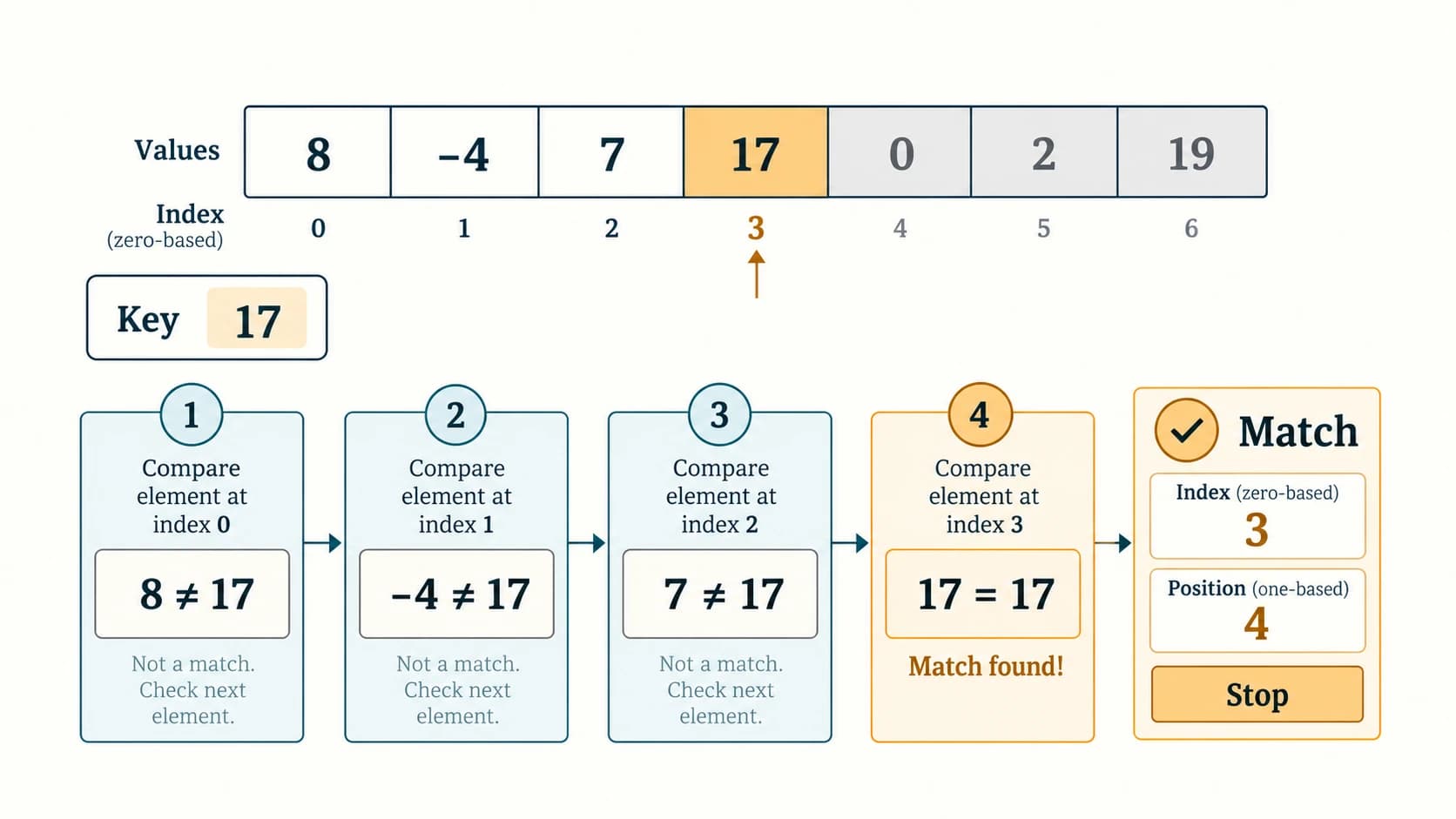
Best case: key is at the first position, one comparison, O(1). Worst case: key is last or absent, n comparisons, O(n). Average case: in a straightforward uniform position model, (n+1)/2 comparisons for a successful search; O(n) time overall. Extra storage for this loop is O(1).
2. Textbook Program 6-1 — classroom-ready input version
The textbook asks how many integers to enter, takes the list and key, then reports the first matching 1-based position. The following complete program maintains that behaviour without using list as a variable name:
def linear_search_position(numbers, key):
    for i, value in enumerate(numbers):
        if value == key:
            return i + 1
    return None

def main():
    count = int(input("How many elements? "))
    if count < 0:
        print("Count cannot be negative")
        return
    numbers = [int(input(f"Number {i + 1}: ")) for i in range(count)]
    key = int(input("Key to search: "))
    position = linear_search_position(numbers, key)
    if position is None:
        print(f"{key} is not present")
    else:
        print(f"{key} is at position {position}")

if __name__ == "__main__":
    main()
Sample input and output: enter 4 items 12, 23, 3, -45, then key 23 → position 2. Searching for 100 → not present. Invalid nonnumeric input raises ValueError; for a larger user-facing program add a try/except ValueError around conversion, as learned in Chapter 1.
3. Duplicates, all matches and empty input
Basic linear search returns the first duplicate encountered. For [42, -2, 32, 8, 17, 19, 42, 13, 8, 44], the key 8 occurs at positions 4 and 9; the standard function returns position 4.
def all_positions(items, key):
    """All 1-based positions; an empty list means no matches."""
    return [i + 1 for i, value in enumerate(items) if value == key]

print(all_positions([42, -2, 32, 8, 17, 19, 42, 13, 8, 44], 8))
# [4, 9]
print(all_positions([], 8))  # []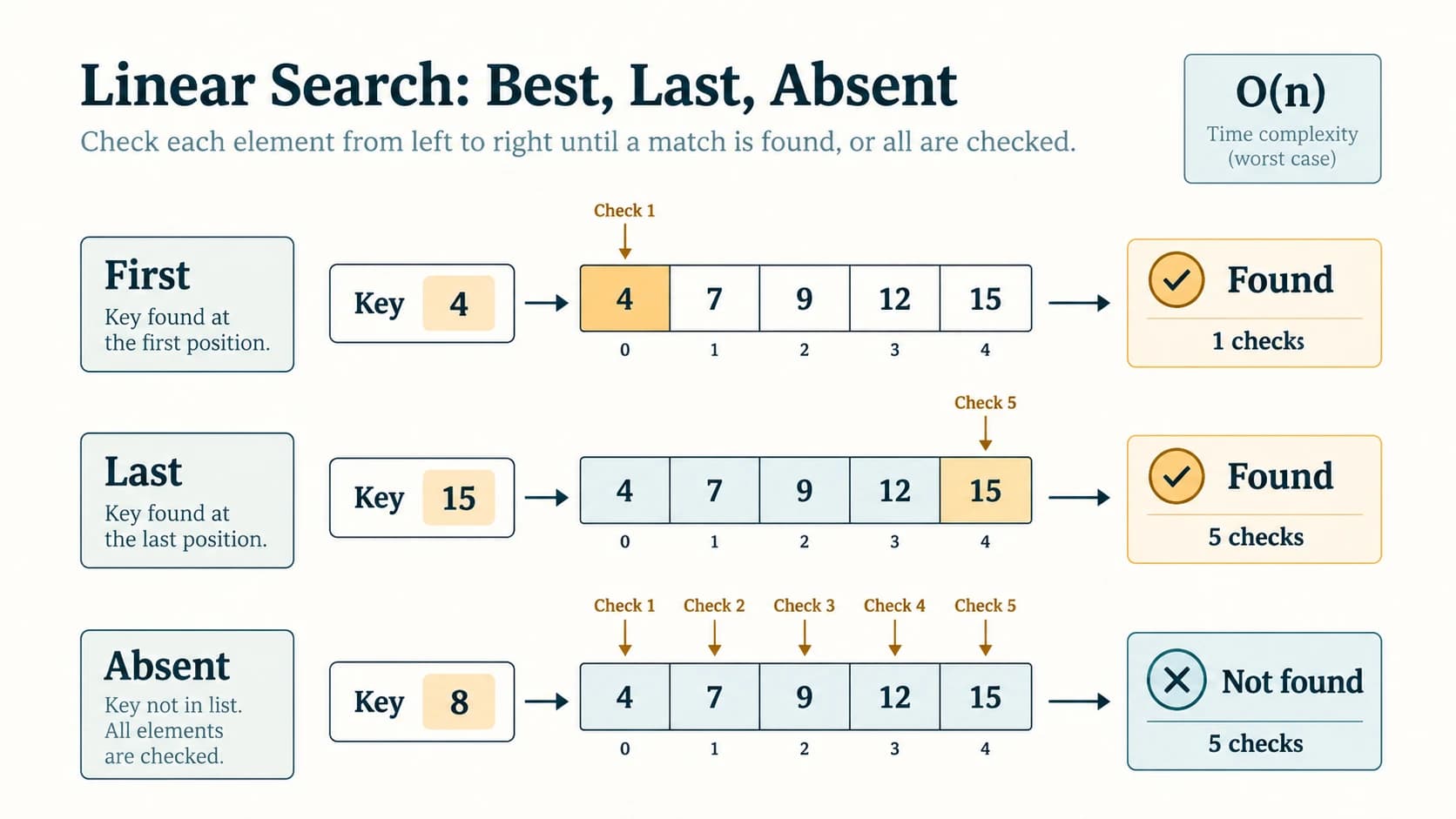
Section C12-CH06-S03 — Binary Search
1. First check the ordering
Binary Search is efficient because the values are sorted. If the current middle value is larger than the key in ascending order, only the left side could contain that key; if smaller, only the right side could contain it. For a descending list, the inequalities must be reversed. If the input is not sorted according to the comparison rule, ordinary Binary Search may silently return an incorrect "not found".
The dictionary analogy in NCERT works precisely because its entries are alphabetically arranged. The textbook's second Program 6-2 demonstration enters descending values despite asking for ascending input, then displays an unsuccessful search. That output must not be used to validate binary search on an unordered/descending list. Our tested program checks or sorts the data first.
2. Algorithm 6.2 and interval invariant
Maintain first=0, last=len(items)-1. While first <= last, set mid = (first+last)//2. Compare items[mid] with the key, then either stop on equality or discard the half that cannot contain the key. Recalculate mid inside every loop iteration—one omission in the textbook's ordered pseudocode presentation could otherwise lead a novice to reuse a stale midpoint.
Pseudocode (corrected implementation of the textbook idea):
BINARY-SEARCH(sorted_items, key)
    first = 0
    last = length(sorted_items) - 1
    WHILE first <= last
        mid = (first + last) // 2
        IF sorted_items[mid] == key
            RETURN mid
        ELSE IF sorted_items[mid] < key
            first = mid + 1
        ELSE
            last = mid - 1
    RETURN -1
def binary_search(sorted_items, key):
"""Ascending input required. Return a matching index, or -1."""
first, last = 0, len(sorted_items) - 1
while first <= last:
mid = (first + last) // 2
if sorted_items[mid] == key:
return mid
if sorted_items[mid] < key:
first = mid + 1
else:
last = mid - 1
return -1
numbers = [-4, 0, 2, 7, 8, 17, 19]
print(binary_search(numbers, 7)) # 3
print(binary_search(numbers, -4)) # 0
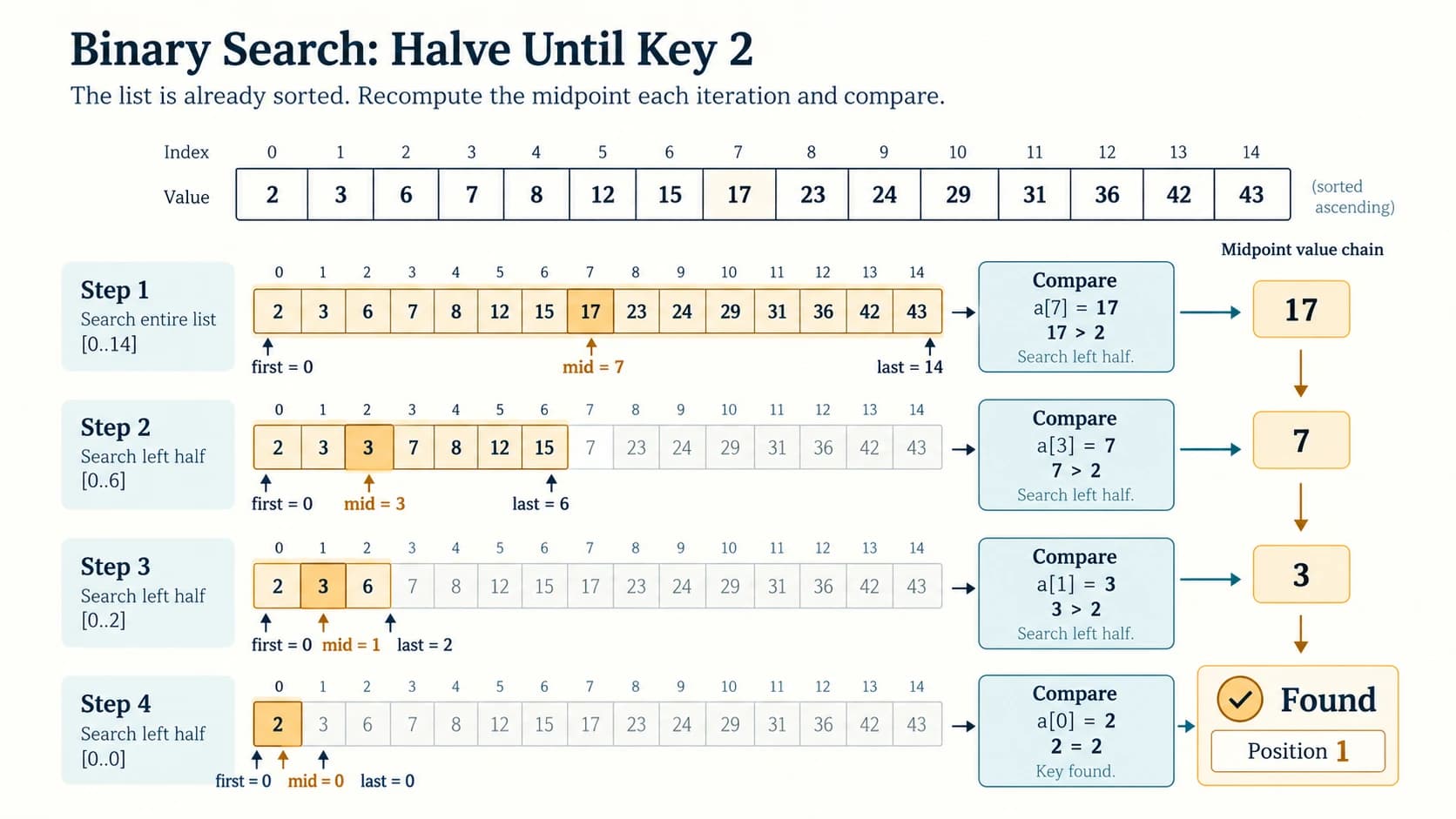
print(binary_search(numbers, 10)) # -1Trace key 2 in NCERT's fifteen-number example
The source ordered list is [2,3,5,7,10,11,12,17,19,23,29,31,37,41,43]. It finds key 2 in four midpoint tests:
| Iteration | first | last | mid | Value at mid | Decision |
|---|---|---|---|---|---|
| 1 | 0 | 14 | 7 | 17 | 2 is smaller; keep 0–6 |
| 2 | 0 | 6 | 3 | 7 | Keep 0–2 |
| 3 | 0 | 2 | 1 | 3 | Keep 0–0 |
| 4 | 0 | 0 | 0 | 2 | Match; position 1 |
If key is 17, the first midpoint already matches and only one iteration is needed. This illustrates why performance depends on the target's location in the search tree, not its numeric magnitude.
3. Program 6-2 — ready-to-run interactive version
The textbook uses -999 to end list input; that choice prevents entering the actual value -999 as a data item. The following asks for a count instead and validates ascending order rather than silently relying on it.
def binary_search_position(numbers, key):
    first, last = 0, len(numbers) - 1
    while first <= last:
        mid = (first + last) // 2
        if numbers[mid] == key:
            return mid + 1
        elif numbers[mid] < key:
            first = mid + 1
        else:
            last = mid - 1
    return None

def main():
    n = int(input("How many values? "))
    if n < 0:
        print("Invalid length")
        return
    numbers = [int(input(f"Sorted value {i + 1}: ")) for i in range(n)]
    if numbers != sorted(numbers):
        print("Please enter numbers in ascending order")
        return
    key = int(input("Key: "))
    found = binary_search_position(numbers, key)
    print(f"Position {found}" if found is not None else "Key not found")

if __name__ == "__main__":
    main()
For inputs 1, 3, 4, 5 and key 4, output is Position 3. If two equal values occur, Binary Search may return either matching index; to locate the first occurrence, a modified lower-bound algorithm is needed (supplement below).
4. Boundary cases and complexity
In a list of length n, each unsuccessful midpoint comparison removes roughly half of the remaining positions. Worst-case: O(log₂ n) midpoint checks, including for an absent key. Best-case: one check, O(1). Iterative Binary Search uses O(1) extra memory; a recursive formulation typically requires O(log n) call-stack space. Empty input immediately returns not found without comparing any list element.
Careful: Sorting an initially unsorted list first may take O(n log n) time, so “sort then binary search” is not necessarily faster than one linear search. It becomes useful when many searches share a mostly unchanged ordered collection.
Section C12-CH06-S04 — Trace Comparisons, Iterations and Positions
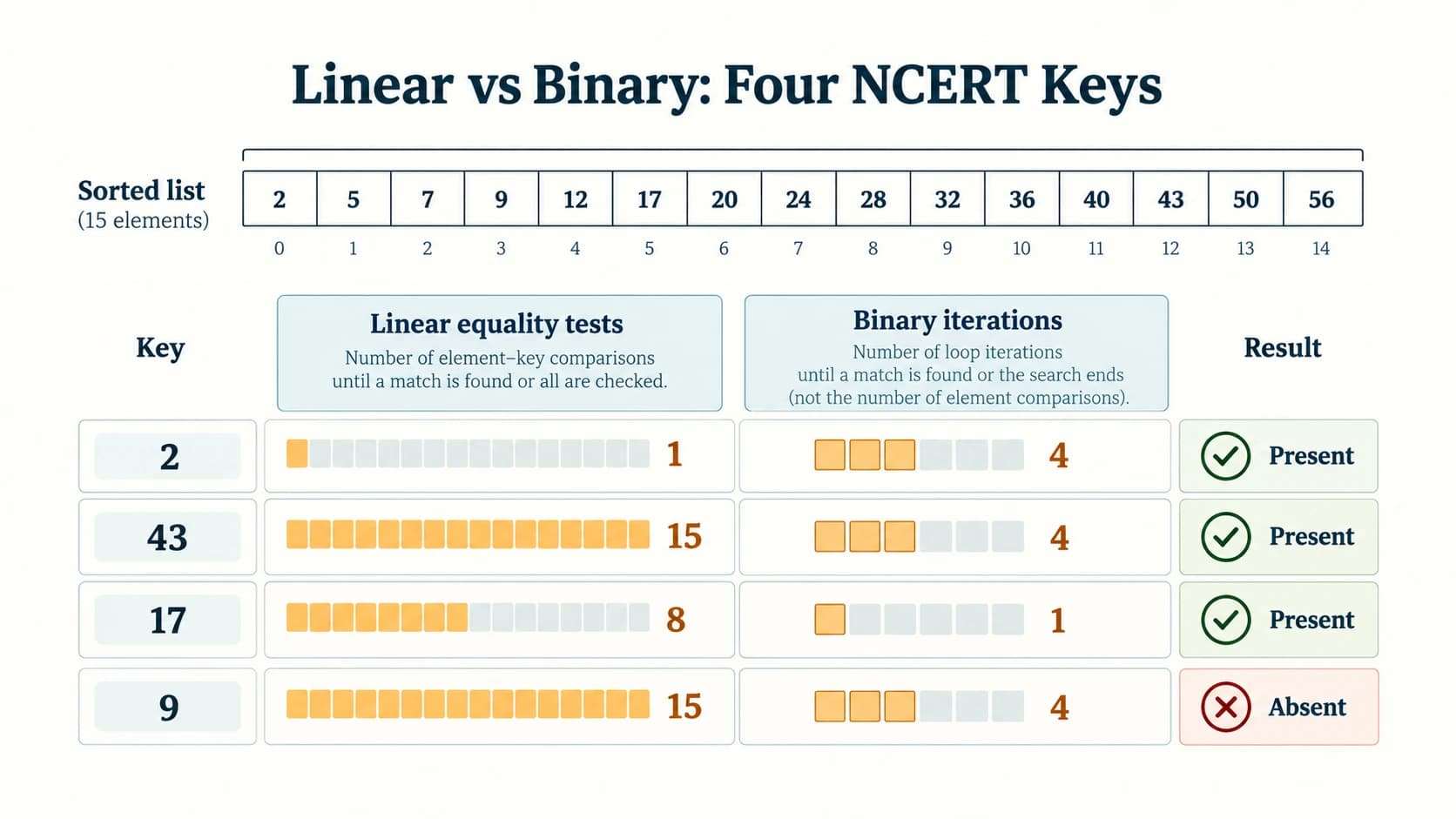
1. What exactly counts as one comparison?
For our linear function, each test items[index] == key is one key-equality comparison. For our binary function, each visited midpoint is counted as one key examination or iteration. Python's code may internally perform more than one relational test in that iteration (== followed by <); these two counts should not be confused. The source explicitly uses “iterations” for Binary Search.
def linear_with_count(items, key):
    for index, value in enumerate(items):
        if value == key:
            return index + 1, index + 1  # position, equality tests
    return None, len(items)

def binary_with_count(sorted_items, key):
    first, last = 0, len(sorted_items) - 1
    iterations = 0
    while first <= last:
        mid = (first + last) // 2
        iterations += 1
        if sorted_items[mid] == key:
            return mid + 1, iterations
        if sorted_items[mid] < key:
            first = mid + 1
        else:
            last = mid - 1
    return None, iterations

sample = [2, 3, 5, 7, 10, 11, 12, 17, 19, 23, 29, 31, 37, 41, 43]
for key in (2, 43, 17, 9):
    print(key, linear_with_count(sample, key), binary_with_count(sample, key))
# 2  (1, 1)    (1, 4)
# 43 (15, 15)  (15, 4)
# 17 (8, 8)    (8, 1)
# 9 (None, 15) (None, 4)| Key | Linear position / equality tests | Binary position / iterations | Lesson |
|---|---|---|---|
| 2 | 1 / 1 | 1 / 4 | First element favours linear search |
| 43 | 15 / 15 | 15 / 4 | Last item favours binary on sorted input |
| 17 | 8 / 8 | 8 / 1 | Midpoint matches immediately |
| 9 | Absent / 15 | Absent / 4 | Missing value need not scan all positions in binary |
2. Two meanings of position after sorting
Sorting changes the indices. The value 55 in NCERT Exercise 5 occurs at original position 23, but at position 12 in the sorted list. Both answers are correct only when their corresponding list is stated. If the program must return the original record location after sorting, keep (original_index, value) pairs or another mapping.
3. Duplicates and a first-occurrence binary-search variant
A normal Binary Search finds some matching value, not necessarily the leftmost. For ordered [2, 8, 8, 8, 12], a search for 8 may return index 2. A lower-bound variant keeps searching left even after a match:
def first_binary_position(sorted_items, key):
    first, last = 0, len(sorted_items) - 1
    result = None
    while first <= last:
        mid = (first + last) // 2
        if sorted_items[mid] < key:
            first = mid + 1
        else:
            if sorted_items[mid] == key:
                result = mid + 1
            last = mid - 1
    return result

print(first_binary_position([2, 8, 8, 8, 12], 8))  # 2
This is a supplementary algorithm; do not mislabel it as NCERT Algorithm 6.2.
Section C12-CH06-S05 — Search by Hashing
1. The remainder method
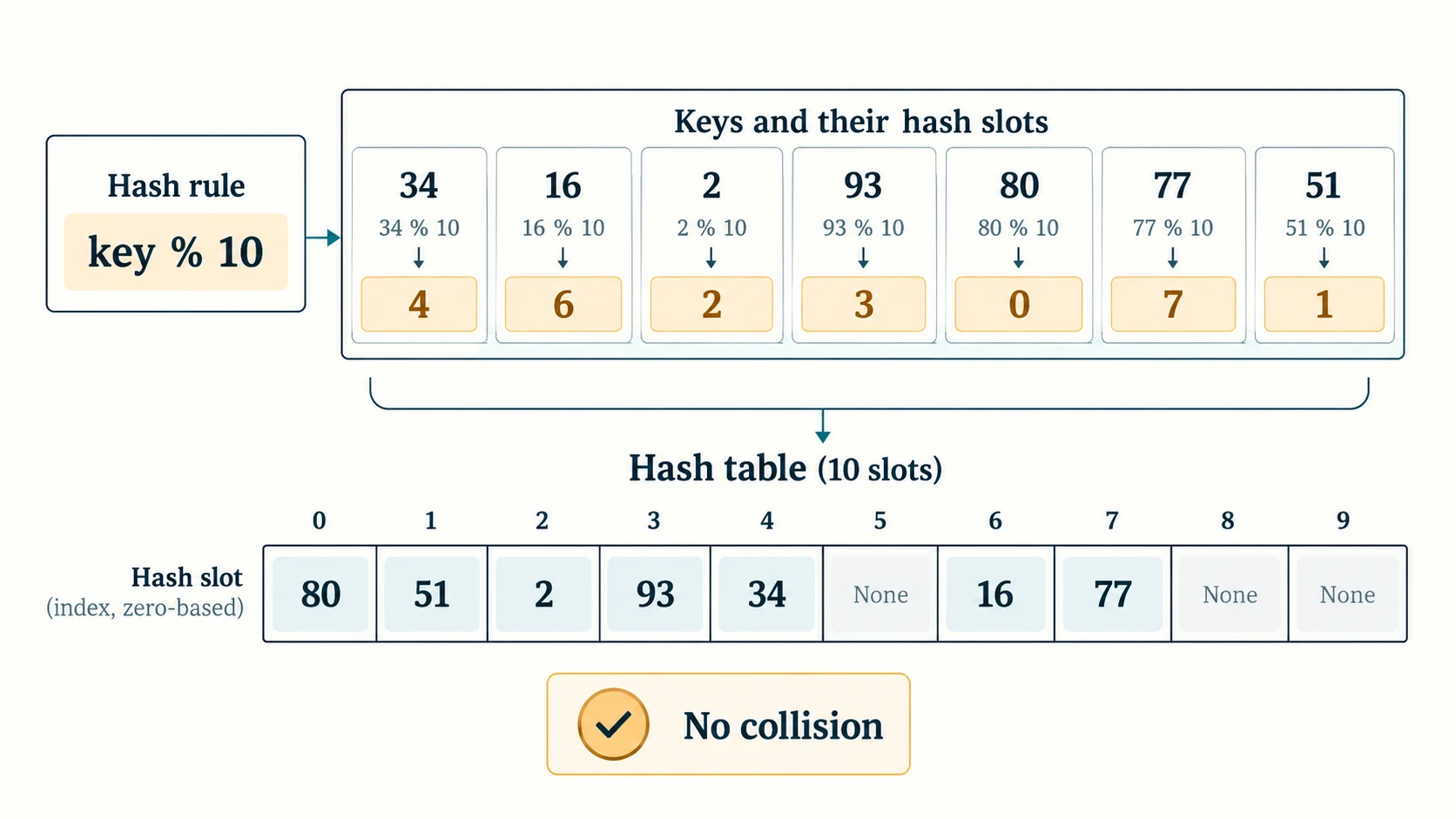
A hash function converts a key to a table slot. For a table with m slots, the textbook uses h(key) = key % m. A collision-free educational example places [34,16,2,93,80,77,51] into ten slots. Every key in that particular list produces a different remainder.
| Key | key % 10 | Slot |
|---|---|---|
| 34 | 4 | 4 |
| 16 | 6 | 6 |
| 2 | 2 | 2 |
| 93 | 3 | 3 |
| 80 | 0 | 0 |
| 77 | 7 | 7 |
| 51 | 1 | 1 |
The table, indexed from 0 to 9, is therefore:
| Slot | 0 | 1 | 2 | 3 | 4 | 5 | 6 | 7 | 8 | 9 |
|---|---|---|---|---|---|---|---|---|---|---|
| Value | 80 | 51 | 2 | 93 | 34 | None | 16 | 77 | None | None |
2. Program 6-3 — collision-free demonstration
The source program assumes no collisions, computes a slot directly, and checks that the stored key equals the query. The following version keeps this assumption explicit and refuses to overwrite a different key accidentally.
def build_collision_free(keys, size):
    if size <= 0:
        raise ValueError("Hash table size must be positive")
    table = [None] * size
    for key in keys:
        slot = key % size
        if table[slot] is not None and table[slot] != key:
            raise ValueError(f"Collision at slot {slot}")
        table[slot] = key
    return table

def hash_find(table, key):
    slot = key % len(table)
    return slot + 1 if table[slot] == key else None

values = [34, 16, 2, 93, 80, 77, 51]
table = build_collision_free(values, 10)
print(table)               # [80, 51, 2, 93, 34, None, 16, 77, None, None]
print(hash_find(table, 16))  # 7 (1-based slot position)
print(hash_find(table, 26))  # None
Limit of the model: Calculating a slot and comparing once is constant-time lookup only when the table represents the data correctly, and the relevant operations really are constant-time. It is not an unconditional guarantee for arbitrary keys or arbitrary hash functions.
3. What a collision means
With % 10, keys 16 and 26 both map to slot 6. Direct assignment table[key % 10] = key would overwrite one key, making earlier data disappear. This is a collision, not an unsuccessful search. The NCERT describes collision and collision resolution but does not develop a complete resolution algorithm; our next section adds a beginner-friendly implementation to solve Exercise 8 responsibly.
Section C12-CH06-S06 — Handling Collisions and Hashing Names
1. Collision resolution by separate chaining (supplement)
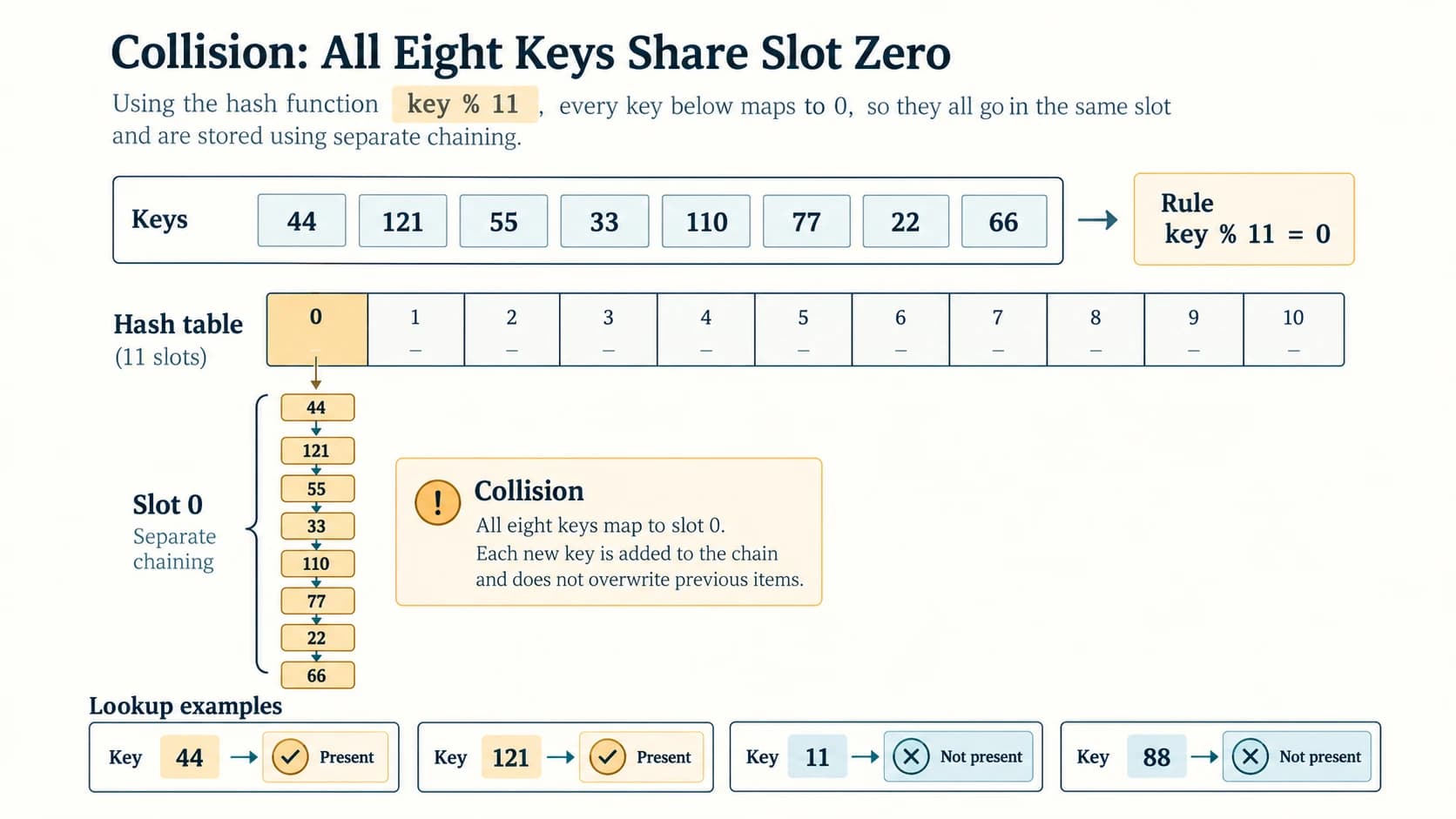
Each slot contains a small list of keys. Two keys with the same hash value live in the same bucket rather than replacing one another. For example, all values 44, 121, 55, 33, 110, 77, 22, 66 are multiples of 11, so every one maps to slot 0 when size=11.
def make_chained_table(keys, size):
    if size <= 0:
        raise ValueError("Size must be positive")
    buckets = [[] for _ in range(size)]
    for key in keys:
        bucket = buckets[key % size]
        if key not in bucket:
            bucket.append(key)
    return buckets

def contains_chained(buckets, key):
    if not buckets:
        return False
    return key in buckets[key % len(buckets)]

keys = [44, 121, 55, 33, 110, 77, 22, 66]
store = make_chained_table(keys, 11)
print(store[0])
# [44, 121, 55, 33, 110, 77, 22, 66]
for key in [11, 44, 88, 121]:
    print(key, contains_chained(store, key))
# 11 False
# 44 True
# 88 False
# 121 True
All other buckets are empty. Here bucket lookup is immediate, but searching inside bucket 0 can require up to 8 equality tests; worst-case chained hashing is O(n) when many keys collide. With sensible distribution and load management, average-case lookup is typically O(1). This performance distinction is important.
2. A country–capital lookup using two parallel lists
The exercise's simple rule is slot = len(country) - 1 (because a name length of 5 maps to one-based position 5 or zero-based index 4). This is not collision-proof: two country names of equal length map to the same slot. The supplied mapping has distinct lengths and fits in a list of length 11. Maintain both lists together:
country_capital = {
    "India": "New Delhi", "UK": "London", "France": "Paris",
    "Switzerland": "Berne", "Australia": "Canberra"
}

size = max(map(len, country_capital))
country_keys = [None] * size
capital_values = [None] * size
for country, capital in country_capital.items():
    slot = len(country) - 1
    if country_keys[slot] is not None:
        raise ValueError(f"Length-hash collision for {country}")
    country_keys[slot] = country
    capital_values[slot] = capital

def lookup_capital(country):
    slot = len(country) - 1
    if 0 <= slot < len(country_keys) and country_keys[slot] == country:
        return capital_values[slot]
    return None

print(lookup_capital("India"))   # New Delhi
print(lookup_capital("France"))  # Paris
print(lookup_capital("USA"))     # None
Two explicit source notes: The textbook's illustration also displays Cuba → Havana at index 3, but Cuba is not in the five-entry mapping in its question. We do not silently add it; include it only as an optional sixth example. The textbook spells the Swiss capital “Berne”; this chapter preserves that source value rather than turning a historical demonstration into a claim about a current naming convention. For real applications, a Python dictionary already manages collisions and is preferable to this intentionally simplistic hash design.
Section C12-CH06-S07 — Choosing the Appropriate Search Method
1. Comparison table
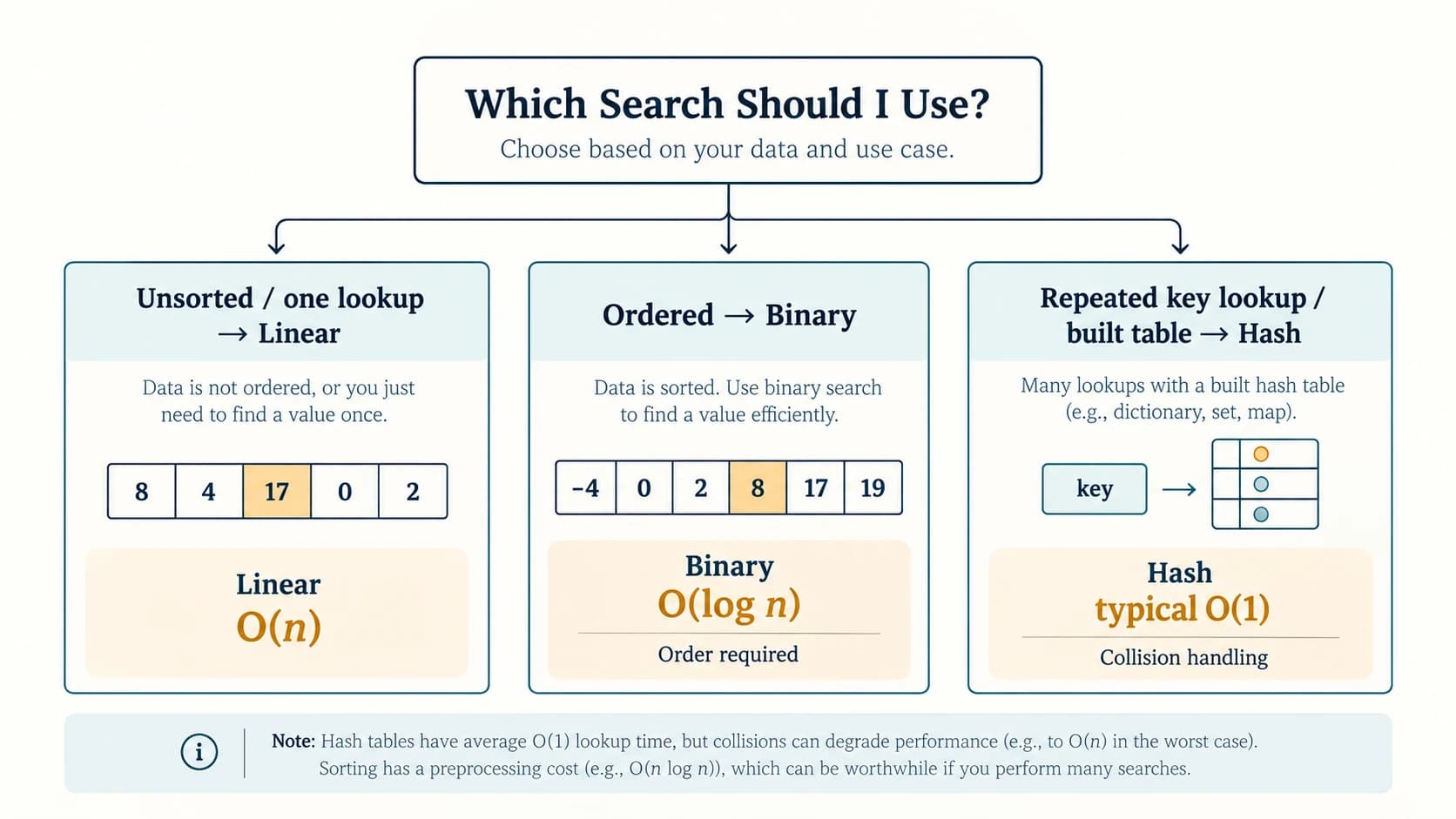
| Property | Linear Search | Binary Search | Hash-table search |
|---|---|---|---|
| Data requirement | Any finite list | Consistently ordered list | Keys indexed by a hash function |
| Method | Examine sequentially | Keep halving candidate interval | Compute slot then examine bucket |
| Best case | O(1) | O(1) | Typically O(1) |
| Worst case | O(n) | O(log n) | O(n) for poor collisions/chaining |
| Extra space (iterative lookup) | O(1) | O(1) | Stored hash table uses extra space |
| Handles duplicates? | Yes; basic code returns first | Can return any matching duplicate | Depends on key/bucket representation |
| Useful scenario | One search in small unordered list | Repeated lookups in ordered values | Frequent key lookup with maintained index |
If a list is unsorted and there is one lookup, scanning is often simplest. If it is already sorted, Binary Search is usually a better asymptotic choice for a large list. For many keyed queries, use a well-designed dictionary/hash table. The time to build a sorted or hashed structure matters when comparing full workflows.
2. Python's built-in membership and dictionary lookups
numbers = [8, 3, 7, 12]
print(7 in numbers)         # True (list scan, O(n) worst case)
lookup = {"India": "New Delhi", "UK": "London"}
print(lookup.get("India"))  # New Delhi (typical average O(1))
print(lookup.get("USA"))    # None
For a list search, in answers whether, not where. For the first index of a present value, numbers.index(value) works but raises ValueError when absent; linear_search instead returns -1. Choose the behaviour your application needs.
3. Final concept checks
- A binary search on an unsorted array is not made correct merely by using
//. - A hash collision is not a rare programming bug to ignore; any collision-free assumption must be documented and checked.
- The position after sorting is not generally the original position.
- An empty list is a valid input; all three lookup methods need defined behaviour.
- Printing "not found" and returning
-1are different function contracts—select and document one.
NCERT Activities 6.1–6.5 — Solved
The five activities below follow the original textbook numbering and their specified data. Each count is based on the exact code/trace convention defined in the teaching sections.
Activity 6.1 — Linear Search for 12
Given: L = [2,3,9,7,-6,11,12,17,45,23,29,31,-37,41,43]. Search for 12.
The inspected values are 2, 3, 9, 7, -6, 11, 12. The first match is index 6, position 7, so 7 equality comparisons are made. Values after index 6 are not examined.
Activity 6.2 — Linear Search for 43
Given: L = [7,-1,11,32,17,19,23,29,31,37,43]. Search for 43.
The key is the last value in a list of 11 elements, so the algorithm performs 11 equality comparisons. Answer: position 11.
Activity 6.3 — Sort then search for 7
Given: [17, 8, -4, 7, 0, 2, 19]. First arrange in ascending order:
numbers = [17, 8, -4, 7, 0, 2, 19]
numbers.sort()
print(numbers)  # [-4, 0, 2, 7, 8, 17, 19]
print(binary_with_count(numbers, 7))  # (4, 1)
With 7 items, midpoint (0+6)//2 = 3, and numbers[3] == 7. One iteration and position 4. This uses the binary_with_count function from Section S04; paste its definition first when running just this excerpt.
Activity 6.4 — Binary Search for -4
Given: [-4, 0, 2, 7, 8, 17, 19]. Search for -4.
| Iteration | first | last | mid | a[mid] | Action |
|---|---|---|---|---|---|
| 1 | 0 | 6 | 3 | 7 | Search left; last=2 |
| 2 | 0 | 2 | 1 | 0 | Search left; last=0 |
| 3 | 0 | 0 | 0 | -4 | Found at position 1 |
Answer: 3 midpoint/key examinations, index 0, position 1. The number of source-code <, == and boundary tests is not what this activity calls its key comparisons.
Activity 6.5 — Complete the linear versus binary comparison table
Given: L = [2,3,5,7,10,11,12,17,19,23,29,31,37,41,43]. Search for 2, 43, 17, 9 using the two textbook strategies.
| Key | Found at 1-based position | Linear equality tests | Binary iterations | Binary mid-value sequence |
|---|---|---|---|---|
| 2 | 1 | 1 | 4 | 17 → 7 → 3 → 2 |
| 43 | 15 | 15 | 4 | 17 → 31 → 41 → 43 |
| 17 | 8 | 8 | 1 | 17 |
| 9 | Not found | 15 | 4 | 17 → 7 → 11 → 10 |
Inference: The middle key is exceptionally quick for Binary Search; the first key is quicker for Linear Search; keys near the end or absent usually benefit from Binary Search on sorted data. The text of Activity 6.5 refers to a “Table 6.8,” although the visible printed Table 6.8 in this chapter labels an empty hash table. Here we supply the requested performance table directly, avoiding the numbering discrepancy.
NCERT Programs 6-1–6-3 — Explanations and Test Cases
Program 6-1 — Linear Search for an input integer
What the textbook program does: (1) constructs a list from user input, (2) scans from the first element, (3) returns position index+1 for the first matching value, or None if it is absent, and (4) prints an explanatory message. See the full runnable version in Section S02.
Trace of the source's demonstration: list [12,23,3,-45]; key 23; inspected 12 then 23; 2 equality tests, result position 2. A negative number like -45 is searchable exactly like any other integer. If key 23 occurs twice, only the first matching position is returned.
Program 6-2 — Binary Search for an input integer
What the textbook program does: accepts ascending data terminated by sentinel -999; sets first, last and mid; reduces the search area until found or exhausted; prints a 1-based position when found. Section S03 provides an alternate count-based program that verifies sorted input and does not reserve -999 as an impossible list element.
Source example: [1,3,4,5]; key 4 → midpoint values 3, then 4; answer position 3, 2 iterations. Its separate demonstration with inputs 12,8,3 is not in ascending order and cannot establish correct Binary Search behaviour. Correct rule: first sort or reject the input before running the ascending algorithm.
Program 6-3 — Hash search in a ten-slot table
The sample uses h(key)=key%10 for [34,16,2,93,80,77,51], and probes one computed table slot. The constructed table is [80,51,2,93,34,None,16,77,None,None]. Search 16 → hash index 6, so the printed 1-based slot position is 7. The source example works only because the supplied keys have distinct remainders; it does not handle collisions and should not be reused blindly for different data. See Sections S05–S06 for safe classroom versions and a collision-handling extension.
NCERT Chapter 6 — Complete Exercise Solutions (Questions 1–9)
All textbook questions are answered in their original numbering. Wording is paraphrased while preserving each question's data, intended subtasks and constraints. For comparison tables, “position” is 1-based; “index” is 0-based. A dash denotes an absent key, and unsuccessful linear searches inspect every element.
NCERT Exercise 1 — Linear Search for four keys, with detailed passes
Original data: [1, -2, 32, 8, 17, 19, 42, 13, 0, 44]. Search for 8, 1, 99 and 44. Show the positions and the decisions taken in each pass.
| Key | Checked values in order | Found index | Found position | Key comparisons |
|---|---|---|---|---|
| 8 | 1 → -2 → 32 → 8 | 3 | 4 | 4 |
| 1 | 1 | 0 | 1 | 1 |
| 99 | 1 → -2 → 32 → 8 → 17 → 19 → 42 → 13 → 0 → 44 | — | — | 10 |
| 44 | 1 → -2 → 32 → 8 → 17 → 19 → 42 → 13 → 0 → 44 | 9 | 10 | 10 |
Full pass-by-pass variable trace: Each row of the following table represents a list[index] == key decision. On every No, increase index by one; on Yes, terminate immediately.
| Pass | index | list[index] | Key 8 | Key 1 | Key 99 | Key 44 |
|---|---|---|---|---|---|---|
| 1 | 0 | 1 | No → continue | Yes → stop | No → continue | No → continue |
| 2 | 1 | -2 | No | — | No | No |
| 3 | 2 | 32 | No | — | No | No |
| 4 | 3 | 8 | Yes → stop | — | No | No |
| 5 | 4 | 17 | — | — | No | No |
| 6 | 5 | 19 | — | — | No | No |
| 7 | 6 | 42 | — | — | No | No |
| 8 | 7 | 13 | — | — | No | No |
| 9 | 8 | 0 | — | — | No | No |
| 10 | 9 | 44 | — | — | No | Yes → stop |
Here the key 99 reaches index 10 after the last unsuccessful comparison (no list element at index 10), causing the loop to end and return not found. That termination check is separate from the ten key-equality comparisons.
Runnable verification:
def linear_with_count(values, key):
    for i, value in enumerate(values):
        if value == key:
            return i + 1, i + 1
    return None, len(values)

values = [1, -2, 32, 8, 17, 19, 42, 13, 0, 44]
for key in (8, 1, 99, 44):
    print(key, linear_with_count(values, key))
# 8 (4, 4)
# 1 (1, 1)
# 99 (None, 10)
# 44 (10, 10)
NCERT Exercise 2 — Duplicate value 8
Original data: [42, -2, 32, 8, 17, 19, 42, 13, 8, 44]. Key: 8.
The sequential scan first matches at index 3, meaning position 4. The second 8 at index 8, position 9, is never reached because the function immediately returns on the first match. Therefore, the returned position is 4, not the count of matching entries and not the last position.
values = [42, -2, 32, 8, 17, 19, 42, 13, 8, 44]
print(next((i + 1 for i, x in enumerate(values) if x == 8), None))
# 4
Interpretation: Basic Linear Search finds the first matching occurrence. Use an all-positions scan if the task demands both positions 4 and 9.
NCERT Exercise 3 — Linear Search using ten positive and negative integers
Task: Read a list of ten integers containing positive and negative entries, take a key, and print its position or a meaningful not-found message. Test at least three different keys.
def linear_position(numbers, key):
    for index, number in enumerate(numbers):
        if number == key:
            return index + 1
    return None

def main():
    numbers = [int(input(f"Integer {i + 1}/10: ")) for i in range(10)]
    key = int(input("Search key: "))
    pos = linear_position(numbers, key)
    print(f"Present at position {pos}" if pos is not None else "Not present")

if __name__ == "__main__":
    main()
Three documented runs using the same sample list: [-10, 5, -3, 8, 12, -1, 0, 7, -5, 20].
| Key | Comparisons | Expected message |
|---|---|---|
| -3 | 3 | Present at position 3 |
| 20 | 10 | Present at position 10 |
| 99 | 10 | Not present |
A user entering an invalid integer receives ValueError under this bare classroom program; a production form should catch invalid inputs. The list has both negative and positive values, satisfying the specified data requirement.
NCERT Exercise 4 — Binary Search using ten integers and three keys
Task: Accept ten integers and a search key, then report the key's position using Binary Search or an appropriate unsuccessful-search message. Run with at least three keys. Binary Search requires sorting before search.
def binary_position(ordered, key):
    low, high = 0, len(ordered) - 1
    while low <= high:
        mid = (low + high) // 2
        if ordered[mid] == key:
            return mid + 1
        if ordered[mid] < key:
            low = mid + 1
        else:
            high = mid - 1
    return None

def main():
    numbers = [int(input(f"Integer {i + 1}/10: ")) for i in range(10)]
    numbers.sort()
    print("Sorted list:", numbers)
    key = int(input("Search key: "))
    pos = binary_position(numbers, key)
    print(f"Present at sorted position {pos}" if pos is not None else "Not present")

if __name__ == "__main__":
    main()
Three sample runs: The originally entered numbers are [19, -4, 7, 0, 12, 3, 21, 8, -1, 14], sorted as [-4,-1,0,3,7,8,12,14,19,21].
| Key | Midpoint values examined | Result |
|---|---|---|
| 7 | 7 | Found at sorted position 5 |
| -4 | 7 → -1 → -4 | Found at sorted position 1 |
| 100 | 7 → 14 → 19 → 21 | Not present |
The reported position is in the sorted list, not necessarily in the original order. If input order must remain intact, keep a separate sorted copy and original-index mapping.
NCERT Exercise 5 — Compare searches on the supplied 24-number dataset
Original unsorted list:
values = [
    50, 31, 21, 28, 72, 41, 73, 93, 68, 43, 45, 78,
    5, 17, 97, 71, 69, 61, 88, 75, 99, 44, 55, 9
]
keys = [1, 5, 55, 99]
ordered = sorted(values)
print(ordered)
# [5, 9, 17, 21, 28, 31, 41, 43, 44, 45, 50, 55,
#  61, 68, 69, 71, 72, 73, 75, 78, 88, 93, 97, 99]
The question has four required stages: (a) Linear Search in original order; (b) sort ascending; (c) Linear Search after sorting; (d) Binary Search after sorting. All are represented here.
| Key | Original-list linear position | Original equality tests | Sorted-list linear position | Sorted equality tests | Sorted binary position | Binary iterations |
|---|---|---|---|---|---|---|
| 1 | — | 24 | — | 24 | — | 4 |
| 5 | 13 | 13 | 1 | 1 | 1 | 4 |
| 55 | 23 | 23 | 12 | 12 | 12 | 1 |
| 99 | 21 | 21 | 24 | 24 | 24 | 5 |
Binary midpoint traces, sorted list:
- Key 1: mids at values
55 → 31 → 17 → 5; no match; 4 iterations. - Key 5: mids
55 → 31 → 17 → 5; found position 1 after 4. - Key 55: first midpoint
55; found position 12 after 1. - Key 99: mids
55 → 73 → 88 → 97 → 99; found position 24 after 5.
Executable comparison program for all four parts:
def linear_count(a, key):
    for i, v in enumerate(a):
        if v == key:
            return (i + 1, i + 1)
    return (None, len(a))

def binary_count(a, key):
    lo, hi, steps = 0, len(a) - 1, 0
    while lo <= hi:
        mid = (lo + hi) // 2
        steps += 1
        if a[mid] == key:
            return (mid + 1, steps)
        if a[mid] < key:
            lo = mid + 1
        else:
            hi = mid - 1
    return (None, steps)

original = [50,31,21,28,72,41,73,93,68,43,45,78,5,17,97,
            71,69,61,88,75,99,44,55,9]
ordered = sorted(original)
for key in (1, 5, 55, 99):
    print(key, linear_count(original, key),
          linear_count(ordered, key), binary_count(ordered, key))
# 1 (None, 24) (None, 24) (None, 4)
# 5 (13, 13) (1, 1) (1, 4)
# 55 (23, 23) (12, 12) (12, 1)
# 99 (21, 21) (24, 24) (24, 5)
Interpretation: Sorting changes observed linear-scan positions, and it enables Binary Search. Linear Search isn't guaranteed to get faster just because the list is sorted; e.g., searching for 99 moves it from original position 21 to sorted position 24, increasing comparisons.
NCERT Exercise 6 — Search an English-word list before and after sorting
Source's sixteen words (capitalisation preserved):
words = [
    "Perfect", "Stupendous", "Wondrous", "Gorgeous", "Awesome",
    "Mirthful", "Fabulous", "Splendid", "Incredible", "Outstanding",
    "Propitious", "Remarkable", "Stellar", "Unbelievable", "Super", "Amazing"
]
ordered_words = sorted(words)
print(ordered_words)
# ['Amazing', 'Awesome', 'Fabulous', 'Gorgeous', 'Incredible',
#  'Mirthful', 'Outstanding', 'Perfect', 'Propitious', 'Remarkable',
#  'Splendid', 'Stellar', 'Stupendous', 'Super', 'Unbelievable', 'Wondrous']
The three search stages: (a) linear before sorting; (b) sort alphabetically; (c) linear and binary after sorting. All four requested keys are included, including Great, which is absent.
| Key | Original linear position / comparisons | Sorted linear position / comparisons | Sorted binary position / iterations |
|---|---|---|---|
| Amazing | 16 / 16 | 1 / 1 | 1 / 4 |
| Perfect | 1 / 1 | 8 / 8 | 8 / 1 |
| Great | — / 16 | — / 16 | — / 4 |
| Wondrous | 3 / 3 | 16 / 16 | 16 / 5 |
The Binary Search midpoint sequences are:
Amazing:Perfect → Gorgeous → Awesome → Amazing(4).Perfect:Perfect(1).Great:Perfect → Gorgeous → Mirthful → Incredible; absent (4).Wondrous:Perfect → Stellar → Super → Unbelievable → Wondrous(5).
Python test program: Use the same linear_count and binary_count functions from Exercise 5, as both functions work for strings of consistent case as well as numbers.
words = ["Perfect","Stupendous","Wondrous","Gorgeous","Awesome",
         "Mirthful","Fabulous","Splendid","Incredible","Outstanding",
         "Propitious","Remarkable","Stellar","Unbelievable","Super","Amazing"]
for key in ("Amazing", "Perfect", "Great", "Wondrous"):
    original_result = next(((i+1, i+1) for i, x in enumerate(words) if x == key),
                           (None, len(words)))
    ordered = sorted(words)
    sorted_result = next(((i+1, i+1) for i, x in enumerate(ordered) if x == key),
                         (None, len(ordered)))
    lo, hi, tries, pos = 0, len(ordered)-1, 0, None
    while lo <= hi:
        mid = (lo + hi)//2
        tries += 1
        if ordered[mid] == key:
            pos = mid + 1
            break
        if ordered[mid] < key:
            lo = mid + 1
        else:
            hi = mid - 1
    print(key, original_result, sorted_result, (pos, tries))
Case-sensitivity caution: These textbook strings use capitalised initial letters, so the alphabetical sorted list above is consistent. For arbitrary mixed-case English text, choose a consistent key normalisation (casefold()) and sort/search according to that same rule; changing only the search side would break the sorted-order requirement.
NCERT Exercise 7 — One billion records and the middle element
Dataset size: 2^30 = 1,073,741,824 records, already sorted. The question says the record being searched is at a middle position. As n is even, there are two central positions. Using the textbook's floor-midpoint convention for zero-based inclusive bounds, first midpoint is:
The first inspected entry is the 536,870,912th position (1-based). If our searched record is at this first midpoint:
| Method | Required key checks |
|---|---|
| Linear Search | 536,870,912 equality comparisons |
| Binary Search | 1 midpoint iteration |
Interpretation: With the sorted list's middle record at the first midpoint, binary search succeeds immediately; linear search walks through more than half a billion entries. This example is conditional on the specified middle-record location. It does not mean binary search always takes one step on a billion records: worst-case midpoint checks grow logarithmically (about 30–31 for this scale, depending on success/failure and bound details). The source's typography for the record count is intended to represent 2^30, not the integer 230.
NCERT Exercise 8 — Hash % 11 and search four keys
Given hash function: h(x) = x % 11, given values: [44,121,55,33,110,77,22,66], search: 11,44,88,121.
Essential collision observation: Every supplied stored value is a multiple of 11, therefore all map to slot 0. A naive one-element-per-slot assignment would overwrite earlier elements, leaving only 66; it cannot correctly answer queries for all stored numbers.
A correct table using separate chaining (an explicitly labelled extension):
| Hash-table slot | Stored bucket contents |
|---|---|
| 0 | [44, 121, 55, 33, 110, 77, 22, 66] |
| 1–10 | Empty bucket [] |
| Search key | key % 11 | Search inside bucket 0 | Answer |
|---|---|---|---|
| 11 | 0 | No match | Not present |
| 44 | 0 | First bucket value matches | Present |
| 88 | 0 | No match | Not present |
| 121 | 0 | Second bucket value matches | Present |
Runnable full answer:
def build_hash_table(values, size=11):
    buckets = [[] for _ in range(size)]
    for value in values:
        if value not in buckets[value % size]:
            buckets[value % size].append(value)
    return buckets

def search_hash(buckets, value):
    if not buckets:
        return False
    return value in buckets[value % len(buckets)]

stored_values = [44,121,55,33,110,77,22,66]
table = build_hash_table(stored_values)
for slot, bucket in enumerate(table):
    print(slot, bucket)
for key in [11, 44, 88, 121]:
    print(f"{key}: {'present' if search_hash(table, key) else 'absent'}")
Why this answer is faithful: The original NCERT chapter introduces the term collision but defers collision resolution. The exercise data make collisions unavoidable, so here we show a working resolution rather than pretending the naive table retains all values. Separate chaining is supplemental; the hash function itself remains exactly x % 11.
NCERT Exercise 9 — Countries and capitals using length-of-name hashing
Given mapping:
CountryCapital = {
    "India": "New Delhi",
    "UK": "London",
    "France": "Paris",
    "Switzerland": "Berne",
    "Australia": "Canberra"
}
Hash rule: slot = len(country) - 1. Therefore, e.g. India has length 5 and goes to index 4. Using 11 positions suffices because the longest source key (Switzerland) has length 11.
| Index | Key list | Value list |
|---|---|---|
| 0 | None | None |
| 1 | UK | London |
| 2 | None | None |
| 3 | None | None |
| 4 | India | New Delhi |
| 5 | France | Paris |
| 6 | None | None |
| 7 | None | None |
| 8 | Australia | Canberra |
| 9 | None | None |
| 10 | Switzerland | Berne |
The exercise's displayed illustration has Cuba → Havana at index 3, but the source's five-country dictionary does not include Cuba. We preserve the dictionary as given; adding Cuba intentionally would fill index 3, and is optional, not silently part of the input.
Complete two-list implementation and search:
country_capital = {
    "India": "New Delhi", "UK": "London", "France": "Paris",
    "Switzerland": "Berne", "Australia": "Canberra"
}
size = max(len(country) for country in country_capital)
key_list = [None] * size
value_list = [None] * size

for country, capital in country_capital.items():
    index = len(country) - 1
    if key_list[index] is not None and key_list[index] != country:
        raise ValueError("Country-name length collision")
    key_list[index] = country
    value_list[index] = capital

def find_capital(country):
    index = len(country) - 1
    if 0 <= index < len(key_list) and key_list[index] == country:
        return value_list[index]
    return None

for country in ("India", "France", "USA"):
    capital = find_capital(country)
    print(country, ":", capital if capital is not None else "not found")
# India : New Delhi
# France : Paris
# USA : not found
Interpretation: Merely matching the length of a country name is insufficient: the code verifies key_list[index] == country, preventing false positives. For example USA has length 3 and hashes to index 2, but that slot is empty. If two actual keys share a length, this source exercise's collision-free two-list representation fails; the safe extension is to keep lists of (country, capital) pairs in buckets or use a built-in dictionary.
Original Practice Questions — 30 Questions with Explained Answers
This original practice set is not claimed to be part of the NCERT textbook. It is organised by difficulty and includes fully explained model answers so students can revise independently.
Part A — Conceptual MCQs (1–10)
Practice 1 — Which search works on an unordered list without preprocessing?
A. Binary Search B. Linear Search C. Binary tree index only D. None
Answer: B — Linear Search. It examines values sequentially and does not depend on sorted order. Ordinary Binary Search needs sorted input.
Practice 2 — Which function result is safe for an absent key when all valid indices start at 0?
A. 0 B. False only C. -1 D. 1
Answer: C — -1. An index-returning function often uses -1 as a no-match sentinel. A function could alternatively return None, but should document that contract.
Practice 3 — What is the first midpoint index for 10 ordered elements using (first+last)//2?
A. 4 B. 5 C. 9 D. 10
Answer: A — 4. first=0, last=9, so (0+9)//2=4. The fifth element is checked first. NCERT's explanatory text separately discusses using n//2 to identify a central element; the exact answer depends on the defined midpoint convention.
Practice 4 — When is Binary Search's candidate interval narrowed?
A. After any unsuccessful midpoint test B. After sorting inside every loop C. Before reading the key D. Only when the key is found
Answer: A. A failed comparison tells us which half cannot contain the key in an ordered list.
Practice 5 — In linear search, how many key comparisons are required if the key is absent from a list of 12 entries?
A. 1 B. 6 C. 12 D. 13
Answer: C — 12. Every stored value must be inspected; the final loop-bound check is not another equality comparison with a key.
Practice 6 — What does hash(key) % m conceptually supply in a simple hash-table demonstration?
A. A sorted copy B. A bucket index C. A boolean existence guarantee D. A password
Answer: B — A bucket index. Only looking at a bucket is not sufficient if multiple keys can share it; the stored keys must still be checked.
Practice 7 — When do two keys collide under the remainder method?
A. Their values are both negative B. Their remainders modulo the table size are equal C. Both are sorted D. Both equal 0
Answer: B. For a size-10 table, 16 and 26 collide because both produce remainder 6.
Practice 8 — Which is a correct bound for worst-case iterative Binary Search on an ordered list?
A. O(n²) B. O(n) C. O(log n) D. O(n!)
Answer: C — O(log n). The remaining interval is roughly halved each unsuccessful iteration.
Practice 9 — Given duplicate keys, the standard textbook Linear Search returns which occurrence?
A. Last B. Middle C. Every match automatically D. First
Answer: D — First. Its loop returns at the earliest match and stops processing the rest of the list.
Practice 10 — What is the worst case for separate-chaining lookup when all keys hash to one bucket?
A. Always one key test B. O(n) C. Always O(log n) D. No memory used
Answer: B — O(n). The implementation may inspect the whole long bucket; the usual constant-time statement is an average-case expectation under good distribution.
Part B — Trace and Output Problems (11–18)
Practice 11 — Trace first-match Linear Search for key 3
Input [9, 3, 3, 1]. State the returned zero-based index and key comparisons.
Answer: Compare 9 (no), then 3 (yes). Return index 1, position 2, after 2 comparisons. The second 3 is not inspected.
Practice 12 — Trace an absent value in an empty list
What does a Linear Search that returns None for absent values return on [] and key 5? How many key comparisons are made?
Answer: It returns None, with 0 equality comparisons; the loop body runs zero times. An index-sentinel version would return -1 instead.
Practice 13 — Trace Binary Search on [1, 4, 7, 9, 11, 20, 30] for 20
Answer: First/last 0,6 → mid3=9, key larger → bounds4..6. Mid5=20 → found. 2 iterations, index5, position6.
Practice 14 — Trace Binary Search for missing 6 on [1, 4, 7, 9, 11, 20, 30]
Answer: Mid3=9 → left range0..2; mid1=4 → right range2..2; mid2=7 → left range2..1 (empty). Result not found after 3 midpoint tests.
Practice 15 — Predict the first tested midpoint for a two-element ordered list
Use [10, 20] and mid=(lo+hi)//2; search for 20.
Answer: First midpoint index0 (value10); then index1 (value20). 2 iterations, found at position2. An alternative upper-mid rule would examine 20 first; always state the rule in a trace.
Practice 16 — Compute remainders and identify collision
With size 7, place values 8, 15, 22. What are their hash slots?
Answer: 8%7=1, 15%7=1, 22%7=1. All three collide in slot1, requiring a resolution strategy.
Practice 17 — Trace a simple collision-free hash search
Table [30, None, 12, None, 4] has 5 slots. The function checks table[key % 5] == key. What happens for key12 and key17?
Answer: Both map to slot2. Key12 matches and is present; key17 fails the equality check and is absent. Sharing a slot address does not imply equal values.
Practice 18 — Evaluate the following Python expression
numbers = [4, 8, 12]
print(numbers.index(8))
print(8 in numbers)
Answer: Prints 1 and True on separate lines. list.index() returns a zero-based index, while in returns only a boolean membership result.
Part C — Short Answers and Reasoning (19–24)
Practice 19 — Can Binary Search be applied to a descending ordered list?
Answer: Yes, with comparisons reversed so that when a midpoint value is greater than the key, the relevant remaining part is to the right. The ascending-only code must not be reused unchanged.
Practice 20 — Is it always wise to sort an unsorted list before one search?
Answer: No. Sorting costs extra time and rearranges positions, whereas Linear Search needs at most one pass. Sorting is valuable when there are many later queries on the same stable data or the data is already sorted.
Practice 21 — Distinguish a search comparison from a Binary Search iteration.
Answer: An iteration inspects one midpoint and then decides whether to stop or adjust bounds. Its Python implementation can execute both an equality test and an ordering test within that same iteration; counting individual ==, < or > expressions is a different metric. Use the question's requested convention.
Practice 22 — Why do duplicated values require extra care in Binary Search?
Answer: Any matching midpoint satisfies standard Binary Search, so the result may be a later occurrence. Finding the first, last or all occurrences requires a modified bound-finding algorithm or repeated scanning of the equal region.
Practice 23 — Does a good hash function guarantee collision-free results for unlimited keys?
Answer: No. A finite table has finitely many slots; with more distinct keys than slots, collisions are inevitable by the pigeonhole principle. Even fewer keys can collide under a particular hash function.
Practice 24 — Why should a two-list country–capital hash lookup verify the stored country name?
Answer: Because two different names may have the same character count. The computed slot only identifies a candidate location, so equality with the actual stored key is required before returning a capital.
Part D — Applied Python Problems (25–30)
Practice 25 — Return both the first and last position of a key in an unsorted list
def first_last_positions(items, key):
    positions = [i + 1 for i, value in enumerate(items) if value == key]
    if not positions:
        return None, None
    return positions[0], positions[-1]

print(first_last_positions([8, 2, 8, 5, 8], 8))  # (1, 5)
print(first_last_positions([2, 3], 8))           # (None, None)
Explanation: A full scan is needed to know the last matching position. Returning both human positions makes the contract unambiguous.
Practice 26 — Count the number of key examinations in iterative Binary Search
def binary_steps(items, key):
    low, high, checks = 0, len(items) - 1, 0
    while low <= high:
        mid = (low + high) // 2
        checks += 1
        if items[mid] == key:
            return mid, checks
        if items[mid] < key:
            low = mid + 1
        else:
            high = mid - 1
    return -1, checks

print(binary_steps([1, 4, 7, 9, 11, 20, 30], 20))  # (5, 2)
Explanation: The counter increases once per visited midpoint. The list must already be sorted in ascending order.
Practice 27 — Search without altering the original unsorted list
def find_in_original(items, key):
    for index, value in enumerate(items):
        if value == key:
            return index
    return -1

raw = [11, 2, 9, 3]
print(find_in_original(raw, 9))  # 2
print(raw)  # [11, 2, 9, 3]
Explanation: Linear Search preserves input order and returns the original index; sorting would change the meaning of reported positions.
Practice 28 — Implement Binary Search for a descending list
def binary_search_desc(items, key):
    low, high = 0, len(items) - 1
    while low <= high:
        mid = (low + high) // 2
        if items[mid] == key:
            return mid
        if items[mid] > key:
            low = mid + 1
        else:
            high = mid - 1
    return -1

print(binary_search_desc([40, 25, 20, 10, 5], 20))  # 2
Explanation: When the midpoint is greater than the target in descending order, smaller values lie to the right, so advance low.
Practice 29 — Build chained hash buckets for strings by their length
def length_buckets(words, size=5):
    buckets = [[] for _ in range(size)]
    for word in words:
        buckets[len(word) % size].append(word)
    return buckets

buckets = length_buckets(["cat", "dog", "pear", "apple"], 5)
print(buckets[3])  # ['cat', 'dog']
print(buckets[4])  # ['pear']
print(buckets[0])  # ['apple']
Explanation: Two three-letter words collide in the same bucket, yet chaining retains both. This is a classroom model, not Python's built-in string hash algorithm.
Practice 30 — Use a dictionary to count membership queries without losing duplicates
def frequency_index(items):
    counts = {}
    for item in items:
        counts[item] = counts.get(item, 0) + 1
    return counts

frequency = frequency_index([5, 7, 5, 8, 5])
for key in (5, 7, 9):
    print(key, frequency.get(key, 0))
# 5 3
# 7 1
# 9 0
Explanation: This built-in dictionary example illustrates a practical hash-based lookup application. Unlike the basic NCERT hashFind demonstration, it stores counts, making duplicate occurrences explicit.
Quick Revision — Searching at a Glance
| Topic | Key fact to remember |
|---|---|
| Searching | Determine presence and, if required, location of a key |
| Linear Search | Scans sequentially; no sorting required |
| Linear best / worst | O(1) for first element; O(n) for last or absent |
| Binary Search | Requires ordered data; checks midpoint, then one half |
| Binary loop invariant | If a key is present, it remains within [first, last] |
| Binary midpoint | (first + last) // 2, recomputed every iteration |
| Binary complexity | Best O(1), worst O(log n); O(1) extra for iterative code |
| Hashing | Use hash function to select bucket/slot |
| Hash collision | Different keys share same slot |
| Chaining | Keep multiple entries in a bucket |
| Hash performance | Average usually O(1); poor collision handling can cause O(n) |
| Index vs position | Python index starts at 0; student position usually starts at 1 |
| Duplicate keys | Linear returns first match; standard binary may return any match |
Exam-readiness checklist
- I can trace every equality test for an unsorted linear search.
- I can explain index 3 = position 4.
- I can write both search methods as complete Python functions.
- I know why a Binary Search on unordered data is invalid.
- I can fill a table of
first,last,midand decisions correctly. - I can count binary iterations, not confuse them with individual relational expressions.
- I can explain why sorting changes reported positions.
- I can identify all
% 11collisions in NCERT Exercise 8. - I can demonstrate chaining or another stated collision-resolution method.
- I can explain the missing Cuba entry in Exercise 9 without inventing source input.
- I can reproduce results for NCERT Activities 6.1–6.5.
- I can answer all nine NCERT exercise groups and the 30 original questions.
Viva / oral review with short model answers
Q. Why does linear search work on an unordered list? — It relies only on equality tests, not on relative ordering.
Q. Why is ordinary binary search invalid before sorting? — Its decision to discard half relies on the ordering rule, so discarded halves cannot be justified without it.
Q. In Binary Search, what does // do? — Produces an integer midpoint index by floor division.
Q. Is one binary iteration necessarily one Python comparison? — No. One iteration can perform both equality and less-than/greater-than tests.
Q. Can a key be present when the first computed hash slot contains some other key? — Yes, if collision resolution stores that key elsewhere or in a bucket; the collision strategy defines how to search it.
Q. Can a Python dictionary handle collisions? — Yes, its implementation has a collision-handling strategy internally; classroom single-slot examples do not model all details.
Q. Does hash(key) % size work for a negative number in Python? — With a positive integer divisor, Python's % returns a value from 0 through size-1, so it is a valid slot index.
Q. Which method for one key in a short unsorted list? — Linear Search is simplest; build indexes only if the wider workload justifies it.