
What Is a Computer? Characteristics and Uses
What Is a Computer? Characteristics and Uses. Foundational Computer Awareness explanations, examples and explained practice questions for banking and recruitment exam preparation.
By Akhilesh Saini
What you will learn
- What makes a machine a computer.
- How a computer receives input, performs processing, and gives output.
- The key characteristics of computers and their limitations.
- Common applications, especially in banks and offices.
Why this topic matters
Questions such as Which characteristic allows a computer to repeat a task without getting tired? and Which statement about computers is incorrect? test whether you understand the computer as a programmable machine rather than a magical device that can think or judge every situation independently.
What is a computer?
A computer is a programmable electronic device that accepts data as input, processes it according to instructions, can store data and results, and produces output.
In simple terms, the computer takes something you provide, works on it using a program, and gives you a result. Most computers can perform different tasks simply by running different programs. A laptop may be used for calculations in the morning, writing documents in the afternoon, and attending a video meeting in the evening.
Concept to understand: The defining idea is programmable data processing, not the shape of a monitor or keyboard. A smartphone, ATM, and desktop can all contain computers even though they look very different.
A basic representation is:
Input → Processing → Output, with storage available for instructions, data, and results.
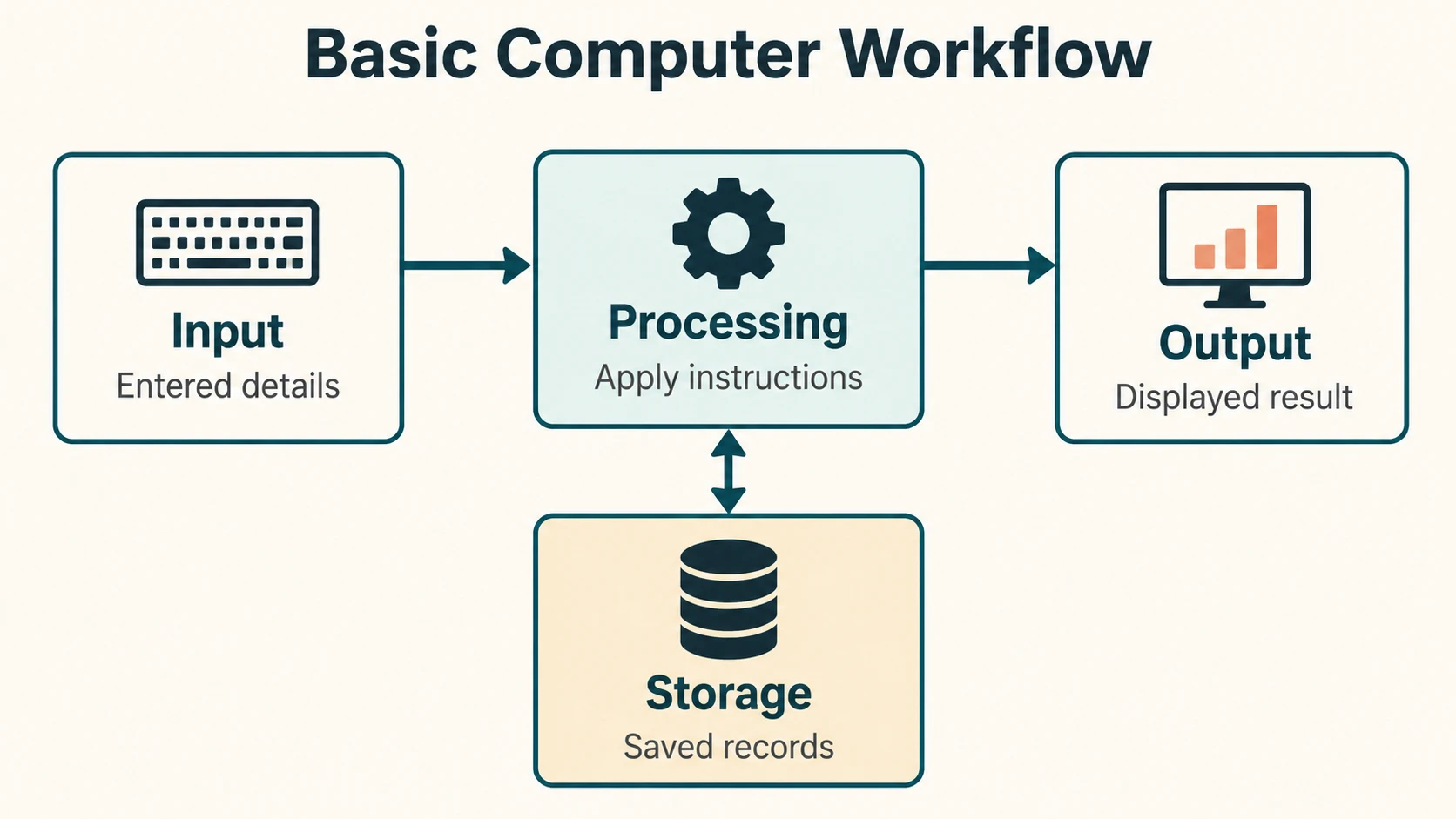
Example — finding an account balance: A bank employee opens a banking application and enters a customer's account details. The system checks the appropriate records and displays the balance. The employee's entry is the input; checking the records is processing; the displayed balance is output. The stored account record is data retained by the system. The actual workflow also includes access controls and multiple connected systems; this is a simplified learning example.
Essential characteristics
| Characteristic | Meaning | Everyday example |
|---|---|---|
| Speed | Performs many operations very quickly. | Searches thousands of records in a short time. |
| Accuracy | Produces reliable results when instructions, data, and hardware function correctly. | Adds a column of valid figures correctly. |
| Diligence / consistency | Can repeat operations without human-like fatigue or boredom. | Processes a large set of records using the same rules. |
| Automation | Once properly set up, executes instructions with little ongoing human intervention. | Produces a scheduled report. |
| Storage capacity | Stores information for later retrieval, subject to available storage. | Saves documents and customer records. |
| Versatility | Performs many different kinds of tasks with different programs. | A desktop handles email, documents, and calculations. |
| Reliability | Can operate consistently when designed, maintained, and used correctly. | Runs routine business processes with controlled errors. |
Important qualifications
A fast computer is not necessarily correct. Incorrect data, flawed programs, hardware faults, and bad assumptions can produce incorrect results. This is sometimes summarized as GIGO — Garbage In, Garbage Out: unreliable inputs or logic can lead to unreliable outputs.
Automation does not mean a computer chooses its own goals or is free of human oversight. A computer performs the tasks specified by its programs and operating environment, even when a program uses artificial intelligence.
Uses of computers
Banking and finance: Maintaining records, processing transactions, using ATMs, calculating interest, generating statements, detecting suspicious activity, and supporting online banking.
Education: Digital textbooks, online classes, assessment systems, and learning applications.
Healthcare: Patient records, diagnostic equipment, appointment systems, and medical-image analysis.
Business and government: Payroll, office documents, inventory, tax systems, and service delivery.
Science and engineering: Data analysis, simulations, research calculations, and design.
Communication and entertainment: Email, messages, video calls, media playback, and games.
A computer may be inside another product: a washing machine, vehicle, payment terminal, or smart meter can include one or more embedded computers.
Limitations of computers
- Dependence on instructions and design: The machine does not automatically know whether the task or underlying assumptions are appropriate.
- Dependence on quality data: A calculation on incorrect inputs can still produce a mathematically consistent but useless output.
- Need for power and working components: Hardware and power failures may interrupt work.
- Security and privacy risks: Data and programs require protection.
- No guaranteed human judgement: A computer cannot be assumed to understand context, ethics, or consequences in the way a responsible person must.
Modern AI systems can generate text, images, predictions, and recommendations, but they can still make errors. That does not remove the need for checking their results.
Important terms
| Term | Simple meaning |
|---|---|
| Computer | Programmable device for processing data. |
| Input | Data or instructions supplied to the computer. |
| Processing | Operations performed on the input. |
| Output | Result made available to a user or another system. |
| Program | Ordered instructions that direct a computer's work. |
| Storage | Retaining data and programs for later use. |
| Automation | Carrying out a defined process with limited direct intervention. |
| GIGO | Poor input or processing rules can cause poor output. |
Common confusions
- Computer ≠ only desktop PC: Phones, servers, and embedded devices may also be computers.
- Speed ≠ intelligence: Completing instructions quickly is not proof of understanding.
- Accuracy ≠ error-free under all conditions: Accuracy depends on correct inputs, logic, and operation.
- Diligence ≠ independence: Repeated operation does not give the machine its own judgement.
- “COMPUTER” is not an official technical acronym: Exam-preparation claims expanding each letter into a phrase are backronyms, not a standard full form.
Fact to remember
- A modern general-purpose computer typically follows instructions stored as programs.
- Three easy steps to remember are input → processing → output.
- Consistency in repetitive work is commonly called diligence in awareness textbooks.
- Versatility means the machine can handle different tasks.
- GIGO warns about incorrect data or flawed processing.
Quick revision
| If the question mentions… | Think of… |
|---|---|
| Very rapid calculations | Speed |
| Same work repeated without tiredness | Diligence |
| Different jobs on the same machine | Versatility |
| Minimal intervention after setup | Automation |
| Retaining files for future use | Storage |
| Wrong result from bad data | GIGO / data quality |
Practice questions — CA-01-01
Q1. Which description best fits a modern general-purpose computer?
A. A machine used only for typing
B. A programmable device that processes data
C. A device that always makes correct decisions
D. An electronic device used only on the internet
Q2. Which sequence best describes basic computer operation?
A. Output → Input → Processing
B. Storage → Output → Input
C. Input → Processing → Output
D. Printing → Typing → Saving
Q3. Repeating the same calculation thousands of times without human-like fatigue illustrates:
A. Diligence
B. Portability
C. Networking
D. Compression
Q4. Using one laptop for banking, presentations, and communication best illustrates:
A. Low storage
B. Versatility
C. Inaccuracy
D. Obsolescence
Q5. In a bank balance enquiry, the amount displayed after checking records is primarily:
A. Input
B. Program code
C. Output
D. Power supply
Q6. Which statement is most accurate?
A. Computers cannot produce wrong answers.
B. Computers always understand a user's intention.
C. Computers can produce incorrect output from faulty inputs or programs.
D. Computers do not need programs.
Q7. GIGO stands for:
A. Graphical Input, Graphical Output
B. Garbage In, Garbage Out
C. General Input, General Output
D. Global Information Goes Online
Q8. Which is an example of computer storage?
A. A saved document on a drive
B. Only the movement of a mouse
C. A person looking at a display
D. The brightness of a monitor
Q9. Automatically generating a routine report after proper setup mainly illustrates:
A. Automation
B. Heat generation
C. Printing speed
D. Screen resolution
Q10. Which of these can contain a computer?
A. Only a desktop tower
B. Only a laptop
C. Only a data centre
D. An ATM, smartphone, and desktop
Q11. Which quality is not guaranteed simply because a device is a computer?
A. Execution of programmed operations
B. Processing of data
C. Perfect human judgement
D. Production of output
Q12. Which is the most appropriate technical view of the word “COMPUTER”?
A. It has one officially recognized letter-by-letter expansion.
B. It is a common term for a programmable computing device, not a standard acronym.
C. Its full form is fixed by the keyboard manufacturer.
D. It always means a supercomputer.
Answers and explanations — CA-01-01
| Q | Answer | Explanation |
|---|---|---|
| 1 | B | A general-purpose computer follows programs to process data; it is not limited to one application. |
| 2 | C | Input is processed into output; storage may assist at several stages. |
| 3 | A | Diligence means repeating operations consistently without human-like fatigue. |
| 4 | B | Versatility is the ability to perform different jobs using different programs. |
| 5 | C | A displayed balance is a result made available to the user. |
| 6 | C | Incorrect data, algorithms, or hardware operation can lead to incorrect results. |
| 7 | B | GIGO is the standard expression for the effect of poor inputs or processing. |
| 8 | A | Saving a document retains data for later retrieval. |
| 9 | A | A correctly configured scheduled report runs with little continuing manual action. |
| 10 | D | Different kinds of devices use embedded or general-purpose computers. |
| 11 | C | Processing instructions does not guarantee sound human judgement. |
| 12 | B | There is no standard technical full form made by expanding COMPUTER letter by letter. |
Next lesson: CA-01-02 — Data, Information and the Data-Processing Cycle.