
Data, Information and the Data-Processing Cycle
Data, Information and the Data-Processing Cycle. Foundational Computer Awareness explanations, examples and explained practice questions for banking and recruitment exam preparation.
By Akhilesh Saini
What you will learn
- The difference between data and information.
- How context and processing turn raw facts into useful results.
- The stages of a simple data-processing cycle.
- How the cycle appears in a banking example.
Why this topic matters
Objective questions often ask whether a list of amounts is data or information, what comes after input, or why verification is necessary. Understanding one realistic example is much more useful than memorizing a definition in isolation.
Data: facts that need interpretation
Data means facts, observations, values, or symbols that can be recorded and processed. Data may appear as numbers, text, dates, images, or measurements. On its own, data may lack the context needed to answer a question.
For example, imagine a report contains the values 1200, 800, 450. Without labels, you do not know whether these are deposits, prices, marks, or temperatures. They are data, but their meaning is unclear.
Information: data with useful meaning
Information is data that has been organized, interpreted, or processed so that it becomes meaningful for a particular purpose.
Now add labels:
| Transaction | Amount deposited (₹) |
|---|---|
| A | 1,200 |
| B | 800 |
| C | 450 |
| Total deposits | 2,450 |
The three amounts are still data. The statement “The three deposits total ₹2,450” is useful information for a person who wants to know the total. Context matters: the labelled list itself may also be information to someone asking for individual transaction values.
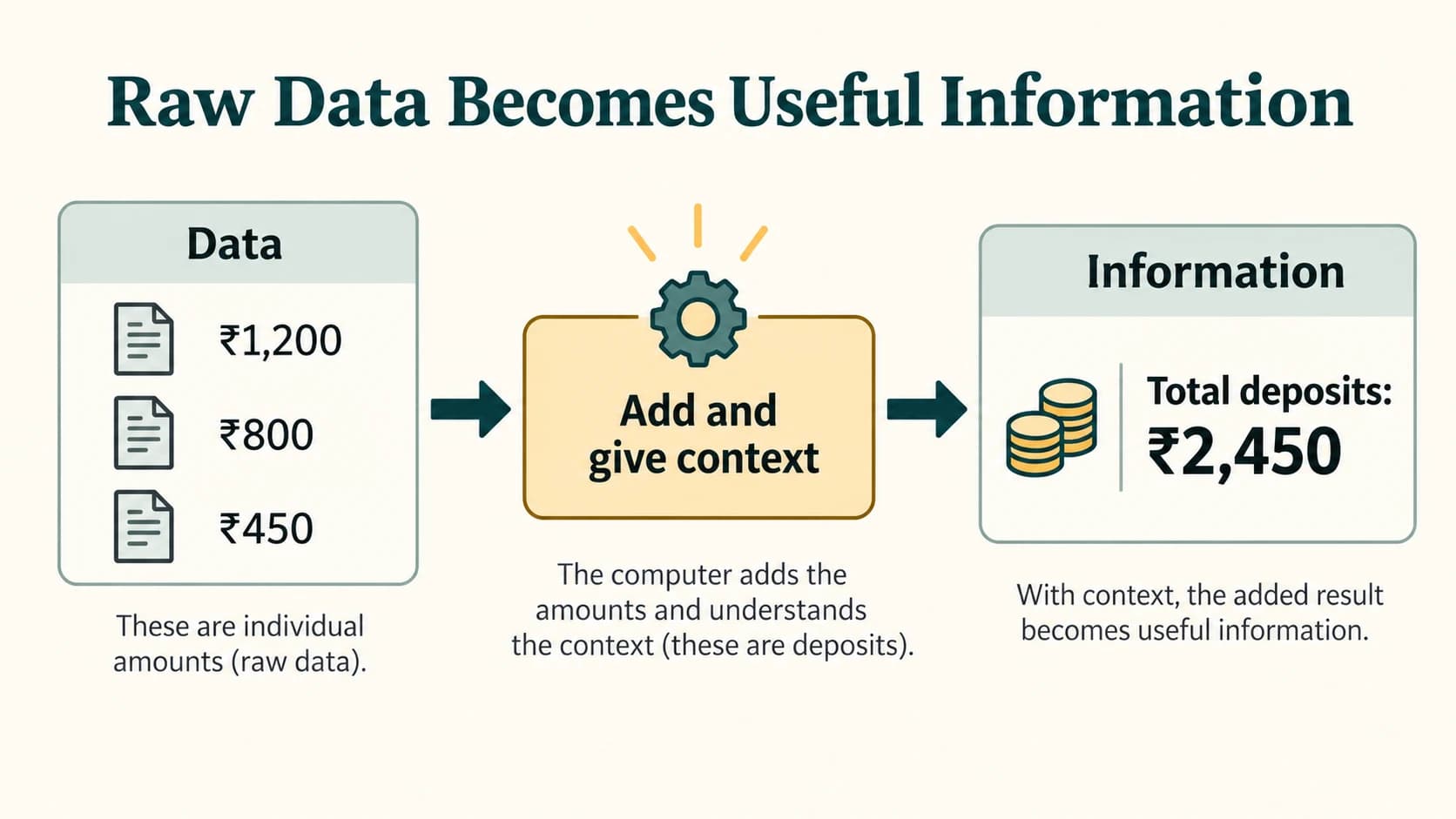
Concept to understand: Information is not necessarily “data after any calculation.” Data becomes useful information when meaning, organization, or interpretation helps answer a particular question.
Data versus information
| Feature | Data | Information |
|---|---|---|
| Nature | Recorded facts or values | Facts given useful meaning or context |
| Typical form | Entries, measurements, raw observations | Summaries, interpreted records, conclusions |
| Example | 250, 300, 450 | “Total collections = ₹1,000” |
| Use | Input to analysis, calculation, or storage | Helps understanding and decisions |
| Relationship | Can be organized or processed | Is derived from and expressed using data |
Remember: One person's information can become another process's input data. The distinction depends partly on how it is being used.
Data-processing cycle
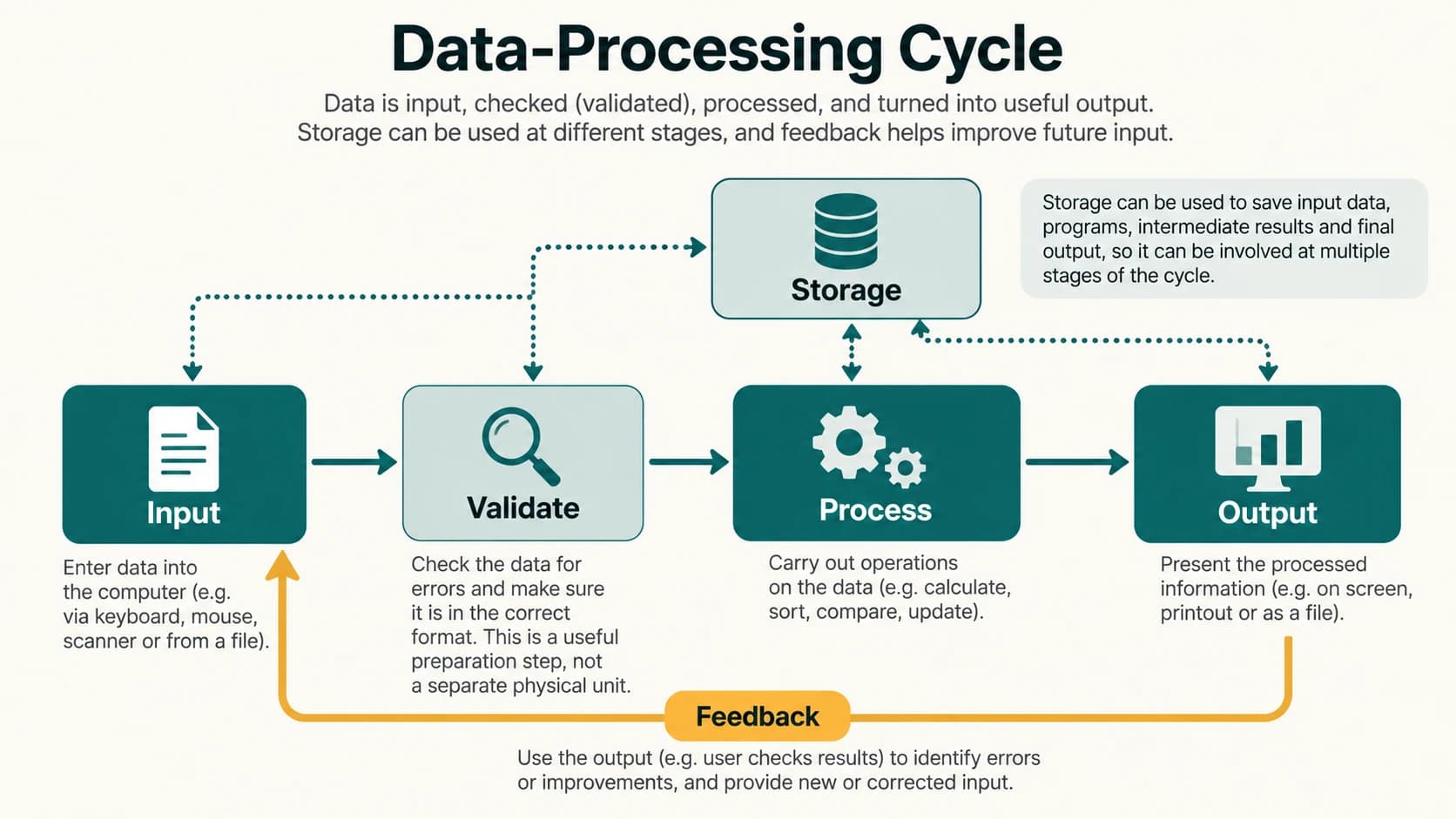
A simplified data-processing cycle shows how data is collected, processed, converted into results, and retained or used.
- Collection and input: Gather relevant data and enter or capture it.
- Validation / preparation: Check basic accuracy, completeness, or format before relying on it.
- Processing: Calculate, sort, compare, filter, organize, or apply other rules.
- Output: Present or transmit the resulting information.
- Storage: Save data, instructions, or results for future use.
- Feedback / correction: Examine the result, correct errors, or supply new input for another cycle.
Different textbooks draw this in different ways. Input → Processing → Output is the fundamental simplified sequence. Storage can occur before, during, and after processing; feedback is a useful extension, not a mandatory additional CPU stage.
Worked example — processing branch deposits
Suppose a bank branch wants a total for three verified deposits: ₹1,200, ₹800, and ₹450.
Input: The three amount entries with their transaction identifiers.
Validation: Check that entries are permitted amounts and correspond to real records.
Processing: Add 1,200 + 800 + 450 = ₹2,450.
Output: A report showing “Total deposits: ₹2,450.”
Storage: Save the authorized transaction records and report as required.
Feedback: If one amount was entered incorrectly, an authorized correction triggers an updated report.
An important practical point: A calculated total may be arithmetically correct and still misleading if a transaction is missing or duplicated. Data quality comes before trusting the final result.
Common processing operations
- Calculating: Finding totals, averages, or differences.
- Sorting: Putting records in date or amount order.
- Filtering: Showing only records that match a condition.
- Comparing: Checking whether two values match.
- Classifying: Grouping records by category.
- Summarizing: Turning many entries into a meaningful report.
These are examples of processing, not a required sequence of six separate stages.
Important terms
| Term | Meaning |
|---|---|
| Data | Recorded facts or observations. |
| Information | Data organized or interpreted to convey useful meaning. |
| Input | Data supplied to a process or system. |
| Validation | Checking whether input meets required rules or constraints. |
| Processing | Transforming, organizing, or analysing data. |
| Output | Result provided after processing. |
| Storage | Retaining data or results for future use. |
| Feedback | Result-based information used to adjust the next action or cycle. |
Common confusions
- Data is not always numeric: Words, images, and sound recordings can also be data.
- Information does not have to be a chart: A labelled statement or meaningful table can be information.
- Processing is more than arithmetic: Sorting, checking, and filtering also count.
- Storage is not identical to output: Saving a result and displaying it are different functions.
- Validation does not guarantee truth: A correctly formatted entry can still be factually wrong.
Fact to remember
- The simplest processing sequence is Input → Process → Output (IPO).
- Storage supports the cycle rather than always appearing at only one point.
- Accurate, relevant, timely, and complete data generally supports better information.
- GIGO is directly relevant to data quality.
Quick revision
| Situation | Stage / idea |
|---|---|
| Entering a deposit amount | Input |
| Checking allowed input format | Validation |
| Adding several deposit amounts | Processing |
| Displaying the computed total | Output |
| Saving the transaction record | Storage |
| Correcting an error and rerunning | Feedback / new cycle |
Practice questions — CA-01-02
Q1. A series of unlabeled figures is most clearly an example of:
A. Information
B. Raw data
C. A processor
D. An operating system
Q2. Which is the best example of information?
A. 100, 250, 400 with no context
B. An unlabelled string of characters
C. “Total deposits for the listed transactions = ₹750”
D. A blank form
Q3. The basic IPO model stands for:
A. Input, Processing, Output
B. Internet, Program, Operation
C. Internal, Public, Online
D. Input, Printing, Opening
Q4. Sorting account records by transaction date is an example of:
A. Physical cleaning
B. Processing
C. Power supply
D. A monitor fault
Q5. Checking whether an entered date has the required format is an example of:
A. Validation
B. Printing
C. Hardware repair
D. Deletion
Q6. A report shown on a screen is most directly an example of:
A. Input
B. Output
C. Electricity
D. Keyboard layout
Q7. Which statement is correct?
A. Storage can only occur after output.
B. Storage can support multiple stages in a processing cycle.
C. All stored data is necessarily correct.
D. Stored information cannot be used again.
Q8. The amounts ₹1,200, ₹800, and ₹450 have a total of:
A. ₹2,250
B. ₹2,350
C. ₹2,450
D. ₹2,550
Q9. If a report includes the same deposit twice, the most important concern is:
A. Data quality
B. Screen size
C. The mouse cable
D. Text font
Q10. Which activity is not a typical data-processing operation?
A. Sorting
B. Filtering
C. Summarizing
D. Replacing a broken power cable
Q11. Feedback in a data-processing cycle can help by:
A. Making data irrelevant
B. Eliminating all human review
C. Identifying and correcting errors for a new cycle
D. Preventing the computer from saving files
Q12. Which statement about data and information is best?
A. Only numbers are data.
B. Data and information are always unrelated.
C. Meaning and context help distinguish useful information from raw data.
D. Information cannot become input to another process.
Answers and explanations — CA-01-02
| Q | Answer | Explanation |
|---|---|---|
| 1 | B | Without context, the figures are raw data rather than a meaningful conclusion. |
| 2 | C | The statement identifies what was measured and supplies a useful total. |
| 3 | A | IPO abbreviates Input, Processing, Output. |
| 4 | B | Sorting reorganizes data according to a rule and is a processing operation. |
| 5 | A | Validation checks whether an entry satisfies defined input rules. |
| 6 | B | The screen displays the result to the user. |
| 7 | B | Data and results may be saved at different points in the cycle. |
| 8 | C | 1,200 + 800 + 450 = 2,450. |
| 9 | A | A duplicate transaction can distort a correct-looking total. |
| 10 | D | Replacing a power cable is hardware maintenance, not an operation on data. |
| 11 | C | Feedback helps detect and correct problems before the next round of processing. |
| 12 | C | The significance of recorded facts depends on purpose and context. |
Previous lesson: CA-01-01 — What Is a Computer? Characteristics and Uses.
Next lesson: CA-01-03 — Generations of Computers.