
Common Protocols: HTTP/HTTPS, FTP, SMTP, POP/IMAP, TCP/IP
Common Protocols: HTTP/HTTPS, FTP, SMTP, POP/IMAP, TCP/IP. Foundational Computer Awareness explanations, examples and explained practice questions for banking and recruitment exam preparation.
By Akhilesh Saini
What you will learn
- What a networking protocol does.
- Match HTTP/HTTPS, FTP, SMTP, POP3 and IMAP to basic use cases.
- Understand the broad roles of TCP, UDP and IP.
- Learn commonly tested port associations with clear qualifications.
Why this topic matters
Protocol questions are usually recognition questions: Which protocol is used to send email?, Which protocols are used to retrieve/synchronize mail?, or What does HTTPS add? A good answer focuses on function rather than assuming any acronym automatically guarantees privacy.
What is a protocol?
A protocol is a set of agreed rules for how computers or programs exchange information. It may define message formats, message order, identifiers, delivery checks, security negotiation or other behaviour. Different protocols cooperate in a stack because no one protocol handles every part of communication.
For an ordinary website visit, a browser uses an application protocol such as HTTP; the underlying network uses IP, and a transport protocol helps the application exchange data. Different HTTP versions can use different transport arrangements.
HTTP and HTTPS — web requests and responses
HTTP (Hypertext Transfer Protocol) is a request-response application protocol used to obtain or send web resources such as pages and data. A browser is a common client; the server supplies responses. HTTP alone does not promise that the communications are encrypted.
HTTPS (HTTP Secure) means HTTP carried with transport security, normally TLS (Transport Layer Security). Properly established HTTPS helps protect the connection against passive observation and certain kinds of tampering, and authenticates the endpoint subject to certificate and trust checks.
Exam caution: HTTPS does not guarantee that the website's owner is honest or that every downloaded file is safe. It protects the connection, not all claims or actions of the site.
A common textbook association is HTTP port 80 and HTTPS port 443. Actual applications can use non-default ports; HTTP/3 commonly uses QUIC over UDP, so never claim that all modern HTTPS traffic uses only TCP.
FTP and related file-transfer ideas
FTP (File Transfer Protocol) is a traditional application protocol for transferring files between a client and server. Classic FTP generally sends credentials and content without modern end-to-end encryption; it should not be assumed secure simply because it transfers files.
FTPS adds TLS protection to FTP in supported configurations. SFTP is SSH File Transfer Protocol, which is a distinct protocol associated with SSH, not merely another name for FTPS. At awareness level, recognize FTP as the familiar file-transfer acronym and avoid conflating different secure-transfer variants.
Classic FTP commonly uses TCP port 21 for a control connection; transfer connections vary by mode. Do not memorize “FTP always uses port 21 for every byte of data.”
SMTP, POP3 and IMAP — email communication
Email commonly uses different protocols for sending and accessing messages:
| Protocol | Full form | Basic role |
|---|---|---|
| SMTP | Simple Mail Transfer Protocol | Send/relay email from mail clients/servers |
| POP3 | Post Office Protocol version 3 | Retrieve email, often download-oriented |
| IMAP | Internet Message Access Protocol | Access and synchronize mailbox state across devices |
SMTP transfers outgoing mail or relays mail between mail systems. POP3 traditionally retrieves a mailbox's messages, often by downloading them to a client, although server retention can be configured. IMAP is especially associated with server-based mailbox access and synchronization of folders and message state across multiple devices.
Important qualification: Modern mail services may use web apps, authenticated submission, sync APIs and TLS in addition to these protocols. “POP3 always deletes all messages from the server” is false as a universal statement.
Common textbook ports (default associations): SMTP relay 25, message submission often 587, POP3 110 (POP3 over implicit TLS commonly 995), IMAP 143 (IMAP over implicit TLS commonly 993). These are service defaults and conventions, not guarantees of a server's actual configuration.
TCP/IP and transport concepts
IP (Internet Protocol) handles addressing and forwarding network-layer packets. IP itself does not promise perfect delivery or correct ordering of an application's messages.
TCP (Transmission Control Protocol) provides a reliable, ordered byte stream between endpoints, using mechanisms such as acknowledgements and retransmissions. A TCP connection does not mean that every application is automatically secure; encryption is a separate concern.
UDP (User Datagram Protocol) sends datagrams with relatively little built-in transport machinery and does not itself guarantee delivery or ordering. It is useful for services where applications manage timing or reliability differently; modern transport designs such as QUIC use UDP as a substrate and add their own reliability features.
The term TCP/IP refers broadly to the protocol family underpinning the Internet, not just one fused protocol. At beginner level: IP: addressing/routing; TCP: reliable ordered transport; UDP: simple datagram transport.
Other protocols worth recognizing
| Protocol | Core purpose | Where explored further |
|---|---|---|
| DNS | Lookup of names and associated records | CA-06-03 |
| DHCP | Automatic network configuration, often IP address leasing | CA-07-06 |
| ARP | IPv4-to-link-layer address resolution on local network | CA-07-06 |
| TLS | Protecting data in transit for supporting applications | CA-09-05 |
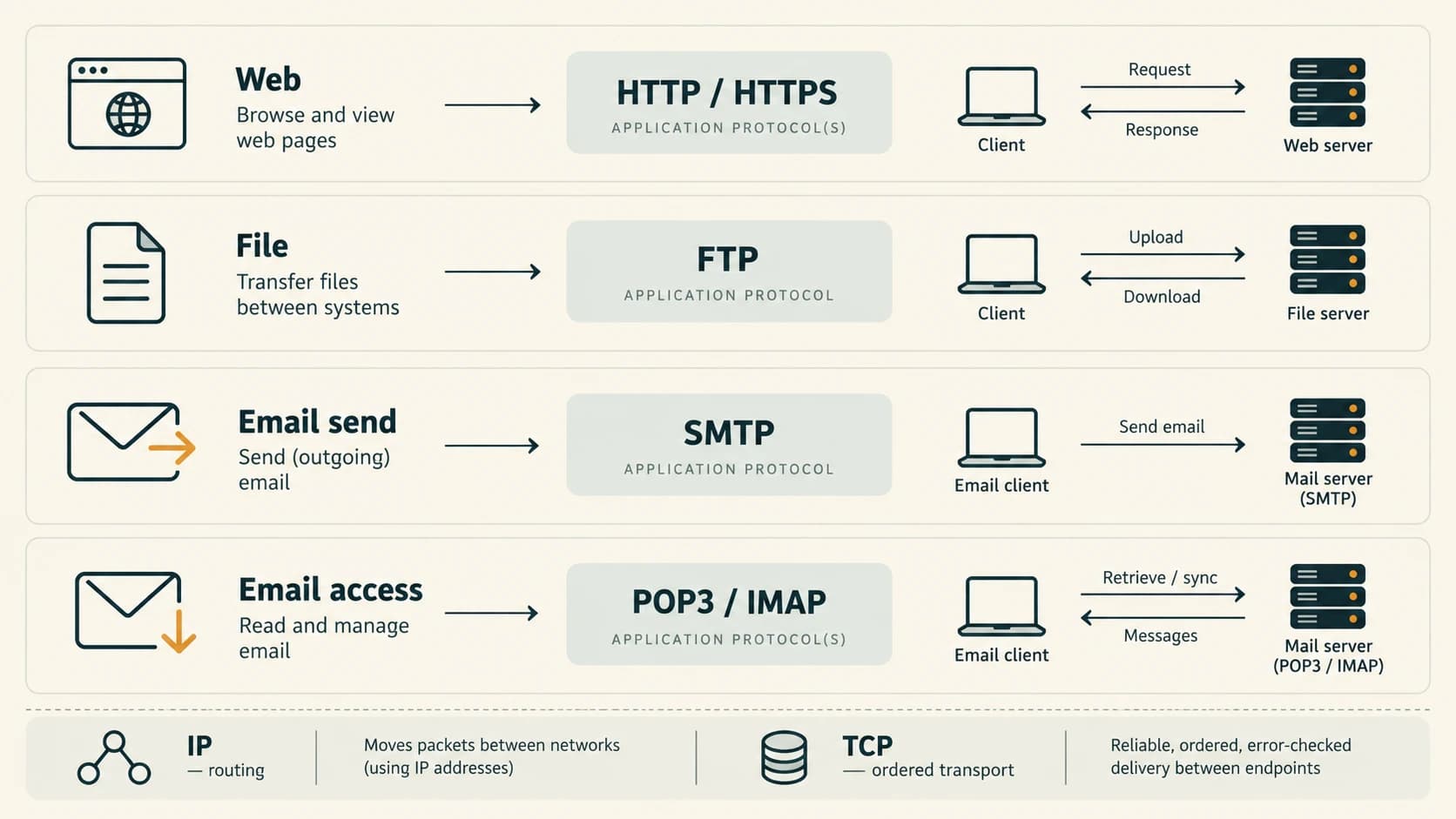
Quick protocol comparison
| Task | Main protocol to recognize |
|---|---|
| Fetch web resource | HTTP |
| Protected web connection | HTTPS / HTTP over TLS |
| Traditional file transfer | FTP |
| Send or relay email | SMTP |
| Download-oriented mail retrieval | POP3 |
| Synchronized mailbox access | IMAP |
| IP packet addressing/routing | IP |
| Reliable ordered byte stream | TCP |
| Basic datagram service | UDP |
Worked examples
Example 1 — Open protected web page: A browser loads an HTTPS site. The connection can be protected by TLS; this says nothing by itself about whether the page's advice is true.
Example 2 — Mail from a colleague: Sending the mail commonly involves SMTP; reading it in a multi-device mail app may involve IMAP or a provider-specific synchronization service.
Example 3 — Old file exchange: An FTP client transfers files to an FTP server. Do not assume the session is encrypted without an explicitly configured secure variant.
Example 4 — Packet delivery: IP helps get packets toward their addresses. TCP adds reliability and ordering to a byte stream, while the application still interprets the bytes as messages/data.
Example 5 — Typical exam ports: If a classic question asks the usual default port for HTTPS, answer 443. If it asks whether every deployment must use 443, answer no.
Important terms
| Term | Meaning |
|---|---|
| HTTP | Hypertext Transfer Protocol |
| HTTPS | HTTP protected using TLS |
| FTP | File Transfer Protocol |
| SMTP | Simple Mail Transfer Protocol |
| POP3 | Post Office Protocol version 3 |
| IMAP | Internet Message Access Protocol |
| TCP | Transmission Control Protocol |
| UDP | User Datagram Protocol |
| IP | Internet Protocol |
| TLS | Transport Layer Security |
| Port | Numerical transport endpoint identifier used by TCP/UDP |
| QUIC | Modern transport protocol commonly carried over UDP |
Common confusions and exam traps
- HTTPS ≠ honest site: It protects the connection, not the trustworthiness of content.
- SMTP ≠ reading inbox: SMTP is commonly for sending/relaying, while POP3/IMAP are for access.
- POP3 ≠ always delete from server: Behaviour can be configured.
- FTP ≠ secure by default: Traditional FTP is not encrypted.
- SFTP ≠ FTPS: They are different protocols.
- IP ≠ TCP: IP provides packet addressing/forwarding; TCP adds an ordered reliable byte stream.
- HTTP over only TCP? HTTP/3 uses QUIC over UDP; avoid absolutes in modern protocol questions.
Objective-exam facts to remember
| Exam clue | Best answer |
|---|---|
| Web resources | HTTP |
| Encrypted/authenticated web transport | HTTPS (TLS) |
| File Transfer Protocol | FTP |
| Sending email | SMTP |
| Receiving/download-oriented email | POP3 |
| Server-synchronized mailbox access | IMAP |
| Reliable ordered transport | TCP |
| IP packet routing | IP |
| Default HTTPS port | 443 |
| Default HTTP port | 80 |
Quick revision
- A protocol defines communication rules.
- HTTP handles web exchange; HTTPS protects the HTTP connection through TLS.
- FTP transfers files, SMTP sends/relays mail, POP3 and IMAP access mail.
- IP addresses/routes packets; TCP offers reliable ordered delivery of a byte stream.
- Default port numbers are conventional associations, not universal requirements.
Practice questions — CA-07-07
1. Which protocol is most directly associated with transferring web resources in a browser?
A. POP3
B. SMTP
C. ARP
D. HTTP
2. HTTPS typically protects HTTP communications using:
A. A printer driver
B. TLS
C. A spreadsheet formula
D. OCR
3. What does SMTP primarily do?
A. Read only local files
B. Assign private IP addresses
C. Send or relay email
D. Print documents
4. Which protocol is strongly associated with synchronized mailbox access?
A. IMAP
B. VGA
C. FTP only
D. USB
5. What is the usual expansion of FTP?
A. File Token Processor
B. Folder Transmission Port
C. Fast Transfer Printer
D. File Transfer Protocol
6. Which protocol is traditionally download-oriented for email retrieval?
A. POP3
B. IP
C. HTTP
D. DHCP
7. Which transport protocol normally supplies an ordered reliable byte stream?
A. IP alone
B. TCP
C. UDP by itself
D. DNS
8. Which statement about IP is correct?
A. IP provides addressing and packet-forwarding functions
B. IP is a physical Ethernet cable
C. IP always encrypts packet contents
D. IP guarantees delivery of every packet
9. The common default port for HTTPS is:
A. 110
B. 21
C. 443
D. 25
10. Which default-port association is traditionally correct for HTTP?
A. 587
B. 995
C. 993
D. 80
11. Which statement about classic FTP is correct?
A. It always encrypts every file
B. It should not be assumed encrypted by default
C. It is solely an email protocol
D. It is identical to SFTP
12. Which statement best reflects modern HTTP transport?
A. TCP is the same as TLS
B. HTTPS guarantees every website is honest
C. HTTP/3 commonly uses QUIC over UDP
D. All HTTP always uses UDP without reliability
Answers and explanations — CA-07-07
1. D — HTTP. HTTP is an application-layer web request-response protocol.
2. B — TLS. TLS provides connection security for HTTPS when the endpoint and certificates are correctly validated.
3. C — Send or relay email. SMTP transports outgoing or relayed email between clients and mail systems.
4. A — IMAP. IMAP supports access to server-stored mailbox state and is commonly used across multiple devices.
5. D — File Transfer Protocol. FTP is File Transfer Protocol, traditionally used to transfer files between a client and a server.
6. A — POP3. POP3 is the familiar mail retrieval protocol often associated with downloading messages to a client.
7. B — TCP. TCP supports reliability and ordering for its byte-stream abstraction.
8. A — IP provides addressing and packet-forwarding functions. IP helps deliver packets using network addresses but does not by itself guarantee reliability or security.
9. C — 443. 443 is the conventional HTTPS port, although services may use different configured ports.
10. D — 80. 80 is the typical default HTTP port; 443 is conventionally HTTPS.
11. B — It should not be assumed encrypted by default. Plain FTP is not an encrypted transport; FTPS and SFTP are distinct secure-transfer approaches.