
Antivirus, Firewall and Security Updates
Antivirus, Firewall and Security Updates. Foundational Computer Awareness explanations, examples and explained practice questions for banking and recruitment exam preparation.
By Akhilesh Saini
Learning objectives
Identify how antivirus, firewalls and security updates differ; explain why they work better in layers; and recognize the difference between a software patch and an operating-system upgrade.
Three different kinds of defense
Antivirus/anti-malware software scans for and may block, quarantine or remove suspected harmful programs. Detection can rely on known signatures, behavior, reputation and other methods. It may miss new or disguised attacks, and a false positive may incorrectly flag a safe file. 'Antivirus' is a common historical product label even when the tool protects against many forms of malware.
A firewall applies rules to network traffic. At a basic level it can allow or deny traffic by origin, destination, port, connection state or other supported criteria. Some firewalls are software on a laptop; others protect networks at a router or dedicated appliance. A firewall is not the same as an antivirus and does not interpret every harmful webpage or stop an authorized user from approving a fraudulent payment.
A security update (patch) fixes defects, including some known vulnerabilities, in an operating system, application, browser, driver or other software. Prompt updates reduce exposure, but even fully updated systems can be compromised in other ways.
| Tool/control | Main job | Cannot guarantee |
|---|---|---|
| Antivirus / EDR-style endpoint tool | Detect suspicious files or endpoint behavior | Every malicious action is detected |
| Host firewall | Enforce traffic rules for a device | Every permitted application is safe |
| Network firewall | Enforce traffic policy at a network boundary | Every internal threat is blocked |
| Security patch | Correct particular vulnerabilities | Elimination of all future flaws |
| Access control | Limit what users/processes can do | Complete protection if privileges are misused |
| Backup | Support recovery after loss or corruption | Live prevention of infection |
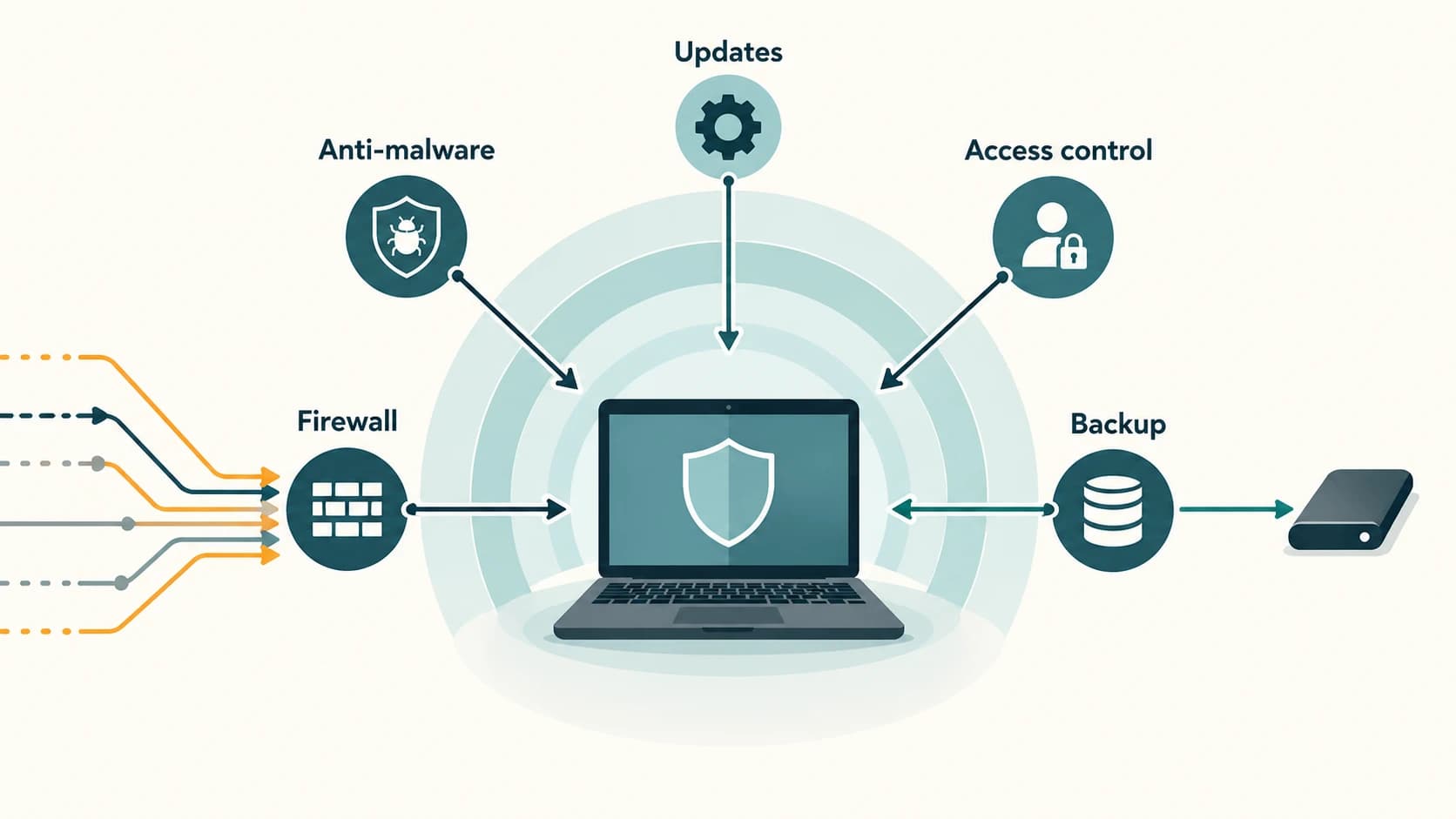
Defense in depth
Security works better when several imperfect controls support one another. Picture an employee opening an unexpected attachment. Email filtering may reject it, an antivirus may quarantine the file, restricted permissions may limit what it can change, network controls may prevent harmful connections, and tested backups may aid recovery. None is infallible; together they can lower risk.
Least privilege means giving users and programs only the permissions necessary for their duties. An ordinary user should not need a system-wide administrator account for routine browsing. Allowlisting restricts execution or access to approved items; blocklisting denies known undesirable items. Organizations choose a mix based on risk.
Patches, updates and upgrades
- A patch is a correction to software, often security-related.
- An update can deliver security fixes, bug fixes or smaller feature changes.
- An upgrade often refers to a larger change of product or version, though vendors use the terms differently.
- Automatic updates help reduce delay, provided devices remain supported and appropriately configured.
- End-of-support software may stop receiving ordinary fixes and becomes riskier to operate.
An update should come from a trusted vendor or approved management system, not a pop-up from an unknown website asking for an executable. Even trusted patches should be deployed through the organization’s change and testing procedures where applicable.
Banking-style incident scenario
An employee's workstation cannot connect to a server after a security-rule change. A firewall could be denying required traffic, but that does not automatically mean the firewall is faulty. Approved administrators should diagnose rules rather than switch off all protection. A different employee receives a suspicious file: the antivirus may quarantine it, and its log can help the security team investigate. These are different controls responding to different problems.
Objective-exam facts
| If an exam asks about… | Recognition answer |
|---|---|
| Blocking/allowing network connections according to policy | Firewall |
| Detecting/quarantining malicious files | Antivirus/anti-malware |
| Correcting a known software vulnerability | Security patch |
| Minimum necessary user permissions | Least privilege |
| Multiple complementary protections | Defense in depth |
| A wrongly flagged safe item | False positive |
| Support that no longer receives normal vendor fixes | End of support |
Common confusions and exam traps
- Antivirus ≠ firewall: One primarily detects endpoint threats; the other applies traffic rules.
- Firewall ≠ guarantee against phishing: A person can voluntarily send credentials through an allowed service.
- Software is up-to-date ≠ completely secure: Misconfiguration and human error remain possible.
- Untrusted update popup ≠ legitimate patch: Use authorized update channels.
- Protection ≠ recovery: Backups and restoration need separate planning.
Quick revision
- Antivirus scans and responds to suspicious software; firewall regulates network traffic.
- Updates correct flaws; timely installation helps reduce vulnerability exposure.
- Least privilege and defense in depth reduce the consequences of a single failure.
- Quarantine isolates a suspected item pending action; false positives are possible.
- Security tools support informed behavior; they do not replace it.
Practice questions — CA-09-03
1. Which tool chiefly enforces rules on network traffic?
A. Firewall
B. Antivirus only
C. Spreadsheet
D. Compiler
2. Which tool commonly scans and quarantines suspected malicious files?
A. Router only
B. Antivirus/anti-malware
C. Printer spooler
D. Data warehouse
3. A correction released to address a security flaw is a:
A. Phishing email
B. Digital signature
C. Security patch
D. Botnet
4. What does defense in depth mean?
A. Use exactly one control
B. Give every user administrator rights
C. Disable backups
D. Use several complementary security controls
5. Which statement about a firewall is correct?
A. It does not guarantee an allowed website is honest
B. It decrypts every password
C. It prevents all social engineering
D. It replaces updates
6. A harmless file incorrectly flagged as malware is a:
A. False negative
B. False positive
C. Full backup
D. Protocol upgrade
7. Giving staff only permissions needed for work is:
A. Privilege escalation
B. Vishing
C. Least privilege
D. Session fixation
8. Installing a security update offered by an unknown pop-up is:
A. Always required
B. Always safer than vendor updates
C. Equivalent to a patch-management policy
D. Risky; updates should come from trusted sources
9. Which distinction is accurate?
A. Antivirus examines threats; firewall regulates traffic
B. Firewall is a file type
C. Antivirus is a hardware-only component
D. Both guarantee total safety
10. A software version no longer receives normal fixes. This is:
A. End of support
B. Cloud synchronization
C. Full encryption
D. Ransomware automatically
11. Which control helps recover corrupted records but does not itself stop infection?
A. Host firewall
B. Antivirus signature
C. Backup
D. User account
12. A blocked legitimate application is reported after a firewall-rule change. Correct next step?
A. Disable all protection permanently
B. Reinstall every operating system
C. Tell users to share credentials
D. Have authorized staff review the applicable rule
Answers and explanations — CA-09-03
1. A — Firewall. A firewall controls allowed and denied network communications according to policy.
2. B — Antivirus/anti-malware. Anti-malware tools inspect files and behavior and may quarantine suspected threats.
3. C — Security patch. A patch fixes a specific issue such as an exploitable software vulnerability.
4. D — Use several complementary security controls. Layered controls reduce reliance on any one technique succeeding every time.
5. A — It does not guarantee an allowed website is honest. Traffic filtering cannot certify the trustworthiness of every destination or user decision.
6. B — False positive. A false positive is an alert identifying a benign item as suspicious.
7. C — Least privilege. Least privilege limits unnecessary access and potential consequences of account compromise.
8. D — Risky; updates should come from trusted sources. Malicious websites may imitate update prompts to distribute malware.
9. A — Antivirus examines threats; firewall regulates traffic. Anti-malware and firewalls have different core functions, although some security suites bundle both.
10. A — End of support. Unsupported versions pose added risk because security issues may remain unpatched.
11. C — Backup. Backup supports restoring usable data; it is not a live malware-blocking tool.
12. D — Have authorized staff review the applicable rule. Correct diagnosis should adjust legitimate policy safely rather than removing all network protection.