
Phishing, Smishing, Vishing and Social Engineering
Phishing, Smishing, Vishing and Social Engineering. Foundational Computer Awareness explanations, examples and explained practice questions for banking and recruitment exam preparation.
By Akhilesh Saini
Learning objectives
Distinguish phishing, smishing and vishing, explain social-engineering tactics, and practice how to verify urgent-looking messages without surrendering credentials or account control.
What is social engineering?
Social engineering means manipulating people into performing actions or sharing information that benefit an attacker. Instead of only attacking software, a criminal may exploit authority, fear, curiosity, sympathy or time pressure. An example is an impersonator saying a customer’s digital banking access will be disabled unless a 'verification code' is supplied immediately.
Phishing broadly refers to deceptive messages or sites designed to trick targets into divulging information, sending money, opening harmful content or approving unsafe actions. Communication channel gives common names to specific variants:
| Term | Typical channel | Example |
|---|---|---|
| Phishing | Email or other deceptive electronic messages | Fake password-reset email |
| Smishing | SMS/text message | Text claims KYC is expiring and links to a fake portal |
| Vishing | Voice/telephone call | Caller impersonates bank staff to request OTP |
| Spear phishing | More targeted deception | Forged message personalized to a particular officer |
| Quishing | Malicious QR-code lure | QR code routes to a fake login or payment instruction |
The names overlap: a phone caller may send a fraudulent SMS while talking to a victim, so the event uses multiple channels. A QR code is not automatically malicious; it is a way of encoding information, and the risk depends on the destination and requested action.
The common manipulation pattern
A typical attempted fraud has four stages: pretext ('I am from your bank'), urgency ('act in five minutes'), request ('share OTP / enter credentials / install tool'), and pressure ('your account will be frozen'). The requested action matters more than how professional the message looks. Names, logos, caller IDs and message formatting can be copied or spoofed.
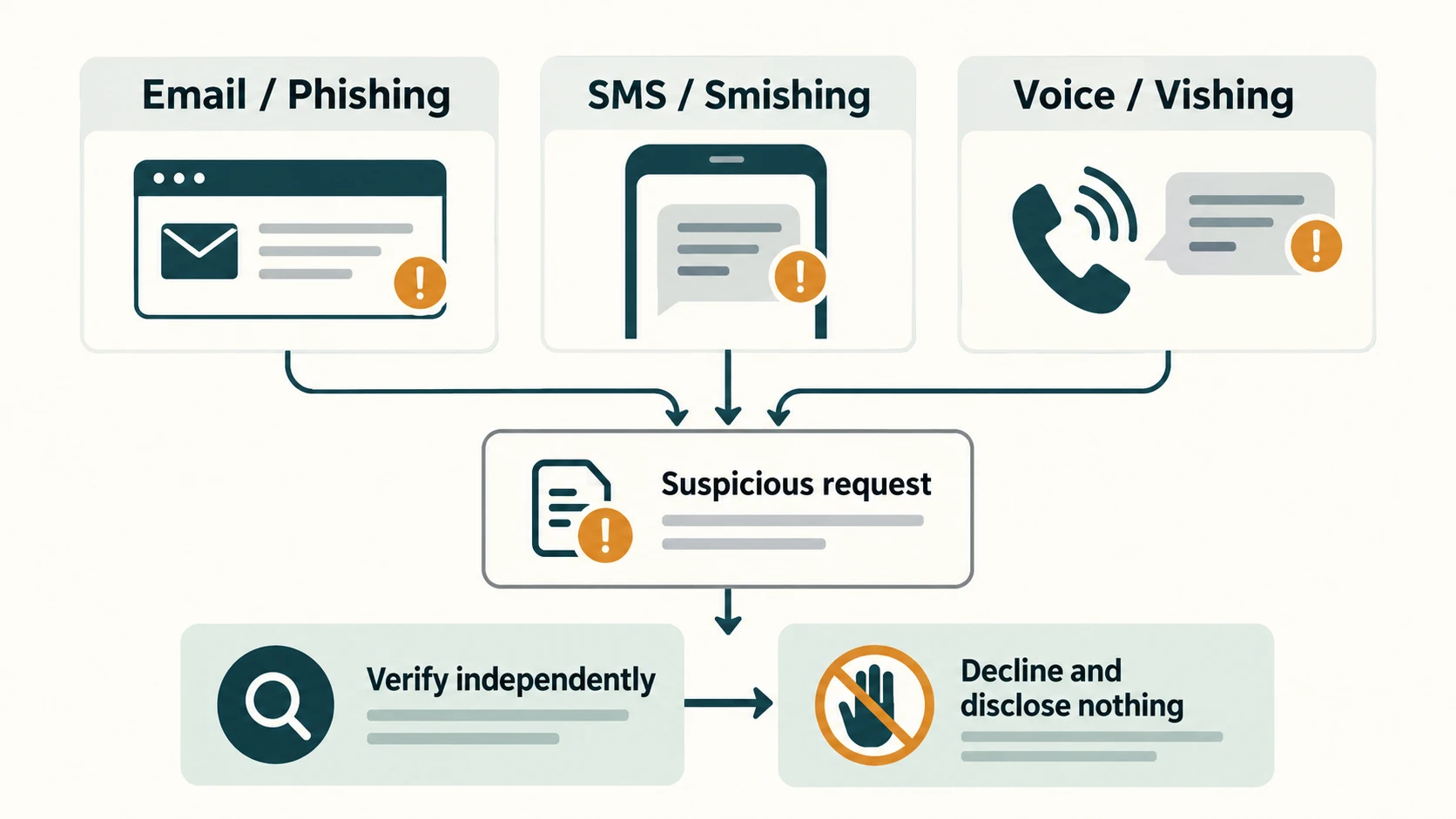
Red flags and safer verification
| Suspicious instruction | Safer response |
|---|---|
| 'Click this shortened link to update KYC now' | Open the provider's known official app or independently verified address |
| 'Tell me the OTP; I am from technical support' | Do not share codes; contact the provider using a trusted number |
| 'Install screen-sharing so I can refund your payment' | Do not grant remote control to an unknown person |
| 'Approve a request in your UPI app to receive funds' | Review carefully: approving a payment/collect request may debit you |
| 'Your manager needs a confidential transfer today' | Validate using an established second communication channel |
Look for mismatched domains, unusual requests, surprise attachments and sudden urgency, but absence of obvious typos does not prove a message is genuine. Artificially generated messages can be fluent. Conversely, legitimate messages may contain poor wording, so judge the action and independently verify the sender.
Worked examples
Example A — Message channel: A text from an unfamiliar sender claims a delivery failed and asks for card information. This is a smishing example. If the same script arrives by call, it is vishing.
Example B — Impersonation of a colleague: An email appears to come from a branch manager requesting immediate access to records. Because it uses organizational role and urgency, it is a social-engineering attempt; if sent to a particular employee using researched details, it may be spear phishing.
Example C — OTP relay: Someone correctly knows a victim's name and partial account data and asks for an OTP. Knowledge of personal data is not proof of authorization. Do not share the OTP. Use the known official service to check the account directly.
Objective-exam facts to remember
| Clue | Exam term |
|---|---|
| SMS-based phishing | Smishing |
| Voice-call phishing | Vishing |
| Targeted personalized phishing | Spear phishing |
| Psychological manipulation of a person | Social engineering |
| Fake website crafted to steal login details | Phishing site |
| Forged apparent sender/caller identity | Spoofing |
Common confusions and exam traps
- Phishing ≠ only email: Email is common, but the umbrella idea applies to deceptive online interaction.
- Spoofed number ≠ verified caller: Displayed identity can be falsified.
- HTTPS ≠ trustworthy content: An encrypted connection can lead to a fraudulent website.
- Urgent request ≠ mandatory action: Verify independently rather than using contact details inside the suspicious message.
- OTP ≠ identity proof to a stranger: Never read a login or transaction authorization code to an unexpected caller.
Quick revision
- Social engineering targets decisions; phishing is one major form.
- SMS → smishing; voice → vishing; targeted message → spear phishing.
- Fraudsters exploit authority, fear and urgency; professional-looking pages are not sufficient evidence.
- Use separately verified contact channels; do not install remote-access software for unsolicited support.
- Suspicious QR codes and payment requests demand careful inspection of the actual action.
Practice questions — CA-09-02
1. An SMS that asks a customer to visit a fake KYC website is an example of:
A. Vishing
B. Smishing
C. Ransomware
D. Hashing
2. A caller impersonates a banker and requests an OTP. This is:
A. Vishing
B. Data compression
C. Encryption
D. Star topology
3. A targeted fake message is customized using details about one employee. It is:
A. Broadcasting
B. Data mining always
C. Spear phishing
D. Optical scanning
4. Which is a classic social-engineering pressure tactic?
A. Independent verification
B. Least privilege
C. Routine patching
D. Urgent threat of account suspension
5. A displayed caller ID exactly matches the bank number. What does this prove?
A. The caller is authenticated
B. Nothing conclusive; caller ID may be spoofed
C. OTP sharing is safe
D. The call is encrypted
6. An email looks genuine but asks for login secrets through a new link. Best response?
A. Navigate independently through a known official channel
B. Reply with password
C. Disable MFA
D. Install its attachment
7. Which is true about phishing emails?
A. All contain spelling mistakes
B. All carry malware
C. A convincing, correctly written message can still be phishing
D. Only banks are targeted
8. A fraudulent QR leads to a false login page. This is sometimes called:
A. Firmware update
B. Quishing
C. Packet switching
D. Backpropagation
9. An unexpected support caller asks to install remote-control software. A safe choice is to:
A. Install it immediately
B. Share the screen and OTP
C. Approve a test debit
D. Decline and use independently verified support
10. Psychologically tricking a person to reveal a secret is:
A. Social engineering
B. Disk partitioning
C. Hash calculation
D. File compression
11. The term spoofing generally refers to:
A. Backing up data
B. Sending email securely
C. Falsifying an apparent source or identity
D. Compressing a file
12. Which is the least reliable sign that a message is genuine?
A. Independent callback through verified number
B. Official app status checked separately
C. A trusted contact record
D. Professional layout and copied logo
Answers and explanations — CA-09-02
1. B — Smishing. Smishing specifically describes phishing conducted through SMS/text messages.
2. A — Vishing. Voice-based social engineering and phishing is called vishing.
3. C — Spear phishing. Spear phishing describes carefully targeted phishing attempts.
4. D — Urgent threat of account suspension. Fear and artificial time pressure are common psychological manipulation tools.
5. B — Nothing conclusive; caller ID may be spoofed. Displayed caller identity can be forged and should not substitute for trusted verification.
6. A — Navigate independently through a known official channel. Independent navigation avoids trusting the suspicious message for destination or contact details.
7. C — A convincing, correctly written message can still be phishing. Attackers can write fluent messages and target many organizations or individuals.
8. B — Quishing. Quishing is phishing delivered through a QR-code lure or destination.
9. D — Decline and use independently verified support. Remote access can expose accounts and data; unsolicited requests require trusted verification.
10. A — Social engineering. Social engineering manipulates human decisions rather than merely exploiting code.
11. C — Falsifying an apparent source or identity. Spoofing misrepresents the origin or identity shown to the recipient.
12. D — Professional layout and copied logo. A copied visual identity can be made by an attacker and provides no authentication.