
Safe Browsing, Privacy and Cyber Hygiene
Safe Browsing, Privacy and Cyber Hygiene. Foundational Computer Awareness explanations, examples and explained practice questions for banking and recruitment exam preparation.
By Akhilesh Saini
Learning objectives
Recognize practical browsing and privacy risks, interpret HTTPS and browser warnings appropriately, and choose everyday cyber-hygiene practices for devices, accounts and networks.
Cyber hygiene means consistent safe habits
Cyber hygiene is the routine set of behaviors and maintenance practices that lowers exposure to security risks. It includes updating devices, checking unexpected requests, limiting permissions, using strong authentication, backing up important information and reporting suspicious activity. It is about reducing risk, not promising a perfectly safe computer.
Safe browsing starts with destination verification. Look at the actual domain, not only a page's familiar logo or visual styling. A link to bank-help.example is not the same as the legitimate bank’s domain merely because it contains the word 'bank'. Attackers can use misleading subdomains, look-alike spellings and redirects. Avoid typing banking secrets into a link received unexpectedly; navigate through the known official app or independently verified address.
Browser and privacy concepts
| Feature or term | What it generally means | What it does NOT guarantee |
|---|---|---|
| HTTPS / TLS | Encrypts and authenticates a connection to the addressed service under a trust model | That the business/content is legitimate |
| Browser security warning | Alerts to a possible certificate/site risk | That every unflagged site is safe |
| Private/incognito window | Usually limits local browsing-history/cookie persistence after the session | Anonymity from employer, ISP, site or network |
| Cookie | Small data item websites store via a browser | Automatically a virus |
| Tracker | Technology that can observe use across contexts | That every tracking purpose is unlawful or malicious |
| App permissions | Device capabilities allowed to software | Permission requests are always justified |
| VPN | Encrypted connection through a selected VPN provider, depending on configuration | Complete anonymity or protection from phishing |
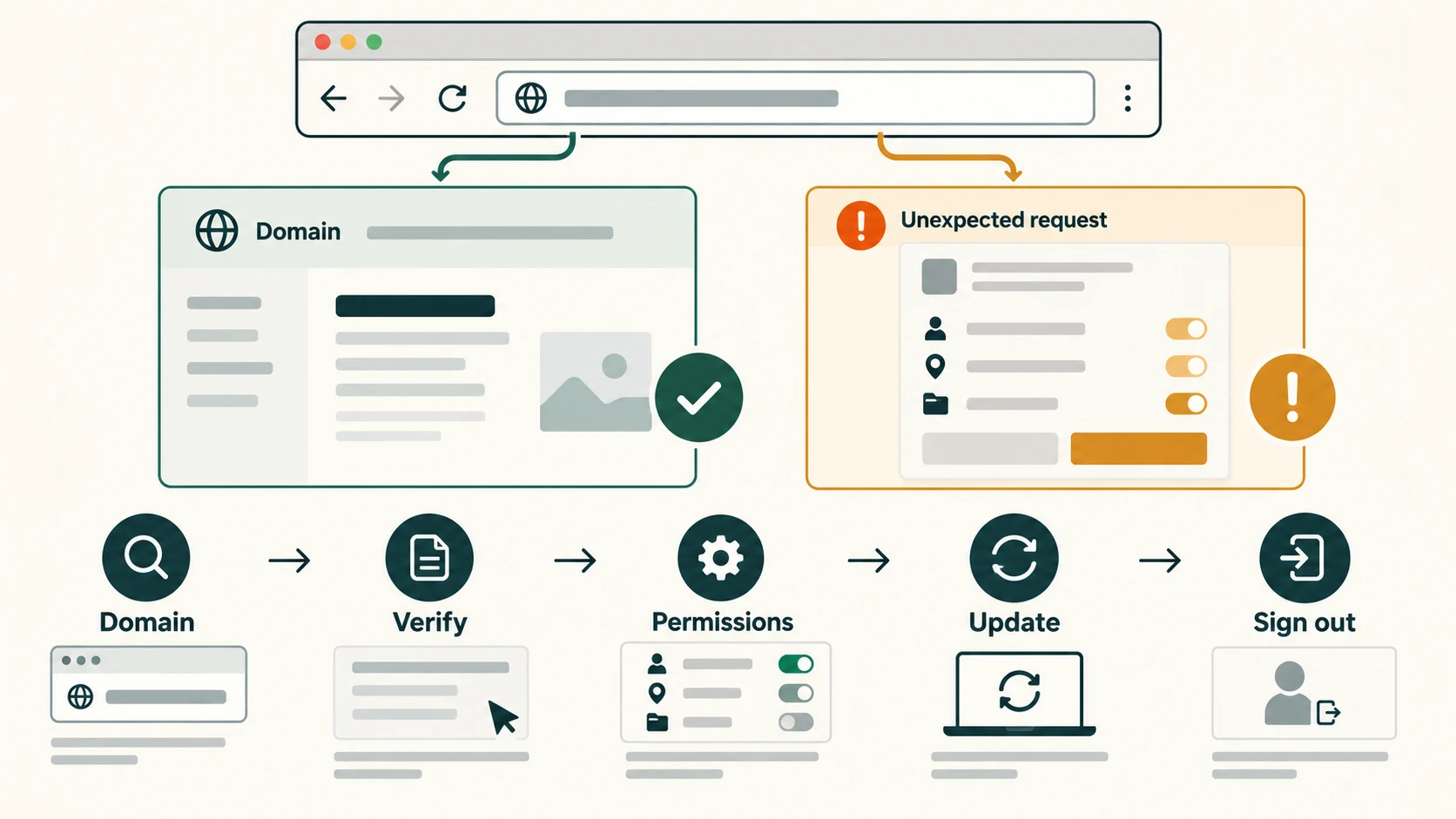
Safe device and account habits
Choose trusted download sources; inspect what an app asks permission to access; install patches; set a screen lock; enable available account-security controls; use unique passwords and a reputable manager; and sign out of shared devices. Do not store customer details in an unauthorized personal cloud account. Limit sharing of personal documents and consider whether an application genuinely needs camera, contacts or microphone access.
On public/shared Wi-Fi, avoid treating the network operator as inherently trustworthy. Modern HTTPS protects many transactions in transit, but scams, fake captive portals and insecure apps remain possible. Verify the network name with its operator and use your organization’s approved connectivity practices. Disabling Wi-Fi alone does not prevent all online fraud.
Device loss scenario: If a phone holding banking apps disappears, lock it remotely where supported, change relevant credentials or revoke sessions through trusted channels, notify the bank/provider as necessary and follow organizational procedures. Actions depend on account protection and platform tools; do not try to 'fix' suspected theft using links sent by unknown callers.
Privacy and data minimization
Personal data includes information relating to an identifiable person. Good privacy habits include collecting only necessary information, accessing it only for legitimate work, retaining it for the appropriate time and avoiding unnecessary disclosure. Data minimization means limiting collection and processing to what is needed for a defined purpose. A data breach might expose personal information even where the attacker did not steal money directly.
A digital footprint consists of information that a person's online actions create or leave behind. Some traces are intentional, such as posts; others arise from logins, device identifiers or analytics. Private browsing should not be mistaken for erasing all such traces.
Worked examples
Example A — Browser lock icon: A site has HTTPS but promises guaranteed doubles of deposited funds. HTTPS does not validate the financial claim; do not treat a secure-connection indicator as investment approval.
Example B — Location request: A calculator application asks for continuous location access. Its request should be considered in light of actual function; permissions should not be granted automatically.
Example C — Shared computer: A person checks an account on a shared terminal. They should avoid saving credentials, sign out and clear appropriate local session data where applicable. The network administrator and visited service may still retain records.
Objective-exam facts
| Clue | Answer |
|---|---|
| Encrypted web connection | HTTPS/TLS |
| Private mode mainly reduces | Local session traces |
| Small web-origin data stored by browser | Cookie |
| Limiting unnecessary personal-data collection | Data minimization |
| Scheduled OS/browser security fixes | Updates/patches |
| Preventing unauthorized screen use | Screen lock |
| Routine safe digital practices | Cyber hygiene |
Common confusions and exam traps
- Incognito ≠ anonymity: It mainly changes what is retained on a local device.
- HTTPS ≠ proof a site is honest: TLS does not perform a business-background investigation.
- VPN ≠ security guarantee: Its operator and configuration matter.
- Cookie ≠ always malware: Cookies have many legitimate session functions.
- Public hotspot ≠ inherently trusted: Protect sessions and verify access points.
Quick revision
- Verify destination domain and unexpected requests through independent trusted channels.
- HTTPS secures transport, not the truthfulness of a message.
- Incognito does not hide all activity or prevent service-side logging.
- Prefer least permissions, unique credentials, updates, screen locks and recoverable backups.
- Minimize personal-data exposure and follow organizational access policies.
Practice questions — CA-09-07
1. What does HTTPS primarily indicate?
A. All website claims are reliable
B. A protected connection using TLS
C. No chance of phishing
D. That a site cannot store cookies
2. Private/incognito browsing normally limits:
A. Some browsing data retained locally after the session
B. All ISP monitoring
C. All server logs
D. Malicious websites automatically
3. A website stores a small session value in a browser. This is often a:
A. Worm
B. Router
C. Cookie
D. Firewall
4. Which practice best reduces exposure from reused credentials?
A. Use one password for all accounts
B. Disable software updates
C. Tell people the password
D. Use unique passwords for different accounts
5. A URL has a familiar bank name but an unfamiliar actual domain. Safest action?
A. Verify independently via the known official app or address
B. Trust the logo
C. Enter an OTP immediately
D. Disable browser warnings
6. A calculator app asks for constant contact-list access. A good response is to:
A. Approve every permission
B. Assess necessity and limit unneeded permissions
C. Assume it is required by law
D. Share all account records
7. Which statement about VPN use is correct?
A. It eliminates all phishing
B. It proves sites are honest
C. It does not guarantee anonymity or total security
D. It replaces passwords
8. Reducing personal-data collection to what a task genuinely needs is:
A. Ransomware
B. Port scanning
C. MAC addressing
D. Data minimization
9. Which safe practice matters on a shared computer?
A. Sign out and avoid saving credentials
B. Post login codes publicly
C. Ignore all sessions
D. Let browser retain banking passwords
10. Which is an appropriate response to a browser certificate warning?
A. Always bypass it
B. Stop and verify the site or connection independently
C. Disable HTTPS everywhere
D. Enter the password twice
11. Which statement about public Wi-Fi is correct?
A. Every network named Free Wi-Fi is genuine
B. HTTPS is unnecessary
C. The access point may be untrusted, so verify network and protect sessions
D. Public Wi-Fi always steals data
12. What is cyber hygiene?
A. An optical scanning method
B. A type of database
C. A compulsory single antivirus product
D. Routine habits that reduce digital security risks
Answers and explanations — CA-09-07
1. B — A protected connection using TLS. HTTPS protects network communication but does not certify honesty or legitimacy.
2. A — Some browsing data retained locally after the session. Private mode mainly changes local cookie/history handling, not Internet-wide visibility.
3. C — Cookie. A cookie stores small browser-managed data such as a session identifier.
4. D — Use unique passwords for different accounts. Unique credentials prevent one compromised password from directly opening other accounts.
5. A — Verify independently via the known official app or address. An independent verified destination is better than trusting words within a suspicious URL.
6. B — Assess necessity and limit unneeded permissions. Permissions should align with legitimate app functionality.
7. C — It does not guarantee anonymity or total security. VPN protection depends on provider/configuration and cannot prevent every type of fraud.
8. D — Data minimization. Data minimization limits collection/processing to data necessary for defined purposes.
9. A — Sign out and avoid saving credentials. Logging out and not storing secrets reduces the risk to subsequent users.
10. B — Stop and verify the site or connection independently. Certificate warnings may indicate connection or identity problems and should be evaluated rather than ignored.
11. C — The access point may be untrusted, so verify network and protect sessions. Public hotspots can be impersonated or misconfigured, so the correct response is cautious validation.
12. D — Routine habits that reduce digital security risks. Cyber hygiene encompasses consistent safe account, device and information-management practices.