
Database vs Spreadsheet
Database vs Spreadsheet. Foundational Computer Awareness explanations, examples and explained practice questions for banking and recruitment exam preparation.
By Akhilesh Saini
Learning objectives
Distinguish a spreadsheet workbook from a DBMS-backed database, recognize when each is useful, and avoid the claim that one completely replaces the other.
Both organize data, but for different common tasks
A spreadsheet is an application interface built around a grid of rows and columns. A user can enter values, build formulas, format cells, create charts, filter records and analyze a manageable dataset. Examples include Microsoft Excel, LibreOffice Calc and Google Sheets. A database is an organized collection of information normally managed using database software and defined rules; an application can query or update it without a person editing visible cells directly.
Both may show information in rows and columns, but the similarity of appearance does not make them interchangeable. A worksheet cell can hold a formula such as =SUM(B2:B10). A relational database field is normally part of a typed table column, with database constraints and query operations.
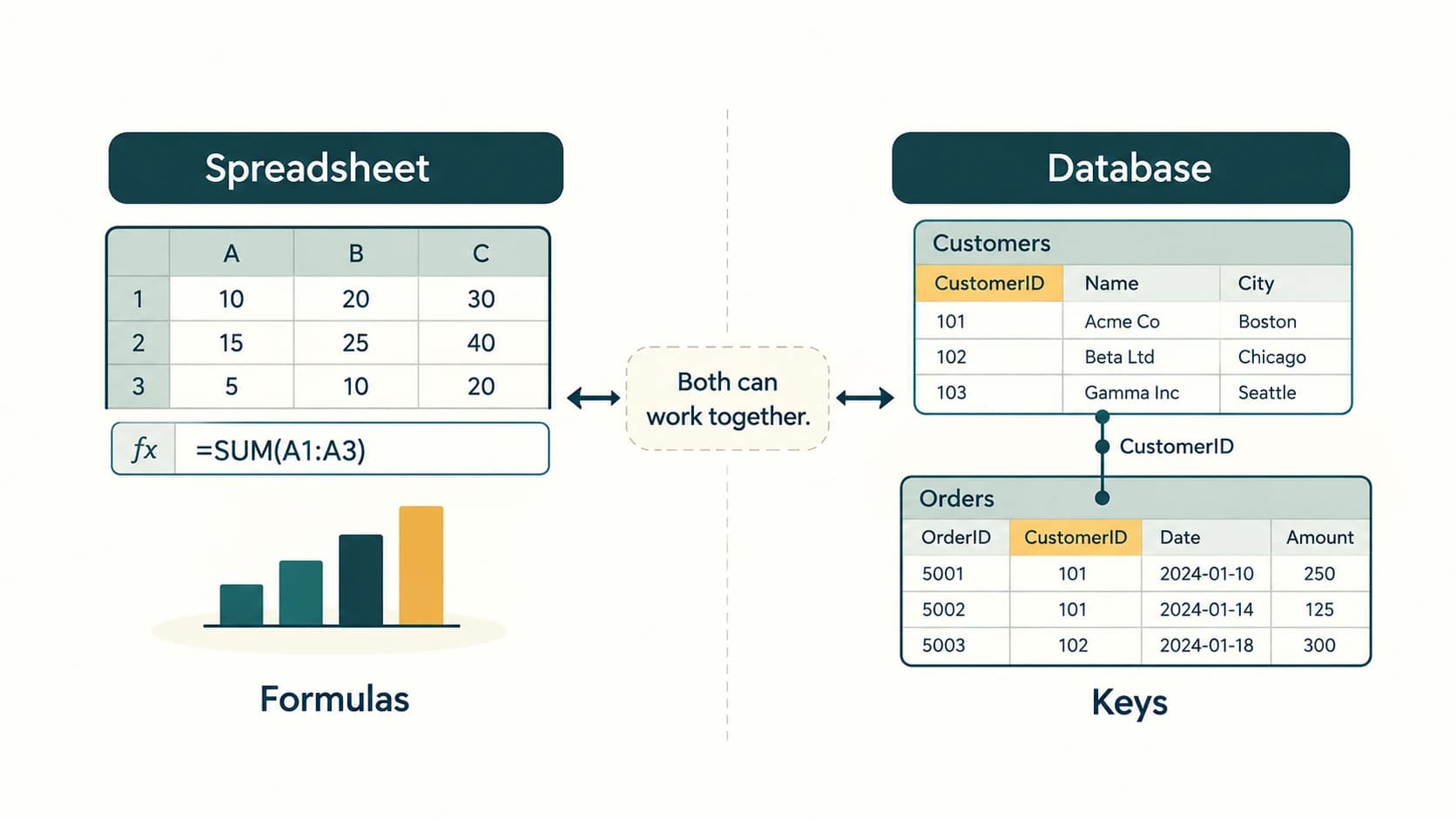
Compare by a real question
Suppose a branch manager wants to examine fictional monthly training attendance for 15 employees and make a quick bar chart. A spreadsheet is often convenient: type rows, calculate totals, filter by team and chart the results. Now suppose an application must consistently maintain account and transaction records, apply user permissions, relate many tables and serve many simultaneous requests. A database-backed system is commonly more suitable.
| Feature | Spreadsheet — typical emphasis | Database/DBMS — typical emphasis |
|---|---|---|
| Primary working surface | Visible workbook grid | Structured data accessed through queries/apps |
| Calculations | Cell formulas and worksheet functions | Queries, aggregations, application logic |
| Data definition | Often flexible cell entry and formats | Defined column types, keys, constraints |
| Relationships | Links, lookups, references possible | Explicit related-table structures and joins |
| Editing | Interactive cells, import/export | Controlled record operations by software/users |
| Concurrent workflows | Depends on product; some cloud sheets support collaboration | Designed for coordinated multi-user access in many systems |
| Data integrity | Validation can be configured | Database constraints and transaction support |
| Reporting | Charts, pivot tables, ad hoc analysis | Queries, applications, dashboards, reports |
| Good example | Quick budget or exam-score workbook | Transaction-processing application backend |
The table describes common strengths, not absolute limitations. Modern spreadsheets can connect to databases and support multi-user editing; databases can run powerful calculations and generate analytical results.
Why not simply use rows in a spreadsheet for every application?
An operational application may need to keep an account reference unique, reject a transaction linked to a nonexistent account, and coordinate several changes as one transaction. A relational DBMS can enforce explicit constraints and transactional rules. A spreadsheet may have validation and protection features, but it usually is not the first choice as the sole transactional backend for a large regulated multi-user application.
Conversely, forcing every small personal calculation into a custom database application can add unnecessary work. Spreadsheets are convenient for experimentation, educational examples and simple models. The best tool follows the task's scale, required controls and workflow.
Import, export and CSV
A CSV file (comma-separated values) stores tabular text with delimiters. Both spreadsheets and databases commonly import/export CSV, but CSV is not itself a spreadsheet workbook or a database engine. It typically does not preserve spreadsheet formulas, charts, styles or the original database's constraints, indexes and relationships.
For example, exporting a Customers table to CSV gives a portable table-like file. Opening that file in a spreadsheet does not automatically create or maintain its original foreign-key relationships. A customer_id column should also be handled carefully: importing identifiers as numbers can drop leading zeros.
Worked example: choosing a tool
- Task A: Compare revision-test scores of 30 students, add conditional formatting and make a chart. Spreadsheet is a practical choice.
- Task B: An approved banking application retrieves a customer and associated account records with role controls. Database-backed system is the appropriate conceptual fit.
- Task C: Download approved data from a reporting database and build a custom chart. Both can be used: a database supplies controlled records and a spreadsheet can analyze an export.
Common confusions and exam traps
- Rows/columns appear in both, but the applications differ in purpose and underlying structure.
- Excel is a spreadsheet application, not a synonym for an RDBMS.
- CSV ≠ XLSX: CSV is a simple text exchange format; XLSX is a workbook format.
- A database is not always larger: small embedded databases are common.
- Spreadsheets can collaborate and databases can compute aggregates; do not memorize absolute 'never' statements.
- Copying database results into a spreadsheet does not reproduce all permissions and constraints.
Exam facts and quick revision
| If the clue says… | Best introductory answer |
|---|---|
Cell formula such as =SUM(A1:A5) | Spreadsheet |
| Primary/foreign keys and SQL joins | Relational database |
| Rows plus formulas and charts in a workbook | Spreadsheet |
| DBMS enforcing referential integrity | Database system |
| Comma-separated text data exchange | CSV |
- A spreadsheet is especially convenient for direct editing, formulas and charts.
- An RDBMS is especially useful for controlled relationships and multi-user record operations.
- The right answer depends on the application—not simply on the number of rows.
- CSV can move tabular data between systems but does not carry all structural rules.
- Spreadsheets and databases are frequently used together.
Practice questions — CA-08-05
1. Which task is most directly associated with a spreadsheet?
A. Forwarding network packets
B. Calculating a small table with cell formulas and charts
C. Enforcing intertable foreign keys
D. Running a web server
2. Which feature is especially associated with a relational DBMS?
A. Slide animation
B. Keyboard shortcuts
C. Enforced primary/foreign-key relationships
D. Image cropping
3. What does CSV stand for?
A. Comma-Separated Values
B. Computer Storage Volume
C. Common System Variables
D. Column SQL View
4. Which statement about CSV is correct?
A. Every CSV includes all workbook charts
B. CSV automatically contains foreign-key rules
C. CSV is always encrypted
D. CSV mainly carries tabular text data, not the entire workbook’s formulas and formatting
5. Which of the following is a spreadsheet application?
A. PostgreSQL server
B. LibreOffice Calc
C. FTP
D. Bluetooth
6. For many simultaneous, authorized updates to related operational records, which is generally the more suitable foundation?
A. A static PNG image
B. A printed table only
C. A transactional database-backed application
D. An image viewer
7. An Excel worksheet primarily organizes user-visible data into:
A. Cells arranged in rows and columns
B. Routers and switches
C. CPU registers only
D. Network packets
8. Which statement is most accurate?
A. A spreadsheet can never collaborate
B. A database can never calculate totals
C. CSV is always an encrypted database
D. Spreadsheets and databases can be used together for reporting
9. A person changes the extension of records.csv to .xlsx without conversion. What happens?
A. It becomes an Excel workbook with charts
B. Renaming does not reliably convert the internal format
C. It becomes a relational database
D. It acquires foreign keys
10. A simple school test-score chart for 30 rows is most conveniently started in a:
A. Router configuration
B. BIOS menu
C. Spreadsheet
D. Modem
11. Which is NOT a guaranteed property of exporting a relational table to CSV?
A. Preserving all original foreign-key constraints
B. Moving rows and column values
C. Representing text data
D. Importing by other compatible software
12. An identifier such as "0017" is imported into a spreadsheet. What is the sensible precaution?
A. Always add all digits
B. Replace with a Boolean
C. Convert into a calendar date
D. Preserve text when leading zeros matter
Answers and explanations — CA-08-05
1. B — Calculating a small table with cell formulas and charts. Spreadsheets are convenient for interactive cell calculations, charting and relatively small ad hoc analyses.
2. C — Enforced primary/foreign-key relationships. Relational database systems are built to manage related tables and can enforce integrity constraints.
3. A — Comma-Separated Values. CSV is a text-based exchange format that commonly separates values by commas.
4. D — CSV mainly carries tabular text data, not the entire workbook’s formulas and formatting. CSV is useful for moving rows and columns, but does not preserve the complete capabilities of a workbook or DBMS schema.
5. B — LibreOffice Calc. LibreOffice Calc is spreadsheet software; PostgreSQL is database software and the others are network technologies.
6. C — A transactional database-backed application. A DBMS can coordinate concurrent operations, permissions and relational constraints needed by an operational application.
7. A — Cells arranged in rows and columns. Spreadsheet users work directly with rows, columns and cell formulas or values.
8. D — Spreadsheets and databases can be used together for reporting. A database may supply controlled records for spreadsheet analysis; neither category absolutely excludes the other’s common features.
9. B — Renaming does not reliably convert the internal format. The filename suffix can change while the underlying CSV content remains CSV until explicitly converted.
10. C — Spreadsheet. A spreadsheet is a natural interactive tool for small tables, formulas and charts.
11. A — Preserving all original foreign-key constraints. CSV exchanges data values but ordinarily does not include the relational schema constraints and indexes.
12. D — Preserve text when leading zeros matter. Treat identifier strings as text when their exact characters, including leading zeros, have meaning.