
Relational Database Concepts at Awareness Level
Relational Database Concepts at Awareness Level. Foundational Computer Awareness explanations, examples and explained practice questions for banking and recruitment exam preparation.
By Akhilesh Saini
Learning objectives
Explain tables linked by keys, recognize one-to-one, one-to-many and many-to-many relationships, and distinguish relational databases from non-relational alternatives without advanced theory.
What makes a database relational?
A relational database organizes information into tables (relations) containing rows and columns. Tables can represent related types of information, and a query can combine related records. A relational database management system (RDBMS) manages data according to this model. PostgreSQL, SQLite, MySQL and others are widely encountered relational DBMSs.
Consider a bank recording customers, their accounts, and transactions. If every transaction row copied the full customer name, address and account type, the same details would be repeated many times. A practical design places the data in separate tables and connects them through identifiers:
Customers
| customer_id (PK) | name |
|---|---|
| C101 | Mira |
| C102 | Ravi |
Accounts
| account_id (PK) | customer_id (FK) | type |
|---|---|---|
| A501 | C101 | Savings |
| A502 | C101 | Fixed deposit |
| A503 | C102 | Current |
Transactions
| transaction_id (PK) | account_id (FK) | amount |
|---|---|---|
| T801 | A501 | 500 |
| T802 | A501 | 200 |
| T803 | A503 | 700 |
PK stands for primary key; FK stands for foreign key. A transaction belonging to account A501 can be related to Mira through Accounts, without the transaction table repeating her name. No real customer records or banking systems are represented in these examples.
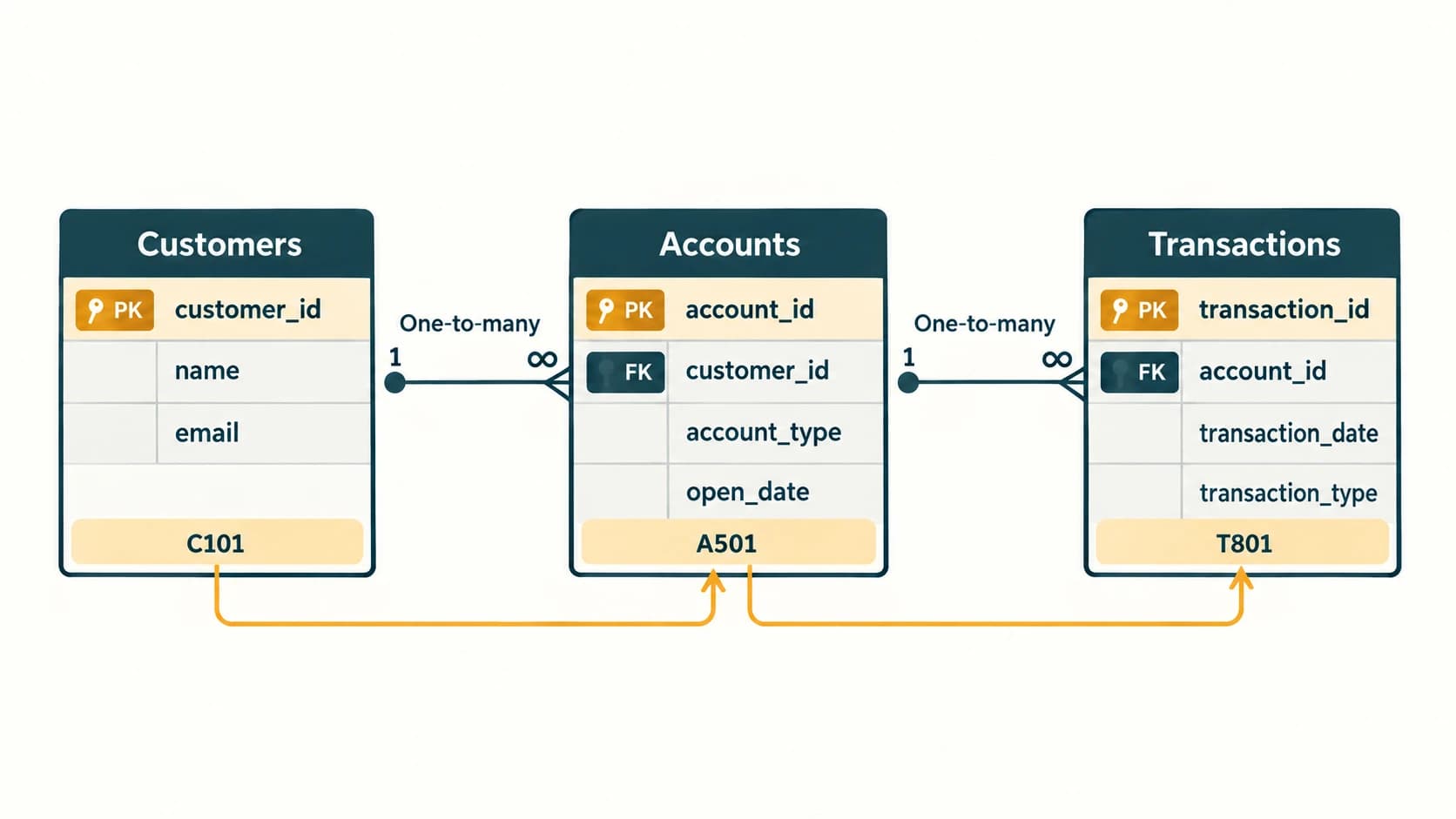
Three basic relationship patterns
| Pattern | Intuitive description | Illustrative, simplified example |
|---|---|---|
| One-to-one (1:1) | One record corresponds to at most one on the other side under enforced rules | One employee has one designated access-card record |
| One-to-many (1:N) | One record can relate to many records elsewhere | One customer → many accounts in the teaching model |
| Many-to-many (M:N) | Records on both sides may each have several matches | Students ↔ courses |
A many-to-many relationship is commonly represented by an extra junction/link table, such as Enrollments(student_id, course_id) for students and courses. The extra table contains foreign keys pointing to both sides. This is enough to recognize in a typical Computer Awareness exam; designing full schemas belongs to more advanced courses.
Important qualification: Real banking relationships may be more complex than one customer to many accounts; a joint account can have several holders. Our small teaching example simplifies such business rules to explain keys and relationships.
Join: asking a question across tables
Suppose a branch wants the customer name associated with account A501. It can use the matching customer_id values in Customers and Accounts. A join is the database operation/concept that combines rows from related tables according to a matching condition. It need not create permanent duplicate rows in storage. Different join types exist, but recognizing why tables can be joined is the essential exam objective.
A view is a named representation of a query's result (often a virtual table), which can simplify reading selected data. An index is a structure that can make certain lookups faster, at some storage and update cost. Neither term needs database-administrator depth for this module.
Integrity and relationships
Foreign-key constraints help maintain referential integrity. If Transactions.account_id is constrained to reference Accounts.account_id, a transaction cannot normally reference nonexistent account A999 unless a relevant constraint/action or state permits it. On deleting a referenced account, defined rules may reject the deletion or take a specified action. Do not memorize that all databases always delete related rows automatically.
A relational system may also use primary keys, unique constraints, data types and checks to reject invalid entries. None of these automatically establishes that entered facts are truthful: for example, a correctly typed address might still be outdated.
Relational versus non-relational: basic contrast
Relational systems commonly use defined tables, relationships and SQL. Non-relational (often called NoSQL) systems may organize information as documents, key–value entries, graph structures, or wide-column structures. NoSQL does not mean that every such product can never support SQL-like querying, and it does not mean relational systems cannot store JSON or large data. Both families may be used at significant scale; selection depends on the problem.
Common confusions and exam traps
- Relation does not simply mean a hyperlink: it is a structured table concept.
- A foreign-key match creates a logical relationship, not necessarily a direct physical cable or a permanent copy of both rows.
- One-to-many ≠ many-to-many: the permitted multiplicity differs.
- A join is not a backup or a file merge: it combines query results by matching conditions.
- Primary and foreign keys serve different roles even when values look similar.
- Normalization broadly concerns organizing data to reduce undesirable redundancy and anomalies; detailed normal forms are beyond this module.
Quick revision
- RDBMS manages relational tables; tables can be connected using keys.
- One-to-many links one parent record to potentially many child records.
- Many-to-many commonly uses a junction table.
- A join brings together matching information from tables in a query.
- Referential integrity checks that foreign-key references point to permitted existing records.
Practice questions — CA-08-03
1. Relational databases are most commonly introduced as information organized into:
A. Only image files
B. Tables of rows and columns
C. Only plain text documents
D. Video playlists
2. What commonly links two related tables?
A. Screen resolution
B. Power supply cable
C. Matching key values
D. File wallpaper
3. One customer related to multiple accounts in the teaching example is:
A. One-to-many
B. One-to-one only
C. Many-to-zero exclusively
D. A file extension
4. A many-to-many relationship is often implemented in a relational design using:
A. A mouse
B. A browser plug-in
C. Only more screen brightness
D. An additional junction/link table
5. A JOIN is used mainly to:
A. Replace a hard disk
B. Combine matching information from multiple tables in a query
C. Encrypt all stored fields
D. Change the operating system
6. Referential integrity helps prevent:
A. Typing numbers in a cell
B. Using the Internet
C. A child foreign-key reference to a nonexistent required parent row
D. Printing reports
7. Which is an example of a nonrelational database model?
A. Document-oriented
B. Primary-key-oriented only
C. Spreadsheet-formula-only
D. Monitor-oriented
8. Which statement about keys is accurate?
A. Every foreign key must be unique
B. A foreign key always identifies the child row
C. Primary keys are never used to identify rows
D. A foreign key can reference an eligible primary/unique key in another table
9. What is an index commonly used for?
A. Turning SQL into graphics
B. Improving selected lookups at a storage/update cost
C. Making every record public
D. Replacing data backups
10. A database view is best understood as:
A. A physical television screen
B. A printer port
C. A named query-based representation of data
D. A power-supply component
11. Which statement about joint bank accounts is most responsible?
A. Real customer/account relationships may be more complex than the simple one-to-many teaching example
B. All real accounts belong to exactly one person
C. Every transaction table must contain a full mailing address
D. Keys remove the need for access controls
12. Normalization broadly aims to:
A. Raise monitor brightness
B. Convert all records to pictures
C. Download tables as audio
D. Organize data to reduce undesirable repetition and update anomalies
Answers and explanations — CA-08-03
1. B — Tables of rows and columns. The relational model is built around relations, commonly presented as tables with rows and attributes.
2. C — Matching key values. Primary/foreign keys and join conditions are used to connect related records logically.
3. A — One-to-many. One customer row can match several child account rows through the customer identifier.
4. D — An additional junction/link table. A junction table holds references to each related side so multiple-to-multiple associations can be represented.
5. B — Combine matching information from multiple tables in a query. A join combines relevant rows according to matching conditions without necessarily copying those records permanently.
6. C — A child foreign-key reference to a nonexistent required parent row. Enforced foreign-key constraints check that referenced parent key values exist when required.
7. A — Document-oriented. Document-oriented databases are a common category of nonrelational database systems.
8. D — A foreign key can reference an eligible primary/unique key in another table. Foreign keys support relationships, often to a parent primary key, while the child table can have a different primary key.
9. B — Improving selected lookups at a storage/update cost. Indexes help some queries find data more efficiently; they introduce their own overhead and do not remove backup needs.
10. C — A named query-based representation of data. A view normally presents query results as a virtual table-like structure, depending on database features.
11. A — Real customer/account relationships may be more complex than the simple one-to-many teaching example. The one-customer-to-many-accounts sample is simplified; joint holders and other business rules require richer relationships.
12. D — Organize data to reduce undesirable repetition and update anomalies. Normalization concerns table organization and dependency rules, not file-download settings or graphics.