
Virtualization and Virtual Machines Basics
Virtualization and Virtual Machines Basics. Foundational Computer Awareness explanations, examples and explained practice questions for banking and recruitment exam preparation.
By Akhilesh Saini
Learning objectives
Explain virtualization; distinguish host, hypervisor, guest OS and virtual machine; compare physical and virtual infrastructure; recognize type-1/type-2 hypervisors and containers; and understand why cloud and virtualization are related but different.
What is virtualization?
Virtualization is a technique for creating software-defined representations of computing resources, such as separate virtual computers, on underlying physical equipment. Instead of dedicating one physical computer to one application or operating system, a sufficiently capable host can run several logically separated environments. Virtualization can improve flexibility and utilization, though it also creates management and security responsibilities.
A virtual machine (VM) behaves like an independent computing environment with its own virtual CPU, memory, disk and network adapter. A VM ordinarily runs a guest operating system. It consumes real physical resources on the host, and the physical machine still limits what all guests can use in total.
The main components
| Term | Meaning | Exam recognition |
|---|---|---|
| Host | Physical system supplying computing resources | Actual computer/server |
| Hypervisor / VMM | Layer that creates/manages VMs and allocates resources | Virtual Machine Monitor |
| Guest | Virtual environment and its installed OS | VM's operating system |
| Virtual CPU (vCPU) | Processor capacity presented to guest | Shares underlying physical processing |
| Virtual disk | Software-presented disk/storage resource | Guest sees a usable drive |
| Snapshot | Captured state at a point in time, where supported | Not automatically a durable backup |
Hypervisor is the program/layer that supports running virtual machines; it manages resource allocation and isolation. Many host platforms use hardware-assisted features to implement efficient virtualization. A VM can be moved, copied or restored according to platform capabilities and policies, but these are possible operations rather than guarantees for every VM configuration.
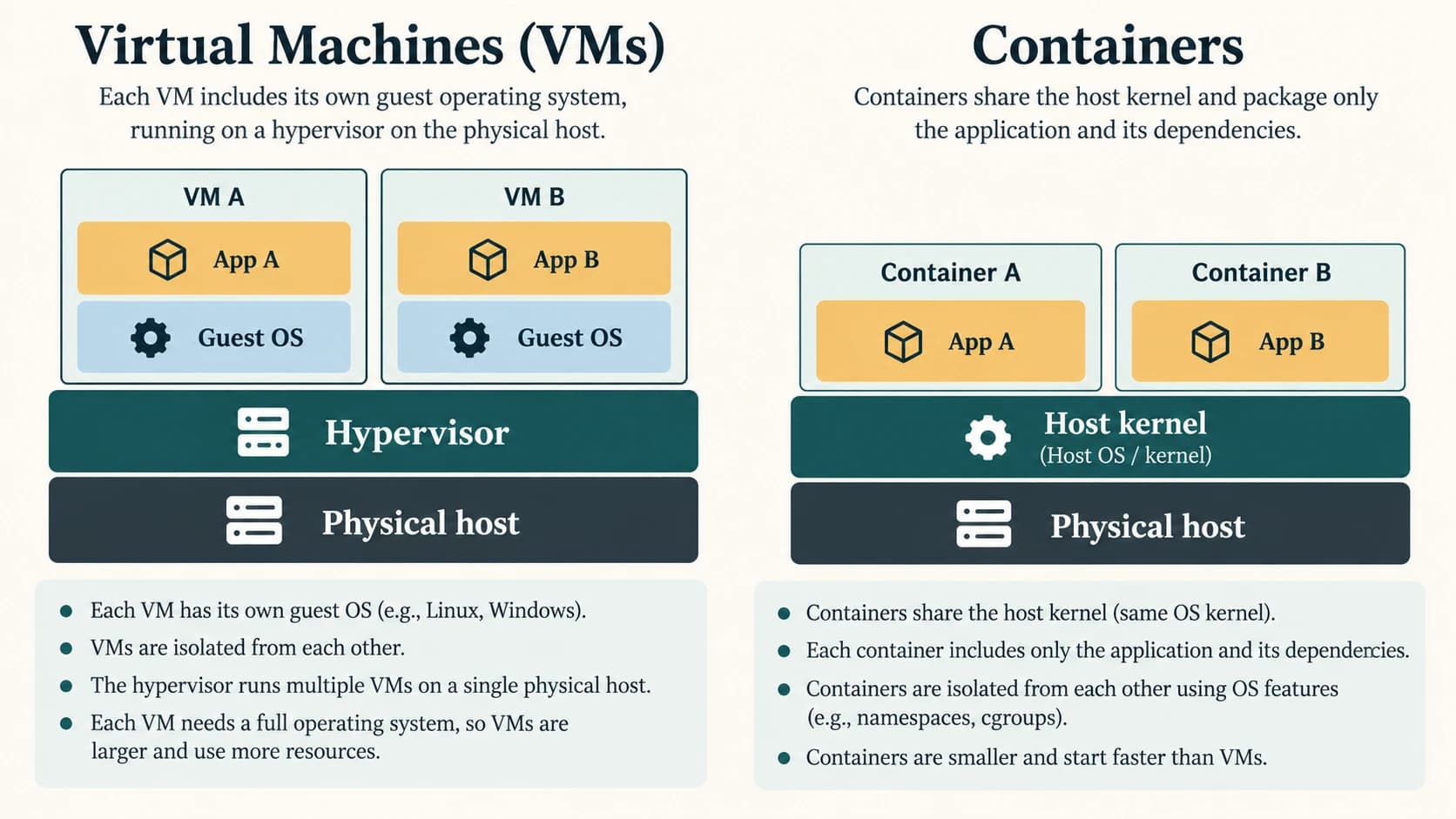
Type-1 and type-2 hypervisors
A type-1 (bare-metal) hypervisor operates on or very close to the physical system as the virtualization layer. A type-2 (hosted) hypervisor runs as software on top of an existing host operating system. This is the familiar textbook distinction; commercial architectures may mix components or terminology.
A beginner's comparison:
- Type 1: Physical hardware → hypervisor → multiple guest VMs.
- Type 2: Physical hardware → host OS → hosted hypervisor application → guest VMs.
Do not treat 'type 1' as synonymous with every cloud server or 'type 2' as unusable in production. They describe architectural patterns, not guaranteed reliability rankings.
Example: two applications on one host
A training centre has a reasonably powerful physical computer. It creates one VM for an approved Linux learning environment and another for a separate test environment. Both appear to have their own OS and files, while using actual CPU, RAM and storage from the physical machine. If the host's available resources are insufficient, the VMs may become slow. If the physical host stops, both VMs may be affected unless the setup includes relevant resilience measures.
In a business context, a virtualized environment may help consolidate test servers or separate applications. Stronger separation than ordinary processes is useful, but a VM is not a perfect security boundary under all possible conditions. Administrators still need patches, backups, host security and network access policies.
Virtual machine versus container
Containers are commonly used to package applications and their dependencies in isolated user-space environments. They typically share the host operating-system kernel (directly or through a container-supporting VM, depending on platform). A conventional VM runs its own guest OS/kernel. A container is not merely a small VM, and not all containerization relies on a hypervisor.
| Aspect | Typical virtual machine | Typical container |
|---|---|---|
| Operating-system environment | Own guest OS/kernel | Shares a host/underlying kernel |
| Typical unit | Complete virtual computer | App/process environment |
| Start/resource overhead | Often greater than a container | Often lighter, context-dependent |
| Isolation | Virtualized machine boundary | OS-level process/resource isolation |
| Packaging | Virtual disks and OS image | Application/container image |
| Can run in a cloud | Yes | Yes |
Examples of containers can run inside VMs. The two ideas often complement one another rather than compete exclusively.
Cloud, virtual machines and related concepts
Cloud computing offers a model of on-demand network-accessible services with pooling, elasticity and measured operation. Virtualization is an enabling technology commonly used to implement some cloud services. Therefore virtualization is not automatically cloud computing; a standalone VM on a laptop is virtualized but not necessarily an on-demand cloud service. Some cloud environments also use bare-metal or container-based resources.
Server consolidation means placing workloads that formerly used separate physical servers onto a smaller number of capable hosts using virtualization or related techniques. Virtual Desktop Infrastructure (VDI) is a different use of virtualization in which desktop environments are delivered from centralized resources. At CA depth, recognize the names rather than learning platform-specific deployment steps.
Snapshots and backup traps
A snapshot may capture a VM's configuration, disk state and in some cases memory state at a chosen moment. Depending on the technology it may depend on existing storage chains; it should not automatically be assumed to be an independent, long-term, disaster-resistant backup. Good recovery planning needs appropriately stored backups and tested restore procedures.
Important terms and objective-exam facts
| Clue | Answer |
|---|---|
| Creates/manages VMs | Hypervisor / VMM |
| Physical machine running guests | Host |
| OS inside a VM | Guest OS |
| Type-1 hypervisor | Bare-metal pattern |
| Type-2 hypervisor | Hosted pattern |
| App environments often sharing OS kernel | Containers |
| Virtualization necessarily means public cloud | False |
| Snapshot always replaces off-site backups | False |
Quick revision
- A VM is a software-defined computing environment running on real hardware.
- A hypervisor manages VMs, and each conventional VM runs a guest OS.
- Type 1 is bare-metal; type 2 is hosted.
- Containers generally share a kernel; conventional VMs have guest OS kernels.
- Virtualization supports cloud services but is not identical to cloud computing.
Practice questions — CA-10-07
1. What is a virtual machine?
A. A software-defined computing environment using underlying host resources
B. A physical monitor cable
C. A UPI collect request
D. A QR data pattern
2. What component creates/manages conventional virtual machines?
A. OCR scanner
B. NFC tag
C. Email client
D. Hypervisor
3. The real physical computer supplying resources to VMs is called the:
A. Guest
B. Host
C. Webhook
D. Block hash
4. An operating system installed inside a virtual machine is a:
A. Host-only BIOS
B. Cloud gateway
C. Guest OS
D. API token
5. A bare-metal hypervisor most closely matches:
A. Type 2 only
B. SaaS
C. Type 1
D. DNS
6. A hypervisor running as an app on a host OS most closely matches:
A. Type 1 only
B. Type 2
C. A network repeater
D. A blockchain ledger
7. A VM is slow because too many guests compete for limited physical memory. This illustrates:
A. Virtualization still uses finite real resources
B. VMs create unlimited hardware
C. Cloud services never allocate memory
D. Every container requires separate physical RAM chips
8. Which statement usually distinguishes a conventional VM from a container?
A. Containers are physical servers only
B. Every container runs a separate full guest kernel
C. VMs cannot use networks
D. VM has guest OS/kernel; container typically shares an underlying kernel
9. A student starts a VM on a standalone laptop. Is that automatically cloud computing?
A. Yes, any VM is public cloud
B. No, virtualization alone does not meet the cloud service model
C. Yes, because storage is digital
D. No, because VMs cannot run locally
10. Which is the safest statement about a VM snapshot?
A. It always replaces disaster recovery
B. It never uses storage
C. It proves every file is malware-free
D. It can capture VM state where supported but is not automatically independent durable backup
11. Why can multiple VMs be useful on one host?
A. Separate software environments can share physical hardware under managed controls
B. They eliminate all host failures
C. They always improve speed without limits
D. They automatically remove all operating systems
12. What is VMM an abbreviation for?
A. Verified Mobile Money
B. Virtual Mail Manager
C. Virtual Machine Monitor
D. Volume Memory Marker
Answers and explanations — CA-10-07
1. A — A software-defined computing environment using underlying host resources. A VM presents virtual computing resources and typically runs a guest OS on host equipment.
2. D — Hypervisor. A hypervisor or VMM manages guest VMs and allocates underlying physical resources.
3. B — Host. Host refers to the underlying physical system used by guest virtual machines.
4. C — Guest OS. Guest OS runs within a virtual machine, using resources presented by the hypervisor.
5. C — Type 1. Type-1 hypervisors operate on or near bare hardware rather than as ordinary hosted applications.
6. B — Type 2. Type 2 is the familiar hosted-hypervisor architecture.
7. A — Virtualization still uses finite real resources. Virtual resources are mapped to finite physical CPU, memory, network and storage resources.
8. D — VM has guest OS/kernel; container typically shares an underlying kernel. Typical containers isolate app/process environments while sharing an OS kernel, whereas conventional VMs run guest OS kernels.
9. B — No, virtualization alone does not meet the cloud service model. Cloud adds a network-accessible on-demand service-delivery model; a local VM is virtualization without necessarily being cloud.
10. D — It can capture VM state where supported but is not automatically independent durable backup. Snapshots can depend on underlying storage and retention policies, so separate tested backups may still be required.
11. A — Separate software environments can share physical hardware under managed controls. VMs can consolidate or separate workloads, but host resources and resilience remain considerations.