
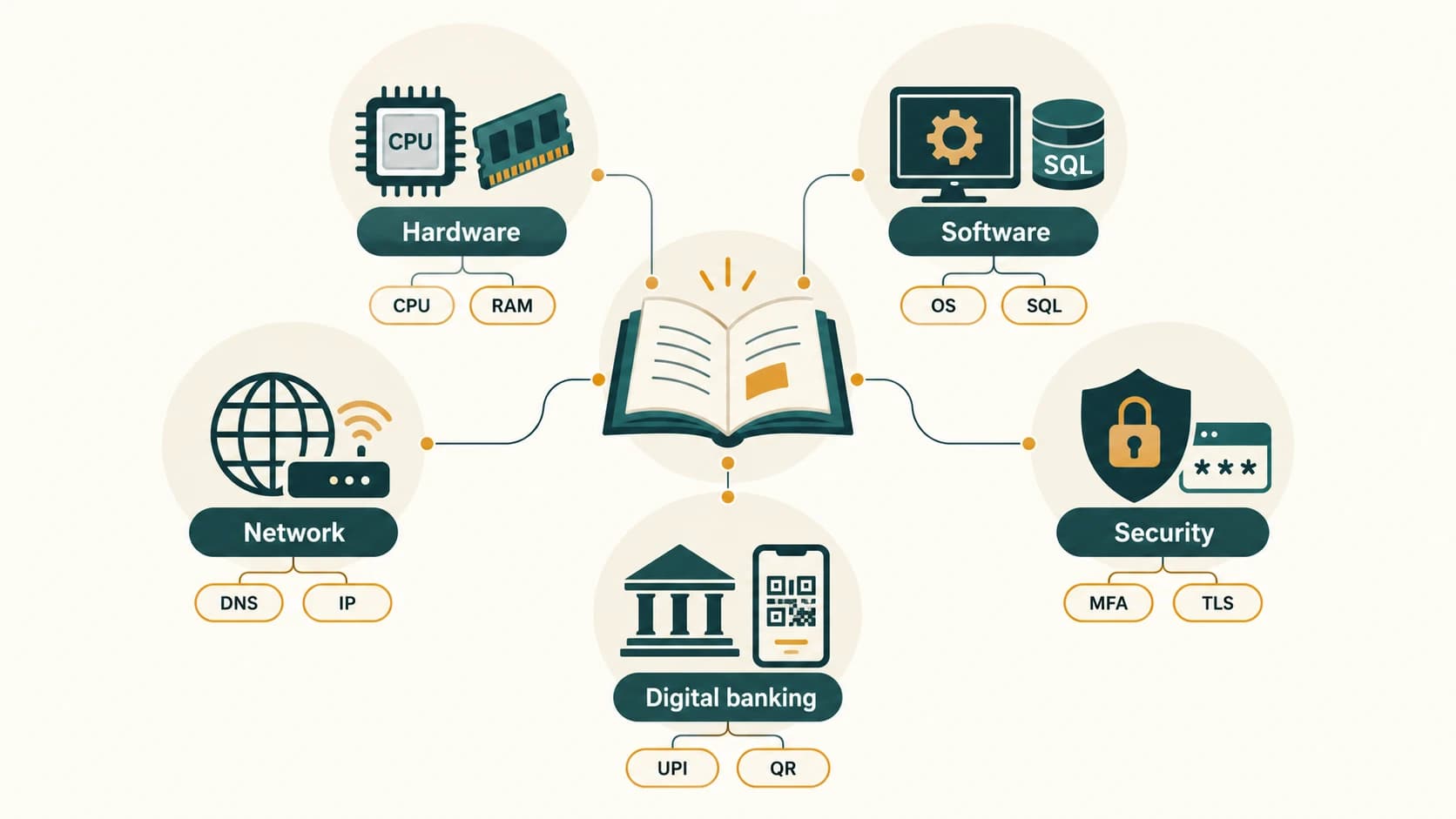
Important Computer Abbreviations
Important Computer Abbreviations. Foundational Computer Awareness explanations, examples and explained practice questions for banking and recruitment exam preparation.
By Akhilesh Saini
Learning objectives
Decode high-frequency abbreviations by category, associate each with its actual use, and distinguish abbreviations that resemble one another but do different jobs.
Why this topic matters
A multiple-choice question may contain only four expanded forms of a term such as CPU, DNS, OCR or MFA. Knowing the letters is necessary, but understanding the job is better: if you can explain that DNS helps resolve names to relevant records, you will not mistake it for the service that hosts an entire webpage. Spellings matter; copying a familiar full form into the wrong context can turn an easy mark into a mistake.
How to learn expansions efficiently
Study by families. For each entry learn (1) the expansion, (2) one plain-language use and (3) a confusing neighbour if one exists. Most expansions below are widely standardized names; a few product or organization abbreviations are conventional names rather than technical standards. Exam questions sometimes use an outdated or informal expansion, so prefer the standard form shown here.
Hardware, memory and devices
| Short form | Expansion | One-line meaning |
|---|---|---|
| CPU | Central Processing Unit | Executes instructions and coordinates processing |
| ALU | Arithmetic Logic Unit | Performs arithmetic and logical operations |
| CU | Control Unit | Directs/control operations of the processor |
| GPU | Graphics Processing Unit | Handles highly parallel graphics and other compute tasks |
| RAM | Random Access Memory | Generally volatile working memory |
| ROM | Read-Only Memory | Non-volatile memory family used for persistent contents/firmware |
| HDD | Hard Disk Drive | Magnetic rotating-disk storage |
| SSD | Solid-State Drive | Non-volatile semiconductor-based storage |
| USB | Universal Serial Bus | Interface standard for peripherals and connections |
| HDMI | High-Definition Multimedia Interface | Digital audio/video connection |
| VGA | Video Graphics Array | Historical graphics standard; also common analog display connector name |
| UPS | Uninterruptible Power Supply | Temporary backup electrical power |
| SMPS | Switched-Mode Power Supply | Efficient electronic power conversion |
| BIOS | Basic Input/Output System | Legacy PC firmware/initialization interface |
| UEFI | Unified Extensible Firmware Interface | Modern platform-firmware interface specification |
| OCR | Optical Character Recognition | Interprets printed or imaged characters |
| OMR | Optical Mark Recognition | Reads marked response positions on forms |
| MICR | Magnetic Ink Character Recognition | Recognizes specially printed magnetic-ink characters |
| DPI | Dots Per Inch | A print-resolution measure; usage varies by device |
| PPI | Pixels Per Inch | Pixel density of a display or image |
Keep the roles separate: OCR reads characters; OMR detects marks; MICR is associated with magnetic-ink characters used, for example, in cheque processing. A UPS supplies brief power continuity; it is not permanent file storage. USB-C is a connector shape and does not, by itself, guarantee a particular data speed, display mode or charging capability.
Software, programming and data
| Short form | Expansion | One-line meaning |
|---|---|---|
| OS | Operating System | Manages hardware and application resources |
| GUI | Graphical User Interface | Uses windows, icons, menus and visual controls |
| CLI | Command-Line Interface | Accepts textual commands |
| DBMS | Database Management System | Software for managing databases |
| RDBMS | Relational Database Management System | DBMS implementing relational tables and related rules |
| SQL | Structured Query Language | Language for querying/managing relational data |
| HTML | HyperText Markup Language | Structures webpage content |
| CSS | Cascading Style Sheets | Specifies webpage presentation |
| XML | Extensible Markup Language | Markup format with user-defined elements |
| JSON | JavaScript Object Notation | Structured data-interchange format |
| CSV | Comma-Separated Values | Plain-text tabular-data format; dialects vary |
| Portable Document Format | Layout-preserving document format | |
| ASCII | American Standard Code for Information Interchange | Historic coded character set |
| UTF | Unicode Transformation Format | Family of encodings such as UTF-8 and UTF-16 |
| API | Application Programming Interface | Rules/interfaces for software interaction |
| IDE | Integrated Development Environment | Combined programming/editor/debugging tools |
| SDK | Software Development Kit | Collection of tools to build software for a platform |
| AI | Artificial Intelligence | Broad field of intelligent-machine techniques |
| ML | Machine Learning | AI methods that learn patterns from data |
| IoT | Internet of Things | Connected devices with sensing, communication and/or control |
| SaaS | Software as a Service | Ready-to-use hosted software |
| PaaS | Platform as a Service | Managed application development/deployment platform |
| IaaS | Infrastructure as a Service | Hosted computing, network and storage infrastructure |
Watch these: Unicode is the character-encoding standard; UTF-8 is a way to encode Unicode characters. HTML structures pages, CSS styles them and JavaScript commonly adds behaviour. SQL is a language, not a particular database product. DBMS is the managing software; the database is the organized data itself. PDF is a document format, not a word processor.
Internet, networking and communication
| Short form | Expansion | One-line meaning |
|---|---|---|
| LAN | Local Area Network | Network within a relatively local site |
| WAN | Wide Area Network | Network connecting distant sites |
| MAN | Metropolitan Area Network | Typically city-scale network |
| PAN | Personal Area Network | Network around a person's devices |
| WLAN | Wireless Local Area Network | LAN using wireless access |
| NIC | Network Interface Controller / Card | Interface for network communication |
| MAC | Media Access Control | In MAC address: link-layer identifier |
| IP | Internet Protocol | Addressing and packet delivery between networks |
| IPv4 | Internet Protocol version 4 | IP address version using 32-bit addresses |
| IPv6 | Internet Protocol version 6 | IP address version using 128-bit addresses |
| DNS | Domain Name System | Naming system supplying records such as address mappings |
| DHCP | Dynamic Host Configuration Protocol | Automatically supplies network configuration |
| TCP | Transmission Control Protocol | Reliable, ordered byte-stream transport |
| UDP | User Datagram Protocol | Connectionless datagram transport |
| HTTP | Hypertext Transfer Protocol | Application protocol for web exchanges |
| HTTPS | Hypertext Transfer Protocol Secure | Conventional name for HTTP protected using TLS |
| URL | Uniform Resource Locator | Address identifying how/where to access a resource |
| WWW | World Wide Web | Interlinked web resources and services |
| ISP | Internet Service Provider | Provider of Internet access/services |
| FTP | File Transfer Protocol | Classical network file-transfer protocol |
| SMTP | Simple Mail Transfer Protocol | Sends/relays email |
| POP3 | Post Office Protocol version 3 | Retrieves email from a server |
| IMAP | Internet Message Access Protocol | Accesses/synchronizes email mailbox state |
| VPN | Virtual Private Network | Encapsulated, protected network connection in many deployments |
| Wi-Fi | Wireless networking brand/name (not a formal full-form acronym) | Common IEEE 802.11-based wireless LAN technology |
| NFC | Near Field Communication | Close-range wireless communication |
| SSID | Service Set Identifier | Name/identifier of a wireless LAN service set |
Important corrections: Wi-Fi has no official expansion “Wireless Fidelity”; treat it as a name. HTTPS protects data in transit between the relevant endpoints when used correctly; it does not prove that a website or seller is honest. A URL is broader than a domain name. The Internet is the underlying global network system; the Web is one important service running on it.
Cybersecurity and digital banking
| Short form | Expansion | One-line meaning |
|---|---|---|
| OTP | One-Time Password | Limited-use authentication code, often short-lived |
| MFA | Multi-Factor Authentication | Authentication involving different factor types |
| 2FA | Two-Factor Authentication | Authentication using two factors |
| PIN | Personal Identification Number | Secret code used for authentication/authorization |
| TLS | Transport Layer Security | Protocol protecting data in transit |
| SSL | Secure Sockets Layer | Obsolete predecessor of TLS; name persists informally |
| AES | Advanced Encryption Standard | Symmetric encryption standard |
| RSA | Rivest–Shamir–Adleman | Public-key cryptography algorithm family |
| SHA | Secure Hash Algorithm | Family of cryptographic hash functions |
| DDoS | Distributed Denial of Service | Flooding/disrupting access using distributed sources |
| UPI | Unified Payments Interface | Indian interoperable digital-payment system |
| QR | Quick Response | Two-dimensional optical code family |
| CERT-In | Indian Computer Emergency Response Team | India's national cyber-incident response organization |
Exam caution: One password followed by another password is not automatically multi-factor authentication; the factors must be different types. A PIN does not need to be disclosed to receive a normal incoming UPI credit. A QR code is read optically, whereas NFC is short-range radio. A hash is not encryption that can simply be reversed with a key.
Five high-value confusion pairs
| Easily confused | Correct distinction |
|---|---|
| RAM / ROM | Generally volatile working memory / persistent memory |
| OCR / OMR / MICR | Characters / marks / magnetic-ink characters |
| HTML / HTTP | Webpage markup / web communication protocol |
| IP / MAC | Network-layer delivery / local link-layer identifier |
| MFA / OTP | Multiple factor types / one possible authentication credential |
Banking-oriented recognition example
A candidate reads: “Which technology helps identify the characters printed using special magnetic ink on cheques?” First pick the task (reading cheque-line characters), then identify the tool (MICR). It is not OMR simply because both can be used to process paper documents.
Common exam traps
- Abbreviation versus brand: Wi-Fi is a common technology name, not an expansion quiz with a reliable “fidelity” answer.
- Standard versus usage: USB describes an interface family, while USB-C describes a connector form.
- Network versus service: WWW is not synonymous with the full Internet.
- Security shorthand: A padlock/HTTPS does not validate the honesty of page content.
- Name recognition versus role: DBMS manages organized data; the stored data itself is the database.
Quick revision
Recite these without looking: CPU—processing; RAM—volatile workspace; SSD—non-volatile storage; OS—resource manager; SQL—database query language; DNS—name records; HTTP—web; SMTP—outgoing email; IMAP—mailbox access; MFA—different authentication factors; QR—optical; NFC—radio.
Practice MCQs — CA-11-01
1. Which expansion correctly identifies MICR in cheque-processing terminology?
A. Magnetic Ink Character Recognition
B. Machine Input Code Reader
C. Magnetic Information Computing Register
D. Manual Ink Character Reader
2. Which term describes an authentication system using two different factor types?
A. Message Forwarding Address (MFA)
B. Multi-Factor Authentication (MFA)
C. Multiple File Access (MFA)
D. Memory Factor Allocation (MFA)
3. Which abbreviation belongs to the protocol commonly used for web requests and responses?
A. HTML
B. HDD
C. HTTP
D. HDMI
4. Which statement about the name Wi-Fi is most accurate?
A. It officially means Wired Fibre.
B. It is the same expansion as WAN.
C. It expands to Wide File Identifier.
D. It is a technology name, not an official expansion of “Wireless Fidelity.”
5. Which is commonly volatile working memory?
A. RAM
B. SSD
C. ROM
D. Blu-ray disc
6. A question asks for the language used to retrieve rows from a relational database. Which abbreviation matches?
A. GUI
B. SQL
C. SMTP
D. SMPS
7. Which abbreviation refers to close-range contactless radio communication?
A. OCR
B. QR
C. NFC
D. WWW
8. In the phrase “Ethernet MAC address”, MAC refers to what?
A. Memory Access Circuit
B. Main Application Control
C. Magnetic Address Code
D. Media Access Control
9. Which expansion is correct for UEFI?
A. Unified Extensible Firmware Interface
B. Universal External File Interconnect
C. User Extended Firmware Input
D. Unified Ethernet File Interface
10. Which protocol is especially associated with synchronizing server-side email mailbox folders and message state?
A. SMTP
B. IMAP
C. FTP
D. HDMI
11. Which component abbreviation expands to Graphics Processing Unit?
A. CPU
B. UPS
C. GPU
D. PPI
12. Which abbreviation identifies a layout-preserving electronic document format?
A. PPI
B. PAN
C. PIN
D. PDF
Answers and explanations — CA-11-01
1. A — Magnetic Ink Character Recognition. MICR recognizes specially printed magnetic-ink characters used in financial document processing; it is not OMR or OCR.
2. B — Multi-Factor Authentication (MFA). MFA requires distinct factor categories, such as a password and a security key; two passwords remain one factor type.
3. C — HTTP. HTTP is the Hypertext Transfer Protocol; HTML is webpage markup and HDMI is a media interface.
4. D — It is a technology name, not an official expansion of “Wireless Fidelity.”. Wi-Fi identifies a wireless LAN technology family; Wireless Fidelity is a popular but non-standard folk expansion.
5. A — RAM. Ordinary RAM typically loses its contents when power is removed, unlike non-volatile storage.
6. B — SQL. SQL is Structured Query Language. The other options describe an interface, email transport and a power supply.
7. C — NFC. NFC means Near Field Communication and uses radio, whereas QR is a visual code.
8. D — Media Access Control. MAC is a link-layer concept. A typical Ethernet MAC address is 48 bits, with exceptions and configurable identifiers.
9. A — Unified Extensible Firmware Interface. UEFI is a modern firmware interface specification used in system initialization.
10. B — IMAP. IMAP is Internet Message Access Protocol. SMTP sends/relays email and FTP transfers files.
11. C — GPU. GPU stands for Graphics Processing Unit, used in graphics and many parallel computation workloads.
12. D — PDF. Portable Document Format is intended to preserve document presentation across environments.