128 GB vs 256 GB Smartphone Storage: How Much Do You Actually Need?
Is 128 GB enough, or is 256 GB worth paying for? Compare real storage needs for photos, 4K video, games, apps and offline use.
A phone with 128 GB of storage can feel spacious on the day you buy it and crowded two years later. Yet a 256 GB model is not automatically a better purchase: for someone who streams entertainment, takes occasional photos and regularly clears downloads, much of that extra space may remain unused.
The useful question is not simply how many apps or photos fit into 128 GB. It is how much storage you use now, how quickly it grows, and how long you intend to keep the phone. Those three things tell you more than any generic storage recommendation.
The short answer: 128 GB or 256 GB?
Choose 128 GB if your phone is mainly for messaging, calls, payments, browsing, social media, ordinary photography and streaming. It is a sensible option when you do not install several enormous games, regularly remove offline downloads and have a dependable photo-backup routine.
Choose 256 GB if you shoot substantial amounts of video, keep years of photos on the handset, download entertainment before travelling, install large games, or expect to use the phone for three to five years without much storage management. It is also more comfortable when you often have unreliable internet access.
Neither capacity guarantees a certain number of usable gigabytes after setup. The operating system and preinstalled software take space, and actual availability differs by device. Apple and Samsung both explain this in their storage documentation (Apple's capacity explanation; Samsung's device-storage guidance).
The choice is therefore about headroom, not a contest over which number is bigger.
Why a 128 GB phone never gives you 128 GB of free space
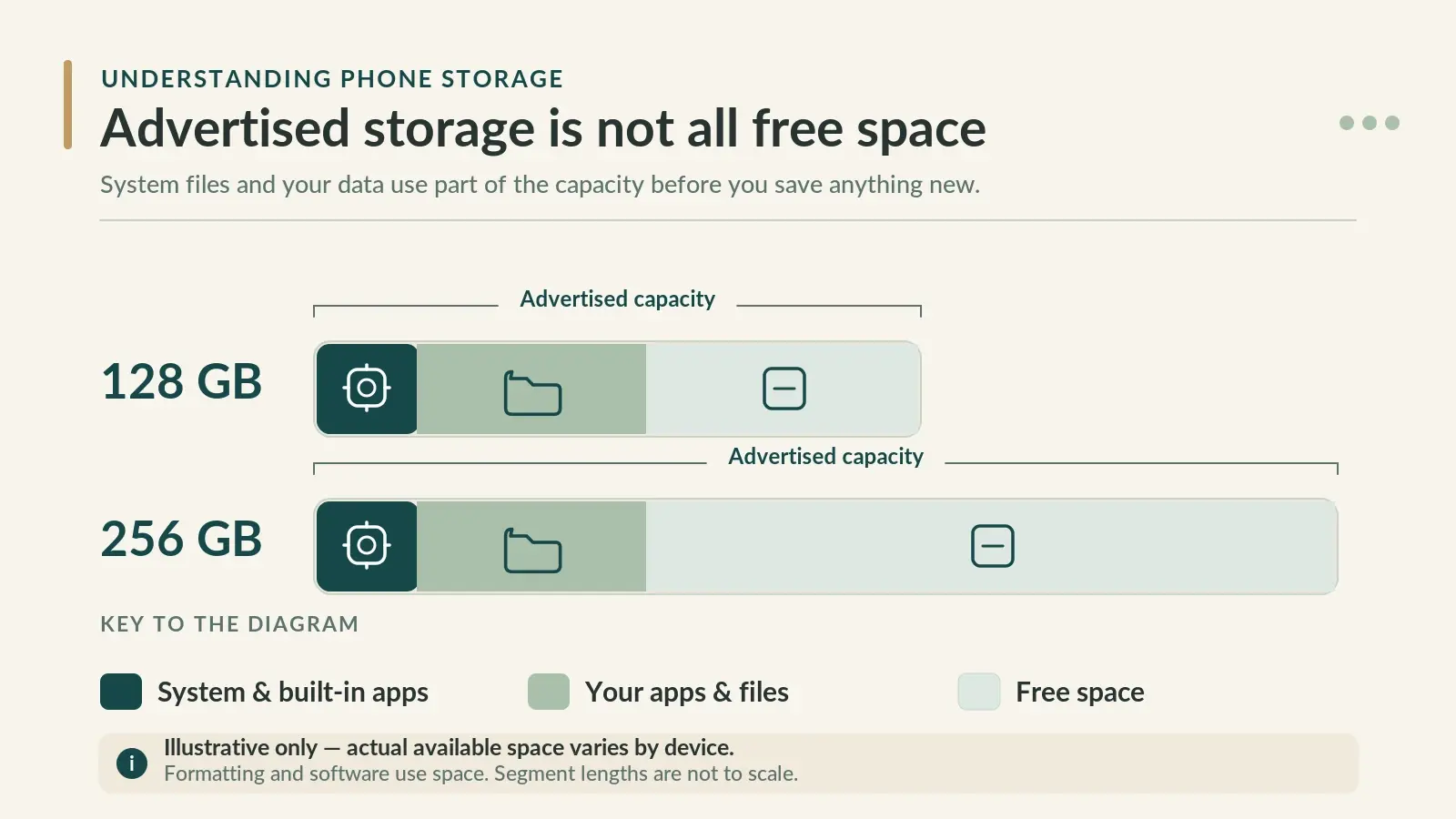
The advertised capacity describes the built-in storage, not the amount reserved exclusively for your files. Your phone needs space for Android or iOS, built-in apps, software components and data created during use. Formatting also consumes some capacity.
There is a second source of confusion: units. Manufacturers commonly use decimal gigabytes, where 1 GB is one billion bytes. A binary unit, 1 GiB, is 1,073,741,824 bytes. Therefore, 128 GB is approximately 119.2 GiB, and 256 GB is approximately 238.4 GiB, before deducting operating-system or application space. Whether your phone displays GB or another convention depends on its software; do not treat the conversion as a universal screenshot of available storage.
Nor is there a reliable rule that every 128 GB phone starts with, say, 100 GB free. Different Android interfaces, preinstalled apps, updates and device configurations change the figure. Even two phones with the same advertised capacity can show different free space.
For an accurate starting point, check the actual storage details of the model you are buying. If possible, compare its reported free space after initial setup rather than relying on the box label alone.
What actually fills smartphone storage?
Photos: usually manageable, until the collection grows
A single compressed phone photo may occupy only a few megabytes. But file size varies with resolution, image complexity, file format, motion-photo features and whether you shoot RAW. A collection can become substantial when you never move or delete it.
For illustration, 4,000 photos averaging 4 MB each occupy about 16 GB. This is an arithmetic example, not a claim that every smartphone photo is 4 MB. RAW photographs and other specialised formats may require much more space.
The question is whether you want your entire photo history accessible offline. If you are comfortable keeping backed-up originals elsewhere and retaining only what you frequently need on your phone, 128 GB becomes easier to live with.
Video: the biggest variable for many people
Video can consume storage much faster than photographs. Resolution, frame rate, codec, stabilisation features and recording format all influence file size. High-resolution 4K clips are a particular consideration, but not all 4K recordings consume the same space.
Consider a hypothetical recording format that produces 250 MB per minute. A 20-minute video would use approximately 5 GB, and two hours of retained footage would use about 30 GB. Your actual files could be smaller or larger. Measure a sample recorded with your own camera settings rather than using this estimate as a specification.
This is why a parent who regularly records school functions, someone filming travel videos, or a creator retaining footage for editing may benefit substantially from 256 GB. If you mostly take short clips and transfer them to a computer, 128 GB may be entirely workable.
Apps and games: installations are only the beginning
The app-store download size does not tell the whole story. Apps may download additional resources, save media, store offline maps or accumulate local databases. Games can also need additional space for content packs and updates.
A person with messaging, banking, shopping and everyday utility apps generally has a different storage profile from someone who keeps multiple high-end games installed. Check the on-device size of apps and their data—not just the size listed in an app store.
WhatsApp illustrates another hidden cost. Photos, videos, voice notes and forwarded files saved inside chats can accumulate over time. WhatsApp provides a Settings → Storage and data → Manage storage area for reviewing content (WhatsApp Help Center). Deleting a few downloaded videos may have more effect than removing dozens of small apps.
Offline entertainment, files and temporary data
Downloaded movies, music playlists, podcasts, maps, PDFs and work files all use local storage. For an Indian commuter or frequent train traveller, reliable offline access may be more important than maintaining a perfectly tidy phone.
Temporary files and caches also consume space, although some can be removed automatically. A cache is not necessarily waste: apps use it to avoid downloading the same content repeatedly. Deleting every cache is rarely a long-term storage strategy, and deleting an app's data can remove important local information. Google distinguishes clearing cache from clearing storage in its Android guidance.
Who should buy which capacity?
| Your usage pattern | Better starting point | Why |
|---|---|---|
| Calls, UPI, browsing, messaging and mostly streaming | 128 GB | Modest local media needs |
| Social media, regular photos and occasional short video | 128 GB or 256 GB | Depends on how much you keep offline |
| Several large games, downloaded shows and offline playlists | 256 GB | More room for installations and downloads |
| Frequent 4K recording, video editing or RAW photography | 256 GB or more | Media projects can grow quickly |
| Keeping a phone for four or five years with minimal cleanup | 256 GB | Provides a larger margin for future files |
These are editorial recommendations, not minimum technical requirements. A disciplined user can do plenty with 128 GB; a heavy video creator can fill 256 GB too.
A better way to estimate your storage requirement
If you already own a smartphone, its storage screen is more useful than guesses about how many photographs fit in a gigabyte.
On an iPhone, open Settings → General → iPhone Storage. Apple shows space used by apps and categories, along with recommendations such as offloading unused apps (Apple's storage instructions). On Android, look under Settings → Storage, or the manufacturer's device-care section; the wording varies. Samsung's guide explains how to review large and duplicate files through Device Care.
Then follow this process:
- Record current usage, not just the amount free. Separate essential apps and system storage from old videos, temporary downloads and files you are willing to move.
- Estimate what will grow. Think about your recent photo and video habits, games, offline media and whether you are about to use the camera more heavily.
- Multiply by the years you will keep the next phone. Allow for changing habits rather than assuming this year's usage will stay unchanged.
- Add comfortable free space. You need room for app updates, new content and unexpected downloads. A 15–25 GB personal buffer can be a useful planning choice, but it is not a universal Android or iOS requirement.
- Compare that total with real usable capacity, allowing for the next device's system and preinstalled software.
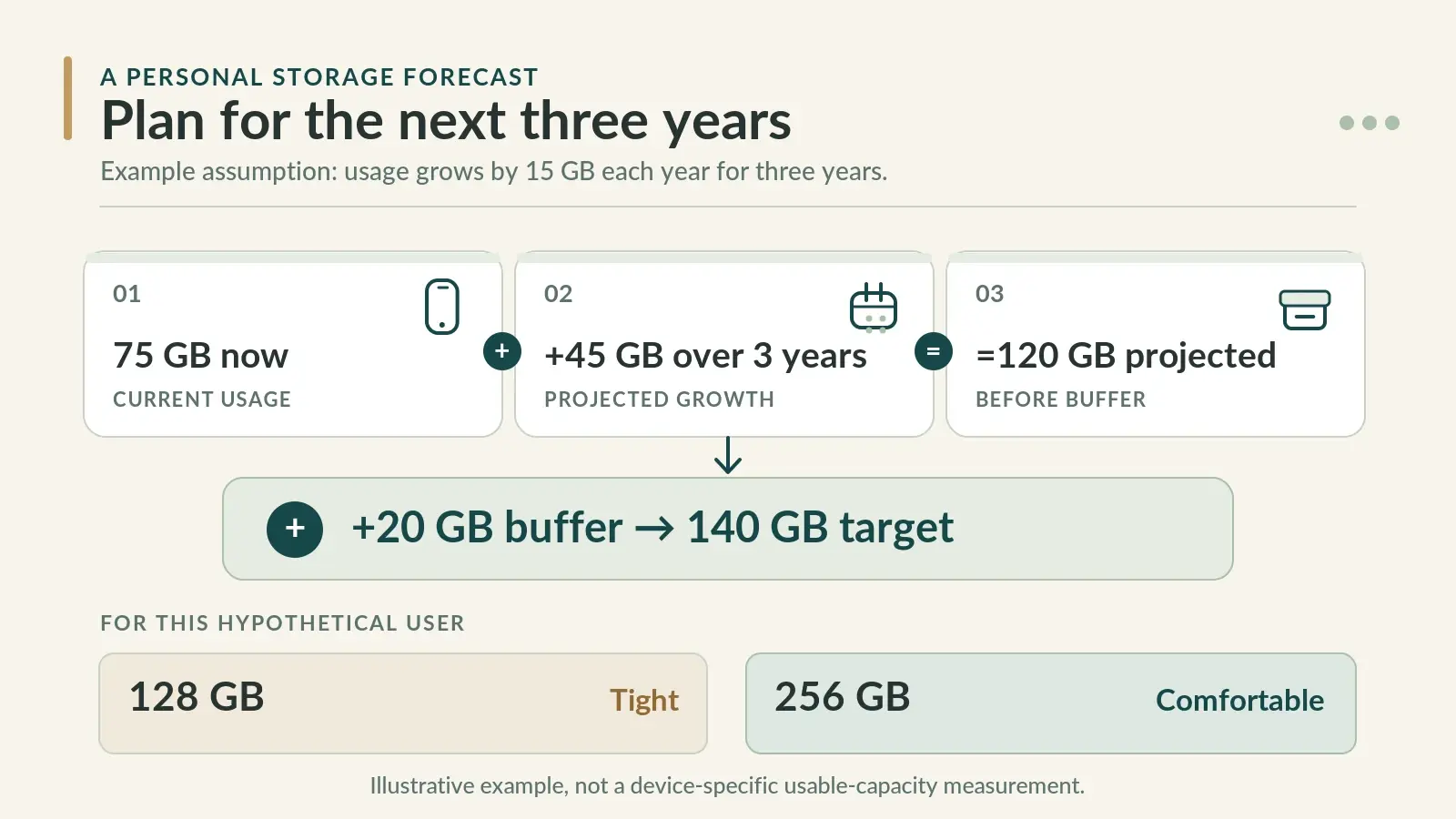
Here is one illustrative calculation. Suppose your current phone uses 75 GB, including system files and apps. You expect that to grow by 15 GB per year over three years. Your projected usage becomes 75 + (15 × 3) = 120 GB. Add a preferred 20 GB buffer and the planning target is 140 GB. A 128 GB model offers little prospect of meeting that target without regular cleanup; 256 GB gives a more comfortable margin.
The point is not that everyone needs 140 GB. It is that a personalised projection exposes the difference between what fits today and what will still be comfortable later.
Can cloud storage make 128 GB enough?
Often, yes—but only for the kinds of data you can actually keep off the device.
With iCloud Photos, Apple's Optimise iPhone Storage setting can keep full-resolution originals in iCloud while storing smaller versions locally when needed. This can lower on-device photo storage, though some space is still used and full originals may require an internet connection (Apple's explanation).
With Google Photos, the Free up space on this device feature can remove local copies of photos and videos that are safely backed up. You should confirm backup has completed before doing so (Google Photos Help).
However, cloud storage is not an extra 128 GB of built-in memory. It cannot automatically hold all app installations, active game files or content that must remain available offline. It may also involve subscription costs, uploading over mobile data or Wi-Fi, and waiting for files to download again.
Be careful with deletion. For example, deleting an image from a synchronised iCloud Photos library can remove it from other synced devices too. Using an approved space-optimisation or device-only removal feature is not the same as indiscriminately deleting items from a synced library (Apple's iCloud guidance). Important personal files should have verified backups independent of a single device.
For users who have affordable, reliable internet access and a routine for managing media, cloud tools make 128 GB a stronger option. For users who regularly travel through low-connectivity areas or need substantial offline content, 256 GB has a more obvious advantage.
Does 256 GB make a phone faster?
Not automatically. Storage capacity describes how much data fits. Storage performance depends on the phone's hardware, controller, flash configuration, software and workload. A 256 GB variant could behave differently from a 128 GB variant, but it is wrong to assume a fixed speed improvement simply from the capacity label.
Similarly, 128 GB of storage and 8 GB of RAM describe different things. RAM is working memory used while apps run; storage holds apps and files persistently. Paying for more storage does not necessarily improve multitasking or camera performance.
Very low free space can cause practical problems—for example, there may be insufficient room to download an update or save a video. That is a reason to maintain headroom, not evidence that all 128 GB phones are inherently slow.
What about microSD cards, USB drives and transferring files?
Some Android phones support microSD expansion, but many do not. Even where a slot exists, its usefulness depends on what the manufacturer and apps allow you to store there. A card may be excellent for photographs, music and some downloads without acting as a complete replacement for internal storage. Check the specific phone rather than assuming a card slot is standard.
Compatible USB-C flash drives, computers and external SSDs can help archive large videos or move files. They are less convenient for apps that expect their working data to stay on the phone. A phone that can record supported video formats directly to an external drive may help some creators, but this is a model- and mode-specific feature, not a universal smartphone capability.
If you know you will rely on external storage, verify the phone's port and file-transfer support before buying. Otherwise, internal capacity remains the simplest place to keep day-to-day files.
Is the upgrade price worth it in India?
Compare the actual price gap between the two variants of the same phone, not an assumed industry-wide premium. Indian prices change with offers, retailers, launch promotions and availability. Sometimes the 256 GB variant is only slightly more expensive; sometimes the difference would buy you a useful accessory, a repair fund or another meaningful improvement.
For example, if the 256 GB version costs ₹4,000 more and you plan to keep it for four years, that is an illustrative ₹1,000 per year for extra local capacity. Whether that is good value depends on whether you would otherwise spend time deleting files, pay for more cloud space, or miss important recordings. The example is a budgeting calculation, not a verified current market price.
Also ask whether choosing the larger capacity forces a trade-off elsewhere. A better camera, longer software support or stronger battery life may matter more than unused storage. Conversely, if the two models are otherwise identical and the price difference is modest, 256 GB can be a sensible long-term convenience purchase.
How to make either capacity last longer
The most effective approach is selective, not obsessive, cleanup. Review the storage page every few months and look first for unusually large videos, duplicate downloads, unwanted offline episodes and apps you no longer use. Use WhatsApp's built-in management tools rather than deleting chat files blindly. Move important recordings to a computer or verified backup before removing local copies.
If you record lots of video, review resolution and frame-rate settings: choosing a format that suits the intended use can reduce file sizes. Keep sufficient free space for unexpected events—especially before travel, a long recording or a major software update.
Don't clear an app's entire storage or delete a photo library until you know what will be lost and where reliable copies exist.
The verdict
For many people in India, 128 GB remains a reasonable, cost-conscious choice when their use is centred on everyday apps, ordinary photos and streaming. It works best with occasional housekeeping and dependable backups.
256 GB is the safer long-term choice for video-heavy users, gamers, people who keep large offline libraries and anyone who wants to manage storage less often over several years. Its value is the extra breathing room—not a guarantee of faster performance.
Before paying more, check your current storage usage, estimate growth and compare the real variant price. Your own numbers will give you a better answer than a universal rule.