
Integrated Graphics vs Dedicated Graphics: Which Laptop Should Students, Programmers and Creators Buy?
Do you need a dedicated GPU in your next laptop? Compare integrated and discrete graphics for coding, college, editing, 3D work, AI and battery life.

A laptop with dedicated graphics can look like the safer purchase. Its specifications promise a separate GPU, graphics memory and extra processing power. But that hardware may add cost, weight and heat without making everyday work noticeably faster.
The important question is not whether dedicated graphics are better in isolation. It is whether your software can use that extra capability. A student writing assignments, a programmer running a development environment and a creator rendering complex 3D scenes have very different requirements.
For most college work and general programming, a good modern integrated GPU is enough. Dedicated graphics become more compelling when your work involves demanding games, GPU rendering, complex effects or software that specifically benefits from a compatible graphics accelerator. Here is how to make that distinction before spending more.
What integrated and dedicated graphics actually mean
A graphics processing unit (GPU) draws the desktop and accelerates certain visual and parallel-processing tasks. Every laptop needs graphics capability, but not every laptop needs a separate graphics processor.
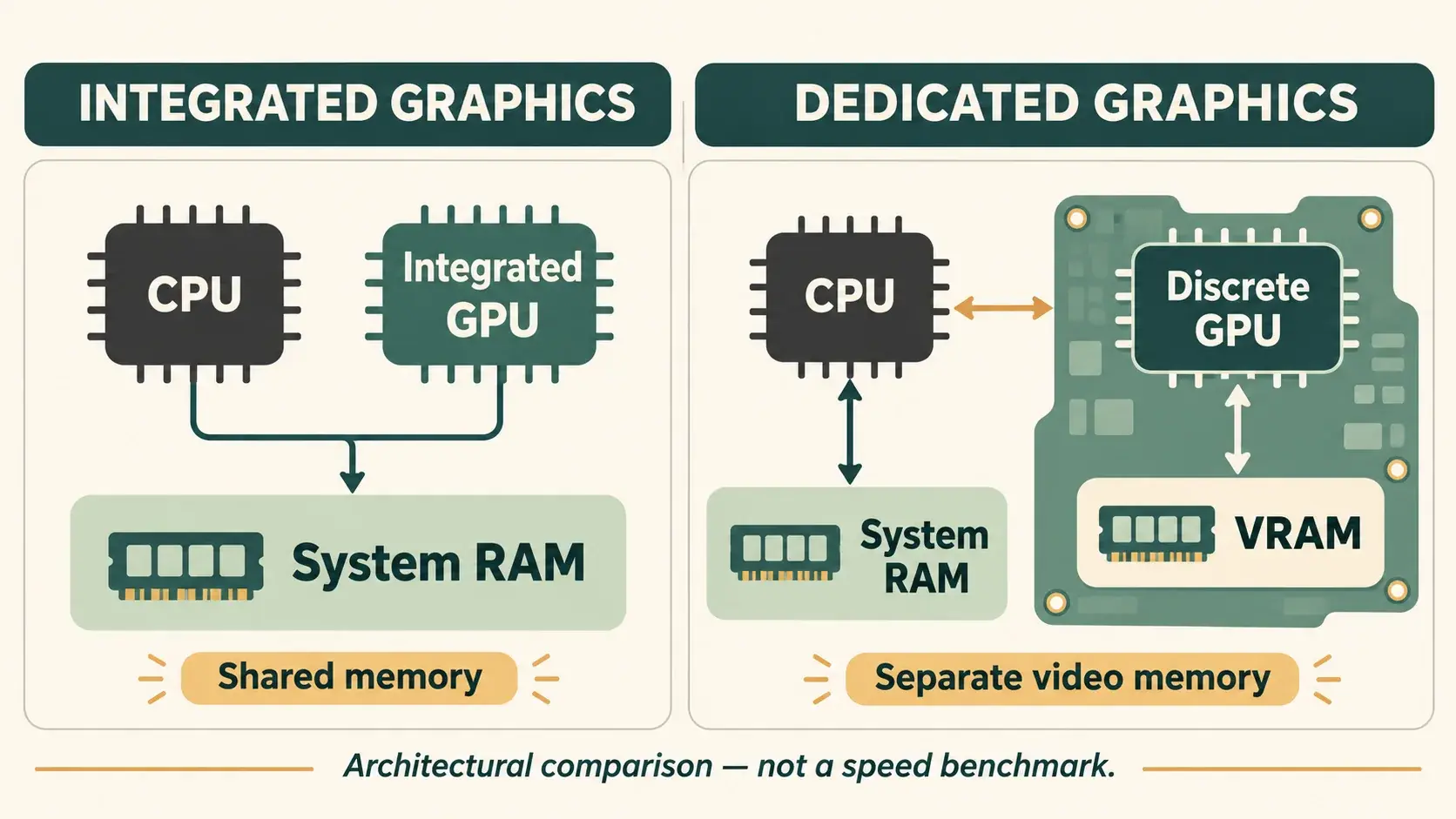
Integrated graphics are built into the processor or its system-on-chip package. They generally use memory shared with the CPU rather than a separate bank of video RAM. Older Intel UHD or Iris Xe graphics, newer Intel Arc integrated graphics and many AMD Radeon integrated GPUs can differ considerably in performance; the word integrated does not identify one performance level.
Dedicated graphics, also called discrete graphics, use a separate GPU with dedicated video memory (VRAM) on most Windows laptops. NVIDIA GeForce RTX and various AMD Radeon laptop GPUs are examples. This provides additional graphics resources for supported workloads, but requires more power and cooling.
| Question | Integrated GPU | Dedicated GPU |
|---|---|---|
| Where is it? | Part of the processor or system-on-chip | Separate graphics processor |
| Graphics memory | Usually shares system RAM | Usually has its own VRAM |
| Everyday documents, browsing and coding | Generally sufficient | Usually unnecessary |
| Sustained 3D rendering or demanding gaming | Depends heavily on model; often limited | Usually better suited, if sufficiently powerful |
| Power, heat and laptop design | Often favours thinner, quieter systems | Can add thermal and power demands |
| Upgrade later? | Generally not replaceable | Also usually not replaceable in laptops |
These are broad design differences, not benchmark results. A strong current integrated GPU can outperform an old or particularly low-power discrete GPU in some tasks. Compare actual laptop configurations rather than treating either category as a guarantee.
What about Apple silicon Macs?
Apple silicon uses an integrated GPU and unified memory shared across processing components. That does not make a Mac's graphics capabilities equivalent to a basic entry-level Windows iGPU. Its performance and software support depend on the exact chip, memory configuration and application. Apple silicon can accelerate professional creative work, including supported video codecs and Metal-based applications, without a conventional separate graphics card.
For students: spend first on the parts you will use
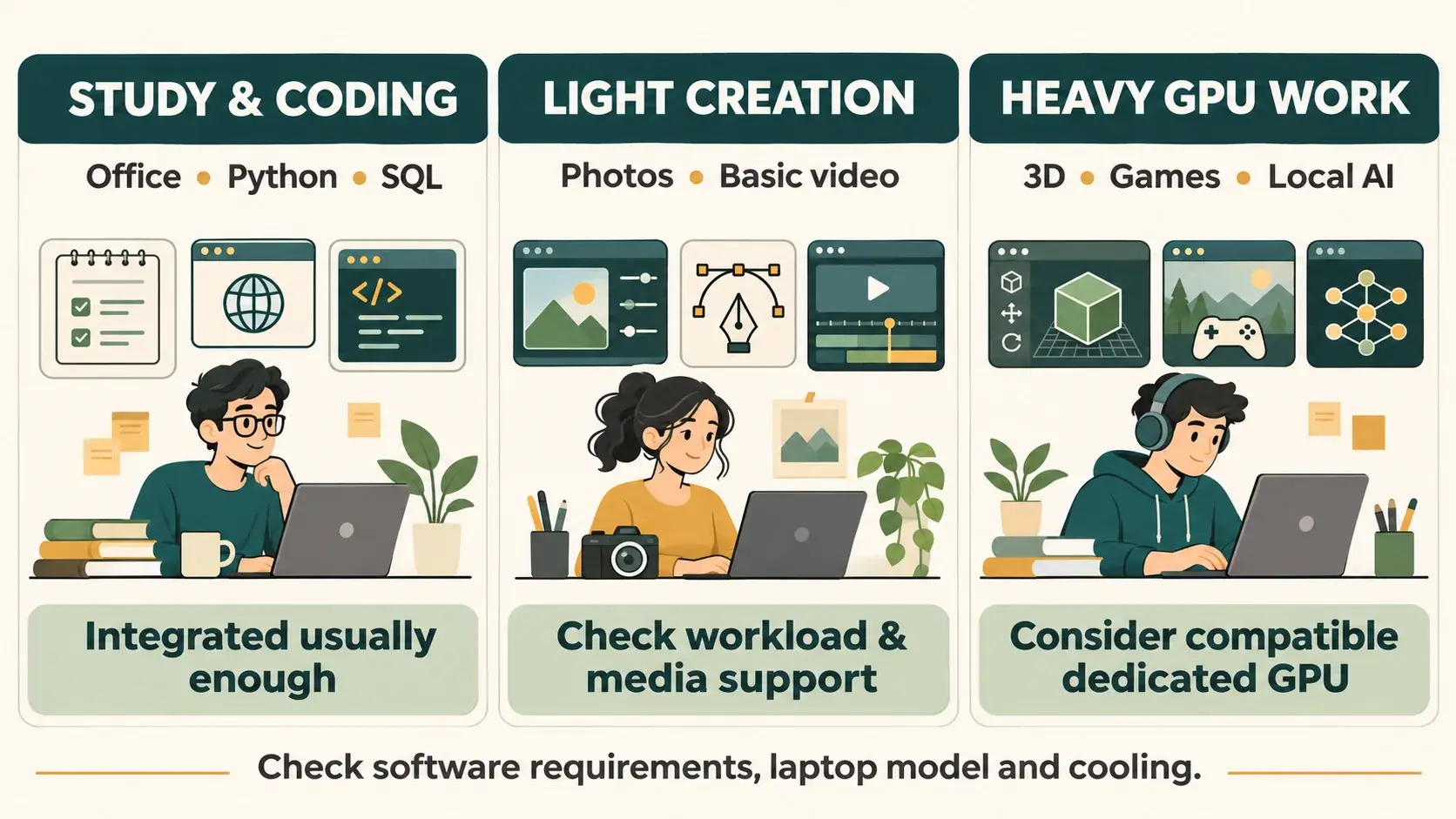
For school and most undergraduate work—PDFs, research, presentations, spreadsheets, browser tabs, video calls, recorded lectures and ordinary programming—integrated graphics are normally the sensible choice.
A balanced laptop with a capable CPU, 16 GB of RAM where the budget allows, a responsive SSD, a readable screen and reliable battery life will generally be more useful than one that sacrifices those essentials to advertise a dedicated GPU. RAM requirements can rise for particularly large projects, and memory-upgrade options vary by laptop.
The exception is a course with specific software needs. Architecture students working with substantial 3D scenes, design students using GPU-heavy effects, or engineering students using specialised simulation and visualisation tools may benefit from dedicated graphics. Check the actual applications and course requirements, not merely the course title. Some engineering CAD tasks run on integrated graphics, while professional-sized models need more GPU memory or certified hardware.
For students carrying a laptop between classes, a lighter machine with less fan noise and better measured unplugged endurance may be worth more than higher peak graphics performance.
For programmers: your workload matters more than the language
Web, app and general software development
Writing Java, Python, JavaScript or C++; building websites; using VS Code or IntelliJ; running SQL databases; testing APIs; and working with Git do not inherently require a dedicated GPU.
Most of these tasks lean on the CPU, memory, storage and occasionally network performance. Opening several IDEs, browser sessions, Docker containers or virtual machines is more likely to expose insufficient RAM or CPU capacity than missing dedicated graphics.
If you develop Android apps, Android Studio and its emulator can be demanding, but that still does not mean a dedicated GPU is automatically required. Check the current emulator and hardware-virtualisation requirements for your intended operating system. For many development laptops, upgrading from 8 GB to 16 GB or 32 GB RAM will matter more than buying an entry-level discrete GPU.
Data science, AI and machine learning
The picture changes when you plan to train or run models locally on the GPU. Python itself needs no discrete GPU. NumPy, pandas, SQL, data visualisation and many introductory machine-learning exercises work on the CPU. A remote GPU or cloud notebook can also handle occasional experiments.
However, some deep-learning classes and research projects expect a compatible accelerator. In particular, NVIDIA CUDA is a specific software ecosystem, not another name for any dedicated GPU. PyTorch offers supported CUDA and AMD ROCm routes on appropriate systems, while Apple silicon has a separate Metal/MPS path. Compatibility varies by framework, operating system and GPU model.
For local model training, check the framework's supported hardware and the size of models or datasets you need to fit in memory. VRAM capacity can be as important as raw compute speed. A laptop bearing a powerful-sounding GPU name may still be constrained by limited memory. Conversely, purchasing a GPU for occasional beginner notebooks may be money better spent on RAM or access to cloud compute.
For creators: distinguish editing from rendering
“Content creation” includes several very different workloads.
Photo editing, illustrations and graphic design
Canva, web-based design tools, many vector illustrations and routine photo adjustments can run comfortably on a good integrated GPU. Adobe Photoshop does use GPU acceleration for selected features, so compatible graphics hardware matters, but that is not the same as requiring the fastest dedicated GPU available.
For many photographers and designers, a colour-accurate, bright display, sufficient memory, good storage and a capable CPU are at least as important as the graphics chip. If your workflow uses extremely large layered files, demanding filters or multiple high-resolution displays, evaluate that exact software and workload before choosing.
Video editing and motion graphics
Editing short Full HD videos, cutting footage, adding captions and exporting common formats does not automatically demand a dedicated GPU. Modern integrated processors may include dedicated media engines for accelerating supported H.264 and H.265 decoding or encoding. Adobe documents hardware-media support across Intel, AMD, NVIDIA and Apple silicon; supported codecs and features vary.
More complex projects—multilayer 4K timelines, heavy colour grading, intensive effects, noise reduction, high-resolution footage or 3D composites—are better candidates for a strong GPU and more memory. Adobe Premiere's requirements distinguish minimum HD editing from recommended configurations for higher-resolution work, rather than treating every editor as having the same needs.
Before paying for discrete graphics, identify whether your main bottleneck is video decoding, timeline effects, export speed, RAM or SSD throughput. These require different solutions. A dedicated GPU will not automatically rescue a weak CPU or slow storage drive.
3D modelling, rendering and specialised CAD
For serious Blender work, substantial architectural visualisations, complex animation and GPU-rendered scenes, a suitable dedicated GPU is often worth prioritising. Blender's Cycles renderer supports different GPU back ends, including CUDA/OptiX, HIP, oneAPI and Metal, subject to the device and software version. The graphics hardware must match the rendering back end you intend to use.
CAD needs more care than a blanket “buy RTX” rule. A student drawing simple 2D plans or small 3D assemblies may be comfortable with integrated graphics. Larger assemblies, professional visualisations and specialised software can have higher requirements or recommend certified workstation GPUs. Autodesk Fusion's published minimum and recommended requirements illustrate this workload-dependent distinction.
In short, buy for the heaviest application you will genuinely use, not for the most demanding application you might someday install.
Does a dedicated GPU make a laptop better for gaming?
For recent visually demanding games at high detail settings, dedicated graphics are usually the stronger option. They offer greater rendering capacity and, often, their own VRAM. They are particularly relevant when you want high frame rates, advanced lighting features or higher display resolutions.
But gaming is not one workload. Less demanding games, older titles and many casual or competitive games can run on capable modern integrated graphics with appropriate settings. The game's official requirements, actual resolution and independent tests of the specific integrated GPU provide better guidance than the category name.
A buyer who rarely plays demanding games should not assume a gaming laptop is the best all-purpose student laptop. Its cooling system, charger and weight may be harder to live with every day than the occasional extra performance is worth.
The hidden trade-offs: battery, heat, noise and performance
Integrated graphics are generally more power-efficient under light workloads, which helps manufacturers make thin and quiet laptops. Dedicated GPUs consume additional power when active and place greater demands on cooling. However, the graphics label alone cannot predict battery life. Screen resolution and brightness, CPU efficiency, battery capacity, software and power settings matter enormously.
Some Windows laptops contain both GPUs. They switch between integrated graphics for everyday tasks and the discrete processor for heavier applications. This can improve efficiency, but it does not guarantee that a gaming laptop will last as long unplugged as a thin-and-light model. A performance-heavy application may keep the discrete GPU active.
Also look beyond the GPU name. Laptop makers configure power limits and cooling differently. NVIDIA's laptop specifications list broad GPU subsystem power ranges, and its professional GPU documentation directs buyers to the laptop manufacturer for system-specific limits. Consequently, two machines with the same graphics chip label may perform differently under a long rendering or gaming load.
Check independent sustained-performance, fan-noise and battery tests for the exact laptop configuration, preferably under comparable conditions. Do not interpret a larger wattage figure as a complete performance ranking across different GPU models.
Five checks before choosing a laptop with dedicated graphics
- Confirm the real application requirement. Look up the official GPU, driver, VRAM and operating-system requirements for the program you use most. Recommended specifications are often more useful than installation minimums.
- Read the exact GPU model and power configuration. “Dedicated NVIDIA graphics” is insufficient. Find the full laptop-GPU name, its stated graphics power where available and evidence of adequate cooling.
- Check graphics memory and system RAM separately. Dedicated VRAM stores GPU workloads; system RAM serves the rest of the laptop. Neither can substitute perfectly for the other. Do not treat a Windows “shared GPU memory” number as physical dedicated VRAM.
- Compare the complete laptop. A better display, CPU, 16–32 GB RAM where appropriate, sufficient SSD space, ports and practical battery life can be more valuable than a modest GPU upgrade.
- Look at upgradeability and service. Many laptop GPUs are soldered and cannot be replaced. Check whether RAM and SSD storage are upgradeable, the warranty and service arrangements in India, and the weight of the power adapter you will carry.
A useful price comparison is between two actual shortlisted configurations, not hypothetical “integrated versus dedicated” averages. If the dedicated model costs more, ask which recurring task it will shorten or enable. If you cannot identify one, its premium may not deliver much value.
Which should you choose? A quick decision table
| Your main use | Sensible starting point | When dedicated graphics become worthwhile |
|---|---|---|
| School, college, office and online classes | Modern integrated GPU | Rarely, unless required software says otherwise |
| Web, Java, Python, SQL and general programming | Integrated GPU; prioritise RAM and CPU | GPU-specific development, rendering or compute |
| Data analytics and introductory ML | Integrated GPU or cloud compute | Regular local deep learning with supported acceleration |
| Photography, Canva and light design | Capable integrated GPU | Intensive effects, very large projects or workflow-specific needs |
| Full HD video and simple creator work | Capable integrated GPU with suitable media support | Complex 4K workflows, effects and heavy exports |
| Blender, demanding 3D and substantial CAD | Check exact software first | Frequently beneficial; verify VRAM and compatibility |
| Demanding modern PC games | Often a dedicated GPU | Especially for high settings or frame rates |
These recommendations assume reasonably current hardware. An ageing integrated GPU, an entry-level discrete GPU and a high-performance modern integrated design are not interchangeable. Software versions also change their hardware requirements.
Common mistakes to avoid
“More VRAM means a faster laptop.” Not necessarily. GPU architecture, memory bandwidth, power limits, thermal design and software support all affect performance. Memory capacity matters when workloads exceed it, but capacity alone is not a speed benchmark.
“Dedicated graphics make programming faster.” Only when the task actually uses the GPU. More RAM or a faster CPU often matters more for builds, containers and ordinary development.
“Integrated graphics cannot handle creative work.” Some can handle photo editing and video production surprisingly well, especially when the software uses modern media engines. Heavy effects and complex rendering are a different matter.
“Any dedicated GPU will work with AI software.” GPU acceleration is platform-specific. CUDA, ROCm and Metal/MPS are different paths with different hardware and framework support.
“A gaming laptop is automatically future-proof.” It may offer more graphics headroom, but poor battery life, inadequate RAM, limited VRAM or an underpowered cooling system can still compromise its usefulness.
The bottom line
For most students, everyday programmers and light creators, start with a well-balanced laptop using modern integrated graphics. Spend on a capable CPU, enough RAM, a good display, fast storage and battery life before paying for a GPU you may rarely use.
Choose dedicated graphics when your regular work genuinely needs the acceleration: serious 3D, demanding games, complex video effects or compatible local GPU computing. Then inspect the exact GPU, VRAM, laptop power limits and application requirements—not just the graphics badge.
A good laptop is the one that performs your real work reliably. The best graphics choice follows from that work, not from the biggest specification on the box.
Sources and Further Reading
- Intel — Difference between integrated and discrete graphics
- Microsoft — All about graphics processing units
- Adobe — Premiere system requirements
- Adobe — Hardware-accelerated encoding and decoding in Premiere
- Blender — Hardware and platform requirements
- Blender — Cycles GPU rendering documentation
- PyTorch — Get started locally
- Apple Developer — PyTorch acceleration using Metal
- NVIDIA India — Compare laptop GPU specifications and subsystem power
- Autodesk — Fusion system requirements