
Laptop Warranty vs Extended Warranty vs Accidental Damage Protection: What's Actually Covered?
Understand which laptop repairs standard warranties, extended warranties and accidental damage plans cover in India, including spills, screens and batteries.

A laptop stops charging after eighteen months. Another falls off a desk and cracks its screen. A third survives for three years, but its battery now lasts barely an hour. All three owners might say, “My laptop has a warranty.” Yet the answer to who pays for the repair could be completely different.
When buying a laptop in India, retailers may offer a standard warranty, an extended warranty, an accidental damage protection plan or a bundle with an impressive name. These products solve different problems. More years of warranty do not automatically mean more types of damage are covered.
The useful question is not simply how long is the warranty? It is which event is covered, during which period, and what will you pay when you make a claim?
The three protections are not interchangeable
| Protection | Mainly intended for | Usually does not add by itself |
|---|---|---|
| Standard manufacturer's warranty | Covered defects in materials or workmanship during the original term | Protection against accidental drops or spills |
| Extended warranty | More time for specified hardware failures and related service | Accidental damage unless explicitly bundled |
| Accidental Damage Protection (ADP) | Specified unexpected incidents such as drops, spills or cracked screens | Unlimited protection against every loss, theft or failure |
These are general descriptions, not universal coverage promises. A manufacturer may sell a combined plan that includes several benefits, while a retailer may sell third-party protection with entirely different claim rules. The written service agreement for your exact laptop and plan determines the coverage.
What does a standard laptop warranty cover?
A standard limited hardware warranty generally addresses faults arising under normal use that the manufacturer determines are covered defects. Examples might include a faulty motherboard, a display that fails without impact damage, a defective charging circuit or a keyboard that stops responding because of an internal hardware fault.
That does not mean every failure during the warranty period is free to repair. A cracked screen resulting from a fall and a screen with a covered manufacturing defect may look similar to the buyer but have different causes. Service teams commonly inspect devices before deciding whether an issue qualifies.
Dell India's basic-support damage guidance explicitly distinguishes accidental damage from defects covered by its limited warranty. HP's India support guidance similarly explains that damage unrelated to a manufacturing defect may be excluded. Apple's Mac repair guidance for India says its limited warranty excludes accidental damage and normal battery wear.
Other common exclusions or limitations may involve misuse, unauthorised modifications that cause damage, cosmetic wear, software problems, data loss and accessories with separate warranty periods. An authorised memory or storage upgrade does not necessarily void the entire warranty, but damage caused by an incompatible component or an improper installation may not be covered. Read the actual terms rather than relying on broad statements about opening a laptop.
Batteries deserve their own check
A rechargeable battery is a consumable: it gradually loses capacity even if nothing is defective. A warranty may cover an early manufacturing fault without promising replacement whenever runtime declines. Battery coverage may also be shorter than the laptop's overall term, or available through a separate plan.
For example, ASUS's India notebook warranty information identifies battery coverage separately for relevant models, while Lenovo offers an optional Sealed Battery Warranty. Apple advertises a battery-service benefit under eligible AppleCare coverage when capacity falls below its stated threshold. None of those policies should be assumed to apply to a different model or protection package.
What does an extended warranty actually extend?
An extended warranty primarily adds time, not necessarily new causes of damage. Suppose a laptop comes with one year of standard coverage and an offer says “three years of warranty.” That could mean three years total, including the original year—not three additional years. A different offer may genuinely add years after the initial period.
Check whether the extension continues the original hardware coverage and whether it changes the service method. Some plans provide only carry-in or courier repair; others include eligible on-site support, priority diagnosis or faster response targets. Those are useful benefits, but they do not automatically cover a spilled drink.
An extension may be valuable for an expensive laptop whose motherboard or display would cost a great deal to replace after the original warranty expires. It is less compelling if you replace inexpensive laptops frequently or if the plan excludes the components you worry about most.
The start and end dates matter. Ask for the exact expiry date attached to the laptop's serial number, not only a promotional phrase such as “2+1 warranty.” Also confirm who provides the repair: the manufacturer, an authorised partner or an independent retailer-backed service provider.
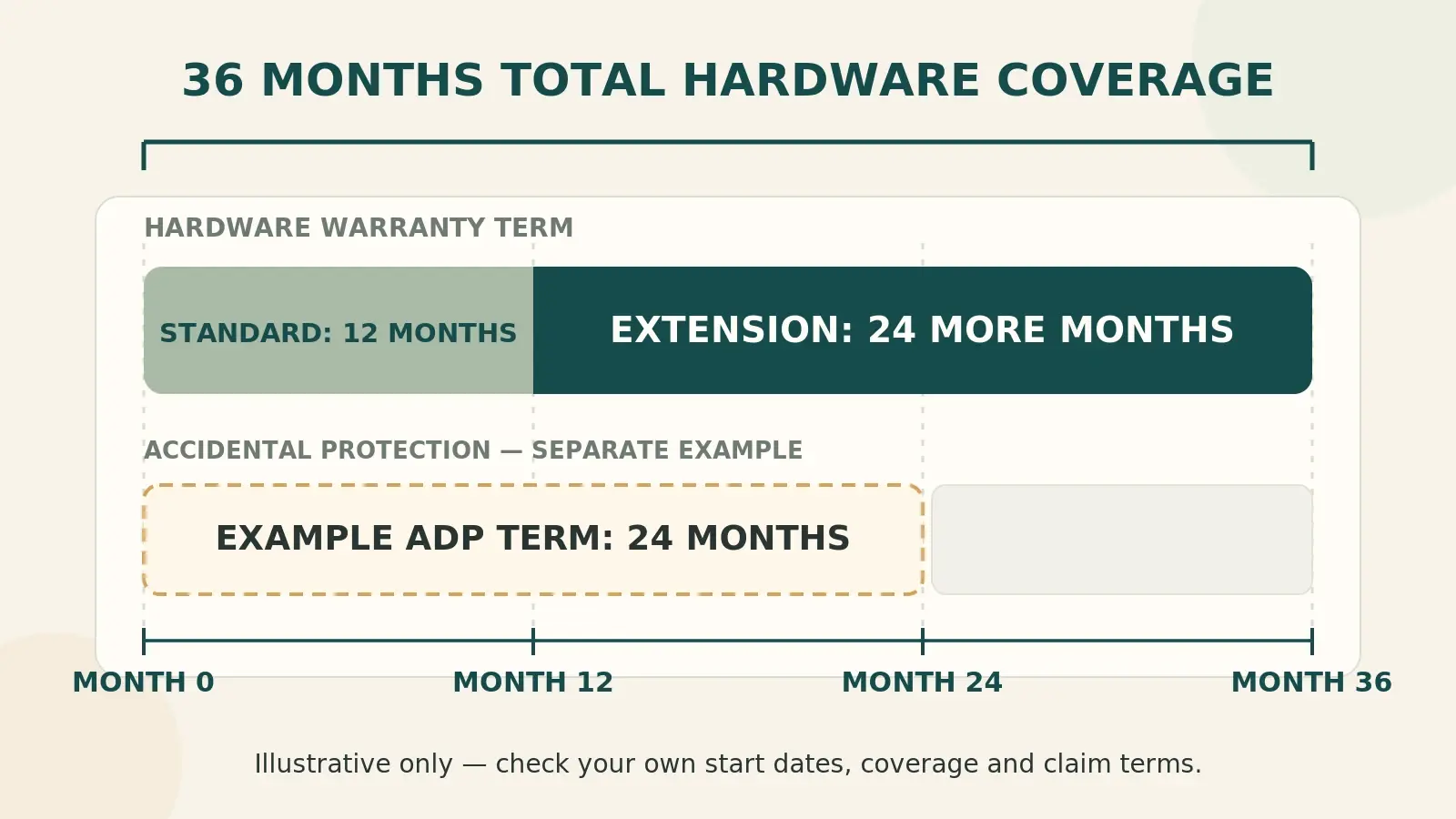
What does Accidental Damage Protection cover?
ADP addresses a different risk: sudden, unintended damage caused while handling or using the laptop. Depending on the plan, eligible events may include a fall, a liquid spill, a cracked display, an impact that damages the enclosure or an electrical surge.
Lenovo's India consumer-services page describes protection for everyday drops, spills, power surges and cracked screens. Dell's India support offerings also describe accidental-damage benefits in qualifying packages. ASUS lists Local Accidental Damage Protection as a separate service from warranty extension and on-site support.
But ADP is not the same as insurance against everything. Plans may exclude deliberate damage, theft, loss, fire, natural disasters, purely cosmetic damage or incidents outside the agreed conditions. Some cover one incident, others allow additional claims, and others impose annual limits, excess payments or replacement caps.
The name alone cannot settle those questions. Lenovo, for example, distinguishes Accidental Damage Protection One, a single-incident product for selected devices, from other ADP offerings. A buyer should verify whether the plan counts incidents, repairs, replacements or an annual claim limit.
Some premium plans also charge a service fee when you make an accidental-damage claim. AppleCare+ for Mac in India is an example of a combined coverage product that includes accidental-damage service with applicable fees, rather than free repair for every accident. Check the current model-specific terms and fees at purchase.
Six situations that reveal the differences
Imagine these common events. The table shows typical expectations, not guaranteed claim outcomes.
| What happened? | Standard / extended hardware warranty | ADP or combined plan |
|---|---|---|
| Laptop motherboard fails during ordinary use | Potentially covered if diagnosed as an eligible defect | May not be needed for this fault; check bundled hardware benefits |
| Laptop falls and screen cracks | Usually excluded as accidental damage | Potentially covered for eligible drops |
| Tea spills onto the keyboard | Usually excluded | Potentially covered for accidental liquid damage |
| Battery gradually loses capacity | Often treated as normal wear; check separate battery terms | Not automatically covered; special battery benefit may apply |
| Laptop is stolen or lost | Usually not covered | Usually not covered unless theft/loss protection is expressly included |
| Hinge loosens or breaks | Depends on whether defect, wear, misuse or impact caused it | May apply if damage follows an eligible accidental event |
A broken hinge is especially instructive. The visible symptom does not prove the cause. A hinge that fails because of a manufacturing issue is a different claim from one broken during a fall. Document the problem and request the service centre's diagnosis if coverage is disputed.
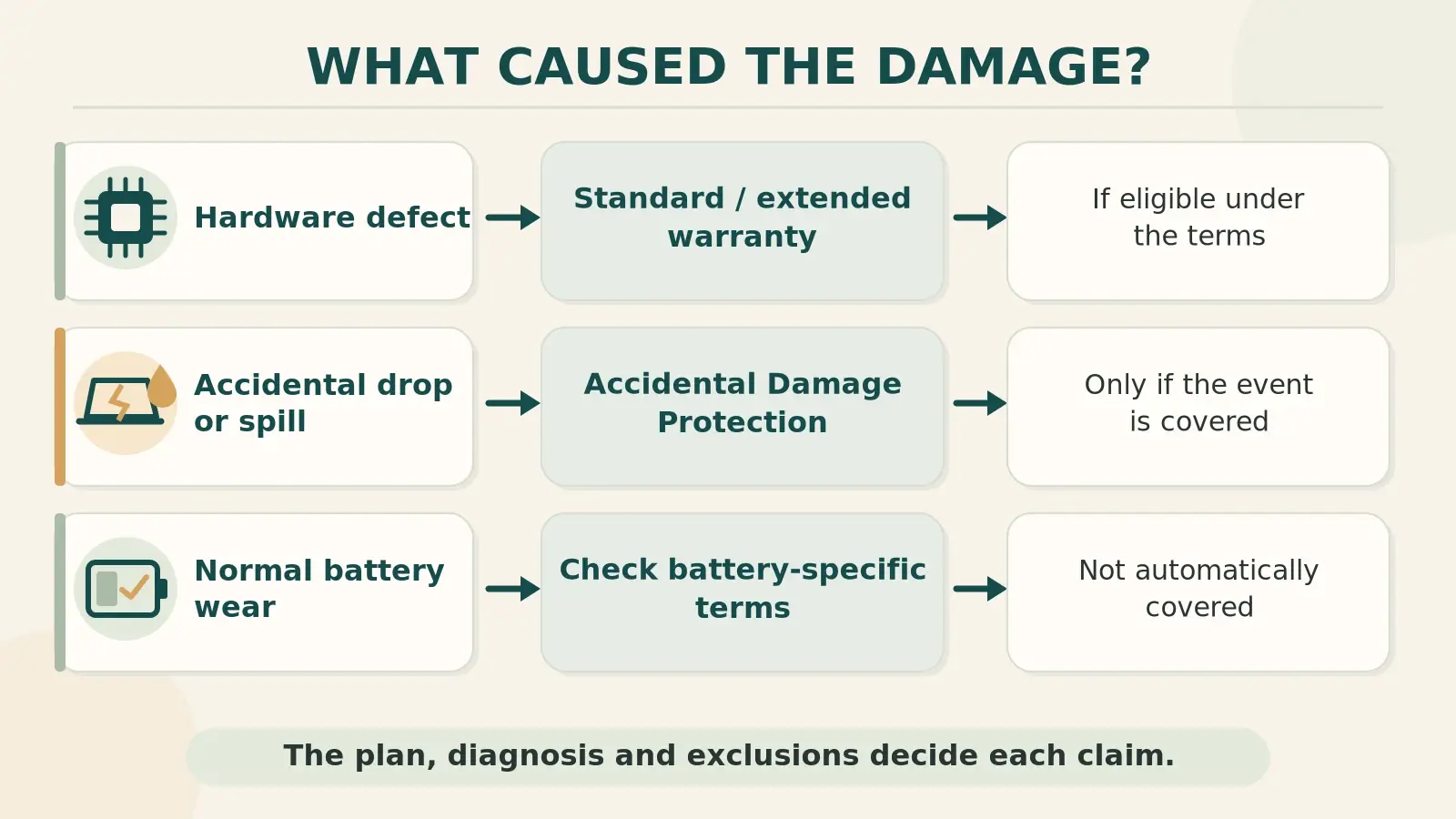
What Indian manufacturers' plan names can hide
The major laptop makers organise these benefits differently. Consider these examples as illustrations of plan structure, not a promise that every current model qualifies:
- HP: Care Packs can extend hardware service, improve support levels or add accidental-damage benefits. The precise Care Pack product determines which combination you get. See HP India on Care Packs.
- Dell: Basic hardware support and enhanced service bundles differ; qualifying enhanced plans may include accidental-damage coverage. Verify the service description for your Service Tag. See Dell India Care support.
- Lenovo: Warranty extensions, Premium Care, sealed-battery services and ADP can be separate or bundled. Some benefits are limited to eligible devices. See Lenovo India Consumer Services.
- ASUS: Warranty Extension, Local ADP, on-site support and battery-related packages are distinct products. ASUS India also specifies purchasing and activation windows for different services.
- Apple: A Mac's limited hardware warranty and AppleCare+ are not equivalent. Eligible AppleCare+ plans add accidental-damage service and other benefits, subject to fees and terms. See AppleCare in India.
A plan sold as “premium,” “complete,” “ultimate” or “protection” can still have important exclusions. Never infer coverage from the marketing tier. Confirm the specific benefits listed in the entitlement record after purchase.
On-site service, priority support and ADP solve different problems
A laptop with on-site service may be repaired at your home or workplace for an eligible fault, subject to location, parts and service conditions. This affects where and how a repair happens; it is not a promise to pay for any kind of damage.
Likewise, priority support can make technical assistance easier to access without changing which broken parts are covered. An international-warranty benefit concerns service availability across regions; it does not necessarily cover accidents abroad. Pickup-and-return service changes logistics, not the underlying exclusions.
For someone relying on a laptop for work, service speed and local access may be more useful than another year of basic carry-in support. For a student travelling with a laptop daily, accidental-damage coverage may be the more relevant upgrade. These benefits can complement one another.
How to check an offer before paying
Ask for the full service contract or plan terms, not a sales-page badge or a verbal assurance. Work through these questions:
- Total term or additional years? What are the exact coverage start and expiry dates?
- Which device? Is the exact model and serial number eligible, and who is the actual service provider?
- Which events? Are drops, cracked screens, liquid spills and surges included or excluded?
- How many claims? Does the plan limit incidents, repair value or replacements?
- What do I pay per claim? Check deductibles, service fees, taxes and any replacement contribution.
- What about batteries? Is ordinary capacity degradation included, and under what threshold?
- Where is service delivered? Carry-in, courier, pickup, on-site or location-dependent?
- When must I buy or activate it? Some plans have tight eligibility windows and registration requirements.
- What happens after repair? Does coverage continue, and what warranty applies to replacement parts?
This last-minute paperwork matters. ASUS India, for example, publishes different purchase deadlines for warranty extensions and certain other protection services. A retailer's offer may also involve a third-party administrator, in which case the seller's description and the actual provider's contract both need checking.
Save the tax invoice, plan invoice, policy number, confirmation email and a screenshot or PDF of the terms that applied when you bought coverage. Check that the plan appears against the laptop's serial number where the provider offers online entitlement lookup.
Is an extended warranty or ADP worth the extra price?
There is no universally correct answer. You are paying to reduce a particular financial or logistical risk, not making an investment guaranteed to pay for itself.
Consider an illustrative scenario, not a current retail quote. A laptop costs ₹70,000. Its accidental-damage plan costs ₹5,000 and a covered repair, if needed, requires a ₹2,000 claim fee. Without protection, suppose that particular repair would cost ₹18,000.
- If an eligible accident occurs and the claim is approved, your combined plan-plus-fee expenditure is ₹7,000 instead of the hypothetical ₹18,000 repair bill: a ₹11,000 difference.
- If no covered accident occurs, you spent ₹5,000 on risk protection and receive no repair payout.
- If the incident is excluded, outside the coverage period or beyond the claim limit, the plan might not pay for it.
That arithmetic illustrates the trade-off; it does not predict your probability of an accident or establish a fair plan price. Compare the premium, possible excess, maximum benefit, likely repair cost, intended ownership period and your ability to absorb an unexpected bill.
A commuter, travelling student or person working around liquids may find ADP more relevant than someone using a laptop almost entirely at a desk. An owner of a high-cost, difficult-to-repair machine may value an extended hardware warranty. On a low-cost laptop, a costly bundle can be poor value if it approaches the price of replacing the device.
If a claim is refused, what should you do?
Do not assume every rejection is justified—or that every rejection breaches the law. Request a written explanation identifying the diagnosis and the relevant exclusion. Preserve photographs, service-job sheets, correspondence and invoices. If the device was opened for inspection, ask for the findings and estimated repair costs in writing.
Start with the manufacturer's or plan provider's grievance route. If the retailer sold or represented the plan inaccurately, contact that seller as well. In India, contractual warranty limits do not necessarily eliminate applicable rights under consumer-protection law. Whether a remedy is available depends on the facts, the relevant legal rules and the evidence.
For unresolved consumer issues, the government's National Consumer Helpline accepts grievances online and through 1915. The Department of Consumer Affairs explains the helpline's complaint channels. More formal consumer-commission remedies may be available where appropriate; a helpline complaint is not a guarantee of a refund or repair.
Before any service visit, back up your important files if possible and ask how the provider handles storage drives, data access, replacement and wiping. Hardware coverage does not guarantee recovery of your personal data.
The bottom line
Choose protection by cause of damage, length of cover, service method and claim cost, in that order. A standard warranty is primarily for eligible product defects. An extended warranty may keep that protection going longer. Accidental Damage Protection addresses certain mishaps, but only on the plan's terms.
If a salesperson says a laptop has a “three-year complete warranty,” ask them to show you where the contract covers a spilled drink, a cracked screen and a worn battery. The written answers are more useful than the name of the package.
Sources and Further Reading
- Dell India — Types of Damage Not Covered by Basic Support
- HP India — Understanding Warranty and Support Services
- Lenovo India — Consumer Services and Protection Options
- ASUS India — Warranty Extension Purchase Rules
- ASUS India — Notebook Warranty Information
- Apple Support India — Mac Laptop Service and Repair
- Apple India — AppleCare Coverage
- National Consumer Helpline — Official Portal