How Do Banking Apps and Websites Keep Your Money Safe?
Learn how banking apps and internet banking use encryption, multi-factor authentication, device binding, secure sessions, fraud monitoring and protected bank systems to safeguard your account.
You unlock your phone, open your banking app and see your account balance.
Or you type your bank's website address into a browser, log in and transfer money.
It feels as though your savings are sitting just behind that screen.
They are not.
Your banking app does not contain your bank account.
The website does not hold your money either.
They are interfaces that let you communicate with secure systems operated by the bank.
Your actual account records live in the bank's back-end infrastructure. The mobile app or website sends authenticated requests to those systems and displays the response.
That distinction is the starting point for understanding banking security.
A criminal who copies the visual appearance of a bank's login page has not copied the bank.
A stolen phone does not automatically contain the customer's bank balance.
And intercepting one piece of information should not, by itself, be enough to authorize every transaction.
Modern digital banking therefore relies on layers of security.
RBI's Digital Payment Security Controls require regulated entities covered by the directions to use controls such as strong encryption, multi-factor authentication, secure application architecture, logging and monitoring, fraud-risk management, security testing and additional protections for internet and mobile banking.
No single layer makes banking completely safe.
The system is designed so that if one protection fails, others still stand in the attacker's way.
Your Money Lives in the Bank's Ledger, Not in the App
Suppose your savings account has:
₹82,450
Your mobile application does not normally keep an authoritative ₹82,450 balance stored locally and subtract from it whenever you make a payment.
Instead, the app asks the bank's servers for the current information.
Conceptually:
Banking app
↓
secure request
↓
bank application servers
↓
account / core banking systems
↓
response
↓
₹82,450 displayed on your phone
If you transfer ₹5,000, the bank's back-end systems process the financial transaction and update the relevant account records.
The app then shows you the result.
This architecture matters because the phone is treated as a client, not as the final source of truth about how much money exists in the account.
Security Starts Before You Even Log In
When you open a banking website, the first security problem is:
How can your browser know that it is communicating with the real bank?
Modern websites use HTTPS, which relies on TLS encryption and digital certificates.
At a high level, the browser checks the website's certificate and establishes an encrypted connection.
This provides two important protections:
Encryption
Someone observing ordinary network traffic should not be able to simply read your username, password and account information as plain text.
Server authentication
The certificate system helps the browser verify that the connection belongs to the domain it is attempting to reach.
RBI requires strong, internationally accepted cryptographic algorithms, protocols, cipher suites and digital certificates for digital payment systems.
But there is an important nuance.
A padlock icon does not prove that every website is trustworthy.
A phishing site can also use HTTPS.
The lock primarily means:
Your connection to this domain is encrypted.
You still need to make sure that the domain itself is genuinely your bank's.
Why Mobile Apps Can Add Another Layer
A genuine bank application can be designed to communicate only with the bank's approved servers.
Mobile security techniques can include normal TLS certificate validation and, where the bank chooses to use it, certificate or public-key pinning.
Pinning means the app is configured to expect a specific server identity rather than accepting every certificate that might otherwise be trusted by the operating system.
OWASP describes pinning as a hardening technique that can reduce the risk of some man-in-the-middle attacks.
It is not perfect and is not implemented identically by every bank.
But it illustrates an important advantage of a dedicated banking app:
the bank controls both the application code and the servers the app is intended to contact.
Logging In Is More Than Checking a Password
A password is useful, but passwords can be:
- guessed,
- reused,
- phished,
- stolen by malware,
- exposed in unrelated data breaches.
That is why banking systems increasingly rely on multi-factor authentication.
The idea is to combine different kinds of evidence.
For example:
Something you know
- password,
- MPIN,
- transaction password.
Something you have
- registered mobile phone,
- bound device,
- SIM,
- hardware token,
- OTP delivered through an approved channel.
Something you are
- fingerprint,
- face or another biometric, depending on the implementation.
RBI's Digital Payment Security Controls require multi-factor authentication for electronic payments and fund transfers except where specifically permitted otherwise, with at least one factor generally being dynamic or non-replicable.
So stealing only a password should not automatically be equivalent to stealing full control of the account.
What Is Device Binding?
Mobile banking apps can add another question:
Is this the phone that was registered for this banking relationship?
RBI requires device binding for regulated mobile payment applications covered by its directions.
Device binding can use combinations of:
- device information,
- software information,
- service/SIM-related information.
The exact method varies between banks.
This is why installing a bank app on a new phone may require:
- mobile-number verification,
- SMS verification,
- fresh registration,
- re-authentication.
The bank is not only verifying who knows the password.
It can also verify which device is trying to use the account.
Your Fingerprint Usually Does Not Get Sent to the Bank as an Image
When a banking app lets you log in using a fingerprint or face scan, it is easy to imagine the app sending a photograph or fingerprint map across the internet.
Modern mobile authentication is usually designed differently.
The phone's secure biometric system verifies the biometric locally and tells the application whether authentication succeeded.
The exact architecture varies by device, operating system and bank, so it is unsafe to claim that every banking app implements biometrics identically.
But a well-designed system avoids treating a raw fingerprint image as an ordinary password that the app casually uploads.
The banking app receives a trusted authentication result or cryptographic proof from the device's security framework rather than needing to understand your fingerprint pattern itself.
Why the Bank Logs You Out After Inactivity
Imagine logging into internet banking at a shared computer and then walking away.
If the session remained active indefinitely, the next person could potentially continue using it.
That is why secure banking sessions expire.
RBI requires online banking and mobile-payment sessions to be automatically terminated after defined periods of inactivity.
Applications can also require re-authentication when:
- the app has been unused,
- the user returns after a timeout,
- a sensitive action is attempted.
Session management is easy to overlook because it is inconvenient.
But that inconvenience is deliberate.
The bank is reducing the useful lifetime of an unattended authenticated session.
What Is a Session Token?
After a successful login, a website does not normally ask you to transmit your password again with every button you press.
Instead, the server can issue a temporary session token.
Conceptually:
Login successful
↓
server creates temporary session
↓
browser/app receives session identifier
↓
future requests refer to that authenticated session
This is why session tokens are highly sensitive.
If an attacker steals a valid authenticated session, they may be able to act without knowing the original password.
Banks therefore need controls around:
- secure session creation,
- encryption,
- expiration,
- logout,
- token handling,
- detection of abnormal session behaviour.
RBI specifically requires authenticated sessions and their encryption to remain protected throughout the interaction.
The App or Website Is Only the Front Door
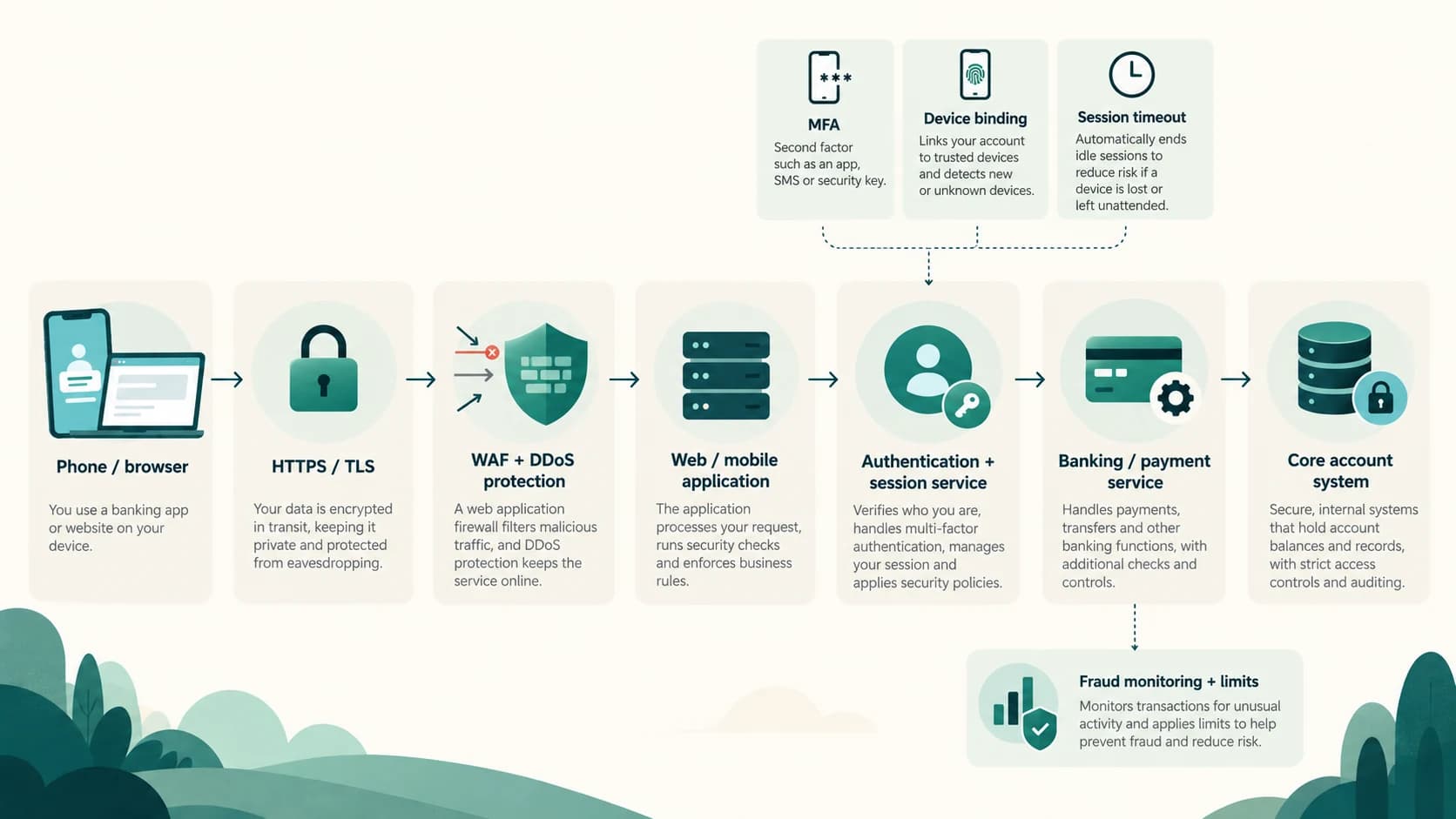
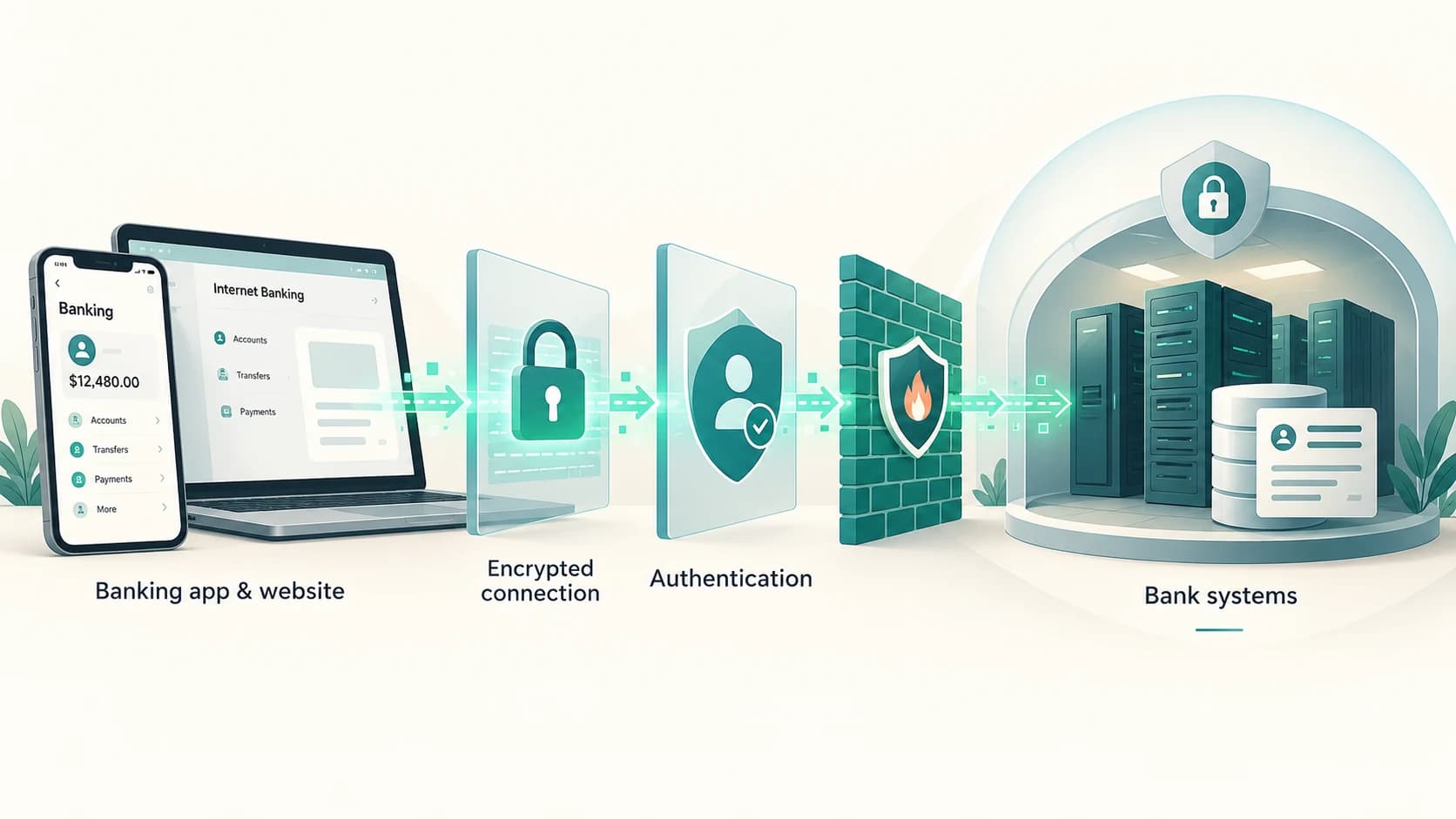
Behind the visible banking screen is usually a multi-layer architecture.
A simplified path may look like:
Phone / browser
↓
secure internet connection
↓
bank's internet-facing security layer
↓
web/mobile application servers
↓
authentication and authorization services
↓
payment or banking services
↓
core banking / account systems
↓
database and internal systems
RBI requires multi-tier architecture that separates presentation, application and database layers for digital payment products.
Why?
Because placing every function in one internet-facing system would be dangerous.
A properly segmented architecture limits how far an attacker can move if one component is compromised.
Firewalls Decide Which Traffic Is Allowed In
A bank's servers are connected to networks that are constantly receiving traffic.
Some of it is legitimate.
Some of it may be:
- automated scanning,
- attack traffic,
- malicious requests,
- bots,
- attempts to exploit software flaws.
Firewalls help control which network connections are permitted.
For web applications, banks can also use a Web Application Firewall (WAF).
A WAF examines web traffic for patterns associated with attacks such as:
- malicious input,
- suspicious requests,
- attempts to exploit known web vulnerabilities.
RBI's Digital Payment Security Controls specifically require regulated entities to implement WAF protection and DDoS mitigation for digital payment services offered over the internet.
What Is a DDoS Attack?
A Distributed Denial of Service attack tries to overwhelm an online service with enormous volumes of traffic.
The attacker's goal may not be to steal money directly.
It may simply be to make the bank's website or app unavailable.
Banks therefore use techniques such as:
- traffic filtering,
- rate limiting,
- distributed infrastructure,
- DDoS mitigation services,
- redundancy.
Availability is part of security.
A system that protects every secret but is unusable whenever attacked is not a resilient banking system.
The Bank Does Not Trust Every Transaction Just Because You Logged In
Suppose you normally:
- log in from Haryana,
- transfer a few thousand rupees,
- use the same phone.
Then suddenly the account shows:
- a new device,
- unusual login behaviour,
- rapid beneficiary addition,
- a very large transfer,
- repeated transactions.
A bank can treat that differently.
RBI requires digital payment systems to have logging and monitoring capable of identifying anomalous behaviour and transactions.
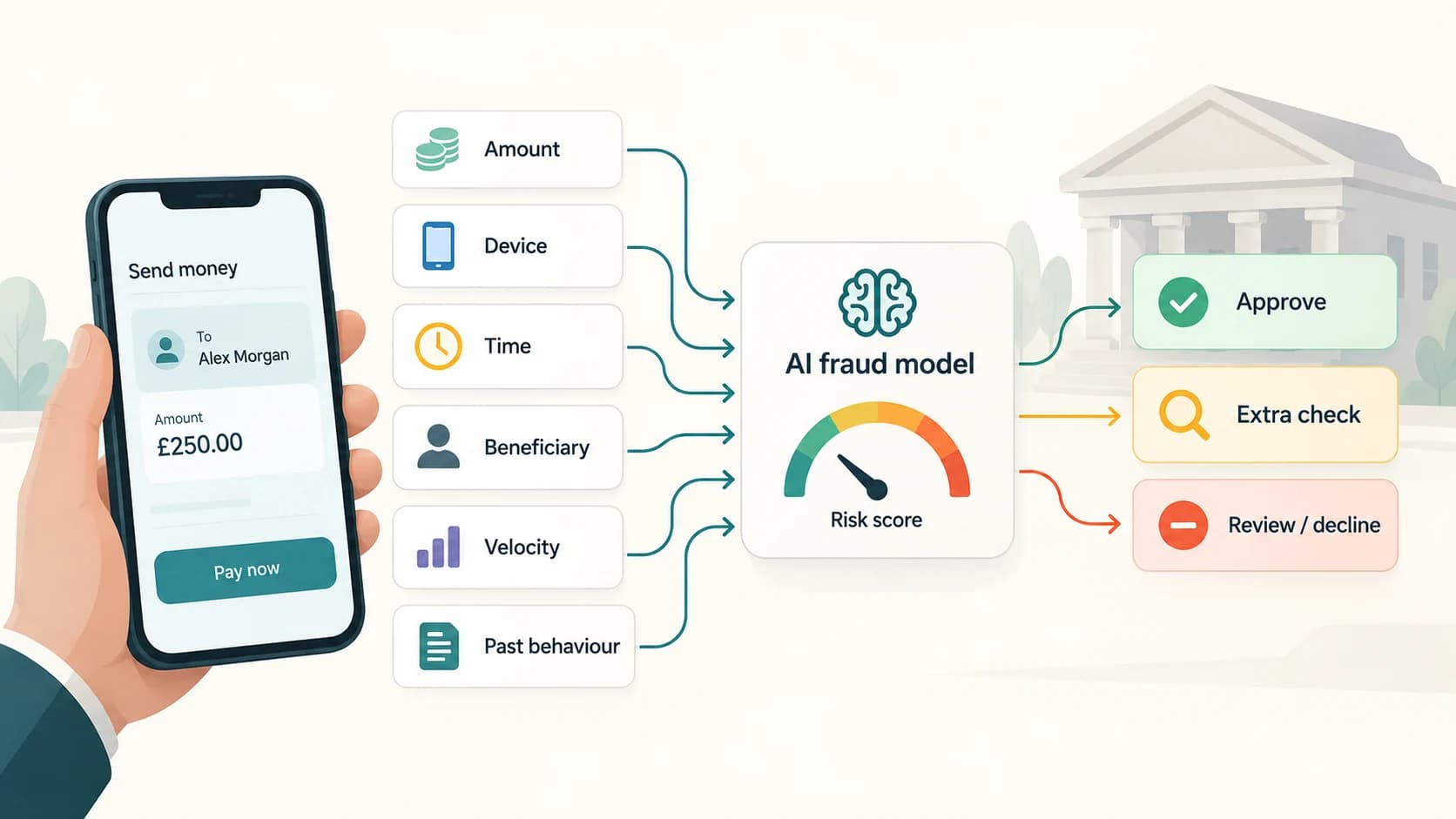
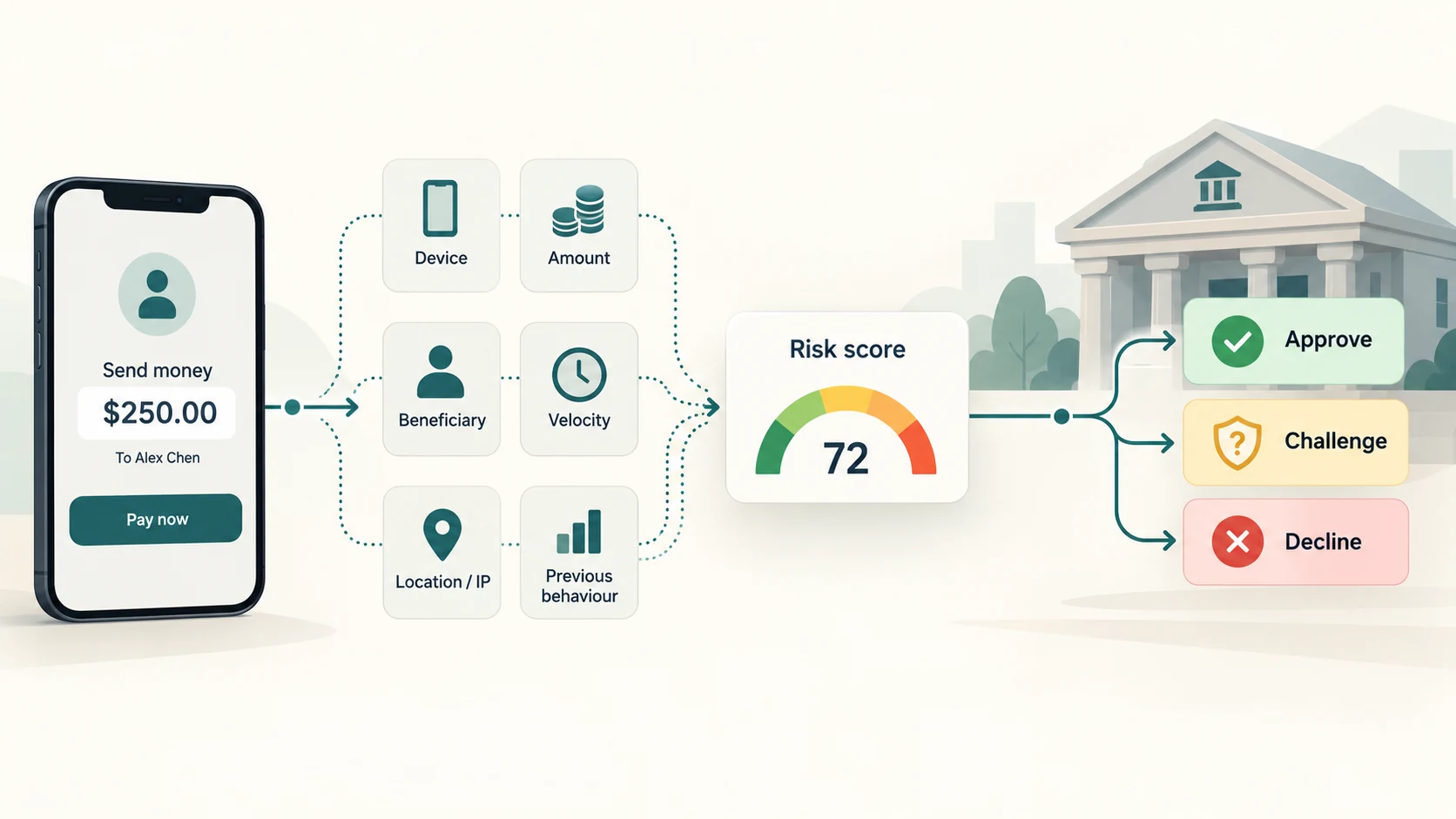
Banks can use fraud engines that examine signals such as:
- transaction amount,
- frequency,
- velocity,
- device change,
- beneficiary history,
- location/network characteristics where permitted,
- previous customer behaviour,
- known fraud indicators.
The precise models are proprietary and vary by bank.
The purpose is not to “know” that a transaction is fraudulent with certainty.
It is to identify when a transaction deserves:
- additional verification,
- a temporary block,
- manual review,
- stronger authentication,
- an alert.
Transaction Limits Are a Security Control
Limits can feel restrictive.
They also reduce the maximum damage from certain attacks.
A bank may apply:
- per-transaction limits,
- daily limits,
- channel-specific limits,
- new-beneficiary restrictions,
- transaction-velocity rules.
Older RBI mobile-banking guidance explicitly identifies transaction amount limits, velocity limits and fraud checks as risk-mitigation measures, while the newer security directions require authentication and fraud-risk controls proportionate to transaction risk.
A thief who obtains partial account access should not automatically be able to transfer unlimited funds instantly.
Why Adding a New Beneficiary Often Triggers Extra Security
Adding a beneficiary changes where your money can be sent.
That makes it a high-risk action.
RBI's security directions call for multi-factor authentication and alerts not only for payment transactions but also for actions such as:
- adding or modifying beneficiaries,
- changing account details,
- changing transfer limits.
This is why banking websites often treat:
checking a balance
very differently from:
adding a new payee and sending ₹5 lakh.
Both happen after login.
But the second action carries much greater financial risk.
SMS, Email and App Alerts Are Part of the Defence
A transaction alert serves a simple purpose:
If this was not you, discover it quickly.
RBI requires banks to send SMS alerts for electronic banking transactions and to provide channels for customers to report unauthorized transactions.
Alerts can cover:
- login from a new device,
- beneficiary addition,
- debit,
- password reset,
- change of registered details,
- large transaction.
The notification itself does not prevent every fraud.
It shortens the time between an unauthorized action and the customer's discovery of it.
That can be critical.
Why Banks Store Logs
Banking systems record activity.
Logs can contain information such as:
- login attempts,
- device registrations,
- session events,
- beneficiary changes,
- transaction requests,
- authentication results,
- security events.
RBI requires effective logging and monitoring for mobile and internet banking systems.
These records help answer questions such as:
Which device logged in?
When was the beneficiary added?
How many failed attempts occurred?
Which server processed the transaction?
Did the session behave abnormally?
Logs are important for:
- fraud detection,
- incident investigation,
- auditing,
- dispute resolution,
- system monitoring.
Banks Test Their Apps Before and After Release
Security is not finished when an app appears in an app store.
Software changes.
New vulnerabilities are discovered.
Operating systems update.
Attack methods evolve.
RBI requires regulated entities to follow a secure-by-design application lifecycle and conduct security testing including:
- source-code review,
- vulnerability assessment,
- penetration testing.
The directions specifically reference standards such as OWASP.
This means security should be considered during:
requirements
↓
design
↓
development
↓
testing
↓
deployment
↓
maintenance
not added as an afterthought.
Why Banking Apps May Refuse to Run on Certain Phones
Some banking apps check whether a device appears to be:
- rooted,
- jailbroken,
- modified,
- running an unsupported environment,
- affected by remote-access applications.
RBI's security directions tell regulated entities to consider device-security checks and allow controls relating to rooted/jailbroken devices and remote-access applications.
Why?
A compromised operating system can weaken assumptions the banking app depends on.
For example, malicious software with excessive privileges may attempt to:
- capture screens,
- read notifications,
- overlay fake login windows,
- control the device remotely.
Blocking or restricting risky environments is therefore another defence layer.
The Bank Also Protects Data Stored on Its Side
Encryption is not only for data travelling over the internet.
Sensitive information stored inside banking systems also needs strong access controls and protection.
Banks can use:
- encryption,
- access control,
- network segmentation,
- restricted administrator privileges,
- Hardware Security Modules,
- audit trails,
- database controls,
- backup and recovery systems.
RBI's broader cyber-security and IT-governance frameworks require banks to implement strong information-security governance, access controls and resilience practices.
A good security architecture assumes that attackers may eventually reach some part of the environment.
The goal is to prevent one compromised component from becoming unrestricted access to everything.
What Does an HSM Do?
A Hardware Security Module is a specialized device designed to protect cryptographic keys and perform sensitive cryptographic operations.
Think of a cryptographic key as a highly sensitive secret used to:
- encrypt,
- decrypt,
- sign,
- authenticate.
If those keys were kept casually in ordinary application files, stealing the server might also mean stealing the keys.
HSMs are designed to make that much harder.
RBI requires HSM-controlled processing for sensitive payment cryptography such as PIN and key operations in applicable card-payment environments.
HSMs are one example of a broader principle:
The most sensitive secrets receive stronger protection than ordinary application data.
What Happens During a Bank Transfer?
A simplified secure mobile-banking transfer might look like this:
1. You open the registered banking app
The app checks its environment and establishes a secure connection.
2. You authenticate
Password/MPIN, device binding, biometric or another supported factor verifies access.
3. The bank creates an authenticated session
A temporary session is established.
4. You enter the transfer
The app sends the transaction details through the encrypted channel.
5. The bank checks authorization
Account permissions, balance, limits and beneficiary status are checked.
6. Risk systems inspect the transaction
The bank can evaluate whether the transaction looks unusual.
7. Additional authentication may be requested
OTP, transaction PIN or another supported factor may be required depending on the flow.
8. The transaction is processed
The bank's payment/account systems execute the instruction.
9. A confirmation is returned
The app displays the transaction result.
10. Alerts and logs are generated
The customer and bank receive evidence that the transaction occurred.
At no stage does the app simply tell itself:
“The user pressed Transfer, so subtract the money.”
The bank remains the authority.
What Security Cannot Protect You From Automatically
Banking security has one difficult boundary:
the genuine customer can be tricked.
Suppose a fraudster convinces someone to:
- reveal an OTP,
- reveal an MPIN,
- install remote-control software,
- approve a collect request,
- transfer money to a “safe account,”
- log in through a fake banking website.
From the bank's perspective, some of the signals may look like genuine customer authorization.
RBI repeatedly warns customers not to share:
- PINs,
- passwords,
- OTPs,
and not to install unknown applications or use links sent by strangers.
This is why social engineering remains so effective.
Attackers often do not break the bank's encryption.
They persuade the customer to open the door.
Phishing Shows Why HTTPS Is Not Enough
Imagine you receive a message:
“Your bank account will be blocked. Verify immediately.”
The link opens:
your-bank-security-example.com
It has a padlock.
The page looks exactly like your bank.
But it is not the bank's real domain.
The HTTPS connection may genuinely be encrypted—between you and the criminal's website.
So safe banking depends on both:
secure technology
and
correct destination.
RBI advises customers to type or use verified bank URLs rather than relying on links from searches, messages or emails, and to avoid banking on unsecured public devices or networks.
Malware Can Attack the Device Rather Than the Bank
Another route is to compromise the phone itself.
Malicious applications can attempt to:
- capture credentials,
- read notifications,
- steal OTPs,
- create overlays,
- abuse accessibility permissions,
- allow remote control.
This explains why banks care about:
- app permissions,
- device integrity,
- remote-access apps,
- operating-system security,
- official app stores.
The bank may have perfectly secure servers while the customer is typing credentials into a compromised phone.
Digital banking security therefore extends all the way to the endpoint device.
Why No Bank Can Promise “Unhackable”
Every major security system faces changing threats.
Software can contain previously unknown vulnerabilities.
Employees can make mistakes.
Customers can be deceived.
Attackers can discover new techniques.
So professional security is not built around the claim:
“Nothing can ever go wrong.”
It is built around:
- prevention,
- detection,
- containment,
- recovery,
- monitoring,
- continuous improvement.
That is why regulators require banks to perform ongoing security assessment rather than passing one test once.
The Strongest Protection Is Layered
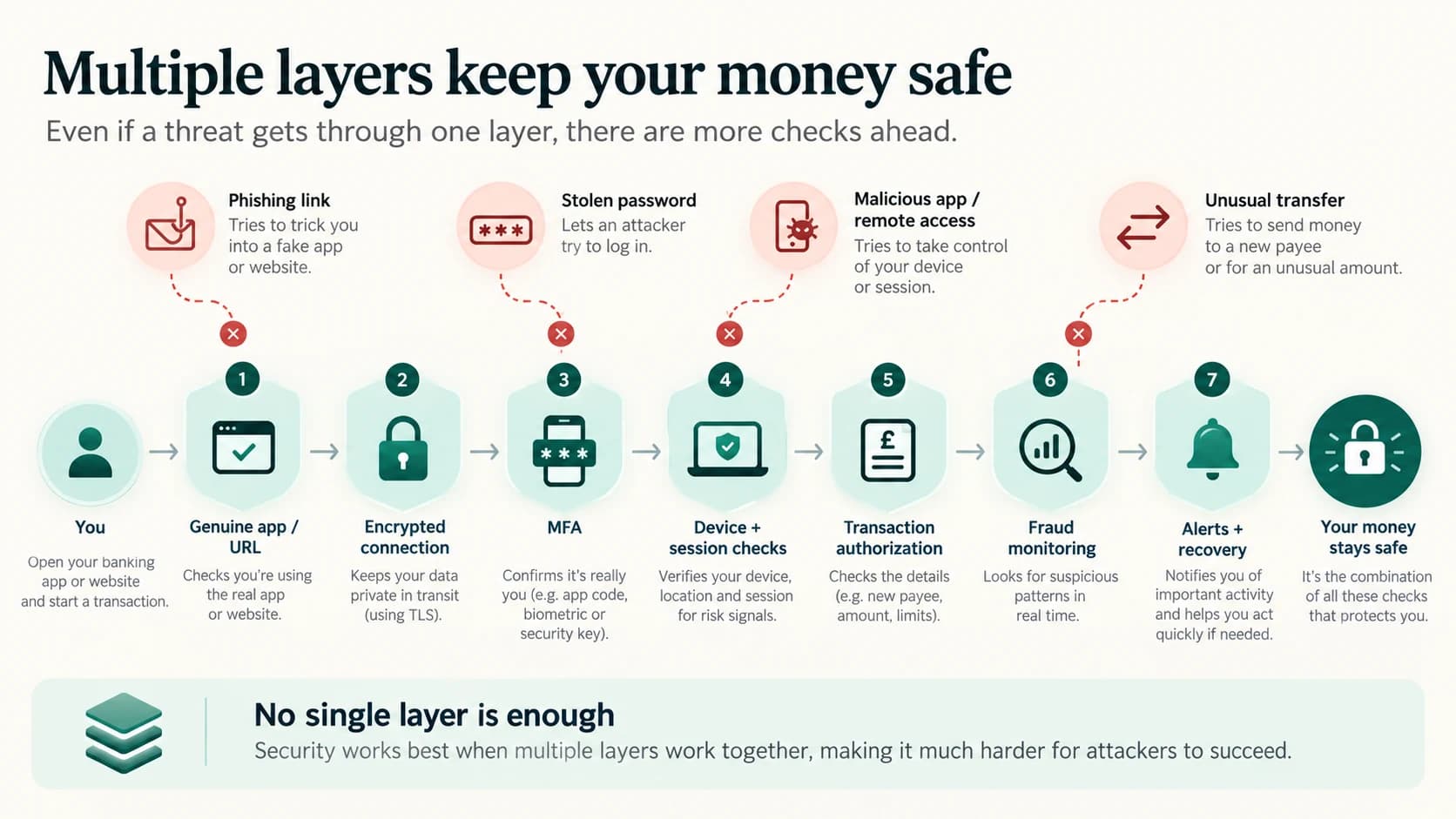
A useful way to picture online banking is as a series of gates.
Gate 1 — Correct app or website
Is the customer connecting to the genuine bank?
↓
Gate 2 — Encrypted channel
Can network traffic be protected from interception or modification?
↓
Gate 3 — Customer authentication
Can the bank establish that this is the authorized user?
↓
Gate 4 — Device and session controls
Is this a trusted or sufficiently verified device and active session?
↓
Gate 5 — Transaction authorization
Is this user allowed to perform this action?
↓
Gate 6 — Fraud monitoring
Does the behaviour look abnormal?
↓
Gate 7 — Alerts and recovery
If something still goes wrong, can it be detected and reported quickly?
An attacker does not need to defeat every security control in the world.
But the bank's goal is to make a single stolen credential insufficient.
Your Banking App Is a Window, Not a Vault
That is the simplest way to think about digital banking.
The money is not inside the phone.
The app is not a digital wallet full of your entire bank balance merely because it can display the number.
It is a controlled window into financial systems that remain behind the bank's security perimeter.
The bank protects that window with:
- encryption,
- digital certificates,
- multi-factor authentication,
- device binding,
- secure sessions,
- firewalls,
- fraud monitoring,
- transaction limits,
- alerts,
- security testing,
- back-end access controls.
And the customer protects the other side by:
- using the genuine app or URL,
- protecting passwords and PINs,
- never sharing OTPs,
- avoiding unknown remote-access apps,
- keeping the phone and app updated,
- reporting unauthorized transactions quickly.
Banking security therefore is not one lock.
It is a chain of locks, checks and monitoring systems working together.
The screen makes banking look simple.
The security behind it is deliberately anything but.