How Much RAM Does the Average Smartphone User Really Need?
Is 6 GB, 8 GB, 12 GB or 16 GB RAM enough for a phone? Learn what RAM actually does and how much most smartphone users really need.
A smartphone specification sheet might offer:
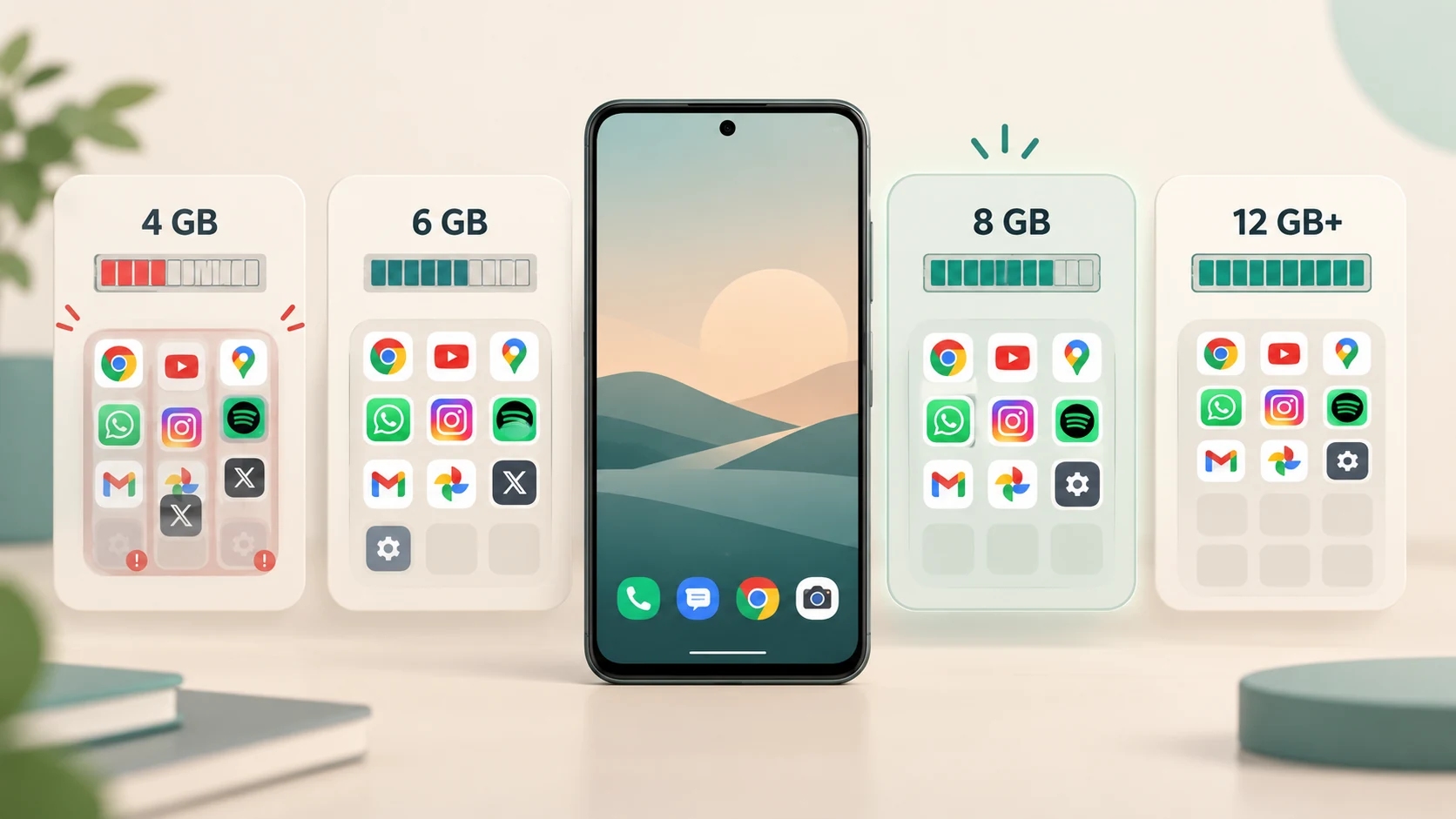
6 GB RAM
8 GB RAM
12 GB RAM
or even:
16 GB RAM
The natural assumption is that the phone with 16 GB must be dramatically faster than the one with 8 GB.
That isn't how RAM works.
RAM is not the component that performs most of the calculations in your phone. That job belongs mainly to the processor. RAM is the fast working space where the operating system and running apps keep information they need right now.
More RAM can therefore help your phone:
- keep more apps open
- switch between apps without reloading them
- handle demanding games and applications
- give newer software more room to work
But once you already have enough RAM for your normal workload, adding several more gigabytes usually produces a much smaller difference.
For most Android users buying a new phone today, 8 GB of physical RAM is a sensible general-purpose target. Six gigabytes can still be perfectly usable for lighter use, while 12 GB provides more headroom for demanding apps, gaming, heavy multitasking and keeping the phone for several years.
Sixteen gigabytes and beyond can be useful in specific cases, but most people should not assume they need it simply because the number is larger.
The important question is not:
How much RAM can I buy?
It is:
How much RAM will my actual workload use before additional memory stops making a noticeable difference?
What Is RAM Actually Doing in Your Phone?
RAM stands for Random Access Memory.
It is very different from the 128 GB, 256 GB or 512 GB storage advertised alongside it.
Google describes the distinction simply: storage holds persistent data such as photos and music, while memory is where apps and the Android system run.
Imagine opening:
- Chrome
- YouTube
- Maps
- Spotify
- your camera
Each application needs memory while it is active.
The operating system needs RAM too.
So do:
- system services
- the keyboard
- widgets
- notifications
- background processes
- graphics
- parts of the camera system
RAM acts as the phone's workspace.
The larger the workspace, the more active information the phone can keep nearby without throwing something away.
What Happens When You Open an App?
Suppose you tap YouTube.
The app itself is stored in your phone's flash storage.
When you launch it, the system loads the code and information it currently needs into RAM.
The processor then works on that information.
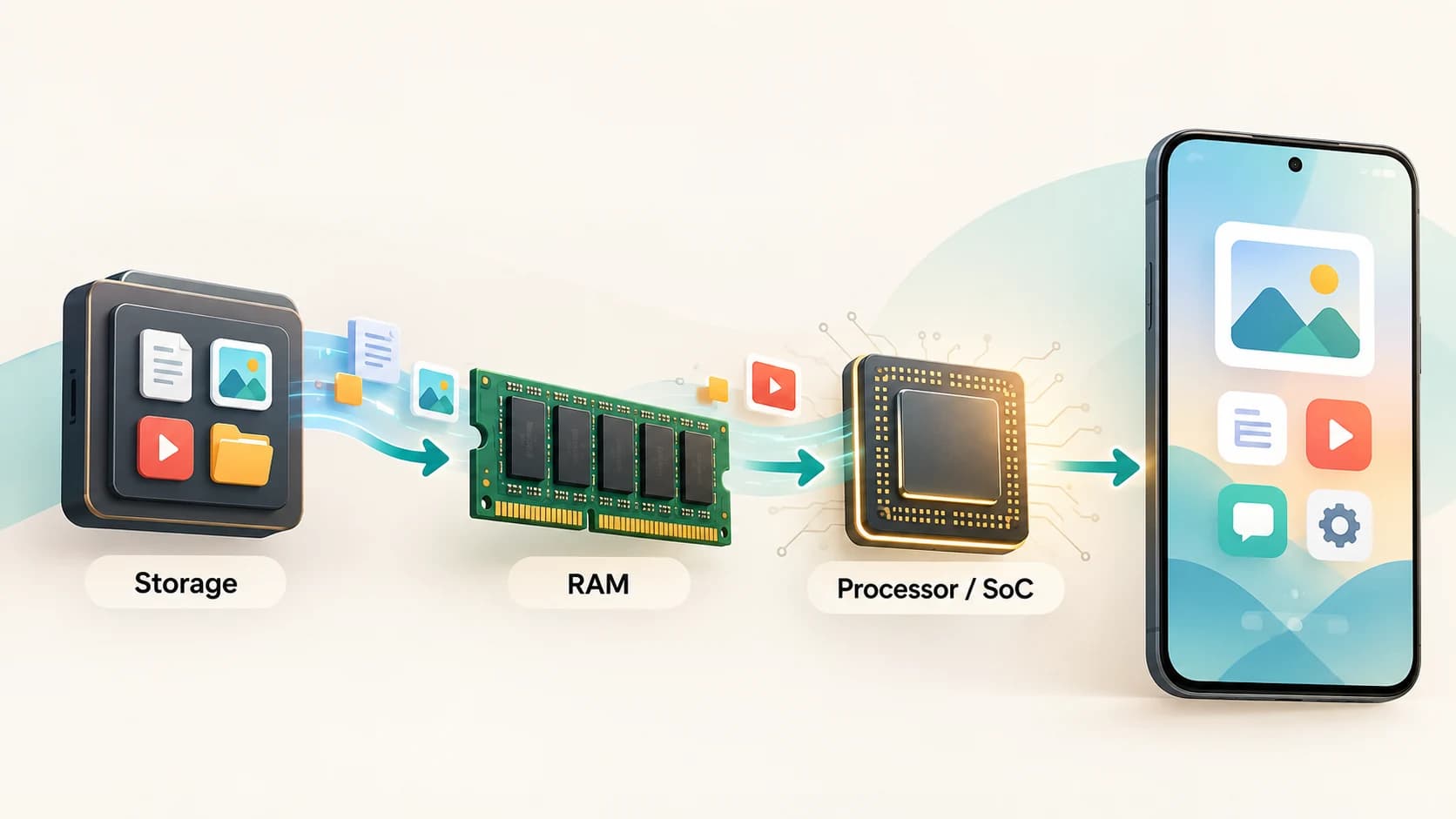
So the simplified path is:
Storage
↓
RAM
↓
Processor
↓
App running on screen
Now you switch from YouTube to Chrome.
Chrome needs RAM.
Then you open Maps.
Maps needs RAM too.
As long as the phone has enough working memory, those applications can remain available in the background.
When you return to Chrome, it may appear almost instantly.
That is one of the biggest practical benefits of having enough RAM.
What Happens When RAM Runs Out?
Android does not simply crash the instant RAM becomes full.
The operating system has several ways to manage memory pressure.
It can:
- reclaim cached memory
- evict information that can later be read again
- use compressed memory
- reduce the priority of background processes
- eventually terminate less-important processes
Android's low-memory system monitors memory pressure and can kill less-essential processes when necessary to keep the phone responsive.
Android's current documentation describes an important concept called the performance cliff.
When there is plenty of RAM, using a little more memory may have almost no noticeable effect.
But once available memory becomes severely constrained, the system must start reclaiming memory and killing processes much more aggressively. Performance can then deteriorate rapidly.
That is why the difference between 6 GB and 8 GB can sometimes matter much more than the difference between 12 GB and 16 GB.
The first upgrade might move you away from the memory limit.
The second may simply add unused headroom.
The Most Obvious Symptom of Too Little RAM
You are reading a webpage.
You switch to the camera.
Take several photos.
Open WhatsApp.
Then return to the browser.
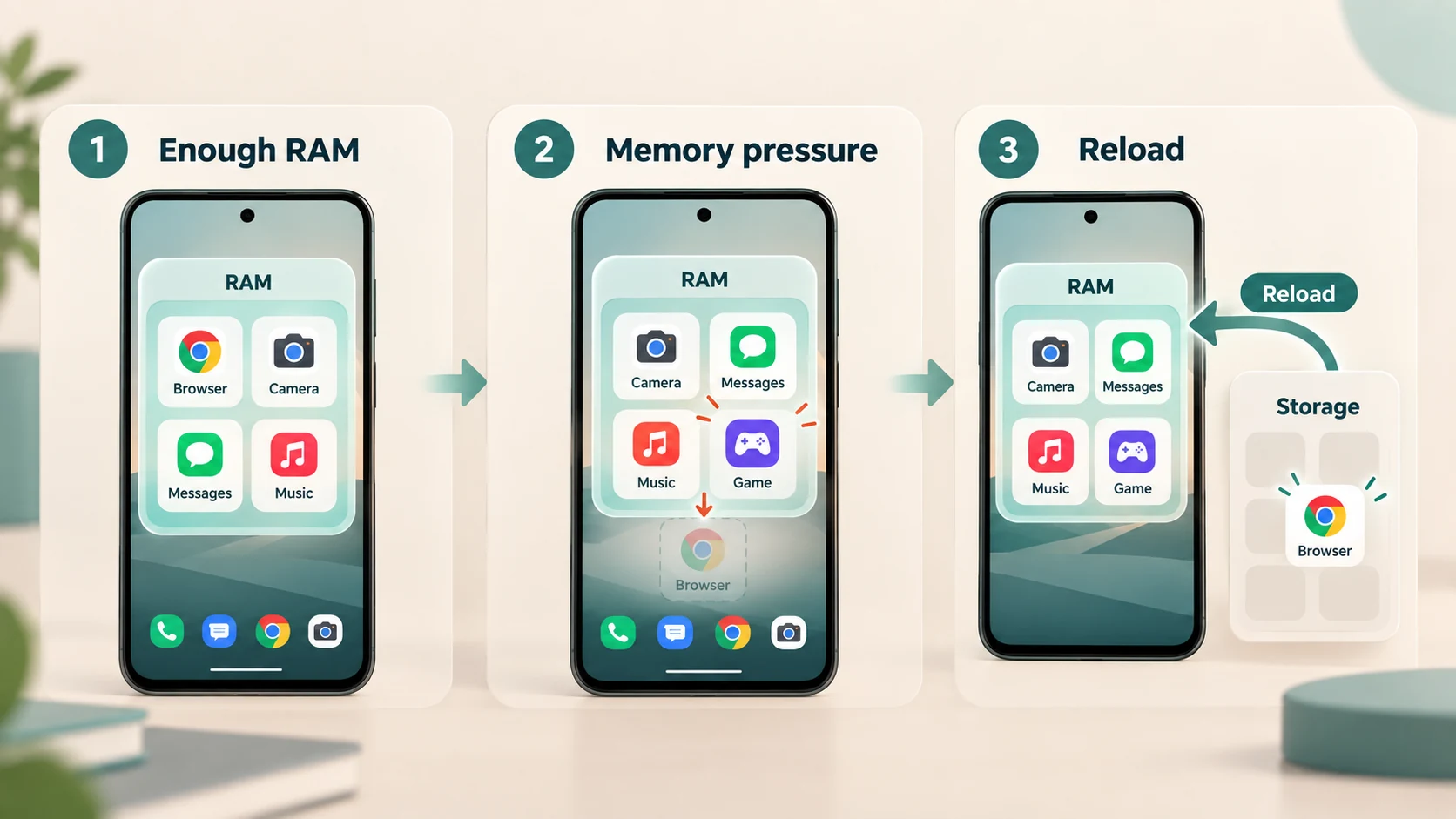
Instead of finding the page exactly where you left it, the browser reloads.
Why?
The phone may have removed some of the browser's process from RAM to free memory for the apps you used afterward.
Android's memory-management documentation explains that file-backed information can be evicted from RAM and later read again from storage when needed.
That reload is not necessarily evidence that the processor is slow.
It can simply mean the phone could not afford to keep everything in memory.
Does More RAM Make Apps Open Faster?
Sometimes indirectly.
But not in the way many people imagine.
If you launch an app from scratch, speed depends heavily on:
- processor performance
- storage speed
- app design
- operating-system optimization
More RAM does not make the CPU execute instructions faster.
Where RAM helps is when the app is already in memory.
Returning to an app that remained available can be much faster than starting it again.
So additional RAM often improves:
multitasking
more than:
raw processing speed.
This is an important distinction when comparing phones.
Is 4 GB RAM Still Enough?
For a modern general-purpose Android phone, 4 GB is increasingly restrictive.
It can still run Android and common applications, especially on lower-cost devices designed around modest workloads.
But there is much less spare memory for:
- multiple browser tabs
- large social-media apps
- camera processing
- games
- background applications
- newer software
Once memory pressure becomes frequent, the phone may reload background apps more often.
That does not mean every 4 GB phone is unusable.
It means 4 GB now leaves relatively little headroom for a conventional smartphone intended to be used heavily for several years.
What About 6 GB?
Six gigabytes remains a realistic amount for budget and lower-midrange Android phones.
Current devices are still sold with 6 GB configurations. Samsung, for example, lists a 6 GB variant of the Galaxy F70 Pro 5G, while Xiaomi's current Redmi 17 5G is offered with 6 GB or 8 GB of physical RAM.
For someone whose typical day involves:
- calls
- social media
- web browsing
- YouTube
- banking
- maps
- light photography
6 GB can be enough.
The compromise is multitasking headroom.
You may see background applications reload sooner than they would on an 8 GB or 12 GB phone.
So 6 GB is best understood as:
adequate for ordinary use, but not especially generous.
Is 8 GB the Sweet Spot?
For most Android buyers, 8 GB is currently the easiest capacity to recommend as a practical balance.
It gives substantially more room than low-memory configurations without paying for extremely large amounts of RAM that many users will rarely exploit.
It is also common in mainstream devices.
Samsung's Galaxy A56, for example, is sold in India with 8 GB of RAM, while many current Xiaomi devices also offer 8 GB configurations.
Eight gigabytes should generally provide enough room for an ordinary mix of:
- messaging
- browsing
- video streaming
- photography
- navigation
- social media
- moderate gaming
- normal multitasking
It does not guarantee a fast phone.
An 8 GB phone with a weak processor and slow storage can still feel slow.
But RAM is unlikely to be the first major limitation for most ordinary users.
When Does 12 GB Make Sense?
Twelve gigabytes becomes more attractive when your usage regularly includes heavier workloads.
Examples include:
- demanding mobile games
- switching between many large apps
- heavy browser use
- photo and video editing
- desktop-like multitasking
- large productivity applications
- on-device AI features
- keeping the device for several years
It also gives the operating system more room to retain background applications.
The standard Pixel 11, for example, currently ships with 12 GB RAM, illustrating how 12 GB has moved into mainstream premium-phone territory rather than being reserved only for specialist gaming devices.
For an average user, 12 GB is not essential.
But it can be a sensible future-headroom upgrade, especially if the price difference from an 8 GB model is small.
Does Anyone Really Need 16 GB?
Yes.
But far fewer people need it than marketing might suggest.
Sixteen gigabytes can make sense for:
- very heavy gaming
- emulation
- advanced multitasking
- demanding creative applications
- desktop modes
- unusually heavy on-device AI workloads
- users who intentionally keep many large applications active
It can also provide significant future headroom.
But if your routine is:
WhatsApp + Instagram + YouTube + Chrome + banking + camera
you should not expect a 16 GB phone to suddenly feel twice as fast as an otherwise identical 8 GB model.
Once sufficient memory is available, the processor, storage, display and software often matter more to the experience.
More RAM Has Diminishing Returns
Imagine your phone's workload currently requires 7 GB of physical memory.
Phone A: 6 GB RAM
The system regularly experiences memory pressure.
Apps may be reclaimed or restarted.
Phone B: 8 GB RAM
The workload fits comfortably.
Multitasking improves noticeably.
Phone C: 12 GB RAM
There is additional headroom.
More background apps may remain available.
Phone D: 16 GB RAM
Much of the extra memory may remain unused during ordinary operation.
The change from:
6 → 8 GB
may therefore feel substantial.
The change from:
12 → 16 GB
may be almost invisible for the same user.
This is why RAM recommendations cannot simply follow:
more = proportionally faster.
The Amount of RAM You Buy Is Not the Amount Apps Get
If your phone contains 8 GB RAM, apps do not receive all 8 GB.
Some memory is needed by:
- Android
- graphics
- hardware
- system processes
- background services
- manufacturer software
The precise division changes constantly.
RAM is dynamically allocated according to the system's current needs.
Android 17 also introduces more explicit per-process memory-management mechanisms to protect overall system stability when individual apps consume excessive amounts of memory.
So thinking of RAM as eight empty boxes that applications can fill one by one is useful only as a simplified analogy.
Real memory management is much more dynamic.
Why Are Phones Getting More RAM?
Today's apps are not identical to the apps of ten years ago.
They increasingly handle:
- larger images
- high-resolution video
- complex webpages
- richer animations
- large games
- machine-learning models
- advanced camera processing
Android itself continues to evolve around devices with larger amounts of physical memory. Google's Android documentation notes that manufacturers are increasingly building devices with more RAM and that newer memory-page configurations are being designed partly around that reality.
This does not mean every phone will eventually require enormous amounts of RAM.
Software also becomes more efficient.
But the general workload has grown.
Does Android “Use All Your RAM” on Purpose?
Seeing high RAM usage is not automatically bad.
Unused RAM does not provide much benefit simply by sitting empty.
Operating systems can use spare memory to cache useful information so that apps and data can be accessed quickly.
When another process needs the memory, cached information can be discarded or reclaimed.
Android's memory system is specifically designed to allocate, reclaim and reuse RAM dynamically.
So:
“My phone is using 7 GB out of 8 GB. Something must be wrong.”
is not necessarily true.
The real warning signs are things such as:
- frequent app reloads
- noticeable memory-related stalls
- apps closing unexpectedly
- severe multitasking problems
High utilization by itself is not proof of a problem.
What Is Virtual RAM?
This is one of the easiest smartphone specifications to misunderstand.
A phone may advertise:
8 GB RAM + 8 GB extended RAM
and then claim:
Up to 16 GB RAM
That does not mean the device suddenly contains 16 GB of physical RAM.
Xiaomi's current Redmi 17 specifications, for example, say that its memory-extension feature uses part of the phone's internal storage and that the advertised expanded amount is based on an 8 GB physical-RAM model.
The storage space is being used to assist memory management.
Flash storage is not identical to physical RAM.
It has different latency, bandwidth and endurance characteristics.
So when comparing phones, prioritize:
physical RAM
over large marketing claims based on:
physical + virtual RAM.
What About Android's zRAM?
Android also uses a different technique called zRAM.
Instead of simply treating ordinary internal storage as equivalent to RAM, zRAM keeps compressed memory pages in a compressed region of RAM.
Android can compress less-active information, allowing more effective information to fit into the available physical memory.
When pressure becomes severe, Android can also reclaim memory or terminate processes.
The important beginner-level distinction is:
physical RAM is still the resource that matters most.
Software techniques help use it efficiently.
They do not make an 8 GB physical-memory phone identical to a phone with 16 GB of physical RAM.
Why You Shouldn't Compare Android and iPhone RAM Directly
RAM numbers are most useful when comparing phones running similar software platforms.
Apple does not even list RAM capacity in the public technical specification page for the iPhone 17, while it does list the chip and storage capacities.
Different operating systems use:
- different memory management
- different app architectures
- different background-process policies
- different hardware/software integration
So a statement such as:
“Phone A has more RAM than an iPhone, therefore it must multitask better.”
does not logically follow from the specification alone.
For Android-to-Android comparisons, RAM numbers are more directly useful.
Across platforms, real behaviour matters more than the raw number.
Does RAM Speed Matter Too?
Yes.
Capacity is not the only characteristic of memory.
Smartphone RAM also differs by:
- memory generation
- bandwidth
- latency
- power efficiency
Modern phones can use technologies such as LPDDR4X, LPDDR5 and LPDDR5X.
Faster memory can feed the processor and graphics system data more rapidly.
However, for a typical buyer, capacity is usually easier to understand and more likely to determine whether apps stay open.
You should not choose:
6 GB of faster RAM
over:
8 GB of slightly slower RAM
based only on the memory-generation label without considering the processor and entire phone.
Everything works as a system.
How Much RAM Should You Buy?
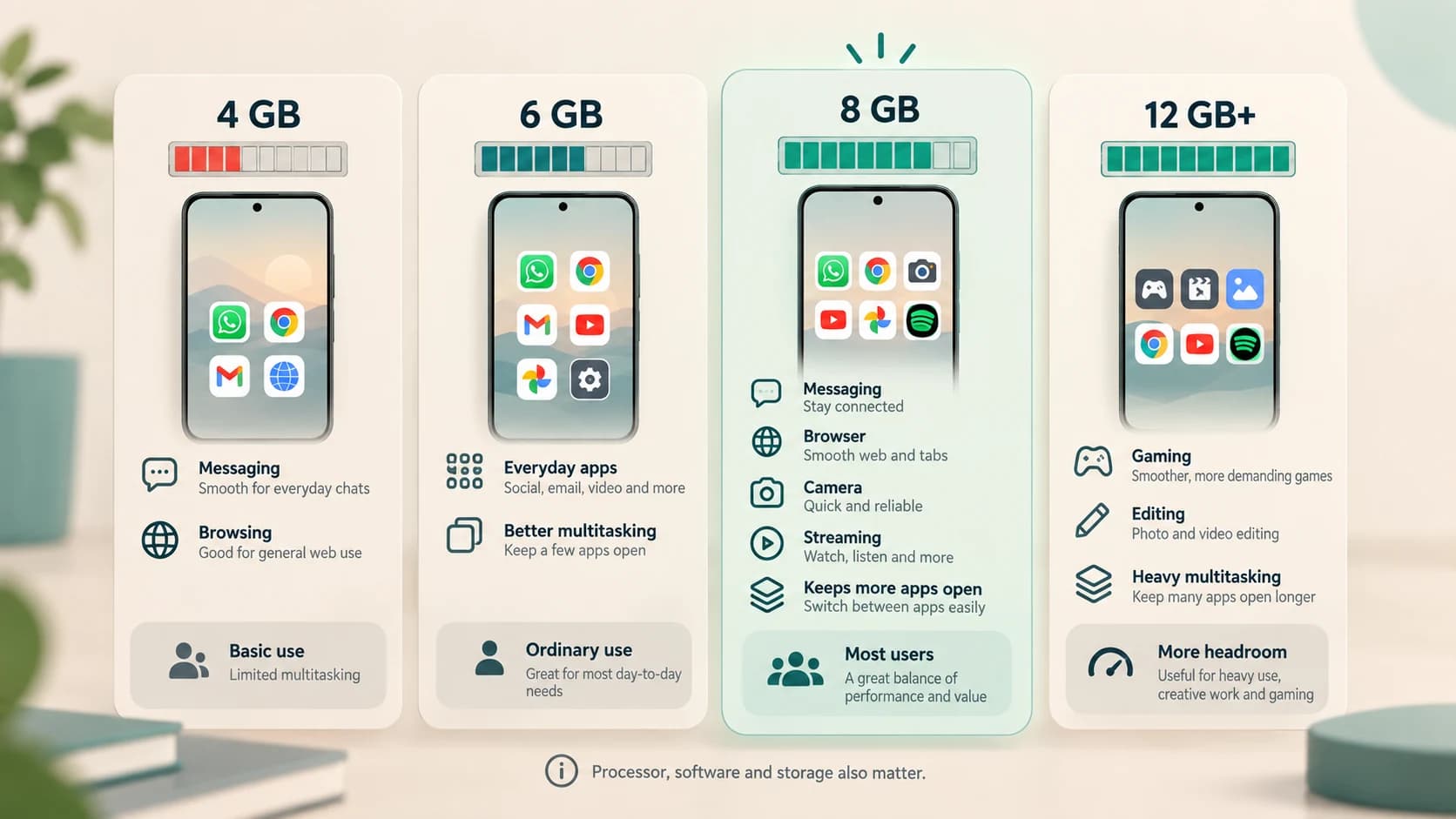
A practical way to think about current Android phones is:
| Physical RAM | Best suited to | Practical view |
|---|---|---|
| 4 GB | Very basic or low-cost use | Increasingly restrictive for long-term general use |
| 6 GB | Calls, messaging, browsing, social media, streaming | Usable, especially for budget buyers |
| 8 GB | Typical everyday smartphone use | Best all-round target for most users |
| 12 GB | Heavy multitasking, gaming, editing, longer ownership | Useful upgrade and strong future headroom |
| 16 GB+ | Enthusiasts and unusually heavy workloads | Usually unnecessary for average users |
This table is a practical buying framework, not a technical law.
An exceptionally well-optimized 6 GB phone may behave better than a poorly designed 8 GB phone.
A phone with 12 GB RAM and a weak processor can still be slower than an 8 GB phone with a much stronger processor.
Should You Pay Extra for More RAM?
Imagine the same phone is available as:
8 GB + 128 GB
and:
12 GB + 256 GB
for a modest price difference.
The second model may be worth considering not only because of RAM, but because you are also getting more storage.
But suppose the choice is:
8 GB RAM with a much better processor
versus:
12 GB RAM with a weaker processor
For most people, the first phone may provide the stronger overall experience.
Once you have enough RAM, spending money on:
- a better processor
- better camera hardware
- more useful storage
- better battery life
- longer software support
can matter more than adding another four gigabytes simply for the specification sheet.
How Long Do You Plan to Keep the Phone?
This changes the recommendation.
If you replace your phone every two years, 8 GB may remain comfortable for ordinary use throughout its life.
If you plan to keep a phone for:
four, five or six years
additional RAM headroom becomes more attractive.
Applications and operating systems may grow more demanding.
Your own usage may also change.
You may begin using:
- AI features
- larger games
- more browser tabs
- editing software
- desktop modes
That does not mean everybody buying a long-term phone needs 16 GB.
But moving from 8 GB to 12 GB can be reasonable when:
- the price difference is small
- the rest of the phone is equally good
- you intend to keep it for years
How Can You Tell If Your Current Phone Needs More RAM?
You cannot upgrade physical RAM on almost all modern smartphones.
But your phone's behaviour can tell you whether memory is becoming a limitation.
Look for patterns.
Apps constantly restart
You return to an app and it repeatedly loads from the beginning.
Browser tabs frequently reload
This can indicate the browser is losing cached pages as memory pressure rises.
Large apps disappear from the background quickly
Particularly after opening the camera, games or other demanding software.
Multitasking feels much worse than running one app
That is a classic sign that memory capacity rather than raw CPU speed may be involved.
By contrast, if apps stay open but run slowly while you are using them, the processor may be the more important limitation.
So How Much RAM Does the Average Smartphone User Really Need?
For an Android phone purchased today:
6 GB is usable.
It remains a reasonable option when budget matters and your usage is relatively light.
8 GB is the practical sweet spot for most people.
It gives ordinary users enough room for modern apps and useful multitasking without paying for excessive memory.
12 GB is the sensible step-up option.
It is especially useful for heavier users, gamers, demanding apps and people planning to keep the phone for several years.
16 GB or more is generally enthusiast territory.
There are workloads that can use it, but most ordinary smartphone owners will gain less from moving from 12 GB to 16 GB than they would from improvements elsewhere in the phone.
The underlying rule is simple:
You need enough RAM to stay comfortably away from memory pressure.
Once you reach that point, extra gigabytes stop transforming the experience.
That is why the best RAM specification is not necessarily the largest one on the box.
It is the one that gives your phone enough working space for the way you actually use it, with enough headroom for the years you expect to keep it.