How Does Your Phone Know Your Fingerprint Is Yours?
Learn how phone fingerprint sensors scan your finger, create a secure mathematical template and decide whether the fingerprint matches yours.
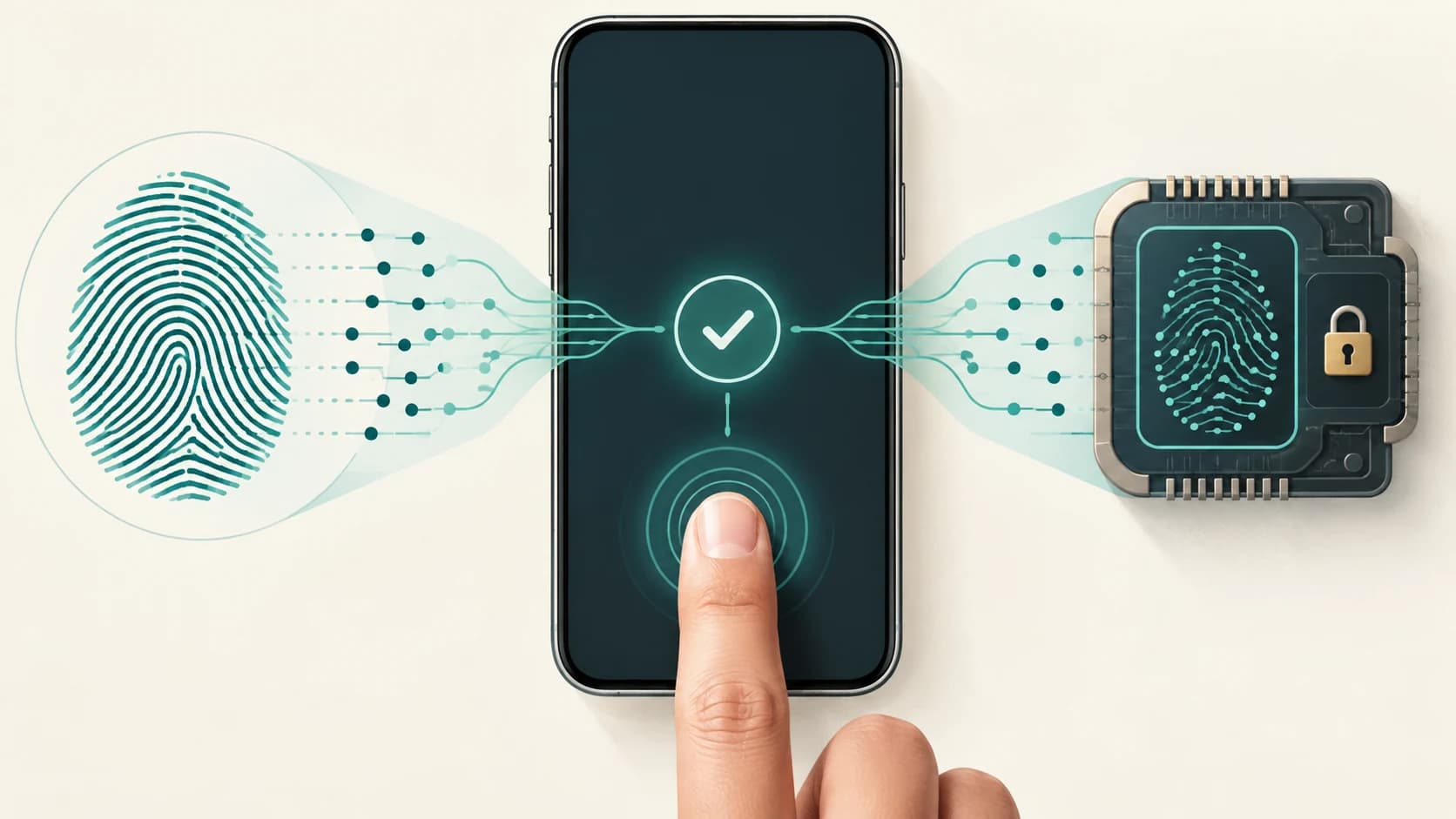
You touch the fingerprint sensor.
A fraction of a second later, your phone unlocks.
It feels as though the phone somehow looked at your finger and recognized you.
But your phone does not actually know who you are in the human sense. It is doing something narrower and more precise:
It is checking whether the fingerprint presented now is sufficiently similar to one of the fingerprints previously enrolled on that device.
That distinction matters.
Your phone usually is not asking:
Whose fingerprint is this?
It is asking:
Does this fingerprint match one of the protected templates I already trust?
To answer that question, the phone has to perform several steps: capture the fingerprint, extract distinctive features, turn those features into a mathematical representation, compare that representation with the enrolled template and decide whether the similarity is high enough to count as a match.
On well-designed systems, the sensitive comparison happens inside isolated security hardware rather than in an ordinary app. Apple, for example, says Touch ID fingerprint matching takes place in the Secure Enclave, while Android requires stronger biometric implementations to perform matching inside an isolated execution environment such as a Trusted Execution Environment.
The clever part is that the phone does not need a perfect copy of your finger every time.
It needs enough reliable fingerprint features to decide that the new scan and the enrolled template most likely came from the same finger.
Your Fingerprint Is Not Just a Pattern of Lines
Look closely at a fingertip and you see raised ridges separated by valleys.
At first glance, fingerprint recognition might seem as simple as comparing those visible lines.
The actual pattern contains many smaller details.
Fingerprint systems can examine features such as:
- ridge endings
- places where a ridge splits
- ridge direction
- ridge flow
- local spacing
- pores and edge structures, depending on the sensor
Apple says its Touch ID system analyses ridge details, variations in ridge direction and structures associated with pores and edges before creating a mathematical representation for matching.
These local details are useful because two fingerprint scans are rarely identical images.
Your finger may be:
- rotated slightly
- pressed harder
- shifted to one side
- dry
- damp
- dirty
- partially touching the sensor
So a useful fingerprint system cannot simply demand that today's scan be pixel-for-pixel identical to the one captured during setup.
It has to recognise the same underlying fingerprint despite normal variation.
First, You Have to Enrol Your Finger
Before fingerprint unlocking can work, the phone needs something to compare future scans against.
That happens during enrolment.
When you set up fingerprint unlock, the phone normally asks you to touch the sensor several times, often moving your finger between touches.
Why several scans?
Because a small sensor may see only part of your fingertip during any one contact.
By capturing different areas and angles, the system can build a more useful representation of the fingerprint.
Conceptually, enrolment looks like this:
Touch finger
↓
Capture fingerprint data
↓
Extract distinctive features
↓
Repeat from different positions
↓
Combine useful information
↓
Create enrolled fingerprint template
The result is not simply a photograph labelled:
Akhilesh's right thumb.jpgModern systems instead create a mathematical template derived from the scan.
Apple explicitly says Touch ID stores a mathematical representation rather than an image of the fingerprint. Its platform-security documentation adds that the original raster scan is temporarily processed in encrypted Secure Enclave memory and then discarded after a lossy transformation that is not intended to preserve the information needed to reconstruct the original fingerprint.
What Is a Fingerprint Template?
A fingerprint template is a compact mathematical representation of features that are useful for matching.
Imagine taking a road map and throwing away everything except the positions and directions of important junctions.
You could still compare two maps to see whether their road structures correspond, even though you no longer possess a photographic image of the original landscape.
Fingerprint templates follow a similar idea.
They preserve information useful for comparison while avoiding the need to retain an ordinary fingerprint photograph.
The exact representation is implementation-specific.
One system may use detailed ridge-flow measurements.
Another may derive feature points or other numerical descriptors.
The important principle is:
The system stores what it needs to recognize the fingerprint, not necessarily a conventional image of the finger.
That is also why deleting and re-enrolling a fingerprint creates a new biometric enrolment state rather than simply retrieving an old photo.
Different Phones Can Scan Fingerprints in Different Ways
Not every fingerprint sensor uses the same physical technology.
Three broad approaches have appeared in smartphones.
Capacitive fingerprint sensors
Capacitive sensors measure electrical differences produced when the ridges and valleys of a fingertip contact the sensor surface.
Ridges are closer to the sensor.
Valleys sit slightly farther away.
An array of tiny sensing elements can detect those differences and build a map of the fingerprint pattern.
Apple's Touch ID is a well-known example of capacitive fingerprint sensing. Apple describes the sensor as using advanced capacitive touch to acquire detailed information from small sections of the fingerprint.
This type of sensor has often appeared in:
- home buttons
- side-mounted power buttons
- rear fingerprint readers
Optical fingerprint sensors
An optical sensor uses light to capture the visible pattern of the fingerprint.
Under-display optical systems can illuminate the fingertip through the screen and record an image-like representation of the ridge pattern using a sensor beneath the display.
The basic idea is closer to photography than capacitive sensing.
Because the phone needs to observe sufficient contrast between ridges and valleys, screen protectors, contamination and finger condition can sometimes affect performance.
Different manufacturers implement these systems differently, so an under-display fingerprint reader should not automatically be assumed to use one particular technology.
Ultrasonic fingerprint sensors
Ultrasonic systems use high-frequency sound rather than ordinary visible light.
The sensor emits an ultrasonic pulse toward the fingertip.
The ridges and valleys reflect that signal differently, allowing the system to reconstruct fingerprint structure.
Qualcomm describes its 3D Sonic sensors as transmitting ultrasonic pulses and using the reflected sound to map fingerprint ridges, valleys and other details.
Samsung has likewise described ultrasonic in-display sensors as measuring reflected ultrasonic signals from ridges and valleys.
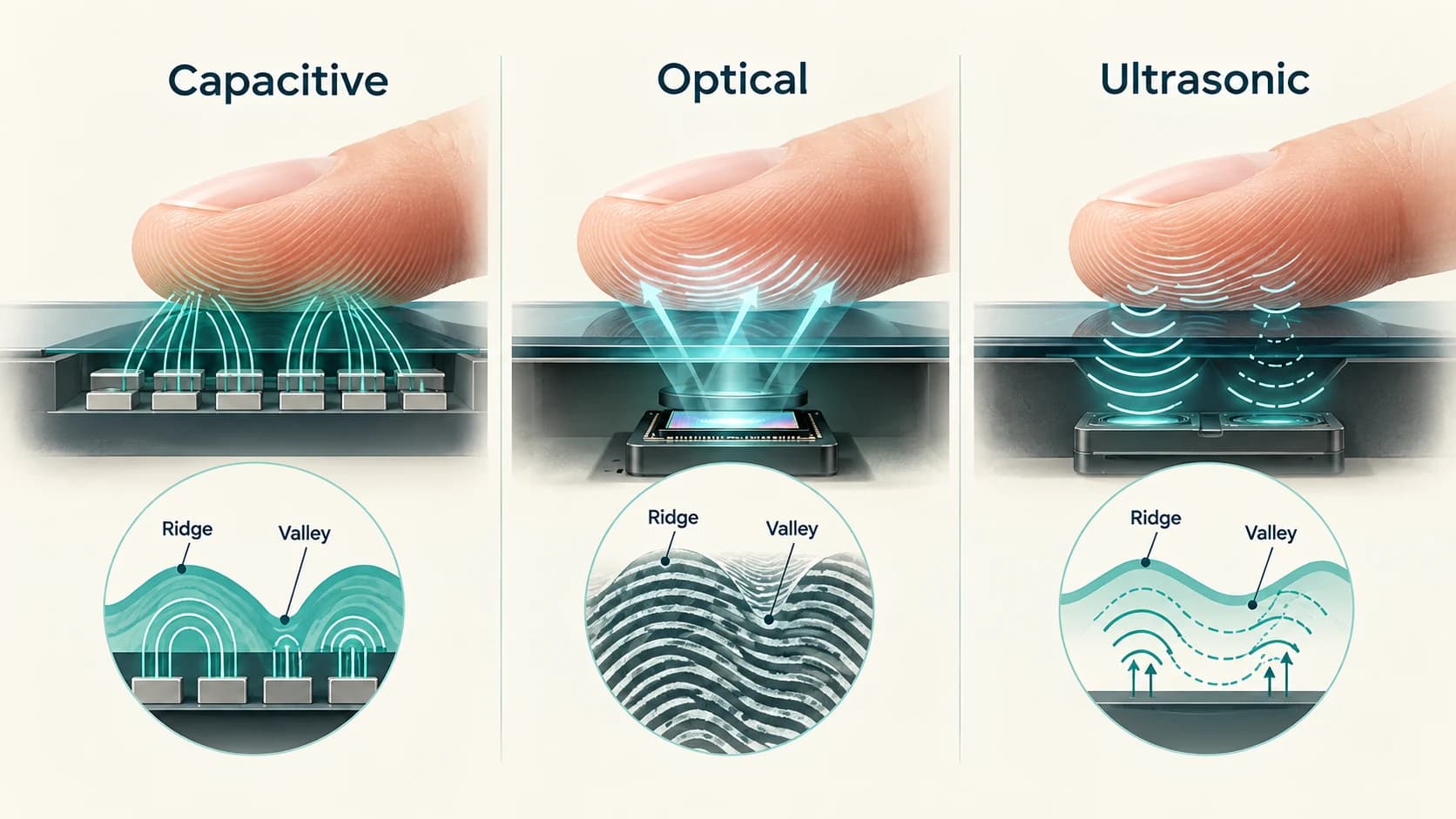
Different sensing technologies change how the fingerprint is captured.
The next stage is still fundamentally similar:
turn the measurement into useful features and compare those features with the enrolled template.
What Happens When You Touch the Sensor to Unlock?
Suppose your fingerprint has already been enrolled.
Now you touch the sensor.
The phone performs a process broadly like this.
Step 1: Capture the fingerprint
The sensor measures the fingertip using its particular technology:
- electrical capacitance
- light
- ultrasound
The output is a fresh biometric sample.
Step 2: Check whether the sample is usable
The scan may be poor.
Perhaps only a tiny part of your finger touched the sensor.
Perhaps the finger is too wet, too dry or positioned badly.
The system may reject the capture before meaningful matching is possible and ask you to try again.
This is one reason fingerprint unlock sometimes fails without anything being wrong with your fingerprint.
Step 3: Extract features
The software transforms the raw sensor information into characteristics useful for comparison.
It is now looking at the fingerprint as structured numerical information rather than simply as an image.
Step 4: Compare it with the enrolled template
The fresh representation is compared against stored fingerprint templates.
If you enrolled several fingers, the system may need to determine whether the new sample matches any authorised template.
Step 5: Calculate similarity
Real biometric matching is not generally:
identical = yes / noInstead, the system evaluates how closely the new scan corresponds to the enrolled fingerprint.
Step 6: Apply a decision threshold
If the match score passes the required security threshold, authentication succeeds.
If it does not, authentication fails.
That threshold is one of the most important concepts in biometrics.
Fingerprint Matching Is About Probability, Not Perfection
A fingerprint sensor faces two opposite mistakes.
False rejection
Your real finger is presented, but the phone rejects it.
This may happen because:
- your finger is wet
- the skin is very dry
- part of the fingertip is damaged
- the sensor is dirty
- your placement is poor
This is annoying, but usually not a security disaster.
You try again.
False acceptance
A different fingerprint is incorrectly accepted as yours.
This is much more security-sensitive.
Biometric systems are therefore designed to keep the probability of false acceptance low while still allowing legitimate users to unlock the phone reliably.
Those objectives conflict.
Make the matching threshold extremely strict and security may improve, but legitimate users are rejected too often.
Make it too forgiving and unlocking becomes convenient, but impostor acceptance becomes more likely.
Biometric engineering is partly about finding a practical balance.
Android therefore classifies biometric implementations by security strength and places requirements on spoof and impostor acceptance as well as secure processing for stronger classes.
Why Doesn't the Phone Need Your Whole Fingerprint?
Touch a small side-mounted sensor and it clearly cannot see your entire fingertip.
Yet it still works.
That is because a sufficiently distinctive partial fingerprint can contain useful matching information.
During enrolment, the phone collects multiple areas.
During authentication, the new sample only needs to overlap sufficiently with information represented in the enrolled template.
This is another reason you are usually asked to move your finger slightly during setup.
You are teaching the phone what different portions of that finger look like.
Apple states that Touch ID can read fingerprints from different orientations and can update its enrolled mathematical representation over time to improve matching.
The precise behaviour varies between systems, but the general goal is the same:
make normal variations in finger placement less likely to cause rejection.
Where Is Your Fingerprint Stored?
This is one of the most important security questions.
A poorly designed biometric system would store sensitive fingerprint data somewhere ordinary apps or malware could easily access it.
Modern phone platforms instead try to isolate biometric processing.
On Apple devices
Apple says Touch ID fingerprint data is encrypted and protected by the Secure Enclave, a dedicated security subsystem isolated from the main application processor.
The operating system and ordinary applications do not get access to the stored fingerprint representation.
Apple also says the fingerprint data is not sent to Apple servers or included in ordinary backups.
On Android
Android supports many manufacturers and fingerprint technologies, so there is no single hardware design.
However, Android's compatibility requirements specify secure handling for stronger biometric classes.
For Class 2 and Class 3 biometric implementations, matching must occur in an isolated execution environment outside normal Android user and kernel space, and identifiable biometric information must be cryptographically protected.
The terminology differs.
The principle is similar:
keep the biometric secret away from ordinary applications and as isolated as practical from the main operating system.
Does an App Receive Your Fingerprint?
Normally, no.
Suppose your banking app asks you to authenticate with your fingerprint.
It does not need a copy of your fingerprint.
Instead, the app asks the operating system to perform biometric authentication.
The protected biometric subsystem checks your finger.
The app receives something closer to:
Authentication succeeded
or:
Authentication failed
rather than:
Here is the user's fingerprint data.
Android's BiometricPrompt framework is specifically designed so applications can request biometric authentication through the operating system rather than implement their own direct fingerprint matching pipeline.
Apple similarly states that fingerprint data cannot be accessed by applications and is used by the Secure Enclave for matching.
That separation is extremely important.
Otherwise every app using fingerprint login would become another place from which your biometric data could potentially leak.
Why Do You Still Need a PIN or Password?
If fingerprint recognition is convenient, why does your phone still force you to create a PIN, pattern or password?
Because biometrics are normally a secondary authentication mechanism, not a complete replacement for a device credential.
Your fingerprint has an unusual security limitation:
you cannot change it like a password.
If a password is compromised, you create a new one.
You cannot issue yourself ten new fingers.
A PIN or password also provides an authentication method when the sensor:
- cannot read your finger
- has failed repeatedly
- has not been used for a defined period
- is disabled
- needs to be reconfigured
Apple requires a passcode alongside Touch ID and requires that passcode again in certain circumstances, including after a device restart.
Android likewise requires strong biometric implementations to fall back to a primary device credential under specified conditions.
So fingerprint unlock is best understood as:
a convenient way to prove possession of an enrolled biometric while the device's deeper security remains anchored to protected credentials and cryptographic keys.
Can Someone Copy Your Fingerprint and Fool the Sensor?
Potentially, which is why spoof resistance is part of biometric-security design.
A fingerprint exists on things you touch.
That makes it fundamentally different from a password stored only in your memory.
An attacker might attempt to reproduce fingerprint characteristics using:
- lifted prints
- photographs
- molds
- synthetic materials
How resistant a phone is depends on the sensor technology and the security of the entire biometric implementation.
Some sensors can measure information beyond a simple surface image.
Ultrasonic designs, for example, can capture three-dimensional ridge and pore structure rather than relying only on a two-dimensional optical picture. Qualcomm describes anti-spoofing as an important feature of its ultrasonic fingerprint systems.
Android's biometric classifications also explicitly consider spoof and impostor acceptance rather than judging security only from ordinary matching accuracy.
No biometric method should be described as impossible to spoof.
Security is about making successful attacks sufficiently difficult while keeping legitimate authentication practical.
Why Does Your Fingerprint Sometimes Stop Working Properly?
Your fingerprint has not suddenly changed identity.
The sensor may simply be receiving a worse sample.
Common causes include:
- water
- sweat
- dirt
- oil
- extremely dry skin
- cuts
- worn fingertips
- poor finger placement
- dirty sensor surface
- incompatible or poorly installed screen protector on some under-display systems
Google's current Pixel fingerprint troubleshooting guidance, for example, recommends ensuring that the display and finger are clean, using the same enrolled finger, pressing appropriately and re-enrolling when persistent problems occur.
Different sensing technologies tolerate these conditions differently.
An ultrasonic sensor and an optical sensor may not fail in exactly the same circumstances.
Does Your Phone Really Know It Is You?
Here is the subtle answer.
Not exactly.
Your phone does not know your legal name simply from examining your fingertip.
During setup, you told the phone to trust a particular fingerprint.
After that, the phone asks whether a future fingerprint sample matches that trusted enrolment.
If you deliberately enrolled another person's finger on your phone, the phone could later accept that person.
From the biometric system's perspective, nothing went wrong.
It was told:
This fingerprint is authorised.
That is why the security of enrolment is important.
Android requires secure biometric enrollment to be tied to the user's existing device credential for protected biometric implementations.
The important identity relationship therefore comes from the setup process:
Device owner authenticates with device credential
↓
Fingerprint is enrolled as trusted
↓
Future matching proves possession of that enrolled biometric
The fingerprint does not magically contain your account name.
The Entire Fingerprint Unlock Process
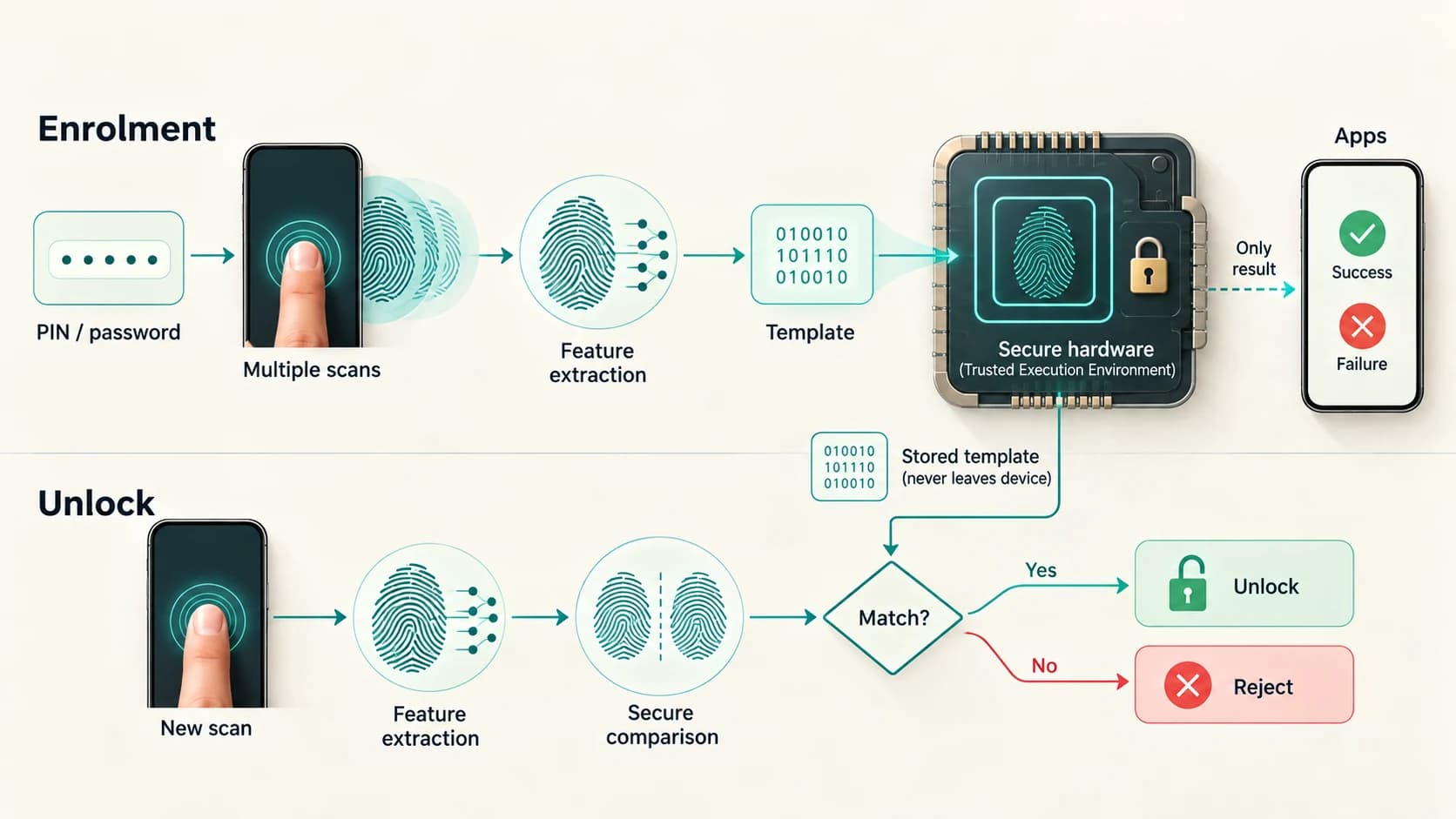
A simplified version looks like this.
During setup
1. You authenticate with your PIN/password
↓
2. The sensor scans the finger several times
↓
3. Fingerprint features are extracted
↓
4. A mathematical template is created
↓
5. The template is encrypted and stored in protected hardware/storage
During unlocking
1. You touch the fingerprint sensor
↓
2. A fresh fingerprint sample is captured
↓
3. The system extracts comparable features
↓
4. Secure hardware compares them with the enrolled template
↓
5. A match score is calculated
↓
6. If the score passes the threshold, authentication succeeds
↓
7. The phone is permitted to unlock
At no point does the phone need to ask an online database:
Does this fingerprint belong to Akhilesh?
The comparison can happen locally.
And ordinary apps do not need a copy of the fingerprint to benefit from biometric authentication.
The Fingerprint Is Only One Part of the Security System
The sensor gets most of the attention because it is the part you physically touch.
But secure fingerprint authentication depends on several components working together:
The sensor
must capture useful fingerprint information.
Feature extraction
must create a reliable representation.
Matching algorithms
must distinguish legitimate users from impostors.
Secure hardware
must protect templates and perform sensitive operations.
The operating system
must control which applications can request authentication.
The device credential
must provide a secure fallback and protect enrolment.
If any one of those layers is poorly designed, the fingerprint sensor alone cannot make the system secure.
That is why the answer to:
How does my phone know this is my fingerprint?
is more interesting than "it scans your finger."
The phone first learns a protected mathematical representation during enrolment.
Later, it captures another sample and asks whether the important fingerprint structures correspond closely enough to that trusted template.
The answer is not:
"I recognize this human."
It is:
"This biometric measurement matches an enrolled credential strongly enough to authenticate."
For a computer, that difference is everything.