How Does a QR Code Work? How So Much Data Fits in a Tiny Square
Learn how QR codes turn text and links into tiny black-and-white squares, how phones decode them, and why damaged QR codes can still work.
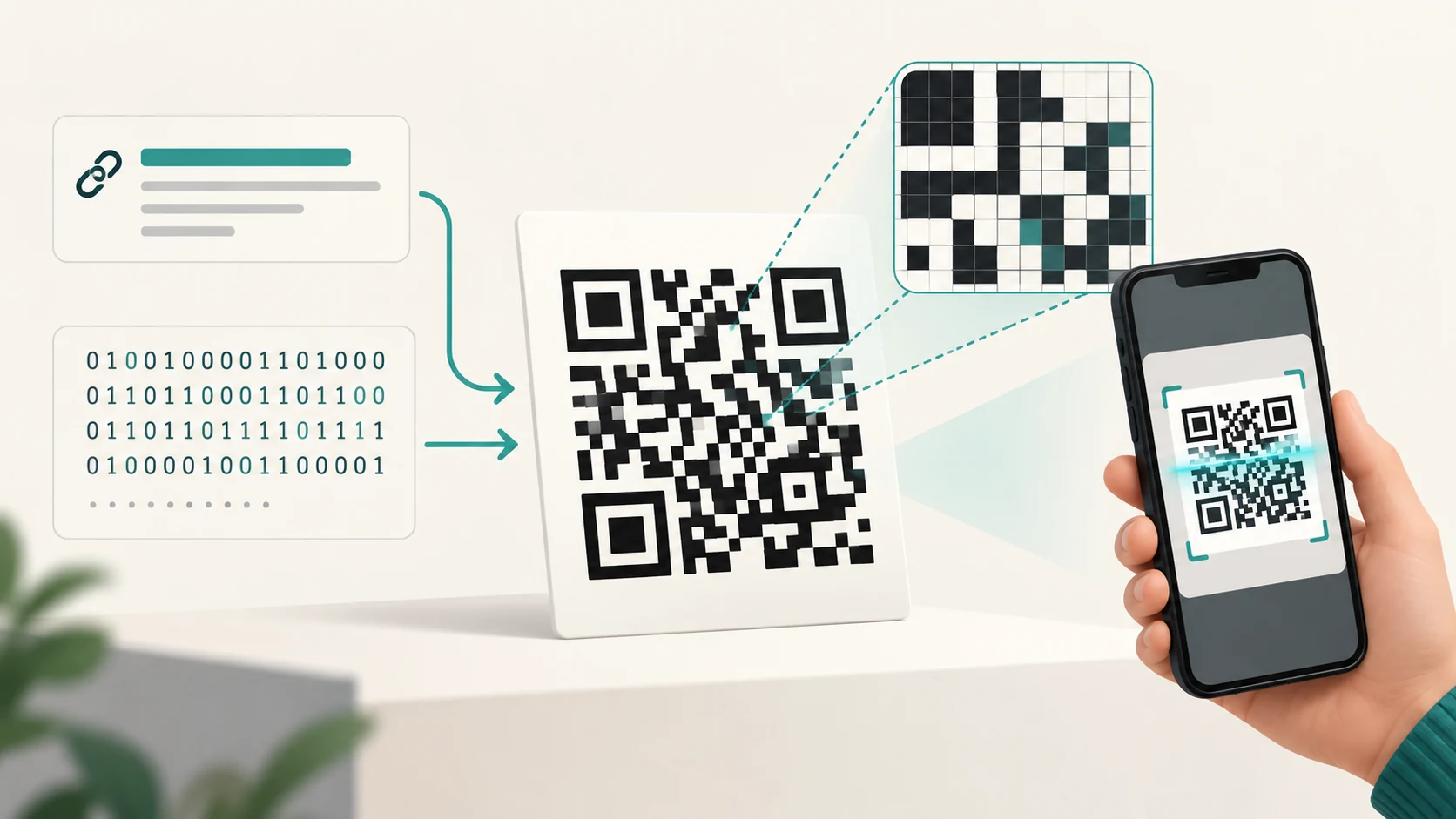
Point your phone at a QR code on a restaurant table, payment counter or product package and something remarkable happens.
The camera sees what appears to be a chaotic square of black and white blocks. Within a fraction of a second, the phone recognizes that it is a QR code, works out which way it is facing, reconstructs the grid, corrects certain errors and extracts information such as a website address or payment instruction.
The strange part is how much that little square can represent.
A QR code can contain far more information than a traditional barcode because it uses two dimensions instead of one. Its black and white squares form a grid, and each part of that grid has a carefully defined purpose.
A standard QR Code can range from 21 × 21 modules to 177 × 177 modules, depending on how much information has to be encoded. DENSO WAVE, which developed the QR Code in 1994, calls each small black or white square a module.
But the code is more sophisticated than simply converting every black square into a 1 and every white square into a 0.
Some modules contain the data.
Others tell the scanner where the code begins, how large its grid is, how it is oriented and how to recover information when parts of the code cannot be read.
That combination is what makes QR codes both compact and surprisingly reliable.
A QR Code Is a Two-Dimensional Barcode
A traditional linear barcode stores information mainly along one dimension.
Look at a product barcode and you see vertical black bars with different widths and spaces between them.
The information is encoded as you move horizontally across those bars.
A QR code uses both directions.
Information can be represented across the square horizontally and vertically.
That gives the code much more usable area.
DENSO WAVE says this two-dimensional structure allows QR Codes to represent the same amount of information in roughly one-tenth the area required by a conventional barcode in some applications.
Think of the difference as similar to writing information on a single narrow line versus filling an entire sheet of graph paper.
The QR code has many more positions available.
The Tiny Squares Are Called Modules
Zoom far enough into a QR code and the pattern stops looking complicated.
It becomes a grid.
Each square position in that grid is called a module.
For example, the smallest standard QR Code, Version 1, contains:
21 × 21 modules
Version 2 contains:
25 × 25 modules
Version 3:
29 × 29 modules
The pattern continues, with every higher version adding four modules to each side.
At the maximum standard size, Version 40 contains:
177 × 177 modules
That works out to more than 31,000 individual grid positions, although a significant number are reserved for structural information, error correction and other functions rather than user data. DENSO WAVE specifies 40 QR Code versions under this system.
This also explains something that isn't obvious when looking at QR codes on a screen:
A QR code does not have one fixed physical size.
The same logical grid can be printed larger or smaller.
What matters is that the individual modules remain large and clear enough for the camera or scanner to distinguish them reliably.
What Are the Three Big Squares in the Corners?
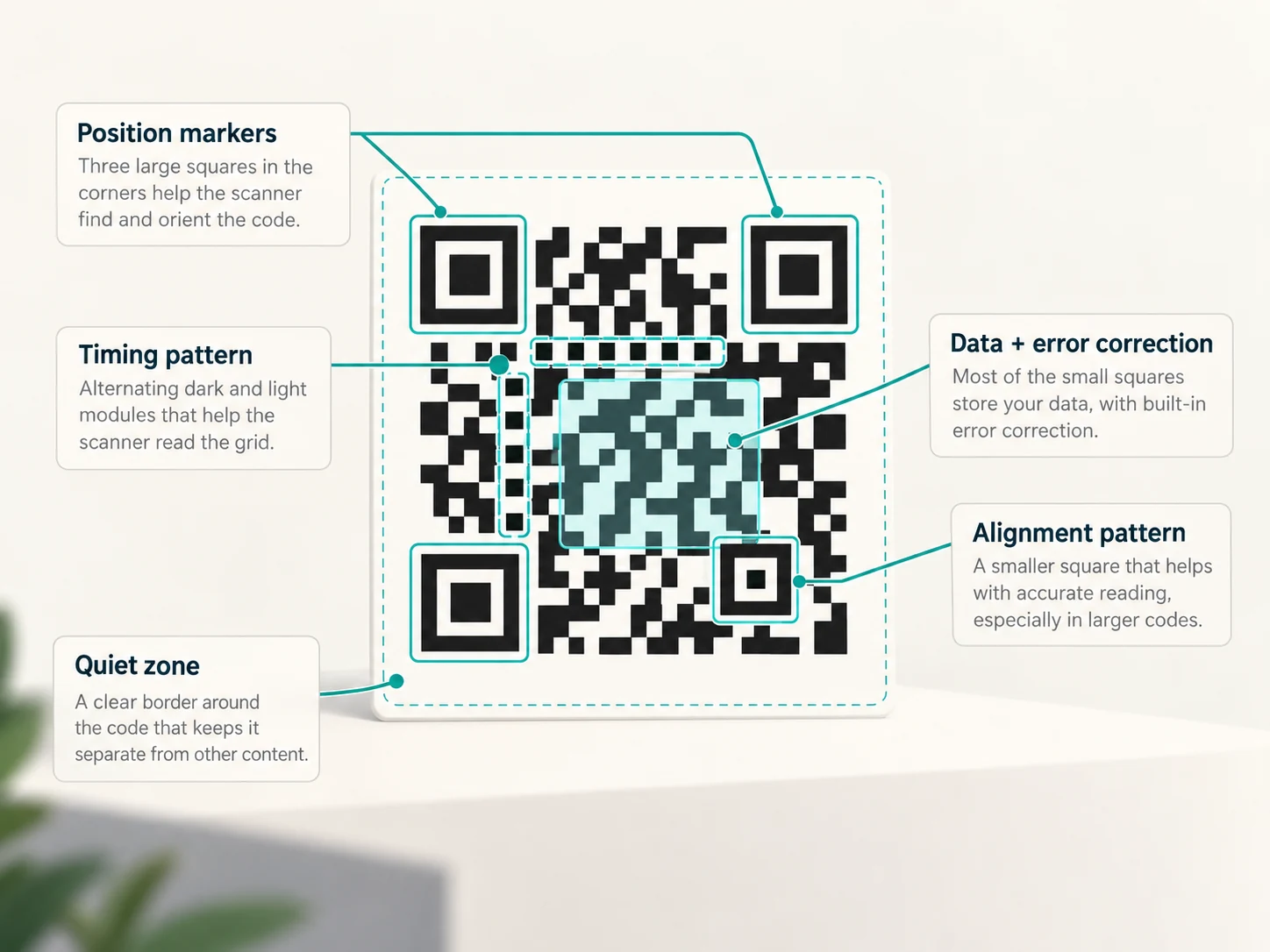
The most recognizable parts of almost every QR code are the three large square patterns.
You normally find them at:
- top left
- top right
- bottom left
These are position detection patterns, often informally called finder patterns.
They are not part of the message you are trying to store.
They help the scanner find the QR code.
DENSO explains that these patterns use a distinctive 1:1:3:1:1 ratio of black and white areas. The pattern was deliberately designed to be uncommon in ordinary printed material, making it easier for a scanner to recognize.
Because there are three of them, the scanner can also determine the orientation of the code.
That is why you don't have to hold your phone perfectly upright.
A QR code can be recognized from different orientations because those corner markers provide reference points.
What Are the Other Patterns Inside a QR Code?
The three large squares are only part of the structure.
Several other areas help the scanner reconstruct the grid correctly.
Timing patterns
Between the large position markers are lines of alternating black and white modules.
These are timing patterns.
They help the scanner determine the spacing of the grid and therefore where the centres of individual modules should be located.
DENSO describes them as alternating black-and-white lines used to help identify module positions correctly when reading the code.
Alignment patterns
Larger QR codes also contain smaller square targets known as alignment patterns.
These help correct distortion.
Imagine a QR code printed on a slightly curved package or photographed at an angle.
The code may appear stretched or skewed rather than perfectly square.
Alignment patterns give the decoding software additional reference points with which to reconstruct the intended grid.
DENSO introduced these patterns in QR Code Model 2 specifically to improve reading when the symbol is distorted.
Quiet zone
There is also an important part of a QR code that contains absolutely nothing.
Around the symbol should be a blank margin called the quiet zone.
For a standard QR Code, DENSO specifies a clear area four modules wide around all sides.
That empty space helps the scanner distinguish the code from nearby text, images and other visual elements.
This is why placing artwork or text immediately against a QR code can make it harder to scan.
Where Is the Actual Information?
After the structural areas have been reserved, much of the remaining grid carries encoded information and error-correction data.
Suppose you want a QR code to contain:
https://example.comThe QR generator does not literally draw those letters inside the square.
It converts the information into a sequence of bits according to standardized encoding rules.
Those bits eventually determine whether specific data modules are dark or light.
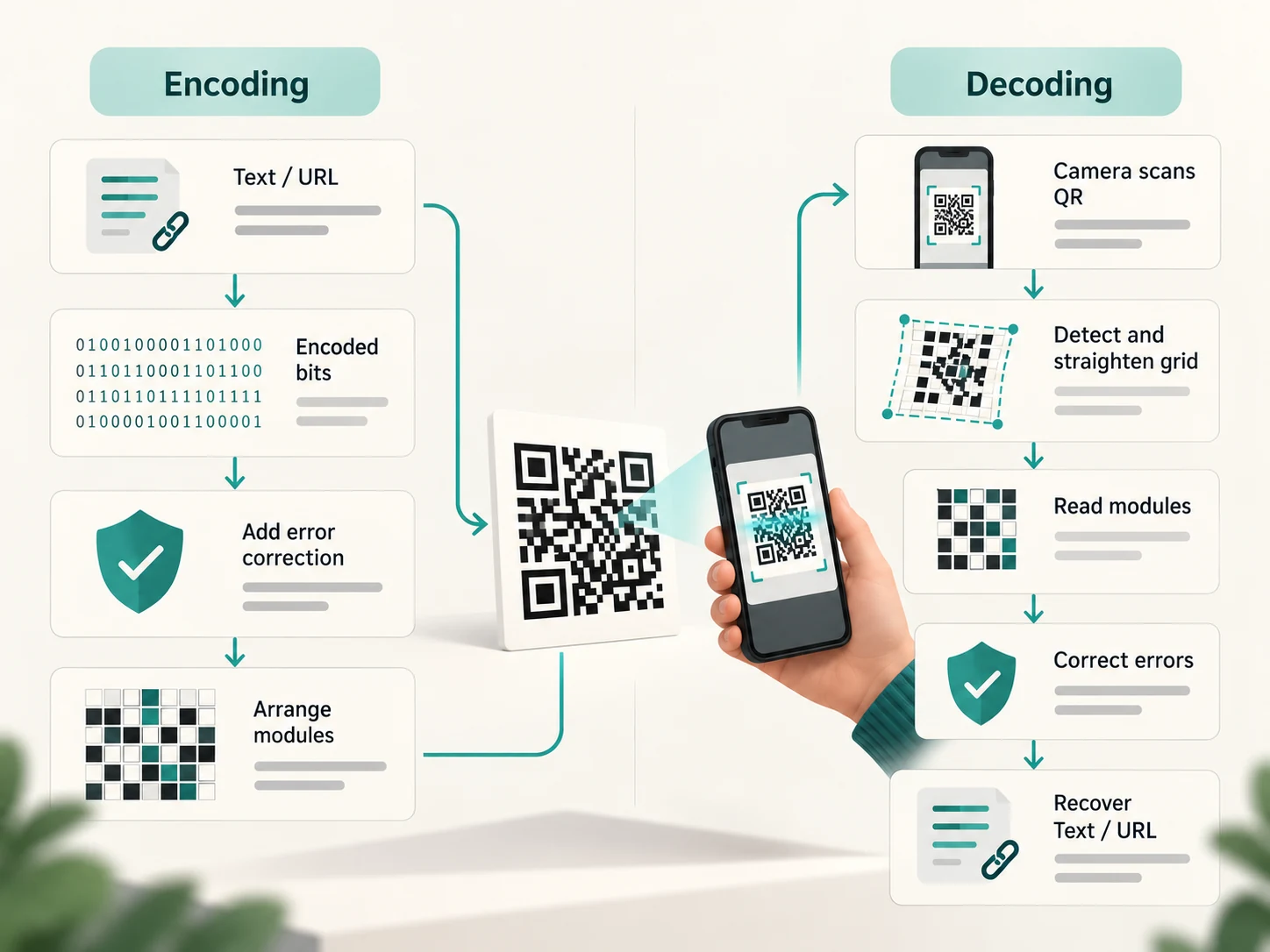
So at a simplified level:
Text or other data
↓
Encoded binary information
↓
Error-correction information added
↓
Bits arranged into the QR grid
↓
Black and white modules
A scanner performs essentially the reverse process.
QR Codes Can Encode Different Types of Data Efficiently
Not all information requires the same number of bits.
The QR Code specification therefore defines several encoding modes.
The standard system supports modes including:
- Numeric for digits
- Alphanumeric for a defined set of numbers, uppercase letters and symbols
- Byte mode for general binary data
- Kanji mode for efficient encoding of supported Japanese characters
DENSO notes that the encoder can select the appropriate internal representation depending on the data being stored.
This matters because efficient encoding means fewer bits are required.
A long sequence containing only numbers can be packed more efficiently than arbitrary binary data.
That is why there isn't one universal answer to:
How many characters can a QR code hold?
It depends on the type of data, QR version and error-correction level.
How Much Can a QR Code Actually Store?
At the largest standard Model 2 size, DENSO lists maximum capacities of up to approximately:
| Data type | Maximum capacity |
|---|---|
| Numeric digits | 7,089 |
| Alphanumeric characters | 4,296 |
| Byte/binary data | 2,953 bytes |
| Kanji characters | 1,817 |
These are maximum figures under the appropriate configuration; increasing error correction reduces the amount of room available for the user's data.
The smallest Version 1 QR Code is dramatically more limited.
At error-correction Level L, DENSO lists capacities such as 41 numeric digits, 25 alphanumeric characters or 17 bytes of binary data.
This is why QR codes look different even though they all use the same basic design.
A short web address might require a relatively small grid.
A much larger payload needs a higher version containing more modules.
Why Doesn't Every QR Code Look the Same for the Same Text?
You might expect identical information to always create an identical pattern.
Not necessarily.
DENSO notes that different QR generation software can produce different-looking QR Codes for the same data because the internal encoding approach may differ.
For example, one encoder might divide or represent the input differently from another.
The QR specification also includes standardized rules for arranging the encoded information into a readable symbol.
The important requirement is not that every generator creates the same picture.
It is that a standards-compliant decoder can correctly recover the original information.
A QR Code Usually Does Not Contain the Website It Opens
Suppose you scan a restaurant QR code and an entire menu appears.
It may feel as if the menu was stored inside the square.
Usually it wasn't.
The QR code often contains something much smaller:
https://restaurant.example/menuYour phone decodes that text and recognizes it as a URL.
The browser then connects to the internet and downloads the actual website.
This distinction explains how an apparently tiny QR code can seem to contain enormous amounts of information.
It doesn't necessarily contain the information itself.
It often contains an address pointing to the information.
The same principle applies to many QR codes used for:
- websites
- app downloads
- event pages
- digital menus
- forms
- product information
A standard QR Code can store binary data directly, but its practical maximum is only a few kilobytes. DENSO notes that storing substantial images or audio directly inside an ordinary QR Code is therefore impractical.
How Does a Phone Read the Code?
When you point a camera at a QR code, the decoding process can be thought of in several stages.
1. Detect the square
The software searches the camera image for the characteristic position-detection patterns.
Those three large corner markers tell it:
There is probably a QR code here.
2. Determine orientation
Because the markers have a known arrangement, the decoder can determine which corner is which.
That allows the code to work even when it is rotated.
3. Correct perspective and distortion
The QR code may not appear as a perfect square in the camera image.
You might be viewing it diagonally.
The software uses the position and alignment information to estimate the shape of the original grid.
4. Locate the modules
The timing and alignment structures help the software determine where individual module centres lie.
The camera image can then be converted into a logical grid of dark and light cells.
5. Read the encoded information
The scanner interprets the designated information and data regions according to the QR Code specification.
6. Correct recoverable errors
Error-correction information is used to reconstruct data when some modules were obscured, damaged or read incorrectly.
7. Decode the payload
The recovered bitstream becomes the original information:
perhaps a URL, text string, identifier or other data.
All of that can happen so quickly that the user sees little more than a box appearing around the QR code followed by a notification.
How Can a Damaged QR Code Still Work?
This is one of the cleverest parts of the design.
QR Codes include redundant error-correction information.
They use a mathematical technique called Reed-Solomon error correction.
Instead of filling every available data position only with the original message, the encoder adds additional codewords calculated from that message.
If part of the symbol later becomes unreadable, those extra codewords can help reconstruct missing information.
DENSO defines four main error-correction levels:
| Level | Approximate restoration capability |
|---|---|
| L | 7% |
| M | 15% |
| Q | 25% |
| H | 30% |
These percentages refer approximately to the proportion of codewords that can be restored, not a guarantee that you can cover exactly that percentage of any QR image and it will always scan. Damage location and pattern matter too.
More error correction therefore improves resilience.
But there is a trade-off.
The correction information itself needs space.
Choose a higher error-correction level and less of the QR code's capacity remains available for your original data.
Is That Why QR Codes With Logos Can Still Scan?
Partly.
You may have seen QR codes with company logos inserted into the centre.
Such designs sometimes remain readable because error correction can compensate for some missing information.
But this should not be interpreted as permission to cover arbitrary areas of a QR code.
Structural patterns can be damaged, too much data can be obscured, contrast can become poor, or the error-correction capacity can be exceeded.
DENSO explicitly warns that overlaying illustrations and modifying QR codes can reduce readability and force the decoder to rely on error correction.
A heavily decorated QR code that happens to work with one phone may fail with another camera, at another distance or under worse lighting.
Why Are QR Codes Usually Black and White?
QR Codes fundamentally need the scanner to distinguish dark modules from light modules.
Black on white gives excellent contrast.
Colour can work, but poor colour combinations can make those boundaries harder for the camera to detect.
The problem is especially serious if:
- dark and light colours are too similar
- the image is blurred
- printing quality is poor
- modules become distorted
- nearby graphics invade the quiet zone
DENSO recommends making individual modules large enough for the capabilities of the intended printer and scanner and notes that larger modules generally improve reading stability.
So a QR code might occupy only a small physical area, but shrinking it indefinitely is not useful.
Eventually the camera can no longer distinguish the individual modules reliably.
Does a QR Code Contain Anything Secret?
Not by default.
This is an important security point.
A normal QR code is primarily an encoding system, not an encryption system.
Anyone who can scan it can generally retrieve the data it contains.
The visual pattern may look incomprehensible to a human, but that does not make the contents secret.
DENSO offers specialized QR-related systems with restricted-reading functionality, and even notes that such features do not automatically guarantee security.
For an ordinary QR code, assume the payload can be read.
Can a QR Code Be Dangerous?
The square itself does not execute malware simply because the camera sees it.
But the information it contains can direct you somewhere dangerous.
For example, a malicious QR code might contain a URL leading to:
- a phishing website
- a fake payment page
- a fraudulent login form
- a malicious download
The risk is similar to clicking an unfamiliar link, except you cannot easily judge the destination merely by looking at the pattern.
That means the safest habit is to check the destination your phone shows before opening it, particularly when the QR code has been placed over another QR sticker or appears in an unexpected location.
Why Were QR Codes Designed This Way?
QR Code was developed by DENSO WAVE in 1994, initially in an industrial context where fast and reliable identification was important.
Its name comes from the goal of quick response.
DENSO's history explains that the three distinctive position markers were developed specifically so scanners could rapidly identify the code and determine its orientation among other printed material.
The technology later became standardized internationally.
The current international specification is ISO/IEC 18004:2024, which defines QR Code characteristics including data encoding, symbol formats, dimensional requirements, error correction and decoding requirements.
That standardization is one reason a QR code generated by one system can be read by countless unrelated phones and scanners.
The Small Square Is Really a Structured Data Grid
A QR code looks random only because humans are not meant to read its pattern directly.
To a scanner, it has structure.
The three large corner squares say:
Find me and determine my orientation.
The timing and alignment patterns say:
Here is how my grid is arranged.
The data modules say:
Here is the encoded information.
The error-correction codewords say:
If some of that information is damaged, use this redundancy to recover it.
The quiet zone says:
This is where the symbol ends.
And the fact that the whole system uses a two-dimensional grid means thousands of tiny module positions can fit inside a square only a few centimetres wide.
So the answer to how a QR code stores so much information isn't that each black square contains some extraordinary amount of data.
It is that there are a great many precisely arranged squares, efficient encoding packs information into them, and the surrounding structure tells a computer exactly how to interpret the pattern.
What looks like visual noise to us is, to a QR scanner, a carefully organized digital message.