How to Check Whether a Website Is Legitimate Before Entering Payment or Personal Details
Learn to spot fake websites before paying or signing in: check the real domain, HTTPS, seller evidence, payment requests and independent safety signals.
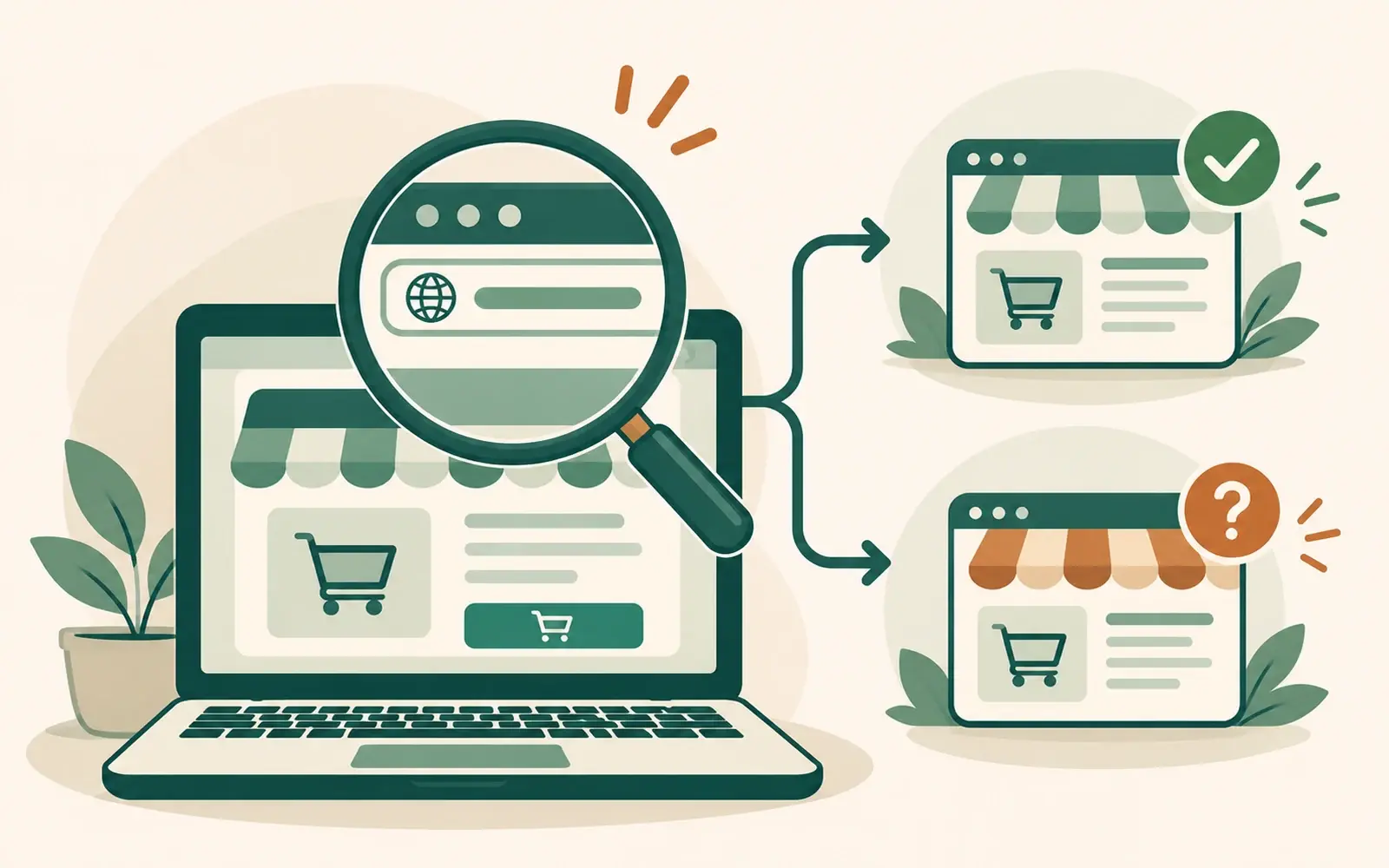
You find a pair of headphones at an unusually low price. The website looks professional: product photographs, a familiar payment logo, delivery promises, customer reviews and a padlock-like security symbol. At checkout, it asks for your card details.
Would you trust it?
A convincing website is not necessarily a legitimate website. Anyone can reproduce the appearance of a shop, bank, delivery company or government portal. Even a fake site can use HTTPS, display impressive-looking reviews and accept payments through ordinary infrastructure.
The safer approach is to verify several things before sharing money or sensitive information: the exact address you are visiting, the identity behind the offer, independent evidence about the seller, the payment or login action requested, and whether anything conflicts with what you expected.
No single visual badge or website-checking tool can prove that a site is honest. But a short, evidence-based check can stop many avoidable mistakes.
Start With the Most Important Question: Who Controls This Address?
An online scam often begins before the checkout page. You may arrive through a social-media advertisement, a search result, a text about an undelivered parcel or an email claiming your bank account needs verification.
The page can imitate a real organization, but its web address may reveal that you have reached a different operator.
Read the domain, not just the familiar words
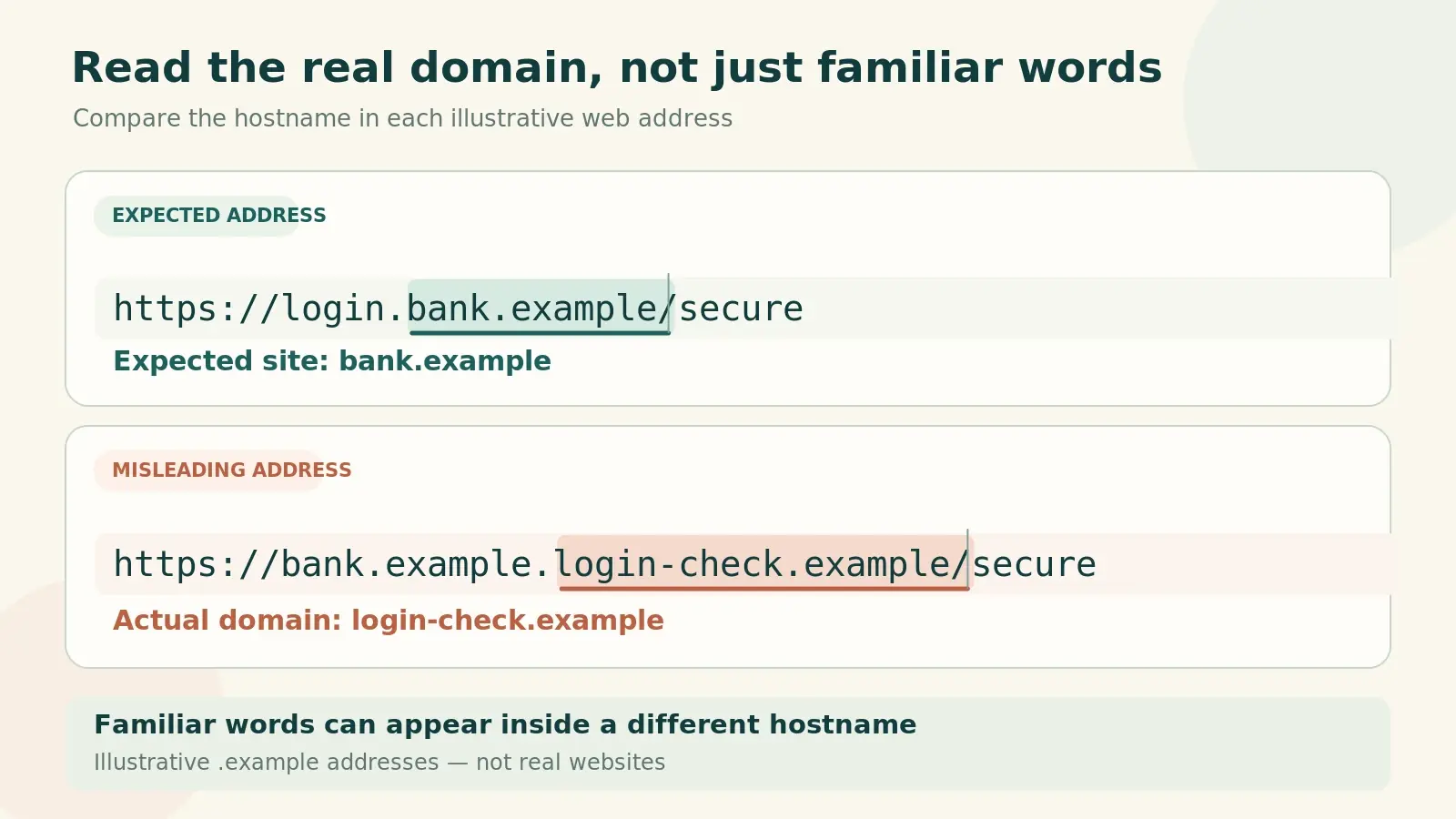
Consider two fictional addresses. These are illustrations using the reserved .example domain space, not real services:
https://login.bank.example/secure
https://bank.example.login-check.example/secure
The first belongs under the illustrative domain bank.example, with login as a subdomain. The second belongs under login-check.example. The words bank.example appear earlier in the second hostname, but that does not make it part of the bank's website.
A simplified way to inspect a hostname is to work back from the domain ending and identify the actual registered domain, rather than stopping at the first familiar brand name. Real-world domain endings can include structures such as .co.in, so counting only the last two dot-separated pieces is not a reliable universal rule.
Another misleading address can place a familiar name in the path instead of the hostname:
https://account-check.example/bank.example/loginHere the site is still under account-check.example. The bank-like text comes after the first / and does not determine who controls the website.
Even the portion before an @ in a URL can be deceptive. If you encounter a complicated or abbreviated address, do not try to interpret it under pressure. Open the organization's address independently using a trusted bookmark or known official source.
Watch for look-alike spelling and visual tricks
A fraudulent address might substitute a letter, add a hyphen, include a word like support or refund, use a different domain ending, or display characters from another alphabet that resemble familiar letters.
Some legitimate businesses also use multiple domains, campaign pages and external checkout providers. An unfamiliar address is a reason to verify, not automatic proof of fraud. Equally, a believable-looking address is not proof of legitimacy.
For important accounts, the most dependable habit is to avoid using the link you were sent. Open the company's known app, type its verified website address, or use a previously saved bookmark. The UK's National Cyber Security Centre (NCSC) recommends this approach when shopping through unfamiliar links.
Understand What HTTPS Actually Guarantees
People are often told to look for https:// or a padlock before entering payment information. That advice is incomplete unless you understand what it checks.
HTTPS normally provides an encrypted, authenticated connection to the hostname shown in the browser. It helps prevent someone on the network from casually reading or altering information in transit. Browser certificate checks also help establish that the connection is to the domain it claims to serve.
What HTTPS does not establish is that the people controlling that domain are honest, that they will deliver your order, or that their privacy practices are acceptable.
The US Federal Trade Commission (FTC) explicitly warns that scammers can encrypt their websites too. You could send card details through a properly encrypted connection directly to a fraudulent merchant.
Think of HTTPS as a secure envelope: it can protect a message while it travels, but it does not guarantee that the recipient deserves your trust.
Modern browsers may show a site-controls icon rather than a prominent padlock. You can inspect connection information through the browser's site-information controls. A red phishing warning or a “Your connection is not private” error is a serious reason to stop rather than bypass the warning.
Useful distinction: Connection security and website legitimacy are separate questions. You need both a correctly secured connection and sufficient reason to trust the destination.
Verify the Seller or Organization Outside Its Own Website
A fake business can write its own “About Us” page, generate glowing testimonials and invent customer-care details. That is why evidence supplied solely by the site itself has limited value.
Look for an independent trail
For an unfamiliar online store, search the business name and exact domain separately, adding terms such as review, complaint, scam, refund or delivery. Compare information from multiple sources rather than treating one search result or star rating as definitive.
Pay attention to the quality of external evidence:
- Do independent reviewers describe actual purchases, delivery and customer support, rather than merely repeating marketing claims?
- Are there multiple unrelated reports of the same unresolved problem?
- Do the advertised business name, physical address, contact channels, invoice details and payment recipient make sense together?
- Can you verify an official social-media profile or physical business through an independently discovered source, rather than by clicking links supplied by the suspicious website?
The FTC notes that reviews may be false or manipulated, including negative ones. A long list of five-star testimonials is therefore not a substitute for independent corroboration.
Do not assume that appearing in Google results, buying an advertisement, having many followers or using a recognizable logo proves a business is authentic. The FTC has also warned about scammers using search results and fake customer-service numbers to impersonate companies.
Examine contact, delivery and refund information
A legitimate seller should ordinarily provide clear answers about what you are buying, the total amount, who is selling it, how delivery works, whether returns are accepted, and how problems are resolved.
Warning signs include vague or contradictory contact details, a copied-looking policy, missing delivery conditions, an implausibly generous return promise or a support number that cannot be verified elsewhere.
These signals require judgment. A small new business may have little public history, and some legitimate merchants may have imperfect websites. Conversely, a sophisticated scam may publish polished terms and professional support pages. Do not convert a single weak signal into a verdict. Look for a consistent pattern.
Treat the Offer and Its Timing as Part of the Evidence
A familiar deception is a highly discounted item attached to an urgent deadline:
“Only two left. Offer ends in five minutes. Complete payment immediately.”
A limited-time promotion can be real. But urgency makes it harder to verify the seller, compare prices and review terms. Be especially cautious when an unknown shop offers a highly sought-after product at a fraction of the normal price and demands an immediate payment that is difficult to reverse.
Compare the precise product model, condition, warranty, delivery charge and seller identity against trusted alternatives. A “90% off” headline means little if the product is counterfeit, unavailable or not what the listing describes.
The FTC advises comparing prices and understanding the full cost of a purchase before paying. The key is not to prove that every cheap offer is fraudulent; it is to avoid letting the price replace verification.
Check What the Site Wants You to Do—and Where Your Money Goes
A website's most revealing moment is often the next action it asks you to take.
| Request | What to verify before proceeding |
|---|---|
| Card payment | Exact merchant, amount, checkout domain and whether the transaction is one you initiated |
| UPI payment | Payee name or UPI ID, amount and purpose shown inside the trusted payment app |
| Bank login or OTP | You independently reached the genuine banking service and the OTP relates to the action you started |
| Identity documents | Why the recipient needs them, whether the request is proportionate and how the information will be handled |
| Install an app or extension | Official publisher, distribution channel, requested permissions and whether installing it is genuinely necessary |
| Pay directly to a personal account | Why a claimed business uses that recipient and what recourse exists if the purchase fails |
A payment gateway that looks technically normal does not necessarily establish that the seller is genuine. A fraudulent merchant might still lead you to a working payment page. Conversely, a real merchant may legitimately redirect to an external payment provider. Verify the merchant relationship and transaction details rather than rejecting or trusting every redirect automatically.
Special caution for UPI, refunds and verification requests in India
The Reserve Bank of India (RBI) warns about fake bank websites, unauthorized QR codes, fraudulent support numbers and messages demanding KYC updates. The National Payments Corporation of India (NPCI) likewise warns that entering a UPI PIN after scanning a QR code is for sending money, not receiving it.
If someone says you must scan a QR code, approve a collect request or enter your UPI PIN to receive a refund, prize or payment, stop. Read the recipient, amount and transaction purpose within your payment app before authorizing anything.
Do not provide OTPs, CVVs, banking passwords or UPI PINs to someone claiming to be customer support. A genuine transaction flow may ask you to authenticate through your bank's trusted channel, but that is different from telling a caller your secret code or entering it into an unfamiliar “verification” website.
For banking, scholarships, tax, government services and other sensitive portals, start from an independently verified official address, not a link or telephone number in an unsolicited message. If unsure, contact the institution through a number published on its established website or inside its official app.
Use Website Safety Tools as a Second Opinion, Not a Certificate of Trust
You can collect additional evidence without installing random “website legitimacy checker” browser extensions.
Google Safe Browsing
Google provides a Safe Browsing Site Status tool that reports whether its systems have currently identified particular unsafe content or threats associated with a site. Browsers including Chrome also warn about known phishing and malware pages.
A warning is meaningful. However, no warning is not an endorsement: a new fraudulent shop, a recently changed page or a scam not captured by a particular detection system might still be dangerous. Safe Browsing focuses on detected web threats; it is not a complete audit of whether a retailer will deliver its products.
Domain registration information
ICANN's Lookup service uses domain-registration data, including the Registration Data Access Protocol (RDAP) for applicable domains. Where records are available, they can offer context such as registration dates or registrar information.
A very recent registration can support other signs of a newly created impersonation site. But a new domain is not automatically a scam; legitimate businesses launch new sites all the time. And an older domain can be sold, compromised or repurposed.
Registration details may be limited or privacy-protected. A hidden registrant name is not proof of wrongdoing, and the registration date does not necessarily tell you when the current business began operating.
Use these tools to strengthen or challenge a wider assessment—not to produce a made-up percentage of safety.
Three Realistic Scenarios: What Would You Check?
Scenario 1: A heavily discounted gadget from a social-media advertisement
You tap an advertisement for expensive headphones at an unusually low price. The site has HTTPS, attractive product images and numerous enthusiastic reviews, but you have never heard of the seller.
Better approach: verify the exact domain, search for independent purchase experiences, compare the product and total price, read refund details and inspect the payment destination. If the seller insists on an irreversible transfer to an unrelated personal account, the combined risk becomes harder to justify. Consider a more established retailer instead.
Scenario 2: A message says your bank account will be blocked
A text message claims that you must update KYC within an hour, and links to a familiar-looking login page. It asks for your password and a one-time code.
Better approach: do not follow the message link. Open the official banking app or independently verified bank website and check for an actual alert. The RBI identifies urgent KYC messages and fake sites as common fraud methods. An apparently authentic logo or HTTPS connection does not override the suspicious approach.
Scenario 3: A work-related site asks for a document upload
A new supplier or recruiter sends a portal for uploading your identity document, employment records or a signed contract. The organization may exist, but the portal's domain is unfamiliar.
Better approach: verify the request through a known contact or established business channel, confirm who operates the upload portal, and determine whether the requested information is necessary. A real company can still use an external provider, so an unfamiliar domain does not prove fraud. But sensitive uploads justify stronger checks than simply reading a public webpage.
A Practical Two-Minute Check Before You Submit Anything
There is no universal stopwatch for safety checks, but this sequence is fast enough for most routine decisions.
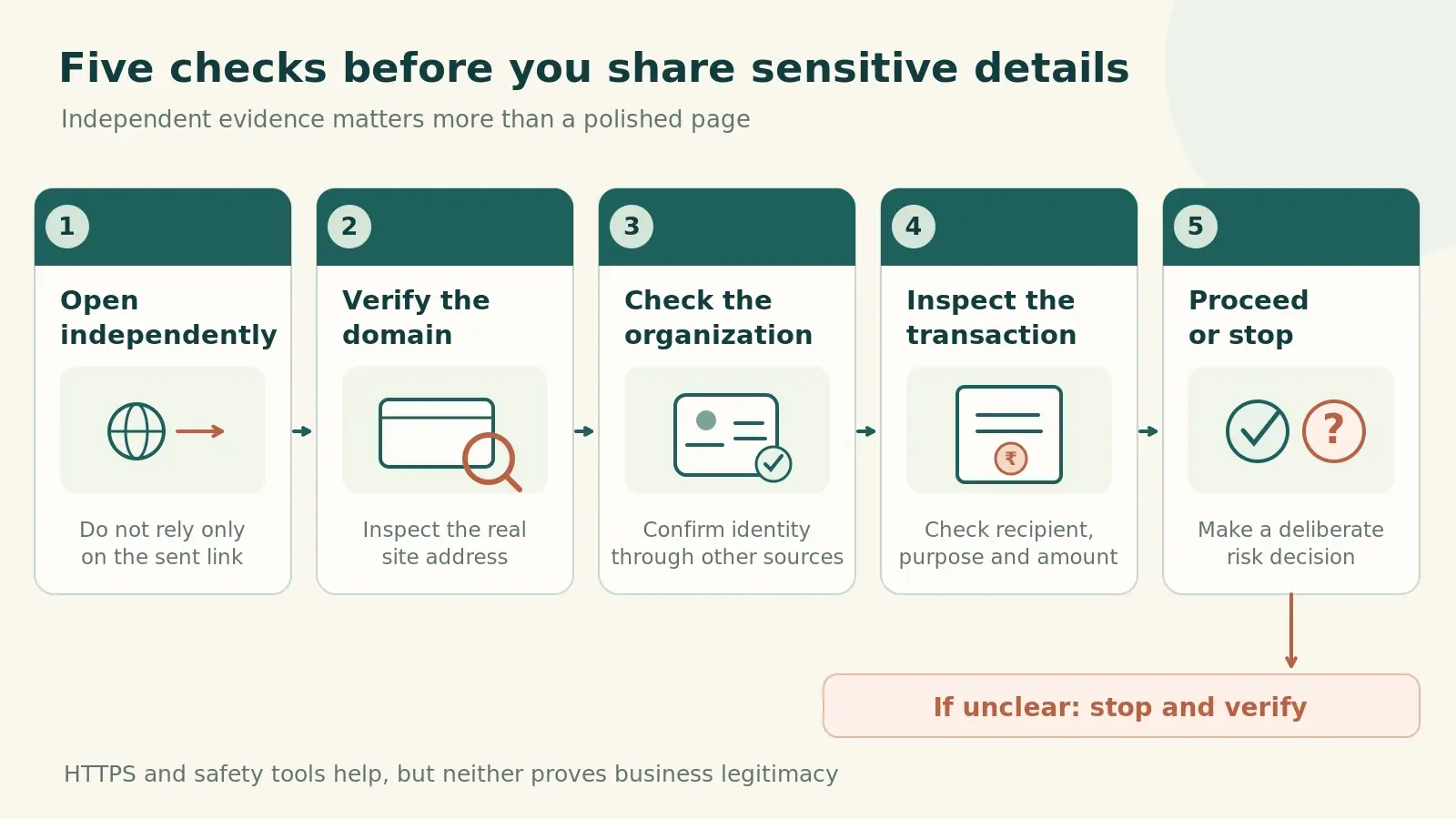
- Stop following the original link. If the page came from an advertisement, SMS, unsolicited email or QR code, locate the seller or institution independently first.
- Read the exact website address. Inspect the hostname carefully, especially the actual registered domain, look-alike spellings and unfamiliar redirects.
- Check connection warnings. Use HTTPS for sensitive data and do not bypass browser warnings. Remember that encryption does not prove the site's identity as a business.
- Verify the organization independently. Examine credible reviews, official contact channels, purchase history and consistent business details.
- Inspect the requested transaction. Confirm the merchant/payee, amount, reason for collecting information, and whether the payment or authorization was initiated by you.
- Decide based on the combined evidence. If key questions remain unanswered, do not enter payment or sensitive personal information simply to finish a purchase.
This is a judgment process, not a scorecard. A single decisive warning—such as a fake domain pretending to be your bank, or an unexpected OTP request—can be sufficient reason to stop even if everything else looks polished.
What If You Already Entered Details on a Suspicious Website?
The correct response depends on what you exposed. Take action through trusted channels rather than the suspicious page's customer-support form or telephone number.
If you typed a password: open the legitimate service independently and change the password immediately. If you reused it elsewhere, change those passwords too. Review account sessions, recovery details and multifactor authentication settings for unauthorized changes.
If you submitted card details or see an unauthorized debit: contact your bank or card issuer promptly using its official app or verified customer-support number. Ask about blocking or replacing the payment instrument, monitoring activity and reporting/disputing transactions according to the provider's procedures. Retain transaction details.
If you approved an unexpected UPI transaction or disclosed an OTP: contact your bank immediately. In India, report financial cyber fraud promptly through 1930 or the official National Cyber Crime Reporting Portal. Timely reporting can improve the chance of intervention, but recovery is not guaranteed.
If you uploaded identity documents: preserve the URL and any messages, report suspected misuse through the appropriate institution and cybercrime channels, and monitor accounts for impersonation or unauthorized changes. Do not share more documents in an attempt to “undo” the exposure.
If you installed unfamiliar software: stop using it for sensitive logins, remove or isolate it appropriately, perform a reputable security scan and seek qualified assistance if you suspect the device is compromised. Change critical passwords from a trusted device.
Keep a record of relevant URLs, screenshots, messages, timestamps, payment references and conversations where safe to do so. Avoid forwarding sensitive personal information publicly while reporting the incident.
Common Misconceptions That Make Scam Sites Easier to Trust
| Claim | What it misses |
|---|---|
| “It has HTTPS, so it must be genuine.” | HTTPS can encrypt a connection to a fraudulent website. |
| “It appears at the top of search results.” | Search visibility or paid placement is not a business-identity guarantee. |
| “Its reviews are excellent.” | Reviews can be manipulated, copied or fabricated. |
| “The domain is old.” | Older domains can change owners or be compromised. |
| “A scanner says it is clean.” | A scanner may not yet have identified the threat, or may test a different kind of risk. |
| “The payment page looks official.” | A functional payment flow does not establish the honesty of the merchant or the purpose of a transaction. |
| “The company is real.” | Impersonators can create websites in a real company's name. |
These are not reasons to distrust every unfamiliar website. They are reasons to make trust evidence-based rather than appearance-based.
Conclusion: Verify the Destination Before You Trust the Form
The safest moment to investigate a website is before entering a password, uploading a document or authorizing a payment.
Start with the actual domain. Use an independently found official source for important organizations. Treat HTTPS as protection for the connection, not certification of the business. Check the seller's identity and terms outside its own claims. Above all, verify what the next button or payment prompt will actually authorize.
A trustworthy-looking design can be copied in minutes. The destination, the independent evidence and the transaction details are much harder to substitute with a convincing illustration.
Sources and Further Reading
- Federal Trade Commission — Online Shopping: independent reviews, return terms, encrypted checkout and payment risks.
- UK National Cyber Security Centre — Shopping and Paying Safely Online: deceptive domains and safer ways to reach a retailer.
- Google Chrome Help — Check If a Site's Connection Is Secure: connection information and browser warnings.
- Google Safe Browsing — Site Status: detected unsafe-site status, not a retailer certification.
- ICANN — Information for RDAP Users: what domain-registration lookups can reveal.
- Reserve Bank of India — Public Caution on Safe Digital Banking: fake sites, KYC scams, unsafe QR codes and secret credentials.
- NPCI — UPI Fraud Awareness: UPI PIN and QR-code misuse.
- Government of India — National Cyber Crime Reporting Portal: reporting suspected cybercrime and financial fraud.