How Does UPI Actually Work?
Learn what happens behind the scenes in a UPI payment, from scanning a QR code and entering your PIN to bank communication and confirmation.
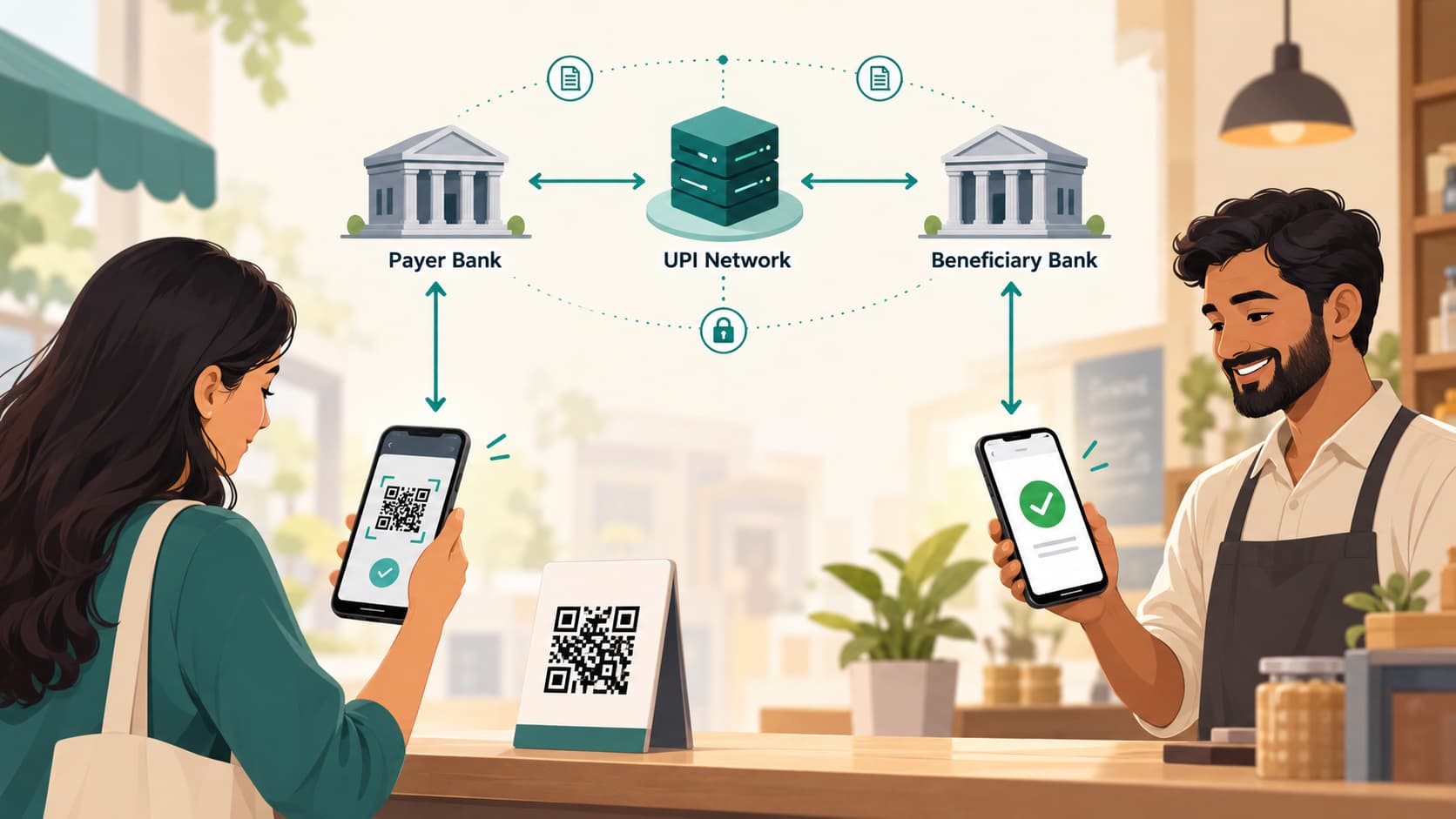
You scan a QR code at a shop, enter ₹250, type your UPI PIN and tap Pay.
Within seconds, your phone displays Payment successful. The shopkeeper may hear a payment sound, and the merchant's bank account has received the money.
It feels almost as if your phone sent ₹250 directly to the shopkeeper's phone.
That isn't what happened.
For a normal bank-account UPI payment, the money moves from your bank account to the recipient's bank account. Your payment app provides the interface, several banking systems exchange messages, and the Unified Payments Interface operated by the National Payments Corporation of India, or NPCI, provides the common network that allows them to communicate.
NPCI describes UPI as an instant payment system built over IMPS infrastructure that enables transfers between participating accounts. It operates around the clock rather than being limited to bank branch hours.
The QR code doesn't contain money. Your UPI app doesn't normally take possession of the money during an ordinary bank-account payment. And your UPI PIN isn't sent to the shopkeeper.
To understand what actually happens, we need to meet the systems involved.
UPI Is a Network, Not a Wallet
One of the easiest misconceptions is to think of UPI as a digital wallet.
They are different ideas.
A traditional wallet holds value inside the wallet system. With a normal bank-account UPI transaction, the funds remain in your bank account until you authorise the payment.
UPI acts more like a common payment layer connecting participating banks and payment applications.
NPCI's own description says UPI allows users to bring multiple participating accounts into a UPI application and make payments using mechanisms such as UPI IDs and QR codes.
This separation is important because the app on your phone and the account containing your money may belong to completely different organisations.
You might use one company's UPI app while your bank account is with another bank and the merchant's account is with a third.
UPI makes that interoperability possible.
The Main Players in a UPI Payment
Suppose you use a UPI app to pay a local shop.
Several participants may be involved.
You: the payer or remitter
You are the person sending money.
NPCI uses the term remitter for the account holder sending funds.
Your UPI app
This is the interface you interact with.
It may be an app provided directly by a bank or a third-party application provider, commonly called a TPAP.
The app lets you scan the QR code, select an account, check the recipient, enter the amount and initiate the payment.
But that does not mean the app itself is the bank holding your money.
The payer PSP
UPI apps connect into the UPI ecosystem through payment-service-provider arrangements.
NPCI describes the payer PSP function as onboarding customers, creating UPI IDs and establishing device binding used as part of authentication.
A large third-party UPI app may work with one or several PSP banks.
Your bank
This is the remitter bank or payer's bank: the bank holding the account from which the money will be debited.
It is ultimately responsible for checking whether the account can make the payment and processing the debit.
NPCI's UPI infrastructure
NPCI operates the UPI system that enables participating institutions to exchange the payment messages required to complete the transaction.
You can think of it as the interoperable routing and switching layer connecting the participants.
The receiver's side
The shopkeeper has a UPI identity connected through a payee PSP or acquiring arrangement to a beneficiary account.
The bank receiving the funds is the beneficiary bank.
NPCI defines the beneficiary simply as the account holder receiving the money and the beneficiary bank as the bank holding that recipient account.
So a simple-looking transaction may involve:
You → UPI app → PSP/bank → UPI network → receiver's PSP/bank → receiver
The details vary by transaction type and participant architecture, but this is a useful model for understanding what is happening.
What Is a UPI ID?
Typing someone's account number and IFSC every time you want to send ₹100 would make mobile payments painfully slow.
UPI solves much of that problem with a Virtual Payment Address, usually called a UPI ID or VPA.
It may look something like:
name@providerThe important part is that this address can be mapped within the UPI ecosystem to an account that can receive the payment.
You therefore don't need to know the receiver's full bank-account details for a normal UPI-ID transfer.
NPCI states that UPI transfers can be made using a Virtual ID without first registering the recipient as a beneficiary, and BHIM supports payment using a UPI ID or QR code.
The UPI ID is effectively an address for the payment, not the money itself.
What Is Actually Inside a UPI QR Code?
The black-and-white square at the tea stall may look like little more than an image.
It contains structured payment information.
At minimum, a merchant QR needs enough information for the payment system to identify where the payment should go. Depending on the type of QR, it can contain information such as:
- payee UPI ID
- payee or merchant name
- merchant-related information
- transaction reference
- amount, where applicable
NPCI's QR specifications identify the payee virtual payment address and payee name as important parameters. A dynamic QR can also carry a fixed transaction amount and reference generated for that particular purchase.
This explains the difference you see in shops.
Static QR
A printed QR placed permanently at the counter generally identifies the merchant.
You scan it and enter the amount yourself.
The same QR can be used by many customers for different payments.
Dynamic QR
A billing system generates a QR for a particular transaction.
It can contain the amount and transaction reference, so when you scan it, ₹742.50 may already be filled in and non-editable.
NPCI's specifications explicitly distinguish these cases, including mandatory amount information for dynamic merchant QR transactions.
So scanning a QR does not transfer money.
It simply gives your app the information needed to prepare the payment.
What Happens After You Scan the QR?
Now we can follow a normal merchant payment from beginning to end.
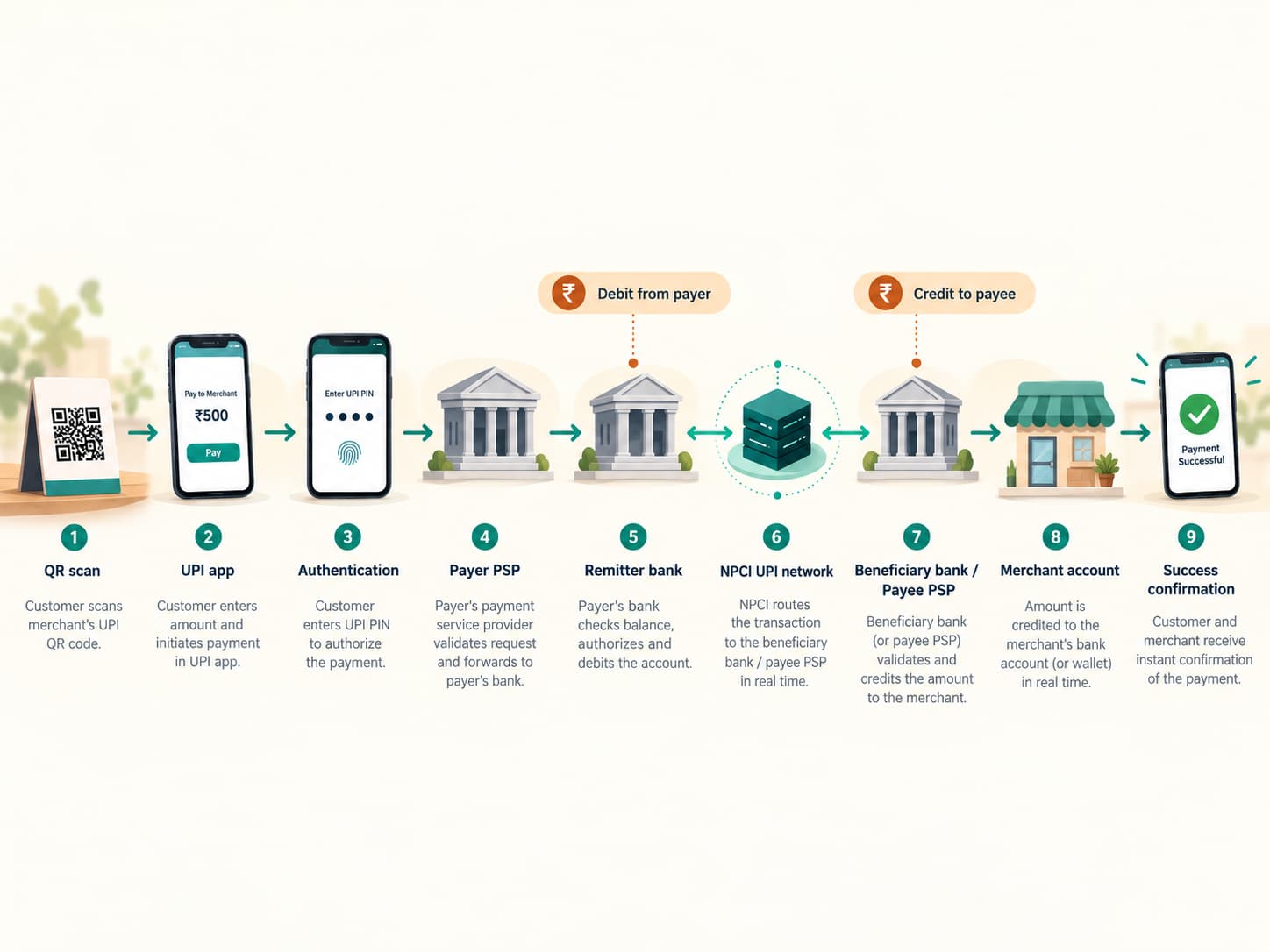
Step 1: Your app reads the payment address
The phone camera reads the QR code.
Your UPI app extracts details such as the merchant's payment address and, with a dynamic QR, possibly the amount and transaction reference.
The app then shows you the recipient details.
That confirmation screen matters.
You should check the displayed recipient before authorising the payment rather than assuming every QR sticker is genuine.
Step 2: You choose the account and amount
If several bank accounts are linked to the app, you choose which one should pay.
With a static QR, you normally enter the amount.
With a dynamic QR, the merchant's billing system may already have supplied it.
At this stage nothing has necessarily left your bank account.
You have simply prepared a payment instruction.
Step 3: The payment request enters the UPI network
The app and its PSP infrastructure create the payment request.
The system needs to determine both sides of the transaction:
Who is paying?
and
Who should receive the money?
The recipient's UPI address is resolved to the relevant receiving side of the UPI network.
UPI's interoperability is what makes it possible for an app linked to one bank to pay a UPI ID served by another participant.
NPCI requires UPI applications and merchants to support interoperable concepts such as Scan any UPI QR and payment through UPI across participating apps.
Then You Enter the UPI PIN
This is the critical authorisation step.
Your UPI PIN is normally a four- or six-digit credential that you set for the bank account.
NPCI states that the UPI PIN is required to authorise bank transactions and specifically warns users not to share it.
UPI also uses device-related authentication.
NPCI describes device binding as a first factor used in the payer PSP function, with the UPI PIN used to approve transactions where required.
A useful way to think about this is:
the phone/app establishes the registered device context
the UPI PIN authorises the transaction
Entering your UPI PIN is therefore not the equivalent of sending your PIN to the merchant.
The merchant does not need to know it.
The app coordinates the authentication flow with the UPI and banking infrastructure so that the payment can be authorised.
What Does Your Bank Check?
Once you authorise the transaction, your bank has to decide whether the debit can proceed.
Depending on the situation, checks may include whether:
- the authentication is valid
- the account is active and eligible
- sufficient funds are available
- transaction limits have not been exceeded
- the request meets risk and security checks
NPCI classifies failures caused by things such as an invalid PIN, incorrect account information or exceeded transaction limits separately from technical failures caused by unavailable systems or networks.
If the payment is accepted, your bank can debit your account.
The corresponding transaction message continues through the UPI infrastructure toward the receiving side.
How Does the Merchant Get the Money?
The beneficiary bank receives the appropriate transaction request and processes the credit to the destination account.
Once the required debit and credit processing has succeeded, success messages travel back through the participating systems.
Your app receives a successful response.
The merchant's side also receives confirmation.
That is why both phones can know about the transaction almost immediately even though they aren't directly transferring money to one another.
For an ordinary successful UPI transaction, the customer-facing debit and credit happen in real time.
NPCI describes BHIM UPI payments as instant bank-to-bank transfers, while its merchant FAQ states that a merchant receives the money after the customer confirms a successful payment according to the acquiring arrangement.
So Does the Money Pass Through the Payment App?
For an ordinary UPI payment directly between linked bank accounts, it is misleading to imagine this:
Your bank → payment-app company's bank account → merchant
The application acts as a payment interface and participant in the messaging ecosystem.
The underlying transaction is between the relevant financial accounts.
This is why you can often link bank accounts from different participating banks inside the same UPI application.
The app helps tell the banking network what you want to do.
It isn't normally functioning as an intermediate storage box for your money during a standard bank-account UPI transfer.
There are now additional UPI arrangements involving prepaid instruments, credit products and specialised features, so not every UPI transaction follows precisely the same funding model. But bank-account-to-bank-account payments remain the clearest way to understand UPI's core architecture. NPCI notes that UPI can now also support eligible prepaid wallets in addition to bank accounts.
What Does NPCI Actually Do?
NPCI is central to the network, but it is useful to distinguish transaction processing from simply "holding everybody's money."
UPI lets participating institutions exchange payment instructions through a common infrastructure.
NPCI is also involved in interbank clearing and settlement.
This produces a slightly surprising distinction:
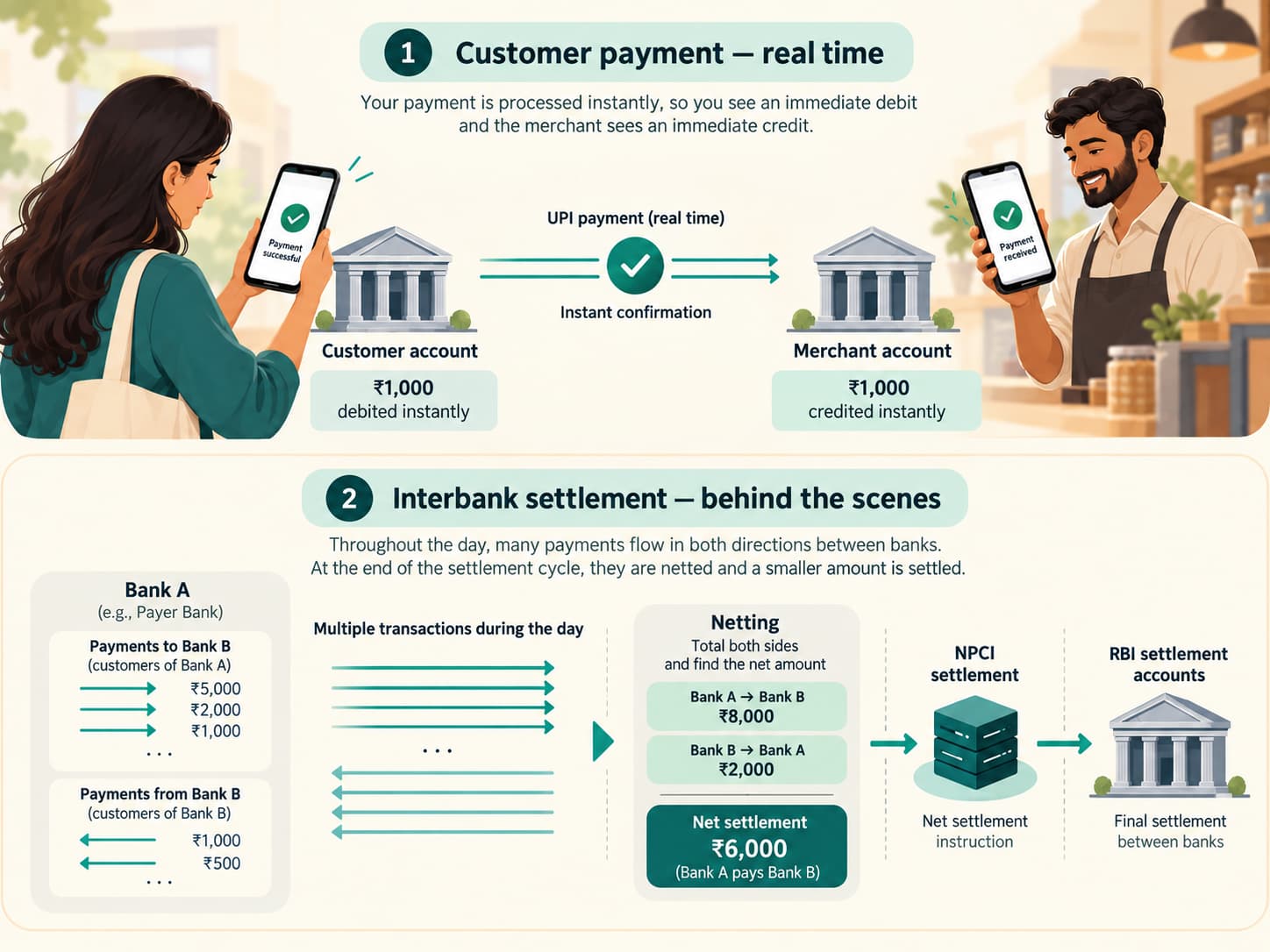
Your payment can appear immediately in your account and the merchant's account even though the banks' settlement obligations are handled separately behind the scenes.
NPCI's settlement documentation describes it as the clearing and settlement agency for interbank UPI transactions. It calculates the participating institutions' net debit and credit positions and settles those obligations through member settlement accounts maintained with the Reserve Bank of India.
So there are really two levels.
Customer transaction
Your account is debited and the recipient's account is credited as part of the real-time payment experience.
Interbank settlement
Behind the scenes, participating institutions owe one another money as millions of transactions flow in both directions.
Rather than individually moving reserves for every ₹20 tea payment, the system calculates settlement obligations between participants and settles them through the banking infrastructure.
That difference between real-time customer payment and interbank settlement is one of the most useful concepts for understanding digital payment systems.
Why Can a UPI Payment Happen So Quickly?
UPI avoids several steps associated with older payment experiences.
You usually don't need to:
- enter the recipient's full account number
- enter an IFSC for every normal QR payment
- add the recipient as a beneficiary and wait
- log into internet banking
- wait for branch working hours
NPCI says UPI operates 24/7, and a beneficiary does not need to be pre-registered when payment is being made using supported UPI addressing methods.
The systems involved are already electronically connected.
What appears to you as:
Scan → PIN → Paid
is actually a rapid sequence of machine-to-machine messages.
Why Does a Transaction Sometimes Show "Pending"?
Because several independent systems have to answer one another.
Your app may be working correctly while:
- your bank responds slowly
- NPCI connectivity is temporarily affected
- the beneficiary bank is delayed
- a network message times out
- the debit succeeds but the final confirmation doesn't arrive immediately
That creates an awkward situation.
Your bank account may appear debited while your app is uncertain whether the recipient received the money.
NPCI tracks such scenarios separately, including cases in which the beneficiary bank has not provided an online credit confirmation. It also tracks debit reversals where a payer account may have been debited but the transaction could not be confirmed successfully.
This is why repeatedly paying again immediately can sometimes be a bad idea.
Check the transaction status first.
What Happens When a Payment Fails After Your Account Is Debited?
A failed debit does not mean the money is supposed to disappear permanently.
UPI has reversal and reconciliation processes for unsuccessful or uncertain transactions.
NPCI's FAQ states that declined transactions provide for reversal of the debit, while exceptional cases that cannot be resolved instantly are handled through bank reconciliation and applicable processes.
From a user's perspective, the important evidence is the transaction's final status and the bank-account entry, not just whether the app briefly displayed an error message.
What Is a Collect Request?
Not every UPI transaction begins with you choosing Pay.
UPI also supports payment requests, often called Collect requests.
In this flow, another party sends a request asking you to authorise payment.
You receive the request in your UPI app, inspect it and decide whether to approve it.
If you approve it and authenticate the transaction, your account is debited.
This is why an unexpected collect request should never be treated as someone "sending you money."
It is asking you to send money to them.
NPCI lists Collect through a UPI ID as one of UPI's payment functions.
The Most Important Security Rule: Your PIN Is for Sending Money
Many UPI scams exploit a simple misunderstanding.
A fraudster tells someone:
"Enter your PIN so I can send you the refund."
That should immediately be suspicious.
For a normal receipt of money, you do not need to enter your UPI PIN merely to receive the credit.
RBI's public safety guidance explicitly says that entering a PIN or OTP is not required to receive money and warns users against scanning unknown QR codes when someone claims they are needed to receive a payment.
NPCI's own interface guidelines similarly carry the warning:
Never enter your UPI PIN to receive money.
That one rule prevents a large category of social-engineering fraud.
A QR Code Does Not Pull Money From Your Account by Itself
Scanning a QR is not normally the same thing as authorising the final payment.
The QR tells the app where the payment should go and may provide transaction details.
You should then see a payment screen showing the recipient and amount.
The debit happens only after the required authorisation process.
This distinction is crucial because scammers sometimes persuade users to scan a malicious or misleading QR under the impression that scanning it will receive money.
RBI advises users not to scan QR codes received from unknown sources for the purpose of receiving funds.
Treat the payment-confirmation screen as seriously as you would treat signing a cheque.
Check:
Who am I paying?
How much?
Am I authorising a debit or actually receiving money?
Then enter the PIN.
How Does UPI Work With Different Apps?
One of UPI's most important characteristics is interoperability.
A customer using one UPI application can normally pay a compatible UPI address or QR associated with another participant.
That interoperability is deliberate.
NPCI's merchant and app rules require support for concepts such as Pay by any UPI App and Scan any UPI QR across the ecosystem.
So the important network isn't the individual app.
It is UPI.
The apps are different doorways into that common payment system.
The Whole Payment in One Diagram
For a typical bank-account merchant payment, the simplified sequence is:
1. You scan the QR
The app reads the merchant's UPI payment information.
↓
2. You check the merchant and amount
You select the account you want to use.
↓
3. Your app creates the payment request
The request enters the UPI ecosystem through the appropriate PSP infrastructure.
↓
4. The payee is resolved
The UPI network identifies where the recipient payment should be routed.
↓
5. You authorise
You enter your UPI PIN through the payment authentication process.
↓
6. Your bank approves and debits
The payer bank verifies the transaction and debits your account if everything is valid.
↓
7. The receiving bank credits the beneficiary
The payment reaches the merchant or other recipient account.
↓
8. Confirmation returns
The success response reaches the participating systems and your app displays the result.
All of that can happen in the time it takes you to put your phone back in your pocket.
That is what makes UPI impressive.
The clever part is not simply that an app can display a QR scanner.
It is that thousands of banks, payment applications and merchants can communicate through a common interoperable framework while your actual bank account remains at the centre of the transaction.
What looks like one tap on a screen is really a tightly coordinated conversation between your phone, your payment provider, your bank, NPCI's UPI infrastructure and the recipient's banking systems.
And when that conversation goes correctly, every participant reaches the same conclusion within seconds:
₹250 has moved from one account to another.