How Does UPI Actually Work—and What Happens When the Sender and Receiver Use Different Banks?
Follow a UPI payment from QR scan and UPI PIN to NPCI routing, sender-bank debit, receiver-bank credit and interbank settlement.
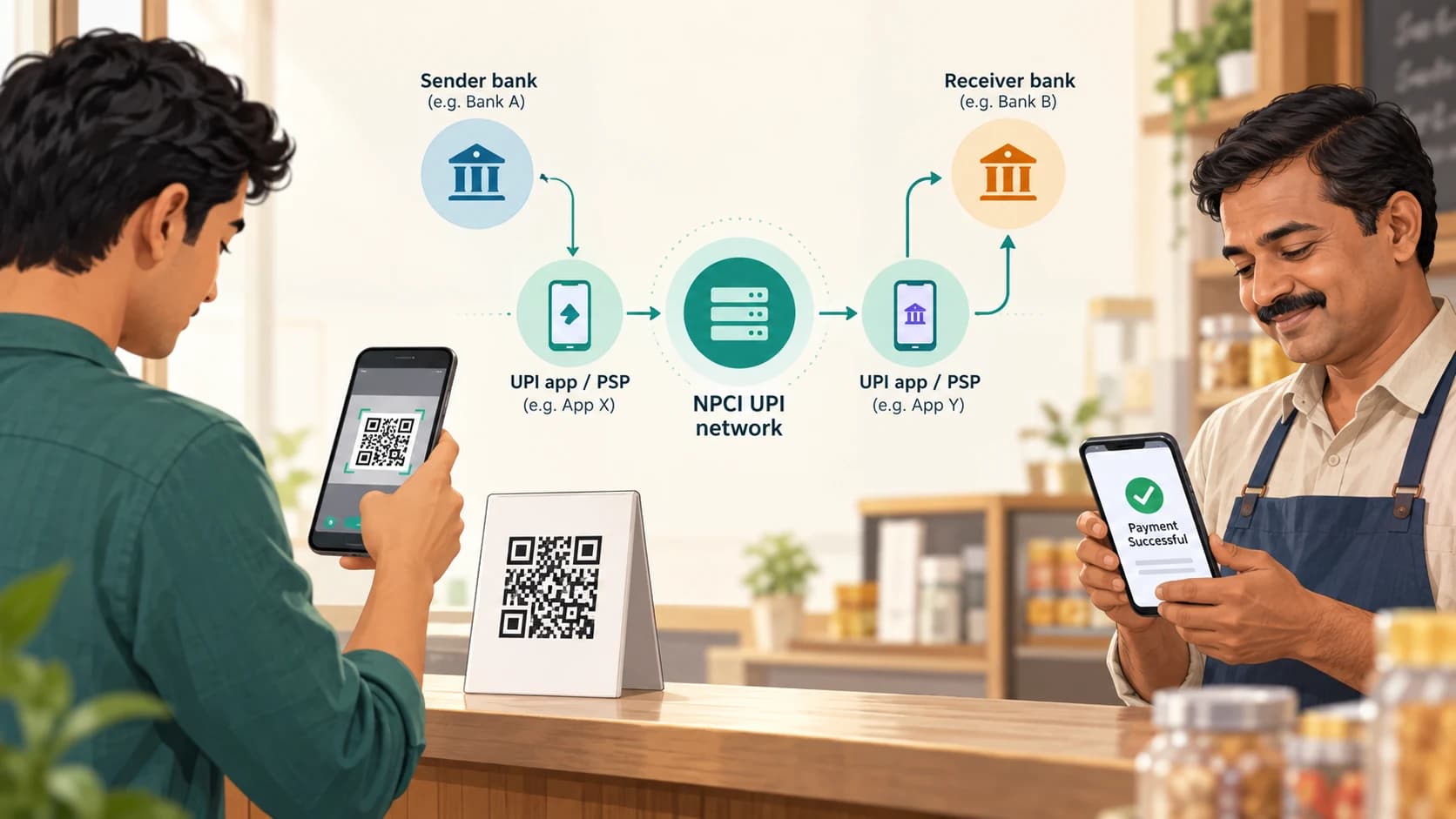
You open a UPI app, scan a QR code, enter ₹500 and type your UPI PIN.
A second or two later:
Payment successful.
The shopkeeper receives the money even though:
- you may use a third-party app,
- your account may be with one bank,
- the merchant may use another app,
- the merchant's account may be with a completely different bank.
It feels almost too simple.
Behind that single tap is a network connecting apps, Payment Service Provider banks, the National Payments Corporation of India (NPCI), the sender's bank and the receiver's bank.
UPI was designed specifically to make those differences largely invisible to the user.
NPCI describes the Unified Payments Interface as an instant payment system that allows transfers between participating bank accounts and works 24 hours a day. RBI has described UPI as an interoperable system that can bring multiple bank accounts into one mobile application and route payments without requiring users to expose sensitive bank details every time.
By August 2026, NPCI reported 752 banks live on UPI and about 24.5 billion transactions in that month alone.
The remarkable part is therefore not merely that UPI is fast.
It is that thousands of financial institutions and payment applications can behave like parts of one payment network.
The First Thing to Understand: Your UPI App Is Not Necessarily Your Bank
Suppose you have:
Bank account: Bank A
UPI app: App X
The app and the bank do not have to be the same company.
UPI separates the interface you use from the bank account where your money actually sits.
NPCI's UPI product material identifies several different roles.
Payer
The person sending money.
Remitter bank
The bank holding the account from which money will be debited.
Beneficiary
The person or merchant receiving money.
Beneficiary bank
The bank whose account will receive the credit.
Payer PSP
The Payment Service Provider side that onboards the payer into UPI and enables the payment request.
Payee PSP
The PSP side associated with receiving money or resolving the beneficiary's UPI identity.
NPCI
The network operator and coordinator of the UPI network.
A third-party UPI application can also participate as a Third-Party Application Provider (TPAP) through one or more PSP banks.
So one ordinary payment can involve several organisations even before we count the two customers.
A UPI ID Is an Address, Not the Bank Account Itself
Traditional bank transfers often required information such as:
- account number,
- IFSC,
- beneficiary registration.
UPI introduced a simpler addressing layer.
A UPI ID might look conceptually like:
name@handle
That identifier acts as a payment address linked through the UPI ecosystem to a bank account or other supported payment source.
The sender does not need to know the recipient's underlying account number for an ordinary UPI-ID transaction.
NPCI's FAQ says a beneficiary does not need to be pre-registered by the sender before a transfer and that UPI can route payments using a Virtual Payment Address.
This is one of UPI's most important design ideas:
People can pay an address while the network handles the account routing underneath.
What Is Inside a UPI QR Code?
A merchant QR code is essentially a convenient way of supplying payment information to the app.
Instead of manually typing a UPI ID, the camera reads the encoded details.
Depending on the QR and payment setup, those details can include information such as:
- the payee's UPI address,
- merchant information,
- transaction reference fields,
- sometimes a preset amount.
Your app interprets the QR and shows you the beneficiary before you authorize the transaction.
The QR itself does not magically transfer money.
It simply gives the UPI app the information required to create the payment request.
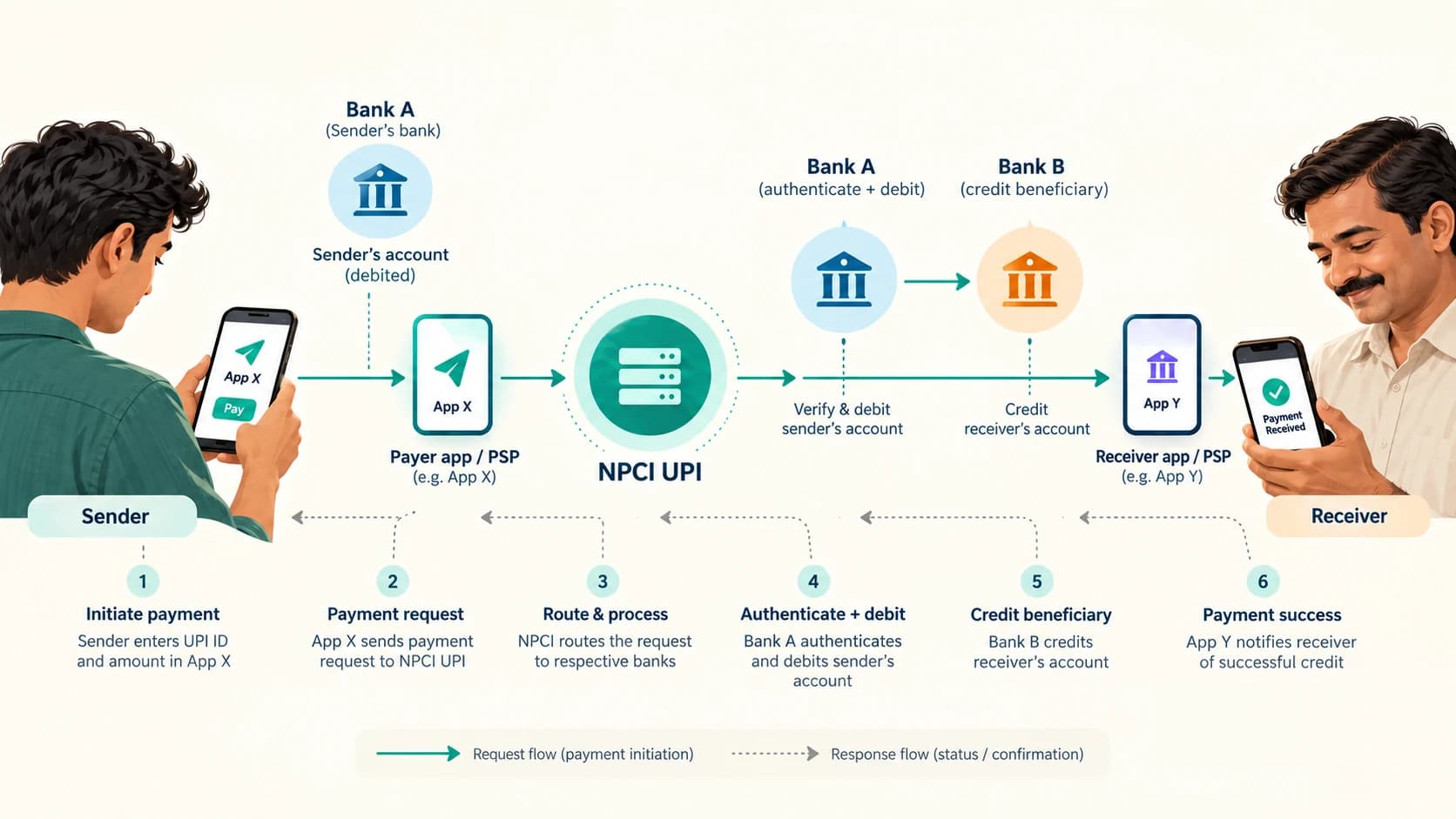
Step 1: You Scan the QR or Enter the UPI ID
Imagine this example:
You: account at Bank A
Your UPI app: App X
Shopkeeper: account at Bank B
Shopkeeper's UPI app/merchant setup: App Y
You scan the merchant's QR.
App X reads the payment address and asks the UPI ecosystem to resolve the recipient information.
The payment screen may show:
- merchant or beneficiary name,
- UPI ID,
- amount,
- your selected bank account.
RBI noted in 2024 that UPI already provides beneficiary-name verification before a transfer—one reason RBI later decided to introduce a similar name-look-up facility for NEFT and RTGS.
You should still check the displayed beneficiary name before paying.
Step 2: The App Creates a Payment Instruction
When you tap Pay, the app constructs a digital payment request.
Conceptually, it contains information such as:
- payer identity/address,
- selected bank account reference,
- beneficiary address,
- amount,
- transaction identifiers,
- other routing information.
The exact production message format is part of the regulated UPI ecosystem and is more complex than a simple text message.
The important point is this:
the app is requesting a bank-to-bank payment; it is not moving ₹500 from its own wallet unless you have deliberately selected a supported wallet/PPI source.
For an ordinary linked-bank-account UPI transaction, the money remains in the banking system.
Step 3: You Authorize the Payment With Your UPI PIN
Before the bank can debit your account, you authorize the transaction.
For conventional UPI payments, this usually involves the UPI PIN.
NPCI says the UPI PIN is a 4–6 digit passcode used to authorize bank transactions.
The PIN is not supposed to be shared with:
- the recipient,
- the merchant,
- customer support,
- anyone asking over a call or message.
A crucial detail is that your UPI application is not supposed to simply store your PIN and decide for itself whether it is correct.
NPCI's product material assigns authentication of the UPI PIN to the remitter bank—the bank whose account is being debited.
That separation matters.
The app provides the interface.
The bank holding your money ultimately participates in approving the debit.
Step 4: The Request Travels Through the UPI Network
Now the payment has to cross institutional boundaries.
This is where NPCI becomes central.
NPCI operates the UPI network and routes payment instructions between participating institutions.
A simplified path looks like:
Your UPI app / payer PSP
↓
NPCI UPI network
↓
Your remitter bank
and, on the receiving side:
NPCI UPI network
↓
Beneficiary side / beneficiary bank
NPCI's documentation describes UPI transactions as potentially involving two, three or four distinct institutional parties depending on whether the PSP roles and the actual account-holding banks are the same entities.
That is why UPI is more powerful than a single-bank mobile app.
The network is built to route across institutions.
Step 5: Your Bank Authenticates and Debits Your Account
Bank A receives the relevant payment instruction.
It checks whether the transaction can proceed.
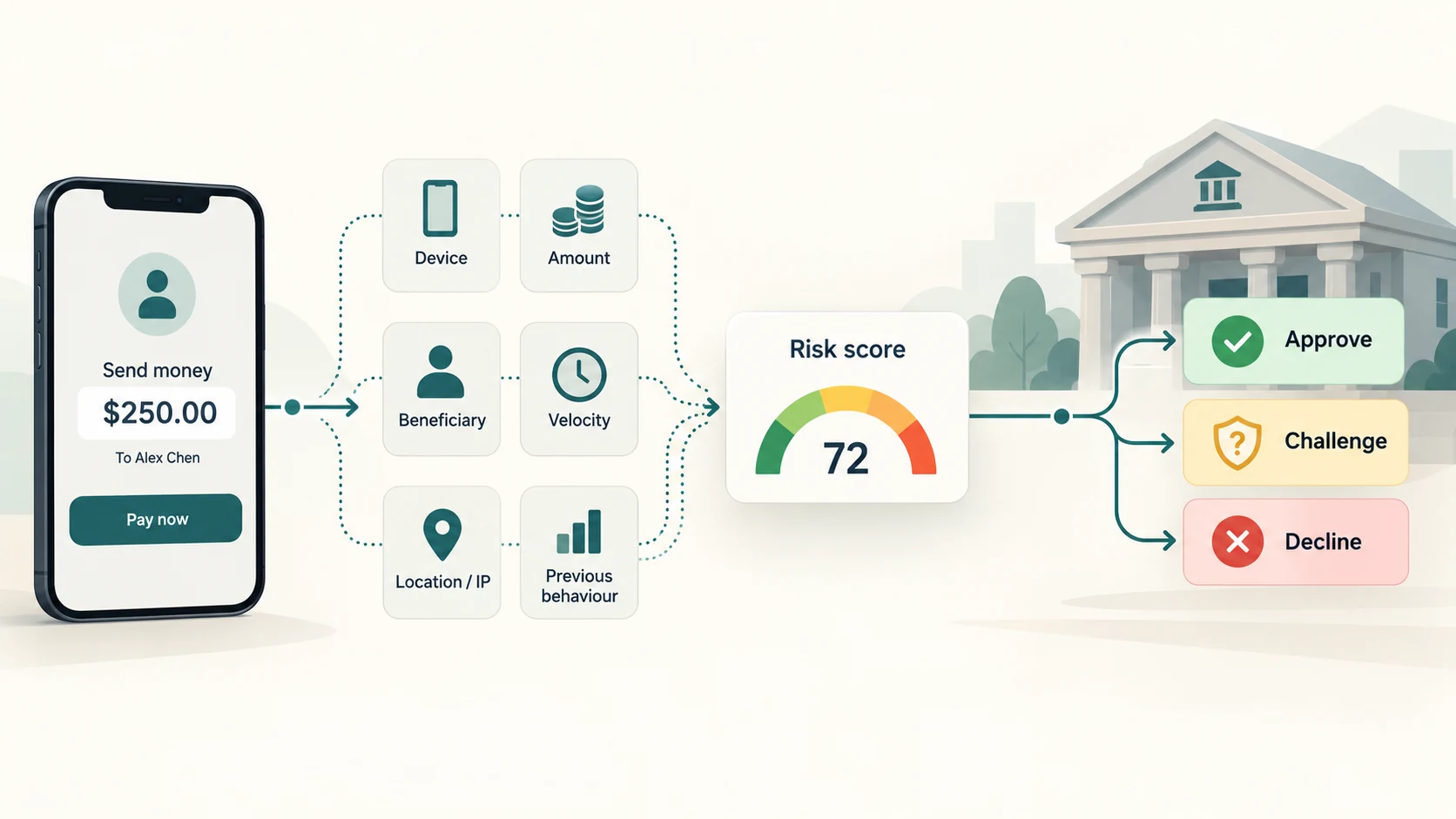
That can involve questions such as:
- Is the UPI authentication valid?
- Is the account active?
- Is sufficient balance available?
- Are transaction limits satisfied?
- Are bank risk controls satisfied?
If the transaction is approved, Bank A debits your account.
Your balance may change almost immediately.
The bank then sends the transaction response into the UPI network.
Step 6: The Receiver's Bank Gets the Credit Instruction
NPCI routes the successful payment toward the beneficiary side.
Bank B identifies the destination account linked to the beneficiary and credits it.
Now:
Your account at Bank A: −₹500
Shopkeeper's account at Bank B: +₹500
The receiver can see the credit even though Bank A and Bank B are completely different institutions.
That is the part that feels magical from the outside.
Technically, it is interoperability.
What Happens When Sender and Receiver Use Different Apps Too?
Nothing fundamental changes.
You could have:
Sender bank: Bank A
Sender app: App X
Receiver bank: Bank B
Receiver app: App Y
The UPI network provides the common language and routing framework between those participants.
The receiver does not need App X.
The sender does not need App Y.
Both sides participate through the UPI ecosystem.
This is similar to email.
A person using one email provider can send a message to someone using another because both sides understand common internet standards.
UPI brings a comparable interoperability concept to supported digital payments.
The Most Important Misconception: The App Does Not Usually “Hold” the Money
Suppose you pay through a popular third-party UPI app.
It is easy to imagine the route as:
Your bank → app company → recipient's app → recipient's bank
For an ordinary bank-account UPI transfer, that is the wrong mental model.
A better one is:
App = interface and transaction initiation layer
Banks = where the customer accounts are held and debited/credited
NPCI UPI = network that routes and coordinates the payment messages
The app may provide:
- user interface,
- QR scanning,
- transaction history,
- notifications,
- merchant experience,
- customer support flows.
But your normal linked bank-account payment is not simply sitting inside the app company's own bank balance while it travels to the receiver.
Then Does ₹500 Physically Move From Bank A to Bank B in That Exact Second?
This is where payment systems become more interesting.
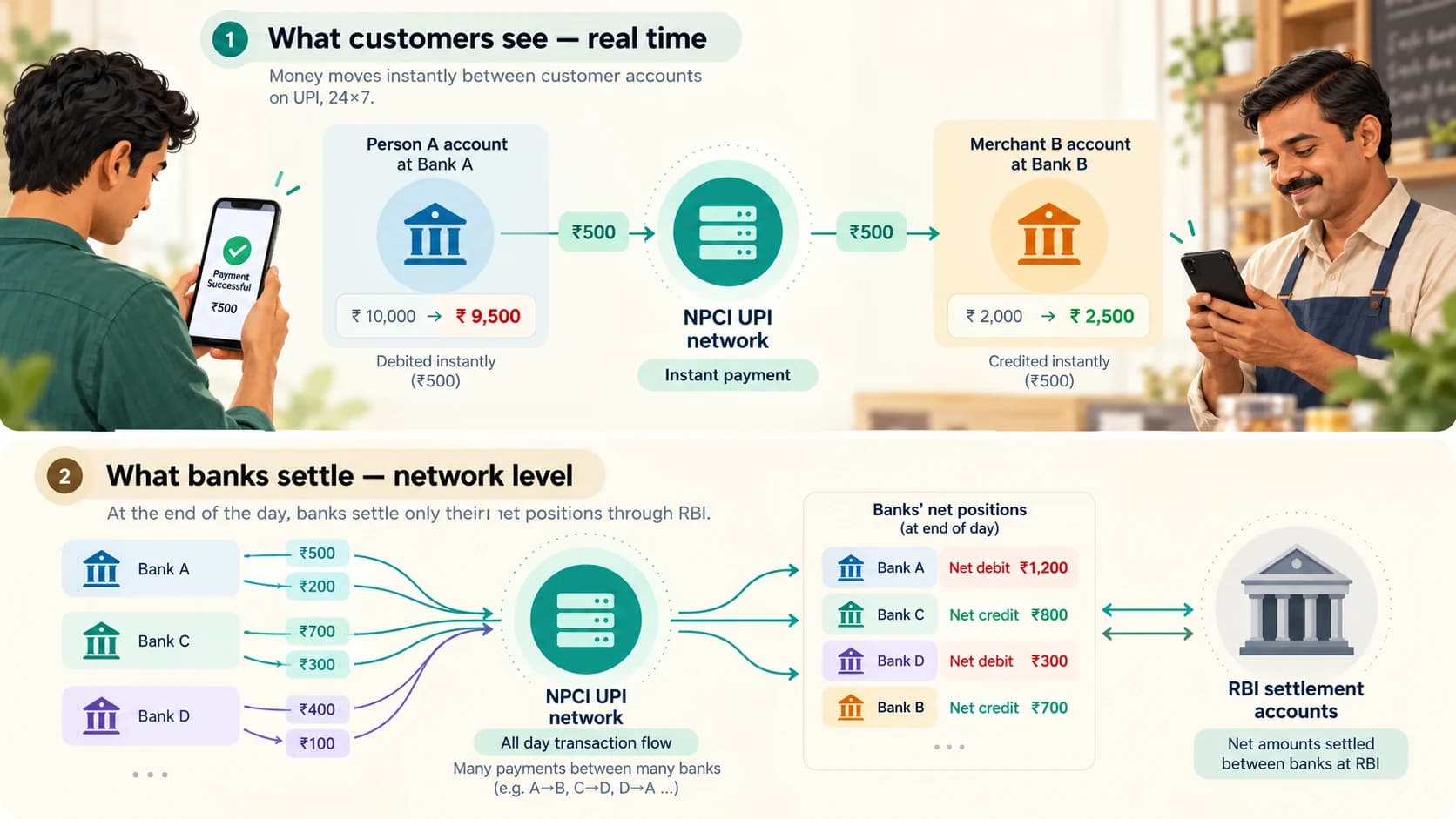
At the customer-account level, the transaction is designed to feel real time:
payer account debited
and
beneficiary account credited.
But there is also a separate interbank settlement layer.
NPCI's UPI settlement documentation states that NPCI acts as the clearing and settlement agency for interbank UPI transactions.
Instead of moving a separate pile of central-bank money between banks for every ₹10, ₹50 or ₹500 customer payment one by one, the system calculates the participating banks' net obligations.
Imagine that during a settlement cycle:
- customers of Bank A sent ₹1,000 crore to customers of Bank B,
- customers of Bank B sent ₹900 crore to customers of Bank A.
The gross flows total ₹1,900 crore.
But between those two simplified sides, the net difference is only:
₹100 crore from A toward B.
Real UPI settlement involves many banks and far more transactions, but the principle of net settlement positions is similar.
NPCI calculates members' net debit or credit positions and uses settlement accounts maintained with RBI to settle those obligations.
So there are two related but different events:
Retail payment
Your ₹500 debit and the merchant's ₹500 credit happen as part of the live UPI transaction.
Interbank settlement
The banks' accumulated obligations are cleared and settled through the payment-system settlement process.
These should not be confused.
Why Does This Architecture Scale So Well?
If every UPI payment required the sender's bank to create a completely new bilateral technical connection with every possible receiver bank, the system would become extremely difficult to scale.
Imagine hundreds of institutions all building separate custom links to one another.
UPI provides a common network.
The payer side sends the transaction into that network.
The network routes it to the required participant.
That is why a new user generally does not care whether a merchant banks with:
- a large private bank,
- a public-sector bank,
- a small finance bank,
- a payments bank,
- another UPI-enabled institution.
If both sides are properly reachable through UPI, the network handles the routing.
Why Can You Link Several Banks to One UPI App?
Because the application layer and account layer are separate.
NPCI's FAQ says users can link more than one bank account depending on the PSP application's available functionality.
So one phone might show:
Bank A savings account
Bank B salary account
Bank C secondary account
When paying, you choose which one should be debited.
The app does not need to become Bank A, Bank B or Bank C.
It is acting as the payment interface connected to the UPI ecosystem.
Why Can the Same Bank Account Work in More Than One UPI App?
For the same reason.
The bank account belongs to the bank.
The UPI application is one interface through which you can access UPI functionality.
NPCI says customers can use more than one UPI application and link the same or different bank accounts where supported.
That is another form of interoperability.
You are not supposed to be locked into one application simply because your bank account was first registered there.
How Does UPI Find Your Bank Account During Registration?
When you first link a bank account, the UPI application verifies your mobile identity and requests the eligible bank accounts associated with the mobile number registered with the bank.
NPCI's FAQ says the mobile number linked to the bank account must match the number verified in the UPI app for account discovery.
The returned information is masked rather than simply exposing complete bank-account information to the app interface.
The user then sets up or uses the required UPI credentials for that bank account.
This onboarding step is one reason changing the SIM, handset or app can require re-registration or fresh device verification.
Device Binding Is Part of UPI Security
UPI does not rely only on knowledge of the PIN.
NPCI's ecosystem material describes device binding as a first factor used when a customer is onboarded.
In practical terms, the system associates the UPI setup with the user's registered mobile/device environment.
The UPI PIN then provides the transaction-authorisation factor.
This is why fraudsters asking you to:
- reveal a UPI PIN,
- install remote-access software,
- approve an unknown collect request,
are dangerous even though UPI itself has authentication controls.
Security technology cannot protect a transaction if the real customer is socially engineered into authorizing the wrong one.
Does the Receiver Need to Enter a PIN?
No—not for a normal incoming payment.
You enter a UPI PIN when authorizing a debit from your account.
Receiving money does not require the beneficiary to reveal or enter a UPI PIN.
That gives a simple anti-fraud rule:
You do not need to enter your UPI PIN merely to receive an ordinary payment.
Be suspicious of anyone claiming otherwise.
What Is a “Collect Request”?
UPI can support both pay and collect flows.
Pay
The payer initiates:
Send ₹500 to this beneficiary.
Collect
The payee requests:
Please authorize ₹500 to me.
NPCI's older UPI architecture documents describe collect requests originating from the payee PSP, while pay requests originate from the payer side.
A collect request is not itself permission to debit the payer.
The payer still needs to review and authorize it where required.
This is why approving an unknown collect request can be dangerous.
It is a request for you to send money, not free money arriving in your account.
What Happens If One Bank's System Is Down?
UPI is real time, so several systems need to respond quickly.
A transaction can fail or remain pending because of:
- payer-bank problems,
- beneficiary-bank problems,
- network issues,
- NPCI-side technical problems,
- invalid authentication,
- insufficient balance,
- exceeded limits,
- other business rules.
NPCI distinguishes broadly between business declines—such as invalid PIN or limits—and technical declines caused by system/network issues.
That is why one UPI app can appear perfectly healthy while payments from a particular bank are failing.
The app is only one part of the chain.
Why Can Money Be Debited but the Receiver Not See It Immediately?
Distributed payment systems occasionally encounter timing problems.
For example:
- your bank successfully debits the account,
- a later part of the transaction times out,
- the app has not yet received a final status.
UPI has reversal and dispute-handling processes for such cases.
NPCI's FAQ says failed transactions should be reversed, although exceptional cases can take longer.
This is why the transaction status matters.
Do not assume that every temporary Pending message means the payment definitely failed or that you should immediately send the same amount again.
First check:
- transaction status,
- bank SMS,
- account balance,
- receiver's account,
- app's transaction history.
Why Does UPI Feel Faster Than an Ordinary Bank Transfer Form?
UPI removes several pieces of friction.
You normally do not need to:
- know the beneficiary's account number,
- know the IFSC,
- add a beneficiary,
- wait for beneficiary activation,
- log into full internet banking.
Instead:
scan / select
↓
check beneficiary
↓
enter amount
↓
authorize
The complexity has not disappeared.
It has moved into the infrastructure.
That is good technology design.
What Actually Happens in Those Few Seconds?
The entire journey can be summarized like this:
1. Payment address is captured
You scan the QR or enter a UPI ID.
2. Beneficiary is resolved
The UPI ecosystem identifies the destination and displays relevant beneficiary information.
3. Payment request is created
Your app/PSP side sends the transaction into UPI.
4. You authenticate
You authorize the payment using the required UPI authentication method, commonly the UPI PIN.
5. NPCI routes the transaction
The UPI network coordinates the request between the relevant participants.
6. Your bank approves and debits
The remitter bank authenticates and reduces your available balance.
7. The beneficiary bank credits
The receiver's bank posts the incoming amount.
8. Status travels back
The success/failure response reaches the apps and users.
9. Banks settle their network obligations
NPCI later calculates interbank settlement positions and settles them through the participating banks' settlement accounts with RBI.
That is the hidden machinery behind:
Payment successful.
UPI Works Because Banks Agree to Behave Like One Network
The most important idea is not the QR code.
It is not the smartphone.
It is not even the UPI PIN.
It is interoperability.
Before systems like UPI, digital banking often meant operating inside the boundaries created by individual banks.
UPI created a common layer above those institutions.
A person using App X can pay a person using App Y.
An account at Bank A can send to Bank B.
The customer's interface does not need to expose the full complexity of the banks, routing and settlement network underneath.
That is why a ₹20 tea payment and a much larger transfer can feel almost identical from the user's point of view.
The front end is simple:
scan → verify → authorize.
The back end is a coordinated conversation between multiple financial systems.
And when the sender and receiver use different banks, that is not an unusual exception UPI has to work around.
That interoperability is one of the main things UPI was designed to do.