Running AI Locally vs in the Cloud: Which Is Better for Privacy, Performance and Cost?
Compare local and cloud AI on privacy, model quality, speed, hardware needs and real costs—with practical examples and a framework for choosing.
Imagine asking an AI assistant to summarize a confidential work document. The answer appears on your screen either way—but where the document was processed can make a substantial difference.
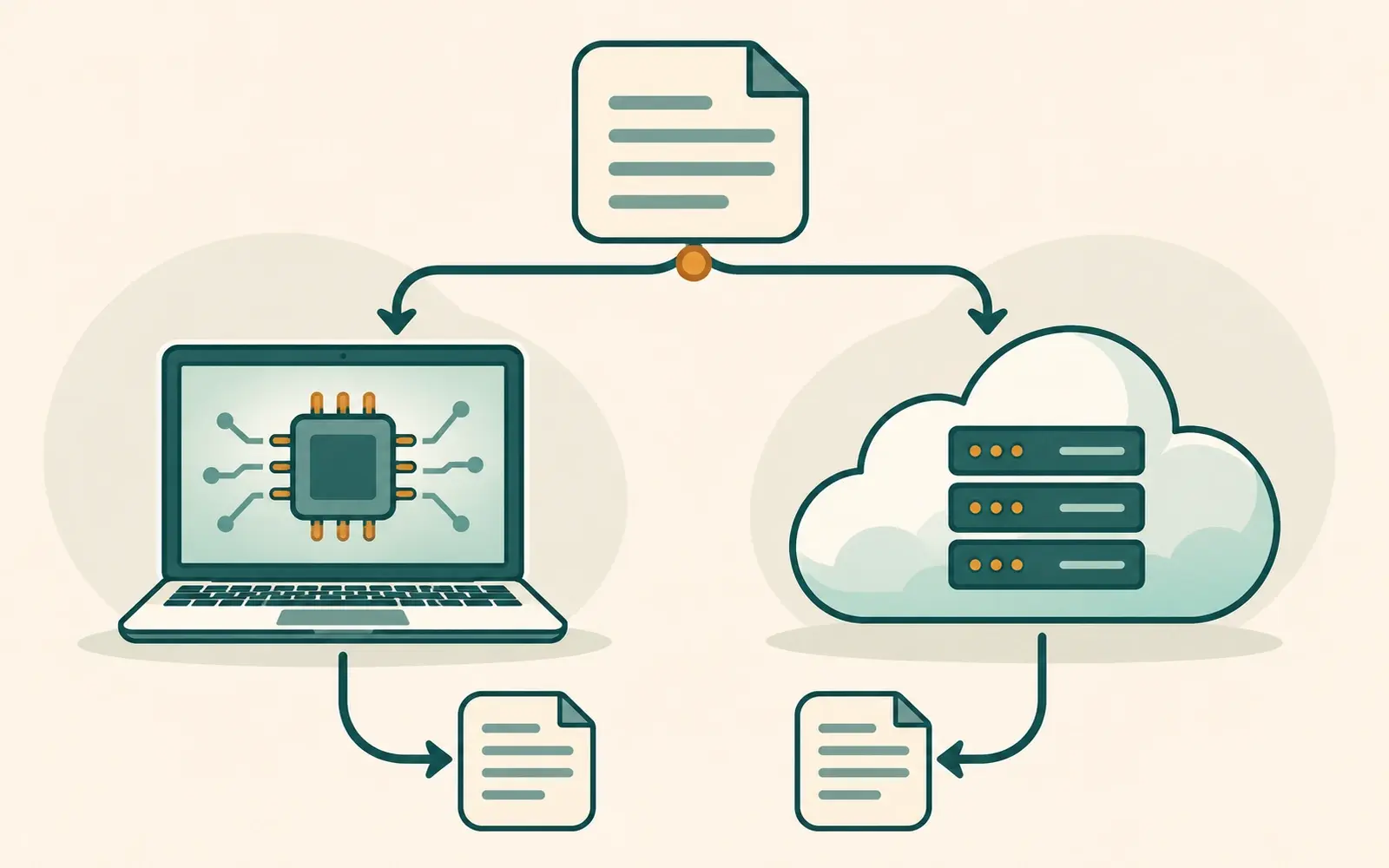
In one setup, a model runs on your own computer. In another, your document is transmitted to a model running on remote servers. The first can keep the document under your direct control; the second can offer access to considerably more computing power and sophisticated models without requiring a powerful computer at home.
That sounds like a simple trade: local AI for privacy, cloud AI for performance. In practice, it is more complicated. A local application may secretly or explicitly send selected requests to a remote service. A cloud service may have contractual, technical and operational protections that make it appropriate for sensitive business data. And a modest local model can answer a short question faster than a cloud model, even while being much less capable on a demanding task.
The useful question is not whether local AI or cloud AI wins in general. It is which deployment fits the data, task, hardware and usage pattern.
What Does It Mean to Run AI Locally?
A local AI model performs its inference—the computation used to generate a response—on hardware you control, typically a laptop, desktop, workstation or phone. The model's weights, the numerical parameters learned during training, are stored on the device and loaded into memory when needed.
For a locally configured text model, the process is roughly:
- Your application reads the prompt or document.
- An inference program converts the input into tokens and runs the model on your CPU, GPU or another supported accelerator.
- The generated response is returned to the local application.
There is no inherent need to transmit the prompt to an external model server. Tools such as Ollama, LM Studio and llama.cpp support local inference, although their precise features and network behavior differ. LM Studio documents that downloaded models can operate offline; it also notes that discovering and downloading models involves network access.
Local does not necessarily mean open-source. A model may offer downloadable weights while carrying a license with restrictions. The application running it may also be proprietary. Model cards and licenses should be checked separately from the question of where inference happens; Hugging Face explains these disclosures.
Local AI also includes tightly integrated on-device features rather than just desktop chat applications. Google's ML Kit GenAI APIs describe on-device inference powered by Gemini Nano for supported app capabilities. This is different from assuming every feature of a product bearing the same AI brand runs locally.
What Does Running AI in the Cloud Mean?
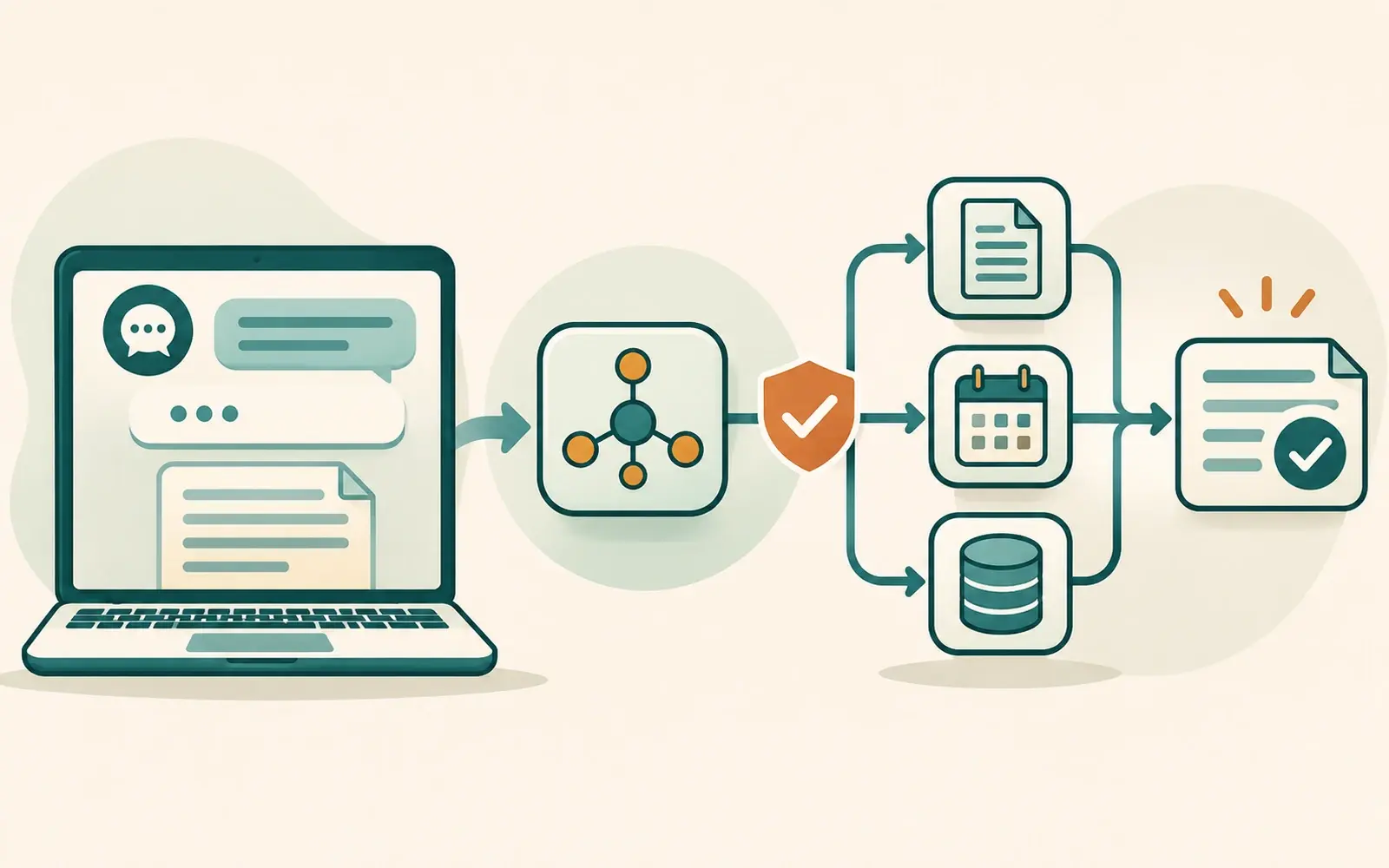
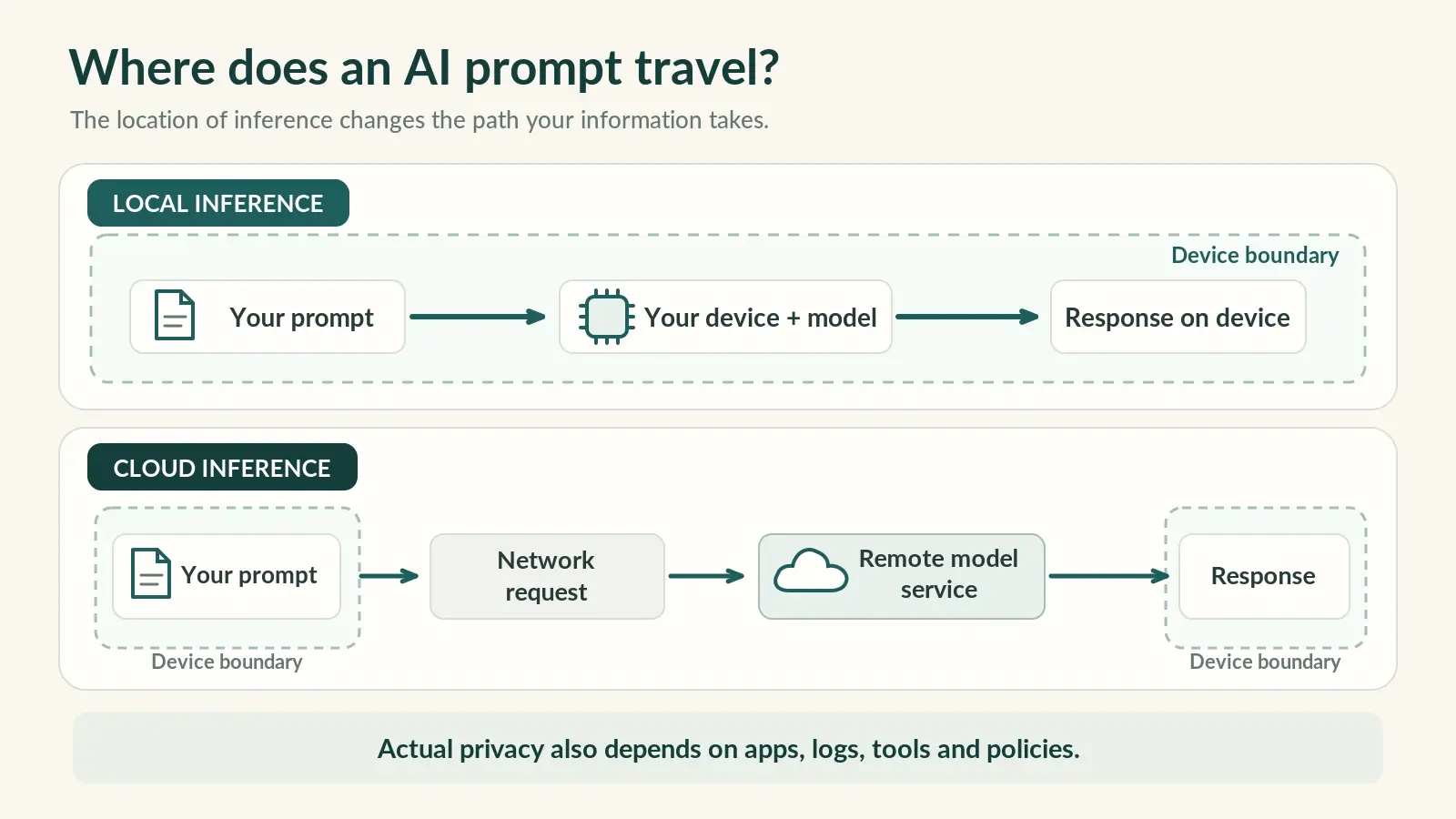
In cloud inference, the model runs on computers operated by a service provider or another remote infrastructure operator. Your device sends a request over a network; the remote model processes it and sends a result back.
A cloud AI service can be used through a website or app, a software subscription, or an application programming interface (API). An organization can also run its own model on rented cloud infrastructure rather than relying on a public chatbot.
These arrangements should not be confused:
| Arrangement | Who runs the computation? | Typical practical consequence |
|---|---|---|
| Fully local model | Your device | Direct control over local processing, subject to app and integration settings |
| Consumer cloud chatbot | Service provider | Easy access; account, retention and usage rules vary by product |
| Managed business/API model | Service provider or contracted host | Programmatic use; specific enterprise and API data terms matter |
| Self-hosted model on rented cloud servers | Your organization administers a remote deployment | More infrastructure control, but still remote processing, hosting costs and security responsibilities |
| Hybrid/on-device-plus-cloud system | Both local hardware and remote servers | Some tasks stay local while others are routed remotely |
For example, Apple describes Apple Intelligence as using on-device processing where possible and its Private Cloud Compute infrastructure for selected more demanding requests. A product may therefore be both local and cloud-based, depending on the feature being used.
Privacy: Where Does Your Information Actually Go?
The strongest privacy advantage of properly configured local inference is data minimization through location. If a prompt never leaves your device, a cloud inference provider cannot receive that prompt through the inference request.
Consider three tasks:
- Summarizing your own unpublished manuscript.
- Reviewing a customer spreadsheet that contains personal information.
- Asking a general question about the history of computers.
Keeping the first two on-device may meaningfully reduce the number of organizations and systems handling sensitive content. The third may be suitable for a cloud tool without meaningful confidentiality concerns.
The UK's Information Commissioner's Office explicitly discusses local inference as one way to limit the exposure of personal data. That is a data-protection consideration, not a blanket certification that local software is safe or legally compliant.
Local privacy has conditions
A computer can run the model locally and still leak information through surrounding software. For example:
- A chat application might switch to an optional cloud model.
- An agent or plugin might send document contents to search, translation, logging or analytics services.
- Cloud-synced folders or backups might upload conversation logs.
- A local server accidentally exposed to a network might allow unauthorized access.
- Malware or another user with access to the device might read local prompts and files.
Ollama's FAQ explains its local prompt handling and how to disable cloud features. LM Studio's offline documentation distinguishes offline chatting from model search and download. These examples illustrate why it is important to check the actual execution path, rather than relying on the word local in a product description.
Cloud processing does not automatically mean training on your data
A common misconception is that any information sent to an AI provider must become part of the model's training dataset. Inference processing, retention, logging, product improvement and model training are separate questions.
For example, OpenAI's API data controls state that API data is not used to train models by default unless a customer opts in. The documentation also describes abuse-monitoring logs and feature-dependent application-state retention. Those policies are specific to the API and the relevant configuration; they must not be assumed to apply identically to every consumer chat product or external integration.
Similarly, Microsoft's documentation for its managed Azure AI models distinguishes inference data handling from training use, subject to its published terms and service details.
A cloud system can offer encryption, access controls, retention limits, regional hosting, audit mechanisms and contractual protections. But users still need to understand what data is sent, what is stored, who can access it, and when it is removed. A promise not to train on prompts does not mean that prompts are never processed or temporarily stored.
For confidential information, the meaningful comparison is therefore a verified local configuration versus a specifically identified cloud product and plan, not "offline" versus "the entire cloud."
Performance: Local Can Feel Faster While Cloud Can Do More
Performance is not one number. At least four distinct measures matter:
| Measure | What it tells you | Why it matters |
|---|---|---|
| Time to first token | How long before the reply starts | Perceived responsiveness |
| Output speed | How quickly words/tokens are generated | Long answers and coding output |
| Task quality | How reliably the model solves your actual problem | Accuracy, reasoning, instruction-following and usefulness |
| Capacity | How much context, memory and simultaneous usage the setup handles | Long documents and multiple users |
For a short request, a small local model running on capable hardware can start responding quickly because it avoids an internet round trip. Cloud responses involve network latency and potentially service-side waiting, but the provider may use much faster accelerators and optimized inference systems.
For a long legal document, complicated coding task or difficult reasoning problem, a larger remotely hosted model may perform better than a much smaller model that fits your laptop. Faster generation is not the same as a better answer. A model that produces a quick but incorrect answer can cost more time in verification and rework.
Why hardware and memory matter
Model weights must occupy storage and, during operation, usable system or accelerator memory. Larger models and longer contexts generally increase resource demands.
A simplified weight-only calculation shows the scale. Imagine a model with 8 billion parameters, each stored at 4 bits:
8,000,000,000 parameters × 4 bits
= 32,000,000,000 bits
= approximately 4,000,000,000 bytes (4 GB)
That is an idealized lower-bound calculation for the weights, not a promise that the complete model runs within 4 GB of RAM or VRAM. Real quantized files include additional information, and inference also requires memory for temporary computation, the key-value (KV) cache, application overhead, and other components. A larger context window can make the memory demand substantially higher.
Quantization reduces the number of bits used to represent model parameters. The llama.cpp project supports multiple quantization formats and CPU/GPU combinations, making models practical on a wider range of machines. The trade-off is that smaller representations can affect model quality, with the impact depending on the model, quantization method and task.
Not every device has a dedicated high-memory graphics card. Some use shared memory, integrated accelerators or CPU-only inference. Such configurations can work, but their generation speed and model size limits vary considerably. Even with the same model name, two computers may produce very different experiences.
Context length and concurrency change the answer
A model that comfortably handles one short chat may struggle when asked to read a lengthy report, keep a large conversation in context or serve five people at once. Context length affects memory and processing load. Cloud services can allocate and scale resources across users, although they may impose their own rate, context or usage limits.
A useful benchmark should therefore specify the model, quantization, hardware, context size, input length, output length and number of concurrent requests. Claims such as "local AI is twice as fast" are meaningless without that context.
Published research on resource-constrained local inference also illustrates why speed, answer quality and energy use have to be evaluated together rather than treating raw token throughput as the only outcome.
Cost: Free Software Does Not Mean Free Computing
Local inference may have no per-request bill from an API provider. That is attractive, but the model still uses hardware, electricity, storage and your time. Cloud AI can have no initial hardware purchase beyond a normal device, but may involve subscriptions, per-token API charges or rented server costs.
The comparison gets misleading when a fixed-fee chatbot plan is compared against the cost of running a local model for an entirely different workload. Consumer subscriptions, commercial APIs and rented GPU instances are different pricing models.
The costs to count
| Cost component | Local inference | Cloud inference |
|---|---|---|
| Initial hardware | Existing computer or possible upgrade | Usually no dedicated AI hardware purchase |
| Model use | Often no per-token inference fee for a downloaded model | Subscription, metered tokens or compute usage may apply |
| Electricity | Paid through local power consumption | Usually included in service price, not necessarily fixed |
| Maintenance | Downloads, configuration, updates and troubleshooting | Much handled by provider; integration work remains |
| Scalability | Limited by available equipment; expanding can cost more | Capacity can be rented or managed, subject to quotas and charges |
| Reliability | Depends on device health, power and local setup | Depends on connectivity and service availability |
A worked example: when might local AI be cheaper?
Suppose a person is considering extra hardware solely for local inference. The following numbers are hypothetical teaching inputs, not current hardware quotations, electricity tariffs or measured benchmark results:
- Extra hardware expense: ₹36,000.
- Intended useful period: 36 months.
- Additional average power draw while using AI: 100 W.
- AI usage: 2 hours per day, 30 days per month.
- Illustrative electricity price: ₹8 per kWh.
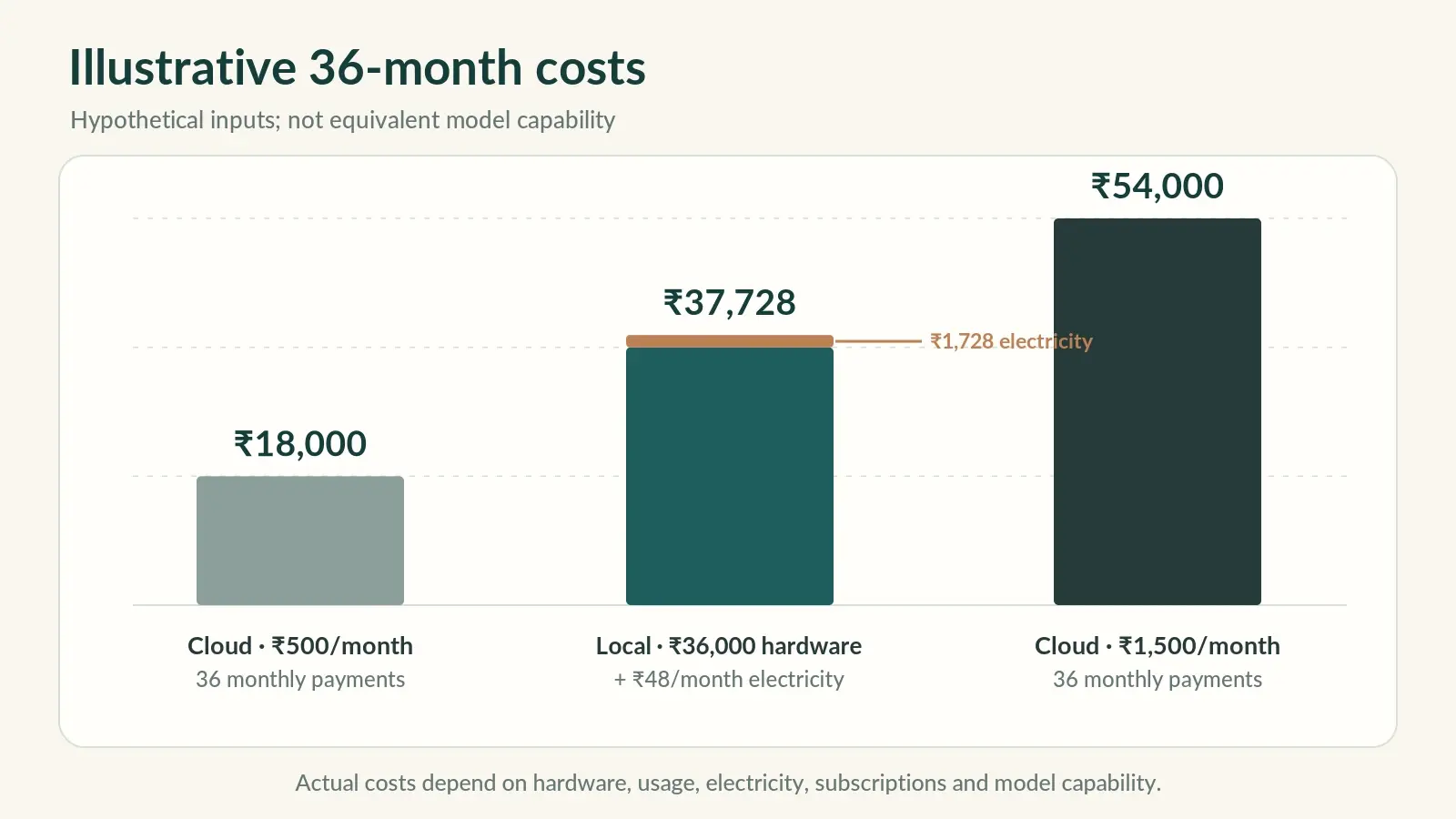
The allocated hardware cost is ₹36,000 ÷ 36 = ₹1,000 per month.
Extra electricity is 0.1 kW × 2 hours × 30 days = 6 kWh per month, or ₹48 at the assumed rate.
So the simplified cost is ₹1,048 per month, before maintenance, repairs, financing, storage and the value of your time.
Compare this with two entirely hypothetical cloud expenditures for a workload of similar usefulness:
- At ₹500 per month, cloud spending over 36 months is ₹18,000. That is less than the assumed local incremental cost of ₹37,728.
- At ₹1,500 per month, cloud spending over 36 months is ₹54,000. Under these assumptions, the local expenditure is lower, provided the local model can actually do the same work.
The result can reverse if you already own suitable hardware, use AI rarely, face high local electricity or maintenance costs, need a more capable model, or serve many requests. Usage-based APIs should be calculated from input tokens × input rate + output tokens × output rate, with any other provider charges added separately. Current rates need to be checked on the chosen provider's live pricing page, such as the OpenAI API pricing documentation.
The crucial missing line in many cost comparisons is value of work completed. A locally generated answer that requires an hour of corrections is not truly cheaper than a paid response that solves the problem in minutes.
Offline Use, Reliability and Control
When a model and its dependencies are already installed, local inference can continue without an internet connection. This can matter during travel, poor connectivity, or within a restricted network.
But offline inference should not be confused with an entirely offline workflow. A task that requires current news, web pages, external documents or third-party tools will still need access to those sources unless they have been made available locally. Models also do not automatically acquire up-to-date knowledge simply because they run on your device.
Cloud systems have different advantages. They can make new models available without users downloading large files, maintain infrastructure centrally and handle concurrent demand. The trade-offs include connectivity dependence, provider availability, rate limits and changing product policies.
Control also works both ways. Local users can choose specific model versions, configure inference and keep a reproducible environment. They must also maintain secure software and protect the computer. Cloud providers take on more operational work but may change features, model availability or prices.
The Hybrid Approach: Keep Some Work Local, Send Some to the Cloud
It is increasingly practical to separate tasks by sensitivity and difficulty rather than force every request through one model.
For example, a professional might use a local model to extract headings and redact names from a confidential draft, then use an approved cloud model to improve a sanitized summary. Or a developer might use a small local model for routine code explanations while reserving an authorized cloud model for harder debugging.
This can reduce unnecessary exposure, but it is not automatically safe. A summary can still reveal confidential facts; a redaction step can miss identifiers; and an agent given file-system or network permissions can transmit more than intended. OWASP's guidance on LLM prompt injection is a reminder that tool access and untrusted content are security concerns regardless of where the model runs.
Apple's Private Cloud Compute design shows another form of hybrid architecture, using special remote security mechanisms rather than simply treating cloud processing as inherently untrustworthy. It is a specific architecture, not a privacy guarantee that applies to every hybrid AI application.
Which Setup Makes Sense for Different People?
The best choice depends more on your tasks than on the prestige of a model or the number of parameters it contains.
Students and everyday users
If you want occasional explanations, brainstorming, writing assistance or help with difficult questions, cloud tools are usually easiest to begin with: no model downloads, performance tuning or hardware decisions are needed. A small local model is worth exploring if you want offline study help or are learning how AI systems work. Avoid sending private student records or other people's sensitive information to tools without appropriate permission.
Developers and technical learners
Local inference is useful for experimentation, reproducibility, connecting applications to a local API and inspecting a model's behavior. Cloud APIs remain useful for demanding tasks, higher-concurrency applications and production systems where managed reliability matters. Test both options with the same tasks rather than assuming the local option will match the remote model.
Professionals handling sensitive documents
Start with an information-classification question: Are you authorized to process this material with this tool, under these terms? A correctly secured local model may be a strong option where external sharing is prohibited. An approved enterprise cloud environment with suitable terms, access controls and review may also be appropriate. The existence of a private mode or a no-training promise does not replace organizational approval or applicable legal duties.
Frequent or high-volume users
A steady, predictable workload can justify local hardware or dedicated infrastructure, provided the selected model meets the quality target. Bursty or infrequent usage may be more economical in the cloud because resources are paid for only when needed, or a subscription absorbs some variability. Where several people need access, administration, backup, monitoring and security become part of the economics.
A Five-Question Test Before You Decide
Instead of choosing by brand or model size, run the same small evaluation for each option:
- What data is involved? Could the input contain secrets, protected records or other people's information? Which systems actually receive it?
- What quality is required? Create a handful of realistic tasks with answers you can check. Count errors and time spent correcting them.
- How responsive must it be? Measure time to first response, full response time and behavior with longer documents—not just advertised tokens per second.
- What will it cost over a year? Include hardware already owned versus new purchases, electricity, provider charges and administrative effort. Compare equivalent tasks.
- What happens when something fails? Consider offline access, local device failure, cloud outages, update policies, backup and recovery.
One useful privacy test for a purportedly local application is whether its intended inference workflow still operates after you disconnect it from the internet once the model has been downloaded. This is not a full security audit, but it helps distinguish required remote inference from locally available computation. Also check the app's model selection, plugins, connections and network settings.
So, Is Local AI Better Than Cloud AI?
Local AI is often better when control over sensitive inputs, offline availability or customization is the overriding requirement—and your hardware can run a model that meets the task. Cloud AI is often better when ease of use, access to larger or more capable models, minimal setup and flexible capacity matter most.
Neither statement is universal. A responsibly configured cloud system may be suitable for private business use; an insecure local installation may not be. A fast local model may excel at a narrow task; a remote model may justify its cost by solving more difficult ones. And the least expensive option depends on how frequently you use it and whether you already own the hardware.
The best long-term approach may be to understand what runs where and choose accordingly—local for work that benefits from staying local, cloud for work that benefits from remote capacity, and carefully controlled combinations when both are genuinely useful.
For a closer look at the remote execution path, read What Actually Happens After You Send a Prompt to an AI Chatbot?. To understand the underlying resource demands, see Why AI Needs So Much Computing Power.
Sources and Further Reading
These sources informed the comparison; product behavior, prices and policies should be checked again before relying on them for a sensitive deployment or purchase.
- Ollama — Frequently Asked Questions: local prompt handling, cloud features, context and GPU use.
- LM Studio — Offline Operation: which features can work entirely on-device.
- llama.cpp — Project documentation: local inference, CPU/GPU execution and quantization support.
- Google for Developers — ML Kit GenAI APIs: mobile on-device inference.
- UK Information Commissioner's Office — AI security and data minimisation: privacy implications of local processing.
- OpenAI — API Data Controls: API training and data retention distinctions.
- Microsoft — Azure AI Model Data Privacy: managed cloud inference privacy terms.
- Apple Security Research — Private Cloud Compute: a security-focused hybrid architecture.
- Hugging Face — Model Cards: model documentation and license metadata.
- Electronics (2026) — Benchmarking LLM Inference on Limited-Resource Edge Systems: measured trade-offs involving performance and energy.
- OWASP — LLM Prompt Injection Prevention: security considerations for tools and integrations.