Public Wi-Fi vs Your Mobile Hotspot: Which Is Safer for Banking, Shopping and Work?
Public Wi-Fi or a mobile hotspot? Learn how HTTPS, VPNs and network risks affect banking, online shopping and confidential work.
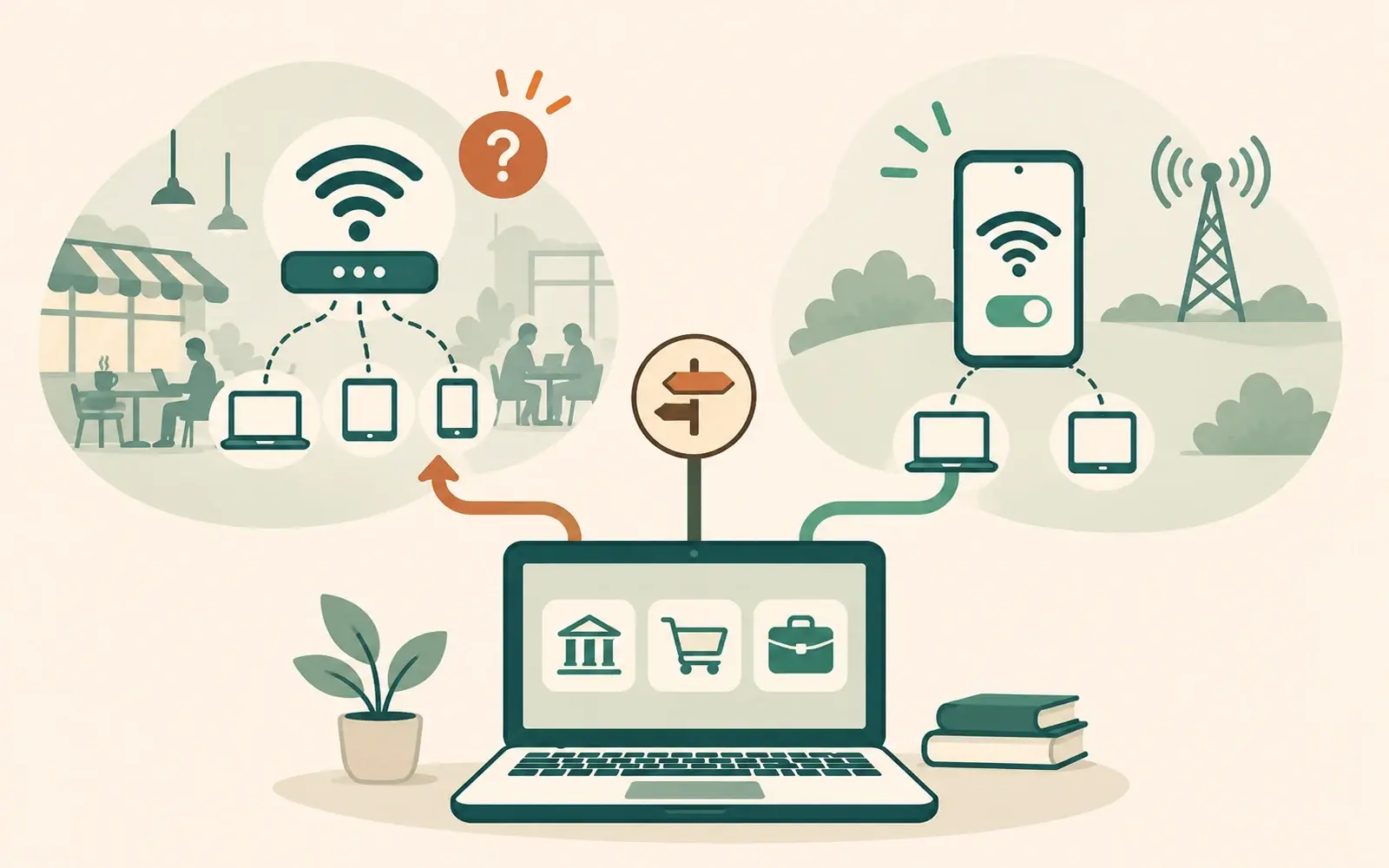
You are sitting in a café with a laptop. The café offers free Wi-Fi, but your phone also has mobile data. You need to pay a bill, make an online purchase and open a confidential document for work.
Which connection should you use?
A properly secured personal hotspot using your phone's mobile-data connection is usually the safer default for sensitive tasks. It gives you control over the nearby Wi-Fi network and avoids relying on an unknown café or hotel access point. But that does not mean modern public Wi-Fi automatically exposes your banking password, or that mobile data makes phishing and malware disappear.
The distinction matters because there are several layers of security between your device and a website. HTTPS protects most modern website traffic even on an untrusted network. A hotspot changes who controls the first network connection. A VPN can add another encrypted path. None of those protections can make a fake banking website legitimate.
To make a sensible choice, we need to identify which attacks each connection can reduce—and which it cannot.
The Short Answer: Which Connection Should You Choose?
| Activity | Better default | Why |
|---|---|---|
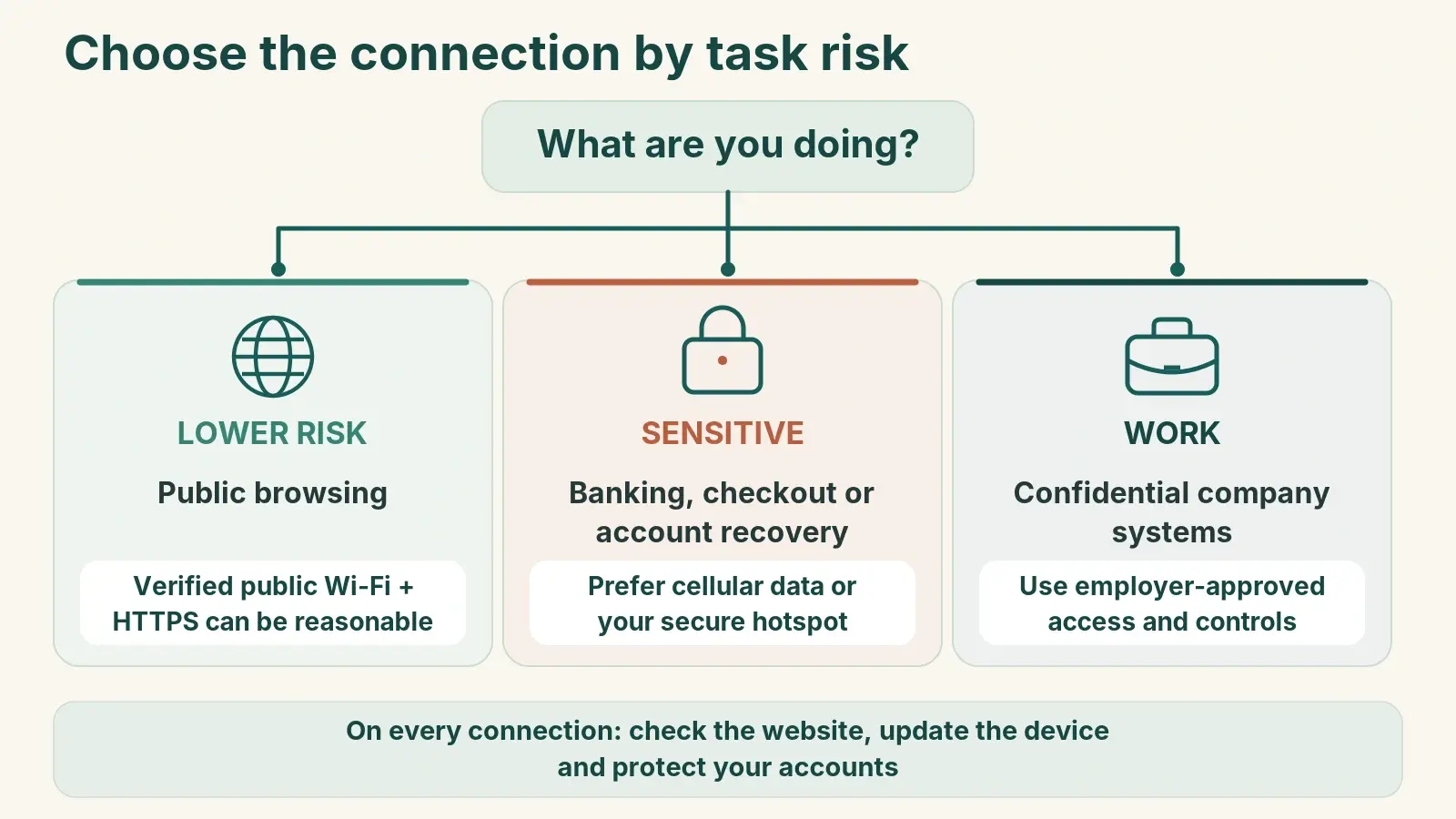
| Reading public websites or checking a train timetable | Verified public Wi-Fi is generally reasonable | Modern HTTPS protects website content in transit; avoid suspicious pages and downloads |
| Banking, UPI, cards or account recovery | Your own cellular connection or a securely configured mobile hotspot | Avoids an unfamiliar local Wi-Fi network during a high-consequence activity |
| Shopping and entering payment details | Personal hotspot when practical | Reduces local-network exposure; still verify the retailer and payment page |
| Accessing confidential work files | Employer-approved secure access, preferably over a trusted connection | Corporate VPN, device compliance and organizational policy may be required regardless of connection |
| Video meetings or downloading large files | Whichever connection is stable and permitted | Quality, data limits and battery life matter; a hotspot is not necessarily faster |
For Indian banking users, this preference is not merely hypothetical: the Reserve Bank of India advised the public on 22 June 2020 to avoid banking or other financial transactions through public, open or free Wi-Fi networks. That advice is a conservative risk-reduction measure, not a claim that every HTTPS banking session on public Wi-Fi is inherently compromised.
Meanwhile, the US Federal Trade Commission (FTC) observes that widespread website encryption has made public Wi-Fi generally safer for ordinary browsing. Those statements are compatible: secure web encryption reduces interception risk, while avoiding an unfamiliar network reduces the number of things that can go wrong during a sensitive transaction.
Follow the Connection: Who Controls the First Network?
The difference starts before your browser even reaches a website.
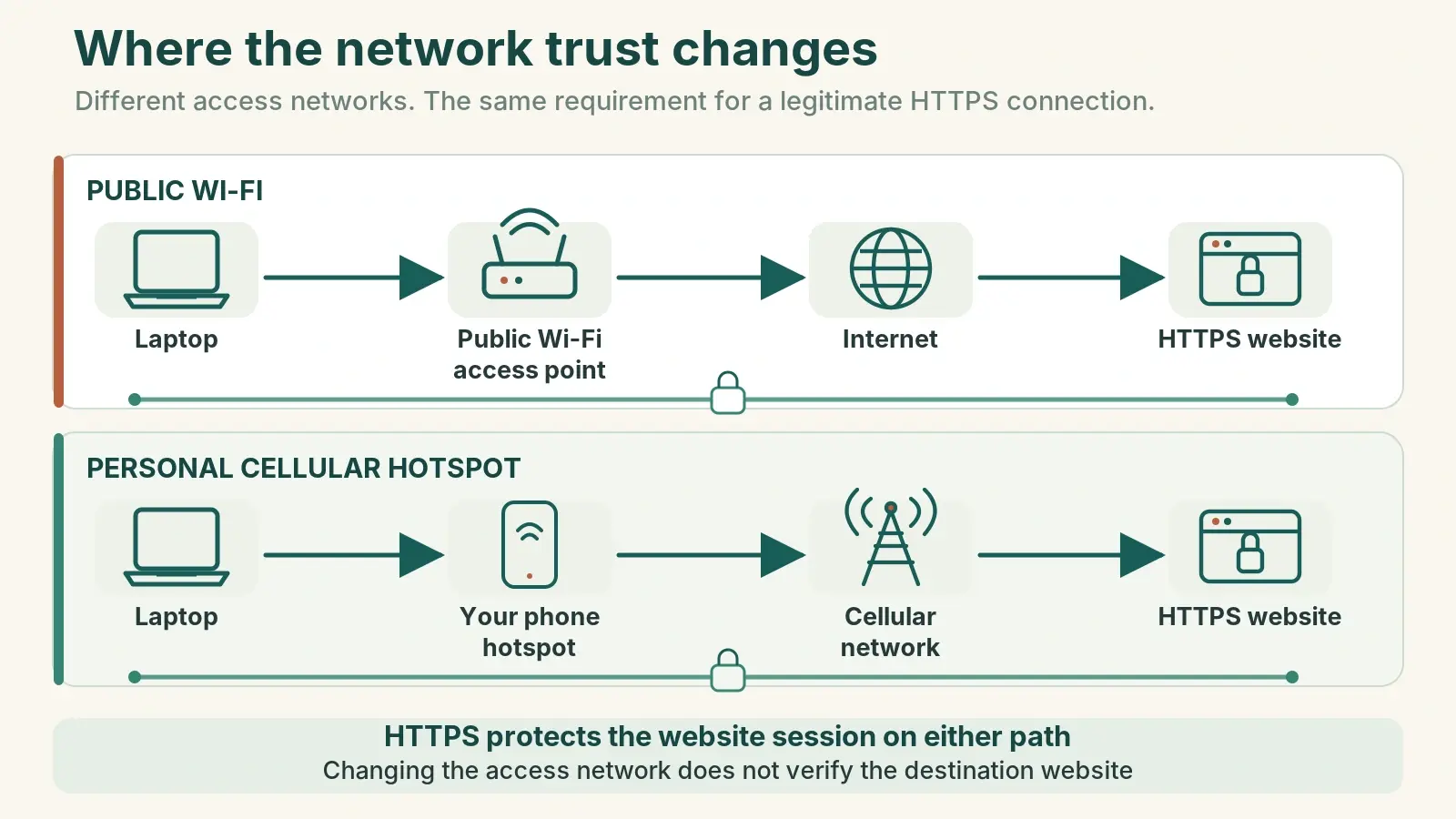
Public Wi-Fi: you join somebody else's network
On an airport, hotel or café Wi-Fi network, your laptop connects to an access point operated by the venue or its service provider. That network then forwards traffic toward the internet.
A legitimate public access point is not automatically malicious. But you usually cannot verify its configuration, who administers it, whether devices are isolated from one another or whether another access point is impersonating the venue's network name.
A hotspot called Airport_Free_WiFi could be the real airport network—or a lookalike created by somebody nearby. The name on your Wi-Fi list is not strong proof of ownership.
Mobile hotspot: your phone becomes the local access point
When you turn on Personal Hotspot on an iPhone or a mobile hotspot on an Android phone, your laptop connects to the phone's short-range Wi-Fi network. The phone ordinarily forwards the laptop's internet traffic over its cellular data connection.
You can control the hotspot name, authentication and password, and you generally avoid having your laptop join the café's shared access point. Apple documents WPA2/WPA3 Personal protection for supported Personal Hotspot configurations. Google documents Android's mobile-data sharing through Wi-Fi hotspot or tethering.
This is a useful reduction in local-network exposure, not end-to-end immunity. Your mobile operator still carries the connection, online services still receive requests, and insecure apps, phishing websites or infected devices remain risky.
Important exception: The word hotspot does not guarantee a cellular upstream connection. Some phones and routers can share an existing Wi-Fi connection instead. If your phone is repeating the café Wi-Fi, you may still depend on the very network you wanted to avoid. Verify that you are sharing mobile data, not simply relaying public Wi-Fi.
What Can Someone on Public Wi-Fi Actually See?
There is a persistent myth that anybody on the same café Wi-Fi can simply read the passwords, account balances and payment details of every other visitor.
That could describe some unencrypted communications. It is not how a correctly configured modern HTTPS connection normally works.
HTTPS protects the contents of a legitimate encrypted connection
When you visit a legitimate HTTPS website and its certificate is validated correctly, encryption protects the web request and response against ordinary reading or tampering by the local Wi-Fi operator or another nearby user.
An observer on the network may be able to learn that your device is communicating, infer some destinations or collect traffic metadata, depending on the protocols and protections in use. But they should not be able to read your submitted card number or banking password simply by capturing a properly encrypted HTTPS session.
This is why the FTC says widespread encryption has made public Wi-Fi much safer than it was when unencrypted web traffic was common.
HTTPS establishes an encrypted connection to a particular website—not a guarantee that the website is honest. A fraudulent site can also use HTTPS. If you type your bank's password into a well-designed imitation website, encryption faithfully delivers that password to the scammer.
A browser's certificate warning, an unexpected sign-in page or an unfamiliar domain should never be dismissed merely because the network is convenient.
Not all app traffic is equally protected
A device can use multiple protocols and applications, some of which may have weaker configurations or expose unnecessary services on a shared network. Outdated applications, unsafe file-sharing settings and unencrypted connections create risks that modern browser HTTPS alone does not fix.
The practical question is not just whether the Wi-Fi has a padlock beside its name. It is whether the particular application uses trustworthy encryption and whether your device is safely configured for an untrusted network.
The Risks a Mobile Hotspot Reduces—and the Ones It Does Not
Consider five threats you could encounter outside your home.
| Threat | Public Wi-Fi | Personal cellular hotspot |
|---|---|---|
| Fake venue network or evil twin | You may join an impersonating access point | Your laptop connects to an access point you configured yourself, reducing this particular risk |
| Other guests on the same local network | Exposure depends on access-point isolation and device security | You control who gets the hotspot password, although invited or unauthorized devices could still connect |
| Malicious captive portal | Possible when the public network requires a browser sign-in | Usually no venue portal when using cellular data |
| Phishing websites, QR-code scams or fake shopping pages | Still possible | Still possible |
| Malware, stolen credentials or compromised accounts | Still possible | Still possible |
This illustrates the central principle: changing the connection can reduce network-specific risks without repairing weaknesses elsewhere.
Mobile networks have their own privacy and security considerations. Your carrier can process network information, and specialized cellular attacks exist. A poorly secured personal hotspot can also be shared with the wrong person. For ordinary users, though, choosing a password-protected personal hotspot usually means fewer unknown nearby participants and less dependence on an unfamiliar network administrator.
Do You Need a VPN on Public Wi-Fi?
A virtual private network (VPN) creates an encrypted tunnel between your device and a VPN endpoint. On an untrusted Wi-Fi network, that can prevent the local network from inspecting the traffic carried inside the tunnel.
It is a valuable additional control in some circumstances, especially when your employer operates the VPN and requires it for corporate access. Microsoft and the US National Security Agency both recommend considering a VPN when public Wi-Fi is unavoidable.
But a VPN is not a magic “safe mode.”
- It does not verify that an online shop or bank lookalike is genuine.
- It does not remove malware or protect an already compromised device.
- It moves some network trust toward the VPN provider, which may be able to see connection metadata; the traffic then continues to its destinations.
- Its protection depends on correct configuration, connection state and which traffic actually uses the tunnel. Split tunnelling and app exclusions can matter.
- HTTPS is still important when using a VPN, including on a private hotspot.
A commercial VPN is therefore not automatically required for routine HTTPS browsing, and subscribing to one does not justify ignoring suspicious sites. For work, follow the employer's approved VPN or secure-access policy rather than installing an unapproved consumer VPN.
If you are evaluating specific VPN services, see the website's maintained Best VPN Services for India. This Article focuses on what the underlying protections do, rather than ranking subscriptions.
Banking and UPI: Why the Connection Is Only One Part of Safety
Imagine opening your bank's official app from a laptop or phone while you are waiting at an airport.
A secure connection helps, but the outcome also depends on the app, the account and the transaction. You could have the safest personal hotspot and still lose money after entering an OTP into a fraudulent page or approving a payment to a scammer.
For Indian banking and UPI users, a practical higher-safety routine is:
- Switch to cellular data directly on your phone—or a secured personal hotspot for a laptop—when feasible.
- Open the bank's official app or a saved, verified website address, not a link from an unsolicited SMS, QR code or chat message.
- Check the actual transaction details and payee before confirming; never disclose an OTP, PIN, CVV or UPI PIN to someone claiming to be support staff.
- Keep the banking app and device updated, and use appropriate device locks and multifactor authentication.
- If you suspect fraud, contact the bank through its official channel immediately; changing Wi-Fi networks alone cannot undo an unauthorized transaction.
The RBI's 2020 public advisory explicitly warns against sharing PINs, OTPs, CVVs and UPI PINs and cautions against financial transactions over public Wi-Fi.
For a deeper explanation of the defenses inside banking services, see How Banking Apps and Websites Keep Your Money Safe. The protection built into a banking app and the security of the network carrying its traffic are separate layers.
Online Shopping: HTTPS Helps, but You Must Trust the Seller
Suppose you find a discounted laptop while using a hotel network. The checkout page uses HTTPS and displays a padlock. Is it now safe to enter your card details?
HTTPS is necessary but insufficient evidence. It helps secure communication with the domain you reached; it does not prove that a retailer is legitimate or that its delivery promises are genuine. The FTC specifically warns that scam websites can use encryption too.
For shopping, check the domain carefully, use a known merchant or independently verified store, and be cautious about unfamiliar payment links or requests to pay outside the platform. Your payment choice also matters; transaction and dispute protections differ by payment method and jurisdiction.
A personal hotspot may remove one potential source of hostile network interference, but the wrong merchant remains the wrong merchant on any connection.
For browsing product reviews or comparing specifications, properly functioning HTTPS over a verified public network may be perfectly reasonable. For card entry, account recovery or unusually valuable transactions, switching to cellular is a low-effort precaution when coverage permits.
Working Remotely: A Hotspot Is Not a Substitute for Company Policy
Work is different from casual browsing because the files and systems may belong to an employer or client, and their rules may require specific protection.
You might have to use a managed device, approved VPN or zero-trust access system, multifactor authentication, endpoint protection and restrictions on local downloads. A personal hotspot does not override those requirements.
If your laptop is on public Wi-Fi, configure its operating system for an untrusted/public network. On Windows 11, Microsoft's network profile guidance says the Public profile makes the PC less discoverable to other devices, whereas the Private profile is intended for trusted networks where sharing may be appropriate. Do not enable file sharing merely to improve convenience in a café.
A useful distinction is:
- Low-sensitivity work: checking a public website, reading non-confidential documentation or joining a non-sensitive meeting may be acceptable on a legitimate public Wi-Fi connection, subject to employer rules.
- Confidential work: client records, payroll, credentials, source code or sensitive company systems warrant an approved secure connection, strong endpoint protections and the organization's stated policy.
- High-risk administrative work: changing access rights, transferring confidential files or resetting security controls may require managed devices, step-up authentication or a private/approved network—not merely a consumer VPN.
Where possible, use your phone's cellular connection or the employer's approved connectivity method rather than an unknown access point. But if an organization's policy prohibits personal hotspots or requires its managed network configuration, follow that policy.
A Password-Protected Public Network Is Not Necessarily Private
The café staff hands you a Wi-Fi password printed on the counter. Does that solve the problem?
It may mean the Wi-Fi link uses a protected connection, but it does not establish that the access point is well managed or that everyone sharing the password is trustworthy. A password handed to hundreds of guests does not create the same trust boundary as a private home network under your control.
On some public networks, modern technologies such as Wi-Fi Enhanced Open use Opportunistic Wireless Encryption (OWE) to encrypt individual wireless connections without requiring a shared password. Google's Android platform documentation describes this protection. It is an improvement over an unencrypted radio connection, not proof that the network operator or captive portal is legitimate.
Likewise, a network called Secure_Guest_WiFi is not automatically secure because of its name. Ask the venue to confirm the legitimate network name and sign-in procedure, and treat unexpected certificate warnings as reasons to stop.
How to Set Up Your Own Hotspot More Safely
A mobile hotspot offers a meaningful advantage only if you configure and use it sensibly.
On Android
Most Android phones expose hotspot controls under a menu such as Settings → Network & internet → Hotspot & tethering; some manufacturers place them under Connections → Mobile Hotspot and Tethering. Google's Android instructions explain how to share a mobile connection by Wi-Fi, Bluetooth or USB.
Turn on mobile data, choose a non-identifying network name, set a strong password and use the strongest supported WPA2/WPA3 mode that remains compatible with your devices. Connect your laptop to that hotspot, and verify that the phone is forwarding cellular data rather than repeating public Wi-Fi.
On iPhone
Apple documents Settings → Personal Hotspot (sometimes reached through Mobile Data/Cellular) to enable the feature and manage the Wi-Fi password. Personal Hotspot uses the iPhone's cellular data service. Apple also documents its use of WPA2/WPA3 protection for supported devices and configurations.
Choose a strong password, share it only with intended devices and turn off the hotspot when it is no longer needed. Apple devices may offer automatic hotspot connections within trusted accounts or family arrangements; review which devices are permitted to connect.
For either phone
Before relying on the hotspot, check three practical conditions: the mobile plan supports tethering, cellular reception is adequate, and your data allowance can support the activity. Large Windows updates, cloud backups and video meetings can use substantial data. Hotspot use can also increase phone battery consumption and heat.
A USB tether may be convenient for a laptop if supported, reducing the need to broadcast a separate Wi-Fi connection. It is not guaranteed to be preferable in every setup; keep your phone and computer trusted and updated.
When Public Wi-Fi Is the Only Practical Option
Public Wi-Fi can be a useful service. You may have poor cellular reception, a limited data allowance or a phone that cannot tether. The appropriate response is not necessarily to avoid the internet entirely; it is to reduce risk according to the task.
- Confirm the genuine network name with the venue instead of choosing whichever network offers the strongest signal.
- Use legitimate HTTPS sites and official apps. Do not proceed through certificate warnings, suspicious redirects or payment forms on a Wi-Fi sign-in portal.
- Keep your device's firewall enabled and use the Public network profile on Windows. Disable unnecessary sharing and nearby-discovery features.
- Avoid automatic reconnection to unfamiliar Wi-Fi networks; disconnect and forget the network afterward when appropriate.
- Use an employer-approved VPN for work when required, or a reputable VPN when appropriate for the risk. Verify that it is actually connected.
- Postpone sensitive banking or account-recovery operations until you can use cellular data or another trusted connection, when practical.
If a captive portal asks for your bank password, card PIN or operating-system security settings, that is not a normal requirement for joining a café network. Stop and verify the request with the venue instead of entering sensitive information.
Which Is Faster, Cheaper or More Reliable?
Security is not the only consideration in a real-world decision. Public Wi-Fi may offer high-speed fixed broadband; cellular may deliver stronger performance in another location. Neither is universally faster.
A hotspot's performance depends on your mobile signal, network congestion, plan restrictions and the phone's capabilities. Its battery drain and data consumption can be significant, particularly during lengthy calls or downloads. Public Wi-Fi may be free to the user, but it can be congested, require repeated portal logins or disconnect unpredictably.
For a 10-minute payment or confidential email, the modest convenience cost of switching to cellular may be worth the additional control. For a 15 GB software download or a long video conference, a verified public network with suitable device security and an approved VPN (if required) may be more practical.
Use the connection that fits the risk of the activity, not simply the one with the stronger signal or the word “secure” in its name.
Three Common Misconceptions
“If the Wi-Fi has no password, my HTTPS banking password is visible to everyone.” Not normally. Valid HTTPS protects the connection's contents even on an unencrypted local wireless network. But open Wi-Fi can expose other traffic and increase network-specific risks, so a trusted cellular connection is still preferable for banking.
“A VPN means any public network is safe.” No. A VPN protects traffic through its tunnel. It does not authenticate the shop you visit, prevent social engineering or secure a compromised laptop.
“My personal hotspot makes me anonymous.” No. Your mobile operator, the online service and any accounts you use still exist. A hotspot mainly replaces the unknown local access point with one you control.
Conclusion: Match the Connection to the Consequences
There is no contradiction between saying that modern HTTPS has made public Wi-Fi much safer and recommending a personal hotspot for banking, shopping checkout and confidential work. The first describes the protection of encrypted application traffic. The second reduces exposure to an unfamiliar local network when the consequences of a mistake are high.
Choose your cellular connection or secured personal hotspot for sensitive transactions when practical. For everyday browsing, verified public Wi-Fi with modern encryption and sensible device settings can be reasonable. For work, your employer's approved security controls take priority over generic connection advice.
Above all, remember what changing networks cannot fix: phishing, fake websites, malicious downloads, compromised accounts and poor password practices. The safest connection is useful—but it is only one part of a safe transaction.
Related reading: check whether the destination website is legitimate.
Sources and Further Reading
- Reserve Bank of India — Safe Use of Digital Transactions advisory, 22 June 2020 — avoid financial transactions over public/open/free Wi-Fi and protect credentials.
- US Federal Trade Commission — Are Public Wi-Fi Networks Safe? — the effect and limits of modern HTTPS.
- US National Security Agency — Securing Wireless Devices in Public Settings — preferred personal hotspots and VPN precautions.
- Canadian Centre for Cyber Security — Wi-Fi Security — enterprise access and security controls for untrusted networks.
- Apple Platform Security — Wi-Fi Security with Apple Devices — Personal Hotspot wireless security.
- Apple Support — Connect to the Personal Hotspot of an iPhone or iPad — what Personal Hotspot shares and how to use it.
- Google Android Help — Share a Mobile Connection by Hotspot or Tethering — tethering and cellular sharing.
- Android Open Source Project — WPA3 and Wi-Fi Enhanced Open — Opportunistic Wireless Encryption (OWE).
- Microsoft Support — Essential Network Settings and Tasks in Windows — public and private network profiles.
- Microsoft Support — Be Safer over Wireless Connections — Wi-Fi and VPN risk reduction.