UPI AutoPay Deducting Money? How to Find, Manage and Cancel Recurring Mandates
Learn why UPI AutoPay deducts money automatically, how to find and cancel recurring mandates in India, and what to do about unwanted or unauthorised debits.

A ₹299 debit appears in your bank statement. You did not scan a QR code, enter your UPI PIN or open a payment app that morning. The transaction description mentions AutoPay, and you cannot immediately remember what you subscribed to.
This does not necessarily mean someone has accessed your bank account. UPI AutoPay allows an earlier authorisation to be used for future payments. A forgotten subscription, a free trial that has converted into a paid membership, or a regular bill may explain the debit. But an unfamiliar mandate could also be the result of fraud or an error.
The immediate question is not simply how to switch off UPI. It is how to identify the specific payment permission, stop unwanted future deductions and establish whether money already collected should be refunded.
What is a UPI AutoPay mandate?
UPI AutoPay is a recurring merchant-payment facility on the Unified Payments Interface. A mandate is an electronic instruction authorising payments according to agreed conditions. Instead of approving each monthly bill manually, you approve the arrangement when setting it up.
Common uses include streaming subscriptions, cloud storage, electricity bills, mobile recharges, mutual fund systematic investment plans (SIPs), insurance premiums and loan instalments.
Think of a mandate as a permission to collect money, not as the payment itself. A single mandate can lead to several separate transactions over its lifetime. Each successful debit will have its own transaction record, while the mandate has its own identifier.
A typical mandate contains the merchant's identity, linked payment account, amount or maximum amount, frequency and validity dates. For example, a music service may collect ₹149 every month, whereas an electricity provider may collect a different amount each billing cycle, subject to a specified ceiling.
Why does the debit happen without a UPI PIN?
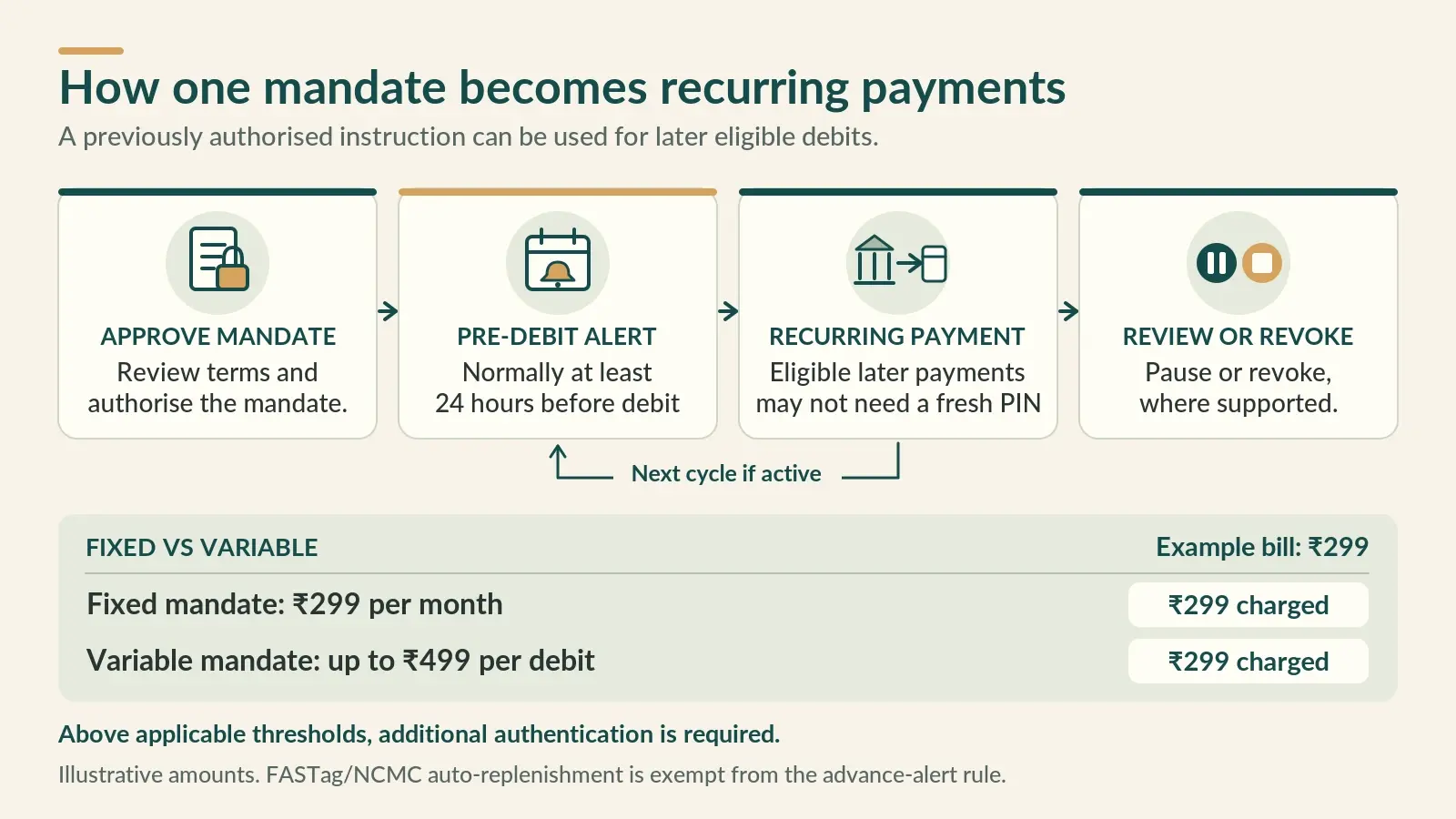
The security authorisation occurs when the instruction is created. Subsequent eligible payments can be processed without fresh authentication every time. The absence of a PIN prompt for a particular debit therefore does not, by itself, establish that the transaction was unauthorised.
The RBI's Digital Payments – E-mandate Framework, 2026, issued on 21 April 2026, consolidates earlier directions for recurring payments across UPI, cards and prepaid payment instruments. It requires authentication at registration and for the first payment, which may be authenticated together. Changing or withdrawing a mandate also requires authentication.
How much can be deducted automatically?
Under the April 2026 RBI framework, the following limits apply to subsequent recurring payments without an additional factor of authentication (AFA).
| Payment category | Limit per transaction without fresh AFA |
|---|---|
| Ordinary subscriptions, utility bills and other general recurring payments | ₹15,000 |
| Mutual fund subscriptions | ₹1,00,000 |
| Insurance premiums | ₹1,00,000 |
| Credit card bill payments | ₹1,00,000 |
Payments exceeding the applicable threshold require further authentication, subject to supported transaction limits. These figures are not permission to collect the full amount from everyone. The actual mandate conditions and payment amount still matter. Loan EMIs do not automatically qualify for the special ₹1 lakh exemption simply because they are financial payments.
The RBI also requires advance notification at least 24 hours before the debit, with an option to reject that payment or withdraw the mandate. Automatic balance replenishment for FASTag and National Common Mobility Card (NCMC) is exempt from this advance-alert requirement. A confirmation is required after execution.
Fixed amount versus maximum amount
Imagine a subscription costing ₹299 per month. A fixed ₹299 mandate authorises that specified amount. Alternatively, a variable mandate may allow collection of the actual billed amount up to ₹499 per transaction.
The ₹499 ceiling does not mean that ₹499 will be charged every month. If the actual eligible bill is ₹299, that is the amount expected. Conversely, the ceiling is not necessarily a total spending cap for the entire validity period.
Read the merchant's renewal conditions separately. A higher maximum amount is not a reason to accept a subscription price increase without checking the agreement and invoice.
How to find which UPI AutoPay mandate is deducting money
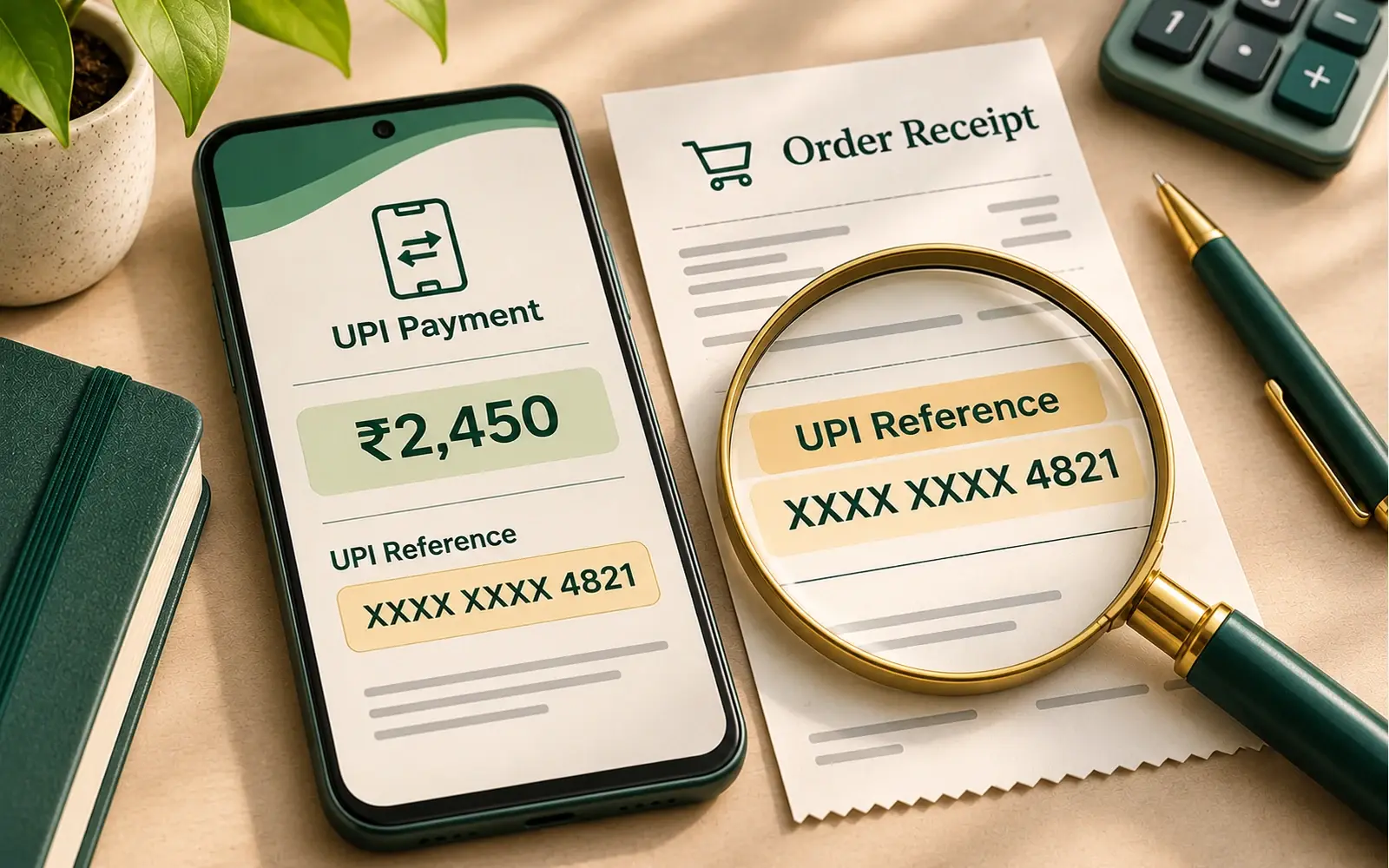
Start with the bank statement rather than a random support number found online. Note the debit date, amount, merchant description and UPI transaction reference. Check whether the corresponding entry in your UPI app contains a mandate reference or merchant information.
Next, open the app's AutoPay or automatic-payment management section. A mandate may have been approved months earlier through a different app or bank account.
| UPI app | Where to look |
|---|---|
| Google Pay | Profile picture → Autopay → Live, Pending or Completed |
| PhonePe | Profile → Autopay Settings |
| Paytm | Profile → UPI & Payment Settings → Automatic Payments |
These navigation paths follow the providers' published instructions (Google Pay, PhonePe and Paytm). Menus and feature availability may change between app releases.
Open the relevant mandate and compare its merchant, payment account, amount, scheduled date and unique reference against the debit. Pending mandates are requests awaiting an action; they should not be confused with permissions already active. Completed, expired or revoked entries can help reconstruct the payment history.
What if you cannot find the mandate in your current app?
In October 2025, NPCI issued Operating Circular 223, introducing visibility of active AutoPay mandates across UPI apps and the ability to transfer a mandate's management to another app. Members already offering AutoPay were instructed to enable the changes by 31 December 2025. The transfer is customer-initiated and limited to once in a rolling 90-day window.
Look for cross-app viewing or mandate management under the bank-account settings or AutoPay section. NPCI's MyUPI support platform also offers mandate discovery and assistance, including redirection to the appropriate app for management. Do not assume every app or account exposes identical controls.
If these options fail, check the original app, other linked accounts and your bank's digital banking services. Ask the bank to identify the payment channel and mandate from the transaction reference. A recurring card payment or NACH debit will not necessarily appear in a UPI AutoPay list.
How to pause, cancel or change a recurring mandate
There are three different actions you might need. Skipping an individual debit prevents that particular payment where the option is available. Pausing temporarily suspends the mandate for the selected period. Revoking or cancelling withdraws the ongoing payment permission.
For an unwanted subscription, revocation is generally more appropriate than a temporary pause.
In your UPI app:
- Find the active mandate and verify its merchant and linked account.
- Choose the cancellation, deletion or revocation option for that mandate. For a temporary break, select pause if supported.
- Complete authentication within the genuine app. Never share your PIN with a support representative.
- Reopen the mandate details to confirm the final status, rather than assuming the request succeeded.
- Save the cancellation confirmation or reference and check the next expected payment date.
In Google Pay, for instance, a live mandate can be paused for a chosen period or cancelled from its details page. Google notes that its app cannot cancel loan-related AutoPay mandates directly and directs borrowers to the merchant. An inactive linked account may also prevent cancellation through the app.
If an error persists, raise a ticket with the app and request assistance from your bank. For a loan mandate, contact the lender for the authorised withdrawal or replacement-payment procedure. Do not treat the absence of a cancellation button as proof that the instruction can never be withdrawn.
Cancelling the payment does not necessarily cancel the subscription
There are two separate relationships: your agreement with the merchant, and the payment permission used to collect money.
Suppose you subscribe to a ₹299 monthly learning service and decide to stop using it. Cancelling AutoPay removes the relevant recurring payment authority once effective. However, your membership may remain active until cancelled through the service provider, and any amount contractually due may remain payable.
Cancel the subscription on the merchant's website or app as well, and retain the confirmation. Similarly, stopping a loan EMI mandate does not cancel the outstanding loan, and stopping an insurance mandate does not automatically terminate the policy on favourable terms. Missed premiums or repayments can have serious consequences.
For a mutual fund SIP, arrange cancellation or modification with the investment platform or fund house if you want to stop the investment instruction itself. Check whether other investments use the same mandate before withdrawing it.
What if money has already been deducted?
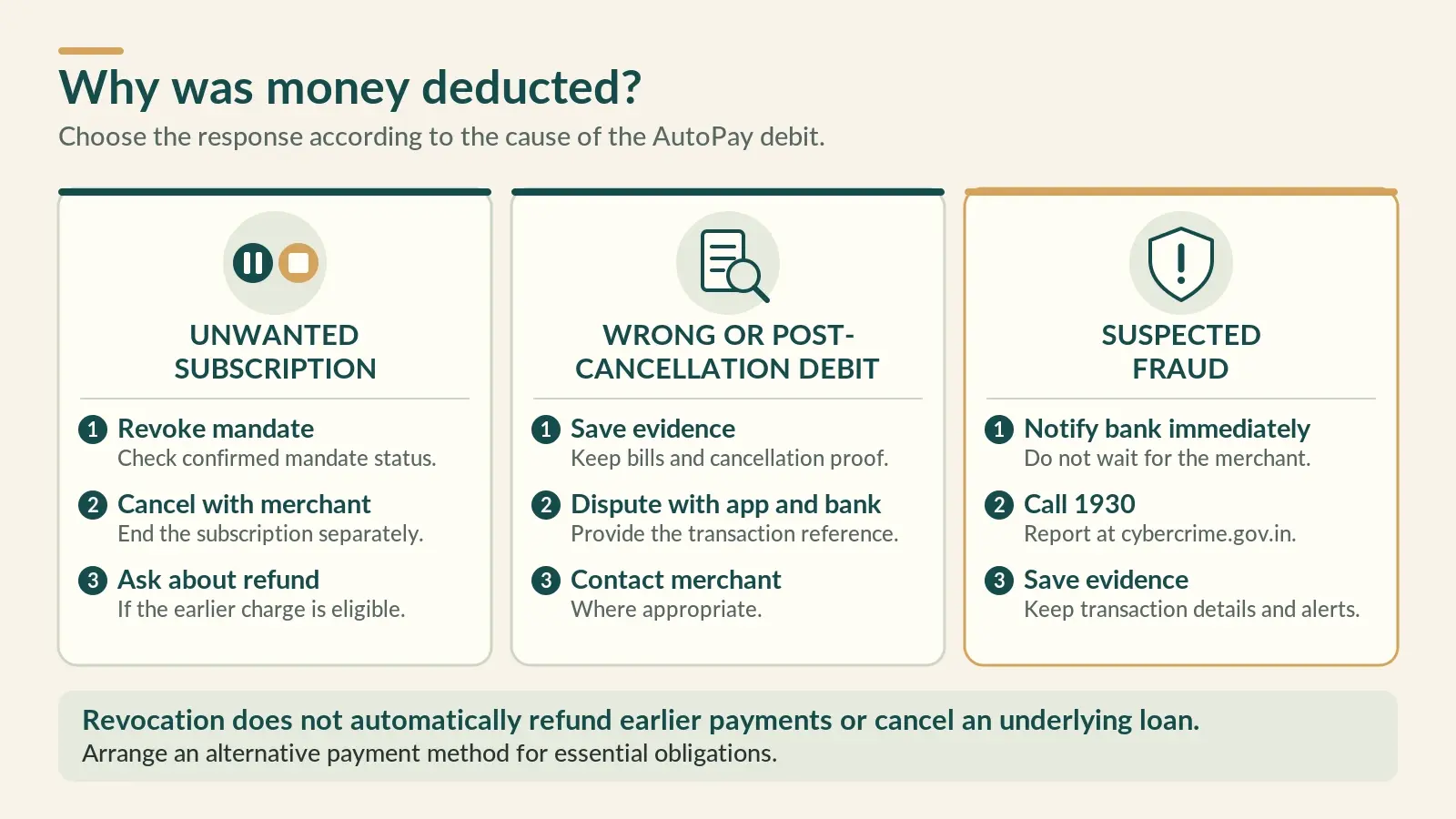
A successful cancellation usually addresses future collections, not completed transactions. What you do next depends on the reason for the deduction.
| Situation | Appropriate action |
|---|---|
| Recognised subscription you forgot to cancel | Stop renewal and ask the merchant about its refund policy. |
| Wrong amount or duplicate collection | Preserve the invoice and transaction details; dispute the payment with the merchant, app and bank as appropriate. |
| Debit after confirmed revocation | Submit the cancellation evidence and ask the bank/app to investigate the execution time and mandate status. |
| Mandate or debit you never authorised | Report suspected fraud immediately to the bank and official cybercrime channels. |
A refund is not automatic merely because you no longer want the service. Equally, a merchant calling a transaction a subscription does not settle a genuine dispute about whether the customer authorised it.
For a debit after cancellation, timestamps matter. Compare when revocation became effective with when the payment was initiated and processed. A transaction already in progress may require a separate dispute rather than another cancellation request.
What to do if you suspect an AutoPay scam
Fraudsters can disguise recurring-payment requests as a refund, a small verification payment or a reward. A request to approve an ongoing mandate is very different from receiving money. You should not enter a UPI PIN to receive a refund or cashback.
If you see an unfamiliar active mandate or suspected fraudulent debit, contact the bank immediately using its official fraud-reporting channel. Ask it to stop further unauthorised payments and help revoke the relevant instruction. Report the transaction through the payment app as well. For financial cybercrime, call 1930 and report through the National Cyber Crime Reporting Portal. Do not wait for the next scheduled debit or for an ordinary merchant refund response.
Save the mandate details, bank message, transaction reference, relevant communications and complaint acknowledgements. Do not send your PIN, OTP or full account credentials to anyone claiming to arrange a refund.
The RBI's e-mandate framework extends its rules on customer liability for unauthorised payments to recurring transactions. Under the commercial-bank rules applicable to transactions as of November 2026, bank-side fault and qualifying third-party breaches can result in zero customer liability; for the latter, reporting within three working days of receiving the bank's transaction communication is important. Customer negligence and delays may change liability. See the Commercial Banks – Responsible Business Conduct Directions. A revised fraud-protection framework announced in June 2026 is scheduled to apply to transactions from 1 January 2027, not retrospectively to every earlier debit.
Escalating an unresolved banking complaint
Keep a written complaint with the bank, including the relief sought: revocation, investigation, refund or correction of a disputed transaction. If necessary, use the bank's formal grievance escalation process.
Under the RBI Integrated Ombudsman Scheme, 2026, effective from 1 July 2026, eligible service complaints may be submitted free of charge through RBI CMS. First complain to the regulated entity. If there is no answer, the applicable waiting period is 30 days or a longer period specified by relevant RBI, NPCI or card-network guidelines. An unsatisfactory response can allow earlier escalation. File within 90 days of expiry of that applicable period or the last communication from the entity, whichever is later, subject to the scheme's other conditions. The Ombudsman is not a general subscription-refund service for disputes solely against unregulated merchants.
Avoid these common AutoPay mistakes
Uninstalling an app is not revocation. Nor should switching phones, resetting a UPI PIN or changing an ordinary transaction limit be relied on to cancel an existing payment instruction. Verify the actual mandate status through a supported channel. The 2026 framework expressly separates recurring payments from other customer-set payment controls.
Keeping an account empty is not a sound cancellation strategy either. A failed debit can be retried under the applicable arrangements, and missed contractual payments can cause late fees, interrupted services or adverse loan repayment records. Arrange an alternative payment method before changing mandates for essential obligations.
Finally, review recurring payments periodically. If you have three unused monthly subscriptions costing ₹299, ₹199 and ₹149, their combined cost is ₹647 per month, or ₹7,764 over twelve months at unchanged prices. The saving comes from ending unnecessary subscriptions, not simply moving the debits to a different bank account.
The bottom line
UPI AutoPay is useful when it removes the work of remembering regular bills, but convenience should not mean losing track of payment permissions. Identify the mandate, review its terms, revoke unwanted instructions and cancel the associated service where appropriate. If a debit looks fraudulent, report it immediately rather than waiting for cancellation alone to solve the problem.
Sources and Further Reading
- RBI — Digital Payments – E-mandate Framework, 2026 (21 April 2026)
- NPCI — Enhancement of UPI AutoPay, OC 223 (7 October 2025)
- NPCI — MyUPI support and mandate management
- Google Pay Help — Manage recurring payments
- PhonePe — Identifying fraudulent subscription mandates
- Paytm — UPI AutoPay setup and management
- RBI — Commercial Banks – Responsible Business Conduct Directions, 2025, updated October 2026
- RBI — Third Amendment Directions, 2026 (24 June 2026; applicable from 1 January 2027)
- RBI — Integrated Ombudsman Scheme, 2026: FAQ
- National Cyber Crime Reporting Portal — official reporting