What Happens Behind the Scenes When You Tap Your Card to Pay?
Follow a contactless card payment from the NFC tap and EMV chip exchange through the merchant terminal, acquirer, card network and issuing bank.
You buy something for ₹850.
The cashier enters the amount into the card machine.
You hold your debit or credit card near the terminal for a moment.
The machine beeps.
A few seconds later:
Approved.
It looks as though the terminal pulled ₹850 directly out of the card.
That is not what happened.
The card does not normally contain your live bank balance, and the shop's terminal does not have direct access to your bank account.
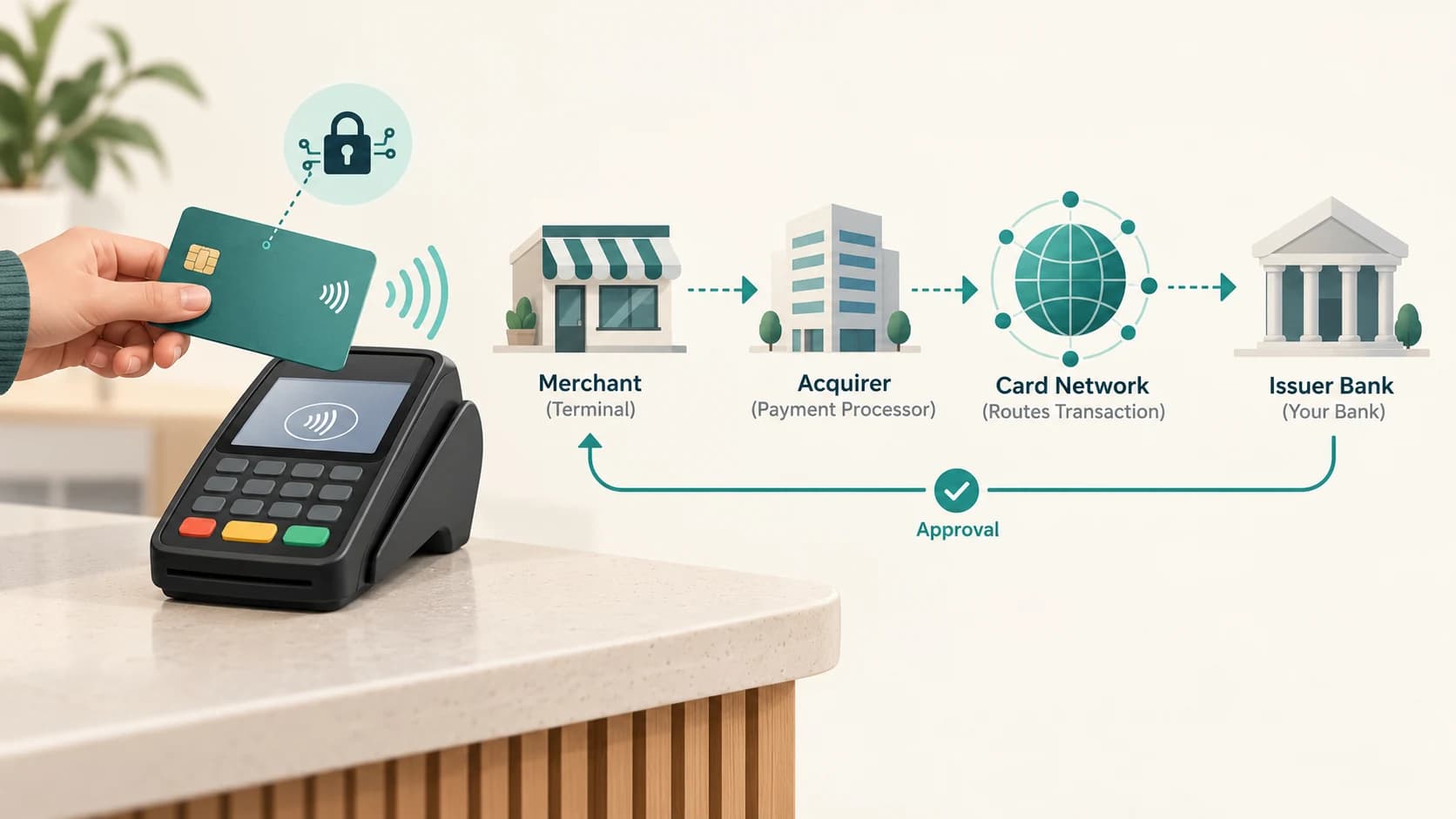
A contactless card payment is actually a short conversation between several systems:
Your card
↓
Merchant payment terminal
↓
Merchant's acquiring bank or payment processor
↓
Card network
↓
Your card-issuing bank
↓
Approval or decline returns
The physical “tap” is only the first part.
The card and terminal use short-range wireless technology to establish the transaction and generate security information. The actual financial authorization usually happens across banking networks after that exchange.
The Contactless Card Is Still a Chip Card
A tap-to-pay card normally contains the same basic secure chip technology associated with EMV payments, plus an antenna that allows the chip to communicate wirelessly.
NPCI describes RuPay Contactless cards as chip cards with an inbuilt radio-frequency antenna that uses Near Field Communication, or NFC, to establish a secure connection with a compatible reader.
EMVCo similarly describes EMV Contactless as technology that allows contactless chip cards and NFC-enabled mobile devices to communicate with an acceptance terminal without physical contact.
So inside a contactless card are two important elements:
- a secure payment chip,
- a small antenna.
The card does not need a battery.
The payment terminal creates the electromagnetic field needed for the short exchange.
What Is NFC?
NFC stands for Near Field Communication.
It is designed for communication over a very short range.
That limited range is useful for payments because the customer intentionally brings the card close to the terminal.
When you tap:
- the terminal creates a short-range radio field,
- the card's antenna couples with that field,
- the chip becomes active,
- the card and terminal exchange payment-related information.
You do not have to make physical contact.
“Tap” is therefore convenient shorthand.
A card can often communicate while held very close to the reader.
Why Can't the Terminal Read the Card From Across the Shop?
Contactless payment is intentionally designed for close proximity.
This reduces accidental reads and makes the customer's physical action part of the experience.
The terminal is not operating like a long-range cellular tower.
It expects the card or payment device to be brought close to the contactless reader.
That is why the familiar contactless symbol appears on the specific area where you hold the card.
The short range is part of the design.
Step 1: The Merchant Enters the Amount
Suppose the bill is:
₹850
The merchant terminal first knows:
- the purchase amount,
- merchant information,
- terminal information,
- transaction type.
It is now waiting for a payment instrument.
When you tap the card, the terminal begins the contactless EMV interaction.
Step 2: The Terminal and Card Exchange Information
The terminal and card negotiate the transaction.
The exact EMV process contains many technical details, but conceptually the terminal may obtain information needed to determine:
- which payment application or card network applies,
- how the transaction should be processed,
- which verification method may be required,
- cryptographic information for the authorization request.
This is much more sophisticated than reading a static card number and trusting it.
The chip actively participates in the transaction.
The Card Creates Transaction-Specific Security Data
One of the most important features of EMV chip technology is that it creates cryptographic data that changes from transaction to transaction.
EMVCo says EMV chip technology generates a one-time-use security code for each transaction.
This matters because copying static data is not enough to perfectly reproduce the original chip's behaviour.
A criminal who somehow sees transaction data from one purchase should not simply be able to reuse the same security information for the next purchase as though nothing changed.
This is a major difference between modern chip payments and older systems that relied much more heavily on static magnetic-stripe information.
Does the Card Send Your PIN During Every Tap?
No.
Whether a PIN or another cardholder-verification method is required depends on factors including:
- transaction amount,
- card configuration,
- issuer rules,
- terminal capability,
- applicable regulation,
- risk controls.
In India, RBI increased the per-transaction limit for relaxation from Additional Factor of Authentication on eligible contactless card-present payments to ₹5,000, effective January 1, 2021.
NPCI's current RuPay Contactless FAQ says that for eligible RuPay contactless transactions below ₹5,000, the customer does not need to enter a PIN; above ₹5,000, the card can still be tapped but PIN entry is required.
So for a typical ₹850 eligible contactless payment:
tap → no PIN → authorization
may be allowed.
For a larger transaction:
tap → PIN → authorization
may be required.
Banks can also apply their own controls within the regulatory framework.
Why Can a Low-Value Tap Work Without a PIN?
The goal is to make small payments faster while keeping risk limited.
If every ₹120 or ₹300 contactless purchase required the same interaction as a larger transaction, much of the speed advantage would disappear.
So the system allows a limited category of lower-value contactless payments to proceed without an additional PIN step, subject to applicable rules.
This does not mean:
“No security exists below ₹5,000.”
The card still uses EMV chip security.
The terminal still creates a payment transaction.
The issuer can still apply:
- card status checks,
- transaction limits,
- fraud monitoring,
- contactless settings,
- risk controls.
The relaxed element is the additional cardholder authentication requirement for the eligible transaction.
Step 3: The Terminal Builds an Authorization Request
After the tap, the terminal has enough information to create a request for payment authorization.
Conceptually, it can include:
- transaction amount,
- merchant identifier,
- terminal details,
- card/account-routing information,
- EMV chip data,
- transaction-specific cryptographic data,
- cardholder-verification result,
- date and transaction references.
The customer sees only:
Processing...
But the terminal is preparing a structured financial message.
The Merchant's Terminal Is Not Connected Directly to Every Bank
Imagine a supermarket accepting cards issued by hundreds of banks.
It would be impractical for that terminal to maintain a separate direct connection to every issuer.
Instead, the merchant works with an acquirer or payment processor.
The acquirer is the financial institution or payment-service side responsible for accepting card transactions for the merchant.
A simplified path is:
Merchant terminal
↓
Acquirer / processor
↓
Card network
↓
Issuer bank
The card network provides the interoperable route.
For example, depending on the card, that network could be:
- RuPay,
- Visa,
- Mastercard,
- another supported payment network.
What Does the Card Network Do?
The card network helps connect the merchant's acquiring side with the financial institution that issued the card.
It can use information in the transaction to determine:
Which issuer should receive this authorization request?
The network is therefore not usually the bank account itself.
It is the payment infrastructure connecting the two sides.
For a RuPay card in India, NPCI operates the RuPay payment network.
For cards on other schemes, the relevant international card network performs the corresponding network role.
Step 4: Your Issuing Bank Decides
Now the transaction reaches the bank or financial institution that issued your card.
This is where the main financial authorization occurs.
The issuer can check:
- Is the card active?
- Is contactless usage enabled?
- Is the card blocked?
- Is sufficient credit or account balance available?
- Is the transaction within limits?
- Did the EMV security data validate correctly?
- Is any required PIN or verification valid?
- Does the purchase trigger fraud controls?
For a debit card, the bank may evaluate the linked account and available funds.
For a credit card, it may evaluate the available credit limit and card-account status.
The terminal does not need to know the full financial history.
It needs the issuer's answer.
Approval Does Not Mean the Merchant Already Has Final Settlement
This is another important distinction.
When the terminal says:
Approved
the issuer has authorized the transaction.
That means the merchant can generally complete the sale.
But the back-end movement of funds between the card issuer, card network, acquirer and merchant involves later clearing and settlement processes.
So there are two different concepts:
Authorization
Is this transaction permitted now?
Clearing and settlement
How are the transaction records and financial obligations exchanged and settled among the institutions afterward?
The customer experiences only the first part directly at checkout.
Step 5: The Approval Travels Back
If your bank approves the ₹850 purchase, the response travels back:
Issuer
↓
Card network
↓
Acquirer / processor
↓
Merchant terminal
The terminal receives the successful response and shows:
Approved
The whole trip can take only a few seconds because the message is tiny and the payment networks are designed for high-speed authorization traffic.
What If the Bank Declines the Transaction?
The reverse can also happen.
The issuer may decline because of:
- insufficient funds,
- card blocked,
- contactless disabled,
- transaction limit,
- suspected fraud,
- incorrect PIN where required,
- technical problems.
The merchant terminal does not need to know every detail.
It receives the applicable decline response and displays an appropriate message.
This protects sensitive issuer logic from being exposed unnecessarily.
Why Is the Contactless Symbol Important?
The contactless symbol tells you where compatible NFC communication can occur.
On a card, the contactless indicator means the card has contactless capability.
On a payment terminal, the symbol shows where a compatible contactless card or device should be presented.
EMVCo standardizes important parts of the contactless ecosystem so cards and terminals from different providers can interoperate reliably.
That is why one card can work at many unrelated merchants.
Is Tapping Less Secure Than Inserting the Card?
Not inherently.
Both modern contact and contactless EMV payments use chip-based security.
The difference is mainly the communication method.
Insert
The chip touches electrical contacts inside the terminal.
Tap
The chip communicates over the short-range NFC interface.
EMVCo states that contactless chip transactions generate one-time-use security data for each transaction.
The wireless step does not turn the card into an unprotected broadcast device.
Can Someone Charge Your Card by Walking Past You?
This fear is understandable because the card communicates wirelessly.
In practice, a contactless retail payment requires more than simply being near a card.
A functioning merchant acceptance environment must construct a transaction and submit it through an acquiring/payment network.
The card also needs to be within very short range of the compatible field.
That does not mean contactless fraud is impossible.
No payment method is risk-free.
But the normal “tap” experience exists inside a controlled card-payment ecosystem rather than as a simple radio command that transfers money to any nearby phone.
What Happens If You Tap Twice?
Terminals and payment systems are designed to avoid simply treating every radio exchange as a completed independent purchase.
A merchant transaction has references, terminal state and authorization messaging around it.
The terminal usually ends the contactless interaction after the transaction is accepted or declined.
However, duplicate card charges can still occur because of:
- merchant retries,
- terminal issues,
- duplicated authorizations or postings,
- operational errors.
Card-payment systems therefore also need:
- unique transaction references,
- clearing records,
- reconciliation,
- dispute processes.
Fast contactless communication does not eliminate the need for back-end accounting controls.
What Changes When You Tap a Phone Instead of a Physical Card?
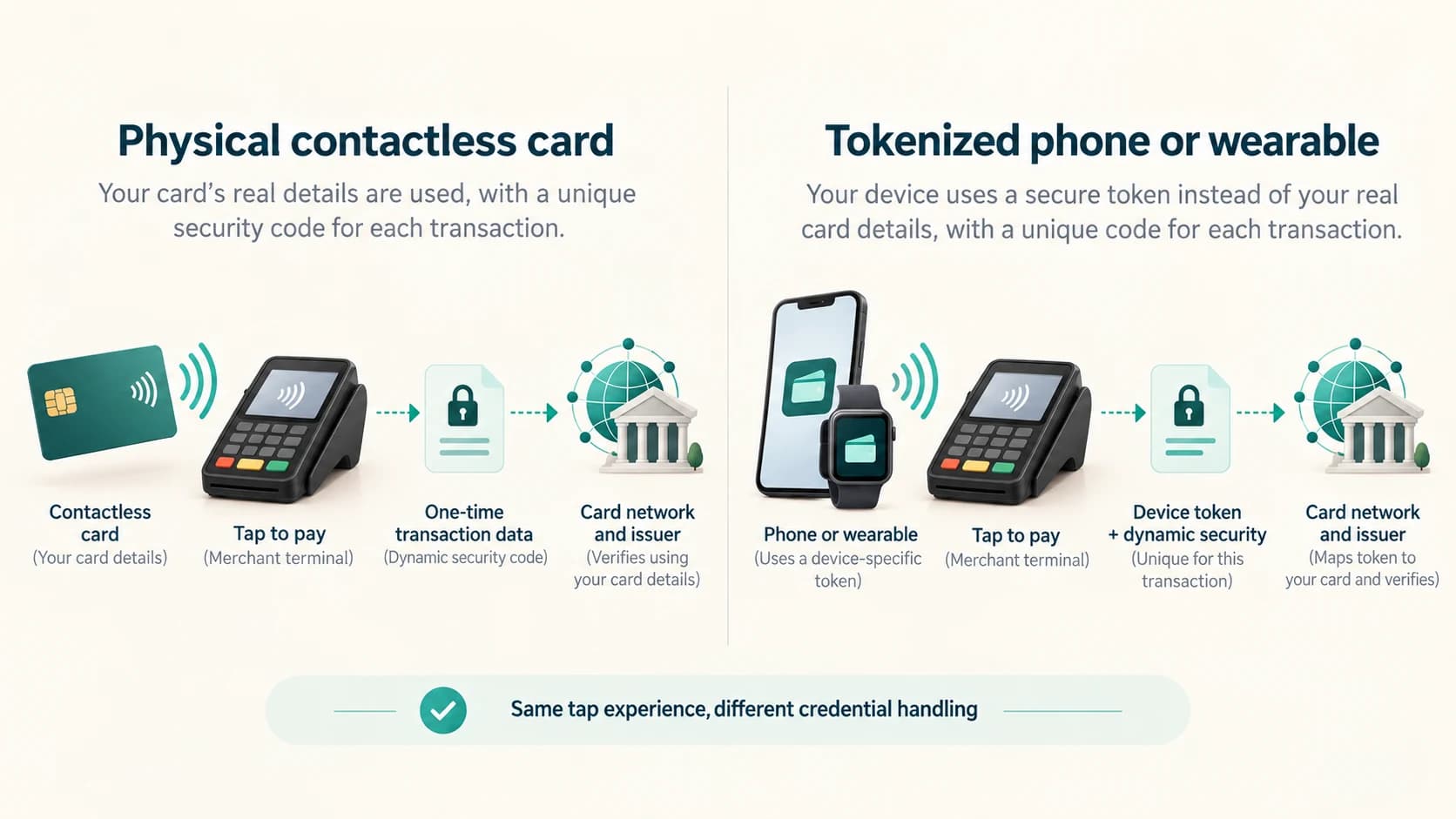
The checkout experience may look identical:
tap phone → approved
But the device can use tokenisation.
RBI defines tokenisation as replacing actual card details with an alternate code called a token.
For device-based tokenisation, the token can be unique to a combination of:
- card,
- token requestor,
- device.
RBI says a tokenised card transaction is safer because the merchant does not receive the actual card credentials in the same way.
A phone or smartwatch can therefore present a payment token through NFC instead of exposing the original card number as the primary transaction credential.
The network and issuer can map the token back to the underlying card relationship within the secure payment ecosystem.
Is the Physical Contactless Card Also “Tokenized” During Every Tap?
Not in the same sense as a mobile wallet token.
A physical EMV contactless card can still identify the underlying card account through the card network while generating dynamic transaction security data.
Device tokenisation is a separate concept used when cards are digitised into phones, watches and other supported devices.
This distinction matters:
Physical tap card
EMV chip + NFC + transaction-specific cryptography
Tokenised phone/wearable
device token + NFC + transaction-specific payment security
Both can produce the same convenient “tap” at the terminal.
Their underlying credentials are not necessarily identical.
Does the Shop Learn Your Bank Balance?
No.
The merchant needs to know:
- transaction amount,
- whether the transaction was approved,
- the information needed for payment processing and receipt/reconciliation.
It does not need your bank account balance.
The issuer can make the authorization decision without sending:
“Customer has ₹78,421.33”
back to the shop.
The merchant receives an approval or decline.
That separation limits unnecessary exposure of financial information.
Does the Merchant Keep Your Full Card Number Forever?
For an in-person terminal payment, card data handling is controlled by payment-security rules and network standards.
For card-on-file use—such as storing a card in an e-commerce account—RBI has imposed separate tokenisation and storage restrictions in India.
RBI's card-on-file framework says entities in the transaction chain other than card issuers and card networks should not store actual card credentials in ordinary card-on-file form.
That is a different issue from a physical tap, but it reflects the same broader security principle:
Expose and store sensitive card credentials only where necessary.
Why Contactless Can Feel Faster Than Chip-and-PIN
The wireless communication itself is quick.
For eligible lower-value transactions, removing the PIN-entry step saves even more time.
A typical small purchase can become:
merchant enters amount
↓
customer taps
↓
card and terminal exchange EMV data
↓
authorization travels to issuer
↓
approval returns
No card insertion.
No PIN.
No signature.
NPCI describes RuPay Contactless payments as completing in a fraction of seconds at the card-reader interaction stage, although total authorization time also depends on the payment network and issuer response.
What Happens If the Internet Connection at the Shop Fails?
Many normal card transactions depend on connectivity between the merchant acceptance system and the acquiring/payment network.
If connectivity is unavailable, the transaction may:
- fail,
- time out,
- be retried,
- follow an approved offline-processing mechanism where the card, terminal, issuer and applicable rules support one.
Offline card-payment capability is a specialized topic and should not be assumed for every terminal or every contactless card.
The common everyday model is still:
tap locally
then
authorize through remote payment systems.
One Tap, Two Different Worlds
The easiest way to understand contactless card payments is to separate the process into two worlds.
World 1: The local NFC exchange
Happens within centimetres of the checkout terminal.
It answers questions such as:
- What payment application is on this card?
- What transaction data should be created?
- What cryptographic information does the chip generate?
- Is a PIN or other verification method required?
World 2: The banking-network authorization
Can travel across data centres and financial networks.
It answers:
- Is the card valid?
- Is the purchase allowed?
- Are funds or credit available?
- Does the issuer approve?
The first world is what makes the payment contactless.
The second world is what makes it a financial transaction.
What Happens in Those Few Seconds?
A normal online contactless-card purchase can be summarized like this:
1. Merchant enters the amount
The terminal knows the purchase is ₹850.
2. Customer taps the card
The card enters the terminal's short-range NFC field.
3. EMV chip and terminal communicate
They exchange transaction and capability information.
4. Chip generates dynamic security data
Transaction-specific cryptographic information helps authenticate the payment.
5. Cardholder verification is determined
For an eligible low-value contactless payment, PIN may not be required; larger or riskier transactions may require additional verification.
6. Terminal creates an authorization request
It combines merchant, amount and card/EMV information.
7. Acquirer receives the request
The merchant's banking/payment side forwards it.
8. Card network routes it to the issuer
The payment network identifies the bank that issued the card.
9. Issuer approves or declines
It checks the card, available funds/credit, limits and risk controls.
10. Response returns to the terminal
The merchant sees success or failure.
11. Clearing and settlement follow
The institutions later exchange transaction records and settle their obligations.
The customer experiences:
tap → beep → approved.
A Tap Is Not the Payment—It Starts the Payment
That is the key idea.
NFC does not magically move money through the air.
It gives the card and terminal a fast, short-range way to exchange the information needed to start a secure card transaction.
The rest happens through financial infrastructure.
The card chip contributes:
- identity,
- EMV logic,
- dynamic security data.
The terminal contributes:
- merchant information,
- amount,
- acceptance rules.
The acquirer connects the merchant.
The card network finds the issuer.
The issuer decides whether the transaction may proceed.
And later, clearing and settlement make sure the financial institutions agree about who owes what.
The next time you tap a card and hear that instant beep, the machine has not simply “read ₹850 from your card.”
It has started a secure conversation that can cross several institutions—and finish before you have put the card back in your wallet.