Why Can Deleted Files Sometimes Be Recovered? What "Delete" Really Does
Learn what actually happens when you delete a file, why recovery sometimes works, and why SSDs, HDDs, cloud storage and phones behave differently.
You accidentally delete an important folder.
You empty the Recycle Bin.
The files disappear from File Explorer, the storage space becomes available again, and the computer behaves as though the files no longer exist.
Then a data-recovery program somehow finds them.
How can software recover a file that was supposedly deleted?
The answer is that "deleted" does not always mean "physically erased from the storage device."
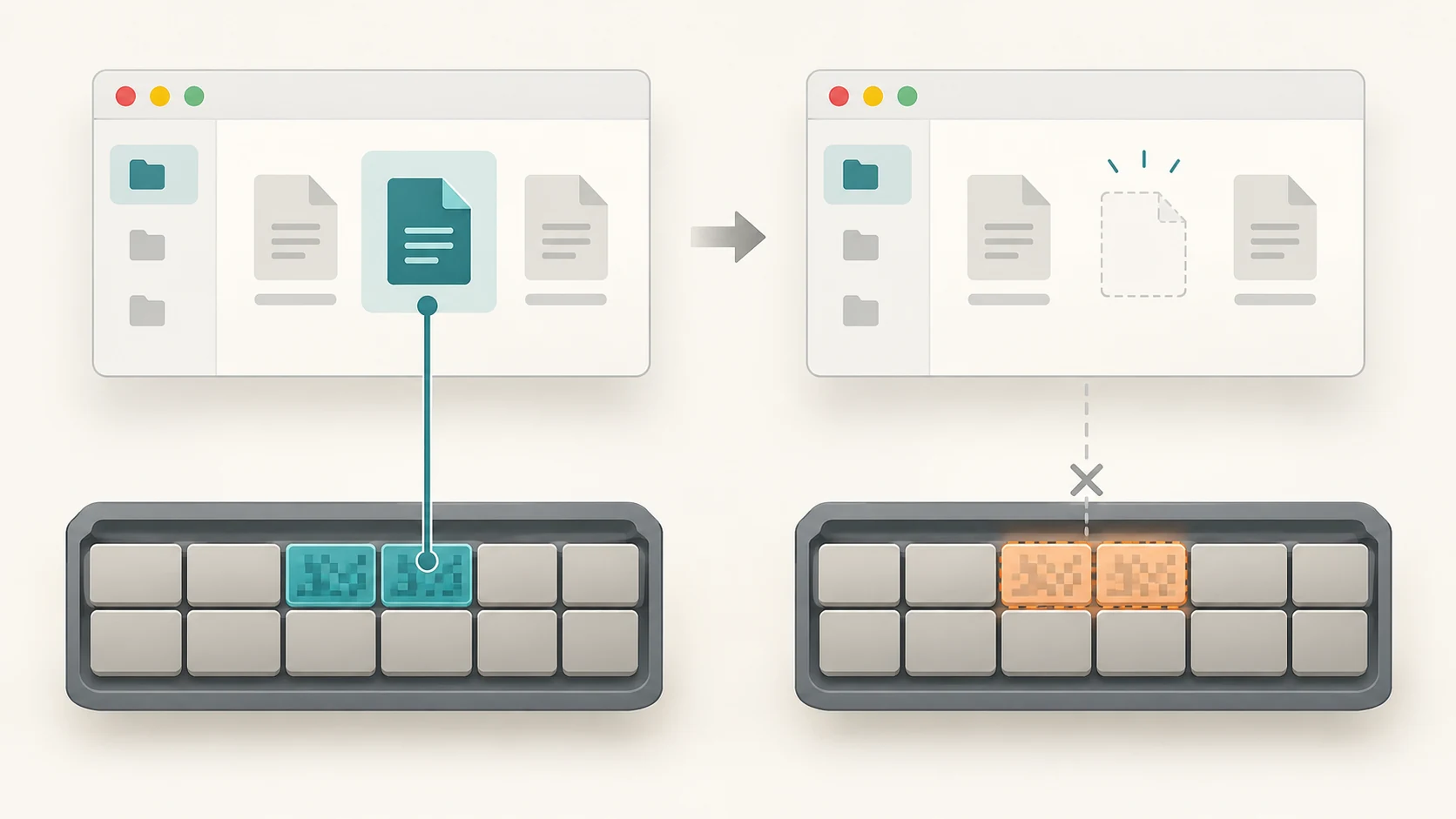
On many storage systems, deleting a file is initially more like telling the file system:
"I don't need this file anymore. You may reuse the space."
The operating system can remove the file from your normal view and mark its storage space as available without immediately overwriting every bit that previously belonged to it.
Microsoft describes this directly in its Windows File Recovery documentation: when a file is deleted, its storage space can be marked as free even though the file's data may still physically exist and remain recoverable until that space is reused.
That simple idea explains traditional file recovery surprisingly well.
But there is an important complication: hard drives and modern SSDs do not behave the same way after deletion.
To understand when recovery works, we need to separate several different things that people casually call "deleting."
First, Deleting a File May Not Delete It at All
When you press Delete on a file in Windows, it will often move to the Recycle Bin.
On a Mac, it normally moves to Trash.
At this stage, the file has not undergone the kind of deletion that requires forensic recovery.
It has essentially been moved into a special holding area.
Microsoft describes ordinary hard-drive deletion as moving the file to the Recycle Bin, while Apple notes that files placed in Trash are not fully removed until the Trash is emptied.
This is why restoring a file from the Recycle Bin is so easy.
The system still knows:
- the file's name
- where it is
- much of its metadata
- where it should be restored
It is closer to moving a document into a waste-paper basket beside your desk than shredding it.
The interesting part begins after you empty that basket.
A File Is More Than the Data Inside It
Suppose you have a photograph called:
holiday-photo.jpgYour storage device contains the image data somewhere, but the computer also needs information describing that data.
A file system keeps track of things such as:
- the file name
- its location in folders
- its size
- timestamps
- permissions
- which areas of the storage device contain its data
Think of a library.
The actual book sits on a shelf, while a catalogue tells you:
Book name → shelf location
Deleting a file can resemble removing the catalogue entry and declaring that shelf space available.
The book may still physically be sitting there.
Until something else is placed on that shelf, parts—or sometimes all—of the original information may remain.
What Happens When a File Is Permanently Deleted?
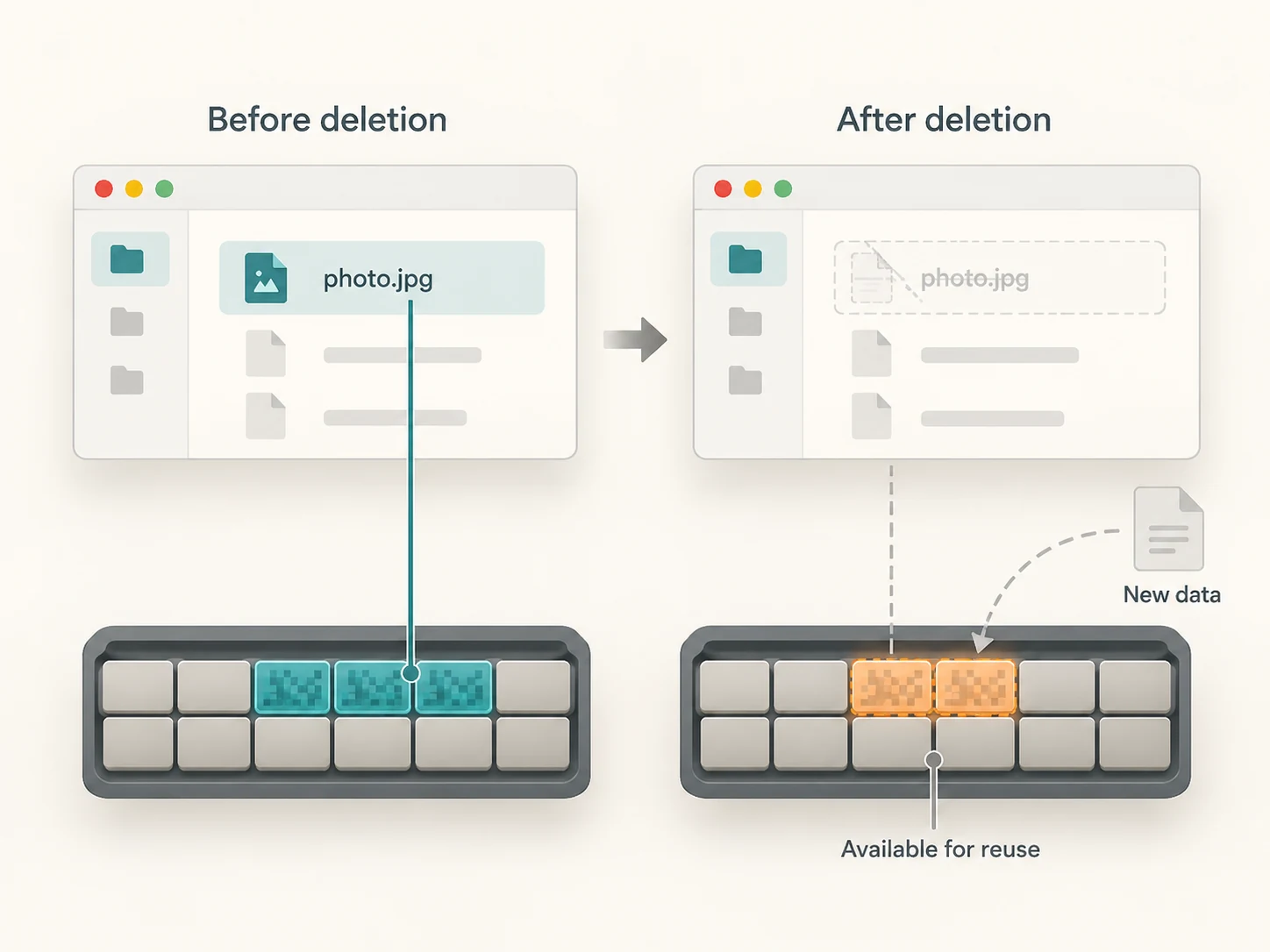
The exact details depend on the operating system, file system and storage device, but a simplified deletion might work like this.
Before deletion:
File: photo.jpg
Location: storage blocks 4000–4050
Status: in use
After deletion:
File entry: removed or marked deleted
Blocks 4000–4050: available for reuse
Notice what may be missing from that process:
Overwrite blocks 4000–4050 immediately with zerosThat extra work usually isn't necessary just to make the file disappear from the user's view.
The operating system can simply remember that those storage locations are available for something else.
This is fast.
It also creates the opportunity for recovery.
Why Recovery Works Particularly Well on Traditional Hard Drives
A traditional hard disk drive, or HDD, stores information magnetically on rotating platters.
If the file system stops referring to a set of sectors, the magnetic patterns representing the old data do not necessarily disappear immediately.
They may remain until new data is written over them.
So imagine you delete a 20 MB photograph.
The system marks those areas as reusable.
If nothing else uses them, recovery software may still be able to read the old content.
But then you download a large video.
The operating system may decide:
"These blocks are free. I'll use them."
Now some of the old photograph may be overwritten by the video.
Once the relevant physical information has genuinely been replaced, ordinary recovery software cannot simply reconstruct the original bytes from those overwritten locations.
This is why time matters after accidental deletion.
Microsoft explicitly recommends minimising or avoiding further use of a computer when trying to recover a deleted file, because new activity can overwrite space that has been marked free.
How Does Recovery Software Find a File the File System Has Forgotten?
There are several possible approaches.
It may find leftover file-system metadata
Some information describing the deleted file may still exist.
If the recovery software can reconstruct enough of that metadata, it may determine:
- what the file was called
- how large it was
- where its data was stored
This is often the best case because the original structure can sometimes be reconstructed.
It may scan the raw storage for recognizable file structures
Even if the filename and folder information are gone, file contents themselves often have recognizable internal patterns.
For example, common image, archive and document formats contain characteristic structures.
Recovery software can scan raw storage looking for those patterns.
This technique is commonly called file carving.
You might recover the photograph but lose its original name:
holiday-photo.jpgcould become something like:
recovered_00873.jpgThe content survived.
The file-system information describing it did not.
Why Some Recovered Files Are Corrupted
Files are not always stored as one neat continuous block.
A file may be divided into several pieces placed in different locations on a drive.
Suppose a file occupies:
Blocks 100–120
Blocks 850–870
Blocks 2100–2120
If all those pieces survive, recovery may succeed.
But if new data overwrites the middle portion, you might recover only part of the original file.
The result could be:
- an image with missing areas
- a video that stops halfway
- a damaged archive
- a document that refuses to open
Recovery therefore is not a simple yes-or-no condition.
A file can be:
- fully recoverable
- partially recoverable
- recoverable without its name
- recoverable but corrupted
- completely unrecoverable
SSDs Change the Story
Modern computers increasingly use solid-state drives, or SSDs.
An SSD stores data in NAND flash memory rather than on magnetic platters.
Flash memory behaves differently.
One important difference is that flash generally cannot simply overwrite existing data in place in the same way a magnetic disk can. SSD controllers organise flash into pages and erase larger blocks as part of their internal management.
This creates a problem.
Imagine the operating system deletes a file.
The file system knows those storage addresses are no longer needed.
But without additional information, the SSD itself may not know that the old contents are disposable.
That is one reason TRIM exists.
What Is TRIM?
TRIM is a mechanism by which the operating system can tell a storage device:
"These logical storage locations are no longer needed."
Microsoft describes TRIM or delete notification as informing the underlying device that clusters freed through file deletion are no longer required. NTFS enables this behaviour by default unless it is disabled.
Microsoft's storage documentation further explains that SSD flash cannot normally overwrite data in place and that TRIM allows the operating system to tell the SSD which sectors can be purged or reclaimed.
The SSD can then use that information during its internal garbage collection.
That is excellent for performance.
It is less helpful when you have just accidentally deleted a file.
Why Deleted Files on an SSD May Be Much Harder to Recover
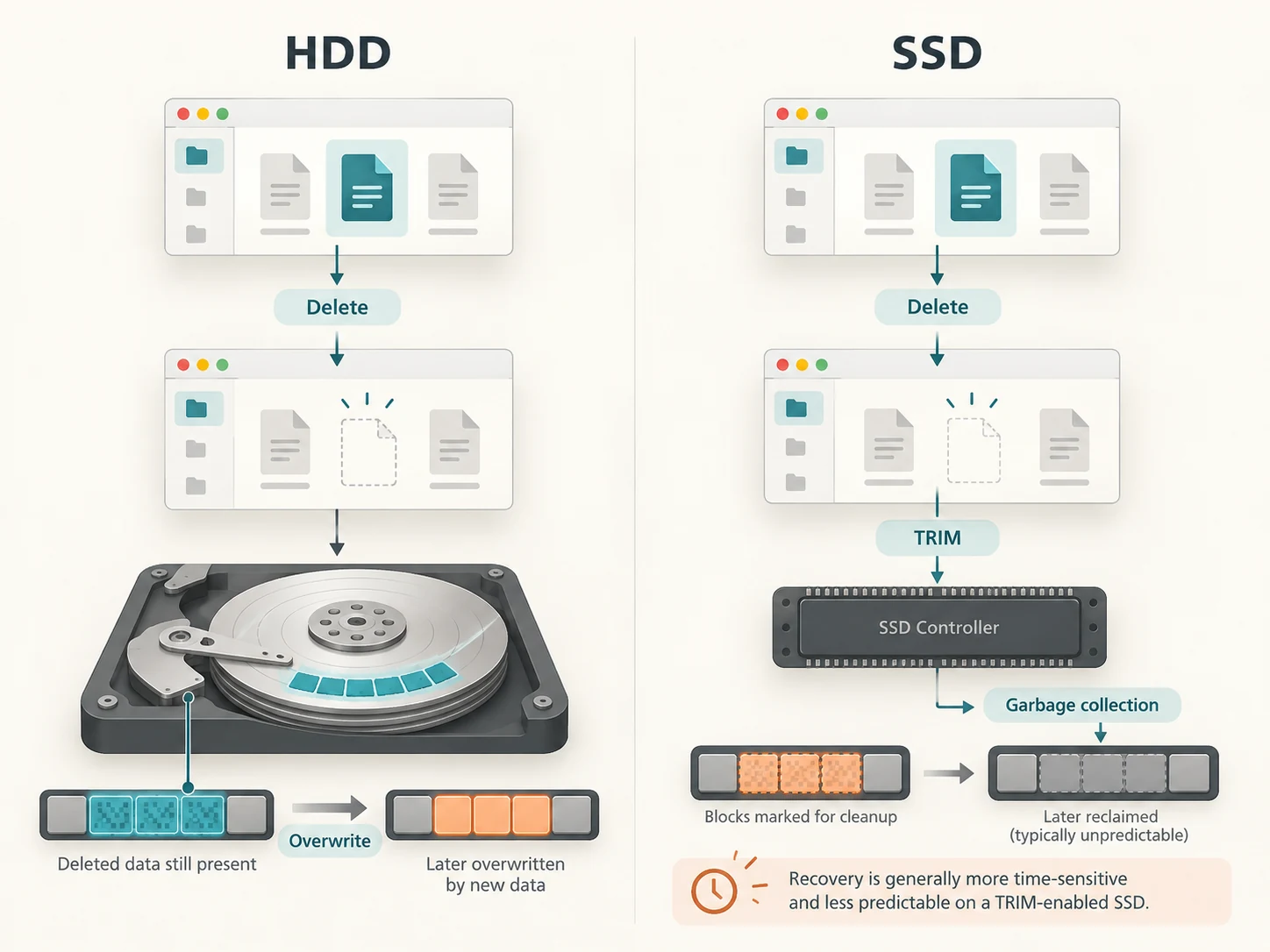
On a traditional HDD, deleting a file may leave the physical magnetic data sitting untouched until something else overwrites it.
On a TRIM-enabled SSD, the operating system can actively tell the drive:
These pages no longer contain useful data.
The SSD controller may then erase or reclaim the corresponding flash during background management.
Once that has happened, raw recovery becomes much less likely.
This is why the old rule:
"Deleted data remains until something overwrites it."
is a useful description for many HDD scenarios but is too simplistic for modern SSDs.
On an SSD, recovery depends on factors including:
- whether TRIM/discard was issued
- whether the storage device supports it
- how quickly the SSD processes the discarded regions
- its internal garbage-collection behaviour
- encryption
- file-system behaviour
- how much the device has been used since deletion
Microsoft describes TRIM as a hint that allows storage locations to be purged, while storage-industry documentation notes that NAND devices use garbage collection to reclaim flash blocks internally.
So SSD recovery is often less predictable than HDD recovery.
What About USB Drives and SD Cards?
Flash memory is also used inside:
- USB pen drives
- SD cards
- microSD cards
- camera memory cards
But these should not automatically be treated like a modern internal SSD.
Different devices expose different capabilities to the operating system, and support for discard or TRIM-like operations varies.
A deleted photograph on an SD card may sometimes be recoverable surprisingly easily if the underlying data has not been overwritten.
That is why one of the first pieces of advice after accidentally formatting a camera card is usually:
Stop taking new photographs on it.
Every new write creates another opportunity to reuse the storage containing the lost data.
What About Phones?
Modern smartphones complicate recovery even further.
They use flash storage, sophisticated storage controllers and extensive encryption.
Android requires devices launching with Android 10 or later to use file-based encryption, allowing different files to be protected with different encryption keys.
Apple similarly uses hardware-backed Data Protection and file-level encryption on modern iPhone and iPad devices.
This means the classic mental model of:
"Take the disk out and scan every sector for deleted JPEGs"
does not translate neatly to a modern phone.
Raw file recovery may be restricted by:
- flash reclamation
- encryption
- hardware security
- application databases
- operating-system permissions
- deleted encryption keys
At the same time, a photo that appears to have been "recovered" may simply have come from:
- a Recently Deleted album
- cloud synchronization
- a device backup
- an app's own trash folder
Those are very different forms of recovery.
Cloud Storage Creates Another Kind of "Deleted"
If you delete something from a cloud service, there may not even be a storage-recovery process involved initially.
The provider may intentionally retain the deleted object for a period of time.
For example, Apple currently keeps many files deleted from iCloud Drive in Recently Deleted for up to 30 days, during which they can be restored.
Windows File History can likewise allow previous versions or deleted content to be restored if suitable backups were created.
So when someone says:
"I recovered my deleted file"
the recovery might actually have come from four very different places:
- Recycle Bin or Trash
- Cloud retention
- Backup or previous version
- Raw storage recovery
Only the fourth involves trying to reconstruct data the file system no longer treats as an ordinary live file.
What Makes Recovery More or Less Likely?
Several factors matter.
Storage type
Traditional HDDs often provide a more forgiving recovery window than TRIM-enabled SSDs.
Time since deletion
Time itself does not necessarily erase the data, but continued device activity creates new writes.
More writes mean more chances for reuse.
Free space
A nearly full drive may reuse recently freed space more quickly.
File size and fragmentation
A small file stored contiguously may be easier to reconstruct than a large file split across many areas.
TRIM and garbage collection
On SSDs, these can make deleted data inaccessible even without the user intentionally writing another file over it.
Encryption
Modern encrypted devices can make raw recovery significantly more difficult, especially if relevant encryption keys are no longer available.
Backups
A proper backup can make all of the storage-level complexity irrelevant.
If another intact copy exists, you do not need forensic recovery at all.
If You Accidentally Delete Something Important, Stop Writing to the Drive
This is probably the most useful practical lesson.
If a valuable file has disappeared from local storage:
- Check the Recycle Bin, Trash or Recently Deleted folder first.
- Check cloud storage and backups.
- Minimise further use of the affected storage device.
- Do not download large files onto that same device unnecessarily.
- If using recovery software, avoid installing it onto the drive containing the lost files when possible.
- Save recovered files somewhere else rather than back onto the source drive.
Microsoft's own recovery guidance specifically recommends reducing computer use after deletion because the storage occupied by the deleted file may have been marked free and can be overwritten.
For extremely valuable data or physically failing hardware, professional recovery may be safer than repeatedly experimenting with the drive.
Is Emptying the Recycle Bin Enough to Protect Private Data?
Not necessarily.
Making a file inaccessible through normal operating-system tools is different from making its underlying data unrecoverable.
This distinction matters when:
- selling a computer
- donating an old drive
- returning leased equipment
- disposing of storage containing confidential information
Security professionals use the broader concept of media sanitization.
NIST defines sanitization as making access to target data infeasible for an appropriate level of effort. Its current guidance, SP 800-88 Revision 2, covers techniques and policies for securely clearing, purging or otherwise sanitizing storage rather than assuming ordinary file deletion is sufficient.
For modern encrypted devices, cryptographic erase can be especially powerful.
Instead of laboriously rewriting every byte, the system can securely destroy encryption keys so that the remaining encrypted information becomes computationally inaccessible.
Apple, for example, states that Erase All Content and Settings destroys keys in effaceable storage, rendering user data cryptographically inaccessible on supported devices.
That is fundamentally different from dragging a file into Trash.
Does Overwriting a File Make It Unrecoverable?
If the physical locations containing the original data are genuinely replaced, the original information becomes far more difficult or impossible to recover through ordinary software techniques.
For HDDs, deliberate overwriting has traditionally been one method used for sanitization.
But SSDs complicate this because of:
- wear levelling
- overprovisioning
- flash translation layers
- blocks that may no longer correspond directly to the logical addresses visible to the operating system
That is why simply writing a giant file full of zeros is not necessarily the ideal way to securely sanitise every modern storage device.
Current NIST guidance recommends selecting sanitization methods appropriate to the actual storage technology and points to dedicated device sanitization and cryptographic-erasure mechanisms where appropriate.
So When Is a Deleted File Really Gone?
There is no single moment that applies to every device.
A file may become inaccessible to the normal user long before its old physical representation disappears.
The stages can look something like this:
File exists normally
        ↓
Moved to Recycle Bin / Trash
        ↓
Removed from ordinary file-system view
        ↓
Storage marked available
        ↓
Old data may still exist
        ↓
Storage is reused, erased, trimmed or cryptographically invalidated
        ↓
Recovery becomes impractical or impossible
Not every storage system passes through these stages in exactly this order.
An SSD might reclaim discarded data rapidly.
A hard disk sector might remain untouched for weeks.
A cloud provider might deliberately retain a deleted copy.
An encrypted phone might make the remaining bits useless if the relevant keys are destroyed.
That is why two files deleted in apparently identical ways can have completely different outcomes.
"Delete" Usually Means the System No Longer Needs the File
The simplest way to understand file deletion is to separate logical deletion from physical erasure.
Logical deletion tells the computer:
"Stop treating this as a live file."
Physical erasure deals with the actual information stored on the medium.
Those two events can happen at different times.
That delay is what traditional data-recovery software takes advantage of.
It searches for information the operating system has stopped listing but the storage device has not yet destroyed or overwritten.
On a magnetic hard drive, that window can sometimes be surprisingly generous.
On a modern SSD, TRIM and garbage collection can shorten it dramatically.
On phones, encryption changes the problem again.
And with cloud storage or backups, recovery may have nothing to do with the deleted physical data at all.
So when your computer asks:
"Are you sure you want to permanently delete this file?"
"Permanent" often means:
You will no longer be able to restore it through the normal interface.
It does not always mean:
Every physical trace of those bytes has already vanished.