
Computer System Components: Hardware, Software, Users and Data
Computer System Components: Hardware, Software, Users and Data. Foundational Computer Awareness explanations, examples and explained practice questions for banking and recruitment exam preparation.
By Akhilesh Saini
What you will learn
- The difference between a computer and a working computer system.
- The roles of hardware, software, data, and users.
- How these elements interact in an everyday banking task.
- Common examples of hardware and software, without going into the deeper next modules.
Why this topic matters
A frequent question asks Which is an example of hardware? or How is software different from data? In a real banking application, knowing these roles helps you understand why a problem might arise from equipment, instructions, records, or human action.
What is a computer system?
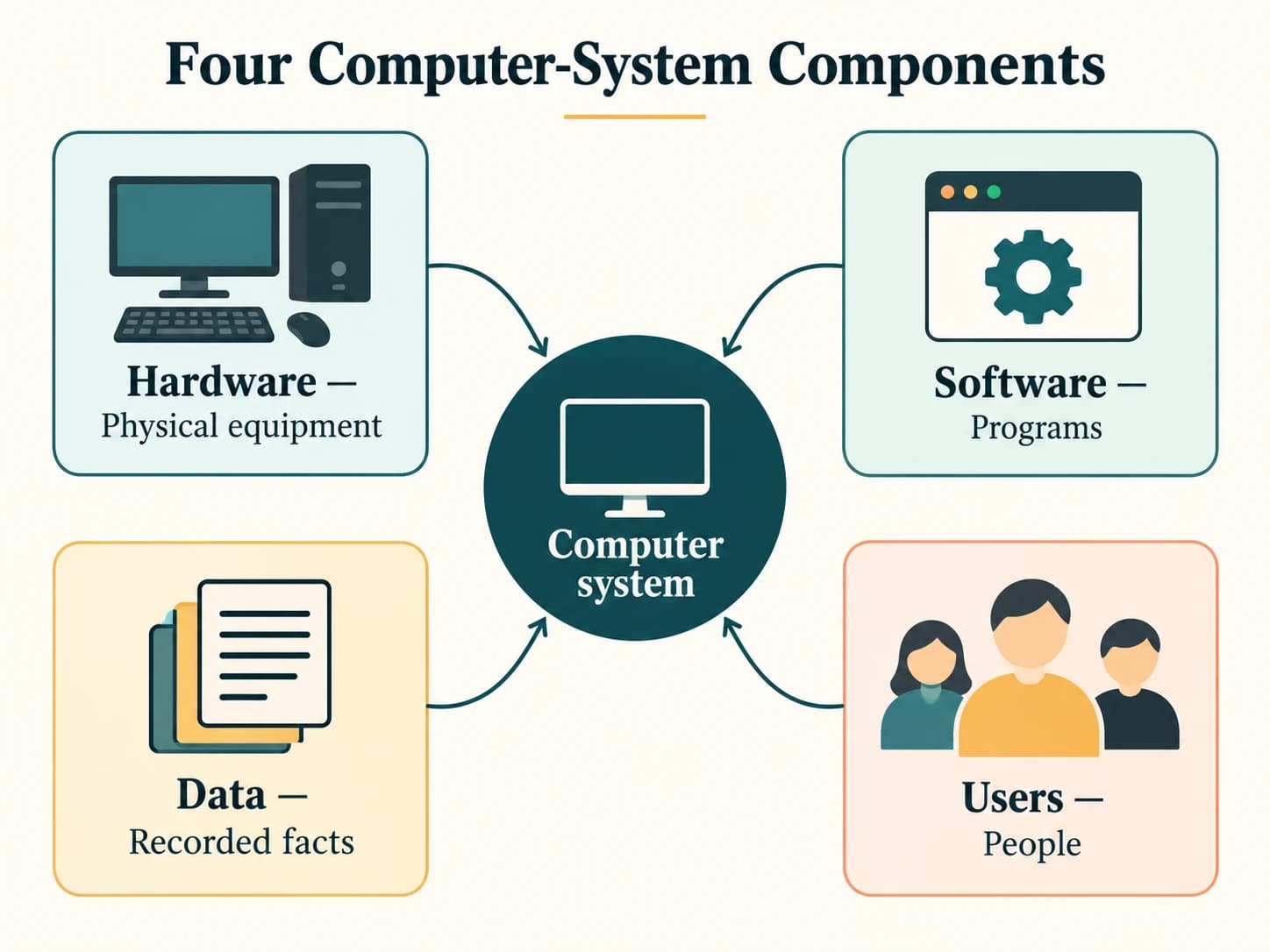
A computer system is an arrangement of interacting components that collectively allow data-processing tasks to be performed. For foundational computer awareness, four useful components are hardware, software, data, and users. The wider environment can also include procedures, networks, and power, depending on the model being taught.
A computer system is more than a collection of electronic objects. It works because instructions, equipment, and information are coordinated to accomplish a task.
1. Hardware — the physical equipment
Hardware means the physical parts of a computer system that can be touched or physically observed.
Examples include:
- Input devices: Keyboard, mouse, scanner.
- Processing hardware: CPU and supporting electronic components.
- Memory and storage devices: RAM, solid-state drive, hard disk drive.
- Output devices: Monitor, printer, speakers.
- Connectivity equipment: Network interface and associated cables.
Do not memorize hardware as “only external devices.” The CPU, circuit boards, memory chips, and internal storage are also hardware.
Detailed functions are studied later in CA-02-01 through CA-02-08.
2. Software — the instructions
Software means programs and related instructions that tell hardware what to do and help people perform tasks.
Two broad categories are:
- System software: Provides foundational operating functions, such as an operating system.
- Application software: Helps users complete tasks, such as a word processor, web browser, or banking application.
An operating system helps coordinate the computer's hardware and running applications; an application uses the system to carry out a user task. This is a basic overview—see CA-03-01 and CA-03-02 for detailed treatment.
Key difference: A printer is hardware; a program that sends documents to the printer is software.
3. Data — the material being worked on
Data consists of recorded facts or values that the system receives, stores, or processes.
Examples: Customer names, transaction amounts, account identifiers, stock quantities, or marks. A program can process data, but the data itself is not the instruction program.
Consider the amount 5000 in a banking record. That number is data. The instructions that check its permitted range or add it to a report are software.
4. Users / people — those operating and supervising
Users are the people who interact with a computer system or rely on its results: students, bank staff, administrators, customers, and others. People enter information, initiate activities, review results, establish procedures, and handle exceptions.
In a larger information system, different people have different responsibilities. For example, a bank customer initiates a request, an employee may review an exception, and an administrator maintains access settings. A program can automate a task, but responsible operation still requires appropriate oversight and controls.
How the four parts cooperate
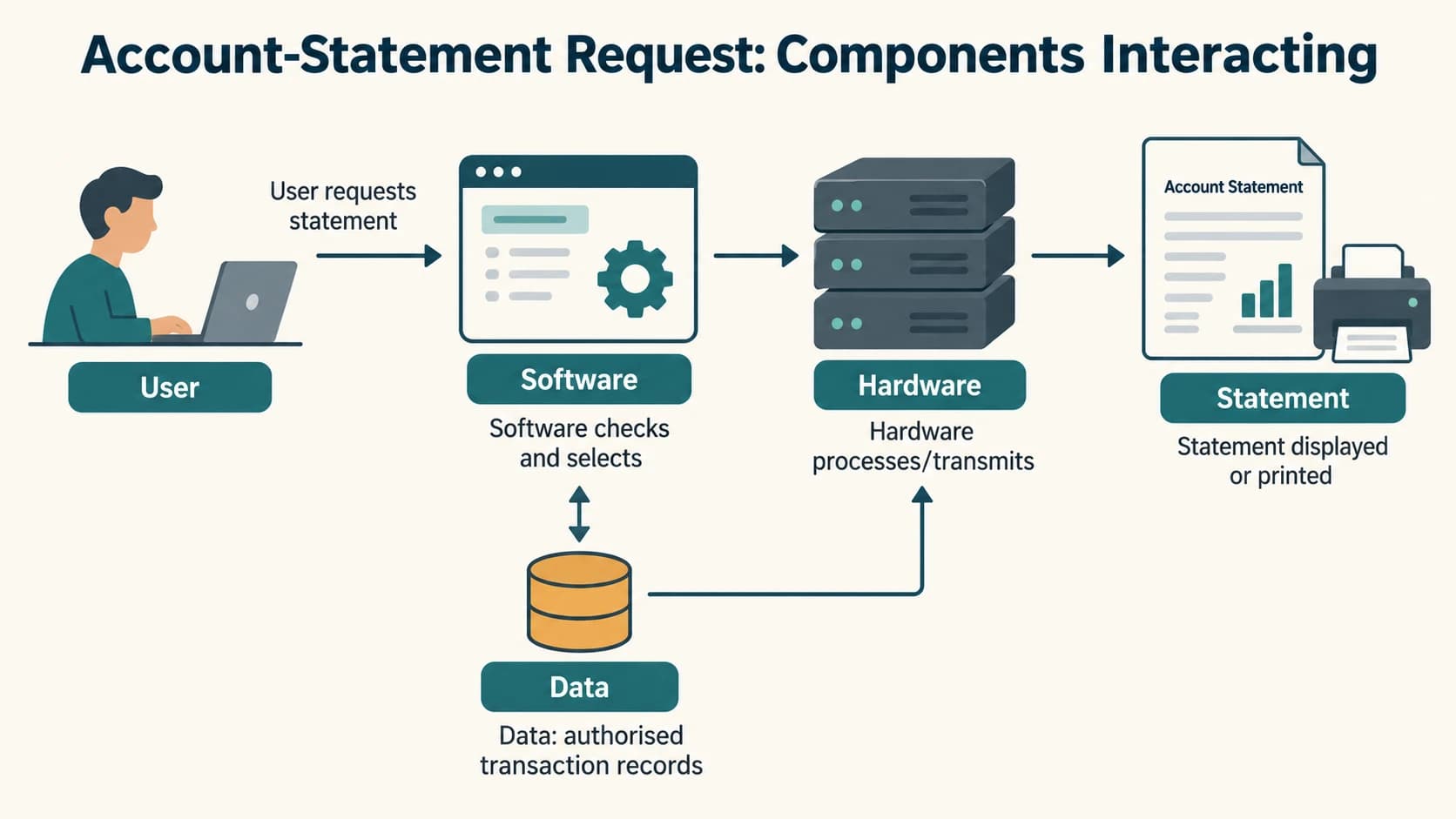
Consider a simple account-statement request:
- User: A bank employee or customer requests an authorized statement.
- Software: The application checks the request and asks for permitted records.
- Hardware: Computers, storage, and network equipment carry out the operations.
- Data: Authorized account and transaction records are retrieved and processed.
- Result: The statement is shown on a screen or produced as a file/printout.
In this example, the software is not the account balance, and the hardware is not the statement itself. Each part has a distinct role.
System components versus functional units
A useful exam distinction is that hardware, software, data, users is a system-components view, while input, processing, output, and storage is a functional view. The two views describe different aspects of the same working system.
| System-component view | Functional view |
|---|---|
| Hardware = physical equipment | Input = entering/capturing data |
| Software = programs/instructions | Processing = applying operations |
| Data = recorded facts | Output = giving a result |
| Users = people interacting/overseeing | Storage = retaining data/results |
For instance, a keyboard is hardware that usually serves an input function. A printer is hardware that usually serves an output function. Neither pair is a contradiction: one term describes what the item is, while the other describes what it does.
Important terms
| Term | Meaning |
|---|---|
| Hardware | Physical devices and electronic parts. |
| Software | Programs and instructions. |
| Data | Recorded facts used by a system. |
| User | Person who operates, controls, or receives output from the system. |
| System software | Software supporting the basic operation of the computer. |
| Application software | Software for user-oriented tasks. |
| Peripheral | Device connected to or used with a computer; often for input/output or storage. |
| Information system | Broader arrangement of technology, data, people and processes serving an information need. |
Common confusions
- Hardware is not only what is outside the cabinet. Internal parts count too.
- Software is not the same as a saved customer record. One is instructions; the other is data.
- Input/output are functions, not alternatives to hardware/software. A device can be both hardware and an input device.
- A computer system is not just a CPU. Other components are needed for useful tasks.
- Users are not necessarily doing all computation manually. People may initiate, monitor, authorize, or consume automated processes.
Fact to remember
- Hardware = physical; software = programs; data = facts; users = people.
- A keyboard is physical input hardware.
- A monitor is physical output hardware.
- RAM and storage drives are hardware, despite serving different roles.
- An operating system is system software; a word processor is application software.
Quick revision
| Item | Best classification | Typical function |
|---|---|---|
| Keyboard | Hardware | Input |
| CPU | Hardware | Processing |
| Monitor | Hardware | Output |
| SSD | Hardware | Storage |
| Operating system | Software | System management |
| Spreadsheet application | Software | User task |
| Transaction amount | Data | Recorded fact |
| Bank employee using software | User | Interaction / oversight |
Practice questions — CA-01-06
Q1. Which of the following is hardware?
A. Operating system
B. Spreadsheet program
C. Keyboard
D. Transaction record
Q2. Which of these is software?
A. Monitor
B. Word-processing program
C. CPU
D. SSD
Q3. A saved customer transaction amount is best classified as:
A. Data
B. A cooling fan
C. An output printer
D. A motherboard
Q4. The primary role of software is to:
A. Supply physical electricity
B. Provide instructions for tasks and system operation
C. Replace every hardware part
D. Become a physical screen
Q5. Which of the following is both hardware and typically an input device?
A. Keyboard
B. Word processor
C. Customer's name
D. Operating system
Q6. A printer is usually classified as:
A. Application software
B. Output hardware
C. Raw data
D. A user
Q7. An operating system is an example of:
A. System software
B. Customer data
C. An external keyboard
D. A paper file
Q8. A bank employee checking an electronic statement primarily represents which system component?
A. Software
B. Data
C. User / people
D. Processing chip
Q9. Which statement is correct?
A. Hardware means only equipment located outside a computer.
B. Internal memory chips are also hardware.
C. Software can be physically touched like a circuit board.
D. Data is always a keyboard.
Q10. Which pair is correctly matched?
A. CPU—hardware
B. Mouse—software
C. Operating system—hardware
D. Printer—data
Q11. “Input, processing, output, storage” primarily describes:
A. Functional roles in a system
B. Four kinds of people
C. Four generations of computers
D. Four programming languages
Q12. In an account-statement system, the instructions that select permitted records are primarily:
A. Software
B. Paper stationery
C. A user's chair
D. Power cables
Answers and explanations — CA-01-06
| Q | Answer | Explanation |
|---|---|---|
| 1 | C | A keyboard is physical equipment and therefore hardware. |
| 2 | B | A word processor is an application program. |
| 3 | A | A transaction amount is a recorded fact for processing. |
| 4 | B | Programs and instructions define work to be carried out. |
| 5 | A | A keyboard is physical hardware used to enter information. |
| 6 | B | A printer is a physical device that produces output. |
| 7 | A | An operating system is foundational system software. |
| 8 | C | A person interacting with the system is a user. |
| 9 | B | Hardware includes internal components such as memory chips. |
| 10 | A | The central processing unit is a physical hardware component. |
| 11 | A | These are functional descriptions of work done by the system. |
| 12 | A | Instructions used to select records belong to software; the records themselves are data. |
Previous lesson: CA-01-05 — Analog, Digital and Hybrid Computers.
Next module: CA-02 — Hardware, CPU and Memory (CA-02-01 — Motherboard and Basic Internal Components).