
Motherboard and Basic Internal Components
Motherboard and Basic Internal Components. Foundational Computer Awareness explanations, examples and explained practice questions for banking and recruitment exam preparation.
By Akhilesh Saini
What you will learn
- What the motherboard does and why it is called the main circuit board.
- The jobs of the CPU socket, memory slots, chipset, expansion slots, storage connections and power supply.
- How to distinguish the motherboard from the cabinet, processor and individual components.
Why this topic matters
A question may ask where RAM is installed, what connects the CPU to other components, or which component supplies electrical power. These are identification questions; understanding the parts as one connected system makes them easier than memorizing isolated names.
The motherboard: the computer's main circuit board
The motherboard, also called the mainboard or system board, is the main printed circuit board (PCB) that provides electrical connections and communication paths for major parts of a computer. In a typical desktop it holds the CPU socket, RAM slots, expansion slots, firmware circuitry and connections to storage, power and external ports. Some compact computers have many of these parts permanently integrated on one board.
The motherboard does not perform all calculations itself. The CPU executes instructions; the motherboard allows components to be connected and communicate.
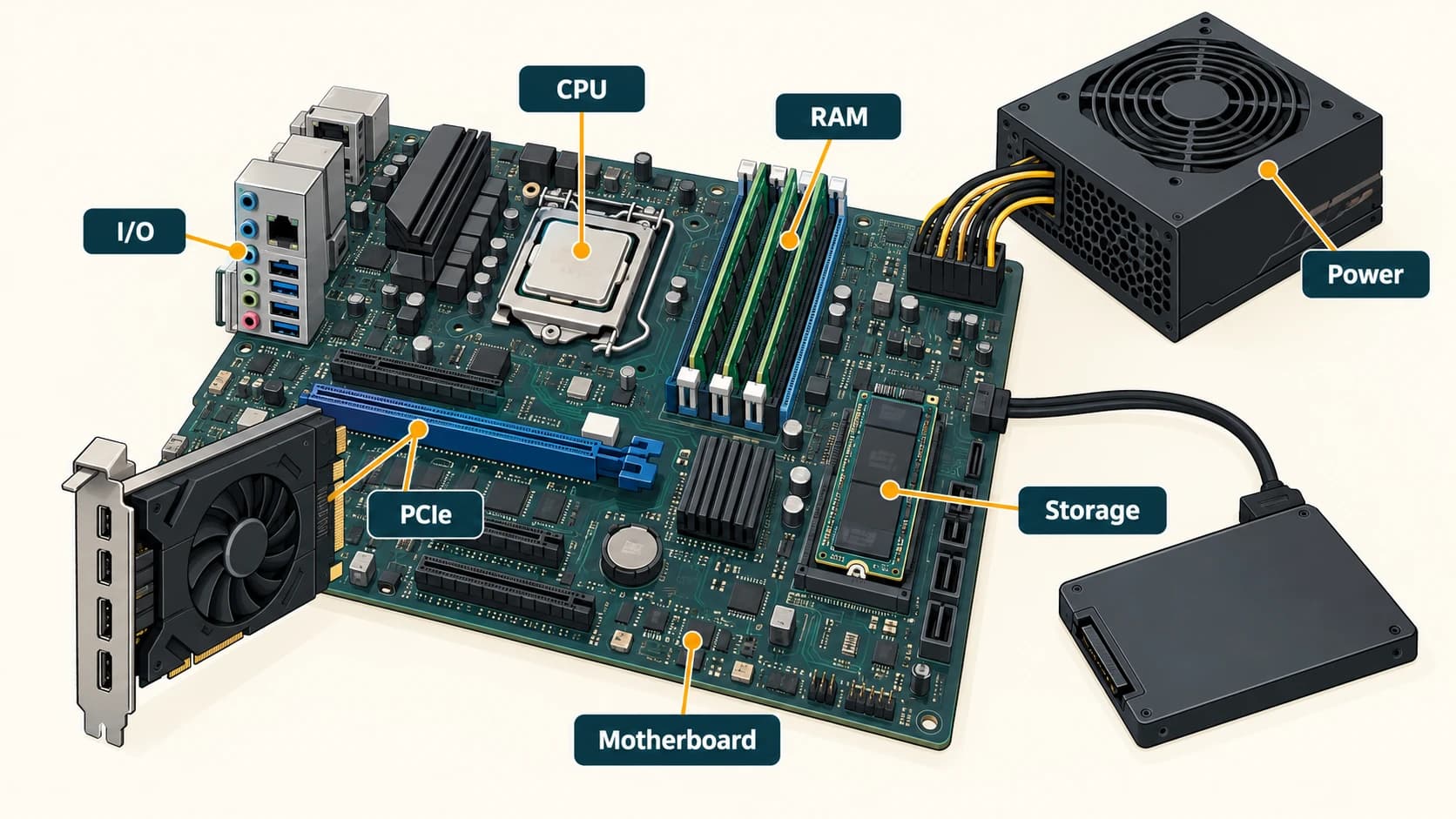
Know the parts and their jobs
| Component | Simple role | Important qualification |
|---|---|---|
| CPU / processor | Executes instructions and performs processing | Often installed in a socket; may be soldered in a compact device |
| CPU socket | Physical/electrical mounting point for a compatible processor | Not present as a replaceable socket in every computer |
| RAM / DIMM slots | Hold working-memory modules | Laptop modules may use a smaller form or soldered memory |
| Chipset / platform controller | Helps coordinate supported input/output connections | Some functions once in chipsets are now inside CPUs |
| PCI Express (PCIe) expansion slot | Connects cards such as graphics or network adapters | A slot is a connection, not the card itself |
| SATA port | Connects compatible storage drives | Used by many HDDs and some SSDs |
| M.2 socket | Accepts compatible compact modules, often SSDs | M.2 describes a form factor; protocol may be SATA or NVMe/PCIe |
| Firmware memory | Stores low-level startup firmware | Modern firmware is often in rewritable non-volatile flash |
| Power connector | Receives regulated electrical power | The power supply unit provides the power |
| Cooling assembly | Removes heat from hot components | Heat sink and fan are not the CPU itself |
The power supply is not the processor
The power supply unit (PSU) converts incoming electrical power into the regulated output needed by internal PC components. A desktop's cabinet or case encloses and protects parts, but it is not the CPU. Students often hear someone call the whole tower the “CPU”; in technical usage the CPU is the processor, a component inside the system.
A heat sink draws heat away from a component, while a fan moves air; some systems use other cooling designs. The graphics processing unit (GPU) accelerates graphics and certain parallel computations. It may be built into a processor, mounted on a separate graphics card or otherwise integrated. Not every computer needs a separate graphics card.
How components work together: a bank counter
An employee opens a banking application. The application and active data are loaded into RAM, the CPU executes program instructions, the SSD/HDD holds saved program files and data, and the monitor displays the result. A keyboard supplies input and an optional printer produces a receipt. The motherboard and appropriate interfaces connect these parts. This is a learning model rather than a claim that all banking systems store information in the same place.
Important terms
| Term | Meaning |
|---|---|
| PCB | Printed circuit board carrying components and electrical connections |
| CPU socket | Mounting/interface point for a compatible processor |
| DIMM | Dual in-line memory module, a common desktop memory form |
| PCIe | Peripheral Component Interconnect Express, a high-speed expansion interface |
| Chipset | Controller circuitry supporting communication and peripherals |
| PSU | Power supply unit |
| GPU | Graphics processing unit |
| Firmware | Low-level software stored in non-volatile memory |
Common confusions
- Motherboard ≠ CPU: motherboard connects; CPU computes.
- CPU ≠ cabinet: a tower/case contains components and is not itself the processor.
- RAM slot ≠ RAM: the slot accepts the memory module.
- M.2 ≠ NVMe: the physical module/socket format and storage communication protocol are different concepts.
- More ports ≠ automatically faster: overall performance depends on the specific components and workload.
Fact to remember
The motherboard is the principal circuit board. The CPU executes instructions. The PSU delivers regulated power. PCIe is an expansion interface, and SATA is widely associated with storage connections.
Quick revision
- Main circuit board: motherboard.
- Processing chip: CPU.
- Temporary working data: RAM.
- Long-term files: SSD or HDD.
- Expansion cards: typically PCIe.
- Electricity for internal components: PSU.
Practice questions — CA-02-01
Q1. Which component is called the main circuit board of a computer?
A. Monitor · B. Motherboard · C. Printer · D. Keyboard
Q2. Which component directly carries out the execution of most general-purpose program instructions?
A. CPU · B. Cabinet · C. USB cable · D. Speaker
Q3. RAM modules in many desktop computers are installed in:
A. HDMI ports · B. DIMM slots · C. Audio jacks · D. SATA data cables
Q4. The main function of a computer's power supply unit is to:
A. Store files · B. Perform logical comparisons · C. Supply regulated electrical power · D. Display graphics
Q5. PCI Express is primarily a:
A. Printed document format · B. High-speed expansion interface · C. Type of keyboard · D. Sound output
Q6. Which item normally helps move heat away from a processor?
A. Heat sink · B. Scanner · C. Microphone · D. Pen drive
Q7. Which statement about a CPU socket is correct?
A. Every CPU is removable · B. It provides a mounting/interface for compatible processors where used · C. It is the primary storage drive · D. It is an output device
Q8. A SATA port is commonly associated with connecting:
A. Storage drives · B. Projector screens only · C. Microphones only · D. Paper scanners only
Q9. Which statement is correct?
A. The cabinet is the same component as the CPU · B. The motherboard and CPU are identical · C. The CPU is one component inside a computer · D. A keyboard stores firmware
Q10. A separate graphics card often connects through a:
A. PCIe slot · B. Power button · C. Printer tray · D. Headphone socket
Q11. Which distinction between M.2 and NVMe is best?
A. Both are names for a monitor · B. M.2 is a form factor; NVMe is a storage protocol · C. NVMe is a case design · D. M.2 refers only to optical drives
Q12. A computer with integrated graphics:
A. Cannot show images · B. Must have a separate graphics card · C. Can provide graphics without a separate graphics card · D. Has no CPU
Answers and explanations — CA-02-01
| Q | Answer | Why |
|---|---|---|
| 1 | B | The motherboard is the computer's main PCB. |
| 2 | A | The CPU executes general-purpose machine instructions. |
| 3 | B | DIMM slots accept common desktop RAM modules. |
| 4 | C | A PSU converts and supplies regulated electrical power. |
| 5 | B | PCIe connects high-speed expansion devices. |
| 6 | A | A heat sink helps transfer heat away from a component. |
| 7 | B | Some CPUs use sockets; others are soldered to the board. |
| 8 | A | SATA is used by many HDDs and SSDs. |
| 9 | C | The CPU is a processor chip or package, not the entire cabinet. |
| 10 | A | A discrete GPU card commonly uses PCIe. |
| 11 | B | Form factor describes physical construction; NVMe describes communication. |
| 12 | C | Integrated graphics can handle display output without a separate card. |