
CPU: ALU, Control Unit and Registers
CPU: ALU, Control Unit and Registers. Foundational Computer Awareness explanations, examples and explained practice questions for banking and recruitment exam preparation.
By Akhilesh Saini
What you will learn
- The CPU's role as an instruction-executing processor.
- How the arithmetic logic unit, control unit and registers differ.
- The basic fetch–decode–execute cycle, clock speed and processor cores.
Why this topic matters
Common exam statements ask Which unit performs comparisons?, Which unit directs operations? or Which stores immediate operands? These questions test the division of responsibilities inside the CPU.
What is a CPU?
The central processing unit (CPU) executes machine instructions from programs. It performs calculations, tests conditions, coordinates operations and works with memory and input/output systems. It does not mean the entire system unit or cabinet.
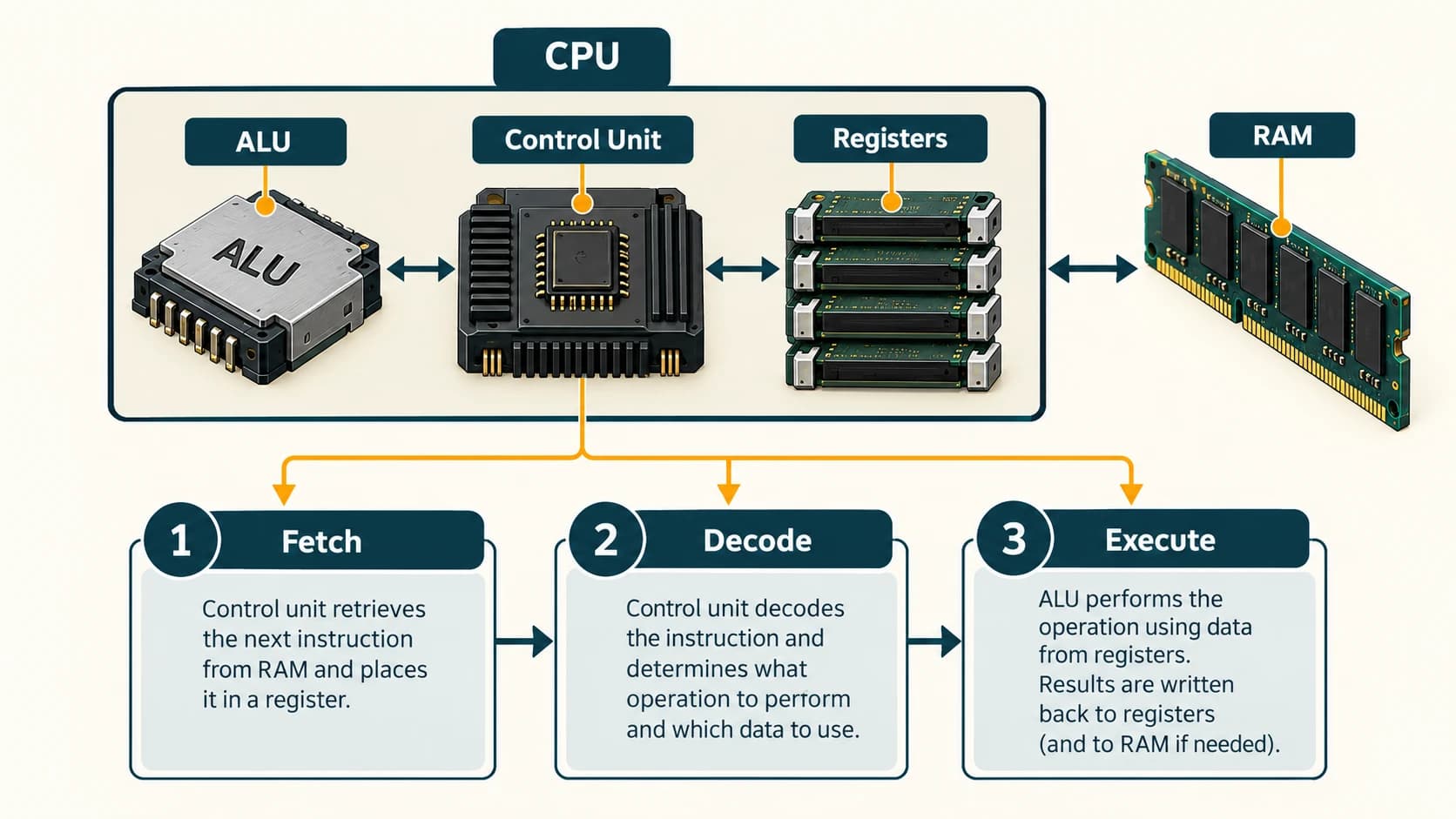
In a beginner-level model, the CPU comprises an ALU, a control unit and registers. Modern processors are more complex and also contain caches, multiple execution units and other circuitry, but the three-part model is excellent for Computer Awareness.
Arithmetic logic unit (ALU)
The ALU performs arithmetic, such as adding or subtracting numbers, and logical/comparison operations, such as checking whether one number is greater than another. For example, the instruction to determine whether an account balance is below a specified threshold involves a comparison.
Remember: The ALU does not control the whole computer. It performs operations as directed by processor control logic. Some modern tasks use specialized execution units, but the standard exam pairing is ALU → arithmetic and logic.
Control unit (CU)
The control unit helps interpret instructions and generate control signals that coordinate execution. It directs the sequence in which data is moved and operations are performed. It is a coordinator, not a long-term storage device or a general arithmetic calculator.
Registers: tiny and extremely fast
Registers are very small, very fast storage locations inside the processor. They hold immediate values, addresses, instructions or intermediate results needed during execution. They are typically volatile working state, not permanent document storage.
Common textbook examples:
| Register / name | Simplified purpose |
|---|---|
| Program counter (PC) | Keeps the address of the next instruction in the usual sequential flow |
| Instruction register (IR) | Holds an instruction being decoded or executed in simple CPU models |
| General-purpose register | Holds values or addresses for operations |
| Status/flags register | Records selected conditions such as zero or carry results |
Different CPU designs use different register organizations. Accumulator is another traditional term for a register holding arithmetic intermediate results; not every CPU has one specifically named accumulator.
The basic instruction cycle
- Fetch: Get an instruction from memory, normally via caches where available.
- Decode: Determine which operation and operands the instruction specifies.
- Execute: Perform the specified operation or direct another unit to do so.
- Store/retire results: Make results available and proceed as defined by the processor.
The model is simplified: modern processors can overlap stages, execute multiple instructions and manage complex memory access. Exam questions usually use the fetch–decode–execute sequence.
Clock speed, cores and performance
Clock speed indicates how many clock cycles occur per second, measured in hertz (Hz), often gigahertz (GHz) for modern processors. 1 GHz = 1 billion cycles per second, but it does not guarantee one instruction per cycle or a fixed number of tasks completed per second. Two CPUs with the same clock speed can perform differently because of architecture, cores, cache and workload.
A core is an independent processing unit within a processor that can execute instruction streams. Multiple cores can handle different work concurrently; performance improvement depends on software and task type. A thread is a unit of execution that software/OS can schedule; it is not identical to a physical core.
Worked example: calculating a bill
Imagine calculating 750 + 125. Program instructions are fetched. CPU control circuitry decodes them, appropriate registers hold the operands, and an ALU execution unit computes 875. The result may be retained temporarily in a register and later placed in memory or sent toward output. This illustrates roles, not the exact microarchitecture of every CPU.
Important terms
| Term | Meaning |
|---|---|
| CPU | Central processing unit |
| ALU | Arithmetic logic unit |
| CU | Control unit |
| Register | Very small, fast processor-internal working storage |
| Core | Processing unit within a CPU |
| Clock cycle | One recurring timing interval of a processor clock |
| Fetch | Obtain an instruction for execution |
| Decode | Interpret an instruction's operation |
Common confusions
- ALU versus CU: ALU computes/compares; CU coordinates and directs.
- Register versus RAM: registers are inside the CPU and much smaller; RAM is the main working memory.
- CPU versus GPU: GPUs specialize in highly parallel workloads; they are not a replacement for all CPU tasks.
- Clock speed versus overall speed: a higher GHz number alone cannot establish which computer is faster.
- Core versus thread: not the same physical resource.
Fact to remember
ALU = arithmetic and logic. CU = coordination/control. Registers = immediate, very fast storage. Instruction processing is commonly summarized as fetch → decode → execute.
Quick revision
| Asked in exam | Answer |
|---|---|
| Arithmetic and comparisons | ALU |
| Controls instruction operations | CU |
| Holds immediate CPU values | Registers |
| Next instruction address (simple model) | Program counter |
| Unit for clock frequency | Hertz |
| More than one processing core | Multicore CPU |
Practice questions — CA-02-02
Q1. Which CPU part is mainly responsible for arithmetic calculations and comparisons?
A. ALU · B. PSU · C. Monitor · D. DVD drive
Q2. Which unit directs and coordinates the execution of instructions?
A. Printer · B. Control unit · C. Scanner · D. SSD
Q3. Registers are best described as:
A. Large permanent disks · B. Small fast storage locations within a processor · C. Network cables · D. Optical discs
Q4. The usual beginner sequence of instruction processing is:
A. Execute–decode–fetch · B. Decode–fetch–execute · C. Fetch–decode–execute · D. Output–store–boot
Q5. In a simple CPU model, the program counter ordinarily holds:
A. The next instruction address · B. A printed page · C. Video output · D. A keyboard scan
Q6. Which CPU part would carry out a numerical greater than comparison?
A. Hard disk platter · B. ALU · C. USB connector · D. Power cable
Q7. CPU clock speed is measured in:
A. Hertz · B. Bytes · C. Pixels · D. Pages
Q8. Which statement about a 3 GHz processor is most accurate?
A. It necessarily completes three billion instructions per second · B. It has a clock frequency of three billion cycles per second · C. It always has three cores · D. It stores 3 GB of data
Q9. A multicore processor contains:
A. Several monitors · B. Multiple processor cores · C. Multiple keyboards · D. Several printers
Q10. Which storage usually provides the CPU's fastest direct access to small working values?
A. Registers · B. DVD · C. External HDD · D. Paper file
Q11. Which statement is incorrect?
A. The CU coordinates operations · B. The ALU performs logical operations · C. Registers are the same as a hard disk · D. The CPU processes instructions
Q12. Two processors have identical clock frequencies. Which conclusion is justified?
A. They must have identical overall performance · B. They must have identical core counts · C. Other design differences may cause different performance · D. They necessarily use the same architecture
Answers and explanations — CA-02-02
| Q | Answer | Why |
|---|---|---|
| 1 | A | The ALU performs arithmetic and logical comparisons. |
| 2 | B | The CU coordinates instruction execution and control signals. |
| 3 | B | Registers are small, extremely fast working locations inside the CPU. |
| 4 | C | Fetch–decode–execute is the conventional basic sequence. |
| 5 | A | The PC tracks the next instruction address in a simplified model. |
| 6 | B | Greater-than testing is a logical/comparison operation. |
| 7 | A | Frequency is measured in hertz, including GHz. |
| 8 | B | Clock cycles and retired instructions are not always one-to-one. |
| 9 | B | Multicore CPUs contain multiple processing cores. |
| 10 | A | Registers are faster and much smaller than ordinary memory and storage. |
| 11 | C | Registers are processor-internal working locations, unlike long-term disks. |
| 12 | C | Architecture, cache, core count and workload influence real performance. |