
Input Devices
Input Devices. Foundational Computer Awareness explanations, examples and explained practice questions for banking and recruitment exam preparation.
By Akhilesh Saini
What you will learn
- The purpose of input devices and common examples.
- The difference between keyboards, pointing devices, scanning/recognition systems and sensors.
- The exam-important meanings of OCR, OMR and MICR.
Why this topic matters
Banking and recruitment papers frequently ask which device reads cheque characters or marked answer sheets. Similar-looking abbreviations are a favourite source of incorrect answers.
What is an input device?
An input device supplies data, commands or signals to a computer. It converts a user action or information from the outside world into a form that the computer can receive. Input can be typed, clicked, spoken, captured by a camera or detected by a sensor.
A device's classification depends on its function in context. Some devices, such as touchscreens and headsets, perform more than one function.
Common manual input devices
| Device | What it does | Typical example |
|---|---|---|
| Keyboard | Enters text, numbers and commands through keys | Typing customer details |
| Mouse | Moves pointer; selects, drags and clicks | Selecting a file |
| Touchpad | Senses finger movements on a flat pad | Laptop navigation |
| Trackball | Controls pointer by rolling an exposed ball | Fixed workstation pointer control |
| Joystick / game controller | Sends directional and other control input | Simulators and gaming |
| Stylus / digitizer | Captures pen movement or handwriting | Signing on a tablet |
| Touchscreen | Detects touch input on a display | ATM or kiosk interface |
| Microphone | Captures sound for digitization/processing | Voice commands |
| Webcam / digital camera | Captures visual data | Video meetings, image capture |
A scanner captures a picture of a paper document. Scanning alone produces image data; making text searchable requires additional recognition processing, commonly OCR.
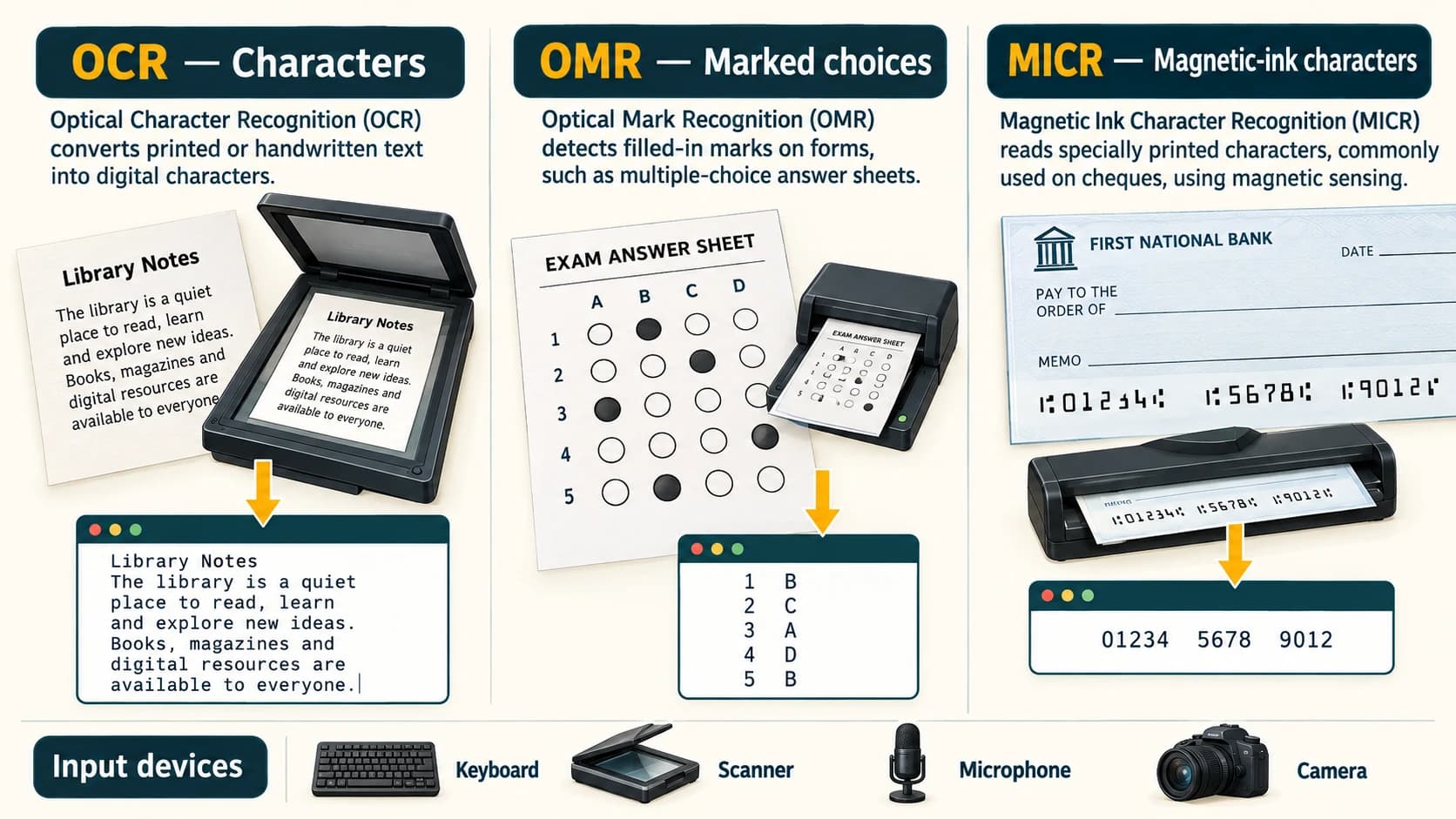
OCR, OMR, MICR — the high-value exam trio
OCR — Optical Character Recognition. OCR software recognizes printed or, depending on the system, handwritten characters in a document image. A scanned printed letter may be converted into editable/searchable text. Recognition quality depends on image quality, font and writing style.
OMR — Optical Mark Recognition. OMR detects the positions of marks in predefined areas, such as filled circles in multiple-choice answer sheets. It generally identifies marked choices, not ordinary sentences.
MICR — Magnetic Ink Character Recognition. MICR is a method for reading specially formatted characters printed with magnetic ink or toner, historically associated with cheque processing. A MICR reader recognizes the encoded characters on a cheque's MICR line. The use of cheques and exact procedures varies by institution; the exam fact remains MICR → cheque characters printed with magnetic ink.
| Technology | Recognizes | Standard example |
|---|---|---|
| OCR | Printed/scanned text characters | Converting a scanned page into text |
| OMR | Marks in predefined positions | Objective answer-sheet bubbles |
| MICR | Special magnetic-ink characters | Cheque identification line |
| Barcode reader | Pattern of a printed barcode | Product label at checkout |
| QR-code reader | Two-dimensional QR symbol, usually via a camera | Scanning a code for a payment or web link |
A QR-code reader is not automatically a payment processor; it reads the encoded symbol, after which software interprets the content and possibly starts another workflow.
Biometrics and sensor-based input
A fingerprint reader captures fingerprint-related data. Face recognition can use a camera and software. Biometric readers collect information used in verification or identification; they do not guarantee that identity checks are infallible. Temperature, proximity, light and motion sensors also feed measurements to computing systems.
Worked examples
Example 1 — Answer sheet: A test centre scans a sheet where options are shaded. The characteristic recognition technology is OMR.
Example 2 — Cheque: A bank uses equipment to read specially encoded characters in magnetic ink on a cheque. This illustrates MICR.
Example 3 — Printed letter: A scanner produces the document image, then OCR attempts to extract editable text. Scanner and OCR are not interchangeable words.
Important terms
| Term | Meaning |
|---|---|
| Input | Data or commands supplied to a computer |
| Pointing device | Device used to position/select a pointer or item |
| Scanner | Hardware that captures a document/image |
| Recognition | Software or system interpretation of captured patterns |
| Biometric input | Input derived from physical or behavioural characteristics |
| Digitizer | Converts physical pointing/writing data to digital input |
| Sensor | Device detecting a physical condition or change |
Common confusions
- OCR ≠ OMR: characters versus marked positions.
- OMR ≠ MICR: answer-sheet bubbles versus magnetic-ink cheque characters.
- Scanner ≠ OCR: one captures the image; the other recognizes characters.
- Touchscreen ≠ only output: the display outputs information and detects touch input.
- Barcode versus QR: both encode data in optical symbols; QR is a two-dimensional code.
Fact to remember
OCR — characters; OMR — marks; MICR — magnetic-ink cheque characters. A keyboard is an input device; a scanner captures images; a microphone captures audio.
Quick revision
- Keyboard → letters and numbers.
- Mouse/touchpad → pointer control.
- Microphone → sound input.
- Scanner → image of a paper document.
- OMR → marked MCQ answer sheets.
- MICR → special cheque characters.
- Touchscreen → both input and output.
Practice questions — CA-02-03
Q1. Which of these is primarily an input device?
A. Keyboard · B. Monitor · C. Projector · D. Speaker
Q2. OMR is most closely associated with:
A. Playing sound · B. Reading shaded answer-sheet responses · C. Magnetic disk storage · D. Cooling a processor
Q3. Which technology is historically associated with reading magnetic-ink characters on cheques?
A. OCR · B. OMR · C. MICR · D. HDMI
Q4. A system converts scanned printed words into editable text. The recognition technology is:
A. OCR · B. VGA · C. SATA · D. PSU
Q5. Which device is designed to capture a paper document as image data?
A. Speaker · B. Scanner · C. Printer · D. Plotter
Q6. Which input device records sound?
A. Microphone · B. Monitor · C. Projector · D. Headphone
Q7. Which of the following may provide both input and output?
A. Basic wired keyboard · B. Non-touch monitor · C. Touchscreen · D. Simple speaker
Q8. A barcode reader typically obtains information by:
A. Optically detecting a barcode pattern · B. Heating the processor · C. Recording human voice · D. Printing toner
Q9. Which is a pointing device?
A. Trackball · B. Laser printer · C. Speaker · D. UPS
Q10. What is a QR-code reader designed to do?
A. Execute payments without software · B. Read information encoded in a QR symbol · C. Cool the CPU · D. Increase RAM
Q11. Which distinction is correct?
A. OCR reads only shaded circles · B. OMR mainly detects predefined marked choices · C. MICR is another name for a monitor · D. A scanner is a printer
Q12. A sensor reporting room temperature to a system is supplying:
A. Input · B. Printed hard copy · C. Permanent RAM · D. A graphics card
Answers and explanations — CA-02-03
| Q | Answer | Why |
|---|---|---|
| 1 | A | A keyboard supplies data and commands. |
| 2 | B | OMR identifies marks placed in known response locations. |
| 3 | C | MICR recognizes encoded characters printed using magnetic ink. |
| 4 | A | OCR interprets text characters from image data. |
| 5 | B | A scanner captures paper as an image. |
| 6 | A | A microphone supplies audio input. |
| 7 | C | A touchscreen displays output and detects touch input. |
| 8 | A | Barcode readers detect optical code patterns. |
| 9 | A | A trackball is a pointer-control device. |
| 10 | B | The reader decodes a QR symbol; later actions require software. |
| 11 | B | OMR focuses on positions of response marks. |
| 12 | A | Sensor readings enter the computer for processing. |