
Output Devices
Output Devices. Foundational Computer Awareness explanations, examples and explained practice questions for banking and recruitment exam preparation.
By Akhilesh Saini
What you will learn
- Why output devices are needed.
- Differences among displays, printers, speakers, projectors and plotters.
- The meaning of soft copy, hard copy, impact and non-impact printing.
Why this topic matters
A banking receipt, a statement viewed on a screen and a beep from an ATM are all outputs, but they use different devices. Objective questions also distinguish printer technology and the medium on which output is produced.
What is an output device?
An output device presents information produced by a computer in a form people or other systems can receive: visible text, images, audio, tactile feedback or printed materials.
- Visual output: monitor, projector, indicator display.
- Audio output: speaker, headphones.
- Printed output: printer, plotter.
- Tactile output: haptic feedback or a refreshable Braille display.
Some devices combine input and output. A touchscreen both displays results and senses touches. A multifunction printer may print output and scan input.
Soft copy and hard copy
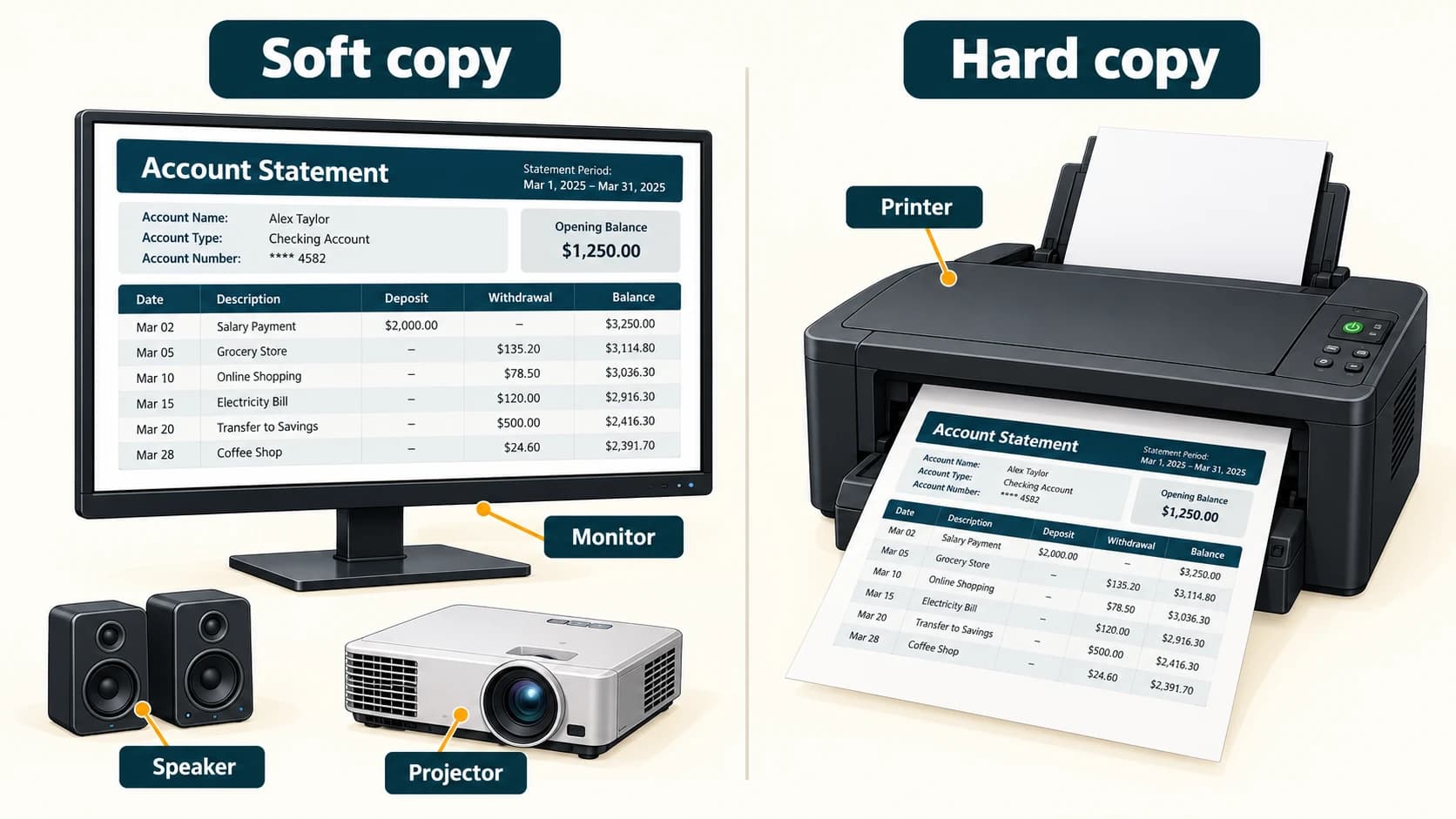
A soft copy is an electronic representation that can be viewed or played on a device, such as a PDF displayed on a monitor. A hard copy is physical output, normally on paper, such as a printed bank statement. A document does not become a hard copy merely because it is saved to a disk.
| Output form | Example | Characteristic |
|---|---|---|
| Soft copy | Statement on screen | Electronic display; no physical printed page |
| Hard copy | Statement printed on paper | Tangible page that can be handled |
| Audio | Spoken instruction through a speaker | Heard rather than read |
| Projected image | Presentation on a wall | Enlarged visual output |
Monitors and display terminology
A monitor (or visual display unit, VDU) is a visual output device. The screen is made up of addressable pixels, small picture elements. Resolution usually describes pixel dimensions such as width × height; more pixels may permit finer detail at the same screen size, but perceived quality also depends on the display and source content.
LCD means liquid crystal display. Many screens commonly sold as LED monitors are LCD screens that use LEDs for backlighting. OLED means organic light-emitting diode and uses self-emitting pixels. Therefore, “LCD versus LED” is not always a sound distinction: one describes display technology and the other can describe its backlight.
Printer families
Impact printers form output by physically striking an ink ribbon or another marking medium against paper. A dot-matrix printer is a common textbook example. Impact printers have historically been useful for multipart forms. The fact that they make noise is a typical property, not their scientific definition.
Non-impact printers create output without that striking action. Examples include inkjet printers (spraying droplets of ink) and laser printers (using toner and an electro-photographic process). Laser printers use toner, while conventional inkjets use liquid ink.
| Printer type | Impact? | Main principle | Typical association |
|---|---|---|---|
| Dot-matrix | Yes | Pins strike an inked ribbon | Multipart or continuous stationery |
| Inkjet | No | Deposits small ink droplets | Home/office colour documents |
| Laser | No | Uses toner and electro-photographic printing | Office document printing |
| Thermal (direct thermal) | No | Heat-sensitive paper changes colour | Many receipts, subject to printer type |
A plotter produces large-scale graphics such as architectural drawings or maps. Traditional pen plotters draw with moving pens, but modern large-format printers/plotters use other printing technologies. The exam association is plotter → large technical drawings.
Audio, projection and accessible output
Speakers produce audible output; headphones deliver sound to an individual listener. A projector displays images on a larger surface. A refreshable Braille display is an assistive output device with changing raised pins to represent Braille characters.
Worked example: three ways to deliver a bank statement
A customer sees a statement on the ATM screen (soft-copy visual output), prints it (hard-copy output) or receives spoken instructions through a speaker (audio output). The same underlying information can be delivered through different output channels.
Important terms
| Term | Meaning |
|---|---|
| Output | Information provided by a computer to a user or system |
| VDU | Visual display unit |
| Pixel | Picture element in a digital image/display |
| Resolution | Pixel dimensions or detail capability, depending on context |
| Soft copy | Electronic output viewed or played without printing |
| Hard copy | Physical printed output |
| Impact printing | Printing by striking a ribbon/medium against paper |
| Toner | Powdered marking material used in laser printing |
Common confusions
- Monitor versus printer: both output, but one displays and the other produces physical pages.
- Laser versus inkjet: toner versus ink droplets.
- Dot-matrix versus laser: impact versus non-impact.
- LED-backlit LCD versus OLED: not the same technology.
- Printer versus scanner: printer is mainly output; scanner is mainly input.
Fact to remember
Monitor = soft-copy display; printer = hard-copy paper output; speaker = audio; plotter = large technical drawings. A dot-matrix printer is an impact printer; laser and inkjet printers are non-impact.
Quick revision
- Visible result → monitor/projector.
- Printed result → printer.
- Sound → speaker/headphones.
- Impact printer → dot-matrix.
- Laser printer consumable → toner.
- Inkjet consumable → ink.
- Large engineering drawing → plotter.
Practice questions — CA-02-04
Q1. Which device is primarily used for visual output?
A. Monitor · B. Keyboard · C. Scanner · D. Microphone
Q2. A printed paper copy of a bank statement is called:
A. Soft copy · B. Hard copy · C. Cache · D. Firmware
Q3. Which printer is a traditional example of an impact printer?
A. Laser · B. Inkjet · C. Dot-matrix · D. Thermal
Q4. Which of the following is generally non-impact?
A. Dot-matrix printer · B. Daisy-wheel printer · C. Laser printer · D. Typewriter-style printer
Q5. A laser printer primarily uses:
A. Toner · B. Stylus ink · C. Magnetic tape · D. Handwritten characters
Q6. Which device is best matched with large technical drawings?
A. Microphone · B. Plotter · C. Joystick · D. Trackball
Q7. A speaker provides:
A. Printed output · B. Audio output · C. Text input · D. Long-term storage
Q8. Which statement about a typical LED-backlit LCD screen is accurate?
A. It cannot be an LCD · B. The LEDs provide backlighting for the LCD · C. It must print documents · D. It is a type of microphone
Q9. A document viewed on a display without printing is a:
A. Hard copy · B. Soft copy · C. Magnetic platter · D. Dot-matrix output
Q10. In digital displays, a pixel is a:
A. Picture element · B. Printer ink cartridge · C. Memory slot · D. CPU register
Q11. A multifunction printer that can scan and print combines:
A. Only output functions · B. Input and output functions · C. Only CPU functions · D. Only storage functions
Q12. Which is an accessible tactile output device?
A. Refreshable Braille display · B. Standard microphone · C. Plain keyboard · D. Barcode scanner
Answers and explanations — CA-02-04
| Q | Answer | Why |
|---|---|---|
| 1 | A | A monitor displays visual information. |
| 2 | B | A hard copy is a physical printout. |
| 3 | C | Dot-matrix pins strike a ribbon, making it an impact printer. |
| 4 | C | Laser printing does not use impact striking. |
| 5 | A | Laser printing uses toner rather than liquid inkjet droplets. |
| 6 | B | Plotters are associated with large drawings and graphics. |
| 7 | B | Speakers convert output signals into sound. |
| 8 | B | Many LED-branded monitors use LED-backlit LCD panels. |
| 9 | B | A displayed electronic document is a soft copy. |
| 10 | A | A pixel is an individual picture element. |
| 11 | B | Scanning is input; printing is output. |
| 12 | A | It conveys text through touch via movable Braille pins. |