
Primary Memory: RAM, ROM and Cache
Primary Memory: RAM, ROM and Cache. Foundational Computer Awareness explanations, examples and explained practice questions for banking and recruitment exam preparation.
By Akhilesh Saini
What you will learn
- Why computers need main working memory.
- How RAM, ROM, cache and registers differ.
- What volatile and non-volatile mean.
- The distinction between DRAM/SRAM, and common RAM/ROM misconceptions.
Why this topic matters
This lesson includes several high-frequency objective-exam comparisons: RAM versus ROM, cache versus RAM, and the effect of switching off power. These concepts also explain why saving a file matters even when it is still open on your screen.
What is primary memory?
Primary memory is storage accessible to the processor for immediate or near-immediate operations, commonly including main RAM and, in textbook comparisons, ROM and cache. Some classifications discuss CPU registers separately because they are located within the processor. The boundary of “primary storage” may vary among textbooks; the functional distinctions are more important than a single rigid list.
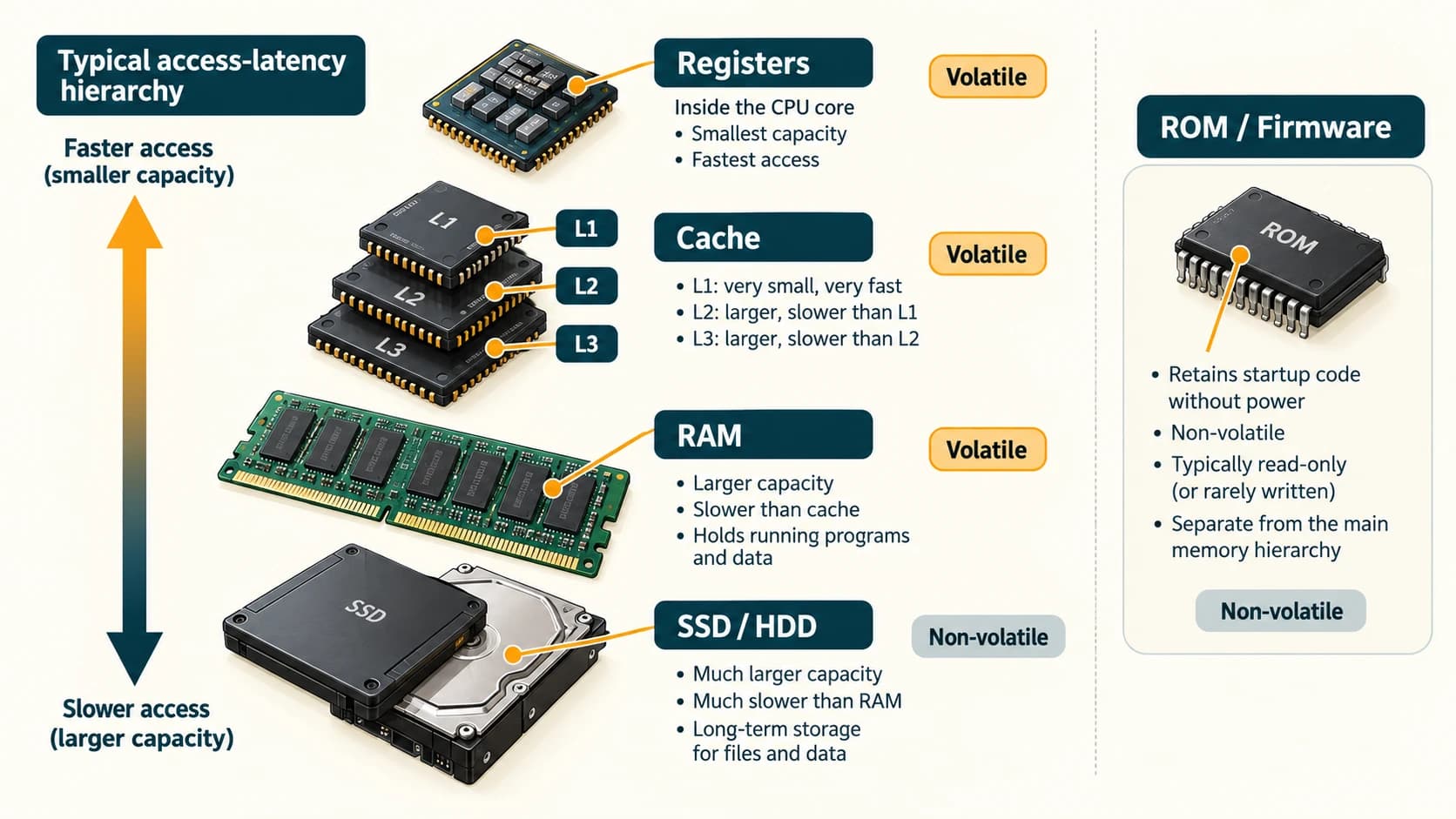
A running application needs an area for its working instructions and data. RAM provides that working area, while cache keeps selected data or instructions closer to execution units. ROM/non-volatile firmware storage helps retain startup-related code. A stored document on an SSD is not RAM merely because the computer can open it quickly.
RAM: Random Access Memory
RAM is the computer's main working memory. Programs and data being actively used can be loaded into RAM for rapid access. Standard system RAM is volatile: its working contents are not reliably preserved when power is removed.
Random access means the system can access a location without scanning every preceding location in order. It does not mean RAM chooses random information.
Two important RAM technologies:
- DRAM (Dynamic RAM): uses memory cells whose contents must be refreshed while powered; commonly used as the main system RAM.
- SRAM (Static RAM): does not need the same periodic cell-refresh mechanism; commonly used to build high-speed processor caches. Standard SRAM is also volatile.
These describe memory-cell technologies, not a guarantee that every circuit using them follows the same physical construction.
ROM: Read-Only Memory
ROM is traditionally memory whose stored contents are intended for reading in normal use and persist without power. Older textbook descriptions call it permanently programmed memory. In real computers, firmware is often stored in flash memory that is non-volatile but updateable. Thus, a computer's “ROM” in casual speech may actually be rewritable firmware storage.
Common exam types:
| Name | Basic idea |
|---|---|
| Mask ROM | Programmed during manufacture |
| PROM | Programmable once by suitable equipment |
| EPROM | Erasable programmable ROM, traditionally erased by ultraviolet light |
| EEPROM | Electrically erasable programmable ROM |
| Flash memory | A widely used electrically rewritable non-volatile technology |
BIOS (Basic Input/Output System) is the traditional name for PC startup firmware, while UEFI (Unified Extensible Firmware Interface) is a modern firmware interface used on many systems. The operating system is generally loaded from storage into RAM after startup preparation; it is not accurate to say that all of Windows or Linux sits permanently in ROM.
Cache memory: a shortcut for frequently needed data
Cache is a small, fast memory holding copies of selected instructions and data to reduce delays when the CPU accesses slower memory. Typical CPU caches are described as L1, L2 and L3. L1 is generally the smallest and fastest of these levels and closest to individual processing units; larger shared caches may serve multiple cores. Designs vary.
A textbook memory-speed comparison is usually:
CPU registers → CPU cache → main RAM → secondary storage
This represents typical access latency, not a law that every device is always faster than every device lower in the sequence. ROM/firmware memory is a different role and should not be inserted at one compulsory speed rank.
Worked example: editing a file
A student opens a document saved on an SSD. The program and working content are brought into RAM. The CPU can retrieve frequently used instructions and data from cache, while active values may pass through registers. When the student saves, the system writes the relevant data back to persistent storage. Switching off power before saving can lose unsaved changes even though the SSD itself is non-volatile.
Primary versus secondary: the big picture
| Property | RAM | ROM / firmware flash | CPU cache | SSD/HDD |
|---|---|---|---|---|
| Principal role | Active work | Persistent firmware/startup information | Frequently needed instructions/data | Persistent files/programs |
| Keeps contents without power? | Generally no | Yes | Generally no | Yes |
| User normally edits documents directly here? | Working data changes while running | No | No | Documents are saved here |
| Typical relative scale | GB | Often much smaller | Small relative to RAM | Often hundreds of GB or TB |
Important terms
| Term | Meaning |
|---|---|
| Volatile | Contents are lost or not retained as intended without power |
| Non-volatile | Retains stored contents when not powered |
| DRAM | Dynamic random-access memory |
| SRAM | Static random-access memory |
| Cache | High-speed storage of selected frequently accessed information |
| Firmware | Low-level software kept in non-volatile memory |
| BIOS / UEFI | Traditional PC firmware and modern firmware interface terms |
Common confusions
- RAM ≠ long-term storage: RAM is working memory.
- ROM ≠ always physically unchangeable: flash-based firmware can be updated.
- Cache ≠ the same as RAM capacity: cache is usually smaller and nearer to CPU processing.
- SRAM ≠ ROM: SRAM is still volatile.
- BIOS/UEFI ≠ operating system: firmware helps initialize the system; the OS manages normal computer operation.
- Memory ≠ storage in every context: textbooks use broad and narrow meanings; ask which kind and purpose.
Fact to remember
RAM = volatile working memory. ROM/flash firmware = non-volatile startup-related storage. Cache = very fast memory reducing repeated slow accesses. DRAM is usual main RAM; SRAM is commonly used for cache.
Quick revision
- Working memory → RAM.
- Data remains without power → non-volatile.
- Common CPU cache technology → SRAM.
- Main system RAM technology → DRAM.
- Fastest small working storage in a basic comparison → registers.
- Startup firmware → BIOS/UEFI-related firmware in non-volatile memory.
Practice questions — CA-02-05
Q1. Which memory is commonly used as a computer's main working memory?
A. RAM · B. DVD · C. Blu-ray · D. Magnetic tape
Q2. Standard RAM is described as volatile because:
A. It always stores files forever · B. Its contents are not retained as working memory without power · C. It is a printer · D. It contains only pictures
Q3. Which storage is traditionally non-volatile?
A. CPU cache · B. DRAM · C. ROM · D. CPU registers
Q4. Which is most closely associated with speeding up repeated CPU access to selected instructions or data?
A. Cache · B. Paper folder · C. Inkjet printer · D. Monitor
Q5. Which memory technology is commonly used for main system RAM?
A. DRAM · B. Optical disc · C. Magnetic tape · D. MICR
Q6. Which memory technology is commonly used to implement fast CPU caches?
A. SRAM · B. DVD-ROM · C. HDD · D. Blu-ray
Q7. Which arrangement is a useful conventional speed hierarchy?
A. HDD → RAM → cache → registers · B. Registers → cache → RAM → secondary storage · C. Printer → mouse → ROM → screen · D. Keyboard → monitor → CPU → speaker
Q8. The traditional term BIOS expands to:
A. Binary Internal Operating Software · B. Basic Input/Output System · C. Basic Internet Output Server · D. Bus Input Operating Storage
Q9. Which statement is accurate about modern firmware?
A. Firmware always requires a separate floppy disk · B. It is often held in rewritable non-volatile flash · C. It must be stored only in volatile RAM · D. It is a type of monitor
Q10. If a document is opened from SSD storage and edited but not saved, the unsaved changes are typically held in:
A. Working memory · B. Printer toner · C. A paper file · D. The monitor glass
Q11. Which pair correctly matches the memory technology and characteristic?
A. DRAM — periodic refresh while powered · B. SRAM — long-term optical disc · C. ROM — always volatile · D. Cache — paper output
Q12. Which statement is false?
A. CPU caches are usually smaller than main RAM · B. Registers are fast processor-internal storage · C. SRAM is always non-volatile · D. ROM is traditionally non-volatile
Answers and explanations — CA-02-05
| Q | Answer | Why |
|---|---|---|
| 1 | A | RAM holds active working data and programs. |
| 2 | B | Ordinary system RAM loses its working contents without power. |
| 3 | C | ROM is traditionally non-volatile. |
| 4 | A | Cache reduces repeated slower accesses by keeping selected data nearby. |
| 5 | A | DRAM is the common main-memory technology. |
| 6 | A | SRAM is widely used for fast processor caches. |
| 7 | B | Registers, cache, RAM and storage form a useful typical latency ordering. |
| 8 | B | BIOS means Basic Input/Output System. |
| 9 | B | Rewritable non-volatile flash frequently holds firmware. |
| 10 | A | Unsaved edits normally exist in working RAM before persistent saving. |
| 11 | A | DRAM cells require periodic refresh during operation. |
| 12 | C | Standard SRAM is volatile, despite not requiring DRAM-style refresh. |