
Secondary Storage: HDD, SSD, Optical and Flash Storage
Secondary Storage: HDD, SSD, Optical and Flash Storage. Foundational Computer Awareness explanations, examples and explained practice questions for banking and recruitment exam preparation.
By Akhilesh Saini
What you will learn
- Why secondary storage retains files when power is removed.
- How HDDs, SSDs, optical discs and flash drives differ.
- What SATA, NVMe, M.2, CD, DVD and Blu-ray refer to at awareness level.
Why this topic matters
Some examinations ask whether an SSD has moving parts, what a CD-ROM means, or how a flash drive compares with RAM. Others use practical scenarios: Which device is best for portable file transfer? Which stores information on spinning magnetic platters?
Secondary storage: keeping information for later
Secondary storage holds files, programs and saved data over time. Most familiar secondary-storage devices are non-volatile: their stored contents persist without power. Storage devices can be internal or external, fixed or removable. “Secondary” describes their role, not a requirement that they must be physically outside the computer.
Hard disk drive (HDD)
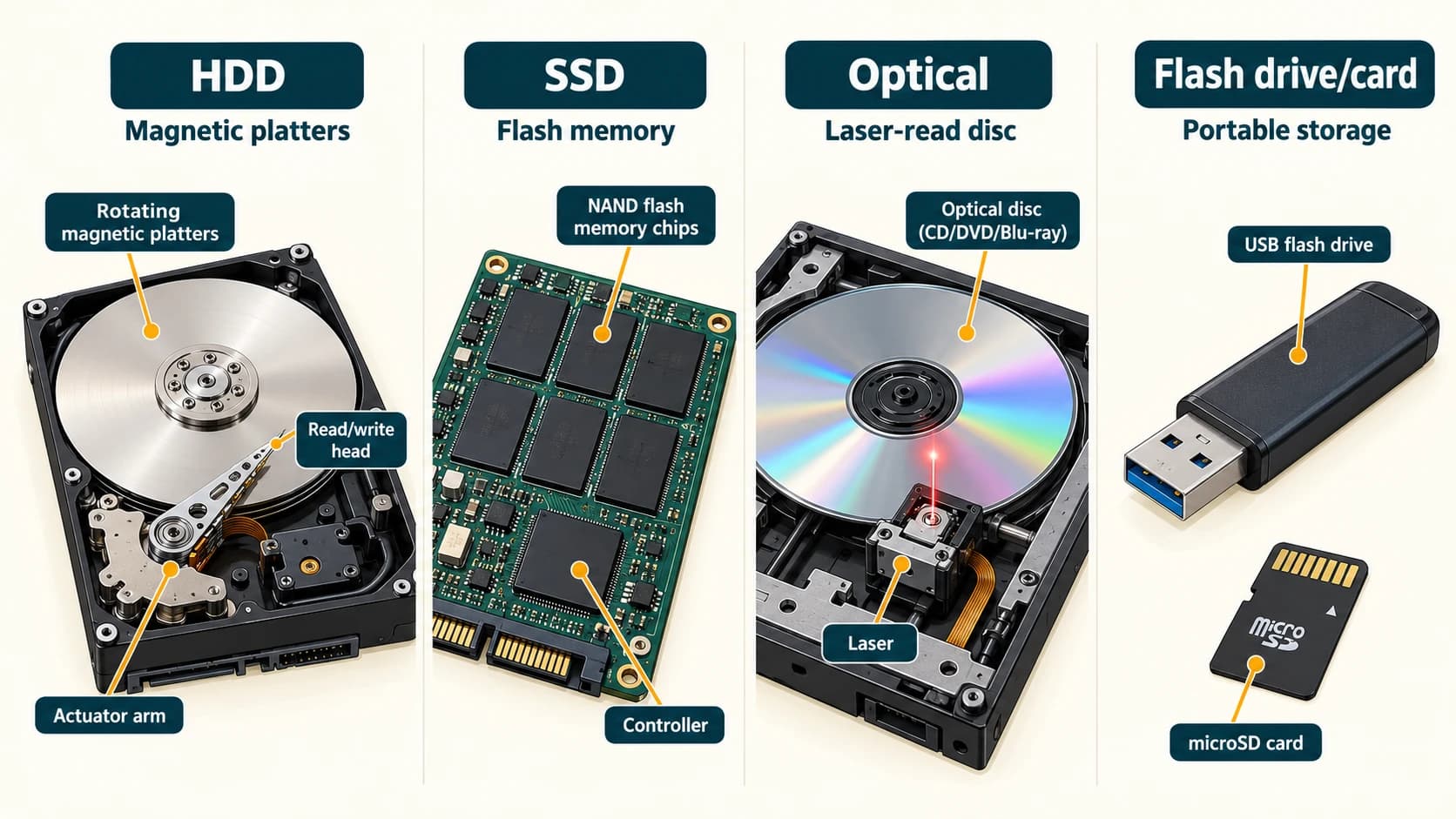
An HDD stores information magnetically on rotating platters, with heads that read/write data. It contains moving mechanical parts. HDDs are widely used for large amounts of persistent storage and may be economical per unit of capacity. Because of moving parts, they are more sensitive to some physical shocks during operation and have mechanical access delays.
Do not confuse HDD with RAM: both can store data, but an HDD is persistent storage while RAM is temporary working memory.
Solid-state drive (SSD)
A typical SSD stores data electronically in non-volatile flash memory and has no spinning platters or moving read/write heads. It usually provides low access latency and good performance for loading software. Many SSDs use NAND flash, a controller and other circuitry.
SATA is an interface used by some SSDs and many HDDs. NVMe (Non-Volatile Memory Express) is a protocol designed for accessing non-volatile storage over interfaces such as PCIe. M.2 is a physical form factor/connector system. Thus M.2 SSD describes construction; it does not guarantee NVMe, a particular speed or compatibility with every M.2 socket.
Optical storage: using light
Optical discs are read using laser-based optical systems. Familiar examples are CD, DVD and Blu-ray Disc. Capacity depends on disc format and layers; as representative single-layer values, a standard CD is often about 700 MB, a DVD about 4.7 GB, and a Blu-ray Disc about 25 GB. The numbers are illustrative format examples, not universal capacities for every disc.
- CD-ROM: Compact Disc Read-Only Memory, intended to be read rather than overwritten.
- CD-R / DVD-R: Recordable, typically one-time-write formats.
- CD-RW / DVD-RW: Rewritable optical-disc formats.
- Blu-ray: Optical-disc family designed for greater capacity than typical CDs/DVDs.
Not every computer has an optical drive.
USB flash drives and memory cards
A USB flash drive (pen drive) is a small portable device that typically uses non-volatile flash memory and a USB interface. SD and microSD are removable memory-card formats widely used in cameras and other devices. Flash memory is the technology, whereas SSD, pen drive and memory card name products/form factors that may use flash.
A device's printed capacity is not a promise that every byte is available to store user files: formatting, file-system structures and manufacturer/operating-system conventions matter.
Important comparisons
| Medium | How it stores data | Moving recording mechanism? | Typical distinction |
|---|---|---|---|
| HDD | Magnetic rotating platters | Yes | Large persistent capacity |
| SSD | Solid-state non-volatile memory | No | Fast random access, low latency |
| Optical disc | Laser-readable optical marks/layers | Disc spins in an optical drive | Removable distribution or archiving |
| USB flash drive | Solid-state flash memory | No | Pocket-sized portable transfer |
| SD/microSD card | Solid-state memory (commonly flash) | No | Small removable cards |
| Magnetic tape | Magnetic material on tape | Tape moves through a drive | Archival/backup in specialist systems |
Practical situations
Situation 1: A laptop starts an application slowly from a mechanical drive. Moving to a suitable SSD may reduce storage-related waiting time; total speed still depends on CPU, RAM and software.
Situation 2: A user wants to carry a presentation. A USB flash drive is a suitable removable storage device, assuming compatible ports and policies.
Situation 3: An organization maintains a long-term backup. A secondary-storage or archival system stores retained copies; a backup is a practice, not the name of one specific hardware medium.
Important terms
| Term | Meaning |
|---|---|
| Non-volatile | Retains data without continuous electrical power |
| Platter | Rotating magnetic disk inside an HDD |
| NAND flash | Non-volatile semiconductor storage technology |
| SATA | Serial ATA, a storage connection/interface |
| NVMe | Non-Volatile Memory Express, a storage-access protocol |
| M.2 | Compact internal module/socket form factor |
| Optical disc | Disc accessed using optical/laser technology |
| Backup | Separate retained copy used for recovery |
Common confusions
- SSD ≠ RAM: an SSD is persistent storage.
- Flash ≠ just pen drive: flash is the memory technology in many products.
- M.2 ≠ NVMe: physical form versus protocol.
- Optical ≠ magnetic HDD: optical drives read disc marks using light; HDDs use magnetic recording.
- External ≠ always secondary: some hardware is external for other purposes; the role determines its category.
- Deleting versus secure erasure: ordinary deletion does not necessarily make data unrecoverable.
Fact to remember
HDD = magnetic rotating platters. SSD = non-volatile solid-state storage without moving heads. Optical = laser-read disc. Pen drive = portable flash-based storage.
Quick revision
- HDD expansion → Hard Disk Drive.
- SSD expansion → Solid-State Drive.
- SATA expansion → Serial ATA.
- NVMe expansion → Non-Volatile Memory Express.
- CD expansion → Compact Disc.
- DVD expansion → Digital Versatile Disc.
- Common portable USB storage → pen drive.
Practice questions — CA-02-06
Q1. Which device stores information on rotating magnetic platters?
A. HDD · B. RAM · C. Cache · D. Monitor
Q2. Which storage device ordinarily has no moving read/write head?
A. HDD · B. SSD · C. Magnetic tape deck · D. Floppy disk drive
Q3. A typical pen drive uses:
A. Volatile CPU registers · B. Flash memory · C. Printer ink · D. Vacuum tubes
Q4. CD and DVD are examples of:
A. Optical storage · B. Processor registers · C. Input-only devices · D. Cooling devices
Q5. Which storage is non-volatile under normal operation?
A. System RAM · B. CPU cache · C. SSD · D. Most CPU registers
Q6. NVMe is primarily a:
A. Printer type · B. Storage-access protocol · C. Monitor resolution · D. Keyboard layout
Q7. Which statement about M.2 is correct?
A. Every M.2 module is a Wi-Fi router · B. M.2 names a physical module/socket format · C. All M.2 devices have identical features · D. It is another term for RAM speed
Q8. Which is an example of rewritable optical media?
A. CD-ROM · B. CD-RW · C. Ordinary printed document · D. Magnetic HDD platter
Q9. Which of the following is primarily a removable memory-card form factor?
A. microSD · B. PCIe x16 slot · C. HDMI · D. DIMM
Q10. In a standard single-layer comparison, which normally holds more data?
A. Typical Blu-ray Disc than typical CD · B. Typical CD than Blu-ray Disc · C. Both must be equal · D. Neither can hold files
Q11. Which description of an SSD is best?
A. A high-speed permanent printer · B. A storage device normally using non-volatile solid-state memory · C. The CPU control unit · D. A mouse interface
Q12. Which statement about secondary storage is correct?
A. It must be outside the cabinet · B. It normally retains saved data without power · C. It is always faster than CPU registers · D. It cannot include SSDs
Answers and explanations — CA-02-06
| Q | Answer | Why |
|---|---|---|
| 1 | A | HDDs use magnetic platters and read/write heads. |
| 2 | B | An SSD lacks the moving magnetic recording mechanism of an HDD. |
| 3 | B | Most pen drives store data using non-volatile flash memory. |
| 4 | A | CD and DVD are laser-read optical-disc formats. |
| 5 | C | SSDs retain stored data when power is removed. |
| 6 | B | NVMe is a protocol for non-volatile storage access. |
| 7 | B | M.2 specifies physical characteristics, not a universal protocol. |
| 8 | B | CD-RW supports rewriting. |
| 9 | A | microSD identifies a compact removable memory-card form. |
| 10 | A | A common single-layer Blu-ray Disc has greater capacity than a standard CD. |
| 11 | B | Most SSDs use non-volatile solid-state flash. |
| 12 | B | Persistence, not external placement, characterizes common secondary storage. |